A New Approach to Emulating and Debugging the Android Runtime
About the author. I’m Colin Xiao — an independent reverse engineer, mostly working solo on contract jobs. I dig into compiled code of every kind, including but not limited to: Android and iOS apps, x86/x64/ARM native binaries, packers and obfuscators, DRM and license checks, network protocols and APIs, crypto and signature algorithms, malware, game binaries, and embedded/IoT firmware. I also handle large-scale data collection and vulnerability research. If you have any project in mind, I’d be glad to take it on — whatever it is, as long as it’s within my wheelhouse. Just reach out. You can reach me on X at @colinxiao_lab or on Telegram at https://t.me/ColinXiao666.
This research is published for educational and defensive purposes. The target sample is anonymized throughout.
A New Approach to Emulating and Debugging the Android Runtime
How people debug Android native libraries today
While debugging an Android .so I hit a wall that turned into a bigger question: how do you debug a native library comfortably?
The conventional workflow is to drop a gdbserver (or IDA’s android_server) onto the device, forward the port over adb, and attach from a local GDB or IDA. It works, but it depends on a full Android environment, it’s clunky, and — more importantly — it can’t do the advanced things. On ARM Android you generally can’t set memory breakpoints (watchpoints), and the debugging model makes efficient tracing essentially impossible.
For efficient tracing you reach for a DBI tool like Frida. Frida does offer a MemoryAccessMonitor API for memory monitoring, but it works by flipping page permissions, so the granularity is coarse, it’s awkward in practice, and it can’t watch data on the stack.
The watchpoint limitation and the tracing inefficiency both trace back to the same root cause: we’re operating in userspace with software, at the mercy of the CPU and OS. If we could operate at the CPU level, we’d get fine-grained control. We can’t modify the hardware, and CPU-level features like Intel PT are limited and painful to use. But there’s another path: emulate the CPU in software.
The best-known software CPU is QEMU — you can emulate another architecture’s OS on top of your own. But QEMU is tuned for emulation, not security analysis. The PANDA framework built on QEMU exposes more interfaces for hooking and instrumenting specific locations. PANDA 1.x even shipped DroidScope for Android debugging, though newer versions dropped it. Because PANDA runs a full OS on a soft CPU, it’s slow — though instrumentation inside PANDA costs little extra since it runs at the CPU layer. Still, PANDA is full-system; for day-to-day userspace analysis it’s overkill.
For lighter emulation, Unicorn is the go-to. Unicorn strips the CPU core out of QEMU and gives you a bare CPU with callbacks at specific hook points.
But running a binary on Unicorn isn’t plug-and-play: you still have to handle memory loading and syscalls yourself. For Android .so emulation specifically, there’s AndroidNativeEmu, ExAndroidNativeEmu, and unidbg (which supports multiple backends). Of these, only unidbg offers a GDB interface — and it’s designed mainly for IDA, doesn’t work over GDB in 32-bit mode, and doesn’t support watchpoints. Worse, all three share the same flaw: JNI functions are hand-emulated, so they’re inevitably incomplete or subtly wrong compared to the real thing.
None of these satisfied what I actually wanted: boot a complete ARM Android Runtime in emulation on an x86 host, then expose a GDB interface to debug it. That requirement is what led me to a Unicorn-based framework called Qiling.
Booting the Android Runtime with Qiling
Qiling is a high-level binary emulation framework, and it has good pedigree — it’s led by the author of Unicorn. It solves exactly the “Unicorn can’t run binaries directly” problem. Qiling’s core contribution is doing what the OS normally does: loading binary images into memory and providing syscalls. And because Unicorn supports multiple CPU architectures, Qiling ends up as a reasonably complete cross-platform, cross-architecture emulation framework. As a framework it exposes interfaces and components — and one of the most exciting to me is a built-in GDB remote-debugging interface you can attach to with a local GDB.
But does Qiling support Android .so? It ships a sample library with test files across OSes and architectures. I was glad to find an arm64_android folder — proof it can run ARM64 Android programs. Then I looked closer and realized the sample doesn’t meet my need: it just prints HelloWorld and never touches JNI.
So the plan was clear: give Qiling JNI support, and the requirement is met. Since AndroidNativeEmu is also a Unicorn-based Python project, couldn’t I just port its JNI parts over?
That’s where the architecture mismatch shows. AndroidNativeEmu emulates Android’s linker: it loads the .so and its dependencies into memory and hand-implements JNI. Qiling, to stay general, emulates the OS loading the dynamic linker (ld.so/linker) itself, and lets the linker load the program and dependencies. That means loading a program through Qiling requires booting the full ELF via the dynamic linker — not pre-loading the .so and jumping straight into a function like AndroidNativeEmu does. Qiling’s approach trades a little convenience for maximum compatibility across systems and versions, and keeps program state close to the real environment.
Since JNI functions all live in the JVM, the first problem is writing a console ELF program that boots a JVM. There’s an article titled Creating a Java VM from Android Native Code on exactly this — but it loads libdvm.so (Dalvik), which is ancient today. Combining a Stack Overflow question with the GitHub links from two pages, I arrived at a program that runs from the Android command line and boots the Android Runtime directly. It runs on Android 6.0 and loads libart.so:
#include <jni.h>
#include <dlfcn.h>
#include <stdio.h>

typedef int(*JNI_CreateJavaVM_t)(void *, void *, void *);
JNIEXPORT void InitializeSignalChain () {}
JNIEXPORT void ClaimSignalChain() {}

int init_jvm(JavaVM **m_jvm, JNIEnv **m_env)
{
    JavaVMOption opt[1];
    opt[0].optionString = "-Xnorelocate";

    JavaVMInitArgs args;
    args.version = JNI_VERSION_1_6;
    args.options = opt;
    args.nOptions = 1;

    void *libart_dso = dlopen("libart.so", RTLD_NOW);
    if (!libart_dso )
        return -1;

    JNI_CreateJavaVM_t JNI_CreateJavaVM;
    JNI_CreateJavaVM = (JNI_CreateJavaVM_t)dlsym(libart_dso, "JNI_CreateJavaVM");
    if (!JNI_CreateJavaVM)
        return -1;

    signed int result = JNI_CreateJavaVM(&(*m_jvm), &(*m_env), &args);

    if ( result != 0)
        return -1;

    return 0;
}

int main()
{
	JavaVM * vm = NULL;
	JNIEnv * env = NULL;
	int status = init_jvm(&vm, &env);
	if (status == 0) {
	  printf("Initialization success (vm=%p, env=%p)\n", vm, env);
	} else {
	  printf("Initialization failure (%i)\n", status);
	  return -1;
	}
	jstring testy = (*env)->NewStringUTF(env, "Hello world!");
	const char *str = (*env)->GetStringUTFChars(env, testy, NULL);
	printf("JNI: %s\n", str);
	return 0;
}
Compile it with the NDK’s armv7a-linux-androideabi23-clang and aarch64-linux-android23-clang:
/opt/android-ndk/toolchains/llvm/prebuilt/linux-x86_64/bin/armv7a-linux-androideabi23-clang -Wl,--export-dynamic jniart.c -o arm_android_jniart

/opt/android-ndk/toolchains/llvm/prebuilt/linux-x86_64/bin/aarch64-linux-android23-clang -Wl,--export-dynamic jniart.c -o arm64_android_jniart
Now we need to run it under Qiling. Qiling needs a linker and its libraries, so copy over an Android rootfs and run:
from qiling import *
ql = Qiling(["android6.0/bin/arm64_android_jniart"], "android6.0")
ql.run()
Of course it wasn’t that simple — it failed immediately.
What followed was a long grind: run it, find where it stalls, analyze and fix the relevant part of Qiling, get past that point, hit the next stall, analyze and fix again. The main culprits were incomplete syscall implementations in Qiling, plus bugs in Qiling itself and even in the Unicorn engine it depends on.
I’ll skip the blow-by-blow. All my fixes were upstreamed — the full set of PRs I submitted is in Qiling’s history. Along the way I found that the /dev/ashmem and /dev/pmsg0 device files were hard to emulate, so I changed the USE_ASHMEM and FAKE_LOG_DEVICE macros in AOSP and rebuilt a version that doesn’t touch them.
You can compile only what the emulation needs:
make framework linker linker_32 libart libart_32 libstdc++ libstdc++_32The full set of generated files (the rootfs):
├── bin
│   ├── linker
│   └── linker64
├── framework
│   ├── arm
│   │   ├── boot.art
│   │   └── boot.oat
│   ├── arm64
│   │   ├── boot.art
│   │   └── boot.oat
│   ├── framework.jar
│   └── framework-res.apk
├── lib
│   ├── libart.so
│   ├── libaudioutils.so
│   ├── libbacktrace.so
│   ├── libbase.so
│   ├── libbinder.so
│   ├── libcamera_client.so
│   ├── libcamera_metadata.so
│   ├── libcommon_time_client.so
│   ├── libcrypto.so
│   ├── libc++.so
│   ├── libc.so
│   ├── libcutils.so
│   ├── libdl.so
│   ├── libEGL.so
│   ├── libexpat.so
│   ├── libGLES_trace.so
│   ├── libGLESv2.so
│   ├── libGLESv3.so -> libGLESv2.so
│   ├── libgui.so
│   ├── libhardware.so
│   ├── libicui18n.so
│   ├── libicuuc.so
│   ├── libjavacore.so
│   ├── libjavacrypto.so
│   ├── libkeymaster1.so
│   ├── libkeymaster_messages.so
│   ├── libkeystore_binder.so
│   ├── libkeystore-engine.so
│   ├── liblog.so
│   ├── libmedia.so
│   ├── libm.so
│   ├── libnativebridge.so
│   ├── libnativehelper.so
│   ├── libnbaio.so
│   ├── libpowermanager.so
│   ├── libprotobuf-cpp-lite.so
│   ├── librtp_jni.so
│   ├── libsigchain.so
│   ├── libsoftkeymasterdevice.so
│   ├── libsonivox.so
│   ├── libspeexresampler.so
│   ├── libssl.so
│   ├── libstagefright_amrnb_common.so
│   ├── libstagefright_foundation.so
│   ├── libstdc++.so
│   ├── libsync.so
│   ├── libui.so
│   ├── libunwind.so
│   ├── libutils.so
│   └── libz.so
├── lib64
│   ├── libart.so
│   ├── libaudioutils.so
│   ├── libbacktrace.so
│   ├── libbase.so
│   ├── libbinder.so
│   ├── libcamera_client.so
│   ├── libcamera_metadata.so
│   ├── libcommon_time_client.so
│   ├── libcrypto.so
│   ├── libc++.so
│   ├── libc.so
│   ├── libcutils.so
│   ├── libdl.so
│   ├── libEGL.so
│   ├── libexpat.so
│   ├── libGLES_trace.so
│   ├── libGLESv2.so
│   ├── libGLESv3.so -> libGLESv2.so
│   ├── libgui.so
│   ├── libhardware.so
│   ├── libicui18n.so
│   ├── libicuuc.so
│   ├── libjavacore.so
│   ├── libjavacrypto.so
│   ├── libkeymaster1.so
│   ├── libkeymaster_messages.so
│   ├── libkeystore_binder.so
│   ├── libkeystore-engine.so
│   ├── liblog.so
│   ├── libmedia.so
│   ├── libm.so
│   ├── libnativebridge.so
│   ├── libnativehelper.so
│   ├── libnbaio.so
│   ├── libpowermanager.so
│   ├── libprotobuf-cpp-lite.so
│   ├── librtp_jni.so
│   ├── libsigchain.so
│   ├── libsoftkeymasterdevice.so
│   ├── libsonivox.so
│   ├── libspeexresampler.so
│   ├── libssl.so
│   ├── libstagefright_amrnb_common.so
│   ├── libstagefright_foundation.so
│   ├── libstdc++.so
│   ├── libsync.so
│   ├── libui.so
│   ├── libunwind.so
│   ├── libutils.so
│   └── libz.so
└── usr
    ├── icu
    │   └── icudt55l.dat
    └── share
        └── zoneinfo
            └── tzdata
The run script needs corresponding tweaks. The final version:
#!/usr/bin/env python3

from qiling import *
from qiling.os.mapper import QlFsMappedObject
from collections import defaultdict

class Fake_maps(QlFsMappedObject):
    def __init__(self, ql):
        self.ql = ql
    def read(self, size):
        stack = next(filter(lambda x : x[3]=='[stack]', self.ql.mem.map_info))
        return ('%x-%x %s\n' % (stack[0], stack[1], stack[3])).encode()
    def fstat(self):
        return defaultdict(int)
    def close(self):
        return 0

if __name__ == "__main__":
    rootfs = "android6.0"
    test_binary = "android6.0/bin/arm64_android_jniart"
    env = {"ANDROID_DATA":"/data", "ANDROID_ROOT":"/system"}
    ql = Qiling([test_binary], rootfs, env, multithread = True)
    ql.add_fs_mapper("/proc/self/task/2000/maps", Fake_maps(ql))
    ql.run()
All changes are now synced to the official Qiling repo — you can try it via the test_android.py script. You can also use my fork, which bundles the runtime files so you can test directly: clone it and run python android.py to watch a complete ART environment come up (install the latest deps first with pip install -e .). Over the course of the boot you’ll see six threads spawn and thousands of syscalls, ending with a JavaVM and JNIEnv created and a JNI call executed.
You can also dump the full memory layout of the boot process:
Start            End              Perm    Label
00000012c00000 - 00000012c01000   rw-     [syscall_mmap]
00000012c01000 - 00000012e01000   rw-     [syscall_mmap]
00000012e01000 - 00000022c00000   ---     [syscall_mmap]
00000022c00000 - 00000022c01000   rw-     [syscall_mmap]
00000022c01000 - 00000032c00000   ---     [syscall_mmap]
00000032c00000 - 00000042c00000   rw-     [syscall_mmap]
00000070000000 - 00000070cf2000   rw-     [mmap] boot.art
00000070cf2000 - 00000072bcb000   r--     [mmap] boot.oat
00000072bcb000 - 00000074b95000   r-x     [mmap] boot.oat
00000074b95000 - 00000074b96000   rw-     [mmap] boot.oat
00000074b96000 - 00000074b97000   rw-     [syscall_mmap]
00000074b97000 - 00000078b96000   ---     [syscall_mmap]
00555555554000 - 00555555555000   r--     arm64_android_jniart
00555555555000 - 00555555556000   r-x     arm64_android_jniart
00555555556000 - 00555555557000   r--     arm64_android_jniart
00555555557000 - 00555555558000   rw-     arm64_android_jniart
00555555558000 - 0055555555a000   rwx     [hook_mem]
007fffb7dd6000 - 007fffb7dd7000   ---     [syscall_mmap]
007fffb7dd7000 - 007fffb7ddb000   rw-     [syscall_mmap]
007fffb7ddb000 - 007fffb7ddc000   r--     [syscall_mmap]
007fffb7ddc000 - 007fffb7ddd000   r--     [syscall_mmap]
007fffb7ddd000 - 007fffb7dde000   rw-     [syscall_mmap]
007fffb7dde000 - 007fffb7ddf000   rw-     [syscall_mmap]
007fffb7ddf000 - 007fffb7de0000   rw-     [syscall_mmap]
007fffb7de0000 - 007fffb7de1000   r--     [syscall_mmap]
007fffb7de6000 - 007fffb7ea9000   r-x     [mmap] libc.so
007fffb7ea9000 - 007fffb7eb8000   ---     [syscall_mmap]
007fffb7eb8000 - 007fffb7ebe000   r--     [mmap] libc.so
007fffb7ebe000 - 007fffb7ec1000   rw-     [mmap] libc.so
007fffb7ec1000 - 007fffb7ecf000   rw-     [syscall_mmap]
007fffb7ed0000 - 007fffb7ed1000   rw-     [syscall_mmap]
007fffb7f40000 - 007fffb7f80000   rw-     [syscall_mmap]
007fffb7f91000 - 007fffb7f92000   r--     [syscall_mmap]
007fffb8000000 - 007fffb8040000   rw-     [syscall_mmap]
007fffb8140000 - 007fffb8200000   rw-     [syscall_mmap]
007fffb8300000 - 007fffb83c0000   rw-     [syscall_mmap]
007fffb83d4000 - 007fffb89b5000   r-x     [mmap] libart.so
007fffb89b5000 - 007fffb89c5000   ---     [syscall_mmap]
007fffb89c5000 - 007fffb89d8000   r--     [mmap] libart.so
007fffb89d8000 - 007fffb89da000   rw-     [mmap] libart.so
007fffb89da000 - 007fffb89dd000   rw-     [syscall_mmap]
007fffb89e2000 - 007fffb89ea000   r-x     [mmap] libnativehelper.so
007fffb89ea000 - 007fffb89f9000   ---     [syscall_mmap]
007fffb89f9000 - 007fffb89fa000   r--     [mmap] libnativehelper.so
007fffb89fa000 - 007fffb89fb000   rw-     [mmap] libnativehelper.so
007fffb8a00000 - 007fffb8a03000   r-x     [mmap] libnativebridge.so
007fffb8a03000 - 007fffb8a12000   ---     [syscall_mmap]
007fffb8a12000 - 007fffb8a13000   r--     [mmap] libnativebridge.so
007fffb8a13000 - 007fffb8a14000   rw-     [mmap] libnativebridge.so
007fffb8a19000 - 007fffb8a1a000   r-x     [mmap] libsigchain.so
007fffb8a1a000 - 007fffb8a29000   ---     [syscall_mmap]
007fffb8a29000 - 007fffb8a2a000   r--     [mmap] libsigchain.so
007fffb8a2a000 - 007fffb8a2b000   rw-     [mmap] libsigchain.so
007fffb8a30000 - 007fffb8a3b000   r-x     [mmap] libbacktrace.so
007fffb8a3b000 - 007fffb8a4a000   ---     [syscall_mmap]
007fffb8a4a000 - 007fffb8a4c000   r--     [mmap] libbacktrace.so
007fffb8a4c000 - 007fffb8a4d000   rw-     [mmap] libbacktrace.so
007fffb8a52000 - 007fffb8a75000   r-x     [mmap] libutils.so
007fffb8a75000 - 007fffb8a84000   ---     [syscall_mmap]
007fffb8a84000 - 007fffb8a86000   r--     [mmap] libutils.so
007fffb8a86000 - 007fffb8a87000   rw-     [mmap] libutils.so
007fffb8a8c000 - 007fffb8a9d000   r-x     [mmap] libcutils.so
007fffb8a9d000 - 007fffb8aad000   ---     [syscall_mmap]
007fffb8aad000 - 007fffb8aae000   r--     [mmap] libcutils.so
007fffb8aae000 - 007fffb8aaf000   rw-     [mmap] libcutils.so
007fffb8aaf000 - 007fffb8ab0000   r--     [syscall_mmap]
007fffb8ab5000 - 007fffb8b8c000   r-x     [mmap] libc++.so
007fffb8b8c000 - 007fffb8b9b000   ---     [syscall_mmap]
007fffb8b9b000 - 007fffb8ba2000   r--     [mmap] libc++.so
007fffb8ba2000 - 007fffb8ba3000   rw-     [mmap] libc++.so
007fffb8ba3000 - 007fffb8ba6000   rw-     [syscall_mmap]
007fffb8bab000 - 007fffb8be3000   r-x     [mmap] libm.so
007fffb8be3000 - 007fffb8bf3000   ---     [syscall_mmap]
007fffb8bf3000 - 007fffb8bf4000   r--     [mmap] libm.so
007fffb8bf4000 - 007fffb8bf5000   rw-     [mmap] libm.so
007fffb8bfa000 - 007fffb8bff000   r-x     [mmap] liblog.so
007fffb8bff000 - 007fffb8c0e000   ---     [syscall_mmap]
007fffb8c0e000 - 007fffb8c0f000   r--     [mmap] liblog.so
007fffb8c0f000 - 007fffb8c10000   rw-     [mmap] liblog.so
007fffb8c15000 - 007fffb8c1e000   r-x     [mmap] libbase.so
007fffb8c1e000 - 007fffb8c2d000   ---     [syscall_mmap]
007fffb8c2d000 - 007fffb8c2e000   r--     [mmap] libbase.so
007fffb8c2e000 - 007fffb8c2f000   rw-     [mmap] libbase.so
007fffb8c34000 - 007fffb8c4f000   r-x     [mmap] libunwind.so
007fffb8c4f000 - 007fffb8c5e000   ---     [syscall_mmap]
007fffb8c5e000 - 007fffb8c5f000   r--     [mmap] libunwind.so
007fffb8c5f000 - 007fffb8c60000   rw-     [mmap] libunwind.so
007fffb8c60000 - 007fffb8cc9000   rw-     [syscall_mmap]
007fffb8cca000 - 007fffb8ccb000   rw-     [syscall_mmap]
007fffb8d40000 - 007fffb8d80000   rw-     [syscall_mmap]
007fffb8e00000 - 007fffb8e40000   rw-     [syscall_mmap]
007fffb8e54000 - 007fffb8e7a000   r--     [mmap] boot.art
007fffb8e7f000 - 007fffb8f7f000   rw-     [syscall_mmap]
007fffb8f7f000 - 007fffb907f000   rw-     [syscall_mmap]
007fffb907f000 - 007fffb908f000   rw-     [syscall_mmap]
007fffb908f000 - 007fffb948f000   rw-     [syscall_mmap]
007fffb948f000 - 007fffb988f000   rw-     [syscall_mmap]
007fffb988f000 - 007fffb989f000   rw-     [syscall_mmap]
007fffb989f000 - 007fffb9c9f000   rw-     [syscall_mmap]
007fffb9c9f000 - 007fffba09f000   rw-     [syscall_mmap]
007fffba09f000 - 007fffba0bf000   rw-     [syscall_mmap]
007fffba0bf000 - 007fffba0df000   rw-     [syscall_mmap]
007fffba0df000 - 007fffba15f000   rw-     [syscall_mmap]
007fffba15f000 - 007fffbae1f000   rw-     [syscall_mmap]
007fffbae1f000 - 007fffbae5f000   rw-     [syscall_mmap]
007fffbae5f000 - 007fffbb660000   rw-     [syscall_mmap]
007fffbb660000 - 007fffbbe61000   rw-     [syscall_mmap]
007fffbbe61000 - 007fffbbe63000   rw-     [syscall_mmap]
007fffbbe63000 - 007fffbbe65000   rw-     [syscall_mmap]
007fffbbe65000 - 007fffbbe67000   rw-     [syscall_mmap]
007fffbbe67000 - 007fffbbf2f000   rw-     [syscall_mmap]
007fffbbf2f000 - 007fffbbff7000   rw-     [syscall_mmap]
007fffbbff7000 - 007fffbbff9000   rw-     [syscall_mmap]
007fffbc040000 - 007fffbc080000   rw-     [syscall_mmap]
007fffbc0bd000 - 007fffbc10e000   r-x     [mmap] libjavacore.so
007fffbc10e000 - 007fffbc11e000   ---     [syscall_mmap]
007fffbc11e000 - 007fffbc120000   r--     [mmap] libjavacore.so
007fffbc120000 - 007fffbc123000   rw-     [mmap] libjavacore.so
007fffbc123000 - 007fffbc124000   rw-     [syscall_mmap]
007fffbc129000 - 007fffbc22b000   r-x     [mmap] libcrypto.so
007fffbc22b000 - 007fffbc23a000   ---     [syscall_mmap]
007fffbc23a000 - 007fffbc24e000   r--     [mmap] libcrypto.so
007fffbc24e000 - 007fffbc24f000   rw-     [mmap] libcrypto.so
007fffbc24f000 - 007fffbc250000   r--     [syscall_mmap]
007fffbc255000 - 007fffbc276000   r-x     [mmap] libexpat.so
007fffbc276000 - 007fffbc286000   ---     [syscall_mmap]
007fffbc286000 - 007fffbc288000   r--     [mmap] libexpat.so
007fffbc288000 - 007fffbc289000   rw-     [mmap] libexpat.so
007fffbc28e000 - 007fffbc411000   r-x     [mmap] libicuuc.so
007fffbc411000 - 007fffbc421000   ---     [syscall_mmap]
007fffbc421000 - 007fffbc433000   r--     [mmap] libicuuc.so
007fffbc433000 - 007fffbc434000   rw-     [mmap] libicuuc.so
007fffbc434000 - 007fffbc438000   rw-     [syscall_mmap]
007fffbc43d000 - 007fffbc659000   r-x     [mmap] libicui18n.so
007fffbc659000 - 007fffbc669000   ---     [syscall_mmap]
007fffbc669000 - 007fffbc67d000   r--     [mmap] libicui18n.so
007fffbc67d000 - 007fffbc67e000   rw-     [mmap] libicui18n.so
007fffbc683000 - 007fffbc69f000   r-x     [mmap] libz.so
007fffbc69f000 - 007fffbc6ae000   ---     [syscall_mmap]
007fffbc6ae000 - 007fffbc6af000   r--     [mmap] libz.so
007fffbc6af000 - 007fffbc6b0000   rw-     [mmap] libz.so
007fffbc6b5000 - 007fffbc6b8000   r-x     [mmap] libstdc++.so
007fffbc6b8000 - 007fffbc6c7000   ---     [syscall_mmap]
007fffbc6c7000 - 007fffbc6c8000   r--     [mmap] libstdc++.so
007fffbc6c8000 - 007fffbc6c9000   rw-     [mmap] libstdc++.so
007fffbc6ce000 - 007fffbc6ee000   rw-     [syscall_mmap]
007fffbc6ee000 - 007fffbdcee000   r--     [mmap] icudt55l.dat
007fffbdcee000 - 007fffbdcef000   ---     [syscall_mmap]
007fffbdcef000 - 007fffbdcf0000   ---     [syscall_mmap]
007fffbdcf0000 - 007fffbdded000   rw-     [syscall_mmap]
007fffbdded000 - 007fffbddee000   ---     [syscall_mmap]
007fffbddee000 - 007fffbddf2000   rw-     [syscall_mmap]
007fffbde40000 - 007fffbde80000   rw-     [syscall_mmap]
007fffbdeb1000 - 007fffbdeb3000   rw-     [syscall_mmap]
007fffbdeb3000 - 007fffbdeb5000   rw-     [syscall_mmap]
007fffbdeb5000 - 007fffbdeb6000   ---     [syscall_mmap]
007fffbdeb6000 - 007fffbdeb7000   ---     [syscall_mmap]
007fffbdeb7000 - 007fffbdfba000   rw-     [syscall_mmap]
007fffbdfba000 - 007fffbdfbc000   rw-     [syscall_mmap]
007fffbdfbc000 - 007fffbdfbd000   ---     [syscall_mmap]
007fffbdfbd000 - 007fffbdfbe000   ---     [syscall_mmap]
007fffbdfbe000 - 007fffbe0c1000   rw-     [syscall_mmap]
007fffbe0c1000 - 007fffbe0c3000   rw-     [syscall_mmap]
007fffbe0c3000 - 007fffbe0c4000   ---     [syscall_mmap]
007fffbe0c4000 - 007fffbe0c5000   ---     [syscall_mmap]
007fffbe0c5000 - 007fffbe1c8000   rw-     [syscall_mmap]
007fffbe1c8000 - 007fffbe1ca000   rw-     [syscall_mmap]
007fffbe1ca000 - 007fffbe1cb000   ---     [syscall_mmap]
007fffbe1cb000 - 007fffbe1cc000   ---     [syscall_mmap]
007fffbe1cc000 - 007fffbe2cf000   rw-     [syscall_mmap]
007fffbe2cf000 - 007fffbe2d0000   ---     [syscall_mmap]
007fffbe2d0000 - 007fffbe2d4000   rw-     [syscall_mmap]
007fffbe2d4000 - 007fffbe2d5000   ---     [syscall_mmap]
007fffbe2d5000 - 007fffbe2d9000   rw-     [syscall_mmap]
007fffbe2d9000 - 007fffbe2da000   ---     [syscall_mmap]
007fffbe2da000 - 007fffbe2de000   rw-     [syscall_mmap]
007fffbe2de000 - 007fffbe2df000   ---     [syscall_mmap]
007fffbe2df000 - 007fffbe2e3000   rw-     [syscall_mmap]
007ffff7dd5000 - 007ffff7e0d000   r-x     linker64
007ffff7e1d000 - 007ffff7e1e000   r--     linker64
007ffff7e1e000 - 007ffff7e24000   rw-     linker64
007ffffffde000 - 007ffffffdf000   ---     [stack]
007ffffffdf000 - 0080000000e000   rwx     [stack]
With that in place, running an Android .so is straightforward: dlopen it, dlsym the target function, pass JNIEnv as the first argument, and call it. If the function needs more arguments, create them through JNI. What you get is a complete Android Runtime environment, so incomplete-JNI worries largely disappear (with the caveat that a few JNI calls may still hit unimplemented syscalls).
To sum up: I emulated the full Android Runtime boot sequence with Qiling, demonstrating its ability to emulate complex systems and stress-testing its features end to end. I chose Android 6.0 partly because I had a device handy for side-by-side testing, and partly because it’s one of the earliest ART-supporting releases — smaller codebase, simpler boot. Anyone interested can take a crack at newer Android versions. The current way of invoking .so functions is still a bit clunky; a natural next step would be to add a Java interface on top, Frida-style, to make calls more ergonomic.
A new way to debug Unicorn-based emulation
Above, Qiling booted a complete Android Runtime. With Qiling’s features we can analyze that boot process in fine detail and get a deeper read on how the Android Runtime starts — and analyze whatever .so we want to run.
As I said earlier, one big reason for choosing Qiling was its built-in GDB remote interface. So can we debug the Android Runtime through it?
Turns out — not so fast. Qiling’s GDB debugging only works in single-threaded mode, and booting the Android Runtime needs multiple threads.
Could I patch Qiling to make GDB debugging work multithreaded? After reading the Qiling source, I concluded it’s hard: the current GDB support is too tightly coupled to the execution flow to port to multithreaded mode.
That stung. A major point of all this work was to debug the .so after it booted, and now that I’d gone to the trouble of booting it, there was no way to debug it.
That raised another question: every Unicorn-based project that wants GDB remote debugging has to hand-roll its own logic. Could I build a generic GDB debug facility for Unicorn instead?
So I did. On top of Unicorn’s own facilities I implemented a general-purpose GDB debugging interface. It supports the basics — register view, memory view, single-stepping — and it also supports watchpoints, which most debuggers don’t, making data monitoring far more convenient.
To keep it both general and clean, the code is written in Rust and compiled into a C-compatible shared library, with bindings for Go, Java, Python, and more.
The project is deliberately low-coupling: a single code hook is all it takes to integrate, and it can be invoked from inside a running Unicorn instance’s hook, so you can spin the debugger up at any moment.
The project lives here: https://github.com/bet4it/udbserver
Once the .so and Python bindings are installed, two lines before ql.run():
from udbserver import udbserver
udbserver(ql.uc, 1234, 0x5555555558D4)
…start a gdbserver when the program reaches main, and attach to it with a remote GDB.
Note that since it’s built on Unicorn, it doesn’t support Qiling’s own multithreading. That’s fine — whichever thread starts udbserver is the thread you control.
It also drops into other projects. For ExAndroidNativeEmu’s example_jni.py, two lines:
from udbserver import udbserver
udbserver(emulator.mu, 1234, 0xcbbd2dec)
…enable GDB remote debugging. Pair it with my earlier hyperpwn tool for the best debugging experience.
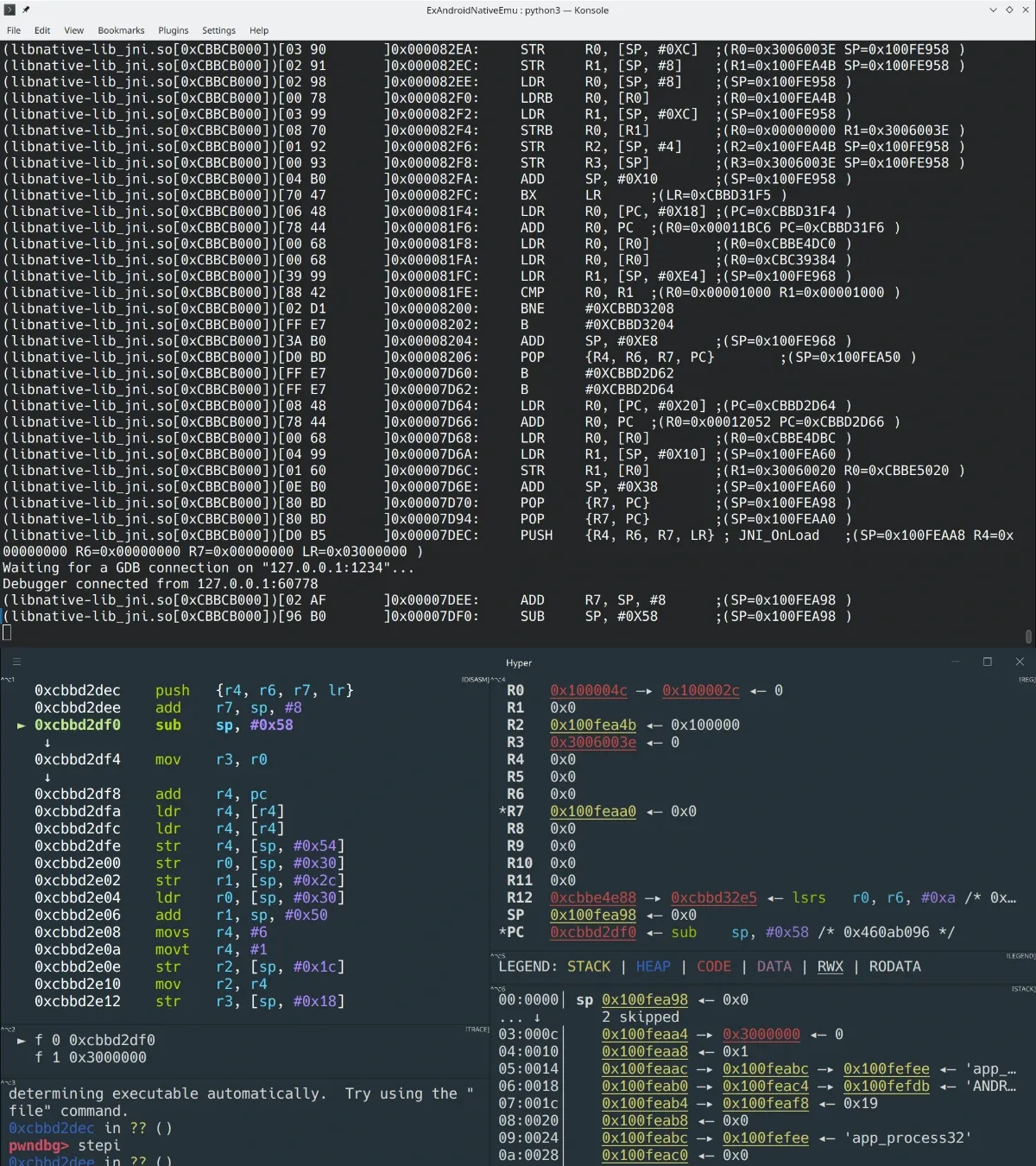
Handy, right? If it helps you, a star on GitHub is always appreciated.
Colin Xiao — I take on contract reverse-engineering work, and writeups like this are how I show what I can do. If you need help with anything in this space — including but not limited to the areas I cover above — I’m available. No project is too big or too small — if it’s reverse engineering and I can do it, I’ll take it. DM me on X (@colinxiao_lab) or Telegram (@ColinXiao666).
Get in touch