Analyzing an iOS App's Login `_sign` and `userpwd` Parameters
About the author. I’m Colin Xiao — an independent reverse engineer, mostly working solo on contract jobs. I dig into compiled code of every kind, including but not limited to: Android and iOS apps, x86/x64/ARM native binaries, packers and obfuscators, DRM and license checks, network protocols and APIs, crypto and signature algorithms, malware, game binaries, and embedded/IoT firmware. I also handle large-scale data collection and vulnerability research. If you have any project in mind, I’d be glad to take it on — whatever it is, as long as it’s within my wheelhouse. Just reach out. You can reach me on X at @colinxiao_lab or on Telegram at https://t.me/ColinXiao666.
This research is published for educational and defensive purposes. The target sample is anonymized throughout.
Analyzing an iOS App’s Login _sign and userpwd Parameters
Preface
This post walks through analyzing the login parameters of an iOS app (for learning only). This is beginner-level — experts can skip ahead.
Preparation
- iOS 12.5.5
- frida 14.0.0
- ipa 11.33.5 (downloaded from a third-party app archive)
Packet capture
- Capture with Charles — install and configure its certificate yourself.
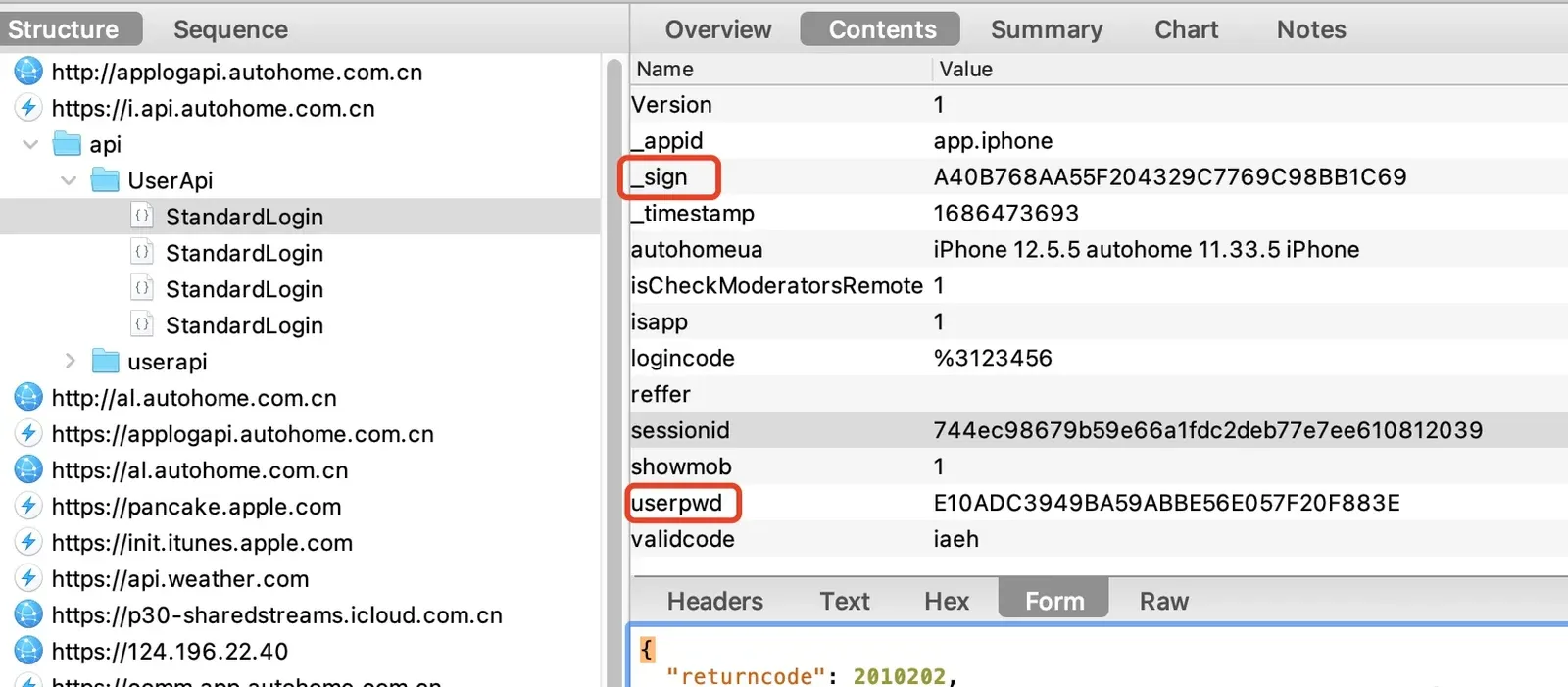
- Trigger the login endpoint by tapping account login. Use fake credentials
123456 / 123456; the capture succeeds.
Analysis
-
The login page takes three inputs — account / password / captcha — mapped to fields
logincode/userpwd/validcode.logincodeis a string: the account prefixed with%3.userpwdis an encrypted string — needs analysis.validcodeis the raw captcha.
-
From repeated captures, the other fields are device info and can stay constant.
_timestampis a 10-digit timestamp;_signchanges every time and needs analysis. -
Before analysis, export the
.appfolder containing the Mach-O from the app archive.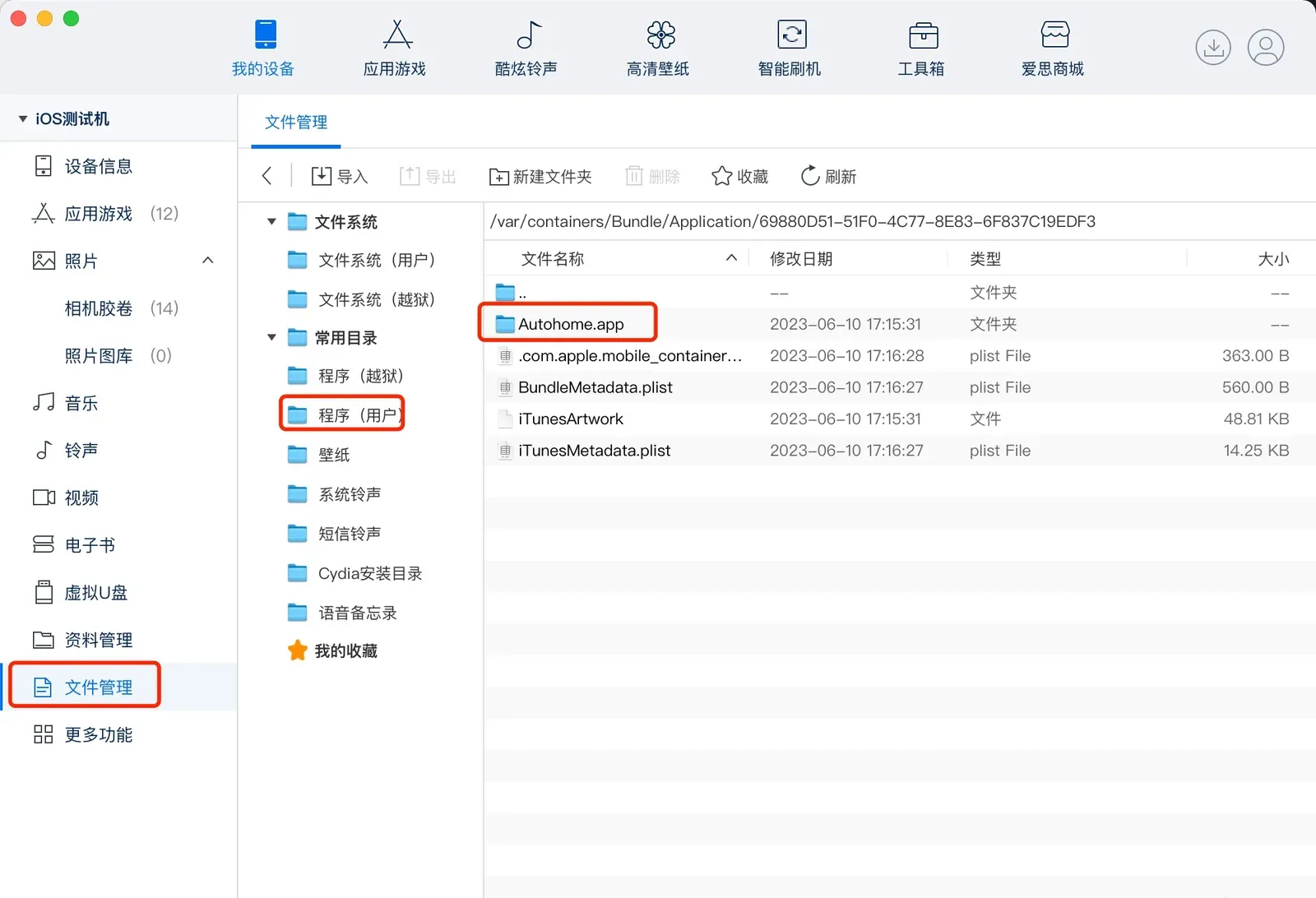
-
Check whether the Mach-O needs decryption.
- Find the Mach-O:
file Payload/Autohome.app/* | grep Mach-O Payload/Autohome.app/Autohome: Mach-O 64-bit executable arm64- Check the encryption flag with
otool—1: still encrypted;0: decrypted:
% otool -l Payload/Autohome.app/Autohome | grep crypt cryptoff 16384 cryptsize 28295168 cryptid 1-
Dump it with frida-ios-dump.
- The app must be fully launched to dump; if it stalls, retry.
- The dump produces an ipa — just unzip it.
-
Run
otoolagain:cryptid 1becomescryptid 0, meaning the dump succeeded.
-
Now analyze
userpwd. Open the Mach-O in IDA and search for the stringuserpwd.
-
Click the first hit and press Tab for pseudocode.
void __cdecl -[LOGThirdBindService bindThirdLogincode:userpwd:platformid:token:tokensecret:orginalname:openid:unionId:position:](LOGThirdBindService *self, SEL a2, id a3, id a4, int a5, id a6, id a7, id a8, id a9, id a10, int a11) { id v11; // x23 id v12; // x22 id v13; // x21 int v14; // w27 id v15; // x20 LOGThirdBindService *v16; // x25 __int64 v17; // x1 void *v18; // x20 __int64 v19; // x1 __int64 v20; // x21 __int64 v21; // x1 __int64 v22; // x1 __int64 v23; // x1 __int64 v24; // x1 void *v25; // x0 int v26; // w19 NSMutableDictionary *v27; // x19 void *v28; // x0 __int64 v29; // x0 NSMutableDictionary *v30; // x19 void *v31; // x0 void *v32; // x0 NSMutableDictionary *v33; // x28 void *v34; // x0 NSMutableDictionary *v35; // x19 void *v36; // x0 NSMutableDictionary *v37; // x19 void *v38; // x0 NSMutableDictionary *v39; // x19 __int64 v40; // x0 __int64 v41; // x0 __int64 v42; // x27 void *v43; // [xsp+20h] [xbp-90h] __int64 v44; // [xsp+50h] [xbp-60h] char v45; // [xsp+58h] [xbp-58h] v11 = a8; v12 = a7; v13 = a6; v14 = a5; v15 = a4; v16 = self; v43 = (void *)objc_retain(a3, a2); v18 = (void *)objc_retain(v15, v17); v20 = objc_retain(v13, v19); objc_retain(v12, v21); objc_retain(v11, v22); objc_retain(a9, v23); objc_retain(a10, v24); sub_1016C6940((void *)v16->postDataDic); v25 = sub_1016769C0(&OBJC_CLASS___AHUserSettings); objc_retainAutoreleasedReturnValue(v25); v26 = sub_1016978E0(); objc_release(); if ( v26 ) { v27 = v16->postDataDic; v28 = sub_1016769C0(&OBJC_CLASS___AHUserSettings); objc_retainAutoreleasedReturnValue(v28); v29 = sub_10167D700(); objc_retainAutoreleasedReturnValue(v29); sub_1017025E0((void *)v27); objc_release(); objc_release(); } v30 = v16->postDataDic; v31 = sub_101728CE0(v43); objc_retainAutoreleasedReturnValue(v31); sub_1017025E0((void *)v30); objc_release(); v32 = -[LPNode count]_0(v18); v33 = v16->postDataDic; if ( v32 ) { v34 = sub_10162E040(&OBJC_CLASS___AHMD5); objc_retainAutoreleasedReturnValue(v34); sub_1017025E0((void *)v33); objc_release(); } else { sub_1017025E0((void *)v16->postDataDic); } v35 = v16->postDataDic; v36 = sub_1016AAC00(&OBJC_CLASS___NSNumber); objc_retainAutoreleasedReturnValue(v36); sub_1017025E0((void *)v35); objc_release(); if ( !v20 ) objc_release(); sub_1017025E0((void *)v16->postDataDic); sub_1017025E0((void *)v16->postDataDic); sub_1017025E0((void *)v16->postDataDic); sub_1017025E0((void *)v16->postDataDic); if ( v14 == 26 ) sub_1017025E0((void *)v16->postDataDic); v37 = v16->postDataDic; v38 = sub_1016AAC00(&OBJC_CLASS___NSNumber); objc_retainAutoreleasedReturnValue(v38); sub_1017025E0((void *)v37); objc_release(); sub_1017025E0((void *)v16->postDataDic); v39 = v16->postDataDic; v40 = sub_1016CB900(&OBJC_CLASS___AHAppSettings); objc_retainAutoreleasedReturnValue(v40); sub_1017025E0((void *)v39); objc_release(); objc_initWeak(&v45, v16); v41 = sub_10172F720(v16); v42 = objc_retainAutoreleasedReturnValue(v41); objc_copyWeak(&v44, &v45); sub_10167B600(v42); objc_release(); objc_destroyWeak(&v44); objc_destroyWeak(&v45); objc_release(); objc_release(); objc_release(); objc_release(); objc_release(); objc_release(); objc_release(); } -
The analysis shows
MD5references — likely uppercase MD5. Testing on an online MD5 tool confirms it’s straight uppercase MD5, no modification._signlooks similar touserpwd, so it’s probably MD5 too. On iOS, MD5 usesCC_MD5, so hookCC_MD5with frida:// hook CC_MD5 let cc_md5 = Module.findExportByName(null, "CC_MD5"); console.log(`CC_MD5 addr>> ${cc_md5}`) Interceptor.attach(cc_md5, { onEnter: function(args){ // get the args passed to CC_MD5 const data = args[0]; const len = args[1]; const output = args[2]; console.log(`md5>> ${data.readCString()} | ${parseInt(len, 16)} | ${output}`) console.log("\nBacktrace:\n\t" + Thread.backtrace(this.context, Backtracer.ACCURATE).map(DebugSymbol.fromAddress).join('\n\t') + '\n'); } }) -
After hooking
CC_MD5, analyzing the logs, under theuserpwdMD5 line there’s a telling log — a 312-char string. Testing it on an online tool confirms it hashes to_sign.md5>> @7U$aPOE@$Version1_appidapp.iphone_timestamp1686474400autohomeuaiPhone 12.5.5 autohome 11.33.5 iPhonefPosition10004isCheckModeratorsRemote1isapp1logincode%3123456platform3reffersPosition1000405sessionid744ec98679b59e66a1fdc2deb77e7ee610812039showmob1userpwdE10ADC3949BA59ABBE56E057F20F883Evalidcodezbzt@7U$aPOE@$ | 312 | 0x16f6cd528 Backtrace: 0x1069566cc AHLoginServicesFramework!+[AHLoginServicesMD5 MD5WithString:] 0x1069515e4 AHLoginServicesFramework!__128-[AHLoginAccountLoginService accountLoginWidthUserName:PassWord:deviceToken:verifyCode:infoexpand:infoclub:sPosition:fPosition:]_block_invoke 0x1061ee424 AHBusinessFramework!-[AHServerTimeStampManager getServerTimeStampWithBlock:] 0x1069514a8 AHLoginServicesFramework!-[AHLoginAccountLoginService accountLoginWidthUserName:PassWord:deviceToken:verifyCode:infoexpand:infoclub:sPosition:fPosition:] 0x1069537b4 AHLoginServicesFramework!-[AHLoginAccountLoginManager loginWidthUserName:PassWord:deviceToken:verifyCode:infoexpand:infoclub:sPosition:fPosition:success:fail:] 0x100b13e9c Autohome!0x3e3e9c 0x1aebe9300 UIKitCore!-[UIApplication sendAction:to:from:forEvent:] 0x1ae692424 UIKitCore!-[UIControl sendAction:to:forEvent:] 0x101584aa4 Autohome!0xe54aa4 0x1ae692744 UIKitCore!-[UIControl _sendActionsForEvents:withEvent:] 0x1ae6917b0 UIKitCore!-[UIControl touchesEnded:withEvent:] 0x1aec205c4 UIKitCore!-[UIWindow _sendTouchesForEvent:] 0x1aec217ec UIKitCore!-[UIWindow sendEvent:] 0x1aec0185c UIKitCore!-[UIApplication sendEvent:] 0x1aecc79d4 UIKitCore!__dispatchPreprocessedEventFromEventQueue 0x1aecca100 UIKitCore!__handleEventQueueInternal -
Analyzing the
_signstring further: it’s built by concatenating the captured parameters. The concatenation code is below — that closes out the_signanalysis.import time import hashlib """ @7U$aPOE@$Version1_appidapp.iphone_timestamp1686473693autohomeuaiPhone 12.5.5 autohome 11.33.5 iPhoneisCheckModeratorsRemote1isapp1logincode%3123456reffersessionid744ec98679b59e66a1fdc2deb77e7ee610812039showmob1userpwdE10ADC3949BA59ABBE56E057F20F883Evalidcodeiaeh@7U$aPOE@$ A40B768AA55F204329C7769C98BB1C69 """ usn = "123456" pwd = "123456" en_md5 = lambda x: hashlib.md5(x.encode()).hexdigest() def gen_sign(params): s = f"@7U$aPOE@$Version{params['Version']}_appid{params['_appid']}_timestamp{params['_timestamp']}autohomeua{params['autohomeua']}isCheckModeratorsRemote{params['isCheckModeratorsRemote']}isapp{params['isapp']}logincode{params['logincode']}reffer{params['reffer']}sessionid{params['sessionid']}showmob{params['showmob']}userpwd{params['userpwd']}validcode{params['validcode']}@7U$aPOE@$" return en_md5(s).upper() if __name__ == "__main__": params = { "Version": 1, "_appid": "app.iphone", # "_timestamp": int(time.time()), "_timestamp": "1686473693", "autohomeua": "iPhone 12.5.5 autohome 11.33.5 iPhone", "isCheckModeratorsRemote": 1, "isapp": 1, "logincode": f"%3{usn}", "reffer": "", "sessionid": "744ec98679b59e66a1fdc2deb77e7ee610812039", "showmob": 1, "userpwd": en_md5(pwd).upper(), "validcode": "iaeh" } _sign = gen_sign(params) print(f"{params=}\n{_sign=}")
Summary
The login endpoint’s userpwd and _sign are fully analyzed. Simple stuff — just uppercase MD5, no modification. Anyone familiar with hashing would’ve spotted it quickly. I didn’t.
Colin Xiao — I take on contract reverse-engineering work, and writeups like this are how I show what I can do. If you need help with anything in this space — including but not limited to the areas I cover above — I’m available. No project is too big or too small — if it’s reverse engineering and I can do it, I’ll take it. DM me on X (@colinxiao_lab) or Telegram (@ColinXiao666).
Get in touch