Analyzing the Login Protocol of a Fitness App
About the author. I’m Colin Xiao — an independent reverse engineer, mostly working solo on contract jobs. I dig into compiled code of every kind, including but not limited to: Android and iOS apps, x86/x64/ARM native binaries, packers and obfuscators, DRM and license checks, network protocols and APIs, crypto and signature algorithms, malware, game binaries, and embedded/IoT firmware. I also handle large-scale data collection and vulnerability research. If you have any project in mind, I’d be glad to take it on — whatever it is, as long as it’s within my wheelhouse. Just reach out. You can reach me on X at @colinxiao_lab or on Telegram at https://t.me/ColinXiao666.
This research is published for educational and defensive purposes. The target sample is anonymized throughout.
Analyzing the Login Protocol of a Fitness App
Preface
While exploring reverse engineering, I analyzed the login protocol of a fitness app and I’m recording the process and results here — for learning/research only. Few tools, simple content, beginner-level (experts can skip). I focused on the password-login flow: enter a random phone number and password, then analyze with a packet-capture tool.
Packet capture
- Capture with Charles — install and configure its certificate yourself.
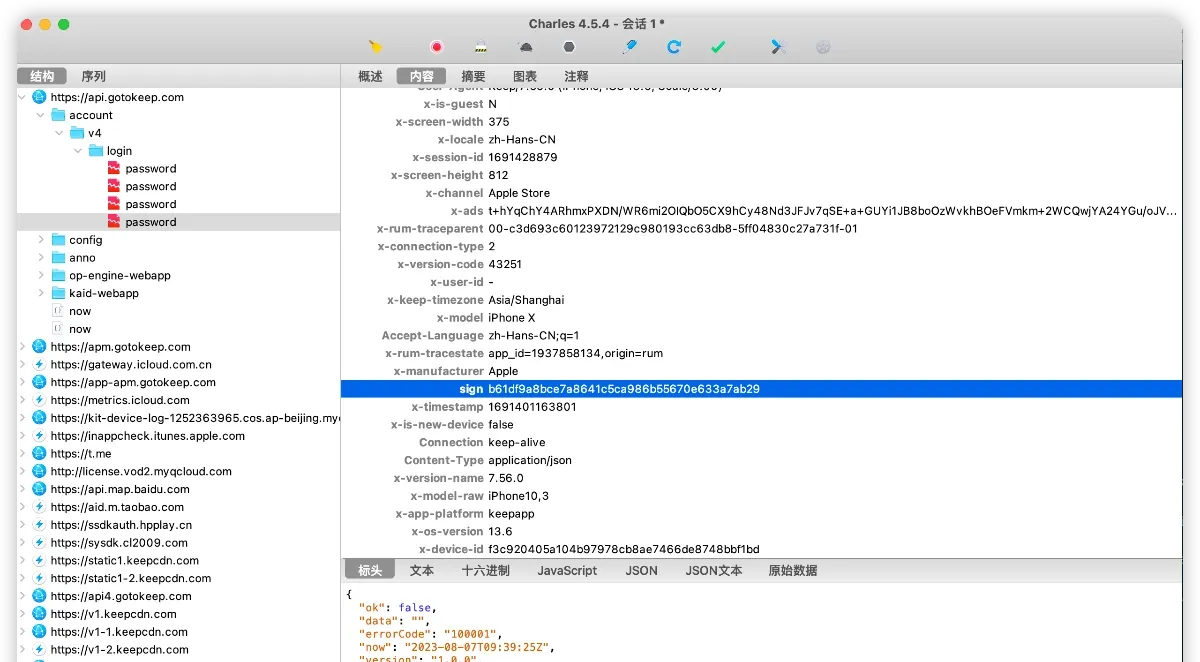
- Trigger the login endpoint by tapping password login. Use fake credentials; the capture succeeds.
Sign analysis
First, there’s a sign field in the request headers:
sign: b61df9a8bce7a8641c5ca986b55670e633a7ab29
It’s 40 chars long. MD5 is 32, so my first instinct says it’s not MD5 — but it could be MD5 concatenated with something else. SHA-1 is exactly 40, which fits. Let’s verify one by one. First check for MD5 traces with a quick frida script. The script is straightforward: hook MD5’s Init, Update, and Final and print their inputs and outputs. Key code:
    // hook CC_MD5
    // unsigned char * CC_MD5(const void *data, CC_LONG len, unsigned char *md);
    Interceptor.attach(Module.findExportByName("libcommonCrypto.dylib", g_funcName), {
        onEnter: function(args) {
            console.log(g_funcName + " begin");
            var len = args[1].toInt32();
            console.log("input:");
            dumpBytes(args[0], len);
            this.md = args[2];
        },
        onLeave: function(retval) {
            console.log(g_funcName + " return value");
            dumpBytes(this.md, g_funcRetvalLength);

            console.log(g_funcName + ' called from:\n' +
                Thread.backtrace(this.context, Backtracer.ACCURATE)
                .map(DebugSymbol.fromAddress).join('\n') + '\n');
        }
    });

    // hook CC_MD5_Update
    // int CC_MD5_Update(CC_MD5_CTX *c, const void *data, CC_LONG len);
    Interceptor.attach(Module.findExportByName("libcommonCrypto.dylib", g_updateFuncName), {
        onEnter: function(args) {
            console.log(g_updateFuncName + " begin");
            var len = args[2].toInt32();
            console.log("input:");
            dumpBytes(args[1], len);
        },
        onLeave: function(retval) {
            console.log(g_updateFuncName + ' called from:\n' +
                Thread.backtrace(this.context, Backtracer.ACCURATE)
                .map(DebugSymbol.fromAddress).join('\n') + '\n');
        }
    });

    // hook CC_MD5_Final
    // int CC_MD5_Final(unsigned char *md, CC_MD5_CTX *c);
    Interceptor.attach(Module.findExportByName("libcommonCrypto.dylib", g_finalFuncName), {
        onEnter: function(args) {
            //console.log(func.name + " begin");
            finalArgs_md = args[0];
        },
        onLeave: function(retval) {
            console.log(g_finalFuncName + " return value");
            dumpBytes(finalArgs_md, g_funcRetvalLength);

            console.log(g_finalFuncName + ' called from:\n' +
                Thread.backtrace(this.context, Backtracer.ACCURATE)
                .map(DebugSymbol.fromAddress).join('\n') + '\n');
        }
    });
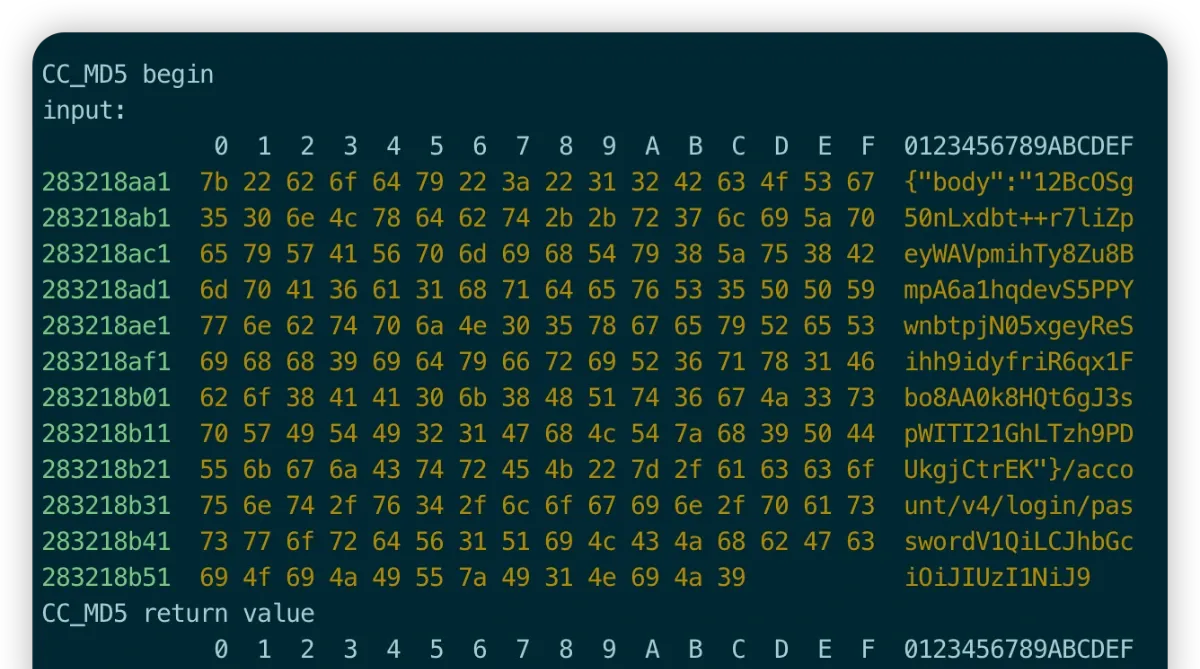
Lucky: the logs clearly show the sign-related content, but the last part of the sign is missing. So the sign is 32(md5) + 8. Let’s look at how the MD5 data is built.
b61df9a8bce7a8641c5ca986b55670e6 33a7ab29
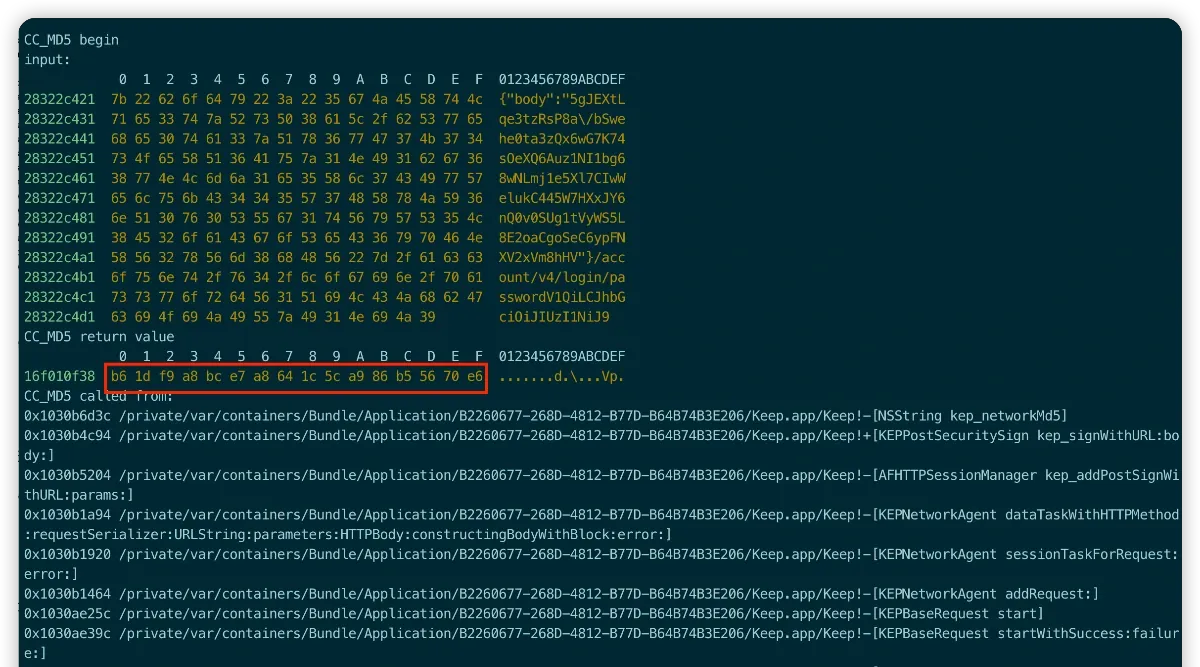
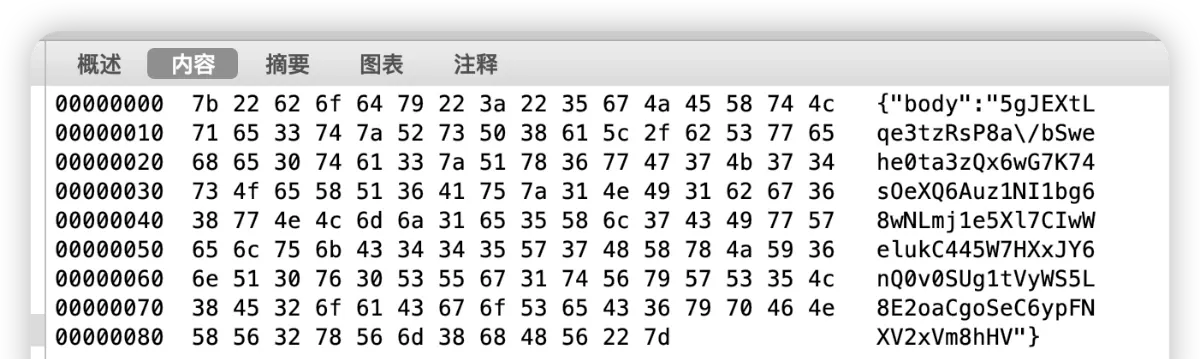
From the logs, the sign’s MD5 is built from three parts: bodyData + Url + Str. The body is also available from Charles.
- {“body”:“5gJEXtLqe3tzRsP8a/bSwehe0ta3zQx6wG7K74sOeXQ6Auz1NI1bg68wNLmj1e5Xl7CIwWelukC445W7HXxJY6nQ0v0SUg1tVyWS5L8E2oaCgoSeC6ypFNXV2xVm8hHV”}
- /account/v4/login/password
- V1QiLCJhbGciOiJIUzI1NiJ9
A question arises: is the third part, V1QiLCJhbGciOiJIUzI1NiJ9, a fixed string or does it change per request? I suspect it’s fixed, used as an MD5 salt. Request again to verify.
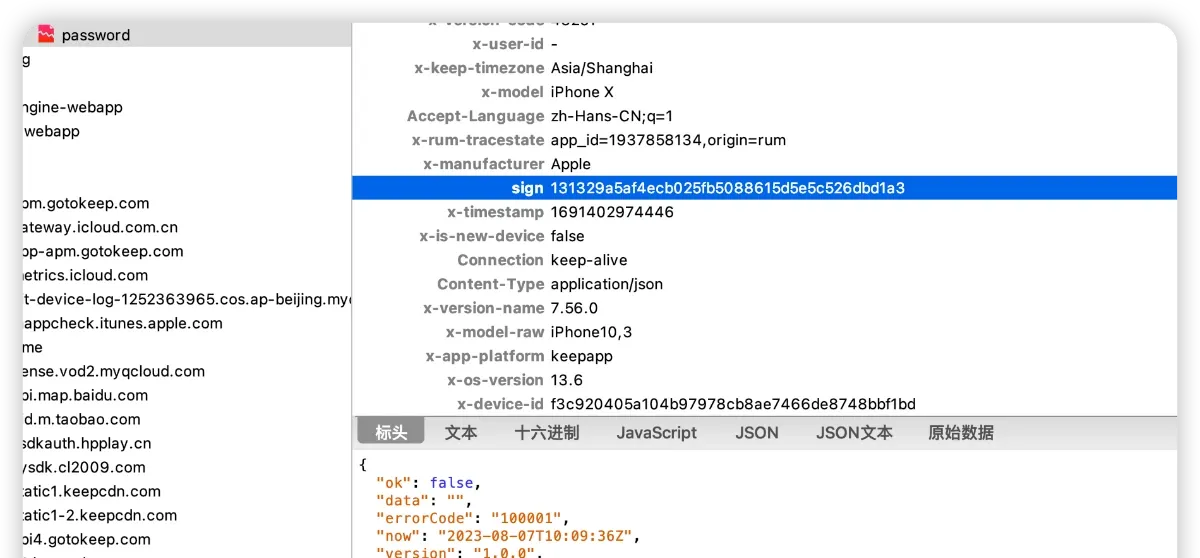
The new sign is 131329a5af4ecb025fb5088615d5e5c526dbd1a3, and the script output confirms the third part is a fixed string.
MD5({“body”:“12BcOSg50nLxdbt++r7liZpeyWAVpmihTy8Zu8BmpA6a1hqdevS5PPYwnbtpjN05xgeyReSihh9idyfriR6qx1Fbo8AA0k8HQt6gJ3spWITI21GhLTzh9PDUkgjCtrEK”}/account/v4/login/passwordV1QiLCJhbGciOiJIUzI1NiJ9)
Sign tail analysis
Next, the tail of the sign. Blind guessing or more frida hooks won’t cut it — let’s look at the actual implementation in IDA. (The MD5 analysis above could also have started from IDA by searching for sign, but I prefer hooking first — if it hits directly, no need to spend time analyzing.)
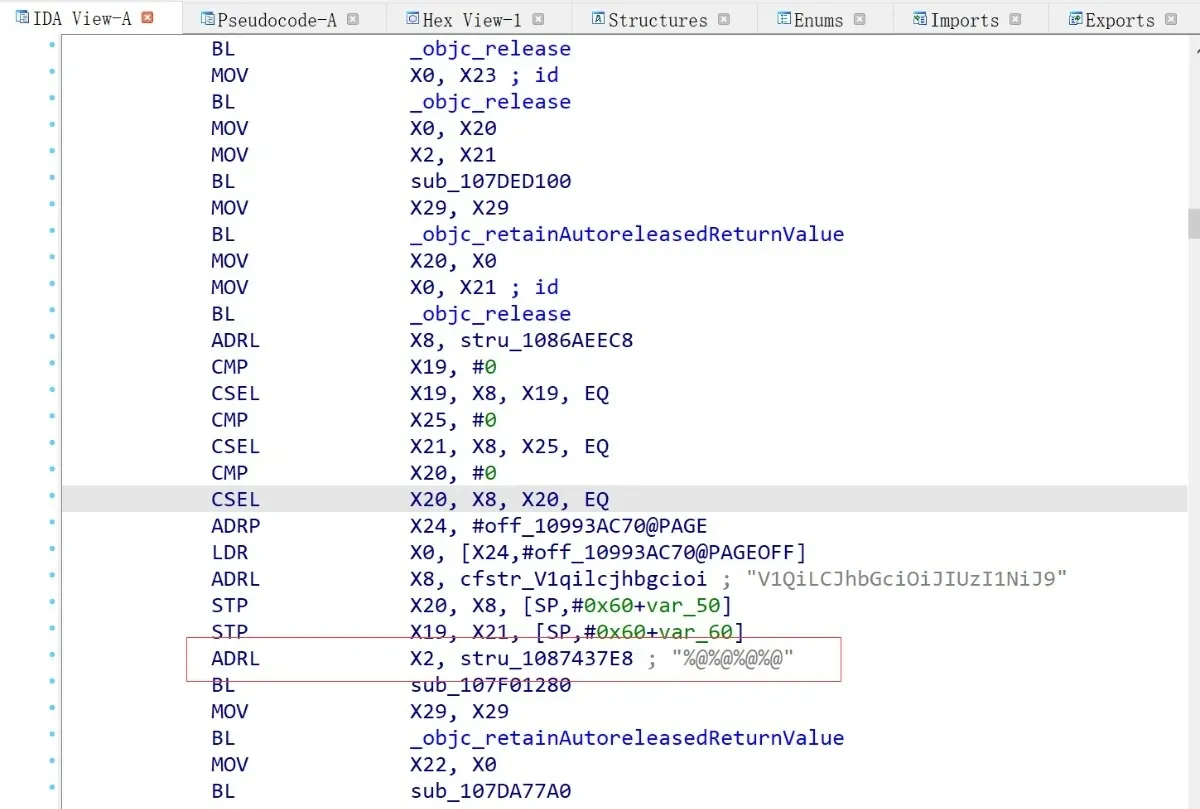
The MD5 script also prints the call stack, which helps a lot for quick localization. Searching for [KEPPostSecuritySign kep_signWithURL: body:] shows obvious string concatenation, and IDA is smart enough to have already recognized the MD5 salt.
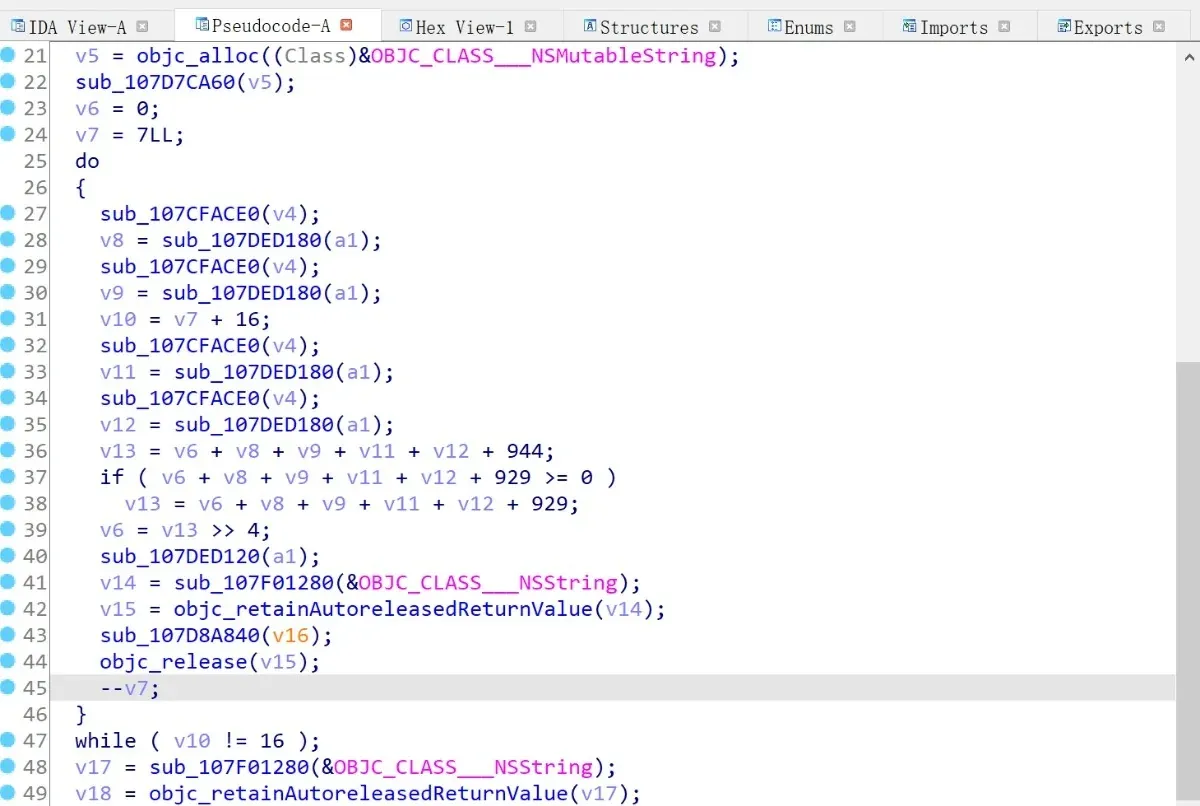
Digging in, I locate [NSString kep_networkStringOffsetSecurity], which does the string processing internally — a loop with various conditions and shift operations. If you’re not afraid of a bit of work, you can analyze and rewrite the logic.
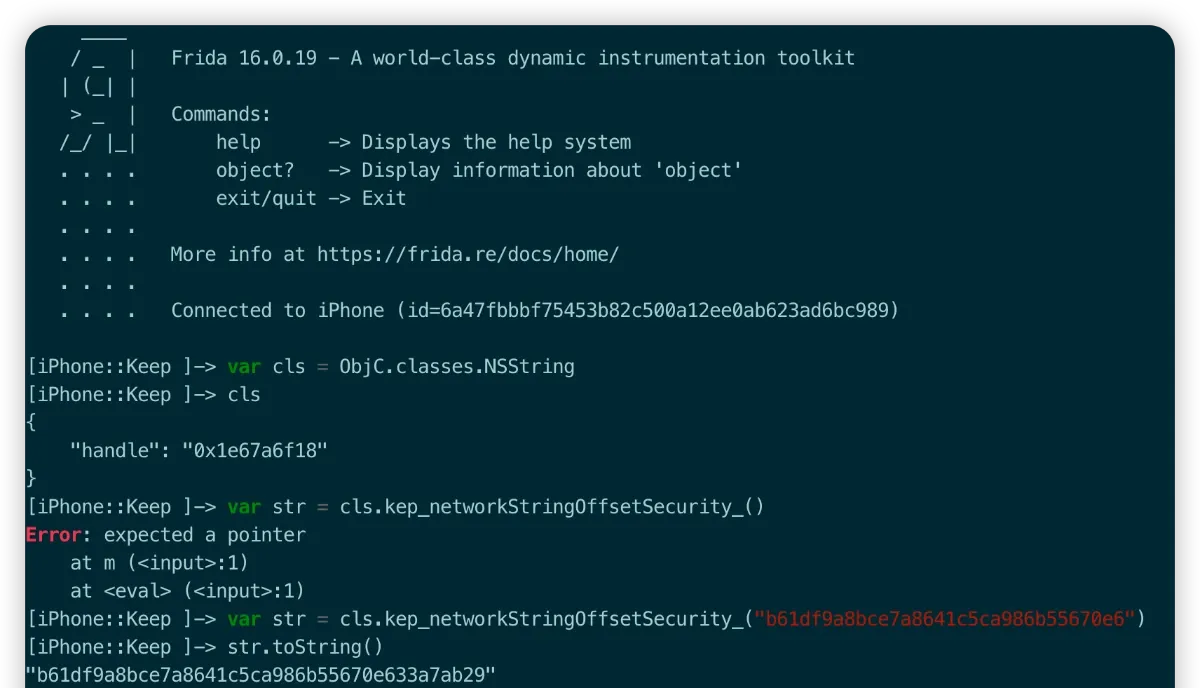
My approach was more brute-force: since kep_networkStringOffsetSecurity is an NSString Category, just call it directly. Attach with frida, find the NSString class, call the method with the MD5 output — and the sign value magically appears.
x-ads analysis
After the sign, there’s an x-ads field. As usual, try hooking first — the common ciphers are DES, AES, or RC4.
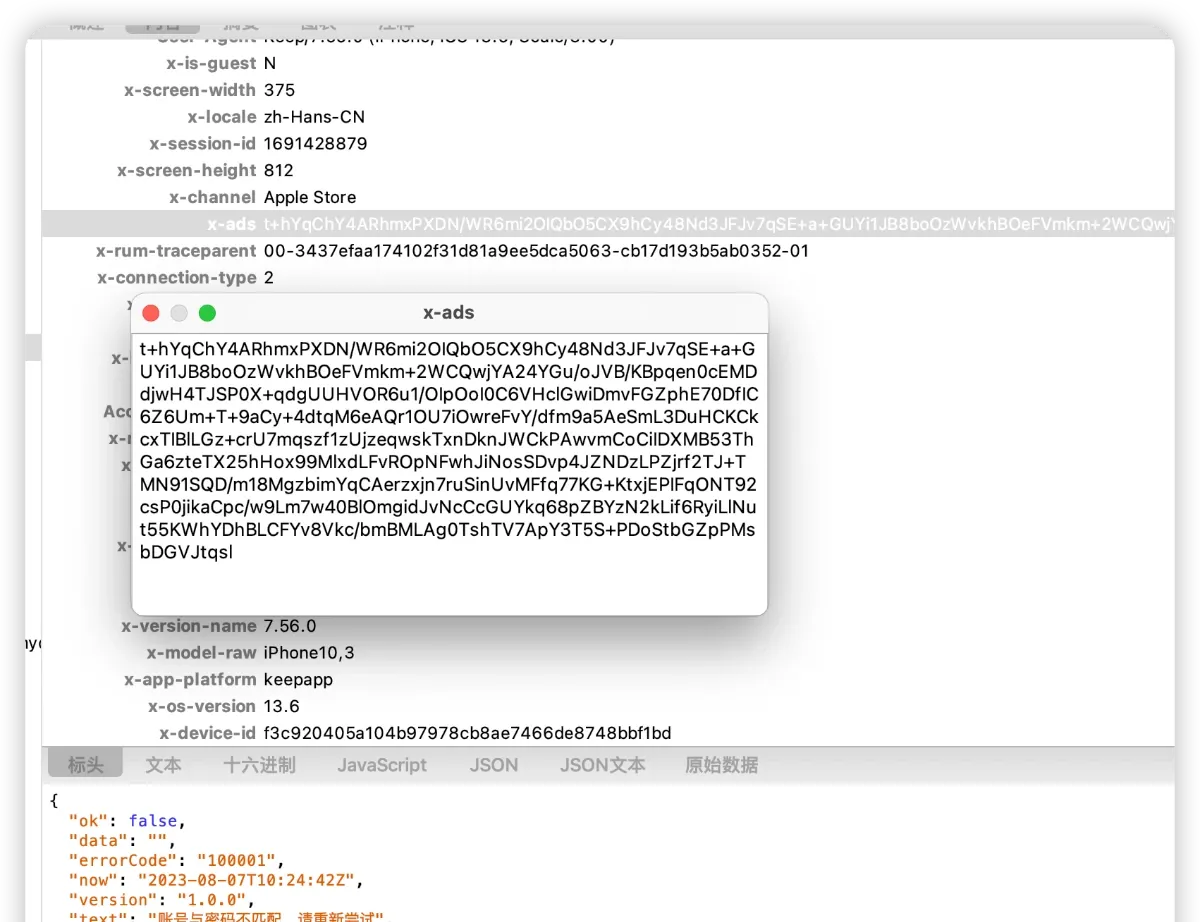
Hook AES128, DES, 3DES, CAST, RC4, RC2, Blowfish, and friends. Key code:
var handlers = {
    CCCrypt: {
        onEnter: function(args) {
            var operation = CCOperation[args[0].toInt32()];
            var alg = CCAlgorithm[args[1].toInt32()].name;
            this.options = CCoptions[args[2].toInt32()];
            var keyBytes = args[3];
            var keyLength = args[4].toInt32();
            var ivBuffer = args[5];
            var inBuffer = args[6];
            this.inLength = args[7].toInt32();
            this.outBuffer = args[8];
            var outLength = args[9].toInt32();
            this.outCountPtr = args[10];
            if (this.inLength < MIN_LENGTH || this.inLength > MAX_LENGTH){
            	return;
            }
            if (operation === "kCCEncrypt") {
                this.operation = "encrypt"
                console.log("***************** encrypt begin **********************");
            } else {
                this.operation = "decrypt"
                console.log("***************** decrypt begin **********************");
            }
            console.log("CCCrypt(" +
                "operation: " + this.operation + ", " +
                "CCAlgorithm: " + alg + ", " +
                "CCOptions: " + this.options + ", " +
                "keyBytes: " + keyBytes + ", " +
                "keyLength: " + keyLength + ", " +
                "ivBuffer: " + ivBuffer + ", " +
                "inBuffer: " + inBuffer + ", " +
                "inLength: " + this.inLength + ", " +
                "outBuffer: " + this.outBuffer + ", " +
                "outLength: " + outLength + ", " +
                "outCountPtr: " + this.outCountPtr + ")"
            );

            //console.log("Key: utf-8 string:" + ptr(keyBytes).readUtf8String())
            //console.log("Key: utf-16 string:" + ptr(keyBytes).readUtf16String())
            console.log("key: ");
            dumpBytes(keyBytes, keyLength);

            console.log("IV: ");
            // ECB mode needs no iv, so iv is null
            dumpBytes(ivBuffer, keyLength);

            var isOutput = true;
            if (!SHOW_PLAIN_AND_CIPHER && this.operation == "decrypt") {
		            isOutput = false;
            }

            if (isOutput){
            	// Show the buffers here if this is an encryption operation
		            console.log("In buffer:");
		            dumpBytes(inBuffer, this.inLength);
            }

        },
        onLeave: function(retVal) {
        	// Skip output for too-long or too-short lengths
            if (this.inLength < MIN_LENGTH || this.inLength > MAX_LENGTH){
            	return;
            }
            var isOutput = true;
            if (!SHOW_PLAIN_AND_CIPHER && this.operation == "encrypt") {
		            isOutput = false;
            }
            if (isOutput) {
		            // Show the buffers here if this is a decryption operation
		            console.log("Out buffer:");
		            dumpBytes(this.outBuffer, Memory.readUInt(this.outCountPtr));
            }
            // Print the call stack — it resolves class and function names, very handy
            console.log('CCCrypt called from:\n' +
                Thread.backtrace(this.context, Backtracer.ACCURATE)
                .map(DebugSymbol.fromAddress).join('\n') + '\n');
        }
    },
};


if (ObjC.available) {
    console.log("frida attach");
    for (var func in handlers) {
    	console.log("hook " + func);
        Interceptor.attach(Module.findExportByName("libcommonCrypto.dylib", func), handlers[func]);
    }
} else {
    console.log("Objective-C Runtime is not available!");
}
The logs hit AES128 directly, and the output Base64 matches exactly — luck was on my side.
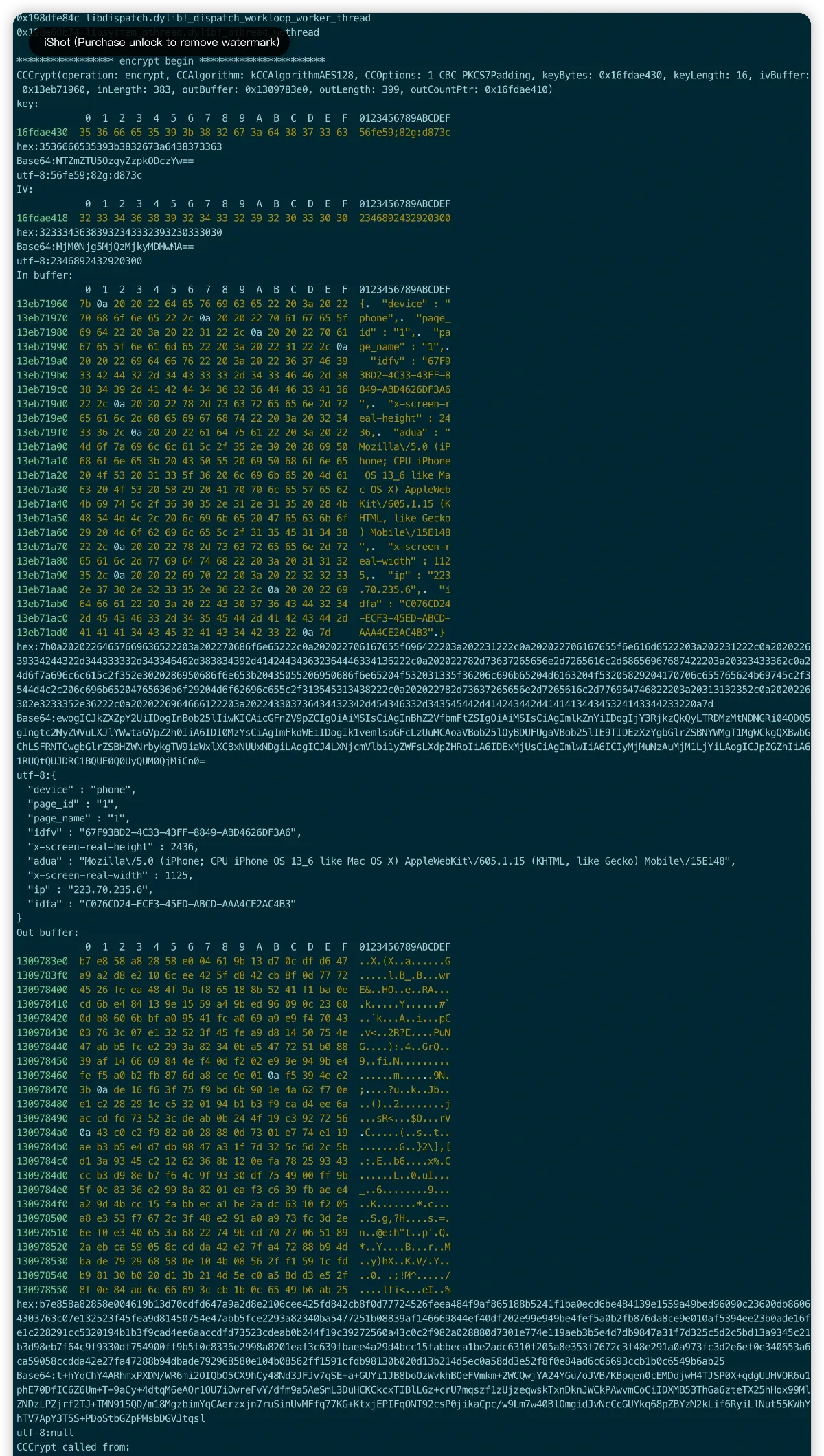
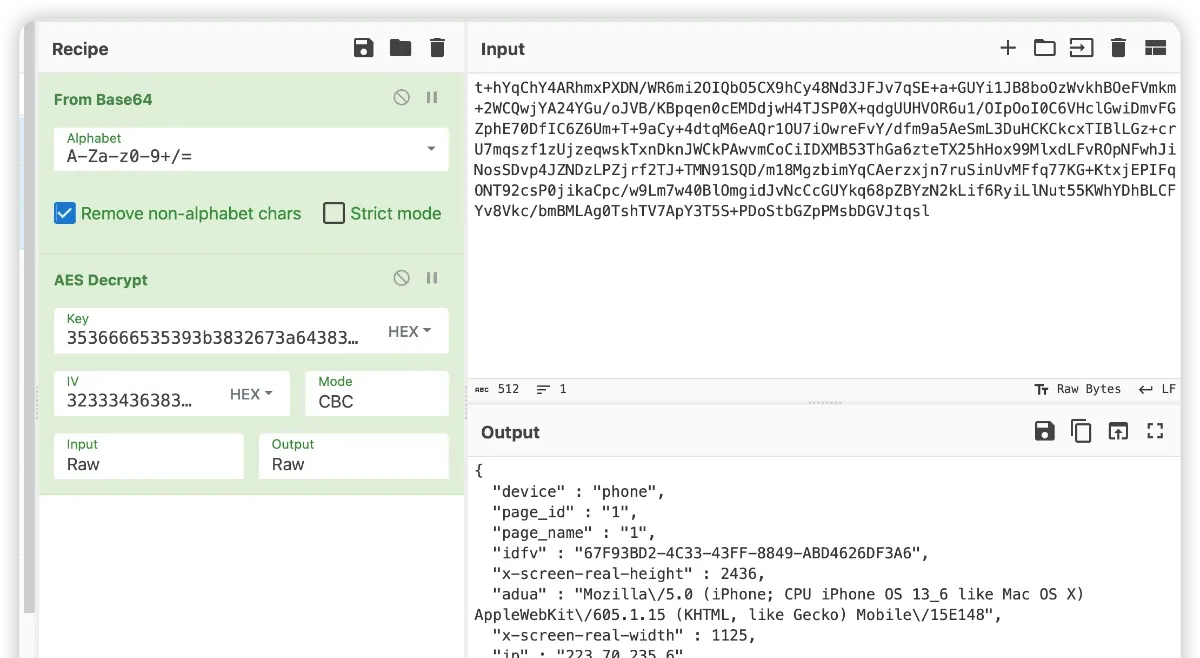
With the key and IV, decryption works. x-ads analysis done — didn’t even need to decompile the code. :)
Body analysis
Finally, how is the sign’s body component computed? On a hunch, I tried decrypting it with the same algorithm, key, and IV from the x-ads analysis:
{
“body”: “5gJEXtLqe3tzRsP8a/bSwXDiK0VslZZZyOEj1jBDBhtYTGGdWltuIjLbzwZ2OxMcb3mFX7bJtgH3WlqGET5W34P4dTEIDhLH6FkT3HSLaDnEXYHvEl9IZRQKf19wMG/t”
}
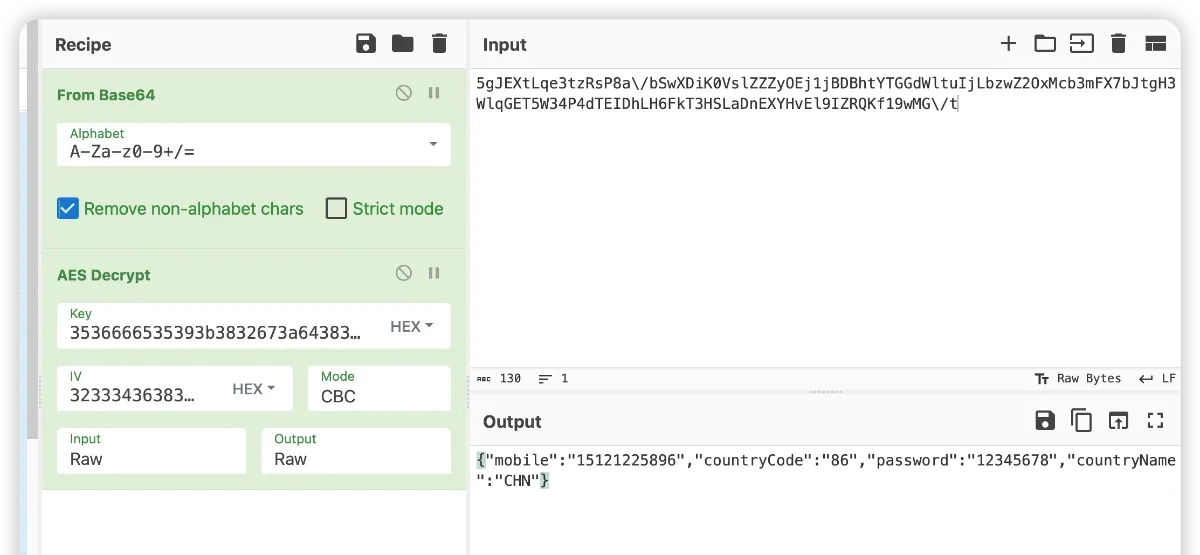
This time it’s less about luck — more that the developers were lazy, or a bit careless about security: AES-CBC, with the IV left unchanged.
Summary
Overall this wasn’t technically heavy — the scripts did most of the work — and the app uses conventional encryption/signing. That’s a reminder for security-minded developers: make strategic changes. Take MD5 as an example of what you can tweak.
https://opensource.apple.com/source/ppp/ppp-37/ppp/pppd/md5.c.auto.html
First, in MD5Init you can change the initialization constants:
void MD5Init (mdContext)
MD5_CTX *mdContext;
{
  mdContext->i[0] = mdContext->i[1] = (UINT4)0;

  /* Load magic initialization constants.
   */
  mdContext->buf[0] = (UINT4)0x67452301;
  mdContext->buf[1] = (UINT4)0xefcdab89;
  mdContext->buf[2] = (UINT4)0x98badcfe;
  mdContext->buf[3] = (UINT4)0x10325476;
}
Second, in Transform you can change a few of the constants:
static void Transform (buf, in)
UINT4 *buf;
UINT4 *in;
{
  UINT4 a = buf[0], b = buf[1], c = buf[2], d = buf[3];

  /* Round 1 */
#define S11 7
#define S12 12
#define S13 17
#define S14 22
  FF ( a, b, c, d, in[ 0], S11, UL(3614090360)); /* 1 */
  FF ( d, a, b, c, in[ 1], S12, UL(3905402710)); /* 2 */
  FF ( c, d, a, b, in[ 2], S13, UL( 606105819)); /* 3 */
  FF ( b, c, d, a, in[ 3], S14, UL(3250441966)); /* 4 */
  FF ( a, b, c, d, in[ 4], S11, UL(4118548399)); /* 5 */
  FF ( d, a, b, c, in[ 5], S12, UL(1200080426)); /* 6 */
  FF ( c, d, a, b, in[ 6], S13, UL(2821735955)); /* 7 */
  FF ( b, c, d, a, in[ 7], S14, UL(4249261313)); /* 8 */
  FF ( a, b, c, d, in[ 8], S11, UL(1770035416)); /* 9 */
  FF ( d, a, b, c, in[ 9], S12, UL(2336552879)); /* 10 */
  FF ( c, d, a, b, in[10], S13, UL(4294925233)); /* 11 */
  FF ( b, c, d, a, in[11], S14, UL(2304563134)); /* 12 */
  FF ( a, b, c, d, in[12], S11, UL(1804603682)); /* 13 */
  FF ( d, a, b, c, in[13], S12, UL(4254626195)); /* 14 */
  FF ( c, d, a, b, in[14], S13, UL(2792965006)); /* 15 */
  FF ( b, c, d, a, in[15], S14, UL(1236535329)); /* 16 */

  /* Round 2 */
#define S21 5
#define S22 9
#define S23 14
#define S24 20
  GG ( a, b, c, d, in[ 1], S21, UL(4129170786)); /* 17 */
  GG ( d, a, b, c, in[ 6], S22, UL(3225465664)); /* 18 */

  ...
After a simple tweak like that, even if a script hooks the function, calling it offline still won’t work — you’d have to resort to decompilation or dynamic debugging. Combined with code obfuscation, VMP-style static protection, and anti-debugging, the bar for attackers goes up accordingly.
Colin Xiao — I take on contract reverse-engineering work, and writeups like this are how I show what I can do. If you need help with anything in this space — including but not limited to the areas I cover above — I’m available. No project is too big or too small — if it’s reverse engineering and I can do it, I’ll take it. DM me on X (@colinxiao_lab) or Telegram (@ColinXiao666).
Get in touch