Android 12 App Launch Process Analysis
About the author. I’m Colin Xiao — an independent reverse engineer, mostly working solo on contract jobs. I dig into compiled code of every kind, including but not limited to: Android and iOS apps, x86/x64/ARM native binaries, packers and obfuscators, DRM and license checks, network protocols and APIs, crypto and signature algorithms, malware, game binaries, and embedded/IoT firmware. I also handle large-scale data collection and vulnerability research. If you have any project in mind, I’d be glad to take it on — whatever it is, as long as it’s within my wheelhouse. Just reach out. You can reach me on X at @colinxiao_lab or on Telegram at https://t.me/ColinXiao666.
This research is published for educational and defensive purposes. The target sample is anonymized throughout.
Android 12 App Launch Process Analysis
Why trace the launch chain
I needed to map the Android app launch chain to find stable injection points for some specialized functionality. This is a code-level walkthrough of the full client-side startup path. (All code analyzed here is based on AOSP android_12.0.0_r14.)
Earlier posts covered the OS boot flow — from init to zygote and system_server — which helps separate what’s Android-specific from what’s plain Linux. But what users and developers actually feel is the UI, the Framework, and the four components. Those are mostly Java, and the analysis follows the same shape: identify the cross-process RPC calls and the polymorphic calls introduced by interfaces and inheritance.
The client side
App developers know this line well:
context.startActivity(new Intent(context, SomeActivity.class));It launches a new Activity — in the same app or another:
Intent intent = new Intent();
intent.setComponent(new ComponentName("com.android.settings", "com.android.settings.DeviceAdminSettings"));
context.startActivity(intent);
Context.startActivity is a virtual function; Activity is itself a Context subclass and implements it.
Activity
In frameworks/base/core/java/android/app/Activity.java the call path is:
startActivity(intent)startActivity(intent, null)startActivityForResult(intent, -1)startActivityForResult(intent, -1, null)
The key code:
public void startActivityForResult(@RequiresPermission Intent intent, int requestCode, @Nullable Bundle options) {
	// ...
	Instrumentation.ActivityResult ar = mInstrumentation.execStartActivity(this, mMainThread.getApplicationThread(), mToken, this, intent, requestCode, options);
	if (ar != null) {
		mMainThread.sendActivityResult(mToken, mEmbeddedID, requestCode, ar.getResultCode(), ar.getResultData());
	}
}
It ultimately calls Instrumentation.execStartActivity. There are several launch entry points, all converging on Instrumentation:
startActivity[ForResult]— the developer-facing API, with an optional result callback.startActivityAsUser[ForResult]— launches as a specified user; hidden API, only for preinstalled apps.startActivityAsCaller[ForResult]— launches as the caller; hidden API, mainly for resolver/chooser activities.
Instrumentation
Instrumentation is the choke point for code tracing. When tracing is enabled, it’s instantiated before the app code and lets you watch every interaction between system and app. The trace config comes from the instrumentation element in AndroidManifest.xml.
execStartActivity does two things: (1) update all active ActivityMonitors and their counts, and (2) dispatch the call into the system activity manager. Simplified pseudocode:
		@UnsupportedAppUsage
    public ActivityResult execStartActivity(
            Context who, IBinder contextThread, IBinder token, Activity target,
            Intent intent, int requestCode, Bundle options) {
      // 1. Update ActivityMonitor
      for (int i = 0; i < mActivityMonitors.size(); i++) {
        ActivityMonitor am = mActivityMonitors.get(i);
        am.onStartActivity(intent);
      }
      // 2. Call the system Activity Manager
      int result = ActivityTaskManager.getService().startActivity();
      checkStartActivityResult(result, intent);
    }
Overriding this method is how many plugin frameworks intercept Activity launches.
ActivityTaskManager
Skipping the monitoring code and following the launch path, getService() returns:
final IBinder b = ServiceManager.getService(Context.ACTIVITY_TASK_SERVICE); // activity_task
return IActivityTaskManager.Stub.asInterface(b);
That’s the standard remote-call pattern — get the raw IBinder, then wrap it in the service’s RPC interface. So it returns an IActivityTaskManager, the activity_task service:
package android.app;
/**
 * System private API for talking with the activity task manager that handles how activities are
 * managed on screen.
 *
 * {@hide}
 */
public interface IActivityTaskManager extends android.os.IInterface
{
  /** Default implementation for IActivityTaskManager. */
  public static class Default implements android.app.IActivityTaskManager
  {
    //...
  }
  /** Local-side IPC implementation stub class. */
  public static abstract class Stub extends android.os.Binder implements android.app.IActivityTaskManager
  {
    //...
  }
  public static final java.lang.String DESCRIPTOR = "android.app.IActivityTaskManager";
  public int startActivity(...);
}
This is an auto-generated AIDL RPC interface. Its definition file is frameworks/base/core/java/android/app/IActivityTaskManager.aidl:
interface IActivityTaskManager {
    int startActivity(in IApplicationThread caller, in String callingPackage,
            in String callingFeatureId, in Intent intent, in String resolvedType,
            in IBinder resultTo, in String resultWho, int requestCode,
            int flags, in ProfilerInfo profilerInfo, in Bundle options);
  // ...
}
At the AIDL boundary, the client-side path ends. The rest of the story is on the RPC server side.
The server side
The server implementation of IActivityTaskManager inherits IActivityTaskManager.Stub, and searching for it lands on ActivityTaskManagerService.
ActivityTaskManagerService
Located at frameworks/base/services/core/java/com/android/server/wm/ActivityTaskManagerService.java. It’s one of the services started in startBootstrapServices:
    private void startBootstrapServices(@NonNull TimingsTraceAndSlog t) {
        // ...

				// Activity manager runs the show.
        t.traceBegin("StartActivityManager");
        // TODO: Might need to move after migration to WM.
        ActivityTaskManagerService atm = mSystemServiceManager.startService(
                ActivityTaskManagerService.Lifecycle.class).getService();
        mActivityManagerService = ActivityManagerService.Lifecycle.startService(
                mSystemServiceManager, atm);
        mActivityManagerService.setSystemServiceManager(mSystemServiceManager);
        mActivityManagerService.setInstaller(installer);
        mWindowManagerGlobalLock = atm.getGlobalLock();
        t.traceEnd();

      	// ...
    }
ActivityManagerService starts alongside it. (In older versions this went through ActivityManagerNative, but its startActivity is now deprecated.)
The startActivity call chain in ActivityTaskManagerService:
startActivitystartActivityAsUser(..., userId=UserHandle.getCallingUserId())startActivityAsUser(..., validateIncomingUser=true)
    private int startActivityAsUser(IApplicationThread caller, String callingPackage,
            @Nullable String callingFeatureId, Intent intent, String resolvedType,
            IBinder resultTo, String resultWho, int requestCode, int startFlags,
            ProfilerInfo profilerInfo, Bundle bOptions, int userId, boolean validateIncomingUser) {
        assertPackageMatchesCallingUid(callingPackage);
        enforceNotIsolatedCaller("startActivityAsUser");

        userId = getActivityStartController().checkTargetUser(userId, validateIncomingUser,
                Binder.getCallingPid(), Binder.getCallingUid(), "startActivityAsUser");

        // TODO: Switch to user app stacks here.
        return getActivityStartController().obtainStarter(intent, "startActivityAsUser")
                .setCaller(caller)
                .setCallingPackage(callingPackage)
                .setCallingFeatureId(callingFeatureId)
                .setResolvedType(resolvedType)
                .setResultTo(resultTo)
                .setResultWho(resultWho)
                .setRequestCode(requestCode)
                .setStartFlags(startFlags)
                .setProfilerInfo(profilerInfo)
                .setActivityOptions(bOptions)
                .setUserId(userId)
                .execute();

    }
A builder chain populates the starter and finally calls execute().
ActivityStarter
obtainStarter returns an ActivityStarter (frameworks/base/services/core/java/com/android/server/wm/ActivityStarter.java). Its execute starts the app based on the request parameters. Key call path:
execute— the entry point for launch requests.executeRequest— runs a series of permission checks; only legal requests proceed.startActivityUnchecked— most preliminary checks are done; performs tracing and exception handling.startActivityInner— launches the activity and updates the global task stack.
Android keeps global state for all apps so users can switch back and forth seamlessly. Launch handling also decides whether the current top is the same activity and whether to relaunch.
Skipping task/window management (ActivityStack, WindowContainer) and keeping only the launch-relevant calls:
mTargetRootTask.startActivityLocked()mRootWindowContainer.resumeFocusedTasksTopActivities()
mTargetRootTask is a Task, a WindowContainer subclass representing all activities in one stack frame (each activity is an ActivityRecord). mRootWindowContainer is a RootWindowContainer, also a WindowContainer subclass, representing the root window.
startActivityLocked decides whether the current activity is visible and whether a new Task is needed, pushing the ActivityRecord onto the right task top. resumeFocusedTasksTopActivities resumes all activities of all focused tasks — newly added activities may be paused.
Task
A Task is an ordered (LIFO) collection of activity screens. It’s a different concept from process/thread. Most tasks start from tapping an app on the launcher, and as you drill in, activities push; pressing back pops and destroys:

An entire task can move to the background (e.g., HOME key), pausing all its activities. Activities in a task may belong to one app or to different apps and processes. In Android 11 and Android 12 (beta) code, the Task class is actually ActivityStack — treat them as the same thing. More on tasks in the official docs: Tasks and the back stack.
resumeFocusedTasksTopActivities checks whether the passed targetRootTask equals the current top task, and either way calls the top task’s resumeTopActivityUncheckedLocked. For non-leaf tasks it recurses into children; at the leaf it finds the topmost visible/focusable activity, checks pause state and user permissions, then enters resumeTopActivityInnerLocked, which finds the right ActivityRecord, sets resume conditions, and prepares to launch. The key logic:
    @GuardedBy("mService")
    private boolean resumeTopActivityInnerLocked(ActivityRecord prev, ActivityOptions options) {
      	ActivityRecord next = topRunningActivity(true /* focusableOnly */);
        // ...
      	if (next.attachedToProcess()) {
            // Activity already attached to a process; resume it and update the stack
        } else {
            // Whoops, need to restart this activity!
						mTaskSupervisor.startSpecificActivity(next, true, true);
        }
    }
If the top activity is already attached to a process, resume it there; otherwise (re)launch it. New-process launch happens in startSpecificActivity, part of TaskSupervisor — a class that is, in the upstream comments’ own words, a dumping ground for miscellaneous code:
void startSpecificActivity(ActivityRecord r, boolean andResume, boolean checkConfig) {
    // Is this activity's application already running?
    final WindowProcessController wpc =
            mService.getProcessController(r.processName, r.info.applicationInfo.uid);

    boolean knownToBeDead = false;
    if (wpc != null && wpc.hasThread()) {
        try {
            realStartActivityLocked(r, wpc, andResume, checkConfig);
            return;
        } catch (RemoteException e) {
            Slog.w(TAG, "Exception when starting activity "
                    + r.intent.getComponent().flattenToShortString(), e);
        }

        // If a dead object exception was thrown -- fall through to
        // restart the application.
        knownToBeDead = true;
    }

    r.notifyUnknownVisibilityLaunchedForKeyguardTransition();

    final boolean isTop = andResume && r.isTopRunningActivity();
    mService.startProcessAsync(r, knownToBeDead, isTop, isTop ? "top-activity" : "activity");
}
If the app is already running, launch directly; otherwise start a new process. Both cases follow.
Process already exists
If the target app is running, the launch takes the realStartActivityLocked branch, which creates a transaction and hands it to the lifecycle manager:
// Create activity launch transaction.
final ClientTransaction clientTransaction = ClientTransaction.obtain(
	proc.getThread(), r.appToken);

final ActivityLifecycleItem lifecycleItem;
if (andResume) {
	lifecycleItem = ResumeActivityItem.obtain(mService.isNextTransitionForward());
} else {
	lifecycleItem = PauseActivityItem.obtain();
}
clientTransaction.setLifecycleStateRequest(lifecycleItem);

// Schedule transaction.
mService.getLifecycleManager().scheduleTransaction(clientTransaction);
Transaction
A Transaction is a container of messages that eventually reach the client — a set of callbacks plus a final lifecycle state. setLifecycleStateRequest sets the client’s terminal state (ActivityLifecycleItem). Scheduling runs in this order: the client calls preExecute; the transaction message is sent to the client; the client runs TransactionExecutor.execute, executing all callbacks and lifecycle items:
public void schedule() throws RemoteException {
	mClient.scheduleTransaction(this);
}
mClient is IApplicationThread — an abstract remote interface defined in frameworks/base/core/java/android/app/IApplicationThread.aidl. So control returns to the RPC implementation in the app process: ActivityThread, which dispatches via an async Handler and runs the transaction in the main thread’s handleMessage. The flow:
sequenceDiagram
%% realStartActivityLocked
participant CT as ClientTransaction
participant IA as IApplicationThread
participant AT as ActivityThread
participant H as H (Handler)
participant TE as TransactionExecutor
CT ->> IA: execute
IA ->> AT: scheduleTransaction
AT --> IA: preExecute
AT ->> H: sendMessage
H --> AT: handleMessage (EXECUTE_TRANSACTION)
H ->> TE: execute
TE --> H: executeCallbacks
TE --> H: cycleToPath
TE --> H: performLifecycleSequence
TE ->> AT: handleLaunchActivity (note 1)
Note right of AT: performLaunchActivity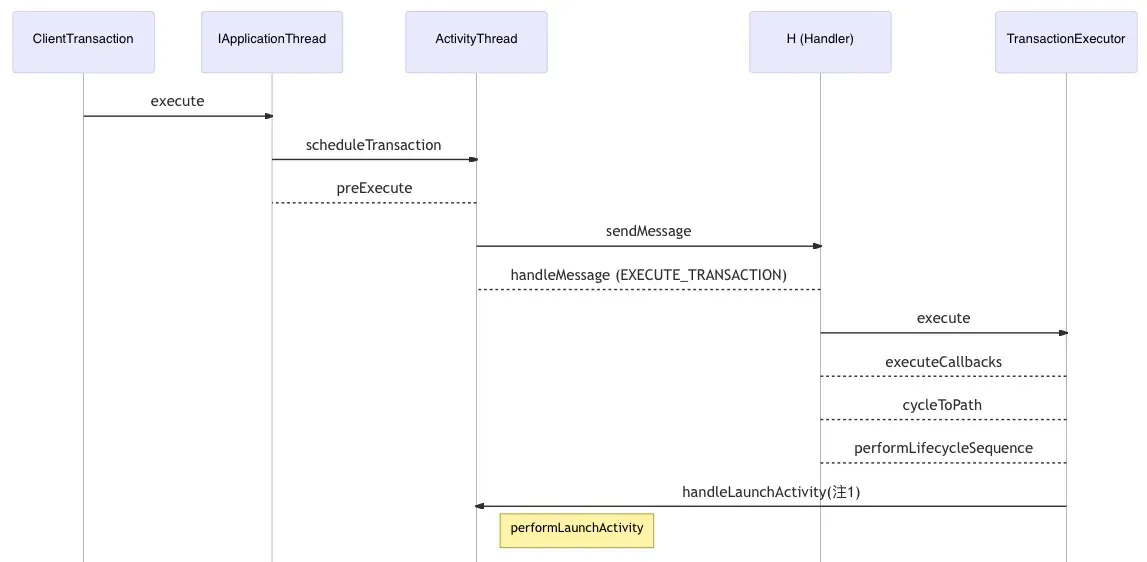
Note that TransactionExecutor calls mTransactionHandler.handleLaunchActivity, and mTransactionHandler is the ActivityThread passed to its constructor:
class ActivityThread {
  // ...
  private final TransactionExecutor mTransactionExecutor = new TransactionExecutor(this);
}
So “note 1” is ActivityThread.handleLaunchActivity.
Launch Activity
ActivityThread.performLaunchActivity is the core of launching. Pseudocode:
private Activity performLaunchActivity(ActivityClientRecord r, Intent customIntent) {
    ContextImpl appContext = createBaseContextForActivity(r);
  	java.lang.ClassLoader cl = appContext.getClassLoader();
  	activity = mInstrumentation.newActivity(cl, component.getClassName(), r.intent);
  	Application app = r.packageInfo.makeApplication(false, mInstrumentation);
  	// loadLabel
  	// initialize Activity resources
  	// activity.attach(appContext, ...)
  	mInstrumentation.callActivityOnCreate(activity, ...);
}
In short: create the app context and get the class loader; instantiate the Activity (classLoader.loadClass(name).newInstance() — which runs the class’s <cinit>, i.e., its static blocks); create the Application from AndroidManifest.xml and call its onCreate; then call the Activity’s onCreate. The sequence:
sequenceDiagram
%% performLaunchActivity
participant AT as ActivityThread
participant IN as Instrumentation
participant AF as AppcomonentFactory
participant LA as LoadApk
participant AC as Activity
AT ->> IN: newActivity
IN ->> AF: makeApplication
IN --> AF: instantiateActivity
AT ->> LA: makeApplication
LA ->> IN: callApplicationOnCreate
AT ->> IN: callActivityOnCreate
IN ->> AC: performCreate
Note right of AC: onCreate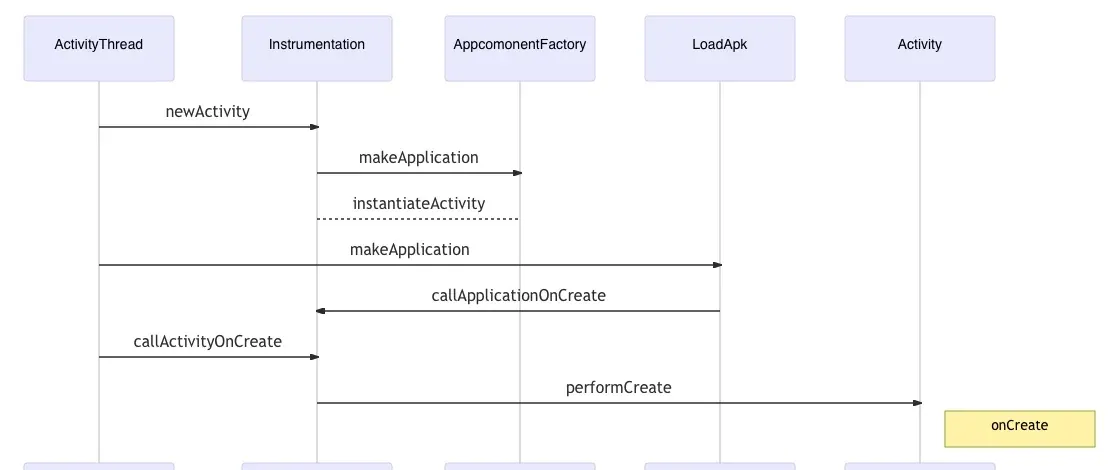
This reaches the familiar Activity.onCreate and starts running the app’s own code.
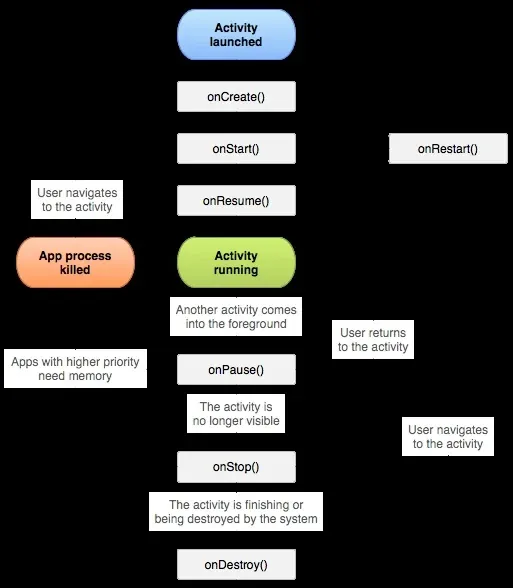
A note on ordering: all of this runs on the app’s main thread. Application.onCreate fires once, on first launch, before any Activity/Service/Receiver — with ContentProvider as the exception. The lifecycle: The Activity Lifecycle:
Starting a new process
When the target app isn’t running, mService.startProcessAsync kicks off process creation.
AMS
mService is ActivityTaskManagerService (ATMS). It sends an async message to AMS, which performs the actual process launch:
sequenceDiagram
%% startProcessAsync
participant ATMS as ActivityTaskManagerService
participant H as H(ATMS$H)
participant AMS as ActivityManagerService
participant PL as ProcessList
ATMS ->> H: sendMessage(startProcess)
Note right of H: LocalService
H ->> AMS: startProcess
H --> AMS: startProcessLocked
AMS ->> PL: startProcessLocked
AMS --> PL: startProcess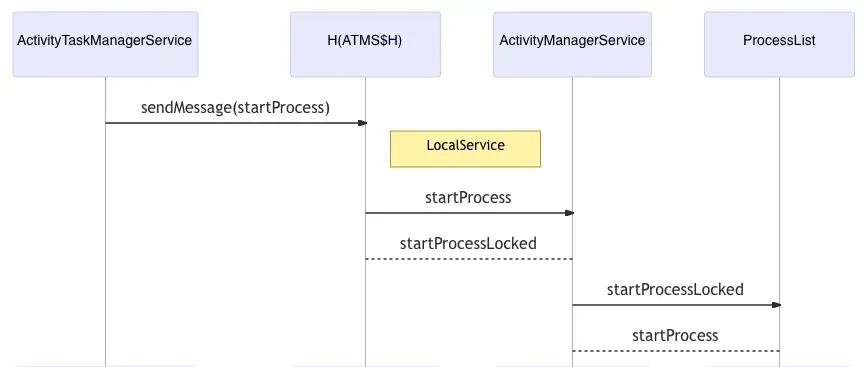
Key pseudocode in startProcessLocked:
ProcessRecord startProcessLocked(String processName, ...) {
  ProcessRecord app = getProcessRecordLocked(processName, info.uid);
  final String entryPoint = "android.app.ActivityThread";
  // ...
  startProcess(hostingRecord, entryPoint, app, ...)
}
Remember the entryPoint string — android.app.ActivityThread — it comes back later. ProcessRecord holds all info for a running process; after startup, handleProcessStartedLocked fills in the dynamic PID and so on.
startProcess picks the launch path:
private Process.ProcessStartResult startProcess(...) {
  // mount App data ...
  // data isolation ...
  if (hostingRecord.usesWebviewZygote()) {
    	startResult = startWebView(entryPoint, app.processName, uid, ...);
  } else if (hostingRecord.usesAppZygote()) {
    	final AppZygote appZygote = createAppZygoteForProcessIfNeeded(app);
    	startResult = appZygote.getProcess().start(entryPoint, app.processName, uid, ...);
  } else {
    	regularZygote = true;
			Process.start(entryPoint, app.processName, uid, ...);
  }
}
All new processes fork from zygote, but there are three kinds:
- regular zygote — the normal
zygote32/zygote64, parent of all Android Java apps. - app zygote — an app zygote, more restricted than the regular one.
- webview zygote — auxiliary, for
isolated_appprocesses rendering untrusted web content; the strictest sandbox.
Zygote
For our purpose, only the regular zygote matters. The request reaches Process.start, a static function that wraps the launch parameters (process name, UID, GID, appDataDir, …) into a string and sends it over zygoteWriter to the zygote process, telling it to start a new process and return the new PID:
sequenceDiagram
%% Process.start
participant P as Process
participant ZP as ZygoteProcess
participant Z as Zygote
P ->> ZP: start
ZP --> P: startViaZygote
ZP ->> Z: zygoteSendArgsAndGetResult
ZP --> Z: zygoteWriter.write(msgStr);
Note right of ZP: <Tunnel>
Note right of Z: fork process
Z ->> ZP: pid = zygoteInputStream.readInt()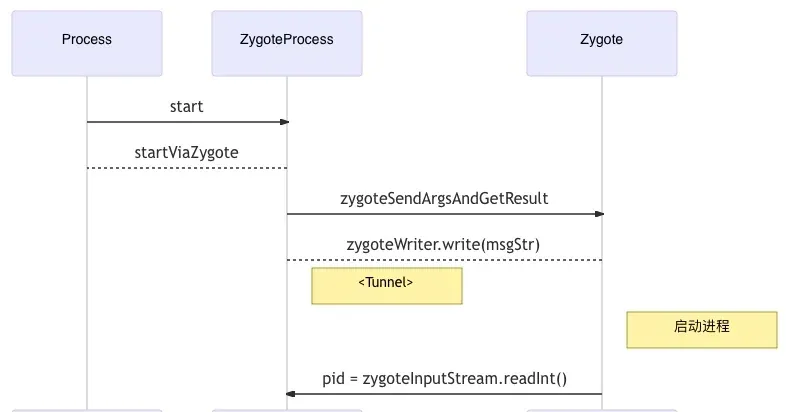
The “Tunnel” is the AMS↔zygote bridge — a UNIX socket:
// android/internal/os/Zygote.java

/**
 * Creates a managed LocalServerSocket object using a file descriptor
 * created by an init.rc script.  The init scripts that specify the
 * sockets name can be found in system/core/rootdir.  The socket is bound
 * to the file system in the /dev/sockets/ directory, and the file
 * descriptor is shared via the ANDROID_SOCKET_<socketName> environment
 * variable.
 */
static LocalServerSocket createManagedSocketFromInitSocket(String socketName) {
    int fileDesc;
    final String fullSocketName = ANDROID_SOCKET_PREFIX + socketName;
    try {
        String env = System.getenv(fullSocketName);
        fileDesc = Integer.parseInt(env);
    } catch (RuntimeException ex) {
        throw new RuntimeException("Socket unset or invalid: " + fullSocketName, ex);
    }

    try {
        FileDescriptor fd = new FileDescriptor();
        fd.setInt$(fileDesc);
        return new LocalServerSocket(fd);
    } catch (IOException ex) {
        throw new RuntimeException(
            "Error building socket from file descriptor: " + fileDesc, ex);
    }
}
The socket name is passed via the ANDROID_SOCKET_zygote environment variable.
ZygoteServer
The zygote receives AMS’s data, forks the process, and returns the child PID — all in ZygoteServer:
// frameworks/base/core/java/com/android/internal/os/ZygoteServer.java
class ZygoteServer {
    /**
     * Runs the zygote process's select loop. Accepts new connections as
     * they happen, and reads commands from connections one spawn-request's
     * worth at a time.
     * @param abiList list of ABIs supported by this zygote.
     */
    Runnable runSelectLoop(String abiList) {
       	ArrayList<FileDescriptor> socketFDs = new ArrayList<>();
      	socketFDs.add(mZygoteSocket.getFileDescriptor());

        while (true) {
          pollFDs = new StructPollfd[socketFDs.size()];
          pollReturnValue = Os.poll(pollFDs, pollTimeoutMs);
          // ...
          while (--pollIndex >= 0) {
            	if ((pollFDs[pollIndex].revents & POLLIN) == 0) continue;
          		ZygoteConnection connection = peers.get(pollIndex);
            	// Handle the received command and fork as needed; note this syscall returns twice
             	Runnable command = connection.processCommand(this, multipleForksOK);
            	if (mIsForkChild) {
                	// We're in the child
              } else {
									// We're in the server
              }
    			// ...
          }
        }
    }
}
The socket-handling flow:
sequenceDiagram
%% ZygoteServer
participant AMS as ActivityManagerService
participant Z as Zygote
participant ZS as ZygoteServer
participant ZC as ZygoteConnection
AMS ->> ZS: write(msgStr)
ZS ->> ZC: processCommand
ZC ->> Z: forkAndSpecialize
ZC --> Z: nativeForkAndSpecialize
Note right of Z: fork(2)
ZC --> Z: handleChildProc
Z ->> AMS: child PID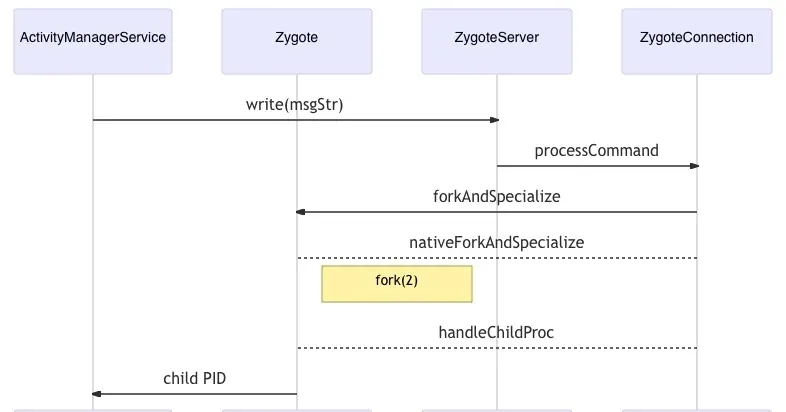
After fork, the parent sets the child’s name, UID, etc., and returns the child PID to AMS. There’s a pre-fork optimization (fork N processes sharing one socket fd; on a message only one is woken) that speeds up launches. After ZygoteConnection forks, the parent runs handleParentProc and the child runs handleChildProc, which returns the Runnable the child must execute.
Child initialization
The child’s call chain:
handleChildProcZygoteInit.zygoteInitRuntimeInit.applicationInitRuntimeInit.findStaticMain
protected static Runnable applicationInit(int targetSdkVersion, long[] disabledCompatChanges,
        String[] argv, ClassLoader classLoader) {
    VMRuntime.getRuntime().setTargetSdkVersion(targetSdkVersion);
    VMRuntime.getRuntime().setDisabledCompatChanges(disabledCompatChanges);
    final Arguments args = new Arguments(argv);
    // The end of of the RuntimeInit event (see #zygoteInit).
    Trace.traceEnd(Trace.TRACE_TAG_ACTIVITY_MANAGER);
    // Remaining arguments are passed to the start class's static main
    return findStaticMain(args.startClass, args.startArgs, classLoader);
}
It ends up calling the start class’s static main(argv[]). Recall the entryPoint string — that’s the startClass here: android.app.ActivityThread. The child’s entry is ActivityThread.main:
sequenceDiagram
%% ActivtyThread.main
participant AT as ActivtyThread
participant AM as ActivtyManager
participant H as H
participant I as Instrumentation
Note left of AT: main
AT ->> AM: attachApplication (RPC)
Note left of AM: set app init state
AM ->> AT: bindApplication (RPC)
AT ->> H: sendMessage(H.BIND_APPLICATION)
Note right of H: handleBindApplication
H ->> I: onCreate
H ->> I: callApplicationOnCreate
Note left of AT: looper.Loop()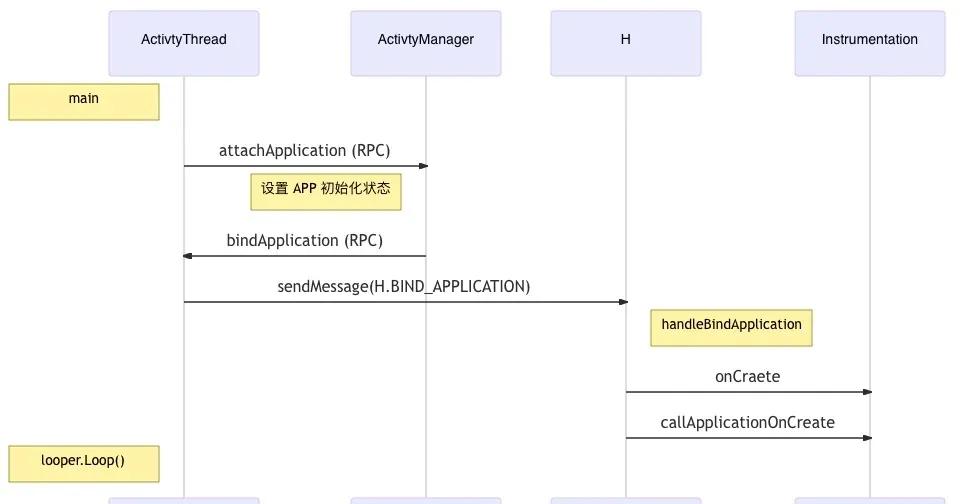
First an RPC to AMS sets init state (debug, launch, OOM priority…), then AMS RPCs back to the client — a round trip that keeps AMS as the single owner of app-state management. Back on the client, handleBindApplication runs on the main thread:
private void handleBindApplication(AppBindData data) {
  // Register the current UI thread as a JavaVM sensitive thread
	VMRuntime.registerSensitiveThread();
  // Set the debug allocation-tracker stack depth
  String property = SystemProperties.get("debug.allocTracker.stackDepth");
  VMDebug.setAllocTrackerStackDepth(Integer.parseInt(property));
  // Set the real process name
  Process.setArgV0(data.processName);
  android.ddm.DdmHandleAppName.setAppName(data.processName, ...);
  VMRuntime.setProcessPackageName(data.appInfo.packageName);
  // Set the app data path for ART
  VMRuntime.setProcessDataDirectory(data.appInfo.dataDir);
  // If debug mode is set, wait for a debugger connection and show a dialog
  if (data.debugMode != ApplicationThreadConstants.DEBUG_OFF) {
  	Debug.changeDebugPort(8100);
    mgr = ActivityManager.getService();
    mgr.showWaitingForDebugger(mAppThread, true);
    Debug.waitForDebugger();
    mgr.showWaitingForDebugger(mAppThread, false);
  }
  // Create the target app's context
  ContextImpl appContext = ContextImpl.createAppContext(this, data.info);
  // Set the HTTP proxy
  final ConnectivityManager cm = appContext.getSystemService(ConnectivityManager.class);
  Proxy.setHttpProxyConfiguration(cm.getDefaultProxy());
  // Load Network Security Config: app custom certs, SSL-pinning...
  NetworkSecurityConfigProvider.install(appContext);
  // Application init and ContentProvider registration
  app = data.info.makeApplication(data.restrictedBackupMode, null);
  ActivityThread.updateHttpProxy(app);
  installContentProviders(app, data.providers);
  // Launch the app
  mInstrumentation.onCreate(data.instrumentationArgs);
  mInstrumentation.callApplicationOnCreate(app);
  // Preload font resources...
}
If the app enables debugging, the debugger is set up before Application starts. Note the HTTP proxy is also set here — which is why native processes don’t use the system proxy: proxy setup happens in ActivityThread, i.e., the Java app’s UI thread.
Instrumentation is the same entry point we saw earlier. Recall:
Application.onCreatefires once, on first launch, before any Activity/Service/Receiver — withContentProvideras the exception.
Indeed installContentProviders runs before callApplicationOnCreate — a historical quirk (sometimes Application init accesses ContentProvider; see issue #36917845). So if you want your code to run as early as possible, put it in ContentProvider.onCreate — a trick some unofficial hardening schemes rely on, though Android makes no contract about that ordering.
Launching the Activity
The app process is now up, but the Activity hasn’t started yet. Earlier we reached ActivityThread.main, whose tail calls Looper.loop() — which is where the BIND_APPLICATION request arrives and drives child init. There’s also the EXECUTE_TRANSACTION request we saw earlier, so after child init, AMS proceeds to launch the Activity.
From here the path matches the “process already exists” case. Verifying with dynamic debugging — set a breakpoint in MainActivity.onCreate and the backtrace is:
onCreate:13, MainActivity (com.evilpan.vulnapp)
performCreate:8000, Activity (android.app)
performCreate:7984, Activity (android.app)
callActivityOnCreate:1309, Instrumentation (android.app)
performLaunchActivity:3404, ActivityThread (android.app)
handleLaunchActivity:3595, ActivityThread (android.app)
execute:85, LaunchActivityItem (android.app.servertransaction)
executeCallbacks:135, TransactionExecutor (android.app.servertransaction)
execute:95, TransactionExecutor (android.app.servertransaction)
handleMessage:2066, ActivityThread$H (android.app)
dispatchMessage:106, Handler (android.os)
loop:223, Looper (android.os)
main:7660, ActivityThread (android.app)
invoke:-1, Method (java.lang.reflect)
run:592, RuntimeInit$MethodAndArgsCaller (com.android.internal.os)
main:947, ZygoteInit (com.android.internal.os)
Which matches the analysis. And that’s the full launch chain.
Takeaway
An app launch looks simple but crosses multiple threads and processes with plenty of async — AIDL RPC calls, cross-thread Handler sendMessage/handleMessage — and recognizing those patterns is what keeps you from getting lost in the code while tracing data and control flow. For anyone hunting stable injection points, the useful anchors are exactly the chokepoints identified here: Instrumentation, ActivityThread.handleBindApplication, and ContentProvider.onCreate ordering.
Colin Xiao — I take on contract reverse-engineering work, and writeups like this are how I show what I can do. If you need help with anything in this space — including but not limited to the areas I cover above — I’m available. No project is too big or too small — if it’s reverse engineering and I can do it, I’ll take it. DM me on X (@colinxiao_lab) or Telegram (@ColinXiao666).
Get in touch