Android App Hardening: From Whole-APK Packing to Code-Extraction Packing — Principles and Implementation
About the author. I’m Colin Xiao — an independent reverse engineer, mostly working solo on contract jobs. I dig into compiled code of every kind, including but not limited to: Android and iOS apps, x86/x64/ARM native binaries, packers and obfuscators, DRM and license checks, network protocols and APIs, crypto and signature algorithms, malware, game binaries, and embedded/IoT firmware. I also handle large-scale data collection and vulnerability research. If you have any project in mind, I’d be glad to take it on — whatever it is, as long as it’s within my wheelhouse. Just reach out. You can reach me on X at @colinxiao_lab or on Telegram at https://t.me/ColinXiao666.
This research is published for educational and defensive purposes.
Android App Hardening: From Whole-APK Packing to Code-Extraction Packing — Principles and Implementation
There’s no shortage of writeups online about whole-APK packing and code-extraction packing, and plenty of mature commercial packers already exist. But while studying this area I kept noticing that it sits on top of a lot of theory. If you stop at the high-level flow and the reference implementation without understanding the underlying principles, you end up memorizing steps instead of actually learning anything.
As a beginner, the hardest part is that the knowledge graph is enormous and it’s not obvious where to start. This article is my attempt to fill that gap. It covers two things:
- The theory behind Android packing: the Java reflection mechanism, the ClassLoader mechanism, and the Android application startup flow.
- The automation of whole-APK packing and code-extraction packing: landed vs. landless loading for whole-APK packing, and code extraction plus instruction refill for code-extraction packing.
Because there’s a lot of ground to cover, I’ve split it into three parts:
- The relevant theoretical foundations, in brief.
- The implementation of generation 1 through generation 3 packing.
- The theoretical foundations, in depth.
A suggested reading order:
- Don’t try to grasp every detail up front — get the overall shape first, then work through the details. The flow diagrams help.
- After the theory, read the generation 1–3 implementations. If a principle or a code path is unclear, come back to the deep-dive section.
- For the theory, I strongly recommend reading Android进阶解密 (Android Advanced Decryption) and the AOSP source itself.
The companion code ships as an attachments.zip (31.7 MB) with the following contents:
- AndroidShell — the shell application project, including the proxy Application classes for generations 1–3. Whole-APK packing is commented out; the default is generation-3 code-extraction packing.
- ReadDex — a Dex-file parser project that extracts the code of every
DexClassDefin a given dex file, filtering out system classes. - ShellScripts — the generation 1–3 packing automation scripts. The
ShellScripts\toolsdirectory provides:apktoolfor unpacking and repacking APKs.uber-apk-signer-1.3.0.jarfor signing APKs.ReadDex.exefor dex code extraction.
- JavaReflectionDemo — a Java reflection demo.
- LoadDexDemo — a demo that loads a dex file and calls a specific class inside it.
- ShellTestResults.zip (76.7 MB, separately compressed) — generation 1–3 packing test files, including the source app, the shell app, and the packed app.
If anything below is wrong or incomplete, corrections are welcome.
1. A Quick Overview of Android Shells
-
Encryption shells
- Generation 1: dynamic loading with
DexClassLoader, landed loading. - Generation 2: dynamic loading with
InMemoryDexClassLoader, landless loading. - Generation 3: code-extraction type, dex code extraction and refill, landed loading.
“Landed” means the dex file is written out to the filesystem; “landless” means the dex file is never released to disk and is loaded directly from memory.
- Generation 1: dynamic loading with
-
Generation 4 shells: DexVMP and Dex2C.
-
Obfuscation shells: OLLVM.
Before studying Android packing, you absolutely need to know these four things:
- The Java reflection mechanism.
- The ClassLoader mechanism.
- The Android application startup flow.
- The Dex file structure.
2. The Java Reflection Mechanism
Reference: Java reflection technique learning, and “Understand the Java reflection mechanism in ten minutes.”
Example file: attachments\JavaReflectionDemo\ReflectionDemo.java.
What reflection is
The principles of reflection:
- The core of the Java reflection mechanism is to dynamically load a class at runtime, obtain its full details, and thereby operate on the properties and methods of the class or its instances. In essence, the JVM obtains the
Classobject and then decompiles it to retrieve the object’s various information. - Java is a compile-then-run language. Object types are determined at compile time, but at runtime you may need to dynamically load classes that weren’t needed before and therefore weren’t loaded into the JVM. Reflection lets you dynamically create objects and call their properties at runtime without knowing at compile time which object you’ll be dealing with.
- Reflection is one of the techniques that makes dynamic loading possible.
Pros and cons of reflection:
- Pros: you can obtain a class’s contents at runtime and decompile it. For a compile-then-run language like Java, this makes it easy to write flexible code that can be assembled at runtime without linking source code between components — which makes object-oriented design easier.
- Cons: reflection consumes system resources, so if you don’t need to create an object dynamically, don’t use reflection. And reflection can bypass permission checks when calling methods, which can break encapsulation and introduce security problems.
Why it matters for packing: reflection is critical for the shell app to dynamically load the protected app. It can break through the default permission-access control and reach the parts of the Android system that user code is normally forbidden from touching, or that are not public.
The essence of reflection
The normal class-loading process:
- Execute
Student student = new Student(), asking the JVM to create astudentinstance. - The JVM finds
Student.classand loads it into memory. - The JVM creates the
Classobject corresponding toStudent(one class maps to exactly oneClassobject). - The JVM creates the
studentinstance.
No matter how many instances a class has, there’s only ever one Class object for it.
The essence of Java reflection: obtain the Class object, then access instance objects in reverse.
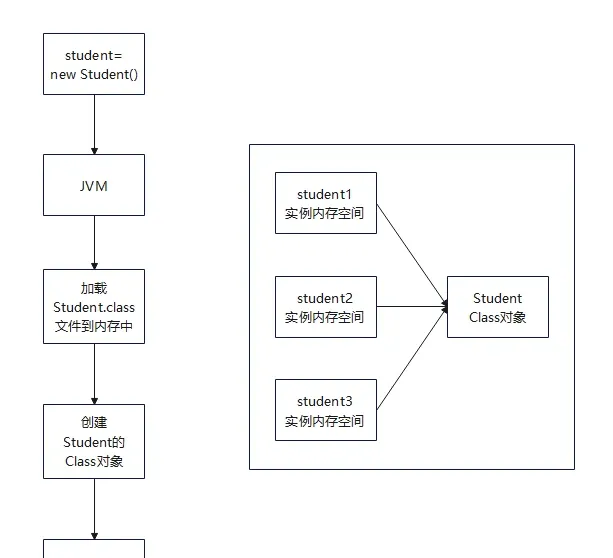
The entry point — the Class class
The files involved in reflection:
java.lang.Class;
java.lang.reflect.Constructor;
java.lang.reflect.Field;
java.lang.reflect.Method;
java.lang.reflect.Modifier;
In the JDK, the Java reflection mechanism is implemented mainly by the following classes, all located in the java.lang.reflect package:
Class— represents a class.Constructor— represents a class’s constructors.Field— represents a class’s member variables (properties).Method— represents a class’s member methods.
The entry point, Class:
- The object of the
Classclass is called a class object. Classis the origin and entry point of the Java reflection mechanism:- It’s used to obtain all kinds of class-related information.
- It provides the methods for retrieving class information.
ClassextendsObject.
Classis the shared blueprint for all classes:- Each class has its own object, like the relationship between a blueprint and the finished product.
- Each class can itself be viewed as an object with a shared blueprint —
Class— which stores the class’s structural information: name, properties, methods, constructors, parent class, and interfaces, all retrievable via the corresponding methods.
Here’s a sample class used in the following operations:
// Sample class
class Person implements Runnable{
    public String name;
    private int age;

    // Default constructor and parameterized constructor
    public Person() {}
    private Person(String str){
        System.out.println("Private constructor:"+str);
    }
    public Person(String name, int age) {
        this.name = name;
        this.age = age;
    }

    // Methods with different access levels
    public void introduce() {
        System.out.println("I am " + name + ", age " + age);
    }

    private void privateMethod(String name,int age) {
        System.out.println("This is Person's private method,"+"name="+name+","+"age="+age);
    }

    @Override
    public void run() {
        System.out.println("Hello World");
    }
}
Getting the Class object
For non-dynamic loading, you can get the Class object via the .class property or the instance’s getClass() method. For dynamic loading, use Class.forName() or ClassLoader.loadClass().
        //1. Get the class object
        // Dynamic loading
        Class<?> clazz= Class.forName("MyUnidbgScripts.Person"); // load by fully-qualified name
        Class<?> clazz2=ClassLoader.getSystemClassLoader().loadClass("MyUnidbgScripts.Person");// load via ClassLoader
        // Non-dynamic loading
        Class<?> clazz3=Person.class;
        Class<?> clazz4=new Person().getClass();
        System.out.println("Load Class:");
        System.out.println(clazz);
        System.out.println(clazz2);
        System.out.println(clazz3);
        System.out.println(clazz4);
        System.out.println();

        //2. Get various class info from the class object
        System.out.println("Class info:");
        System.out.println(clazz.getName());       // fully-qualified name
        System.out.println(clazz.getSimpleName()); // simple name
        System.out.println(clazz.getSuperclass()); // parent class object
        System.out.println(Arrays.toString(clazz.getInterfaces()));    // interface class object array
        System.out.println();
Output:
Load Class:
class MyUnidbgScripts.Person
class MyUnidbgScripts.Person
class MyUnidbgScripts.Person
class MyUnidbgScripts.Person

Class info:
MyUnidbgScripts.Person
Person
class java.lang.Object
[interface java.lang.Runnable]
Getting constructors
class.getConstructor(Class<?>... ParameterTypes)— get thepublicconstructor with the specified parameter types.class.getConstructors()— get allpublicconstructors.class.getDeclaredConstructor(Class<?>... ParameterTypes)— get any constructor with the specified parameter types.class.getDeclaredConstructors()— get all constructors.
        //3. Get constructors
        // Get the no-arg (default) constructor
        System.out.println("Get constructor:");
        Constructor<?> constructor=clazz.getConstructor();
        System.out.println(constructor);
        System.out.println();

        // Get public constructors
        System.out.println("Get public constructors:");
        Constructor<?>[] constructors=clazz.getConstructors();
        System.out.println(Arrays.toString(constructors));
        System.out.println();

        // Get all constructors
        System.out.println("Get all constructors:");
        constructors=clazz.getDeclaredConstructors();
        System.out.println(Arrays.toString(constructors));
        System.out.println("Print All Constructors:");
        for(Constructor<?> cons:constructors){
            System.out.println("constructor: "+cons);
            System.out.println("\tname: "+cons.getName()+
                    "\n\tModifiers: "+Modifier.toString(cons.getModifiers())+
                    "\n\tParameterTypes: "+Arrays.toString(cons.getParameterTypes()));
        }
        System.out.println();
Output:
Get constructor:
public MyUnidbgScripts.Person()

Get public constructors:
[public MyUnidbgScripts.Person(java.lang.String,int), public MyUnidbgScripts.Person()]

Get all constructors:
[public MyUnidbgScripts.Person(java.lang.String,int), private MyUnidbgScripts.Person(java.lang.String), public MyUnidbgScripts.Person()]
Print All Constructors:
constructor: public MyUnidbgScripts.Person(java.lang.String,int)
	name: MyUnidbgScripts.Person
	Modifiers: public
	ParameterTypes: [class java.lang.String, int]
constructor: private MyUnidbgScripts.Person(java.lang.String)
	name: MyUnidbgScripts.Person
	Modifiers: private
	ParameterTypes: [class java.lang.String]
constructor: public MyUnidbgScripts.Person()
	name: MyUnidbgScripts.Person
	Modifiers: public
	ParameterTypes: []
Getting fields
class.getField(FieldName)— get thepublicfield with the given name.class.getFields()— get allpublicfields.class.getDeclaredField(FieldName)— get the field with the given name regardless of access level.class.getDeclaredFields()— get all fields.
        //3. Get fields
        // Get all public fields
        System.out.println("Get public fields:");
        Field[] fields=clazz.getFields();
        System.out.println(Arrays.toString(fields));
        System.out.println();

        // Get all fields
        System.out.println("Get all fields:");
        fields=clazz.getDeclaredFields();
        System.out.println(Arrays.toString(fields));
        System.out.println("Print all fields:");
        for(Field field:fields){
            System.out.println("field: "+field);
            System.out.println("\ttype: "+field.getType()+
                    "\n\tname: "+field.getName());
        }
        System.out.println();

        System.out.println("Get specific field:");
        // Get a specific public field
        Field field=clazz.getField("name");
        System.out.println(field);
        // Get a specific field of any access level
        field=clazz.getDeclaredField("age");
        System.out.println(field);
Output:
Get public fields:
[public java.lang.String MyUnidbgScripts.Person.name]

Get all fields:
[public java.lang.String MyUnidbgScripts.Person.name, private int MyUnidbgScripts.Person.age]
Print all fields:
field: public java.lang.String MyUnidbgScripts.Person.name
	type: class java.lang.String
	name: name
field: private int MyUnidbgScripts.Person.age
	type: int
	name: age

Get specific field:
public java.lang.String MyUnidbgScripts.Person.name
private int MyUnidbgScripts.Person.age
Getting methods
class.getMethod(MethodName, ...ParameterTypes)— get thepublicmethod with the given name and parameters.class.getMethods()— get allpublicmethods.class.getDeclaredMethod(MethodName, ...ParameterTypes)— get the method with the given name and parameters regardless of access level.class.getDeclaredMethods()— get all methods.
        //4. Get methods
        System.out.println("Get public methods:");
        Method[] methods=clazz.getMethods();   // note: this also includes public methods of implemented interfaces
        System.out.println(Arrays.toString(methods));
        System.out.println();

        System.out.println("Get all methods:");
        methods=clazz.getDeclaredMethods();    // get all declared methods
        System.out.println(Arrays.toString(methods));
        System.out.println();

        System.out.println("Print all methods:");
        for(Method method:methods){
            System.out.println("method: "+method);
            System.out.println("\tname: "+method.getName());
            System.out.println("\treturnType: "+method.getReturnType());
            System.out.println("\tparameterTypes: "+Arrays.toString(method.getParameterTypes()));
        }
        System.out.println();

        // Get a specific public method
        Method method=clazz.getMethod("introduce");
        System.out.println(method);
        // Get a specific method of any access level
        method=clazz.getDeclaredMethod("privateMethod",String.class,int.class);
        System.out.println(method);
        System.out.println();
Output:
Get public methods:
[public void MyUnidbgScripts.Person.run(), public void MyUnidbgScripts.Person.introduce(), public final void java.lang.Object.wait(long,int) throws java.lang.InterruptedException, public final void java.lang.Object.wait() throws java.lang.InterruptedException, public final native void java.lang.Object.wait(long) throws java.lang.InterruptedException, public boolean java.lang.Object.equals(java.lang.Object), public java.lang.String java.lang.Object.toString(), public native int java.lang.Object.hashCode(), public final native java.lang.Class java.lang.Object.getClass(), public final native void java.lang.Object.notify(), public final native void java.lang.Object.notifyAll()]

Get all methods:
[public void MyUnidbgScripts.Person.run(), public void MyUnidbgScripts.Person.introduce(), private void MyUnidbgScripts.Person.privateMethod(java.lang.String,int)]

Print all methods:
method: public void MyUnidbgScripts.Person.run()
	name: run
	returnType: void
	parameterTypes: []
method: public void MyUnidbgScripts.Person.introduce()
	name: introduce
	returnType: void
	parameterTypes: []
method: private void MyUnidbgScripts.Person.privateMethod(java.lang.String,int)
	name: privateMethod
	returnType: void
	parameterTypes: [class java.lang.String, int]

public void MyUnidbgScripts.Person.introduce()
private void MyUnidbgScripts.Person.privateMethod(java.lang.String,int)
Creating objects by reflection
- Via
Class.newInstance()— calls the no-arg constructor; no arguments can be passed. - Via
Constructor.newInstance()— calls a specific constructor; arguments can be passed.
        //5. Create objects by reflection
        System.out.println("Create instance by reflection:");
        //5.1 Class.newInstance() requires the class to have a no-arg constructor
        System.out.println("Create instance by Class.newInstance():");
        Object obj=clazz.newInstance();
        System.out.println(obj.toString());
        System.out.println();

        //5.2 Constructor.newInstance() obtains the Constructor via Class, then creates the object with a chosen constructor
        System.out.println("Create instance by Constructor.newInstance():");
        Constructor<?> cons=clazz.getConstructor();// get the no-arg constructor
        obj=cons.newInstance();
        System.out.println(obj.toString());
        cons=clazz.getDeclaredConstructors()[0];// get a parameterized constructor
        obj=cons.newInstance("Zhang San",18);
        System.out.println(obj.toString());
        System.out.println();
Output:
Create instance by reflection:
Create instance by Class.newInstance():
MyUnidbgScripts.Person@30dae81

Create instance by Constructor.newInstance():
MyUnidbgScripts.Person@1b2c6ec2
MyUnidbgScripts.Person@4edde6e5
Operating on fields by reflection
Class.getField(FieldName)— get the namedpublicfield.Class.getDeclaredField(FieldName)— get the named field regardless of access level.Field.get(Object obj)— get the value for a specific instance.Field.set(Object obj, Object value)— set the value for a specific instance.Field.setAccessible(true)— bypass the field’s access control.
       //6. Operate on fields by reflection
        System.out.println("Access field by reflection:");
        Field nameField=clazz.getField("name");
        nameField.set(obj,"Wang Wu");    // modify the field of a specific object
        Field ageField=clazz.getDeclaredField("age");
        ageField.setAccessible(true);// bypass access control
        ageField.set(obj,20);
        System.out.println(nameField.get(obj));// get() returns the field value
        System.out.println(ageField.get(obj));
Output:
Access field by reflection:
Wang Wu
20
Calling methods by reflection
Class.getMethod(String name, Class<?>... parameterTypes)— get the namedpublicmethod with the given parameter types.Class.getDeclaredMethod(String name, Class<?>... parameterTypes)— get the named method regardless of access level.Method.setAccessible(true)— bypass access control.Method.invoke(Object obj, Object... args)— call a method on a specific instance, passing arguments.
       //7. Call methods by reflection
        System.out.println("Run method by reflection:");
        Method introduceMethod=clazz.getMethod("introduce");
        introduceMethod.invoke(obj); //person.introduce()
        Method privateMethod=clazz.getDeclaredMethod("privateMethod",String.class,int.class);// person.privateMethod("Zhao Si",19)
        privateMethod.setAccessible(true);
        privateMethod.invoke(obj,"Zhao Si",19);
Output:
Run method by reflection:
I am Wang Wu, age 20
This is Person's private method,name=Zhao Si,age=19
Wrapping reflection
I wrapped a Reflection.java class for later use. It provides:
- Calling static/instance methods.
- Accessing static/instance fields.
package com.example.androidshell;

import android.util.Log;

import java.lang.reflect.Field;
import java.lang.reflect.Method;

public class Reflection {
    private static final String TAG="glass";
    public static Object invokeStaticMethod(String class_name,String method_name,Class<?>[] parameterTypes,Object[] parameterValues){
        try {
            Class<?> clazz = Class.forName(class_name); // get the Class object by reflection
            Method method = clazz.getMethod(method_name,parameterTypes);// get the method by reflection
            method.setAccessible(true);// bypass access control
            return method.invoke(null,parameterValues);// static methods need no instance, just pass the args
        }catch (Exception e){
            Log.d(TAG, e.toString());
            return null;
        }
    }

    public static Object invokeMethod(String class_name,String method_name,Object obj,Class<?>[] parameterTypes,Object[] parameterValues)
    {
        try {
            Class<?> clazz = Class.forName(class_name);
            Method method = clazz.getMethod(method_name,parameterTypes);
            method.setAccessible(true);// bypass access control
            return method.invoke(obj,parameterValues);// instance methods need the target instance
        }catch (Exception e)
        {
            Log.d(TAG, e.toString());
            return null;
        }
    }

    public static Object getField(String class_name,Object obj,String field_name)
    {
        try {
            Class<?> clazz = Class.forName(class_name);
            Field field = clazz.getDeclaredField(field_name);
            field.setAccessible(true);
            return field.get(obj);  // instance fields need the target object
        }catch(Exception e)
        {
            Log.d(TAG, e.toString());
            return null;
        }
    }

    public static Object getStaticField(String class_name,String field_name)
    {
        try {
            Class<?> clazz = Class.forName(class_name);
            Field field = clazz.getDeclaredField(field_name);
            field.setAccessible(true);
            return field.get(null);
        }catch (Exception e)
        {
            Log.d(TAG, e.toString());
            return null;
        }
    }

    public static void setField(String class_name,String field_name,Object obj,Object value)
    {
        try {
            Class<?> clazz = Class.forName(class_name);
            Field field = clazz.getDeclaredField(field_name);
            field.setAccessible(true);
            field.set(obj,value);
        }catch (Exception e)
        {
            Log.d(TAG, e.toString());
        }
    }

    public static void setStaticField(String class_name,String field_name,Object value)
    {
        try {
            Class<?> clazz = Class.forName(class_name);
            Field field = clazz.getDeclaredField(field_name);
            field.setAccessible(true);
            field.set(null,value);
        }catch (Exception e){
            Log.d(TAG, e.toString());
        }
    }
}
3. The ClassLoader Mechanism
Hot-fix and plugin techniques depend on ClassLoader. The JVM runs .class files, while Dalvik/ART run .dex files, so their ClassLoaders differ in a few ways.
ClassLoader in Java
Types of ClassLoader
Java’s ClassLoaders come in two categories:
- System class loaders:
BootstrapClassLoader,ExtensionsClassLoader,ApplicationClassLoader. - Custom class loaders:
Custom ClassLoader, implemented by extendingjava.lang.ClassLoader.
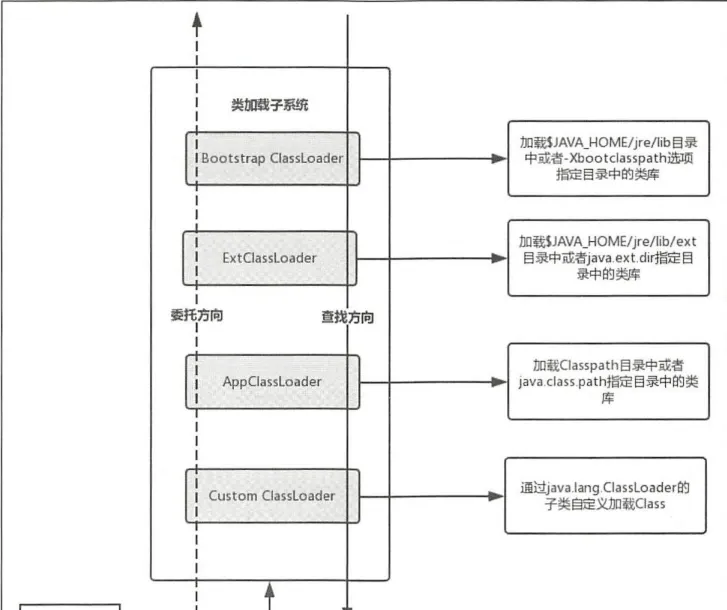
In detail:
-
Bootstrap ClassLoader — implemented in C/C++ (not accessible from Java code). It loads the JDK’s core libraries, such as
java.langandjava.util. It loads fromJAVA_HOME/jre/liband the directories specified by-Xbootclasspath. The JVM boots by creating the initial classes through theBootstrapClassLoader. You can see its load directories like this (Java 8):public class Test0 { public static void main(String[] args) { System.out.println(System.getProperty("sun.boot.class.path")); } }
-
Extensions ClassLoader — the Java implementation class is
ExtClassLoader. It loads Java’s extension classes, providing functionality beyond the system classes. It loads fromJAVA_HOME/jre/lib/extand the directories specified byjava.ext.dirs. The following printsExtClassLoader’s load directories:public class JavaClassLoaderTest { public static void main(String[] args) { System.out.println(System.getProperty(java.ext.dirs)); } } -
Application ClassLoader — the implementation class is
AppClassLoader, also called the System ClassLoader because it’s obtained viaClassLoader.getSystemClassLoader(). It loads from the program’s classpath and the directories specified by the system propertyjava.class.path. -
Custom ClassLoader — in addition to the three system-provided loaders, you can implement a custom loader by extending
java.lang.ClassLoader.ExtensionsClassLoaderandApplicationClassLoaderalso extend this class.
ClassLoader inheritance
How many kinds of class loaders does it take to run a Java program? You can verify with:
public class JavaClassLoaderTest {
        public static void main(String[] args) {
            ClassLoader loader=JavaClassLoaderTest.class.getClassLoader();
            while(loader!=null){
              System.out.println(loader);
              loader=loader.getParent();
            }
        }
}
It prints AppClassLoader and ExtClassLoader. Because BootstrapClassLoader is written in C/C++ rather than Java, you can’t get a reference to it from Java.
Note:
- There are three types of system class loaders, but more than three system ClassLoaders exist.
AppClassLoader’s parent loader isExtClassLoader, but that doesn’t meanAppClassLoaderextendsExtClassLoader.
The inheritance relationship is shown below:
ClassLoaderis an abstract class that defines the main functionality.SecureClassLoaderextendsClassLoader— not an implementation, but an extension that adds permission management, improving security.URLClassLoaderextendsSecureClassLoader; it can load classes and resources from jar files and folders via URL paths.ExtClassLoaderandAppClassLoaderboth extendURLClassLoader. They’re both inner classes ofLauncher, and sinceLauncheris the JVM’s entry application, both are initialized insideLauncher.
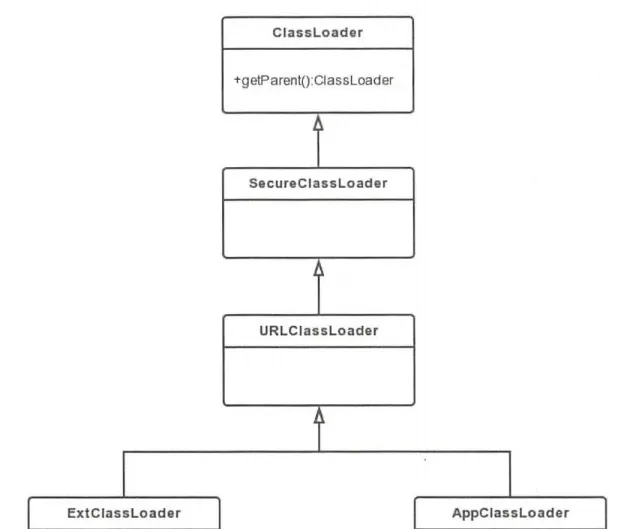
The parent-delegation model
Class loaders find classes using the parent-delegation model:
- First check whether the class is already loaded; if not, delegate to the parent loader, recursing upward to the top-level
Bootstrap ClassLoader. - If
Bootstrap ClassLoaderfinds it, return it; otherwise search downward. - If no parent finds the class, call the loader’s own
findClass.
Advantages of parent delegation:
- Avoids duplicate loading — if the class is already loaded, it’s not loaded again; you just read the loaded class.
- Safer — it guarantees you can’t replace a system class with a custom class, and two classes are only considered the same class if they have the same name and were loaded by the same loader.
The ClassLoader.loadClass source (Java 17):
- Point 1: check whether the class has already been loaded; if so, skip the rest.
- Point 2: if the parent loader isn’t null, call the parent’s
loadClass. - Point 3: if the parent loader is null, call
findBootstrapClassOrNull. Internally this calls the native methodfindBootstrapClass, ultimately usingBootstrap ClassLoaderto check whether the class is loaded. Note: in Android this method returns null directly, because Android has noBootstrapClassLoader. - Point 4: call the loader’s own
findClass.
    protected Class<?> loadClass(String name, boolean resolve)
        throws ClassNotFoundException
    {
        synchronized (getClassLoadingLock(name)) {
            Class<?> c = findLoadedClass(name);//1
            if (c == null) {
                long t0 = System.nanoTime();
                try {
                    if (parent != null) {
                        c = parent.loadClass(name, false);//2.
                    } else {
                        c = findBootstrapClassOrNull(name);//3
                    }
                } catch (ClassNotFoundException e) {
                    // ClassNotFoundException thrown if class not found
                    // from the non-null parent class loader
                }

                if (c == null) {
                    // If still not found, then invoke findClass in order
                    // to find the class.
                    long t1 = System.nanoTime();
                    c = findClass(name);//4

                    // this is the defining class loader; record the stats
                    PerfCounter.getParentDelegationTime().addTime(t1 - t0);
                    PerfCounter.getFindClassTime().addElapsedTimeFrom(t1);
                    PerfCounter.getFindClasses().increment();
                }
            }
            if (resolve) {
                resolveClass(c);
            }
            return c;
        }
    }
The flow:
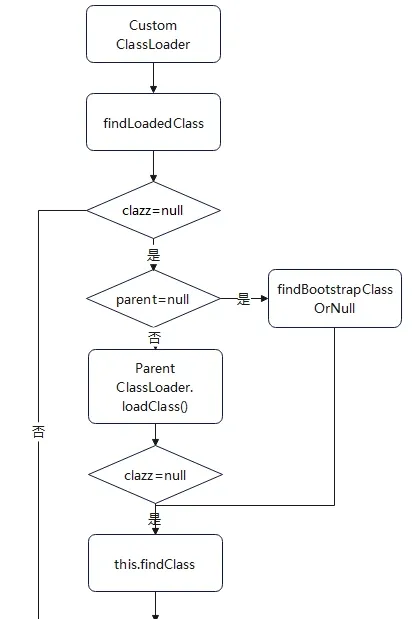
ClassLoader in Android
Java’s ClassLoader can load jar and class files (both are essentially loading class files). In Android, whether it’s DVM or ART, what gets loaded is a dex file, so the ClassLoader-related classes had to be redesigned.
Android’s ClassLoaders come in two categories:
- System class loaders:
BootClassLoader,PathClassLoader,DexClassLoader, etc. - Custom loaders: implemented by extending
BaseDexClassLoader. Their inheritance relationship:
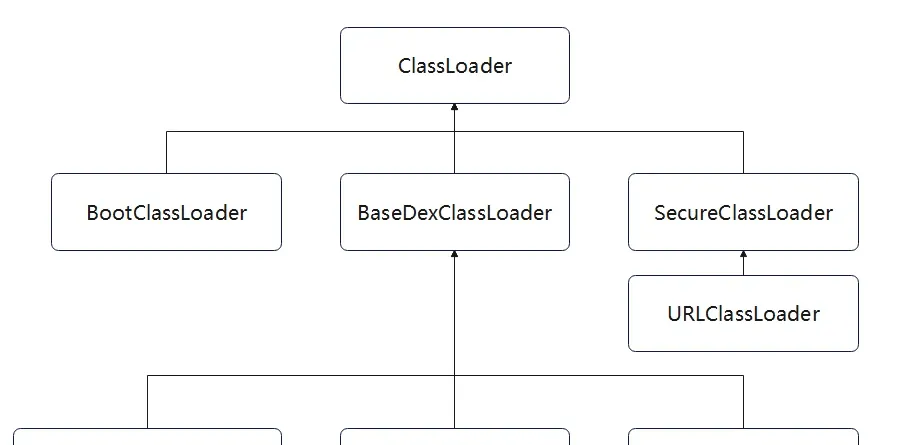
What each loader does:
ClassLoader— abstract class defining the main functionality.BootClassLoader— extendsClassLoader; preloads common classes at Android system startup.SecureClassLoader— extendsClassLoader, adding class-permission functionality.URLClassLoader— extendsSecureClassLoader; loads classes and resources via URL paths.BaseDexClassLoader— extendsClassLoader; the concrete implementation of the abstract class.InMemoryDexClassLoader(added in Android 8.0) — extendsBaseDexClassLoader; loads dex files from memory.PathClassLoader— extendsBaseDexClassLoader; loads the dex files of installed APKs.DexClassLoader— extendsBaseDexClassLoader; loads the dex files of installed APKs, and dex files of uninstalled APKs from the SD card.
When implementing Android packing, the shell app dynamically loads the protected app’s dex files mainly using these three loaders:
DexClassLoadercan load the dex files of uninstalled APKs. It’s one of the cores of generation-1 whole-APK (landed) packing.InMemoryDexClassLoadercan load dex files from memory. It’s one of the cores of generation-2 whole-APK (landless) packing.BaseDexClassLoaderis the concrete implementation ofClassLoader. In practice,DexClassLoader,PathClassLoader, andInMemoryDexClassLoaderall delegate toBaseDexClassLoaderwhen loading classes.
A brief look at how ClassLoader loads dex
Loading a dex file relies on PathClassLoader, DexClassLoader, and InMemoryDexClassLoader. The actual work is delegated to the parent BaseDexClassLoader. PathClassLoader and DexClassLoader call the same BaseDexClassLoader constructor, while InMemoryDexClassLoader calls a different one.
Ultimately, ArtDexFileLoader::OpenCommon creates a DexFile::DexFile object inside the ART VM — the in-memory representation of the dex file, used at runtime to load classes and execute method code. It’s also the key object for the generation-3 code-extraction packing’s instruction refill.
The flow for the three ClassLoaders loading dex (based on Android 10.0):
-
Java layer.
PathClassLoaderandDexClassLoaderdelegate toBaseDexClassLoader, which eventually calls the JNI methodDexFile.openDexFileNativeto enter the native layer.InMemoryDexClassLoader, after delegating toBaseDexClassLoader, callsDexFile.openInMemoryDexFilesinstead.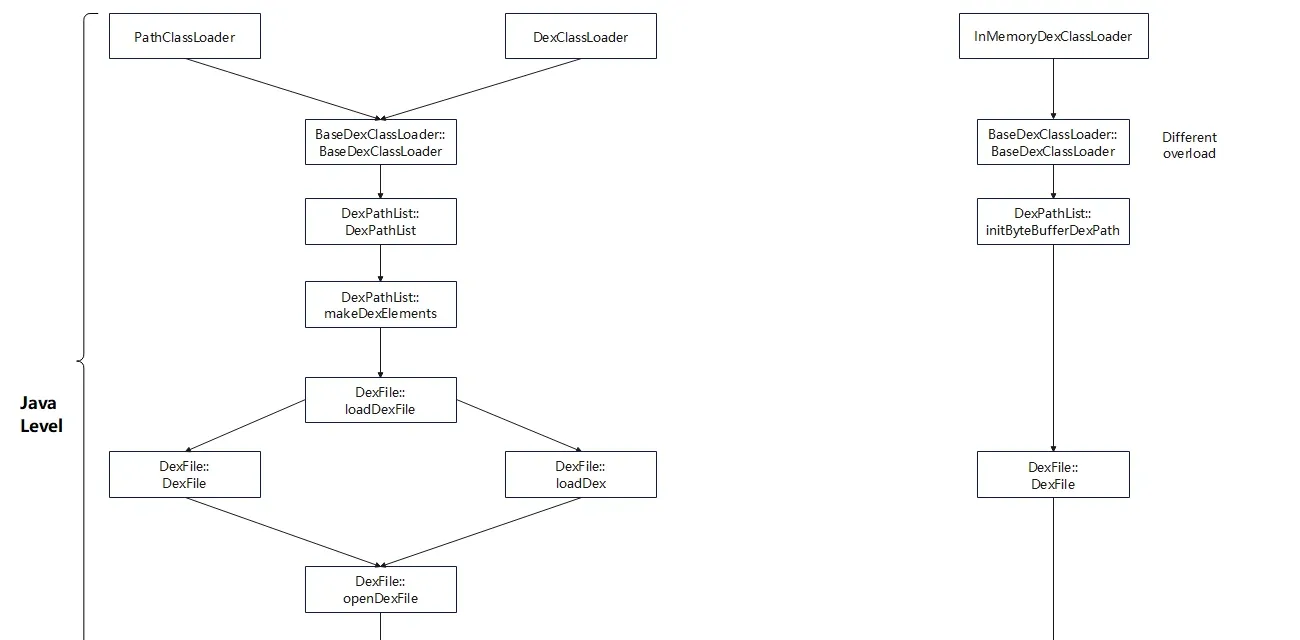
-
Native layer. The
PathClassLoader/DexClassLoaderchain calls different overloads ofArtDexFileLoader::Open, orOpenOneDexFileFromZip, depending on the situation.InMemoryDexClassLoadercalls the third overload ofArtDexFileLoader::Open. Regardless of which function is called, they all ultimately reachArtDexFileLoader::OpenCommon.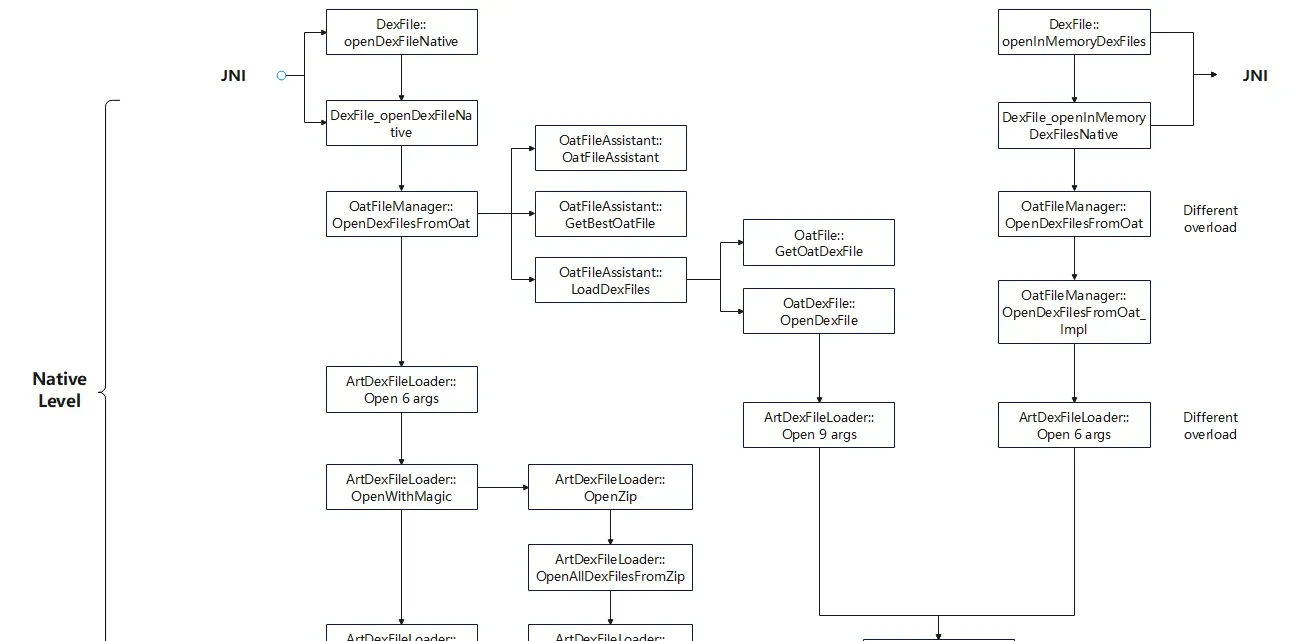
After the above flow reaches
ArtDexFileLoader::OpenCommon, and after dex initialization and verification, theDexFileobject is created: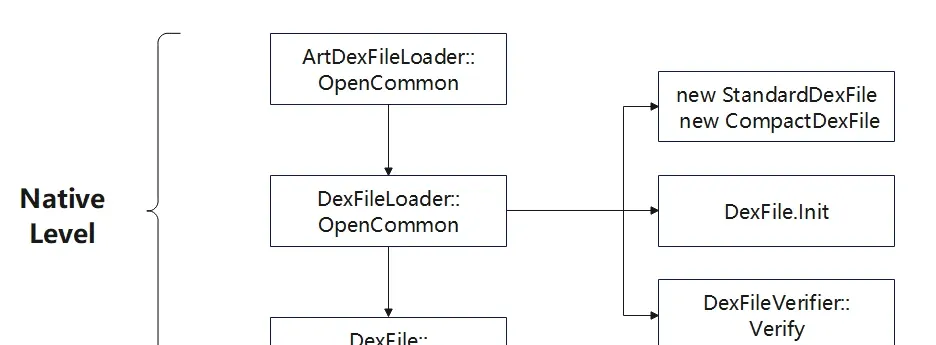
Once the DexFile object is created, the class’s corresponding file is loaded into the ART VM.
A brief look at how ClassLoader loads a class
We already saw the parent-delegation model via ClassLoader.loadClass. But how does a class actually get loaded into the JVM?
First, when the three BaseDexClassLoader-derived loaders call their own loadClass, they delegate upward, and it returns when it reaches ClassLoader.loadClass. BaseDexClassLoader.findClass calls DexPathList.findClass, which calls Element.findClass, and finally DexFile.loadClassBinaryName to enter DexFile. The flow:
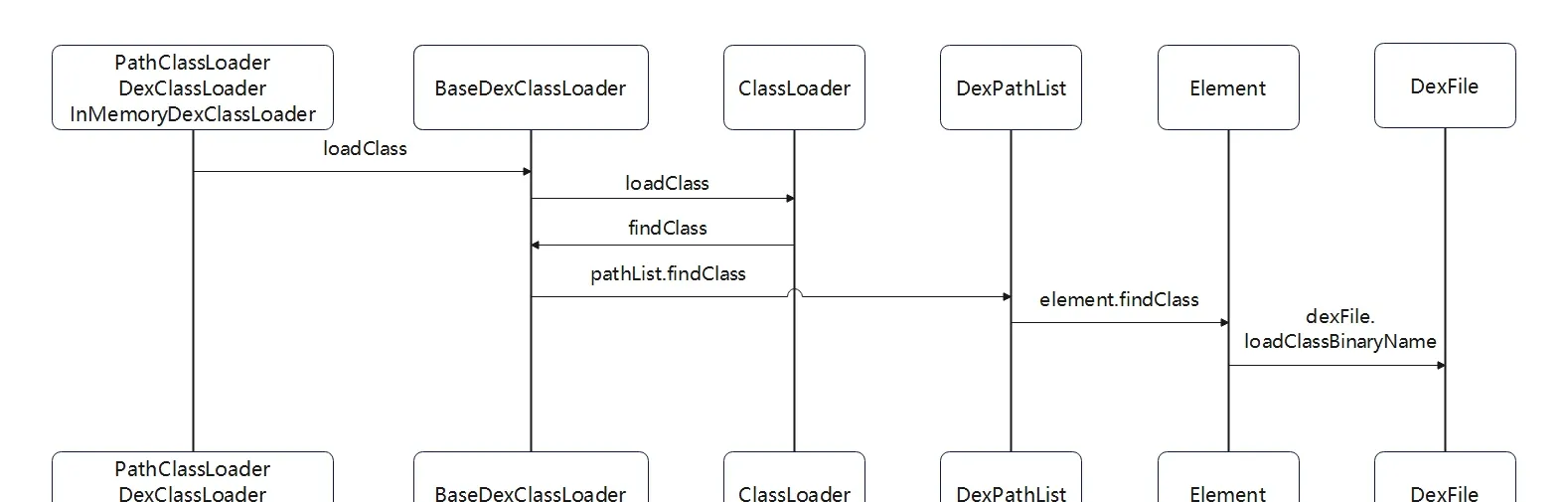
Inside DexFile, the main operations are:
DexFile— enters the native layer through the JNI functiondefineClassNative.DexFile_defineClassNative— enumerates allDexClassDefstructures of theDexFileviaFindClassDef, and usesClassLinker::DefineClassto create the correspondingClassobject. Then callsClassLinker::InsertDexFileInToClassLoaderto add theDexFileobject to the ClassLoader’sClassTable.ClassLinker::DefineClass— callsLoadFieldto load the class’s fields, thenLoadMethodto load methods, thenLinkCodeto link method code.
The flow:
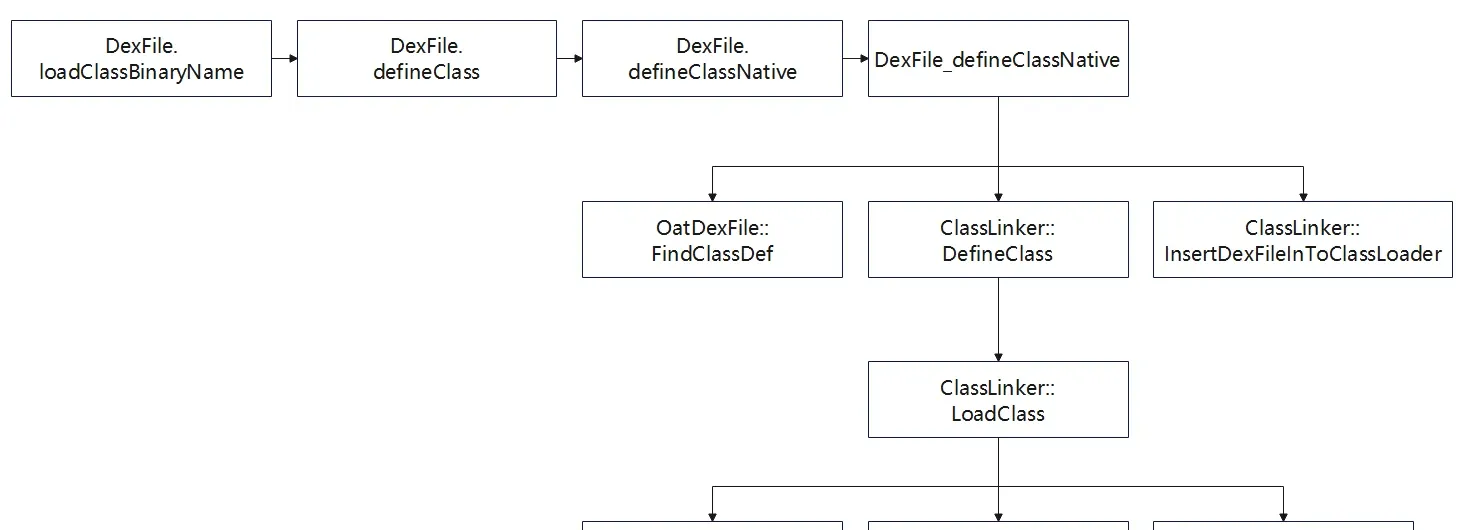
In summary, the ClassLoader ultimately creates the Class object via ClassLinker::DefineClass, and completes the loading of fields and methods and the linking of code.
There’s one core function in this chain — ClassLinker::LoadMethod. Through it you can get the method bytecode’s offset in the DexFile (code_off), which is one of the cores of instruction refill.
LoadDexDemo
Reference: dynamic loading examples.
Example file: attachments\LoadDexDemo.
As established, Android lets you load a dex file with a ClassLoader and call the methods of the classes it holds.
Create an empty project, write a test class that prints info, compile it, extract the APK and the dex file containing the class, and push them to the phone’s /tmp directory:
package com.example.emptydemo;
import android.util.Log;
public class TestClass{
    public void print(){
        Log.d("glass","com.example.emptydemo.print is called!");
    }
}
Create another project that loads the APK and the extracted dex via DexClassLoader, then reflectively calls print:
- Create private directories for the
DexClassLoader— the odex and lib directories. - Create the
DexClassLoader. - Load the target class.
- Reflectively load and call the class’s method.
package com.example.testdemo;

import android.content.Context;
import android.os.Bundle;

import androidx.appcompat.app.AppCompatActivity;

import java.io.File;
import java.lang.reflect.InvocationTargetException;
import java.lang.reflect.Method;

import dalvik.system.DexClassLoader;


public class MainActivity extends AppCompatActivity {

    @Override
    protected void onCreate(Bundle savedInstanceState) {
        super.onCreate(savedInstanceState);
        setContentView(R.layout.activity_main);
        Context appContext = getApplicationContext();
        //com.example.emptydemo
        loadDexClassAndExecuteMethod(appContext, "/data/local/tmp/classes3.dex"); // load the dex file directly
        loadDexClassAndExecuteMethod(appContext, "/data/local/tmp/EmptyDemo.apk"); // load the apk; it's still loading dex underneath
    }
    public void loadDexClassAndExecuteMethod(Context context, String strDexFilePath) {
        //1. Create the private optimization directories app_opt_dex and app_lib_dex for the ClassLoader
        File optFile = context.getDir("opt_dex", 0);// /data/user/0/com.example.testdemo/app_opt_dex
        File libFile = context.getDir("lib_dex", 0);// /data/user/0/com.example.testdemo/app_lib_dex


        //2. Create the ClassLoader to load the dex, specifying in order: dex path, odex dir, lib dir, parent loader
        DexClassLoader dexClassLoader = new DexClassLoader(
                strDexFilePath,
                optFile.getAbsolutePath(),
                libFile.getAbsolutePath(),
                MainActivity.class.getClassLoader());
        Class<?> clazz = null;
        try {
            //3. Load the target class of the dex via the DexClassLoader
            clazz = dexClassLoader.loadClass("com.example.emptydemo.TestClass");

            if (clazz != null) {
                try {
                    //3. Reflectively get and call the class's method
                    Object obj = clazz.newInstance();
                    Method method = clazz.getDeclaredMethod("print");
                    method.invoke(obj);
                } catch (InvocationTargetException e) {
                    e.printStackTrace();
                } catch (NoSuchMethodException e) {
                    e.printStackTrace();
                } catch (IllegalAccessException e) {
                    e.printStackTrace();
                } catch (InstantiationException e) {
                    e.printStackTrace();
                }
            }
        } catch (ClassNotFoundException e) {
            e.printStackTrace();
        }
    }
}
Result:
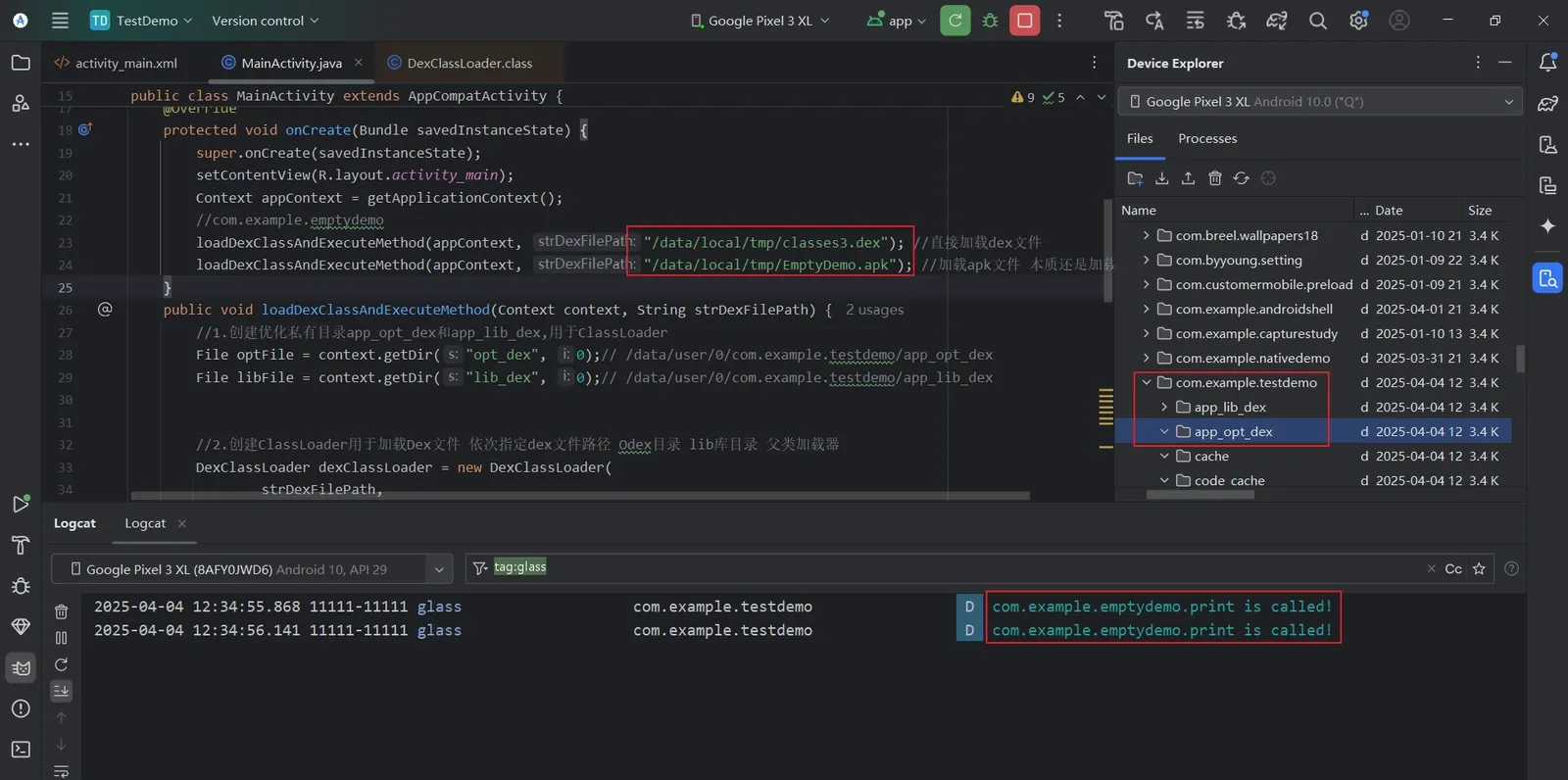
The DexClassLoader constructor:
/*
	param 1: String dexPath — the dex file path
	param 2: String optimizedDirectory — the optimized dex (odex) directory.
	The dex file from param 1 never appears in memory in Android; it's optimized first, then run, producing a .odex file.
	param 3: String librarySearchPath — the lib search path
	param 4: ClassLoader parent — the parent class loader
*/
public class DexClassLoader extends BaseDexClassLoader {
    public DexClassLoader(String dexPath, String optimizedDirectory, String librarySearchPath, ClassLoader parent) {
        super((String)null, (File)null, (String)null, (ClassLoader)null);
        throw new RuntimeException("Stub!");
    }
}
4. The Android Application Startup Flow
The Android app startup flow is the core of understanding how a shell app loads a protected app. You have to understand this mechanism before the shell’s working principle makes sense.
Android app startup involves four processes: the Zygote process, the Launcher process, the process where AMS lives (the SystemServer process), and the application process.
The overall flow:
- After you tap the desktop app icon, the Launcher process uses Binder IPC to send a
startActivityrequest to AMS in the SystemServer process, asking to create the root Activity. - After AMS receives the Launcher’s request, it checks whether the application process exists; if not, it uses Socket communication and calls
zygoteSendArgsAndGetResultto ask Zygote to create the application process. - After the Zygote process receives AMS’s Socket request, it creates the application process via
forkAndSpecialize, then performs initialization. - After the application process starts, AMS uses the
ApplicationThreadproxy to do Binder IPC with the application process’sApplicationThread, sending ascheduleLaunchActivityrequest. - The application process’s Binder thread
ApplicationThreadreceives the request and uses Handler communication with the main threadActivityThreadviasendMessage, sending aLAUNCH_ACTIVITYmessage. - The main thread
ActivityThreadreceives the message and callshandleLaunchActivity, creating the Activity instance by reflection and then callingActivity.onCreate.
After Activity.onCreate is called, the app enters its lifecycle, and the app has successfully started.
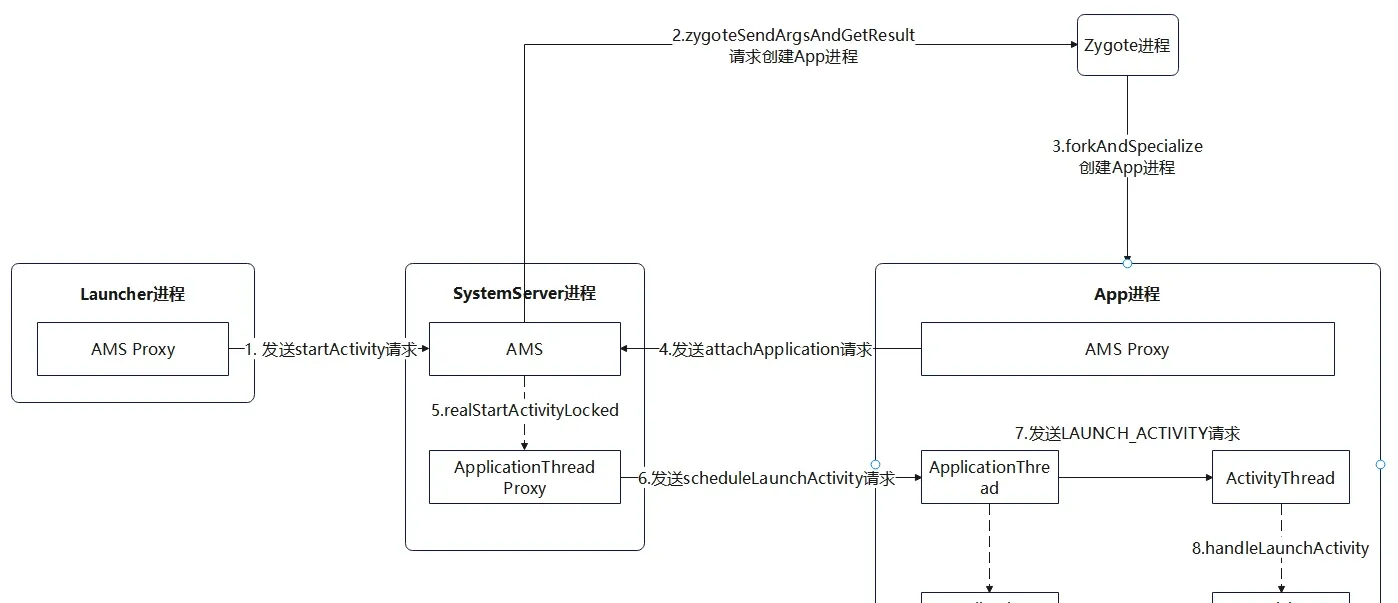
The core of the above flow can be summarized into three parts, which the rest of this article expands on:
- Creating the application process.
- Creating the Application.
- Starting the root Activity.
Creating the application process, in brief
To start an Android app, the application process it needs must exist. After tapping the app icon, Launcher.onClick is triggered, and after a chain of calls, ActivityStackSupervisor.startSpecificActivityLocked checks whether the application process exists. If it doesn’t, it calls startProcessLocked on the AMS proxy ActivityManagerProxy to ask AMS to create the process; AMS then sends the request to Zygote.
This process splits into two parts:
- AMS sends the app-process-start request to Zygote.
- Zygote receives AMS’s request and creates the application process.
The flow of AMS sending the request: Launcher requests AMS, AMS requests Zygote, entering Zygote through ZygoteInit.main:
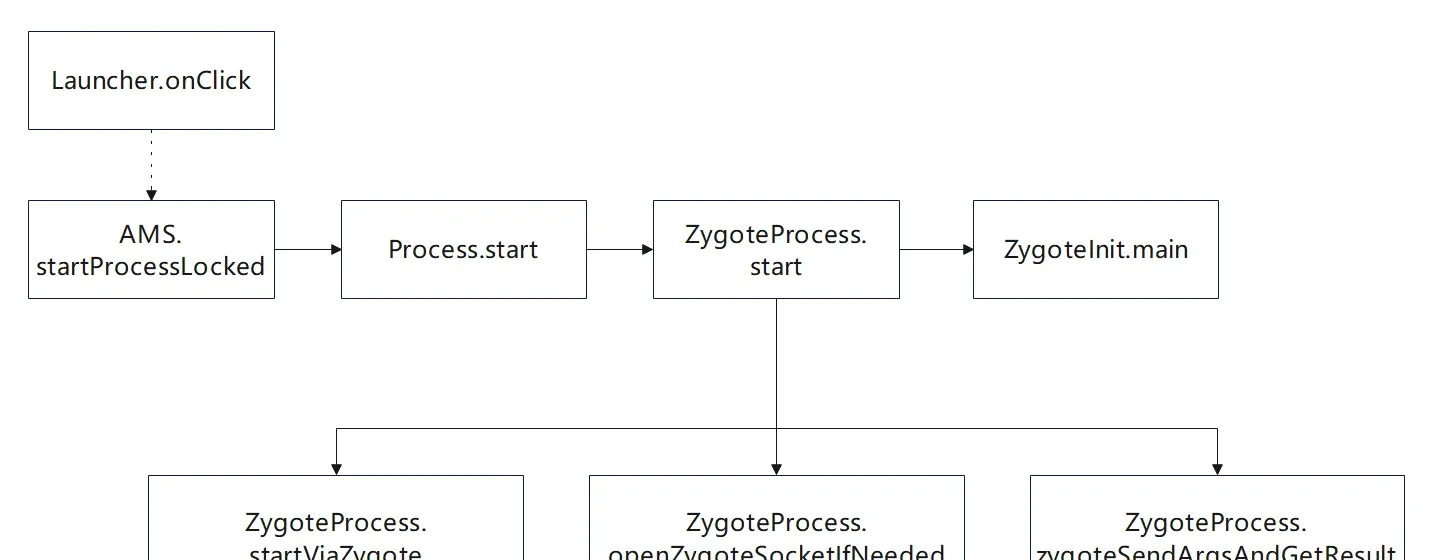
The flow of Zygote receiving the request and creating the process:
- After a series of steps it enters
ZygoteConnection.handleChildProc, which configures the child process’s initial environment and callsZygoteInit.zygoteInitto initialize the application process. ZygoteInit.zygoteInitcallsZygoteInit.nativeZygoteInit, which starts the application process’s Binder thread pool so the process can do Binder IPC, then callsRuntimeInit.applicationInit.RuntimeInitcallsinvokeStaticMainand throws aZygote.MethodAndArgsCallerexception; after exception handling clears the stack frames from the setup phase, it calls themainmethod of the main-thread manager classActivityThread. At this point, the application process is created.
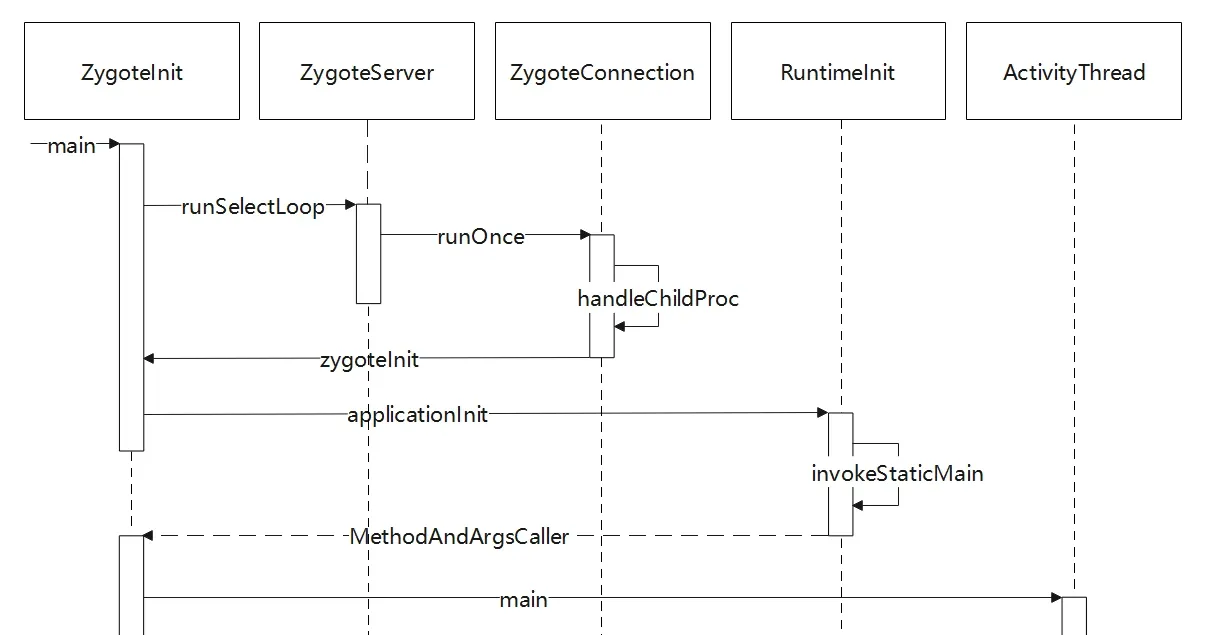
Creating the Application, in brief
After ActivityThread.main does some initialization, it creates and starts the main-thread message-loop manager Looper for message handling, and calls attach to notify AMS to attach its own ApplicationThread class. AMS sends a BIND_APPLICATION message to the app’s message queue through the IApplicationThread proxy. The main-thread manager ActivityThread.handleMessage then handles the message and calls handleBindApplication to create and bind the Application, doing four steps:
ActivityThread.getPackageInfoNoCheck— creates theLoadedApkobject, setsApplicationInfoandClassLoader, and adds it tomPackages. This object is the manager of the app’s APK package.ContextImpl.createAppContext— creates the app’s context environment (Context).LoadedApk.makeApplication— creates the Application and callsApplication.attachBaseContext.Instrumentation.callApplicationOnCreate— callsApplication.onCreate.
At this point the Application is created. The flow:
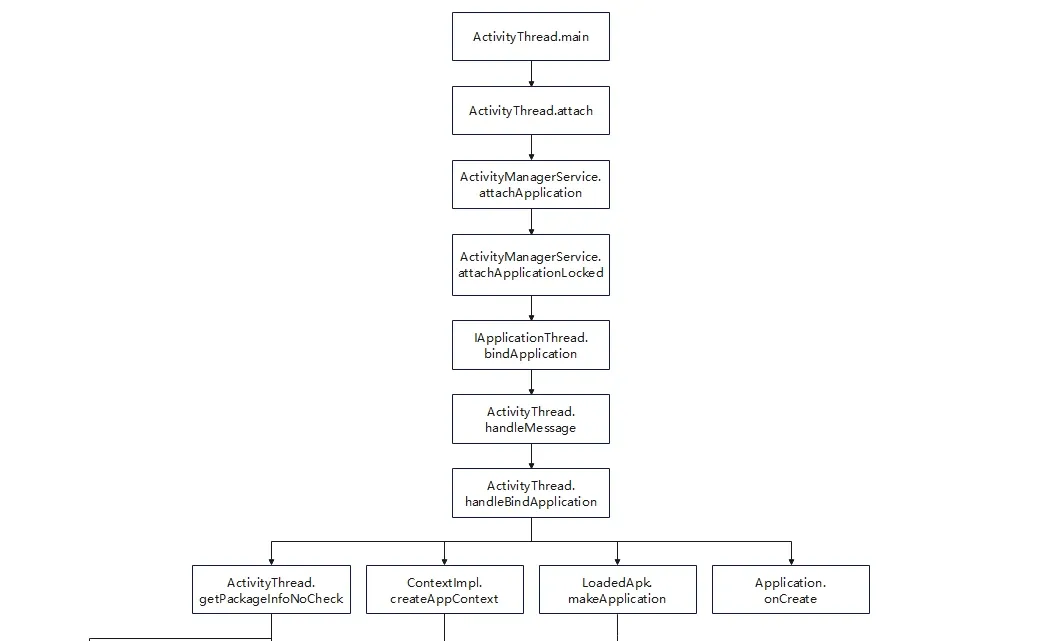
Starting the root Activity, in brief
After the above steps, the application process and its Application exist. Back in the Launcher→AMS flow, ActivityStackSupervisor.startSpecificActivityLocked calls ActivityStackSupervisor.realStartActivityLocked, which calls ApplicationThread.scheduleLaunchActivity to tell the app to launch the Activity. ApplicationThread sends an H.LAUNCH_ACTIVITY message to class H (the main thread’s message manager) via sendMessage. After H.handleMessage receives it, it calls ActivityThread.handleLaunchActivity, handing control to ActivityThread.
handleLaunchActivity calls performLaunchActivity, which launches the Activity:
-
Get the Activity info class
ActivityInfo. -
Get the APK description class
LoadedApk. -
Create the Activity’s context environment.
-
Get the Activity’s fully-qualified class name and create the Activity instance via the ClassLoader.
-
Call
LoadedApk.makeApplication.This step needs explanation.
Applicationis Android’s app-description class; each app has exactly one global singletonApplication. WhenmakeApplicationis called here, sinceActivityThread.mainalready created the Application, it returns the already-created Application.performLaunchActivityis used to start any Activity — the root Activity uses the Application created byActivityThread.main, but other Activities might run in a child process, so this call mainly handles ordinary Activities. -
Call
Activity.attachto initialize the Activity. -
Call
Instrumentation.callActivityOnCreateto start the Activity.
The flow:
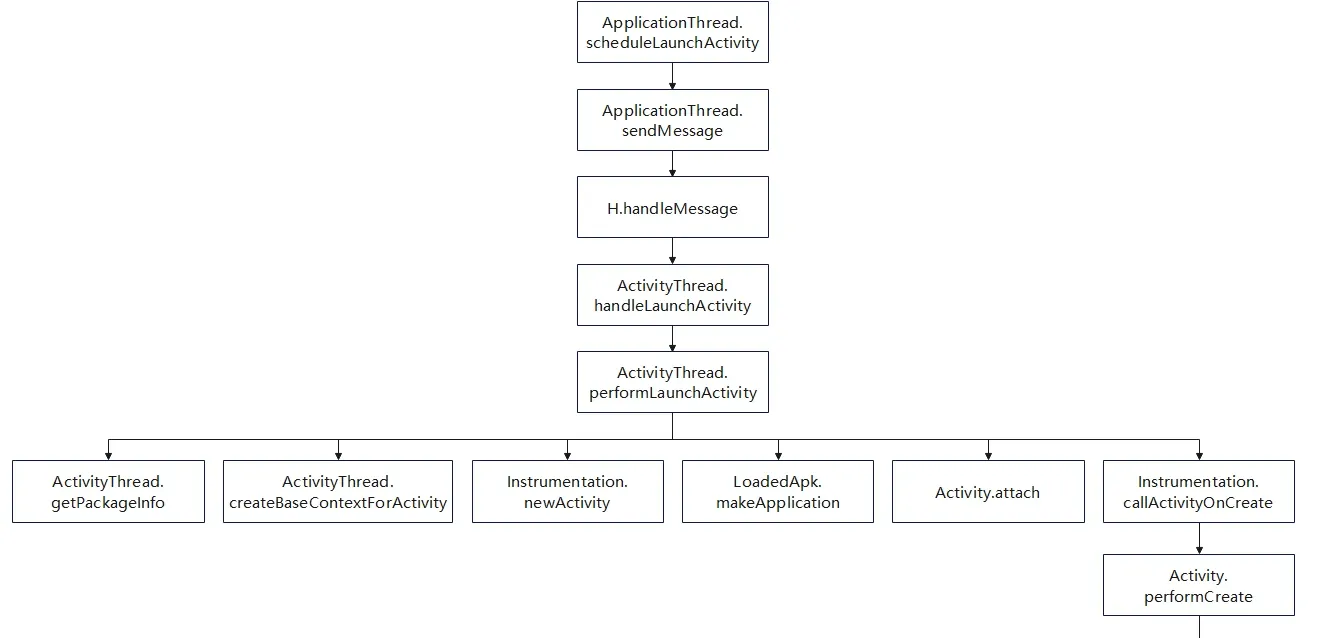
After the above steps, the Android app officially starts (root Activity started). The classes most worth attention are ActivityThread, Application, and LoadedApk.
ActivityThreadis the main-thread manager of the Android app process. It holds a lot of key information, and through it you can reflectively obtain the app process’sApplicationandLoadedApk.Applicationdescribes the current app. During startup, theApplicationinstance is created first — before the app starts and before any Activity or Service. Its lifecycle is the longest in the app, equal to the app’s own lifecycle. When developing, you can extend this class and overrideattachBaseContextandonCreateto initialize resources. If the protected app doesn’t specify a customApplication, use the system default; if it does, the unpacking code must replace it.LoadedApkdescribes the APK file of the current app. ItsmClassLoaderfield holds the APK’s class loader, andmApplicationholds the current Application.
5. Dex File Structure and Code Extraction
I won’t expand on dex structure and parsers here for space — see my separate article on the ReadDex parser implementation. Building on the parsing functionality, I added code extraction, supporting extraction of all method code from a specified dex file, and outputting a .patched file (with the original instructions zeroed out) and a .codes file (the bytecode).
The principle:
- The
DexClassDefstructure defines aClassobject in the ART VM; itsclassDataOfffield points to aDexClassDatastructure. - The
DexClassDatastructure holds the class’s data. Field and method data is held by four sequentially-arranged field and method arrays; theDexClassDataHeaderstructure’s header holds the sizes of the four arrays. Notably, members ofDexClassDataother than the header aren’t necessarily valid — only when the header specifies a non-zero size for the corresponding array is that array valid. DexMethod.codeOffpoints to theDexCodestructure, which is the key structure for code extraction. ItsinsnsSizeandinsnsfields hold the number of instruction words and the instruction array, respectively.
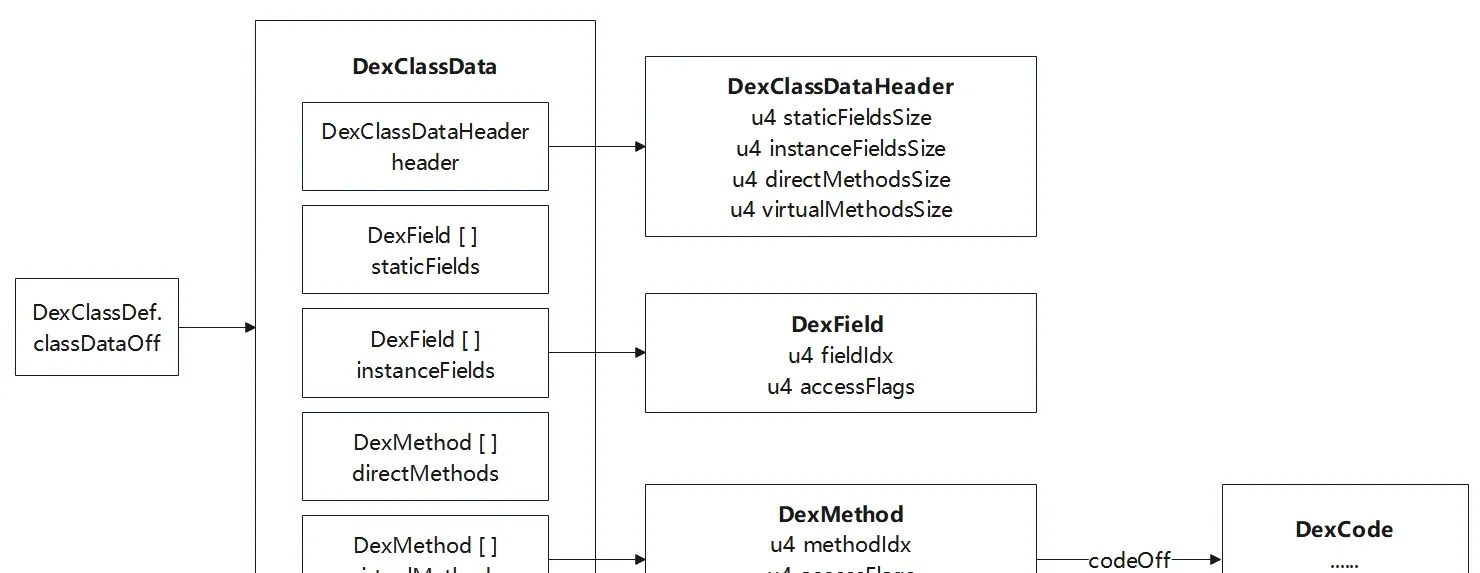
The code-extraction steps:
- Enumerate all
DexClassDefs; access the correspondingDexClassDatastructure viaclassDataOff. - For each
DexClassData, parse the header to determine the sizes ofDexFieldandDexMethod; skip theDexFieldarray, then parse theDexMethodarray. - For each
DexMethod, access theDexCode’sinsnsSizeandinsnsvia itscodeOff, perform code extraction, and set the originalinsnsto the empty instruction NOP (bytecode0x0000).
The key functions in the ReadDex project:
extractAllClassDefCodes— extracts the code of everyDexClassDef. It enumerates allDexClassDefs, filters system classes, and parses the correspondingDexClassDatato extract code.extractClassDataCodes— extracts the code of a singleDexClassData. It first reads (viareadAndGetSizeUleb128) theDexClassDataHeader’sstaticFieldsSize,instanceFieldsSize,directMethodsSize, andvirtualMethodsSize. Then it computes the length of theDexFieldarray to get an offset, and finally accesses theDexMethodarray to extract code.extractDexMethodArrayCodes— extracts the code of aDexMethodstructure array. It enumerates theDexMethodarray; for eachDexMethod, it gets a reference to theDexCodevia the DexFile base address pluscodeOff, then extracts the instruction bytecode from theinsnsarray according toinsnsSize. Each extractedDexCodeis saved as aCodeItemand written to the file. The customCodeItemstructure is used later to parse the.codesfile during instruction refill.
A diagram of a dex file after code extraction:
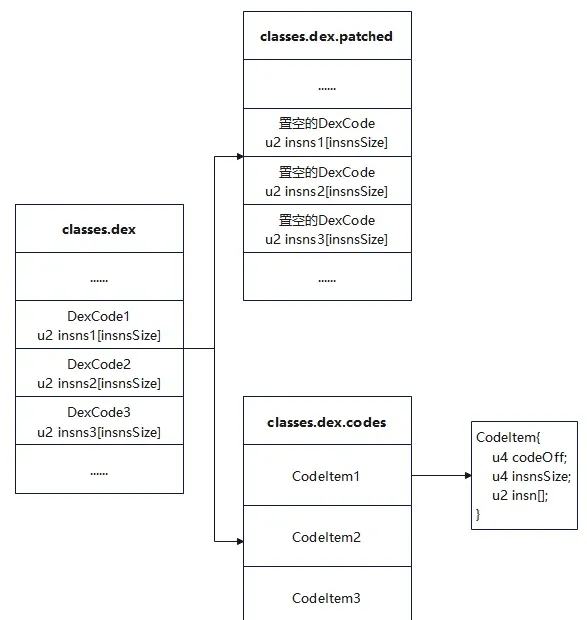
See the ReadDex project for details. It’s compiled to ReadDex.exe for the packing scripts to call; -file specifies the dex path and -extractAllCodes extracts all code.
6. Generation 1 — Whole-APK Packing (Landed Loading)
Generation-1 packing is the foundation of all Android packing. Understanding its basic idea helps you see how later hardening techniques evolved from it.
Principle
Three objects are involved:
- The source APK to be protected.
- The (un)shell APK, responsible for loading, decrypting, and executing the protected source app.
- The packer, responsible for parsing the source app, using the shell app to protect it, and merging the shell and source into a new program.

The packer:
- Unpacks the shell and source apps to get the shell dex, the source app’s
AndroidManifest.xml, resource files, etc. - Copies the unpacked source-app files to the new APK temp directory (ignoring some files).
- Processes the source
AndroidManifest.xmland writes it to the new APK temp directory: checks whether the<application>tag’snameattribute specifies a customApplication; if so, adds a<meta-data>tag to save the originalApplication; whether or not one exists, setsnameto the shell’sApplication. - Merges the shell dex and the source APK, writes to the new APK temp directory.
- Repackages the new APK.
- Signs the new APK.
- Deletes the temp directory.
The packed shell-dex file looks like this:
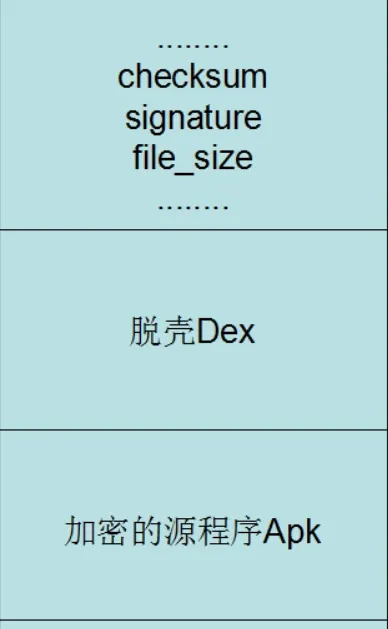
The final new APK contains:
- The modified
AndroidManifest.xml. - A
classes.dexmerged from the shell dex and the source APK. - All the source APK’s other resource files (lib, assets, resources, etc.).
The (un)shell:
- Appends all the source app’s dex files to the end of the shell dex.
- In the shell
Application’sattachBaseContext, releases all the source dex files and replacesmClassLoader. - In the shell
Application’sonCreate, registers the sourceApplicationand starts its lifecycle.
The source app
The source app is an ordinary user app. Our main goal is to protect it, so we care about the technical points it may involve:
- Custom
Application.Application.attachBaseContextis the real entry point of the app process. If the source app has no customApplication, the shellApplicationcan be reused directly. If it has one, it’s necessarily declared inAndroidManifest.xmlvia the**<application android:name="">**tag; we can replace that attribute with the shellApplicationand add a<meta-data>tag to save the sourceApplication. - Native. When the source app is built with NDK, it produces a
libfolder with.sofiles that need handling — mainly creating the lib release folder and providing it to the newClassLoader.
The source app mainly includes these files:
MainActivity.javaMyApplication.javanative-lib.cppAndroidManifest.xmlactivity_main.xml
Note: disable Multidex support to guarantee only one dex file is produced.
MainActivity.java
Main functionality:
- A Java-layer
TextViewcomponent. - JNI function calls in the native layer.
Notes:
MainActivityextendsActivityrather thanAppCompatActivity— this makes resource handling easier.- It uses native functions, so the lib files must be handled.
- Disable MultiDex support to produce a single dex file for easier processing.
package com.example.nativedemo;

import android.app.Activity;
import android.os.Bundle;
import android.util.Log;
import android.widget.TextView;

public class MainActivity extends Activity {

    static {
        System.loadLibrary("nativedemo");
    }
    public native String stringFromJNI();
    public native int add(int x,int y);
    public native int sub(int x,int y);

    @Override
    protected void onCreate(Bundle savedInstanceState) {
        super.onCreate(savedInstanceState);
        setContentView(R.layout.activity_main);
        // Example of a call to a native method
        TextView tv = findViewById(R.id.sample_text) ;
        String result=stringFromJNI()+" add(111,222)="+add(111,222)+" sub(999,333)="+sub(999,333);
        tv.setText(result);
        Log.d("glass","Run source MainActivity.onCreate "+this);
    }
}
MyApplication.java
Main functionality: log output to help trace the execution flow.
Notes:
- Execution order is
Application.attachBaseContext->Application.onCreate->MainActivity.onCreate. - This class mainly simulates the case where a custom
Applicationexists. If the source app has no customApplication, the default one is used; otherwise we parse, create, and replace the sourceApplication.
package com.example.nativedemo;

import android.app.Application;
import android.content.Context;
import android.util.Log;

public class MyApplication extends Application {

    @Override
    protected void attachBaseContext(Context base) {
        super.attachBaseContext(base);
        Log.d("glass", "Run source MyApplication.attachBaseContext "+this);
    }
    @Override
    public void onCreate() {
        super.onCreate();
        Log.d("glass", "Run source MyApplication.onCreate "+this);
    }
}
native-lib.cpp
Defines the statically registered stringFromJNI and the dynamically registered add/sub.
#include <jni.h>
#include <string>

// Statically registered
extern "C" JNIEXPORT jstring JNICALL
Java_com_example_nativedemo_MainActivity_stringFromJNI(
        JNIEnv* env,
        jobject /* this */) {
    std::string hello = "Hello from C++";
    return env->NewStringUTF(hello.c_str());
}

// The Java class the native functions belong to
static const char *ClassName="com/example/nativedemo/MainActivity";

jint add(JNIEnv* env,jobject obj,jint x,jint y){
    return x+y;
}
jint sub(JNIEnv* env,jobject obj,jint x,jint y){
    return x-y;
}

// Define the native-method array to build the mapping.
// The JNINativeMethod struct members are: function name, signature, function pointer
static JNINativeMethod methods[]={
        {"add","(II)I",(void*)add},
        {"sub","(II)I",(void*)sub}
};

// Write the load/registration method
jint JNI_OnLoad(JavaVM* vm,void* reserved){
    JNIEnv* env=nullptr;// get the JNIEnv object
    if(vm->GetEnv((void**)&env,JNI_VERSION_1_6)!=JNI_OK)
        return -1;
    // get the Class object of the Java class the methods belong to
    jclass clazz=env->FindClass(ClassName);
    // call RegisterNatives to register the methods
    if(clazz){
        env->RegisterNatives(clazz,methods,sizeof(methods)/sizeof(methods[0]));
        return JNI_VERSION_1_6;// note: must return the JNI version
    }
    else
        return -1;
}
AndroidManifest.xml
Main functionality:
- Declares the root Activity as
MainActivity. - Declares
android:nameasMyApplication.
<?xml version="1.0" encoding="utf-8"?>
<manifest xmlns:android="http://schemas.android.com/apk/res/android"
    xmlns:tools="http://schemas.android.com/tools">

    <application
        android:allowBackup="true"
        android:dataExtractionRules="@xml/data_extraction_rules"
        android:fullBackupContent="@xml/backup_rules"
        android:icon="@mipmap/ic_launcher"
        android:label="@string/app_name"
        android:roundIcon="@mipmap/ic_launcher_round"
        android:supportsRtl="true"
        android:theme="@style/Theme.NativeDemo"
        tools:targetApi="29"
        android:name=".MyApplication"
        >
        <activity
            android:name=".MainActivity"
            android:exported="true">
            <intent-filter>
                <action android:name="android.intent.action.MAIN" />
                <category android:name="android.intent.category.LAUNCHER" />
            </intent-filter>
        </activity>
    </application>
</manifest>
activity_main.xml
A LinearLayout.
<?xml version="1.0" encoding="utf-8"?>
<LinearLayout xmlns:android="http://schemas.android.com/apk/res/android"
    xmlns:app="http://schemas.android.com/apk/res-auto"
    xmlns:tools="http://schemas.android.com/tools"
    android:layout_width="match_parent"
    android:layout_height="match_parent"
    android:gravity="center"
    tools:context="com.example.nativedemo.MainActivity"
    >

    <TextView
        android:id="@+id/sample_text"
        android:layout_width="wrap_content"
        android:layout_height="wrap_content"
        android:text="Hello World!"
        android:textAlignment="center"
        />

</LinearLayout>
The packer
The packer mainly does this:
- Unpacks the shell and source apps to get the shell dex and the source app’s
AndroidManifest.xmland resource files. - Copies the unpacked source-app files to the new APK temp directory (ignoring some files).
- Processes the source
AndroidManifest.xmland writes it to the new APK temp directory: checks whether the<application>tag’snameattribute specifies a customApplication; if so, adds a<meta-data>tag to save the originalApplication; whether or not one exists, setsnameto the shell’sApplication. - Merges the shell dex and the source APK, writes to the new APK temp directory.
- Repackages the new APK.
- Signs the new APK.
- Deletes the temp directory.
FirstShell.py:
- Encapsulates a
Pathsclass that holds the global paths — mainly APK paths and temp directories. - Encapsulates an
Apktoolclass that provides APK unpack/pack via apktool and signing via uber-apk-signer. - Encapsulates a
ManifestEditorclass that providesAndroidManifestparsing — getting and modifying tag attributes and adding new tags. combineShellDexAndSrcApk— merges the shell dex and source APK: encrypts the source APK and appends it after the shell dex, plus a 4-byte marker holding the APK size. New dex = shell dex + encrypted source APK + source APK size.handleManifest— extracts the source and shell manifests, uses the source manifest as the baseline; decides whether to add a<meta-data>tag based on whether the source app declares a customApplication; finally changesapplication:nameto the shellApplication.start— the full processing function.
from zlib import adler32
from hashlib import sha1
from binascii import unhexlify
from lxml import etree
import subprocess
import shutil
from pathlib import Path
import argparse
# Path class, holds the global paths used throughout
class Paths:
    def __init__(self, srcApk:Path, shellApk:Path, outputApk:Path):
        # Apk file paths
        self.srcApkPath= srcApk.resolve() # resolve to absolute path
        self.shellApkPath= shellApk.resolve()
        self.newApkPath= outputApk.resolve()

        # Temp directories default python file path
        self.tmpdir= Path(__file__).parent/'temp'
        self.srcApkTempDir=  self.tmpdir/ 'srcApkTemp'
        self.shellApkTempDir= self.tmpdir/'shellApkTemp'
        self.newApkTempDir= self.tmpdir/ 'newApkTemp'


# Apktool class, provides unpack, pack, and sign functionality
class Apktool:
    def __init__(self):
        self.apktool_path= Path(__file__).parent/'tools/apktool/apktool.bat'
        self.signer_path=Path(__file__).parent/'tools/uber-apk-signer-1.3.0.jar'

    def signApk(self,unsignedApkPath:Path):
        self.runCommand(['java','-jar', self.signer_path, '--apk',unsignedApkPath])

    # use apktool to unpack the apk, resources only (no dex)
    def extractApk(self,apkPath:Path, outputDir:Path):
        self.runCommand([self.apktool_path, '-s', 'd' , apkPath, '-o', outputDir])

    # repack the apk
    def repackApk(self,inputDir:Path, outApk:Path):
        self.runCommand([self.apktool_path, 'b' , inputDir, '-o', outApk])

    def runCommand(self,args):
        subprocess.run(args,stdout=subprocess.DEVNULL) # only invoke the tool; no output needed, redirect stdout to os.devnull
        # argument list, capture output, convert output to string
        #print(subprocess.run(args,  capture_output=True,text=True).stdout)

# AndroidManifest.xml editor, used to get/modify tag attributes and add tags
class ManifestEditor:
    def __init__(self, xml_content: bytes):
        self.ns = {'android': 'http://schemas.android.com/apk/res/android'}
        self.tree = etree.fromstring(xml_content)

    # get the android attribute value of a tag, examples: get_attr('application', 'name') get_attr('activity', 'name')
    def getTagAttribute(self, tag_name: str, attr_name: str):
        if tag_name == 'manifest':  # root tag is handled specially
            elem = self.tree
            if elem is not None:
                return elem.get(f'{attr_name}')  # find the tag's attribute
        else:
            elem = self.tree.find(f'.//{tag_name}', namespaces=self.ns)
            if elem is not None:
                return elem.get(f'{{{self.ns["android"]}}}{attr_name}')  # attributes outside the root tag are under the android namespace
        return None

    # set a tag's attribute value, example: set_attr('application','name',"com.example.ProxyApplication")
    def setTagAttribute(self, tag_name: str, attr_name: str, new_value: str):
        if tag_name == 'manifest':  # root tag is handled specially
            elem = self.tree
            if elem is not None:
                return elem.set(f'{attr_name}', new_value)  # set the attribute value
        else:
            elem = self.tree.find(f'.//{tag_name}', namespaces=self.ns)
            if elem is not None:
                elem.set(f'{{{self.ns["android"]}}}{attr_name}', new_value)
                return True
        return False

    # add a new child tag under a parent tag, example: add_tag('application',"meta-data",{'name': 'android.permission.CAMERA','value':'hello'})
    def addTagWithAttributes(self, parent_tag: str, new_tag: str, attrs: dict):
        if parent_tag == 'manifest':
            parent = self.tree
            if parent is not None:
                new_elem = etree.SubElement(parent, new_tag)
                for k, v in attrs.items():  # support setting multiple attributes on the added tag at once
                    new_elem.set(f'{k}', v)
                return True
        else:
            parent = self.tree.find(f'.//{parent_tag}', namespaces=self.ns)
            if parent is not None:
                new_elem = etree.SubElement(parent, new_tag)
                for k, v in attrs.items():
                    new_elem.set(f'{{{self.ns["android"]}}}{k}', v)
                return True
        return False

    # Not needed unless we operate relative to the shell manifest; when using the source apk's manifest as baseline it comes built-in, no extra setting needed
    def getMainActivity(self):
        activities = self.tree.findall('.//activity', namespaces=self.ns)
        for activity in activities:
            intent_filters = activity.findall('.//intent-filter', namespaces=self.ns)
            for intent_filter in intent_filters:
                action = intent_filter.find('.//action[@android:name="android.intent.action.MAIN"]', namespaces=self.ns)
                category = intent_filter.find('.//category[@android:name="android.intent.category.LAUNCHER"]',
                                              namespaces=self.ns)
                if action is not None and category is not None:
                    return activity.get(f'{{{self.ns["android"]}}}name')
        return None

    def getApplication(self):
        return self.getTagAttribute('application', 'name')

    def setApplication(self, application: str):
        self.setTagAttribute('application', 'name', application)

    def addMetaData(self, name: str, value: str):
        self.addTagWithAttributes('application', 'meta-data', {'name': name, 'value': value})

    def getManifestData(self):
        """Return the XML string"""
        return etree.tostring(self.tree, pretty_print=True, encoding='utf-8', xml_declaration=True).decode()

# Merge the shell dex and the source apk
def combineShellDexAndSrcApk(sourceApkPath:Path, shellApkTempDir:Path, newApkTempDir:Path):
    def fixCheckSum(dexBytesArray):
        # dexfile[8:12]
        # little-endian
        value = adler32(bytes(dexBytesArray[12:]))
        valueArray = bytearray(value.to_bytes(4, 'little'))
        for i in range(len(valueArray)):
            dexBytesArray[8 + i] = valueArray[i]

    def fixSignature(dexBytesArray):
        # dexfile[12:32]
        sha_1 = sha1()
        sha_1.update(bytes(dexBytesArray[32:]))
        value = sha_1.hexdigest()
        valueArray = bytearray(unhexlify(value))
        for i in range(len(valueArray)):
            dexBytesArray[12 + i] = valueArray[i]

    def fixFileSize(dexBytesArray, fileSize):
        # dexfile[32:36]
        # little-endian
        fileSizeArray = bytearray(fileSize.to_bytes(4, "little"))
        for i in range(len(fileSizeArray)):
            dexBytesArray[32 + i] = fileSizeArray[i]

    def encrypto(file):
        for i in range(len(file)):
            file[i] ^= 0xff
        return file

    # get the source apk
    with open(sourceApkPath, 'rb') as f:
        SourceApkArray=bytearray(f.read())
    # get the shell dex
    with open(shellApkTempDir/'classes.dex', 'rb') as f:
        shellDexArray=bytearray(f.read())

    SourceApkLen = len(SourceApkArray)
    shellDexLen = len(shellDexArray)

    # new dex file length
    newDexLen = shellDexLen + SourceApkLen + 4
    # encrypt the source file
    enApkArray = encrypto(SourceApkArray)
    # new dex content = shell dex + encrypted source apk + 4-byte marker for the encrypted source apk size
    newDexArray = shellDexArray + enApkArray + bytearray(SourceApkLen.to_bytes(4, 'little'))

    # fix filesize
    fixFileSize(newDexArray, newDexLen)
    # fix signature
    fixSignature(newDexArray)
    # fix checksum
    fixCheckSum(newDexArray)
    # write the file out
    with open(newApkTempDir/'classes.dex', 'wb') as f:
        f.write(newDexArray)

# Extract the source apk's manifest, change application to the shell application (maybe add a meta-data tag), output the new manifest
def handleManifest( srcApkTempDir:Path,shellApkTempDir:Path,newApkTempDir:Path):
    # extract AndroidManifest.xml from the source apk
    with open(srcApkTempDir/'AndroidManifest.xml', 'r') as f:
        srcManifestEditor=ManifestEditor(f.read().encode())
    srcApplication=srcManifestEditor.getApplication()

    # extract AndroidManifest.xml from the shell apk
    with open(shellApkTempDir/'AndroidManifest.xml', 'r') as f:
        shellManifestEditor=ManifestEditor(f.read().encode())
    print('ShellApplication:',shellManifestEditor.getApplication())

    # change the source AndroidManifest.xml application to the shell's proxy application
    srcManifestEditor.setApplication(shellManifestEditor.getApplication())

    # write a meta-data tag to save the source apk's original application
    if srcApplication != None:
        print('Source application:',srcApplication)
        srcManifestEditor.addMetaData('APPLICATION_CLASS_NAME',srcApplication)

    # output the new AndroidManifest.xml
    with open(newApkTempDir/'AndroidManifest.xml', 'w') as f:
        f.write(srcManifestEditor.getManifestData())

def start(paths:Paths):
    apktool=Apktool()
    # 1. Unpack the source and shell files to temp directories
    print('Extracting source and shell apk...')
    apktool.extractApk(paths.srcApkPath,paths.srcApkTempDir)
    print('Extract source apk success!')

    print('Extracting shell apk...')
    apktool.extractApk(paths.shellApkPath,paths.shellApkTempDir)
    print('Extract shell apk success!')

    # 2. Copy all source apk files to the new apk temp directory
    print('Copying source apk files to new apk temp dir...')
    shutil.copytree(paths.srcApkTempDir,paths.newApkTempDir )
    print('Copy source apk files success!')

    # 3. Handle AndroidManifest.xml
    print('Handling AndroidManifest.xml...')
    handleManifest(paths.srcApkTempDir,paths.shellApkTempDir,paths.newApkTempDir)
    print('Handle AndroidManifest.xml success!')

    # 4. Merge the shell dex and source apk and write the file out
    print('Combining shell dex and source apk...')
    combineShellDexAndSrcApk(paths.srcApkPath,paths.shellApkTempDir,paths.newApkTempDir)
    print('Combine shell dex and source apk success!')

    # 5. Repack the apk
    print('Repacking apk...')
    apktool.repackApk(paths.newApkTempDir,paths.newApkPath)
    print('Repack apk success!')

    # 6. Sign the apk
    print('Signing apk...')
    apktool.signApk(paths.newApkPath)
    print('Resign apk success!')

    # 7. Delete the temp directories
    print('Deleting temp directories...')
    shutil.rmtree(paths.tmpdir) # delete the temp directory
    print('Delete temp directories success!')

def main():
    parser = argparse.ArgumentParser(description="Android APK Packer")
    parser.add_argument('-src','--src-apk', required=True, type=Path, help='Path to source APK file')
    parser.add_argument('-shell','--shell-apk', required=True, type=Path, help='Path to shell APK file')
    parser.add_argument('-o','-out','--output-apk',type=Path,help='Output path for packed APK (Default: ./out/<src-apk>_protected.apk)')
    args = parser.parse_args()
    if args.output_apk == None:
        args.output_apk = Path('./out')/(args.src_apk.stem+'_protected.apk') # default new apk name and output path
    paths = Paths(args.src_apk, args.shell_apk, args.output_apk)

    print('Source APK:', paths.srcApkPath)
    print('Shell APK:', paths.shellApkPath)
    print('Output APK:', paths.newApkPath)
    start(paths)


if __name__=="__main__":
    main()
The unshell
FirstProxyApplication.java
Note: disable Multidex support to guarantee only one dex file is produced.
attachBaseContext does the following:
- Creates private directories to hold the released dex, lib, and source APK.
- Calls
readDexFromApkto extract the shell dex from the shell APK into a byte array. - Calls
extractSrcApkFromShellDexto extract the source APK from the shell dex, unpacking lib files into the private lib directory. - Calls
replaceClassLoaderto replace the shell’sClassLoader. The newClassLoaderspecifies the source APK dex file, lib files, and odex path — i.e. the released source APK and source lib.
onCreate calls replaceApplication:
- Checks whether the manifest saved the source APK’s
Applicationvia a<meta-data>tag. If the source APK declares noApplication, use the default one (the shellApplication). - If the source APK declares a custom
Application, create the corresponding instance, replace the shellApplication, then callonCreate.
package com.example.androidshell;

import android.app.Application;
import android.app.Instrumentation;
import android.content.Context;
import android.content.pm.ApplicationInfo;
import android.content.pm.PackageManager;
import android.os.Bundle;
import android.util.ArrayMap;
import android.util.Log;

import java.io.BufferedInputStream;
import java.io.ByteArrayOutputStream;
import java.io.File;
import java.io.FileInputStream;
import java.io.FileOutputStream;
import java.io.IOException;
import java.lang.ref.WeakReference;
import java.nio.ByteBuffer;
import java.nio.ByteOrder;
import java.util.ArrayList;
import java.util.Iterator;
import java.util.zip.ZipEntry;
import java.util.zip.ZipInputStream;

import dalvik.system.DexClassLoader;

public class FirstProxyApplication extends  Application {
     private static final String TAG="glass";
     private String apkPath;
     private String dexPath;
     private String libPath;
     public void log(String message){Log.d(TAG,message);}
    @Override
    protected void attachBaseContext(Context base) {
        super.attachBaseContext(base);
        log("FirstProxyApplication.attachBaseContext() running!");
        try {
            //1. Create private directories to hold dex, lib, and the source apk; the path is data/user/0/<package_name>/app_tmp_dex
            File dex = getDir("tmp_dex", MODE_PRIVATE);
            File lib = getDir("tmp_lib", MODE_PRIVATE);
            dexPath = dex.getAbsolutePath();
            libPath = lib.getAbsolutePath();
            apkPath = dex.getAbsolutePath() + File.separator + "Source.apk";
            log("dexPath: " + dexPath);
            log("libPath: " + libPath);
            log("apkPath: " + apkPath);

            // create a File object from the file path
            File apkFile = new File(apkPath);
            // only on first run do we need to create the relevant files
            if (!apkFile.exists()) {
                // create the file from the path
                apkFile.createNewFile();
                // read the classes.dex file
                byte[] shellDexData = readDexFromApk();
                // extract the source apk from it
                extractSrcApkFromShellDex(shellDexData);
            }
            // configure the dynamic environment that loads the source app, i.e. replace mClassLoader
            replaceClassLoader();
        } catch (Exception e) {
            Log.getStackTraceString(e);
        }
    }
    // Read the dex file from the current app's apk and store it as a byte array
    private byte[] readDexFromApk() throws IOException {
        //1. Get the current app's source-code path (apk), generally under data/app, where user-installed apps live
        String sourceDir = this.getApplicationInfo().sourceDir;
        log("this.getApplicationInfo().sourceDir: " +sourceDir);

        //2. Create the relevant input streams
        FileInputStream fileInputStream = new FileInputStream(sourceDir);
        BufferedInputStream bufferedInputStream = new BufferedInputStream(fileInputStream);
        ZipInputStream zipInputStream = new ZipInputStream(bufferedInputStream); // used to parse the apk

        ByteArrayOutputStream byteArrayOutputStream = new ByteArrayOutputStream(); // used to hold the dex file

        //3. Iterate over all files in the apk and extract the dex file
        ZipEntry zipEntry;
        while((zipEntry = zipInputStream.getNextEntry()) != null){ // there is a next file
            // store classes.dex into a byte array; after merging shell dex and source apk only one dex is kept for easier handling
            if (zipEntry.getName().equals("classes.dex")){
                byte[] bytes = new byte[1024];
                int num;
                while((num = zipInputStream.read(bytes))!=-1){      // read 1024 bytes each time, return the number of bytes read
                    byteArrayOutputStream.write(bytes,0, num); // store into the allocated byteArrayOutputStream
                }
            }
            zipInputStream.closeEntry(); // close the current file
        }
        zipInputStream.close();

        log("Read dex from apk succeed!");
        return byteArrayOutputStream.toByteArray(); // return the read dex file as a byte array
    }

    // Extract and parse the source apk from the shell dex file
    private void extractSrcApkFromShellDex(byte[] shellDexData) throws IOException {
        int shellDexLen = shellDexData.length;
        // start parsing the dex file
        //1. read the source apk size
        byte[] srcApkSizeBytes = new byte[4];
        System.arraycopy(shellDexData, shellDexLen - 4, srcApkSizeBytes,0,4);
        int srcApkSize =ByteBuffer.wrap(srcApkSizeBytes).order(ByteOrder.LITTLE_ENDIAN).getInt();// convert to bytebuffer to easily turn 4 bytes into an int; when packing, the length is stored little-endian

        //2. read the source apk
        byte[] sourceApkData = new byte[srcApkSize];
        System.arraycopy(shellDexData, shellDexLen - srcApkSize - 4, sourceApkData, 0, srcApkSize);// note the -4

        //3. decrypt the source apk
        sourceApkData = decrypt(sourceApkData);
        // write into the newly created apk file
        File apkfile = new File(apkPath);
        try {
            FileOutputStream apkfileOutputStream = new FileOutputStream(apkfile);
            apkfileOutputStream.write(sourceApkData);
            apkfileOutputStream.close();
        }catch (IOException e){
            throw new IOException(e);
        }

        // analyze the source apk, take out the so files and put them in the libPath directory
        FileInputStream fileInputStream = new FileInputStream(apkfile);
        BufferedInputStream bufferedInputStream = new BufferedInputStream(fileInputStream);
        ZipInputStream zipInputStream = new ZipInputStream(bufferedInputStream);
        ZipEntry nextEntry;
        while ((nextEntry=zipInputStream.getNextEntry())!=null){
            String name = nextEntry.getName();
            if (name.startsWith("lib/") && name.endsWith(".so")){
                // get the file name and create the corresponding file
                String[] nameSplit = name.split("/");
                String soFileStorePath = libPath + File.separator + nameSplit[nameSplit.length - 1];
                File storeFile = new File(soFileStorePath);
                storeFile.createNewFile();

                // read data into the corresponding so file
                FileOutputStream fileOutputStream = new FileOutputStream(storeFile);
                byte[] bytes = new byte[1024];
                int num;
                while((num = zipInputStream.read(bytes))!=-1){
                    fileOutputStream.write(bytes,0,num);
                }
                fileOutputStream.flush();
                fileOutputStream.close();
            }
            zipInputStream.closeEntry();
        }
        zipInputStream.close();
    }

    // decrypt function
    private byte[] decrypt(byte[] data) {
        for (int i = 0; i < data.length; i++){
            data[i] ^= (byte) 0xff;
        }
        return data;
    }

    // Replace the shell App's ClassLoader with the source App's ClassLoader
    private void replaceClassLoader() {
        //1. Get the current classloader
        ClassLoader classLoader = this.getClassLoader();
        log("Current ClassLoader: " + classLoader.toString());
        log("Parent ClassLoader: " + classLoader.getParent().toString());

        //2. Reflectively get ActivityThread
        Object sCurrentActivityThreadObj = Reflection.getStaticField("android.app.ActivityThread","sCurrentActivityThread");
        log("ActivityThread.sCurrentActivity: " + sCurrentActivityThreadObj.toString());

        //3. Reflectively get LoadedApk
        // Get the current ActivityThread instance's mPackages field, of type ArrayMap<String, WeakReference<LoadedApk>>, holding the current app's LoadedApk object
        ArrayMap mPackagesObj = (ArrayMap) Reflection.getField("android.app.ActivityThread",sCurrentActivityThreadObj,"mPackages");
        log( "mPackagesObj: " + mPackagesObj.toString());

        // Get the current app's package name from mPackages
        String currentPackageName = this.getPackageName();
        log("currentPackageName: " + currentPackageName);

        // There are several ways to get the loadedApk instance: mInitialApplication, mAllApplications, mPackages
        // Get the current app's loadedApk instance by package name
        WeakReference weakReference = (WeakReference) mPackagesObj.get(currentPackageName);
        Object loadedApkObj = weakReference.get();
        log( "LoadedApk: " + loadedApkObj.toString());

        //4. Replace the ClassLoader
        DexClassLoader dexClassLoader = new DexClassLoader(apkPath,dexPath,libPath, classLoader.getParent()); // dynamically load the source app's dex file, using the current classloader's parent as parent
        Reflection.setField("android.app.LoadedApk","mClassLoader",loadedApkObj,dexClassLoader); // replace the current loadedApk instance's mClassLoader field
        log("New DexClassLoader: " + dexClassLoader);
    }

    // Replace the shell's LoadedApk Application with the source Application, and call its onCreate
    public boolean replaceApplication(){
        // Application instances live in: LoadedApk.mApplication
        // and ActivityThread's mInitialApplication, mAllApplications, and mBoundApplication

        // Check whether the source uses a custom Application; if so replace it, otherwise return directly and use the shell's default Application

        String appClassName = null; // the source Application class name
        try {
            // get the <meta-data> element from AndroidManifest.xml
            ApplicationInfo applicationInfo = getPackageManager().getApplicationInfo(this.getPackageName(), PackageManager.GET_META_DATA);
            Bundle metaData = applicationInfo.metaData;
            // get the Application class declared in the xml
            if (metaData != null && metaData.containsKey("APPLICATION_CLASS_NAME")){
                appClassName = metaData.getString("APPLICATION_CLASS_NAME");
            } else {
                log("Source app has no custom Application");
                return false; // if it doesn't exist, return directly and use the shell application
            }
        } catch (PackageManager.NameNotFoundException e) {
            log(Log.getStackTraceString(e));
        }

        // The source app has a custom application class; start replacing
        log("Try to replace Application");

        //1. Reflectively get the ActivityThread instance
        Object sCurrentActivityThreadObj = Reflection.getStaticField("android.app.ActivityThread","sCurrentActivityThread");
        log("ActivityThread: " + sCurrentActivityThreadObj.toString());

        //2. Get and set LoadedApk
        // get mBoundApplication (the AppBindData object)
        Object mBoundApplicationObj = Reflection.getField("android.app.ActivityThread",sCurrentActivityThreadObj,"mBoundApplication") ;
        log("mBoundApplication: "+mBoundApplicationObj.toString());
        // get mBoundApplication.info (i.e. LoadedApk)
        Object infoObj = Reflection.getField("android.app.ActivityThread$AppBindData",mBoundApplicationObj,"info");
        log( "LoadedApk: " + infoObj.toString());
        // set LoadedApk's mApplication to null so makeApplication() can be called later; otherwise the existing Application prevents replacement
        Reflection.setField("android.app.LoadedApk","mApplication",infoObj,null);

        //3. Get ActivityThread.mInitialApplication, i.e. the old Application (relative to the Application being loaded)
        Object mInitialApplicationObj = Reflection.getField("android.app.ActivityThread",sCurrentActivityThreadObj,"mInitialApplication");
        log("mInitialApplicationObj: " + mInitialApplicationObj.toString());

        //4. Get ActivityThread.mAllApplications and remove the old application
        ArrayList<Application> mAllApplicationsObj = (ArrayList<Application>) Reflection.getField("android.app.ActivityThread",sCurrentActivityThreadObj,"mAllApplications");
        mAllApplicationsObj.remove(mInitialApplicationObj);
        log("Removed mInitialApplication from mAllApplications");

        //5. Reset the Application class name on the relevant classes so the Application can be created later
        // get LoadedApk.mApplicationInfo
        ApplicationInfo applicationInfo = (ApplicationInfo) Reflection.getField("android.app.LoadedApk",infoObj,"mApplicationInfo");
        log( "LoadedApk.mApplicationInfo: " + applicationInfo.toString());
        // get mBoundApplication.appInfo
        ApplicationInfo appinfoInAppBindData = (ApplicationInfo) Reflection.getField("android.app.ActivityThread$AppBindData",mBoundApplicationObj,"appInfo");
        log("ActivityThread.mBoundApplication.appInfo: " + appinfoInAppBindData.toString());
        // Here we modify values by reference; even though they aren't used later, we are actually modifying the LoadedApk-related fields they point to
        // set both appinfo classnames to the source application class name so makeApplication() later creates the source application
        applicationInfo.className = appClassName;
        appinfoInAppBindData.className = appClassName;
        log("Source Application name: " + appClassName);


        //6. Reflectively call makeApplication to create the source application
        Application application = (Application) Reflection.invokeMethod("android.app.LoadedApk","makeApplication",infoObj,new Class[]{boolean.class, Instrumentation.class},new Object[]{false,null}); // use the source app's application
        //Application app = (Application)ReflectionMethods.invokeMethod("android.app.LoadedApk","makeApplication",infoObj,new Class[]{boolean.class, Instrumentation.class},new Object[]{true,null}); // use a custom application, forced to the system default
        log("Create source Application succeed: "+application);

        //7. Reset ActivityThread.mInitialApplication to the new Application
        Reflection.setField("android.app.ActivityThread","mInitialApplication",sCurrentActivityThreadObj,application);
        log("Reset ActivityThread.mInitialApplication by new Application succeed!");

        //8. ContentProviders hold the proxy Application and need special handling
        ArrayMap mProviderMap = (ArrayMap) Reflection.getField("android.app.ActivityThread",sCurrentActivityThreadObj,"mProviderMap");
        log("ActivityThread.mProviderMap: " + mProviderMap);

        // get all providers into an iterator and iterate
        Iterator iterator = mProviderMap.values().iterator();
        while(iterator.hasNext()){
            Object providerClientRecord = iterator.next();
            // get ProviderClientRecord.mLocalProvider, may be null
            Object mLocalProvider = Reflection.getField("android.app.ActivityThread$ProviderClientRecord",providerClientRecord,"mLocalProvider") ;
            if(mLocalProvider != null){
                log("ProviderClientRecord.mLocalProvider: " + mLocalProvider);
                // get the ContentProvider's mContext field and set it to the new Application
                Reflection.setField("android.content.ContentProvider","mContext",mLocalProvider,application);
            }
        }

        log( "Run Application.onCreate" );
        application.onCreate(); // source app, launch!
        return true;
    }
    @Override
    public void onCreate() {
        super.onCreate();
        log("ProxyApplication.onCreate() is running!");
        if(replaceApplication())
            log("Replace application succeed!");
    }
}
Reflection.java
The wrapped reflection class, used to get/set member variables of a class and call its methods.
package com.example.androidshell;

import android.util.Log;

import java.lang.reflect.Field;
import java.lang.reflect.Method;

public class Reflection {
    private static final String TAG="glass";
    public static Object invokeStaticMethod(String class_name,String method_name,Class<?>[] parameterTypes,Object[] parameterValues){
        try {
            Class<?> clazz = Class.forName(class_name); // reflectively get the Class object
            Method method = clazz.getMethod(method_name,parameterTypes);// reflectively get the method
            method.setAccessible(true);// bypass access control
            return method.invoke(null,parameterValues);// reflective call; static methods need no instance, just pass the args
        }catch (Exception e){
            Log.d(TAG, e.toString());
            return null;
        }
    }

    public static Object invokeMethod(String class_name,String method_name,Object obj,Class<?>[] parameterTypes,Object[] parameterValues)
    {
        try {
            Class<?> clazz = Class.forName(class_name);
            Method method = clazz.getMethod(method_name,parameterTypes);
            method.setAccessible(true);// bypass access control
            return method.invoke(obj,parameterValues);// reflective call; instance methods need the target instance
        }catch (Exception e)
        {
            Log.d(TAG, e.toString());
            return null;
        }
    }

    public static Object getField(String class_name,Object obj,String field_name)
    {
        try {
            Class<?> clazz = Class.forName(class_name);
            Field field = clazz.getDeclaredField(field_name);
            field.setAccessible(true);
            return field.get(obj);  // get an instance field; needs the instance object
        }catch(Exception e)
        {
            Log.d(TAG, e.toString());
            return null;
        }
    }

    public static Object getStaticField(String class_name,String field_name)
    {
        try {
            Class<?> clazz = Class.forName(class_name);
            Field field = clazz.getDeclaredField(field_name);
            field.setAccessible(true);
            return field.get(null);
        }catch (Exception e)
        {
            Log.d(TAG, e.toString());
            return null;
        }
    }

    public static void setField(String class_name,String field_name,Object obj,Object value)
    {
        try {
            Class<?> clazz = Class.forName(class_name);
            Field field = clazz.getDeclaredField(field_name);
            field.setAccessible(true);
            field.set(obj,value);
        }catch (Exception e)
        {
            Log.d(TAG, e.toString());
        }
    }

    public static void setStaticField(String class_name,String field_name,Object value)
    {
        try {
            Class<?> clazz = Class.forName(class_name);
            Field field = clazz.getDeclaredField(field_name);
            field.setAccessible(true);
            field.set(null,value);
        }catch (Exception e){
            Log.d(TAG, e.toString());
        }
    }
}
AndroidManifest.xml
Specifies the application via the name attribute.
<?xml version="1.0" encoding="utf-8"?>
<manifest xmlns:android="http://schemas.android.com/apk/res/android"
    xmlns:tools="http://schemas.android.com/tools">

    <application
        android:allowBackup="true"
        android:dataExtractionRules="@xml/data_extraction_rules"
        android:fullBackupContent="@xml/backup_rules"
        android:icon="@mipmap/ic_launcher"
        android:label="@string/app_name"
        android:roundIcon="@mipmap/ic_launcher_round"
        android:supportsRtl="true"
        android:theme="@style/Theme.AndroidShell"
        tools:targetApi="29"
        android:name="com.example.androidshell.FirstProxyApplication"
        >
    </application>
</manifest>
Summary
The core idea of whole-APK landed-loading packing is to merge the source APK and the shell dex, then at runtime dynamically decrypt, set up the relevant execution environment, and re-execute the source APK’s code.
Pros: easy to implement.
Cons: because the files land on disk, it’s very easy to grab the source APK from the filesystem; also the source APK is loaded into memory twice, which is inefficient.
7. Generation 2 — Whole-APK Packing (Landless Loading)
Principle
To address some problems of landed loading, landless loading was introduced: load the dex bytecode directly from memory, avoiding releasing files to disk.
How do you load dex from memory? On Android 8 and above you can use the system’s InMemoryDexClassLoader; on Android 7 and below you must implement it manually.
Also, generation 1’s lack of Multidex support needs fixing: prepend a 4-byte size marker to each of the source APK’s dex files, merge them all into one file, merge that into the shell dex, and finally append a 4-byte marker holding the total file size. The structure:
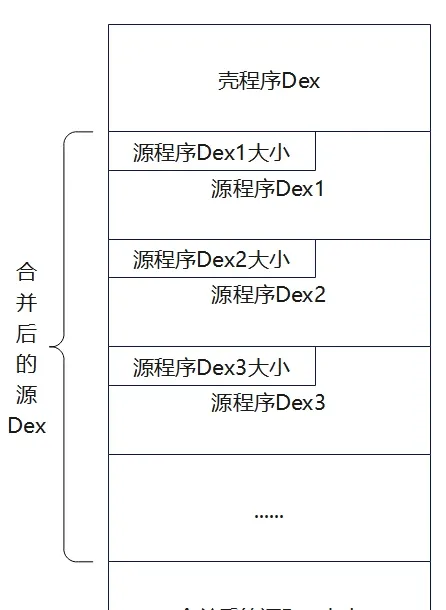
The source app
Same as generation 1; Multidex support may be enabled, everything else unchanged.
The packer
Main changes:
-
Call
combineShellAndSourceDexsto merge the shell dex and source dex; internally it callsreadAndCombineDexsto read and merge the source APK’s multiple dex files into one file. -
When copying the source APK, ignore the Manifest and dex files:
shutil.copytree(paths.srcApkTempDir,paths.newApkTempDir,ignore=shutil.ignore_patterns('AndroidManifest.xml','classes*.dex')) -
ManifestEditoraddsgetEtractNativeLibs(get theapplicationtag’sandroid:extractNativeLibsattribute) andresetExtractNativeLibs(resetextractNativeLibs=true, forcing lib files to be released). -
handleManifestchecks whether the source manifest setsandroid:extractNativeLibs="true"; iffalse(the default), change it totrue.
from zlib import adler32
from hashlib import sha1
from binascii import unhexlify
from lxml import etree
import subprocess
import shutil
from pathlib import Path
import argparse
# Path class, holds the global paths used throughout
class Paths:
    def __init__(self, srcApk:Path, shellApk:Path, outputApk:Path):
        # Apk file paths
        self.srcApkPath= srcApk.resolve() # resolve to absolute path
        self.shellApkPath= shellApk.resolve()
        self.newApkPath= outputApk.resolve()

        # Temp directories default python file path
        self.tmpdir= Path(__file__).parent/'temp'
        self.srcApkTempDir=  self.tmpdir/ 'srcApkTemp'
        self.shellApkTempDir= self.tmpdir/'shellApkTemp'
        self.newApkTempDir= self.tmpdir/ 'newApkTemp'


# Apktool class, provides unpack, pack, and sign functionality
class Apktool:
    def __init__(self):
        self.apktool_path= Path(__file__).parent/'tools/apktool/apktool.bat'
        self.signer_path=Path(__file__).parent/'tools/uber-apk-signer-1.3.0.jar'

    def signApk(self,unsignedApkPath:Path):
        self.runCommand(['java','-jar', self.signer_path, '--apk',unsignedApkPath])

    # use apktool to unpack the apk, resources only (no dex)
    def extractApk(self,apkPath:Path, outputDir:Path):
        self.runCommand([self.apktool_path, '-s', 'd' , apkPath, '-o', outputDir])

    # repack the apk
    def repackApk(self,inputDir:Path, outApk:Path):
        self.runCommand([self.apktool_path, 'b' , inputDir, '-o', outApk])

    def runCommand(self,args):
        subprocess.run(args,stdout=subprocess.DEVNULL) # only invoke the tool; no output needed, redirect stdout to os.devnull
        # argument list, capture output, convert output to string
        #print(subprocess.run(args,  capture_output=True,text=True).stdout)

# AndroidManifest.xml editor, used to get/modify tag attributes and add tags
class ManifestEditor:
    def __init__(self, xml_content: bytes):
        self.ns = {'android': 'http://schemas.android.com/apk/res/android'}
        self.tree = etree.fromstring(xml_content)

    # get the android attribute value of a tag, examples: get_attr('application', 'name') get_attr('activity', 'name')
    def getTagAttribute(self, tag_name: str, attr_name: str):
        if tag_name == 'manifest':  # root tag is handled specially
            elem = self.tree
            if elem is not None:
                return elem.get(f'{attr_name}')  # find the tag's attribute
        else:
            elem = self.tree.find(f'.//{tag_name}', namespaces=self.ns)
            if elem is not None:
                return elem.get(f'{{{self.ns["android"]}}}{attr_name}')  # attributes outside the root tag are under the android namespace
        return None

    # set a tag's attribute value, example: set_attr('application','name',"com.example.ProxyApplication")
    def setTagAttribute(self, tag_name: str, attr_name: str, new_value: str):
        if tag_name == 'manifest':  # root tag is handled specially
            elem = self.tree
            if elem is not None:
                return elem.set(f'{attr_name}', new_value)  # set the attribute value
        else:
            elem = self.tree.find(f'.//{tag_name}', namespaces=self.ns)
            if elem is not None:
                elem.set(f'{{{self.ns["android"]}}}{attr_name}', new_value)
                return True
        return False

    # add a new child tag under a parent tag, example: add_tag('application',"meta-data",{'name': 'android.permission.CAMERA','value':'hello'})
    def addTagWithAttributes(self, parent_tag: str, new_tag: str, attrs: dict):
        if parent_tag == 'manifest':
            parent = self.tree
            if parent is not None:
                new_elem = etree.SubElement(parent, new_tag)
                for k, v in attrs.items():  # support setting multiple attributes on the added tag at once
                    new_elem.set(f'{k}', v)
                return True
        else:
            parent = self.tree.find(f'.//{parent_tag}', namespaces=self.ns)
            if parent is not None:
                new_elem = etree.SubElement(parent, new_tag)
                for k, v in attrs.items():
                    new_elem.set(f'{{{self.ns["android"]}}}{k}', v)
                return True
        return False

    # Not needed unless we operate relative to the shell manifest; when using the source apk's manifest as baseline it comes built-in, no extra setting needed
    def getMainActivity(self):
        activities = self.tree.findall('.//activity', namespaces=self.ns)
        for activity in activities:
            intent_filters = activity.findall('.//intent-filter', namespaces=self.ns)
            for intent_filter in intent_filters:
                action = intent_filter.find('.//action[@android:name="android.intent.action.MAIN"]', namespaces=self.ns)
                category = intent_filter.find('.//category[@android:name="android.intent.category.LAUNCHER"]',
                                              namespaces=self.ns)
                if action is not None and category is not None:
                    return activity.get(f'{{{self.ns["android"]}}}name')
        return None

    def getApplication(self):
        return self.getTagAttribute('application', 'name')

    def setApplication(self, application: str):
        self.setTagAttribute('application', 'name', application)

    def addMetaData(self, name: str, value: str):
        self.addTagWithAttributes('application', 'meta-data', {'name': name, 'value': value})

    def getManifestData(self):
        """Return the XML string"""
        return etree.tostring(self.tree, pretty_print=True, encoding='utf-8', xml_declaration=True).decode()

    def getEtractNativeLibs(self):
        """Return whether so files are released"""
        return self.getTagAttribute('application', 'extractNativeLibs')

    def resetExtractNativeLibs(self):
        """Reset etractNativeLibs to true"""
        self.setTagAttribute('application', 'extractNativeLibs', 'true')


# Merge the shell dex and the source apk's dex files
def combineShellAndSourceDexs(shellApkTempDir:Path,srcApkTempDir:Path,newApkTempDir:Path):

    def fixCheckSum(dexBytesArray):
        # dexfile[8:12]
        # little-endian
        value = adler32(bytes(dexBytesArray[12:]))
        valueArray = bytearray(value.to_bytes(4, 'little'))
        for i in range(len(valueArray)):
            dexBytesArray[8 + i] = valueArray[i]

    def fixSignature(dexBytesArray):
        # dexfile[12:32]
        sha_1 = sha1()
        sha_1.update(bytes(dexBytesArray[32:]))
        value = sha_1.hexdigest()
        valueArray = bytearray(unhexlify(value))
        for i in range(len(valueArray)):
            dexBytesArray[12 + i] = valueArray[i]

    def fixFileSize(dexBytesArray, fileSize):
        # dexfile[32:36]
        # little-endian
        fileSizeArray = bytearray(fileSize.to_bytes(4, "little"))
        for i in range(len(fileSizeArray)):
            dexBytesArray[32 + i] = fileSizeArray[i]

    def encrypto(file):
        for i in range(len(file)):
            file[i] ^= 0xff
        return file

    def readAndCombineDexs(unpackedApkDir:Path):
        # read all dex files of the unpacked apk and merge them into one file
        combinedDex = bytearray()
         # glob returns a generator containing all matching files
        for dex in unpackedApkDir.glob('classes*.dex'):
            print('Source Apk Dex file:', dex)
            with open(dex, 'rb') as f:
                data = bytearray(f.read())
                combinedDex+=bytearray(len(data).to_bytes(4, 'little'))  # dex file length, little-endian
                combinedDex+=data # dex file content
        return combinedDex

    # get the shell dex
    with open(shellApkTempDir/'classes.dex', 'rb') as f:
        shellDexArray=bytearray(f.read())

    # get the source apk's dex files
    srcDexArray = readAndCombineDexs(srcApkTempDir)
    # new dex file length
    newDexLen = len(srcDexArray) + len(shellDexArray) + 4
    # encrypt the source files
    encSrcDexArray = encrypto(srcDexArray)
    # new dex content = shell dex + encrypted source dex + 4-byte marker for the encrypted source dex size
    newDexArray = shellDexArray + encSrcDexArray  + bytearray(len(encSrcDexArray).to_bytes(4, 'little'))

    # fix filesize
    fixFileSize(newDexArray, newDexLen)
    # fix signature
    fixSignature(newDexArray)
    # fix checksum
    fixCheckSum(newDexArray)
    # write the file out
    with open(newApkTempDir/'classes.dex', 'wb') as f:
        f.write(newDexArray)

# Extract the source apk's manifest, change application to the shell application (maybe add a meta-data tag), output the new manifest
def handleManifest( srcApkTempDir:Path,shellApkTempDir:Path,newApkTempDir:Path):
    # extract AndroidManifest.xml from the source apk
    with open(srcApkTempDir/'AndroidManifest.xml', 'r') as f:
        srcManifestEditor=ManifestEditor(f.read().encode())
    srcApplication=srcManifestEditor.getApplication()
    srcExtractNativeLibs=srcManifestEditor.getEtractNativeLibs()
    print('SourceApplication:',srcApplication)
    print('SourceExtractNativeLibs:',srcExtractNativeLibs)

    # extract AndroidManifest.xml from the shell apk
    with open(shellApkTempDir/'AndroidManifest.xml', 'r') as f:
        shellManifestEditor=ManifestEditor(f.read().encode())
    print('ShellApplication:',shellManifestEditor.getApplication())

    # change the source AndroidManifest.xml application to the shell's proxy application
    srcManifestEditor.setApplication(shellManifestEditor.getApplication())

    # write a meta-data tag to save the source apk's original application
    if srcApplication != None:
        print('Source application:',srcApplication)
        srcManifestEditor.addMetaData('APPLICATION_CLASS_NAME',srcApplication)

    # if the source apk's manifest defaults etractNativeLibs=false, reset it to true to ensure lib files are released
    if srcExtractNativeLibs=='false':
        srcManifestEditor.resetExtractNativeLibs()

    # output the new AndroidManifest.xml
    with open(newApkTempDir/'AndroidManifest.xml', 'w') as f:
        f.write(srcManifestEditor.getManifestData())

def start(paths:Paths):
    apktool=Apktool()
    # 1. Unpack the source and shell files to temp directories
    print('Extracting source and shell apk...')
    apktool.extractApk(paths.srcApkPath,paths.srcApkTempDir)
    print('Extract source apk success!')

    print('Extracting shell apk...')
    apktool.extractApk(paths.shellApkPath,paths.shellApkTempDir)
    print('Extract shell apk success!')

    # 2. Copy all source apk files to the new apk temp directory, ignoring the source dex and manifest files
    print('Copying source apk files to new apk temp dir...')
    shutil.copytree(paths.srcApkTempDir,paths.newApkTempDir,ignore=shutil.ignore_patterns('AndroidManifest.xml','classes*.dex'))
    print('Copy source apk files success!')

    # 3. Handle AndroidManifest.xml
    print('Handling AndroidManifest.xml...')
    handleManifest(paths.srcApkTempDir,paths.shellApkTempDir,paths.newApkTempDir)
    print('Handle AndroidManifest.xml success!')

    # 4. Merge the shell dex and source dexs and write the file out
    print('Combining shell dex and source dexs...')
    combineShellAndSourceDexs(paths.shellApkTempDir,paths.srcApkTempDir,paths.newApkTempDir)
    print('Combine shell dex and source dexs success!')

    # 5. Repack the apk
    print('Repacking apk...')
    apktool.repackApk(paths.newApkTempDir,paths.newApkPath)
    print('Repack apk success!')

    # 6. Sign the apk
    print('Signing apk...')
    apktool.signApk(paths.newApkPath)
    print('Resign apk success!')

    # 7. Delete the temp directories
    print('Deleting temp directories...')
    shutil.rmtree(paths.tmpdir) # delete the temp directory
    print('Delete temp directories success!')

def main():
    parser = argparse.ArgumentParser(description="Android APK Packer")
    parser.add_argument('-src','--src-apk', required=True, type=Path, help='Path to source APK file')
    parser.add_argument('-shell','--shell-apk', required=True, type=Path, help='Path to shell APK file')
    parser.add_argument('-o','-out','--output-apk',type=Path,help='Output path for packed APK (Default: ./out/<src-apk>_protected.apk)')
    args = parser.parse_args()
    if args.output_apk == None:
        args.output_apk = Path('./out')/(args.src_apk.stem+'_protected.apk') # default new apk name and output path
    paths = Paths(args.src_apk, args.shell_apk, args.output_apk)

    print('Source APK:', paths.srcApkPath)
    print('Shell APK:', paths.shellApkPath)
    print('Output APK:', paths.newApkPath)
    start(paths)


if __name__=="__main__":
    main()
The unshell
SecondProxyApplication.java differs from FirstProxyApplication.java as follows:
attachBaseContext— after reading the shell dex, it extracts the source dex files and replaces theClassLoader. There are no private-directory or file-release operations.extractDexFilesFromShellDex— replacessplitSourceApkFromShellDex; extracts the source dex files from the shell dex and stores them as aByteBuffer[].replaceClassLoader— generation 1 usesDexClassLoaderto load from a file; generation 2 usesInMemoryDexClassLoader.
Notes:
- Below Android 8.0,
InMemoryDexClassLoaderis unsupported and must be implemented manually. - Below Android 10.0, the
InMemoryDexClassLoaderoverload that takes a lib directory is unsupported. The default search path isnativeLibraryDirectories=[/system/lib64, /product/lib64]. There are articles that explain how to fix the lib-directory problem. - If the source app sets
android:extractNativeLibs="false", lib files aren’t released to the filesystem — the lib data is mapped directly from the APK file. If you hit this you must handle it manually, simulating the mapped-loading of the so; the underlying logic is complex and requires compatibility care. To simplify, change the packed APK’sandroid:extractNativeLibstotrue, forcing lib release.
package com.example.androidshell;

import android.app.Application;
import android.app.Instrumentation;
import android.content.Context;
import android.content.pm.ApplicationInfo;
import android.content.pm.PackageManager;
import android.os.Build;
import android.os.Bundle;
import android.util.ArrayMap;
import android.util.Log;

import java.io.BufferedInputStream;
import java.io.ByteArrayOutputStream;
import java.io.FileInputStream;
import java.io.IOException;
import java.lang.ref.WeakReference;
import java.nio.ByteBuffer;
import java.nio.ByteOrder;
import java.util.ArrayList;
import java.util.Iterator;
import java.util.zip.ZipEntry;
import java.util.zip.ZipInputStream;

import dalvik.system.InMemoryDexClassLoader;

public class SecondProxyApplication extends Application {
    private final String TAG="glass";
    public void log(String message){Log.d(TAG,message);}
    @Override
    protected void attachBaseContext(Context base) {
        super.attachBaseContext(base);
        log("SecondProxyApplication.attachBaseContext is running!");
        try {
            byte[] shellDexData = readDexFromApk();
            log("Read classes.dex from source APK succeed");
            // extract the source dex files from it
            ByteBuffer[] byteBuffers = extractDexFilesFromShellDex(shellDexData);
            log("Separated source dex set succeed");
            // configure the dynamic environment that loads the source app, i.e. replace mClassLoader
            replaceClassLoader(byteBuffers);
        } catch (Exception e) {
            log( Log.getStackTraceString(e));
        }
    }
    @Override
    public void onCreate() {
        super.onCreate();
        log("SecondProxyApplication.onCreate is running!");
        if(replaceApplication())
            log("Replace Application succeed");
    }
    // Extract the source apk's dex files from the shell dex and wrap them as ByteBuffers
    private ByteBuffer[] extractDexFilesFromShellDex(byte[] shellDexData) throws IOException {
        int shellDexlength = shellDexData.length;
        // start parsing the dex file
        byte[] sourceDexsSizeByte = new byte[4];
        // read the source dexs size
        System.arraycopy(shellDexData,shellDexlength - 4, sourceDexsSizeByte,0,4);
        // convert to bytebuffer to easily turn 4 bytes into an int
        ByteBuffer wrap = ByteBuffer.wrap(sourceDexsSizeByte);
        // turn the bytes into an int; when packing, the length is stored little-endian
        int sourceDexsSizeInt = wrap.order(ByteOrder.LITTLE_ENDIAN).getInt();
        Log.d(TAG, "Source dex set size: " + sourceDexsSizeInt);
        // read the source dexs
        byte[] sourceDexsData = new byte[sourceDexsSizeInt];
        System.arraycopy(shellDexData,shellDexlength - sourceDexsSizeInt - 4, sourceDexsData, 0, sourceDexsSizeInt);
        // decrypt the source dexs
        sourceDexsData = decrypt(sourceDexsData);

        // new part
        // split the source dexs
        ArrayList<byte[]> sourceDexList = new ArrayList<>();
        int pos = 0;
        while(pos < sourceDexsSizeInt){
            // first extract four bytes describing the current dex size
            // start parsing the dex file
            byte[] singleDexSizeByte = new byte[4];
            // read the source dexs size
            System.arraycopy(sourceDexsData, pos, singleDexSizeByte,0,4);
            // convert to bytebuffer to easily turn 4 bytes into an int
            ByteBuffer singleDexwrap = ByteBuffer.wrap(singleDexSizeByte);
            int singleDexSizeInt = singleDexwrap.order(ByteOrder.LITTLE_ENDIAN).getInt();
            Log.d(TAG, "Current singleDex size: " + singleDexSizeInt);
            // read a single dex
            byte[] singleDexData = new byte[singleDexSizeInt];
            System.arraycopy(sourceDexsData,pos + 4, singleDexData, 0, singleDexSizeInt);
            // add to the dex list
            sourceDexList.add(singleDexData);
            // update pos
            pos += 4 + singleDexSizeInt;
        }

        // wrap the dex list as ByteBuffers
        int dexNum = sourceDexList.size();
        Log.d(TAG, "Source dex count: " + dexNum);
        ByteBuffer[] dexBuffers = new ByteBuffer[dexNum];
        for (int i = 0; i < dexNum; i++){
            dexBuffers[i] = ByteBuffer.wrap(sourceDexList.get(i));
        }

        return dexBuffers;

    }
    // Read the dex file from the apk and return its byte array
    // Read the dex file from the current app's apk and store it as a byte array
    private byte[] readDexFromApk() throws IOException {
        //1. Get the current app's source-code path (apk), generally under data/app, where user-installed apps live
        String sourceDir = this.getApplicationInfo().sourceDir;
        log("this.getApplicationInfo().sourceDir: " +sourceDir);

        //2. Create the relevant input streams
        FileInputStream fileInputStream = new FileInputStream(sourceDir);
        BufferedInputStream bufferedInputStream = new BufferedInputStream(fileInputStream);
        ZipInputStream zipInputStream = new ZipInputStream(bufferedInputStream); // used to parse the apk

        ByteArrayOutputStream byteArrayOutputStream = new ByteArrayOutputStream(); // used to hold the dex file

        //3. Iterate over all files in the apk and extract the dex file
        ZipEntry zipEntry;
        while((zipEntry = zipInputStream.getNextEntry()) != null){ // there is a next file
            // store classes.dex into a byte array; after merging shell dex and source apk only one dex is kept for easier handling
            if (zipEntry.getName().equals("classes.dex")){
                byte[] bytes = new byte[1024];
                int num;
                while((num = zipInputStream.read(bytes))!=-1){      // read 1024 bytes each time, return the number of bytes read
                    byteArrayOutputStream.write(bytes,0, num); // store into the allocated byteArrayOutputStream
                }
            }
            zipInputStream.closeEntry(); // close the current file
        }
        zipInputStream.close();

        log("Read dex from apk succeed!");
        return byteArrayOutputStream.toByteArray(); // return the read dex file as a byte array
    }
    private byte[] decrypt(byte[] sourceApkdata) {
        for (int i = 0; i < sourceApkdata.length; i++){
            sourceApkdata[i] ^= (byte) 0xff;
        }
        return sourceApkdata;

    }
    // Replace the shell's LoadedApk Application with the source Application, and call its onCreate
    public boolean replaceApplication(){
        // Application instances live in: LoadedApk.mApplication
        // and ActivityThread's mInitialApplication, mAllApplications, and mBoundApplication

        // Check whether the source uses a custom Application; if so replace it, otherwise return directly and use the shell's default Application

        String appClassName = null; // the source Application class name
        try {
            // get the <meta-data> element from AndroidManifest.xml
            ApplicationInfo applicationInfo = getPackageManager().getApplicationInfo(this.getPackageName(), PackageManager.GET_META_DATA);
            Bundle metaData = applicationInfo.metaData;
            // get the Application class declared in the xml
            if (metaData != null && metaData.containsKey("APPLICATION_CLASS_NAME")){
                appClassName = metaData.getString("APPLICATION_CLASS_NAME");
            } else {
                log("Source app has no custom Application");
                return false; // if it doesn't exist, return directly and use the shell application
            }
        } catch (PackageManager.NameNotFoundException e) {
            log(Log.getStackTraceString(e));
        }

        // The source app has a custom application class; start replacing
        log("Try to replace Application");

        //1. Reflectively get the ActivityThread instance
        Object sCurrentActivityThreadObj = Reflection.getStaticField("android.app.ActivityThread","sCurrentActivityThread");
        log("ActivityThread: " + sCurrentActivityThreadObj.toString());

        //2. Get and set LoadedApk
        // get mBoundApplication (the AppBindData object)
        Object mBoundApplicationObj = Reflection.getField("android.app.ActivityThread",sCurrentActivityThreadObj,"mBoundApplication") ;
        log("mBoundApplication: "+mBoundApplicationObj.toString());
        // get mBoundApplication.info (i.e. LoadedApk)
        Object infoObj = Reflection.getField("android.app.ActivityThread$AppBindData",mBoundApplicationObj,"info");
        log( "LoadedApk: " + infoObj.toString());
        // set LoadedApk's mApplication to null so makeApplication() can be called later; otherwise the existing Application prevents replacement
        Reflection.setField("android.app.LoadedApk","mApplication",infoObj,null);

        //3. Get ActivityThread.mInitialApplication, i.e. the old Application (relative to the Application being loaded)
        Object mInitialApplicationObj = Reflection.getField("android.app.ActivityThread",sCurrentActivityThreadObj,"mInitialApplication");
        log("mInitialApplicationObj: " + mInitialApplicationObj.toString());

        //4. Get ActivityThread.mAllApplications and remove the old application
        ArrayList<Application> mAllApplicationsObj = (ArrayList<Application>) Reflection.getField("android.app.ActivityThread",sCurrentActivityThreadObj,"mAllApplications");
        mAllApplicationsObj.remove(mInitialApplicationObj);
        log("Removed mInitialApplication from mAllApplications");

        //5. Reset the Application class name on the relevant classes so the Application can be created later
        // get LoadedApk.mApplicationInfo
        ApplicationInfo applicationInfo = (ApplicationInfo) Reflection.getField("android.app.LoadedApk",infoObj,"mApplicationInfo");
        log( "LoadedApk.mApplicationInfo: " + applicationInfo.toString());
        // get mBoundApplication.appInfo
        ApplicationInfo appinfoInAppBindData = (ApplicationInfo) Reflection.getField("android.app.ActivityThread$AppBindData",mBoundApplicationObj,"appInfo");
        log("ActivityThread.mBoundApplication.appInfo: " + appinfoInAppBindData.toString());
        // Here we modify values by reference; even though they aren't used later, we are actually modifying the LoadedApk-related fields they point to
        // set both appinfo classnames to the source application class name so makeApplication() later creates the source application
        applicationInfo.className = appClassName;
        appinfoInAppBindData.className = appClassName;
        log("Source Application name: " + appClassName);

        //6. Reflectively call makeApplication to create the source application
        Application application = (Application) Reflection.invokeMethod("android.app.LoadedApk","makeApplication",infoObj,new Class[]{boolean.class, Instrumentation.class},new Object[]{false,null}); // use the source app's application
        //Application app = (Application)ReflectionMethods.invokeMethod("android.app.LoadedApk","makeApplication",infoObj,new Class[]{boolean.class, Instrumentation.class},new Object[]{true,null}); // use a custom application, forced to the system default
        log("Create source Application succeed: "+application);

        //7. Reset ActivityThread.mInitialApplication to the new Application
        Reflection.setField("android.app.ActivityThread","mInitialApplication",sCurrentActivityThreadObj,application);
        log("Reset ActivityThread.mInitialApplication by new Application succeed!");

        //8. ContentProviders hold the proxy Application and need special handling
        ArrayMap mProviderMap = (ArrayMap) Reflection.getField("android.app.ActivityThread",sCurrentActivityThreadObj,"mProviderMap");
        log("ActivityThread.mProviderMap: " + mProviderMap);

        // get all providers into an iterator and iterate
        Iterator iterator = mProviderMap.values().iterator();
        while(iterator.hasNext()){
            Object providerClientRecord = iterator.next();
            // get ProviderClientRecord.mLocalProvider, may be null
            Object mLocalProvider = Reflection.getField("android.app.ActivityThread$ProviderClientRecord",providerClientRecord,"mLocalProvider") ;
            if(mLocalProvider != null){
                log("ProviderClientRecord.mLocalProvider: " + mLocalProvider);
                // get the ContentProvider's mContext field and set it to the new Application
                Reflection.setField("android.content.ContentProvider","mContext",mLocalProvider,application);
            }
        }

        log( "Run Application.onCreate" );
        application.onCreate(); // source app, launch!
        return true;
    }
    // Replace the shell App's ClassLoader with the source App's ClassLoader
    private void replaceClassLoader(ByteBuffer[] byteBuffers) throws Exception{
        //1. Get the current classloader
        ClassLoader classLoader = this.getClassLoader();
        log("Current ClassLoader: " + classLoader.toString());
        log("Parent ClassLoader: " + classLoader.getParent().toString());

        //2. Reflectively get ActivityThread
        Object sCurrentActivityThreadObj = Reflection.getStaticField("android.app.ActivityThread","sCurrentActivityThread");
        log("ActivityThread.sCurrentActivity: " + sCurrentActivityThreadObj.toString());

        //3. Reflectively get LoadedApk
        // Get the current ActivityThread instance's mPackages field, of type ArrayMap<String, WeakReference<LoadedApk>>, holding the current app's LoadedApk object
        ArrayMap mPackagesObj = (ArrayMap) Reflection.getField("android.app.ActivityThread",sCurrentActivityThreadObj,"mPackages");
        log( "mPackagesObj: " + mPackagesObj.toString());

        // Get the current app's package name from mPackages
        String currentPackageName = this.getPackageName();
        log("currentPackageName: " + currentPackageName);

        // There are several ways to get the loadedApk instance: mInitialApplication, mAllApplications, mPackages
        // Get the current app's loadedApk instance by package name
        WeakReference weakReference = (WeakReference) mPackagesObj.get(currentPackageName);
        Object loadedApkObj = weakReference.get();
        log( "LoadedApk: " + loadedApkObj.toString());

        // dynamically load the source app's dex files
        if(Build.VERSION.SDK_INT>=29){
            Log.d(TAG,"Library path:"+this.getApplicationInfo().nativeLibraryDir);
            InMemoryDexClassLoader dexClassLoader=new InMemoryDexClassLoader(byteBuffers,this.getApplicationInfo().nativeLibraryDir,classLoader.getParent());
            Log.d(TAG, "New InMemoryDexClassLoader: " + dexClassLoader);
            // replace the current loadedApk instance's mClassLoader field
            Reflection.setField("android.app.LoadedApk","mClassLoader",loadedApkObj,dexClassLoader);
        }
        else{

            Log.d(TAG,"Android versions below 8.0 not supported");
        }
    }
}
Summary
Generation-2 packing uses landless loading, loading dex directly from memory — essentially an update of landed loading.
Generations 1 and 2 are collectively called whole-APK packing; in some references they’re merged and called “generation 1,” with code-extraction packing called “generation 2.”
Pros: more efficient than generation 1; harder to grab the dex from the filesystem to obtain key code.
Cons: compatibility issues — the source app’s lib/so handling is complex; low versions need a hand-rolled InMemoryDexClassLoader.
8. Generation 3 — Code-Extraction Packing
Some problems in whole-APK packing gave rise to generation 3: code-extraction packing.
The idea: empty out the instruction bytes of critical methods, replacing them with nop instructions, and refill the real instructions dynamically at runtime. The core of refilling is hooking key Android system functions.
Hook points
Common hook points are ClassLinker::LoadMethod and ClassLinker::DefineClass; both can obtain a DexFile object.
- LoadMethod: gives you the
Methodobject, from which you can getcodeOff— convenient for refilling. But its signature changes often, so compatibility is poor. - DefineClass: gives you the
ClassDefobject, which you must parse to derivecodeOff. More complex, but the signature is stable, so compatibility is good.
How code is extracted (see the earlier Dex-file-structure and code-extraction sections)
In the Dex file structure, DexClassDef describes each class; its DexClassData structure records the class’s fields and methods. A method is stored in a DexMethod structure, whose codeOff member holds the bytecode data’s offset in the file. Extraction proceeds from that offset.
LoadMethod is declared as follows:
// Android 7 and earlier
  void LoadMethod(Thread* self,
                  const DexFile& dex_file,
                  const ClassDataItemIterator& it,
                  Handle<mirror::Class> klass, ArtMethod* dst)
// Android 8-9
  void LoadMethod(const DexFile& dex_file,
                  const ClassDataItemIterator& it,
                  Handle<mirror::Class> klass, ArtMethod* dst)
// Android 10-14
  void LoadMethod(const DexFile& dex_file,
                  const ClassAccessor::Method& method,
                  Handle<mirror::Class> klass,
                  ArtMethod* dst)

// Android 15
  void LoadMethod(const DexFile& dex_file,
                  const ClassAccessor::Method& method,
                  ObjPtr<mirror::Class> klass,
                  /*inout*/ MethodAnnotationsIterator* mai,
                  /*out*/ ArtMethod* dst)
DefineClass is declared as follows:
// Android 5.0 (Level 21) and earlier use this declaration
static void* (*g_originDefineClassV21)(void* thiz,
                                       const char* descriptor,
                                       void* class_loader,
                                       const void* dex_file,
                                       const void* dex_class_def);
/*
// original declaration
mirror::Class* DefineClass(const char* descriptor,
                            Handle<mirror::ClassLoader> class_loader,
                            const DexFile& dex_file,
                            const DexFile::ClassDef& dex_class_def)
*/

// Android 5.1-14 (Level 22-34) use this declaration
static void* (*g_originDefineClassV22)(void* thiz,
                                       void* self,
                                       const char* descriptor,
                                       size_t hash,
                                       void* class_loader,
                                       const void* dex_file,
                                       const void* dex_class_def);
/*
// original declaration
ObjPtr<mirror::Class> DefineClass(Thread* self,
                                  const char* descriptor,
                                  size_t hash,
                                  Handle<mirror::ClassLoader> class_loader,
                                  const DexFile& dex_file,
                                  const dex::ClassDef& dex_class_def)
*/

// Android 15 (Level 35) and later use this declaration
static void* (*g_originDefineClassV35)(void* thiz,
                                       void* self,
                                       const char* descriptor,
                                       size_t descriptor_length,
                                       size_t hash,
                                       void* class_loader,
                                       const void* dex_file,
                                       const void* dex_class_def);
// original declaration
/*
ObjPtr<mirror::Class> DefineClass(Thread* self,
                                  const char* descriptor,
                                  size_t descriptor_length,
                                  size_t hash,
                                  Handle<mirror::ClassLoader> class_loader,
                                  const DexFile& dex_file,
                                  const dex::ClassDef& dex_class_def)
*/
The source app
Mainly involves three technical points (as before):
- Native-layer NDK development
- Multidex
- Custom
Application
The packer
The packer has three modules:
- APK processing module — unpacks, repacks, and signs the APK.
- XML processing module — reads, modifies, and adds tags.
- Dex processing module — merges multiple dexs, encrypts dexs, extracts code, and repairs files.
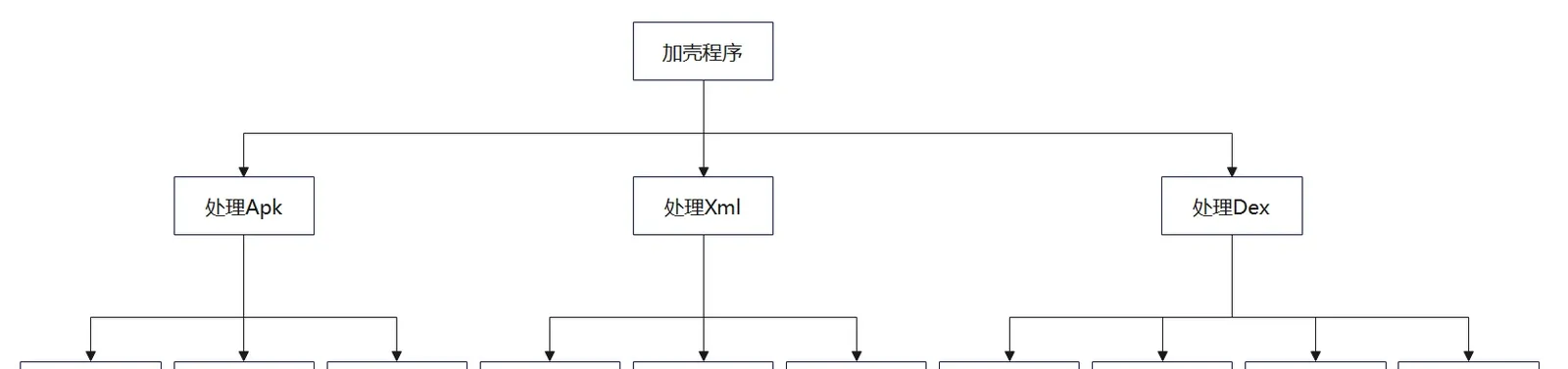
The packer’s basic workflow:
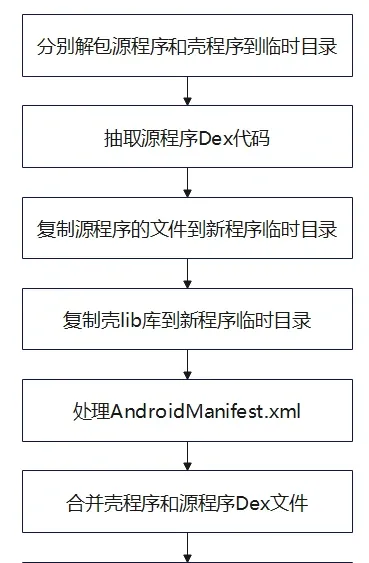
Overall workflow:
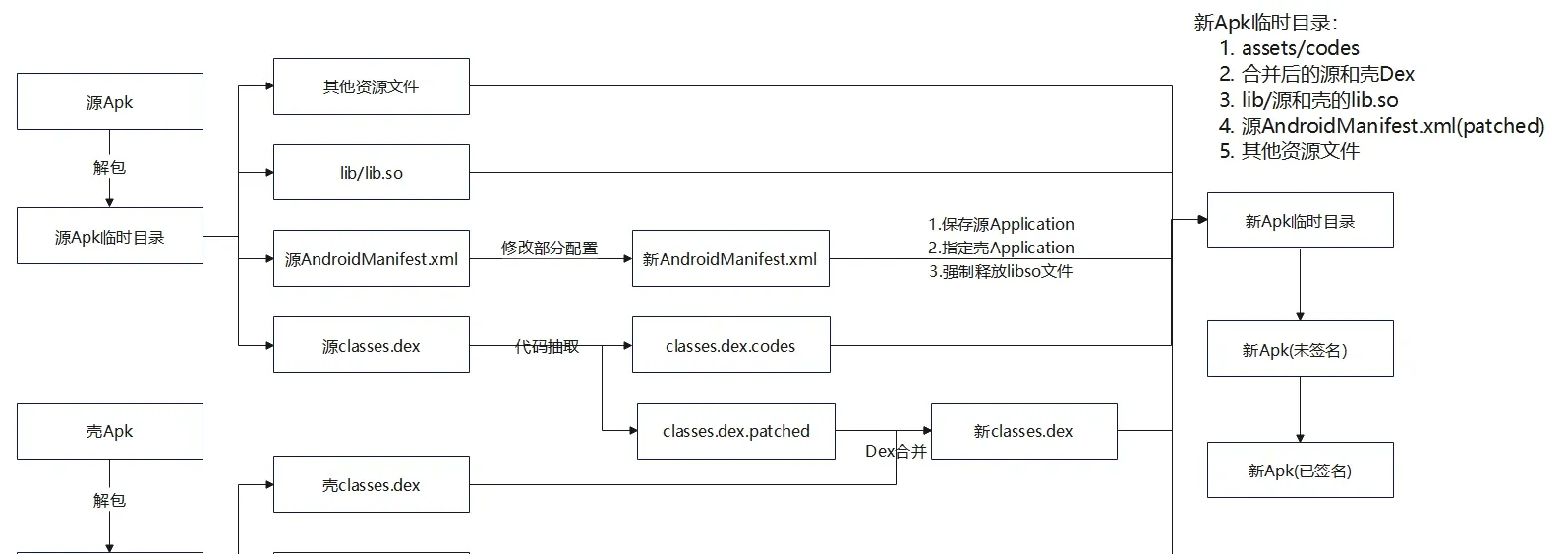
Changes relative to SecondShell.py:
start— after unpacking the source APK, callextractAllDexFilesto extract code from all dex files. Also copy the shell APK’slibto the new APK temp directory (the hook and code-refill logic lives in the native layer).extractAllDexFiles— iterate over all dex files in a directory, callReadDexto extract code, producing the corresponding.patchedand.codesfiles; repair the patched dex and overwrite the original, then move the.codesfiles intoassets.
from zlib import adler32
from hashlib import sha1
from binascii import unhexlify
from lxml import etree
import subprocess
import shutil
from pathlib import Path
import argparse

# Paths class, manages the global paths used throughout
class Paths:
    def __init__(self, srcApk:Path, shellApk:Path, outputApk:Path):
        # relevant APK file paths
        self.srcApkPath= srcApk.resolve() # resolve to absolute path
        self.shellApkPath= shellApk.resolve()
        self.newApkPath= outputApk.resolve()

        # temp directories, rooted at this script file's parent directory
        self.tmpdir= Path(__file__).parent/'temp'
        self.srcApkTempDir=  self.tmpdir/ 'srcApkTemp'
        self.shellApkTempDir= self.tmpdir/'shellApkTemp'
        self.newApkTempDir= self.tmpdir/ 'newApkTemp'

# Apktool class, invokes other tools via subprocess; provides unpack, pack, sign, and code-extraction functionality
class Apktool:
    def __init__(self):
        self.apktool_path= Path(__file__).parent/'tools/apktool/apktool.bat'
        self.signer_path=Path(__file__).parent/'tools/uber-apk-signer-1.3.0.jar'
        self.readDex_path=Path(__file__).parent/'tools/ReadDex.exe'

    # sign the apk
    def signApk(self,unsignedApkPath:Path):
        self.runCommand(['java','-jar', self.signer_path, '--apk',unsignedApkPath])

    # use apktool to unpack the apk; only unpack resources to get AndroidManifest.xml, no need to unpack dex into smali
    def unpackApk(self,apkPath:Path, outputDir:Path):
        self.runCommand([self.apktool_path, '-s', 'd' , apkPath, '-o', outputDir])

    # repack the apk
    def repackApk(self,inputDir:Path, outApk:Path):
        self.runCommand([self.apktool_path, 'b' , inputDir, '-o', outApk])

    # extract code from the given dex file
    def extractDexCodes(self,dexPath:Path):
        # call ReadDex.exe to extract the dex file's code, output to the same directory; e.g. classes.dex produces classes.dex.patched and classes.dex.codes
        self.runCommand([self.readDex_path,'-file',  dexPath, '-extractCodes'])

    # run a command
    def runCommand(self,args):
        #subprocess.run(args)
        subprocess.run(args,stdout=subprocess.DEVNULL) # only invoke the tool, no extra output needed; redirect stdout to os.devnull
        # argument list, capture output, convert output to string
        #print(subprocess.run(args,  capture_output=True,text=True).stdout)

# AndroidManifest.xml editor, used to get and modify tag attributes and add tags
class ManifestEditor:
    def __init__(self, xml_content: bytes):
        self.ns = {'android': 'http://schemas.android.com/apk/res/android'}
        self.tree = etree.fromstring(xml_content)

    # get the android attribute value of a tag, examples: get_attr('application', 'name') get_attr('activity', 'name')
    def getTagAttribute(self, tag_name: str, attr_name: str):
        if tag_name == 'manifest':  # root tag handled specially
            elem = self.tree
            if elem is not None:
                return elem.get(f'{attr_name}')  # find the tag's attribute
        else:
            elem = self.tree.find(f'.//{tag_name}', namespaces=self.ns)
            if elem is not None:
                return elem.get(f'{{{self.ns["android"]}}}{attr_name}')  # attributes outside the root tag are under the android namespace
        return None

    # set a tag's attribute value, example: set_attr('application','name',"com.example.ProxyApplication")
    def setTagAttribute(self, tag_name: str, attr_name: str, new_value: str):
        if tag_name == 'manifest':  # root tag handled specially
            elem = self.tree
            if elem is not None:
                return elem.set(f'{attr_name}', new_value)  # set the attribute value
        else:
            elem = self.tree.find(f'.//{tag_name}', namespaces=self.ns)
            if elem is not None:
                elem.set(f'{{{self.ns["android"]}}}{attr_name}', new_value)
                return True
        return False

    # add a new child tag under a parent tag, example: add_tag('application',"meta-data",{'name': 'android.permission.CAMERA','value':'hello'})
    def addTagWithAttributes(self, parent_tag: str, new_tag: str, attrs: dict):
        if parent_tag == 'manifest':
            parent = self.tree
            if parent is not None:
                new_elem = etree.SubElement(parent, new_tag)
                for k, v in attrs.items():  # support setting multiple attributes on the added tag at once
                    new_elem.set(f'{k}', v)
                return True
        else:
            parent = self.tree.find(f'.//{parent_tag}', namespaces=self.ns)
            if parent is not None:
                new_elem = etree.SubElement(parent, new_tag)
                for k, v in attrs.items():
                    new_elem.set(f'{{{self.ns["android"]}}}{k}', v)
                return True
        return False

    # not needed unless we operate relative to the shell manifest; using the source apk's manifest as baseline it's built in, no extra setting needed
    def getMainActivity(self):
        activities = self.tree.findall('.//activity', namespaces=self.ns)
        for activity in activities:
            intent_filters = activity.findall('.//intent-filter', namespaces=self.ns)
            for intent_filter in intent_filters:
                action = intent_filter.find('.//action[@android:name="android.intent.action.MAIN"]', namespaces=self.ns)
                category = intent_filter.find('.//category[@android:name="android.intent.category.LAUNCHER"]',
                                              namespaces=self.ns)
                if action is not None and category is not None:
                    return activity.get(f'{{{self.ns["android"]}}}name')
        return None

    # get the application tag's name attribute value
    def getApplicationName(self):
        return self.getTagAttribute('application', 'name')

    # set the application tag's name attribute value
    def setApplicationName(self, application: str):
        self.setTagAttribute('application', 'name', application)

    # add a meta-data tag and set its name and value attributes
    def addMetaData(self, name: str, value: str):
        self.addTagWithAttributes('application', 'meta-data', {'name': name, 'value': value})

    # get the AndroidManifest.xml string
    def getManifestData(self):
        """Return the XML string"""
        return etree.tostring(self.tree, pretty_print=True, encoding='utf-8', xml_declaration=True).decode()

    # get the application tag's extractNativeLibs attribute value
    def getEtractNativeLibs(self):
        return self.getTagAttribute('application', 'extractNativeLibs')

    # set the application tag's extractNativeLibs attribute value to true
    def resetExtractNativeLibs(self):
        self.setTagAttribute('application', 'extractNativeLibs', 'true')

# utility functions; note the repair order: fileSize -> signature -> checksum
# fix the dex file's checksum
def fixCheckSum(dexBytes:bytearray):
    # dexfile[8:12] little-endian 4 bytes
    value = adler32(bytes(dexBytes[12:]))
    valueArray = bytearray(value.to_bytes(4, 'little'))
    for i in range(len(valueArray)):
        dexBytes[8 + i] = valueArray[i]

# fix the dex file's signature
def fixSignature(dexBytes:bytearray):
    # dexfile[12:32] little-endian 20 bytes
    sha_1 = sha1()
    sha_1.update(bytes(dexBytes[32:]))
    value = sha_1.hexdigest()
    valueArray = bytearray(unhexlify(value))
    for i in range(len(valueArray)):
        dexBytes[12 + i] = valueArray[i]

# fix the dex file's filesize
def fixFileSize(dexBytes:bytearray, fileSize):
    # dexfile[32:36] little-endian storage
    fileSizeArray = bytearray(fileSize.to_bytes(4, "little"))
    for i in range(len(fileSizeArray)):
        dexBytes[32 + i] = fileSizeArray[i]

# encryption function, uses XOR
def encrypt(data:bytearray):
    # todo: replace with aes/sm4 or similar
    for i in range(len(data)):
        data[i] ^= 0xff
    return data

# extract code from all dex files in a directory; patch all dex files and repair them, move the codes files into assets
def extractAllDexFiles(directory:Path):
    apktool=Apktool()
    # 1. iterate over all dex files in the directory and extract the corresponding code
    for dex in directory.glob('classes*.dex'):
        apktool.extractDexCodes(dex) # extract the dex file's code, producing classes*.dex.patched and classes*.dex.codes

    # 2. repair the extracted files and overwrite the original dex files
    for patchedDex in directory.glob('classes*.dex.patched'):
        newDexName = str(patchedDex).replace('.patched', '') # rename
        # read file content
        with open(patchedDex, 'rb') as f:
            data = bytearray(f.read())
            # fix signature and checksum, note the order
            fixSignature(data)
            fixCheckSum(data)
            # overwrite the original dex file with the repaired file
            with open(newDexName, 'wb') as newf:
                newf.write(data)

    # 3. delete the patched files
    for patchedDex in directory.glob('classes*.dex.patched'):
        patchedDex.unlink()

    # 4. move the .codes files into the assets directory
    # create assets if it doesn't exist
    if not (directory/'assets').exists():
        (directory/'assets').mkdir(parents=True)

    for codes in directory.glob('classes*.dex.codes'):
        shutil.move(codes,directory/'assets'/codes.name) # move into assets

# merge the shell dex and source apk dexs, supporting multiple dex files merged into one
def combineShellAndSourceDexs(shellApkTempDir:Path,srcApkTempDir:Path,newApkTempDir:Path):
    # read all dex files of the unpacked apk and merge them into one dex file
    def readAndCombineDexs(unpackedApkDir:Path):
        combinedDex = bytearray()
         # glob returns a generator containing all matching files
        for dex in unpackedApkDir.glob('classes*.dex'):
            print('Source Apk Dex file:', dex)
            with open(dex, 'rb') as f:
                data = bytearray(f.read())
                combinedDex+=bytearray(len(data).to_bytes(4, 'little'))  # dex file length, little-endian
                combinedDex+=data # dex file content
        return combinedDex

    # get the shell dex
    with open(shellApkTempDir/'classes.dex', 'rb') as f:
        shellDexArray=bytearray(f.read())

    # get the source apk's dex files
    srcDexArray = readAndCombineDexs(srcApkTempDir)
    # new dex file length
    newDexLen = len(srcDexArray) + len(shellDexArray) + 4
    # encrypt the source files
    encSrcDexArray = encrypt(srcDexArray)
    # new dex file content = shell dex + encrypted source dex + 4-byte marker holding the encrypted source dex size
    newDexArray = shellDexArray + encSrcDexArray  + bytearray(len(encSrcDexArray).to_bytes(4, 'little'))

    # fix filesize
    fixFileSize(newDexArray, newDexLen)
    # fix signature
    fixSignature(newDexArray)
    # fix checksum
    fixCheckSum(newDexArray) # note the order: fix signature first, then checksum

    # write the file out
    with open(newApkTempDir/'classes.dex', 'wb') as f:
        f.write(newDexArray)

# extract the source apk's manifest, change application to the shell application (maybe add a meta-data tag), output the new manifest
def handleManifest(srcApkTempDir:Path,shellApkTempDir:Path,newApkTempDir:Path):
    # extract AndroidManifest.xml from the source apk
    with open(srcApkTempDir/'AndroidManifest.xml', 'r') as f:
        srcManifestEditor=ManifestEditor(f.read().encode())
    srcApplication=srcManifestEditor.getApplicationName()           # get application:name, determine whether a custom Application class exists
    srcExtractNativeLibs=srcManifestEditor.getEtractNativeLibs()    # get application:extractNativeLibs, determine whether lib files are released
    print('SourceApplication:',srcApplication)
    print('SourceExtractNativeLibs:',srcExtractNativeLibs)

    # extract AndroidManifest.xml from the shell apk
    with open(shellApkTempDir/'AndroidManifest.xml', 'r') as f:
        shellManifestEditor=ManifestEditor(f.read().encode())
    print('ShellApplication:',shellManifestEditor.getApplicationName())

    # change the source AndroidManifest.xml's application to the shell's proxy application
    srcManifestEditor.setApplicationName(shellManifestEditor.getApplicationName())

    # write a meta-data tag to save the source apk's original application
    if srcApplication != None:
        print('Source application:',srcApplication)
        srcManifestEditor.addMetaData('APPLICATION_CLASS_NAME',srcApplication)

    # if the source apk's manifest defaults extractNativeLibs=false, reset it to true to ensure lib files are released
    if srcExtractNativeLibs=='false':
        srcManifestEditor.resetExtractNativeLibs()

    # output the new AndroidManifest.xml
    with open(newApkTempDir/'AndroidManifest.xml', 'w') as f:
        f.write(srcManifestEditor.getManifestData())

# run the packing flow
def start(paths:Paths):
    apktool=Apktool()
    # 1. unpack the source and shell files to temp directories
    print('Extracting source and shell apk...')
    apktool.unpackApk(paths.srcApkPath,paths.srcApkTempDir)
    print('Extract source apk success!')

    print('Extracting shell apk...')
    apktool.unpackApk(paths.shellApkPath,paths.shellApkTempDir)
    print('Extract shell apk success!')

    # 2. extract the source dex files' code
    print('Extracting dex files codes...')
    extractAllDexFiles(paths.srcApkTempDir)
    print('Extract dex files codes success!')

    # 3. copy all source apk files to the new apk temp directory, ignoring the source dex and manifest files
    print('Copying source apk files to new apk temp dir...')
    shutil.copytree(paths.srcApkTempDir,paths.newApkTempDir,ignore=shutil.ignore_patterns('AndroidManifest.xml','classes*.dex'))
    print('Copy source apk files success!')

    # 4. copy the shell apk's lib files to the new apk temp directory (the shell's code-refill logic lives in lib)
    print('Copying shell apk lib files to new apk temp dir...')
    shutil.copytree(paths.shellApkTempDir/'lib',paths.newApkTempDir/'lib',dirs_exist_ok=True) # dirs_exist_ok=True overwrite if the target directory exists
    print('Copy shell apk lib files success!')

    # 5. handle AndroidManifest.xml
    print('Handling AndroidManifest.xml...')
    handleManifest(paths.srcApkTempDir,paths.shellApkTempDir,paths.newApkTempDir)
    print('Handle AndroidManifest.xml success!')

    # 6. merge the shell dex and source apk dexs and write the file out
    print('Combining shell dex and source dexs...')
    combineShellAndSourceDexs(paths.shellApkTempDir,paths.srcApkTempDir,paths.newApkTempDir)
    print('Combine shell dex and source dexs success!')

    # 7. repack the apk
    print('Repacking apk...')
    apktool.repackApk(paths.newApkTempDir,paths.newApkPath)
    print('Repack apk success!')

    # 8. sign the apk
    print('Signing apk...')
    apktool.signApk(paths.newApkPath)
    print('Resign apk success!')

    # 9. delete the temp directories
    print('Deleting temp directories...')
    shutil.rmtree(paths.tmpdir)
    print('Delete temp directories success!')

def main():
    parser = argparse.ArgumentParser(description="Android APK Packer")
    parser.add_argument('-src','--src-apk', required=True, type=Path, help='Path to source APK file')
    parser.add_argument('-shell','--shell-apk', required=True, type=Path, help='Path to shell APK file')
    parser.add_argument('-o','-out','--output-apk',type=Path,help='Output path for packed APK (Default: ./out/<src-apk>_protected.apk)')
    args = parser.parse_args()
    if args.output_apk == None:
        args.output_apk = Path('./out')/(args.src_apk.stem+'_protected.apk') # default new apk name and output path
    paths = Paths(args.src_apk, args.shell_apk, args.output_apk)

    print('Source APK:', paths.srcApkPath)
    print('Shell APK:', paths.shellApkPath)
    print('Output APK:', paths.newApkPath)
    start(paths)

if __name__=="__main__":
    main()
The unshell
The unshell has two modules:
- Java layer — environment initialization, ClassLoader replacement, Application replacement.
- Native layer — disabling dex2oat, making the Dex file writable, refilling code, parsing code files.
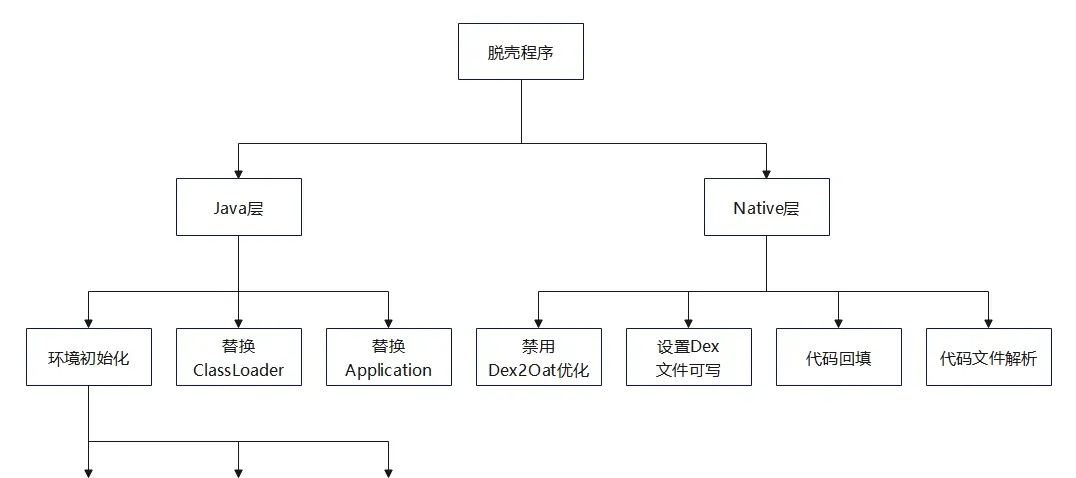
After the packer’s processing, the source AndroidManifest.xml’s <application> tag’s name attribute points to the shell’s Application. Since Application is the true entry point of an Android app, control is in the shell’s proxy Application when the packed app starts.
The shell’s proxy Application mainly does:
- Initialization — set relevant file paths, parse relevant files for later processing.
- Replace ClassLoader — replace the shell’s ClassLoader with the protected app’s ClassLoader.
- Replace Application — if the protected app has a custom
Application, create and replace the instance. - Load the shell .so — call
System.loadLibrary()to load it, then perform code refill in the native layer.
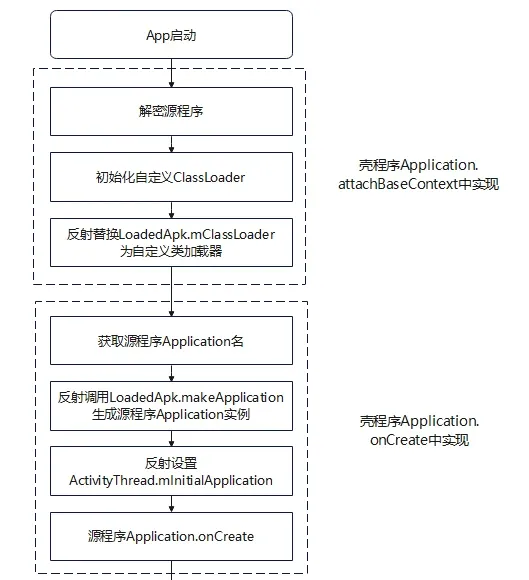
Environment initialization
Mainly:
- Set private directories for later file release and DexClassLoader configuration.
- Extract and parse the protected app’s dex from the shell APK, write it into the private directory. Call
readDexFromApkto extractclasses.dexfrom the current APK, thenextractDexFilesFromShellDexto separate the source dex files, thenwriteByteBuffersToDirectoryto write the multiple dex files into the private directory one by one. - Extract the
.codesfiles fromassetsinto the private directory — viacopyClassesCodesFiles. - Join all the source dex file paths with
:to build the DexClassLoader search path.
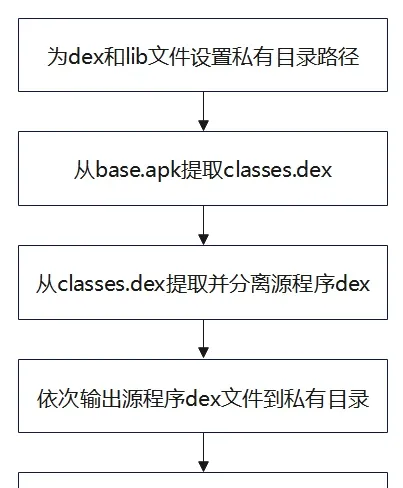
Replacing the ClassLoader
Mainly:
- Get the current ClassLoader —
this.getClassLoader(). - Reflectively get the
ActivityThreadinstance — get theActivityThread.sCurrentActivityThreadfield, i.e. the current app’sActivityThreadinstance. - Reflectively get the
LoadedApkinstance — first reflectively get theActivityThread.mPackagesfield, then look up the matchingLoadedApkby the current package name. - Create and replace the ClassLoader — pass the lib/dex private directory paths and the current ClassLoader into a new
DexClassLoader, which can load the released source dex and lib/so files. Finally replaceLoadedApk.mClassLoaderby reflection.
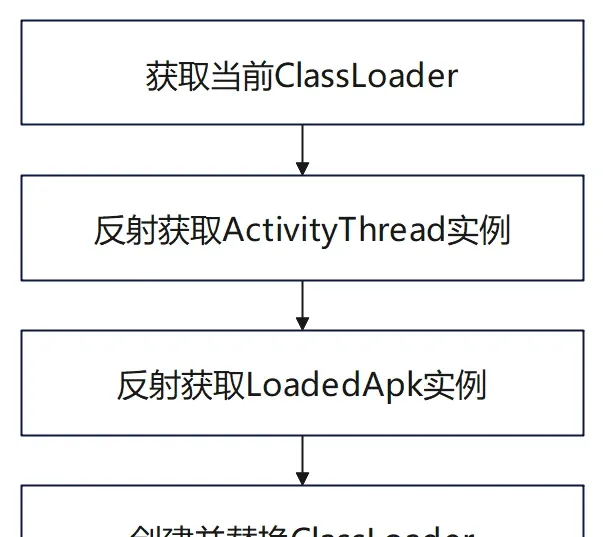
Replacing the Application
Mainly:
- Get the custom Application’s full class name — read the
meta-datatag the packer added toAndroidManifest.xml, which saved the source app’s custom Application class name. - Reflectively get the
ActivityThreadinstance (as above). - Reflectively get the
LoadedApkinstance and setmApplicationto null — becauseLoadedApk.makeApplicationreturns the currentApplicationinstance directly ifmApplicationisn’t null. So you must null it before creating. - Get
ActivityThread.mInitialApplicationand remove the shell Application. - Reflectively call
LoadedApk.makeApplicationto create the source Application. - Reset
ActivityThread.mInitialApplicationto the source Application. - Handle the ContentProviders holding the proxy Application.
- Call
Application.onCreate— source app, launch!
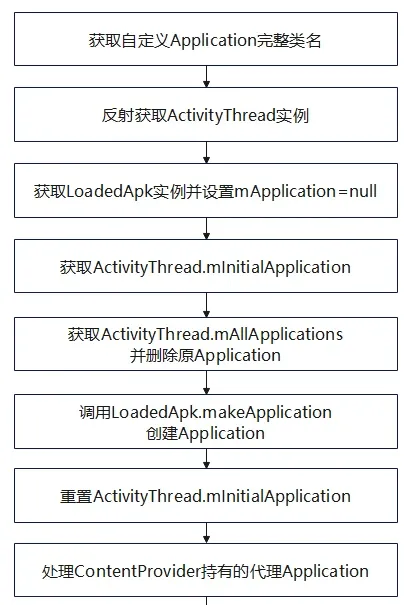
Native layer
System.loadLibrary actively loads the shell’s SO, first calling the init function, which performs these hooks (intercepting the corresponding functions):
- Hook
execve— add a check in the hook; when adex2oatsyscall is matched, return directly.dex2oatis ART’s operation that optimizes all Dex files into one OAT file (essentially an ELF file) to speed up instruction execution — but this interferes with instruction refill. - Hook
mmap— add write permission when mmap maps memory, ensuring the DexFile can be modified for instruction refill. - Hook
LoadMethod—LoadMethodhas two key parameters:DexFile* dexFileandMethod* method. FromdexFileyou get the method’s dex file path, to determine whether it’s a source dex whose code was extracted; if so, determine whether file parsing was already done. If not, callparseExtractedCodeFilesto parse the dex’s corresponding.codesfile, building aCodeMap(a codeOff → CodeItem mapping). Later, when a target method is invoked, look up the correspondingCodeItemfromCodeMapbyMethod.codeOffand perform instruction refill —dexFile.begin + Method.codeOffis the location of theinsns[]instruction byte array.
The hooks mainly use Bhook and Dobby.
-
Dobby — see luoyesiqiu/dpt-shell for a working example of integrating Dobby into a packing shell. Building from source is a bit involved, so statically import dobby:
include_directories( dobby ) add_library(local_dobby STATIC IMPORTED) set_target_properties(local_dobby PROPERTIES IMPORTED_LOCATION ${CMAKE_CURRENT_SOURCE_DIR}/../../../libs/${ANDROID_ABI}/libdobby.a) target_link_libraries(dpt ${log-lib} MINIZIP::minizip local_dobby bytehook ${android-lib} ) -
Bhook — see bytedance/bhook.
Add the bhook dependency in
build.gradle:android { buildFeatures { prefab true } } dependencies { implementation 'com.bytedance:bytehook:1.1.1' }Add the following to
CMakeLists.txt:// where mylib is the module name that needs bhook, i.e. link these modules with bytehook find_package(bytehook REQUIRED CONFIG) // get the bytehook package add_library(mylib SHARED mylib.c) // user module target_link_libraries(mylib bytehook::bytehook) // link the user module with bytehook
The hooked LoadMethod mainly does:
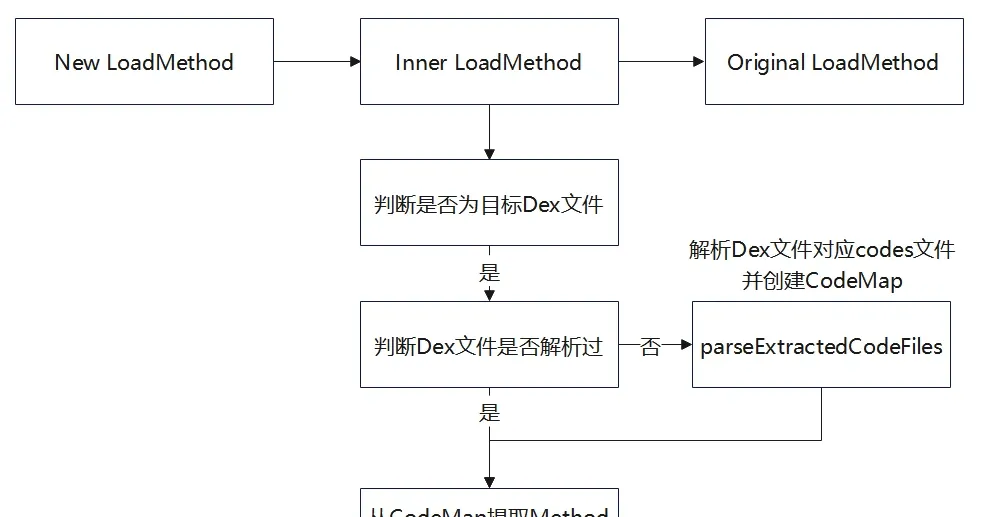
ThirdProxyApplication.java
Relative to FirstProxyApplication.java, changes are:
System.loadLibrary("androidshell")— actively load the shell’s so, set up hooks.writeByteBuffersToDirectory— write the source dex byte arrays extracted from the shell dex to files.copyClassesCodesFiles— copy the.codesfiles corresponding to the dex files into the same private directory as the dex.
package com.example.androidshell;

import android.app.Application;
import android.app.Instrumentation;
import android.content.Context;
import android.content.pm.ApplicationInfo;
import android.content.pm.PackageManager;
import android.content.res.AssetManager;
import android.os.Bundle;
import android.util.ArrayMap;
import android.util.Log;

import java.io.BufferedInputStream;
import java.io.BufferedOutputStream;
import java.io.ByteArrayOutputStream;
import java.io.File;
import java.io.FileInputStream;
import java.io.FileOutputStream;
import java.io.IOException;
import java.io.InputStream;
import java.lang.ref.WeakReference;
import java.nio.ByteBuffer;
import java.nio.ByteOrder;
import java.util.ArrayList;
import java.util.Iterator;
import java.util.zip.ZipEntry;
import java.util.zip.ZipInputStream;

import dalvik.system.DexClassLoader;

public class ThirdProxyApplication extends Application {
    private final String TAG="glass";
    private String dexPath;
    private String odexPath;
    private String libPath;
    public void log(String message){Log.d(TAG,message);}

    @Override
    protected void attachBaseContext(Context base) {
        super.attachBaseContext(base);
        log("ThirdProxyApplication.attachBaseContext is running!");
        System.loadLibrary("androidshell");     // actively load the so, set hooks, perform instruction refill
        log("Load libandroidshell.so succeed!");
        try {
            // initialize the relevant environment
            initEnvironments();
            // configure the dynamic environment that loads the source app, i.e. replace mClassLoader
            replaceClassLoader();
        } catch (Exception e) {
            log( Log.getStackTraceString(e));
        }
    }
    @Override
    public void onCreate() {
        super.onCreate();
        log("ThirdProxyApplication.onCreate is running!");
        if(replaceApplication())
            log("Replace Application succeed!");
    }

    private void initEnvironments() throws IOException {
        //1. set the relevant directories and paths
        File dex = getDir("tmp_dex", MODE_PRIVATE);     // private directory holding dex files
        //File lib = getDir("tmp_lib", MODE_PRIVATE);       // lib can use the default directory
        //libPath = lib.getAbsolutePath();
        odexPath = dex.getAbsolutePath();
        libPath=this.getApplicationInfo().nativeLibraryDir; // default lib path
        dexPath =this.getApplicationInfo().sourceDir;   // current base.apk path
        //2. read classes.dex from the current base.apk into a byte array
        byte[] shellDexData = readDexFromApk();
        log("Get classes.dex from base.apk succeed!");
        //3. separate the source dex files from the shell dex
        ByteBuffer[] byteBuffers = extractDexFilesFromShellDex(shellDexData);
        //4. write the source dex files into the private directory one by one
        writeByteBuffersToDirectory(byteBuffers, odexPath);
        //5. copy the codes files into the private directory
        copyClassesCodesFiles(this, odexPath);
        //6. join the dex directory strings, set the dex file path; DexClassLoader supports passing multiple dex paths to load multiple dex files, paths separated by ':'
        StringBuffer dexFiles=new StringBuffer();
        for(File file:dex.listFiles()){
            if(file.getName().contains(".codes"))
                continue;
            dexFiles.append(file.getAbsolutePath());
            dexFiles.append(":");
        }
        dexPath=dexFiles.toString();
    }
    private void writeByteBuffersToDirectory(ByteBuffer[] byteBuffers, String directoryPath) throws IOException {
        // create the directory object
        File directory = new File(directoryPath);
        // check whether the directory exists, create it if not
        if (!directory.exists()) {
            if (!directory.mkdirs()) {
                throw new IOException("Unable to create directory: " + directoryPath);
            }
        }

        // iterate over the ByteBuffer array
        for (int i = 0; i < byteBuffers.length; i++) {
            // generate a file name
            String fileName;
            if (i == 0) {
                fileName = "classes.dex";
            } else {
                fileName = "classes" + (i + 1) + ".dex";
            }
            // build the file object
            File file = new File(directory, fileName);
            // create a file output stream
            try (FileOutputStream fos = new FileOutputStream(file)) {
                // get the byte array from the ByteBuffer
                ByteBuffer buffer = byteBuffers[i];
                byte[] bytes = new byte[buffer.remaining()];
                buffer.get(bytes);
                // write the byte array to the file
                fos.write(bytes);
            }
        }
    }
    private void copyClassesCodesFiles(Context context, String targetDirectoryPath) {
        AssetManager assetManager = context.getAssets();
        try {
            // get all files and folders under assets
            String[] files = assetManager.list("");
            if (files != null) {
                // create the target directory
                File targetDirectory = new File(targetDirectoryPath);
                if (!targetDirectory.exists()) {
                    if (!targetDirectory.mkdirs()) {
                        throw new IOException("Unable to create target directory: " + targetDirectoryPath);
                    }
                }
                for (String fileName : files) {
                    // filter files starting with classes and ending with .codes
                    if (fileName.startsWith("classes") && fileName.endsWith(".codes")) {
                        try (InputStream inputStream = assetManager.open(fileName);
                             BufferedInputStream bis = new BufferedInputStream(inputStream);
                             FileOutputStream fos = new FileOutputStream(new File(targetDirectory, fileName));
                             BufferedOutputStream bos = new BufferedOutputStream(fos)) {

                            byte[] buffer = new byte[1024];
                            int bytesRead;
                            while ((bytesRead = bis.read(buffer)) != -1) {
                                bos.write(buffer, 0, bytesRead);
                            }
                        } catch (IOException e) {
                            e.printStackTrace();
                        }
                    }
                }
            }
        } catch (IOException e) {
            e.printStackTrace();
        }
    }

    // extract the source apk's dex from the shell dex and wrap them as ByteBuffers
    private ByteBuffer[] extractDexFilesFromShellDex(byte[] shellDexData) {
        int shellDexlength = shellDexData.length;
        // start parsing the dex file
        byte[] sourceDexsSizeByte = new byte[4];
        // read the source dexs size
        System.arraycopy(shellDexData,shellDexlength - 4, sourceDexsSizeByte,0,4);
        // convert to bytebuffer to easily turn 4 bytes into an int
        ByteBuffer wrap = ByteBuffer.wrap(sourceDexsSizeByte);
        // turn the bytes into an int; when packing, the length is stored little-endian
        int sourceDexsSizeInt = wrap.order(ByteOrder.LITTLE_ENDIAN).getInt();
        Log.d(TAG, "Source dex set size: " + sourceDexsSizeInt);
        // read the source dexs
        byte[] sourceDexsData = new byte[sourceDexsSizeInt];
        System.arraycopy(shellDexData,shellDexlength - sourceDexsSizeInt - 4, sourceDexsData, 0, sourceDexsSizeInt);
        // decrypt the source dexs
        sourceDexsData = decrypt(sourceDexsData);

        // new part
        // separate dex from the source dexs
        ArrayList<byte[]> sourceDexList = new ArrayList<>();
        int pos = 0;
        while(pos < sourceDexsSizeInt){
            // first extract four bytes describing the current dex size
            // start parsing the dex file
            byte[] singleDexSizeByte = new byte[4];
            // read the source dexs size
            System.arraycopy(sourceDexsData, pos, singleDexSizeByte,0,4);
            // convert to bytebuffer to easily turn 4 bytes into an int
            ByteBuffer singleDexwrap = ByteBuffer.wrap(singleDexSizeByte);
            int singleDexSizeInt = singleDexwrap.order(ByteOrder.LITTLE_ENDIAN).getInt();
            Log.d(TAG, "Current dex size: " + singleDexSizeInt);
            // read a single dex
            byte[] singleDexData = new byte[singleDexSizeInt];
            System.arraycopy(sourceDexsData,pos + 4, singleDexData, 0, singleDexSizeInt);
            // add to the dex list
            sourceDexList.add(singleDexData);
            // update pos
            pos += 4 + singleDexSizeInt;
        }

        // wrap the dex list as ByteBuffers
        int dexNum = sourceDexList.size();
        Log.d(TAG, "Source dex count: " + dexNum);
        ByteBuffer[] dexBuffers = new ByteBuffer[dexNum];
        for (int i = 0; i < dexNum; i++){
            dexBuffers[i] = ByteBuffer.wrap(sourceDexList.get(i));
        }

        return dexBuffers;

    }
    // read the dex file from the current app's apk and store it as a byte array
    private byte[] readDexFromApk() throws IOException {
        //1. get the current app's source-code path (apk), generally under data/app, where user-installed apps live
        String sourceDir = this.getApplicationInfo().sourceDir;
        log("this.getApplicationInfo().sourceDir: " +sourceDir);

        //2. create the relevant input streams
        FileInputStream fileInputStream = new FileInputStream(sourceDir);
        BufferedInputStream bufferedInputStream = new BufferedInputStream(fileInputStream);
        ZipInputStream zipInputStream = new ZipInputStream(bufferedInputStream); // used to parse the apk file

        ByteArrayOutputStream byteArrayOutputStream = new ByteArrayOutputStream(); // used to hold the dex file

        //3. iterate over all files in the apk and extract the dex file
        ZipEntry zipEntry;
        while((zipEntry = zipInputStream.getNextEntry()) != null){ // there is a next file
            // store classes.dex into a byte array; after merging shell dex and source apk only one dex is kept for easier handling
            if (zipEntry.getName().equals("classes.dex")){
                byte[] bytes = new byte[1024];
                int num;
                while((num = zipInputStream.read(bytes))!=-1){      // read 1024 bytes each time, return the number of bytes read
                    byteArrayOutputStream.write(bytes,0, num); // store into the allocated byteArrayOutputStream
                }
            }
            zipInputStream.closeEntry(); // close the current file
        }
        zipInputStream.close();

        log("Read dex from apk succeed!");
        return byteArrayOutputStream.toByteArray(); // return the read dex file as a byte array
    }
    // decrypt
    private byte[] decrypt(byte[] data) {
        for (int i = 0; i < data.length; i++){
            data[i] ^= (byte) 0xff;
        }
        return data;

    }
    // replace the shell LoadedApk's Application with the source Application, and call its onCreate
    private boolean replaceApplication(){
        // Application instances live in: LoadedApk.mApplication
        // and ActivityThread's mInitialApplication, mAllApplications, and mBoundApplication

        // check whether the source uses a custom Application; if so replace it, otherwise return directly and use the shell's default Application

        String appClassName = null; // the source Application class name
        try {
            // get the <meta-data> element from AndroidManifest.xml
            ApplicationInfo applicationInfo = getPackageManager().getApplicationInfo(this.getPackageName(), PackageManager.GET_META_DATA);
            Bundle metaData = applicationInfo.metaData;
            // get the Application class declared in the xml
            if (metaData != null && metaData.containsKey("APPLICATION_CLASS_NAME")){
                appClassName = metaData.getString("APPLICATION_CLASS_NAME");
            } else {
                log("Source app has no custom Application");
                return false; // if it doesn't exist, return directly and use the shell application
            }
        } catch (PackageManager.NameNotFoundException e) {
            log(Log.getStackTraceString(e));
        }

        // the source app has a custom application class; start replacing
        log("Try to replace Application");

        //1. reflectively get the ActivityThread instance
        Object sCurrentActivityThreadObj = Reflection.getStaticField("android.app.ActivityThread","sCurrentActivityThread");
        log("ActivityThread: " + sCurrentActivityThreadObj.toString());

        //2. get and set LoadedApk
        // get mBoundApplication (the AppBindData object)
        Object mBoundApplicationObj = Reflection.getField("android.app.ActivityThread",sCurrentActivityThreadObj,"mBoundApplication") ;
        log("mBoundApplication: "+mBoundApplicationObj.toString());
        // get mBoundApplication.info (i.e. LoadedApk)
        Object infoObj = Reflection.getField("android.app.ActivityThread$AppBindData",mBoundApplicationObj,"info");
        log( "LoadedApk: " + infoObj.toString());
        // set LoadedApk's mApplication to null so makeApplication() can be called later; otherwise the existing Application prevents replacement
        Reflection.setField("android.app.LoadedApk","mApplication",infoObj,null);

        //3. get ActivityThread.mInitialApplication, i.e. the old Application (relative to the Application being loaded)
        Object mInitialApplicationObj = Reflection.getField("android.app.ActivityThread",sCurrentActivityThreadObj,"mInitialApplication");
        log("mInitialApplicationObj: " + mInitialApplicationObj.toString());

        //4. get ActivityThread.mAllApplications and remove the old application
        ArrayList<Application> mAllApplicationsObj = (ArrayList<Application>) Reflection.getField("android.app.ActivityThread",sCurrentActivityThreadObj,"mAllApplications");
        mAllApplicationsObj.remove(mInitialApplicationObj);
        log("Removed mInitialApplication from mAllApplications");

        //5. reset the Application class name on the relevant classes so the Application can be created later
        // get LoadedApk.mApplicationInfo
        ApplicationInfo applicationInfo = (ApplicationInfo) Reflection.getField("android.app.LoadedApk",infoObj,"mApplicationInfo");
        log( "LoadedApk.mApplicationInfo: " + applicationInfo.toString());
        // get mBoundApplication.appInfo
        ApplicationInfo appinfoInAppBindData = (ApplicationInfo) Reflection.getField("android.app.ActivityThread$AppBindData",mBoundApplicationObj,"appInfo");
        log("ActivityThread.mBoundApplication.appInfo: " + appinfoInAppBindData.toString());
        // here we modify values by reference; even though they aren't used later, we are actually modifying the LoadedApk-related fields they point to
        // set both appinfo classnames to the source application class name so makeApplication() later creates the source application
        applicationInfo.className = appClassName;
        appinfoInAppBindData.className = appClassName;
        log("Source Application name: " + appClassName);

        //6. reflectively call makeApplication to create the source application
        Application application = (Application) Reflection.invokeMethod("android.app.LoadedApk","makeApplication",infoObj,new Class[]{boolean.class, Instrumentation.class},new Object[]{false,null}); // use the source app's application
        //Application app = (Application)ReflectionMethods.invokeMethod("android.app.LoadedApk","makeApplication",infoObj,new Class[]{boolean.class, Instrumentation.class},new Object[]{true,null}); // use a custom application, forced to the system default
        log("Create source Application succeed: "+application);

        //7. reset ActivityThread.mInitialApplication to the new Application
        Reflection.setField("android.app.ActivityThread","mInitialApplication",sCurrentActivityThreadObj,application);
        log("Reset ActivityThread.mInitialApplication by new Application succeed!");

        //8. ContentProviders hold the proxy Application and need special handling
        ArrayMap mProviderMap = (ArrayMap) Reflection.getField("android.app.ActivityThread",sCurrentActivityThreadObj,"mProviderMap");
        log("ActivityThread.mProviderMap: " + mProviderMap);

        // get all providers into an iterator and iterate
        Iterator iterator = mProviderMap.values().iterator();
        while(iterator.hasNext()){
            Object providerClientRecord = iterator.next();
            // get ProviderClientRecord.mLocalProvider, may be null
            Object mLocalProvider = Reflection.getField("android.app.ActivityThread$ProviderClientRecord",providerClientRecord,"mLocalProvider") ;
            if(mLocalProvider != null){
                log("ProviderClientRecord.mLocalProvider: " + mLocalProvider);
                // get the ContentProvider's mContext field and set it to the new Application
                Reflection.setField("android.content.ContentProvider","mContext",mLocalProvider,application);
            }
        }

        log( "Run Application.onCreate" );
        application.onCreate(); // source app, launch!
        return true;
    }
    // replace the shell App's ClassLoader with the source App's ClassLoader
    private void replaceClassLoader() {
        //1. get the current classloader
        ClassLoader classLoader = this.getClassLoader();
        log("Current ClassLoader: " + classLoader.toString());
        log("Parent ClassLoader: " + classLoader.getParent().toString());

        //2. reflectively get ActivityThread
        Object sCurrentActivityThreadObj = Reflection.getStaticField("android.app.ActivityThread","sCurrentActivityThread");
        log("ActivityThread.sCurrentActivityThread: " + sCurrentActivityThreadObj.toString());

        //3. reflectively get LoadedApk
        // get the current ActivityThread instance's mPackages field, of type ArrayMap<String, WeakReference<LoadedApk>>, holding the current app's LoadedApk object
        ArrayMap mPackagesObj = (ArrayMap) Reflection.getField("android.app.ActivityThread",sCurrentActivityThreadObj,"mPackages");
        log( "mPackagesObj: " + mPackagesObj.toString());

        // get the current app's package name from mPackages
        String currentPackageName = this.getPackageName();
        log("currentPackageName: " + currentPackageName);

        // there are several ways to get the loadedApk instance: mInitialApplication, mAllApplications, mPackages
        // get the current app's loadedApk instance by package name
        WeakReference weakReference = (WeakReference) mPackagesObj.get(currentPackageName);
        Object loadedApkObj = weakReference.get();
        log( "LoadedApk: " + loadedApkObj.toString());

        //4. replace the ClassLoader
        DexClassLoader dexClassLoader = new DexClassLoader(dexPath, odexPath,libPath, classLoader.getParent()); // dynamically load the source app's dex files, using the current classloader's parent as parent
        Reflection.setField("android.app.LoadedApk","mClassLoader",loadedApkObj,dexClassLoader); // replace the current loadedApk instance's mClassLoader field
        log("New DexClassLoader: " + dexClassLoader);
    }
}
shell.cpp
Mainly provides:
- Hook
execve— main purpose is to disabledex2oat, preventing dex optimization. - Hook
mmap— make the dex file writable, for later instruction refill. - Hook
LoadMethod—LoadMethodloads a dex file’s methods; it gives you the dex file reference andcodeOff. After hooking, perform codes-file parsing and instruction refill.
#include <jni.h>
#include <string>
#include <unistd.h>
#include <map>
#include <fstream>
#include <stdlib.h>
#include <elf.h>
#include <dlfcn.h>
#include "android/log.h"
#include "sys/mman.h"
#include "bytehook.h"
#include "dobby/dobby.h"
#include "dex/DexFile.h"
#include "dex/CodeItem.h"
#include "dex/class_accessor.h"
#define TAG "glass"
#define logd(...) __android_log_print(ANDROID_LOG_DEBUG, TAG, __VA_ARGS__);
#define logi(...) __android_log_print(ANDROID_LOG_INFO , TAG, __VA_ARGS__);
#define loge(...) __android_log_print(ANDROID_LOG_ERROR, TAG, __VA_ARGS__);

// sdk version, used for compatibility adaptation
int APILevel;
// function declarations
void hook();
void hookExecve();
void hookMmap();
void hook_LoadMethod();

// extracted code file, in the same private directory as the source .dex
std::string codeFilePostfix = ".codes";

// dex file name -> codeOff -> CodeItem; each dex file maps to one map, each codeOff inside maps to one CodeItem
std::map<std::string,std::map<uint32_t, CodeItem>> codeMapList;

// art/runtime/class_linker.h
// function declaration
static void (*g_originLoadMethod)(void* thiz,
                                  const DexFile* dex_file,
                                  ClassAccessor::Method* method,
                                  void* klass,
                                  void* dst);
/*// Android 10-14 prototype:
void LoadMethod(const DexFile& dex_file,
                const ClassAccessor::Method& method,
                Handle<mirror::Class> klass,
                ArtMethod* dst);
*/

// Tool functions

// read an entire file in binary mode, return the byte array and return the file length
uint8_t* readFileToBytes(const std::string fileName,size_t* readSize) {
    FILE *file = fopen(fileName.c_str(), "rb");
    if (file == NULL) {
        logd("Error opening file");
        fclose(file);
        return NULL;
    }
    fseek(file, 0,SEEK_END);
    size_t fileSize = ftell(file);
    fseek(file, 0,SEEK_SET);
    uint8_t *buffer = (uint8_t *) malloc(fileSize);
    if (buffer == NULL) {
        logd("Error allocating memory\n");
        fclose(file);
        return NULL;
    }
    size_t bytesRead = fread(buffer, 1, fileSize, file);
    if(bytesRead!=fileSize) {
        logd("Read bytes not equal file size!\n");
        free(buffer);
        fclose(file);
        return NULL;
    }
    fclose(file);
    if(readSize)
        *readSize=bytesRead;
    return buffer;
}

// 4-byte array to uint32_t
uint32_t bytes2uint32(unsigned char * bytes){
    uint32_t retnum = 0;
    for(int i = 3;i >=0;i--){
        retnum <<= 8;
        retnum |= bytes[i];
    }
    return retnum;
}

const char * getArtLibPath() {
    if(APILevel < 29) {
        return "/system/lib64/libart.so";
    } else if(APILevel == 29) {
        return "/apex/com.android.runtime/lib64/libart.so";
    } else {
        return "/apex/com.android.art/lib64/libart.so";
    }
}

const char * getArtBaseLibPath() {
    if(APILevel == 29) {
        return "/apex/com.android.runtime/lib64/libartbase.so";
    } else {
        return "/apex/com.android.art/lib64/libartbase.so";
    }
}

const char* find_symbol_in_elf_file(const char *elf_file,int keyword_count,...) {
    FILE *elf_fp = fopen(elf_file, "r");
    if (elf_fp) {
        // get the elf file size
        fseek(elf_fp, 0L, SEEK_END);
        size_t lib_size = ftell(elf_fp);
        fseek(elf_fp, 0L, SEEK_SET);
        // read the elf file data
        char *data = (char *) calloc(lib_size, 1);
        fread(data, 1, lib_size, elf_fp);
        char *elf_bytes_data = data;
        // elf header
        Elf64_Ehdr *ehdr = (Elf64_Ehdr *) elf_bytes_data;
        // section header
        Elf64_Shdr *shdr = (Elf64_Shdr *) (((uint8_t *) elf_bytes_data) + ehdr->e_shoff);
        va_list kw_list;
        // iterate over sections
        for (int i = 0; i < ehdr->e_shnum; i++) {
            // string table
            if (shdr->sh_type == SHT_STRTAB) {
                const char *str_base = (char *) ((uint8_t *) elf_bytes_data + shdr->sh_offset);
                char *ptr = (char *) str_base;
                // iterate over the string table
                for (int k = 0; ptr < (str_base + shdr->sh_size); k++) {
                    const char *item_value = ptr;
                    size_t item_len = strnlen(item_value, 128);
                    ptr += (item_len + 1);
                    if (item_len == 0) {
                        continue;
                    }
                    int match_count = 0;
                    va_start(kw_list, keyword_count);
                    for (int n = 0; n < keyword_count; n++) {
                        const char *keyword = va_arg(kw_list, const char*);
                        if (strstr(item_value, keyword)) {
                            match_count++;
                        }
                    }
                    va_end(kw_list);
                    if (match_count == keyword_count) {
                        return item_value;
                    }
                }
                break;
            }
            shdr++;
        }
        fclose(elf_fp);
        free(data);
    }
    return nullptr;
}

const char * getClassLinkerDefineClassLibPath(){
    return getArtLibPath();
}

const char * getClassLinkerDefineClassSymbol() {
    const char * sym = find_symbol_in_elf_file(getClassLinkerDefineClassLibPath(),2,"ClassLinker","DefineClass");
    return sym;
}

const char * getClassLinkerLoadMethodLibPath(){
    return getArtLibPath();
}

// get the real symbol name of ClassLinker::LoadMethod
const char * getClassLinkerLoadMethodSymbol() {
    const char * sym = find_symbol_in_elf_file(getClassLinkerLoadMethodLibPath(),2,"ClassLinker","LoadMethod");
    return sym;
}

// get the real libart name
const char * getArtLibName() {
    // Android 10 and later it becomes libartbase.so
    return APILevel >= 29 ? "libartbase.so" : "libart.so";
}

// disable dex2oat
int fakeExecve(const char *pathname, char *const argv[], char *const envp[]) {
    BYTEHOOK_STACK_SCOPE();
    // disable dex2oat
    if (strstr(pathname, "dex2oat") != nullptr) {
        errno = EACCES;
        return -1;
    }
    return BYTEHOOK_CALL_PREV(fakeExecve, pathname, argv, envp);
}

void hookExecve(){
    bytehook_stub_t stub = bytehook_hook_single(
            getArtLibName(),
            "libc.so",
            "execve",
            (void *) fakeExecve,
            nullptr,
            nullptr);
    if (stub != nullptr) {
        logd("hook execve done");
    }
}

// add write permission for the dex file
void* fakeMmap(void * __addr, size_t __size, int __prot, int __flags, int __fd, off_t __offset){
    BYTEHOOK_STACK_SCOPE();
    int prot = __prot;
    int hasRead = (__prot & PROT_READ) == PROT_READ;
    int hasWrite = (__prot & PROT_WRITE) == PROT_WRITE;
    // add write permission
    if(hasRead && !hasWrite) {
        prot |= PROT_WRITE;
    }
    void * addr = BYTEHOOK_CALL_PREV(fakeMmap, __addr, __size, prot, __flags, __fd, __offset);
    return addr;
}

void hookMmap(){
    bytehook_stub_t stub = bytehook_hook_single(
            getArtLibName(),
            "libc.so",
            "mmap",
            (void *) fakeMmap,
            nullptr,
            nullptr);
    if(stub != nullptr){
        logd("hook mmap done");
    }
}

// parse the extracted code file; each dex.codes is parsed only once
void parseExtractedCodeFiles(const std::string& dexPath){
    //1. read the code file as a byte array
    std::string codeFilePath=dexPath+codeFilePostfix;
    logd("Code File Path: %s",codeFilePath.c_str());
    size_t codeBytesLen = 0;
    uint8_t* codeBytes = readFileToBytes(codeFilePath, &codeBytesLen);
    if(codeBytes == nullptr || codeBytesLen == 0) {
        logd("Code file not found!")
        return;
    }
    logd("CodeFile: %s Len:%#llx", codeFilePath.c_str(),codeBytesLen);

    // 2. parse the code byte array
    size_t offset=0;
    while(offset<codeBytesLen){
        uint8_t* pointer = codeBytes + offset;  // start pointer of each structure
        uint32_t codeOff = bytes2uint32(pointer); // 4-byte CodeOff and 4-byte InsnSize
        uint32_t insnSize = bytes2uint32(pointer+4);
        if(codeOff == 0 || insnSize == 0){
            logd("CodeOff or InsnSize equals 0!")
            break;
        }
        logd("CodeOff: %#x InsnSize: %#x", codeOff, insnSize);
        // create the extracted code object
        CodeItem codeItem = CodeItem(insnSize, pointer+8);
        // add a CodeOff:CodeItem mapping
        codeMapList[dexPath].insert(std::pair<uint32_t, CodeItem>(codeOff, codeItem));
        logd("CodeItem codeOff: %#x insnSize: %#x has created!", codeOff, insnSize);
        offset += 8 + insnSize*2; // skip CodeOff, InsnSize, and Insn[]
    }
}

// refill the dex method's code; only one Method per call
void innerLoadMethod(void* thiz, const DexFile* dexFile, ClassAccessor::Method* method, void* klass, void* dest){
    // dex file path
    std::string location = dexFile->location_;
    //logd("Load Dex File Location: %s",location.c_str())
    // determine whether it's the decrypted and released dex file, located in the private directory
    if(location.find("app_tmp_dex") == std::string::npos){
        return;
    }
    // if the dexCodes file hasn't been parsed, parse it; each dex file is parsed only once, creating the corresponding map<CodeOff,CodeItem> mapping
    if(codeMapList.find(location)==codeMapList.end()){
        logd("Parse dex file %s codes",location.c_str());
        codeMapList[location]=std::map<uint32_t,CodeItem>(); // create a new codeMap
        parseExtractedCodeFiles(location);
    }
    // no DexCode, skip directly
    if(method->code_off_==0){
        return;
    }
    // instruction address
    uint8_t* codeAddr = (uint8_t*)(dexFile->begin_ + method->code_off_ + 16); // insn structure has 16 bytes before it

    //logd("MethodCodeOff: %d",method->code_off_);
    // refill instructions
    std::map<uint32_t,CodeItem> codeMap=codeMapList[location];
    // seems to not reach the instruction-refill branch (note the C++ shallow-copy problem, cannot delete arbitrarily)
    if(codeMap.find(method->code_off_) != codeMap.end()){
        CodeItem codeItem = codeMap[method->code_off_];
        memcpy(codeAddr,codeItem.getInsns(),codeItem.getInsnsSize()*2); // note instructions are u2 type, length needs *2
    }
}

void newLoadMethod(void* thiz, const DexFile* dex_file, ClassAccessor::Method* method, void* klass, void* dest){
    if(g_originLoadMethod!= nullptr){
        // refill instructions first, then call
        innerLoadMethod(thiz,dex_file,method,klass,dest);
        g_originLoadMethod(thiz,dex_file,method, klass, dest);
    }
    return;
}

void hook_LoadMethod(){
    void * loadMethodAddress =  DobbySymbolResolver(getClassLinkerLoadMethodLibPath(),getClassLinkerLoadMethodSymbol());
    DobbyHook(loadMethodAddress, (void *) newLoadMethod, (void **) &g_originLoadMethod);
    logd("hook LoadMethod done");
}

// init function, implements the hooks
extern "C"
void _init(){
    APILevel = android_get_device_api_level();
    logd("Android API Level: %d", APILevel)
    logd("Setting hook...")
    hook();
}
// hook
void hook(){
    bytehook_init(BYTEHOOK_MODE_AUTOMATIC, false);
    hookExecve();   // disable dex2oat
    hookMmap();     // make the dex file writable
    //hook_DefineClass(); // needs manual ClassDef parsing
    hook_LoadMethod();  // refill instructions when loading methods
}
9. Testing the Packer
We mainly test generation 3, which covers dynamic loading plus code extraction and refill.
Use frida-dexdump and blackdex to attempt unpacking.
The packer script is ThirdAndroidShell.py. Parameters:
-src --src-apk— source APK path-shell --shell-apk— shell APK path-out --out-apk— output APK path
Run the command and the script performs the relevant operations automatically. On success it outputs the following, packing/merging the test program NativeDemo.apk and the shell ThirdShell.apk into NewApk.apk:
python ThirdAndroidShell.py -src <source Apk path> -shell <shell Apk path> -out <packed Apk path>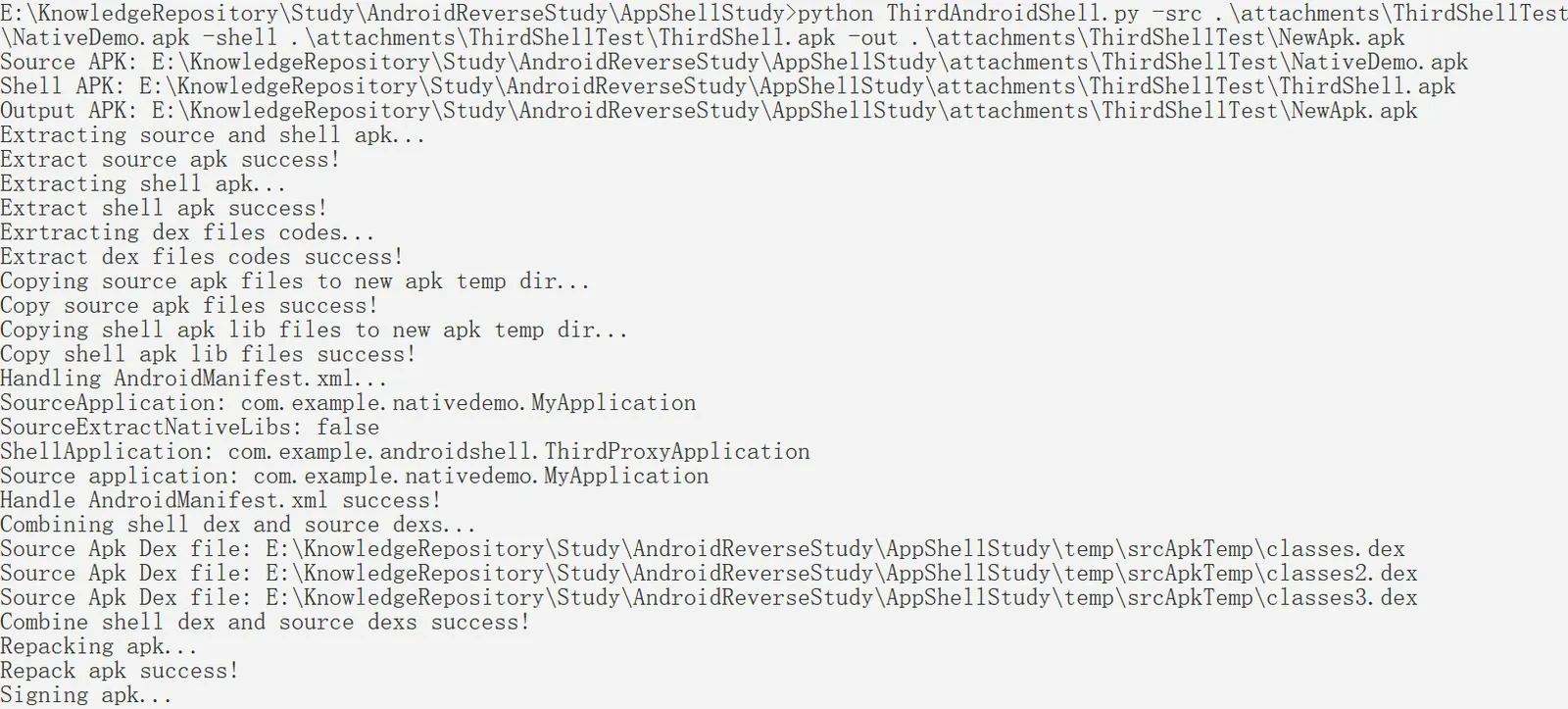
Install and run the output NewApk.apk, and the logcat results show:
-
When execution reaches the shell proxy
ThirdProxyApplication.attachBaseContext, since it actively callsSystem.loadLibraryto load the shell so, the so’sinitfunction runs and sets up hooks first. At this point no source-app Java-layer code has run, so no Dex instruction refill is triggered.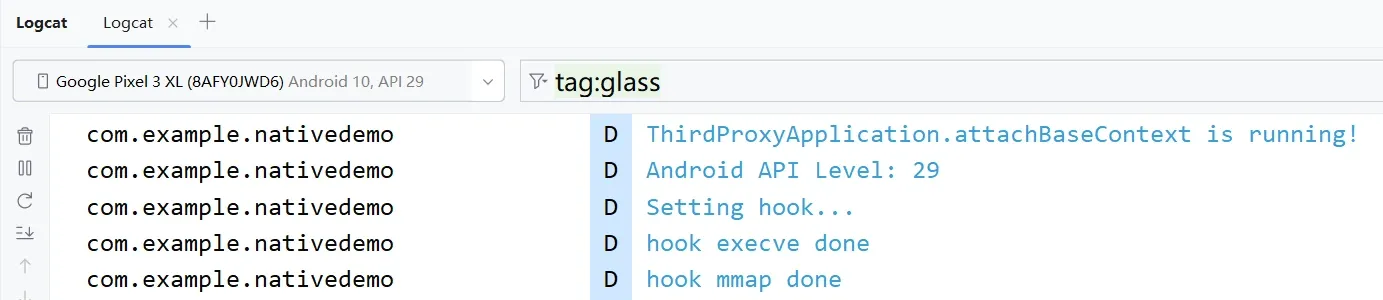
-
First extract the shell Dex from
base.apk, then extract the source Dex, and finally replace the ClassLoader.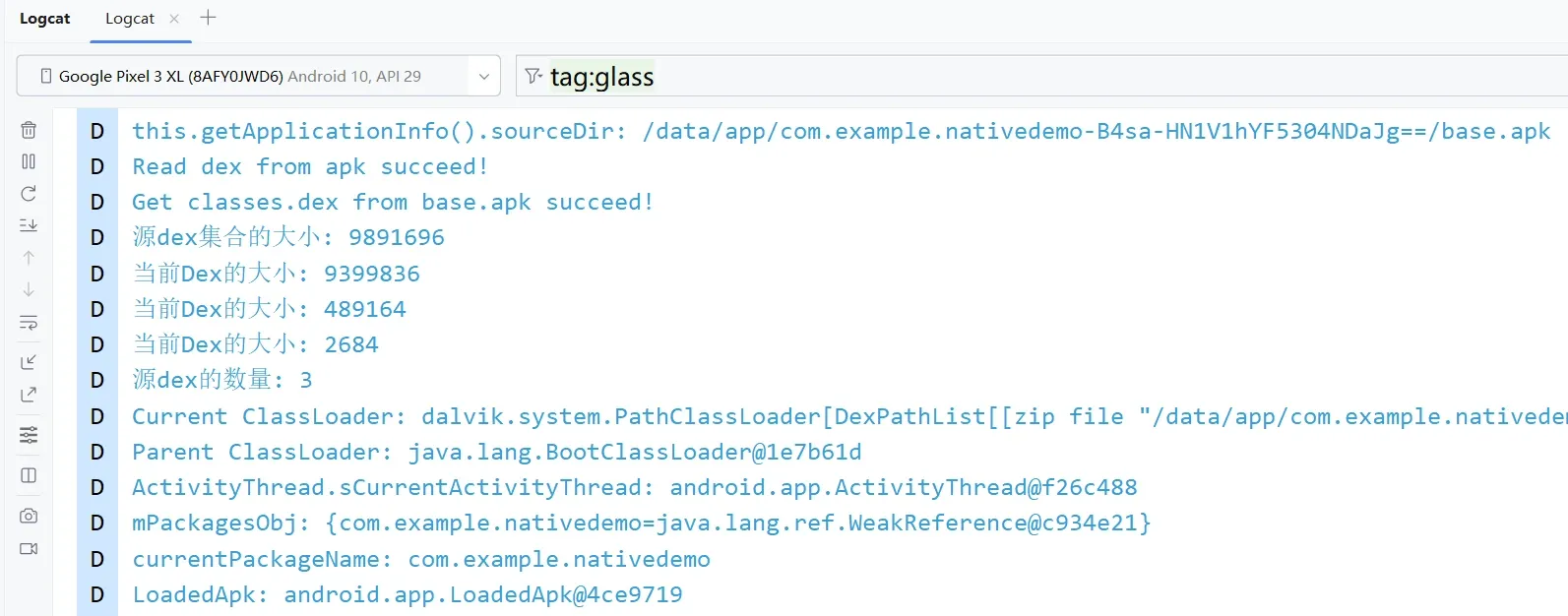
-
Next, Application replacement is needed; because source-app Java-layer code runs, Dex instruction refill is triggered — codes-file parsing and CodeItem object creation.
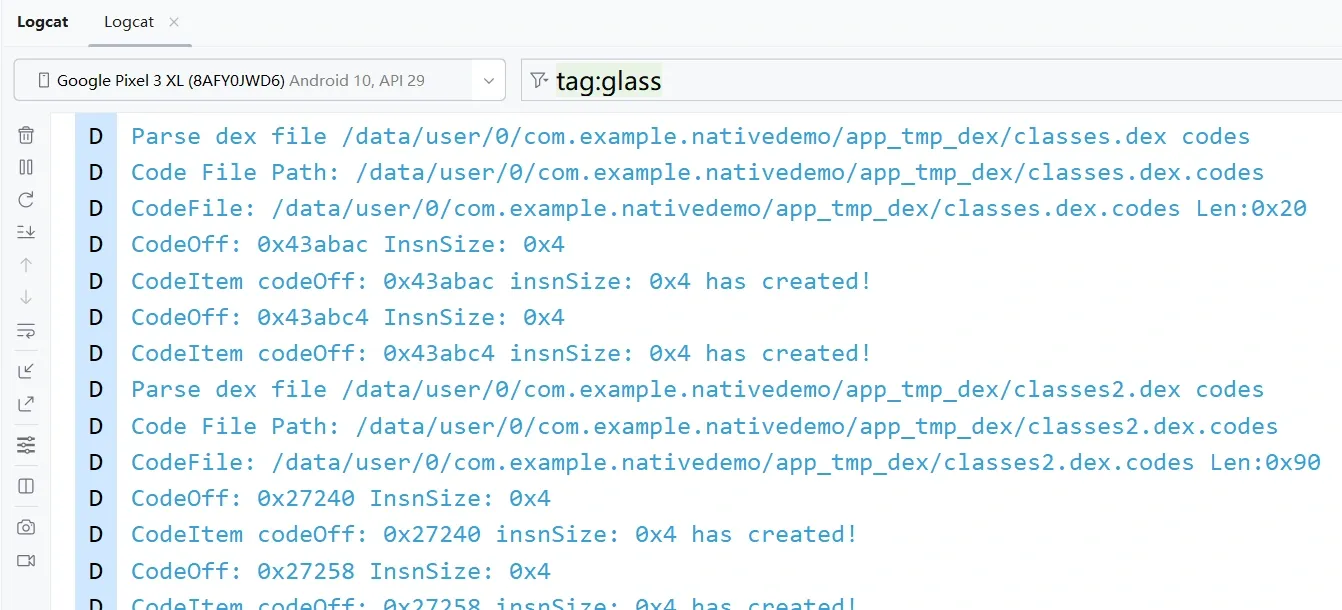
-
After code refill and Application replacement finish, the source
Application.attachBaseContextandonCreaterun successfully, and finallyMainActivity.onCreateruns, entering the source lifecycle.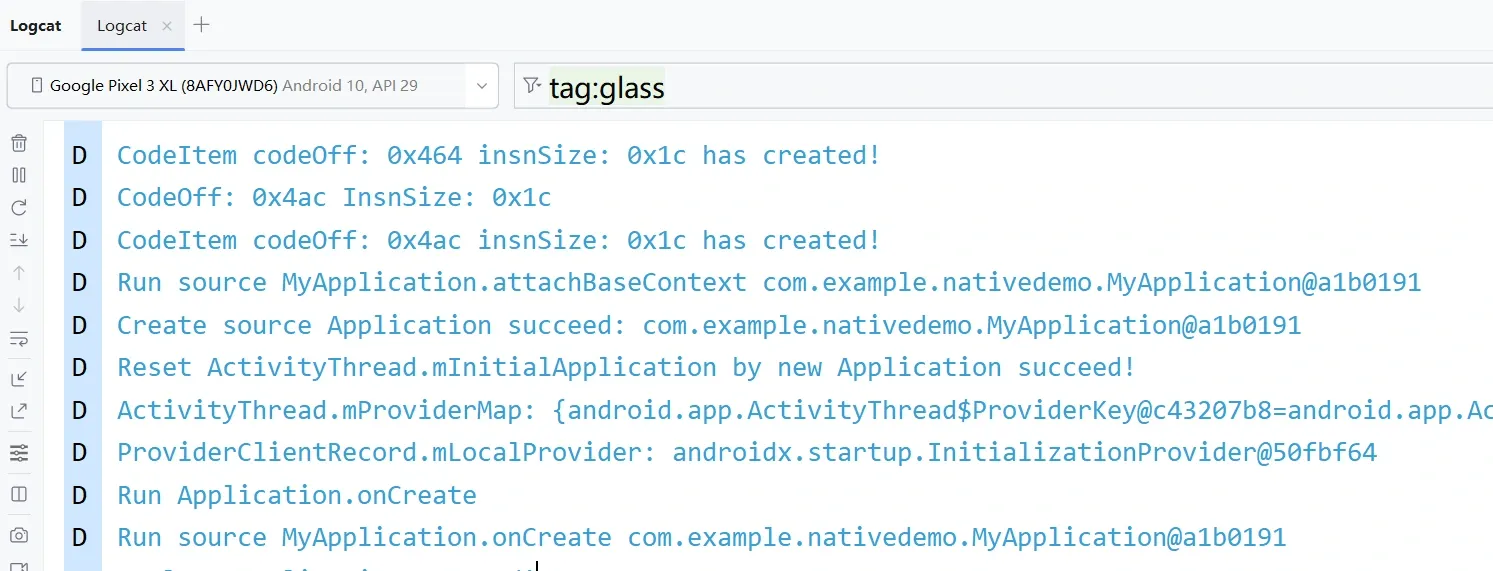
Jadx analysis of the protected app shows:
-
Because the Dex is dynamically loaded, key classes can’t be viewed directly.
-
The code-extraction effect: method bodies are empty.
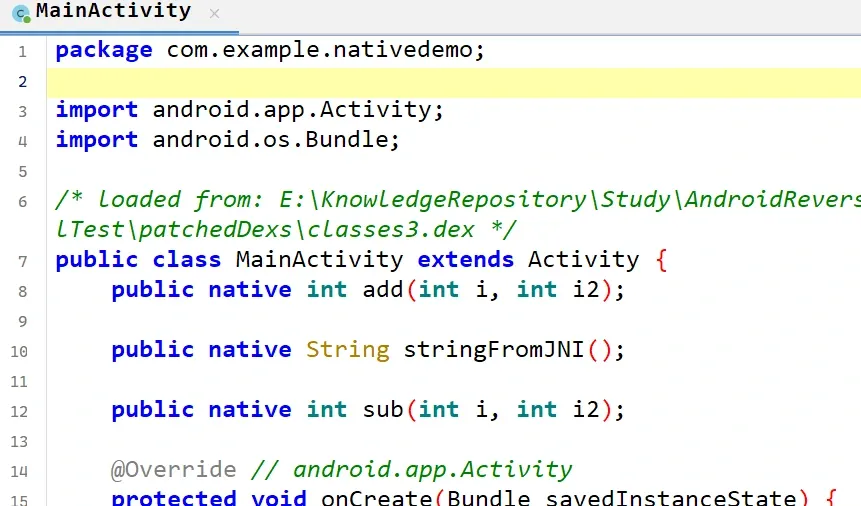
-
The method bodies’ smali code is entirely set to
nopinstructions.
10. ClassLoader Loading a Dex — Deep Dive
Dex loading depends on Android’s ClassLoader; there are three related ClassLoaders:
- InMemoryDexClassLoader — added in Android 8.0, loads dex files from memory.
- PathClassLoader — loads the dex of already-installed APKs.
- DexClassLoader — loads installed jar/apk/dex as well as uninstalled apks from the SD card.
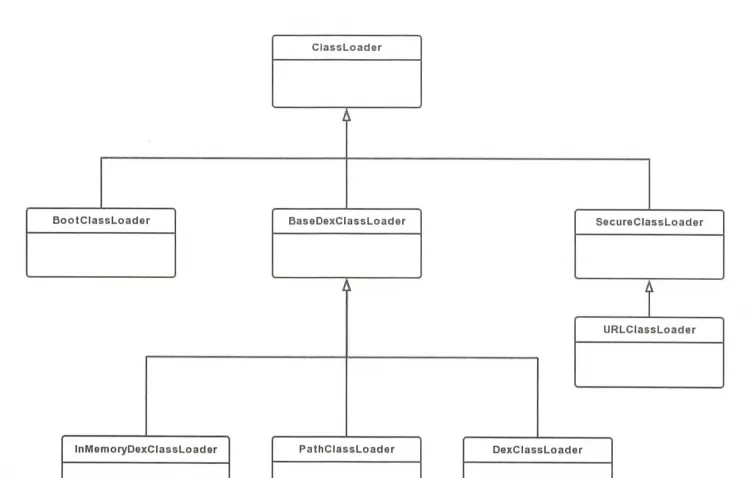
The full flow:
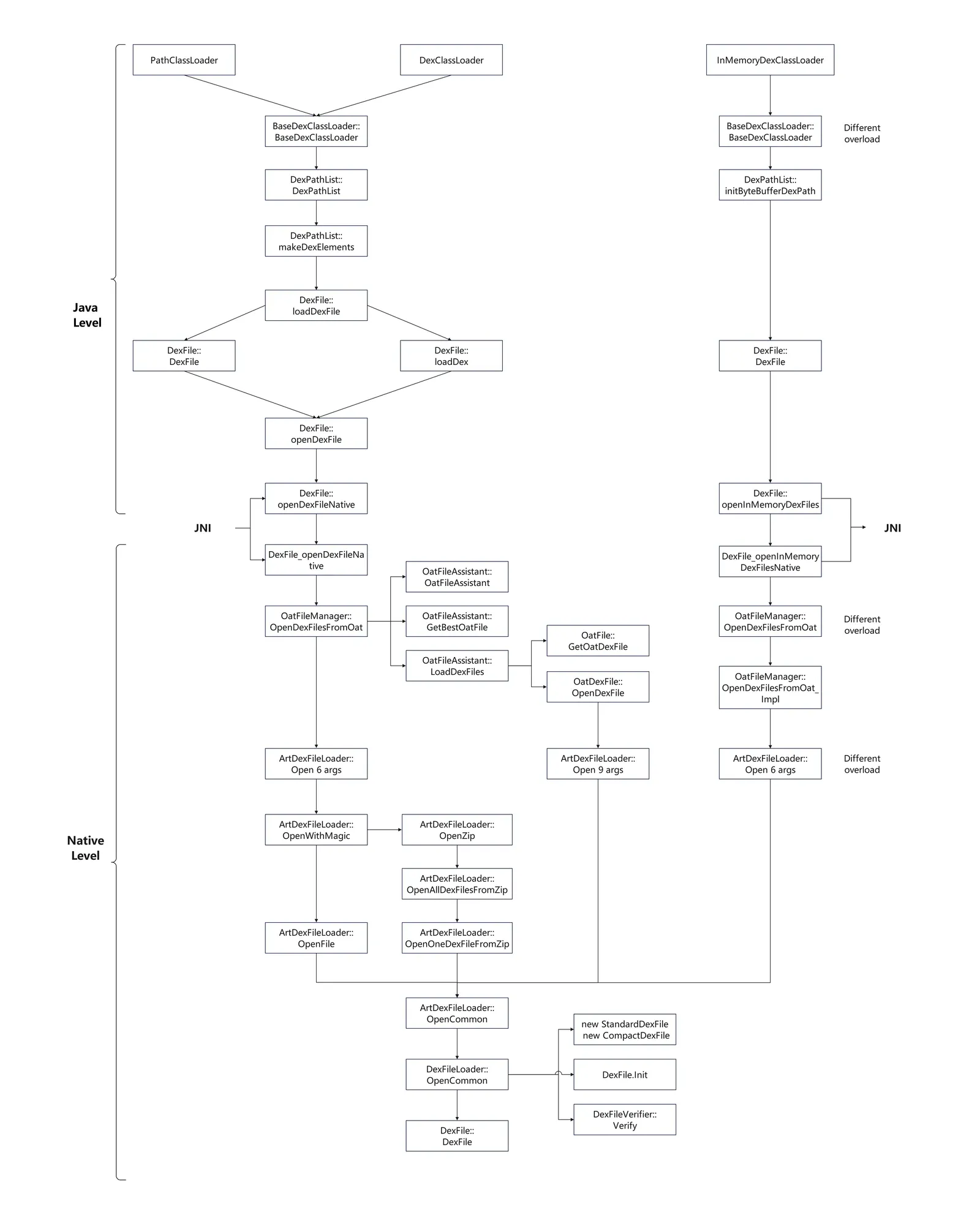
The following analysis is based on Android 10.0.0_r47.
Path/DexClassLoader — Java layer
Call chain:
BaseDexClassLoader()
 ├─ new DexPathList
 │  └─ DexPathList.makeDexElements
 │      └─ DexPathList.loadDexFile
 │          └─ new DexFile
 │              └─ DexFile::loadDex
 │                  └─ DexFile.openDexFile
 └───────────────────────└─ DexFile.openDexFileNative
BaseDexClassLoader
//libcore/dalvik/src/main/java/dalvik/system/DexClassLoader.java
public class DexClassLoader extends BaseDexClassLoader {
    public DexClassLoader(String dexPath, String optimizedDirectory,
            String librarySearchPath, ClassLoader parent) {
        super(dexPath, null, librarySearchPath, parent);
    }
}

//libcore/dalvik/src/main/java/dalvik/system/PathClassLoader.java
public class PathClassLoader extends BaseDexClassLoader {
    public PathClassLoader(String dexPath, ClassLoader parent) {
        super(dexPath, null, null, parent);
    }

    public PathClassLoader(String dexPath, String librarySearchPath, ClassLoader parent) {
        super(dexPath, null, librarySearchPath, parent);
    }

    @libcore.api.CorePlatformApi
    public PathClassLoader(
            String dexPath, String librarySearchPath, ClassLoader parent,
            ClassLoader[] sharedLibraryLoaders) {
        super(dexPath, librarySearchPath, parent, sharedLibraryLoaders);
    }
}
Both DexClassLoader and PathClassLoader inherit from BaseDexClassLoader and both call this 4-parameter constructor overload.
The constructor mainly creates the DexPathList class:
//libcore/dalvik/src/main/java/dalvik/system/BaseDexClassLoader.java
public BaseDexClassLoader(String dexPath, File optimizedDirectory,
                          String librarySearchPath, ClassLoader parent) {
    super(parent);
    this.pathList = new DexPathList(this, dexPath, librarySearchPath, null);

    if (reporter != null) {
        reporter.report(this.pathList.getDexPaths());
    }
}
DexPathList::DexPathList
The DexPathList constructor is as follows. In this call chain, optimizedDirectory=null and isTrusted=false.
It calls makeDexElements:
//libcore/dalvik/src/main/java/dalvik/system/DexPathList.java
    @UnsupportedAppUsage
    public DexPathList(ClassLoader definingContext, String dexPath,
            String librarySearchPath, File optimizedDirectory) {
        this(definingContext, dexPath, librarySearchPath, optimizedDirectory, false);
    }

    DexPathList(ClassLoader definingContext, String dexPath,
            String librarySearchPath, File optimizedDirectory, boolean isTrusted) {
        // some validation logic
        ......

        this.definingContext = definingContext;

        ArrayList<IOException> suppressedExceptions = new ArrayList<IOException>();
        // save dexPath for BaseDexClassLoader
        this.dexElements = makeDexElements(splitDexPath(dexPath), optimizedDirectory,
                                           suppressedExceptions, definingContext, isTrusted);

        // Native libraries may exist in both the system and
        // application library paths, and we use this search order:
        //
        //   1. This class loader's library path for application libraries (librarySearchPath):
        //   1.1. Native library directories
        //   1.2. Path to libraries in apk-files
        //   2. The VM's library path from the system property for system libraries
        //      also known as java.library.path
        //
        // This order was reversed prior to Gingerbread; see http://b/2933456.
        this.nativeLibraryDirectories = splitPaths(librarySearchPath, false);
        this.systemNativeLibraryDirectories =
                splitPaths(System.getProperty("java.library.path"), true);
        this.nativeLibraryPathElements = makePathElements(getAllNativeLibraryDirectories());

        if (suppressedExceptions.size() > 0) {
            this.dexElementsSuppressedExceptions =
                suppressedExceptions.toArray(new IOException[suppressedExceptions.size()]);
        } else {
            dexElementsSuppressedExceptions = null;
        }
    }
DexPathList::makeDexElements
Iterate over all files, find dex files, and call loadDexFile to load them:
//libcore/dalvik/src/main/java/dalvik/system/DexPathList.java
    @UnsupportedAppUsage
    private static Element[] makeDexElements(List<File> files, File optimizedDirectory,
            List<IOException> suppressedExceptions, ClassLoader loader) {
        return makeDexElements(files, optimizedDirectory, suppressedExceptions, loader, false);
    }


    private static Element[] makeDexElements(List<File> files, File optimizedDirectory,
            List<IOException> suppressedExceptions, ClassLoader loader, boolean isTrusted) {
      Element[] elements = new Element[files.size()];
      int elementsPos = 0;
      /*
       * Open all files and load the (direct or contained) dex files up front.
       */
       // iterate over all passed-in files
      for (File file : files) {
          if (file.isDirectory()) {// directory
              // We support directories for looking up resources. Looking up resources in
              // directories is useful for running libcore tests.
              elements[elementsPos++] = new Element(file);
          } else if (file.isFile()) {// file
              String name = file.getName();

              DexFile dex = null;
              if (name.endsWith(DEX_SUFFIX)) {// determine dex file by the DEX_SUFFIX=".dex" suffix
                  // Raw dex file (not inside a zip/jar).
                  try {
                      // call loadDexFile to load the dex file directly
                      dex = loadDexFile(file, optimizedDirectory, loader, elements);
                      if (dex != null) {
                          elements[elementsPos++] = new Element(dex, null);
                      }
                  } catch (IOException suppressed) {
                      System.logE("Unable to load dex file: " + file, suppressed);
                      suppressedExceptions.add(suppressed);
                  }
              } else {
                  try {
                      // try calling loadDexFile to load the dex inside the zip file
                      dex = loadDexFile(file, optimizedDirectory, loader, elements);
                  } catch (IOException suppressed) {
                      // no dex file in the zip
                      /*
                       * IOException might get thrown "legitimately" by the DexFile constructor if
                       * the zip file turns out to be resource-only (that is, no classes.dex file
                       * in it).
                       * Let dex == null and hang on to the exception to add to the tea-leaves for
                       * when findClass returns null.
                       */
                      suppressedExceptions.add(suppressed);
                  }

                  // add the file to the elements array
                  if (dex == null) {
                      elements[elementsPos++] = new Element(file);
                  } else {
                      elements[elementsPos++] = new Element(dex, file);
                  }
              }
              if (dex != null && isTrusted) {
                dex.setTrusted();
              }
          } else {
              System.logW("ClassLoader referenced unknown path: " + file);
          }
      }
      if (elementsPos != elements.length) {
          elements = Arrays.copyOf(elements, elementsPos);
      }
      return elements;
    }
DexFile::loadDexFile
In Android, when an app starts for the first time, the dex is optimized and a cache file is generated under cache/dalvik-cache to speed up app startup.
optimizedDirectory is the cache file’s path, defaulting to cache/dalvik-cache.
If there is no corresponding cache file, call DexFile to parse the dex (and optimize it). If there is a cache file, call DexFile.loadDex to parse it:
//libcore/dalvik/src/main/java/dalvik/system/DexPathList.java
    @UnsupportedAppUsage
    private static DexFile loadDexFile(File file, File optimizedDirectory, ClassLoader loader,
                                       Element[] elements)
            throws IOException {
        if (optimizedDirectory == null) {
            // no optimized cache file, call DexFile to parse and optimize the dex
            return new DexFile(file, loader, elements);
        } else {
            // an optimized cache file exists, call DexFile.loadDex to parse and load it
            String optimizedPath = optimizedPathFor(file, optimizedDirectory);
            return DexFile.loadDex(file.getPath(), optimizedPath, 0, loader, elements);
        }
    }
DexFile::DexFile
Internally calls openDexFile:
//libcore/dalvik/src/main/java/dalvik/system/DexFile.java
    DexFile(File file, ClassLoader loader, DexPathList.Element[] elements)
            throws IOException {
        this(file.getPath(), loader, elements);
    }

    DexFile(String fileName, ClassLoader loader, DexPathList.Element[] elements)
            throws IOException {
        mCookie = openDexFile(fileName, null, 0, loader, elements);
        mInternalCookie = mCookie;
        mFileName = fileName;
        //System.out.println("DEX FILE cookie is " + mCookie + " fileName=" + fileName);
    }
There is also an overload accepting a ByteBuffer[], which internally calls openInMemoryDexFiles, presumably used by InMemoryDexClassLoader to load dex. Plus a 5-parameter overload that also calls openDexFile:
    DexFile(ByteBuffer[] bufs, ClassLoader loader, DexPathList.Element[] elements)
            throws IOException {
        mCookie = openInMemoryDexFiles(bufs, loader, elements);
        mInternalCookie = mCookie;
        mFileName = null;
    }
   private DexFile(String sourceName, String outputName, int flags, ClassLoader loader,
            DexPathList.Element[] elements) throws IOException {
        if (outputName != null) {
            ......
        }
        mCookie = openDexFile(sourceName, outputName, flags, loader, elements);
        mInternalCookie = mCookie;
        mFileName = sourceName;
        //System.out.println("DEX FILE cookie is " + mCookie + " sourceName=" + sourceName + " outputName=" + outputName);
    }
DexFile::loadDex
Internally calls DexFile, after which the flow is the same as above, finally calling openDexFile:
//libcore/dalvik/src/main/java/dalvik/system/DexFile.java
    @Deprecated
    static public DexFile loadDex(String sourcePathName, String outputPathName,
        int flags) throws IOException {
        return loadDex(sourcePathName, outputPathName, flags, null, null);
    }

    @UnsupportedAppUsage
    static DexFile loadDex(String sourcePathName, String outputPathName,
        int flags, ClassLoader loader, DexPathList.Element[] elements) throws IOException {
        return new DexFile(sourcePathName, outputPathName, flags, loader, elements);
    }
DexFile::openDexFile
Finally calls the native method openDexFileNative:
    @UnsupportedAppUsage
    private static Object openDexFile(String sourceName, String outputName, int flags,
            ClassLoader loader, DexPathList.Element[] elements) throws IOException {
        // Use absolute paths to enable the use of relative paths when testing on host.
        return openDexFileNative(new File(sourceName).getAbsolutePath(),
                                 (outputName == null)
                                     ? null
                                     : new File(outputName).getAbsolutePath(),
                                 flags,
                                 loader,
                                 elements);
    }
There are also openInMemoryDexFiles and openInMemoryDexFilesNative:
    private static Object openInMemoryDexFiles(ByteBuffer[] bufs, ClassLoader loader,
            DexPathList.Element[] elements) throws IOException {
        // Preprocess the ByteBuffers for openInMemoryDexFilesNative. We extract
        // the backing array (non-direct buffers only) and start/end positions
        // so that the native method does not have to call Java methods anymore.
        byte[][] arrays = new byte[bufs.length][];
        int[] starts = new int[bufs.length];
        int[] ends = new int[bufs.length];
        for (int i = 0; i < bufs.length; ++i) {
            arrays[i] = bufs[i].isDirect() ? null : bufs[i].array();
            starts[i] = bufs[i].position();
            ends[i] = bufs[i].limit();
        }
        return openInMemoryDexFilesNative(bufs, arrays, starts, ends, loader, elements);
    }

    private static native Object openInMemoryDexFilesNative(ByteBuffer[] bufs, byte[][] arrays,
            int[] starts, int[] ends, ClassLoader loader, DexPathList.Element[] elements);
Path/DexClassLoader — Native layer
Whether it’s PathClassLoader or DexClassLoader, the final JNI call is DexFile::openDexFileNative.
The corresponding native function is DexFile_openDexFileNative in art/runtime/native/dalvik_system_DexFile.cc.
Call chain:
DexFile_openDexFileNative()
 ├─ OpenDexFilesFromOat
 │  └─ ArtDexFileLoader::Open
 │      └─ OpenAndReadMagic
 │         OpenWithMagic
 │          └─ ArtDexFileLoader::OpenFile
 │              └─ ArtDexFileLoader::OpenCommon
 │                  └─ DexFileLoader::OpenCommon
 │                       magic == "dex\n" new StandardDexFile
 │                       magic == "cdex"  new CompactDexFile
 └───────────────────────└─ DexFile::DexFile()
DexFile_openDexFileNative
The key is calling OatFileManager.OpenDexFilesFromOat() to open the OAT file:
//art/runtime/native/dalvik_system_DexFile.cc
// TODO(calin): clean up the unused parameters (here and in libcore).
static jobject DexFile_openDexFileNative(JNIEnv* env,
                                         jclass,
                                         jstring javaSourceName,
                                         jstring javaOutputName ATTRIBUTE_UNUSED,
                                         jint flags ATTRIBUTE_UNUSED,
                                         jobject class_loader,
                                         jobjectArray dex_elements) {
  ScopedUtfChars sourceName(env, javaSourceName);
  if (sourceName.c_str() == nullptr) {
    return nullptr;
  }

  std::vector<std::string> error_msgs;
  const OatFile* oat_file = nullptr;
  // open the oat file
  std::vector<std::unique_ptr<const DexFile>> dex_files =
      Runtime::Current()->GetOatFileManager().OpenDexFilesFromOat(sourceName.c_str(),
                                                                  class_loader,
                                                                  dex_elements,
                                                                  /*out*/ &oat_file,
                                                                  /*out*/ &error_msgs);
  return CreateCookieFromOatFileManagerResult(env, dex_files, oat_file, error_msgs);
}
OatFileManager::OpenDexFilesFromOat
The rough flow (Android 8.0 differs somewhat here, using DexFile::Open to load dex):
- Get the
oat_file_assistantobject viaoat_file_assistant(). - Get the oat file via
oat_file_assistant.GetBestOatFile(). - Call
oat_file_assistant.LoadDexFiles()to load dex from the oat file. - If loading dex from the oat file fails, call
ArtDexFileLoader::Open()to load the dex file.
//art/runtime/oat_file_manager.cc#447
std::vector<std::unique_ptr<const DexFile>> OatFileManager::OpenDexFilesFromOat(
    const char* dex_location,
    jobject class_loader,
    jobjectArray dex_elements,
    const OatFile** out_oat_file,
    std::vector<std::string>* error_msgs) {
    ......
  // 1. get the OatFileAssistant
  OatFileAssistant oat_file_assistant(dex_location,
                                      kRuntimeISA,
                                      !runtime->IsAotCompiler(),
                                      only_use_system_oat_files_);

  // 2. get the oat file via oat_file_assistant.GetBestOatFile
  // Get the oat file on disk.
  std::unique_ptr<const OatFile> oat_file(oat_file_assistant.GetBestOatFile().release());
  VLOG(oat) << "OatFileAssistant(" << dex_location << ").GetBestOatFile()="
            << reinterpret_cast<uintptr_t>(oat_file.get())
            << " (executable=" << (oat_file != nullptr ? oat_file->IsExecutable() : false) << ")";

  const OatFile* source_oat_file = nullptr;
  CheckCollisionResult check_collision_result = CheckCollisionResult::kPerformedHasCollisions;
  std::string error_msg;
  if ((class_loader != nullptr || dex_elements != nullptr) && oat_file != nullptr) {
    check_collision_result = CheckCollision(oat_file.get(), context.get(), /*out*/ &error_msg);
    bool accept_oat_file = AcceptOatFile(check_collision_result);
      ......
      // collision detection
  }

  std::vector<std::unique_ptr<const DexFile>> dex_files;

  // load dex from the oat file
  // Load the dex files from the oat file.
  if (source_oat_file != nullptr) {
    bool added_image_space = false;
    if (source_oat_file->IsExecutable()) {
        ......
        // oat image handling
    }
    if (!added_image_space) {
      DCHECK(dex_files.empty());
      // 3. call LoadDexFiles to load dex from the oat file
      dex_files = oat_file_assistant.LoadDexFiles(*source_oat_file, dex_location);

      // Register for tracking.
      // register tracking
      for (const auto& dex_file : dex_files) {
        dex::tracking::RegisterDexFile(dex_file.get());
      }
    }
    // failed to load dex from oat
    if (dex_files.empty()) {
      error_msgs->push_back("Failed to open dex files from " + source_oat_file->GetLocation());
    } else {
      // Opened dex files from an oat file, madvise them to their loaded state.
       for (const std::unique_ptr<const DexFile>& dex_file : dex_files) {
         OatDexFile::MadviseDexFile(*dex_file, MadviseState::kMadviseStateAtLoad);
       }
    }
  }

  // Fall back to running out of the original dex file if we couldn't load any
  // dex_files from the oat file.
  if (dex_files.empty()) {
    if (oat_file_assistant.HasOriginalDexFiles()) {// determine whether original dex files exist
      if (Runtime::Current()->IsDexFileFallbackEnabled()) {// whether dex file fallback is enabled
        static constexpr bool kVerifyChecksum = true;
        const ArtDexFileLoader dex_file_loader;
        // 4. call ArtDexFileLoader::Open to open the dex file
        if (!dex_file_loader.Open(dex_location,
                                  dex_location,
                                  Runtime::Current()->IsVerificationEnabled(),
                                  kVerifyChecksum,
                                  /*out*/ &error_msg,
                                  &dex_files)) {
          LOG(WARNING) << error_msg;
          error_msgs->push_back("Failed to open dex files from " + std::string(dex_location)
                                + " because: " + error_msg);
        }
      } else {
        error_msgs->push_back("Fallback mode disabled, skipping dex files.");
      }
    } else {
      error_msgs->push_back("No original dex files found for dex location "
          + std::string(dex_location));
    }
  }

  if (Runtime::Current()->GetJit() != nullptr) {
    ScopedObjectAccess soa(self);
    Runtime::Current()->GetJit()->RegisterDexFiles(
        dex_files, soa.Decode<mirror::ClassLoader>(class_loader));
  }

  return dex_files;
}
OatFileAssistant::GetBestOatFile
First call GetBestInfo() to get the best oat file info, then call ReleaseFileForUse() to release the file for use based on the oat file’s state (using the latest-state oat file by default):
//art/runtime/oat_file_assistant.cc
std::unique_ptr<OatFile> OatFileAssistant::GetBestOatFile() {
  return GetBestInfo().ReleaseFileForUse();
}

OatFileAssistant::OatFileInfo& OatFileAssistant::GetBestInfo() {

  if (dex_parent_writable_ || UseFdToReadFiles()) {
    // parent directory writable, choose odex
    return odex_;
  }
  // parent directory not writable, meaning it's a system app; if the oat file is usable, choose the oat file
  if (oat_.IsUseable()) {
    return oat_;
  }

  // oat file not usable; if the odex file is up to date, use odex
  if (odex_.Status() == kOatUpToDate) {
    return odex_;
  }

  // oat file not usable, odex not up to date; if the original oat exists, use it
  if (HasOriginalDexFiles()) {
    return oat_;
  }

  // worst case, pick whatever exists
  // We got into the worst situation here:
  // - the oat location is not usable
  // - the prebuild odex location is not up to date
  // - and we don't have the original dex file anymore (stripped).
  // Pick the odex if it exists, or the oat if not.
  return (odex_.Status() == kOatCannotOpen) ? oat_ : odex_;
}

std::unique_ptr<OatFile> OatFileAssistant::OatFileInfo::ReleaseFileForUse() {
  // if the oat file is up to date, release the file and use it directly
  if (Status() == kOatUpToDate) {
    return ReleaseFile();
  }

  VLOG(oat) << "Oat File Assistant: No relocated oat file found,"
    << " attempting to fall back to interpreting oat file instead.";

  switch (Status()) {
    case kOatBootImageOutOfDate:
      // OutOfDate may be either a mismatched image, or a missing image.
      if (oat_file_assistant_->HasOriginalDexFiles()) {
        // If there are original dex files, it is better to use them (to avoid a potential
        // quickening mismatch because the boot image changed).
        break;
      }
      // If we do not accept the oat file, we may not have access to dex bytecode at all. Grudgingly
      // go forward.
      FALLTHROUGH_INTENDED;

    case kOatUpToDate:
    case kOatCannotOpen:
    case kOatDexOutOfDate:
      break;
  }

  return std::unique_ptr<OatFile>();
}OatFileAssistant::OatFileInfo::Status:
OatFileAssistant::OatStatus OatFileAssistant::OatFileInfo::Status() {
  if (!status_attempted_) {
    status_attempted_ = true;
      // open the oat file
    const OatFile* file = GetFile();
    if (file == nullptr) {
      // Check to see if there is a vdex file we can make use of.
      std::string error_msg;
      std::string vdex_filename = GetVdexFilename(filename_);
      std::unique_ptr<VdexFile> vdex;
      if (use_fd_) {
        if (vdex_fd_ >= 0) {
          struct stat s;
          int rc = TEMP_FAILURE_RETRY(fstat(vdex_fd_, &s));
          if (rc == -1) {
            error_msg = StringPrintf("Failed getting length of the vdex file %s.", strerror(errno));
          } else {
              // open the vdex file
            vdex = VdexFile::Open(vdex_fd_,
                                  s.st_size,
                                  vdex_filename,
                                  /*writable=*/ false,
                                  /*low_4gb=*/ false,
                                  /*unquicken=*/ false,
                                  &error_msg);
          }
        }
      } else {
        vdex = VdexFile::Open(vdex_filename,
                              /*writable=*/ false,
                              /*low_4gb=*/ false,
                              /*unquicken=*/ false,
                              &error_msg);
      }
      if (vdex == nullptr) {
        status_ = kOatCannotOpen;
        VLOG(oat) << "unable to open vdex file " << vdex_filename << ": " << error_msg;
      } else {
        if (oat_file_assistant_->DexChecksumUpToDate(*vdex, &error_msg)) {
          // The vdex file does not contain enough information to determine
          // whether it is up to date with respect to the boot image, so we
          // assume it is out of date.
          VLOG(oat) << error_msg;
          status_ = kOatBootImageOutOfDate;
        } else {
          status_ = kOatDexOutOfDate;
        }
      }
    } else {
      status_ = oat_file_assistant_->GivenOatFileStatus(*file);
      VLOG(oat) << file->GetLocation() << " is " << status_
          << " with filter " << file->GetCompilerFilter();
    }
  }
  return status_;
}
OatFileAssistant::LoadDexFiles
- Get the
OatDexFileobject viaOatFile::GetOatDexFile. - Open the dex via
OatDexFile::OpenDexFileand add it to the DexFile array. - Iterate over the Oat file; if multidex exists, open those dexs in order and add them to the DexFile array.
In short, this function opens dex files from the Oat file and adds them to the DexFile array:
//art/runtime/oat_file_assistant.cc
std::vector<std::unique_ptr<const DexFile>> OatFileAssistant::LoadDexFiles(
    const OatFile &oat_file, const char *dex_location) {
  std::vector<std::unique_ptr<const DexFile>> dex_files;
  // call the 3-parameter LoadDexFiles overload
  if (LoadDexFiles(oat_file, dex_location, &dex_files)) {
    return dex_files;
  } else {
    return std::vector<std::unique_ptr<const DexFile>>();
  }
}

bool OatFileAssistant::LoadDexFiles(
    const OatFile &oat_file,
    const std::string& dex_location,
    std::vector<std::unique_ptr<const DexFile>>* out_dex_files) {
  // Load the main dex file.
  std::string error_msg;
  //1. get the OatDexFile object via oat_file.GetOatDexFile
  const OatDexFile* oat_dex_file = oat_file.GetOatDexFile(
      dex_location.c_str(), nullptr, &error_msg);
  if (oat_dex_file == nullptr) {
    LOG(WARNING) << error_msg;
    return false;
  }

  //2. open the dex file via OatDexFile::OpenDexFile
  std::unique_ptr<const DexFile> dex_file = oat_dex_file->OpenDexFile(&error_msg);
  if (dex_file.get() == nullptr) {
    LOG(WARNING) << "Failed to open dex file from oat dex file: " << error_msg;
    return false;
  }
  //3. add the dex file to the dex_files array
  out_dex_files->push_back(std::move(dex_file));

  // Load the rest of the multidex entries
  //4. check whether multiple dex files exist (multidex support)
  for (size_t i = 1;; i++) {
    // scan and get the i-th dex file from the oat file
    std::string multidex_dex_location = DexFileLoader::GetMultiDexLocation(i, dex_location.c_str());
    oat_dex_file = oat_file.GetOatDexFile(multidex_dex_location.c_str(), nullptr);
    if (oat_dex_file == nullptr) {
      // There are no more multidex entries to load.
      break;
    }
    // open the i-th dex file
    dex_file = oat_dex_file->OpenDexFile(&error_msg);
    if (dex_file.get() == nullptr) {
      LOG(WARNING) << "Failed to open dex file from oat dex file: " << error_msg;
      return false;
    }
    // add the dex file to the dex_files array
    out_dex_files->push_back(std::move(dex_file));
  }
  return true;
}
OatFile::GetOatDexFile
Using dex_location as key, look up the oat_dex file position in the oat_dex_files_ map, and return after verification:
//art/runtime/oat_file.cc
const OatDexFile* OatFile::GetOatDexFile(const char* dex_location,
                                         const uint32_t* dex_location_checksum,
                                         std::string* error_msg) const {
  const OatDexFile* oat_dex_file = nullptr;
  std::string_view key(dex_location);
  // Try to find the key cheaply in the oat_dex_files_ map which holds dex locations
  // directly mentioned in the oat file and doesn't require locking.
  // find the oat_dex file position in the oat_dex_files_ map by key
  auto primary_it = oat_dex_files_.find(key);
  if (primary_it != oat_dex_files_.end()) {// dex file not unique
    oat_dex_file = primary_it->second;
    DCHECK(oat_dex_file != nullptr);
  } else {
    // This dex_location is not one of the dex locations directly mentioned in the
    // oat file. The correct lookup is via the canonical location but first see in
    // the secondary_oat_dex_files_ whether we've looked up this location before.
    MutexLock mu(Thread::Current(), secondary_lookup_lock_);
    auto secondary_lb = secondary_oat_dex_files_.lower_bound(key);
    if (secondary_lb != secondary_oat_dex_files_.end() && key == secondary_lb->first) {
      oat_dex_file = secondary_lb->second;  // May be null.
    } else {
      // We haven't seen this dex_location before, we must check the canonical location.
      std::string dex_canonical_location = DexFileLoader::GetDexCanonicalLocation(dex_location);
      if (dex_canonical_location != dex_location) {
        std::string_view canonical_key(dex_canonical_location);
        auto canonical_it = oat_dex_files_.find(canonical_key);
        if (canonical_it != oat_dex_files_.end()) {
          oat_dex_file = canonical_it->second;
        }  // else keep null.
      }  // else keep null.

      // Copy the key to the string_cache_ and store the result in secondary map.
      string_cache_.emplace_back(key.data(), key.length());
      std::string_view key_copy(string_cache_.back());
      secondary_oat_dex_files_.PutBefore(secondary_lb, key_copy, oat_dex_file);
    }
  }

  // failed to get oat_dex_file
  if (oat_dex_file == nullptr) {
    if (error_msg != nullptr) {
      std::string dex_canonical_location = DexFileLoader::GetDexCanonicalLocation(dex_location);
      *error_msg = "Failed to find OatDexFile for DexFile " + std::string(dex_location)
          + " (canonical path " + dex_canonical_location + ") in OatFile " + GetLocation();
    }
    return nullptr;
  }

  // verify the oat_dex_file's checksum
  if (dex_location_checksum != nullptr &&
      oat_dex_file->GetDexFileLocationChecksum() != *dex_location_checksum) {
    if (error_msg != nullptr) {
      std::string dex_canonical_location = DexFileLoader::GetDexCanonicalLocation(dex_location);
      std::string checksum = StringPrintf("0x%08x", oat_dex_file->GetDexFileLocationChecksum());
      std::string required_checksum = StringPrintf("0x%08x", *dex_location_checksum);
      *error_msg = "OatDexFile for DexFile " + std::string(dex_location)
          + " (canonical path " + dex_canonical_location + ") in OatFile " + GetLocation()
          + " has checksum " + checksum + " but " + required_checksum + " was required";
    }
    return nullptr;
  }
  return oat_dex_file;
}
OatDexFile::OpenDexFile
Internally calls ArtDexFileLoader::Open:
//art/runtime/oat_file.cc
std::unique_ptr<const DexFile> OatDexFile::OpenDexFile(std::string* error_msg) const {
  ScopedTrace trace(__PRETTY_FUNCTION__);
  static constexpr bool kVerify = false;
  static constexpr bool kVerifyChecksum = false;
  const ArtDexFileLoader dex_file_loader;
  return dex_file_loader.Open(dex_file_pointer_,
                              FileSize(),
                              dex_file_location_,
                              dex_file_location_checksum_,
                              this,
                              kVerify,
                              kVerifyChecksum,
                              error_msg);
}
ArtDexFileLoader::Open
From the analysis above, in OatFileManager::OpenDexFilesFromOat, OatFileAssistant::LoadDexFiles ultimately also calls ArtDexFileLoader::Open, with a different number of parameters.
OatFileAssistant::LoadDexFiles calls the 9-parameter Open (oddly, only 8 arguments are passed, the 9th container isn’t).
Parameter explanation:
base— pointer to the dex file’s memory addresssize— dex file sizelocation— dex file locationlocation_checksum— checksum of the dex file locationoat_dex_file— pointer to theOatDexFileobjectverify— whether to verify the dex fileverify_checksum— whether to verify the dex file’s checksumerror_msg— pointer to the error message string
It directly calls ArtDexFileLoader::OpenCommon:
//art/libdexfile/dex/art_dex_file_loader.cc
std::unique_ptr<const DexFile> ArtDexFileLoader::Open(
    const uint8_t* base,
    size_t size,
    const std::string& location,
    uint32_t location_checksum,
    const OatDexFile* oat_dex_file,
    bool verify,
    bool verify_checksum,
    std::string* error_msg,
    std::unique_ptr<DexFileContainer> container) const {
  ScopedTrace trace(std::string("Open dex file from RAM ") + location);
  return OpenCommon(base,
                    size,
                    /*data_base=*/ nullptr,
                    /*data_size=*/ 0u,
                    location,
                    location_checksum,
                    oat_dex_file,
                    verify,
                    verify_checksum,
                    error_msg,
                    std::move(container),
                    /*verify_result=*/ nullptr);
}
The 6-parameter ArtDexFileLoader::Open called inside OatFileManager::OpenDexFilesFromOat:
filename— dex file namelocation— dex file locationverify_checksum— whether to verify the dex file’s checksumerror_msg— pointer to the error message stringdex_files— the DexFile array storing the dex files
It internally calls ArtDexFileLoader::OpenWithMagic, checks the file header: if zip, open via OpenZip; if dex, open via OpenFile:
//art/libdexfile/dex/art_dex_file_loader.cc
bool ArtDexFileLoader::Open(const char* filename,
                            const std::string& location,
                            bool verify,
                            bool verify_checksum,
                            std::string* error_msg,
                            std::vector<std::unique_ptr<const DexFile>>* dex_files) const {
  uint32_t magic;
  // open the file and read magic[8]; OpenAndReadMagic can be a common unpacking point, but the dex isn't loaded into memory yet
  File fd = OpenAndReadMagic(filename, &magic, error_msg);
  if (fd.Fd() == -1) {
    DCHECK(!error_msg->empty());
    return false;
  }
  return OpenWithMagic(
      magic, fd.Release(), location, verify, verify_checksum, error_msg, dex_files);
}

bool ArtDexFileLoader::OpenWithMagic(uint32_t magic,
                                     int fd,
                                     const std::string& location,
                                     bool verify,
                                     bool verify_checksum,
                                     std::string* error_msg,
                                     std::vector<std::unique_ptr<const DexFile>>* dex_files) const {
  ScopedTrace trace(std::string("Open dex file ") + std::string(location));
  DCHECK(dex_files != nullptr) << "DexFile::Open: out-param is nullptr";
  // if it's a zip header, open the zip via OpenZip
  if (IsZipMagic(magic)) {
    return OpenZip(fd, location, verify, verify_checksum, error_msg, dex_files);
  }
  // if it's a dex header, open via ArtDexFileLoader::OpenFile and create a DexFile object
  if (IsMagicValid(magic)) {
    std::unique_ptr<const DexFile> dex_file(OpenFile(fd,
                                                     location,
                                                     verify,
                                                     verify_checksum,
                                                     /* mmap_shared= */ false,
                                                     error_msg));
    if (dex_file.get() != nullptr) {
      // dex file opened successfully, add to the DexFile array
      dex_files->push_back(std::move(dex_file));
      return true;
    } else {
      return false;
    }
  }
  *error_msg = StringPrintf("Expected valid zip or dex file: '%s'", location.c_str());
  return false;
}
ArtDexFileLoader::OpenZip
Internally calls OpenAllDexFilesFromZip:
bool ArtDexFileLoader::OpenZip(int fd,
                               const std::string& location,
                               bool verify,
                               bool verify_checksum,
                               std::string* error_msg,
                               std::vector<std::unique_ptr<const DexFile>>* dex_files) const {
  ScopedTrace trace("Dex file open Zip " + std::string(location));
  DCHECK(dex_files != nullptr) << "DexFile::OpenZip: out-param is nullptr";
  std::unique_ptr<ZipArchive> zip_archive(ZipArchive::OpenFromFd(fd, location.c_str(), error_msg));
  if (zip_archive.get() == nullptr) {
    DCHECK(!error_msg->empty());
    return false;
  }
  return OpenAllDexFilesFromZip(
      *zip_archive, location, verify, verify_checksum, error_msg, dex_files);
}
ArtDexFileLoader::OpenAllDexFilesFromZip
OpenAllDexFilesFromZip internally calls OpenOneDexFileFromZip to open the dex:
bool ArtDexFileLoader::OpenAllDexFilesFromZip(
    const ZipArchive& zip_archive,
    const std::string& location,
    bool verify,
    bool verify_checksum,
    std::string* error_msg,
    std::vector<std::unique_ptr<const DexFile>>* dex_files) const {
  ScopedTrace trace("Dex file open from Zip " + std::string(location));
  DCHECK(dex_files != nullptr) << "DexFile::OpenFromZip: out-param is nullptr";
  DexFileLoaderErrorCode error_code;
  std::unique_ptr<const DexFile> dex_file(OpenOneDexFileFromZip(zip_archive,
                                                                kClassesDex,
                                                                location,
                                                                verify,
                                                                verify_checksum,
                                                                error_msg,
                                                                &error_code));
  if (dex_file.get() == nullptr) {
    return false;
  } else {
    // Had at least classes.dex.
    dex_files->push_back(std::move(dex_file));

    // Now try some more.

    // We could try to avoid std::string allocations by working on a char array directly. As we
    // do not expect a lot of iterations, this seems too involved and brittle.

    for (size_t i = 1; ; ++i) {
      std::string name = GetMultiDexClassesDexName(i);
      std::string fake_location = GetMultiDexLocation(i, location.c_str());
      std::unique_ptr<const DexFile> next_dex_file(OpenOneDexFileFromZip(zip_archive,
                                                                         name.c_str(),
                                                                         fake_location,
                                                                         verify,
                                                                         verify_checksum,
                                                                         error_msg,
                                                                         &error_code));
      if (next_dex_file.get() == nullptr) {
        if (error_code != DexFileLoaderErrorCode::kEntryNotFound) {
          LOG(WARNING) << "Zip open failed: " << *error_msg;
        }
        break;
      } else {
        dex_files->push_back(std::move(next_dex_file));
      }

      if (i == kWarnOnManyDexFilesThreshold) {
        LOG(WARNING) << location << " has in excess of " << kWarnOnManyDexFilesThreshold
                     << " dex files. Please consider coalescing and shrinking the number to "
                        " avoid runtime overhead.";
      }

      if (i == std::numeric_limits<size_t>::max()) {
        LOG(ERROR) << "Overflow in number of dex files!";
        break;
      }
    }

    return true;
  }
}
ArtDexFileLoader::OpenOneDexFileFromZip
OpenOneDexFileFromZip internally calls OpenCommon to open the dex:
std::unique_ptr<const DexFile> ArtDexFileLoader::OpenOneDexFileFromZip(
    const ZipArchive& zip_archive,
    const char* entry_name,
    const std::string& location,
    bool verify,
    bool verify_checksum,
    std::string* error_msg,
    DexFileLoaderErrorCode* error_code) const {
  ScopedTrace trace("Dex file open from Zip Archive " + std::string(location));
  CHECK(!location.empty());
  //1. find the given dex via zip_archive.Find
  std::unique_ptr<ZipEntry> zip_entry(zip_archive.Find(entry_name, error_msg));
  if (zip_entry == nullptr) {
    *error_code = DexFileLoaderErrorCode::kEntryNotFound;
    return nullptr;
  }
  if (zip_entry->GetUncompressedLength() == 0) {
    *error_msg = StringPrintf("Dex file '%s' has zero length", location.c_str());
    *error_code = DexFileLoaderErrorCode::kDexFileError;
    return nullptr;
  }

  MemMap map;
  if (zip_entry->IsUncompressed()) {
    // check file alignment
    if (!zip_entry->IsAlignedTo(alignof(DexFile::Header))) {
      // Do not mmap unaligned ZIP entries because
      // doing so would fail dex verification which requires 4 byte alignment.
      LOG(WARNING) << "Can't mmap dex file " << location << "!" << entry_name << " directly; "
                   << "please zipalign to " << alignof(DexFile::Header) << " bytes. "
                   << "Falling back to extracting file.";
    } else {
      //2. map uncompressed files, avoiding a dirty copy, e.g. lib files, arsc files, etc.
      // Map uncompressed files within zip as file-backed to avoid a dirty copy.
      map = zip_entry->MapDirectlyFromFile(location.c_str(), /*out*/error_msg);
      if (!map.IsValid()) {
        LOG(WARNING) << "Can't mmap dex file " << location << "!" << entry_name << " directly; "
                     << "is your ZIP file corrupted? Falling back to extraction.";
        // Try again with Extraction which still has a chance of recovery.
      }
    }
  }
  //...... MemMap check
  //3. call OpenCommon to open the dex file
  std::unique_ptr<DexFile> dex_file = OpenCommon(begin,
                                                 size,
                                                 /*data_base=*/ nullptr,
                                                 /*data_size=*/ 0u,
                                                 location,
                                                 zip_entry->GetCrc32(),
                                                 kNoOatDexFile,
                                                 verify,
                                                 verify_checksum,
                                                 error_msg,
                                                 std::make_unique<MemMapContainer>(std::move(map)),
                                                 &verify_result);
  // validity check
  ......
  return dex_file;
}
ArtDexFileLoader::OpenFile
Internally calls ArtDexFileLoader::OpenCommon to open the dex:
std::unique_ptr<const DexFile> ArtDexFileLoader::OpenFile(int fd,
                                                          const std::string& location,
                                                          bool verify,
                                                          bool verify_checksum,
                                                          bool mmap_shared,
                                                          std::string* error_msg) const {
  ScopedTrace trace(std::string("Open dex file ") + std::string(location));
  CHECK(!location.empty());
  MemMap map;
  {
    File delayed_close(fd, /* check_usage= */ false);
    struct stat sbuf;
    memset(&sbuf, 0, sizeof(sbuf));
    if (fstat(fd, &sbuf) == -1) {
      *error_msg = StringPrintf("DexFile: fstat '%s' failed: %s", location.c_str(),
                                strerror(errno));
      return nullptr;
    }
    if (S_ISDIR(sbuf.st_mode)) {
      *error_msg = StringPrintf("Attempt to mmap directory '%s'", location.c_str());
      return nullptr;
    }
    size_t length = sbuf.st_size;
    //1. map the dex file into memory
    map = MemMap::MapFile(length,
                          PROT_READ,
                          mmap_shared ? MAP_SHARED : MAP_PRIVATE,
                          fd,
                          0,
                          /*low_4gb=*/false,
                          location.c_str(),
                          error_msg);
    if (!map.IsValid()) {
      DCHECK(!error_msg->empty());
      return nullptr;
    }
  }

  const uint8_t* begin = map.Begin();
  size_t size = map.Size();
  if (size < sizeof(DexFile::Header)) {
    *error_msg = StringPrintf(
        "DexFile: failed to open dex file '%s' that is too short to have a header",
        location.c_str());
    return nullptr;
  }

  const DexFile::Header* dex_header = reinterpret_cast<const DexFile::Header*>(begin);

  //2. call OpenCommon to open the dex file
  std::unique_ptr<DexFile> dex_file = OpenCommon(begin,
                                                 size,
                                                 /*data_base=*/ nullptr,
                                                 /*data_size=*/ 0u,
                                                 location,
                                                 dex_header->checksum_,
                                                 kNoOatDexFile,
                                                 verify,
                                                 verify_checksum,
                                                 error_msg,
                                                 std::make_unique<MemMapContainer>(std::move(map)),
                                                 /*verify_result=*/ nullptr);

  // Opening CompactDex is only supported from vdex files.
  if (dex_file != nullptr && dex_file->IsCompactDexFile()) {
    *error_msg = StringPrintf("Opening CompactDex file '%s' is only supported from vdex files",
                              location.c_str());
    return nullptr;
  }
  return dex_file;
}
ArtDexFileLoader::OpenCommon
Whether it’s ArtDexFileLoader::OpenZip or ArtDexFileLoader::OpenFile, both finally call OpenCommon to open the dex file (on Android 7 the corresponding function is OpenMemory).
Internally calls DexFileLoader::OpenCommon:
//art/libdexfile/dex/art_dex_file_loader.cc
std::unique_ptr<DexFile> ArtDexFileLoader::OpenCommon(const uint8_t* base,
                                                      size_t size,
                                                      const uint8_t* data_base,
                                                      size_t data_size,
                                                      const std::string& location,
                                                      uint32_t location_checksum,
                                                      const OatDexFile* oat_dex_file,
                                                      bool verify,
                                                      bool verify_checksum,
                                                      std::string* error_msg,
                                                      std::unique_ptr<DexFileContainer> container,
                                                      VerifyResult* verify_result) {
  return DexFileLoader::OpenCommon(base,
                                   size,
                                   data_base,
                                   data_size,
                                   location,
                                   location_checksum,
                                   oat_dex_file,
                                   verify,
                                   verify_checksum,
                                   error_msg,
                                   std::move(container),
                                   verify_result);
}
DexFileLoader::OpenCommon
- Depending on the case, call the
StandardDexFileorCompactDexFileconstructor to create theDexFileobject.- If magic == “dex\n”, the dex is standard type — call
new StandardDexFile(). - If magic == “cdex”, the dex is compact type — call
new CompactDexFile(). - Both
StandardDexFileandCompactDexFileinherit fromDexFile, so both call theDexFile::DexFile()constructor.
- If magic == “dex\n”, the dex is standard type — call
- Call
DexFile.Initto initialize. - Call
DexFileVerifier::Verifyto verify the DexFile. - Return the DexFile.
//art/libdexfile/dex/dex_file_loader.cc
std::unique_ptr<DexFile> DexFileLoader::OpenCommon(const uint8_t* base,
                                                   size_t size,
                                                   const uint8_t* data_base,
                                                   size_t data_size,
                                                   const std::string& location,
                                                   uint32_t location_checksum,
                                                   const OatDexFile* oat_dex_file,
                                                   bool verify,
                                                   bool verify_checksum,
                                                   std::string* error_msg,
                                                   std::unique_ptr<DexFileContainer> container,
                                                   VerifyResult* verify_result) {
  if (verify_result != nullptr) {
    *verify_result = VerifyResult::kVerifyNotAttempted;
  }
  //1. create the DexFile object
  std::unique_ptr<DexFile> dex_file;
  if (size >= sizeof(StandardDexFile::Header) && StandardDexFile::IsMagicValid(base)) {
    if (data_size != 0) {
      CHECK_EQ(base, data_base) << "Unsupported for standard dex";
    }
    // call the StandardDexFile constructor, defined in art/libdexfile/dex/standard_dex_file.h, inheriting from DexFile
    dex_file.reset(new StandardDexFile(base,
                                       size,
                                       location,
                                       location_checksum,
                                       oat_dex_file,
                                       std::move(container)));
  } else if (size >= sizeof(CompactDexFile::Header) && CompactDexFile::IsMagicValid(base)) {
    if (data_base == nullptr) {
      // TODO: Is there a clean way to support both an explicit data section and reading the one
      // from the header.
      CHECK_EQ(data_size, 0u);
      const CompactDexFile::Header* const header = CompactDexFile::Header::At(base);
      data_base = base + header->data_off_;
      data_size = header->data_size_;
    }
    // call the CompactDexFile constructor, defined in art/libdexfile/dex/compact_dex_file.h, inheriting from DexFile
    dex_file.reset(new CompactDexFile(base,
                                      size,
                                      data_base,
                                      data_size,
                                      location,
                                      location_checksum,
                                      oat_dex_file,
                                      std::move(container)));
    // Disable verification for CompactDex input.
    verify = false;
  } else {
    *error_msg = "Invalid or truncated dex file";
  }
  if (dex_file == nullptr) {
    *error_msg = StringPrintf("Failed to open dex file '%s' from memory: %s", location.c_str(),
                              error_msg->c_str());
    return nullptr;
  }
  //2. init the dexfile
  if (!dex_file->Init(error_msg)) {
    dex_file.reset();
    return nullptr;
  }
  //3. verify the dexfile
  if (verify && !DexFileVerifier::Verify(dex_file.get(),
                                         dex_file->Begin(),
                                         dex_file->Size(),
                                         location.c_str(),
                                         verify_checksum,
                                         error_msg)) {
    if (verify_result != nullptr) {
      *verify_result = VerifyResult::kVerifyFailed;
    }
    return nullptr;
  }
  if (verify_result != nullptr) {
    *verify_result = VerifyResult::kVerifySucceeded;
  }
  return dex_file;
}
DexFile::Init
Checks the dex file header and version number:
//art/libdexfile/dex/dex_file.cc
bool DexFile::Init(std::string* error_msg) {
  if (!CheckMagicAndVersion(error_msg)) {
    return false;
  }
  return true;
}
bool DexFile::CheckMagicAndVersion(std::string* error_msg) const {
  if (!IsMagicValid()) {
    std::ostringstream oss;
    oss << "Unrecognized magic number in "  << GetLocation() << ":"
            << " " << header_->magic_[0]
            << " " << header_->magic_[1]
            << " " << header_->magic_[2]
            << " " << header_->magic_[3];
    *error_msg = oss.str();
    return false;
  }
  if (!IsVersionValid()) {
    std::ostringstream oss;
    oss << "Unrecognized version number in "  << GetLocation() << ":"
            << " " << header_->magic_[4]
            << " " << header_->magic_[5]
            << " " << header_->magic_[6]
            << " " << header_->magic_[7];
    *error_msg = oss.str();
    return false;
  }
  return true;
}
DexFileVerifier::Verify
Checks the dex file header, maplist, and other parts:
//art/libdexfile/dex/dex_file_verifier.cc
bool DexFileVerifier::Verify(const DexFile* dex_file,
                             const uint8_t* begin,
                             size_t size,
                             const char* location,
                             bool verify_checksum,
                             std::string* error_msg) {
  std::unique_ptr<DexFileVerifier> verifier(
      new DexFileVerifier(dex_file, begin, size, location, verify_checksum));
  if (!verifier->Verify()) {
    *error_msg = verifier->FailureReason();
    return false;
  }
  return true;
}

bool DexFileVerifier::Verify() {
  // Check the header.
  if (!CheckHeader()) {
    return false;
  }

  // Check the map section.
  if (!CheckMap()) {
    return false;
  }

  // Check structure within remaining sections.
  if (!CheckIntraSection()) {
    return false;
  }

  // Check references from one section to another.
  if (!CheckInterSection()) {
    return false;
  }

  return true;
}
DexFile::DexFile
Both StandardDexFile and CompactDexFile inherit from DexFile.
The : after the constructor DexFile() is assignment — the variables in () are assigned to the variables before () in order.
This method takes the dex file’s base and size parameters, so it can serve as an unpacking point.
Internally calls InitializeSectionsFromMapList:
//art/libdexfile/dex/dex_file.cc
DexFile::DexFile(const uint8_t* base,
                 size_t size,
                 const uint8_t* data_begin,
                 size_t data_size,
                 const std::string& location,
                 uint32_t location_checksum,
                 const OatDexFile* oat_dex_file,
                 std::unique_ptr<DexFileContainer> container,
                 bool is_compact_dex)
    : begin_(base),
      size_(size),
      data_begin_(data_begin),
      data_size_(data_size),
      location_(location),
      location_checksum_(location_checksum),
      header_(reinterpret_cast<const Header*>(base)),
      string_ids_(reinterpret_cast<const StringId*>(base + header_->string_ids_off_)),
      type_ids_(reinterpret_cast<const TypeId*>(base + header_->type_ids_off_)),
      field_ids_(reinterpret_cast<const FieldId*>(base + header_->field_ids_off_)),
      method_ids_(reinterpret_cast<const MethodId*>(base + header_->method_ids_off_)),
      proto_ids_(reinterpret_cast<const ProtoId*>(base + header_->proto_ids_off_)),
      class_defs_(reinterpret_cast<const ClassDef*>(base + header_->class_defs_off_)),
      method_handles_(nullptr),
      num_method_handles_(0),
      call_site_ids_(nullptr),
      num_call_site_ids_(0),
      hiddenapi_class_data_(nullptr),
      oat_dex_file_(oat_dex_file),
      container_(std::move(container)),
      is_compact_dex_(is_compact_dex),
      hiddenapi_domain_(hiddenapi::Domain::kApplication) {
  CHECK(begin_ != nullptr) << GetLocation();
  CHECK_GT(size_, 0U) << GetLocation();
  // Check base (=header) alignment.
  // Must be 4-byte aligned to avoid undefined behavior when accessing
  // any of the sections via a pointer.
  CHECK_ALIGNED(begin_, alignof(Header));

  InitializeSectionsFromMapList();
}
DexFile::InitializeSectionsFromMapList
Parses the dex file via the map_list structure:
//art/libdexfile/dex/dex_file.cc
void DexFile::InitializeSectionsFromMapList() {
  const MapList* map_list = reinterpret_cast<const MapList*>(DataBegin() + header_->map_off_);
  if (header_->map_off_ == 0 || header_->map_off_ > DataSize()) {
    // Bad offset. The dex file verifier runs after this method and will reject the file.
    return;
  }
  const size_t count = map_list->size_;

  size_t map_limit = header_->map_off_ + count * sizeof(MapItem);
  if (header_->map_off_ >= map_limit || map_limit > DataSize()) {
    // Overflow or out out of bounds. The dex file verifier runs after this
    // method and will reject the file as it is malformed.
    return;
  }

  for (size_t i = 0; i < count; ++i) {
    const MapItem& map_item = map_list->list_[i];
    if (map_item.type_ == kDexTypeMethodHandleItem) {
      method_handles_ = reinterpret_cast<const MethodHandleItem*>(Begin() + map_item.offset_);
      num_method_handles_ = map_item.size_;
    } else if (map_item.type_ == kDexTypeCallSiteIdItem) {
      call_site_ids_ = reinterpret_cast<const CallSiteIdItem*>(Begin() + map_item.offset_);
      num_call_site_ids_ = map_item.size_;
    } else if (map_item.type_ == kDexTypeHiddenapiClassData) {
      hiddenapi_class_data_ = GetHiddenapiClassDataAtOffset(map_item.offset_);
    } else {
      // Pointers to other sections are not necessary to retain in the DexFile struct.
      // Other items have pointers directly into their data.
    }
  }
}
InMemoryDexClassLoader
The following analysis is based on Android 10.0_r47 (https://cs.android.com/android/platform/superproject/+/android-10.0.0_r47).
Android 8.0 added InMemoryDexClassLoader, with these two overloads:
//libcore/dalvik/src/main/java/dalvik/system/InMemoryDexClassLoader.java
public final class InMemoryDexClassLoader extends BaseDexClassLoader {

    public InMemoryDexClassLoader(ByteBuffer[] dexBuffers, ClassLoader parent) {
        super(dexBuffers, parent);// call the parent BaseDexClassLoader constructor
    }

    public InMemoryDexClassLoader(ByteBuffer dexBuffer, ClassLoader parent) {
        this(new ByteBuffer[] { dexBuffer }, parent);// call the other overload
    }
}

//libcore/dalvik/src/main/java/dalvik/system/BaseDexClassLoader.java
public BaseDexClassLoader(ByteBuffer[] dexFiles, ClassLoader parent) {
    super(parent);
    this.pathList = new DexPathList(this, dexFiles);// process via DexPathList
}
But when the shell code replaces the classloader, it’s easy to hit a missing-lib problem. If you run into “can’t find the .so” errors, look into how InMemoryDexClassLoader builds its native library search path — the core fix is to supply the right library directory to the loader rather than relying on the default system paths.
Android 10.0 added an overload supporting a lib path:
//libcore/dalvik/src/main/java/dalvik/system/InMemoryDexClassLoader.java
public final class InMemoryDexClassLoader extends BaseDexClassLoader {
    public InMemoryDexClassLoader(@NonNull ByteBuffer @NonNull [] dexBuffers,
            @Nullable String librarySearchPath, @Nullable ClassLoader parent) {
        super(dexBuffers, librarySearchPath, parent);// call the parent BaseDexClassLoader constructor
    }

    public InMemoryDexClassLoader(@NonNull ByteBuffer @NonNull [] dexBuffers,
            @Nullable ClassLoader parent) {
        this(dexBuffers, null, parent);// call the first overload
    }

    public InMemoryDexClassLoader(@NonNull ByteBuffer dexBuffer, @Nullable ClassLoader parent) {
        this(new ByteBuffer[] { dexBuffer }, parent);// call the second overload
    }
}
BaseDexClassLoader
InMemoryDexClassLoader inherits from BaseDexClassLoader; the corresponding methods are implemented in the parent, which internally creates a DexPathList object:
//libcore/dalvik/src/main/java/dalvik/system/BaseDexClassLoader.java
    public BaseDexClassLoader(ByteBuffer[] dexFiles, String librarySearchPath, ClassLoader parent) {
        super(parent);
        this.sharedLibraryLoaders = null;
        this.pathList = new DexPathList(this, librarySearchPath);// create the object and set the lib directory
        this.pathList.initByteBufferDexPath(dexFiles);// create dex files from the byte stream
    }
DexPathList::DexPathList
//libcore/dalvik/src/main/java/dalvik/system/DexPathList.java
    public DexPathList(ClassLoader definingContext, String librarySearchPath) {
        if (definingContext == null) {
            throw new NullPointerException("definingContext == null");
        }

        this.definingContext = definingContext;
        // split the passed-in lib directories (supports passing multiple via one String)
        this.nativeLibraryDirectories = splitPaths(librarySearchPath, false);
        // system lib directories
        this.systemNativeLibraryDirectories =
                splitPaths(System.getProperty("java.library.path"), true);
        // wrap all lib directories into NativeLibraryElement objects and add to the elements array
        this.nativeLibraryPathElements = makePathElements(getAllNativeLibraryDirectories());
    }
getAllNativeLibraryDirectories adds the passed-in lib and system lib directories together:
    private List<File> getAllNativeLibraryDirectories() {
        List<File> allNativeLibraryDirectories = new ArrayList<>(nativeLibraryDirectories);
        allNativeLibraryDirectories.addAll(systemNativeLibraryDirectories);
        return allNativeLibraryDirectories;
    }
DexPathList::makePathElements
//libcore/dalvik/src/main/java/dalvik/system/DexPathList.java
    @UnsupportedAppUsage
    private static NativeLibraryElement[] makePathElements(List<File> files) {
        NativeLibraryElement[] elements = new NativeLibraryElement[files.size()];
        int elementsPos = 0;
        // iterate over files, wrap existing libs into NativeLibraryElement objects and add to elements
        for (File file : files) {
            String path = file.getPath();

            if (path.contains(zipSeparator)) {
                String split[] = path.split(zipSeparator, 2);
                File zip = new File(split[0]);
                String dir = split[1];
                elements[elementsPos++] = new NativeLibraryElement(zip, dir);
            } else if (file.isDirectory()) {
                // We support directories for looking up native libraries.
                elements[elementsPos++] = new NativeLibraryElement(file);
            }
        }
        if (elementsPos != elements.length) {
            elements = Arrays.copyOf(elements, elementsPos);
        }
        return elements;
    }
DexPathList::initByteBufferDexPath
Calls DexFile to create the dex file:
//libcore/dalvik/src/main/java/dalvik/system/DexPathList.java
    void initByteBufferDexPath(ByteBuffer[] dexFiles) {
        //...... validity check

        final List<IOException> suppressedExceptions = new ArrayList<IOException>();

        try {
            Element[] null_elements = null;
            //1. create the dexfile
            DexFile dex = new DexFile(dexFiles, definingContext, null_elements);
            // Capture class loader context from *before* `dexElements` is set (see comment below).
            String classLoaderContext = dex.isBackedByOatFile()
                    ? null : DexFile.getClassLoaderContext(definingContext, null_elements);
            //2. create dexElements
            dexElements = new Element[] { new Element(dex) };
            // Spawn background thread to verify all classes and cache verification results.
            // Must be called *after* `dexElements` has been initialized for ART to find
            // its classes (the field is hardcoded in ART and dex files iterated over in
            // the order of the array), but with class loader context from *before*
            // `dexElements` was set because that is what it will be compared against next
            // time the same bytecode is loaded.
            // We only spawn the background thread if the bytecode is not backed by an oat
            // file, i.e. this is the first time this bytecode is being loaded and/or
            // verification results have not been cached yet. Skip spawning the thread on
            // all subsequent loads of the same bytecode in the same class loader context.
            if (classLoaderContext != null) {
                dex.verifyInBackground(definingContext, classLoaderContext);
            }
        } catch (IOException suppressed) {
            System.logE("Unable to load dex files", suppressed);
            suppressedExceptions.add(suppressed);
            dexElements = new Element[0];
        }

        if (suppressedExceptions.size() > 0) {
            dexElementsSuppressedExceptions = suppressedExceptions.toArray(
                    new IOException[suppressedExceptions.size()]);
        }
    }
DexFile::DexFile
Calls openInMemoryDexFiles:
//libcore/dalvik/src/main/java/dalvik/system/DexFile.java
    DexFile(ByteBuffer[] bufs, ClassLoader loader, DexPathList.Element[] elements)
            throws IOException {
        mCookie = openInMemoryDexFiles(bufs, loader, elements);
        mInternalCookie = mCookie;
        mFileName = null;
    }
DexFile::openInMemoryDexFiles
Calls openInMemoryDexFilesNative:
    private static Object openInMemoryDexFiles(ByteBuffer[] bufs, ClassLoader loader,
            DexPathList.Element[] elements) throws IOException {
        // Preprocess the ByteBuffers for openInMemoryDexFilesNative. We extract
        // the backing array (non-direct buffers only) and start/end positions
        // so that the native method does not have to call Java methods anymore.
        byte[][] arrays = new byte[bufs.length][];
        int[] starts = new int[bufs.length];
        int[] ends = new int[bufs.length];
        for (int i = 0; i < bufs.length; ++i) {
            arrays[i] = bufs[i].isDirect() ? null : bufs[i].array();
            starts[i] = bufs[i].position();
            ends[i] = bufs[i].limit();
        }
        return openInMemoryDexFilesNative(bufs, arrays, starts, ends, loader, elements);
    }

    private static native Object openInMemoryDexFilesNative(ByteBuffer[] bufs, byte[][] arrays,
            int[] starts, int[] ends, ClassLoader loader, DexPathList.Element[] elements);
DexFile_openInMemoryDexFilesNative
openInMemoryDexFilesNative’s corresponding implementation is DexFile_openInMemoryDexFilesNative:
//art/runtime/native/dalvik_system_DexFile.cc
static jobject DexFile_openInMemoryDexFilesNative(JNIEnv* env,
                                                  jclass,
                                                  jobjectArray buffers,
                                                  jobjectArray arrays,
                                                  jintArray jstarts,
                                                  jintArray jends,
                                                  jobject class_loader,
                                                  jobjectArray dex_elements) {
  jsize buffers_length = env->GetArrayLength(buffers);
  CHECK_EQ(buffers_length, env->GetArrayLength(arrays));
  CHECK_EQ(buffers_length, env->GetArrayLength(jstarts));
  CHECK_EQ(buffers_length, env->GetArrayLength(jends));

  ScopedIntArrayAccessor starts(env, jstarts);
  ScopedIntArrayAccessor ends(env, jends);

  // Allocate memory for dex files and copy data from ByteBuffers.
  std::vector<MemMap> dex_mem_maps;
  dex_mem_maps.reserve(buffers_length);
  for (jsize i = 0; i < buffers_length; ++i) {
    jobject buffer = env->GetObjectArrayElement(buffers, i);
    jbyteArray array = reinterpret_cast<jbyteArray>(env->GetObjectArrayElement(arrays, i));
    jint start = starts.Get(i);
    jint end = ends.Get(i);

    //1. allocate the dex memory mapping
    MemMap dex_data = AllocateDexMemoryMap(env, start, end);
    if (!dex_data.IsValid()) {
      DCHECK(Thread::Current()->IsExceptionPending());
      return nullptr;
    }

    if (array == nullptr) {
      // Direct ByteBuffer
      uint8_t* base_address = reinterpret_cast<uint8_t*>(env->GetDirectBufferAddress(buffer));
      if (base_address == nullptr) {
        ScopedObjectAccess soa(env);
        ThrowWrappedIOException("dexFileBuffer not direct");
        return nullptr;
      }
      size_t length = static_cast<size_t>(end - start);
      //2. copy the dex file into memory
      memcpy(dex_data.Begin(), base_address + start, length);
    } else {
      // ByteBuffer backed by a byte array
      jbyte* destination = reinterpret_cast<jbyte*>(dex_data.Begin());
      env->GetByteArrayRegion(array, start, end - start, destination);
    }

    dex_mem_maps.push_back(std::move(dex_data));
  }

  // Hand MemMaps over to OatFileManager to open the dex files and potentially
  // create a backing OatFile instance from an anonymous vdex.
  std::vector<std::string> error_msgs;
  const OatFile* oat_file = nullptr;
  // open the oat file to get the dex files via OpenDexFilesFromOat
  std::vector<std::unique_ptr<const DexFile>> dex_files =
      Runtime::Current()->GetOatFileManager().OpenDexFilesFromOat(std::move(dex_mem_maps),
                                                                  class_loader,
                                                                  dex_elements,
                                                                  /*out*/ &oat_file,
                                                                  /*out*/ &error_msgs);
  // create the dex file cookie and return
  return CreateCookieFromOatFileManagerResult(env, dex_files, oat_file, error_msgs);
}
OatFileManager::OpenDexFilesFromOat
This is a different overload; internally calls OpenDexFilesFromOat_Impl to create the dexfile:
//art/runtime/oat_file_manager.cc
std::vector<std::unique_ptr<const DexFile>> OatFileManager::OpenDexFilesFromOat(
    std::vector<MemMap>&& dex_mem_maps,
    jobject class_loader,
    jobjectArray dex_elements,
    const OatFile** out_oat_file,
    std::vector<std::string>* error_msgs) {
  std::vector<std::unique_ptr<const DexFile>> dex_files = OpenDexFilesFromOat_Impl(
      std::move(dex_mem_maps),
      class_loader,
      dex_elements,
      out_oat_file,
      error_msgs);

  if (error_msgs->empty()) {
    // Remove write permission from DexFile pages. We do this at the end because
    // OatFile assigns OatDexFile pointer in the DexFile objects.
    for (std::unique_ptr<const DexFile>& dex_file : dex_files) {
      if (!dex_file->DisableWrite()) {
        error_msgs->push_back("Failed to make dex file " + dex_file->GetLocation() + " read-only");
      }
    }
  }

  if (!error_msgs->empty()) {
    return std::vector<std::unique_ptr<const DexFile>>();
  }

  return dex_files;
}
OatFileManager::OpenDexFilesFromOat_Impl
std::vector<std::unique_ptr<const DexFile>> OatFileManager::OpenDexFilesFromOat_Impl(
    std::vector<MemMap>&& dex_mem_maps,
    jobject class_loader,
    jobjectArray dex_elements,
    const OatFile** out_oat_file,
    std::vector<std::string>* error_msgs) {
  ScopedTrace trace(__FUNCTION__);
  std::string error_msg;
  DCHECK(error_msgs != nullptr);

  // Extract dex file headers from `dex_mem_maps`.
  // 1. extract dex file headers from the dex memory mappings
  const std::vector<const DexFile::Header*> dex_headers = GetDexFileHeaders(dex_mem_maps);

  // Determine dex/vdex locations and the combined location checksum.
  uint32_t location_checksum;
  std::string dex_location;
  std::string vdex_path;
  // check whether a vdex file exists
  bool has_vdex = OatFileAssistant::AnonymousDexVdexLocation(dex_headers,
                                                             kRuntimeISA,
                                                             &location_checksum,
                                                             &dex_location,
                                                             &vdex_path);

  // Attempt to open an existing vdex and check dex file checksums match.
  std::unique_ptr<VdexFile> vdex_file = nullptr;
  if (has_vdex && OS::FileExists(vdex_path.c_str())) {
    // open the vdex file
    vdex_file = VdexFile::Open(vdex_path,
                               /* writable= */ false,
                               /* low_4gb= */ false,
                               /* unquicken= */ false,
                               &error_msg);
    if (vdex_file == nullptr) {
      LOG(WARNING) << "Failed to open vdex " << vdex_path << ": " << error_msg;
    } else if (!vdex_file->MatchesDexFileChecksums(dex_headers)) {
      LOG(WARNING) << "Failed to open vdex " << vdex_path << ": dex file checksum mismatch";
      vdex_file.reset(nullptr);
    }
  }

  // Load dex files. Skip structural dex file verification if vdex was found
  // and dex checksums matched.
  // no vdex file, and the dex checksum matches
  std::vector<std::unique_ptr<const DexFile>> dex_files;
  for (size_t i = 0; i < dex_mem_maps.size(); ++i) {
    static constexpr bool kVerifyChecksum = true;
    const ArtDexFileLoader dex_file_loader;
    // open the DexFile via ArtDexFileLoader.Open
    std::unique_ptr<const DexFile> dex_file(dex_file_loader.Open(
        DexFileLoader::GetMultiDexLocation(i, dex_location.c_str()),
        location_checksum,
        std::move(dex_mem_maps[i]),
        /* verify= */ (vdex_file == nullptr) && Runtime::Current()->IsVerificationEnabled(),
        kVerifyChecksum,
        &error_msg));
    if (dex_file != nullptr) {
      dex::tracking::RegisterDexFile(dex_file.get());  // Register for tracking.
      dex_files.push_back(std::move(dex_file));
    } else {
      error_msgs->push_back("Failed to open dex files from memory: " + error_msg);
    }
  }

  // Check if we should proceed to creating an OatFile instance backed by the vdex.
  // We need: (a) an existing vdex, (b) class loader (can be null if invoked via reflection),
  // and (c) no errors during dex file loading.
  if (vdex_file == nullptr || class_loader == nullptr || !error_msgs->empty()) {
    return dex_files;
  }

  // Attempt to create a class loader context, check OpenDexFiles succeeds (prerequisite
  // for using the context later).
  std::unique_ptr<ClassLoaderContext> context = ClassLoaderContext::CreateContextForClassLoader(
      class_loader,
      dex_elements);
  if (context == nullptr) {
    LOG(ERROR) << "Could not create class loader context for " << vdex_path;
    return dex_files;
  }
  DCHECK(context->OpenDexFiles(kRuntimeISA, ""))
      << "Context created from already opened dex files should not attempt to open again";

  // Check that we can use the vdex against this boot class path and in this class loader context.
  // Note 1: We do not need a class loader collision check because there is no compiled code.
  // Note 2: If these checks fail, we cannot fast-verify because the vdex does not contain
  //         full VerifierDeps.
  if (!vdex_file->MatchesBootClassPathChecksums() ||
      !vdex_file->MatchesClassLoaderContext(*context.get())) {
    return dex_files;
  }

  // Initialize an OatFile instance backed by the loaded vdex.
  std::unique_ptr<OatFile> oat_file(OatFile::OpenFromVdex(MakeNonOwningPointerVector(dex_files),
                                                          std::move(vdex_file),
                                                          dex_location));
  DCHECK(oat_file != nullptr);
  VLOG(class_linker) << "Registering " << oat_file->GetLocation();
  *out_oat_file = RegisterOatFile(std::move(oat_file));
  return dex_files;
}
ArtDexFileLoader::Open
Though similar to before, this calls ArtDexFileLoader::Open with slightly different parameters. Still, internally it opens the dex via OpenCommon; the flow after is similar:
std::unique_ptr<const DexFile> ArtDexFileLoader::Open(const std::string& location,
                                                      uint32_t location_checksum,
                                                      MemMap&& map,
                                                      bool verify,
                                                      bool verify_checksum,
                                                      std::string* error_msg) const {
  ScopedTrace trace(std::string("Open dex file from mapped-memory ") + location);
  CHECK(map.IsValid());

  size_t size = map.Size();
  if (size < sizeof(DexFile::Header)) {
    *error_msg = StringPrintf(
        "DexFile: failed to open dex file '%s' that is too short to have a header",
        location.c_str());
    return nullptr;
  }

  uint8_t* begin = map.Begin();
  // call OpenCommon to open the dexfile
  std::unique_ptr<DexFile> dex_file = OpenCommon(begin,
                                                 size,
                                                 /*data_base=*/ nullptr,
                                                 /*data_size=*/ 0u,
                                                 location,
                                                 location_checksum,
                                                 kNoOatDexFile,
                                                 verify,
                                                 verify_checksum,
                                                 error_msg,
                                                 std::make_unique<MemMapContainer>(std::move(map)),
                                                 /*verify_result=*/ nullptr);
  // Opening CompactDex is only supported from vdex files.
  if (dex_file != nullptr && dex_file->IsCompactDexFile()) {
    *error_msg = StringPrintf("Opening CompactDex file '%s' is only supported from vdex files",
                              location.c_str());
    return nullptr;
  }
  return dex_file;
}
ArtDexFileLoader::OpenCommon
Calls DexFileLoader::OpenCommon; the flow after is the same:
std::unique_ptr<DexFile> ArtDexFileLoader::OpenCommon(const uint8_t* base,
                                                      size_t size,
                                                      const uint8_t* data_base,
                                                      size_t data_size,
                                                      const std::string& location,
                                                      uint32_t location_checksum,
                                                      const OatDexFile* oat_dex_file,
                                                      bool verify,
                                                      bool verify_checksum,
                                                      std::string* error_msg,
                                                      std::unique_ptr<DexFileContainer> container,
                                                      VerifyResult* verify_result) {
  return DexFileLoader::OpenCommon(base,
                                   size,
                                   data_base,
                                   data_size,
                                   location,
                                   location_checksum,
                                   oat_dex_file,
                                   verify,
                                   verify_checksum,
                                   error_msg,
                                   std::move(container),
                                   verify_result);
}
11. ClassLoader Loading a Class — Deep Dive
Before a class is loaded, its corresponding dex file is already in memory.
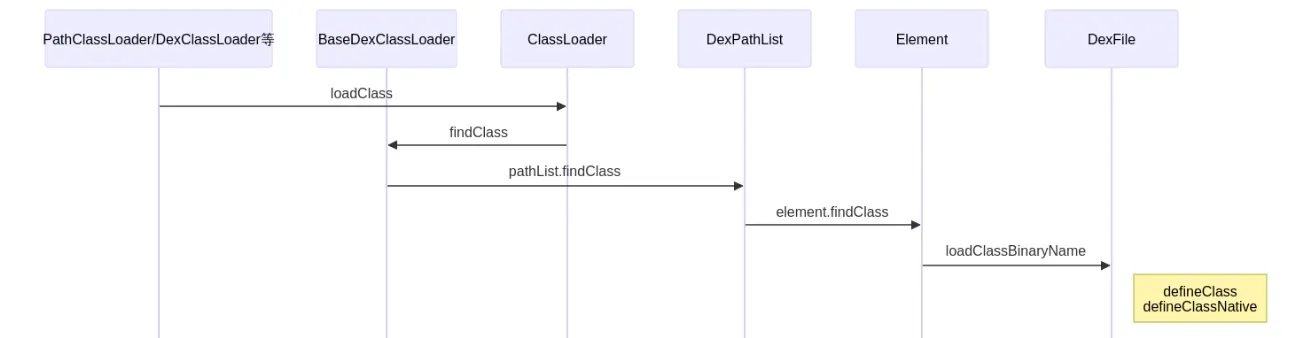
ClassLoader::LoadClass
ClassLoader is the virtual base class of all class loaders. When a class is statically or dynamically loaded, the base class’s LoadClass function is called first, performing the following steps:
- Check whether the class is already loaded; if so, return the corresponding
Classobject directly. - Try calling the parent loader’s
loadClassto load it. - If the class is not loaded and the parent loader didn’t load it, call the loader’s own
findClass.
//libcore/ojluni/src/main/java/java/lang/ClassLoader.java
     protected Class<?> loadClass(String name, boolean resolve)
        throws ClassNotFoundException
    {
            // First, check if the class has already been loaded
            //1. check whether this class has already been loaded
            Class<?> c = findLoadedClass(name);
            if (c == null) {
                try {
                    if (parent != null) {
                        //2. parent loader is not null, call parent.loadClass to load this class
                        c = parent.loadClass(name, false);
                    } else {
                        // parent loader is null, meaning this loader is the bootstrap loader (BootClassLoader); let it load
                        c = findBootstrapClassOrNull(name);
                    }
                } catch (ClassNotFoundException e) {
                    // ClassNotFoundException thrown if class not found
                    // from the non-null parent class loader
                }

                if (c == null) {
                    // If still not found, then invoke findClass in order
                    // to find the class.
                    //3. if the parent loader can't load it, the current loader calls findClass
                    c = findClass(name);
                }
            }
            return c;
    }
BaseDexClassLoader::findClass
BaseDexClassLoader inherits from the abstract ClassLoader class. The commonly used Android loaders all inherit from BaseDexClassLoader, so BaseDexClassLoader.findClass is called first, which internally calls DexPathList.findClass:
//libcore/dalvik/src/main/java/dalvik/system/BaseDexClassLoader.java
    protected Class<?> findClass(String name) throws ClassNotFoundException {
        ......
        // Check whether the class in question is present in the dexPath that
        // this classloader operates on.
        List<Throwable> suppressedExceptions = new ArrayList<Throwable>();
        Class c = pathList.findClass(name, suppressedExceptions);
        if (c != null) {
            return c;
        }
    }
DexPathList.findClass internally calls Element.findClass:
//libcore/dalvik/src/main/java/dalvik/system/DexPathList.java
    public Class<?> findClass(String name, List<Throwable> suppressed) {
        for (Element element : dexElements) {
            Class<?> clazz = element.findClass(name, definingContext, suppressed);
            if (clazz != null) {
                return clazz;
            }
        }

        if (dexElementsSuppressedExceptions != null) {
            suppressed.addAll(Arrays.asList(dexElementsSuppressedExceptions));
        }
        return null;
    }
Element.findClass calls DexFile.loadClassBinaryName:
//libcore/dalvik/src/main/java/dalvik/system/DexPathList.java
    public Class<?> findClass(String name, ClassLoader definingContext,
                List<Throwable> suppressed) {
            return dexFile != null ? dexFile.loadClassBinaryName(name, definingContext, suppressed)
                    : null;
        }
defineClassNative (JNI)
Element.findClass internally calls loadClassBinaryName.
loadClassBinaryName then calls defineClass -> defineClassNative, a native function implemented in the ART VM:
//libcore/dalvik/src/main/java/dalvik/system/DexFile.java
    public Class loadClassBinaryName(String name, ClassLoader loader, List<Throwable> suppressed) {
        return defineClass(name, loader, mCookie, this, suppressed);
    }

    private static Class defineClass(String name, ClassLoader loader, Object cookie,
                                     DexFile dexFile, List<Throwable> suppressed) {
        Class result = null;
        try {
            result = defineClassNative(name, loader, cookie, dexFile);
        } catch (NoClassDefFoundError e) {
            if (suppressed != null) {
                suppressed.add(e);
            }
        } catch (ClassNotFoundException e) {
            if (suppressed != null) {
                suppressed.add(e);
            }
        }
        return result;
    }
DexFile_defineClassNative
The ART native function corresponding to defineClassNative is DexFile_defineClassNative, which loads the class’s fields and methods inside ART.
Its call chain:
DexFile_defineClassNative()
 ├─ FindClassDef
 │  ClassLinker::DefineClass
 │  └─ ClassLinker::LoadClass
 │      └─ LoadField
 │         LoadMethod
 │         LinkCode
└─ InsertDexFileInToClassLoaderFindClassDefenumerates all dex files of this class loader, and searches those dex files for aClass_defmatching the class being loaded; if none is found, it fails.ClassLinker::DefineClassloads the corresponding class’s fields and methods.- The corresponding
DexFileis added to the class loader’sClassTable.
//art/runtime/native/dalvik_system_DexFile.cc
static jclass DexFile_defineClassNative(JNIEnv* env,
                                        jclass,
                                        jstring javaName,
                                        jobject javaLoader,
                                        jobject cookie,
                                        jobject dexFile) {
  std::vector<const DexFile*> dex_files;
  const std::string descriptor(DotToDescriptor(class_name.c_str()));
  const size_t hash(ComputeModifiedUtf8Hash(descriptor.c_str()));
  // enumerate all dex files of this class loader
  for (auto& dex_file : dex_files) {
    //1. find the ClassDef in the dex file
    const dex::ClassDef* dex_class_def =
        OatDexFile::FindClassDef(*dex_file, descriptor.c_str(), hash);
    if (dex_class_def != nullptr) {
      ScopedObjectAccess soa(env);
      ClassLinker* class_linker = Runtime::Current()->GetClassLinker();
      StackHandleScope<1> hs(soa.Self());
      Handle<mirror::ClassLoader> class_loader(
          hs.NewHandle(soa.Decode<mirror::ClassLoader>(javaLoader)));
      ObjPtr<mirror::DexCache> dex_cache =
          class_linker->RegisterDexFile(*dex_file, class_loader.Get());
      if (dex_cache == nullptr) {
        // OOME or InternalError (dexFile already registered with a different class loader).
        soa.Self()->AssertPendingException();
        return nullptr;
      }
      //2. complete loading of the target class
      ObjPtr<mirror::Class> result = class_linker->DefineClass(soa.Self(),
                                                               descriptor.c_str(),
                                                               hash,
                                                               class_loader,
                                                               *dex_file,
                                                               *dex_class_def);
      //3. add the used DexFile to the class loader's ClassTable
      // Add the used dex file. This only required for the DexFile.loadClass API since normal
      // class loaders already keep their dex files live.
      class_linker->InsertDexFileInToClassLoader(soa.Decode<mirror::Object>(dexFile),
                                                 class_loader.Get());
}
ClassLinker::DefineClass
DefineClass mainly calls ClassLinker::LoadClass to load the corresponding class’s fields and methods:
//art/runtime/class_linker.cc
ObjPtr<mirror::Class> ClassLinker::DefineClass(Thread* self,
                                               const char* descriptor,
                                               size_t hash,
                                               Handle<mirror::ClassLoader> class_loader,
                                               const DexFile& dex_file,
                                               const dex::ClassDef& dex_class_def) {
  // Load all fields and methods from the DexFile (the one in memory)
  // Load the fields and other things after we are inserted in the table. This is so that we don't
  // end up allocating unfree-able linear alloc resources and then lose the race condition. The
  // other reason is that the field roots are only visited from the class table. So we need to be
  // inserted before we allocate / fill in these fields.
  LoadClass(self, *new_dex_file, *new_class_def, klass);
}
ClassLinker::LoadClass
ClassLinker::LoadClass calls LoadField to load all fields, and LoadMethod to load all methods:
//art/runtime/class_linker.cc
void ClassLinker::LoadClass(Thread* self,
                            const DexFile& dex_file,
                            const dex::ClassDef& dex_class_def,
                            Handle<mirror::Class> klass) {

    uint16_t hotness_threshold = runtime->GetJITOptions()->GetWarmupThreshold();
    // Use the visitor since the ranged based loops are bit slower from seeking. Seeking to the
    // methods needs to decode all of the fields.
    accessor.VisitFieldsAndMethods([&](
        // load all static fields
        const ClassAccessor::Field& field) REQUIRES_SHARED(Locks::mutator_lock_) {
          uint32_t field_idx = field.GetIndex();
          DCHECK_GE(field_idx, last_static_field_idx);  // Ordering enforced by DexFileVerifier.
          if (num_sfields == 0 || LIKELY(field_idx > last_static_field_idx)) {
            LoadField(field, klass, &sfields->At(num_sfields));
            ++num_sfields;
            last_static_field_idx = field_idx;
          }
        }, [&](const ClassAccessor::Field& field) REQUIRES_SHARED(Locks::mutator_lock_) {
          // load all instance fields
          uint32_t field_idx = field.GetIndex();
          DCHECK_GE(field_idx, last_instance_field_idx);  // Ordering enforced by DexFileVerifier.
          if (num_ifields == 0 || LIKELY(field_idx > last_instance_field_idx)) {
            LoadField(field, klass, &ifields->At(num_ifields));
            ++num_ifields;
            last_instance_field_idx = field_idx;
          }
        }, [&](const ClassAccessor::Method& method) REQUIRES_SHARED(Locks::mutator_lock_) {
          // load all direct methods
          ArtMethod* art_method = klass->GetDirectMethodUnchecked(class_def_method_index,
              image_pointer_size_);
          LoadMethod(dex_file, method, klass.Get(), art_method);
          LinkCode(this, art_method, oat_class_ptr, class_def_method_index);
          uint32_t it_method_index = method.GetIndex();
          if (last_dex_method_index == it_method_index) {
            // duplicate case
            art_method->SetMethodIndex(last_class_def_method_index);
          } else {
            art_method->SetMethodIndex(class_def_method_index);
            last_dex_method_index = it_method_index;
            last_class_def_method_index = class_def_method_index;
          }
          art_method->ResetCounter(hotness_threshold);
          ++class_def_method_index;
        }, [&](const ClassAccessor::Method& method) REQUIRES_SHARED(Locks::mutator_lock_) {
          // load all virtual methods
          ArtMethod* art_method = klass->GetVirtualMethodUnchecked(
              class_def_method_index - accessor.NumDirectMethods(),
              image_pointer_size_);
          art_method->ResetCounter(hotness_threshold);
          LoadMethod(dex_file, method, klass.Get(), art_method);
          LinkCode(this, art_method, oat_class_ptr, class_def_method_index);
          ++class_def_method_index;
        });
}
12. Creating the Application Process — Deep Dive
Creating the application process has two parts:
- AMS sends a “start application process” request to Zygote.
- Zygote receives the AMS request and creates the application process.
AMS sends the start-application-process request
Sequence diagram:
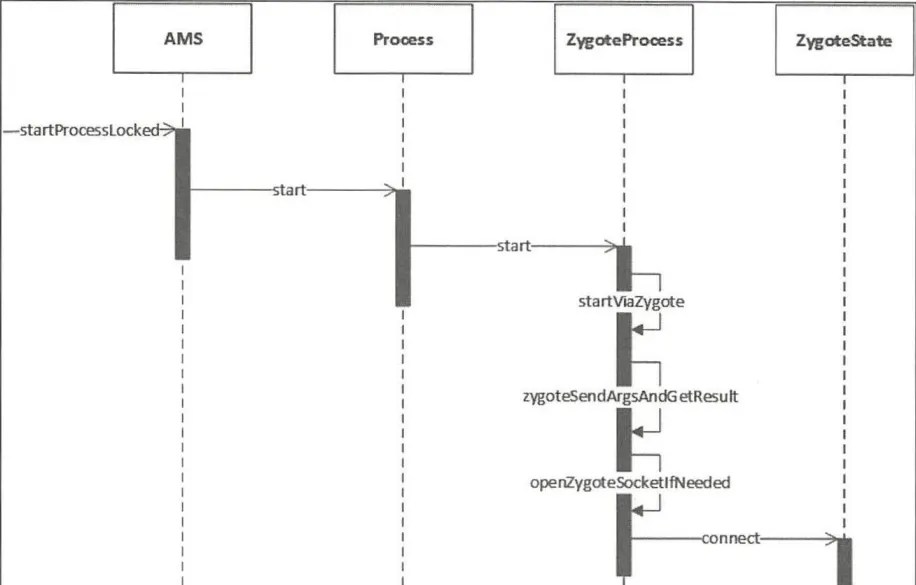
Assuming the process needed to start the app doesn’t exist, AMS sends a request to Zygote via the startProcessLocked method.
startProcessLocked internally calls Process.start to start the process; also, entryPoint is android.app.ActivityThread.
- At comment 1: get the user ID for the application process to be created.
- At comment 2: create and assign the group IDs (gids).
- At comment 3: if
entryPoint == null, set it to"android.app.ActivityThread", i.e. the class name of the application process’s main thread. - At comment 4: call
Process.startto start the application process, passing the application process’s user ID, group gids, and entryPoint.
//frameworks/base/services/core/java/com/android/server/am/ActivityManagerService.java
	private final void startProcessLocked(ProcessRecord app, String hostingType,
	        String hostingNameStr, String abiOverride, String entryPoint, String[] entryPointArgs) {
		//...... check time
	    try {
	        try {
	            final int userId = UserHandle.getUserId(app.uid);
	            AppGlobals.getPackageManager().checkPackageStartable(app.info.packageName, userId);
	        } catch (RemoteException e) {
	            throw e.rethrowAsRuntimeException();
	        }

	        //1. get the user ID of the application process to create
	        int uid = app.uid;
	        int[] gids = null;
	        int mountExternal = Zygote.MOUNT_EXTERNAL_NONE;
	        if (!app.isolated) {
				//...... check
	            /*
	             * Add shared application and profile GIDs so applications can share some
	             * resources like shared libraries and access user-wide resources
	             */
	            //2. create and assign gids
	            if (ArrayUtils.isEmpty(permGids)) {
	                gids = new int[3];
	            } else {
	                gids = new int[permGids.length + 3];
	                System.arraycopy(permGids, 0, gids, 3, permGids.length);
	            }
	            gids[0] = UserHandle.getSharedAppGid(UserHandle.getAppId(uid));
	            gids[1] = UserHandle.getCacheAppGid(UserHandle.getAppId(uid));
	            gids[2] = UserHandle.getUserGid(UserHandle.getUserId(uid));
	        }
	       	// check time and others .......

	        // Start the process.  It will either succeed and return a result containing
	        // the PID of the new process, or else throw a RuntimeException.
	        //3.
	        boolean isActivityProcess = (entryPoint == null);
	        if (entryPoint == null) entryPoint = "android.app.ActivityThread";
	        Trace.traceBegin(Trace.TRACE_TAG_ACTIVITY_MANAGER, "Start proc: " +
	                app.processName);
	        checkTime(startTime, "startProcess: asking zygote to start proc");
	        ProcessStartResult startResult;
	        // determine whether this is a webview service
	        if (hostingType.equals("webview_service")) {
	            // start webview
	            startResult = startWebView(entryPoint,
	                    app.processName, uid, uid, gids, debugFlags, mountExternal,
	                    app.info.targetSdkVersion, seInfo, requiredAbi, instructionSet,
	                    app.info.dataDir, null, entryPointArgs);
	        } else {
	            //4. call Process.start to start the application process
	            startResult = Process.start(entryPoint,
	                    app.processName, uid, uid, gids, debugFlags, mountExternal,
	                    app.info.targetSdkVersion, seInfo, requiredAbi, instructionSet,
	                    app.info.dataDir, invokeWith, entryPointArgs);
	        }
			//......
	    } catch (RuntimeException e) {
			//......
	    }
	}
Process.start internally calls zygoteProcess.start:
//frameworks/base/core/java/android/os/Process.java
	public static final ProcessStartResult start(final String processClass,
	                              final String niceName,
	                              int uid, int gid, int[] gids,
	                              int debugFlags, int mountExternal,
	                              int targetSdkVersion,
	                              String seInfo,
	                              String abi,
	                              String instructionSet,
	                              String appDataDir,
	                              String invokeWith,
	                              String[] zygoteArgs) {
	    return zygoteProcess.start(processClass, niceName, uid, gid, gids,
	                debugFlags, mountExternal, targetSdkVersion, seInfo,
	                abi, instructionSet, appDataDir, invokeWith, zygoteArgs);
	}
ZygoteProcess.start calls startViaZygote:
//frameworks/base/core/java/android/os/ZygoteProcess.java
	public final Process.ProcessStartResult start(final String processClass,
	                                              final String niceName,
	                                              int uid, int gid, int[] gids,
	                                              int debugFlags, int mountExternal,
	                                              int targetSdkVersion,
	                                              String seInfo,
	                                              String abi,
	                                              String instructionSet,
	                                              String appDataDir,
	                                              String invokeWith,
	                                              String[] zygoteArgs) {
	    try {
	        return startViaZygote(processClass, niceName, uid, gid, gids,
	                debugFlags, mountExternal, targetSdkVersion, seInfo,
	                abi, instructionSet, appDataDir, invokeWith, zygoteArgs);
	    } catch (ZygoteStartFailedEx ex) {
	        Log.e(LOG_TAG,
	                "Starting VM process through Zygote failed");
	        throw new RuntimeException(
	                "Starting VM process through Zygote failed", ex);
	    }
	}
ZygoteProcess.startViaZygote stores the app process’s startup parameters and then calls zygoteSendArgsAndGetResult, first calling openZygoteSocketIfNeeded:
//frameworks/base/core/java/android/os/ZygoteProcess.java
	private Process.ProcessStartResult startViaZygote(final String processClass,
	                                                  final String niceName,
	                                                  final int uid, final int gid,
	                                                  final int[] gids,
	                                                  int debugFlags, int mountExternal,
	                                                  int targetSdkVersion,
	                                                  String seInfo,
	                                                  String abi,
	                                                  String instructionSet,
	                                                  String appDataDir,
	                                                  String invokeWith,
	                                                  String[] extraArgs)
	                                                  throws ZygoteStartFailedEx {
	    //1. create a string list to store the app process's startup parameters
	    ArrayList<String> argsForZygote = new ArrayList<String>();

	    // --runtime-args, --setuid=, --setgid=,
	    // and --setgroups= must go first
	    argsForZygote.add("--runtime-args");
	    argsForZygote.add("--setuid=" + uid);
	    argsForZygote.add("--setgid=" + gid);
	    if ((debugFlags & Zygote.DEBUG_ENABLE_JNI_LOGGING) != 0) {
	        argsForZygote.add("--enable-jni-logging");
	    }
		//......

	    synchronized(mLock) {
	        return zygoteSendArgsAndGetResult(openZygoteSocketIfNeeded(abi), argsForZygote);
	    }
	}
ZygoteProcess.openZygoteSocketIfNeeded mainly establishes a socket connection with the Zygote process and returns the Zygote process’s state:
//frameworks/base/core/java/android/os/ZygoteProcess.java
	/**
     * Tries to open socket to Zygote process if not already open. If
     * already open, does nothing.  May block and retry.  Requires that mLock be held.
     */
    @GuardedBy("mLock")
    private ZygoteState openZygoteSocketIfNeeded(String abi) throws ZygoteStartFailedEx {
        // check whether the current thread holds the mLock lock; throw otherwise
        Preconditions.checkState(Thread.holdsLock(mLock), "ZygoteProcess lock not held");

        if (primaryZygoteState == null || primaryZygoteState.isClosed()) {
            try {
                // establish a socket connection with the primary Zygote process
                primaryZygoteState = ZygoteState.connect(mSocket);
            } catch (IOException ioe) {
                throw new ZygoteStartFailedEx("Error connecting to primary zygote", ioe);
            }
        }

        // check whether the primary Zygote process and the target process abi match; if so, return the primary Zygote state
        if (primaryZygoteState.matches(abi)) {
            return primaryZygoteState;
        }

        // The primary zygote didn't match. Try the secondary.
        // abi doesn't match, try connecting to the secondary Zygote process
        if (secondaryZygoteState == null || secondaryZygoteState.isClosed()) {
            try {
                // establish a socket connection with the secondary Zygote process
                secondaryZygoteState = ZygoteState.connect(mSecondarySocket);
            } catch (IOException ioe) {
                throw new ZygoteStartFailedEx("Error connecting to secondary zygote", ioe);
            }
        }

        // return the secondary zygote process's state
        if (secondaryZygoteState.matches(abi)) {
            return secondaryZygoteState;
        }

        throw new ZygoteStartFailedEx("Unsupported zygote ABI: " + abi);
}zygoteSendArgsAndGetResult:
Its main function is to write the app process startup parameters into zygoteState (a static inner class of ZygoteProcess representing the communication state with the Zygote process), then communicate with the Zygote process and wait for the new process’s pid and usingWrapper; if pid >= 0, process creation succeeded:
//frameworks/base/core/java/android/os/ZygoteProcess.java
	@GuardedBy("mLock")
    private static Process.ProcessStartResult zygoteSendArgsAndGetResult(
            ZygoteState zygoteState, ArrayList<String> args)
            throws ZygoteStartFailedEx {
        try {
            // Throw early if any of the arguments are malformed. This means we can
            // avoid writing a partial response to the zygote.
            //1. check the args array's parameters
            int sz = args.size();
            for (int i = 0; i < sz; i++) {
                if (args.get(i).indexOf('\n') >= 0) {
                    throw new ZygoteStartFailedEx("embedded newlines not allowed");
                }
            }

            /**
             * See com.android.internal.os.SystemZygoteInit.readArgumentList()
             * Presently the wire format to the zygote process is:
             * a) a count of arguments (argc, in essence)
             * b) a number of newline-separated argument strings equal to count
             *
             * After the zygote process reads these it will write the pid of
             * the child or -1 on failure, followed by boolean to
             * indicate whether a wrapper process was used.
             */
            //2. write the parameters into ZygoteState
            final BufferedWriter writer = zygoteState.writer;
            final DataInputStream inputStream = zygoteState.inputStream;

            writer.write(Integer.toString(args.size()));
            writer.newLine();

            for (int i = 0; i < sz; i++) {
                String arg = args.get(i);
                writer.write(arg);
                writer.newLine();
            }

            writer.flush();

            // Should there be a timeout on this?

            Process.ProcessStartResult result = new Process.ProcessStartResult();

            // Always read the entire result from the input stream to avoid leaving
            // bytes in the stream for future process starts to accidentally stumble
            // upon.
            //3. wait for the socket server (Zygote) to return the new process's pid and usingWrapper
            result.pid = inputStream.readInt();
            result.usingWrapper = inputStream.readBoolean();

            if (result.pid < 0) {
                throw new ZygoteStartFailedEx("fork() failed");
            }
            return result;
        } catch (IOException ex) {
            zygoteState.close();
            throw new ZygoteStartFailedEx(ex);
        }
    }
Zygote receives the request and creates the application process
Sequence diagram:
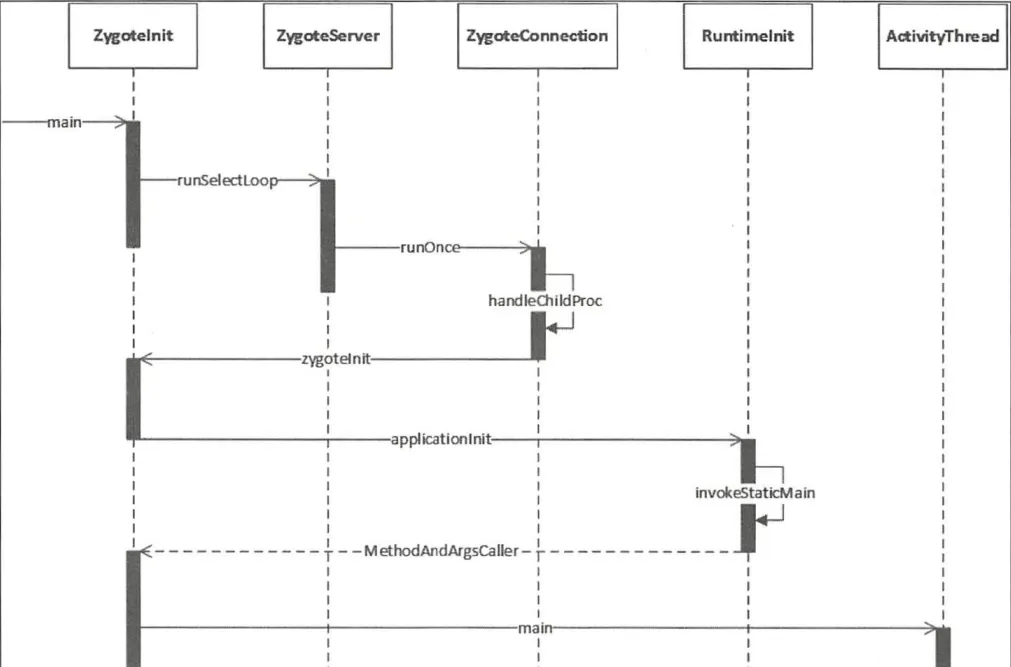
After the socket connection succeeds and the abi matches, a ZygoteState object is returned; then zygoteSendArgsAndGetResult writes the app process startup parameters into ZygoteState.
Now the Zygote process can receive requests to create a new app process, back in the ZygoteInit.main method.
After Zygote creates the socket server, it waits for AMS requests via the runSelectLoop method to create new application processes:
    public static void main(String argv[]) {
        ZygoteServer zygoteServer = new ZygoteServer();
		//......
        try {
			//......
			//1. create the server-side Socket, socketName="zygote"
            zygoteServer.registerServerSocket(socketName);
            // In some configurations, we avoid preloading resources and classes eagerly.
            // In such cases, we will preload things prior to our first fork.
            if (!enableLazyPreload) {
                bootTimingsTraceLog.traceBegin("ZygotePreload");
                EventLog.writeEvent(LOG_BOOT_PROGRESS_PRELOAD_START,
                    SystemClock.uptimeMillis());
                //2. preload classes and resources
                preload(bootTimingsTraceLog);
                EventLog.writeEvent(LOG_BOOT_PROGRESS_PRELOAD_END,
                    SystemClock.uptimeMillis());
                bootTimingsTraceLog.traceEnd(); // ZygotePreload
            } else {
                Zygote.resetNicePriority();
            }

            //......

            //3. start the SystemServer process
            if (startSystemServer) {
                startSystemServer(abiList, socketName, zygoteServer);
            }

            Log.i(TAG, "Accepting command socket connections");
            //4. wait for AMS requests
            zygoteServer.runSelectLoop(abiList);

            zygoteServer.closeServerSocket();
        } catch (Zygote.MethodAndArgsCaller caller) {
            caller.run();
        } catch (Throwable ex) {
            Log.e(TAG, "System zygote died with exception", ex);
            zygoteServer.closeServerSocket();
            throw ex;
        }
    }
runSelectLoop handles the request data via ZygoteConnection.runOnce at comment 2:
//frameworks/base/core/java/com/android/internal/os/ZygoteServer.java
	void runSelectLoop(String abiList) throws Zygote.MethodAndArgsCaller {
        // create the file descriptor array
        ArrayList<FileDescriptor> fds = new ArrayList<FileDescriptor>();
        //1. create the zygoteConnection object array
        ArrayList<ZygoteConnection> peers = new ArrayList<ZygoteConnection>();

        // mServerSocket is the Zygote process's Socket, saved into fds[0]
        fds.add(mServerSocket.getFileDescriptor());
        peers.add(null);

        while (true) {
            // create a StructPollfd array pollFds to store file descriptors to poll
            StructPollfd[] pollFds = new StructPollfd[fds.size()];
            for (int i = 0; i < pollFds.length; ++i) {
                pollFds[i] = new StructPollfd();
                pollFds[i].fd = fds.get(i);
                pollFds[i].events = (short) POLLIN;
            }
            try {
                // use Os.poll() to poll file descriptors, waiting for a readable descriptor. Blocks until an event occurs
                Os.poll(pollFds, -1);
            } catch (ErrnoException ex) {
                throw new RuntimeException("poll failed", ex);
            }
            // iterate over pollFds, checking each descriptor for a readable event
            for (int i = pollFds.length - 1; i >= 0; --i) {
                if ((pollFds[i].revents & POLLIN) == 0) {
                    continue;
                }
                // if the descriptor index is 0, a new connection request has arrived
                if (i == 0) {
                    // call acceptCommandPeer to accept the connection and add the new connection object to peers and its descriptor to fds
                    ZygoteConnection newPeer = acceptCommandPeer(abiList);
                    peers.add(newPeer);
                    fds.add(newPeer.getFileDesciptor());
                } else {
                    //2. if the descriptor index is not 0, an existing connection has readable data; call its runOnce method
                    boolean done = peers.get(i).runOnce(this);
                    // remove the descriptor and connection object after handling
                    if (done) {
                        peers.remove(i);
                        fds.remove(i);
                    }
                }
            }
        }
}runOnce:
After getting the application process’s startup parameters and file descriptors, it parses the parameters and calls Zygote.forkAndSpecialize to create the application process.
It then uses pid to determine which process the code is running in; when pid == 0 (child process), it calls the handleChildProc method:
//frameworks/base/core/java/com/android/internal/os/ZygoteConnection.java
	boolean runOnce(ZygoteServer zygoteServer) throws Zygote.MethodAndArgsCaller {

        String args[];
        Arguments parsedArgs = null;
        FileDescriptor[] descriptors;

        try {
            //1. get the app process startup parameters and file descriptors
            args = readArgumentList();
            descriptors = mSocket.getAncillaryFileDescriptors();
        } catch (IOException ex) {
            Log.w(TAG, "IOException on command socket " + ex.getMessage());
            closeSocket();
            return true;
        }
		//......
        try {
            //2. parse the parameters passed from the Binder client into Arguments object format
            parsedArgs = new Arguments(args);

			//...... parameter handling

            //3. create the application process
            pid = Zygote.forkAndSpecialize(parsedArgs.uid, parsedArgs.gid, parsedArgs.gids,
                    parsedArgs.debugFlags, rlimits, parsedArgs.mountExternal, parsedArgs.seInfo,
                    parsedArgs.niceName, fdsToClose, fdsToIgnore, parsedArgs.instructionSet,
                    parsedArgs.appDataDir);
        } catch (ErrnoException ex) {
            logAndPrintError(newStderr, "Exception creating pipe", ex);
        } catch (IllegalArgumentException ex) {
            logAndPrintError(newStderr, "Invalid zygote arguments", ex);
        } catch (ZygoteSecurityException ex) {
            logAndPrintError(newStderr,
                    "Zygote security policy prevents request: ", ex);
        }

        try {
            if (pid == 0) {
                // current code runs in the child process
                zygoteServer.closeServerSocket();
                IoUtils.closeQuietly(serverPipeFd);
                serverPipeFd = null;
                // handle the application process
                handleChildProc(parsedArgs, descriptors, childPipeFd, newStderr);

                // should never get here, the child is expected to either
                // throw Zygote.MethodAndArgsCaller or exec().
                return true;
            } else {
                // in the parent process...pid of < 0 means failure
                IoUtils.closeQuietly(childPipeFd);
                childPipeFd = null;
                return handleParentProc(pid, descriptors, serverPipeFd, parsedArgs);
            }
        } finally {
            IoUtils.closeQuietly(childPipeFd);
            IoUtils.closeQuietly(serverPipeFd);
        }
    }
ZygoteConnection.handleChildProc mainly configures the child process’s initial environment: closing the parent (Zygote) socket pipe, redirecting stdin/stdout/stderr, setting the child process name, etc.
It then calls ZygoteInit.zygoteInit to initialize the application process:
//frameworks/base/core/java/com/android/internal/os/ZygoteConnection.java
	private void handleChildProc(Arguments parsedArgs,
	        FileDescriptor[] descriptors, FileDescriptor pipeFd, PrintStream newStderr)
	        throws Zygote.MethodAndArgsCaller {
	    /**
	     * By the time we get here, the native code has closed the two actual Zygote
	     * socket connections, and substituted /dev/null in their place.  The LocalSocket
	     * objects still need to be closed properly.
	     */

	    // close the socket communication from the zygote process
	    closeSocket();
	    // redirect std_xxx to the corresponding file descriptors in the descriptors array, then close those descriptors
	    if (descriptors != null) {
	        try {
	            Os.dup2(descriptors[0], STDIN_FILENO);
	            Os.dup2(descriptors[1], STDOUT_FILENO);
	            Os.dup2(descriptors[2], STDERR_FILENO);

	            for (FileDescriptor fd: descriptors) {
	                IoUtils.closeQuietly(fd);
	            }
	            newStderr = System.err;
	        } catch (ErrnoException ex) {
	            Log.e(TAG, "Error reopening stdio", ex);
	        }
	    }

	    // set the process's command-line argv0 to parsedArgs.niceName
	    if (parsedArgs.niceName != null) {
	        Process.setArgV0(parsedArgs.niceName);
	    }

	    // close the Trace event, meaning no longer tracking the current activity manager event
	    Trace.traceEnd(Trace.TRACE_TAG_ACTIVITY_MANAGER);
	    if (parsedArgs.invokeWith != null) {
	        WrapperInit.execApplication(parsedArgs.invokeWith,
	                parsedArgs.niceName, parsedArgs.targetSdkVersion,
	                VMRuntime.getCurrentInstructionSet(),
	                pipeFd, parsedArgs.remainingArgs);
	    } else {
	        // call zygoteInit to initialize the process, classloader set to null
	        ZygoteInit.zygoteInit(parsedArgs.targetSdkVersion,
	                parsedArgs.remainingArgs, null /* classLoader */);
	    }
}ZygoteInit.zygoteInit:
//frameworks/base/core/java/com/android/internal/os/ZygoteInit.java
    public static final void zygoteInit(int targetSdkVersion, String[] argv,
            ClassLoader classLoader) throws Zygote.MethodAndArgsCaller {
        if (RuntimeInit.DEBUG) {
            Slog.d(RuntimeInit.TAG, "RuntimeInit: Starting application from zygote");
        }

        // add a systrace tag named "ZygoteInit" to identify the process init flow
        Trace.traceBegin(Trace.TRACE_TAG_ACTIVITY_MANAGER, "ZygoteInit");
        RuntimeInit.redirectLogStreams();// redirect log output

        RuntimeInit.commonInit();// common init
        ZygoteInit.nativeZygoteInit();// nativeZygoteInit JNI-calls to start the process's binder thread pool
        RuntimeInit.applicationInit(targetSdkVersion, argv, classLoader);
    }

    private static final native void nativeZygoteInit();
RuntimeInit.applicationInit internally calls invokeStaticMain:
args.startClassis the earlierentryPoint, i.e."android.app.ActivityThread".args.startArgsis the app process startup parameters.classLoaderis null.
//frameworks/base/core/java/com/android/internal/os/RuntimeInit.java
	protected static void applicationInit(int targetSdkVersion, String[] argv, ClassLoader classLoader)
	        throws Zygote.MethodAndArgsCaller {

	    // true means don't call AppRuntime.onExit when the app exits
	    nativeSetExitWithoutCleanup(true);

		// set the VM heap utilization parameter to 0.75 and the SDK version
	    VMRuntime.getRuntime().setTargetHeapUtilization(0.75f);
	    VMRuntime.getRuntime().setTargetSdkVersion(targetSdkVersion);

	    final Arguments args;
	    try {
	        args = new Arguments(argv);
	    } catch (IllegalArgumentException ex) {
	        Slog.e(TAG, ex.getMessage());
	        // let the process exit
	        return;
	    }

	    // The end of of the RuntimeInit event (see #zygoteInit).
	    Trace.traceEnd(Trace.TRACE_TAG_ACTIVITY_MANAGER);

	    // Remaining arguments are passed to the start class's static main
	    invokeStaticMain(args.startClass, args.startArgs, classLoader);
}invokeStaticMain:
//frameworks/base/core/java/com/android/internal/os/RuntimeInit.java
	private static void invokeStaticMain(String className, String[] argv, ClassLoader classLoader)
	        throws Zygote.MethodAndArgsCaller {
	    Class<?> cl;

	    try {
	        //1. get the android.app.ActivityThread class
	        cl = Class.forName(className, true, classLoader);
	    } catch (ClassNotFoundException ex) {
	        throw new RuntimeException(
	                "Missing class when invoking static main " + className,
	                ex);
	    }

	    Method m;
	    try {
	        //2. get ActivityThread's main method
	        m = cl.getMethod("main", new Class[] { String[].class });
	    } catch (NoSuchMethodException ex) {
	        throw new RuntimeException(
	                "Missing static main on " + className, ex);
	    } catch (SecurityException ex) {
	        throw new RuntimeException(
	                "Problem getting static main on " + className, ex);
	    }

	    int modifiers = m.getModifiers();
	    if (! (Modifier.isStatic(modifiers) && Modifier.isPublic(modifiers))) {
	        throw new RuntimeException(
	                "Main method is not public and static on " + className);
	    }

	    //3. start ActivityThread.main by throwing an exception, as described earlier
	    throw new Zygote.MethodAndArgsCaller(m, argv);
	}
Back in ZygoteInit.main, after catching the Zygote.MethodAndArgsCaller exception, it calls caller.run:
//frameworks/base/core/java/com/android/internal/os/ZygoteInit.java
	public static void main(String argv[]) {
		......

	    try {
			......
	        zygoteServer.closeServerSocket();
	    } catch (Zygote.MethodAndArgsCaller caller) {
	        caller.run();
	    } catch (Throwable ex) {
	        Log.e(TAG, "System zygote died with exception", ex);
	        zygoteServer.closeServerSocket();
	        throw ex;
	    }
	}
MethodAndArgsCaller is Zygote’s static inner class. After catching the exception, it gets the method via reflection and invokes ActivityThread.main:
//frameworks/base/core/java/com/android/internal/os/Zygote.java
	public static class MethodAndArgsCaller extends Exception
	        implements Runnable {
	    /** method to call */
	    private final Method mMethod;

	    /** argument array */
	    private final String[] mArgs;

	    public MethodAndArgsCaller(Method method, String[] args) {
	        mMethod = method;
	        mArgs = args;
	    }

	    public void run() {
	        try {
	            // invoke via reflection
	            mMethod.invoke(null, new Object[] { mArgs });
	        } catch (IllegalAccessException ex) {
	            throw new RuntimeException(ex);
	        } catch (InvocationTargetException ex) {
	            Throwable cause = ex.getCause();
	            if (cause instanceof RuntimeException) {
	                throw (RuntimeException) cause;
	            } else if (cause instanceof Error) {
	                throw (Error) cause;
	            }
	            throw new RuntimeException(ex);
	        }
	    }
	}
At this point the application process has been successfully created and is running the main-thread management class ActivityThread.
13. Creating the Application — Deep Dive
When studying Android process startup, we know that AMS sends a “start Activity” request to the target app process’s ApplicationThread, and then ApplicationThread calls scheduleLaunchActivity to ask ActivityThread to start the Activity.
But when was the Application corresponding to ApplicationThread created?
In Android, the Application creation flow differs between the system process and ordinary app processes; we focus on the ordinary user app process.
As we know, after the app process is created, the Zygote.MethodAndArgsCaller callback calls ActivityThread.main.
ActivityThread.main
//frameworks/base/core/java/android/app/ActivityThread.java
public static void main(String[] args) {
    // start tracing, tagged "ActivityThreadMain"
    Trace.traceBegin(Trace.TRACE_TAG_ACTIVITY_MANAGER, "ActivityThreadMain");

    // start the sampling profiler integration, used for performance analysis
    SamplingProfilerIntegration.start();

    // disable CloseGuard (enabled by default). CloseGuard detects resources not closed correctly
    CloseGuard.setEnabled(false);

	// initialize the current user's environment variables
    Environment.initForCurrentUser();

    // set the event log reporter for logging events in libcore
    EventLogger.setReporter(new EventLoggingReporter());

    // find the CA certificate store location and set it as the default CA certificate store
    final File configDir = Environment.getUserConfigDirectory(UserHandle.myUserId());
    TrustedCertificateStore.setDefaultUserDirectory(configDir);

	// set the current process's argv[0] to "<pre-initialized>"
    Process.setArgV0("<pre-initialized>");

	//1. create the main thread's looper
    Looper.prepareMainLooper();

	//2. create the thread and attach the current thread to ActivityThread; false means don't use a new thread
    ActivityThread thread = new ActivityThread();
    thread.attach(false);

	//3. if sMainThreadHandler is null, set it to ActivityThread's Handler
    if (sMainThreadHandler == null) {
        sMainThreadHandler = thread.getHandler();
    }

	// always false, can ignore
    if (false) {
        Looper.myLooper().setMessageLogging(new LogPrinter(Log.DEBUG, "ActivityThread"));
    }

    // end tracing
    Trace.traceEnd(Trace.TRACE_TAG_ACTIVITY_MANAGER);

	//4. start the main thread's message loop
    Looper.loop();

    throw new RuntimeException("Main thread loop unexpectedly exited");
}
We mainly focus on these two lines — creating the ActivityThread and attaching the current thread to it (false means don’t use a new thread):
    ActivityThread thread = new ActivityThread();
    thread.attach(false);
ActivityThread.attach
The ActivityThread.attach method internally calls AMS’s attachApplication:
//frameworks/base/core/java/android/app/ActivityThread.java
	private void attach(boolean system) {
	    sCurrentActivityThread = this;
	    mSystemThread = system;
	    // the application process enters this branch
	    if (!system) {
	        ViewRootImpl.addFirstDrawHandler(new Runnable() {
	            @Override
	            public void run() {
	                ensureJitEnabled();
	            }
	        });
	        android.ddm.DdmHandleAppName.setAppName("<pre-initialized>",
	                                                UserHandle.myUserId());
	        // initialize RuntimeInit.mApplicationObject
	        RuntimeInit.setApplicationObject(mAppThread.asBinder());
	        final IActivityManager mgr = ActivityManager.getService();
	        try {
	            // attach the target app process's ApplicationThread via AMS
	            mgr.attachApplication(mAppThread);
	        } catch (RemoteException ex) {
	            throw ex.rethrowFromSystemServer();
	        }
	        // Watch for getting close to heap limit.
			//......
	    } else {
	        // Don't set application object here -- if the system crashes,
	        // we can't display an alert, we just want to die die die.
	        android.ddm.DdmHandleAppName.setAppName("system_process",
	                UserHandle.myUserId());
	        try {
	            mInstrumentation = new Instrumentation();
	            ContextImpl context = ContextImpl.createAppContext(
	                    this, getSystemContext().mPackageInfo);
	            mInitialApplication = context.mPackageInfo.makeApplication(true, null);
	            mInitialApplication.onCreate();
	        } catch (Exception e) {
	            throw new RuntimeException(
	                    "Unable to instantiate Application():" + e.toString(), e);
	        }
	    }
		//......
	}
ActivityManagerService.attachApplication
attachApplication internally calls attachApplicationLocked to attach the Application to the application process:
//frameworks/base/services/core/java/com/android/server/am/ActivityManagerService.java
public final void attachApplication(IApplicationThread thread) {
    synchronized (this) {
        int callingPid = Binder.getCallingPid();	// get the caller's pid
        // temporarily clear the caller's identity, returning a unique id to restore it later
        final long origId = Binder.clearCallingIdentity();
        // attach the Application to the calling process
        attachApplicationLocked(thread, callingPid);
        // restore the caller's identity
        Binder.restoreCallingIdentity(origId);
    }
}
ActivityManagerService.attachApplicationLocked
attachApplicationLocked mainly calls IApplicationThread.bindApplication:
//frameworks/base/services/core/java/com/android/server/am/ActivityManagerService.java
private final boolean attachApplicationLocked(IApplicationThread thread, int pid) {
    ProcessRecord app;
    long startTime = SystemClock.uptimeMillis();
    if (pid != MY_PID && pid >= 0) {
        synchronized (mPidsSelfLocked) {
            app = mPidsSelfLocked.get(pid);// get the ProcessRecord (app process descriptor) by pid
        }
    }
    ...
    try {
        ...
        ApplicationInfo appInfo = app.instr != null ? app.instr.mTargetInfo : app.info;
        ...
        if (app.instr != null) {
            //
            thread.bindApplication(processName, appInfo, providers,
                                   app.instr.mClass,
                                   profilerInfo, app.instr.mArguments,
                                   app.instr.mWatcher,
                                   app.instr.mUiAutomationConnection, testMode,
                                   mBinderTransactionTrackingEnabled, enableTrackAllocation,
                                   isRestrictedBackupMode || !normalMode, app.persistent,
                                   new Configuration(getGlobalConfiguration()), app.compat,
                                   getCommonServicesLocked(app.isolated),
                                   mCoreSettingsObserver.getCoreSettingsLocked(),
                                   buildSerial);
        } else {
            // call the other thread.bindApplication overload
            ...
        }

        ...
    }
    ...
}
IApplicationThread.bindApplication
bindApplication internally creates an AppBindData instance, assigns values to it, then calls sendMessage to send the BIND_APPLICATION message to the application’s message queue:
        public final void bindApplication(String processName, ApplicationInfo appInfo,
                List<ProviderInfo> providers, ComponentName instrumentationName,
                ProfilerInfo profilerInfo, Bundle instrumentationArgs,
                IInstrumentationWatcher instrumentationWatcher,
                IUiAutomationConnection instrumentationUiConnection, int debugMode,
                boolean enableBinderTracking, boolean trackAllocation,
                boolean isRestrictedBackupMode, boolean persistent, Configuration config,
                CompatibilityInfo compatInfo, Map services, Bundle coreSettings,
                String buildSerial) {

            if (services != null) {
                // Setup the service cache in the ServiceManager
                ServiceManager.initServiceCache(services);
            }

            setCoreSettings(coreSettings);

            // create an AppBindData instance and assign values
            AppBindData data = new AppBindData();
            data.processName = processName;
            data.appInfo = appInfo;
            data.providers = providers;
            data.instrumentationName = instrumentationName;
            data.instrumentationArgs = instrumentationArgs;
            data.instrumentationWatcher = instrumentationWatcher;
            data.instrumentationUiAutomationConnection = instrumentationUiConnection;
            data.debugMode = debugMode;
            data.enableBinderTracking = enableBinderTracking;
            data.trackAllocation = trackAllocation;
            data.restrictedBackupMode = isRestrictedBackupMode;
            data.persistent = persistent;
            data.config = config;
            data.compatInfo = compatInfo;
            data.initProfilerInfo = profilerInfo;
            data.buildSerial = buildSerial;
            // call sendMessage to add the BIND_APPLICATION message to the message queue
            sendMessage(H.BIND_APPLICATION, data);
        }
ActivityThread.handleMessage
ActivityThread.main starts the main-thread message loop via Looper.loop, and handles messages via handleMessage, which internally calls handleBindApplication:
//frameworks/base/core/java/android/app/ActivityThread.java
public void handleMessage(Message msg) {
    switch (msg.what) {
        ...
        case BIND_APPLICATION:
			AppBindData data = (AppBindData)msg.obj;	// cast the message parameter to AppBindData
            handleBindApplication(data);	//
            break;
        ...
    }
    ...
}
ActivityThread.handleBindApplication
handleBindApplication mainly performs the following steps:
- At comment 1: get the
LoadedApkobject and set it to theAppBindData.infofield, used to createappContext. - At comment 2: create a
ContextImplobject, i.e.appContext. - At comment 3: reflectively call
LoadedApk.makeApplicationto create the Application object. - At comment 4: call
Application.onCreate.
//frameworks/base/core/java/android/app/ActivityThread.java
private void handleBindApplication(AppBindData data) {
    //......
    mBoundApplication = data;
    //......
    //1. get the LoadedApk object
    data.info = getPackageInfoNoCheck(data.appInfo, data.compatInfo);

	//......
    //2. create appContext
    final ContextImpl appContext = ContextImpl.createAppContext(this, data.info);

    //......
    try {
        //3. reflectively create the target app's Application object; data.info here refers to LoadedApk
        Application app = data.info.makeApplication(data.restrictedBackupMode, null);
        mInitialApplication = app;

        //......
        try {
            // call the (empty) method
            mInstrumentation.onCreate(data.instrumentationArgs);
        }
        //......
        try {
            //4. call Application.onCreate
            mInstrumentation.callApplicationOnCreate(app);
        }
        //......
    } finally {
        StrictMode.setThreadPolicy(savedPolicy);
    }
    // Preload fonts resources
    //...d...
}
Let’s look at each involved method in turn.
ActivityThread.getPackageInfoNoCheck
getPackageInfoNoCheck creates a LoadedApk object and adds it to mPackages, then sets the ApplicationInfo and ClassLoader for the LoadedApk. Each app creates a unique LoadedApk object:
// path: /frameworks/base/core/java/android/app/ActivityThread.java
public final LoadedApk getPackageInfoNoCheck(ApplicationInfo ai, CompatibilityInfo compatInfo) {
    return getPackageInfo(ai, compatInfo, null, false, true, false);
}

private LoadedApk getPackageInfo(ApplicationInfo aInfo, CompatibilityInfo compatInfo,
                                 ClassLoader baseLoader, boolean securityViolation, boolean includeCode,
                                 boolean registerPackage) {
    final boolean differentUser = (UserHandle.myUserId() != UserHandle.getUserId(aInfo.uid));
    synchronized (mResourcesManager) {
        WeakReference<LoadedApk> ref;
        // get the cached LoadedApk object depending on the situation
        if (differentUser) {
            // Caching not supported across users
            ref = null;
        } else if (includeCode) {
            ref = mPackages.get(aInfo.packageName);
        } else {
            ref = mResourcePackages.get(aInfo.packageName);
        }

        LoadedApk packageInfo = ref != null ? ref.get() : null;
        if (packageInfo == null || (packageInfo.mResources != null
                                    && !packageInfo.mResources.getAssets().isUpToDate())) {
            ...
            // create the LoadedApk object
            packageInfo = new LoadedApk(this, aInfo, compatInfo, baseLoader,
                              securityViolation, includeCode &&
                              (aInfo.flags&ApplicationInfo.FLAG_HAS_CODE) != 0, registerPackage);

            if (mSystemThread && "android".equals(aInfo.packageName)) {
               	// set ApplicationInfo and ClassLoader

                packageInfo.installSystemApplicationInfo(aInfo,
                                                         getSystemContext().mPackageInfo.getClassLoader());
            }

            if (differentUser) {
                // Caching not supported across users
            } else if (includeCode) {
                // update mPackages, i.e. add the just-created packageInfo
                mPackages.put(aInfo.packageName,
                              new WeakReference<LoadedApk>(packageInfo));
            } else {
                mResourcePackages.put(aInfo.packageName,
                                      new WeakReference<LoadedApk>(packageInfo));
            }
        }
        return packageInfo;
    }
}LoadedApk.installSystemApplicationInfo:
//frameworks/base/core/java/android/app/LoadedApk.java
void installSystemApplicationInfo(ApplicationInfo info, ClassLoader classLoader) {
    assert info.packageName.equals("android");
    mApplicationInfo = info;
    mClassLoader = classLoader;
}
ContextImpl.createAppContext
Creates a ContextImpl instance and sets its resources:
//frameworks/base/core/java/android/app/ContextImpl.java
static ContextImpl createAppContext(ActivityThread mainThread, LoadedApk packageInfo) {
    if (packageInfo == null) throw new IllegalArgumentException("packageInfo");
	// create the instance, passing the current app's main-thread manager ActivityThread and the app package descriptor LoadedApk
    ContextImpl context = new ContextImpl(null, mainThread, packageInfo, null, null, null, 0, null);
    context.setResources(packageInfo.getResources());// set the app resources
    return context;
}
ContextImpl.ContextImpl
The constructor performs the following operations, after which the AppContext is successfully created:
//frameworks/base/core/java/android/app/ContextImpl.java
private ContextImpl(@Nullable ContextImpl container, @NonNull ActivityThread mainThread,
                    @NonNull LoadedApk packageInfo, @Nullable String splitName,
                    @Nullable IBinder activityToken, @Nullable UserHandle user, int flags,
                    @Nullable ClassLoader classLoader) {
    mOuterContext = this;
    if ((flags & (Context.CONTEXT_CREDENTIAL_PROTECTED_STORAGE
                  | Context.CONTEXT_DEVICE_PROTECTED_STORAGE)) == 0) {
        final File dataDir = packageInfo.getDataDirFile();
        if (Objects.equals(dataDir, packageInfo.getCredentialProtectedDataDirFile())) {
            flags |= Context.CONTEXT_CREDENTIAL_PROTECTED_STORAGE;
        } else if (Objects.equals(dataDir, packageInfo.getDeviceProtectedDataDirFile())) {
            flags |= Context.CONTEXT_DEVICE_PROTECTED_STORAGE;
        }
    }
    mMainThread = mainThread;
    mActivityToken = activityToken;
    mFlags = flags;
	//1. set the current process's user
    if (user == null) {
        user = Process.myUserHandle();
    }
    mUser = user;
	//2. assign the LoadedApk instance to mPackageInfo
    mPackageInfo = packageInfo;
    mSplitName = splitName;
    mClassLoader = classLoader;
    mResourcesManager = ResourcesManager.getInstance();
	// branch on whether the passed-in context object container is null
    if (container != null) {
        mBasePackageName = container.mBasePackageName;
        mOpPackageName = container.mOpPackageName;
        setResources(container.mResources);
        mDisplay = container.mDisplay;
    } else {// assign info from the just-created LoadedApk instance to some fields
        mBasePackageName = packageInfo.mPackageName;
        ApplicationInfo ainfo = packageInfo.getApplicationInfo();// actually an empty object
        if (ainfo.uid == Process.SYSTEM_UID && ainfo.uid != Process.myUid()) {
            mOpPackageName = ActivityThread.currentPackageName();
        } else {
            mOpPackageName = mBasePackageName;
        }
    }
    mContentResolver = new ApplicationContentResolver(this, mainThread, user);
}
LoadedApk.makeApplication
- At comment 1: check whether the Application has already been created; guarantee one
LoadedApkobject creates only one corresponding Application object. - At comment 2: get the class loader.
- At comment 3: create the Application object, internally calling
Application.attachBaseContext. - At comment 4: call
Application.onCreate.
//
public Application makeApplication(boolean forceDefaultAppClass,
                                   Instrumentation instrumentation) {
    //1. check whether Application has already been created
    if (mApplication != null) {
        return mApplication;
    }
	//......
    Application app = null;
    String appClass = mApplicationInfo.className;
    if (forceDefaultAppClass || (appClass == null)) {// the passed-in parameter is true, enter this branch
        appClass = "android.app.Application";// the system_server process enters this branch
    }
    try {
        //2. get the class loader
        java.lang.ClassLoader cl = getClassLoader();
        if (!mPackageName.equals("android")) {// from earlier we know it defaults to android, so it doesn't enter this branch
            initializeJavaContextClassLoader();
        }
        ContextImpl appContext = ContextImpl.createAppContext(mActivityThread, this);
        //3. create the Application object by class name; internally calls Application.attachBaseContext
        app = mActivityThread.mInstrumentation.newApplication(cl, appClass, appContext);
        appContext.setOuterContext(app);
    }
    //......
    mActivityThread.mAllApplications.add(app);// add to the Application list; a process can have multiple applications
    mApplication = app;// assign the just-created Application object app to mApplication
    if (instrumentation != null) {// the passed-in instrumentation is null, so skip this branch
        try {
            //4. call Application.onCreate
            instrumentation.callApplicationOnCreate(app);
        }
        //.......
    }
    //......
    return app;
}
Instrumentation.newApplication
Creates an Application instance by class name using the specified class loader, and calls Application.attach, which internally calls attachBaseContext.
This is also why the shell program must replace the ClassLoader before creating the Application: creating the Application instance depends on the specified ClassLoader, and if the protected program’s dex file isn’t reachable through the ClassLoader, it can’t be created successfully.
//frameworks/base/core/java/android/app/Instrumentation.java
public Application newApplication(ClassLoader cl, String className, Context context) throws InstantiationException, IllegalAccessException, ClassNotFoundException {
    return newApplication(cl.loadClass(className), context);
}

static public Application newApplication(Class<?> clazz, Context context) throws InstantiationException, IllegalAccessException, ClassNotFoundException {
    Application app = (Application)clazz.newInstance();
    app.attach(context);
    return app;
}
Application.attach
Calls the parent’s attachBaseContext and sets LoadedApk:
//frameworks/base/core/java/android/app/Application.java
    /* package */ final void attach(Context context) {
        attachBaseContext(context);
        mLoadedApk = ContextImpl.getImpl(context).mPackageInfo;
    }
In the shell Application’s attachBaseContext, replace the ClassLoader.
In the shell Application’s onCreate, replace the Application.
Because by the time attachBaseContext runs, the LoadedApk, ClassLoader, and Application have already been created. LoadedApk describes the APK file itself and doesn’t affect class loading — class loading is done through the ClassLoader. After replacing the ClassLoader, the source program’s classes can be loaded correctly, including creating the source program’s Application.
After that, the Application must be replaced in Application.onCreate, because LoadedApk.makeApplication calls the shell Application’s instance method and will definitely execute onCreate. If the Application were replaced in attachBaseContext and its methods called, it could conflict: the shell Application’s attachBaseContext would create and call the source Application’s methods, then the shell Application’s onCreate would run.
Instrumentation.callApplicationOnCreate
Calls Application.onCreate:
//frameworks/base/core/java/android/app/Instrumentation.java
public void callApplicationOnCreate(Application app) {
    app.onCreate();
}

public void onCreate(Bundle arguments) {
}
14. Starting the Root Activity — Deep Dive
After the application process starts, the app itself must start — i.e. start the root Activity.
There are two kinds of Activity startup:
- Root Activity startup: also called app cold start; the app hasn’t started yet, usually launched from the Launcher.
- Normal Activity startup: the app is already running, generally starting another Activity from within the app.
Their main flows are basically the same; the difference is that the root Activity startup flow additionally includes starting the app process and instantiating the Application.
How ActivityThread starts an Activity
After the flow above, the code runs in the application process. The sequence diagram for ActivityThread starting an Activity:
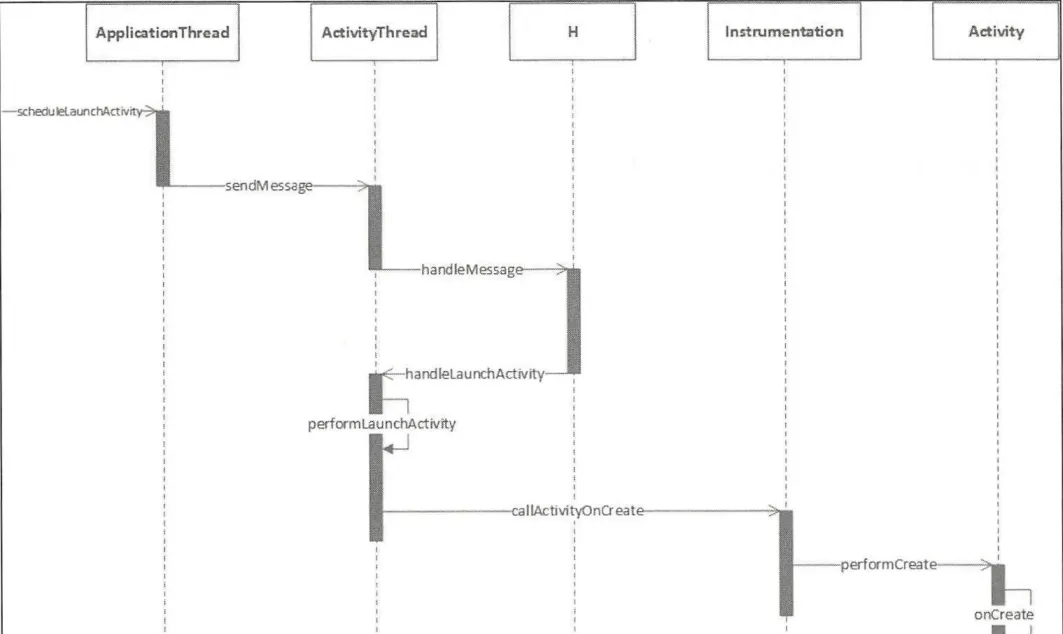
ApplicationThread is ActivityThread’s inner class. After the app process is created, it runs an instance of ActivityThread, which represents the main thread, to manage the main thread.
Next, look at ApplicationThread.scheduleLaunchActivity:
- Uses
updateProcessStateto update the process state. - Wraps the parameters of the Activity to be launched into an
ActivityClientRecord. - Uses
sendMessageto send aLAUNCH_ACTIVITYmessage to classH.
//frameworks/base/core/java/android/app/ActivityThread.java
	@Override
        public final void scheduleLaunchActivity(Intent intent, IBinder token, int ident,
                ActivityInfo info, Configuration curConfig, Configuration overrideConfig,
                CompatibilityInfo compatInfo, String referrer, IVoiceInteractor voiceInteractor,
                int procState, Bundle state, PersistableBundle persistentState,
                List<ResultInfo> pendingResults, List<ReferrerIntent> pendingNewIntents,
                boolean notResumed, boolean isForward, ProfilerInfo profilerInfo) {

            // update the process state
            updateProcessState(procState, false);

            // wrap the parameters of the Activity to launch into an ActivityClientRecord
            ActivityClientRecord r = new ActivityClientRecord();

            r.token = token;
            r.ident = ident;
            r.intent = intent;
            r.referrer = referrer;
            r.voiceInteractor = voiceInteractor;
            r.activityInfo = info;
            r.compatInfo = compatInfo;
            r.state = state;
            r.persistentState = persistentState;

            r.pendingResults = pendingResults;
            r.pendingIntents = pendingNewIntents;

            r.startsNotResumed = notResumed;
            r.isForward = isForward;

            r.profilerInfo = profilerInfo;

            r.overrideConfig = overrideConfig;
            // update the configuration of the Activity to launch
            updatePendingConfiguration(curConfig);

            // send a LAUNCH_ACTIVITY message to class H
            sendMessage(H.LAUNCH_ACTIVITY, r);
        }
sendMessage has multiple overloads; the one called is shown below.
mH is class H, an inner class of ActivityThread that extends Handler and is the main thread’s message management class in the application process.
Because ApplicationThread is a Binder whose calling logic runs in the Binder thread pool, class H is needed here to switch the code logic back to the main thread.
sendMessage adds the message to the message queue; the message handler automatically takes the message from the queue and calls the corresponding handleMessage method:
//frameworks/base/core/java/android/app/ActivityThread.java
	private void sendMessage(int what, Object obj) {
	    sendMessage(what, obj, 0, 0, false);
	}
    private void sendMessage(int what, Object obj, int arg1, int arg2, boolean async) {
        if (DEBUG_MESSAGES) Slog.v(
            TAG, "SCHEDULE " + what + " " + mH.codeToString(what)
            + ": " + arg1 + " / " + obj);
        // get the message instance
        Message msg = Message.obtain();
        msg.what = what;
        msg.obj = obj;
        msg.arg1 = arg1;
        msg.arg2 = arg2;
        // whether it's an async message
        if (async) {
            msg.setAsynchronous(true);
        }
        // call the message handler mH.sendMessage to send the message
        mH.sendMessage(msg);
    }
handleMessage is defined in class H:
- At comment 1: cast
msg.objtoActivityClientRecord. - At comment 2: get the
LoadedApkobject viagetPackageInfoNoCheckand assign it toActivityClientRecord.packageInfo. When the app process wants to launch an Activity, it must load that Activity’s APK into the process;LoadedApkdescribes the loaded APK file. - At comment 3: call
handleLaunchActivityto launch the Activity.
//frameworks/base/core/java/android/app/ActivityThread.java
private class H extends Handler {
    public static final int LAUNCH_ACTIVITY         = 100;
    public static final int PAUSE_ACTIVITY          = 101;
    //......
	public void handleMessage(Message msg) {
	        if (DEBUG_MESSAGES) Slog.v(TAG, ">>> handling: " + codeToString(msg.what));
	        switch (msg.what) {
	            case LAUNCH_ACTIVITY: {
	                Trace.traceBegin(Trace.TRACE_TAG_ACTIVITY_MANAGER, "activityStart");
	                //1. cast msg.obj to ActivityClientRecord
	                final ActivityClientRecord r = (ActivityClientRecord) msg.obj;

	                //2. get the LoadedApk object via getPackageInfoNoCheck
	                // and assign it to ActivityClientRecord's member packageInfo
	                r.packageInfo = getPackageInfoNoCheck(
	                        r.activityInfo.applicationInfo, r.compatInfo);
	                //3. call handleLaunchActivity to launch the Activity
	                handleLaunchActivity(r, null, "LAUNCH_ACTIVITY");
	                Trace.traceEnd(Trace.TRACE_TAG_ACTIVITY_MANAGER);
	            } break;
	            //......
	        }
	        Object obj = msg.obj;
	        if (obj instanceof SomeArgs) {
	            ((SomeArgs) obj).recycle();
	        }
	        if (DEBUG_MESSAGES) Slog.v(TAG, "<<< done: " + codeToString(msg.what));
	    }
	//......
}handleLaunchActivity:
After some initialization, at comment 1 it calls performLaunchActivity to launch the Activity. If the resulting Activity is not null it sets it to the Resume state; otherwise it notifies AMS to stop launching the Activity:
//frameworks/base/core/java/android/app/ActivityThread.java
    private void handleLaunchActivity(ActivityClientRecord r, Intent customIntent, String reason) {
        // If we are getting ready to gc after going to the background, well
        // we are back active so skip it.
        // cancel the previously scheduled GC because the app is becoming active again
        unscheduleGcIdler();
        mSomeActivitiesChanged = true;

        // if the ActivityClientRecord contains profilerInfo, set it into mProfiler and start the profiler
        if (r.profilerInfo != null) {
            mProfiler.setProfiler(r.profilerInfo);
            mProfiler.startProfiling();// start the profiler
        }

        // Make sure we are running with the most recent config.
        // handle configuration changes, ensuring the latest config is in use
        handleConfigurationChanged(null, null);

        if (localLOGV) Slog.v(
            TAG, "Handling launch of " + r);

        // Initialize before creating the activity
        // initialize the window manager
        WindowManagerGlobal.initialize();

        //1. launch the Activity
        Activity a = performLaunchActivity(r, customIntent);

        if (a != null) {
            r.createdConfig = new Configuration(mConfiguration);
            reportSizeConfigurations(r);
            Bundle oldState = r.state;
            //2. set the Activity state to Resume
            handleResumeActivity(r.token, false, r.isForward,
                    !r.activity.mFinished && !r.startsNotResumed, r.lastProcessedSeq, reason);

            if (!r.activity.mFinished && r.startsNotResumed) {
                // The activity manager actually wants this one to start out paused, because it
                // needs to be visible but isn't in the foreground. We accomplish this by going
                // through the normal startup (because activities expect to go through onResume()
                // the first time they run, before their window is displayed), and then pausing it.
                // However, in this case we do -not- need to do the full pause cycle (of freezing
                // and such) because the activity manager assumes it can just retain the current
                // state it has.
                performPauseActivityIfNeeded(r, reason);

                // We need to keep around the original state, in case we need to be created again.
                // But we only do this for pre-Honeycomb apps, which always save their state when
                // pausing, so we can not have them save their state when restarting from a paused
                // state. For HC and later, we want to (and can) let the state be saved as the
                // normal part of stopping the activity.
                if (r.isPreHoneycomb()) {
                    r.state = oldState;
                }
            }
        } else {
            // If there was an error, for any reason, tell the activity manager to stop us.
            try {
                //3. if a == null, notify AMS to stop launching the Activity
                ActivityManager.getService()
                    .finishActivity(r.token, Activity.RESULT_CANCELED, null,
                            Activity.DONT_FINISH_TASK_WITH_ACTIVITY);
            } catch (RemoteException ex) {
                throw ex.rethrowFromSystemServer();
            }
        }
}performLaunchActivity:
- At comment 1: get the
ActivityInfo, which stores the code and the Activity/Receiver node info set in AndroidManifest (e.g. the Activity’s theme and launchMode). - At comment 2: get the APK file’s descriptor
LoadedApk. - At comment 3: get the
ComponentNameof the Activity to launch, which stores the Activity’s package name and class name. - At comment 4: create the context environment for the Activity.
- At comment 5: create the Activity instance through the class loader based on the Activity class name stored in
ComponentName. - At comment 6: create the application object Application;
makeApplicationinternally callsApplication.attachBaseContextandonCreate. Note:ActivityThread.maincreates theLoadedApkobject and callsmakeApplication, creating the main process’s Application. This call here mainly handles the case where the Activity is in a child process and also needs an Application (one process corresponds to one Application). - At comment 7: call
Activity.attachto initialize the Activity; internally it creates thePhoneWindowwindow object and associates it with the Activity. - At comment 8: call
Instrumentation.callActivityOnCreateto start the Activity.
//frameworks/base/core/java/android/app/ActivityThread.java
	private Activity performLaunchActivity(ActivityClientRecord r, Intent customIntent) {
	    // System.out.println("##### [" + System.currentTimeMillis() + "] ActivityThread.performLaunchActivity(" + r + ")");

	    //1. get the ActivityInfo class via ActivityClientRecord
	    ActivityInfo aInfo = r.activityInfo;
	    if (r.packageInfo == null) {
	        //2. get the APK file's descriptor LoadedApk
	        r.packageInfo = getPackageInfo(aInfo.applicationInfo, r.compatInfo,
	                Context.CONTEXT_INCLUDE_CODE);
	    }

	    //3. get componentName, i.e. the Activity's fully-qualified class name (package name and class name)
	    ComponentName component = r.intent.getComponent();

	    //......

	    //4. create the context environment for the Activity to launch
	    ContextImpl appContext = createBaseContextForActivity(r);
	    Activity activity = null;
	    try {
	        //5. create the class loader and create the Activity instance through it
	        java.lang.ClassLoader cl = appContext.getClassLoader();
	        activity = mInstrumentation.newActivity(
	                cl, component.getClassName(), r.intent);
	        //......
	    } catch (Exception e) {
			//......
	    }

	    try {
	        //6. create the application object Application instance
	        Application app = r.packageInfo.makeApplication(false, mInstrumentation);

			//......

	        if (activity != null) {
	            //7. initialize the Activity
				//......
	            // initialize the Activity and connect the key components
	            activity.attach(appContext, this, getInstrumentation(), r.token,
	                    r.ident, app, r.intent, r.activityInfo, title, r.parent,
	                    r.embeddedID, r.lastNonConfigurationInstances, config,
	                    r.referrer, r.voiceInteractor, window, r.configCallback);

				//......

	            //8. start the Activity
	            if (r.isPersistable()) {
	                mInstrumentation.callActivityOnCreate(activity, r.state, r.persistentState);
	            } else {
	                mInstrumentation.callActivityOnCreate(activity, r.state);
	            }

	            //......

	        r.paused = true;

	        mActivities.put(r.token, r);

	    } catch (SuperNotCalledException e) {
	        throw e;

	    } catch (Exception e) {
	        if (!mInstrumentation.onException(activity, e)) {
	            throw new RuntimeException(
	                "Unable to start activity " + component
	                + ": " + e.toString(), e);
	        }
	    }

	    return activity;
}Instrumentation.callActivityOnCreate:
//frameworks/base/core/java/android/app/Instrumentation.java
	public void callActivityOnCreate(Activity activity, Bundle icicle,
	    // perform pre-processing, e.g. set theme style, initialize resources
	    prePerformCreate(activity);
		// perform the Activity's creation
    	activity.performCreate(icicle, persistentState);
    	// perform post-processing, e.g. register broadcast receivers, initialize data
    	postPerformCreate(activity);
    }
The called Activity.performCreate mainly calls Activity.onCreate:
//frameworks/base/core/java/android/app/Activity.java
final void performCreate(Bundle icicle, PersistableBundle persistentState) {
    // on Android 6.0+, apps need to request some permissions dynamically; this restores a prior permission-request state
    restoreHasCurrentPermissionRequest(icicle);
    // call the Activity's actual onCreate method, i.e. the one overridden by the developer
    onCreate(icicle, persistentState);
    // read the Activity's transition state (transition animation state), restoring a previously saved transition state
    mActivityTransitionState.readState(icicle);
    // perform some common initialization
    performCreateCommon();
}
The processes involved in root Activity startup
Root Activity startup involves four processes: the Zygote process, the Launcher process, the AMS process (SystemServer process), and the application process. Normal Activity startup only involves the AMS process and the application process.
Their relationship is shown below. The root Activity startup flow: Launcher -> AMS -> Zygote -> AMS -> Application -> Activity.
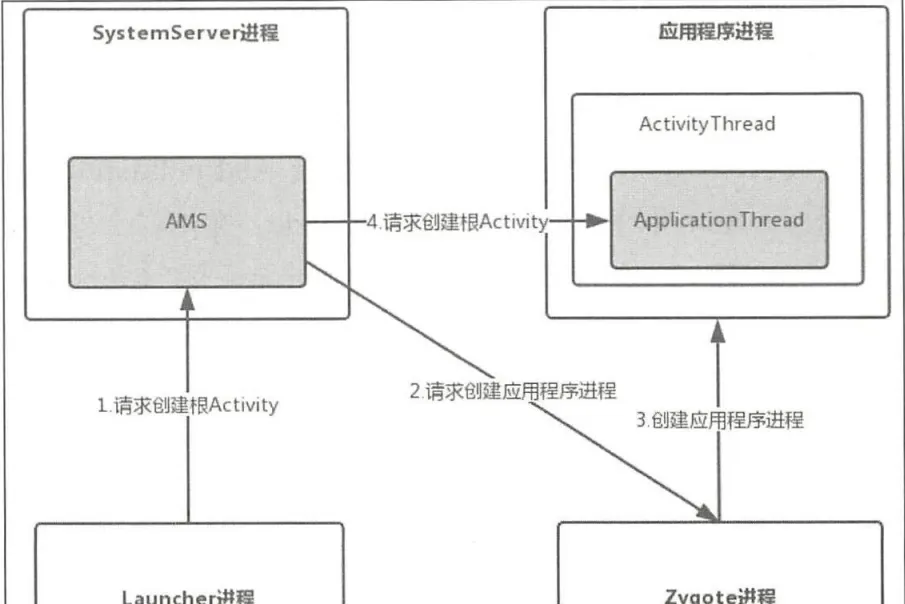
Sequence diagram:
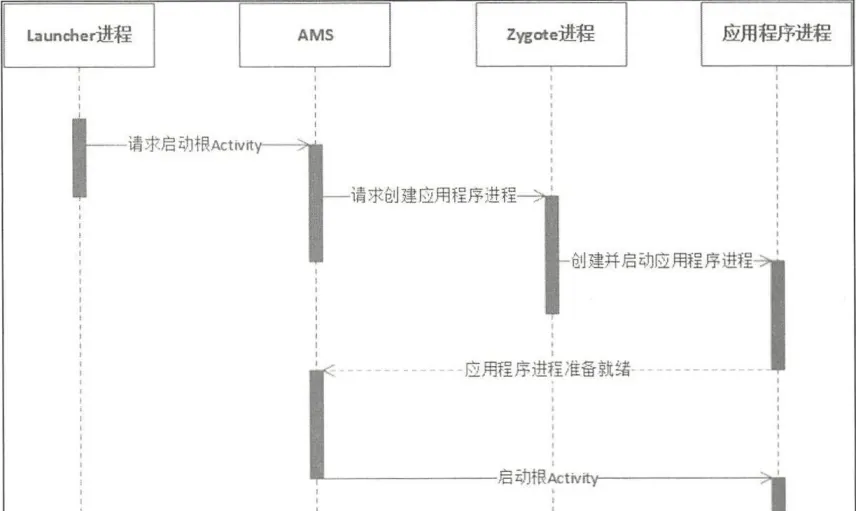
References
Primary references (some may be omitted):
- Android system source — aospxref.com and cs.android.com
- Android Advanced Decryption (《Android进阶解密》) — Liu Wangshu
- Android App Security Protection and Reverse Analysis (《Android应用安全防护和逆向分析》) — Jiang Wei
- Principles and implementation of the first-generation Android hardening shell — landed loading
- Principles and implementation of the second-generation Android hardening shell — landless loading
- Simple implementation and pitfalls of the first-generation whole-APK shell for Android
- Simple implementation and pitfalls of the second-generation extraction shell for Android
- App packing and unpacking
- Android Activity startup process
- dpt-shell
- dpt-shell extraction-shell source code and its reverse analysis
Unpacking tools:
- BlackDex
- frida-dexdump
- FART
- Youpk
- https://nop.gs
Dex2C and Dex VMP related projects:
- dex2c
- dcc
- nmmp
Colin Xiao — I take on contract reverse-engineering work, and writeups like this are how I show what I can do. Here I walked through Android and native runtime internals: class loaders, ART, dex packing, and anti-tampering. If you need help with anything in this space — including but not limited to deep Android runtime analysis, unpacking research, or hardening review for your own products — I’m available. No project is too big or too small — if it’s reverse engineering and I can do it, I’ll take it. DM me on X (@colinxiao_lab) or Telegram (@ColinXiao666).
Get in touch