How Android App Virtualization Works — The VirtualApp Architecture
About the author. I’m Colin Xiao — an independent reverse engineer, mostly working solo on contract jobs. I dig into compiled code of every kind, including but not limited to: Android and iOS apps, x86/x64/ARM native binaries, packers and obfuscators, DRM and license checks, network protocols and APIs, crypto and signature algorithms, malware, game binaries, and embedded/IoT firmware. I also handle large-scale data collection and vulnerability research. If you have any project in mind, I’d be glad to take it on — whatever it is, as long as it’s within my wheelhouse. Just reach out. You can reach me on X at @colinxiao_lab or on Telegram at https://t.me/ColinXiao666.
This research is published for educational and defensive purposes. The target sample is anonymized throughout.
How Android App Virtualization Works — The VirtualApp Architecture
Here’s the VirtualApp execution flow:
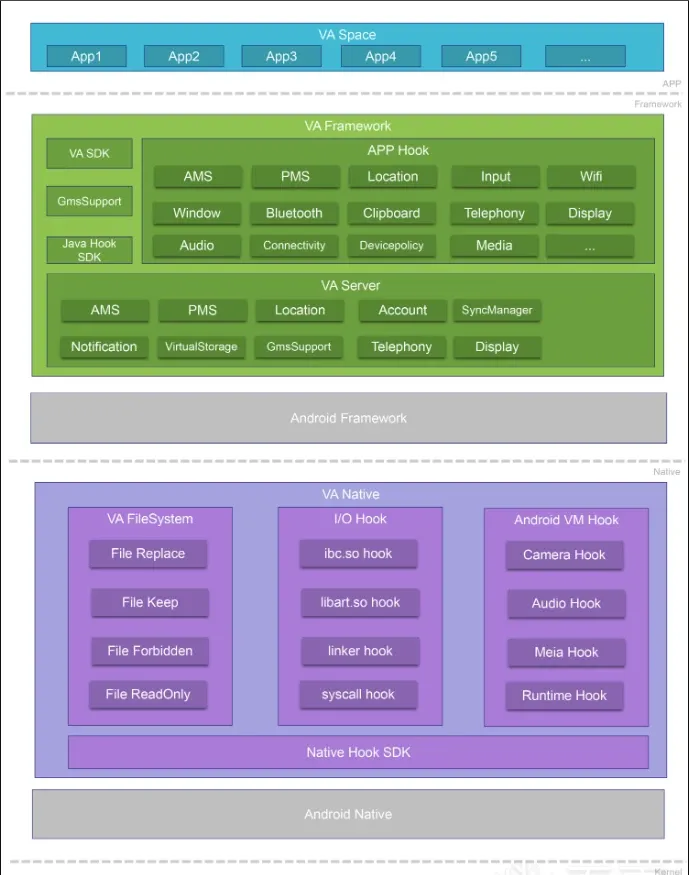
Let’s use the open-source VirtualApp to understand how an application runs inside a virtual machine.
Virtual space
First, the app is downloaded and installed. In practice, the application running in the VM is downloaded into a virtual space.
Virtual Framework
The apps in the VM (say App1, App2) would ordinarily call the system Framework directly — but what an app inside the VM needs is different:
- It “thinks” it’s talking to system services,
- when in fact it’s talking to the services simulated by VA (the hooked ones).
Android Framework
Android Framework is the full set of APIs Android provides — the interface to system-level services such as AMS, PMS, and LocationService, for example:
ActivityManagerService (AMS): manages Activity launch and scheduling.PackageManagerService (PMS): manages app package installation and information.LocationManager: provides location information.ClipboardManager: the clipboard service.
These are all part of the system-native Android Framework, running in system processes (like system_server), and are not things a user app can freely modify. The Framework inside the VM, by contrast, is a self-developed, modifiable Framework.
What the Virtual Framework needs to accomplish is to make the app believe it’s running under the native system. From the execution flow of an app in the Android Framework, we can see roughly how this works.
An application’s execution flow goes roughly like this:
- Tap the app on the home screen.
- Set the top Activity to paused, waiting for the app being launched.
- Decide the process first, then the program.
fork()the app process via Zygote.- Execute ActivityThread.main().
- ActivityThread passes its own ApplicationThread to AMS via Binder, so AMS can launch the app through ActivityThread.
- AMS notifies Activity launch through ApplicationThread.scheduleLaunchActivity().
- ActivityThread loads the target Activity class via reflection.
- Calls Instrumentation.callActivityOnCreate(), executing the program’s OnCreate() function.
The actual startup of the app is executed by ActivityThread, but the whole process is controlled and scheduled by AMS; the two sides communicate through a Binder bridge.
Virtual App vs natively-installed App
| Aspect | App in the VM (VA App) | System-installed app (native app) |
|---|---|---|
| Installation | Not actually installed via system PMS; only registered in the VA virtual space | Installed via system PMS; Activity, Service, etc. are registered |
| Runtime path | Install path, data path, etc. are redirected/virtualized (e.g. /data/data/com.xxx -> /data/data/io.virtual.app/space/0/...) |
Uses the real Android /data/data/com.xxx path |
| Accessing system services | All system-service calls (Location, Clipboard, etc.) are intercepted and “forged” by VA Hook | Calls the system-native ServiceManager services, directly connecting to system_server |
| AMS / PMS management | Scheduled by VA’s simulated AMS/PMS (Activity launch, Service calls, etc.) | Controlled by the system’s ActivityManagerService and PackageManagerService |
| Permission model | Permission requests and decisions are taken over by VA (can fake grants or forcibly block) | Permissions controlled by the Android system; the user authorizes manually |
| Multi-instance & isolation | Unlimited instances; multiple instances of the same app are mutually isolated | The system allows only one instance per package name by default, with no data isolation |
| File/IO control | VA hooks low-level filesystem access; can implement read-only/deny/forge/isolate policies | System file access acts directly on the real filesystem |
| Runtime awareness | Can “deceive” the app into thinking it’s running in a normal system (e.g. unaware of the virtual environment) | Real environment; the app can access all supported device resources |
| Security control | More flexible; can simulate the environment, hijack functions, restrict behavior | High security but low openness; can’t flexibly control the runtime environment |
So the execution flow of an application inside the VM should look the same — except that here the server services are not the Android-native Framework, but the VM’s Framework.
And this is where the main APP HOOK implementation comes into play.
APP HOOK
The hook targets are system service classes, in two main kinds:
1. Java-layer services (running in system_server)
VA replaces system service objects via reflection, proxying (e.g. Binder proxies), or dynamic injection.
For example:
- The app calls
Context.getSystemService("location")to get aLocationManager. - Under a normal system, it returns a Binder-connected service in system_server.
- After VA hooks it, it returns its own “fake LocationManager” — for instance, always returning a spoofed location.
2. Binder interface hooking
- VA uses something like “Binder IPC hijacking” to simulate Binder services such as AMS and PMS at the Java layer.
- It’s like hijacking a “telephone line”: the app thinks it’s talking to the system, but it’s actually talking to VA itself.
A concrete implementation might look like this:
- The app calls
ActivityManager.startActivity(). - The AMS hook in APP HOOK hijacks the system service call via a proxy (e.g. modifying
IActivityManager’s Binder). - It does not actually call the system AMS; instead it redirects the call to VirtualApp’s own VA Server → AMS.
- The VA Server’s AMS runs the launch flow (e.g. registering an Activity record in VirtualActivityStack).
- Finally, it masquerades as the system returning a normal
ActivityResult, and the app believes it “really launched the Activity”.
After the APP HOOK finishes intercepting, the VA Server takes over providing the corresponding service to fulfill the intercepted request.
So: APP Hook is the part that “intercepts” the app’s calls into system services; VA Server is the implementation side that “virtually provides” those services.
Virtual Native
This layer has two jobs: IO redirection and modifying the requests through which the VA APP interacts with the Android system.
IO redirection
Some apps hardcode the paths of config, cache, database, and other files in their code:
new File("/data/data/com.example.app/shared_prefs/config.xml")
fopen("/data/data/com.example.app/files/config.dat", "r");
In this case, a program opened in the VM can’t access files and configs at the matching paths.
That’s why VA Native exists:
- Intercept all
open,fopen,access,stat, and other syscalls. - Determine whether the path is the virtual app’s target path.
- Replace it with the virtual path — the location of the real program’s virtual path.
This is where the Native-layer hook comes in.
JNI native functions
All the APP HOOKs above are Java-layer. But Android has a huge amount of system behavior implemented natively. Adapting the app for those requires Native hooks:
| Case | Example | Solution |
|---|---|---|
| Direct file access | open, fopen, access |
hook libc |
| Direct system-service calls | getuid(), getpid() |
hook syscall |
| Special device access | /dev/*, /proc/* |
redirect paths |
| ART runtime optimization | libart.so calls |
hook libart |
| Dynamic-link resolve | dlsym to get function addresses |
hook linker |
The example here needs to hook the SO layer to analyze and obtain files/configs adapted to the matching paths.
Source analysis
mirror
Inside the VM, many details are implemented through hooks or reflective operations — intercepting the real AMS/PMS and returning self-written services. To make call interception more convenient, the VM framework wraps reflection into a helper layer, and that wrapper is called mirror.
The normal way, to intercept and change the Instrumentation:
private void hookInstrumentation() {
    try {
        // Load the ActivityThread class.
        Class<?> activityThreadClass = Class.forName("android.app.ActivityThread");

        // Get the 'currentActivityThread' method.
        Method currentActivityThreadMethod = activityThreadClass.getDeclaredMethod("currentActivityThread");
        currentActivityThreadMethod.setAccessible(true);

        // Invoke it to obtain the current ActivityThread instance.
        Object currentThread = currentActivityThreadMethod.invoke(null);

        // Get the 'mInstrumentation' field.
        Field instrumentationField = activityThreadClass.getDeclaredField("mInstrumentation");
        instrumentationField.setAccessible(true);

        // Get the original Instrumentation instance.
        Instrumentation originalInstrumentation = (Instrumentation) instrumentationField.get(currentThread);

        // Create an InstrumentationDelegate and replace the original Instrumentation.
        InstrumentationDelegate instrumentationDelegate = new InstrumentationDelegate(originalInstrumentation);
        instrumentationField.set(currentThread, instrumentationDelegate);
    } catch (Exception e) {
        e.printStackTrace();
    }
}
The mirror-encapsulated version (pseudocode) does the same interception and modification:
private void hookInstrumentation(){
    Object currentThread         = ActivityThread.currentActivityThread.call();
    Instrumentation originInstrumentation = ActivityThread.mInstrumentation.get(currentThread);
    ActivityThread.mInstrumentation.set(currentThread, new InstrumentationDelegate(originInstrumentation));
}
Here mirror performs the function wrapping, so the code logic is implemented much faster.
Java-layer hook
Let’s look at the Java-layer hook through the flow of an app calling AMS.
In Android, the management of all four major components goes through the system’s ActivityManagerService (AMS); the client calls AMS through the IActivityManager interface.
So hooking AMS = controlling the launch flow of all components! Once you have the IActivityManager interface, you can intercept the execution flow.
Activity.startActivity(Intent)
    ↓
Instrumentation.execStartActivity(...)
    ↓
ActivityManager.getService().startActivity(...)
This goes through ActivityManager.getService(), and at the Android 8.0 level:
// frameworks/base/core/java/android/app/ActivityManager.java
public static IActivityManager getService() {
    return IActivityManagerSingleton.get();
}

// frameworks/base/core/java/android/util/Singleton.java
private static final Singleton<IActivityManager> IActivityManagerSingleton =
    new Singleton<IActivityManager>() {
        @Override
        protected IActivityManager create() {
            // Note this line.
            return ActivityManagerNative.getDefault();
        }
    };
getService() returns IActivityManagerSingleton.get();So:
public class ActivityManagerStub extends MethodInvocationProxy<MethodInvocationStub<IInterface>> {
    public ActivityManagerStub() {
        // Use mirror to get AMS's IActivityManager interface object and create its dynamic proxy.
        super(new MethodInvocationStub<>(ActivityManagerNative.getDefault.call())); // get the system IActivityManager instance via reflection.
    }

public void inject() throws Throwable {
        if (BuildCompat.isOreo()) {
            // Android 8.x and above.
            Object singleton = ActivityManager.IActivityManagerSingleton.get();
            // Replace the original AMS object with our dynamic proxy.
            Singleton.mInstance.set(singleton, getInvocationStub().getProxyInterface());
        } else {
            // Android below 8.x (omitted).
        }
    }
Using reflection, replace mInstance with the proxy object we just constructed. All of the app’s AMS calls (like startActivity()) now go through our hook proxy object.
    // Method hook implementation.
    static class StartActivity extends MethodProxy {
        @Override
        public String getMethodName() {
            return "startActivity";
        }
        @Override
        public Object call(Object who, Method method, Object... args) throws Throwable {
            // Args can be processed here.
            int res = VActivityManager.get().startActivity(args);
            return res;
        }
    }
}
Here int res = VActivityManager.get().startActivity(args); forwards the call directly to VActivityManager (VirtualApp’s virtual AMS).
The core purpose of “intercepting the AMS service” is really to obtain the IActivityManager instance and replace it with our constructed proxy object. Because component scheduling in an Android app (launching Activity, Service, broadcast, etc.) all goes through this interface to send requests to the system.
ActivityManager.getService().startActivity(...)
ActivityManager.getService().broadcastIntent(...)
ActivityManager.getService().startService(...)
These are all methods of IActivityManager.
Native-layer hook
Having covered the Native-layer hook principle above, let’s look at IO redirection — modifying the file read/write paths.
@SuppressLint("SdCardPath")
private void startIOUniformer() {
    ApplicationInfo info = mBoundApplication.appInfo;
    int userId = VUserHandle.myUserId();
    String wifiMacAddressFile = deviceInfo.getwifiFile(userId).getPath();

    // Redirect WiFi-related addresses.
    NativeEngine.redirectDirectory("/sys/class/net/wlan0/address", wifiMacAddressFile);
    NativeEngine.redirectDirectory("/sys/class/net/eth0/address", wifiMacAddressFile);
    NativeEngine.redirectDirectory("/sys/class/net/wifi/address", wifiMacAddressFile);

    // Redirect the data/data path.
    NativeEngine.redirectDirectory("/data/data/" + info.packageName, info.dataDir);
    NativeEngine.redirectDirectory("/data/user/0/" + info.packageName, info.dataDir);

    if (Build.VERSION.SDK_INT > Build.VERSION_CODES.N) {
        // Android 7.0 and above.
        NativeEngine.redirectDirectory("/data/user_de/0/" + info.packageName, info.dataDir);

        String libPath = VEnvironment.getAppLibDirectory(info.packageName).getAbsolutePath();
        String userLibPath = new File(
            VEnvironment.getUserSystemDirectory(userId),
            info.packageName + "/lib"
        ).getAbsolutePath();

        // Redirect the native lib path.
        NativeEngine.redirectDirectory(userLibPath, libPath);
        NativeEngine.redirectDirectory("/data/data/" + info.packageName + "/lib/", libPath);
        NativeEngine.redirectDirectory("/data/user/0/" + info.packageName + "/lib/", libPath);
    }

    // Virtual storage handling.
    VirtualStorageManager vsManager = VirtualStorageManager.get();
    String vsPath = vsManager.getVirtualStorage(info.packageName, userId);
    boolean enable = vsManager.isVirtualStorageEnable(info.packageName, userId);

    if (enable && vsPath != null) {
        File vsDirectory = new File(vsPath);
        if (vsDirectory.exists() || vsDirectory.mkdirs()) {
            HashSet<String> mountPoints = getMountPoints();
            for (String mountPoint : mountPoints) {
                NativeEngine.redirectDirectory(mountPoint, vsPath);
            }
        }
    }

    NativeEngine.enableIORedirect();
}
You can see it uses redirectDirectory to redirect the locations the app might read from, replacing them with the VM’s corresponding content.
// int faccessat(int dirfd, const char *pathname, int mode, int flags);
HOOK_DEF(int, faccessat, int dirfd, const char *pathname, int mode, int flags) {
    int res;
    const char *redirect_path = relocate_path(pathname, &res);
    int ret = syscall(_NR_faccessat, dirfd, redirect_path, mode, flags);
    FREE(redirect_path, pathname);
    return ret;
}
The macro generates a function with a new_ prefix, e.g.:
int new_faccessat(...) { ... }- Decide whether redirection is needed (e.g.
/data/data/com.xxx→/virtual/data/com.xxx). - If so, return the new path; otherwise return the original path.
resrecords whether an actual replacement happened.
For example:
pathname = "/data/data/com.test/files/a.txt"
if this app is managed by VA, the path gets redirected to
redirect_path = "/data/user/0/com.va.wrapper/files/a.txt"
This covers the overall picture from the diagram at the top — though many of the problems and configuration details of running an app in a VM only surface through hands-on practice.
Reference: https://github.com/asLody/VirtualApp
Colin Xiao — I take on contract reverse-engineering work, and writeups like this are how I show what I can do. If you need help with anything in this space — including but not limited to the areas I cover above — I’m available. No project is too big or too small — if it’s reverse engineering and I can do it, I’ll take it. DM me on X (@colinxiao_lab) or Telegram (@ColinXiao666).
Get in touch