Analyzing the Android Boot Process from Source
About the author. I’m Colin Xiao — an independent reverse engineer, mostly working solo on contract jobs. I dig into compiled code of every kind, including but not limited to: Android and iOS apps, x86/x64/ARM native binaries, packers and obfuscators, DRM and license checks, network protocols and APIs, crypto and signature algorithms, malware, game binaries, and embedded/IoT firmware. I also handle large-scale data collection and vulnerability research. If you have any project in mind, I’d be glad to take it on — whatever it is, as long as it’s within my wheelhouse. Just reach out. You can reach me on X at @colinxiao_lab or on Telegram at https://t.me/ColinXiao666.
This research is published for educational and defensive purposes. The target sample is anonymized throughout.
Analyzing the Android Boot Process from Source
Source version
android-7.0.0_r1

Test device
Pixel 3, Android 10
Before you read
This boot-flow walkthrough draws on a number of existing community writeups and a couple of Android internals books. The reason I’m writing it down is that by the time I cross-referenced those writeups against the Android 7.0 tree I had on hand, a lot of the code had already changed.
I’m also a beginner at reading source. I used to know the boot flow only at the “init → zygote → system_server → launcher” level, without knowing where in the code each transition actually happens. So this is partly me refining my own knowledge. It doesn’t go especially deep — things like AMS startup, SystemServiceManager startup, or the Launcher’s app-list mechanism aren’t covered, just introduced. If you’re interested, the resources I found useful are linked at the end.
There’s a risk of reinventing the wheel here, but this is the product of my own step-by-step analysis, and I hope it helps others who are also starting out reading source.
A tip: read each section’s summary first (e.g., the summaries in sections 4, 5, 6). If you’ve read source before you know how it goes — sometimes you forget why you traced down to a particular function. Reading the summary first tells you the point of each section’s analysis.
Sections 4.2.1 and 4.2.2 in the init part can be a bit verbose and abstract; you may want to look at the source directly.
Here’s the overview:
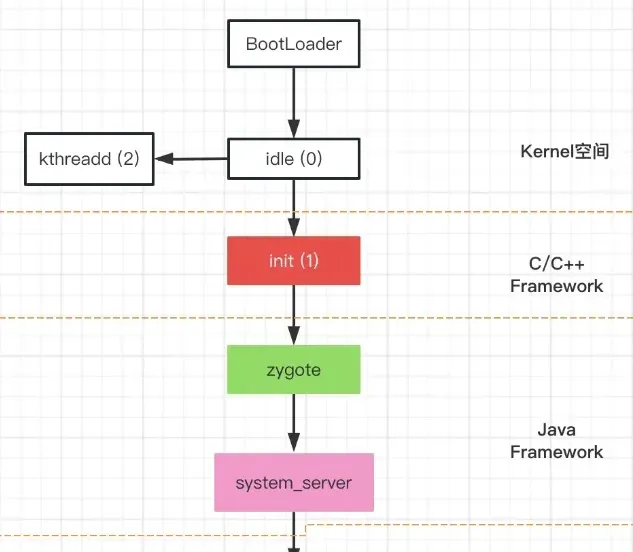
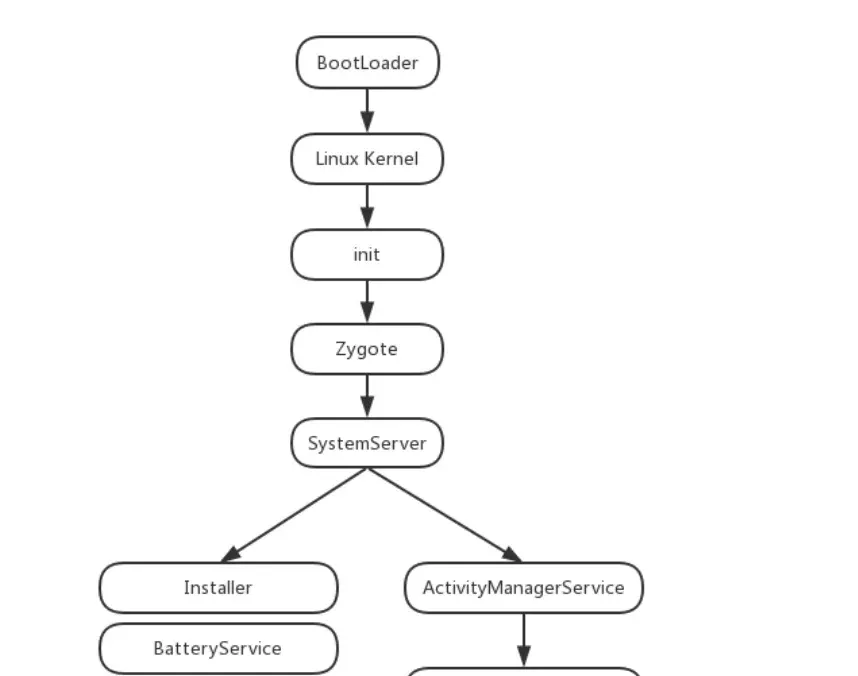
1. Power on
After the power button is pressed, the boot chip’s code starts executing from a predefined location (hard-coded in the hardware), loads the bootloader into RAM, and starts it.
2. Bootloader
A program that runs before the Android OS itself. Its main job is to pull up the OS.
This is familiar territory if you’ve rooted devices. My own research here is shallow, but I did come across an interesting, aggressive bootloader-cracking writeup worth a look.
3. The idle process (kernel space)
When I read the authoritative guides earlier, they never mentioned this kernel-space process — but it’s actually the first process. It does initialization in kernel space and launches the init process.
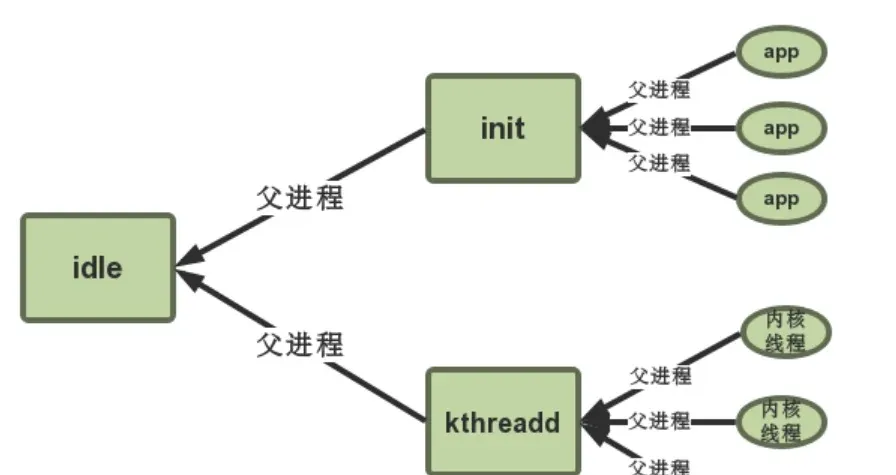
There’s a good post on this worth referencing.
4. The init process
The init process is started from kernel space. Inside the kernel there’s a snippet like this:
if (!try_to_run_init_process("/sbin/init") ||
        !try_to_run_init_process("/etc/init") ||
        !try_to_run_init_process("/bin/init") ||
        !try_to_run_init_process("/bin/sh"))
    return 0;
What we care about here is init, located at system/bin/init.
From the mk file we can see how it’s built:
android-7.0.0_r1/system/core/init/Android.mk
LOCAL_SRC_FILES:= \
    bootchart.cpp \
    builtins.cpp \
    devices.cpp \
    init.cpp \
    keychords.cpp \
    property_service.cpp \
    signal_handler.cpp \
    ueventd.cpp \
    ueventd_parser.cpp \
    watchdogd.cpp \
Notice init.cpp.
4.1 init.cpp
main’s main logic isn’t very long:
int main(int argc, char** argv) {
    if (!strcmp(basename(argv[0]), "ueventd")) {
        return ueventd_main(argc, argv);
    }

    if (!strcmp(basename(argv[0]), "watchdogd")) {
        return watchdogd_main(argc, argv);
    }

    // Clear the umask.
    umask(0);

    add_environment("PATH", _PATH_DEFPATH);

    bool is_first_stage = (argc == 1) || (strcmp(argv[1], "--second-stage") != 0);

    // Get the basic filesystem setup we need put together in the initramdisk
    // on / and then we'll let the rc file figure out the rest.
    // mount the filesystem here
    if (is_first_stage) {
        mount("tmpfs", "/dev", "tmpfs", MS_NOSUID, "mode=0755");
        mkdir("/dev/pts", 0755);
        mkdir("/dev/socket", 0755);
        mount("devpts", "/dev/pts", "devpts", 0, NULL);
        #define MAKE_STR(x) __STRING(x)
        mount("proc", "/proc", "proc", 0, "hidepid=2,gid=" MAKE_STR(AID_READPROC));
        mount("sysfs", "/sys", "sysfs", 0, NULL);
    }

    // We must have some place other than / to create the device nodes for
    // kmsg and null, otherwise we won't be able to remount / read-only
    // later on. Now that tmpfs is mounted on /dev, we can actually talk
    // to the outside world.
    open_devnull_stdio();
    klog_init();
    klog_set_level(KLOG_NOTICE_LEVEL);

    NOTICE("init %s started!\n", is_first_stage ? "first stage" : "second stage");

    if (!is_first_stage) {
        // Indicate that booting is in progress to background fw loaders, etc.
        close(open("/dev/.booting", O_WRONLY | O_CREAT | O_CLOEXEC, 0000));
        // initialize properties
        property_init();

        // If arguments are passed both on the command line and in DT,
        // properties set in DT always have priority over the command-line ones.
        process_kernel_dt();
        process_kernel_cmdline();

        // Propagate the kernel variables to internal variables
        // used by init as well as the current required properties.
        export_kernel_boot_props();
    }

    // Set up SELinux, including loading the SELinux policy if we're in the kernel domain.
    selinux_initialize(is_first_stage);

    // If we're in the kernel domain, re-exec init to transition to the init domain now
    // that the SELinux policy has been loaded.
    if (is_first_stage) {
        if (restorecon("/init") == -1) {
            ERROR("restorecon failed: %s\n", strerror(errno));
            security_failure();
        }
        char* path = argv[0];
        char* args[] = { path, const_cast<char*>("--second-stage"), nullptr };
        if (execv(path, args) == -1) {
            ERROR("execv(\"%s\") failed: %s\n", path, strerror(errno));
            security_failure();
        }
    }

    // These directories were necessarily created before initial policy load
    // and therefore need their security context restored to the proper value.
    // This must happen before /dev is populated by ueventd.
    NOTICE("Running restorecon...\n");
    restorecon("/dev");
    restorecon("/dev/socket");
    restorecon("/dev/__properties__");
    restorecon("/property_contexts");
    restorecon_recursive("/sys");

    epoll_fd = epoll_create1(EPOLL_CLOEXEC);
    if (epoll_fd == -1) {
        ERROR("epoll_create1 failed: %s\n", strerror(errno));
        exit(1);
    }

    signal_handler_init();

    property_load_boot_defaults();
    export_oem_lock_status();
    start_property_service();

    const BuiltinFunctionMap function_map;
    Action::set_function_map(&function_map);
    // create a parser object here and start parsing init.rc
    Parser& parser = Parser::GetInstance();
    parser.AddSectionParser("service",std::make_unique<ServiceParser>());
    parser.AddSectionParser("on", std::make_unique<ActionParser>());
    parser.AddSectionParser("import", std::make_unique<ImportParser>());
    parser.ParseConfig("/init.rc");

    ActionManager& am = ActionManager::GetInstance();

    am.QueueEventTrigger("early-init");

    // Queue an action that waits for coldboot done so we know ueventd has set up all of /dev...
    am.QueueBuiltinAction(wait_for_coldboot_done_action, "wait_for_coldboot_done");
    // ... so that we can start queuing up actions that require stuff from /dev.
    am.QueueBuiltinAction(mix_hwrng_into_linux_rng_action, "mix_hwrng_into_linux_rng");
    am.QueueBuiltinAction(set_mmap_rnd_bits_action, "set_mmap_rnd_bits");
    am.QueueBuiltinAction(keychord_init_action, "keychord_init");
    am.QueueBuiltinAction(console_init_action, "console_init");

    // Trigger all the boot actions to get us started.
    am.QueueEventTrigger("init");

    // Repeat mix_hwrng_into_linux_rng in case /dev/hw_random or /dev/random
    // wasn't ready immediately after wait_for_coldboot_done
    am.QueueBuiltinAction(mix_hwrng_into_linux_rng_action, "mix_hwrng_into_linux_rng");

    // Don't mount filesystems or start core system services in charger mode.
    std::string bootmode = property_get("ro.bootmode");
    if (bootmode == "charger") {
        am.QueueEventTrigger("charger");
    } else {
        am.QueueEventTrigger("late-init");
    }

    // Run all property triggers based on current state of the properties.
    am.QueueBuiltinAction(queue_property_triggers_action, "queue_property_triggers");

    while (true) {
        if (!waiting_for_exec) {
            am.ExecuteOneCommand();
            restart_processes();
        }

        int timeout = -1;
        if (process_needs_restart) {
            timeout = (process_needs_restart - gettime()) * 1000;
            if (timeout < 0)
                timeout = 0;
        }

        if (am.HasMoreCommands()) {
            timeout = 0;
        }

        bootchart_sample(&timeout);

        epoll_event ev;
        int nr = TEMP_FAILURE_RETRY(epoll_wait(epoll_fd, &ev, 1, timeout));
        if (nr == -1) {
            ERROR("epoll_wait failed: %s\n", strerror(errno));
        } else if (nr == 1) {
            ((void (*)()) ev.data.ptr)();
        }
    }

    return 0;
}
The init.cpp main in Android 7.0 is still fairly simple. By Android 10 the code structure changed a bit — first stage, second stage, and the parsing code all got wrapped into separate functions, which is arguably easier to read.
To summarize what init does, init.cpp gives the gist:
- Mount filesystems or create files.
- Initialization (e.g.
umask(0), permission setup, etc.). - SELinux security policy.
- Parse
init.rc.
4.2 init.rc
This part gets a little tricky. Following the normal flow, this is where the logic starts heading toward zygote.
On newer Android the flow looks like this, where you can find the start zygote line:
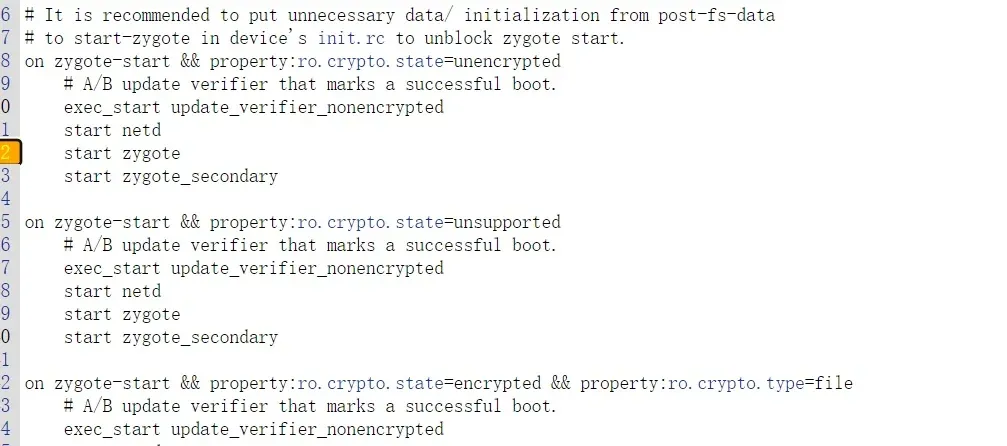
But on Android 7.0:
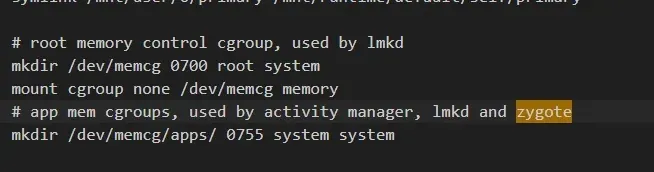
So when I first got here I did some digging. Let me say it up front: zygote is started by class_start main.
To understand how that works, you need some background on the AIL (rc) language and how the parser handles init.rc.
4.2.1 The AIL language
AIL = Android Init Language. I don’t know it deeply, and tracing the boot flow doesn’t need a deep understanding, so here’s a quick pass.
There are five statement types: Actions, Commands, Services, Options, and Imports.
Actions, Services, and Imports can define a Section. Here’s a section:
on boot
    ifup lo
    hostname localhost
    domainname localdomain
4.2.1.1 Action
Format — an Action is followed by a trigger indicating when it should run:
on <trigger> [&& <trigger>]*
   <command>
   <command>
   <command>
   ...
4.2.1.2 Commands
Simply put, the commands to execute.
| Command | Meaning |
|---|---|
bootchart_init |
Start bootcharting if configured. Included in the default init.rc. |
chmod |
Change file permissions. |
chown <owner> <group> <path> |
Change a file’s owner and group. |
class_start <serviceclass> |
Start all not-yet-started services of the given class. |
class_stop <serviceclass> |
Stop all running services of the given class. |
class_reset <serviceclass> |
Stop all services of the given class (they keep running) without disabling them; they can be restarted later via class_start. |
copy <src> <dst> |
Copy a file; useful for binaries/large files. |
domainname <name> |
Set the domain name. |
enable <servicename> |
Enable a previously disabled service. |
exec [ <seclabel> [ <user> [ <group> ]* ]] --<command> [ <argument> ]* |
Fork a process to run the given command, with arguments if provided. |
export <name> |
Set the value of a global environment variable <name> (key-value), effective for all subsequent processes. |
hostname |
Set the hostname. |
ifup <interface> |
Bring up a network interface. |
insmod [-f] <path> [<options>] |
Load a driver module at the given path. -f forces loading regardless of whether the module matches the Linux kernel. |
load_all_props |
Load properties from /system and /vendor. Included in init.rc by default. |
load_persist_props |
Load persistent properties when /data is encrypted. |
loglevel <level> |
Set the kernel log level. |
mkdir <path> [mode] [owner] [group] |
Create a directory at the given path. |
mount_all <fstab> [ <path> ]* |
Call fs_mgr_mount on the given fs_mgr-format fstab and import the rc files. |
mount <type> <device> <dir> [ <flag> ]* [<options>] |
Mount the device to the directory. |
powerctl |
Handle changes to the sys.powerctl system property, used for reboot. |
restart <service> |
Restart a service without disabling it. |
restorecon <path> [ <path> ]* |
Restore the file(s) to the security context specified in file_contexts. |
restorecon_recursive <path> [ <path> ]* |
Recursively restore a directory to the security contexts in file_contexts. |
rm <path> |
Delete a file. |
rmdir <path> |
Delete a directory. |
setprop <name> <value> |
Set the system property <name> to <value>. |
setrlimit <resource> <cur> <max> |
Set a resource limit. |
start <service> |
Start a service (if not already started). |
stop <service> |
Stop a service (if not already stopped). |
swapon_all <fstab> |
|
symlink <target> <path> |
Create a symlink <target> pointing at <path>. |
sysclktz <mins_west_of_gmt> |
Set the system clock base (0 = GMT). |
trigger <event> |
Trigger an event, queueing the action after some action (used for Action queueing). |
verity_load_state |
|
verity_update_state <mount_point> |
|
wait <path> [ <timeout> ] |
Wait for a file to exist; returns immediately if it exists or on timeout (default 5s). |
write <path> <content> |
Write content to a file. |
4.2.1.3 Services
Programs that start at init time, or restart when they exit.
Format:
service <name> <pathname> [ <argument> ]*
        <option>
        <option>
        ...
An example:
service ueventd /sbin/ueventd
    class core
    critical
    seclabel u:r:ueventd:s0
4.2.1.4 Options
Modifiers on a service, telling it how to run.
| Option | Meaning |
|---|---|
console |
The service needs a console. |
critical |
A critical device service. If it exits more than 4 times in 4 minutes, the device reboots into recovery mode. |
disabled |
The service won’t auto-start; it must be started explicitly by name. |
setenv <name> <value> |
Set the environment variable <name> to <value> during process startup. |
socket <name> <type> <perm> [ <user> [ <group> [seclabel]]] |
Create a Unix-domain socket named /dev/socket/<name> and pass its fd to the service. type must be dgram, stream, or seqpacket; user and group default to 0. seclabel is the socket’s SELinux context, defaulting to the service’s context. |
user <username> |
Switch to this user before running the service (default root). Since Android M you should use this even when Linux capabilities are required — obviously the process must run as root to gain them. |
group <groupname> |
Switch to this group before running; additional group names after the first set the process’s supplementary groups (via setgroups()). Default root. |
seclabel <seclabel> |
Change the security context before running the service (default: init’s context). |
oneshot |
Don’t restart the service when it exits. |
class <name> |
Assign a class to the service. Same-class services start/stop together; default class is default. |
onrestart |
Run this command when the service restarts. |
priority <priority> |
Set the service process priority, range -20~19, default 0 (via setpriority()). |
4.2.1.5 Imports
Include a config file:
import <path>Example:
import /init.environ.rc
import /init.usb.rc
import /init.${ro.hardware}.rc
import /init.usb.configfs.rc
import /init.${ro.zygote}.rc
That’s enough AIL. For details, read readme.txt under system/core/init.
4.2.2 init_parser.cpp
Back to init.cpp — this code parses init.rc:
    Parser& parser = Parser::GetInstance();
    parser.AddSectionParser("service",std::make_unique<ServiceParser>());
    parser.AddSectionParser("on", std::make_unique<ActionParser>());
    parser.AddSectionParser("import", std::make_unique<ImportParser>());
    parser.ParseConfig("/init.rc");
So how is this parser written? The logic lives in init_parser.cpp.
Step by step. It first calls parser.AddSectionParser, so let’s look at that function.
The second argument parser is stored in section_parsers_, keyed by the first argument name. section_parsers_ is a map — so this function binds a parser to its corresponding section:
void Parser::AddSectionParser(const std::string& name,
                              std::unique_ptr<SectionParser> parser) {
    section_parsers_[name] = std::move(parser);
}
Most of the above is really interpreter initialization.
Next, the line parser.ParseConfig("/init.rc");. Looking at ParseConfig:
This function checks whether the argument is a file path or a directory path. A directory path calls ParseConfigDir to recurse; a file path calls ParseConfigFile:
bool Parser::ParseConfig(const std::string& path) {
    if (is_dir(path.c_str())) {
        return ParseConfigDir(path);
    }
    return ParseConfigFile(path);
}


bool Parser::ParseConfigDir(const std::string& path) {
    INFO("Parsing directory %s...\n", path.c_str());
    std::unique_ptr<DIR, int(*)(DIR*)> config_dir(opendir(path.c_str()), closedir);
    if (!config_dir) {
        ERROR("Could not import directory '%s'\n", path.c_str());
        return false;
    }
    dirent* current_file;
    while ((current_file = readdir(config_dir.get()))) {
        std::string current_path =
            android::base::StringPrintf("%s/%s", path.c_str(), current_file->d_name);
        // Ignore directories and only process regular files.
        if (current_file->d_type == DT_REG) {
            if (!ParseConfigFile(current_path)) {
                ERROR("could not import file '%s'\n", current_path.c_str());
            }
        }
    }
    return true;
}
The key is ParseConfigFile. Its job:
- Read the rc file’s contents into
data. - Call
ParseDatato parse.
bool Parser::ParseConfigFile(const std::string& path) {
    INFO("Parsing file %s...\n", path.c_str());
    Timer t;
    std::string data;
    if (!read_file(path.c_str(), &data)) {
        return false;
    }

    data.push_back('\n'); // TODO: fix parse_config.
    ParseData(path, data);
    for (const auto& sp : section_parsers_) {
        sp.second->EndFile(path);
    }

    // Turning this on and letting the INFO logging be discarded adds 0.2s to
    // Nexus 9 boot time, so it's disabled by default.
    if (false) DumpState();

    NOTICE("(Parsing %s took %.2fs.)\n", path.c_str(), t.duration());
    return true;
}
Then ParseData. It’s a bit longer; I put the analysis inline:
void Parser::ParseData(const std::string& filename, const std::string& data) {
    //TODO: Use a parser with const input and remove this copy
    // store rc contents in a vector for char-by-char parsing
    std::vector<char> data_copy(data.begin(), data.end());
    data_copy.push_back('\0');

    parse_state state;
    state.filename = filename.c_str();
    state.line = 0;
    state.ptr = &data_copy[0];
    state.nexttoken = 0;

    SectionParser* section_parser = nullptr;
    // holds the content of each line
    std::vector<std::string> args;

    for (;;) {
        switch (next_token(&state)) {
        case T_EOF:
            if (section_parser) {
                section_parser->EndSection();
            }
            return;
        case T_NEWLINE:
            state.line++;
            // skip empty lines
            if (args.empty()) {
                break;
            }
            // determine if this is a section start by checking whether args[0] is services/on/import
            if (section_parsers_.count(args[0])) {
                if (section_parser) {
                    // end parsing
                    section_parser->EndSection();
                }
                // fetch the matching parser
                section_parser = section_parsers_[args[0]].get();
                std::string ret_err;
                // parse it
                if (!section_parser->ParseSection(args, &ret_err)) {
                    parse_error(&state, "%s\n", ret_err.c_str());
                    section_parser = nullptr;
                }
            } else if (section_parser) {
                // not a section start; this line belongs to the section body, parse as a line
                std::string ret_err;
                if (!section_parser->ParseLineSection(args, state.filename,
                                                      state.line, &ret_err)) {
                    parse_error(&state, "%s\n", ret_err.c_str());
                }
            }
            args.clear();
            break;
        case T_TEXT:
            args.emplace_back(state.text);
            break;
        }
    }
}
In short, the function above branches to:
ParseSectionParseLineSectionEndSection
Depending on the parser — Action goes to ActionParser, service goes to ServiceParser.
4.2.2.1 ActionParser
action.cpp.
ParseSection creates an Action object (my reading: the operations on an action), adds a trigger to it, and moves action_ into the current Action object:
bool ActionParser::ParseSection(const std::vector<std::string>& args,
                                std::string* err) {
    std::vector<std::string> triggers(args.begin() + 1, args.end());
    if (triggers.size() < 1) {
        *err = "actions must have a trigger";
        return false;
    }

    auto action = std::make_unique<Action>(false);
    if (!action->InitTriggers(triggers, err)) {
        return false;
    }

    action_ = std::move(action);
    return true;
}
ParseLineSection handles each line (my reading: operations on commands):
bool ActionParser::ParseLineSection(const std::vector<std::string>& args,
                                    const std::string& filename, int line,
                                    std::string* err) const {
    return action_ ? action_->AddCommand(args, filename, line, err) : false;
}
This calls AddCommand:
bool Action::AddCommand(const std::vector<std::string>& args,
                        const std::string& filename, int line, std::string* err) {
    if (!function_map_) {
        *err = "no function map available";
        return false;
    }

    if (args.empty()) {
        *err = "command needed, but not provided";
        return false;
    }
    // this mentions function_map_, which is important
    auto function = function_map_->FindFunction(args[0], args.size() - 1, err);
    if (!function) {
        return false;
    }

    AddCommand(function, args, filename, line);
    return true;
}
Which calls this AddCommand:
void Action::AddCommand(BuiltinFunction f,
                        const std::vector<std::string>& args,
                        const std::string& filename, int line) {
    commands_.emplace_back(f, args, filename, line);
}
Based on function_map_, the matching command handler is set.
For example, the class start that starts zygote is set up here — when class start is hit, which function to call. So which function does it call? Let’s see where function_map_ gets assigned:
static const KeywordMap<BuiltinFunction>* function_map_;

static void set_function_map(const KeywordMap<BuiltinFunction>* function_map) {
    function_map_ = function_map;
}
Back to init.cpp, find this line:
    const BuiltinFunctionMap function_map;
    Action::set_function_map(&function_map);
Then find BuiltinFunctionMap, which is in builtins.cpp:
BuiltinFunctionMap::Map& BuiltinFunctionMap::map() const {
    constexpr std::size_t kMax = std::numeric_limits<std::size_t>::max();
    static const Map builtin_functions = {
        {"bootchart_init",          {0,     0,    do_bootchart_init}},
        {"chmod",                   {2,     2,    do_chmod}},
        {"chown",                   {2,     3,    do_chown}},
        {"class_reset",             {1,     1,    do_class_reset}},
        {"class_start",             {1,     1,    do_class_start}},
        {"class_stop",              {1,     1,    do_class_stop}},
        {"copy",                    {2,     2,    do_copy}},
        {"domainname",              {1,     1,    do_domainname}},
        {"enable",                  {1,     1,    do_enable}},
        {"exec",                    {1,     kMax, do_exec}},
        {"export",                  {2,     2,    do_export}},
        {"hostname",                {1,     1,    do_hostname}},
        {"ifup",                    {1,     1,    do_ifup}},
        {"init_user0",              {0,     0,    do_init_user0}},
        {"insmod",                  {1,     kMax, do_insmod}},
        {"installkey",              {1,     1,    do_installkey}},
        {"load_persist_props",      {0,     0,    do_load_persist_props}},
        {"load_system_props",       {0,     0,    do_load_system_props}},
        {"loglevel",                {1,     1,    do_loglevel}},
        {"mkdir",                   {1,     4,    do_mkdir}},
        {"mount_all",               {1,     kMax, do_mount_all}},
        {"mount",                   {3,     kMax, do_mount}},
        {"powerctl",                {1,     1,    do_powerctl}},
        {"restart",                 {1,     1,    do_restart}},
        {"restorecon",              {1,     kMax, do_restorecon}},
        {"restorecon_recursive",    {1,     kMax, do_restorecon_recursive}},
        {"rm",                      {1,     1,    do_rm}},
        {"rmdir",                   {1,     1,    do_rmdir}},
        {"setprop",                 {2,     2,    do_setprop}},
        {"setrlimit",               {3,     3,    do_setrlimit}},
        {"start",                   {1,     1,    do_start}},
        {"stop",                    {1,     1,    do_stop}},
        {"swapon_all",              {1,     1,    do_swapon_all}},
        {"symlink",                 {2,     2,    do_symlink}},
        {"sysclktz",                {1,     1,    do_sysclktz}},
        {"trigger",                 {1,     1,    do_trigger}},
        {"verity_load_state",       {0,     0,    do_verity_load_state}},
        {"verity_update_state",     {0,     0,    do_verity_update_state}},
        {"wait",                    {1,     2,    do_wait}},
        {"write",                   {2,     2,    do_write}},
    };
    return builtin_functions;
}
So class_start maps to do_class_start, already implemented in builtins:

We’ll look at the concrete logic below. First let’s finish ActionParser’s ParseLineSection.
Then EndSection:
void ActionParser::EndSection() {
    if (action_ && action_->NumCommands() > 0) {
        ActionManager::GetInstance().AddAction(std::move(action_));
    }
}

void ActionManager::AddAction(std::unique_ptr<Action> action) {
    ...

    if (old_action_it != actions_.end()) {
        (*old_action_it)->CombineAction(*action);
    } else {
        // add the parsed action object to the actions_ list for later iteration/execution
        actions_.emplace_back(std::move(action));
    }
}

// ActionManager's definition in action.h
class ActionManager {
public:
    static ActionManager& GetInstance();

    void AddAction(std::unique_ptr<Action> action);
    void QueueEventTrigger(const std::string& trigger);
    void QueuePropertyTrigger(const std::string& name, const std::string& value);
    void QueueAllPropertyTriggers();
    void QueueBuiltinAction(BuiltinFunction func, const std::string& name);
    void ExecuteOneCommand();
    bool HasMoreCommands() const;
    void DumpState() const;

private:
    ActionManager();

    ActionManager(ActionManager const&) = delete;
    void operator=(ActionManager const&) = delete;

    std::vector<std::unique_ptr<Action>> actions_; // actions_ definition
    std::queue<std::unique_ptr<Trigger>> trigger_queue_;
    std::queue<const Action*> current_executing_actions_;
    std::size_t current_command_;
};
Summarizing the Action parsing:
- Create an Action object.
- Add the Trigger and corresponding commands to it.
- When adding a command, set the command’s handler function.
- Add the Action object to ActionManager’s
actions_vector.
4.2.2.2 ServiceParser
The overall logic is very similar to Action:
bool ServiceParser::ParseSection(const std::vector<std::string>& args,
                                 std::string* err) {
    ...
    // get service name
    const std::string& name = args[1];
    ...
    // save args other than the name (e.g. exec path)
    std::vector<std::string> str_args(args.begin() + 2, args.end());
    // point service_ at the current Service object
    service_ = std::make_unique<Service>(name, "default", str_args);
    return true;
}
bool ServiceParser::ParseLineSection(const std::vector<std::string>& args,
const std::string& filename, int line,
std::string* err) const {
// assign a handler for each Option in the Service
return service_ ? service_->HandleLine(args, err) : false;
}
bool Service::HandleLine(const std::vector<std::string>& args, std::string* err) {
...
static const OptionHandlerMap handler_map;
// find the handler for the option
auto handler = handler_map.FindFunction(args[0], args.size() - 1, err);
...
return (this->*handler)(args, err);
}void ServiceParser::EndSection() {
if (service_) {
ServiceManager::GetInstance().AddService(std::move(service_));
}
}
void ServiceManager::AddService(std::unique_ptr<Service> service) {
Service* old_service = FindServiceByName(service->name());
if (old_service) {
ERROR("ignored duplicate definition of service '%s'",
service->name().c_str());
return;
}
// add the parsed service object to the services_ list
services_.emplace_back(std::move(service));
}
// ServiceManager's definition in service.h
class ServiceManager {
public:
static ServiceManager& GetInstance();
void AddService(std::unique_ptr<Service> service);
Service* MakeExecOneshotService(const std::vector<std::string>& args);
Service* FindServiceByName(const std::string& name) const;
Service* FindServiceByPid(pid_t pid) const;
Service* FindServiceByKeychord(int keychord_id) const;
void ForEachService(std::function<void(Service*)> callback) const;
void ForEachServiceInClass(const std::string& classname,
void (*func)(Service* svc)) const;
void ForEachServiceWithFlags(unsigned matchflags,
void (*func)(Service* svc)) const;
void ReapAnyOutstandingChildren();
void RemoveService(const Service& svc);
void DumpState() const;
private:
ServiceManager();
bool ReapOneProcess();
static int exec_count_; // Every service needs a unique name.
std::vector<std::unique_ptr<Service>> services_; // services_ definition
};Similar to Action:
- Create a Service object, parse it, and add the corresponding arguments.
- Set a handler for each Option object.
4.2.2.3 How commands get executed
Now with AIL knowledge and how the interpreter handles each command, the device can read and manage the contents of init.rc. (This still feels like initialization, not yet running.)
Our goal is to find how zygote starts, so how commands get executed matters too (e.g. how class_start main lands on zygote).
Back to init.cpp:
while (true) {
        if (!waiting_for_exec) {
            am.ExecuteOneCommand();
            restart_processes();
        }

        int timeout = -1;
        if (process_needs_restart) {
            timeout = (process_needs_restart - gettime()) * 1000;
            if (timeout < 0)
                timeout = 0;
        }

        if (am.HasMoreCommands()) {
            timeout = 0;
        }

        bootchart_sample(&timeout);

        epoll_event ev;
        int nr = TEMP_FAILURE_RETRY(epoll_wait(epoll_fd, &ev, 1, timeout));
        if (nr == -1) {
            ERROR("epoll_wait failed: %s\n", strerror(errno));
        } else if (nr == 1) {
            ((void (*)()) ev.data.ptr)();
        }
    }
Action execution goes through ExecuteOneCommand — tracing up, it’s ActionManager’s ExecuteOneCommand:
void ActionManager::ExecuteOneCommand() {
    while (current_executing_actions_.empty() && !trigger_queue_.empty()) {
        // iterate over actions_
        for (const auto& action : actions_) {
            if (trigger_queue_.front()->CheckTriggers(*action)) {
                // add the action to current_executing_actions_
                current_executing_actions_.emplace(action.get());
            }
        }
        trigger_queue_.pop();
    }

    ...

    // execute one action at a time; on the next while-loop iteration, skip the loop above and continue
    auto action = current_executing_actions_.front();

    if (current_command_ == 0) {
        std::string trigger_name = action->BuildTriggersString();
        INFO("processing action (%s)\n", trigger_name.c_str());
    }

    // execute the action's command
    action->ExecuteOneCommand(current_command_);

    ++current_command_;
    ...
}

void Action::ExecuteOneCommand(std::size_t command) const {
    // execute the command stored in the action object
    ExecuteCommand(commands_[command]);
}

void Action::ExecuteCommand(const Command& command) const {
    Timer t;
    // call the command's handler
    int result = command.InvokeFunc();

    ...
}
Quick summary:
- init enters an infinite loop.
- Each Action is processed in the order stored in ActionManager’s
actions_.
4.2.2.4 How zygote starts
Now we basically understand AIL, how the init.rc holding zygote is parsed, and how commands in init.rc run.
The common knowledge is roughly the same, so next let’s look at how zygote actually starts (the earlier part was a bit verbose).
Remember that “important” function from before:
static int do_class_start(const std::vector<std::string>& args) {
    ServiceManager::GetInstance().
        ForEachServiceInClass(args[1], [] (Service* s) { s->StartIfNotDisabled(); });
    return 0;
}
It calls the service’s StartIfNotDisabled:
bool Service::StartIfNotDisabled() {
    if (!(flags_ & SVC_DISABLED)) {
        return Start();
    } else {
        flags_ |= SVC_DISABLED_START;
    }
    return true;
}

bool Service::Start() {
    ....
    // create child process
    pid_t pid = fork();
    if (pid == 0) {
        ...
        // exec the file for this service; args_[0].c_str() is the path
        if (execve(args_[0].c_str(), (char**) &strs[0], (char**) ENV) < 0) {
            ERROR("cannot execve('%s'): %s\n", args_[0].c_str(), strerror(errno));
        }

        _exit(127);
    }

    ....
    return true;
}
It calls Service::Start.
The code we care about is class_start main — you can see the class identifier is main:
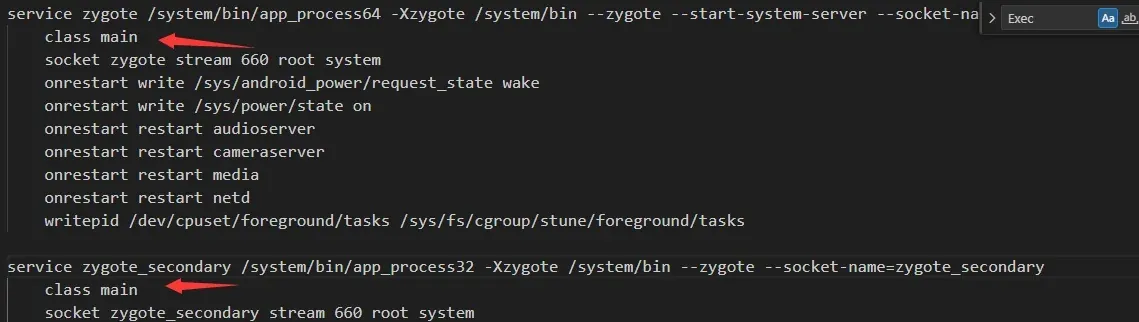
Alright, summarizing:
init.cpp does some command initialization, and in the interpreter reads init.rc so the device understands init’s startup config, then in the infinite loop calls the commands in init.rc — including starting zygote.
4.3 Summary
init’s main work:
- Create some directories, mount filesystems and devices.
- Initialize and start the property service.
- Parse
init.rcand other rc files to start the corresponding system-level processes, including zygote (next section).
Next the logic enters zygote.
5. Zygote
On my Pixel 3 running Android 10 there are two zygotes, for two different ABIs.
Entering zygote, we actually first enter the native layer.
5.1 The native-layer zygote
First, different zygotes start based on device info (bitness). I’ll use 64/32 as the example.
The binaries are app_process64 and app_process32, with -Xzygote /system/bin --zygote --start-system-server --socket-name=zygote as arguments:
service zygote /system/bin/app_process64 -Xzygote /system/bin --zygote --start-system-server --socket-name=zygote
    class main
    socket zygote stream 660 root system
    onrestart write /sys/android_power/request_state wake
    onrestart write /sys/power/state on
    onrestart restart audioserver
    onrestart restart cameraserver
    onrestart restart media
    onrestart restart netd
    writepid /dev/cpuset/foreground/tasks /sys/fs/cgroup/stune/foreground/tasks

service zygote_secondary /system/bin/app_process32 -Xzygote /system/bin --zygote --socket-name=zygote_secondary
    class main
    socket zygote_secondary stream 660 root system
    onrestart restart zygote
    writepid /dev/cpuset/foreground/tasks /dev/stune/foreground/tasks
Both app_process64 and app_process32 are compiled; find their source to see the logic.
The code is long; we mainly care about three parts:
- Creating the app runtime object.
- Key section 1.
- Key section 2.
- Key section 2’s
runtime.start.
int main(int argc, char* const argv[])
{
    if (prctl(PR_SET_NO_NEW_PRIVS, 1, 0, 0, 0) < 0) {
        // Older kernels don't understand PR_SET_NO_NEW_PRIVS and return
        // EINVAL. Don't die on such kernels.
        if (errno != EINVAL) {
            LOG_ALWAYS_FATAL("PR_SET_NO_NEW_PRIVS failed: %s", strerror(errno));
            return 12;
        }
    }
    // create the app runtime object
    AppRuntime runtime(argv[0], computeArgBlockSize(argc, argv));
    // Process command line arguments
    // ignore argv[0]
    argc--;
    argv++;

    // Everything up to '--' or first non '-' arg goes to the vm.
    //
    // The first argument after the VM args is the "parent dir", which
    // is currently unused.
    //
    // After the parent dir, we expect one or more the following internal
    // arguments :
    //
    // --zygote : Start in zygote mode
    // --start-system-server : Start the system server.
    // --application : Start in application (stand alone, non zygote) mode.
    // --nice-name : The nice name for this process.
    //
    // For non zygote starts, these arguments will be followed by
    // the main class name. All remaining arguments are passed to
    // the main method of this class.
    //
    // For zygote starts, all remaining arguments are passed to the zygote.
    // main function.
    //
    // Note that we must copy argument string values since we will rewrite the
    // entire argument block when we apply the nice name to argv0.

    int i;
    for (i = 0; i < argc; i++) {
        if (argv[i][0] != '-') {
            break;
        }
        if (argv[i][1] == '-' && argv[i][2] == 0) {
            ++i; // Skip --.
            break;
        }
        runtime.addOption(strdup(argv[i]));
    }

    // Parse runtime arguments.  Stop at first unrecognized option.
    bool zygote = false;
    bool startSystemServer = false;
    bool application = false;
    String8 niceName;
    String8 className;
    // key section 1
    ++i;  // Skip unused "parent dir" argument.
    while (i < argc) {
        const char* arg = argv[i++];
        if (strcmp(arg, "--zygote") == 0) {
            zygote = true;
            niceName = ZYGOTE_NICE_NAME;
        } else if (strcmp(arg, "--start-system-server") == 0) {
            startSystemServer = true;
        } else if (strcmp(arg, "--application") == 0) {
            application = true;
        } else if (strncmp(arg, "--nice-name=", 12) == 0) {
            niceName.setTo(arg + 12);
        } else if (strncmp(arg, "--", 2) != 0) {
            className.setTo(arg);
            break;
        } else {
            --i;
            break;
        }
    }

    Vector<String8> args;
    if (!className.isEmpty()) {
        // We're not in zygote mode, the only argument we need to pass
        // to RuntimeInit is the application argument.
        //
        // The Remainder of args get passed to startup class main(). Make
        // copies of them before we overwrite them with the process name.
        args.add(application ? String8("application") : String8("tool"));
        runtime.setClassNameAndArgs(className, argc - i, argv + i);
    } else {
        // We're in zygote mode.
        maybeCreateDalvikCache();

        if (startSystemServer) {
            args.add(String8("start-system-server"));
        }

        char prop[PROP_VALUE_MAX];
        if (property_get(ABI_LIST_PROPERTY, prop, NULL) == 0) {
            LOG_ALWAYS_FATAL("app_process: Unable to determine ABI list from property %s.",
                ABI_LIST_PROPERTY);
            return 11;
        }

        String8 abiFlag("--abi-list=");
        abiFlag.append(prop);
        args.add(abiFlag);

        // In zygote mode, pass all remaining arguments to the zygote
        // main() method.
        for (; i < argc; ++i) {
            args.add(String8(argv[i]));
        }
    }

    if (!niceName.isEmpty()) {
        runtime.setArgv0(niceName.string());
        set_process_name(niceName.string());
    }
    // key section 2
    if (zygote) {
        runtime.start("com.android.internal.os.ZygoteInit", args, zygote);
    } else if (className) {
        runtime.start("com.android.internal.os.RuntimeInit", args, zygote);
    } else {
        fprintf(stderr, "Error: no class name or --zygote supplied.\n");
        app_usage();
        LOG_ALWAYS_FATAL("app_process: no class name or --zygote supplied.");
        return 10;
    }
}
5.1.1 Key section 1
--start-system-server is part of our arguments -Xzygote /system/bin --zygote --start-system-server. It sets the flags:
    ++i;  // Skip unused "parent dir" argument.
    while (i < argc) {
        const char* arg = argv[i++];
        if (strcmp(arg, "--zygote") == 0) {
            zygote = true;
            niceName = ZYGOTE_NICE_NAME;
        } else if (strcmp(arg, "--start-system-server") == 0) {
            startSystemServer = true;
        } else if (strcmp(arg, "--application") == 0) {
            application = true;
        } else if (strncmp(arg, "--nice-name=", 12) == 0) {
            niceName.setTo(arg + 12);
        } else if (strncmp(arg, "--", 2) != 0) {
            className.setTo(arg);
            break;
        } else {
            --i;
            break;
        }
    }
5.1.2 Key section 2
From our arguments we know app_process is started with the zygote argument, so zygote is set to true and we enter this branch — specifically runtime.start("com.android.internal.os.ZygoteInit", args, zygote);:
if (zygote) {
        runtime.start("com.android.internal.os.ZygoteInit", args, zygote);
    } else if (className) {
        runtime.start("com.android.internal.os.RuntimeInit", args, zygote);
    } else {
        fprintf(stderr, "Error: no class name or --zygote supplied.\n");
        app_usage();
        LOG_ALWAYS_FATAL("app_process: no class name or --zygote supplied.");
        return 10;
    }
5.1.3 Key section 2’s runtime.start
This one is long; let me paste it:
void AndroidRuntime::start(const char* className, const Vector<String8>& options, bool zygote)
{
    ALOGD(">>>>>> START %s uid %d <<<<<<\n",
            className != NULL ? className : "(unknown)", getuid());

    static const String8 startSystemServer("start-system-server");

    /*
     * 'startSystemServer == true' means runtime is obsolete and not run from
     * init.rc anymore, so we print out the boot start event here.
     */
    for (size_t i = 0; i < options.size(); ++i) {
        if (options[i] == startSystemServer) {
           /* track our progress through the boot sequence */
           const int LOG_BOOT_PROGRESS_START = 3000;
           LOG_EVENT_LONG(LOG_BOOT_PROGRESS_START,  ns2ms(systemTime(SYSTEM_TIME_MONOTONIC)));
        }
    }

    const char* rootDir = getenv("ANDROID_ROOT");
    if (rootDir == NULL) {
        rootDir = "/system";
        if (!hasDir("/system")) {
            LOG_FATAL("No root directory specified, and /android does not exist.");
            return;
        }
        setenv("ANDROID_ROOT", rootDir, 1);
    }

    //const char* kernelHack = getenv("LD_ASSUME_KERNEL");
    //ALOGD("Found LD_ASSUME_KERNEL='%s'\n", kernelHack);

    /* start the virtual machine */
    JniInvocation jni_invocation;
    jni_invocation.Init(NULL);
    JNIEnv* env;
    if (startVm(&mJavaVM, &env, zygote) != 0) {
        return;
    }
    onVmCreated(env);

    /*
     * Register android functions.
     */
    if (startReg(env) < 0) {
        ALOGE("Unable to register all android natives\n");
        return;
    }

    /*
     * We want to call main() with a String array with arguments in it.
     * At present we have two arguments, the class name and an option string.
     * Create an array to hold them.
     */
    jclass stringClass;
    jobjectArray strArray;
    jstring classNameStr;

    stringClass = env->FindClass("java/lang/String");
    assert(stringClass != NULL);
    strArray = env->NewObjectArray(options.size() + 1, stringClass, NULL);
    assert(strArray != NULL);
    classNameStr = env->NewStringUTF(className);
    assert(classNameStr != NULL);
    env->SetObjectArrayElement(strArray, 0, classNameStr);

    for (size_t i = 0; i < options.size(); ++i) {
        jstring optionsStr = env->NewStringUTF(options.itemAt(i).string());
        assert(optionsStr != NULL);
        env->SetObjectArrayElement(strArray, i + 1, optionsStr);
    }

    /*
     * Start VM.  This thread becomes the main thread of the VM, and will
     * not return until the VM exits.
     */
    char* slashClassName = toSlashClassName(className);
    jclass startClass = env->FindClass(slashClassName);
    if (startClass == NULL) {
        ALOGE("JavaVM unable to locate class '%s'\n", slashClassName);
        /* keep going */
    } else {
        jmethodID startMeth = env->GetStaticMethodID(startClass, "main",
            "([Ljava/lang/String;)V");
        if (startMeth == NULL) {
            ALOGE("JavaVM unable to find main() in '%s'\n", className);
            /* keep going */
        } else {
            env->CallStaticVoidMethod(startClass, startMeth, strArray);

#if 0
            if (env->ExceptionCheck())
                threadExitUncaughtException(env);
#endif
        }
    }
    free(slashClassName);

    ALOGD("Shutting down VM\n");
    if (mJavaVM->DetachCurrentThread() != JNI_OK)
        ALOGW("Warning: unable to detach main thread\n");
    if (mJavaVM->DestroyJavaVM() != 0)
        ALOGW("Warning: VM did not shut down cleanly\n");
}
Two spots here help a lot for understanding Android: startVm is the entry to understanding the VM (mark it), and startReg registers JNI functions:
     startVm(&mJavaVM, &env, zygote)

     startReg(env)
And then this — whose job is to find ZygoteInit’s main function and call it via JNI (the call pattern looks familiar), entering zygote’s Java layer:
     jmethodID startMeth = env->GetStaticMethodID(startClass, "main",
     "([Ljava/lang/String;)V");
     env->CallStaticVoidMethod(startClass, startMeth, strArray);
5.2 The Java-layer zygote
As above, ZygoteInit.java’s main:
public static void main(String argv[]) {
        // Mark zygote start. This ensures that thread creation will throw
        // an error.
        ZygoteHooks.startZygoteNoThreadCreation();

        try {
            Trace.traceBegin(Trace.TRACE_TAG_DALVIK, "ZygoteInit");
            RuntimeInit.enableDdms();
            // Start profiling the zygote initialization.
            SamplingProfilerIntegration.start();

            boolean startSystemServer = false;
            String socketName = "zygote";
            String abiList = null;
            for (int i = 1; i < argv.length; i++) {
                if ("start-system-server".equals(argv[i])) {
                    startSystemServer = true;
                } else if (argv[i].startsWith(ABI_LIST_ARG)) {
                    abiList = argv[i].substring(ABI_LIST_ARG.length());
                } else if (argv[i].startsWith(SOCKET_NAME_ARG)) {
                    socketName = argv[i].substring(SOCKET_NAME_ARG.length());
                } else {
                    throw new RuntimeException("Unknown command line argument: " + argv[i]);
                }
            }

            if (abiList == null) {
                throw new RuntimeException("No ABI list supplied.");
            }

            registerZygoteSocket(socketName);
            Trace.traceBegin(Trace.TRACE_TAG_DALVIK, "ZygotePreload");
            EventLog.writeEvent(LOG_BOOT_PROGRESS_PRELOAD_START,
                SystemClock.uptimeMillis());
            preload();
            EventLog.writeEvent(LOG_BOOT_PROGRESS_PRELOAD_END,
                SystemClock.uptimeMillis());
            Trace.traceEnd(Trace.TRACE_TAG_DALVIK);

            // Finish profiling the zygote initialization.
            SamplingProfilerIntegration.writeZygoteSnapshot();

            // Do an initial gc to clean up after startup
            Trace.traceBegin(Trace.TRACE_TAG_DALVIK, "PostZygoteInitGC");
            gcAndFinalize();
            Trace.traceEnd(Trace.TRACE_TAG_DALVIK);

            Trace.traceEnd(Trace.TRACE_TAG_DALVIK);

            // Disable tracing so that forked processes do not inherit stale tracing tags from
            // Zygote.
            Trace.setTracingEnabled(false);

            // Zygote process unmounts root storage spaces.
            Zygote.nativeUnmountStorageOnInit();

            ZygoteHooks.stopZygoteNoThreadCreation();

            if (startSystemServer) {
                startSystemServer(abiList, socketName);
            }

            Log.i(TAG, "Accepting command socket connections");
            runSelectLoop(abiList);

            closeServerSocket();
        } catch (MethodAndArgsCaller caller) {
            caller.run();
        } catch (RuntimeException ex) {
            Log.e(TAG, "Zygote died with exception", ex);
            closeServerSocket();
            throw ex;
        }
    }
The important functions inside:
registerZygoteSocket(socketName);
// registers the socket zygote uses to communicate with AMS, to create new app processes

preload();
// preloads resources, classes, VM instances, etc.

startSystemServer(abiList, socketName);
// starts the SystemServer process, home to PMS etc.

runSelectLoop(abiList);
// loops, waiting for and handling AMS's requests to create new app processes.
// on a create-request, calls ZygoteConnection.runOnce to create a new app process
Sequence diagram:
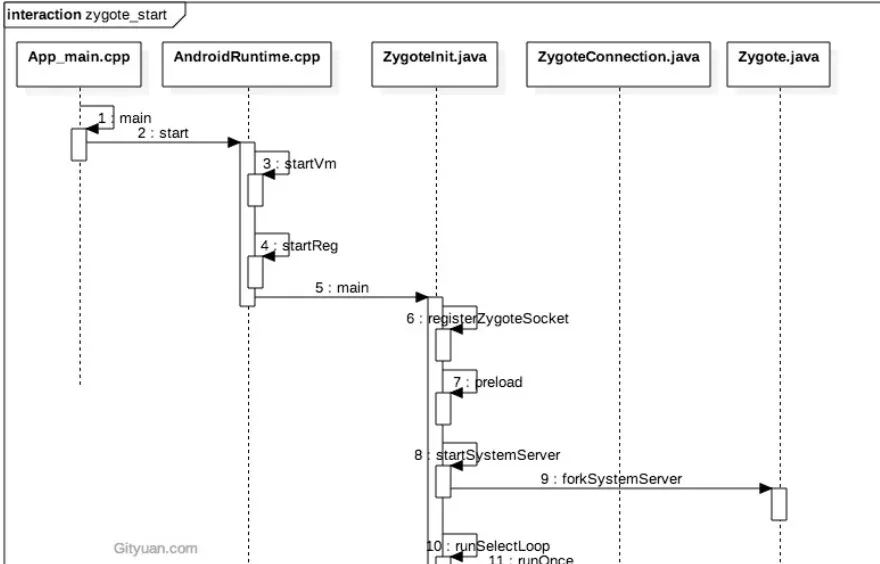
5.3 Summary
Parsing the rc arguments:
- In the native layer, call the runtime’s
start, which creates the VM and registers JNI functions. - Call
ZygoteInit’smainvia JNI to enter the Java layer. registerZygoteSocketregisters the socket zygote uses to talk to AMS and create app processes.preloadpreloads resources, classes, VM instances, etc.startSystemServerstarts the SystemServer process (home to PMS etc.).runSelectLooploops waiting for and handling AMS’s app-process creation requests.- At this point zygote has basically finished its init work and starts waiting.
6. SystemServer
Zygote just started SystemServer.
Sequence diagram first:
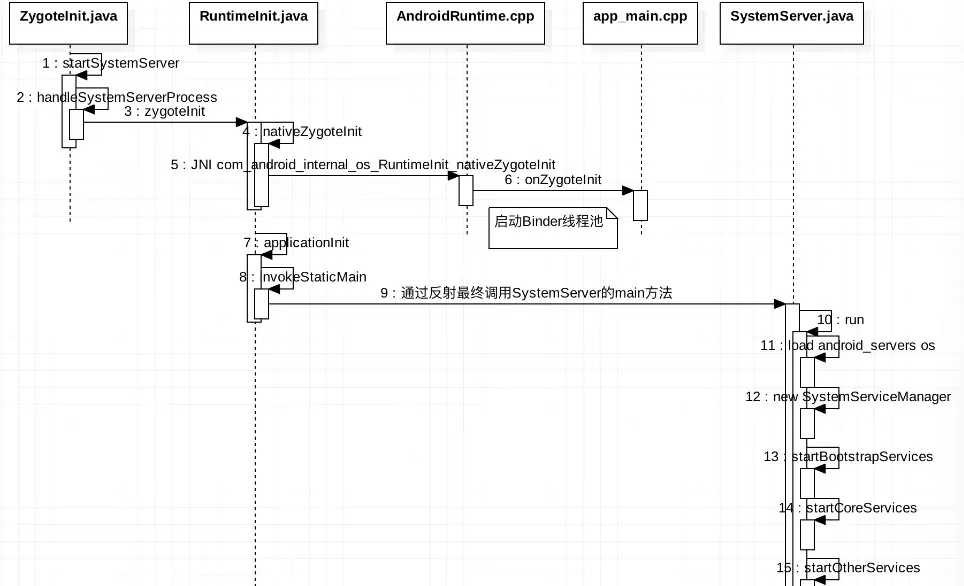
I have a bit less detail here — some of this is borrowed from another writeup, just to get the concept.
ZygoteInit.startSystemServer()
Forks the
system_serverchild process, entering thesystem_serverprocess.
ZygoteInit.handleSystemServerProcess()
Sets the current process name to “system_server”, creates a PathClassLoader.
RuntimeInit.zygoteInit()
Redirects log output, common initialization (default exception handler, timezone, etc.), initializes Zygote → nativeZygoteInit().
app_main::onZygoteInit()
proc->startThreadPool();starts the Binder thread pool so it can communicate with other processes.
ZygoteInit.main()
Enables DDMS,
preload()loads resources, preloads OpenGL, callsSystemServer.main().
SystemServer.main()
Initializes the SystemServer object, then calls its
run()method.
From here it’s familiar:
SystemServer.run()
          createSystemContext
          startBootstrapServices();
          startCoreServices();
          startOtherServices();
          Looper.loop();
6.1 System services
startBootstrapServices: bootstrap services
| Service | Purpose |
|---|---|
| Installer | A service class used when the system installs an APK; other system services can only start after Installer is up. |
| ActivityManagerService | Responsible for starting, switching, and scheduling the four major components. |
| PowerManagerService | Computes power-related decisions and decides how the system reacts. |
| LightsService | Manages and displays the backlight/LED. |
| DisplayManagerService | Manages all display devices. |
| UserManagerService | Multi-user management. |
| SensorService | Provides various sensor services to the system. |
| PackageManagerService | Installs, parses, deletes, uninstalls APKs, etc. |
startCoreServices: core services
| Service | Purpose |
|---|---|
| BatteryService | Battery-related services. |
| UsageStatsService | Collects how often and how long each app is used. |
| WebViewUpdateService | WebView update service. |
startOtherServices: other services (60+)
| Service | Purpose |
|---|---|
| CameraService | Camera-related. |
| AlarmManagerService | Global timer/alarm management. |
| InputManagerService | Manages input events. |
| WindowManagerService | Window management. |
| VrManagerService | VR mode management. |
| BluetoothService | Bluetooth management. |
| NotificationManagerService | Notification management. |
| DeviceStorageMonitorService | Storage-related management. |
| LocationManagerService | Location management. |
| AudioService | Audio-related management. |
| … |
All necessary Android services.
6.2 Summary
- Start the Binder thread pool to communicate with other processes.
- Create SystemServiceManager, which creates, starts, and manages the lifecycle of system services.
- Start the various system services (bootstrap, core, other).
7. Launcher
This might feel abrupt, but the Launcher is started by the AMS, which was started by SystemServer. The Launcher’s job is to display the installed applications. During startup, Launcher requests that PackageManagerService return the installed app info, and wraps that into a grid of shortcut icons on the screen.
The code logic is winding and very long; since this is just a boot-flow study, I won’t write it all out. Details can be found in the writeup linked at the end. Here’s just a summary.
7.1 Launcher startup
- SystemServer starts PMS; after PMS starts it first installs the system apps. The AMS (which started before this) launches the Launcher, in AMS’s
systemReadymethod, called fromstartOtherServices. - In
systemReady, the launch ultimately goes through an Intent withaction = Intent.ACTION_MAINandcategory = Intent.CATEGORY_HOME— started much like an ordinary activity.
7.2 Launcher app-icon display
- All app info is first loaded by creating an internal HandlerThread, then loading all apps in a handler loop. The
allAppsinfo is passed to anAllAppsRecyclerViewadapter for display. - The Launcher uses a workspace model to display installed apps’ shortcut icons. Each workspace describes an abstract desktop made of n screens, each screen divided into n cells, each cell showing one app’s shortcut icon.
8. Conclusion
That’s it for this piece. Point out any mistakes and I’ll correct them as soon as I see them. Hope it helps readers.
I’ll probably keep writing more source-reading pieces, generally on security-relevant parts. After finishing the source-analysis pieces I consider key, I’ll dig into things like how Magisk works and Xposed-related topics, and try to analyze them from the bottom up where I can.
Colin Xiao — I take on contract reverse-engineering work, and writeups like this are how I show what I can do. If you need help with anything in this space — including but not limited to the areas I cover above — I’m available. No project is too big or too small — if it’s reverse engineering and I can do it, I’ll take it. DM me on X (@colinxiao_lab) or Telegram (@ColinXiao666).
Get in touch