A Discussion of Android Injection Techniques, and an Open-Source Injection Module
About the author. I’m Colin Xiao — an independent reverse engineer, mostly working solo on contract jobs. I dig into compiled code of every kind, including but not limited to: Android and iOS apps, x86/x64/ARM native binaries, packers and obfuscators, DRM and license checks, network protocols and APIs, crypto and signature algorithms, malware, game binaries, and embedded/IoT firmware. I also handle large-scale data collection and vulnerability research. If you have any project in mind, I’d be glad to take it on — whatever it is, as long as it’s within my wheelhouse. Just reach out. You can reach me on X at @colinxiao_lab or on Telegram at https://t.me/ColinXiao666.
This research is published for educational and defensive purposes. The target sample is anonymized throughout.
A Discussion of Android Injection Techniques, and an Open-Source Injection Module
Concepts
In the Android system, processes are isolated from each other — two processes cannot directly access each other’s address space across process boundaries. So to perform memory operations on an app process, read the target process’s address space, or modify its private data, you need injection techniques.
Injection lets you inject a designated .so module or code into a target process. Once injected successfully, you can read and tamper with the target process’s memory, including both data and code.
Why I wrote this
Whether we’re recovering an algorithm or doing RPC-style calls into an app, we all have a need to inject into the app.
It’s just that the current tooling is mature enough that everyone overlooks the injection step itself.
As vendors add signature detection for common injection tools like Frida and Xposed, the app crashes and becomes un-runnable after injection.
As is well known, game-security has historically led general app security by several domains. Many major vendors have also started applying injection-detection policies, but most are just risk-control policies that don’t actually crash the app — because different vendors have modified the system to varying degrees, and if some system injects an auxiliary .so, overly aggressive detection would cause massive false positives.
Use cases
For example, the enterprise editions of BB, iJuia (爱加密), and 360 all detect Frida and Xposed. In those cases we can manually inject Dobby hooks and some Java-supporting SandHook to assist analysis. It’s not as efficient as Frida, but it won’t trip the crash-on-detection policy. (This tool also has plans to develop hidden injection further down the line — child’s play for game security, but hidden injection in the app-security space is still quite effective.)
So this article first discusses several injection techniques, then provides an open-source Magisk module for you to compile and use — inject your own .so, or load an off-the-shelf library, for hooking and high-performance RPC.
I’ll list several common injection techniques, name the tools built on each principle, and focus on Zygote-injection module development.
I’ll detail the two injection approaches I know best (modifying AOSP, and Zygisk), briefly touch on a few other possible approaches, and supplement injection material later.
Common injection approaches
Static injection (repackaging; requires bypassing signature checks)
Static injection statically parses the ELF file, adds a dependent SO, or adds a new section (with the injection code in the section). The code section is your own injected code, then the ELF structure is repaired.
Modify the dex, add a static dex segment, and System.load your own .so.
Implementations: PingTouGe, some virtual-Xposed frameworks.
static {
        try {
            String soName;
            if (Process.is64Bit()) {
                soName = path/to/lib64;
            } else {
                soName = path/to/lib32;
            }
            System.loadLibrary(soName);
        } catch (Throwable e) {
            CLog.e("static loadLibrary error", e);
        }
}
Advantages:
No root required, easy to distribute, reasonable packaging speed.
Disadvantages:
Getting past signature checks is fairly hard.
Dynamic injection (via the debug API the system provides)
ptrace injection
Since Android is a Linux-kernel-based OS, injection on Android is also built on the Linux ptrace() syscall. With root, you use ptrace() to inject a stub (shellcode) into the process with the given pid.
Common tools: IDA, GDB, LLDB, Frida, etc.
You can also write a simple ptrace-based .so injector yourself. I’ll drop a project below that interested folks can compile and try.
Preview: I’ll write my own ptrace-based debugger later and share it in an article — already in progress.
Here are a few ptrace articles for anyone interested, since I haven’t researched this deeply.
https://blog.csdn.net/hp910315/article/details/77335058
https://blog.csdn.net/jinzhuojun/article/details/9900105
Advantages:
Fast injection, hard to detect (after ptrace injection completes, immediately detach — undetectable afterward).
Disadvantages:
Requires root; some ptrace detection exists (IDA-style injection shows up as “currently being debugged” in a maps scan).
The attach method is hard to bypass when the ptrace slot is already occupied (IDA is very unhappy about this).
Zygote injection
Common tools: Xposed. Implementations: Riru (early), Zygisk (common).
Zygote injection is a form of global injection, relying on fork()-ing child processes. The mature Xposed tool on the market today is based on Zygote global injection.
It has two big advantages: Zygote is a system process, so forking from the system process gives it stealth and power.
Several tools use Zygisk injection, such as the well-known open-source Zygisk-Il2CppDumper, as well as FridaManager and the Xposed framework.
Below I’ll explain how my module injects its own .so. (This module is based on the Zygisk-Il2CppDumper project, modified — the original author’s Gradle setup is just too convenient.)
System injection (modifying AOSP source for instrumentation)
By modifying the AOSP system source, you insert instrumentation statements before app loading to load a custom library.
There’s a small module discussion later.
Implementing a Zygisk custom .so (dex) injection plugin
Module development prerequisites
class ModuleBase {
public:

    // Called immediately when the module is loaded into the target process.
    // A Zygisk API handle is passed as a parameter.
    virtual void onLoad([[maybe_unused]] Api *api, [[maybe_unused]] JNIEnv *env) {}

    // Called before the app process is specialized.
    // At this point the process has just forked from zygote but has not yet applied
    // any app-specific specialization. This means the process has no sandbox
    // restrictions and still runs with the same privileges as zygote.
    //
    // All parameters that will be passed and used for app specialization are
    // wrapped in an AppSpecializeArgs object. You can read and override these
    // to change how the app process is specialized.
    //
    // If you need to run some operations with superuser privileges, call
    // Api::connectCompanion() to obtain a socket for IPC with the root companion
    // process. See Api::connectCompanion() for more info.
    virtual void preAppSpecialize([[maybe_unused]] AppSpecializeArgs *args) {}

    // Called after the app process is specialized.
    // At this point the process has all sandbox restrictions applied and runs
    // with the app's own code privileges.
    virtual void postAppSpecialize([[maybe_unused]] const AppSpecializeArgs *args) {}

    // Called before the system_server process is specialized.
    // See preAppSpecialize(args) for more info.
    virtual void preServerSpecialize([[maybe_unused]] ServerSpecializeArgs *args) {}

    // Called after the system_server process is specialized.
    // At this point the process runs with system_server privileges.
    virtual void postServerSpecialize([[maybe_unused]] const ServerSpecializeArgs *args) {}
};
The key points are these APIs — read the comments to understand them. In the most colloquial terms:
pre is when it has just forked from Zygote with no sandbox restrictions yet.
postAppSpecialize is roughly when the app process starts — you can do custom dex-loading actions here.
postServerSpecialize is roughly when the system service, i.e. system_server, runs.
The official https://github.com/topjohnwu/zygisk-module-sample is also worth reading.
Module implementation details
The implementation principle is very simple:
Copy the .so to inject, from an app-accessible path into the app’s private directory (because of SELinux restrictions).
Then load the target .so with dlopen.
#include <cstring>
#include <thread>
#include <fcntl.h>
#include <sys/mman.h>
#include <sys/stat.h>
#include <sys/types.h>
#include <unistd.h>
#include <cinttypes>
#include "hack.h"
#include "zygisk.hpp"
#include "game.h"
#include "log.h"
#include "dlfcn.h"
using zygisk::Api;
using zygisk::AppSpecializeArgs;
using zygisk::ServerSpecializeArgs;

class MyModule : public zygisk::ModuleBase {
public:
    void onLoad(Api *api, JNIEnv *env) override {
        this->api = api;
        this->env = env;
    }

    void preAppSpecialize(AppSpecializeArgs *args) override {
        auto package_name = env->GetStringUTFChars(args->nice_name, nullptr);
        auto app_data_dir = env->GetStringUTFChars(args->app_data_dir, nullptr);
        LOGI("preAppSpecialize %s %s", package_name, app_data_dir);
        preSpecialize(package_name, app_data_dir);
        env->ReleaseStringUTFChars(args->nice_name, package_name);
        env->ReleaseStringUTFChars(args->app_data_dir, app_data_dir);
    }

    void postAppSpecialize(const AppSpecializeArgs *) override {
        if (enable_hack) {
            std::thread hack_thread(hack_prepare, _data_dir, data, length);
            hack_thread.detach();
        }
    }

private:
    Api *api;
    JNIEnv *env;
    bool enable_hack;
    char *_data_dir;
    void *data;
    size_t length;

    void preSpecialize(const char *package_name, const char *app_data_dir) {
        if (strcmp(package_name, AimPackageName) == 0) {
            LOGI("successfully injected into target process: %s", package_name);
            enable_hack = true;
            _data_dir = new char[strlen(app_data_dir) + 1];
            strcpy(_data_dir, app_data_dir);

#if defined(__i386__)
            auto path = "zygisk/armeabi-v7a.so";
#endif
#if defined(__x86_64__)
            auto path = "zygisk/arm64-v8a.so";
#endif
#if defined(__i386__) || defined(__x86_64__)
            int dirfd = api->getModuleDir();
            int fd = openat(dirfd, path, O_RDONLY);
            if (fd != -1) {
                struct stat sb{};
                fstat(fd, &sb);
                length = sb.st_size;
                data = mmap(nullptr, length, PROT_READ, MAP_PRIVATE, fd, 0);
                close(fd);
            } else {
                LOGW("Unable to open arm file");
            }
#endif
        } else {
            api->setOption(zygisk::Option::DLCLOSE_MODULE_LIBRARY);
        }
    }
};

REGISTER_ZYGISK_MODULE(MyModule)
This mainly implements the main APIs the Magisk module provides:
 void preAppSpecialize(AppSpecializeArgs *args) override {
        auto package_name = env->GetStringUTFChars(args->nice_name, nullptr);
        auto app_data_dir = env->GetStringUTFChars(args->app_data_dir, nullptr);
        LOGI("preAppSpecialize %s %s", package_name, app_data_dir);
        preSpecialize(package_name, app_data_dir);
        env->ReleaseStringUTFChars(args->nice_name, package_name);
        env->ReleaseStringUTFChars(args->app_data_dir, app_data_dir);
    }
Our main implementation is this function — at this point the app is already in its sandbox, with only the app’s own privileges:
 if (strcmp(package_name, AimPackageName) == 0) {
            LOGI("successfully injected into target process: %s", package_name);
            enable_hack = true;
            _data_dir = new char[strlen(app_data_dir) + 1];
            strcpy(_data_dir, app_data_dir);
Here you need to change the package name to inject, otherwise the module won’t inject further.
The main functionality:
void hack_start(const char *game_data_dir,JavaVM *vm) {
    bool load = false;
    LOGI("hack_start %s", game_data_dir);
    // build the new file path
    char new_so_path[256];
    snprintf(new_so_path, sizeof(new_so_path), "%s/files/%s.so", game_data_dir, "test");

    // copy /sdcard/test.so to game_data_dir and rename
    const char *src_path = "/data/local/tmp/test.so";
    int src_fd = open(src_path, O_RDONLY);
    if (src_fd < 0) {
        LOGE("Failed to open %s: %s (errno: %d)", src_path, strerror(errno), errno);
        return;
    }

    int dest_fd = open(new_so_path, O_WRONLY | O_CREAT | O_TRUNC, 0644);
    if (dest_fd < 0) {
        LOGE("Failed to open %s", new_so_path);
        close(src_fd);
        return;
    }
    // copy the file contents
    char buffer[4096];
    ssize_t bytes;
    while ((bytes = read(src_fd, buffer, sizeof(buffer))) > 0) {
        if (write(dest_fd, buffer, bytes) != bytes) {
            LOGE("Failed to write to %s", new_so_path);
            close(src_fd);
            close(dest_fd);
            return;
        }
    }

    close(src_fd);
    close(dest_fd);
    if (chmod(new_so_path, 0755) != 0) {
        LOGE("Failed to change permissions on %s: %s (errno: %d)", new_so_path, strerror(errno), errno);
        return;
    } else {
        LOGI("Successfully changed permissions to 755 on %s", new_so_path);
    }
    void * handle;
    // use xdl_open to open the newly copied so file
    for (int i = 0; i < 10; i++) {
//        void *handle = xdl_open(new_so_path, 0);
        handle = dlopen(new_so_path, RTLD_NOW | RTLD_LOCAL);
        if (handle) {
            LOGI("Successfully loaded %s", new_so_path);
            load = true;
            break;
        } else {
            LOGE("Failed to load %s: %s", new_so_path, dlerror());
            sleep(1);
        }
    }
    if (!load) {
        LOGI("test.so not found in thread %d", gettid());
    }
    void (*JNI_OnLoad)(JavaVM *, void *);
    *(void **) (&JNI_OnLoad) = dlsym(handle, "JNI_OnLoad");
    if (JNI_OnLoad) {
        LOGI("JNI_OnLoad symbol found, calling JNI_OnLoad.");
        JNI_OnLoad(vm, NULL);
    } else {
        LOGE("JNI_OnLoad symbol not found in %s", new_so_path);
    }

}
The copy step: copy /data/local/tmp/test.so to the private directory, then chmod to 0755 — otherwise dlopen can’t load it.
char new_so_path[256];
    snprintf(new_so_path, sizeof(new_so_path), "%s/files/%s.so", game_data_dir, "test");

    // copy /sdcard/test.so to game_data_dir and rename
    const char *src_path = "/data/local/tmp/test.so";
    int src_fd = open(src_path, O_RDONLY);
    if (src_fd < 0) {
        LOGE("Failed to open %s: %s (errno: %d)", src_path, strerror(errno), errno);
        return;
    }

    int dest_fd = open(new_so_path, O_WRONLY | O_CREAT | O_TRUNC, 0644);
    if (dest_fd < 0) {
        LOGE("Failed to open %s", new_so_path);
        close(src_fd);
        return;
    }
    // copy the file contents
    char buffer[4096];
    ssize_t bytes;
    while ((bytes = read(src_fd, buffer, sizeof(buffer))) > 0) {
        if (write(dest_fd, buffer, bytes) != bytes) {
            LOGE("Failed to write to %s", new_so_path);
            close(src_fd);
            close(dest_fd);
            return;
        }
    }

    close(src_fd);
    close(dest_fd);
    if (chmod(new_so_path, 0755) != 0) {
        LOGE("Failed to change permissions on %s: %s (errno: %d)", new_so_path, strerror(errno), errno);
        return;
    } else {
        LOGI("Successfully changed permissions to 755 on %s", new_so_path);
    }
Try opening ten times to get the .so handle:
for (int i = 0; i < 10; i++) {
//        void *handle = xdl_open(new_so_path, 0);
        handle = dlopen(new_so_path, RTLD_NOW | RTLD_LOCAL);
        if (handle) {
            LOGI("Successfully loaded %s", new_so_path);
            load = true;
            break;
        } else {
            LOGE("Failed to load %s: %s", new_so_path, dlerror());
            sleep(1);
        }
    }
Find the symbol and execute:
 void (*JNI_OnLoad)(JavaVM *, void *);
    *(void **) (&JNI_OnLoad) = dlsym(handle, "JNI_OnLoad");
    if (JNI_OnLoad) {
        LOGI("JNI_OnLoad symbol found, calling JNI_OnLoad.");
        JNI_OnLoad(vm, NULL);
    } else {
        LOGE("JNI_OnLoad symbol not found in %s", new_so_path);
    }
You can write your own function and call it via dlsym — I won’t belabor that here.
Import the source into Android Studio to build the Magisk module. Thanks again to the original project’s author.
Usage
Before compiling, change the target app’s package name — otherwise it won’t inject. (Later I’ll consider a black/white-list like shamiko’s. For this first version, edit it manually.)
Compile your own plugin .so to implement your functionality.
Here you need to understand dlopen’s loading flow — see the bonus section.
Of course you can modify the plugin and use dlsym to find your function’s symbol and load it manually.
I’ve implemented JNI_OnLoad loading.
Move the .so to /data/local/tmp, named test.so.
Enjoy the injection!
Plugin .so source:
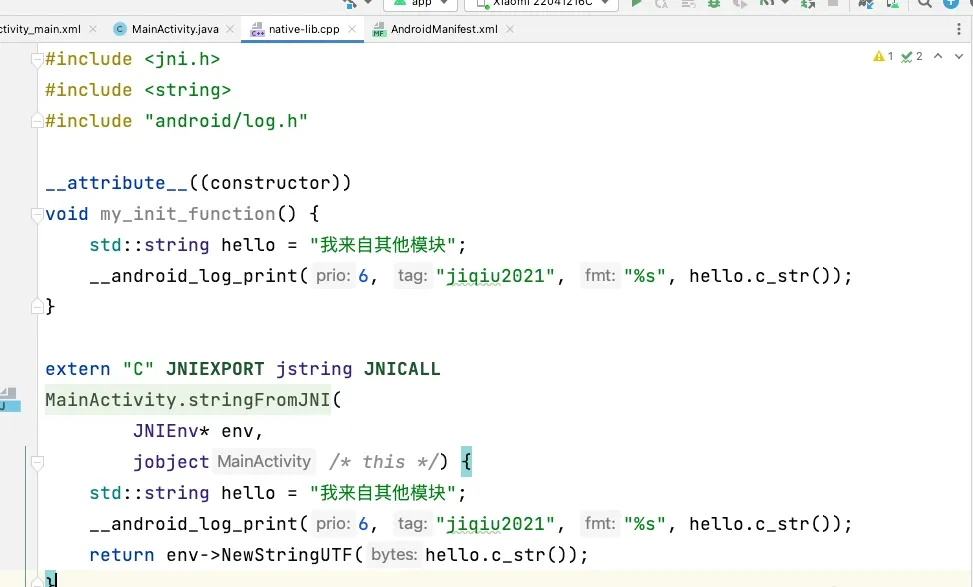
__attribute__((constructor))
void my_init_function() {
    std::string hello = "hello from another module";
    __android_log_print(6, "jiqiu2021", "%s", hello.c_str());
}
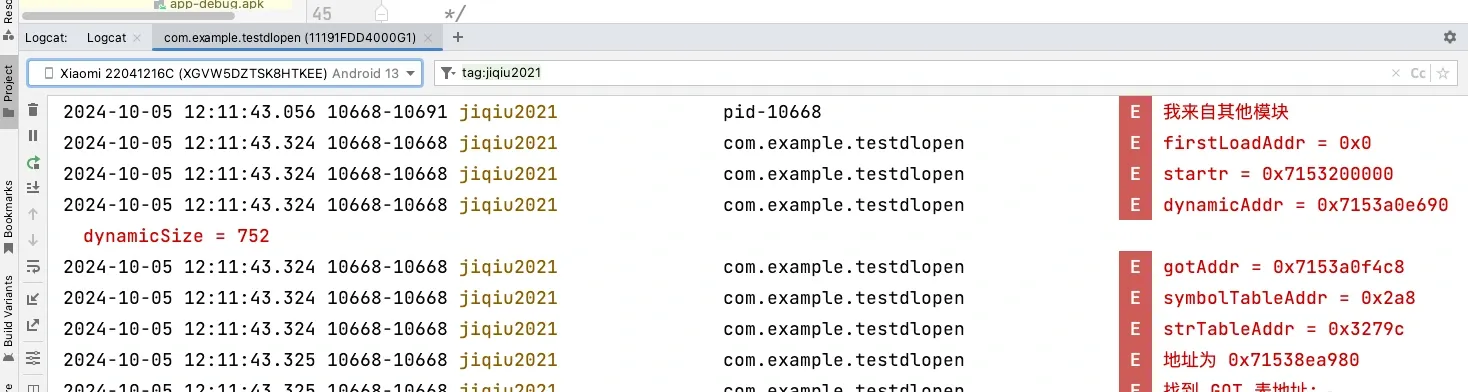
Injection result:
Bonus 1: a quick look at dlopen
http://aospxref.com/android-12.0.0_r3/xref/bionic/libdl/libdl.cpp
Then call:
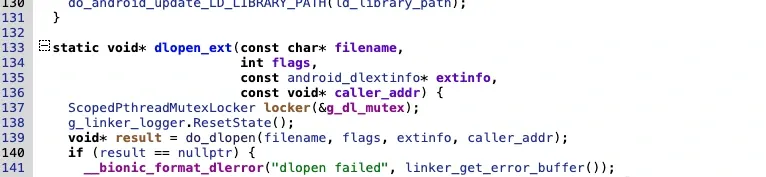
Arriving at where dlopen actually loads:
void* do_dlopen(const char* name, int flags,
2064                  const android_dlextinfo* extinfo,
2065                  const void* caller_addr) {
2066    std::string trace_prefix = std::string("dlopen: ") + (name == nullptr ? "(nullptr)" : name);
2067    ScopedTrace trace(trace_prefix.c_str());
2068    ScopedTrace loading_trace((trace_prefix + " - loading and linking").c_str());
2069    soinfo* const caller = find_containing_library(caller_addr);
2070    android_namespace_t* ns = get_caller_namespace(caller);
2071
2072    LD_LOG(kLogDlopen,
2073           "dlopen(name=\"%s\", flags=0x%x, extinfo=%s, caller=\"%s\", caller_ns=%s@%p, targetSdkVersion=%i) ...",
2074           name,
2075           flags,
2076           android_dlextinfo_to_string(extinfo).c_str(),
2077           caller == nullptr ? "(null)" : caller->get_realpath(),
2078           ns == nullptr ? "(null)" : ns->get_name(),
2079           ns,
2080           get_application_target_sdk_version());
2081
2082    auto purge_guard = android::base::make_scope_guard([&]() { purge_unused_memory(); });
2083
2084    auto failure_guard = android::base::make_scope_guard(
2085        [&]() { LD_LOG(kLogDlopen, "... dlopen failed: %s", linker_get_error_buffer()); });
2086
2087    if ((flags & ~(RTLD_NOW|RTLD_LAZY|RTLD_LOCAL|RTLD_GLOBAL|RTLD_NODELETE|RTLD_NOLOAD)) != 0) {
2088      DL_OPEN_ERR("invalid flags to dlopen: %x", flags);
2089      return nullptr;
2090    }
2091
2092    if (extinfo != nullptr) {
2093      if ((extinfo->flags & ~(ANDROID_DLEXT_VALID_FLAG_BITS)) != 0) {
2094        DL_OPEN_ERR("invalid extended flags to android_dlopen_ext: 0x%" PRIx64, extinfo->flags);
2095        return nullptr;
2096      }
2097
2098      if ((extinfo->flags & ANDROID_DLEXT_USE_LIBRARY_FD) == 0 &&
2099          (extinfo->flags & ANDROID_DLEXT_USE_LIBRARY_FD_OFFSET) != 0) {
2100        DL_OPEN_ERR("invalid extended flag combination (ANDROID_DLEXT_USE_LIBRARY_FD_OFFSET without "
2101            "ANDROID_DLEXT_USE_LIBRARY_FD): 0x%" PRIx64, extinfo->flags);
2102        return nullptr;
2103      }
2104
2105      if ((extinfo->flags & ANDROID_DLEXT_USE_NAMESPACE) != 0) {
2106        if (extinfo->library_namespace == nullptr) {
2107          DL_OPEN_ERR("ANDROID_DLEXT_USE_NAMESPACE is set but extinfo->library_namespace is null");
2108          return nullptr;
2109        }
2110        ns = extinfo->library_namespace;
2111      }
2112    }
2113
2114    // Workaround for dlopen(/system/lib/<soname>) when .so is in /apex. http://b/121248172
2115    // The workaround works only when targetSdkVersion < Q.
2116    std::string name_to_apex;
2117    if (translateSystemPathToApexPath(name, &name_to_apex)) {
2118      const char* new_name = name_to_apex.c_str();
2119      LD_LOG(kLogDlopen, "dlopen considering translation from %s to APEX path %s",
2120             name,
2121             new_name);
2122      // Some APEXs could be optionally disabled. Only translate the path
2123      // when the old file is absent and the new file exists.
2124      // TODO(b/124218500): Re-enable it once app compat issue is resolved
2125      /*
2126      if (file_exists(name)) {
2127        LD_LOG(kLogDlopen, "dlopen %s exists, not translating", name);
2128      } else
2129      */
2130      if (!file_exists(new_name)) {
2131        LD_LOG(kLogDlopen, "dlopen %s does not exist, not translating",
2132               new_name);
2133      } else {
2134        LD_LOG(kLogDlopen, "dlopen translation accepted: using %s", new_name);
2135        name = new_name;
2136      }
2137    }
2138    // End Workaround for dlopen(/system/lib/<soname>) when .so is in /apex.
2139
2140    std::string asan_name_holder;
2141
2142    const char* translated_name = name;
2143    if (g_is_asan && translated_name != nullptr && translated_name[0] == '/') {
2144      char original_path[PATH_MAX];
2145      if (realpath(name, original_path) != nullptr) {
2146        asan_name_holder = std::string(kAsanLibDirPrefix) + original_path;
2147        if (file_exists(asan_name_holder.c_str())) {
2148          soinfo* si = nullptr;
2149          if (find_loaded_library_by_realpath(ns, original_path, true, &si)) {
2150            PRINT("linker_asan dlopen NOT translating \"%s\" -> \"%s\": library already loaded", name,
2151                  asan_name_holder.c_str());
2152          } else {
2153            PRINT("linker_asan dlopen translating \"%s\" -> \"%s\"", name, translated_name);
2154            translated_name = asan_name_holder.c_str();
2155          }
2156        }
2157      }
2158    }
2159
2160    ProtectedDataGuard guard;
2161    soinfo* si = find_library(ns, translated_name, flags, extinfo, caller);
2162    loading_trace.End();
2163
2164    if (si != nullptr) {
2165      void* handle = si->to_handle();
2166      LD_LOG(kLogDlopen,
2167             "... dlopen calling constructors: realpath=\"%s\", soname=\"%s\", handle=%p",
2168             si->get_realpath(), si->get_soname(), handle);
2169      si->call_constructors();
2170      failure_guard.Disable();
2171      LD_LOG(kLogDlopen,
2172             "... dlopen successful: realpath=\"%s\", soname=\"%s\", handle=%p",
2173             si->get_realpath(), si->get_soname(), handle);
2174      return handle;
2175    }
2176
2177    return nullptr;
2178  }
This is where the .so’s various segments are loaded. Focus on the ending part:

In this function:
 // DT_INIT should be called before DT_INIT_ARRAY if both are present.
547    call_function("DT_INIT", init_func_, get_realpath());
548    call_array("DT_INIT_ARRAY", init_array_, init_array_count_, false, get_realpath());
549
Calls to DT_INIT and DT_INIT_ARRAY.
So if dlopen successfully opens the .so, it calls these two places.
Thus the plugin entry point can live in these two segments via __attribute__((constructor)):
__attribute__((constructor))
void my_init_function() {
    std::string hello = "hello from another module";
    __android_log_print(6, "jiqiu2021", "%s", hello.c_str());
}
Bonus 2: AOSP instrumentation for .so injection
Here I inject the .so by modifying source. For injection timing I initially chose “the earlier the better”.
I chose handleBindApplication, where the ContextImpl object is created, to do a series of copy-and-inject operations.
Our flow: first place the .so to inject into the SD card directory, then when the app is a non-system app, copy it to the app directory and inject. Find the source at AOSP/frameworks/base/core/java/android/app/ActivityThread.java, locate handleBindApplication, and find the line final ContextImpl appContext = ContextImpl.createAppContext(this, data.info);.
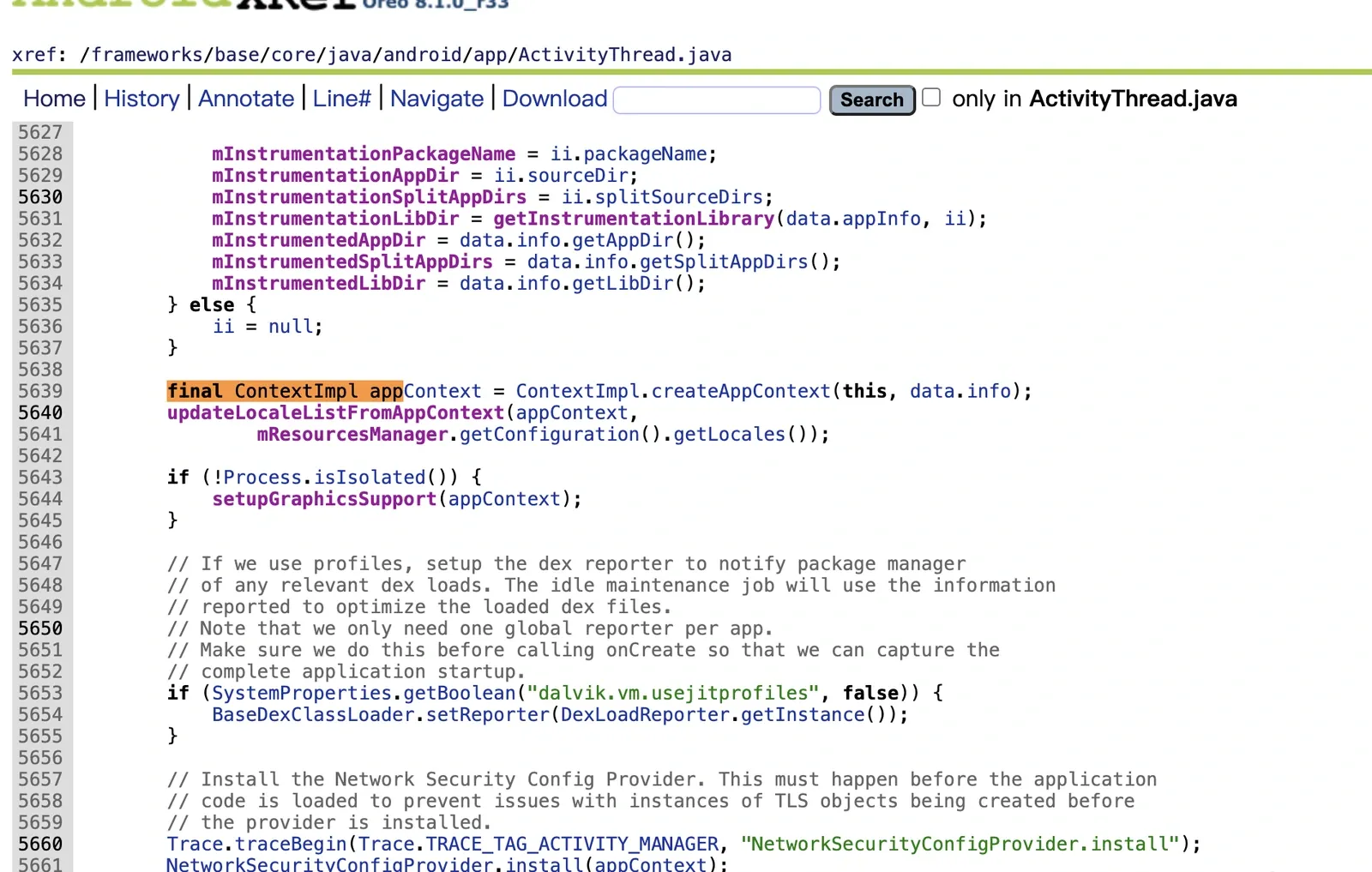
Start adding our own code:
Same as above — copy the .so, then System.load to load it.
There are many implementations online; you can also customize SELinux labels, and pair a system service with a companion app for custom injection.
TODO: a real-world demo using my own hook tool on a Frida-hardened app
If this article lands well, I’ll continue updating with apps that Frida/Xposed can’t analyze (blocked by anti-debugging), to deepen everyone’s use of this framework.
Future framework direction
Add a second injection approach: pack the plugin .so into the framework, hiding the on-disk file’s signature.
Borrow Riru’s injection approach for hidden injection (works against some vendors).
Further research the perfect hidden approach.
Project: https://github.com/jiqiu2022/Zygisk-MyInjector
The injected package name is hardcoded — you need to compile it yourself.
Colin Xiao — I take on contract reverse-engineering work, and writeups like this are how I show what I can do. If you need help with anything in this space — including but not limited to the areas I cover above — I’m available. No project is too big or too small — if it’s reverse engineering and I can do it, I’ll take it. DM me on X (@colinxiao_lab) or Telegram (@ColinXiao666).
Get in touch