AOSP Source Build, Part 4: Customizing and Erasing Root Fingerprints
About the author. I’m Colin Xiao — an independent reverse engineer, mostly working solo on contract jobs. I dig into compiled code of every kind, including but not limited to: Android and iOS apps, x86/x64/ARM native binaries, packers and obfuscators, DRM and license checks, network protocols and APIs, crypto and signature algorithms, malware, game binaries, and embedded/IoT firmware. I also handle large-scale data collection and vulnerability research. If you have any project in mind, I’d be glad to take it on — whatever it is, as long as it’s within my wheelhouse. Just reach out. You can reach me on X at @colinxiao_lab or on Telegram at https://t.me/ColinXiao666.
This research is published for educational and defensive purposes. The target sample is anonymized throughout.
AOSP Source Build, Part 4: Customizing and Erasing Root Fingerprints
This is the root-fingerprint-erasing installment of my AOSP source-customization series. By the end of it, you’ll have a working grasp of how to customize Android build fingerprints and, more importantly, how to customize root itself. It builds on a widely-cited overview of bypassing root detection, recorded here as lab notes. Corrections and pointers are welcome.
Section 2 covers the fundamentals, section 3 walks through the experiments, and section 4 wraps up.
2. Fundamentals
2.1 Fingerprint anatomy
Before you can modify an Android fingerprint you need to understand what each build.prop parameter means. Here’s a slice of a commonly-circulated reference to make that concrete:
# begin build properties (start setting system properties)
# autogenerated (system info produced by build)
ro.=GRI40 (version ID)
ro.build.=GRJ22 (version number)
ro.build.version.incremental=eng.buildbot.20110619.060228 (version increment)
ro.build.version.sdk=10 (SDK version)
ro.build.version.codename=REL (version codename)
ro.build.version.release=2.3.4 (Android 2.3.4)
ro.build.date=Sun Jun 19 06:02:58 UTC 2011 (build date)
ro.build.date.utc=0
ro.build.type=user (build mode: user/userdebug/eng/test)
ro.build.user=buildbot (build account)
ro.build.host=bb1 (build host)
ro.build.tags=test-keys (build tags)
ro.product.model=HTC Wildfire (internal device codename)
ro.product.brand=htc_wwe (brand)
ro.product.name=htc_buzz (product name)
ro.product.device=buzz (device)
ro.product.board=buzz (board)
ro.product.cpu.abi=armeabi-v6j (CPU ABI)
ro.product.cpu.abi2=armeabi (secondary CPU ABI)
ro.product.manufacturer=HTC (manufacturer)
ro.product.locale.language=zh (default locale language)
ro.product.locale.region=CN (locale region)
ro.wifi.channels= (Wi-Fi channels)
ro.board.platform=msm7k (board platform)
# ro.build.product is obsolete; use ro.product.device
ro.build.product=buzz (build product)
# Do not try to parse ro.build.description or .fingerprint
ro.build.description=passion-user 2.3.3 GRI40 102588 release-keys (user's key)
ro.build.fingerprint=google/passion/passion:2.3.3/GRI40/102588:user/release-keys (system fingerprint)
# end build properties
#
# system.prop for buzz
#
# Density in DPI of the LCD of this board. This is used to scale the UI
# appropriately. If this property is not defined, the default value is 160 dpi.
ro.sf.lcd_density=240 (display density; 240 = 800x480)
# View configuration for QVGA.
view.fading_edge_length=8
view.touch_slop=15 (touch slop)
view.minimum_fling_velocity=25 (fling velocity)
view.scroll_friction=0.008 (scroll friction)
# RIL specific configuration.
rild.libpath=/system/lib/libhtc_
ro.ril.ecc.HTC-WWE=999
ro.ril.ecc.HTC-ELL=92,93,94
ro.ril.enable.a52.HTC-ITA=1
ro.ril.enable.a53.HTC-ITA=1
ro.ril.enable.a52=0
ro.ril.enable.a53=1
ro.ril.vmail.23415=1571,BT
ro.ril.hsdpa.category=8 (HSDPA category)
ro.ril.htcmaskw1.bitmask=429496
ro.ril.htcmaskw1=14449
ro.ril.def.agps.mode=2 (AGPS mode; 0 saves power but slows GPS lock)
ro.ril.gprsclass=12 (GPRS class)
# For HSDPA low throughput
ro.ril.disable.power.collapse=1 (disable power collapse)
# Modify MMS APN retry timer from 5s to 2s.
ro.gsm.2nd_data_retry_config=max_retries=3, 2000, 2000, 2000
# Time between scans in seconds. Keep it high to minimize battery drain.
# This only affects the case in which there are remembered access points,
# but none are in range.
wifi.interface=eth0 (Wi-Fi interface)
wifi.supplicant_scan_interval=45 (scan interval in seconds)
# Mobile data interfaces
mobiledata.interfaces=rmnet0,rmnet1,rmnet2
# Allow or deny tethering.
ro.tether.denied=false
# Default network type.
# 0 => WCDMA Preferred.
ro.telephony.default_network=0
# Enable Google-specific location features,
# like NetworkLocationProvider and LocationCollector.
ro.c o m.google.locationfeatures=1
# The OpenGL ES API level that is natively supported by this device.
# This is a 16.16 fixed point number.
ro.opengles.version=65536
# Disable fs check on boot by default.
sys.checkfs.fat=false
# Performance settings.
dalvik.vm.execution-mode=int:jit
dalvik.vm.heapsize=24m (heap size: 16m/24m/32m/48m)
persist.sys.use_dithering=1
persist.sys.purgeable_assets=1
# Increase SKIA decode memory capability for progressive jpg file.
ro.media.dec.jpeg.memcap=20000000
#
# ADDITIONAL_BUILD_PROPERTIES
no_require_sim=true (no SIM required)
ro.rommanager.developerid=cyanogenmodnightly (ROM manager developer)
ro.url.legal=http://www./intl/%s/mobile/android/basic/phone-legal.html
ro.url.legal.android_privacy=http://www]/intl/%s/mobile/android/basic/privacy.html
ro. com.google.clientidbase=android-google (Google client ID)
ro. com.android.wifi-watchlist=GoogleGuest (Wi-Fi watchlist)
ro.setupwizard.enterprise_mode=1 (default setup mode)
ro. com.android.dateformat=MM-dd-yyyy (default date format)
ro. com.android.dataroaming=false (data roaming)
ro.config.ringtone=Playa.ogg (default ringtone)
ro.config.notification_sound=regulus.ogg (default notification sound)
ro.config.alarm_alert=Alarm_Beep_03.ogg (default alarm)
ro.modversion=CyanogenMod-7-06192011-NIGHTLY-buzz (mod version)
ro.setupwizard.mode=OPTIONAL (setup wizard mode)
net. bt. name=Android (device name)
dalvik.vm.stack-trace-file=/data/anr/traces.txt
For the fingerprint edits later, two files matter most: buildinfo.sh and Makefile.
2.2 How root detection works
The usual ways an Android app detects root boil down to:
(1) Check whether the `su` binary exists
(2) Check whether common directories contain `su` (or files with the setuid bit)
(3) Use `which` to look for `su`
(4) Actively request root
(5) Execute busybox
(6) Check Android properties (read key properties in build.prop, e.g. ro.build.tags and ro.build.type)
(7) Check write access on specific paths (directories ordinary users can't reach, e.g. /data, /system, /etc)
(8) Check for mainstream emulators
(9) Detect the signatures of hooking frameworks like Frida and Xposed
More concretely, these split into: Android root system fingerprints, root path fingerprints, root execution behavior, and third-party tooling.
A commonly-referenced root-detection checklist lays out the fingerprints like this:
1.detectRootManagementApps — detect common su package names, e.g. {"com.noshufou.android.su", "com.noshufou.android.su.elite", "eu.chainfire.supersu", "com.koushikdutta.superuser", "com.thirdparty.superuser", "com.yellowes.su", "com.topjohnwu.magisk", "com.kingroot.kinguser", "com.kingo.root", "com.smedialink.oneclickroot", "com.zhiqupk.root.global", "com.alephzain.framaroot"}

2.detectPotentiallyDangerousApps — {"com.koushikdutta.rommanager", "com.koushikdutta.rommanager.license", "com.dimonvideo.luckypatcher", "com.chelpus.lackypatch", "com.ramdroid.appquarantine", "com.ramdroid.appquarantinepro", "com.android.vending.billing.InAppBillingService.COIN", "com.android.vending.billing.InAppBillingService.LUCK", "com.chelpus.luckypatcher", "com.blackmartalpha", "org.blackmart.market", "com.allinone.free", "com.repodroid.app", "org.creeplays.hack", "com.baseappfull.fwd", "com.zmapp", "com.dv.marketmod.installer", "org.mobilism.android", "com.android.wp.net.log", "com.android.camera.update", "cc.madkite.freedom", "com.solohsu.android.edxp.manager", "org.meowcat.edxposed.manager", "com.xmodgame", "com.cih.game_cih", "com.charles.lpoqasert", "catch_.me_.if_.you_.can_"}

3.detectRootCloakingApps — {"com.devadvance.rootcloak", "com.devadvance.rootcloakplus", "de.robv.android.xposed.installer", "com.saurik.substrate", "com.zachspong.temprootremovejb", "com.amphoras.hidemyroot", "com.amphoras.hidemyrootadfree", "com.formyhm.hiderootPremium", "com.formyhm.hideroot"}

4.suPath — iterate over possible su directories, e.g. {"/data/local/", "/data/local/bin/", "/data/local/xbin/", "/sbin/", "/su/bin/", "/system/bin/", "/system/bin/.ext/", "/system/bin/failsafe/", "/system/sd/xbin/", "/system/usr/we-need-root/", "/system/xbin/", "/cache/", "/data/", "/dev/"}

5.checkForDangerousProps — check the value of certain properties: {"ro.debuggable", "1"}, {"ro.secure", "0"}

6.checkForRWPaths — first run (requires root) mount, then check read/write access on {"/system", "/system/bin", "/system/sbin", "/system/xbin", "/vendor/bin", "/sbin", "/etc"}

7.detectTestKeys — check whether the build type is {"test-keys"}

8.checkBuildProp — check build.prop values: {"ro.build.display.id", "ro.build.version.incremental", "ro.build.date", "ro.build.date.utc", "ro.build.type", "ro.build.user", "ro.build.flavor", "ro.build.tags", "ro.build.description", "ro.build.fingerprint", "ro.product.model", "ro.product.brand", "ro.product.name"}

9.checkSuExists — run su and see whether it succeeds

10.checkForRootNative — native-layer root checks

11.checkForMagiskBinary — detect Magisk: {"/data/local/", "/data/local/bin/", "/data/local/xbin/", "/sbin/", "/su/bin/", "/system/bin/", "/system/bin/.ext/", "/system/bin/failsafe/", "/system/sd/xbin/", "/system/usr/we-need-root/", "/system/xbin/", "/cache/", "/data/", "/dev/"}
3. Experiment
Environment:
Pixel, Android 8.0.1
Ubuntu 18
3.1 Building a user image
First I build a user image. The target I need is aosp_sailfish-user, which doesn’t exist as a lunch option yet. So I pick any of the files lunch lists and edit it — here, device/google/marlin/vendorsetup.sh:
source build/envsetup.sh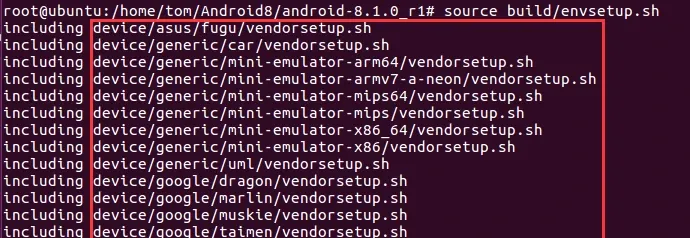
Figure 1 — envsetup loaded
Open a config file and add an entry — here device/google/marlin/vendorsetup.sh:
vim device/google/marlin/vendorsetup.sh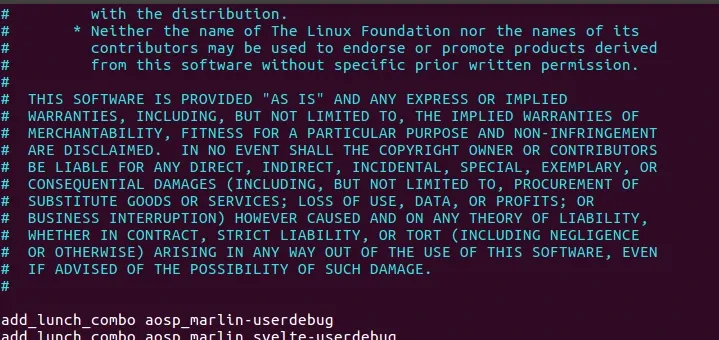
Figure 2 — vendorsetup.sh
Notice the previous userdebug declaration lives in the same file. Then re-initialize and pick the device:
source build/envsetup.sh
lunch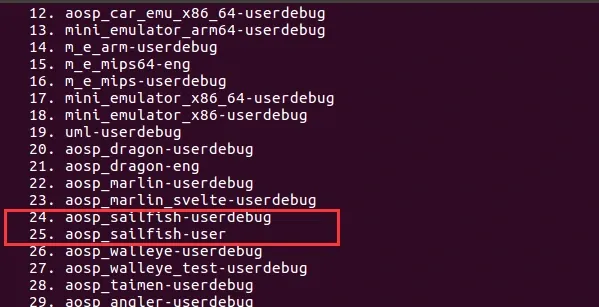
Figure 3 — the user build option now appears in lunch
Now there’s a user option; select it and build:
make -j4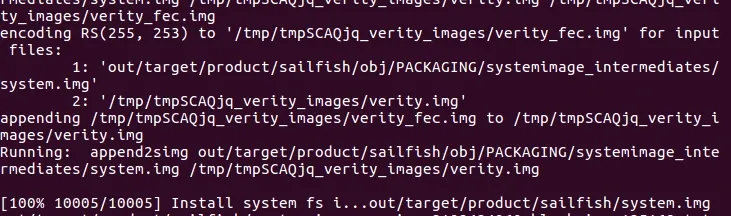
Figure 4 — build completes
At this point we have a user build with no root, just like a phone off the shelf:
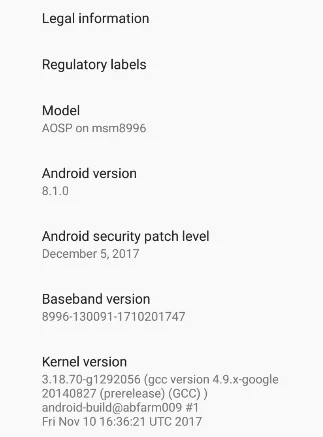
Figure 5 — user build, no root
Running a root-check tool from the internet confirms the device is not rooted:
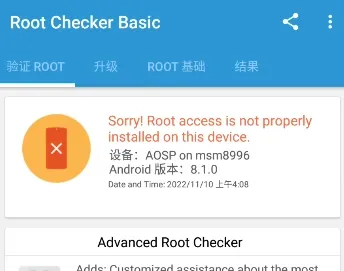
Figure 6 — a root checker confirms no root
Even though this is a user build, some test apps still flag the system as rooted. Digging in, the reason is that both user and userdebug builds sign the system with test-key, whereas real shipping phones are signed with release-key. A lot of apps key their detection off exactly this. Two ways around it:
- Build a
release-key-signed system (out of scope here, but doable — look into compiling a release-signed system). - Modify the fingerprint — which is what we’ll do, by simply rewriting:
test-keys --> release-keysTo continue, I need the user-build fingerprint. Since this build isn’t rooted I can’t read /system/build.prop directly, so I root the device first. For Android 8.0, the quickest path is:
Android 8.0 root steps:
    (1) Flash TWRP
    (2) Use TWRP to flash Magisk
Then you have root.
The easiest route for Android 8.0 is flashing Magisk:
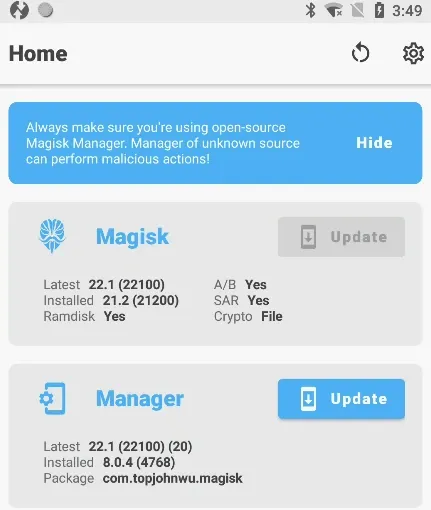
Figure 7 — flashing Magisk
Now check the device fingerprint again:
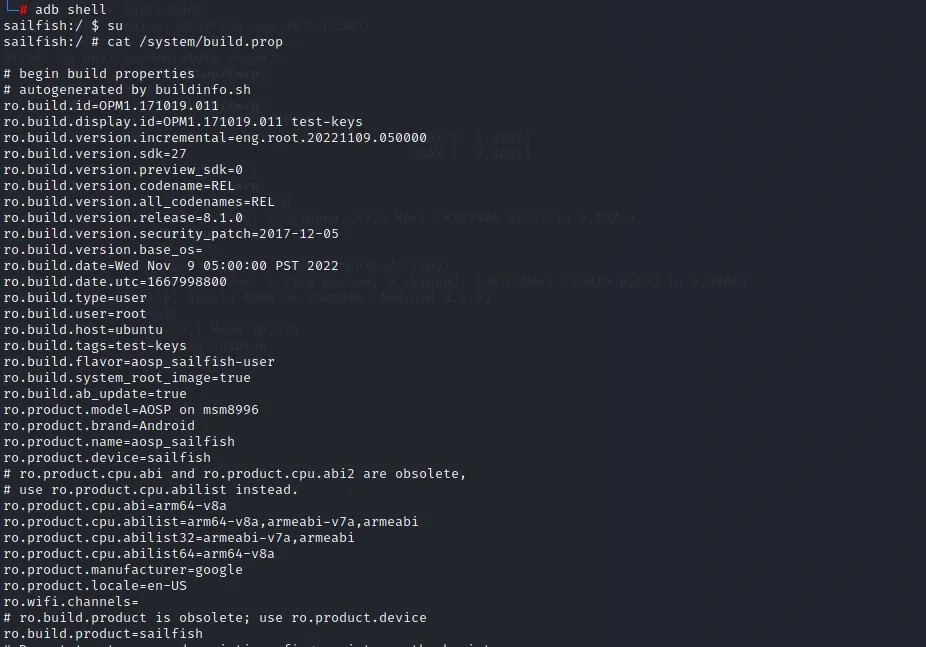
Figure 8 — the fingerprint is now readable
The fingerprint is visible now — save it for later.
3.2 Building a userdebug image
Repeat the same steps but select userdebug:
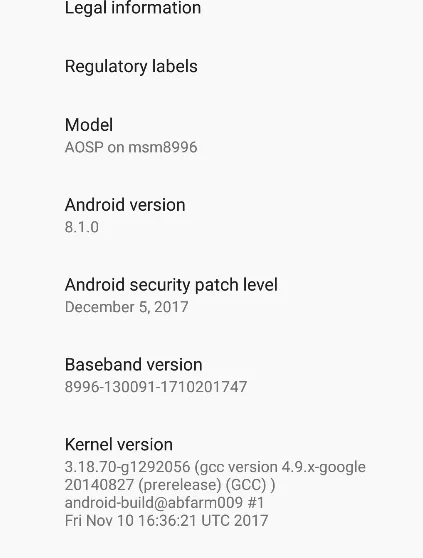
Figure 9 — selecting userdebug
The userdebug fingerprint is visibly different — confirm it:
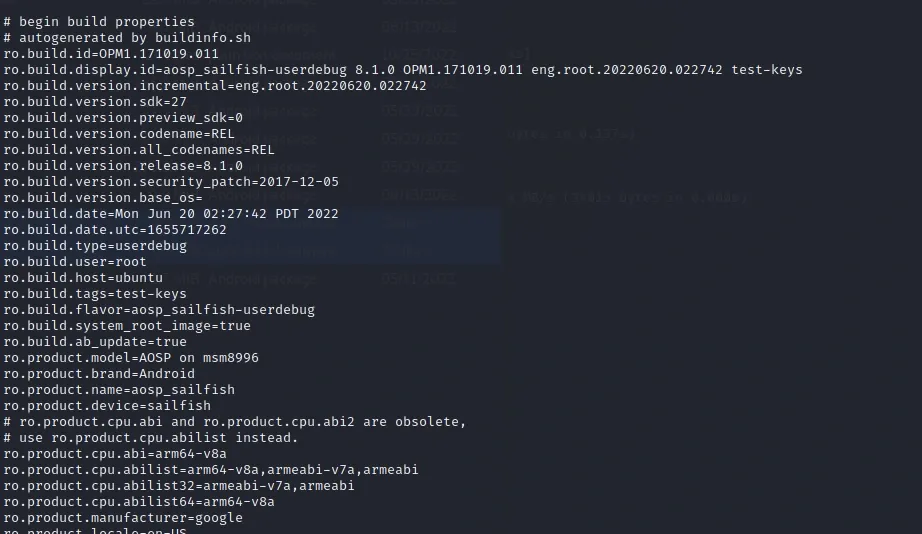
Figure 10 — userdebug fingerprint
3.3 Erasing the root fingerprints
We’ve now got a user build and a userdebug build side by side. The goal: keep root, but present a user-identical image. That means customizing root and erasing the fingerprints. First, diff the two with a file-comparison tool:
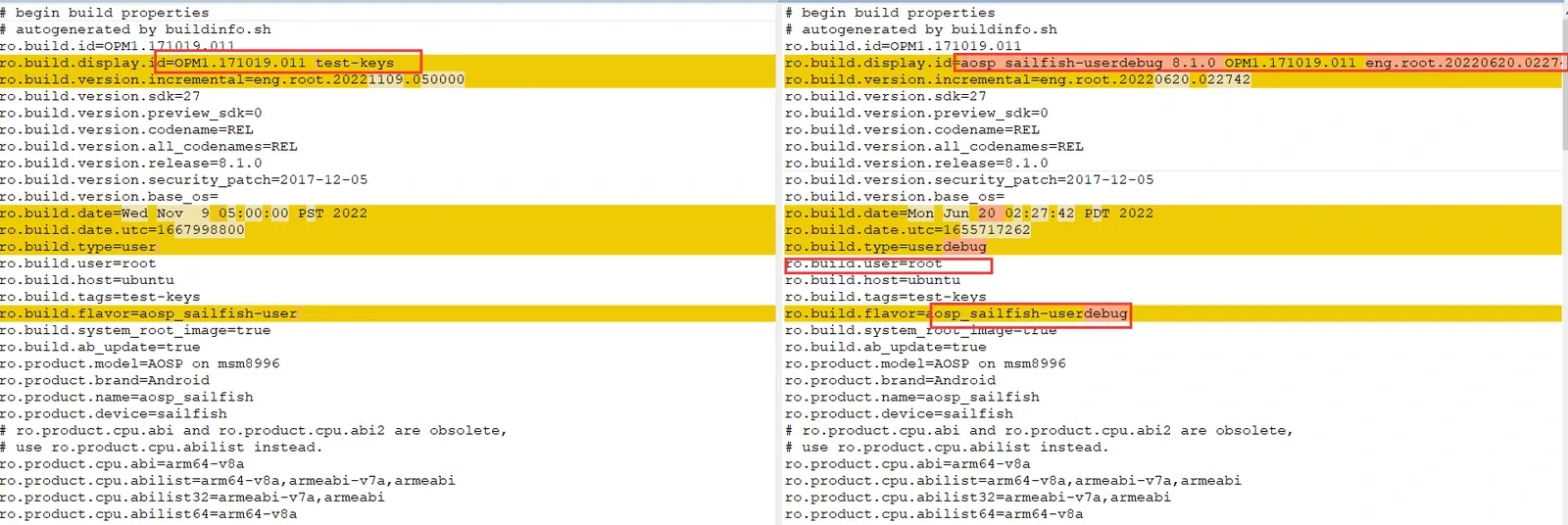
Figure 11 — diffing user vs userdebug
From here it’s just a matter of patching each difference, one by one.
(1) test-keys
As noted, fix this first by changing test-keys to release-keys. Locate the definition: search for ro.build.tags, which lives in buildinfo.sh:
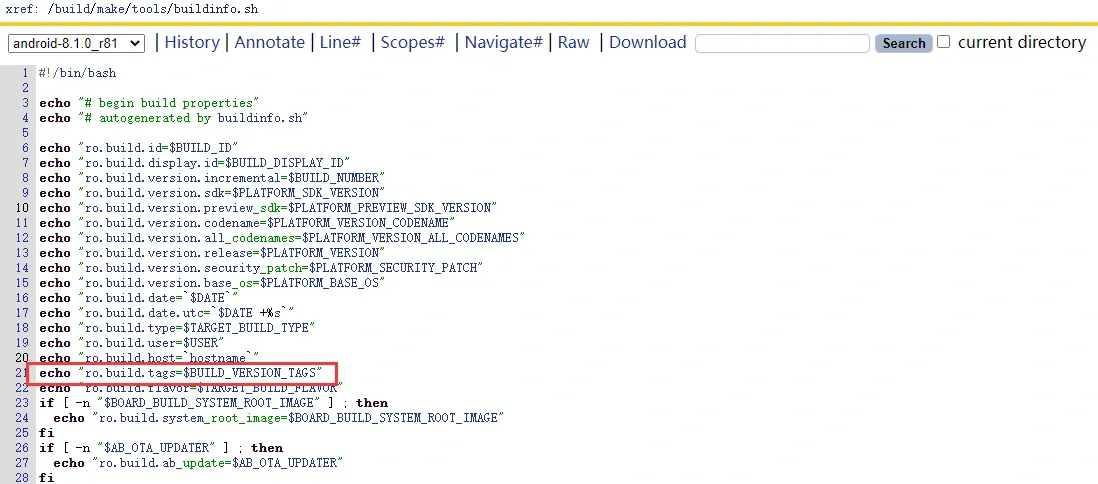
Figure 12 — ro.build.tags in buildinfo.sh
The value itself is set further down, in build/make/core/Makefile:

Figure 13 — the value in Makefile
Change it directly to release-keys.
(2) ro.build.display.id
Same drill — locate it in build/make/core/Makefile:

Figure 14 — ro.build.display.id in Makefile
Then set its value to match the user build:
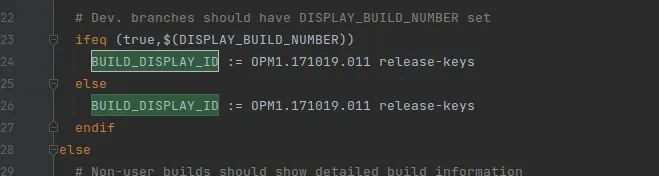
Figure 15 — matching the user build value
Note we use release-key here.
(3) ro.build.version.incremental
This one needs both buildinfo.sh and Makefile changed — essentially, patch BF_BUILD_BUMBER.
(4) ro.build.date and ro.build.date.utc
These are build timestamps. I change them too so they stay consistent with everything else.
(5) ro.build.type
In buildinfo.sh and Makefile — patch it right there.
(6) ro.build.user and ro.build.host
In buildinfo.sh — set these to the desired username and host.
(6) ro.build.flavor
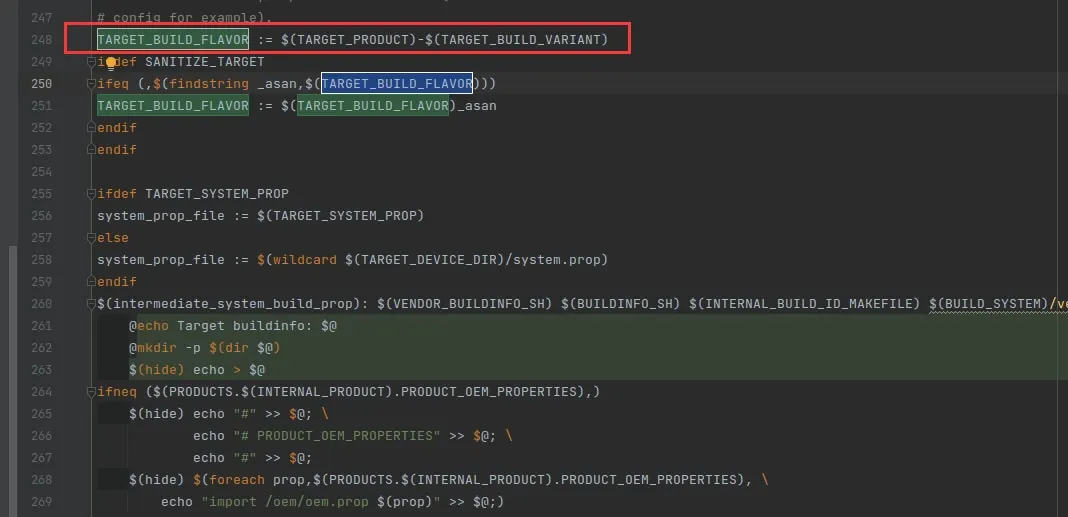
Figure 16 — ro.build.flavor before
Then edit it:
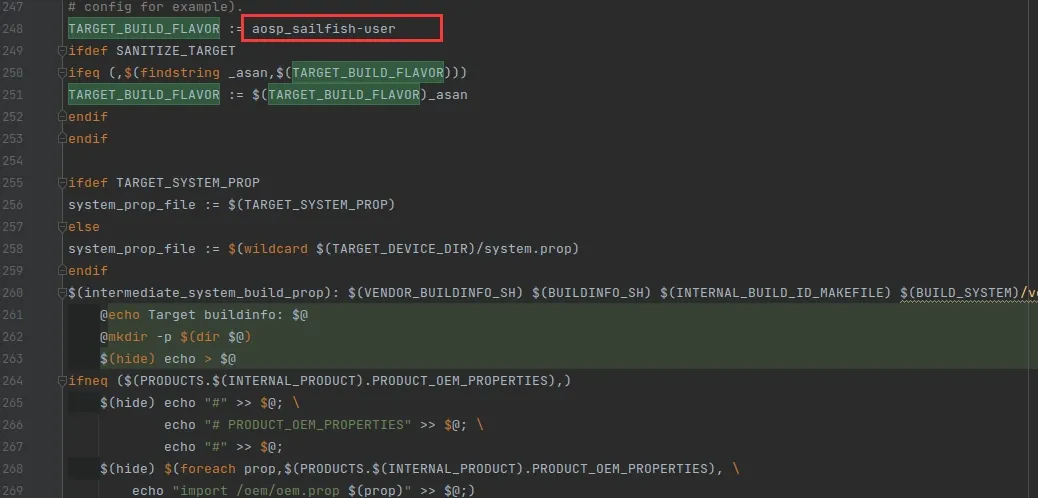
Figure 17 — ro.build.flavor after
(7) ro.build.description
Change it to:
aosp_sailfish-user 8.1.0 OPM1.171019.011 eng.Windaa.20221109.050000 release-keys(8) ro.build.fingerprint
Same approach — locate it and rewrite to:
Android/aosp_sailfish/sailfish:8.1.0/OPM1.171019.011/Windaa11090500:user/release-keys(9) ro.product.model, ro.product.brand, ro.product.name
If you want the device to look like a stock Google device, change the codename and product name here. I left these alone — worth doing only if you need it.
3.4 Customizing root
For root customization I follow the standard approach, using xu as the custom name:
AOSP/system/extras/su — change su to xu in Android.mk
AOSP/system/core/libcutils/fs_config.cpp — change /system/xbin/su to /system/xbin/xu
AOSP/system/sepolicy/private/file_contexts — change /system/xbin/su to /system/xbin/xu
First spot:
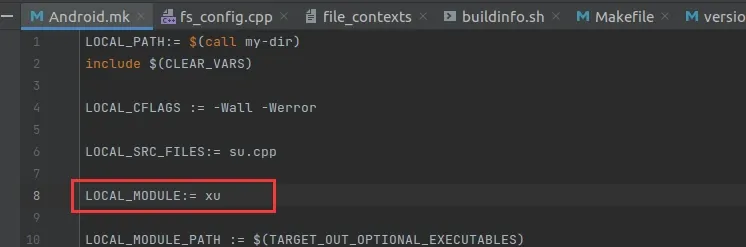
Figure 18 — Android.mk, su renamed to xu
Second spot:
Third spot:
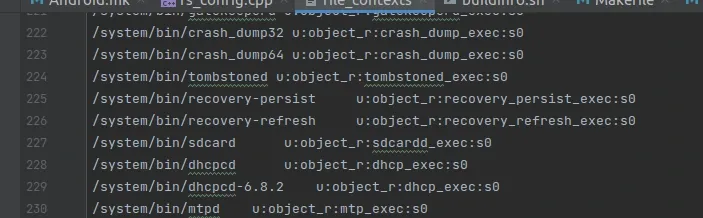
Figure 19 — file_contexts, su renamed to xu
3.5 Building
Build again, selecting userdebug:
lunch: 24
make -j4
Figure 20 — rebuild completes
3.6 Result
Flash the new image. Once it boots, the customized image looks just like the original — as intended.
After customization:
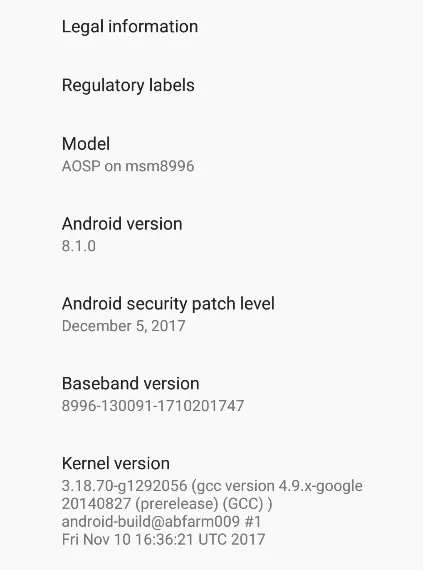
Figure 21 — after customization
Before (the user build):
Figure 22 — the original user build
And a quick sanity check that root still works:
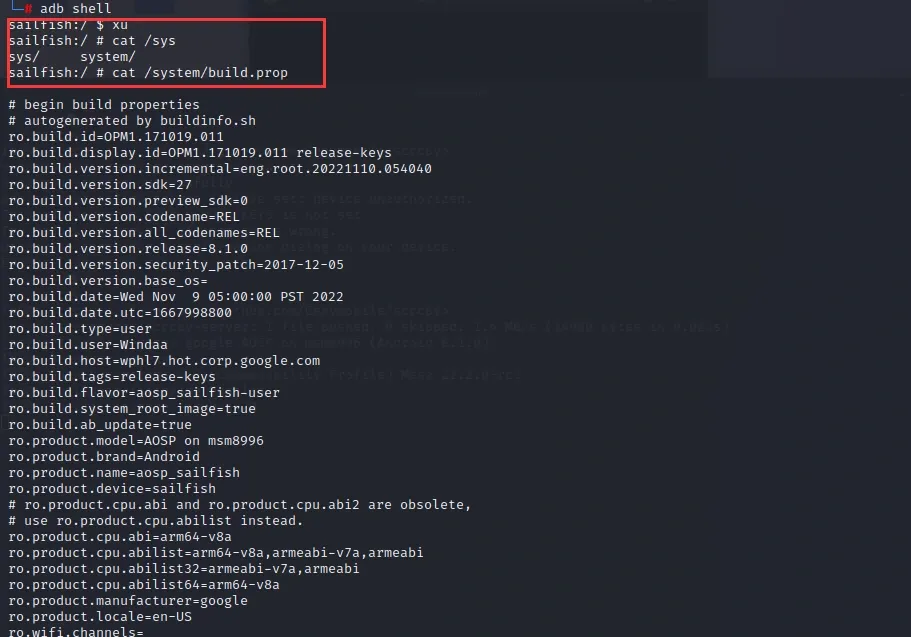
Figure 23 — root still works
No problem.
4. Summary
I built both user and userdebug images, then morphed the userdebug build into a user-identical one through fingerprint customization. That gives us a rooted device that presents the same fingerprints as a stock user build — a much more convenient base for later experiments. Supporting files will be uploaded to GitHub separately.
5. References
- http://lzonel.cn/3136.html
- https://blog.csdn.net/u010142437/article/details/78030485
- https://www.jianshu.com/p/dd6cca4ec27d
Colin Xiao — I take on contract reverse-engineering work, and writeups like this are how I show what I can do. If you need help with anything in this space — including but not limited to the areas I cover above — I’m available. No project is too big or too small — if it’s reverse engineering and I can do it, I’ll take it. DM me on X (@colinxiao_lab) or Telegram (@ColinXiao666).
Get in touch