Bypassing Anti-Debugging in an iOS App
About the author. I’m Colin Xiao — an independent reverse engineer, mostly working solo on contract jobs. I dig into compiled code of every kind, including but not limited to: Android and iOS apps, x86/x64/ARM native binaries, packers and obfuscators, DRM and license checks, network protocols and APIs, crypto and signature algorithms, malware, game binaries, and embedded/IoT firmware. I also handle large-scale data collection and vulnerability research. If you have any project in mind, I’d be glad to take it on — whatever it is, as long as it’s within my wheelhouse. Just reach out. You can reach me on X at @colinxiao_lab or on Telegram at https://t.me/ColinXiao666.
This research is published for educational and defensive purposes. The target sample is anonymized throughout.
Bypassing Anti-Debugging in an iOS App
I saw people in a community discussing this app — even a professional pentester got stuck on it, saying the anti-debugging couldn’t be beaten. That piqued my curiosity. Could an app I’d never heard of really have such solid protection?

The download link went straight to the App Store — a good sign, since that usually rules out heavy obfuscation. Let’s grab it and see.
Sure enough, on a jailbroken device it exits immediately on launch, with no crash log — an intentional exit. Since someone had already confirmed anti-debugging, the first step was getting a decrypted copy of the app.
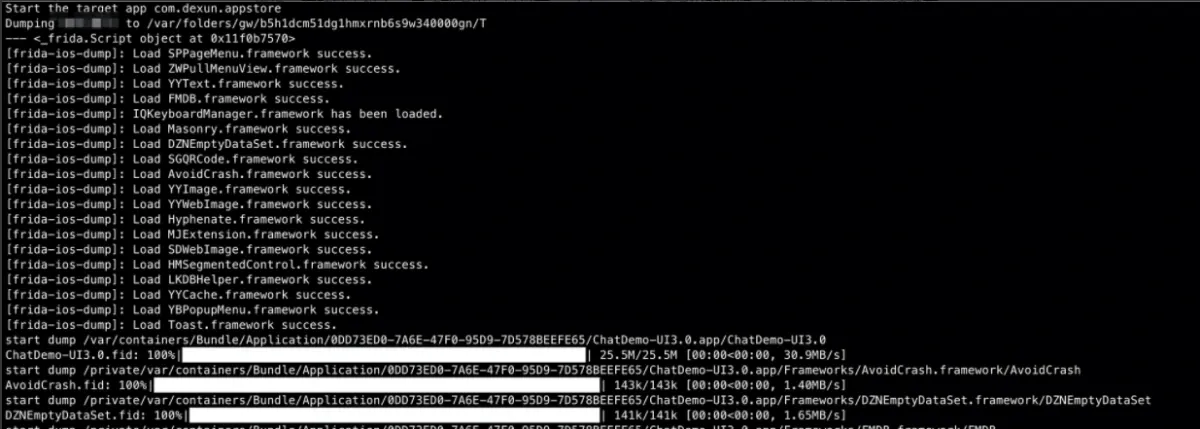
App Store apps use FairPlay DRM, so all the standard decryption approaches apply — dump the app once it’s running. I tried the two most common tools, frida-ios-dump and CrackerXI. Both failed: the app exited before the dump completed. But frida-ios-dump’s log showed every framework had loaded successfully — only the dump was interrupted by the exit.
Not so simple after all — but not hopeless. Let’s look at dyld’s loading flow (here’s a diagram someone helpfully put together):
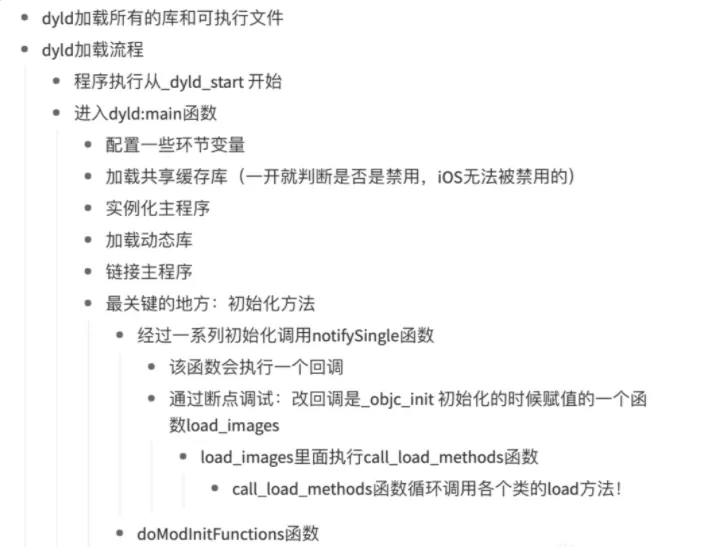
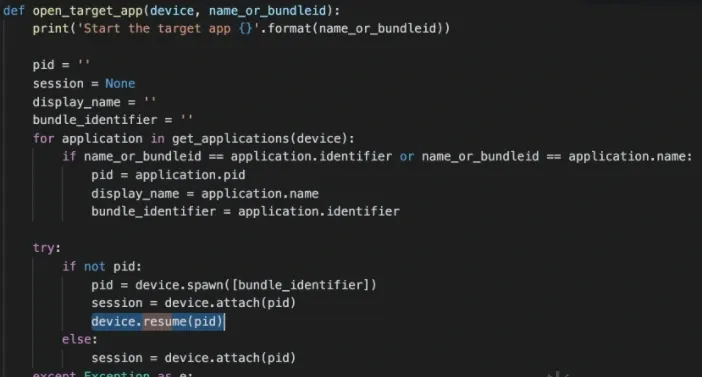
We can at least get as far as loading the dynamic libraries. Whether the check runs during initialization or after entering main is unknown — and doesn’t matter. Since lldb breaks on _dyld_start when launching the program, we have a window to dump it: just read the memory by hand and fix it up. To save effort, I patched frida-ios-dump to pause the process during decryption — commenting out the resume:
That got me the decrypted ipa. I threw the main binary into IDA and found these jailbreak-detection APIs:
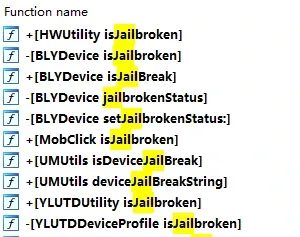
Searching around, most of these checks come from SDKs. On top of a jailbreak-bypass tweak, a little targeted handling should be enough — nothing too exotic. I could write a Frida script or a Substrate tweak to hook them:
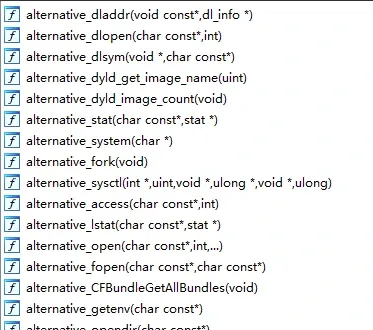
For a lazy person, writing all that hooking code is the last thing I want. I figured I’d just neutralize the exit logic itself — one patch beats many, since it makes such a fuss.
Searching IDA for exit found several calls, but none looked like they ran on detecting debugging or jailbreak — and debugging confirmed they weren’t the culprit. So how was it exiting?
Let’s just run it under MonkeyDev (a real lifesaver — it handles re-signing and bundles a debugging environment). First I uncommented all the anti-debugging-related stubs in MonkeyDev and ran:

To my surprise, it threw an access exception — and I couldn’t even backtrace where it crashed, because the stack had been corrupted. Nasty trick.
Anti-debugging is always beatable. Checking what others have written, the common techniques are well known — MonkeyDev already handles ptrace, dlsym, sysctl, and syscall via fishhook. So maybe the app issues syscalls directly at the instruction level. Let’s search:
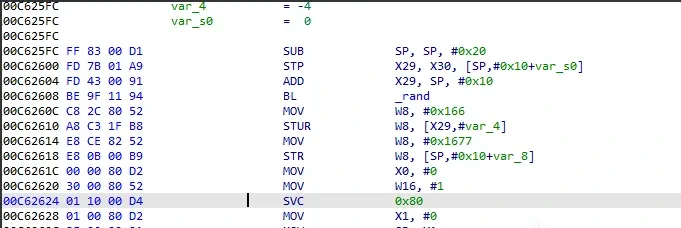
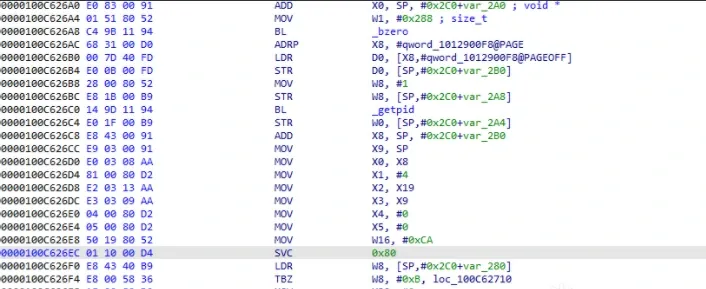
There they are — two assembly-written syscalls, the first for exit, the second for anti-debugging. The usual move is to brute-force NOP the svc, but that won’t work here. Look at this block:
mov x1, #0
mov sp, x1
mov x29, x1
mov x30, x1
It corrupts the saved registers at function entry — so you can’t just NOP it. But neither function does anything else, so I ret’d at the function start (or NOP’d, then restored the stack). For functions with a return value, fix the return value too. All of this is easy with Keypatch.
After patching the Mach-O, re-pack, install, run — it works. MonkeyDev is a lifesaver.

Takeaway
The protections:
- Modified strategy checks that defeat existing jailbreak tweaks.
- Anti-debugging at initialization — well-timed.
- Multiple checks combined, plus stack corruption after the instruction to block mindless
svcNOP-ing. - Periodic checks after launch — not a one-shot deal.
What I’d do differently:
- Exiting is too loud; silently reporting back would be stealthier.
- Inline some checks into business logic to burn more of an analyst’s time.
- Write protection code yourself instead of relying on SDKs — and don’t copy others’ code verbatim; change the signatures.
Any detection with a fixed signature is unsafe.
Thanks to a friend for the pointers.
Colin Xiao — I take on contract reverse-engineering work, and writeups like this are how I show what I can do. If you need help with anything in this space — including but not limited to the areas I cover above — I’m available. No project is too big or too small — if it’s reverse engineering and I can do it, I’ll take it. DM me on X (@colinxiao_lab) or Telegram (@ColinXiao666).
Get in touch