Recovering a Car App's `sd` Signature: White-Box AES and DFA Key Recovery
About the author. I’m Colin Xiao — an independent reverse engineer, mostly working solo on contract jobs. I dig into compiled code of every kind, including but not limited to: Android and iOS apps, x86/x64/ARM native binaries, packers and obfuscators, DRM and license checks, network protocols and APIs, crypto and signature algorithms, malware, game binaries, and embedded/IoT firmware. I also handle large-scale data collection and vulnerability research. If you have any project in mind, I’d be glad to take it on — whatever it is, as long as it’s within my wheelhouse. Just reach out. You can reach me on X at @colinxiao_lab or on Telegram at https://t.me/ColinXiao666.
This research is published for educational and defensive purposes. The target sample is anonymized throughout; recovered keys, credentials, and captured signature values have been redacted.
Recovering a Car App’s sd Signature: White-Box AES and DFA Key Recovery
Overview
There are already many writeups on this parameter, but most are too terse, and for this version of the sd parameter, much of the earlier analysis no longer applies (the checkcode generation part). I had some free time, so here’s my full analysis process. The .so is heavily obfuscated, so it’s not trivial. My level is limited — take the whole thing as reference only.
Packet capture, unpacking, and locating the .so function were all straightforward, so I’ll skip those and just give the .so function name and its parameters:
.sofile:libencrypt.so- Native function:
Java_com_bangcle_comapiprotect_CheckCodeUtil_checkcode- Arg 1:
"mobile=[redacted]&password=[redacted]&client_id=[redacted]&client_secret=[redacted]&state=[redacted]&response_type=token&ostype=ios&imei=00&mac=00:00:00:00:00:00&model=Pixel 6&sdk=33&serviceTime=1745556662765&mod=google&checkcode=[redacted]"(a String of login info) - Arg 2:
1745556662765(timestamp)
- Arg 1:
unidbg environment setup
Skipping the environment-fixing details, here’s the code:
package com.example.carlogin;
import com.github.unidbg.AndroidEmulator;
import com.github.unidbg.Emulator;
import com.github.unidbg.Module;
import com.github.unidbg.arm.backend.Unicorn2Factory;
import com.github.unidbg.debugger.BreakPointCallback;
import com.github.unidbg.debugger.Debugger;
import com.github.unidbg.file.FileResult;
import com.github.unidbg.file.IOResolver;
import com.github.unidbg.linux.android.AndroidEmulatorBuilder;
import com.github.unidbg.linux.android.AndroidResolver;
import com.github.unidbg.linux.android.dvm.*;
import com.github.unidbg.linux.file.ByteArrayFileIO;
import com.github.unidbg.memory.Memory;
import com.github.unidbg.memory.MemoryBlock;
import com.github.unidbg.pointer.UnidbgPointer;
import org.apache.commons.io.HexDump;
import unicorn.Arm64Const;
import unicorn.ArmConst;
import javax.xml.transform.Source;
import java.io.*;
import java.nio.charset.StandardCharsets;
import java.util.ArrayList;
import java.util.List;
import java.util.Random;
public class CarSdAnalyzer extends AbstractJni implements IOResolver {
private final AndroidEmulator emulator;
// private final DvmClass CryptoTool;
private final VM vm;
public final Module module;
public CarSdAnalyzer() throws IOException { // initialize
emulator = AndroidEmulatorBuilder
.for64Bit()
.addBackendFactory(new Unicorn2Factory(true))
.setProcessName("com.example.carapp")
.build();
Memory memory = emulator.getMemory();
memory.setLibraryResolver(new AndroidResolver(23));
vm = emulator.createDalvikVM(new File("path/to/your/target.apk")); // change to your own apk path
vm.setJni(this);
vm.setVerbose(true);
emulator.getSyscallHandler().addIOResolver(this);
DalvikModule dm2 = vm.loadLibrary("encrypt", true);
module = dm2.getModule();
// CryptoTool = vm.resolveClass("com.bangcle.CryptoTool");
dm2.callJNI_OnLoad(emulator);
}
public static void main(String[] args) throws Exception {
CarSdAnalyzer test = new CarSdAnalyzer();
test.call_checkcode();
}
public void call_checkcode() {
List<Object> list = new ArrayList<>(5);
list.add(vm.getJNIEnv()); // first arg is env
list.add(0); // second arg: jobject for instance methods, jclazz for static methods; 0 is fine, but better to construct one
list.add(vm.addLocalObject(new StringObject(vm, "mobile=[redacted]&password=[redacted]&client_id=[redacted]&client_secret=[redacted]&state=[redacted]&response_type=token&ostype=ios&imei=00&mac=00:00:00:00:00:00&model=Pixel 6&sdk=33&serviceTime=1745556662765&mod=google")));
list.add(2);
list.add(vm.addLocalObject(new StringObject(vm, "1745556662765")));
Number retNum = module.callFunction(emulator, 0x25250, list.toArray());
String ret = vm.getObject(retNum.intValue()).getValue().toString();
System.out.println("result -> " + ret);
}
@Override
public FileResult resolve(Emulator emulator, String pathname, int oflags) {
System.out.println("open path: " + pathname);
return null;
}
@Override
public DvmObject<?> callStaticObjectMethod(BaseVM vm, DvmClass dvmClass, String signature, VarArg varArg) {
switch (signature) {
case "android/app/ActivityThread->currentActivityThread()Landroid/app/ActivityThread;": {
// return a fake ActivityThread instance
return vm.resolveClass("android/app/ActivityThread").newObject(null);
}
}
return super.callStaticObjectMethod(vm, dvmClass, signature, varArg);
}
@Override
public DvmObject<?> callObjectMethod(BaseVM vm, DvmObject<?> dvmObject, String signature, VarArg varArg) {
switch (signature) {
case "android/app/ActivityThread->getSystemContext()Landroid/app/ContextImpl;": {
return vm.resolveClass("android/app/ContextImpl").newObject(null);
}
case "android/app/ContextImpl->getPackageManager()Landroid/content/pm/PackageManager;": {
return vm.resolveClass("android/content/pm/PackageManager").newObject(null);
}
}
return super.callObjectMethod(vm, dvmObject, signature, varArg);
}
@Override
public DvmObject<?> getStaticObjectField(BaseVM vm, DvmClass dvmClass, String signature) {
switch (signature) {
case "android/os/Build->MODEL:Ljava/lang/String;": {
return new StringObject(vm, "Pixel 6");
}
case "android/os/Build->MANUFACTURER:Ljava/lang/String;": {
return new StringObject(vm, "google");
}
case "android/os/Build$VERSION->SDK:Ljava/lang/String;": {
return new StringObject(vm, "29");
}
}
return super.getStaticObjectField(vm, dvmClass, signature);
}
} Fig. 1
The run succeeded and produced a value. Now let’s trace a log to guide further analysis.
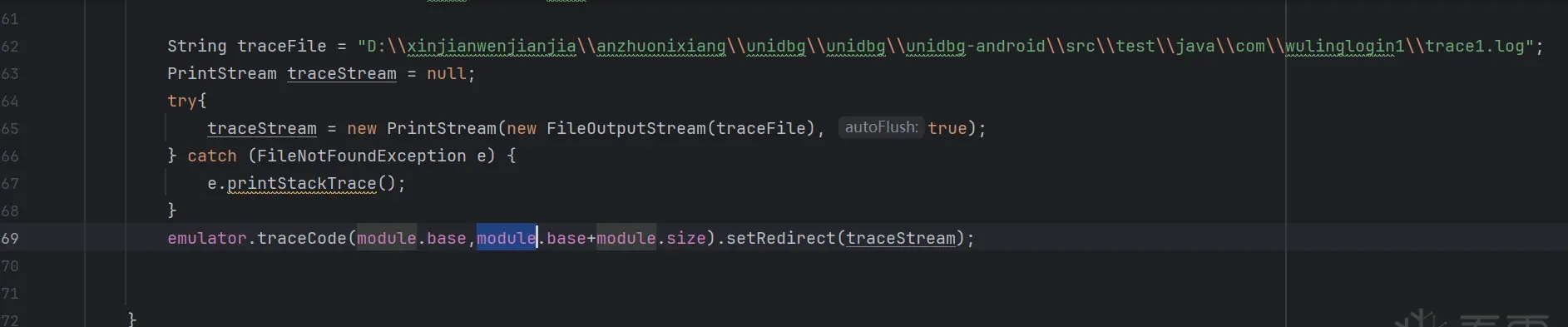 Fig. 2
so-layer analysis
base64
JNIEnv->NewStringUTF("[redacted]") was called from RX@0x12026a34[libencrypt.so]0x26a34
result -> [redacted]
These are the last few log lines. We can see the return string is constructed via JNIEnv->NewStringUTF at offset 0x26a34. Jump there in IDA:
This line is the NewStringUTF call, so v5’s type must be JNIEnv*. Press Y to retype v5.
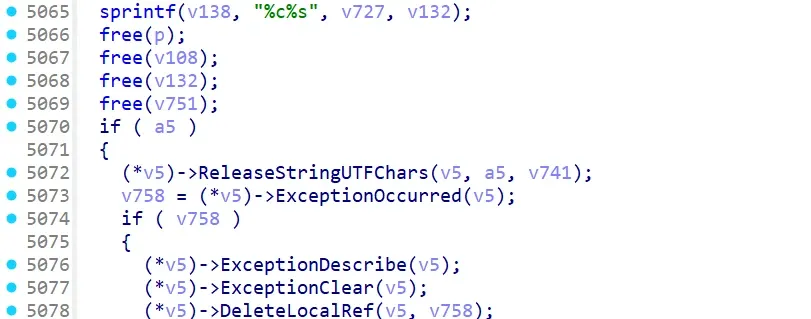 Fig. 3
Now it’s restored. Continuing the analysis, the value comes from v138. Looking upward, at line 5065:
sprintf(v138, "%c%s", v727, v132); // %c is a char placeholder, so v727 is a single char; %s is char*, so v132 is a string. v727 is the leading 'M', v132 is the following continuous string
// after several runs with different arguments, this 'M' is confirmed fixed
Anyone familiar with C sees this writes v727 and v132 into v138. v727 is the fixed M, and v132 is the encrypted result. So v132 is our analysis target.
Looking upward:
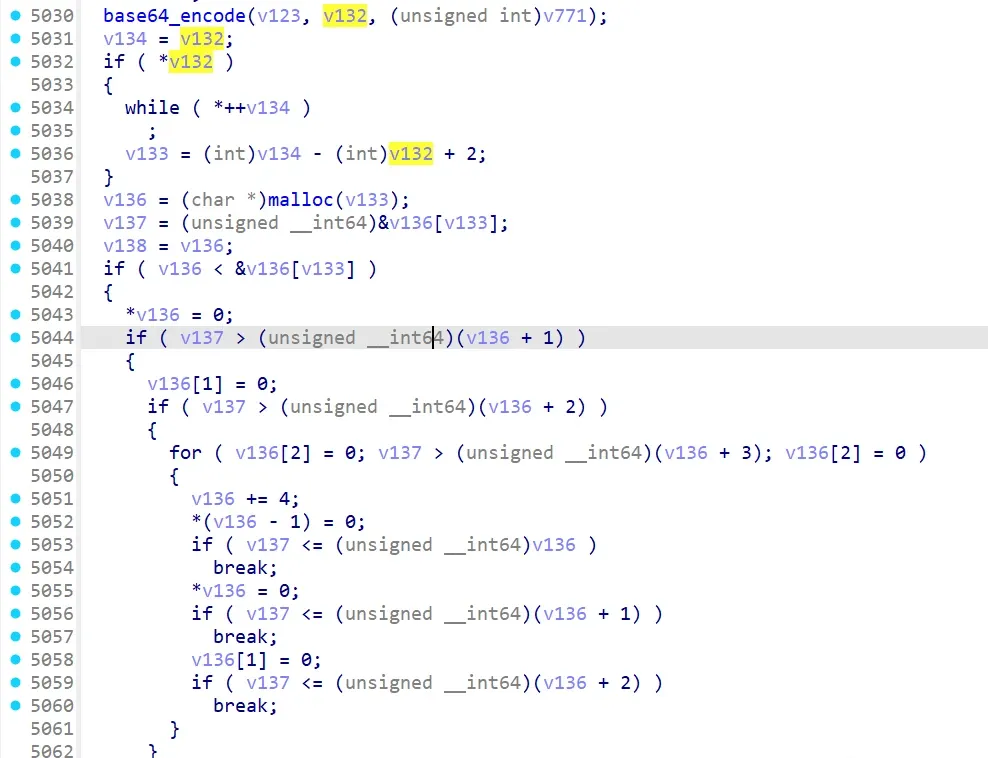 Fig. 4
base64_encode(v123, v132, (unsigned int)v771);v132 appears to come from base64 encoding. Now verify whether base64_encode is standard base64 (and whether its input matches standard base64-decoding of v132):
.text:00000000000268C0                 MOV             X1, X20
.text:00000000000268C4                 MOV             X0, X24
.text:00000000000268C8                 MOV             X19, #2
.text:00000000000268CC                 BL              base64_encode
This is the assembly at base64_encode. Breakpoint at 0x268cc and inspect x0 (v123, the function’s input):
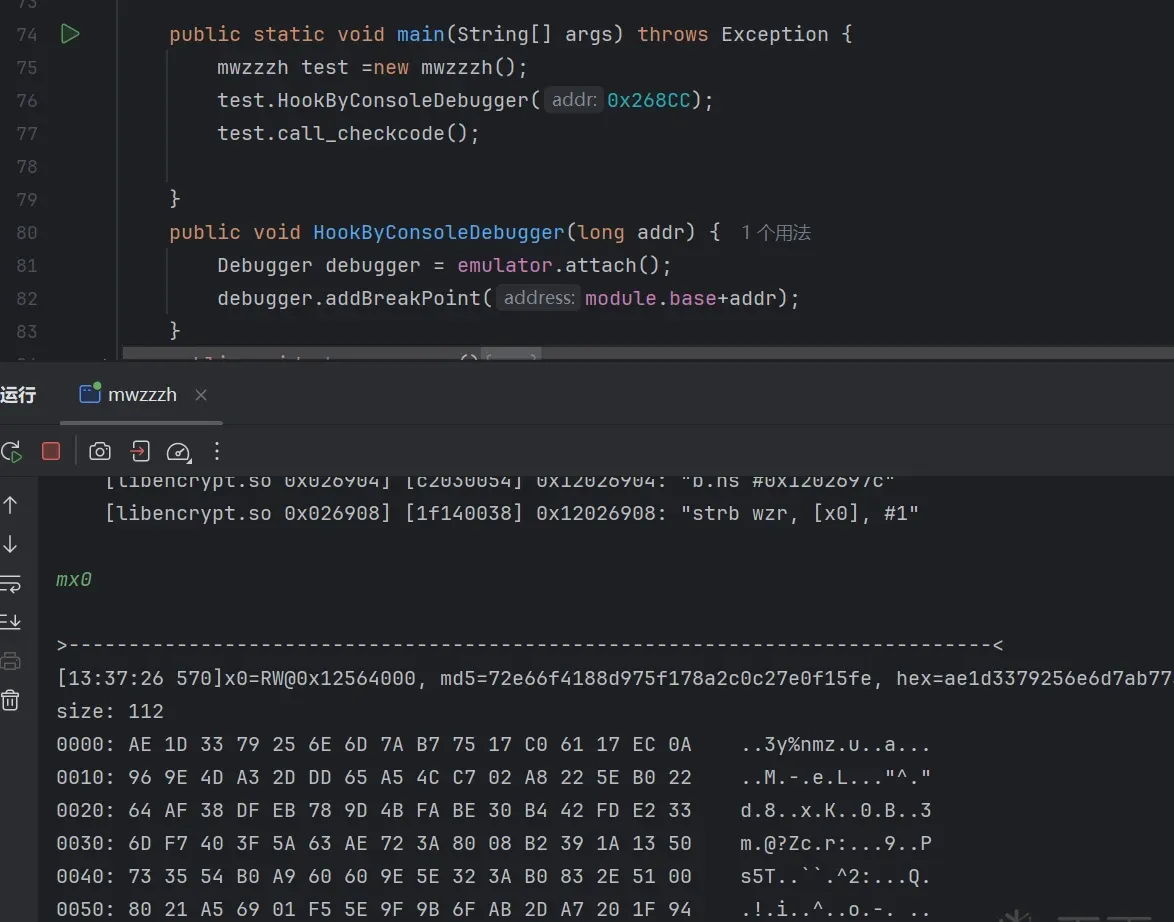 Fig. 5
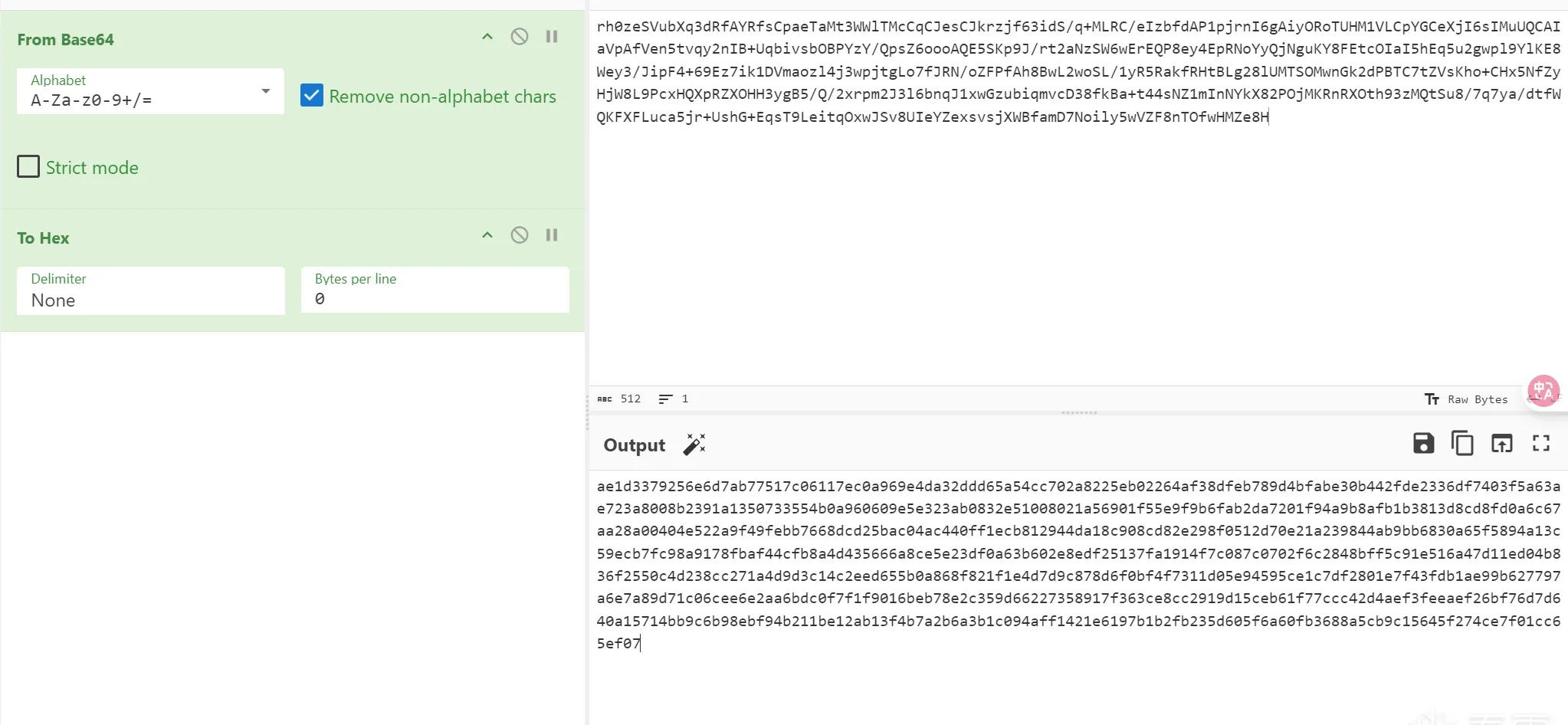 Fig. 6
It matches the online base64 result — so it’s standard base64, and v123 is the base64 input. We can skip base64_encode’s internals; next target is the source of the data at v123.
AES
Identifying AES
Trace the write to v123’s current address (0x1256400, 0x1256400+0x01A0) to see where this string is written:
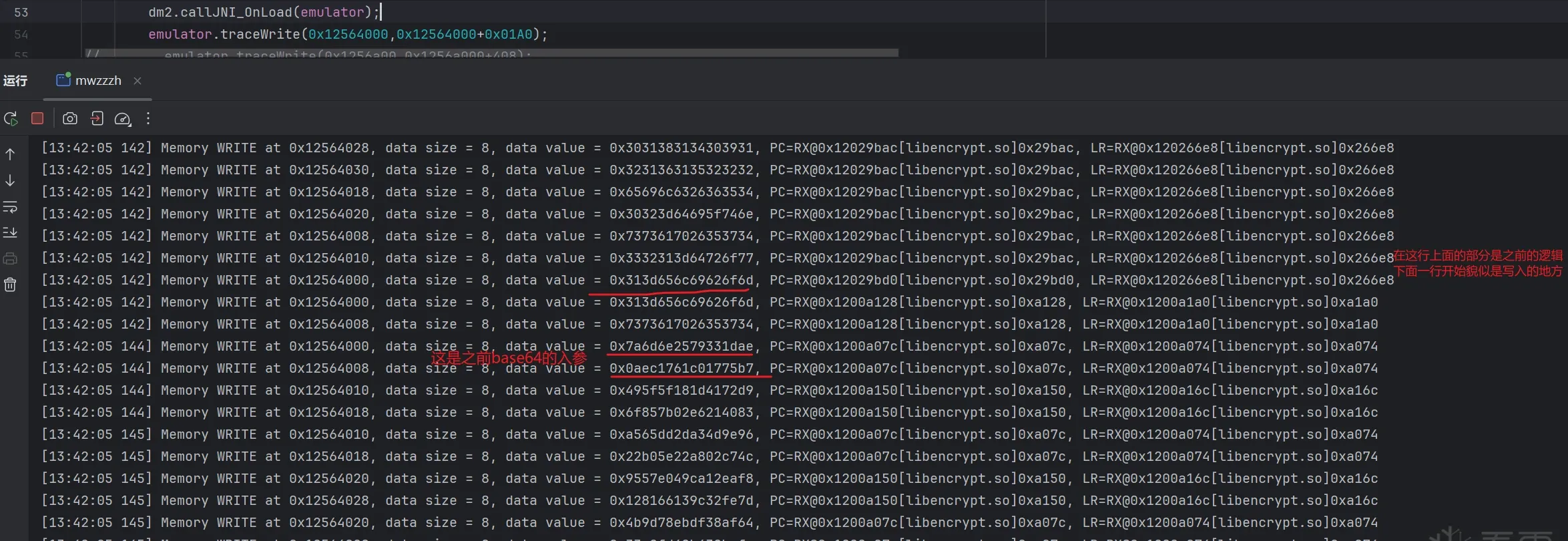 Fig. 7
Notice 0x7a6d6e2579331dae is the big-endian value of the first bytes of the base64 input, so the write happens at 0xa07c.
But writes seem to happen in groups: 0xa128, 0xa128 (later 0xa150), 0xa07c, 0xa07c. The value written at 0xa07c may relate to the earlier value at 0xa128. Let’s look at both in IDA.
First 0xa128 (inside WBACRAES128_EncryptCBC):
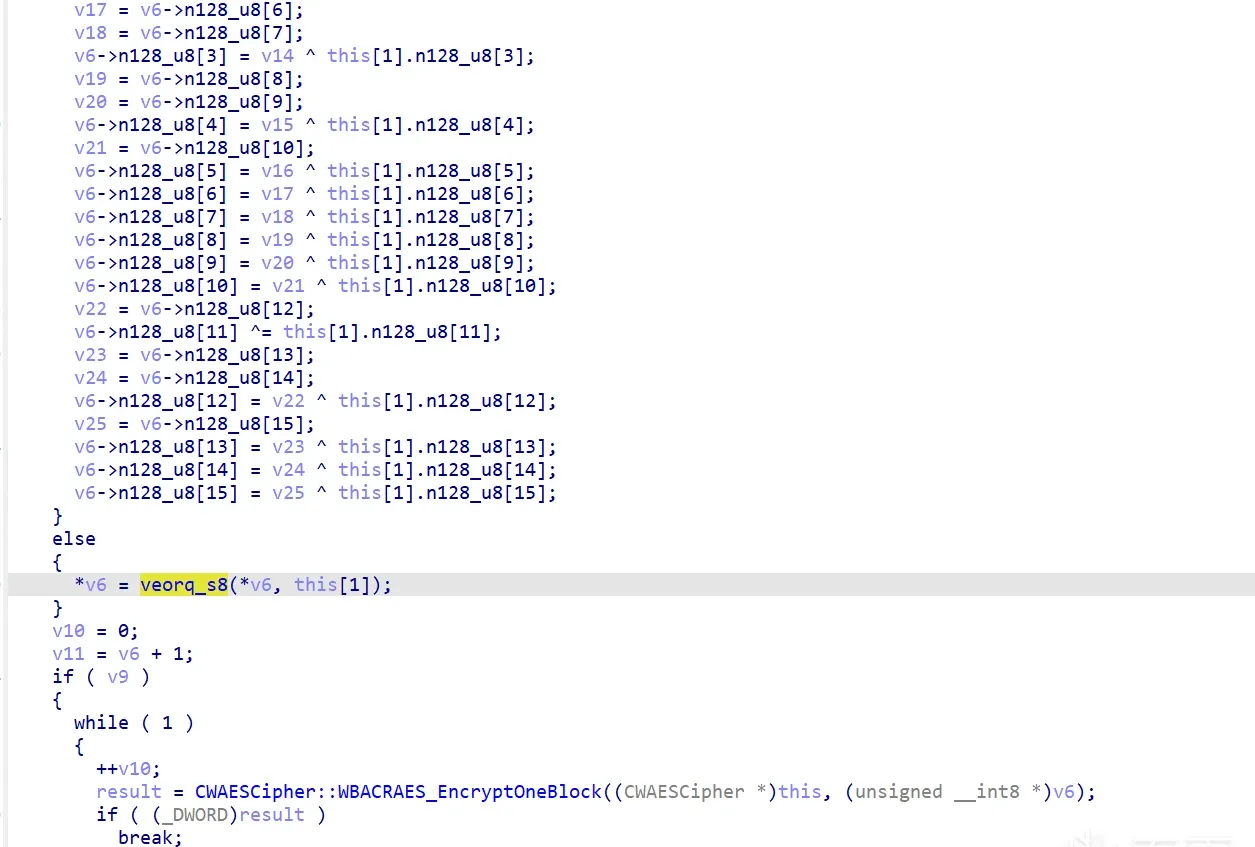 Fig. 8
Then 0xa07c (inside WBACRAES_EncryptOneBlock):
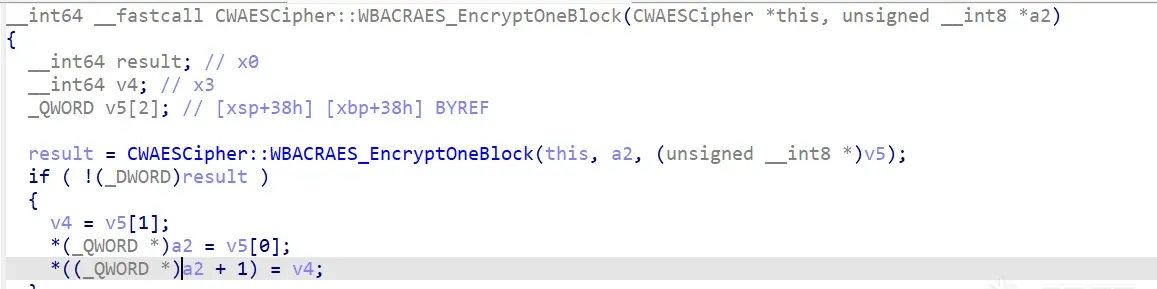 Fig. 9
At 0xa128 there’s veorq_s8(*v6, this[1]) — a byte-wise XOR of v6 and this[1]. (If you don’t know veorq_s8, ask any assistant — it’s NEON vector XOR.) We don’t yet know why.
At 0xa07c, right above the write there’s AES_EncryptOneBlock — “encrypt one AES block” — which basically tells us it’s AES, and likely a white-box AES.
What’s 0xa128 then? Probably AES pre-initialization: in CBC mode, each plaintext block is XORed with the previous ciphertext block (the first block XORs with the IV). So this is very likely CBC mode. (Still a hypothesis; we’ll verify soon.)
So the algorithm is AES, and after WBACRAES128_EncryptCBC finishes initializing each block, it enters WBACRAES_EncryptOneBlock to encrypt one block.
Let’s verify that hypothesis.
Confirming the AES input
Hook the call sites of WBACRAES128_EncryptCBC and WBACRAES_EncryptOneBlock and observe their inputs. (The first is the original AES input; the second is likely the post-padding, post-first-block-XOR input.)
First, confirm the original input:
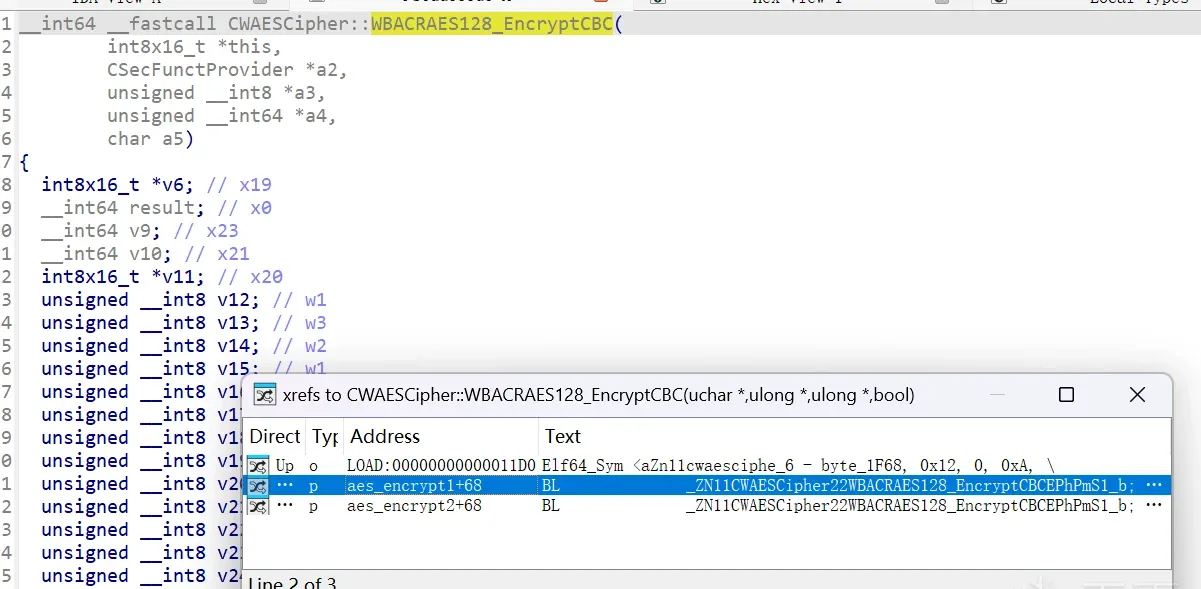 Fig. 10
Press X on WBACRAES128_EncryptCBC to find its references — there are two. Which one calls it? Breakpoint both call sites and see which one hits.
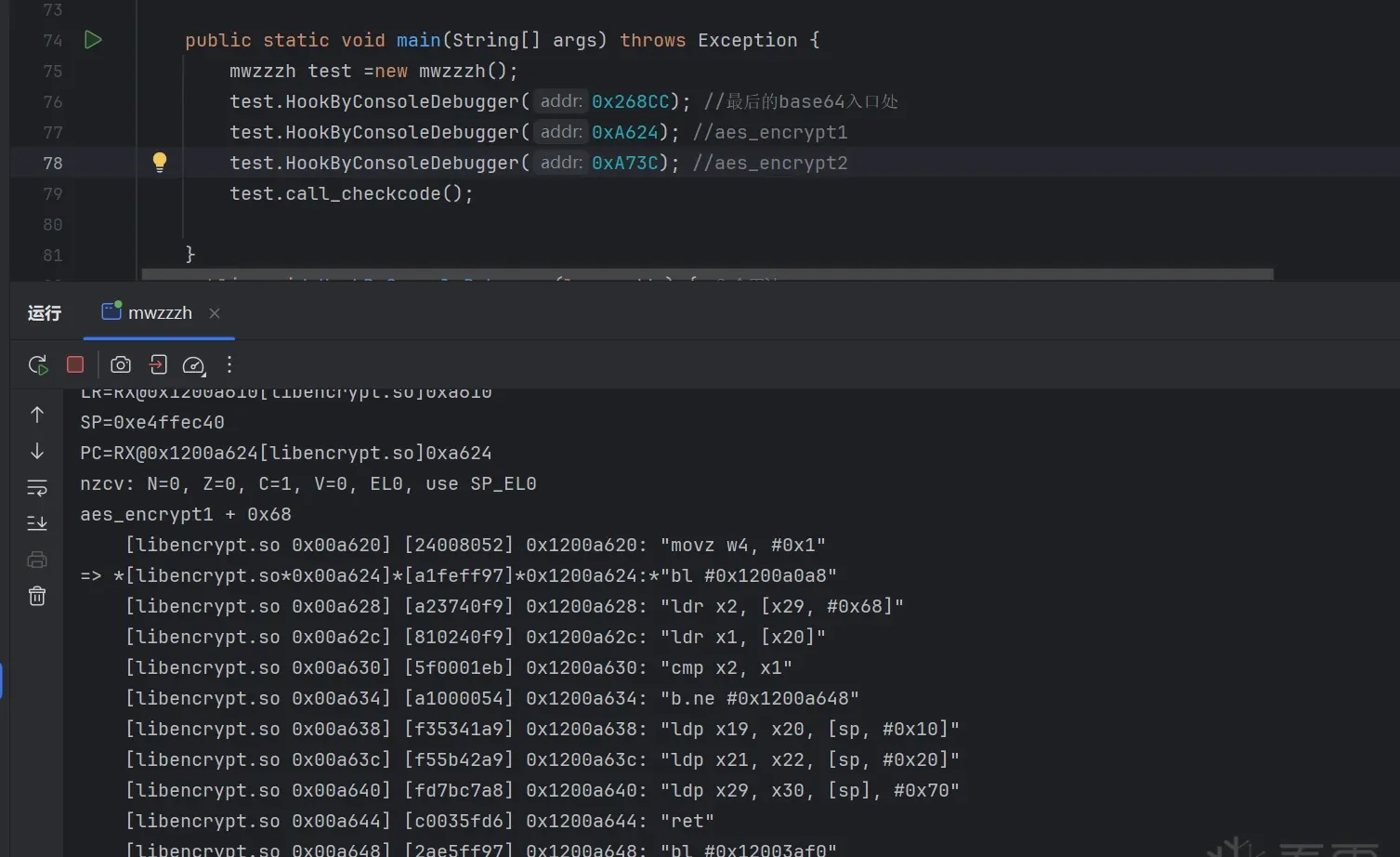 Fig. 11
After breaking and re-running, only encrypt1 hits; encrypt2 never does.
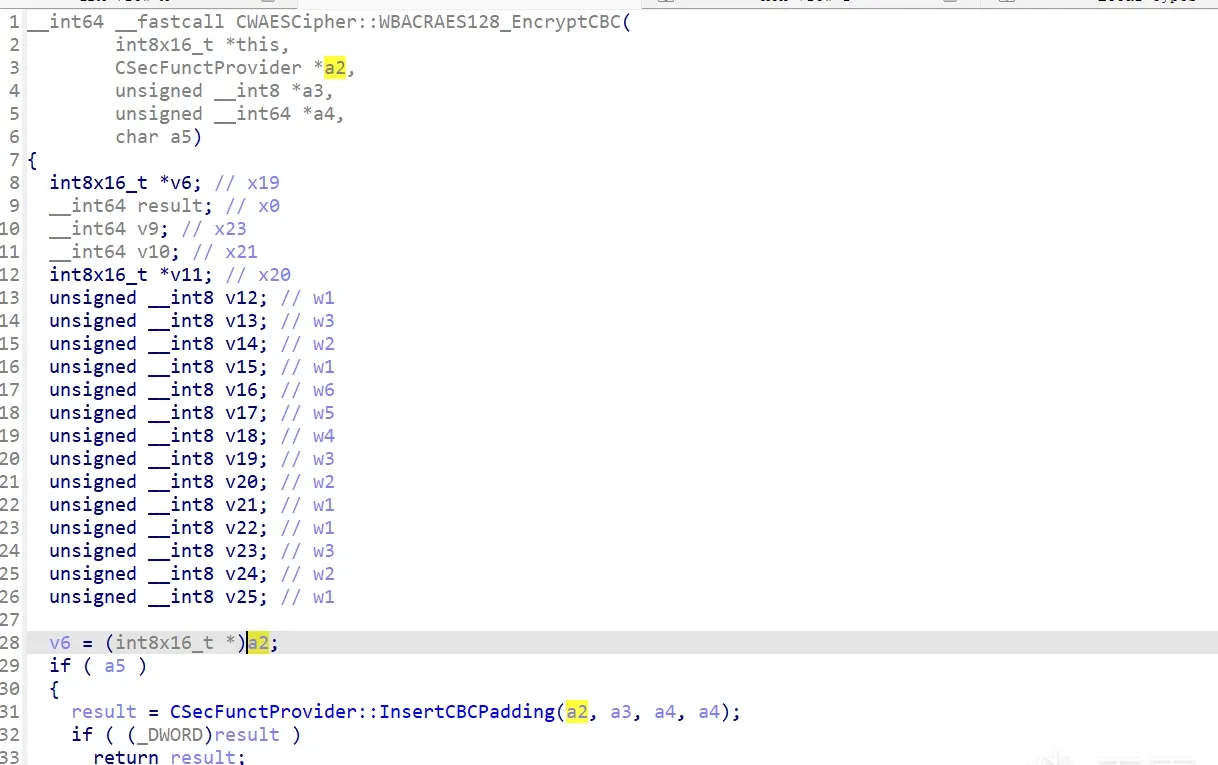 Fig. 12
 Fig. 13
Now the input. The image above shows the code near encrypt1’s branch into WBACRAES128_EncryptCBC; x1 holds our input. (How do we know? Inside WBACRAES128_EncryptCBC, v6 is XORed with this[1] and assigned to a6, so a6 is the input. a6 comes from a2, which in encrypt1 corresponds to the a1 parameter; disassemble at a1 and its register is x1.)
After the breakpoint:
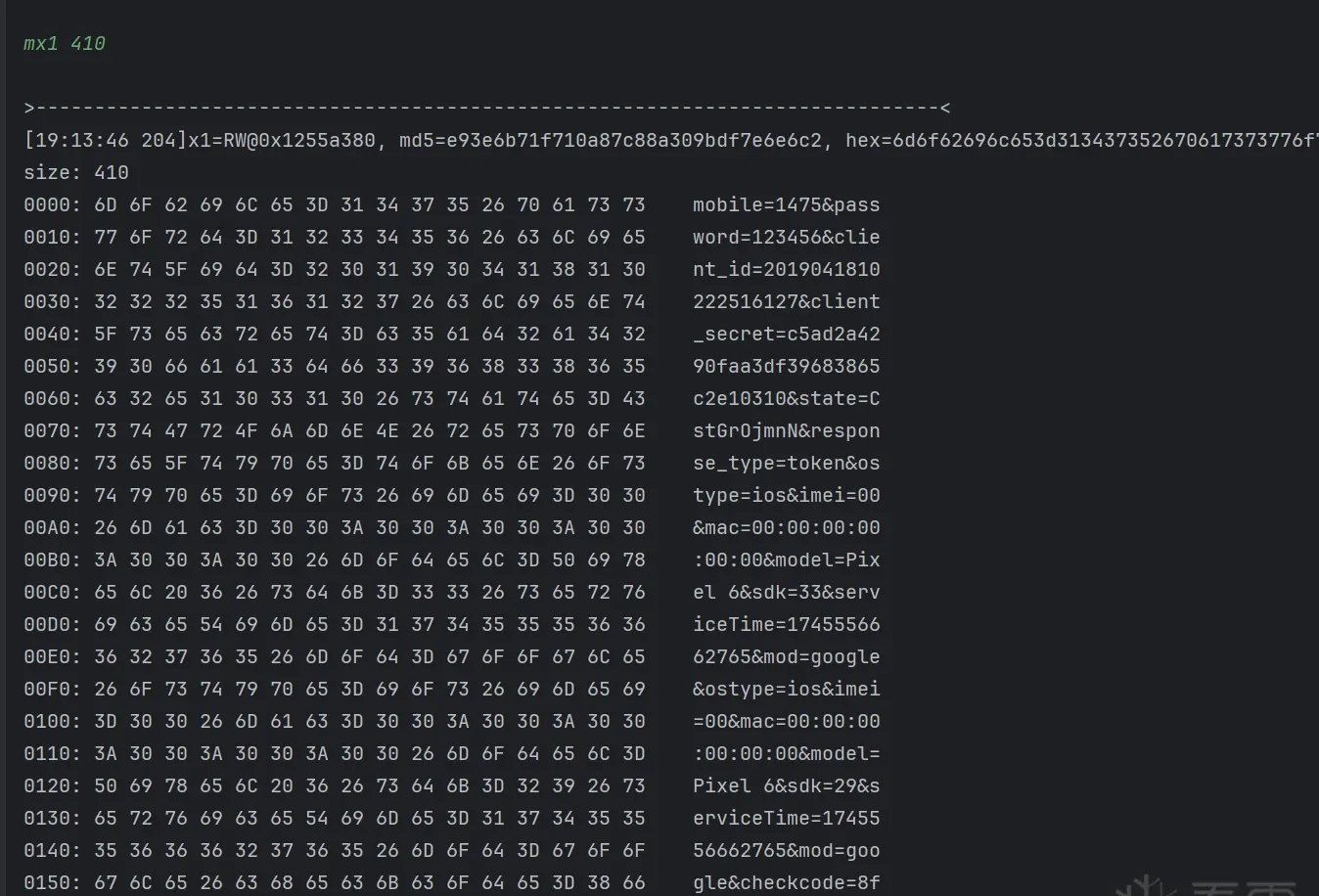 Fig. 14
Isn’t this the first string we passed to unidbg? Almost — there’s an extra checkcode, and it changes each run. So we have another target: checkcode. But it can wait.
So the AES input is confirmed: our first unidbg string + &checkcode=.... One step closer to recovering sd.
Confirming the padding mode
Next, WBACRAES_EncryptOneBlock (called from WBACRAES128_EncryptCBC). Breakpoint at the call site:
 Fig. 15
 Fig. 16
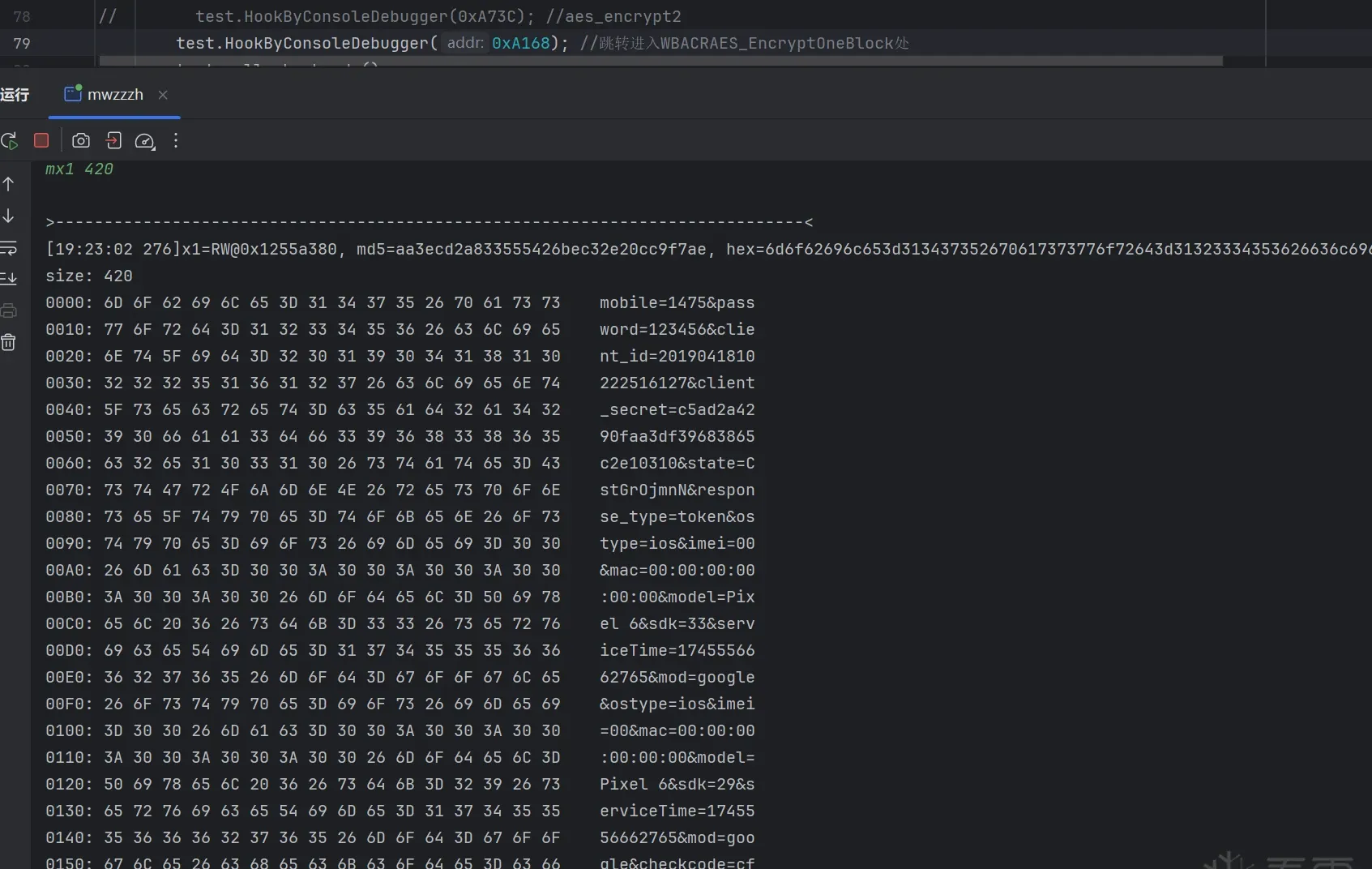 Fig. 17
Breaking and printing x1… familiar — this looks like the unidbg result content above, but with an extra 02 02. That’s AES padding (when plaintext length isn’t a multiple of 16, it’s padded before encryption). Padded with 02 02, and the length was 2 bytes short of a multiple of 16 — that’s PKCS7 padding (PKCS7 pads (16 - length % 16) bytes of value (16 - length % 16)).
Padding mode confirmed: PKCS7.
Confirming the mode and IV
But something feels missing. I recall there was an XOR before entering this function, yet the first 16 bytes here are still the original data. Strange. Let’s go back to WBACRAES128_EncryptCBC:
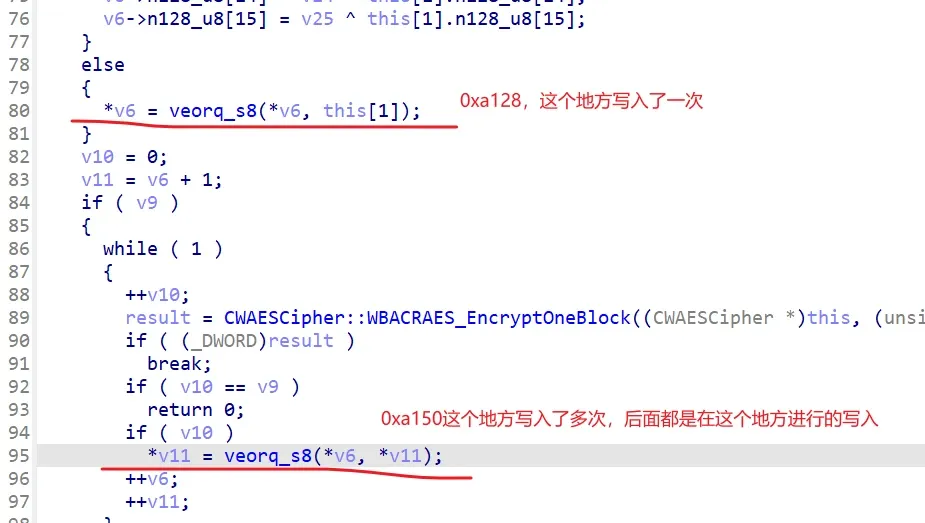 Fig. 18
There are actually two XOR branches: the upper one only writes once; the later rounds write at the lower address. Hypothesis: the first round’s XOR is against this[1] = 0 (anything XOR 0 is itself), and later rounds XOR against v11, the previous round’s ciphertext.
Check whether v11 at the first hit of 0xa150 equals our previous round’s encryption result (I’ll skip verifying the first-round XOR — you can check it yourself):
This is the assembly at 0xa150; breakpoint at 0xa14c and inspect q0/q1 (the Q registers are the general vector registers) before the XOR:
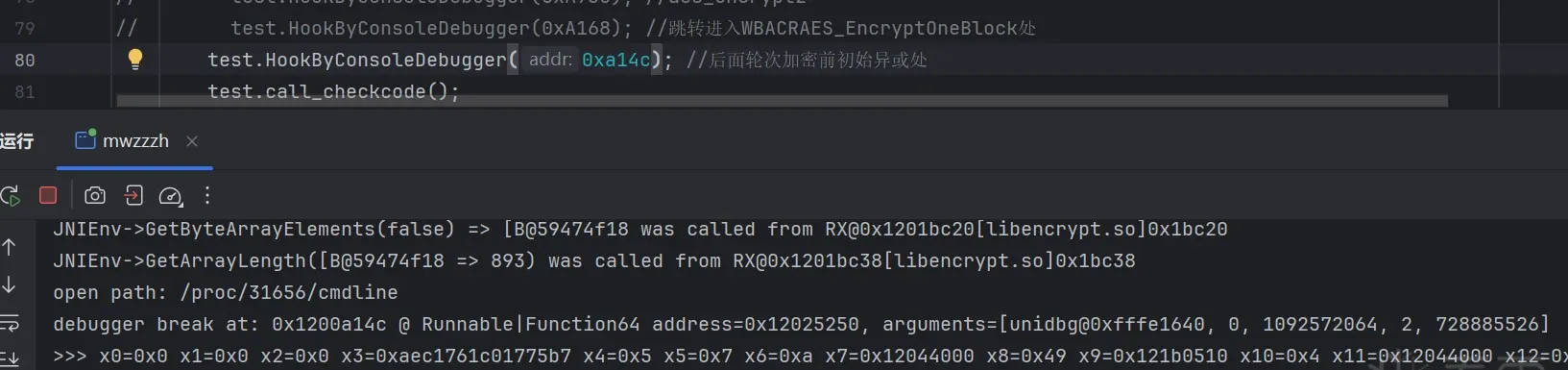 Fig. 19
q0 matches our first-round ciphertext — hypothesis confirmed. Mode is CBC, IV = 0x00000000…. Next: get the AES key.
Confirming white-box AES
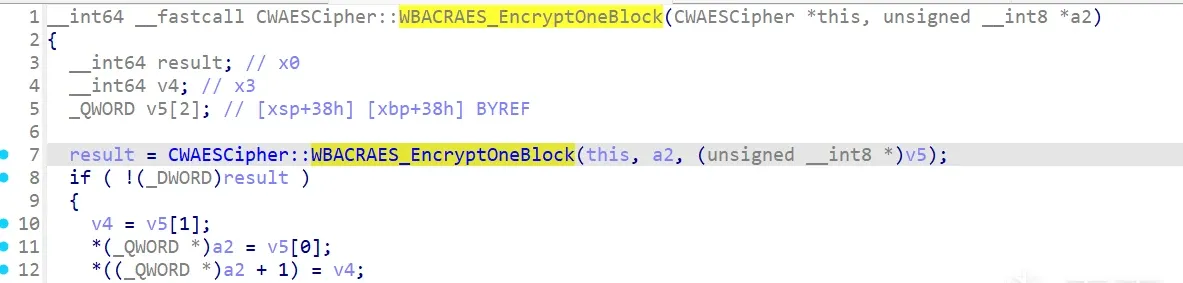 Fig. 20
Back in this function, double-click the yellow region to jump into the specific function:
 Fig. 21
Inside it looks like this, but we can’t keep jumping in. Press TAB to switch to assembly:
 Fig. 22
It’s obfuscated — the jump to the next function goes through:
BLR X4Because IDA can’t resolve X4 at runtime, double-clicking gets us nowhere. What now? Option 1: de-obfuscate (and clean the outer control-flow obfuscation too). Option 2: breakpoint here and read X4 when it hits. I’m lazy, so option 2. (unidbg is genuinely a great tool for recovering algorithms.)
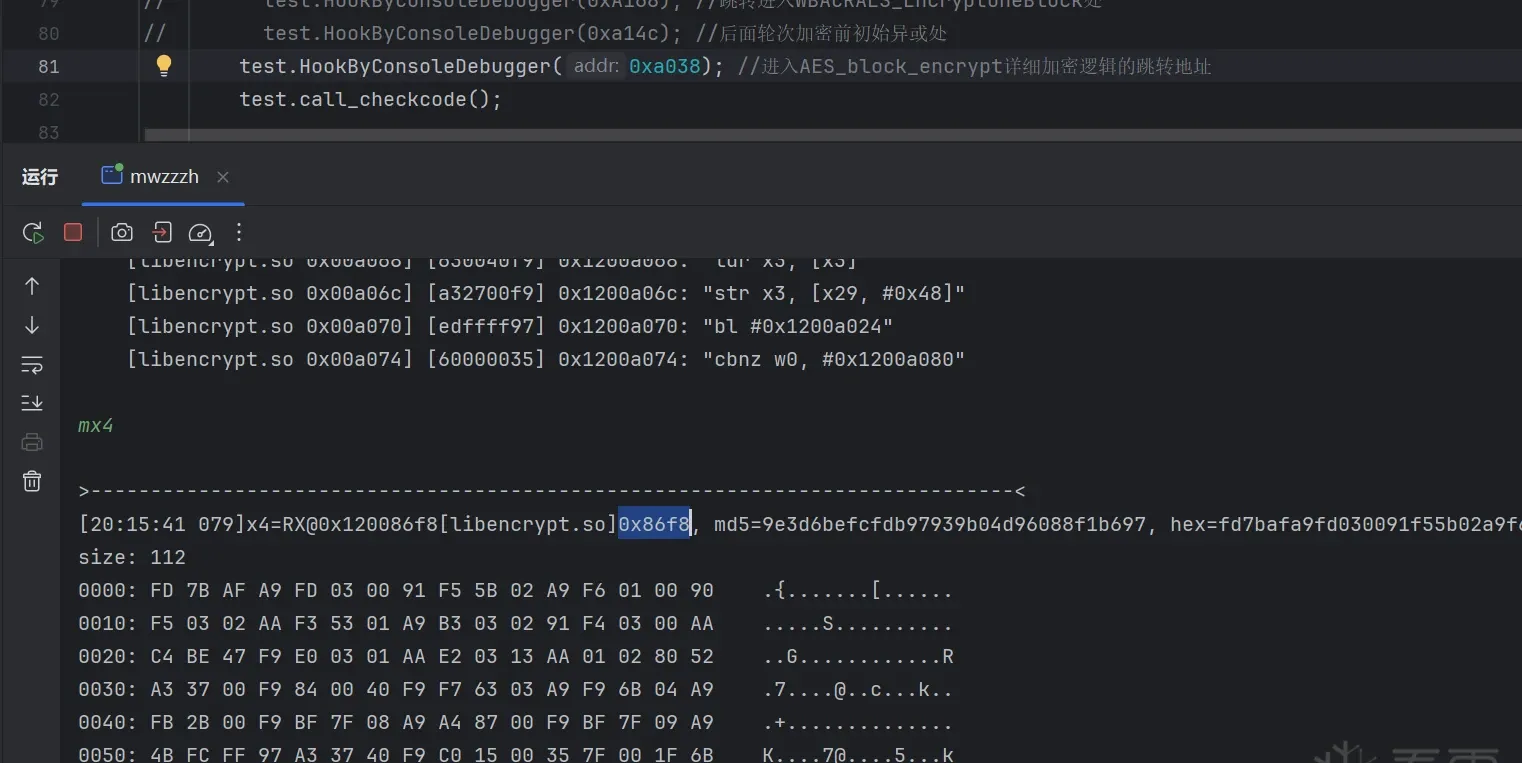 Fig. 23
Nice — now we know the .so offset is 0x86f8. Jump there in IDA:
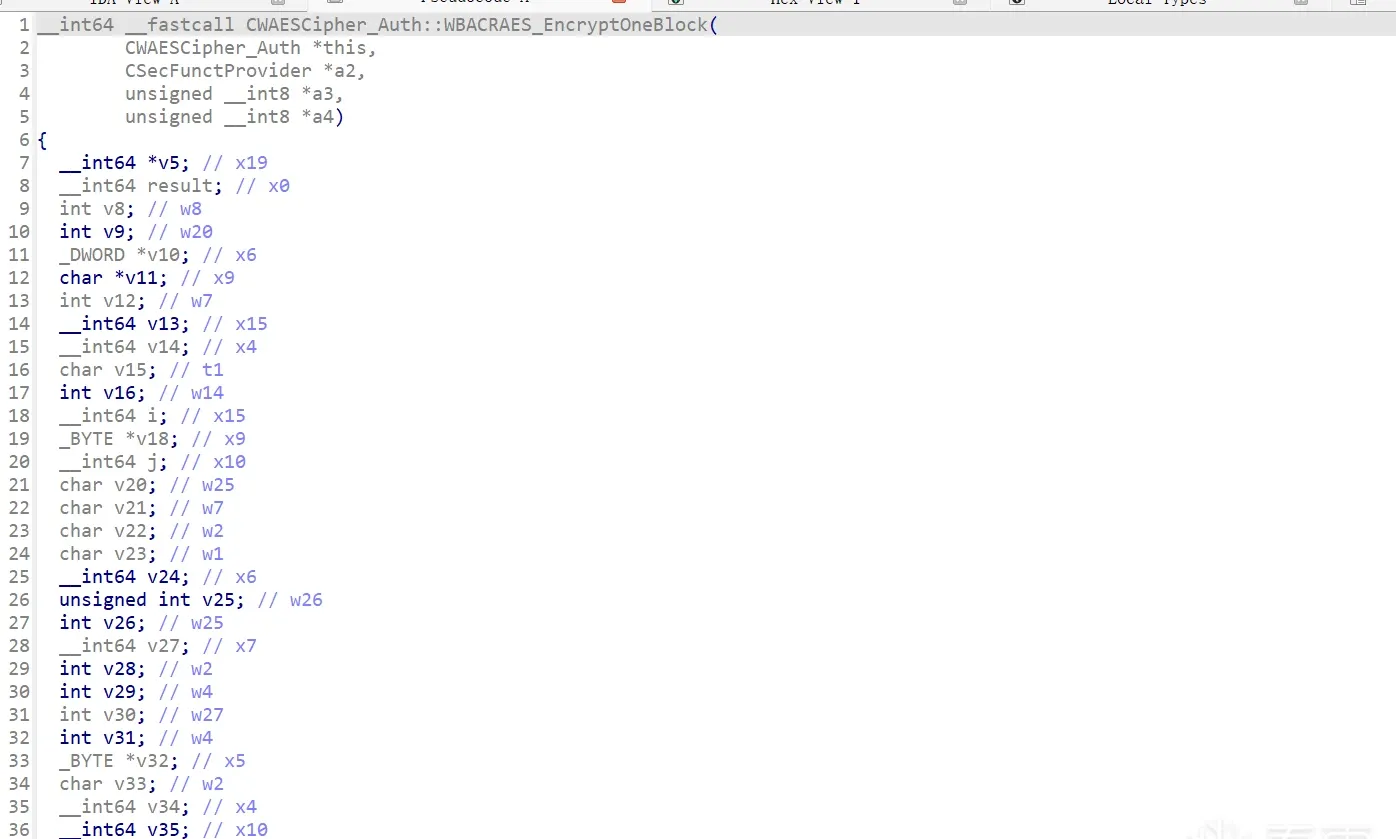 Fig. 24
Finally inside:
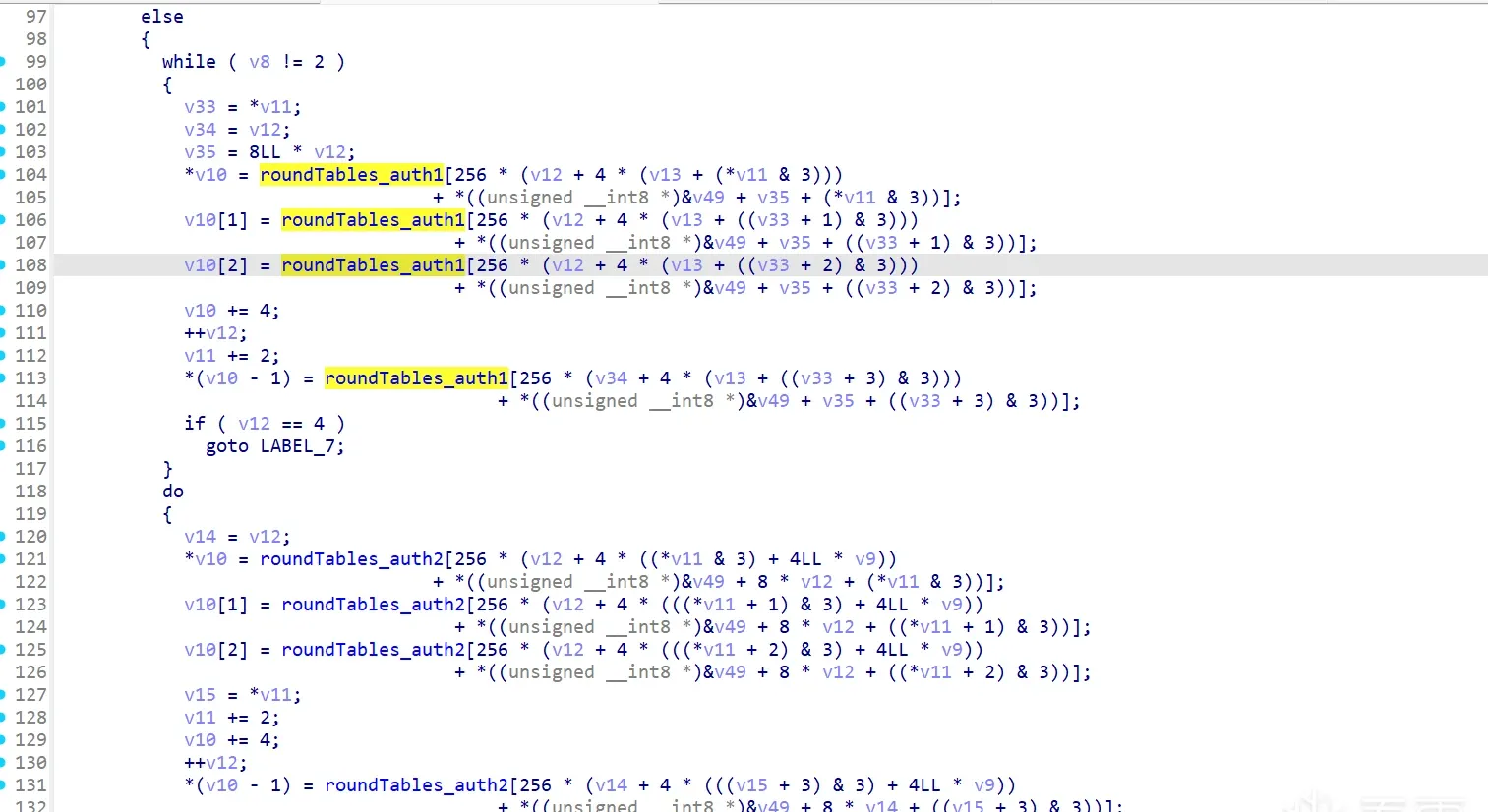 Fig. 25
It’s all table lookups — classic table-based AES. The table is large and there’s no obvious key logic — it’s a white-box AES.
DFA attack to recover the key
For white-box AES there are two approaches: (1) extract the code and tables wholesale; (2) run a DFA attack against the white-box AES to recover the key, then re-implement the algorithm.
I chose (2); this is a fairly standard white-box AES.
First, a bit on how DFA recovers round keys. (Skip the theory — lots of articles online.) For white-box AES, you typically find the entry of the second-to-last round (round 9 for AES-128), flip a single plaintext byte several times, and collide each mutated ciphertext against the normal ciphertext to pin down part of the 10th-round subkey. With enough samples you recover the full 10th-round subkey, then reverse the key schedule to get the original key.
No need to write it yourself — open-source projects already do this.
Let’s find the 9th round. Look at this code:
do
{
    v10 = v54;
    v11 = (char *)&unk_31080;
    v12 = 0;
    v13 = 4LL * v9;
    if ( v8 == 1 )
    {
        do
        {
            v36 = v12;
            *v10 = roundTables_auth1[256 * (v12 + 4 * ((*v11 & 3) + 4LL * v9))
                                     + *((unsigned __int8 *)&v49 + 8 * v12 + (*v11 & 3))];
            v10[1] = roundTables_auth1[256 * (v12 + 4 * (((*v11 + 1) & 3) + 4LL * v9))
                                       + *((unsigned __int8 *)&v49 + 8 * v12 + ((*v11 + 1) & 3))];
            v10[2] = roundTables_auth1[256 * (v12 + 4 * (((*v11 + 2) & 3) + 4LL * v9))
                                       + *((unsigned __int8 *)&v49 + 8 * v12 + ((*v11 + 2) & 3))];
            v37 = *v11;
            v11 += 2;
            v10 += 4;
            ++v12;
            *(v10 - 1) = roundTables_auth1[256 * (v36 + 4 * (((v37 + 3) & 3) + 4LL * v9))
                                           + *((unsigned __int8 *)&v49 + 8 * v36 + ((v37 + 3) & 3))];
        }
        while ( v12 != 4 );
    }
    else
    {
        while ( v8 != 2 )
        {
            v33 = *v11;
            v34 = v12;
            v35 = 8LL * v12;
            *v10 = roundTables_auth1[256 * (v12 + 4 * (v13 + (*v11 & 3)))
                                     + *((unsigned __int8 *)&v49 + v35 + (*v11 & 3))];
            v10[1] = roundTables_auth1[256 * (v12 + 4 * (v13 + ((v33 + 1) & 3)))
                                       + *((unsigned __int8 *)&v49 + v35 + ((v33 + 1) & 3))];
            v10[2] = roundTables_auth1[256 * (v12 + 4 * (v13 + ((v33 + 2) & 3)))
                                       + *((unsigned __int8 *)&v49 + v35 + ((v33 + 2) & 3))];
            v10 += 4;
            ++v12;
            v11 += 2;
            *(v10 - 1) = roundTables_auth1[256 * (v34 + 4 * (v13 + ((v33 + 3) & 3)))
                                           + *((unsigned __int8 *)&v49 + v35 + ((v33 + 3) & 3))];
            if ( v12 == 4 )
                goto LABEL_7;
        }
        do
        {
            v14 = v12;
            *v10 = roundTables_auth2[256 * (v12 + 4 * ((*v11 & 3) + 4LL * v9))
                                     + *((unsigned __int8 *)&v49 + 8 * v12 + (*v11 & 3))];
            v10[1] = roundTables_auth2[256 * (v12 + 4 * (((*v11 + 1) & 3) + 4LL * v9))
                                       + *((unsigned __int8 *)&v49 + 8 * v12 + ((*v11 + 1) & 3))];
            v10[2] = roundTables_auth2[256 * (v12 + 4 * (((*v11 + 2) & 3) + 4LL * v9))
                                       + *((unsigned __int8 *)&v49 + 8 * v12 + ((*v11 + 2) & 3))];
            v15 = *v11;
            v11 += 2;
            v10 += 4;
            ++v12;
            *(v10 - 1) = roundTables_auth2[256 * (v14 + 4 * (((v15 + 3) & 3) + 4LL * v9))
                                           + *((unsigned __int8 *)&v49 + 8 * v14 + ((v15 + 3) & 3))];
        }
        while ( v12 != 4 );
    }
    LABEL_7:
    v16 = 1;
    for ( i = 0; i != 4; ++i )
    {
        v18 = &v54[i];
        for ( j = 0; j != 4; ++j )
        {
            v20 = v18[16];
            v21 = v18[32];
            v22 = v18[48];
            v23 = *v18 & 0xF;
            v55[0] = *v18;
            v24 = 24LL * (int)j + 96LL * v9;
            v55[1] = v20;
            v25 = v55[0] & 0xF0;
            v55[2] = v21;
            v26 = v16;
            v27 = 0;
            v55[3] = v22;
            do
            {
                v28 = v26 - 1;
                v29 = (unsigned __int8)v55[v27 + 1];
                v30 = (unsigned __int8)(v23 | (16 * v29));
                if ( v8 == 1 )
                {
                    v23 = xorTables_auth1[256 * (v24 + v28) + (unsigned __int8)(v23 | (16 * v29))] & 0xF;
                    v25 = 16 * (xorTables_auth1[256 * (v24 + v26) + (int)((v25 >> 4) | (16 * (v29 >> 4)))] & 0xF);
                }
                else
                {
                    if ( v8 == 2 )
                    {
                        v31 = (v25 >> 4) | (16 * (v29 >> 4));
                        v23 = xorTables_auth2[256 * (v24 + v28) + v30] & 0xF;
                        v32 = xorTables_auth2;
                    }
                    else
                    {
                        v32 = xorTables_auth1;
                        v31 = (v25 >> 4) | (16 * (v29 >> 4));
                        v23 = xorTables_auth1[256 * (v24 + v28) + v30] & 0xF;
                    }
                    v25 = 16 * (v32[256 * (v24 + v26) + v31] & 0xF);
                }
                ++v27;
                v26 += 2;
            }
            while ( v27 != 3 );
            *((_BYTE *)&v49 + 8 * i + j) = v25 | v23;
            v18 += 4;
        }
        v16 += 6;
    }
    ++v9;
}
while ( v9 <= 8 && v48 > v9 );
Here v48 is the current round count; the first nine rounds of each block run in this loop, and each round passes through:
v10 = v54;So we can breakpoint that line, override OnHit, and on the ninth pass mutate this round’s plaintext, then collide the new ciphertext against the normal one. That eventually yields the 10th-round subkey. Since AES encrypts block by block and each block uses the same round keys, we only need to observe one block — I’ll use the first.
How do we mutate the plaintext? First find the runtime address of the plaintext being encrypted:
Each block’s AES encryption starts with PrepareAESMatrix — pre-encryption matrix initialization:
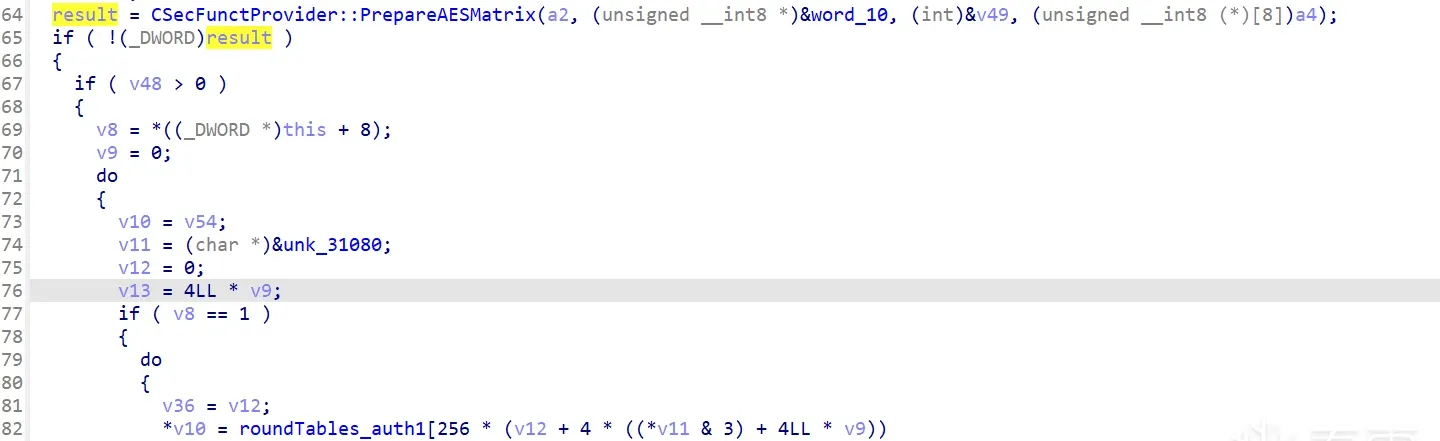 Fig. 26
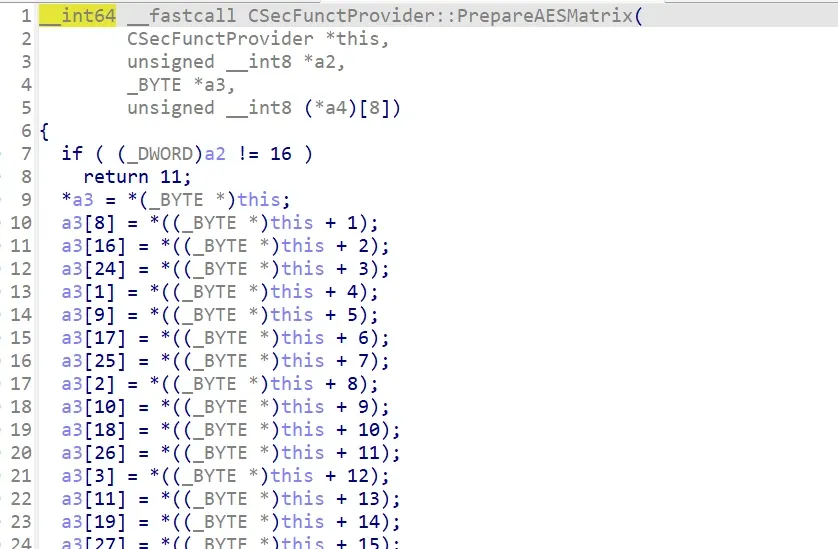 Fig. 27
Inside, a3 ends up holding the data we’ll encrypt. So our target is a3’s address:
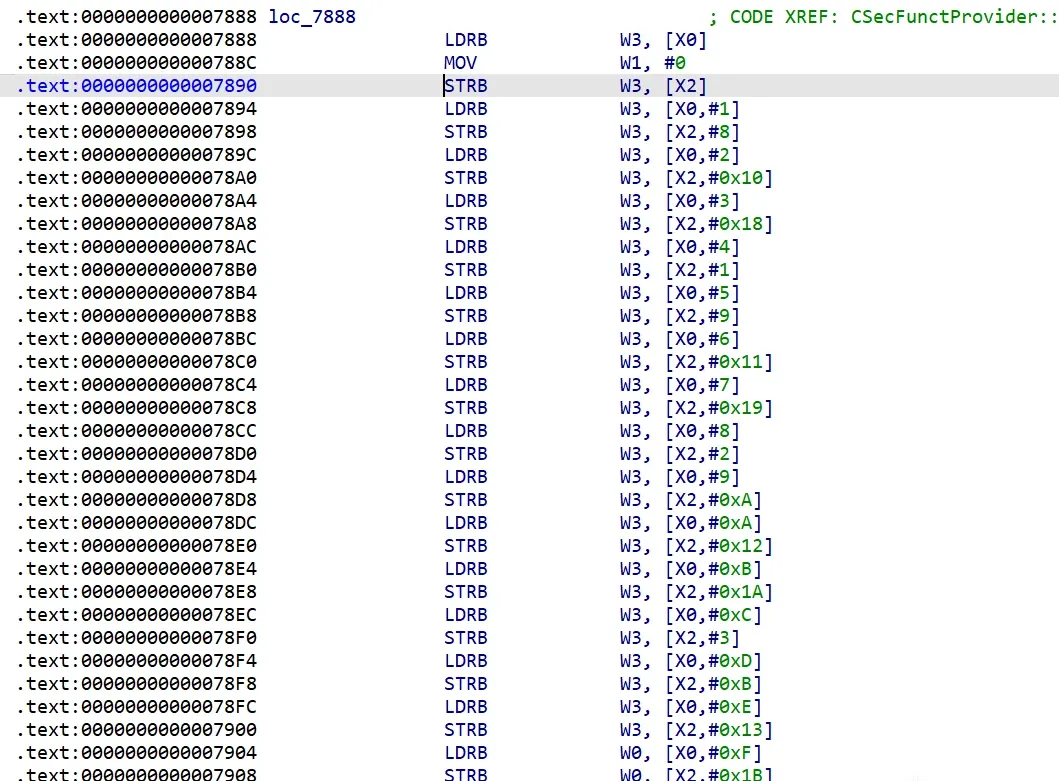 Fig. 28
Breakpoint at 0x7908 and inspect x2:
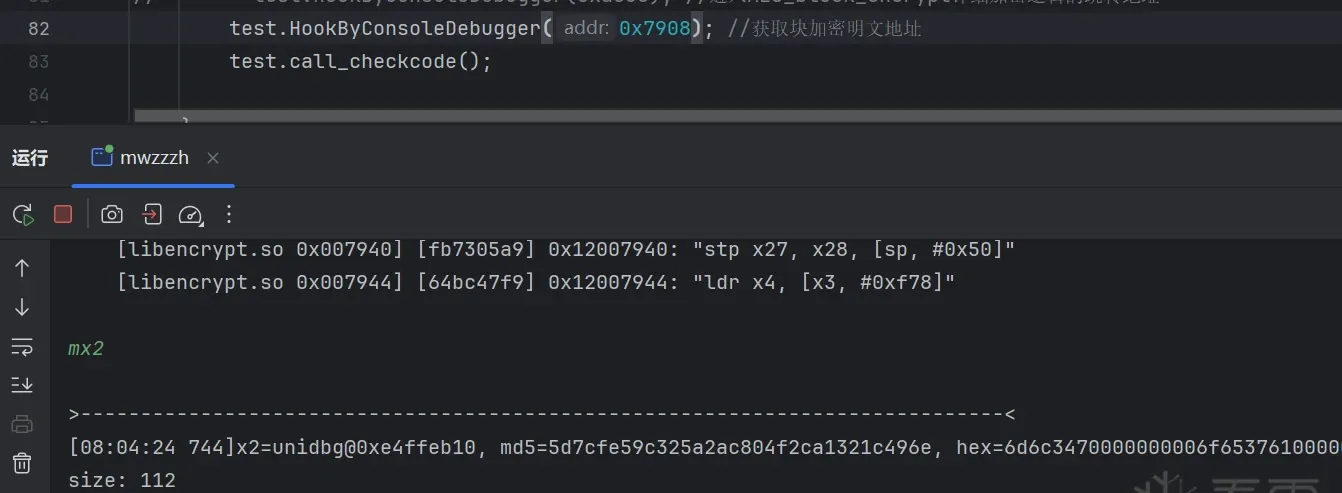 Fig. 29
Yes, this is the matrix transform. After the transform the plaintext address is 0xe4ffeb10 — the place to mutate for DFA. Here’s the DFA-attach code:
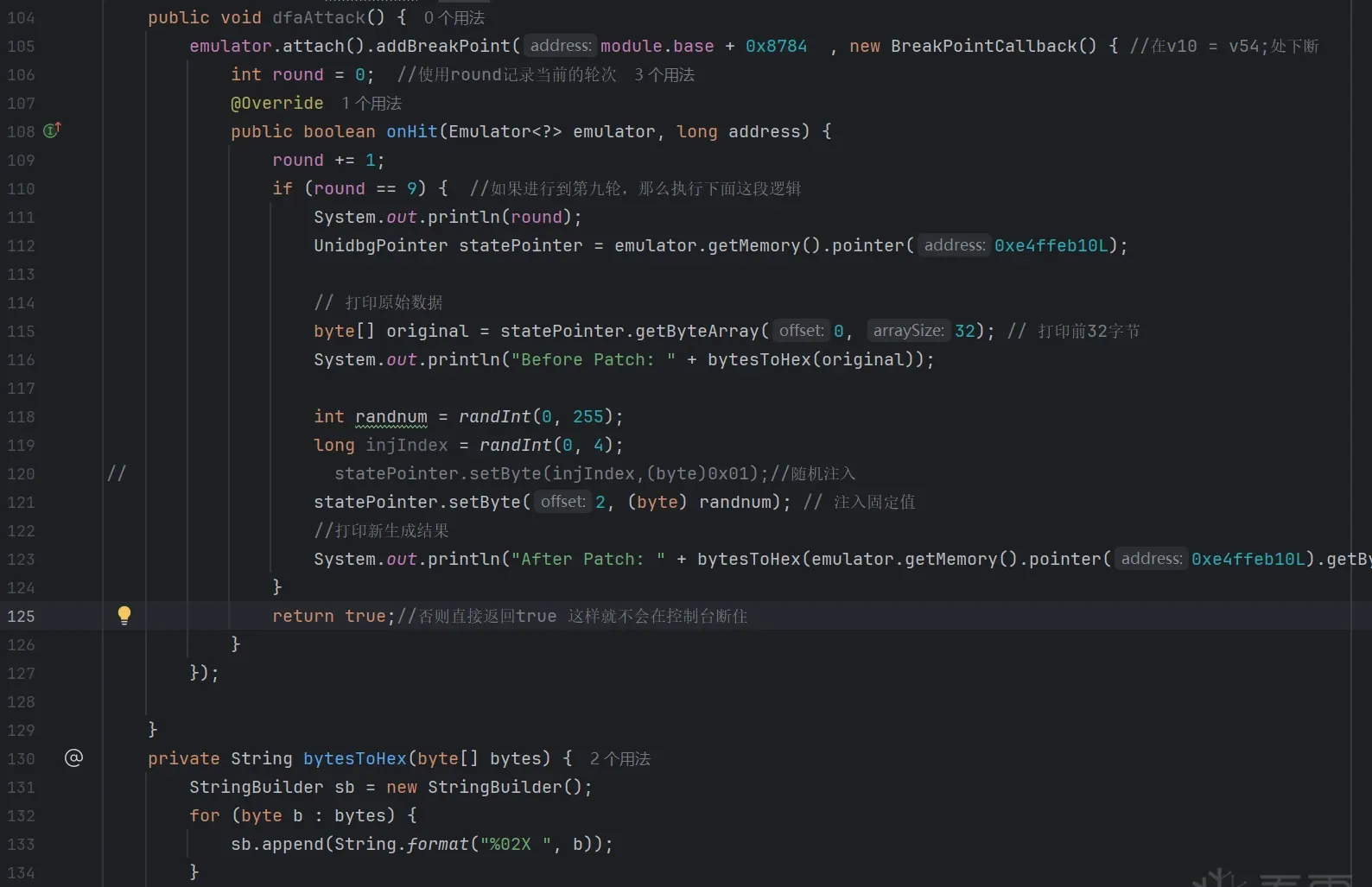 Fig. 30
DFA collides the normal ciphertext against the ciphertext from a single-byte-mutated plaintext, so we need to trace the ciphertext write. Recall the per-round ciphertext write address from the AES identification step: (0x1256400, 0x1256400+0x01A0). Adding the code and re-running… but oddly, no trace log. Why? Let’s re-hook base64_encode and re-check the data address:
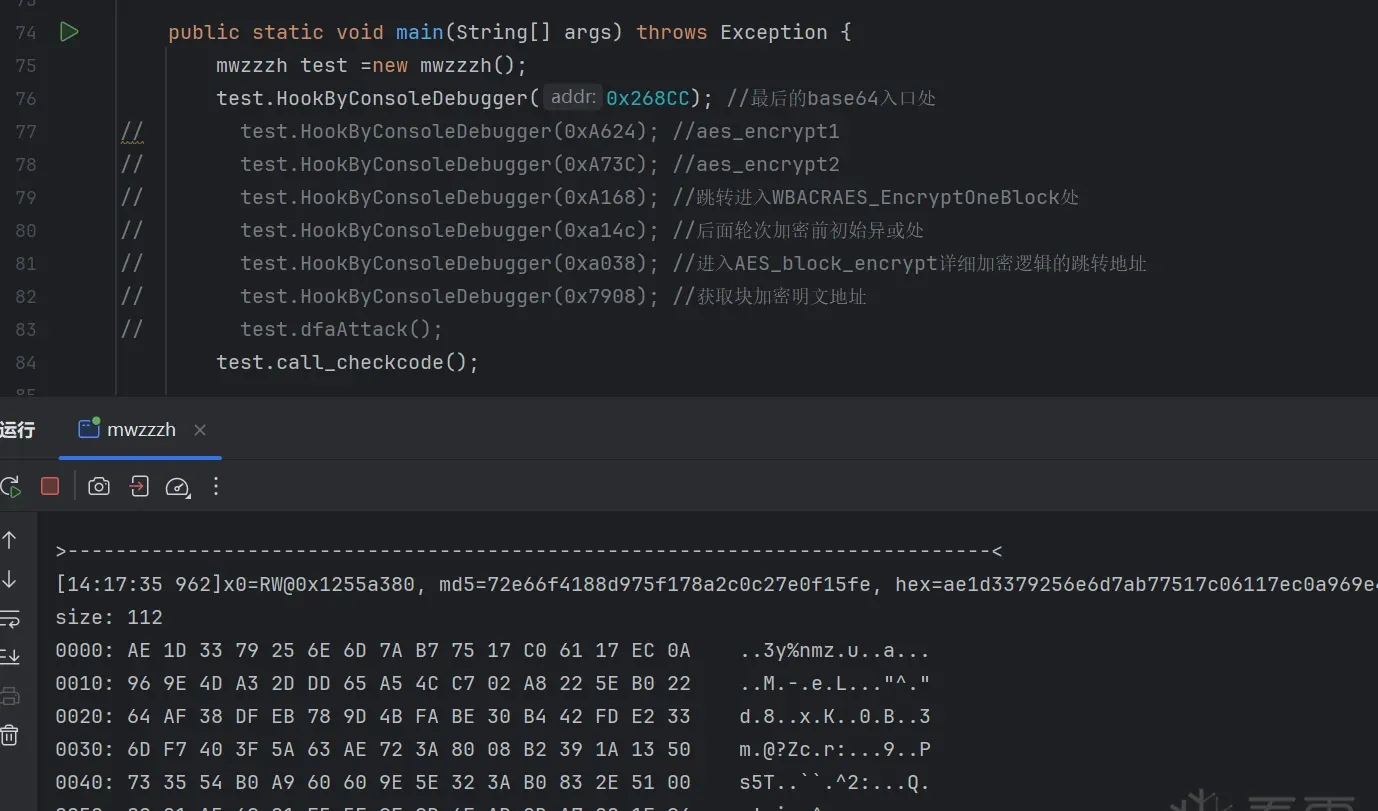 Fig. 31
The address changed. Why? Maybe too long between writing sessions — unclear. No matter, re-trace (0x1255a380, 0x1255a380+0x01A0):
 Fig. 32
Top: first-block ciphertext before DFA injection. Bottom: after injection. Four bytes changed — injection confirmed.
Use the phoenixAES library for the round-key analysis (inject several faulted ciphertexts to complete it):
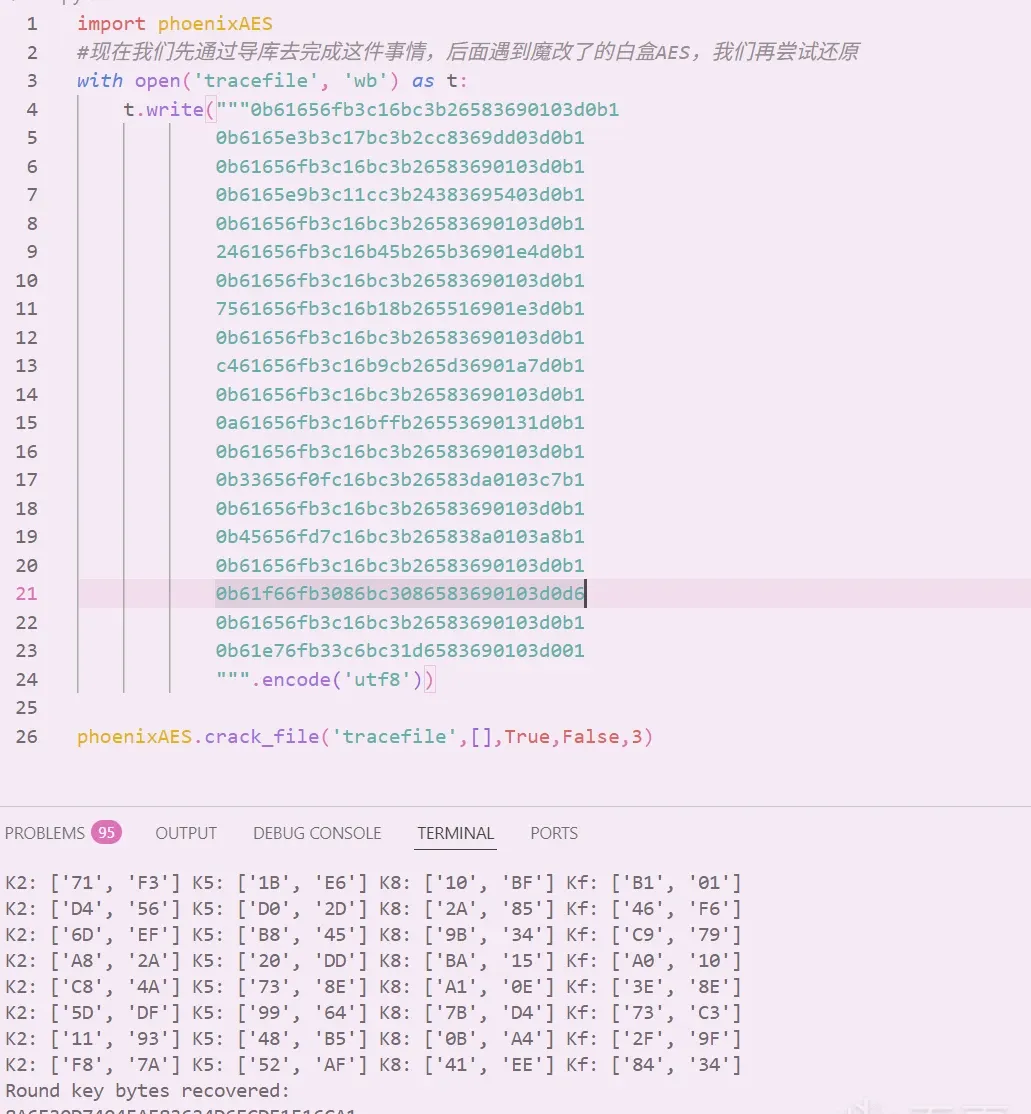 Fig. 33
We’ve recovered the 10th-round subkey. AES’s round-key schedule lets you derive round i−1 from round i, and so on back to the original key (skipping the theory here for brevity). Here’s the code:
# ki2k0.py
# constants
Nb = 4 # AES state column count, fixed at 4
# S-Box and Rcon tables
sbox = [
0x63, 0x7c, 0x77, 0x7b, 0xf2, 0x6b, 0x6f, 0xc5, 0x30, 0x01, 0x67, 0x2b, 0xfe, 0xd7, 0xab, 0x76,
0xca, 0x82, 0xc9, 0x7d, 0xfa, 0x59, 0x47, 0xf0, 0xad, 0xd4, 0xa2, 0xaf, 0x9c, 0xa4, 0x72, 0xc0,
0xb7, 0xfd, 0x93, 0x26, 0x36, 0x3f, 0xf7, 0xcc, 0x34, 0xa5, 0xe5, 0xf1, 0x71, 0xd8, 0x31, 0x15,
0x04, 0xc7, 0x23, 0xc3, 0x18, 0x96, 0x05, 0x9a, 0x07, 0x12, 0x80, 0xe2, 0xeb, 0x27, 0xb2, 0x75,
0x09, 0x83, 0x2c, 0x1a, 0x1b, 0x6e, 0x5a, 0xa0, 0x52, 0x3b, 0xd6, 0xb3, 0x29, 0xe3, 0x2f, 0x84,
0x53, 0xd1, 0x00, 0xed, 0x20, 0xfc, 0xb1, 0x5b, 0x6a, 0xcb, 0xbe, 0x39, 0x4a, 0x4c, 0x58, 0xcf,
0xd0, 0xef, 0xaa, 0xfb, 0x43, 0x4d, 0x33, 0x85, 0x45, 0xf9, 0x02, 0x7f, 0x50, 0x3c, 0x9f, 0xa8,
0x51, 0xa3, 0x40, 0x8f, 0x92, 0x9d, 0x38, 0xf5, 0xbc, 0xb6, 0xda, 0x21, 0x10, 0xff, 0xf3, 0xd2,
0xcd, 0x0c, 0x13, 0xec, 0x5f, 0x97, 0x44, 0x17, 0xc4, 0xa7, 0x7e, 0x3d, 0x64, 0x5d, 0x19, 0x73,
0x60, 0x81, 0x4f, 0xdc, 0x22, 0x2a, 0x90, 0x88, 0x46, 0xee, 0xb8, 0x14, 0xde, 0x5e, 0x0b, 0xdb,
0xe0, 0x32, 0x3a, 0x0a, 0x49, 0x06, 0x24, 0x5c, 0xc2, 0xd3, 0xac, 0x62, 0x91, 0x95, 0xe4, 0x79,
0xe7, 0xc8, 0x37, 0x6d, 0x8d, 0xd5, 0x4e, 0xa9, 0x6c, 0x56, 0xf4, 0xea, 0x65, 0x7a, 0xae, 0x08,
0xba, 0x78, 0x25, 0x2e, 0x1c, 0xa6, 0xb4, 0xc6, 0xe8, 0xdd, 0x74, 0x1f, 0x4b, 0xbd, 0x8b, 0x8a,
0x70, 0x3e, 0xb5, 0x66, 0x48, 0x03, 0xf6, 0x0e, 0x61, 0x35, 0x57, 0xb9, 0x86, 0xc1, 0x1d, 0x9e,
0xe1, 0xf8, 0x98, 0x11, 0x69, 0xd9, 0x8e, 0x94, 0x9b, 0x1e, 0x87, 0xe9, 0xce, 0x55, 0x28, 0xdf,
0x8c, 0xa1, 0x89, 0x0d, 0xbf, 0xe6, 0x42, 0x68, 0x41, 0x99, 0x2d, 0x0f, 0xb0, 0x54, 0xbb, 0x16
]
Rcon = [0x8d, 0x01, 0x02, 0x04, 0x08, 0x10, 0x20, 0x40, 0x80, 0x1b, 0x36]
# globals
RoundKey = [0] * 240 # round-key storage
Key = [0] * 32 # input key
def KeyExpansion(start: int, AesSize: int):
"""AES key expansion: generate all round keys from the given starting round key."""
Nk = AesSize // 32 # key length in 32-bit words
Nr = Nk + 6 # rounds: 10 (AES-128), 12 (AES-192), 14 (AES-256)
start *= 4 # convert to byte offset
# initialize the first group of round keys
for i in range(start, Nk + start):
RoundKey[i * 4 + 0] = Key[(i - start) * 4 + 0]
RoundKey[i * 4 + 1] = Key[(i - start) * 4 + 1]
RoundKey[i * 4 + 2] = Key[(i - start) * 4 + 2]
RoundKey[i * 4 + 3] = Key[(i - start) * 4 + 3]
# generate subsequent round keys
for i in range(Nk + start, Nb * (Nr + 1)):
tempa = [RoundKey[(i - 1) * 4 + j] for j in range(4)]
if i % Nk == 0:
# RotWord: rotate left
k = tempa[0]
tempa[0] = tempa[1]
tempa[1] = tempa[2]
tempa[2] = tempa[3]
tempa[3] = k
# SubWord: apply S-Box
tempa = [sbox[x] for x in tempa]
# XOR with Rcon
tempa[0] ^= Rcon[i // Nk]
elif Nk > 6 and i % Nk == 4:
# SubWord: only for AES-256 under specific conditions
tempa = [sbox[x] for x in tempa]
# generate the new round key
for j in range(4):
RoundKey[i * 4 + j] = RoundKey[(i - Nk) * 4 + j] ^ tempa[j]
# reverse-expand to the earlier round keys
for i in range(Nk + start - 1, Nk - 1, -1):
tempa = [RoundKey[(i - 1) * 4 + j] for j in range(4)]
if i % Nk == 0:
# RotWord
k = tempa[0]
tempa[0] = tempa[1]
tempa[1] = tempa[2]
tempa[2] = tempa[3]
tempa[3] = k
# SubWord
tempa = [sbox[x] for x in tempa]
# XOR with Rcon
tempa[0] ^= Rcon[i // Nk]
elif Nk > 6 and i % Nk == 4:
tempa = [sbox[x] for x in tempa]
# generate the previous round key
for j in range(4):
RoundKey[(i - Nk) * 4 + j] = RoundKey[i * 4 + j] ^ tempa[j]
# print all round keys
for j in range(16 * (Nr + 1)):
if j % 16 == 0:
print(f"K{j // 16:02d}: ", end="")
print(f"{RoundKey[j]:02X}", end="")
if j % 16 == 15:
print()
def main():
# recovered round key as hex (16 bytes)
example_key = "[redacted]"
AesSize = 128 # AES-128; change for 192/256
round_start = 10 # reverse from round 10; 0 means a fresh key schedule. Usually we have the 10th-round key.
# convert hex string to byte array
for i in range(0, len(example_key), 2):
Key[i // 2] = int(example_key[i:i + 2], 16)
KeyExpansion(round_start, AesSize)
if __name__ == "__main__":
main() Fig. 34
It runs successfully, and we’ve recovered the AES key.
So all of AES is recovered — but something’s still missing. Right, checkcode: the dynamic 32-byte value.
Recovering checkcode (MD5)
Where to start? checkcode first appeared in the white-box AES input, so hook the white-box AES entry to get checkcode’s address, then trace writes to it.
First hook the white-box AES entry:
 Fig. 35
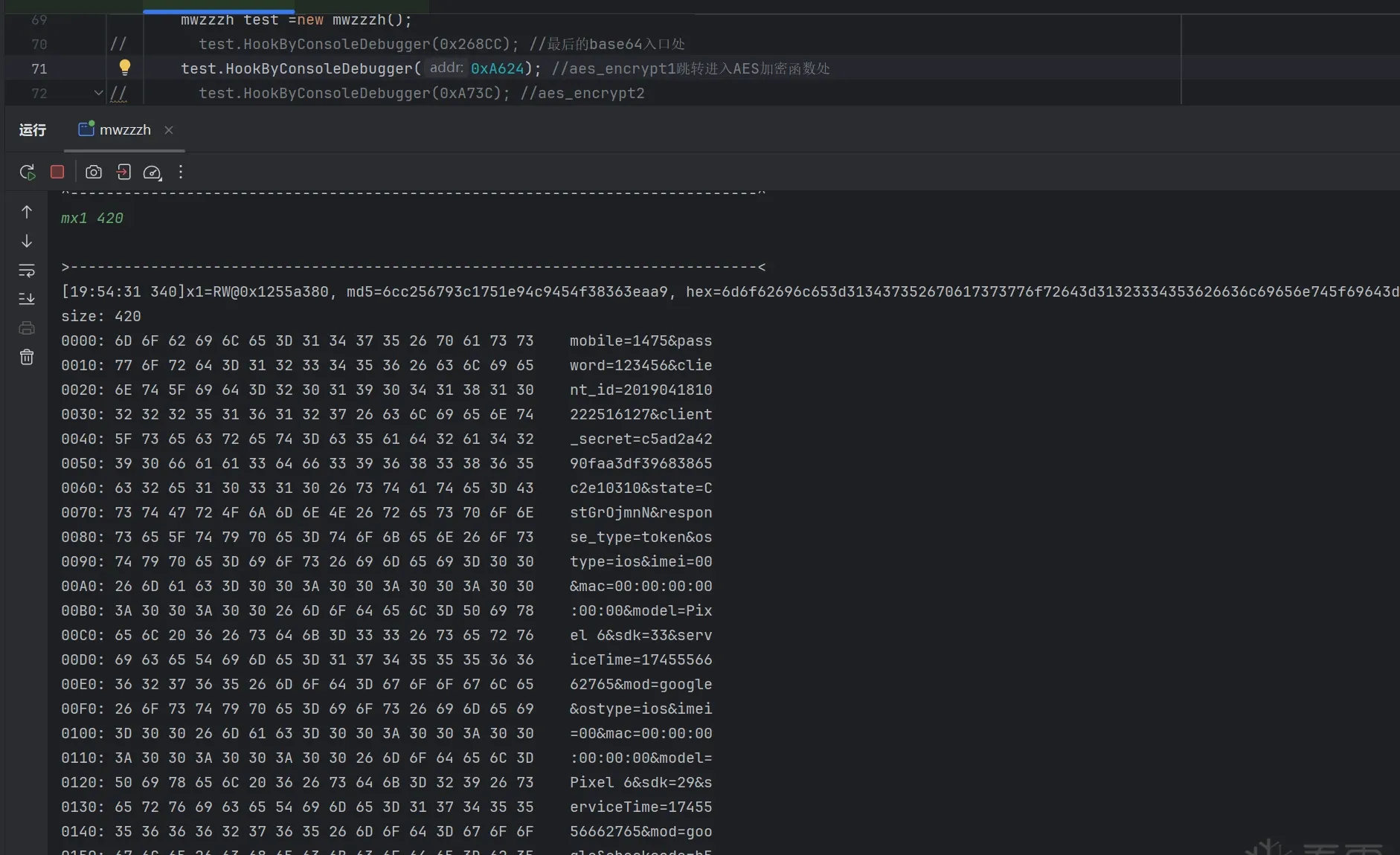 Fig. 36
The checkcode field’s address is roughly 0x1255a380+0x15e to 0x1255a380+0x17d. Trace writes to that range:
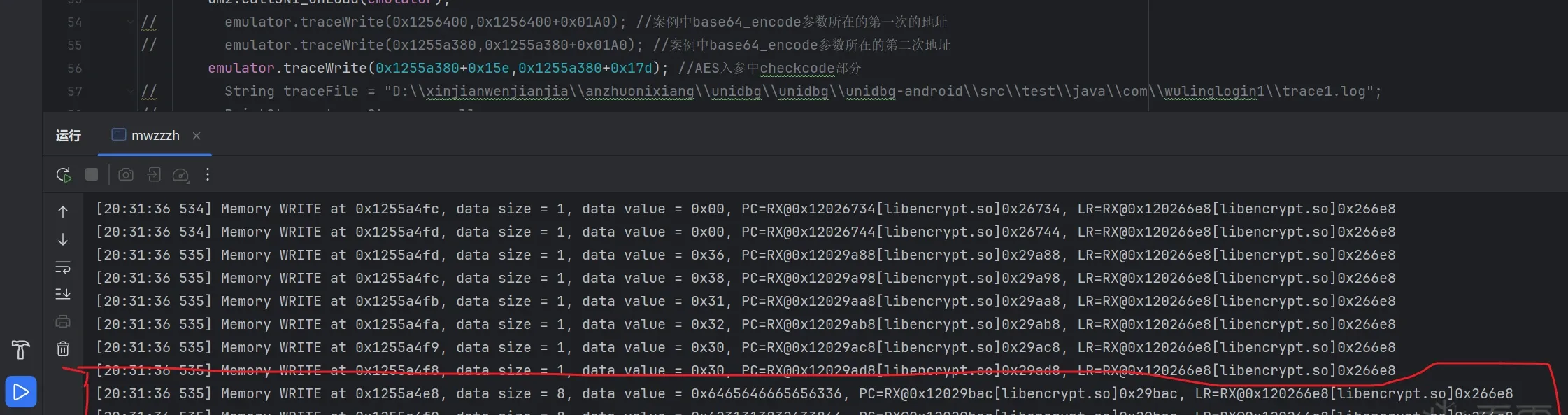 Fig. 37
The write is at .so offset 0x29bac. Jump there in IDA:
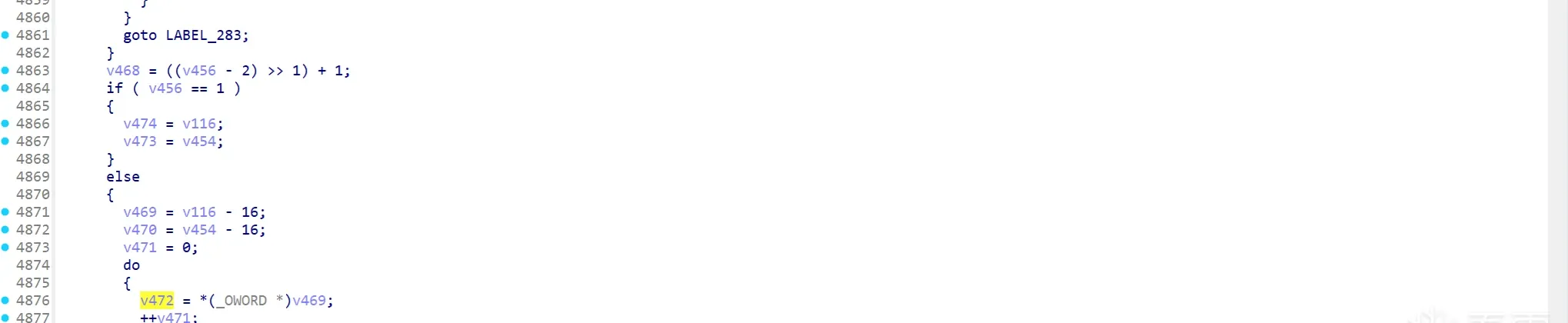 Fig. 38
It writes v472 here. Upward, v472 comes from v469, and v469 from v116:
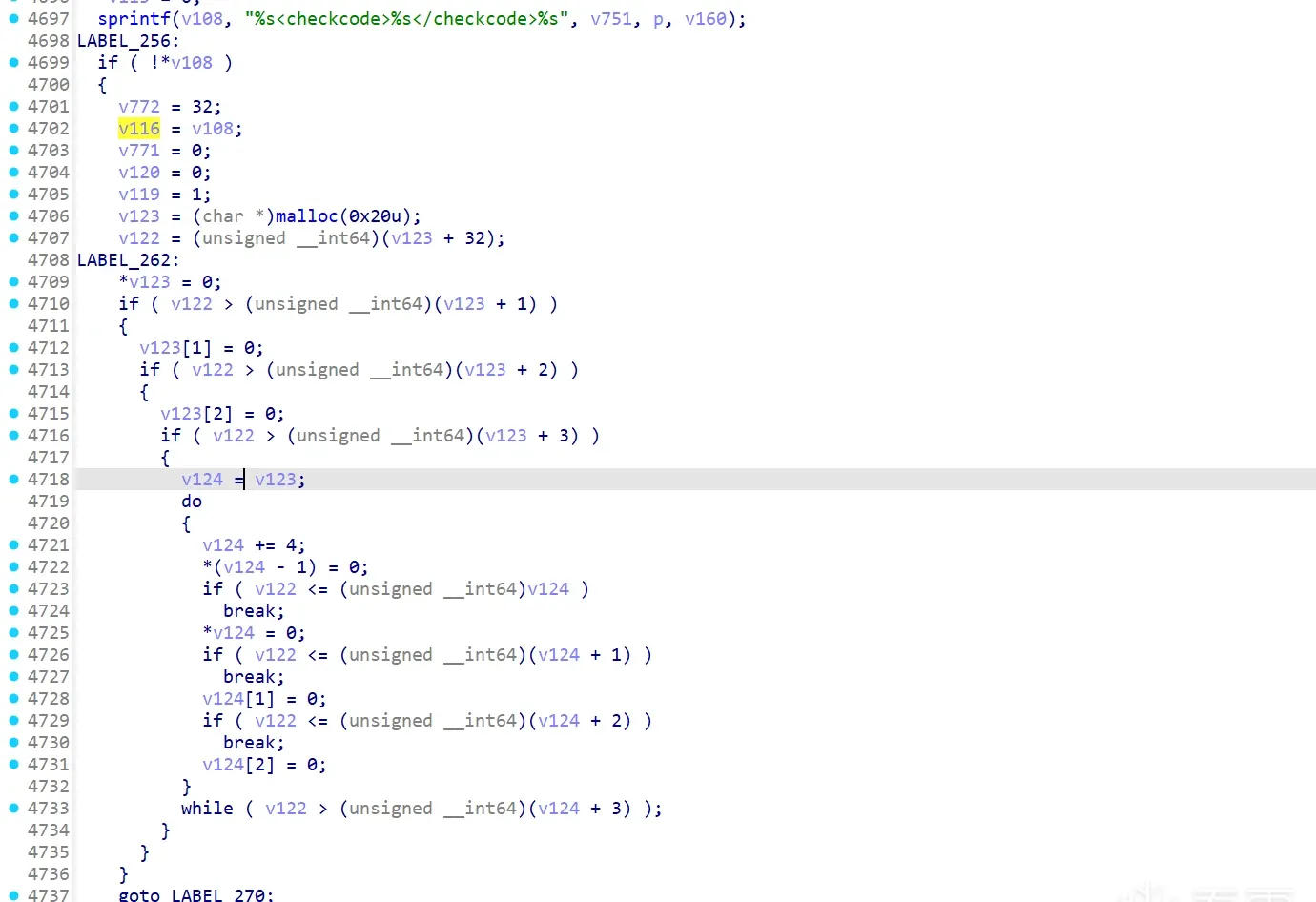 Fig. 39
Upward again, v116 comes from v108, which appears written by a sprintf at line 4697. But there are several sprintf writes into v108 (two more above). Recall the AES input format ...&mod=google&checkcode=:
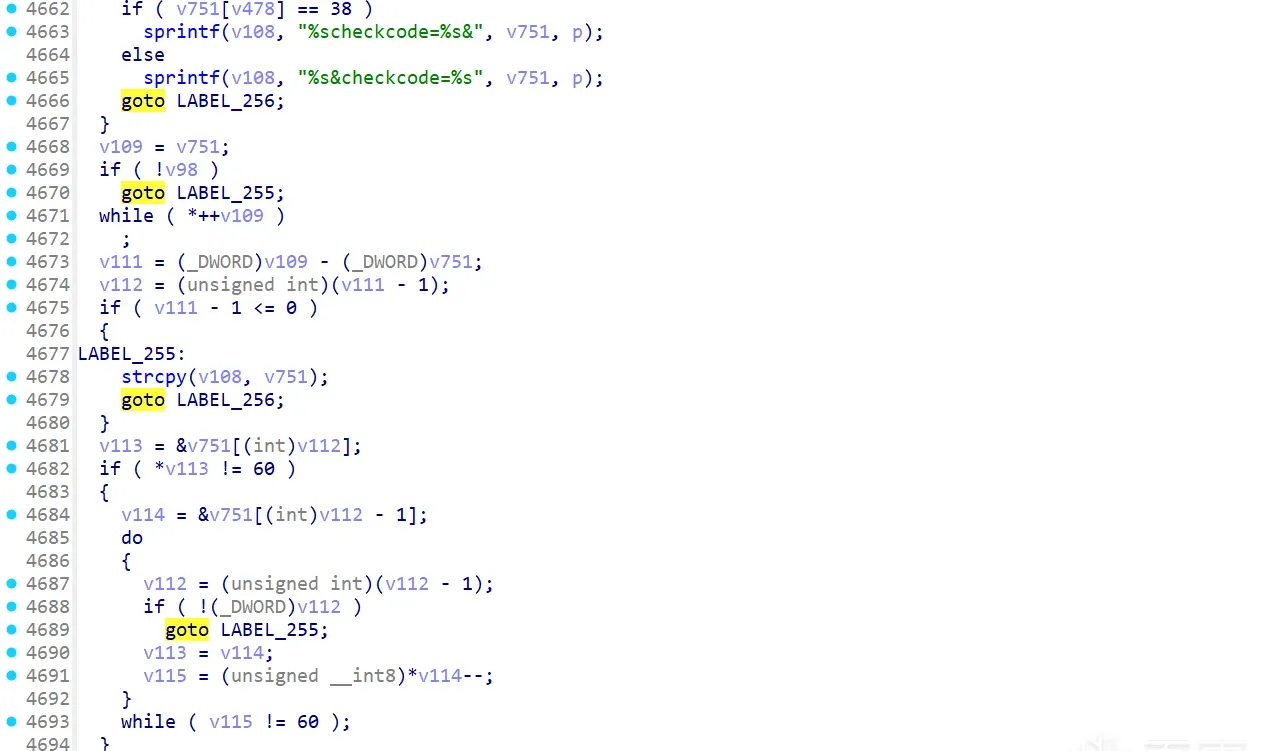 Fig. 40
From that format we can already tell it’s the write at line 4665. (If you didn’t spot it, breakpoint all these sprintfs and see which hits.)
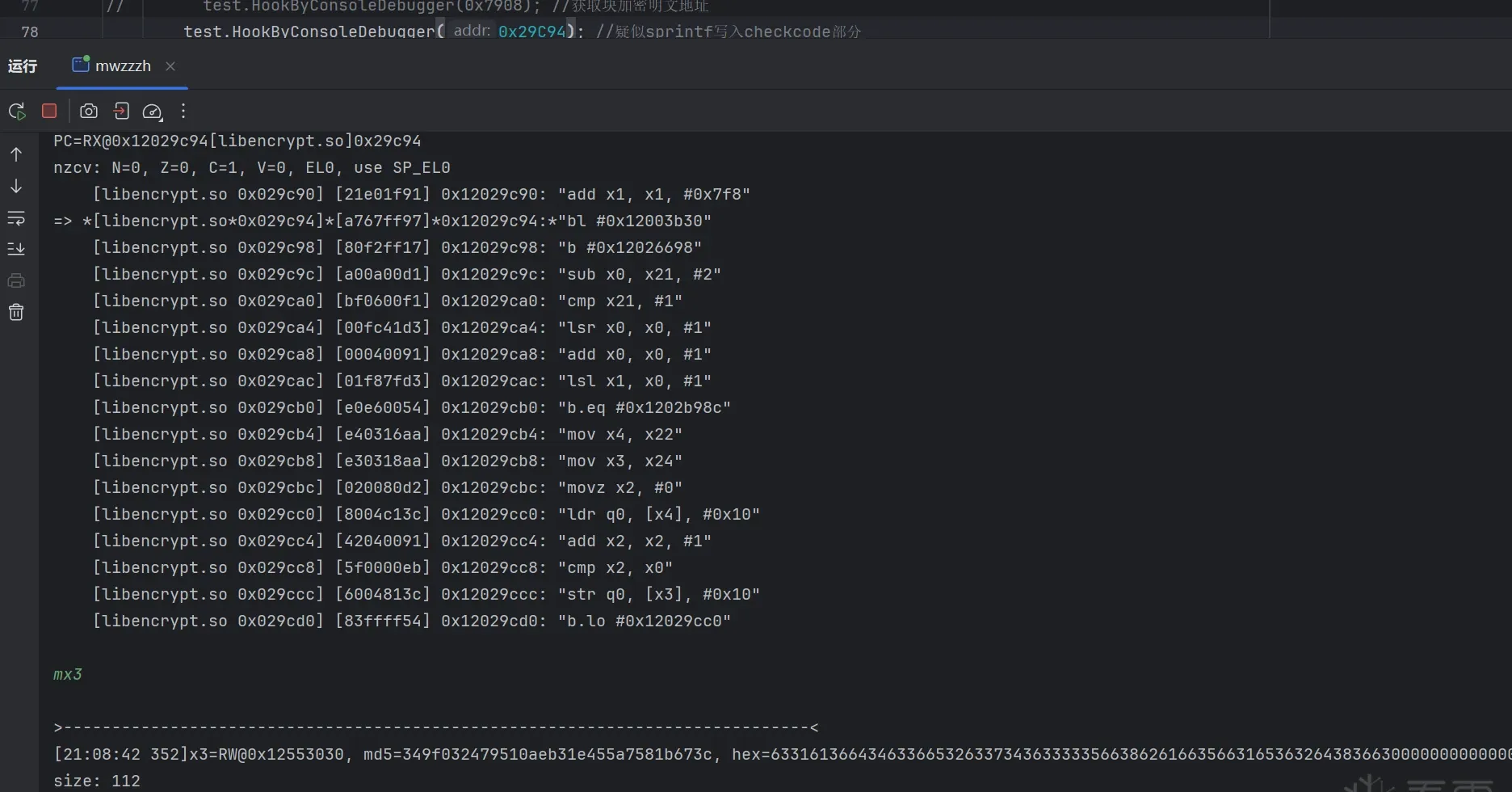 Fig. 41
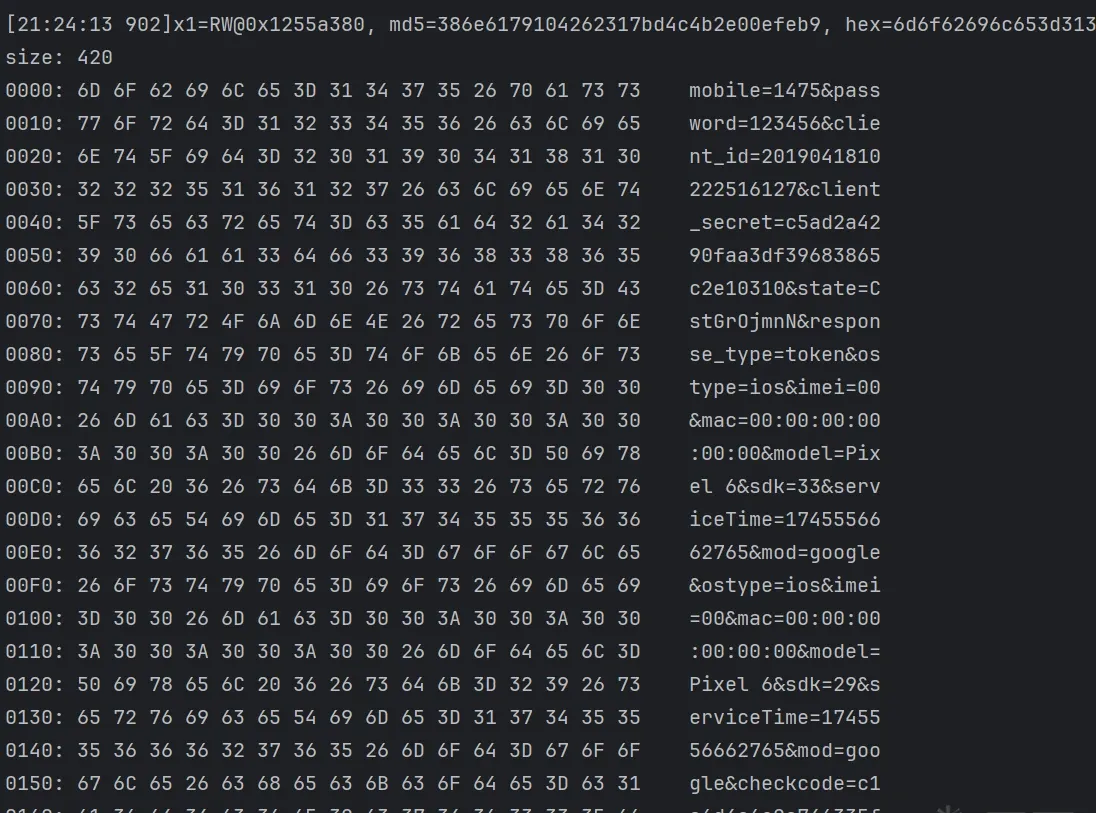 Fig. 42
It breaks here, and x3 (that p) matches the checkcode content in the AES input.
So p is checkcode’s source. Now find p’s assignment:
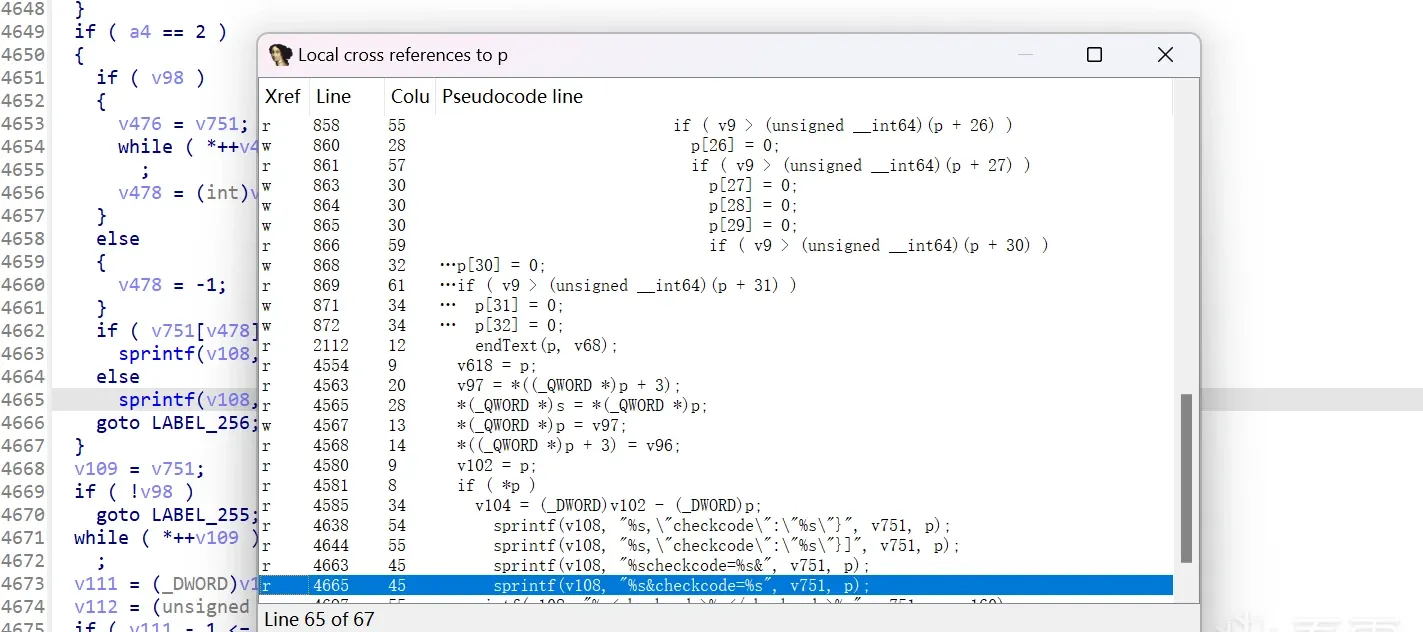 Fig. 43
Press X to see references to p — assigned at line 4567.
But those four lines look like a permutation (not the assignment), which means p has an internal byte-reordering after its encryption. Looking upward there’s an endText function — jump in and breakpoint it:
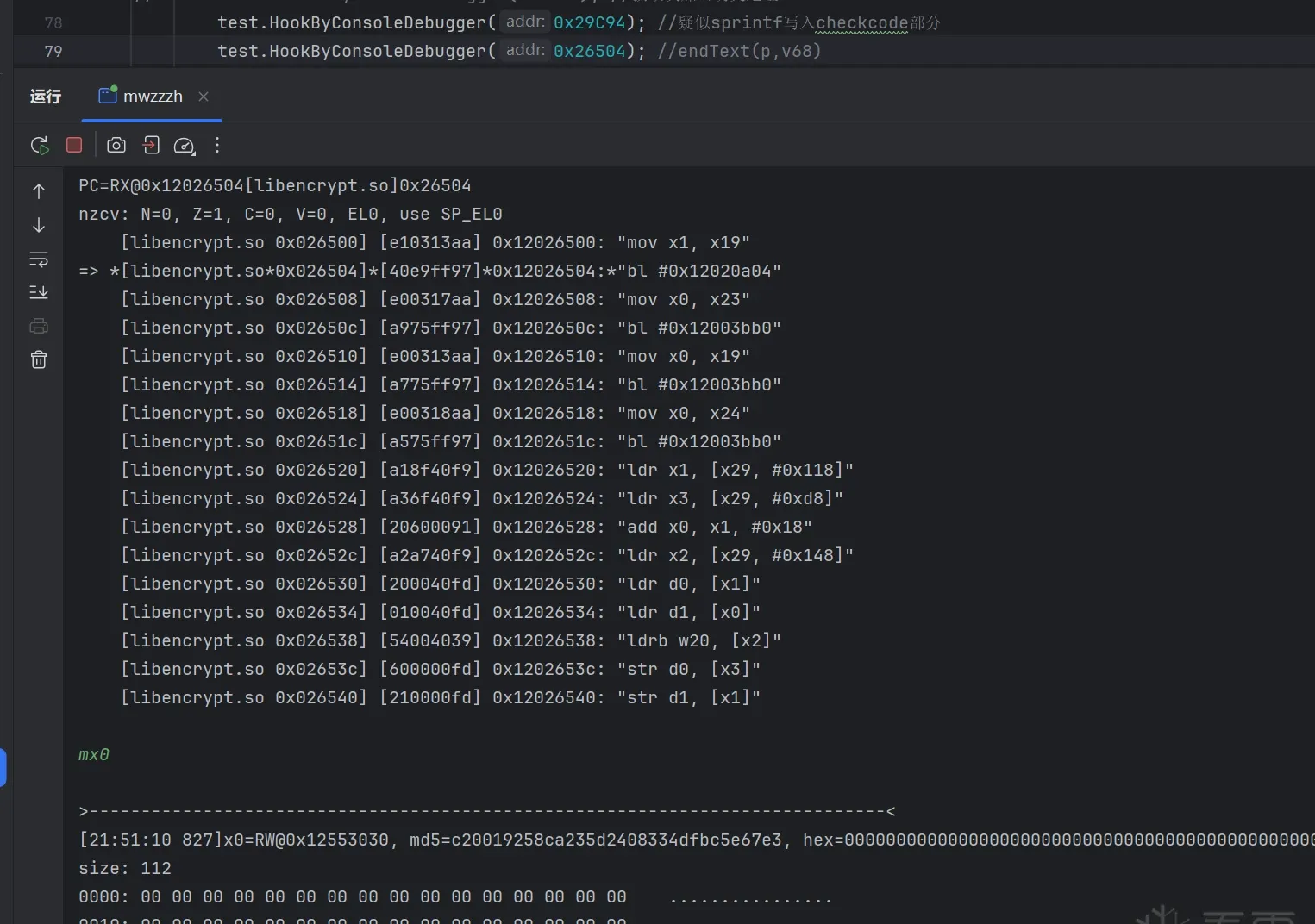 Fig. 44
It breaks here, and before entering, x0 (that p) is empty — confirming p is produced by this function:
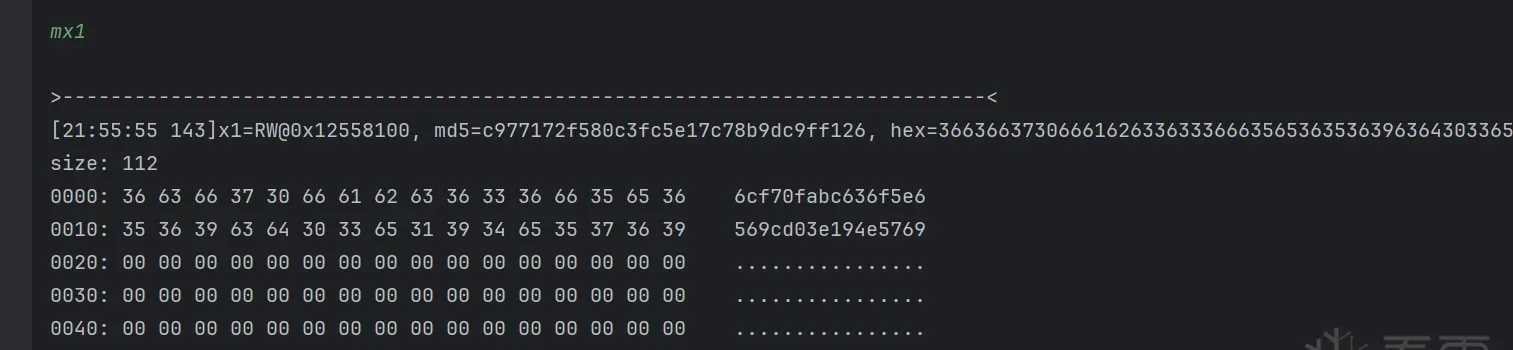 Fig. 45
The second parameter v68’s content is a constant (verified fixed across runs; it’s an MD5 of the package name — you can trace it yourself if interested).
Now enter endText to see the actual logic. Inside: all obfuscation. Where do I start? Don’t panic — press X on the input to find a1 (that p)’s generation logic:
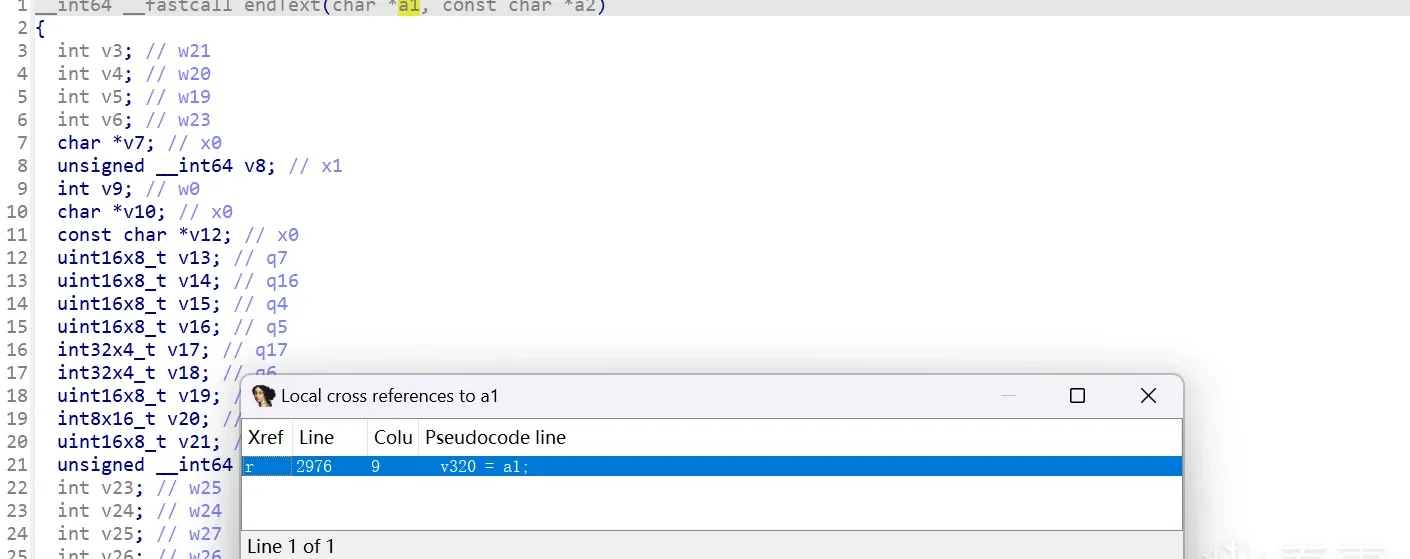 Fig. 46
Finally a1 is assigned to v320 (since a1 is char*, this makes v320 point at a1’s memory — modifying v320 later modifies a1). Let’s look at v320:
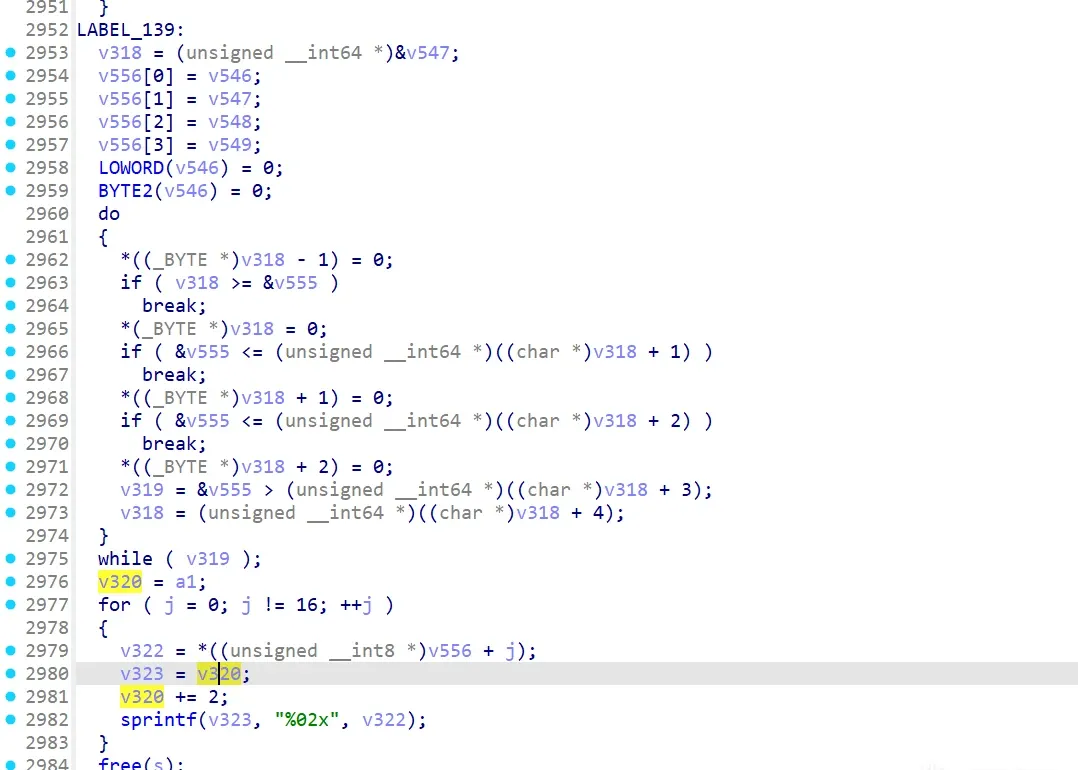 Fig. 47
This looks like the final write, sourced from v556, which comes from v546. Next: v546:
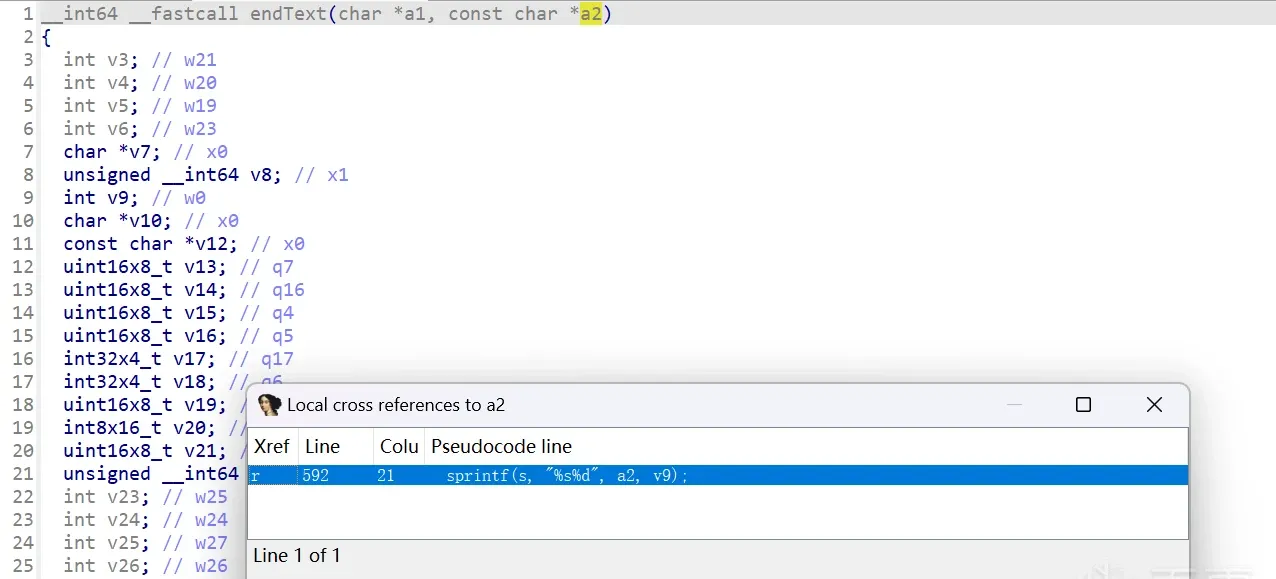 Fig. 48
Press X on v546 and jump — it looks like MD5, but with a lot of fake control flow, hard to read. What’s MD5’s input? Don’t forget the other argument — it can’t be useless. See what’s done to it:
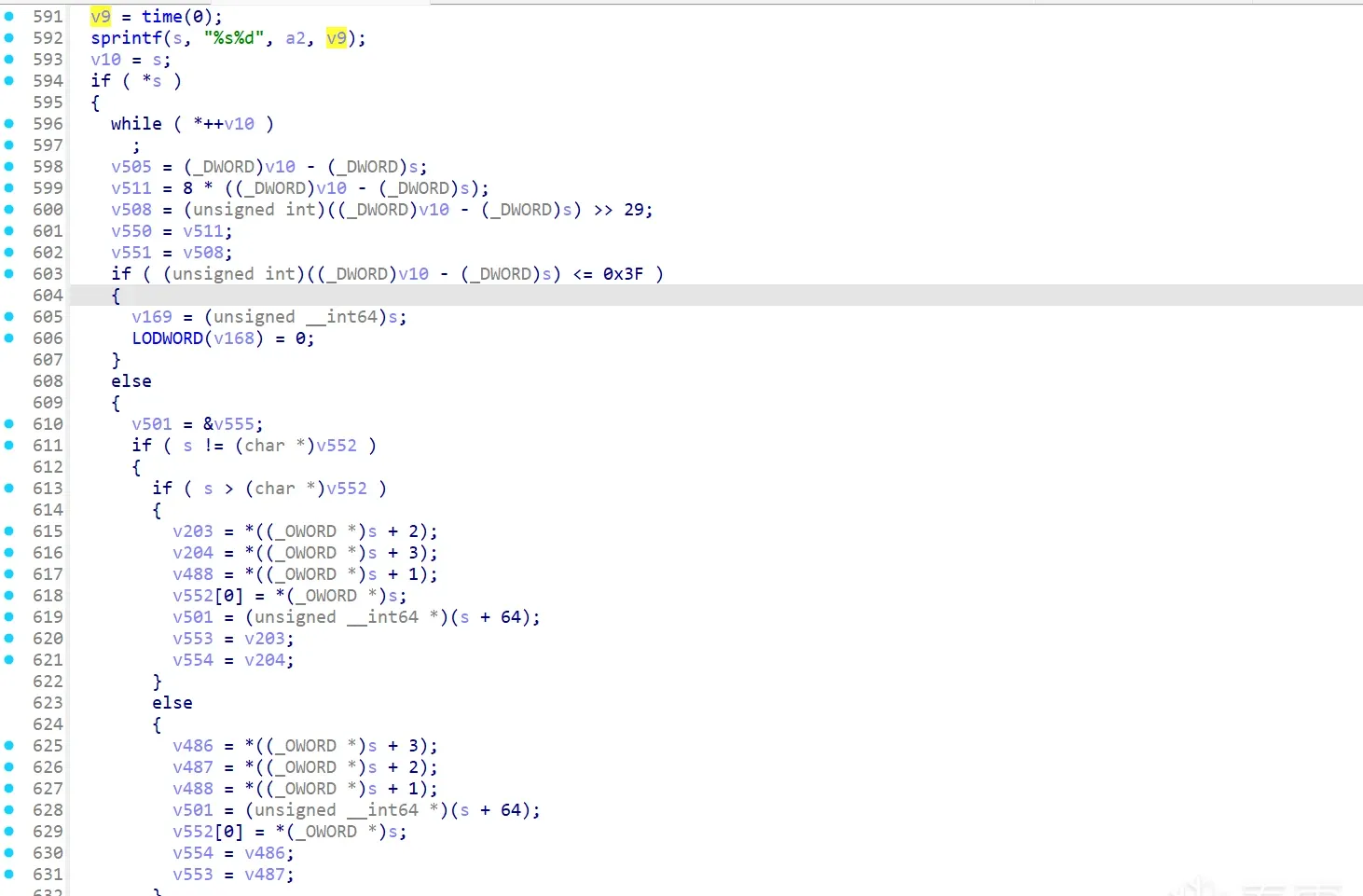 Fig. 49
Press X on a2 — only one reference, jump in:
This writes into s; looking down a bit, it’s MD5 (unknown yet whether modified) over s. Here a2 (a constant) is a string, and v9 is time(0) (a timestamp).
Breakpoint after s is written and inspect its content:
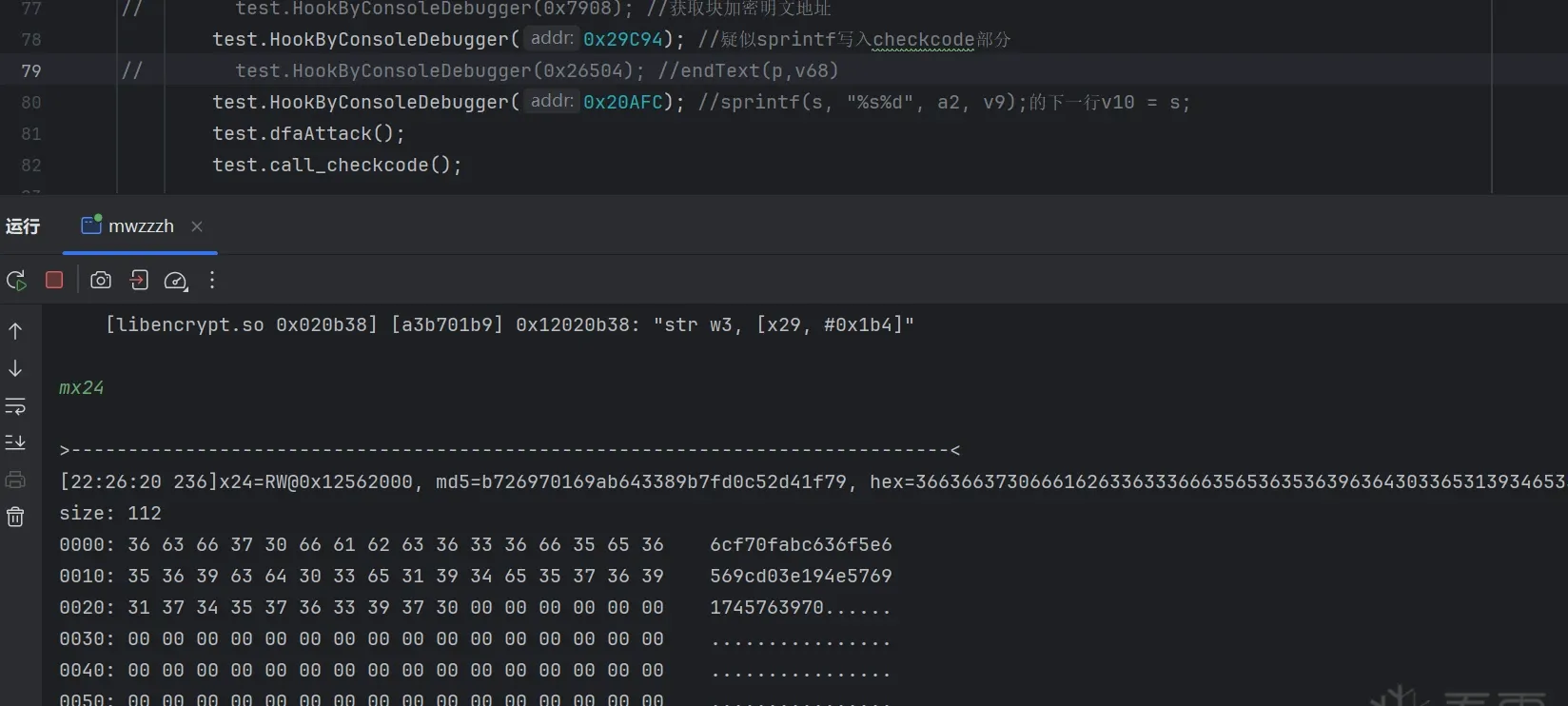 Fig. 50
It’s a constant plus a timestamp. Next verify whether endText’s result equals a standard MD5 of it:
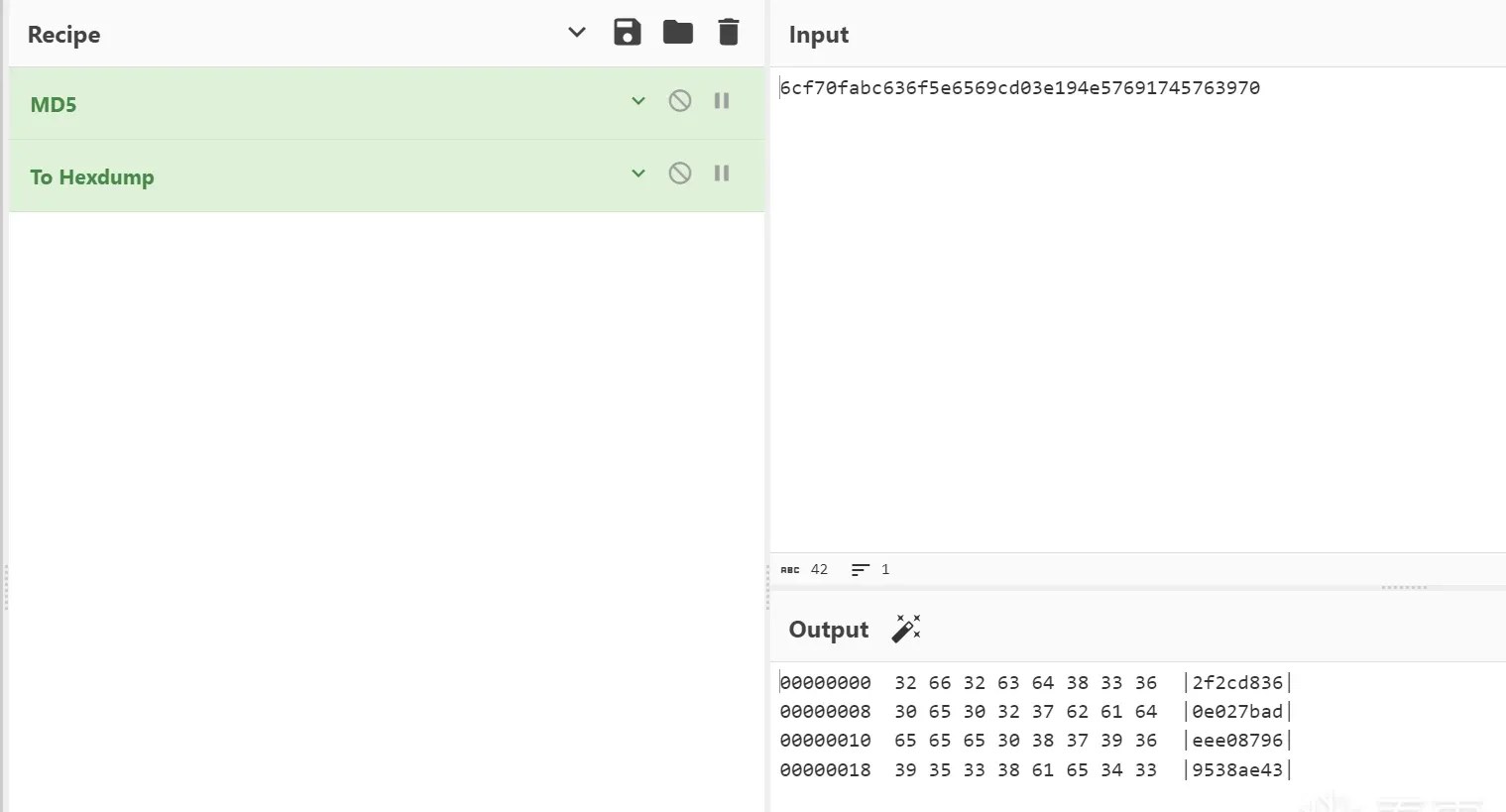 Fig. 51
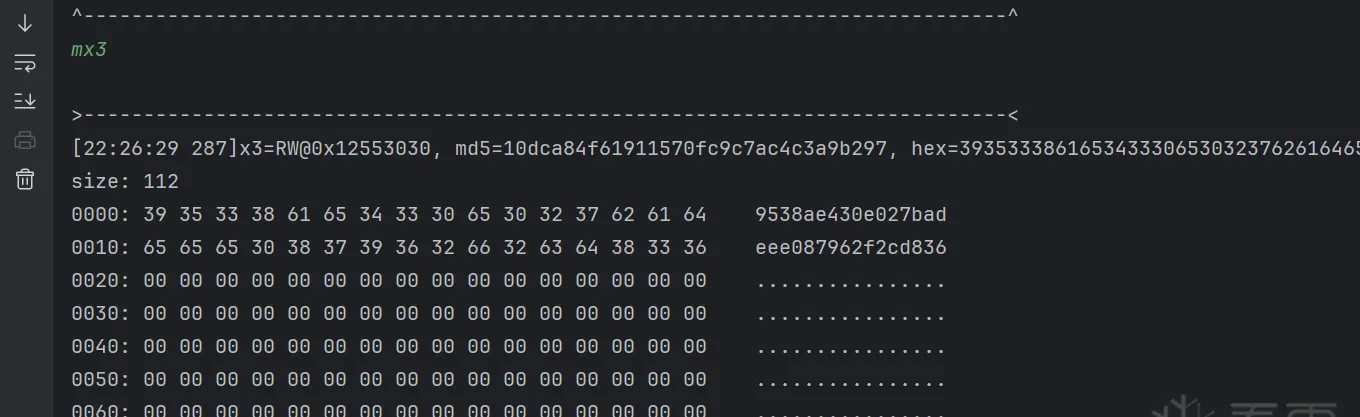 Fig. 52
The online MD5 matches what’s written into checkcode — almost: the byte order differs. Remember the internal p permutation earlier? That’s it.
So checkcode = standard MD5 of ([redacted] + current timestamp), with the byte order adjusted to checkcode = p[12:16] + p[4:12] + p[0:4]. checkcode analysis done.
Final words
This article was written in fits and starts over about three days. I’d rate the case medium difficulty. Hope it helps; corrections welcome.
Colin Xiao — I take on contract reverse-engineering work, and writeups like this are how I show what I can do. If you need help with anything in this space — including but not limited to the areas I cover above — I’m available. No project is too big or too small — if it’s reverse engineering and I can do it, I’ll take it. DM me on X (@colinxiao_lab) or Telegram (@ColinXiao666).
Get in touch