Cataloging the Xposed Detection Surface: Fingerprints Every Detector Looks For
About the author. I’m Colin Xiao — an independent reverse engineer, mostly working solo on contract jobs. I dig into compiled code of every kind, including but not limited to: Android and iOS apps, x86/x64/ARM native binaries, packers and obfuscators, DRM and license checks, network protocols and APIs, crypto and signature algorithms, malware, game binaries, and embedded/IoT firmware. I also handle large-scale data collection and vulnerability research. If you have any project in mind, I’d be glad to take it on — whatever it is, as long as it’s within my wheelhouse. Just reach out. You can reach me on X at @colinxiao_lab or on Telegram at https://t.me/ColinXiao666.
This research is published for educational and defensive purposes. The target sample is anonymized throughout.
Cataloging the Xposed Detection Surface: Fingerprints Every Detector Looks For
I set out to build a customized copy of the Xposed framework — one where the obvious fingerprints are scrubbed. But you can’t remove what you haven’t enumerated. Before touching a single string, the right first step is a complete inventory of everything a detector can see. That inventory is what this post is about. It’s the first of a three-part series:
- Cataloging the fingerprints (this post)
- Compiling the framework from source
- Changing the fingerprints
I was inspired by an earlier “custom Xposed” writeup that turned out to be almost detail-free — hard to reproduce, no explanation of how the pieces fit together. So I’m doing the opposite: a step-by-step with enough detail to actually follow.
Environment: Xposed v89
From the official release channel, the sdk27 (Android 8.1) build is still beta:
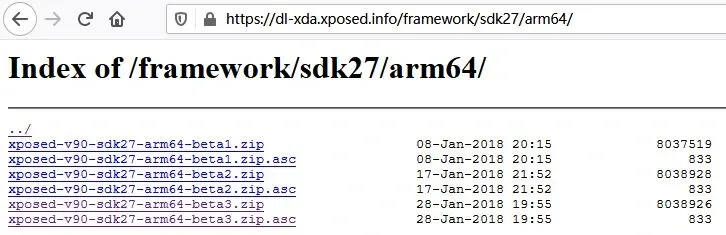
The latest stable is sdk25 (Android 7.1), from 2017:
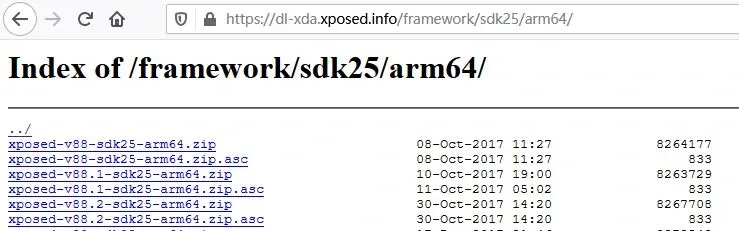
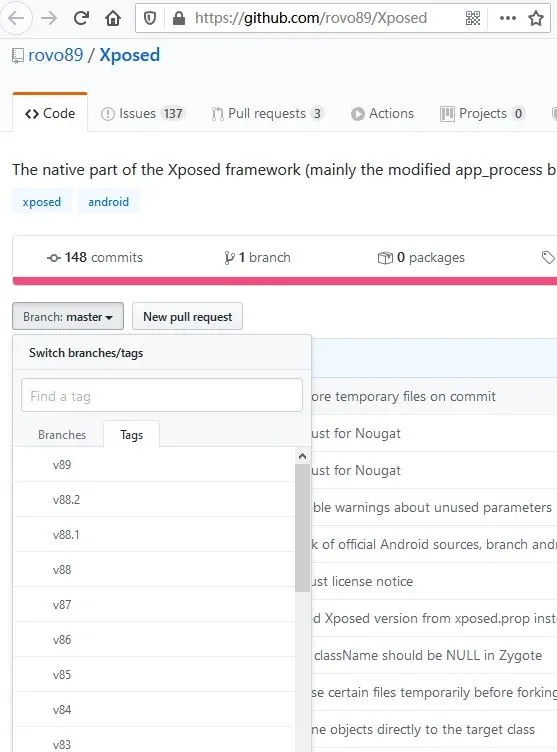
Most importantly, the open-source release on GitHub only goes up to v89 — Android 7.1 — not the v90 Android 8 series.
Environment: Google factory image 7.1.2
Xposed won’t be updated further, so I built against android-7.1.2_r8.
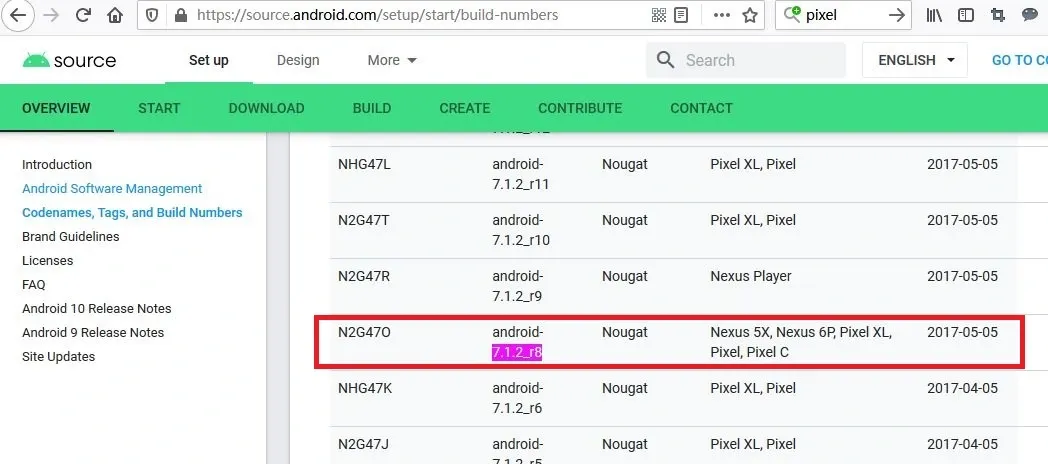
For fingerprint collection I only need a device, so I grabbed the stock Google image for a Pixel (sailfish):
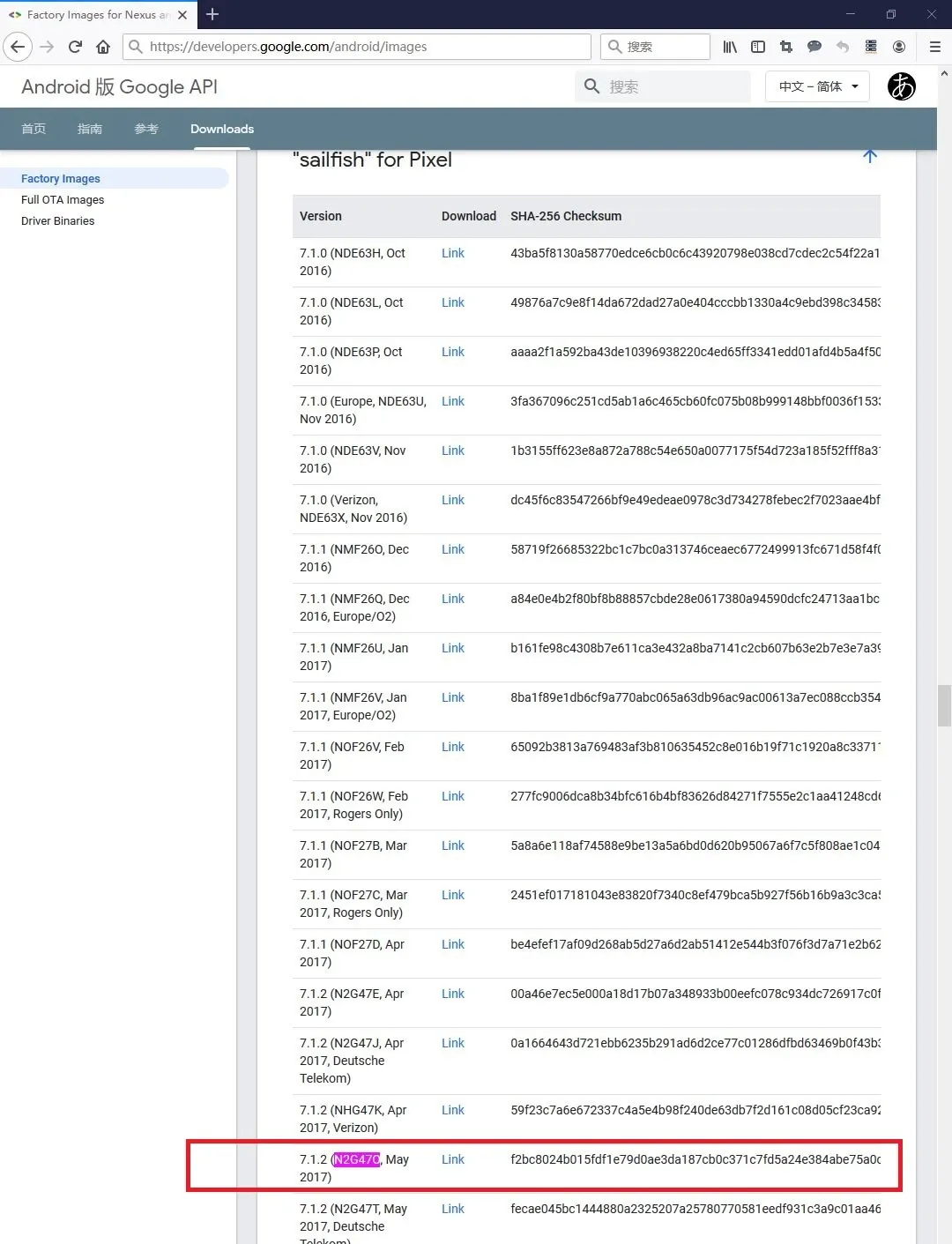
Copy the link from the page and wget it:
# wget https://dl.google.com/dl/android/aosp/sailfish-n2g47o-factory-f2bc8024.zip
--2020-03-29 10:18:25--  https://dl.google.com/dl/android/aosp/sailfish-n2g47o-factory-f2bc8024.zip
Resolving dl.google.com (dl.google.com)... 203.208.43.101, 203.208.43.102, 203.208.43.104, ...
Connecting to dl.google.com (dl.google.com)|203.208.43.101|:443... connected.
HTTP request sent, awaiting response... 200 OK
Length: 1914505658 (1.8G) [application/zip]
Saving to: 'sailfish-n2g47o-factory-f2bc8024.zip'

sailfish-n2g47o-factory-f2bc 100%[============================================>]   1.78G  10.5MB/s    in 3m 25s

2020-03-29 10:21:51 (8.92 MB/s) - 'sailfish-n2g47o-factory-f2bc8024.zip' saved [1914505658/1914505658]
Unzip it:
# unzip sailfish-n2g47o-factory-f2bc8024.zip
Archive:  sailfish-n2g47o-factory-f2bc8024.zip
   creating: sailfish-n2g47o/
  inflating: sailfish-n2g47o/radio-sailfish-8996-012901-1702171013.img
  inflating: sailfish-n2g47o/bootloader-sailfish-8996-012001-1703151359.img
  inflating: sailfish-n2g47o/flash-all.bat
  inflating: sailfish-n2g47o/flash-all.sh
 extracting: sailfish-n2g47o/image-sailfish-n2g47o.zip
  inflating: sailfish-n2g47o/flash-base.sh
If fastboot isn’t installed, grab the platform tools:
# wget https://dl.google.com/android/repository/platform-tools-latest-linux.zip
--2020-03-29 10:24:28--  https://dl.google.com/android/repository/platform-tools-latest-linux.zip
Resolving dl.google.com (dl.google.com)... 203.208.50.167, 203.208.50.164, 203.208.50.174, ...
Connecting to dl.google.com (dl.google.com)|203.208.50.167|:443... connected.
HTTP request sent, awaiting response... 302 Found
Location: https://dl.google.com/android/repository/platform-tools_r29.0.6-linux.zip [following]
--2020-03-29 10:24:29--  https://dl.google.com/android/repository/platform-tools_r29.0.6-linux.zip
Reusing existing connection to dl.google.com:443.
HTTP request sent, awaiting response... 200 OK
Length: 8254604 (7.9M) [application/zip]
Saving to: 'platform-tools-latest-linux.zip.1'

platform-tools-latest-linux. 100%[============================================>]   7.87M  9.76MB/s    in 0.8s

2020-03-29 10:24:30 (9.76 MB/s) - 'platform-tools-latest-linux.zip.1' saved [8254604/8254604]

FINISHED --2020-03-29 10:24:30--
Total wall clock time: 2.3s
Downloaded: 1 files, 7.9M in 0.8s (9.76 MB/s)
Unzip and add fastboot to your PATH:
# unzip platform-tools-latest-linux.zip
inflating: platform-tools/systrace/catapult/systrace/systrace/__init__.py
inflating: platform-tools/systrace/catapult/systrace/systrace/monitor_unittest.py
inflating: platform-tools/systrace/catapult/systrace/systrace/LICENSE
inflating: platform-tools/systrace/catapult/systrace/systrace/tracing_controller.py
inflating: platform-tools/systrace/catapult/systrace/systrace/update_systrace_trace_viewer.py
inflating: platform-tools/systrace/catapult/systrace/systrace/prefix.html
creating: platform-tools/systrace/catapult/systrace/systrace/tracing_agents/
inflating: platform-tools/systrace/catapult/systrace/systrace/tracing_agents/walt_agent_unittest.py
inflating: platform-tools/systrace/catapult/systrace/systrace/tracing_agents/__init__.py
...
...
# pwd   (print the current path)
# export PATH=$PATH:/<current-path>/platform-tools/
Verify fastboot is available:
# fastboot -h
usage: fastboot [OPTION...] COMMAND...

flashing:
 update ZIP                 Flash all partitions from an update.zip package.
 flashall                   Flash all partitions from $ANDROID_PRODUCT_OUT.
                            On A/B devices, flashed slot is set as active.
                            Secondary images may be flashed to inactive slot.
 flash PARTITION [FILENAME] Flash given partition, using the image from
                            $ANDROID_PRODUCT_OUT if no filename is given.

basics:
 devices [-l]               List devices in bootloader (-l: with device paths).
 getvar NAME                Display given bootloader variable.
 reboot [bootloader]        Reboot device.

locking/unlocking:
 flashing lock|unlock       Lock/unlock partitions for flashing
 flashing lock_critical|unlock_critical
                            Lock/unlock 'critical' bootloader partitions.
 flashing get_unlock_ability
                            Check whether unlocking is allowed (1) or not(0).
Put the phone in bootloader mode. For the Pixel (sailfish): fully power off, wait a minute, then hold Volume Down while powering on. The device lands in the bootloader:
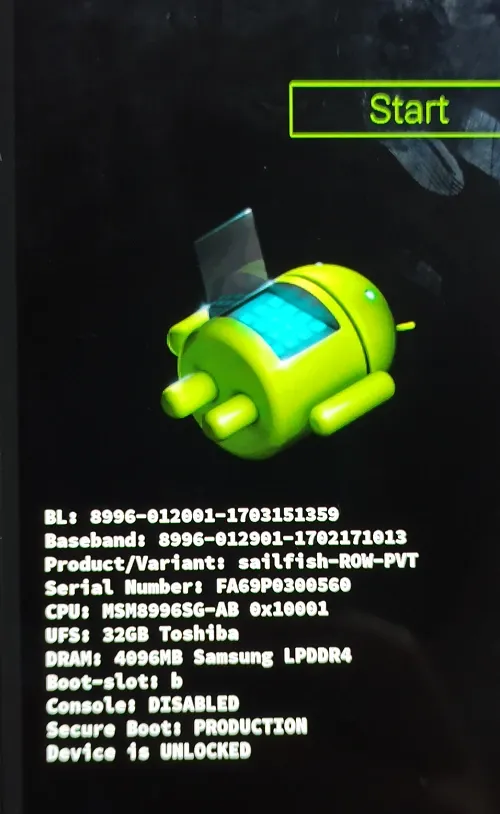
Connect USB and confirm fastboot sees it (if you’re inside a VM, make sure the USB port is passed through to the guest):
# fastboot devices
FA69P0300560    fastboot
Then enter the extracted sailfish folder and run the flash script:
# cd sailfish-n2g47o/
# ./flash-all.sh
Sending 'bootloader_b' (32380 KB)                  OKAY [  3.792s]
Writing 'bootloader_b'                             (bootloader) Valid bootloader version.
(bootloader) Flashing active slot "_b"
(bootloader) Flashing active slot "_b"
OKAY [ 12.260s]
Finished. Total time: 16.250s
Rebooting into bootloader                          OKAY [  0.048s]
Finished. Total time: 0.149s
< waiting for any device >
Sending 'radio_b' (57240 KB)                       OKAY [  6.854s]
Writing 'radio_b'                                  OKAY [  0.951s]
Finished. Total time: 7.991s
Rebooting into bootloader                          OKAY [  0.045s]
Finished. Total time: 0.096s
--------------------------------------------
Bootloader Version...: 8996-012001-1703151359
Baseband Version.....: 8996-012901-1702171013
Serial Number........: FA69P0306926
--------------------------------------------
extracting android-info.txt (0 MB) to RAM...
Checking 'product'                                 OKAY [  0.048s]
Checking 'version-bootloader'                      OKAY [  0.050s]
Checking 'version-baseband'                        OKAY [  0.050s]
Setting current slot to 'b'                        OKAY [  0.405s]
extracting boot.img (24 MB) to disk... took 0.353s
archive does not contain 'boot.sig'
Sending 'boot_b' (24653 KB)                        OKAY [  3.192s]
Writing 'boot_b'                                   OKAY [  0.605s]
archive does not contain 'system.sig'
Sending sparse 'system_b' 1/4 (521196 KB)          OKAY [ 64.041s]
Writing 'system_b'                                 OKAY [  7.893s]
Sending sparse 'system_b' 2/4 (524080 KB)          OKAY [ 66.481s]
Writing 'system_b'                                 OKAY [ 15.006s]
Sending sparse 'system_b' 3/4 (496387 KB)          OKAY [ 60.688s]
Writing 'system_b'                                 OKAY [  7.644s]
Sending sparse 'system_b' 4/4 (32756 KB)           OKAY [  4.007s]
Writing 'system_b'                                 OKAY [  0.996s]
archive does not contain 'system_ext.img'
extracting system_other.img (1641 MB) to disk... took 30.917s
archive does not contain 'system.sig'
Sending sparse 'system_a' 1/4 (520579 KB)          OKAY [ 64.744s]
Writing 'system_a'                                 OKAY [  5.791s]
Sending sparse 'system_a' 2/4 (521193 KB)          OKAY [ 63.390s]
Writing 'system_a'                                 OKAY [  6.042s]
Sending sparse 'system_a' 3/4 (510220 KB)          OKAY [ 61.388s]
Writing 'system_a'                                 OKAY [  5.191s]
Sending sparse 'system_a' 4/4 (128745 KB)          OKAY [ 15.756s]
Writing 'system_a'                                 OKAY [  1.953s]
extracting vendor.img (236 MB) to disk... took 4.279s
archive does not contain 'vendor.sig'
Sending 'vendor_b' (242102 KB)                     OKAY [ 29.721s]
Writing 'vendor_b'                                 OKAY [  7.801s]
archive does not contain 'vendor_other.img'
Erasing 'userdata'                                 OKAY [  6.061s]
mke2fs 1.45.4 (23-Sep-2019)
Creating filesystem with 6509568 4k blocks and 1630208 inodes
Filesystem UUID: 4b251af0-28e0-479e-b726-813ed8a0ed0c
Superblock backups stored on blocks:
        32768, 98304, 163840, 229376, 294912, 819200, 884736, 1605632, 2654208,
        4096000

Allocating group tables: done
Writing inode tables: done
Creating journal (32768 blocks): done
Writing superblocks and filesystem accounting information: done

Sending 'userdata' (4272 KB)                       OKAY [  0.572s]
Writing 'userdata'                                 OKAY [  0.111s]
Rebooting                                          OKAY [  0.050s]
Finished. Total time: 567.899s
The finished marker appears and the phone reboots into the system.
Environment: root with SuperSU
Magisk and Xposed conflict — that’s why the systemless Xposed build exists at all — so choosing 7.1.2 pays off: the old-school SuperSU still works here.
SuperSU’s official downloads are gone, so I used a mirror: SR3-SuperSU-v2.82-SR3-20170813133244.zip, flashed through TWRP (twrp-3.2.1-0-sailfish.img).
- Boot the phone into bootloader as above.
- Load TWRP with fastboot:
# fastboot boot twrp-3.2.1-0-sailfish.img
Sending 'boot.img' (30948 KB)                      OKAY [  3.981s]
Booting                                            OKAY [  1.005s]
Finished. Total time: 5.160s- Once TWRP is up, push the SuperSU zip to
/sdcard/:
# adb push SR3-SuperSU-v2.82-SR3-20170813133244.zip /sdcard/
* daemon not running; starting now at tcp:5037
* daemon started successfully
SR3-SuperSU-v2.82-SR3-20170813133244.zip: 1 file pushed, 0 skipped. 21.8 MB/s (6918737 bytes in 0.303s)- Tap Install, browse to
/sdcard/, select the zip, and drag the slider to flash. Then Reboot System → Do Not Install.
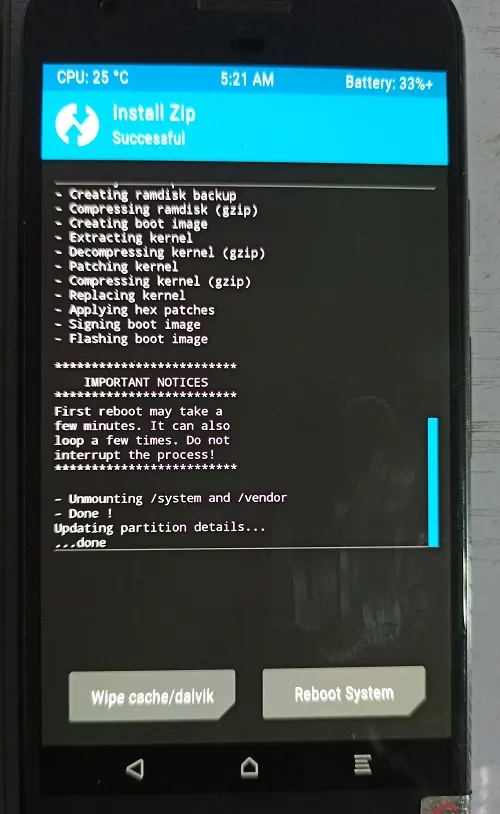
Environment: install Xposed and activate a module
Install the latest xposed.installer_3.1.5 APK, open it, and install the framework base package:
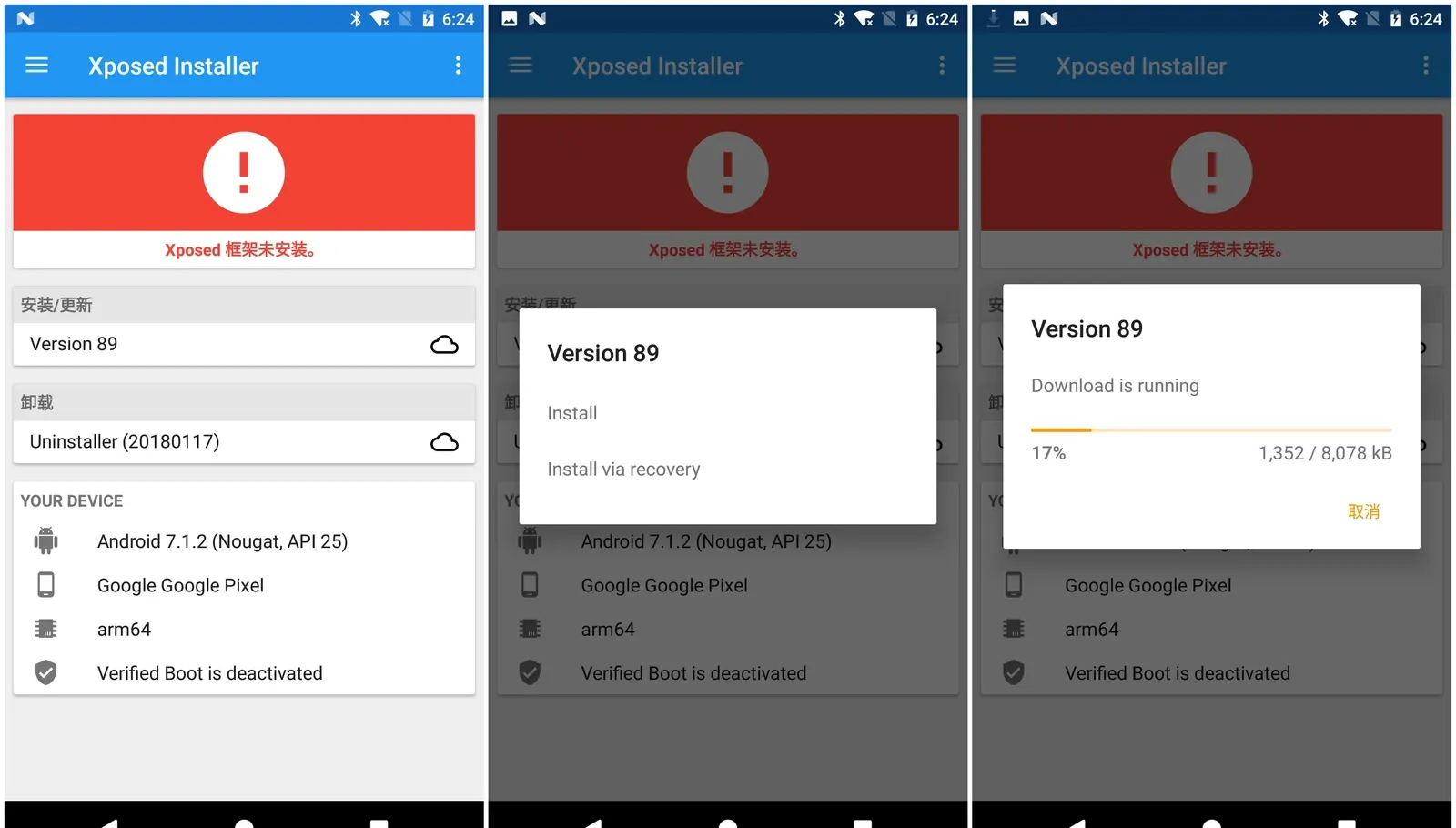
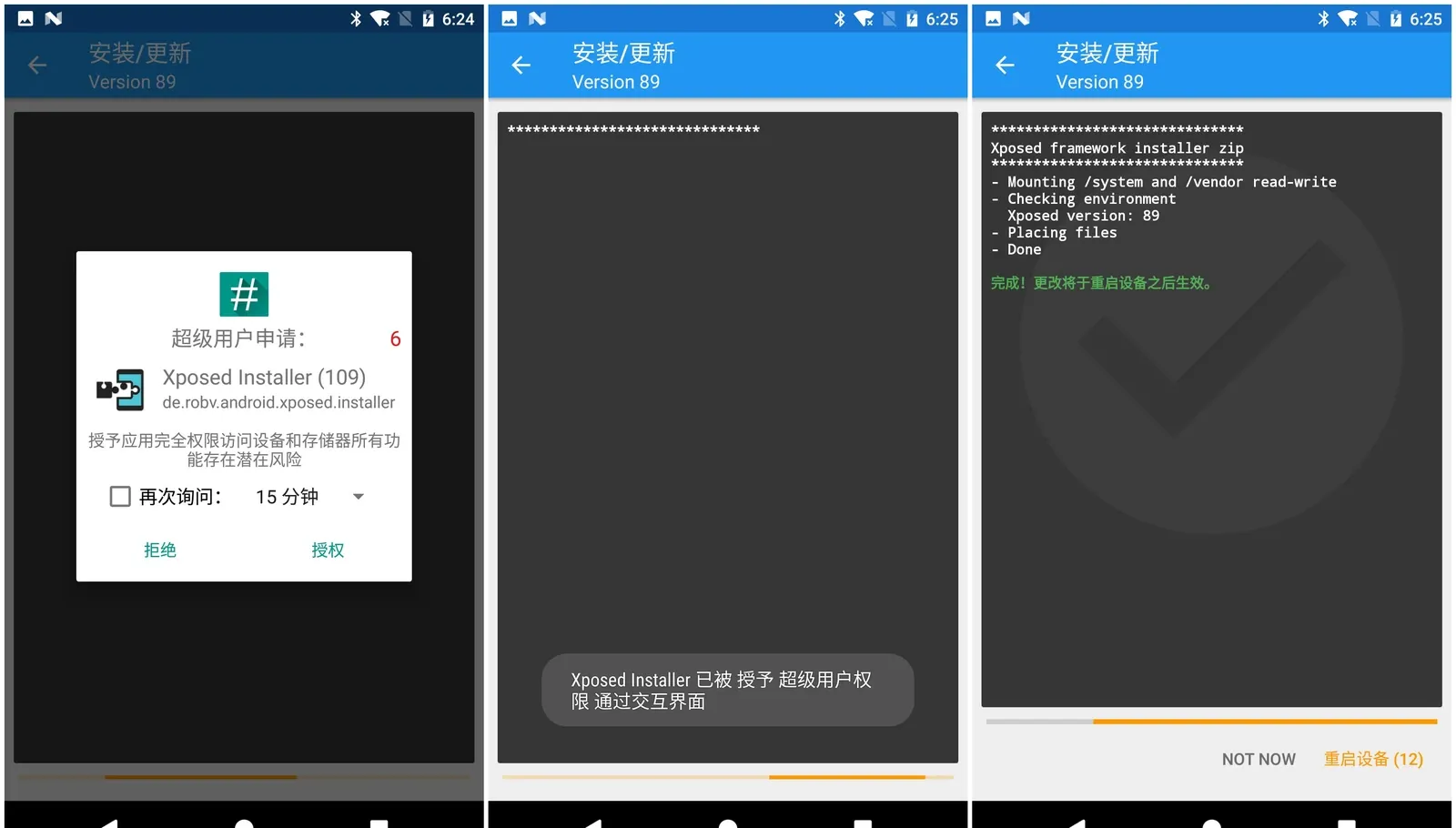
After install and reboot, it should say “Xposed framework version 89 is active” with a green check (not red or yellow). Then install and activate GravityBox[N] from the Installer’s download tab and make the status-bar clock turn green (it was white):
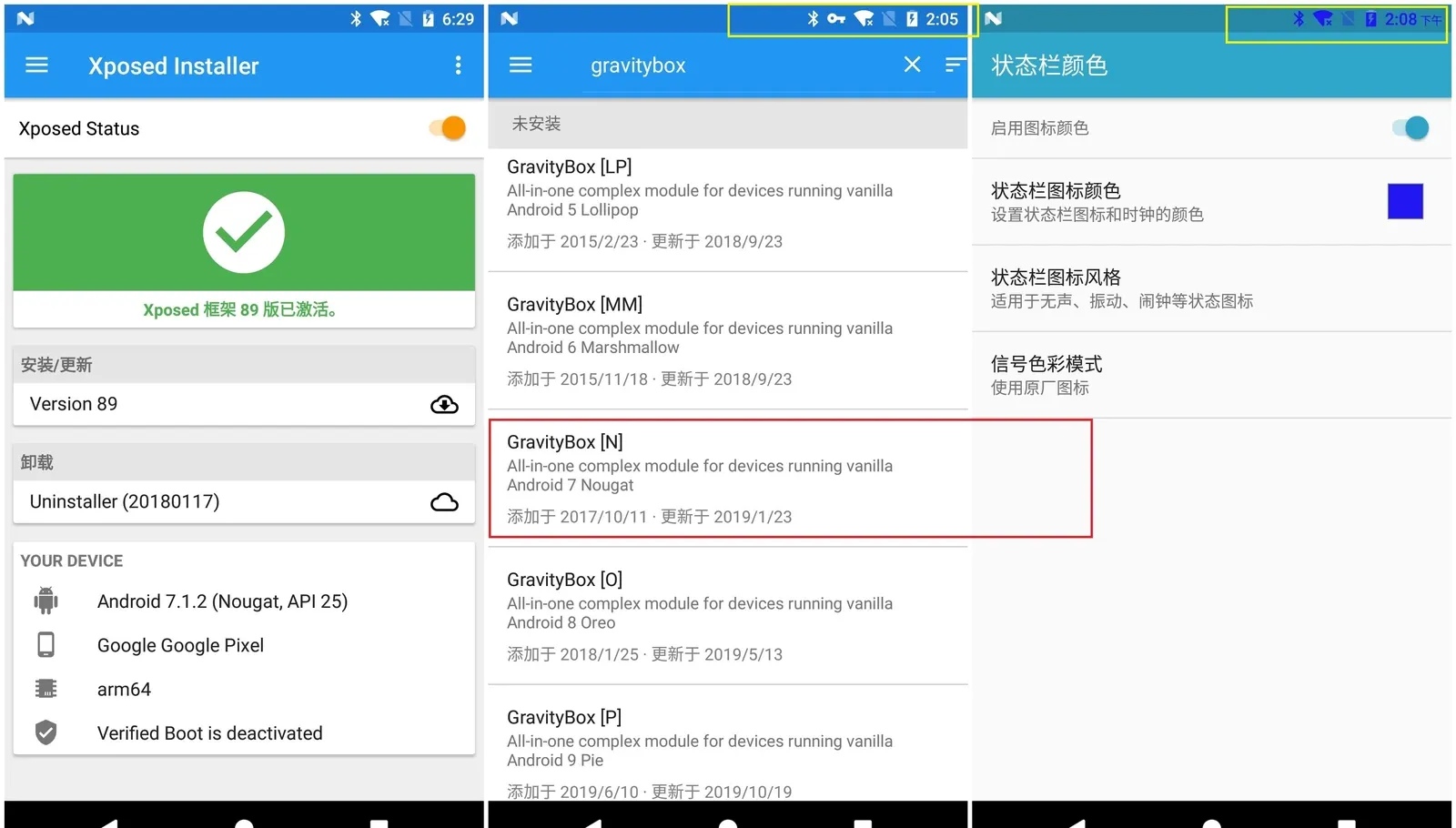
Framework and module both working.
Fingerprint 1: what’s inside the base package
Pull the base package — xposed-v89-sdk25-arm64.zip, served at https://dl-xda.xposed.info/framework/sdk25/arm64/xposed-v89-sdk25-arm64.zip — and look inside:
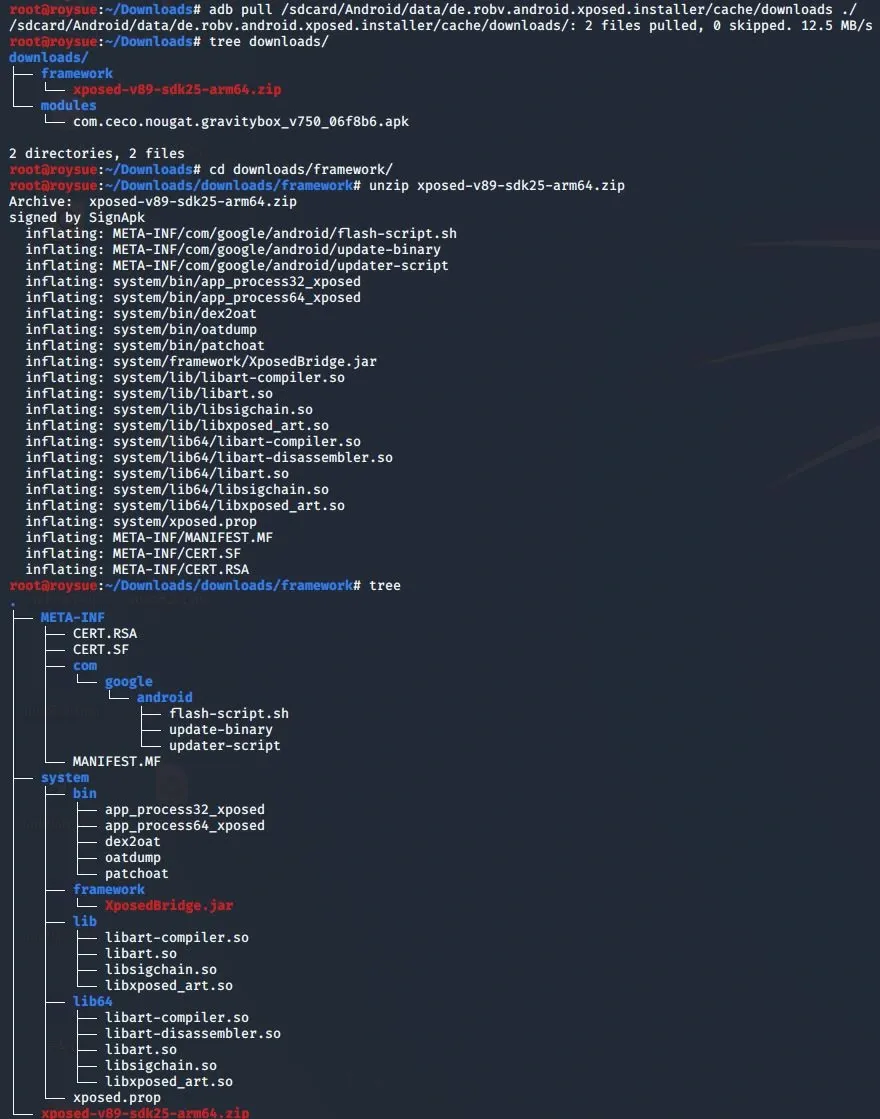
The interesting part is what the installer script actually does:
##########################################################################################
#
# Xposed framework installer zip.
#
# This script installs the Xposed framework files to the system partition.
# The Xposed Installer app is needed as well to manage the installed modules.
#
##########################################################################################

...

##########################################################################################

echo "******************************"
echo "Xposed framework installer zip"
echo "******************************"

if [ ! -f "system/xposed.prop" ]; then
  echo "! Failed: Extracted file system/xposed.prop not found!"
  exit 1
fi

# Mount /system and /vendor read-write
echo "- Mounting /system and /vendor read-write"
mount /system >/dev/null 2>&1
mount /vendor >/dev/null 2>&1
mount -o remount,rw /system
mount -o remount,rw /vendor >/dev/null 2>&1
if [ ! -f '/system/build.prop' ]; then
  echo "! Failed: /system could not be mounted!"
  exit 1
fi

# Check the environment and set variables
echo "- Checking environment"
API=$(grep_prop ro.build.version.sdk)
APINAME=$(android_version $API)
ABI=$(grep_prop ro.product.cpu.abi | cut -c-3)
ABI2=$(grep_prop ro.product.cpu.abi2 | cut -c-3)
ABILONG=$(grep_prop ro.product.cpu.abi)
XVERSION=$(grep_prop version system/xposed.prop)
XARCH=$(grep_prop arch system/xposed.prop)
XMINSDK=$(grep_prop minsdk system/xposed.prop)
XMAXSDK=$(grep_prop maxsdk system/xposed.prop)

XEXPECTEDSDK=$(android_version $XMINSDK)
if [ "$XMINSDK" != "$XMAXSDK" ]; then
  XEXPECTEDSDK=$XEXPECTEDSDK' - '$(android_version $XMAXSDK)
fi

ARCH=arm
IS64BIT=
if [ "$ABI" = "x86" ]; then ARCH=x86; fi;
if [ "$ABI2" = "x86" ]; then ARCH=x86; fi;
if [ "$API" -ge "21" ]; then
  if [ "$ABILONG" = "arm64-v8a" ]; then ARCH=arm64; IS64BIT=1; fi;
  if [ "$ABILONG" = "x86_64" ]; then ARCH=x64; IS64BIT=1; fi;
fi

# This line actually prints much more detail, but the author commented it out.
# echo "DBG [$API] [$ABI] [$ABI2] [$ABILONG] [$ARCH] [$XARCH] [$XMINSDK] [$XMAXSDK] [$XVERSION]"

# Only the simplified info is printed (see the screenshot).
echo "  Xposed version: $XVERSION"

# If anything mismatches, print an error.
XVALID=
if [ "$ARCH" = "$XARCH" ]; then
  if [ "$API" -ge "$XMINSDK" ]; then
    if [ "$API" -le "$XMAXSDK" ]; then
      XVALID=1
    else
      echo "! Wrong Android version: $APINAME"
      echo "! This file is for: $XEXPECTEDSDK"
    fi
  else
    echo "! Wrong Android version: $APINAME"
    echo "! This file is for: $XEXPECTEDSDK"
  fi
else
  echo "! Wrong platform: $ARCH"
  echo "! This file is for: $XARCH"
fi

if [ -z $XVALID ]; then
  echo "! Please download the correct package"
  echo "! for your platform/ROM!"
  exit 1
fi

# Once all environment checks pass, place each file in its location (32-bit vs 64-bit).
echo "- Placing files"
install_nobackup /system/xposed.prop                      0    0 0644
install_nobackup /system/framework/XposedBridge.jar       0    0 0644

install_and_link  /system/bin/app_process32               0 2000 0755 u:object_r:zygote_exec:s0
install_overwrite /system/bin/dex2oat                     0 2000 0755 u:object_r:dex2oat_exec:s0
install_overwrite /system/bin/oatdump                     0 2000 0755
install_overwrite /system/bin/patchoat                    0 2000 0755 u:object_r:dex2oat_exec:s0
install_overwrite /system/lib/libart.so                   0    0 0644
install_overwrite /system/lib/libart-compiler.so          0    0 0644
install_overwrite /system/lib/libart-disassembler.so      0    0 0644
install_overwrite /system/lib/libsigchain.so              0    0 0644
install_nobackup  /system/lib/libxposed_art.so            0    0 0644
if [ $IS64BIT ]; then
  install_and_link  /system/bin/app_process64             0 2000 0755 u:object_r:zygote_exec:s0
  install_overwrite /system/lib64/libart.so               0    0 0644
  install_overwrite /system/lib64/libart-compiler.so      0    0 0644
  install_overwrite /system/lib64/libart-disassembler.so  0    0 0644
  install_overwrite /system/lib64/libsigchain.so          0    0 0644
  install_nobackup  /system/lib64/libxposed_art.so        0    0 0644
fi

if [ "$API" -ge "22" ]; then
  find /system /vendor -type f -name '*.odex.gz' 2>/dev/null | while read f; do mv "$f" "$f.xposed"; done
fi

echo "- Done"
exit 0
The script’s real job: verify the package matches the environment, then scatter files into system/bin/, system/framework/, and system/lib64/. So a flashable build of our own must produce those same files, landing in those same spots.
A quick string search shows that nearly every binary in the package contains the literal string xposed — that’s the first fingerprint to scrub:
# grep -ril "xposed" *
META-INF/CERT.SF
META-INF/MANIFEST.MF
META-INF/com/google/android/update-binary
META-INF/com/google/android/flash-script.sh
system/lib64/libxposed_art.so
system/lib64/libart-compiler.so
system/lib64/libart.so
system/lib/libxposed_art.so
system/lib/libart-compiler.so
system/lib/libart.so
system/bin/oatdump
system/bin/dex2oat
system/bin/app_process32_xposed
system/bin/app_process64_xposed
xposed-v89-sdk25-arm64.zip
What each file does, and how it maps to the source tree, is next post’s material.
Fingerprint 2: log output
Xposed modules emit a log at runtime:
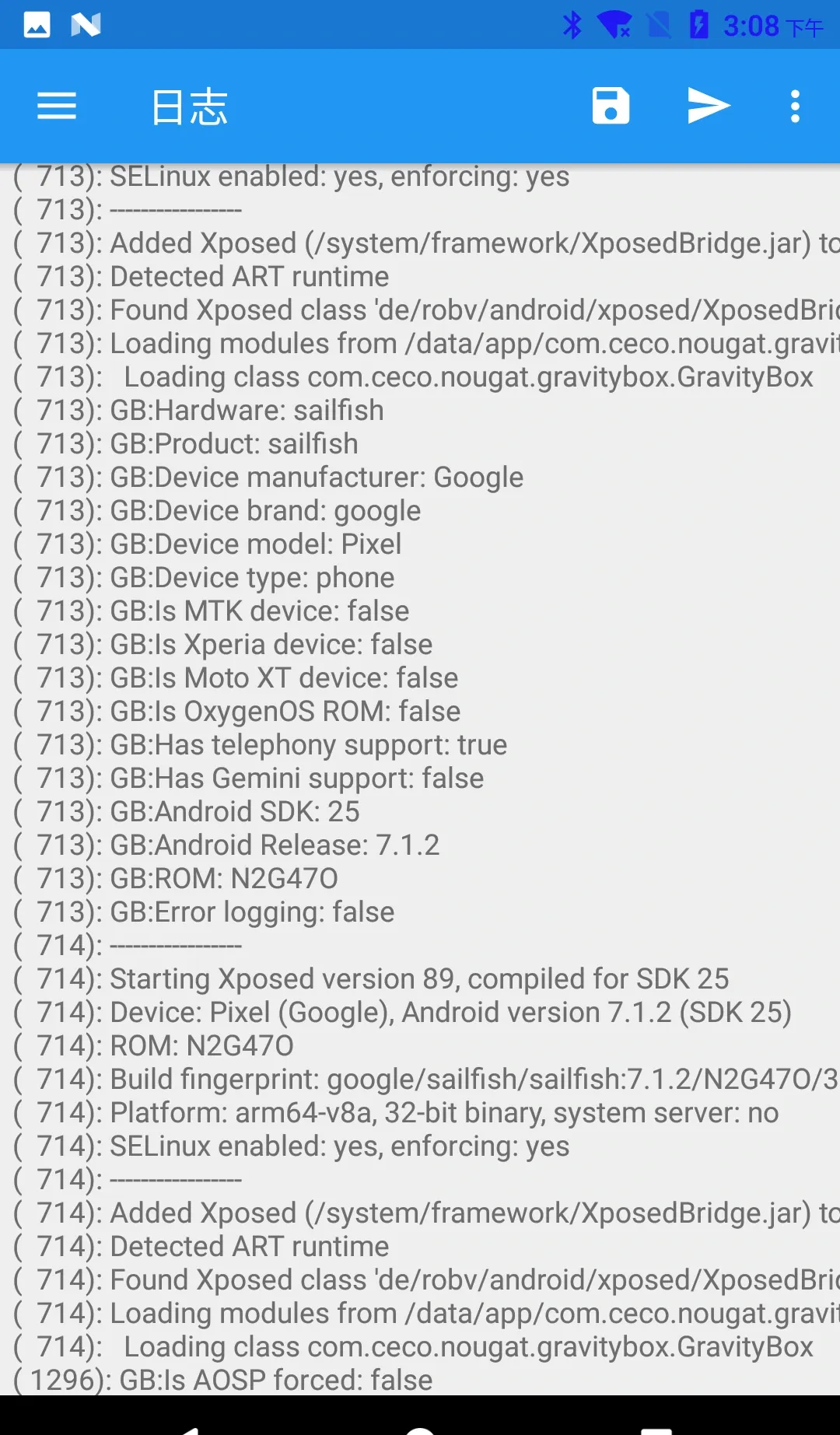
A full one:
# cat xposed_error_20200331_150832.log
03-31 14:06:50.383 I/Xposed  (  713): -----------------
03-31 14:06:50.383 I/Xposed  (  713): Starting Xposed version 89, compiled for SDK 25
03-31 14:06:50.384 I/Xposed  (  713): Device: Pixel (Google), Android version 7.1.2 (SDK 25)
03-31 14:06:50.384 I/Xposed  (  713): ROM: N2G47O
03-31 14:06:50.384 I/Xposed  (  713): Build fingerprint: google/sailfish/sailfish:7.1.2/N2G47O/3852959:user/release-keys
03-31 14:06:50.384 I/Xposed  (  713): Platform: arm64-v8a, 64-bit binary, system server: yes
03-31 14:06:50.384 I/Xposed  (  713): SELinux enabled: yes, enforcing: yes
03-31 14:06:51.426 I/Xposed  (  713): -----------------
03-31 14:06:51.426 I/Xposed  (  713): Added Xposed (/system/framework/XposedBridge.jar) to CLASSPATH
03-31 14:06:52.425 I/Xposed  (  713): Detected ART runtime
03-31 14:06:52.433 I/Xposed  (  713): Found Xposed class 'de/robv/android/xposed/XposedBridge', now initializing
03-31 14:06:52.774 I/Xposed  (  713): Loading modules from /data/app/com.ceco.nougat.gravitybox-1/base.apk
03-31 14:06:52.806 I/Xposed  (  713):   Loading class com.ceco.nougat.gravitybox.GravityBox
03-31 14:06:52.819 I/Xposed  (  713): GB:Hardware: sailfish
03-31 14:06:52.819 I/Xposed  (  713): GB:Product: sailfish
03-31 14:06:52.819 I/Xposed  (  713): GB:Device manufacturer: Google
03-31 14:06:52.819 I/Xposed  (  713): GB:Device brand: google
03-31 14:06:52.819 I/Xposed  (  713): GB:Device model: Pixel
03-31 14:06:52.821 I/Xposed  (  713): GB:Device type: phone
03-31 14:06:52.821 I/Xposed  (  713): GB:Is MTK device: false
03-31 14:06:52.821 I/Xposed  (  713): GB:Is Xperia device: false
03-31 14:06:52.821 I/Xposed  (  713): GB:Is Moto XT device: false
03-31 14:06:52.821 I/Xposed  (  713): GB:Is OxygenOS ROM: false
03-31 14:06:52.822 I/Xposed  (  713): GB:Has telephony support: true
03-31 14:06:52.822 I/Xposed  (  713): GB:Has Gemini support: false
03-31 14:06:52.822 I/Xposed  (  713): GB:Android SDK: 25
03-31 14:06:52.822 I/Xposed  (  713): GB:Android Release: 7.1.2
03-31 14:06:52.822 I/Xposed  (  713): GB:ROM: N2G47O
03-31 14:06:52.822 I/Xposed  (  713): GB:Error logging: false
03-31 14:07:05.189 I/Xposed  ( 1296): GB:Is AOSP forced: false
The log tag is literally I/Xposed, and the pivotal file is /system/framework/XposedBridge.jar — the same file dropped into /system/framework/ by the installer. That jar is central to module execution.
Fingerprint 3: module development config
Per the official tutorial, a typical module dev flow is: add the Xposed Framework API, edit AndroidManifest.xml, write the hook, and register the class in assets/xposed_init. Here’s a hook that recolors the system clock:
package de.robv.android.xposed.mods.tutorial;

import static de.robv.android.xposed.XposedHelpers.findAndHookMethod;
import android.graphics.Color;
import android.widget.TextView;
import de.robv.android.xposed.IXposedHookLoadPackage;
import de.robv.android.xposed.XC_MethodHook;
import de.robv.android.xposed.callbacks.XC_LoadPackage.LoadPackageParam;

public class Tutorial implements IXposedHookLoadPackage {
	public void handleLoadPackage(final LoadPackageParam lpparam) throws Throwable {
		if (!lpparam.packageName.equals("com.android.systemui"))
			return;

		findAndHookMethod("com.android.systemui.statusbar.policy.Clock", lpparam.classLoader, "updateClock", new XC_MethodHook() {
			@Override
			protected void afterHookedMethod(MethodHookParam param) throws Throwable {
				TextView tv = (TextView) param.thisObject;
				String text = tv.getText().toString();
				tv.setText(text + " :)");
				tv.setTextColor(Color.RED);
			}
		});
	}
}
Every import lives under de.robv.android.xposed — pulled in with the Xposed Framework API:
repositories {
    jcenter();
}

dependencies {
    provided 'de.robv.android.xposed:api:82'
}
The official latest is still api-82.jar and api-source-82.jar.
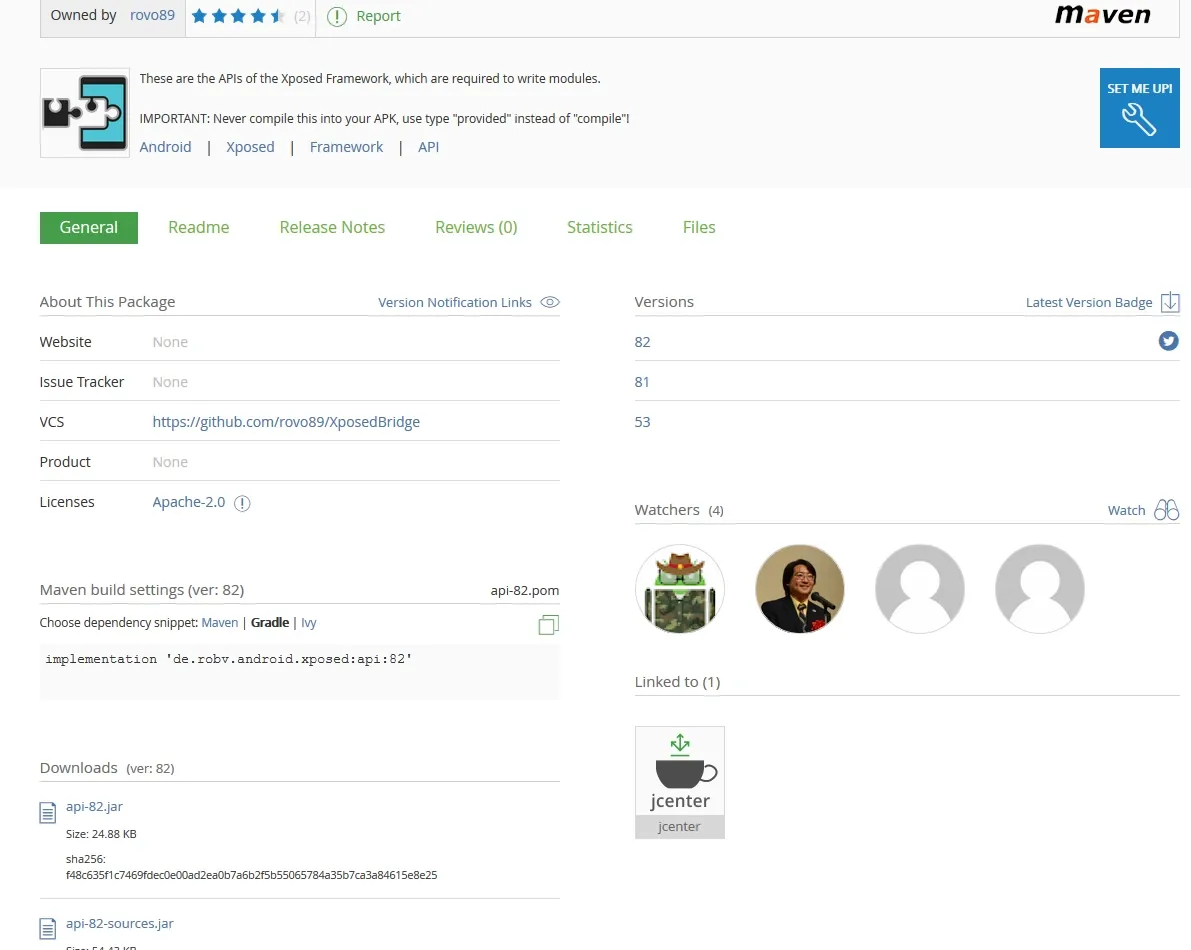
One is bytecode, the other is Java source:
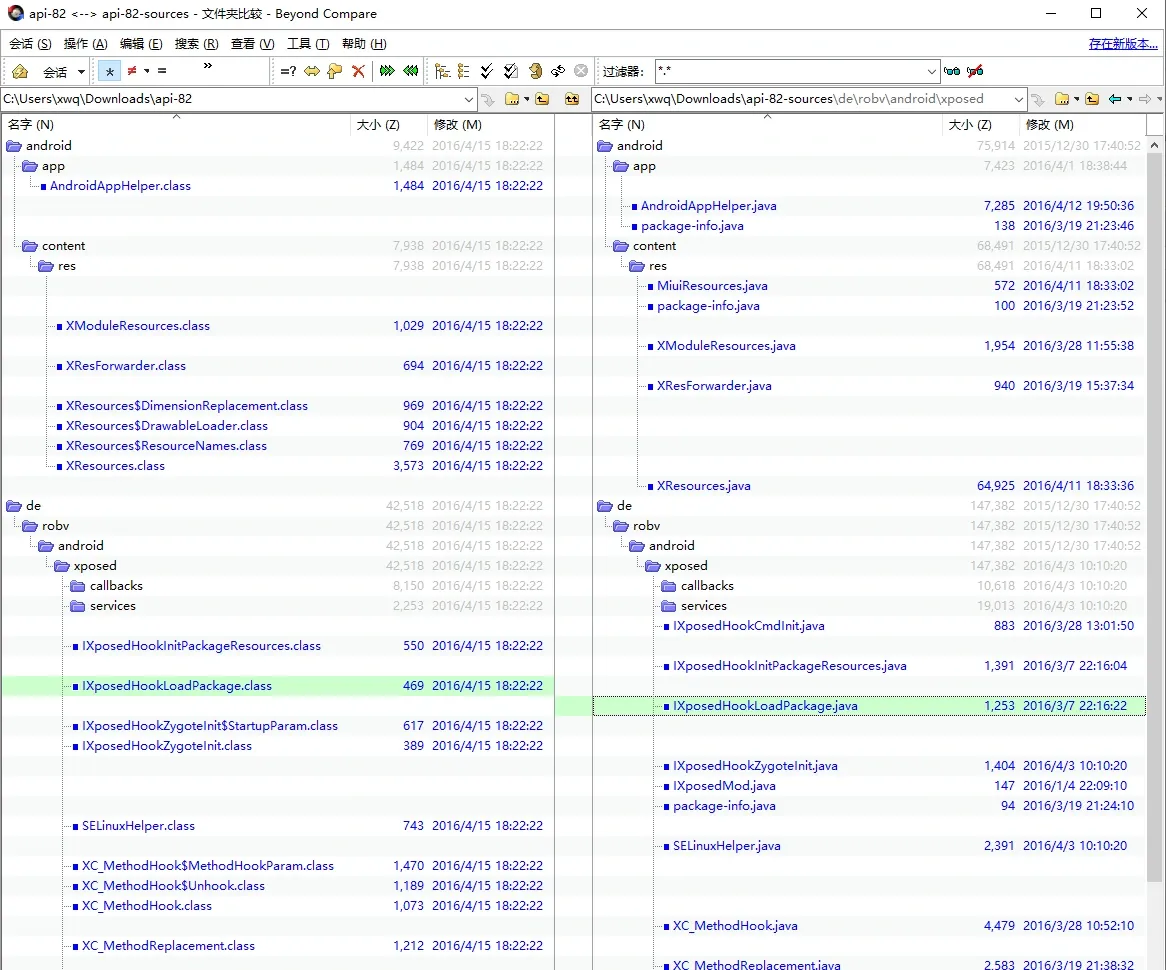
Open any file, e.g. IXposedHookLoadPackage.java:
package de.robv.android.xposed;

import android.app.Application;

import de.robv.android.xposed.callbacks.XC_LoadPackage;
import de.robv.android.xposed.callbacks.XC_LoadPackage.LoadPackageParam;

/**
 * Get notified when an app ("Android package") is loaded.
 * This is especially useful to hook some app-specific methods.
 *
 * <p>This interface should be implemented by the module's main class. Xposed will take care of
 * registering it as a callback automatically.
 */
public interface IXposedHookLoadPackage extends IXposedMod {
	/**
	 * This method is called when an app is loaded. It's called very early, even before
	 * {@link Application#onCreate} is called.
	 * Modules can set up their app-specific hooks here.
	 *
	 * @param lpparam Information about the app.
	 * @throws Throwable Everything the callback throws is caught and logged.
	 */
	void handleLoadPackage(LoadPackageParam lpparam) throws Throwable;

	/** @hide */
	final class Wrapper extends XC_LoadPackage {
		private final IXposedHookLoadPackage instance;
		public Wrapper(IXposedHookLoadPackage instance) {
			this.instance = instance;
		}
		@Override
		public void handleLoadPackage(LoadPackageParam lpparam) throws Throwable {
			instance.handleLoadPackage(lpparam);
		}
	}
}
xposed strings are everywhere. Which means: if we rename the fingerprint, we also have to rebuild an equivalent api-82.jar / api-source-82.jar for developers to compile against — and the API surface must not contain the literal xposed anywhere.
Fingerprint 4: what a dedicated detector checks
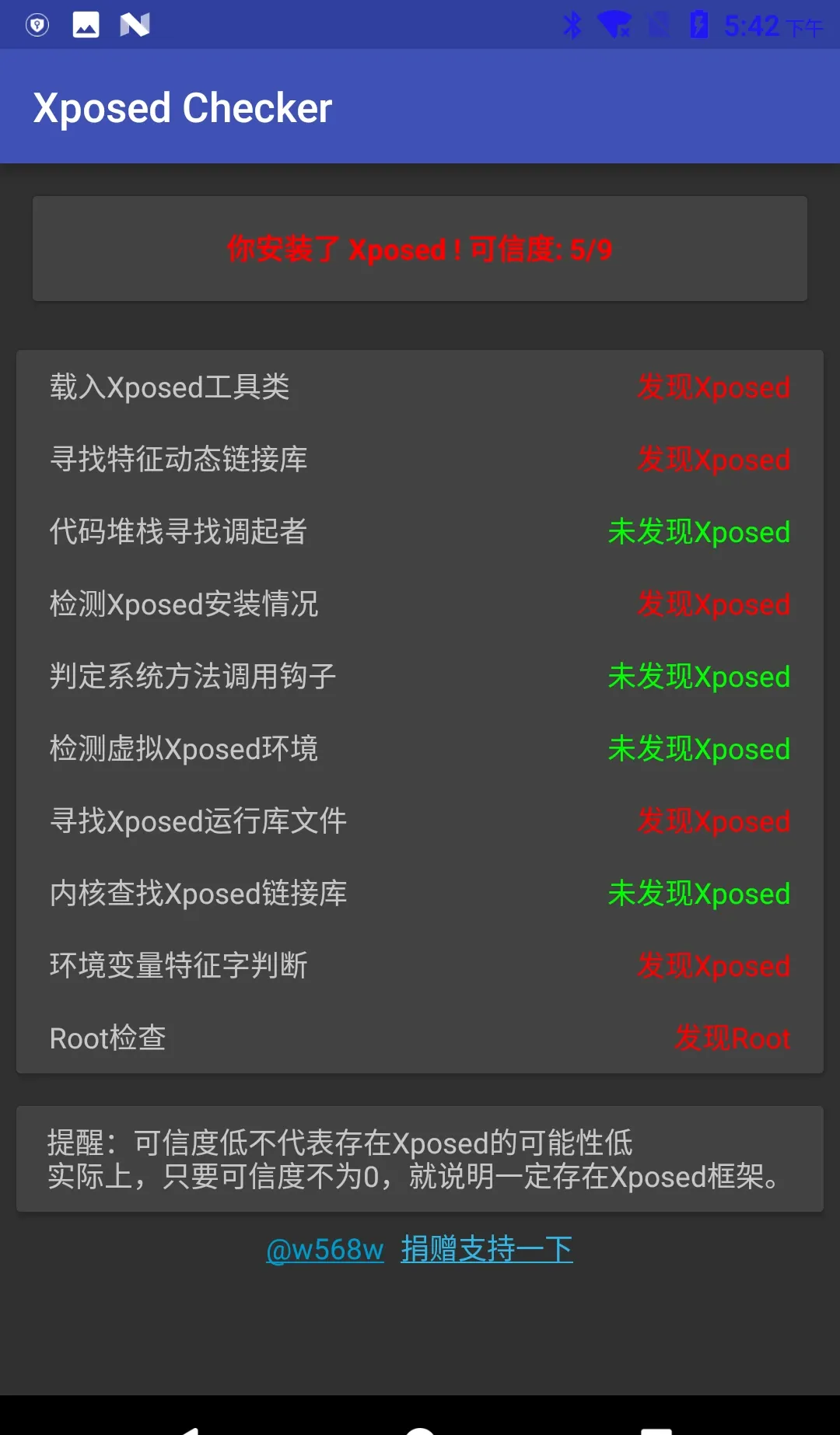
To see how detectors actually use these, I looked at an open-source detector, XposedChecker (APK Xposed Checker 4.apk). Running it with my GravityBox module still active, it scored 5/9 — the status bar still recolored. The result is clearly unreliable: of the four green items, only “detect virtual Xposed environment” was correct, since I’m running real Xposed, not VirtualXposed. The main detection logic sits in MainActivity.java:
private static final String[] CHECK_ITEM = {
  "Load Xposed utility classes",
  "Look for the fingerprint shared library",
  "Find the caller in the stack trace",
  "Check Xposed installation",
  "Detect hooked system methods",
  "Detect virtual Xposed environment",
  "Look for Xposed runtime library files",
  "Look for Xposed shared libs in the kernel",
  "Check environment variable fingerprints",
};- Load Xposed utility classes:
private boolean testClassLoader() {
        try {
            ClassLoader.getSystemClassLoader()
				.loadClass("de.robv.android.xposed.XposedHelpers");

            return true;
        }
		catch (ClassNotFoundException e) {
            e.printStackTrace();
        }
        return false;
}- Look for the fingerprint shared library:
private int check2() {
    return checkContains("XposedBridge") ? 1 : 0;
}
public static boolean checkContains(String paramString) {
    try {
        HashSet<String> localObject = new HashSet<>();
        // Read the maps file
        BufferedReader localBufferedReader =
    new BufferedReader(new FileReader("/proc/" + Process.myPid() + "/maps"));
        while (true) {
            String str = localBufferedReader.readLine();
            if (str == null) {
                break;
            }
            localObject.add(str.substring(str.lastIndexOf(" ") + 1));
        }
        // An app's linked libraries can't be empty, unless it's above 7.0...
        if (localObject.isEmpty() && Build.VERSION.SDK_INT <= Build.VERSION_CODES.M) {
            return true;
        }
        localBufferedReader.close();
        for (String aLocalObject : localObject) {
            if (aLocalObject.contains(paramString)) {
                return true;
            }
        }
    }
catch (Throwable ignored) {
    }
    return false;
}- Find the caller in the stack trace:
private int check3() {
        try {
            throw new Exception();
        }
		catch (Exception e) {
            StackTraceElement[] arrayOfStackTraceElement = e.getStackTrace();
            for (StackTraceElement s : arrayOfStackTraceElement) {
                if ("de.robv.android.xposed.XposedBridge".equals(s.getClassName())) {
                    return 1;
                }
            }
            return 0;
        }
}- Check XposedInstaller installation:
    private int check4() {
        try {
            List<PackageInfo> list = getPackageManager().getInstalledPackages(0);
            for (PackageInfo info : list) {
                if ("de.robv.android.xposed.installer".equals(info.packageName)) {
                    return 1;
                }
                if ("io.va.exposed".equals(info.packageName)) {
                    return 1;
                }
            }
        }
		catch (Throwable ignored) {

        }
        return 0;
}- Detect hooked system methods:
    private int check5() {
        try {
            Method method = Throwable.class.getDeclaredMethod("getStackTrace");
            return Modifier.isNative(method.getModifiers()) ? 1 : 0;
        }
		catch (NoSuchMethodException e) {
            e.printStackTrace();
        }
        return 0;
}- Detect virtual Xposed environment:
private int check6() {
    return System.getProperty("vxp") != null ? 1 : 0;
}- Look for Xposed runtime library files:
private int check7() {
        CommandResult commandResult = Shell.run("ls /system/lib");
        return commandResult.isSuccessful() ? commandResult.getStdout().contains("xposed") ? 1 : 0 : 0;
}- Look for Xposed shared libs in the kernel:
char isXposedMaps(char * pid){
	FILE * maps;
	char path[80];
	char * content;
	strcpy (path,"/proc/");
	strcat (path,pid);
	strcat (path,"/maps");
	if((maps=fopen(path,"r"))==NULL){
		return 0;
	}else{
		int len=filelength(maps);
		content=(char *)malloc(len);
		fread(content,len,1,maps);
		content[len-1]='\0';
		return strstr(content,"XposedBridge")!=NULL;
	}
}- Check environment variable fingerprints:
private int check9() {
    return System.getenv("CLASSPATH").contains("XposedBridge") ? 1 : 0;
}
Fingerprint 5: how the big players do it
I also read through a stack of writeups on commercial detection — payment-app hook defense, Alibaba’s Xposed detection, Meituan’s hook-prevention survey, a security vendor’s anti-debug/hook-detection shell analysis, Alipay’s rootless-Xposed column, Douyin’s Xposed detection (parts one and two), and Android VM detection. The pattern across all of them: they’re dated. Most modern risk-control lives inside native .so files, checks hundreds or thousands of items, and is obfuscated with OLLVM or even in-house VMP so you can’t trivially locate and patch it. They collect environment fingerprints, encrypt them, and upload — they don’t just kick the app out and tip you off.
Against that kind of hardening, the saner play is modifying AOSP source to plant more instrumentation and collect the .so’s checks into a checklist — or emulating with Unicorn, though Unicorn countermeasures are multiplying too. Unicorn’s endgame is a complete Android system, so at some point it’s cleaner to just change the system.
For our purposes that’s overkill. Simply renaming the xposed strings is enough to pass the naive string-based detectors. The next post covers how the framework pieces relate and how to compile the stock Xposed framework; the last covers changing the fingerprints.
Colin Xiao — I take on contract reverse-engineering work, and writeups like this are how I show what I can do. If you need help with anything in this space — including but not limited to the areas I cover above — I’m available. No project is too big or too small — if it’s reverse engineering and I can do it, I’ll take it. DM me on X (@colinxiao_lab) or Telegram (@ColinXiao666).
Get in touch