Debugging the Windows 11 Boot Process
About the author. I’m Colin Xiao — an independent reverse engineer, mostly working solo on contract jobs. I dig into compiled code of every kind, including but not limited to: Android and iOS apps, x86/x64/ARM native binaries, packers and obfuscators, DRM and license checks, network protocols and APIs, crypto and signature algorithms, malware, game binaries, and embedded/IoT firmware. I also handle large-scale data collection and vulnerability research. If you have any project in mind, I’d be glad to take it on — whatever it is, as long as it’s within my wheelhouse. Just reach out. You can reach me on X at @colinxiao_lab or on Telegram at https://t.me/ColinXiao666.
This research is published for educational and defensive purposes. The target sample is anonymized throughout.
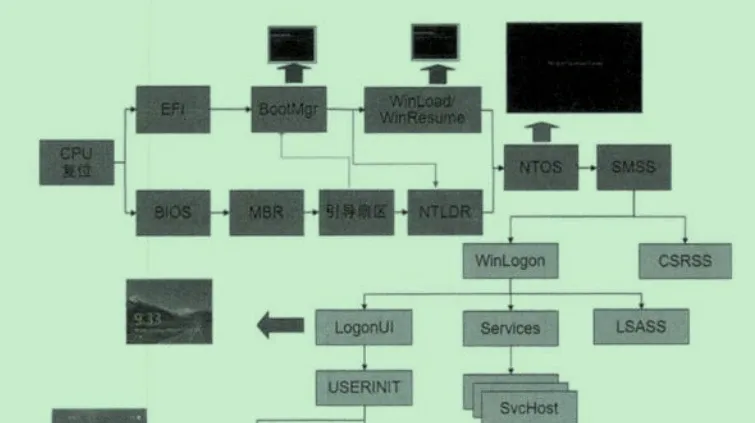
This article walks the full Windows 11 boot chain under WinDbg: UEFI → boot manager (bootmgfw.efi) → OS loader (winload.efi) → kernel (ntkrnlmp.exe) → session manager (smss.exe). It’s a 64-bit re-implementation of the classic boot-debugging exercises, with the quirks that Windows 11’s UEFI security adds along the way.
Boot overview
After power-on, the CPU first executes firmware code burned into the motherboard, whose job is to detect and initialize basic hardware. Firmware comes in two flavors — UEFI and BIOS — and modern machines overwhelmingly use UEFI.
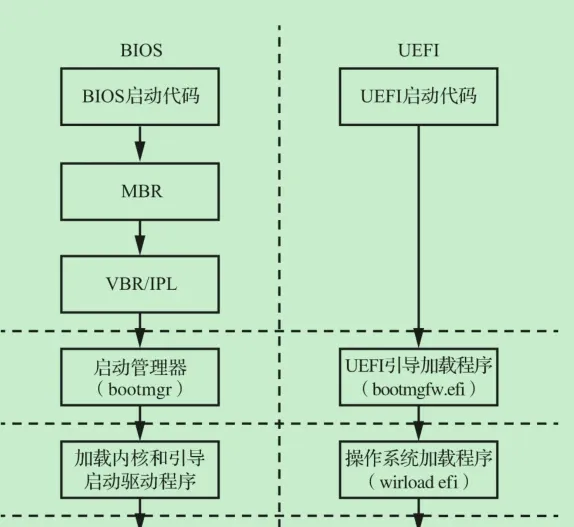
Boot Loader and UEFI
UEFI is the start of the whole boot process. We won’t go deep into UEFI internals, but a little context makes the rest much clearer.
Boot Loader
The word “boot” comes from “pull oneself up by one’s bootstraps” — the impossible task of lifting yourself off the ground by your own bootstraps, later used to mean “accomplishing something entirely without outside help.”
Booting is exactly that bootstrap motion:
- Power on: a freshly powered CPU is a blank slate — it doesn’t know how to use memory, where the disk is, or even how to light the screen.
- Tiny program (bootloader): the CPU can only execute the small ROM firmware on the motherboard (BIOS/UEFI).
- Self-loading: that tiny program’s only job is to read a slightly larger program (e.g.
bootmgr) off the disk into memory. - Hand-off: that larger program (
bootmgr) loads an even larger one (winload.efi). - Final boot: the OS kernel is finally loaded.
The machine has to use an extremely tiny, pre-burned “seed” program to pull the enormous OS up step by step — hence “booting.”
The concrete UEFI sequence:
- UEFI firmware performs platform initialization, CPU and chipset init, and loads UEFI platform modules
- The UEFI boot manager enumerates devices on external buses, loads UEFI device drivers, then loads the boot application
- The Windows Boot Manager (
bootmgfw.efi) loads the Windows boot loader - The Windows boot loader (
winload.efi) loads the Windows OS
Steps 1 and 2 live in the motherboard’s flash (SPI flash); steps 3 and 4 are read from the filesystem of a special UEFI partition on the disk.
The OS loader relies on two sets of firmware APIs:
| Dimension | EFI Boot Services | EFI Runtime Services |
|---|---|---|
| Lifetime | Temporary. Invalid after the OS calls ExitBootServices(). |
Permanent. Available from power-on to shutdown. |
| Main functions | memory allocation, driver loading, filesystem access, events & timers | time management, power management, EFI variable access |
| Access | only the OS loader (e.g. Bootmgr) during early boot | callable by the kernel and drivers throughout runtime |
| Purpose | let the OS safely take over hardware control without firmware interference | provide a standardized low-level hardware interface, hiding hardware differences |
Making Windows break at boot
To debug the boot process, first make Windows stop at the moment of boot and hand control to the debugger.
How bcdedit works
bcdedit.exe (Boot Configuration Data Editor) is a command-line tool that edits the BCD database on disk — the file that stores Windows’ boot parameters.
The BCD file lives in the EFI System Partition (ESP). You won’t see it in Explorer because it sits in a hidden, drive-letter-less partition:
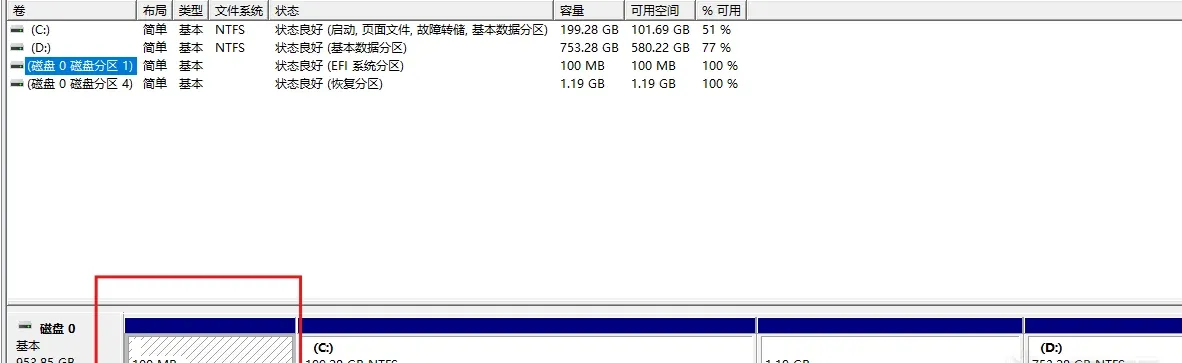
Editing the BCD with bcdedit
Most references give the following command to enable the bootmgr/winload debug engine:
bcdedit /set {bootmgr} bootdebug onIn Windows 11 this doesn’t work. You’ll most likely get:
The specified setting command is invalid.
Run "bcdedit /?" for command-line help.
Argument error
Per Microsoft’s documentation and experiments, in a normal (admin) shell only this command enables the debug engine — and it enables winload’s debug engine, not bootmgr’s:
bcdedit /bootdebug onWhy can’t bootmgr’s debug engine be enabled? From the Microsoft docs (https://learn.microsoft.com/windows-hardware/drivers/devtest/bcdedit--debug):
You may need to disable BitLocker and Secure Boot before setting BCDEdit options.
The bcdedit /set {bootmgr} bootdebug on error is not a syntax problem — it’s Windows 11’s UEFI security mechanism. In Windows 11 the BCD store is locked by the firmware; any attempt to directly modify the {bootmgr} identifier is intercepted, producing the “argument error”. The debugger can therefore only take over at the winload.efi stage — missing the bootmgr stage entirely.
To bypass the lock, reboot into Advanced Startup:
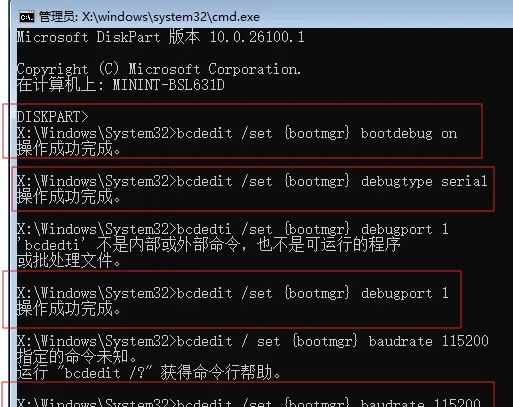
After that, reboot the VM. A Windows bootmgr-like label flashes in the top-left corner (too fast to screenshot), then the VM goes black, halts, and WinDbg breaks at the bootmgr stage:

bootmgfw.efi
This is the earliest Windows boot code — UEFI hands control to this module. Note the distinction:
{bootmgr}(the BCD identifier) is a logical entry in the BCD databasebootmgfw.efi(the physical file) is the actual code loaded into memory
kd> lmDvm bootmgfw
Browse full module list
start             end                 module name
00000000`10000000 00000000`10327000   bootmgfw   (pdb symbols)
    Loaded symbol image file: bootmgfw.efi
    Image path: bootmgfw.efi
    Image name: bootmgfw.efi
    ...
    File version:     10.0.28000.317
    Product version:  10.0.28000.317
    ...
    FileDescription:  Boot Manager
bootmgfw.efi is stored at \EFI\Microsoft\Boot\bootmgfw.efi — in the EFI System Partition (ESP), not C:, because UEFI firmware can only read FAT32 partitions, while the Windows system drive is usually NTFS.
kd> k
 # Child-SP          RetAddr               Call Site
00 00000000`0ffc95d8 00000000`101e4340     bootmgfw!DebugService2+0x5
01 00000000`0ffc95e0 00000000`10226be5     bootmgfw!DbgLoadImageSymbols+0x70
02 00000000`0ffc9630 00000000`102271a3     bootmgfw!BlBdStart+0x1c9
03 00000000`0ffc9700 00000000`1019f6d8     bootmgfw!BlBdInitialize+0x3ff
04 00000000`0ffc9880 00000000`1019d4f4     bootmgfw!ReinitializeLibrary+0xd4
05 00000000`0ffc98b0 00000000`1003f7eb     bootmgfw!BlInitializeLibrary+0x54
06 00000000`0ffc98e0 00000000`1003f0ba     bootmgfw!BmMain+0x5d3
07 00000000`0ffc9b10 00000000`0ffcd4ac     bootmgfw!EfiEntry+0x6a
08 00000000`0ffc9b50 00000000`00000000     0xffcd4ac
EfiEntry
The EFI boot manager creates a runtime image of bootmgfw.efi in memory. Once loaded, the UEFI firmware boot manager jumps to its entry point: EfiEntry. This is the start of the OS boot process.
The prototype (from the UEFI spec):
EFI_STATUS
EFIAPI
UefiMain (
  IN EFI_HANDLE        ImageHandle,   // handle of the app's UEFI image (bootmgfw.efi itself)
  IN EFI_SYSTEM_TABLE  *SystemTable   // pointer to the UEFI system table
  );
EfiEntryis the link-time symbol name; the source usually calls itUefiMainorShellAppMain.
Inside EfiEntry, the two service sets are obtained through EFI_SYSTEM_TABLE: Boot Services load winload.efi into memory and read the BCD, while Runtime Services let Windows keep talking to firmware through standard interfaces after boot.
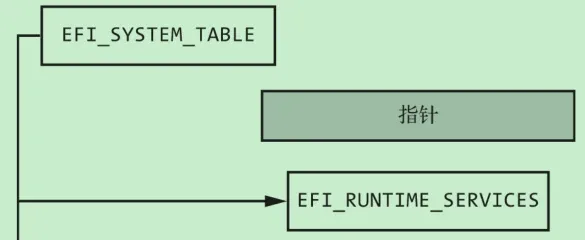
Looking at the caller of EfiEntry:
kd> ub 0xffcd4ac
00000000`0ffcd48a 0f94c2          sete    dl
00000000`0ffcd48d 8d541207        lea     edx,[rdx+rdx+7]
00000000`0ffcd491 4c89e1          mov     rcx,r12
00000000`0ffcd494 e861f80000      call    00000000`0ffdccfa
00000000`0ffcd499 41c644241801    mov     byte ptr [r12+18h],1
00000000`0ffcd49f 498b542438      mov     rdx,qword ptr [r12+38h]
00000000`0ffcd4a4 4c89e9          mov     rcx,r13
00000000`0ffcd4a7 41ff542420      call    qword ptr [r12+20h] ; this should be the call to EfiEntry
0ffcd4a7 is likely the call to EfiEntry (judging by the arguments and return address).
And EfiEntry’s disassembly:
kd> uf bootmgfw!EfiEntry
bootmgfw!EfiEntry:
00000000`1003f050 48895c2408      mov     qword ptr [rsp+8],rbx
00000000`1003f055 57              push    rdi
00000000`1003f056 4883ec30        sub     rsp,30h
00000000`1003f05a 0f1005a74ffdff  movups  xmm0,xmmword ptr [bootmgfw!EfiBootmgrDbxSvnGuid (00000000`10014008)]
00000000`1003f061 488bda          mov     rbx,rdx
00000000`1003f064 488bf9          mov     rdi,rcx
00000000`1003f067 41b800000700    mov     r8d,70000h
00000000`1003f06d 488d542420      lea     rdx,[rsp+20h]
00000000`1003f072 488bcb          mov     rcx,rbx
00000000`1003f075 f30f7f442420    movdqu  xmmword ptr [rsp+20h],xmm0
00000000`1003f07b e8643d0900      call    bootmgfw!DbxSvnCheck (00000000`100d2de4)
00000000`1003f080 4885c0          test    rax,rax
00000000`1003f083 790f            jns     bootmgfw!EfiEntry+0x44 (00000000`1003f094)  Branch

bootmgfw!EfiEntry+0x35:
00000000`1003f085 48b90e00000000000080 mov rcx,800000000000000Eh
00000000`1003f08f 483bc1          cmp     rax,rcx
00000000`1003f092 752d            jne     bootmgfw!EfiEntry+0x71 (00000000`1003f0c1)  Branch

bootmgfw!EfiEntry+0x44:
00000000`1003f094 488bd3          mov     rdx,rbx
00000000`1003f097 c605d3e92b0001  mov     byte ptr [bootmgfw!DbxSvnChecked (00000000`102fda71)],1
00000000`1003f09e 488bcf          mov     rcx,rdi
00000000`1003f0a1 e8da600100      call    bootmgfw!EfiInitCreateInputParametersEx (00000000`10055180) ; key call
00000000`1003f0a6 4885c0          test    rax,rax
00000000`1003f0a9 7507            jne     bootmgfw!EfiEntry+0x62 (00000000`1003f0b2)  Branch

bootmgfw!EfiEntry+0x5b:
00000000`1003f0ab b80d0000c0      mov     eax,0C000000Dh
00000000`1003f0b0 eb08            jmp     bootmgfw!EfiEntry+0x6a (00000000`1003f0ba)  Branch

bootmgfw!EfiEntry+0x62:
00000000`1003f0b2 488bc8          mov     rcx,rax
00000000`1003f0b5 e85e010000      call    bootmgfw!BmMain (00000000`1003f218) ; key call

bootmgfw!EfiEntry+0x6a:
00000000`1003f0ba 8bc8            mov     ecx,eax
00000000`1003f0bc e89f6d0100      call    bootmgfw!EfiGetEfiStatusCode (00000000`10055e60)

bootmgfw!EfiEntry+0x71:
00000000`1003f0c1 488b5c2440      mov     rbx,qword ptr [rsp+40h]
00000000`1003f0c6 4883c430        add     rsp,30h
00000000`1003f0ca 5f              pop     rdi
00000000`1003f0cb c3              ret
Two key calls: EfiInitCreateInputParametersEx and BmMain.
EfiInitCreateInputParametersEx
Two responsibilities:
- Convert EfiEntry’s arguments into bootmgfw’s internal format. UEFI passes generic parameters (
ImageHandle,SystemTable); this function turns them into Bootmgr’s internal structures (e.g.BL_APPLICATION_ENTRY). - Scan and read the BCD via an internal function (e.g.
EfiInitpCreateApplicationEntry), initializing the boot environment per the BCD configuration (such as thebootdebug onyou set earlier).
BmMain
BmMain is the core of the Windows Boot Manager. It reads the BCD and decides what to do next:
- Handle hibernation — if
hiberfil.sysexists, loadwinresume.efiand resume, skipping everything else. - Show the boot menu — if the BCD configures multiple systems or an F8 debug menu, display it and wait for a choice.
- Handle errors — if the previous boot failed, enter automatic repair (Windows Recovery Environment).
- Load the kernel — otherwise proceed with normal boot: read the default entry, load
winload.efi, hand over control.
BmMain’s execution path:
BmMain
  └──> BlInitializeLibrary          // initialize the base library
        └──> ReinitializeLibrary     // reinitialize the library
              └──> BlBdInitialize    // initialize the boot debugger
                    └──> BlBdStart   // start the debugger
                          └──> DbgLoadImageSymbols
                                └──> DebugService2
BmMain is the last generic code in the boot process — everything after it (winload.efi, ntoskrnl.exe) is version-specific. It’s the bridge between firmware and Windows.
BmMain also checks the BCD flag LastBootSucceeded to decide whether the previous boot succeeded. That flag is genuinely useful: if you develop a boot-time driver with a bug that breaks boot, the driver can check LastBootSucceeded and skip loading when the previous boot failed, keeping the system bootable while you debug.
Finally, before handing control to winload, bootmgfw enables and initializes paging. On 64-bit UEFI, protected mode is already on (the firmware switches to it during its own initialization).
winload.efi
winload.efi is the bridge between firmware and the kernel (ntoskrnl.exe). Its job isn’t to run the system, but to prepare the environment for the kernel.
Breaking at winload and getting the backtrace:
winload!DebugService2+0x5:
00000000`00d43185 cc              int     3
kd> k
 # Child-SP          RetAddr               Call Site
00 00000000`001a7b88 00000000`00b0166e     winload!DebugService2+0x5
01 00000000`001a7b90 00000000`00cc99f0     winload!DbgLoadImageSymbols+0x62
02 00000000`001a7be0 00000000`00cc9fbf     winload!BlBdStart+0x1c8
03 00000000`001a7cb0 00000000`00c39e41     winload!BlBdInitialize+0x40b
04 00000000`001a7e30 00000000`00c383ac     winload!InitializeLibrary+0x4bd
05 00000000`001a7ed0 00000000`00aac1ab     winload!BlInitializeLibrary+0x58
06 00000000`001a7f00 00000000`102a0d66     winload!OslMain+0x10b
07 00000000`001a7fe0 00000000`00000000 0x102a0d66OslMain— winload’s main entry, likemain().BlInitializeLibrary— Boot Library initialization entry.InitializeLibrary— lower-level library init (debugging, memory management).BlBdInitialize/BlBdStart— initialize and start the boot debugger channel to WinDbg.DbgLoadImageSymbols/DebugService2— load debug symbols;DebugService2triggers theint 3.
winload’s main jobs:
- Load the kernel: read
ntoskrnl.exeandhal.dllinto memory. - Load drivers: scan the registry and load
Start == 0boot drivers. - Pass data: build a
LOADER_PARAMETER_BLOCKcontaining memory layout, ACPI tables, etc.
OslpMain does the heavy lifting:
kd> uf OslpMain
winload!OslpMain:
00000000`00ab377c 48895c2408      mov     qword ptr [rsp+8],rbx
00000000`00ab3781 4889742418      mov     qword ptr [rsp+18h],rsi
00000000`00ab3786 55              push    rbp
00000000`00ab3787 488dac2460f6ffff lea     rbp,[rsp-9A0h]
00000000`00ab378f 4881eca00a0000  sub     rsp,0AA0h
00000000`00ab3796 488bd9          mov     rbx,rcx
00000000`00ab3799 c685b809000000  mov     byte ptr [rbp+9B8h],0
00000000`00ab37a0 488d4c2470      lea     rcx,[rsp+70h]
00000000`00ab37a5 33d2            xor     edx,edx
00000000`00ab37a7 41b8300a0000    mov     r8d,0A30h
00000000`00ab37ad e8ce132a00      call    winload!memset (00000000`00d54b80)
00000000`00ab37b2 be10000000      mov     esi,10h
00000000`00ab37b7 4c8d05b2872d00  lea     r8,[winload!SymCryptTestKey32 (00000000`00d8bf70)]
00000000`00ab37be 448bce          mov     r9d,esi
00000000`00ab37c1 488d1538c72a00  lea     rdx,[winload!SymCryptAesBlockCipher_Fast (00000000`00d5ff00)]
00000000`00ab37c8 488d4c2470      lea     rcx,[rsp+70h]
00000000`00ab37cd e872062200      call    winload!SymCryptGcmExpandKey (00000000`00cd3e44)
00000000`00ab37d2 85c0            test    eax,eax
00000000`00ab37d4 0f852d010000    jne     winload!OslpMain+0x18b (00000000`00ab3907)  Branch
...
(The full OslpMain walk — including its self-test of SymCryptGcmEncrypt/SymCryptGcmDecrypt and the call to OslPrepareTarget / OslExecuteTransition — is omitted here for brevity.)
winload’s final act is handing CPU control to the kernel: it prepares a LOADER_PARAMETER_BLOCK and passes it to KiSystemStartup (the kernel’s entry), which uses it to initialize the kernel.
ntkrnlmp.exe
Now we’re inside the kernel:
kd> lmDvm nt
Browse full module list
start             end                 module name
fffff806`87000000 fffff806`88450000   nt         (pdb symbols)
    ...
    File version:     10.0.26100.8036
    ...
    FileDescription:  NT Kernel & System
The mp suffix in ntkrnlmp means Multi-Processor.
kd> k
 # Child-SP          RetAddr               Call Site
00 fffff806`1afb3de8 fffff806`874a41bd     nt!DebugService2+0x5
01 fffff806`1afb3df0 fffff806`87b764b0     nt!DbgLoadImageSymbols+0x8d
02 fffff806`1afb3e40 fffff806`87b4b576     nt!KdInitSystem+0x680
03 fffff806`1afb3fc0 00000000`00000000     nt!KiSystemStartup+0x1d6
KiSystemStartup
KiSystemStartup is the kernel entry. It saves winload’s LOADER_PARAMETER_BLOCK into KeLoaderBlock:
kd> uf KiSystemStartup
nt!KiSystemStartup:
fffff806`87b4b3a0 4883ec38        sub     rsp,38h
fffff806`87b4b3a4 4c897c2430      mov     qword ptr [rsp+30h],r15
fffff806`87b4b3a9 4c8bfc          mov     r15,rsp
fffff806`87b4b3ac 48890d6da74700  mov     qword ptr [nt!KeLoaderBlock (fffff806`87fc5b20)],rcx
fffff806`87b4b3b3 4c8b9188000000  mov     r10,qword ptr [rcx+88h]
fffff806`87b4b3ba 41837a2400      cmp     dword ptr [r10+24h],0
fffff806`87b4b3bf 750c            jne     nt!KiSystemStartup+0x2d (fffff806`87b4b3cd)  Branch
The LOADER_PARAMETER_BLOCK (via KeLoaderBlock):
kd> dt nt!_LOADER_PARAMETER_BLOCK fffff806`87fc5b20
   +0x000 OsMajorVersion   : 0x1662c070
   +0x004 OsMinorVersion   : 0xfffff806
   +0x008 Size             : 0
   +0x00c OsLoaderSecurityVersion : 0
   +0x010 LoadOrderListHead : _LIST_ENTRY [ 0x00000000`00000000 - 0x00000000`00000000 ]
   +0x020 MemoryDescriptorListHead : _LIST_ENTRY [ 0x00000000`00000000 - 0x00000000`00000000 ]
   +0x030 BootDriverListHead : _LIST_ENTRY [ 0x00000000`00000000 - 0x00000000`00001f49 ]
   +0x040 EarlyLaunchListHead : _LIST_ENTRY [ 0x00000000`00000000 - 0x00000000`00000000 ]
   +0x050 CoreDriverListHead : _LIST_ENTRY [ 0x00000000`00000000 - 0x00000000`00000000 ]
   +0x060 CoreExtensionsDriverListHead : _LIST_ENTRY [ 0x00000000`00000000 - 0x00000000`00000000 ]
   +0x070 TpmCoreDriverListHead : _LIST_ENTRY [ 0x00000000`00000000 - 0x00000000`00000000 ]
   +0x080 KernelStack      : 0
   +0x088 Prcb             : 0
   +0x090 Process          : 0
   +0x098 Thread           : 0
   +0x0a0 KernelStackSize  : 0
   +0x0a4 RegistryLength   : 0x1000000
   +0x0a8 RegistryBase     : (null)
   +0x0b0 ConfigurationRoot : (null)
   +0x0b8 ArcBootDeviceName : (null)
   +0x0c0 ArcHalDeviceName : (null)
   +0x0c8 NtBootPathName   : (null)
   +0x0d0 NtHalPathName    : 0x00000000`00000001  ""
   +0x0d8 LoadOptions      : (null)
   +0x0e0 NlsData          : (null)
   +0x0e8 ArcDiskInformation : (null)
   +0x0f0 Extension        : (null)
   +0x0f8 u                : <unnamed-tag>
   +0x108 FirmwareInformation : _FIRMWARE_INFORMATION_LOADER_BLOCK
   +0x148 OsBootstatPathName : (null)
   +0x150 ArcOSDataDeviceName : (null)
   +0x158 ArcWindowsSysPartName : (null)
   +0x160 MemoryDescriptorTree : _RTL_RB_TREE
In short, KiSystemStartup performs the kernel’s lowest-level initialization: setting up the IDT so the CPU can respond to hardware interrupts, configuring the GDT for memory access permissions, and initializing the kernel debug engine. After initializing the current core (usually core 0), it signals the other cores to wake and initialize, then calls KiInitializeKernel, which initializes processes, threads, and memory management — at which point the system enters the “multitasking” era and starts loading system processes.
The two initialization phases
Because kernel components are tightly coupled, their initialization can’t be a simple sequential walk. To resolve interdependencies, kernel initialization runs in two phases — Phase 0 and Phase 1 — where most components take an integer parameter indicating which phase a call is.
Phase 0 corresponds to KiInitializeKernel, which runs with interrupts disabled (IRQL = HIGH_LEVEL) for absolute atomicity. When it finishes, it lowers the IRQL, exits Phase 0, and returns control to the primary processor. Phase 1 then begins: interrupts are re-enabled, the other cores are activated, and the rest of the system (device drivers, subsystems) loads.
Phase 0 also creates the two primordial processes, Idle and System.
Phase 1’s core task is to grow the kernel from a single-core framework into a full multiprocessor environment: wake all standby cores, have the I/O manager load boot-start device drivers, and create the first user-mode process smss.exe — marking the kernel’s transition toward user mode.
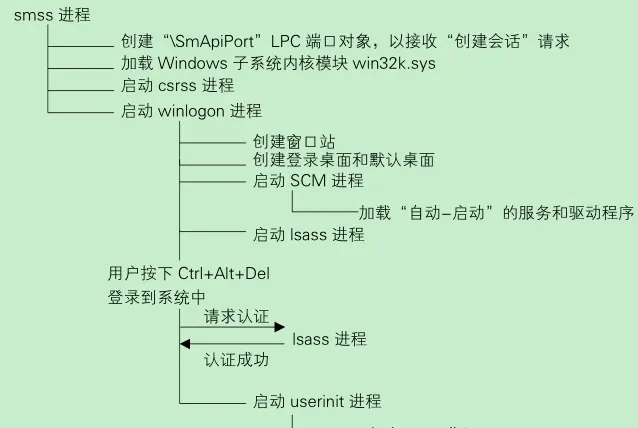
SMSS.exe
SMSS (Session Manager Subsystem) takes over from the kernel and builds the user-mode environment. Its focus is “environment configuration” and “process spawning”:
1. System environment initialization
SMSS reads HKLM\SYSTEM\CurrentControlSet\Control\Session Manager and performs:
- Paging file management — create/adjust
Pagefile.sys - Filesystem check — trigger
Autochkon dirty volumes - Known-DLL mapping — build Section objects for
ntdll.dll,kernel32.dll, etc., so processes can share them efficiently
2. Starting the core subsystems and logon process
- Start CSRSS — the client/server runtime subsystem, the foundation of the Win32 GUI
- Start WinLogon — handles logon authentication, desktop switching, and the secure desktop
3. Session management and lifecycle
When a user logs on or connects via RDP, SMSS creates a new Session with dedicated csrss.exe/winlogon.exe instances, and monitors them — if one dies unexpectedly, SMSS decides whether to blue-screen or restart per system policy.
A Session is the logical container for a user’s independent environment: its own desktop, window station, environment variables, and access rights.
Summary
The whole chain — UEFI → bootmgfw.efi → winload.efi → ntkrnlmp.exe → smss.exe — is best understood by debugging it yourself once, so you have a mental map of the stages before you need to dig into any single one of them.
Colin Xiao — I take on contract reverse-engineering work, and writeups like this are how I show what I can do. If you need help with anything in this space — including but not limited to the areas I cover above — I’m available. No project is too big or too small — if it’s reverse engineering and I can do it, I’ll take it. DM me on X (@colinxiao_lab) or Telegram (@ColinXiao666).
Get in touch