Decrypting a Car Infotainment OTA Package
About the author. I’m Colin Xiao — an independent reverse engineer, mostly working solo on contract jobs. I dig into compiled code of every kind, including but not limited to: Android and iOS apps, x86/x64/ARM native binaries, packers and obfuscators, DRM and license checks, network protocols and APIs, crypto and signature algorithms, malware, game binaries, and embedded/IoT firmware. I also handle large-scale data collection and vulnerability research. If you have any project in mind, I’d be glad to take it on — whatever it is, as long as it’s within my wheelhouse. Just reach out. You can reach me on X at @colinxiao_lab or on Telegram at https://t.me/ColinXiao666.
This research is published for educational and defensive purposes. The target sample is anonymized throughout.
Decrypting a Car Infotainment OTA Package
Well, where to start — my car’s infotainment system finally got an update. It added the features I wanted, and I’d been waiting a long time. Great news.
My plan: just pull the APKs straight out of the OTA package and install them, no need to update the whole infotainment system. That plan failed.
I got my hands on the long-awaited OTA package and opened it up:
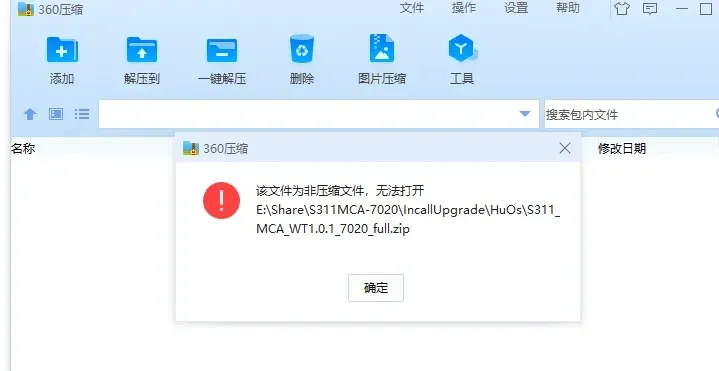
It’s encrypted. Ouch.
Then I thought: if it’s encrypted here, the infotainment system must also decrypt it before installing. So, curious, I went digging.
0x1 Getting the updater APK
Through the car-owner group I got the APK responsible for OTA upgrades. Dropped it into jadx and searched for the keyword HuOs:
Sure enough, there it was — my upgrade path and the package format, .zip.
Following the call stack statically led to the decrypt method:
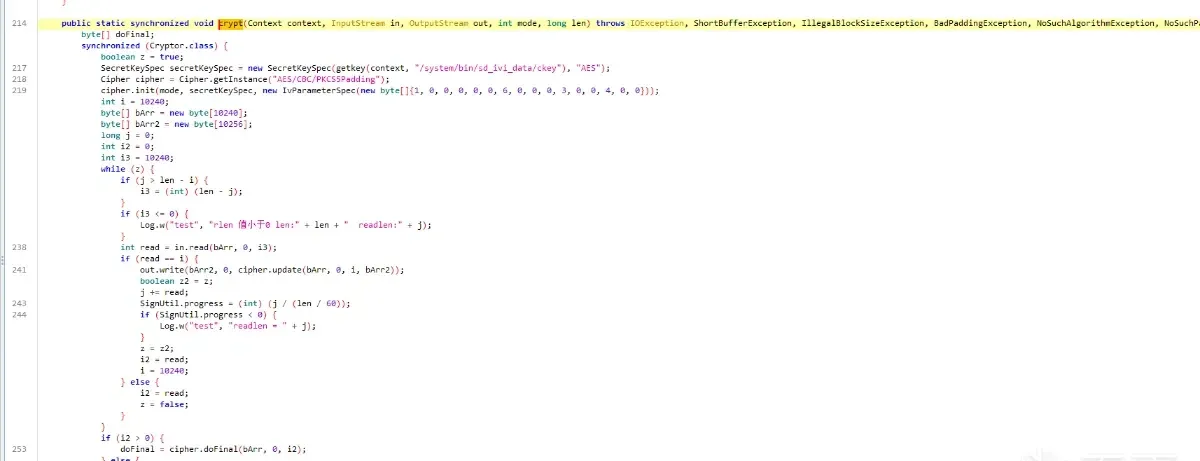
The package is encrypted with AES/CBC/PKCS5Padding. The infotainment system decrypts the file after receiving it, then installs it.
0x2 Getting the decryption key
From the previous step, the key comes from a ckey value. That value is decrypted, and the first 16 bytes become the system package’s AES key:
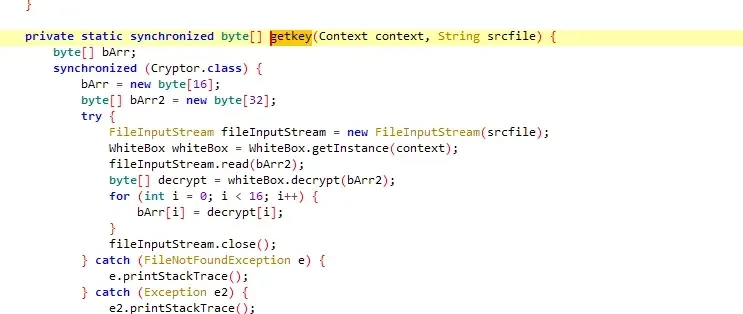
Decrypting this needs two things:
- Get the
ckeyfile. (The ever-reliable car-owner group provided it.) - Get the
decryptimplementation. (Same group, again.)
Step 2 took a few detours. I first assumed the decrypt logic lived in boot-framework.vdex, but after searching it turned out to be in boot-ext.vdex.
That requires two tools:
- Convert VDEX to CDEX.
- Convert CDEX to DEX.
Finally open it up:
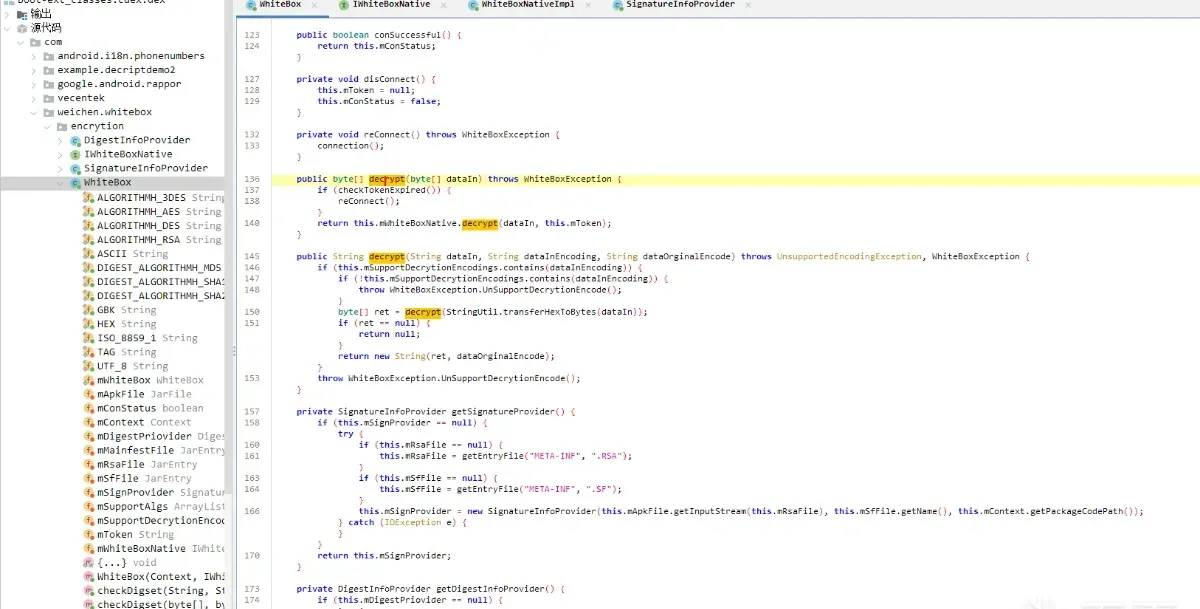
The decrypt method passes the file’s value and a key into native code, which computes the result:
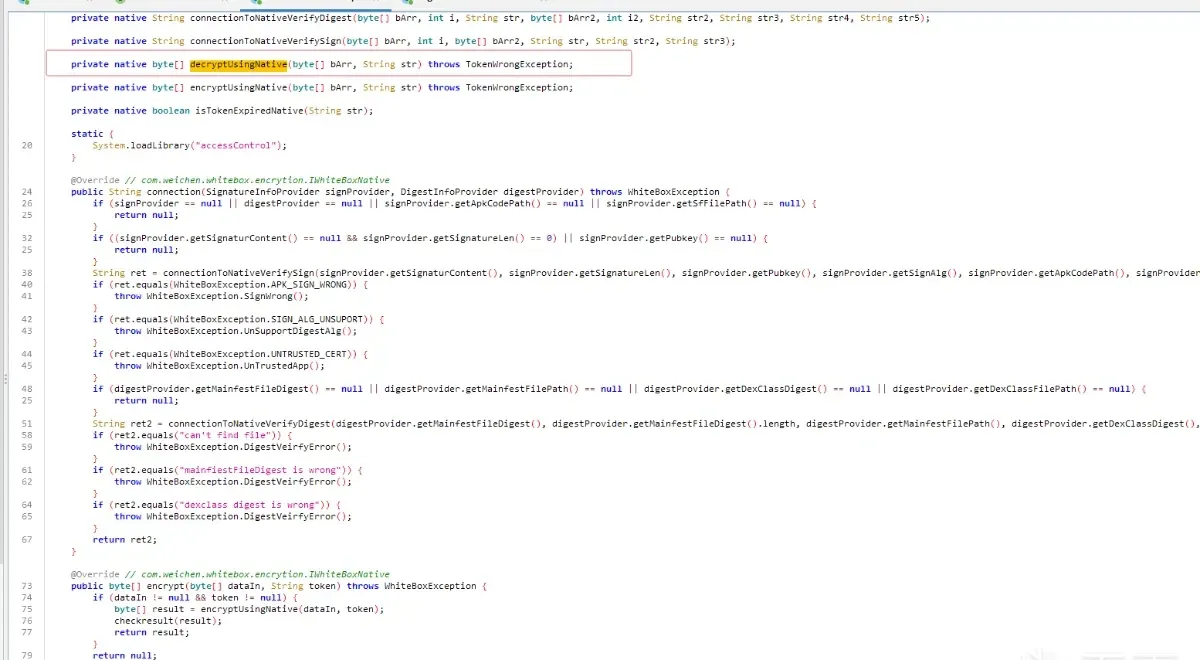
So I also need the token:
0x3 Getting the token that decrypts the key
Static analysis shows the token comes from checking some file values in the updater APK inside native code, which returns the result:
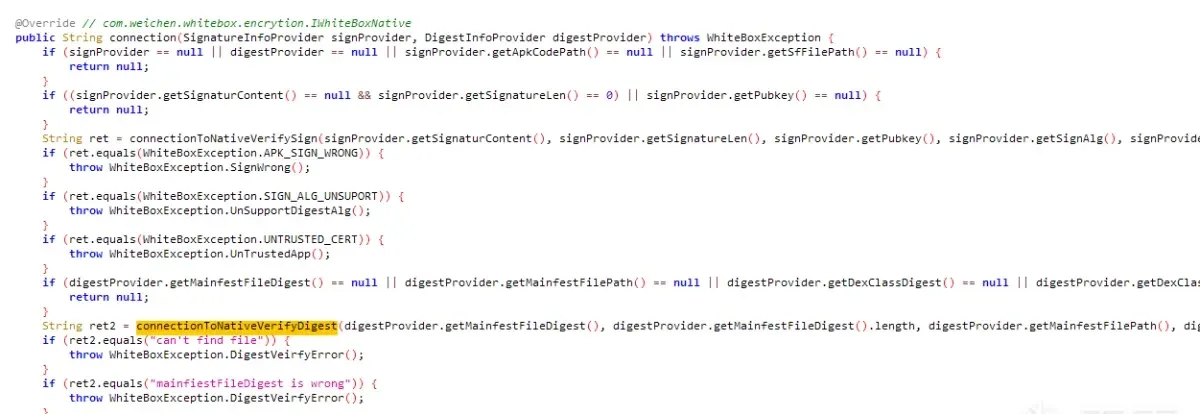
I first assumed I’d need to reverse the native computation — then I decompiled it and saw…
It just compares the fetched data and directly returns the token. I overcomplicated it.
int __fastcall Java_com_***_***_***_WhiteBoxNativeImpl_connectionToNativeVerifyDigest(JNIEnv *a1, int a2, int a3, size_t a4, int a5, int a6, size_t a7, int a8, int a9, int a10, int a11)
{
  _DWORD *v13; // r9
  const char *v14; // r5
  const char *v15; // r10
  int v16; // r0
  const char *v17; // r5
  jbyte *v18; // r4
  jbyte *v19; // r6
  jstring (*v20)(JNIEnv *, const char *); // r2
  const char *v21; // r1
  const char *v23; // r4
  void *v24; // r9
  const char *v25; // r10
  jbyte *v26; // r4
  jbyte *v27; // r5
  const char *v28; // [sp+1Ch] [bp-2Ch]
  const char *v29; // [sp+24h] [bp-24h]

  v13 = malloc(0x20u);
  v14 = (*a1)->GetStringUTFChars(a1, a9, 0);
  v15 = (*a1)->GetStringUTFChars(a1, a5, 0);
  if ( !j_readFileFromApk(v14, v15, v13) )
  {
    _android_log_print(4, "LeosinAcsctl: digest", "can't find file, LINE = %d", 275);
LABEL_8:
    v20 = (*a1)->NewStringUTF;
    v21 = "can't find file";
    return (int)v20(a1, v21);
  }
  v29 = v14;
  v16 = j_calculateDigest(a1, v13, a10);
  if ( !v16 || (v17 = (const char *)v16, !v13[4]) )
  {
    _android_log_print(4, "LeosinAcsctl: digest", "unsupproted signAlg, LINE = %d", 281);
    v20 = (*a1)->NewStringUTF;
    v21 = "unsupproted signAlg";
    return (int)v20(a1, v21);
  }
  v18 = (*a1)->GetByteArrayElements(a1, a3, 0);
  v19 = (jbyte *)malloc(a4);
  qmemcpy(v19, v18, a4);
  if ( strncmp(v17, v19, a4) )
  {
    _android_log_print(4, "LeosinAcsctl: digest", "mainfiestFileDigest is wrong, LINE = %d", 290);
    v20 = (*a1)->NewStringUTF;
    v21 = "mainfiestFileDigest is wrong";
    return (int)v20(a1, v21);
  }
  (*a1)->ReleaseByteArrayElements(a1, (jbyteArray)a3, v18, 2);
  (*a1)->ReleaseStringUTFChars(a1, (jstring)a5, v15);
  free(v19);
  free(v13);
  v23 = (*a1)->GetStringUTFChars(a1, a8, 0);
  v24 = malloc(0x20u);
  if ( !j_readFileFromApk(v29, v23, v24) )
  {
    _android_log_print(4, "LeosinAcsctl: digest", "can't find file, LINE = %d", 301);
    goto LABEL_8;
  }
  v28 = v23;
  v25 = (const char *)j_calculateDigest(a1, v24, a11);
  v26 = (*a1)->GetByteArrayElements(a1, a6, 0);
  v27 = (jbyte *)malloc(a4);
  qmemcpy(v27, v26, a7);
  __android_log_print(4, "LeosinAcsctl: digest", "dexClassDigestLen is %d", a7);
  __android_log_print(4, "LeosinAcsctl: digest", "dexClassDigestArr is %s", v27);
  __android_log_print(4, "LeosinAcsctl: digest", "dexClassDigest is %s", v25);
  if ( !strncmp(v27, v25, a7) )
  {
    (*a1)->ReleaseByteArrayElements(a1, (jbyteArray)a6, v26, 2);
    (*a1)->ReleaseStringUTFChars(a1, (jstring)a8, v28);
    free(v27);
    free(v24);
    (*a1)->ReleaseStringUTFChars(a1, (jstring)a9, v29);
    v20 = (*a1)->NewStringUTF;
    v21 = "****";
  }
  else
  {
    _android_log_print(4, "LeosinAcsctl: digest", "can't find file, LINE = %d", 313);
    v20 = (*a1)->NewStringUTF;
    v21 = "dexclass digest is wrong";
  }
  return (int)v20(a1, v21);
}
0x4 Decrypting the key
Now that I have the token, I pass the token and ckey into Unidbg to compute the result:
    public byte[] key() {
        String y2 = "decryptUsingNative([BLjava/lang/String;)[B";
        // arg1: ckey value, arg2: token value
        DvmObject<?> dvmObject = UmeJni.callStaticJniMethodObject(emulator, y2, Base64.getDecoder().decode("j3AR4u/Jxxxxxxxxxxxxj7ibVPSX695NCfhxxxxQWc="), "****");
        return (byte[]) dvmObject.getValue();
    }
0x5 Decrypting
With the key in hand, back to step one: decrypt with AES/CBC/PKCS5Padding to get the OTA package:
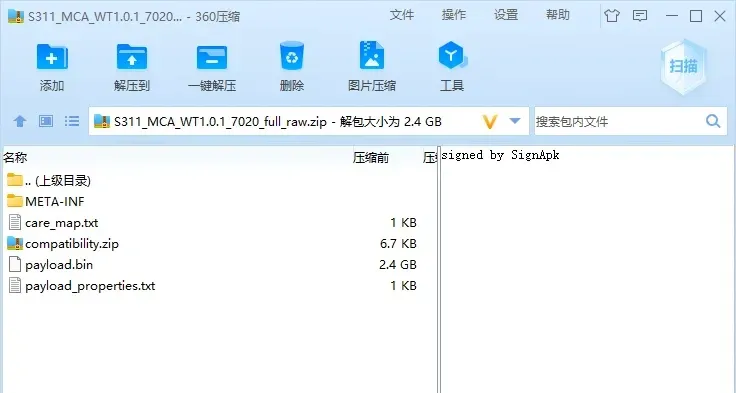
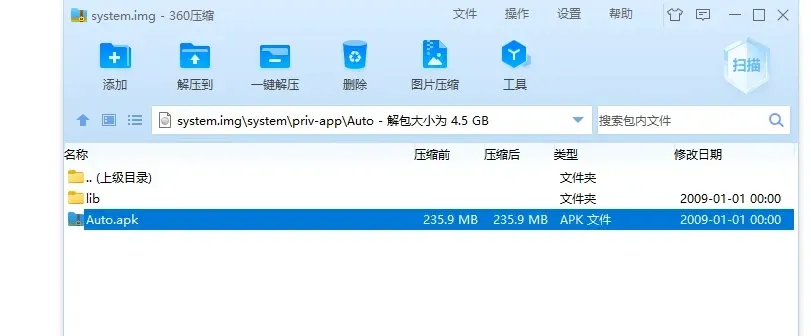
Then use the open-source payload-dumper-go to extract system.img from payload.bin:
And there’s the APK I wanted:
0x6 Wrap-up
The whole thing took an afternoon. I overestimated the difficulty at first — once I actually got going, it helped enormously that the car group provided the files to analyze. The hardest part is always getting started; once you do, the rest flows.
Overall the analysis wasn’t hard — just basic calls and a few simple concepts bolted together.
Colin Xiao — I take on contract reverse-engineering work, and writeups like this are how I show what I can do. If you need help with anything in this space — including but not limited to the areas I cover above — I’m available. No project is too big or too small — if it’s reverse engineering and I can do it, I’ll take it. DM me on X (@colinxiao_lab) or Telegram (@ColinXiao666).
Get in touch