Debugging Android Without Attaching: eDBG and the eBPF Trick
About the author. I’m Colin Xiao — an independent reverse engineer, mostly working solo on contract jobs. I dig into compiled code of every kind, including but not limited to: Android and iOS apps, x86/x64/ARM native binaries, packers and obfuscators, DRM and license checks, network protocols and APIs, crypto and signature algorithms, malware, game binaries, and embedded/IoT firmware. I also handle large-scale data collection and vulnerability research. If you have any project in mind, I’d be glad to take it on — whatever it is, as long as it’s within my wheelhouse. Just reach out. You can reach me on X at @colinxiao_lab or on Telegram at https://t.me/ColinXiao666.
This research is published for educational and defensive purposes. The target sample is anonymized throughout.
Debugging Android Without Attaching: eDBG and the eBPF Trick
The problem every Android reverse engineer runs into
If you’ve spent any serious time doing native Android reverse engineering, you know the routine. You attach a debugger, and the target immediately knows. Maybe it checks TracerPid in /proc/self/status. Maybe it watches for ptrace system calls. Maybe it uses a honeypot — a harmless-looking routine that no healthy process ever touches, but a debugging tool inevitably trips. You get “pummeled”, as the saying goes, by an ever-growing pile of anti-debugging tricks.
The root cause is structural: every traditional debugger — GDB with gdbserver, LLDB, IDA’s remote debugging, Frida’s Stalker — ultimately relies on the same two mechanisms: ptrace to seize control of the target, or in-process instrumentation that the target can enumerate. Both leave a footprint the target can inspect.
That’s what makes eDBG interesting. It’s an open-source Android CLI debugger built on eBPF, and it sidesteps the entire problem by never attaching to the process at all.
The core idea: breakpoints in the kernel, not in the process
eDBG’s design philosophy is simple to state and subtle in its implications:
- It produces no attachment to the target process while debugging.
- It uses no traditional debugging scheme.
- The debugger and the debuggee are completely independent — each interacts only with the kernel.
Breakpoints are implemented with uprobes, a kernel feature that plants a breakpoint instruction at a user-space address but manages it entirely inside the kernel. The debugger doesn’t ptrace the target, doesn’t inject anything into its address space, and doesn’t appear in its /proc metadata. The debuggee and the debugger each talk to the kernel separately, and neither can see or interfere with the other.
A few consequences follow from this architecture:
- Registration is not tied to runtime addresses. Because a breakpoint is a kernel-managed uprobe, it doesn’t depend on ASLR-resolved addresses the way a ptrace software breakpoint does.
- Crash isolation. If the debugger crashes or restarts, the debuggee keeps running; if the debuggee crashes, the debugger stays alive. There’s no fragile master/slave coupling to recover from.
- Nothing lives in the target. There’s no agent, no injected thread, no
LD_PRELOAD-style shim for the target to scan for.
It’s the difference between following someone into a room and watching through a one-way mirror.
What it actually does
For day-to-day reverse engineering, eDBG covers the basics a debugger should, with a GDB-compatible interface so there’s essentially nothing new to learn:
- Breakpoints — via uprobes; pause the program and read any context you want at the breakpoint.
- Single-stepping — both step-into and step-over.
- Memory read/write — read arbitrary memory at a breakpoint, and freely write to any address that’s writable.
- Thread filtering — debug only the thread or threads you care about.
- Symbol resolution and disassembly — the usual amenities.
The supported GDB command set: break / continue / step / next / finish / until / examine / display / quit / list / info / thread.
Two extras are worth noting. write writes to memory directly, and set lets you label an arbitrary address with a custom symbol of your own — small conveniences, but they’re the kind of thing you reach for constantly in a session.
It also supports saving your session to a project file and reloading it later, so a half-finished debugging state isn’t lost when you step away.
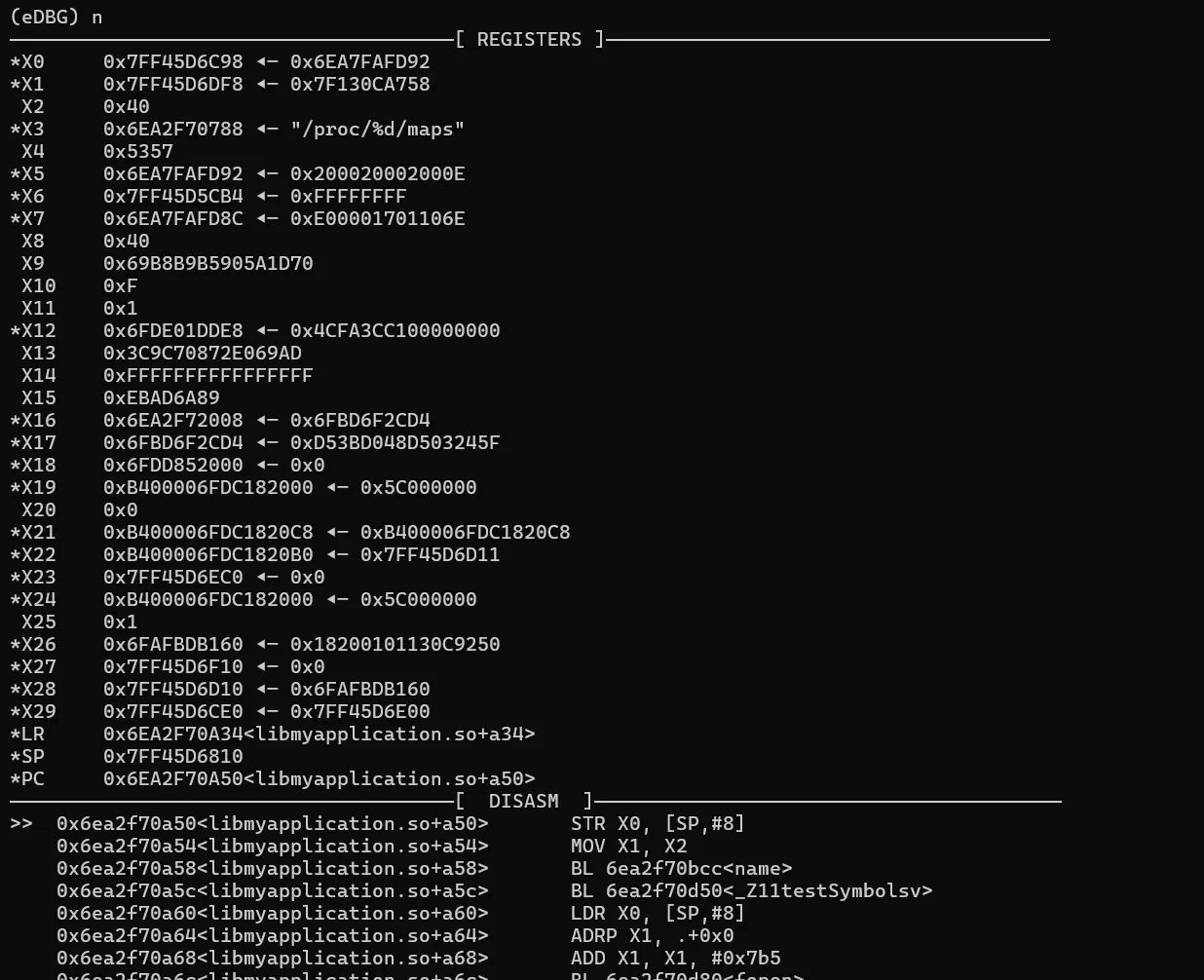
The interface takes its cues from pwndbg — on each breakpoint it auto-analyzes the current code and register state. You can turn those displays off in the options if you prefer a quieter screen.
Requirements
Keep expectations realistic. This isn’t a magic wand:
- ARM64 Android only, for now.
- Root required, with KernelSU recommended.
- Kernel 5.10 or newer (check with
uname -r).
A note on stealth
It’s tempting to frame eBPF as “undetectable”, but that would be overselling it. eBPF itself leaves traces — uprobe events can be observed, and sophisticated anti-cheat stacks have side channels for noticing that something is watching. eDBG itself documents this: there’s an “advanced usage” section specifically about avoiding uprobes from producing observable signatures. The honest summary is that eBPF raises the bar dramatically over ptrace-based tooling, but it doesn’t make you invisible. Treat it as a strong tool, not a cloak.
Why this matters
The tool was inspired by stackplz, and grew out of a frustration a lot of us share: using eBPF-adjacent tooling to assist IDA’s dynamic debugging, only to keep losing fights to anti-debugging and honeypots. It doesn’t replace IDA — no graphical interface, no decompiler (and let’s be honest, most modern apps can’t be cleanly decompiled anyway) — but as a companion for the grunt work of dynamic analysis, it’s a genuinely useful addition to the kit.
The broader lesson is the one worth taking away: when a technique keeps getting detected, the fix usually isn’t to do the same thing more cleverly — it’s to move to a different layer of the stack entirely.
Colin Xiao — I take on contract reverse-engineering work, and writeups like this are how I show what I can do. If you need help with anything in this space — including but not limited to the areas I cover above — I’m available. No project is too big or too small — if it’s reverse engineering and I can do it, I’ll take it. DM me on X (@colinxiao_lab) or Telegram (@ColinXiao666).
Get in touch