Real-Time HTTPS Decryption With Frida + Wireshark (Part 1) — Hooking libssl
About the author. I’m Colin Xiao — an independent reverse engineer, mostly working solo on contract jobs. I dig into compiled code of every kind, including but not limited to: Android and iOS apps, x86/x64/ARM native binaries, packers and obfuscators, DRM and license checks, network protocols and APIs, crypto and signature algorithms, malware, game binaries, and embedded/IoT firmware. I also handle large-scale data collection and vulnerability research. If you have any project in mind, I’d be glad to take it on — whatever it is, as long as it’s within my wheelhouse. Just reach out. You can reach me on X at @colinxiao_lab or on Telegram at https://t.me/ColinXiao666.
This research is published for educational and defensive purposes. The target sample is anonymized throughout.
Real-Time HTTPS Decryption With Frida + Wireshark (Part 1) — Hooking libssl
Tools
- frida-analykit
- wireshark
- Test resource:
002_frida-analykit-ssl-log-secret
Preface
On Android, the usual way to capture HTTPS traffic is a man-in-the-middle tool — Charles, Fiddler, and the like:
- From the client’s perspective, the MITM forges a CA and uses it to sign a forged server certificate to talk to the app client.
- From the server’s perspective, the MITM acts as the app client when issuing requests.
In the implementation of these capture tools, the forged certificate is the one hurdle they can never get past. That single weakness gives rise to these detection methods:
- Compare the public-key fingerprint of the leaf certificate in the server certificate chain obtained at request time against the real server leaf certificate’s public-key fingerprint (hardcoded into the app at release). A mismatch means a MITM is present — this is what we call
ssl pinning. mtlsis stricter still: the server also validates the client certificate (hardcoded into the app), so you must initiate the request from a client holding a server-issued trust certificate for the server to accept it. Since the MITM forged its certificate without configuring a trusted client certificate, the request gets stopped at the certificate check during the handshake.
For the conventional Java-layer certificate validation — TrustKit-Android depends on the Android framework’s Java TLS API (HttpsURLConnection, SSLSocket, X509TrustManager, etc.) — tools like JustTrustMe and objection simply hook all the Java-layer validation classes involved and force them to pass.
Even with all those Java-layer hooks, apps still exist that perform certificate validation at the native layer, or that speak modified-HTTP or fully custom protocols — and against those, HTTP-protocol capture tools are helpless.
Of course, none of this is meant to disparage MITM proxy tools or argue which approach is “right”. My point is simpler: MITM-proxy capture tools are never the wrong first choice, but when you find yourself stuck, don’t forget Wireshark is standing behind you.
With that out of the way, let’s get to business. Starting from the goal, I’ll walk through how to let Wireshark capture traffic in real time — and decrypt TLS automatically — without any MITM proxy.
The article is split into two parts:
- Part 1 (this post): hooking
libssl.soto enable real-time TLS decryption in Wireshark. - Part 2: how to automatically hook
.solibraries with statically-linkedboringssl(WebView and Flutter) by fingerprinting them.
The current landscape
Wireshark can use a user-supplied
sslkey.log(Fig. 1) to decrypt matching TLS traffic. Keep writing tosslkey.logand Wireshark reads the new keys in a tail-like fashion.
The sslkey.log Wireshark expects looks like this:
CLIENT_RANDOM 54235798f2aa3068370b4c30f97104f7176eeabc2feaaeff2087b81e7bed0154 878524cf02d4366eabbf8d520f86c98b334f3677e5858937e04b63f3b30722cbf20011e1a546edd1cf0f010aec60bcff
CLIENT_RANDOM f984d87e0ca21e979b1e6dfa3c70e4e8c502195249d8aba01d933fc96e020da4 2ba31e88d4f6df0d359f61a19b115de5b15324ad5c2362c4d14b38a34be8067c1bdd341f64f43aaa036d8863f49ffb04
CLIENT_HANDSHAKE_TRAFFIC_SECRET b4a5b243e816c0cb1364bcfc9a18ddf3de93bb1d4d7cafd60762bb6a377fdd42 4c2c8981b54a2a588b547ef7463e3aa5417e3c77de19030333913c5f35878be7cb08067b262ad6d306512f156560ac6d
SERVER_HANDSHAKE_TRAFFIC_SECRET b4a5b243e816c0cb1364bcfc9a18ddf3de93bb1d4d7cafd60762bb6a377fdd42 0096713b0c5ca4822f1ca3a4ab01f3b889a93f23b8603ae37fe73643f8b6ed31fe8a9e67e389a674578c91b50d146b21
Each line splits into three parts:
-
label: usually one ofCLIENT_RANDOM,CLIENT_HANDSHAKE_TRAFFIC_SECRET,EXPORTER_SECRET, etc. The most critical isCLIENT_RANDOM. -
Client Random: 32 bytes (64 hex chars), the client’s random number sent during the Client Hello in the handshake (Fig. 2). This value is also the ID Wireshark uses to locate the TLS packet to decrypt. -
Master Secret: 48 bytes (96 hex chars), the master secret computed during the TLS handshake. Simply put, it’s the key parameter used to generate the encryption data for subsequent client/server communication (thinkgen_data_secret(master_secret)).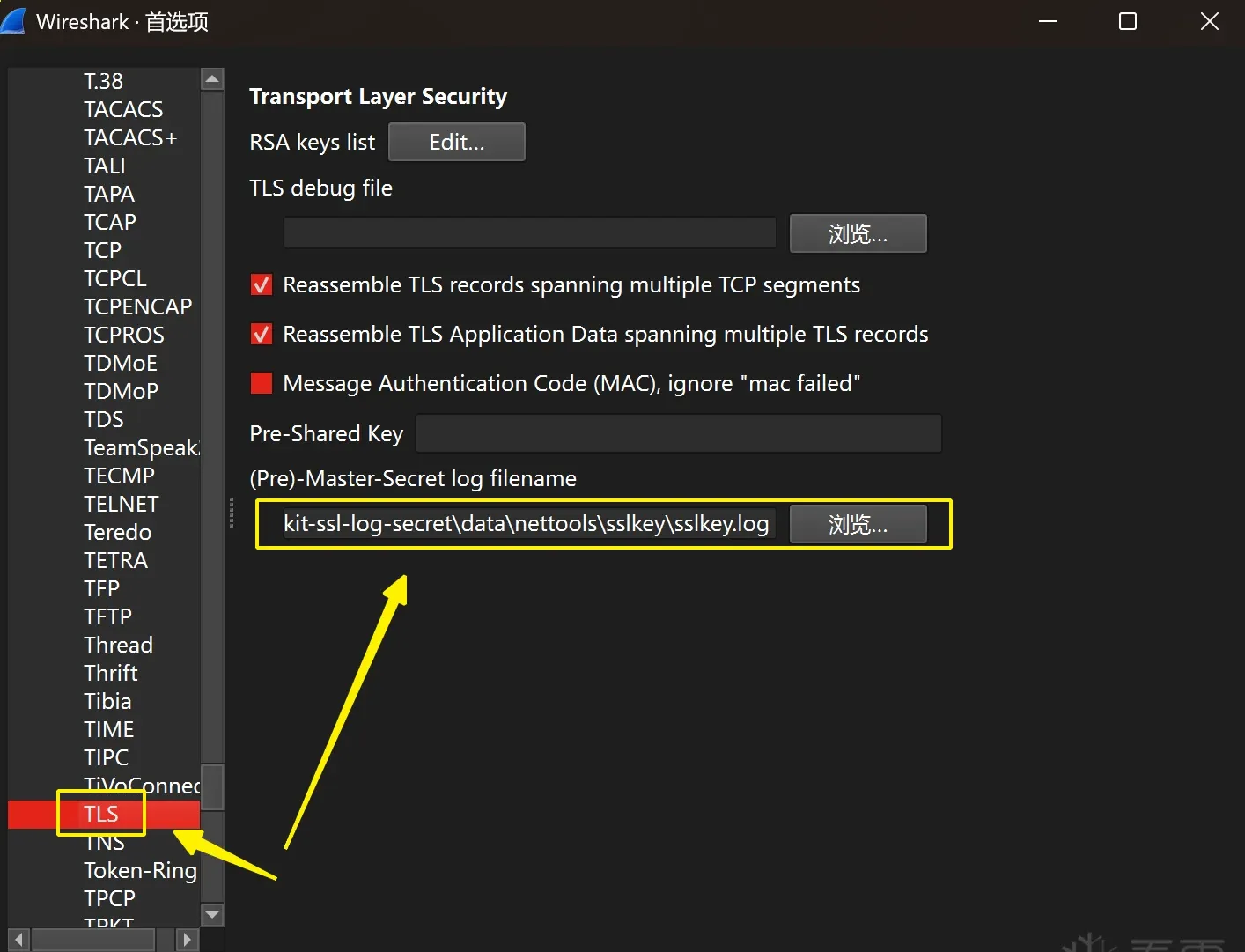 Fig. 1
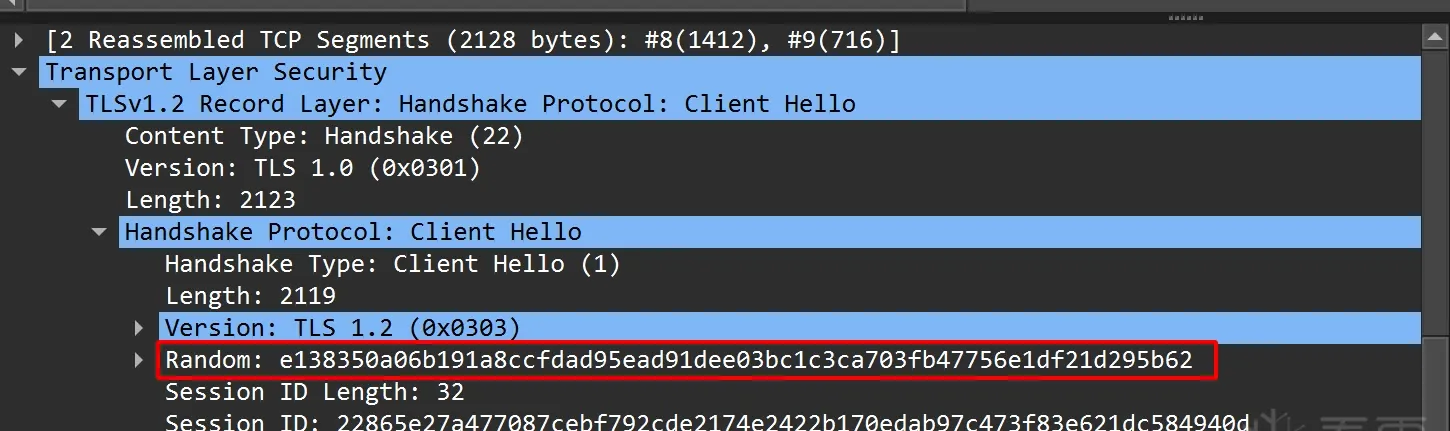 Fig. 2
With that understanding, the goal is confirmed: by any viable means, write the target app’s TLS-traffic sslkey to a PC log file in real time, so Wireshark can read and decrypt the TLS traffic.
How to obtain sslkey.log
Since Android 7, AOSP switched its SSL implementation from OpenSSL to BoringSSL, so here we’ll only study the BoringSSL project (the parts we care about are very likely identical anyway).
BoringSSL project: https://github.com/google/boringssl
In AOSP, BoringSSL produces libssl.so — the native support behind the Java-layer SSLSocket / SSLContext and friends. (That claim comes without any proof attached. For someone who hasn’t seen how the Java layer connects to native, it’s the kind of thing you end up memorizing. If you want the reasoning, read on — I’ll trace, from a position of ignorance, why the Java layer lands on libssl.so through a simple example. Already know it or don’t care? Skip this part.)
Why libssl.so?
// Java example
URL url = new URL("https://example.com");
URLConnection conn = url.openConnection();
conn.connect()

// Trace steps
java.net.URL.openConnection()
    v
    abstract URLStreamHandler
        ├── com.android.okhttp.HttpsHandler.openConnection()
        ├── com.android.okhttp.HttpHandler.openConnection()
        ├── com.android.okhttp.HttpHandler.newOkUrlFactory()
        ├── com.android.okhttp.OkUrlFactory.open()
        ├── com.squareup.okhttp.internal.huc.HttpsURLConnectionImpl()
        ├── com.squareup.okhttp.internal.huc.DelegatingHttpsURLConnection()
        ├── com.squareup.okhttp.internal.huc.HttpURLConnectionImpl()
        v
    abstract URLConnection
    v
com.squareup.okhttp.internal.huc.HttpURLConnectionImpl.connect()
    v
com.squareup.okhttp.internal.huc.HttpURLConnectionImpl.execute()
    v
com.squareup.okhttp.internal.http.HttpEngine.sendRequest()
    v
com.squareup.okhttp.internal.http.HttpEngine.connect()
    v
com.squareup.okhttp.internal.http.StreamAllocation.newStream()
    v
com.squareup.okhttp.internal.http.StreamAllocation.findHealthyConnection()
    v
com.squareup.okhttp.internal.http.StreamAllocation.findConnection()
    v
com.squareup.okhttp.internal.io.RealConnection()
    v
com.squareup.okhttp.internal.io.RealConnection.connect()
    v
com.squareup.okhttp.internal.io.RealConnection.connectSocket()
    v
com.squareup.okhttp.internal.io.RealConnection.connectTls()
    v
    abstract SSLSocketFactory
        ├── org.conscrypt.OpenSSLSocketFactoryImpl.createSocket()
        ├── org.conscrypt.Platform.createFileDescriptorSocket()
        ├── org.conscrypt.ConscryptFileDescriptorSocket()
        ├── org.conscrypt.newSsl()
        ├── org.conscrypt.NativeSsl.newInstance()
        ├── org.conscrypt.NativeCrypto.SSL_new()  // native
        v
    static native long SSL_new(long ssl_ctx, AbstractSessionContext holder) throws SSLException;
    v
    // Reached the native function; find where it's registered:
    v
com.android.org.conscrypt.NativeCryptoJni.init() // external/conscrypt/common/src/main/java/org/conscrypt/NativeCrypto.java
    v
    System.loadLibrary("javacrypto") // => libjavacrypto.so
        ├── // external/conscrypt/Android.bp: build config for libjavacrypto.so
        |   cc_defaults {
        |       name: "libjavacrypto-defaults",
        |
        |       cflags: [
        |           "-Wall",
        |           "-Wextra",
        |           "-Werror",
        |           "-Wunused",
        |           "-fvisibility=hidden",
        |       ],
        |
        |       srcs: ["common/src/jni/main/cpp/**/*.cc"],
        |       local_include_dirs: ["common/src/jni/main/include"],
        |   }
        |
        |   cc_library_shared {
        |       name: "libjavacrypto",
        |       // ...
        |       shared_libs: [
        |           "libcrypto",
        |           "liblog",
        |           "libssl", // libjavacrypto.so depends on libssl.so
        |       ],
        |       // ...
        |       apex_available: [
        |           "com.android.conscrypt",
        |           "test_com.android.conscrypt",
        |       ],
        |       // ...
        |   }
        |
        ├── // external/conscrypt/common/src/jni/main/cpp/conscrypt/jniload.cc
        |   jint libconscrypt_JNI_OnLoad(JavaVM* vm, void*) // register native methods, NativeCrypto_{libssl.exports}
        |
        ├── // external/conscrypt/common/src/jni/main/cpp/conscrypt/native_crypto.cc
        |   NativeCrypto::registerNativeMethods(env);
        |       ├── ...
        |       ├── CONSCRYPT_NATIVE_METHOD(SSL_new, "(J" REF_SSL_CTX ")J")
        |       ├── ...
        |   static jlong NativeCrypto_SSL_new(JNIEnv* env, jclass, jlong ssl_ctx_address, CONSCRYPT_UNUSED jobject holder)
        |       ├── SSL_new() // #include <openssl/ssl.h>
        |
        ├── // external/conscrypt/common/src/jni/main/cpp/conscrypt/jniutil.cc
        |   void jniRegisterNativeMethods(JNIEnv* env, const char* className, const JNINativeMethod* gMethods, int numMethods)
        |   env->RegisterNatives()
        v
    static native long SSL_new(long ssl_ctx, AbstractSessionContext holder) throws SSLException;
    v
........
(end)

// Above, we traced from the Java layer all the way to the native layer and finally landed on
// libssl.so, establishing the fact: libssl.so is the native support for Java classes such as
// SSLSocket / SSLContext.
ssl_log_secret
Why this function?
- The function was built by the project precisely to ease debugging and capture analysis; the
(const char *)outit produces is exactly what Wireshark needs to decrypt.- It has an easily-located signature (
CLIENT_RANDOM— a spoiler for Part 2, which exploits this).
The code below comes from src/ssl/ssl_lib.cc in the BoringSSL project.
int ssl_log_secret(const SSL *ssl, const char *label, const uint8_t *secret,
                   size_t secret_len) {
  // If no callback is registered, do nothing.
  if (ssl->ctx->keylog_callback == NULL) {
    return 1;
  }

  // Encode random and master_secret into a string.
  ScopedCBB cbb;
  uint8_t *out;
  size_t out_len;
  if (!CBB_init(cbb.get(), strlen(label) + 1 + SSL3_RANDOM_SIZE * 2 + 1 +
                          secret_len * 2 + 1) ||
      !CBB_add_bytes(cbb.get(), (const uint8_t *)label, strlen(label)) ||
      !CBB_add_bytes(cbb.get(), (const uint8_t *)" ", 1) ||
      !cbb_add_hex(cbb.get(), ssl->s3->client_random, SSL3_RANDOM_SIZE) ||
      !CBB_add_bytes(cbb.get(), (const uint8_t *)" ", 1) ||
      !cbb_add_hex(cbb.get(), secret, secret_len) ||
      !CBB_add_u8(cbb.get(), 0 /* NUL */) ||
      !CBB_finish(cbb.get(), &out, &out_len)) {
    return 0;
  }

  // Notify the callback.
  ssl->ctx->keylog_callback(ssl, (const char *)out);
  OPENSSL_free(out);
  return 1;
}


struct ssl_ctx_st {
  // ...
  // keylog_callback, if not NULL, is the key logging callback. See
  // |SSL_CTX_set_keylog_callback|.
  void (*keylog_callback)(const SSL *ssl, const char *line) = nullptr;
  // ...
}
When deciding what to hook, the first thought is usually:
- Can I hook the
ssl_log_secretsymbol directly? No.
Why not? The quickest way to confirm is readelf to check whether the symbol name exists, or a hex editor to search for the string and confirm it’s in .symtab. (IDA Pro would display it anyway, but that display doesn’t reflect whether the symbol actually exists — it uses other information to infer function symbol names.) Whether an ELF retains STB_LOCAL function symbols is decided at compile time; the external/boringssl/Android.bp config confirms this.
- Use
SSL_CTX_set_keylog_callbackto setssl->ctx->keylog_callback.
// src/include/openssl/base.h
#define OPENSSL_EXPORT __attribute__((visibility("default")))

// Declare the exported symbol.
// src/include/openssl/ssl.h
OPENSSL_EXPORT void SSL_CTX_set_keylog_callback(
    SSL_CTX *ctx, void (*cb)(const SSL *ssl, const char *line));

// src/ssl/ssl_lib.cc
void SSL_CTX_set_keylog_callback(SSL_CTX *ctx,
                                 void (*cb)(const SSL *ssl, const char *line)) {
  ctx->keylog_callback = cb;
}
SSL_CTX_set_keylog_callback is an exported symbol, so getting its address is trivial. Before that, though, we need the SSL_CTX *ctx to register the callback on — and how do we get that?
SSL_new
From the Java-to-native trace above, you can see that establishing a connection first requires
SSL_new.
// src/include/openssl/ssl.h
OPENSSL_EXPORT SSL *SSL_new(SSL_CTX *ctx);

// src/ssl/ssl_lib.cc
SSL *SSL_new(SSL_CTX *ctx) {
  if (ctx == nullptr) {
    OPENSSL_PUT_ERROR(SSL, SSL_R_NULL_SSL_CTX);
    return nullptr;
  }

  UniquePtr<SSL> ssl = MakeUnique<SSL>(ctx);
  // ...

  return ssl.release();
}
So the strategy is: attach to the SSL_new symbol, take its SSL_CTX* ctx argument, and use SSL_CTX_set_keylog_callback to register our callback.
// The implementation below uses Frida's native functions directly for clarity;
// frida-analykit wraps these further.

// Keep a reference to prevent the native functions defined by NativeCallback from being GC'd.
const no_gc_list = []


setImmediate(() => {
    const libsslMod = Process.getModuleByName('libssl.so')
    const SSL_new = libsslMod.getExportByName('SSL_new')
    const SSL_CTX_set_keylog_callback = new NativeFunction(
        libsslMod.getExportByName('SSL_CTX_set_keylog_callback'),
        'void', ['pointer', 'pointer']
    )

    Interceptor.attach(SSL_new, {
        onEnter(args) {
            const ctx = args[0]
            this.ssl_ctx = ctx
        },
        onLeave(retval) {
            const ctx = this.ssl_ctx

            const SSL_CTX_keylog_callback = new NativeCallback((ssl: NativePointer, line: NativePointer) => {
                const str = line.readCString()
                if (str !== null) {
                    console.log(str)
                }
            }, 'void', ['pointer', 'pointer'])
            no_gc_list.push(SSL_CTX_keylog_callback)

            SSL_CTX_set_keylog_callback(ctx, SSL_CTX_keylog_callback)
        }
    })

})
At this point we’ve printed the TLS key material from libssl.so. But is that everything? Not yet — Wireshark still can’t get this data. We need RPC to take over all the sslkey output.
How to transfer to Wireshark via RPC?
Frida provides an RPC mechanism: scripts register exported functions via
rpc.exports, and communicate withsend/recv. (frida-analykit implements this; just follow its docs to configure — see the Tools section.)frida-analykit’s exported-function registration lives in
frida-analykit/script/rpc.ts.
// @types/frida-gum/index.d.ts definitions

declare namespace rpc {
    let exports: RpcExports;
}

interface RpcExports {
    [name: string]: AnyFunction;
}

declare function recv(callback: MessageCallback): MessageRecvOperation;

declare function recv(type: string, callback: MessageCallback): MessageRecvOperation;

interface MessageCallback {
    (message: any, data: ArrayBuffer | null): void;
}

interface MessageRecvOperation {
    wait(): void;
}

declare function send(message: any, data?: ArrayBuffer | number[] | null): void;- Exported functions can be referenced from the Go, Python, and Node.js SDKs. Here’s the Python documentation:
frida-analykit’s Python RPC data-proxy implementation lives in
frida-analykit/agent/rpc/resolver.py.
class Script:
    # ...

    # Register a callback invoked when a message arrives.
    @overload
    def on(self, signal: Literal["message"], callback: ScriptMessageCallback) -> None: ...

    # RPC-exported functions: note the names registered in JS aren't exactly the same in Python —
    # there's a name conversion.
    #        [py] hello_world => [js] helloWorld
    # i.e., underscores become camelCase; you can see this in class ScriptExportsSync:
    # def __getattr__ function _to_camel_case.
    def exports(self) -> ScriptExportsSync: ...

    # ...
Here I’ve only listed the implementation rationale. The rest is code development and project organization, which I’ll skip — if you want to understand it, reading the code directly is more efficient. Jump to frida-analykit (see Tools) for the implementation details.
The demo
Let’s verify two things:
- That frida-analykit + Wireshark can bypass certificate validation such as ssl pinning. (Obvious from the theory, but nothing beats seeing the actual result.)
- That Wireshark can capture and decrypt TLS in real time and show the HTTP protocol.
All the resources below are in the Tools directory. The test resources are relative to that directory.
- Install the test APK app-debug.apk (or build it yourself from the
app/source).
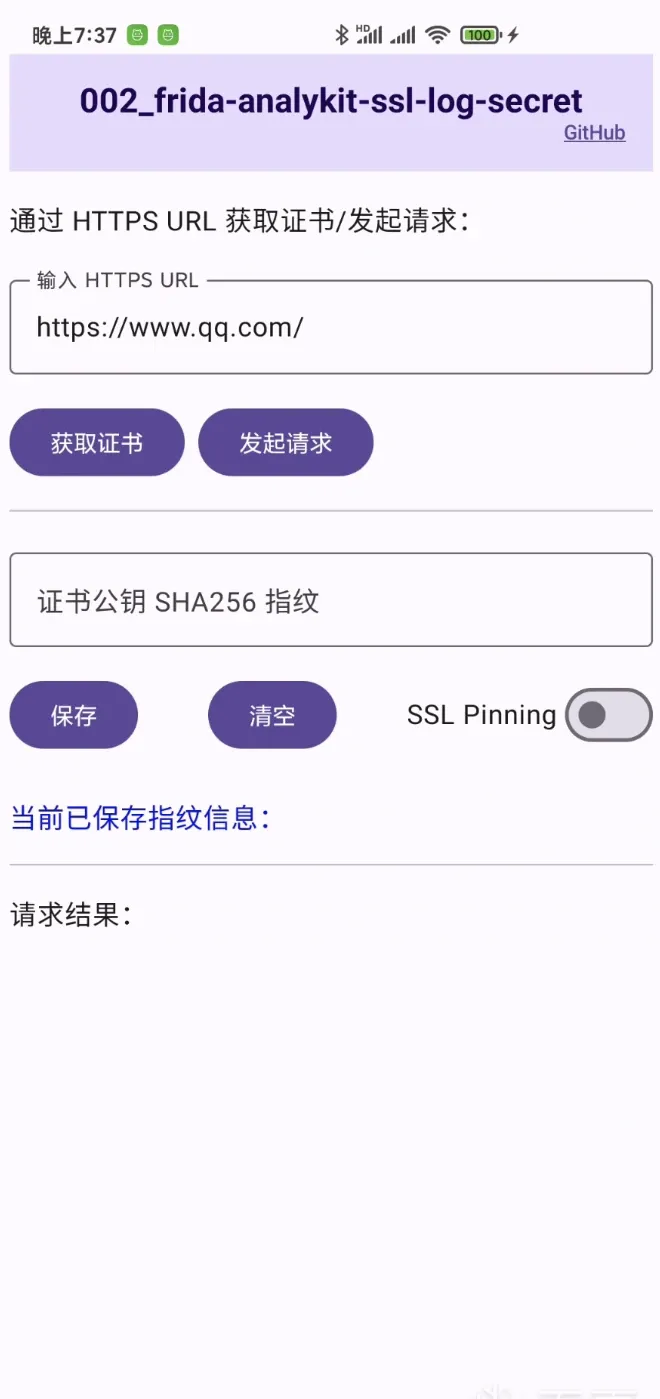 Fig. 3
Fig. 3 shows roughly what the app does.
- Connect the device to a “mobile hotspot” on the PC, and select the corresponding “hotspot NIC” in Wireshark.
On Windows, using softAP for the hotspot usually auto-creates a
Wi-Fi DirectNIC; select it in Wireshark’s capture options (check Task Manager for its name).This approach is recommended so the capture doesn’t mix in too much traffic from other devices — otherwise you’d need filter rules.
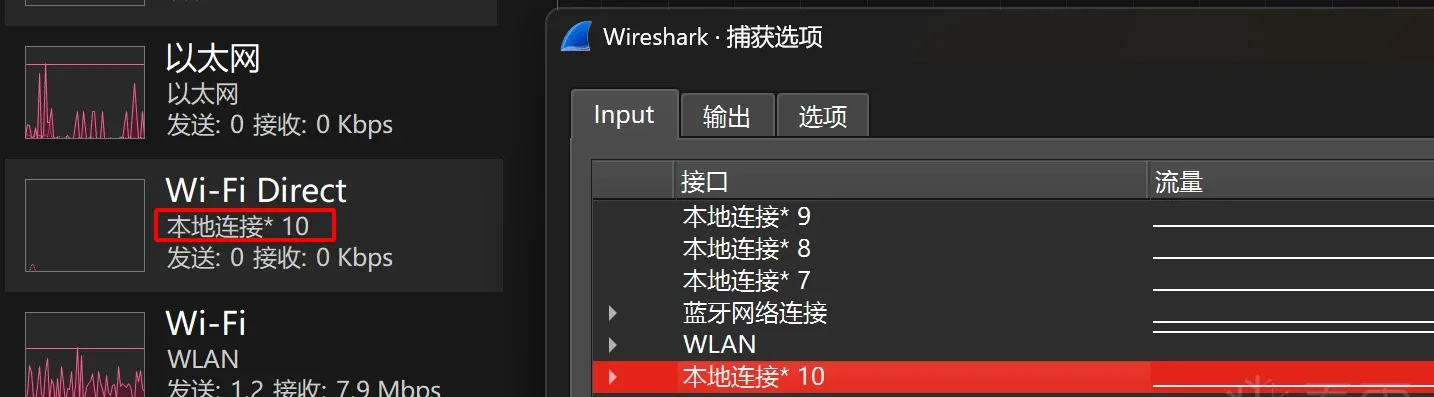 Fig. 4
- Pull
frida-analykit, configure the environment per its docs, configure the yaml file, and boot upfrida-server.
app: com.frida_analykit.ssl_log_secret
jsfile: _agent.js

server:
  servername: /data/local/tmp/frida-server
  host: 127.0.0.1:6666
  device:

agent:
  datadir: ./data/
  stdout: ./logs/outerr.log
  stderr: ./logs/outerr.log


script:
  nettools:
    # Path of the sslkey.log file to write; select this file at the [Fig.1] location.
ssl_log_secret: ./data/nettools/sslkey/- Run
./ptpython_spawn.shto launch theindex.tsscript. - Tap “Send Request” to fire an HTTPS request.
The sslkey.log file is only created once data comes in, so configure it after the first request (or create it manually).
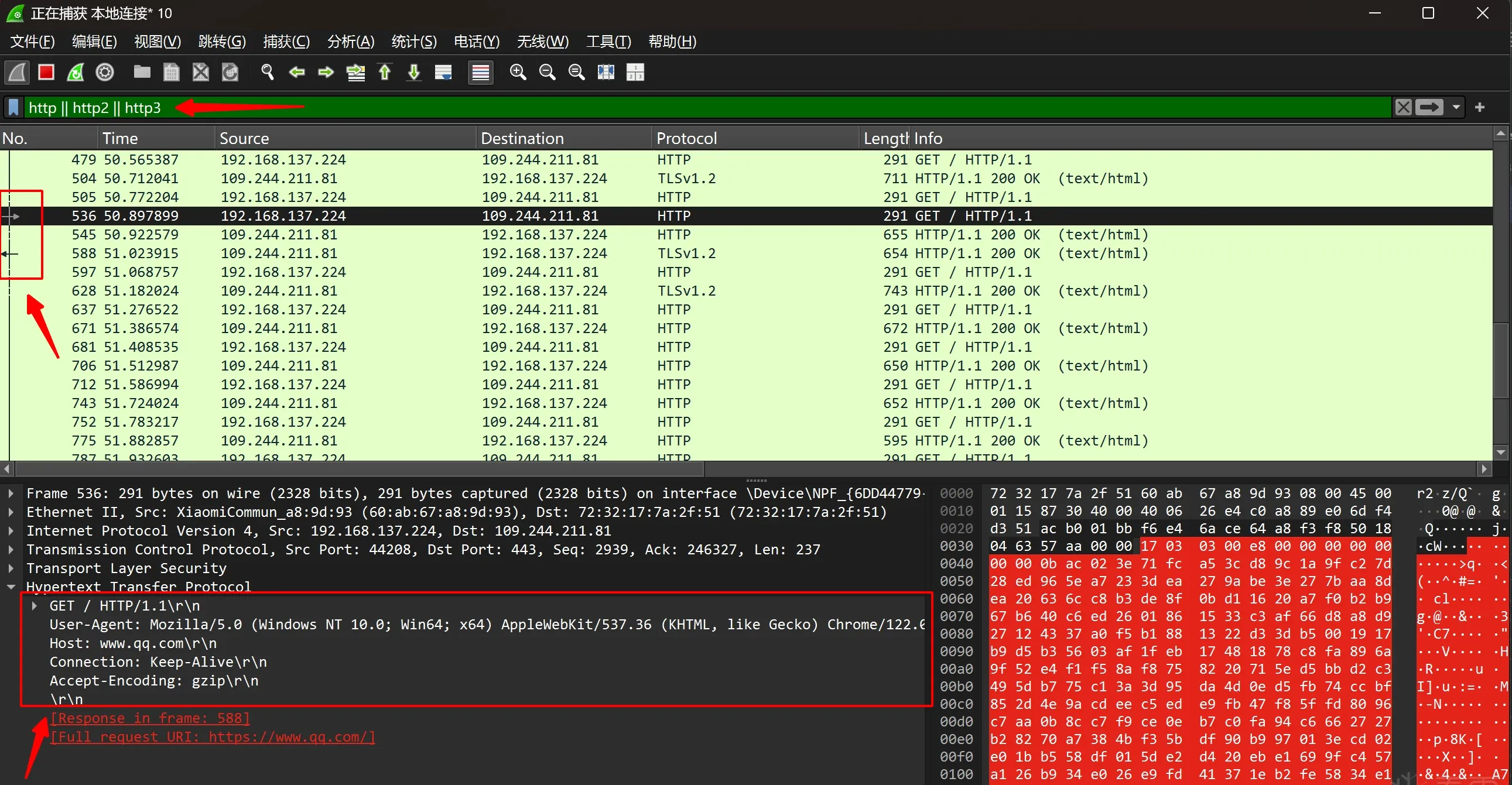 Fig. 5
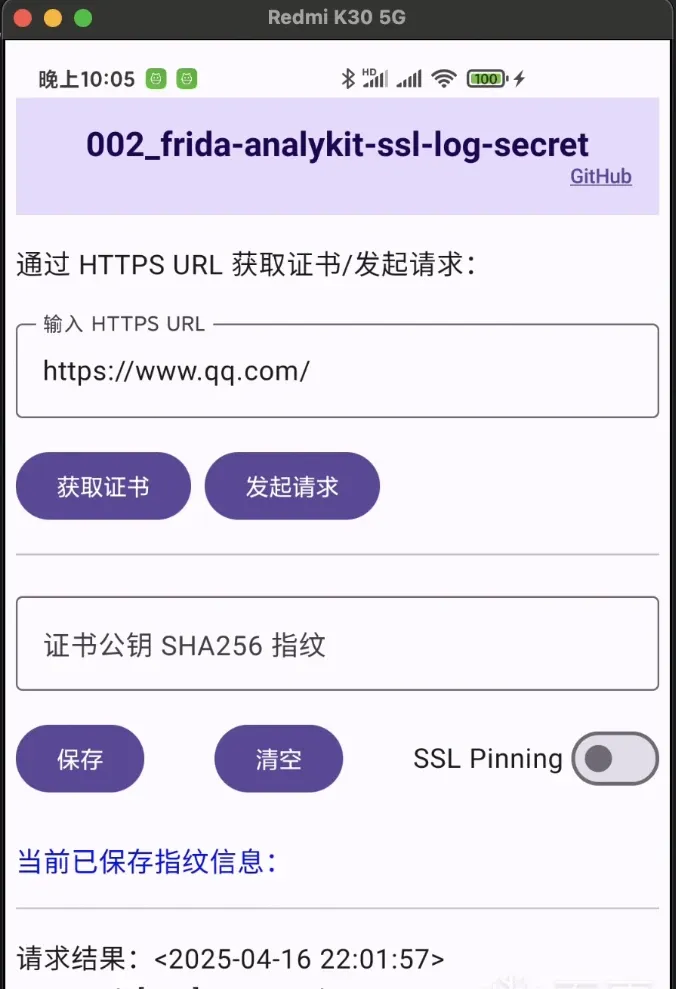 Fig. 6
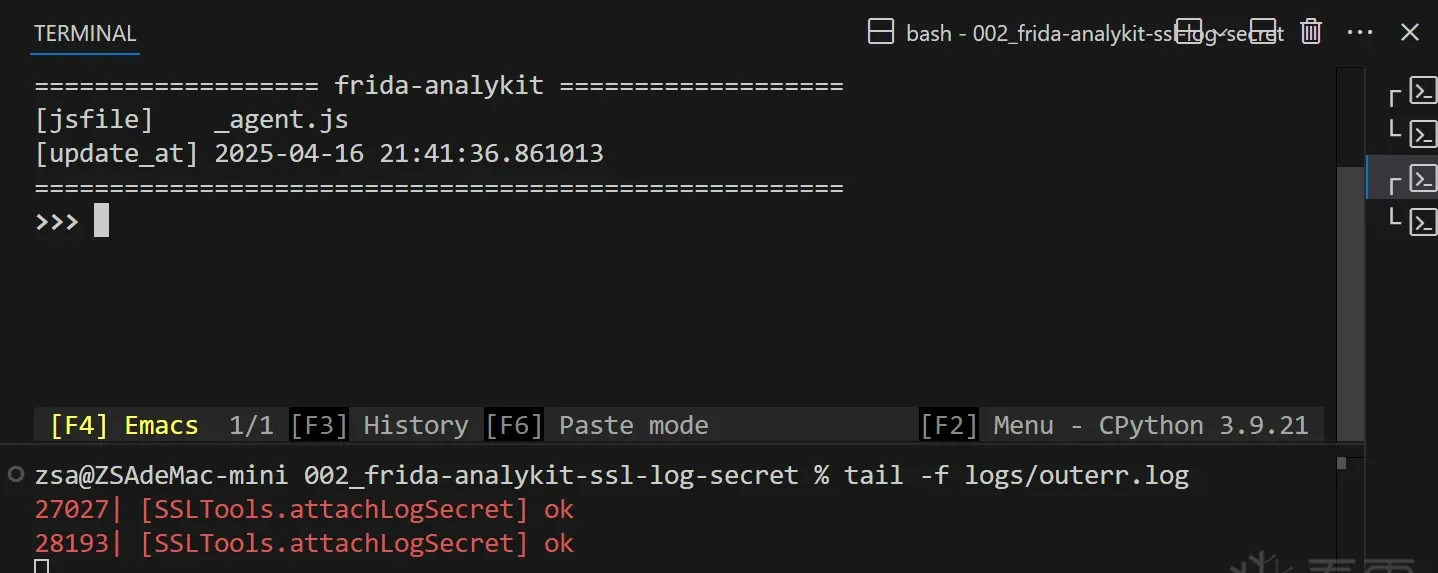 Fig. 7
Fig. 5 shows the packets successfully decrypted, with three boxes marked: top = filter rule (keep HTTP only); middle = related packets (the paired request and response); bottom = packet content.
Wireshark isn’t HTTP-specific, so it isn’t as intuitive to use as Charles or Fiddler.
- What about traffic with ssl pinning enabled? Tap “Get Certificate” – “Save” – enable “SSL Pinning” – “Send Request”.
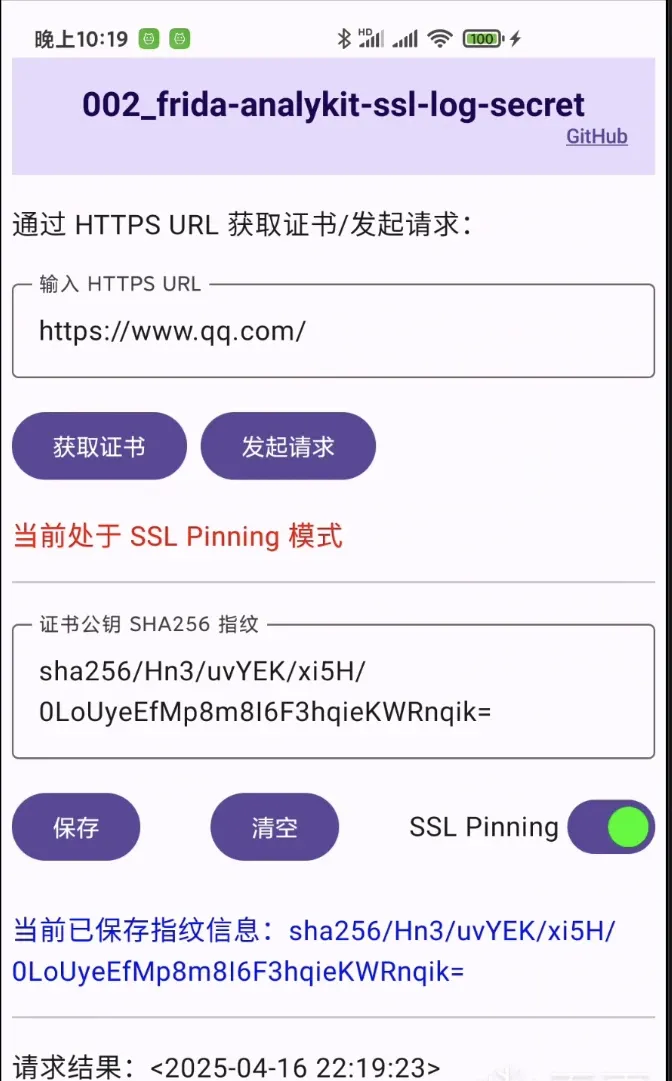 Fig. 8
- Finally, here’s the error that appears when a MITM proxy is present with ssl pinning enabled.
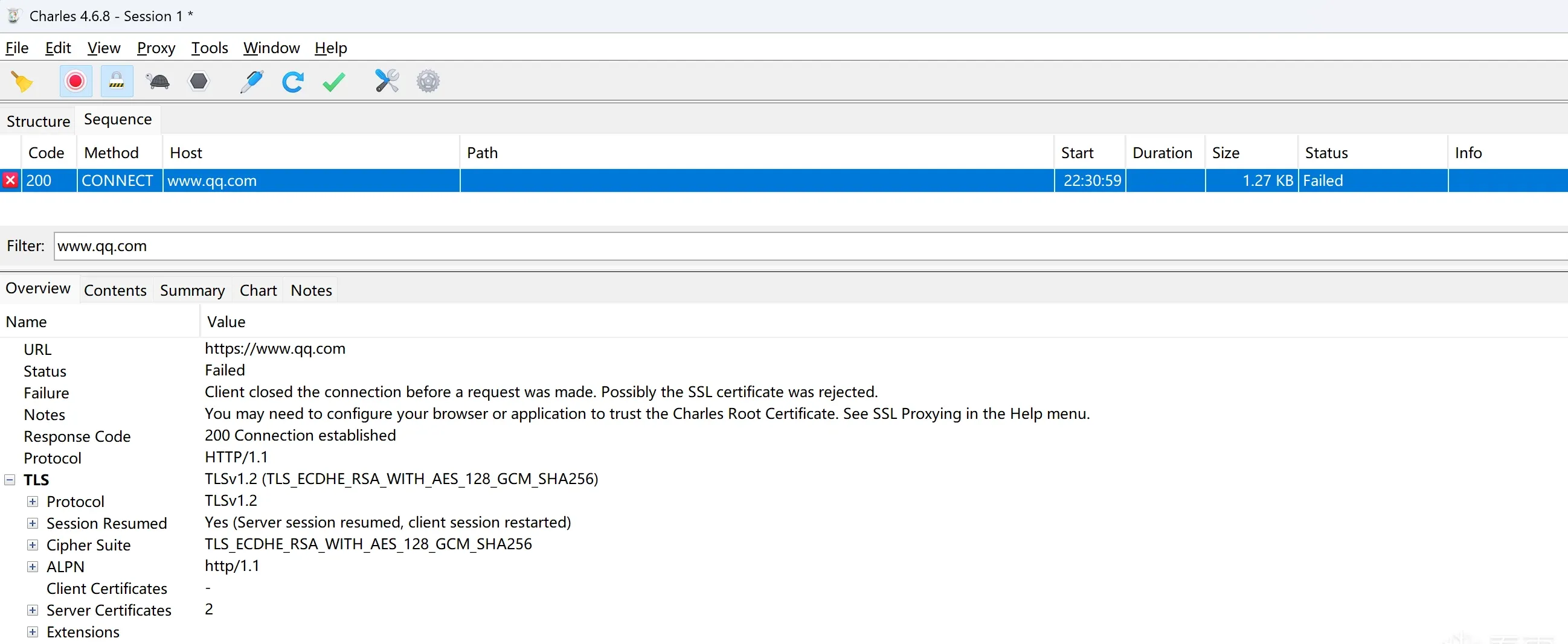 Fig. 9
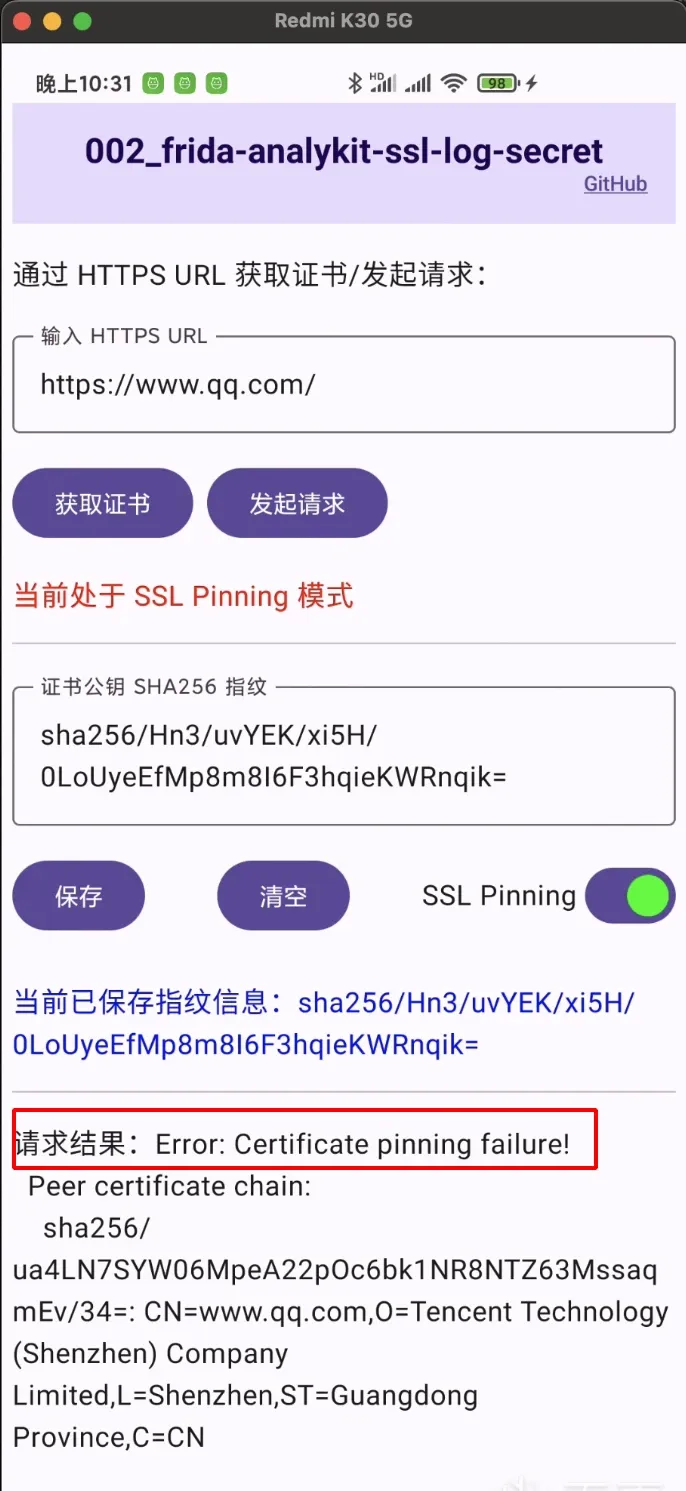 Fig. 10
Closing
This post used libssl.so — a BoringSSL build with clearly exported symbols — as a simple example to walk through the whole capture workflow and its principles.
But will it always be this easy to hook ssl_log_secret in the field? No. The reality is that even common WebViews don’t use the dynamic libssl.so — they statically link BoringSSL themselves. That means all TLS traffic except the conventional Java-layer native validation goes undecryptable. If that were the limit, it wouldn’t be useful. So Part 2 will discuss how to fingerprint and hook a statically-linked BoringSSL ssl_log_secret that has no exported symbols (Flutter and WebView are the examples — though the technique also applies to libssl.so).
Colin Xiao — I take on contract reverse-engineering work, and writeups like this are how I show what I can do. If you need help with anything in this space — including but not limited to the areas I cover above — I’m available. No project is too big or too small — if it’s reverse engineering and I can do it, I’ll take it. DM me on X (@colinxiao_lab) or Telegram (@ColinXiao666).
Get in touch