A Frida-Powered Xposed: Injecting Frida into Zygote for Serverless Hooking
About the author. I’m Colin Xiao — an independent reverse engineer, mostly working solo on contract jobs. I dig into compiled code of every kind, including but not limited to: Android and iOS apps, x86/x64/ARM native binaries, packers and obfuscators, DRM and license checks, network protocols and APIs, crypto and signature algorithms, malware, game binaries, and embedded/IoT firmware. I also handle large-scale data collection and vulnerability research. If you have any project in mind, I’d be glad to take it on — whatever it is, as long as it’s within my wheelhouse. Just reach out. You can reach me on X at @colinxiao_lab or on Telegram at https://t.me/ColinXiao666.
This research is published for educational and defensive purposes.
A Frida-Powered Xposed: Injecting Frida into Zygote for Serverless Hooking
Background
The main motivation: running a frida-server for any length of time destabilizes the system. It looks like the system restarts every so often — not a real reboot, but my screen-mirroring tool drops, Bluetooth drops, and the frida-server itself hangs, forcing a redo. The root cause is that frida’s server doesn’t just hook the target process — it also hooks system_server (for spawning and process enumeration). So when the server crashes, the whole system environment suffers.
So I wanted to integrate Frida the way Xposed is integrated: already loaded every time an app starts, ready to use directly.
Main features
When an app starts — before any of the app’s own code runs — a small server starts up. It accepts client commands, primarily three: load script, update script, and unload script, providing Frida-like functionality. It also supports configuration so the server only starts for target apps.
This makes Frida much more convenient:
- No need to launch a server — the detection surface shrinks a lot.
- Avoids the server’s side effects (destabilizing the system, etc.).
- It starts before any app code, so you get control of the app at the earliest possible moment — useful for detection-avoidance work later.
Now for the implementation. Following Xposed’s example, we modify zygote — which requires some zygote background.
zygote startup
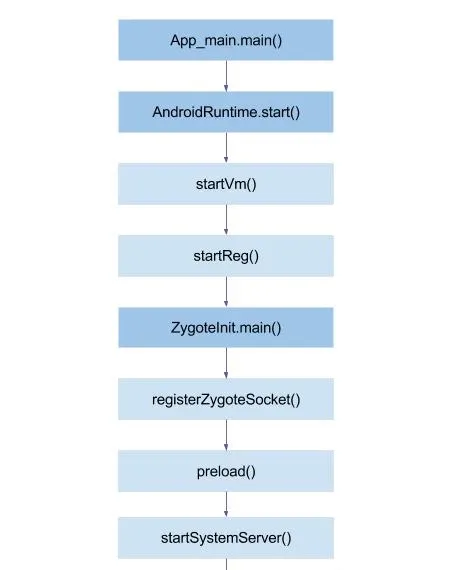
The corresponding files:
frameworks/base/cmds/app_process/app_main.cpp— themainfunction, corresponds toapp_process64.frameworks/base/core/jni/AndroidRuntime.cpp— thestartfunction, corresponds tolibandroid_runtime.so.frameworks/base/core/java/com/android/internal/os/ZygoteInit.java— corresponds toframework.jar.
After zygote finishes its job (starting ART, preloading common system resources, forking system services), it starts a server and enters an idle loop, waiting for AMS to send it a fork request.
App startup
When zygote receives AMS’s fork request, it forks, as follows in frameworks/base/core/jni/com_android_internal_os_Zygote.cpp:
com_android_internal_os_Zygote_nativeForkAndSpecialize
    └─ ForkCommon
        └─ SpecializeCommon
            └─ SetThreadName(const std::string& thread_name)
From my observations, SetThreadName has very nice properties:
- It runs after the fork, i.e. in the app’s process space — a good place to start our server. If we ran before the fork, the service would die when fork executes, because fork is single-threaded.
- It’s before any app code runs, meaning we gain control at the earliest moment — good for detection-avoidance.
- It’s trivial to obtain the app name here, which makes filtering easy (start our service only for target apps).
Static injection
Write our logic in C++, compile it into an .so, and statically inject it into app_process64 with LIEF:
def inject_so_tail(src: str | Path,
                   new_so: str,
                   dst: str | Path | None = None) -> Path:
    bin_ = lief.parse(str(src))

    # 1. Record the old dependency order and remove all of them
    old_needed = [lib for lib in bin_.libraries if lib != new_so]
    for lib in list(bin_.libraries):
        bin_.remove_library(lib)

    # 2. Insert the new library first, then rebuild in reverse old-dependency order
    bin_.add_library(new_so)                              # now it's first
    for lib in reversed(old_needed):                      # insert each at the front
        bin_.add_library(lib)

    out = Path(dst) if dst else Path(str(src) + ".patched")
    bin_.write(str(out))
    return out
After patching, we use APatch to perform the replacement. APatch injects a program into the kernel to implement everything — KPM, APM, root, etc. — and exposes a syscall to user space that coordinates all functionality. The following program grants a thread supreme privileges (and the PID is not 0). Note that this thread, when executing commands, doesn’t carry high privileges — only the thread itself does:
#include <stdio.h>
#include <unistd.h>
#include <sys/syscall.h>
#include <errno.h>
#include <stdlib.h>
#include <fcntl.h>    // for O_WRONLY, O_CREAT, O_TRUNC
#include <string.h>   // for strerror
#include <sys/stat.h> // for the stat structure and functions
#include <sys/types.h> // basic type definitions

// the SuperCall syscall number on most Android devices
#define __NR_supercall 45

// thread-level privilege-escalation command
#define SUPERCALL_THREAD_SU 0x1011

static inline int ver_and_cmd(const char *key, int cmd) {
    int v = 0;
    for (int i = 0; key[i]; ++i) {
        v += key[i];
    }
    return ((v & 0xffff) << 16) | (cmd & 0xffff);
}

int main(int argc, char *argv[]) {
    const char *key = "xxxxx";
    int tid = gettid();

    // perform privilege escalation
    long result = syscall(__NR_supercall, key, ver_and_cmd(key, SUPERCALL_THREAD_SU), tid, "u:r:magisk:s0");
    printf("privilege-escalation call return: %ld\n", result);

    // print some core info for a quick check
    printf("\n--- privilege verification info ---\n");
    system("cat /proc/self/status | grep -E 'Uid:|Gid:|CapEff:'");

    return 0;
}
That syscall will probably have big uses someday, but for now I only use the APM module. What APM does is replace app_process64 and mount our main .so into /system/lib64. The .so mainly does this:
Reads the config file, hooks SetThreadName, and checks whether this is a target process:
static void hook_thread() {
    // 1. Initialize Gum
    LOGD("[*] hook_thread() called");
    sleep(2);
    gum_init_embedded();
    GumAddress base_adress = get_module_base("libandroid_runtime.so");

    GumAddress SpecializeCommon = base_adress + (GumAddress)0x20AB70;
    GumAddress SetThreadName = base_adress + (GumAddress)0x2118A0;
    ExtractJString = (ExtractJStringFunc)(base_adress + (GumAddress)0x2115E0);

    auto on_enter = [](GumInvocationContext* ic, gpointer) {
        gpointer raw = gum_invocation_context_get_nth_argument(ic, 0);
        auto str = reinterpret_cast<const std::string*>(raw);
//        LOGD("[on_enter] SetThreadName %d %s", getpid(), str->c_str());
        entry(str->c_str());
    };

    auto on_leave = [](GumInvocationContext* ic, gpointer) {
        gpointer raw = gum_invocation_context_get_nth_argument(ic, 0);
        auto str = reinterpret_cast<const std::string*>(raw);
        LOGD("[on_leave] SetThreadName %d %s", getpid(), str->c_str());
    };

    gum_hook((GumAddress)SetThreadName,
             on_enter,
             nullptr,
             nullptr);

    LOGD("[*] hook_thread() finished");
}

__attribute__((constructor))
void test_entry() {
    std::thread t(hook_thread);
    t.detach();
}
If it’s a target process, we start two threads: one receives external commands (load script, etc.), the other handles the script operations using the frida-gumjs C API. The two threads communicate via ZeroMQ’s inproc; the server thread uses ZeroMQ sockets. ZeroMQ is a lightweight, powerful message middleware — using it avoids raw sockets, which are too low-level and demand handling many tedious details:
//__attribute__((constructor))
void entry(const char* name) {
//    LOGD("entry() called");

    json j = read_config("/system/lib64/dconfig.so");
    if (j.is_null() && !j.contains("process") || !j["process"].is_array()) {
        LOGD("process array not found or wrong type");
        return;
    }

    // iterate the process array
    for (auto& item : j["process"]) {
        std::string pname = item.value("name", "");
        std::string js_content = item.value("js_content", "");
        if (pname.find(name) == std::string::npos) {
            continue;
        } else {
            int port = get_free_port();
            static Server server(port);
            if (!server.initialize().success) {
                LOGD("Server init failed, process: %s", name);
                return;
            }
            LOGD("process name: %s, assigned port: %d", name, port);
            LOGD("process name: %s, script content: %s", pname.c_str(), base64_decode(js_content).c_str());
            void* context = server.getZmqContext();
            Agent::instance().startThread(context, js_content);
            server.start();
            return;
        }
    }
}
#ifndef AGENT_H
#define AGENT_H
#include <string>
#include "../include//frida-gumjs.h"
#include "../common/result.h"
#include "../include//zmq.h"
using common::Result;
class Agent {
public:
static Agent& instance();
Result initialize();
Result load();
Result unload();
Result updateScriptContent(const std::string &content);
Result cleanup();
// new: handle string commands, start a thread listening on the inproc socket
std::string handleCommand(const std::string& msg);
void startThread(void* context, const std::string& init_script = ""); // internally initializes and starts the main loop
private:
Agent();
Agent(const Agent&) = delete;
Agent& operator=(const Agent&) = delete;
static void onMessage(const gchar* message, GBytes* data, gpointer user_data);
void loop(void* zmqContext);
bool isLoaded_;
bool isInitialized_;
std::string scriptContent_;
std::string initScriptContent_;
GumScriptBackend* backend_;
GumScript* script_;
};
#endif // AGENT_H#pragma once
/*
* Server.h - network service class (simplified)
*
* Design notes:
* 1. Object-oriented design, no centralized state block.
* 2. Uses ZeroMQ (REP pattern) for external command send/receive.
* 3. Provides initialize, start, stop, and message-handling interfaces.
* 4. Simple LOGD logging.
*/
#include <string>
#include <thread>
#include <atomic>
#include "../common/result.h" // Result class (assumed implemented)
#include <../include//zmq.h>
class Server {
public:
// constructor: specify the listen port
explicit Server(int port);
// destructor: auto-stop the service, release resources
~Server();
// initialize the service (create ZeroMQ context, socket, bind port)
common::Result initialize();
// start the network service thread, begin receiving client commands
common::Result start();
// stop the service, wait for the thread to exit and clean up
common::Result stop();
// handle an incoming JSON command, return a JSON string as the response (synchronous)
std::string handleMessage(const std::string &msg);
void* getZmqContext() const;
private:
// listen port
int port_;
// service running flag
std::atomic<bool> isRunning_;
// ZeroMQ context and REP socket
void* zmqContext_;
void* zmqSocket_;
void* agentSocket_; // for inproc://agent
// network service thread
std::thread* networkThread_;
// the network thread's main loop
void networkLoop();
// no copying
Server(const Server&) = delete;
Server& operator=(const Server&) = delete;
};Here’s a simple client that sends scripts to the in-app server for execution, and watches the script for changes so it auto-updates the server:
const SERVER_ADDRESS = 'tcp://192.168.1.19:42803';
// main flow: ping -> unload -> update -> load -> watch for script changes
executePing(SERVER_ADDRESS)
  .then(() => executeUnload(SERVER_ADDRESS))
  .then(() => executeUpdate(SERVER_ADDRESS, './test2.js'))
  .then(() => executeLoad(SERVER_ADDRESS))
  .then(() => {
    console.log(' initial update and load done, watching script for changes...');
    monitorScript(SERVER_ADDRESS, './test2.js');
  })
  .catch(err => {
    console.error('❌ error:', err.message);
    suggestTroubleshooting();
    process.exit(1);
  });
The result:
root@DESKTOP:~$ node kagent_client.mjs
→ PING tcp://192.168.1.19:55253
↩︎ server raw response: {"message":"pong","success":true}
✅ ping ok
→ UNLOAD SCRIPT
↩︎ server raw response: {"message":"Script not loaded","success":true}
✅ unload ok
→ UPDATE test2.js (Base64-encoded, 128268 bytes)
↩︎ server raw response: {"message":"Script content updated","success":true}
✅ update ok
→ LOAD SCRIPT
↩︎ server raw response: {"message":"Script loaded successfully","success":true}
✅ load ok
 initial update and load done, watching script for changes...
initial script hash: 35c6525790bb9fd3ca008cbe1b9765b60112bdc03f8e85fc8a4eecae93f97b55

2025-04-26 21:23:20.594 17259-17259 giao  pid-17259  D  process name: com.tencent.mobileqq, assigned port: 55253
2025-04-26 21:23:20.595 17259-17259 giao  pid-17259  D  process name: com.tencent.mobileqq, script content:
2025-04-26 21:23:36.416 17259-17263 giao  com.tencent.mobileqq  D  onMessage: set ------------------------------------------------------------------------------
2025-04-26 21:23:36.416 17259-17263 giao  com.tencent.mobileqq  D  onMessage: set Process.id, 17259, Process.arch, arm64
2025-04-26 21:23:36.417 17259-17263 giao  com.tencent.mobileqq  D  onMessage: set 1111111
2025-04-26 21:23:36.417 17259-17263 giao  com.tencent.mobileqq  D  onMessage: set ------------------------------------------------------------------------------
Colin Xiao — I take on contract reverse-engineering work, and writeups like this are how I show what I can do. If you need help with anything in this space — including but not limited to the areas I cover above — I’m available. No project is too big or too small — if it’s reverse engineering and I can do it, I’ll take it. DM me on X (@colinxiao_lab) or Telegram (@ColinXiao666).
Get in touch