IDA Debugger Hooks: Automating Breakpoints, Registers, and Memory
About the author. I’m Colin Xiao — an independent reverse engineer, mostly working solo on contract jobs. I dig into compiled code of every kind, including but not limited to: Android and iOS apps, x86/x64/ARM native binaries, packers and obfuscators, DRM and license checks, network protocols and APIs, crypto and signature algorithms, malware, game binaries, and embedded/IoT firmware. I also handle large-scale data collection and vulnerability research. If you have any project in mind, I’d be glad to take it on — whatever it is, as long as it’s within my wheelhouse. Just reach out. You can reach me on X at @colinxiao_lab or on Telegram at https://t.me/ColinXiao666.
This research is published for educational and defensive purposes. The target sample is anonymized throughout.
My first contact with IDA hooks started from a simple desire: “print something automatically when a breakpoint hits.” It didn’t take long to realize that the real value of hooks isn’t just printing information — it’s that they hand every debugger event over to a script.
For reverse engineering, that ability is genuinely practical. Plenty of targets aren’t hard to analyze statically; you already know exactly where the breakthrough is, you just don’t want to do the mechanical work of clicking 50 breakpoints by hand, transcribing 40 register values, and patching 20 memory locations manually. At that stage, an IDA hook is usually the fastest tool you can reach for.
This article does four things:
- Untangles what an IDA hook is and how it works
- Explains the core
ida_dbg.DBG_HooksAPI - Gives a reusable hook template, and shows how to hook multiple functions at once with different logic per breakpoint
- Applies it end to end against a CTF challenge
How IDA hooks work
IDA has several kinds of hooks:
- UI Hook: interface events
- IDP Hook: processor-analysis events
- Hex-Rays Hook: decompiler events
- Debugger Hook: debugger events
In reverse-engineering challenges, the one you actually use most is the Debugger Hook — ida_dbg.DBG_Hooks.
Its working model is easy to understand:
debugger emits event -> IDA dispatches event -> your hook callback runsThese “events” include, but aren’t limited to:
- process start
- library load
- breakpoint hit
- single-step finished
- exception raised
- process exit
In other words, you can stop thinking of debugging as “clicking Continue and Step by hand” and start thinking of it as an event stream.
Why this matters for reverse engineering
Reverse engineering is full of high-repetition tasks:
- every time a function entry is hit, inspect the arguments
- every time a comparison happens, record both sides
- every time a state machine switches, print the current state
- every time a checkpoint is passed, patch a register or memory
You can do all of that by hand, but it’s slow and easy to transcribe wrong.
The point of a hook is to script those actions:
breakpoint hit -> auto-read context -> auto-record/patch -> auto-continueFrom a reversing perspective, a hook is fundamentally three things:
- wait for an event
- read the context
- modify the context
Here “context” usually means:
- registers
- debugger memory
- the call stack
- code and data around the instruction pointer
That’s why, in many CTF challenges, a hook isn’t a nice-to-have — it compresses what would otherwise be dumb, repetitive manual labor into a small script.
The core API: ida_dbg.DBG_Hooks
What DBG_Hooks actually is
DBG_Hooks is a “debugger event listener” class. The common pattern is to subclass it and only implement the callbacks you care about:
import ida_dbg

class MyHook(ida_dbg.DBG_Hooks):
    def dbg_bpt(self, tid, ea):
        print("hit bp at %#x" % ea)
        return 0
Then instantiate and register it:
hook = MyHook()
hook.hook()
And when you no longer need it:
hook.unhook()From a scripting perspective, the members you use most are these.
hook() / unhook()
These are the basic entry points of the whole class.
hook(): registers the current object with IDA’s debug-event dispatcherunhook(): unregisters it
In practice, scripts almost always end with something like:
try:
    hook.unhook()
except Exception:
    pass

hook = MyHook()
hook.hook()
The reason is practical: when you run a script repeatedly in IDA, the old hook object is often still alive. If you don’t unhook() first, you’ll hit things like:
- one breakpoint handled by several stale callbacks at once
- duplicate output
- old logic still erroring in the background
So during development, “unhook the old hook, then install the new one” is a habit worth keeping.
The most important callback: dbg_bpt()
This is the callback you’ll use most. It fires on a breakpoint hit:
def dbg_bpt(self, tid, ea):
    print("breakpoint hit at %#x" % ea)
    return 0
The parameters:
tid: current thread IDea: the address that was hit
Typically you do a few things inside this function:
- check whether the hit breakpoint is the one you care about
- read registers
- read debugger memory
- record arguments or state
- modify registers / memory
- auto-continue
A lot of hook scripts are really just dbg_bpt() with logic around it.
Other high-frequency callbacks
Besides dbg_bpt(), these are the common ones.
dbg_process_start
Fires on process start. Common uses:
- initialize script state
- compute runtime breakpoints from the module base
- auto-set breakpoints
def dbg_process_start(self, pid, tid, ea, name, base, size):
    print("process start, base = %#x" % base)
    return 0
dbg_process_exit
def dbg_process_exit(self, pid, tid, ea, code):
    print("process exited with code: %d" % code)
    return 0
Fires on process exit. Common uses:
- summarize output
- print the recovered flag / key / trace
If your script is the “run the whole program, then emit one final result” type, dbg_process_exit() is the natural place to finish up.
dbg_library_load
Fires on module load. Common uses:
- set breakpoints after the target module is loaded
- handle lazy-loading / dynamic-loading scenarios
dbg_exception
Fires on exception. Common uses:
- observe anti-debugging logic
- identify exception-driven control flow
- auto-ignore certain intentionally-thrown exceptions
How to think about callback return values
Most of the time you’ll see people write this at the end of a callback:
return 0For ordinary reversing scripts, that’s enough. What matters more than the return value is whether you explicitly call:
ida_dbg.request_continue_process()
ida_dbg.run_requests()
If you call this pair, the program keeps running after the current event is handled; otherwise it usually stops at the event point and waits for you to operate manually.
So the thing to actually care about is:
- should this callback auto-continue?
- should it stop here so I can inspect manually?
rather than agonizing over whether a given callback should return 0 or some other value.
Custom fields
The most important thing about DBG_Hooks isn’t the fields it ships with — it’s that you can freely hang your own state on a subclass instance.
For example:
class Hook(ida_dbg.DBG_Hooks):
    def __init__(self):
        super().__init__()
        self.bp = 0x401000
        self.out = []
        self.hit_count = 0
        self.done = False
These custom fields are genuinely useful in real scripts:
self.bp: keep the key breakpoint addressself.hit_count: count hitsself.out: accumulate sampled resultsself.done: prevent duplicate outputself.handlers: map breakpoints to handler functions
So DBG_Hooks is essentially an “event callback container” — the thing that actually makes a script good is the state management you attach on top of it.
The right way to use DBG_Hooks
When actually writing scripts, I’d treat DBG_Hooks as a “dispatch shell” rather than stuffing every piece of logic into it.
A cleaner style is:
DBG_Hooksreceives eventsdbg_bpt()dispatches- the real sampling / patching logic lives in standalone handlers
That keeps the script clearer and easier to extend later.
Companion APIs: breakpoints, memory, registers
ida_dbg.DBG_Hooks is just the entry point. The APIs you use alongside it fall into a few categories.
Adding / removing breakpoints
Hooks handle events; breakpoints generate events. The most common combination:
import idc

idc.add_bpt(0x401000)
idc.del_bpt(0x401000)
If the target has PIE / ASLR enabled, don’t set breakpoints on raw static addresses — compute the runtime address first.
Reading / writing registers
import ida_dbg

rax = ida_dbg.get_reg_val("RAX")
rip = ida_dbg.get_reg_val("RDI")

ida_dbg.set_reg_val("RAX", 0)
Reading / writing memory
This is one of the most important companion APIs for dynamic-analysis scripts:
import ida_idd

data = ida_idd.dbg_read_memory(ea, size)
ida_idd.dbg_write_memory(ea, b"\x90\x90")
It pairs nicely with struct.unpack:
import struct

u32 = struct.unpack("<I", ida_idd.dbg_read_memory(ea, 4))[0]
u64 = struct.unpack("<Q", ida_idd.dbg_read_memory(ea, 8))[0]
If you modify debugger memory, refresh the cache:
ida_dbg.invalidate_dbgmem_contents(ea, size)Auto-continue
If you want the program to keep running after handling an event:
ida_dbg.request_continue_process()
ida_dbg.run_requests()
This pair suits “batch sampling” scripts — where you don’t want the program to stop and wait for a Continue click every time it hits, but instead want it to run through and record everything you need.
A minimal working example
Say you just want to print RDI and RSI when a specific breakpoint hits:
import ida_dbg
import idc

BP = 0x401234

class Hook(ida_dbg.DBG_Hooks):
    def dbg_bpt(self, tid, ea):
        if ea != BP:
            return 0

        rdi = ida_dbg.get_reg_val("RDI")
        rsi = ida_dbg.get_reg_val("RSI")
        print("RDI = %#x, RSI = %#x" % (rdi, rsi))

        ida_dbg.request_continue_process()
        ida_dbg.run_requests()
        return 0

hook = Hook()
idc.add_bpt(BP)
hook.hook()
Short as it is, this already captures the full typical workflow:
- set a breakpoint
- hit the breakpoint
- read registers
- auto-continue
Most dynamic-analysis scripts for reversing challenges are just this skeleton with more logic.
A reusable IDA hook template
Here’s a general-purpose template you can copy and tweak per target:
import struct
import idautils
import ida_dbg
import ida_idd
import ida_segment
import idc

HOOK_RVA = 0x1234
moduleBase = 0

_read_memory = lambda ea, n: ida_idd.dbg_read_memory(ea, n)
r_u8  = lambda ea: _read_memory(ea, 1)[0]
r_u16 = lambda ea: struct.unpack("<H", _read_memory(ea, 2))[0]
r_u32 = lambda ea: struct.unpack("<I", _read_memory(ea, 4))[0]
r_u64 = lambda ea: struct.unpack("<Q", _read_memory(ea, 8))[0]

_w = lambda ea, data: ida_idd.dbg_write_memory(ea, data)
w_u8  = lambda ea, x: _w(ea, struct.pack("<B", x & 0xFF))
w_u16 = lambda ea, x: _w(ea, struct.pack("<H", x & 0xFFFF))
w_u32 = lambda ea, x: _w(ea, struct.pack("<I", x & 0xFFFFFFFF))
w_u64 = lambda ea, x: _w(ea, struct.pack("<Q", x & 0xFFFFFFFFFFFFFFFF))

invalidate_cache = lambda ea, size: ida_dbg.invalidate_dbgmem_contents(ea, size)
rebase = lambda ea : moduleBase+ea
get_reg = lambda reg_name: ida_dbg.get_reg_val(reg_name)
set_reg = lambda reg_name, val: ida_dbg.set_reg_val(reg_name, val)

def get_main_module_base():
    """Get the main module base (usually the first entry in the module list)."""
    module = idautils.Modules().__next__()
    print(f"[*] Main module: {module.name} at {module.base:#x}")
    return module.base

class Hook(ida_dbg.DBG_Hooks):
    def __init__(self):
        super().__init__()
        self.bp = rebase(HOOK_RVA)
        self.hit_count = 0

    def dbg_bpt(self, tid, ea):
        if ea != self.bp:
            return 0

        rax = get_reg("RAX")
        rdi = get_reg("RDI")
        self.hit_count += 1
        print("rax = %#x, rdi = %#x" % (rax, rdi))

        ida_dbg.request_continue_process()
        ida_dbg.run_requests()
        return 0

    def dbg_process_exit(self, pid, tid, ea, code):
        print("Total hit count -> %d" % self.hit_count)
        return 0


try:
    idc.del_bpt(hook.bp)
    hook.unhook()
except Exception:
    pass

moduleBase = get_main_module_base()
hook = Hook()
idc.add_bpt(hook.bp)
hook.hook()
print("bp = %#x" % hook.bp)
For a real target you only need to change two things:
HOOK_RVA- the logic inside
dbg_bpt()
It works well for:
- argument sampling
- state-variable observation
- VM interpreter hooking
- batch patch checkpoints
Handling multiple breakpoints
Multi-breakpoint handling is a very common problem in practice. Most people start with a single-breakpoint script:
if ea == bp1:
    ...
But once the target becomes:
func_aentry → record argumentsfunc_bmiddle → patch a checkfunc_cbefore return → print the result
shoving everything into one if/elif/elif quickly turns into a mess.
Here are two common approaches.
Option 1: a plain if-elif
Good when there are few breakpoints and the logic is simple:
class Hook(ida_dbg.DBG_Hooks):
    def __init__(self):
        super().__init__()
        self.bp_a = 0x401000
        self.bp_b = 0x402000

    def dbg_bpt(self, tid, ea):
        if ea == self.bp_a:
            self.handle_a()
        elif ea == self.bp_b:
            self.handle_b()
        else:
            return 0

        ida_dbg.request_continue_process()
        ida_dbg.run_requests()
        return 0
Simple and direct — but it gets out of control as breakpoints multiply.
Option 2: an “address → handler” mapping table
This is the general-purpose pattern I’d recommend.
The idea is to bind each breakpoint to its handler function:
class Hook(ida_dbg.DBG_Hooks):
    def __init__(self):
        super().__init__()
        self.handlers = {
            0x401000: self.handle_func_a,
            0x402000: self.handle_func_b,
            0x403000: self.handle_func_c,
        }

    def dbg_bpt(self, tid, ea):
        fn = self.handlers.get(ea)
        if fn is not None:
            fn()
        else:
            return 0

        ida_dbg.request_continue_process()
        ida_dbg.run_requests()
        return 0

    def handle_func_a(self):
        rdi = ida_dbg.get_reg_val("RDI")
        print("func_a arg =", hex(rdi))

    def handle_func_b(self):
        print("patch func_b check")

    def handle_func_c(self):
        print("func_c hit")
The advantages are clear:
- clean structure
- each breakpoint’s logic stays independent
- adding a new breakpoint is just one more mapping in the dict
If your script has many breakpoints and complex per-breakpoint logic, use this style.
Things to watch out for
A multi-breakpoint script should handle these points:
- Manage runtime addresses centrally. If the target has PIE, don’t scatter absolute addresses across the script — organize everything as
base + rva. - Keep each handler to one job. Let
dbg_bpt()only dispatch; put the actual sampling and patching in standalone functions, which makes maintenance much easier. - Beware of stale hooks. If you run the script repeatedly and an old
DBG_Hooksobject is still alive, you’ll get duplicate output and stale logic still erroring in the background.
Also, I’d suggest following this convention:
def dbg_bpt(self, tid, ea):
    if ea == self.bp_a:
        self.handle_a()
    elif ea == self.bp_b:
        self.handle_b()
    else:
        return 0

    ida_dbg.request_continue_process()
    ida_dbg.run_requests()
    return 0

def dbg_bpt(self, tid, ea):
    fn = self.handlers.get(ea)
    if fn is not None:
        fn()
    else:
        return 0

    ida_dbg.request_continue_process()
    ida_dbg.run_requests()
    return 0
In the callbacks above, breakpoints the script doesn’t handle on purpose (i.e., breakpoints outside your automation logic) get a plain return 0.
The benefit: when you set a manual temporary breakpoint during dynamic debugging to step into a function’s internals, IDA will pause instead of auto-continuing when it hits. Conversely, if your callback calls request_continue_process() for every breakpoint, your manual breakpoints get resumed automatically too, and you lose the chance to debug manually.
Putting it to work: a VM challenge
Let’s apply this to a VM-based challenge, since VM challenges are usually slow to analyze statically — and hooks are exactly the speedup here.
The program starts by reading a user-supplied key, padding it with \0 to length 42, which tells us the flag is 42 bytes long.
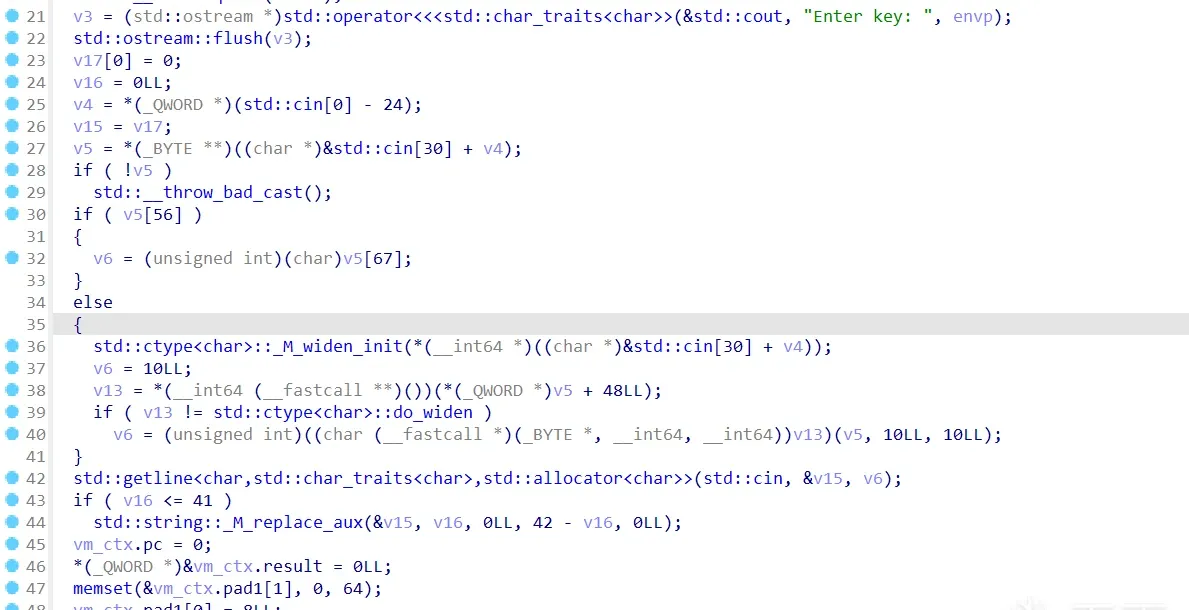
Then a do-while interpreter executes the data in the .vmp section as VM bytecode:
  v9 = 16LL;
  regs = vm_ctx.regs;
  vm_ctx.code_len = 0x7AELL;
  while ( v9 )
  {
    *regs++ = 0;
    --v9;
  }
  vm_ctx.code = (uint8_t *)&unk_5D2AA7E12040;
  *(_QWORD *)&vm_ctx.pc = 0xFFC00000000LL;
  std::string::_M_assign(&vm_ctx.input, &v15);
  vm_ctx.running = 1;
  vm_ctx.input_cur = 0LL;
  do
  {
    if ( vm_ctx.pc >= vm_ctx.code_len )
      break;
    interpreter(&vm_ctx);
  }
  while ( vm_ctx.running );
  v11 = vm_ctx.regs[15] != 1;
Here the VM struct is lightly analyzed from the pseudocode, but the hooking approach means you barely need that analysis.
If you’ve done VM challenges, you know many of them wrap a VM interpreter around an algorithm that isn’t actually complex (usually a trivial XOR).
So we can first locate a few key instruction implementations — like XOR and compare.
Those two are easy to find: they’re the 0x4e and 0x6b opcode branches.
xor

cmp
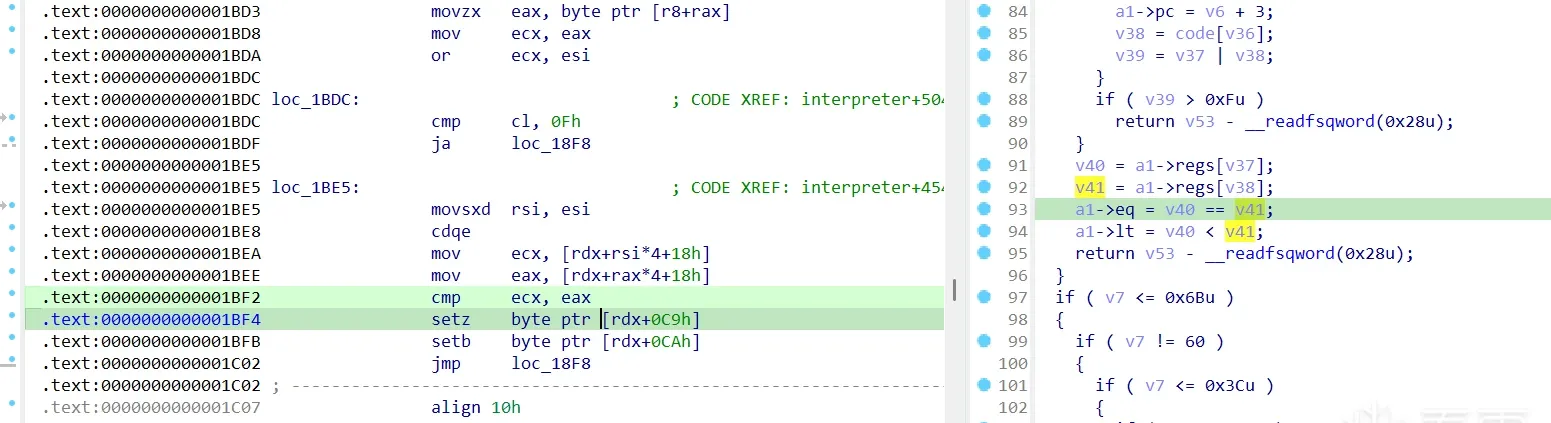
Next, write a hook script to check whether it’s a simple single-byte XOR — using the template from earlier:
import struct
import idautils
import ida_dbg
import ida_idd
import ida_segment
import idc

moduleBase = 0
_read_memory = lambda ea, n: ida_idd.dbg_read_memory(ea, n)
r_u8  = lambda ea: _read_memory(ea, 1)[0]
r_u16 = lambda ea: struct.unpack("<H", _read_memory(ea, 2))[0]
r_u32 = lambda ea: struct.unpack("<I", _read_memory(ea, 4))[0]
r_u64 = lambda ea: struct.unpack("<Q", _read_memory(ea, 8))[0]

_w = lambda ea, data: ida_idd.dbg_write_memory(ea, data)
w_u8  = lambda ea, x: _w(ea, struct.pack("<B", x & 0xFF))
w_u16 = lambda ea, x: _w(ea, struct.pack("<H", x & 0xFFFF))
w_u32 = lambda ea, x: _w(ea, struct.pack("<I", x & 0xFFFFFFFF))
w_u64 = lambda ea, x: _w(ea, struct.pack("<Q", x & 0xFFFFFFFFFFFFFFFF))
invalidate_cache = lambda ea, size: ida_dbg.invalidate_dbgmem_contents(ea, size)
rebase = lambda ea : moduleBase+ea
get_reg = lambda reg_name: ida_dbg.get_reg_val(reg_name)
set_reg = lambda reg_name, val: ida_dbg.set_reg_val(reg_name, val)

def get_main_module_base():
    module = idautils.Modules().__next__()
    print(f"[*] Main module: {module.name} at {module.base:#x}")
    return module.base


class Hook(ida_dbg.DBG_Hooks):
    def __init__(self):
        super().__init__()
        self.bp_cmp = rebase(0x1BF2)
        self.bp_xor = rebase(0x1B28)
        self.hita = 0
        self.hitb = 0

    def dbg_bpt(self, tid, ea):
        if ea == self.bp_cmp:
            self.hita += 1
        elif ea == self.bp_xor:
            self.hitb += 1
        else:
            return 0
        ida_dbg.request_continue_process()
        ida_dbg.run_requests()
        return 0

    def dbg_process_exit(self, pid, tid, ea, code):
        print("[*] cmp hit count -> %d" % self.hita)
        print("[*] xor hit count -> %d" % self.hitb)
        return 0

try:
    hook.unhook()
    idc.del_bpt(hook.bp_cmp)
    idc.del_bpt(hook.bp_xor)
except Exception:
    pass

moduleBase = get_main_module_base()
hook = Hook()
idc.add_bpt(hook.bp_cmp)
idc.add_bpt(hook.bp_xor)
hook.hook()
print("[*] cmp breakpoint = %#x" % hook.bp_cmp)
print("[*] xor breakpoint = %#x" % hook.bp_xor)
Attach the debugger. One tip: for some challenges it’s worth enabling the “break at program entry” option.
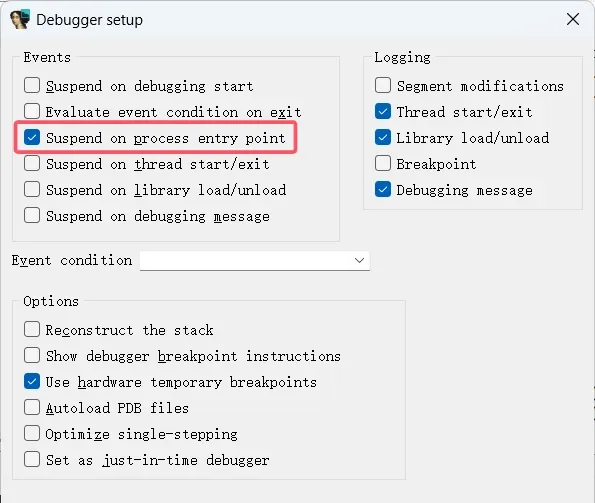
Run the script, then type some text on the Linux debug side. The output:
[*] Main module: /home/user/IDAdebug/IDA8.3/challenge at 0x5613b760c000
[*] cmp breakpoint = 0x5613b760dbf2
[*] xor breakpoint = 0x5613b760db28
Debugger: process has exited (exit code 1)
[*] cmp hit count -> 43
[*] xor hit count -> 42
The program did 42 XOR operations, matching the flag length — as expected. But why did the compare instruction run one more time than the XOR? That hints the program, after comparing the ciphertext, checks some flag to decide between the success/failure branch, something like:
if (matched)
    goto success;
else
    goto failed;
That’s still a bit of an assumption, so let’s tweak the dbg_bpt callback and re-debug:
    def dbg_bpt(self, tid, ea):
        if ea == self.bp_cmp:
            self.hita += 1
            print("[*] cmp hitted %d" % self.hita)
        elif ea == self.bp_xor:
            self.hitb += 1
            print("[*] xor hitted %d" % self.hitb)
        else:
            return 0
        #ida_dbg.request_continue_process()
        #ida_dbg.run_requests()
        return 0
Now every hit prints which instruction fired, and the auto-continue is commented out so we control it manually. The IDA output window shows the order:
[*] Main module: /home/user/IDAdebug/IDA8.3/challenge at 0x651d75bfc000
[*] cmp breakpoint = 0x651d75bfdbf2
[*] xor breakpoint = 0x651d75bfdb28
[*] xor hitted 1
[*] cmp hitted 1
[*] xor hitted 2
[*] cmp hitted 2
[*] xor hitted 3
......
You can see it’s xor then cmp, alternating (and it’s even more obvious if you step through manually).
Restoring the auto-continue and letting it run to the end:
[*] xor hitted 41
[*] cmp hitted 41
[*] xor hitted 42
[*] cmp hitted 42
[*] cmp hitted 43 // the extra compare
Debugger: process has exited (exit code 1)
[*] cmp hit count -> 43
[*] xor hit count -> 42
This output fully confirms our guess about the VM’s algorithm flow. Now let’s finish the script and extract the right-hand values of the XOR and compare. (I’ll skip the full code and show the core logic.)
class Hook(ida_dbg.DBG_Hooks):
    def __init__(self):
        super().__init__()
        self.bp_cmp = rebase(0x1BF2)
        self.bp_xor = rebase(0x1B28)
        self.enc = b""
        self.key = b""
        self.hita = 0
        self.hitb = 0

    def dbg_bpt(self, tid, ea):
        if ea == self.bp_cmp:
            ctx = get_reg("RDX")
            eax = get_reg("EAX")
            self.enc += (eax & 0xff).to_bytes(1)
            print("[*] enc[%d] = %x" % (self.hita, eax & 0xff))
            self.hita += 1
        elif ea == self.bp_xor:
            rdx = get_reg("RDX")
            self.key += r_u8(rdx + 0x18 + 11 * 4).to_bytes(1)
            print("[*] key[%d] = %x" % (self.hitb, self.key[self.hitb]))
            self.hitb += 1
        else:
            return 0

        if len(self.key) == 42 and len(self.enc) == 42 :
            print("[+] key -> %s" % self.key.hex())
            print("[+] enc -> %s" % self.enc.hex())
            return 0

        ida_dbg.request_continue_process()
        ida_dbg.run_requests()
        return 0

    def dbg_process_exit(self, pid, tid, ea, code):
        print("[*] cmp hit count -> %d" % self.hita)
        print("[*] xor hit count -> %d" % self.hitb)
        return 0

try:
    hook.unhook()
    idc.del_bpt(hook.bp_cmp)
    idc.del_bpt(hook.bp_xor)
except Exception:
    pass

moduleBase = get_main_module_base()
hook = Hook()
idc.add_bpt(hook.bp_cmp)
idc.add_bpt(hook.bp_xor)
hook.hook()
print("[*] cmp breakpoint = %#x" % hook.bp_cmp)
print("[*] xor breakpoint = %#x" % hook.bp_xor)
The output:
......
[*] key[38] = 7
[*] enc[38] = 33
[*] key[39] = 17
[*] enc[39] = 22
[*] key[40] = 18
[*] enc[40] = 2e
[*] key[41] = 3a
[*] enc[41] = 47
[+] key -> 6cb47cfc07962a92603fe9b4bae75430c9d3ecfa0c3276711f65ef5944aaca18609cf602c6360717183a
[+] enc -> 08d50e887cae1af050078880d9ca6d56adeac1ce3e00155c7d54de6e699af87954ffce3aa00533222e47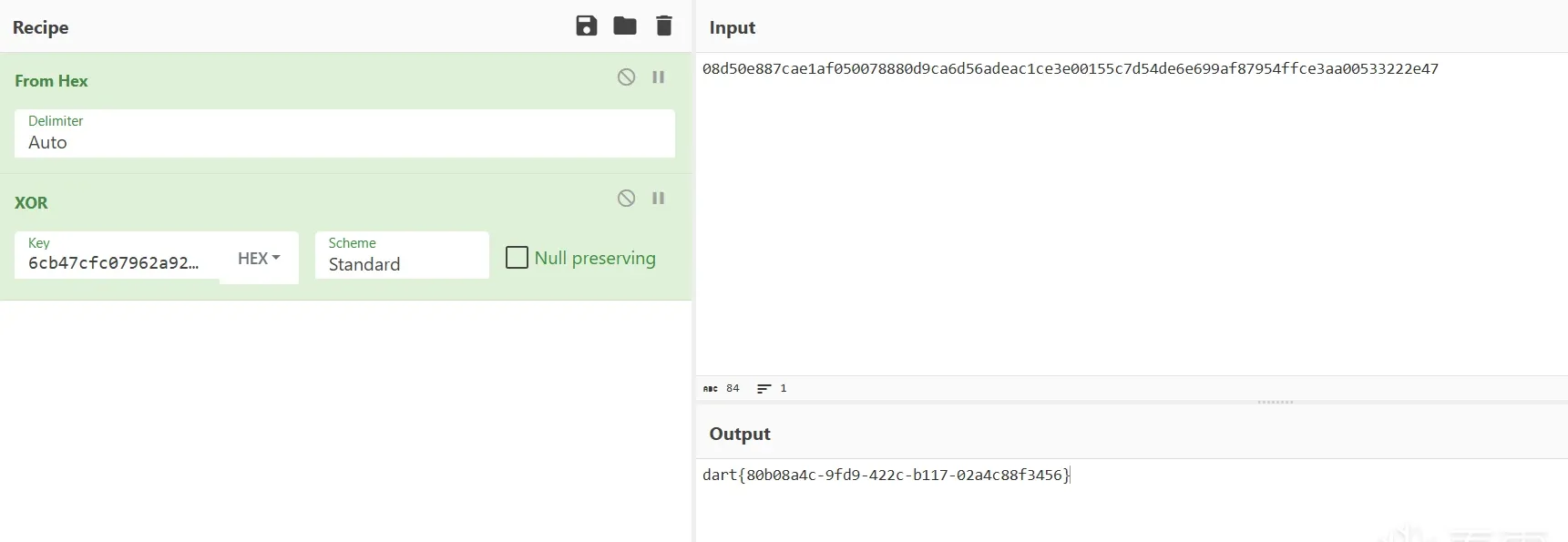
This example is just a starting point. From this template you can also:
- observe function arguments and return values
- batch-trace state machines / branch switches
- modify function arguments and test in batches
- record each loop iteration’s key state
- grab live values at a critical comparison
- auto-patch a class of checkpoints
- do a lightweight trace instead of manually stepping the whole way
- and more
It won’t fit every target, but the moment you reach “I already know where the key point is, I just don’t want to do it by hand,” a hook is usually the best cost-to-value tool you can reach for.
Summary
IDA hooks aren’t an advanced-but-obscure trick — they’re fundamentally about turning debugger events into script entry points.
If manual debugging is observe + record + modify, then a hook automates, batches, and event-drives those three things.
The single most important idea to take away:
The core of a hook isn’t “auto-setting breakpoints” — it’s “taking over the context at the instant an event fires.”
Once you internalize that, a lot of dynamic-analysis processes that used to require many manual clicks naturally collapse into a clean batch script.
Colin Xiao — I take on contract reverse-engineering work, and writeups like this are how I show what I can do. If you need help with anything in this space — including but not limited to the areas I cover above — I’m available. No project is too big or too small — if it’s reverse engineering and I can do it, I’ll take it. DM me on X (@colinxiao_lab) or Telegram (@ColinXiao666).
Get in touch