ιldb: A Command-Line Scripting Layer for LLDB Debugging
About the author. I’m Colin Xiao — an independent reverse engineer, mostly working solo on contract jobs. I dig into compiled code of every kind, including but not limited to: Android and iOS apps, x86/x64/ARM native binaries, packers and obfuscators, DRM and license checks, network protocols and APIs, crypto and signature algorithms, malware, game binaries, and embedded/IoT firmware. I also handle large-scale data collection and vulnerability research. If you have any project in mind, I’d be glad to take it on — whatever it is, as long as it’s within my wheelhouse. Just reach out. You can reach me on X at @colinxiao_lab or on Telegram at https://t.me/ColinXiao666.
This research is published for educational and defensive purposes. The target sample is anonymized throughout.
ιldb: A Command-Line Scripting Layer for LLDB Debugging
Reverse engineering iOS binaries in LLDB means repeating the same dance over and over: copy an address out of IDA, paste it into LLDB, set a breakpoint, read memory, copy the result back somewhere. ιldb is a scripting layer on top of LLDB that turns those recurring operations into short, memorable commands — and, crucially, lets you save, annotate, and replay command sequences so the “copy address to a text file, paste it back later” loop disappears.
Installation and setup
-
Drop the
ιldb.pyfile into your LLDB plugin directory. -
Add this line to
~/.lldbinitto load the script (replace the path with your own):command script import ***/ιldb.py -
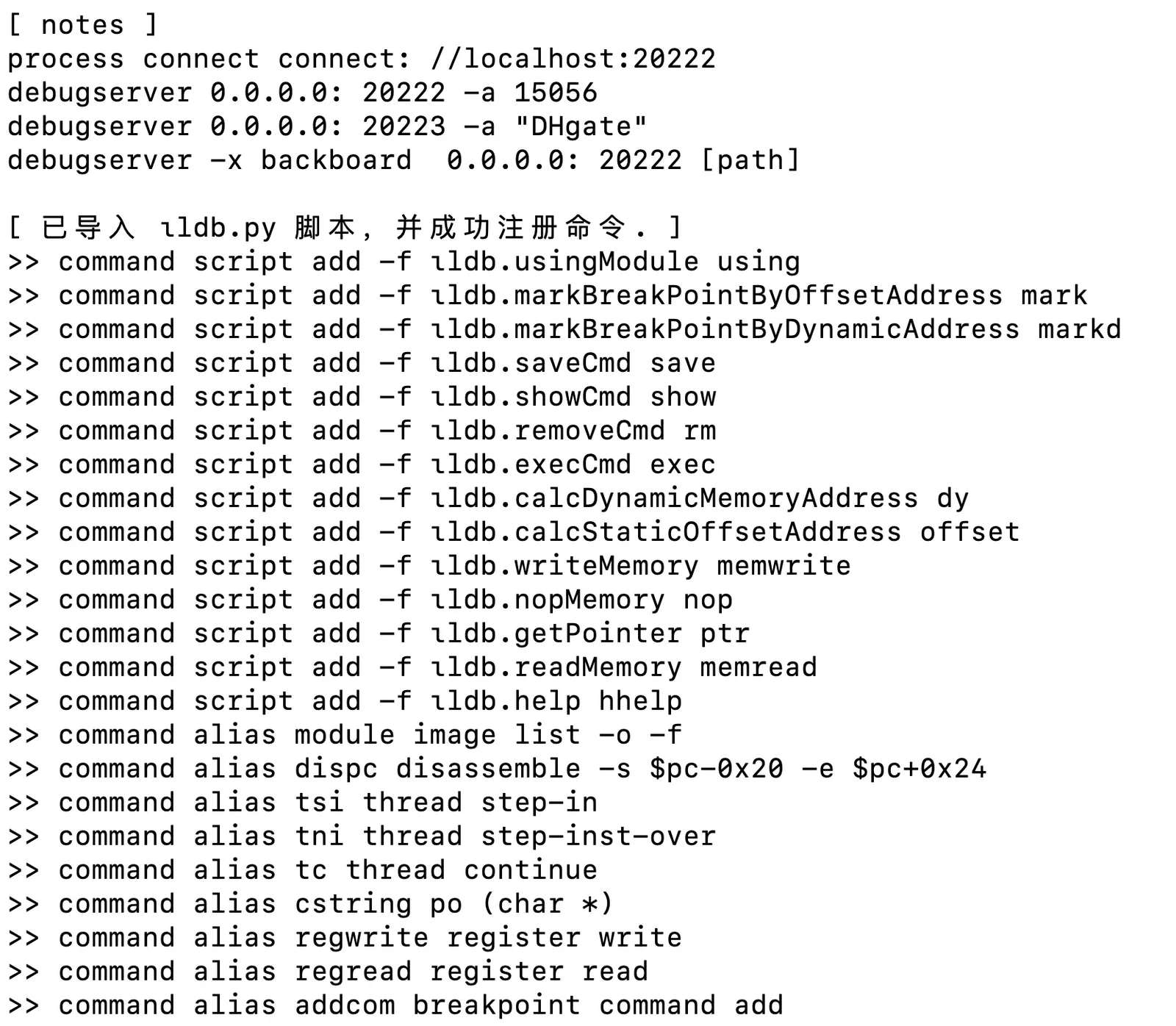
Once loaded, you’ll see the full list of registered commands:
Command management
save — save a command to the record
Saves LLDB history entries into cmd_record.json, with several formats:
# save the most recent command, no description
save

# save the most recent command with a description
save "this is the most recent command"

# save specific history entries by index, with descriptions
save 0 "history entry 0" 2 "history entry 2"

# mixed: save several entries, some without descriptions
save 0 2 "this is a command"
show — list saved commands
showExample output:
[ command list ]
0. using       —— select a module (later mark commands use it)
1. mark        —— breakpoint by module offset (multiple addresses supported)
2. markd       —— breakpoint by dynamic address (multiple addresses supported)
3. memread     —— read memory
4. process     —— launch a process
rm — delete saved commands
# delete one entry
rm 1

# delete several entries
rm 0 2 4
The updated list is printed automatically after a delete.
exec — execute a saved command
# execute the entry at index 1
exec 1
The command content and its description are shown as it runs:

Debugging commands
using — select the debug module
Selects the module that later mark commands compute offsets against:
# use the app's main module
using

# use a specific module
using SwiftDemo.debug.dylib
mark — breakpoint by module offset
Sets breakpoints from module-relative offsets, multiple addresses supported:
# single address
mark 0x1063c2c10

# multiple addresses
mark 0x1063c2c10 1063c2c18 0x1063c2c20

# an address range (addresses must start with 0x)
mark [0x1063c2c10, 0x1063c2c20]
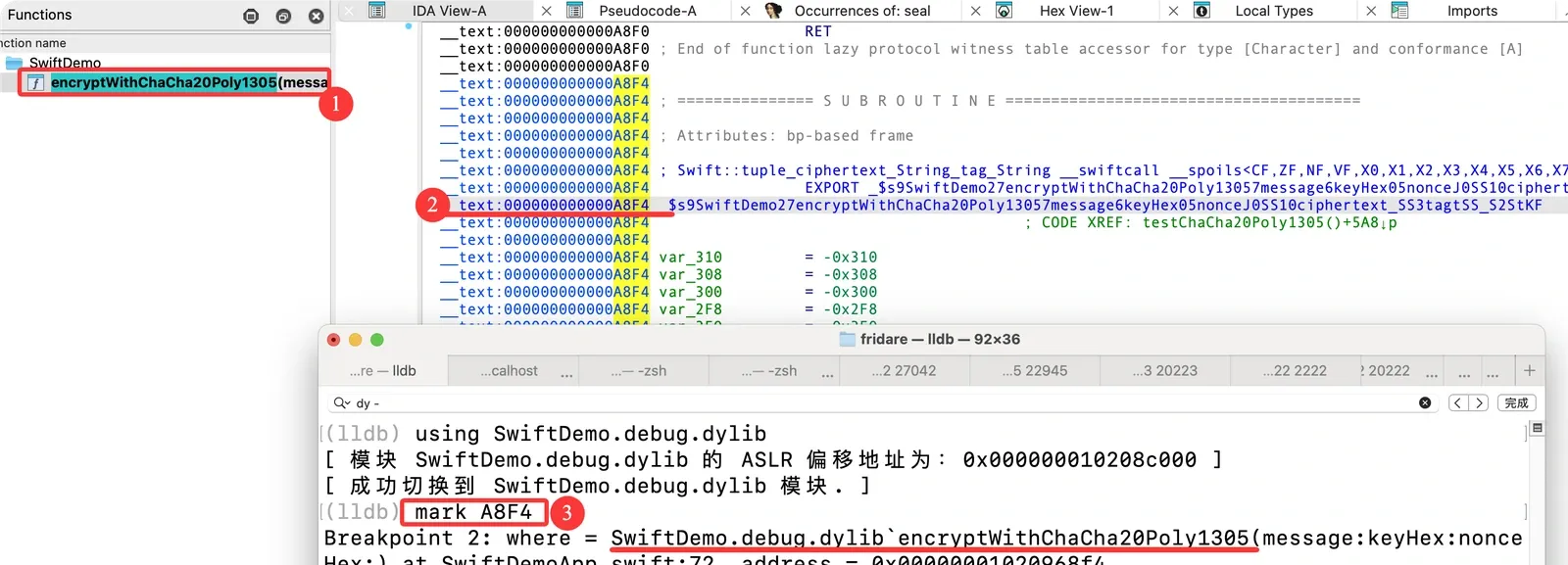
If IDA says encryptWithChaCha20Poly1305 is at offset A8F4, mark drops the breakpoint for you:
markd — breakpoint by dynamic address
# single address
markd 0x12345678

# multiple addresses
markd 0x12345678 0x87654321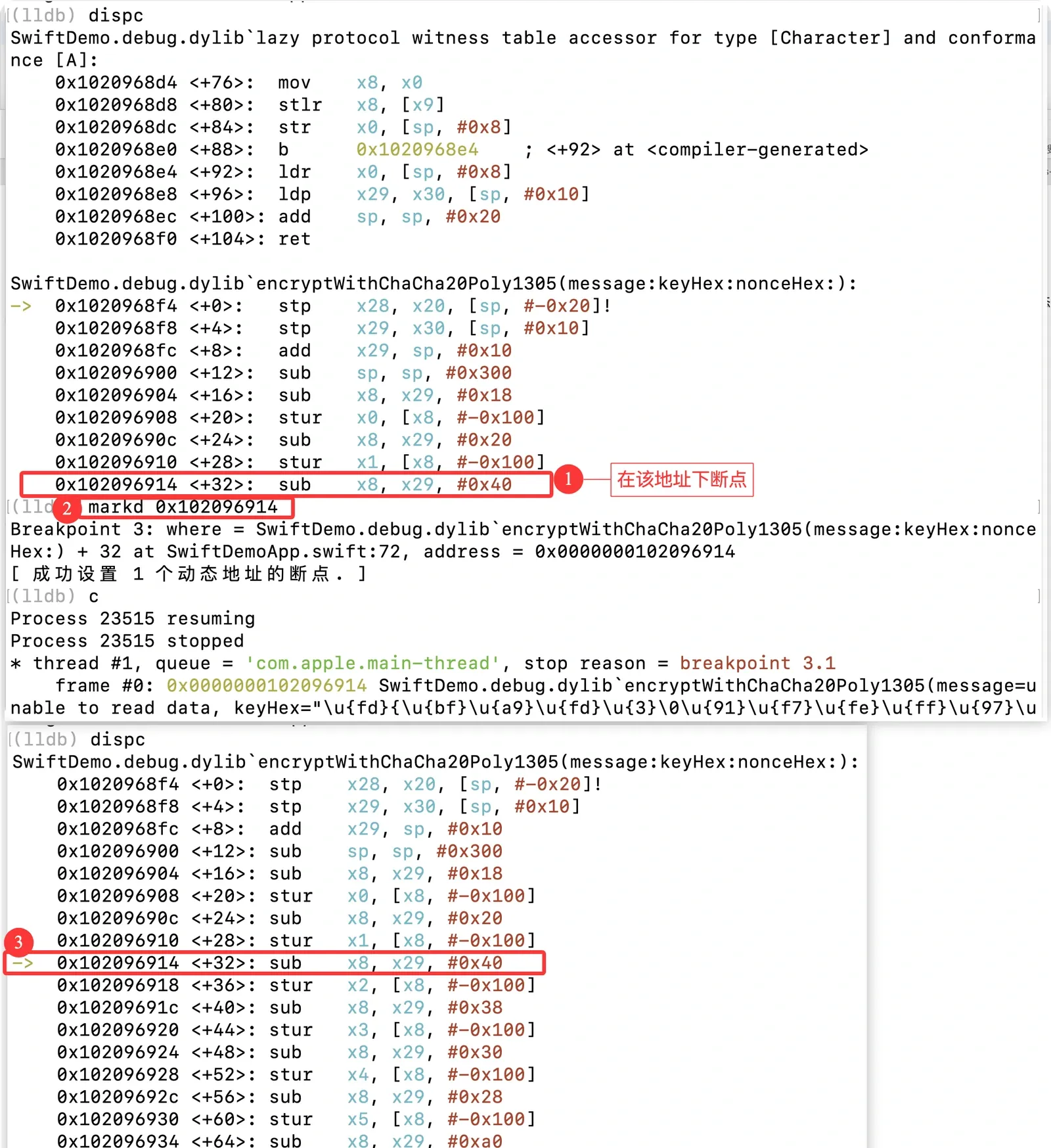
dy — compute a dynamic memory address
Computes the dynamic address of an offset relative to the module selected with using:
dy 0xA8F4
offset — compute a static offset
# offset of a given address
offset 0x1063c2c10

# offset of the current PC register
offset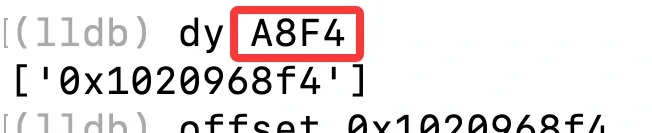
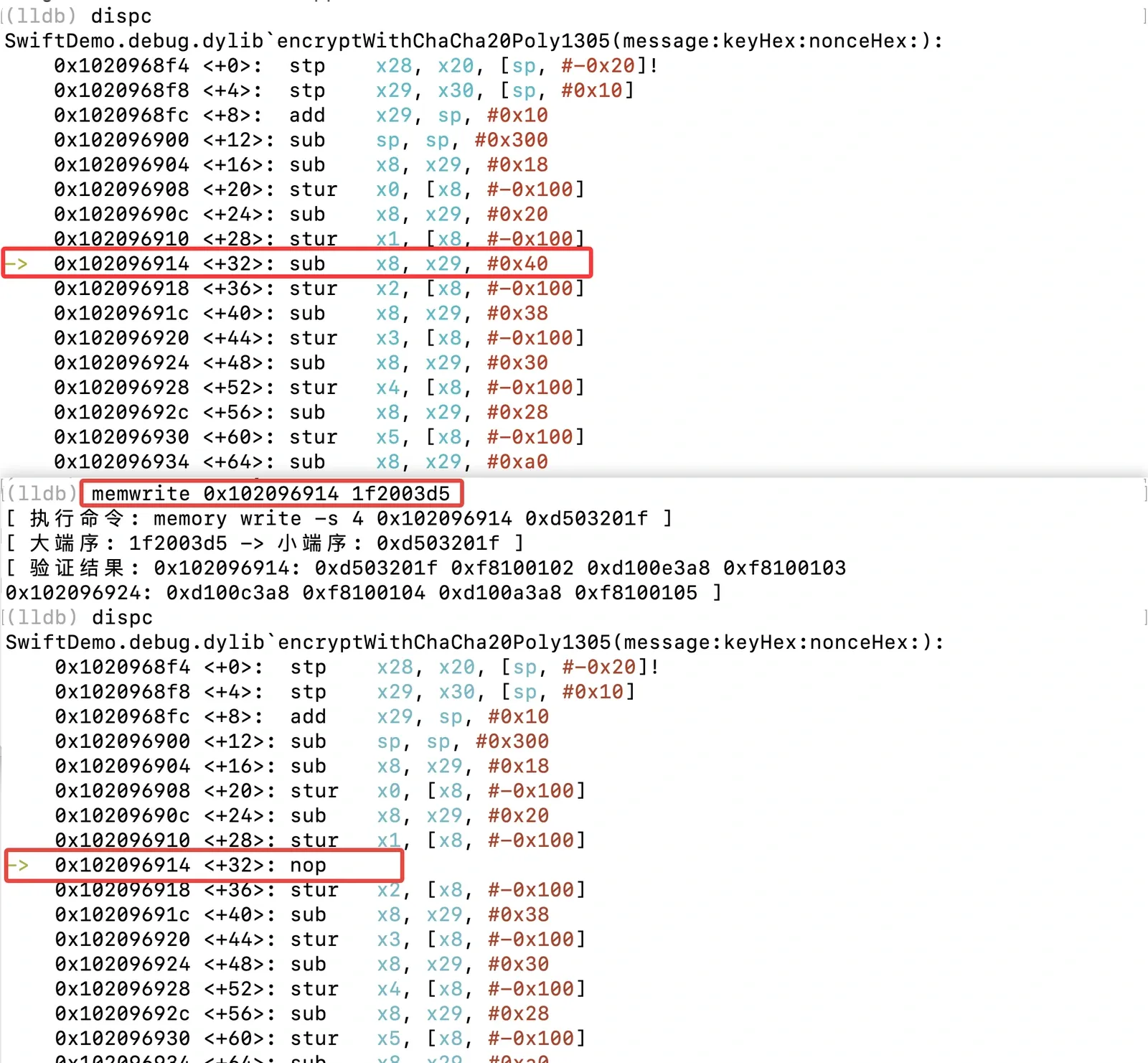
memwrite — patch memory
Patches memory at a dynamic address, with endian conversion applied by default:
# the address is a dynamic address, not an offset
memwrite 0x1063c2c10 1f2003d5
Addresses and machine code don’t need the 0x prefix — they’re treated as hex by default.
memread — read memory
Several formats:
# read multiple addresses
memread $x8 0x12345678

# read the pointer at an address, then read what it points to
memread -ptr ($x8 + 0x20)

# read a specific byte count
memread -c 0x100 $x8
memread --count 0x200 0x12345678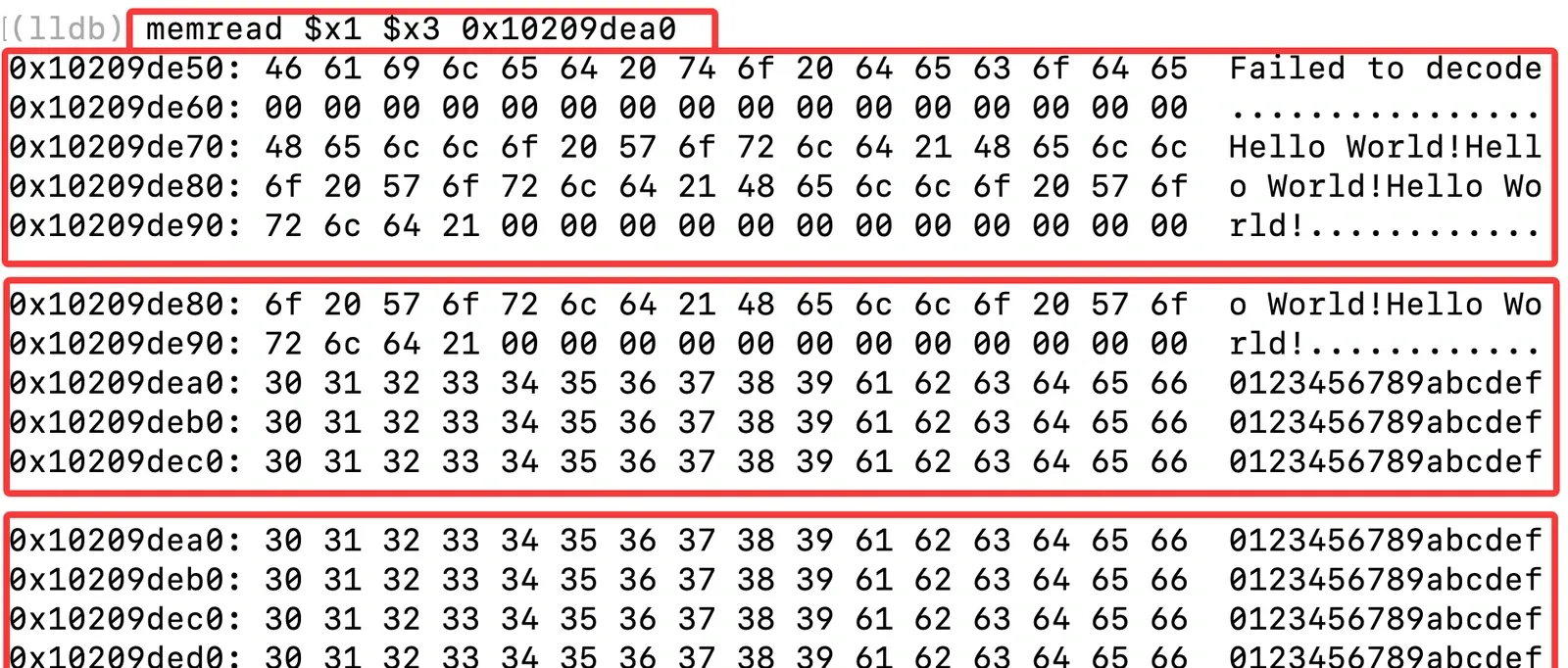
nop — fill memory with NOP instructions
# single address
nop 0x1063c2c10

# multiple addresses
nop 0x1063c2c10 1063c2c18 0x1063c2c20

# an address range (addresses must start with 0x)
nop [0x1063c2c10, 0x1063c2c20]
ptr — resolve a pointer
# pointer from register expressions
ptr ($x8 + 0x8) ($x8 + 0x20)

# pointer from a direct address
ptr 0x12345678
ss — parse a Swift String
Tries to interpret the contents of a register as a Swift String; you name one register and it reads the other automatically:

sd — parse a Swift Data
The Data counterpart to ss:

Configuration files
ιldb uses two main config files:
cmd_config.json
Command configuration, containing:
cmd_script— the command-to-script mappingcmd_alias— command aliasescus_cmd— custom command list (auto-executed when the script loads)cmd_notes— command notes (printed to the terminal as reminders, not executed)
cmd_record.json
Saved command records. Each record holds:
command— the actual LLDB commanddesc— the command description
Command-to-script mapping
| Command | Function | Description |
|---|---|---|
| using | usingModule | select the debug module |
| mark | markBreakPointByOffsetAddress | breakpoint by module offset |
| markd | markBreakPointByDynamicAddress | breakpoint by dynamic address |
| dy | calcDynamicMemoryAddress | compute dynamic memory address |
| offset | calcStaticOffsetAddress | compute static offset |
| memread | readMemory | read memory |
| memwrite | writeMemory | write memory |
| nop | nopMemory | fill with NOP instructions |
| ptr | getPointer | resolve a pointer |
| save | saveCmd | save a command |
| show | showCmd | list saved commands |
| rm | removeCmd | delete a command |
| exec | execCmd | execute a command |
| ss | parseSwiftString | parse a Swift String object |
| sd | parseSwiftData | parse a Swift Data object |
A full debugging workflow
# 1. select the debug module
using SwiftDemo.debug.dylib

# 2. set breakpoints
mark 0x1063c2c10
markd 0x12345678

# 3. save frequently used commands
save "select debug module"
save 0 "breakpoint at entry" 1 "breakpoint at key function"

# 4. list saved commands
show

# 5. execute saved commands
exec 0
exec 1

# 6. read memory
memread $x8

# 7. patch memory
memwrite 0x1063c2c10 d503201f

# 8. NOP out a range
nop [0x1063c2c10, 0x1063c2c20]
Notes
- All indices (
save,show,rm,exec) are zero-based. - Address ranges like
[0x1063c2c10, 0x1063c2c20]must use the0xprefix. - Single and multiple addresses don’t require the
0xprefix. - Memory operations are hexadecimal by default.
- Command history lives in
ιldb/config/cmd_record.json.
ιldb also supports adding custom commands and aliases by editing cmd_config.json, so you can shape it to your own workflow.
Colin Xiao — I take on contract reverse-engineering work, and writeups like this are how I show what I can do. If you need help with anything in this space — including but not limited to the areas I cover above — I’m available. No project is too big or too small — if it’s reverse engineering and I can do it, I’ll take it. DM me on X (@colinxiao_lab) or Telegram (@ColinXiao666).
Get in touch