Instrumenting an Android App to Dump Bluetooth AES Keys and Ciphertext
About the author. I’m Colin Xiao — an independent reverse engineer, mostly working solo on contract jobs. I dig into compiled code of every kind, including but not limited to: Android and iOS apps, x86/x64/ARM native binaries, packers and obfuscators, DRM and license checks, network protocols and APIs, crypto and signature algorithms, malware, game binaries, and embedded/IoT firmware. I also handle large-scale data collection and vulnerability research. If you have any project in mind, I’d be glad to take it on — whatever it is, as long as it’s within my wheelhouse. Just reach out. You can reach me on X at @colinxiao_lab or on Telegram at https://t.me/ColinXiao666.
This research is published for educational and defensive purposes. The target sample is anonymized throughout.
Instrumenting an Android App to Dump Bluetooth AES Keys and Ciphertext
A friend asked me to instrument a Bluetooth smart-lock APK so that the encrypted Bluetooth packets’ ciphertext, key, and plaintext would all show up in the logs. This was my first time instrumenting an APK, so I wrote it all down as a learning note.
0x01 What is instrumentation?
My take: instrumentation is inserting your own code into existing code so you can print out the values of variables you want to inspect. Beyond just printing, the injected code can also add all sorts of extra functionality on top of the original.
Back when I was learning fuzzing I ran into the same concept — AFL-Fuzz instruments binary machine code. This time the target is an APK, and after going through the whole flow today I found instrumenting an APK noticeably more flexible and easier to operate.
0x02 Initial triage of the APK
Where to instrument, and which variables to print
We start with a base.apk.
To instrument, we first need to know exactly where to insert our code. Fortunately, when the APK was handed to me, the person had already located the target code in com.nokelock.blelibrary.b.b.
Decompile it with JADX:
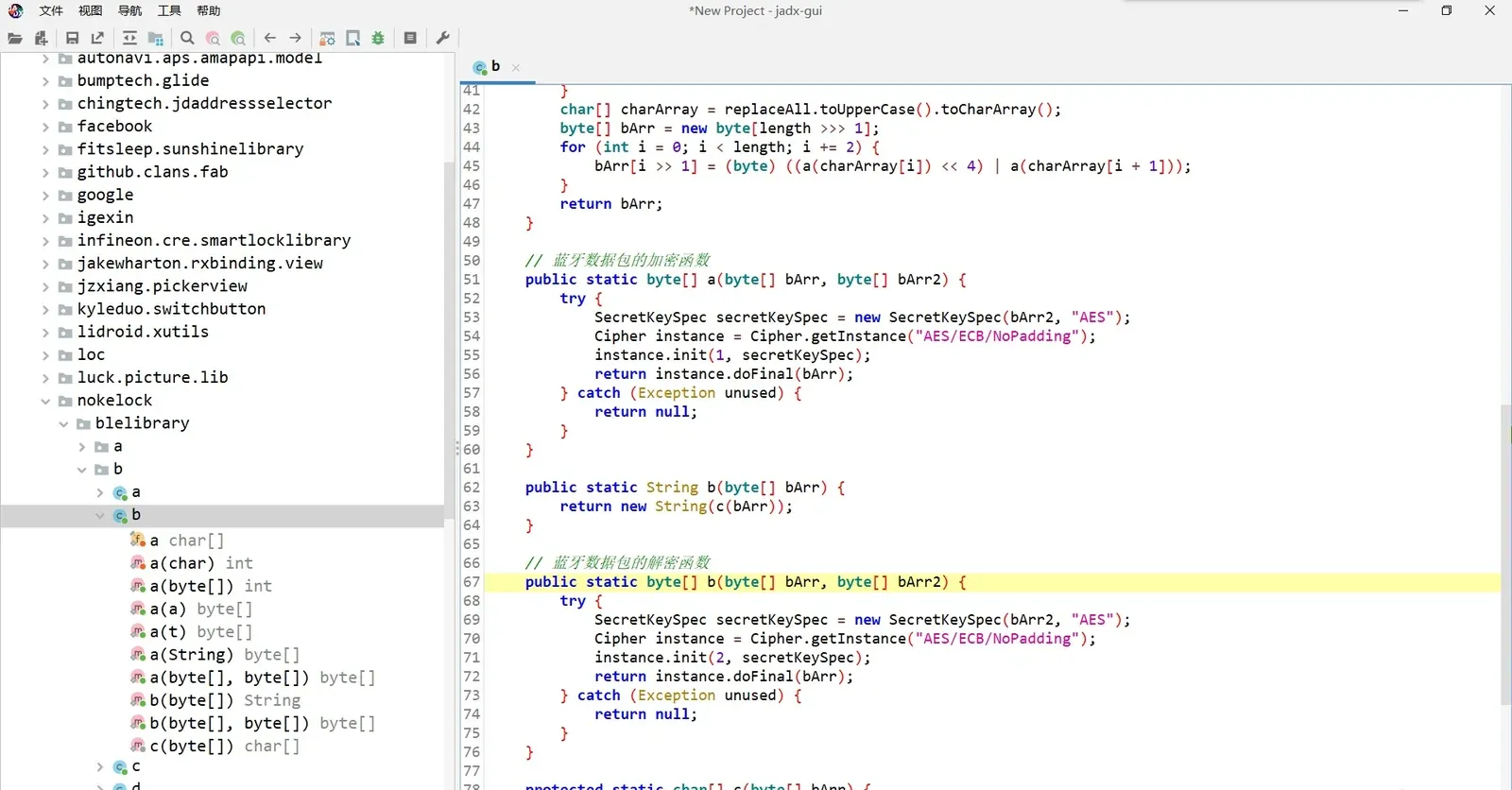
Reading the code, this is a textbook AES encryption. The variables we need to print are obvious: bArr, bArr2, and instance.doFinal(bArr).
Getting the smali code
You can’t modify the decompiled Java directly. Instrumentation happens one level lower, in smali. In short, the relationship between Java and smali is roughly like that between C and assembly.
So how do we see the smali?
Quick look at smali
In JADX you can press Tab on the Java source to get the raw smali:
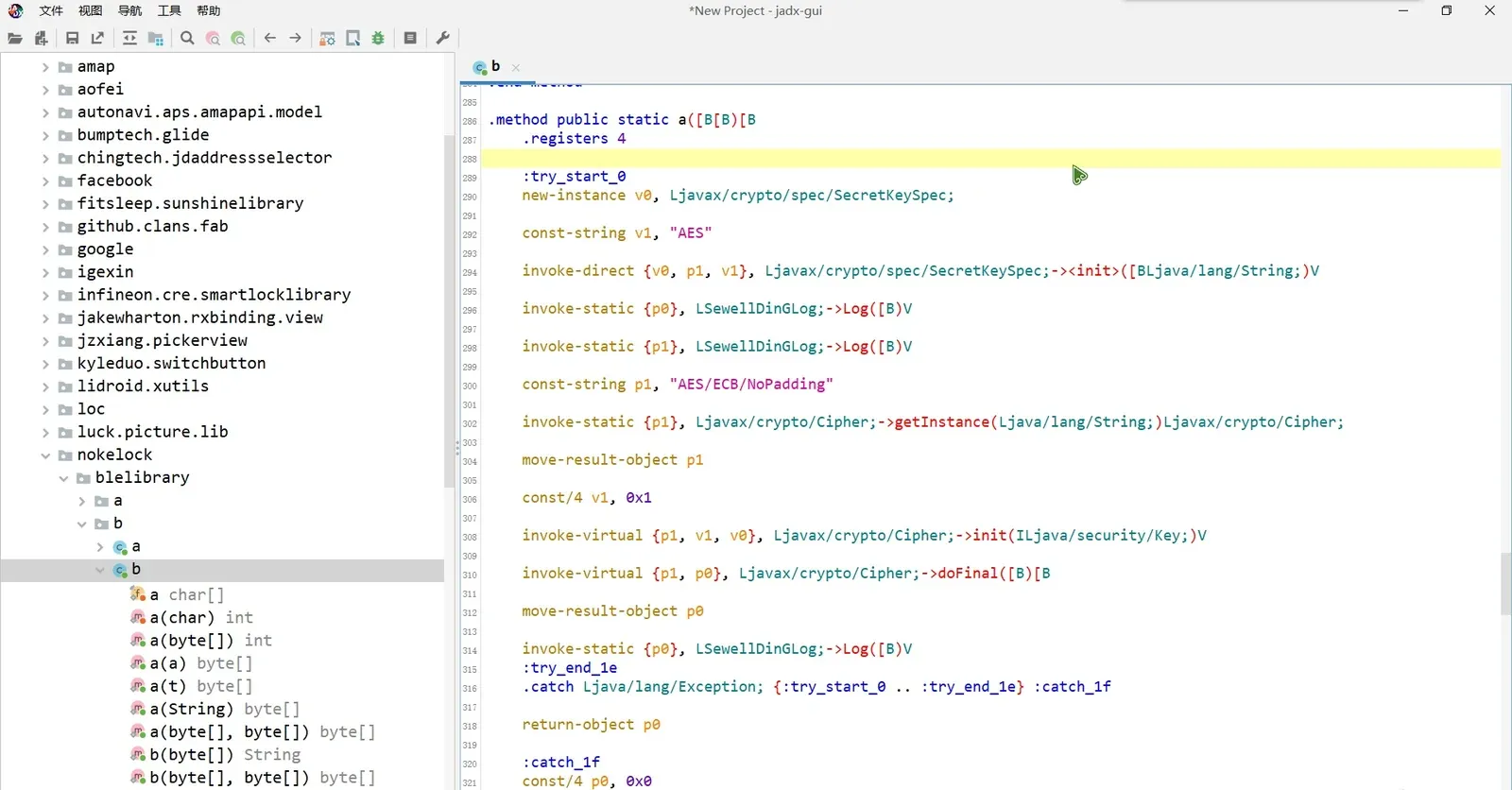
One caveat: while this lets you view the smali, you can’t recompile and repackage from here — you can look, but you can’t touch. :)
Editing smali, rebuilding, and re-signing
For this I strongly recommend APK Easy Tool. It just works. :)
Download it, open it, drag the APK in, click “Decompile”, then “Open decompiled directory” — and the smali is there:
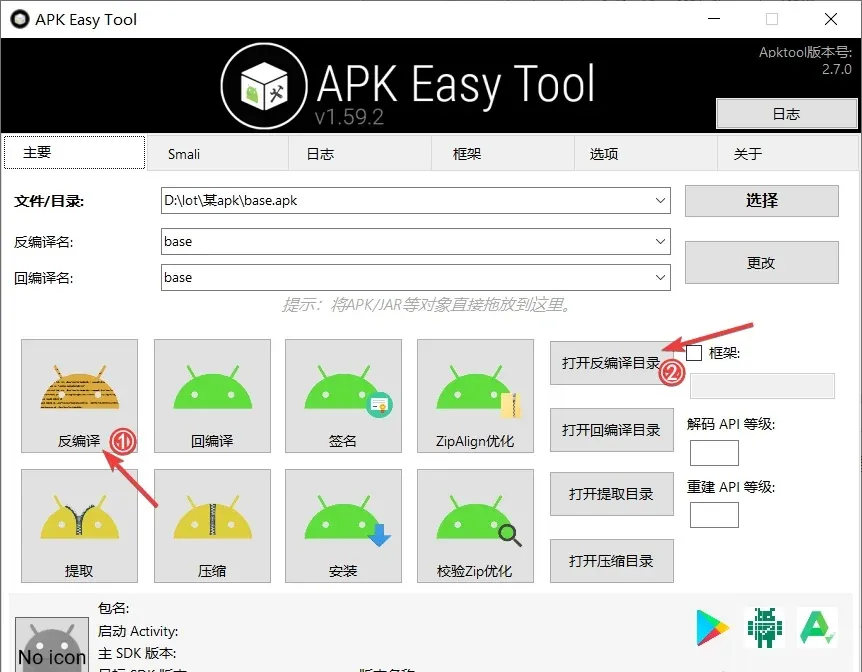
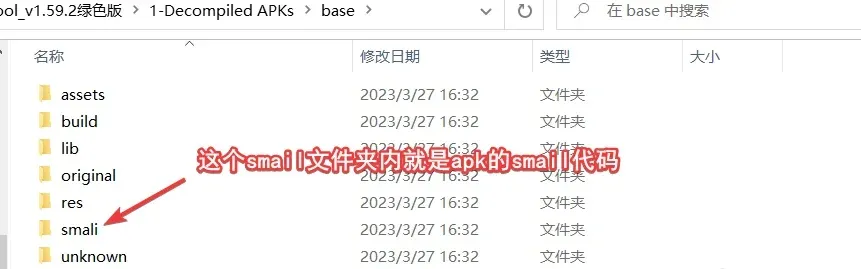
Then drill down the path of our target (com.nokelock.blelibrary.b.b) and you get an editable smali file:

0x03 How to instrument
Opening b.smali and matching on the method name and parameter types, we quickly land on this block:
.method public static a([B[B)[B
    .locals 2

    :try_start_0
    new-instance v0, Ljavax/crypto/spec/SecretKeySpec;

    const-string v1, "AES"

    invoke-direct {v0, p1, v1}, Ljavax/crypto/spec/SecretKeySpec;-><init>([BLjava/lang/String;)V

    const-string p1, "AES/ECB/NoPadding"

    invoke-static {p1}, Ljavax/crypto/Cipher;->getInstance(Ljava/lang/String;)Ljavax/crypto/Cipher;

    move-result-object p1

    const/4 v1, 0x1

    invoke-virtual {p1, v1, v0}, Ljavax/crypto/Cipher;->init(ILjava/security/Key;)V

    invoke-virtual {p1, p0}, Ljavax/crypto/Cipher;->doFinal([B)[B

    move-result-object p0
    :try_end_0
    .catch Ljava/lang/Exception; {:try_start_0 .. :try_end_0} :catch_0

    return-object p0

    :catch_0
    const/4 p0, 0x0

    return-object p0
.end method


.method public static b([B[B)[B
    .locals 2

    :try_start_0
    new-instance v0, Ljavax/crypto/spec/SecretKeySpec;

    const-string v1, "AES"

    invoke-direct {v0, p1, v1}, Ljavax/crypto/spec/SecretKeySpec;-><init>([BLjava/lang/String;)V

    const-string p1, "AES/ECB/NoPadding"

    invoke-static {p1}, Ljavax/crypto/Cipher;->getInstance(Ljava/lang/String;)Ljavax/crypto/Cipher;

    move-result-object p1

    const/4 v1, 0x2

    invoke-virtual {p1, v1, v0}, Ljavax/crypto/Cipher;->init(ILjava/security/Key;)V

    invoke-virtual {p1, p0}, Ljavax/crypto/Cipher;->doFinal([B)[B

    move-result-object p0
    :try_end_0
    .catch Ljava/lang/Exception; {:try_start_0 .. :try_end_0} :catch_0

    return-object p0

    :catch_0
    const/4 p0, 0x0

    return-object p0
.end method
First exposure to smali can feel intimidating, but I actually find smali simpler to read than assembly.
Back on track: for a first-time instrument, we can grab a ready-made instrumentation helper from GitHub (the “smali instrumentation helper” snippet library).
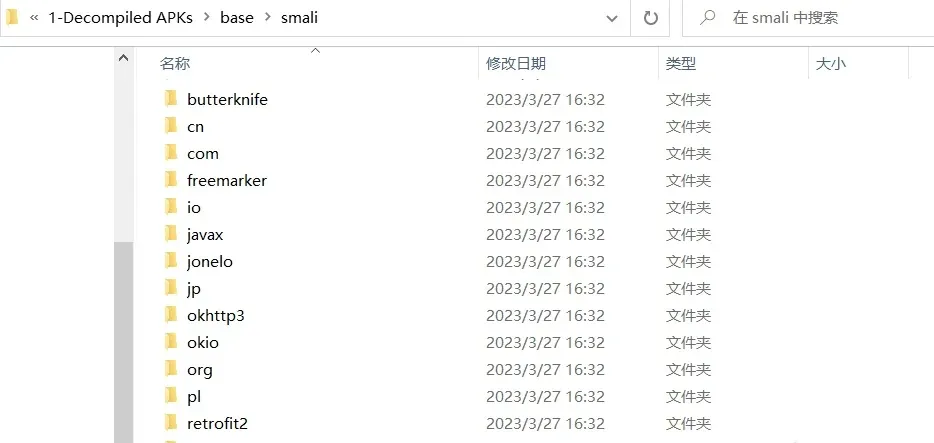
Usage is simple. Download it, then copy SewellDinGLog.smali straight into the smali folder produced by APK Easy Tool:
Where to instrument?
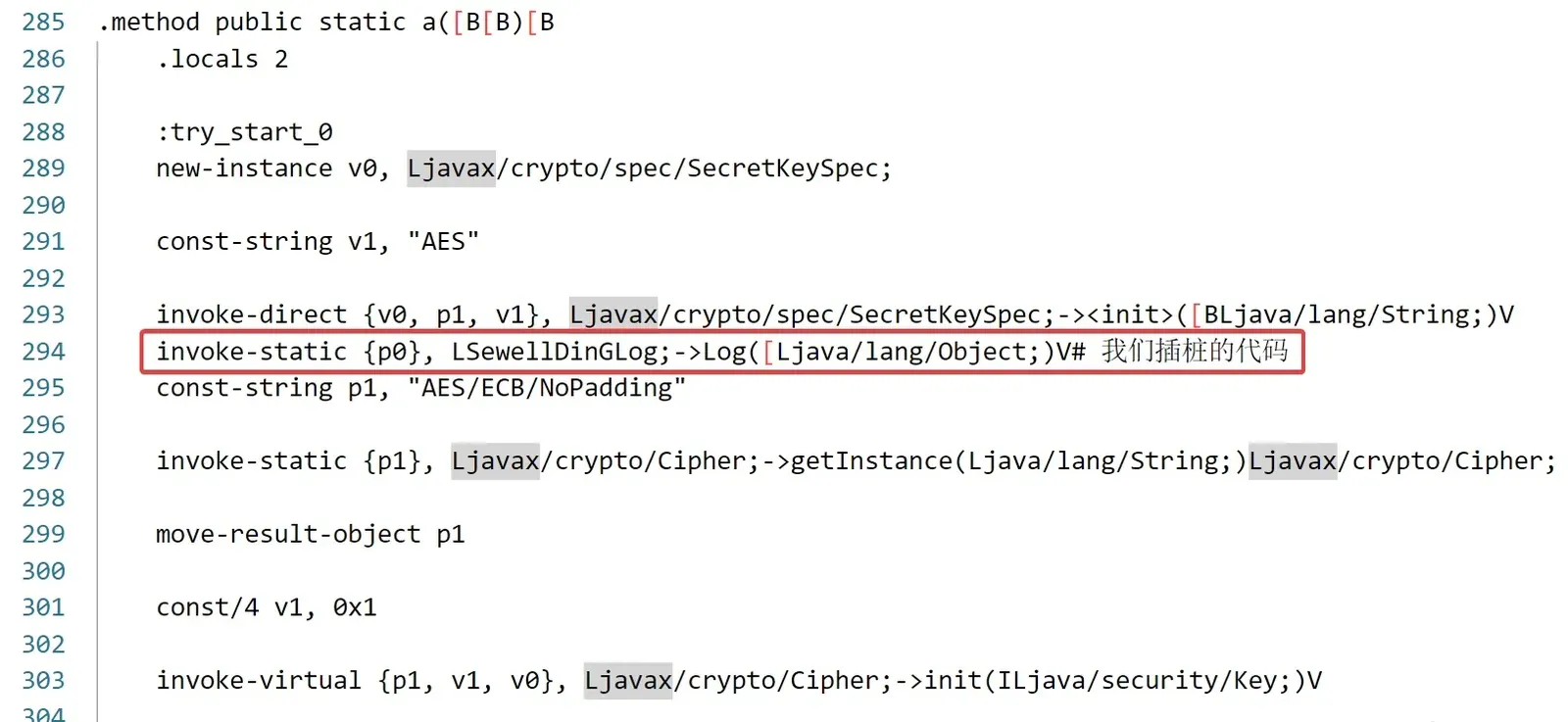
Back in b.smali. There are exactly two valid insertion points (why only these? — from experience, instrumenting anywhere else fails to recompile):
- After an
invoke-static/invoke-virtual/invoke-directinstruction whose return type isV - After the
move-result-objectof aninvoke-*instruction whose return type is notV
The instrumentation calls
invoke-static {}, LSewellDinGLog;->Log()V# no args, to check whether a function ran
invoke-static {v1}, LSewellDinGLog;->Log(Ljava/lang/Object;)V# print a string
invoke-static {v1}, LSewellDinGLog;->Log([Ljava/lang/Object;)V# print an array
Read these together with SewellDinGLog.java:
import java.util.Arrays;
import android.util.Log;

public class SewellDinGLog {

	public static void Log(String tag, String msg) {//two params
		Log.d(tag, msg);
	}

	public static void Log() {//no params
		Log("SewellDinG", "DeBug ...");
	}

	public static void Log(Object someObj) {//one param, print string
		Log("SewellDinG", someObj.toString());
	}

	public static void Log(Object[] someObj) {//one param, print array
		Log("SewellDinG", Arrays.toString(someObj));
	}

}
Simple enough — it just uses Log to print the variables.
Following the rules above, insert the calls like this:
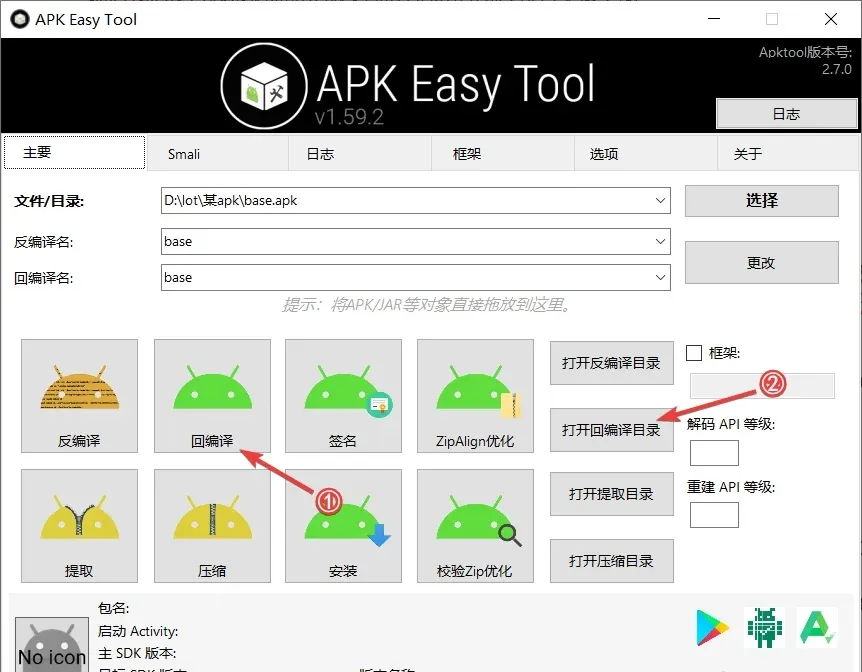
Then back in APK Easy Tool, click “Compile” and “Open compiled directory” to find the freshly built APK:
Reading the logs
Run the APK via adb and pull the logs with:
adb logcat -s SewellDinG0x04 An unexpected error
After sending the instrumented build back, there were logs — but they looked like this:
F:\platform-tools>adb logcat -s SewellDinG
--------- beginning of main
03-27 12:38:56.882 14325 14325 D SewellDinG: [B@3ad0a72
03-27 12:38:56.882 14325 14325 D SewellDinG: [B@85ec3
03-27 12:38:56.882 14325 14325 D SewellDinG: [B@e41f340
03-27 12:39:05.392 14325 14325 D SewellDinG: [B@4ee0ab4
03-27 12:39:05.392 14325 14325 D SewellDinG: [B@bd596dd
03-27 12:39:05.392 14325 14325 D SewellDinG: [B@9d6c252
Are the key, ciphertext, and plaintext all [B@-prefixed? No — the problem is in SewellDinGLog.smali.
I needed to print a byte[], and the array-printing Java looked like this:
public static void Log(Object[] someObj) {//one param, print array
		Log("SewellDinG", Arrays.toString(someObj));
	}
Here’s the bug: calling toString on a byte array returns the array’s address, not its contents.
0x05 Fixing it — rewriting SewellDinGLog.smali
At this point it’s clear I need to fix the smali. How?
The easiest route is to write the Java first, then compile it to smali. My Java workflow is IDEA, but SewellDinGLog.java depends on android.util.Log, which isn’t available there, and I couldn’t find it online. After a lot of googling, the answer was to install Android Studio.
Once installed, create a new project and paste the code in:
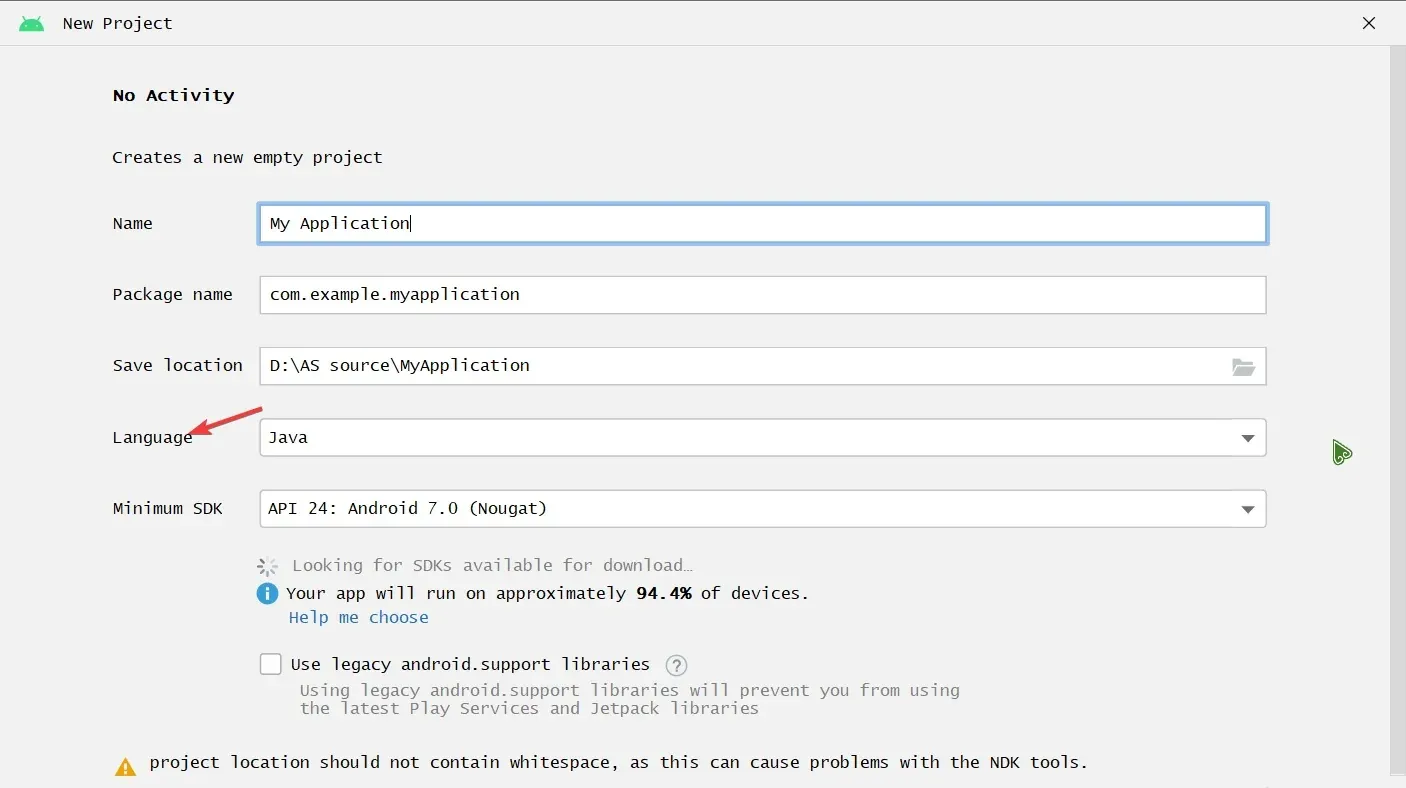
Make sure to pick Java as the language, not Kotlin — otherwise you’ll waste a long download and find the code won’t run at all.
First-time Android Studio needs several minutes to pull its runtime packages. Then go to File → Settings → Plugins, search for java2smali, install it, restart Android Studio, and Build → Compile to smali will generate the smali directly.
To successfully log a byte array, I adjusted SewellDinGLog.java first, then compiled to smali:
package com.example.newlog;

import android.util.Log;

public class SewellDinGLog {
    final protected static char[] hexArray = "0123456789ABCDEF".toCharArray();
    public static String bytesToHex(byte[] bytes) {
        char[] hexChars = new char[bytes.length * 2];
        for ( int j = 0; j < bytes.length; j++ ) {
            int v = bytes[j] & 0xFF;
            hexChars[j * 2] = hexArray[v >>> 4];
            hexChars[j * 2 + 1] = hexArray[v & 0x0F];
        }
        return new String(hexChars);
    }
    public static void Log(String tag, String msg) {
        Log.d(tag, msg);
    }

    public static void Log() {
        Log("SewellDinG", "DeBug ...");
    }

    public static void Log(byte[] someObj) {
        String result = bytesToHex(someObj);
        Log("SewellDinG", result);
    }

}
SewellDinGLog.smali is then generated in the same folder:
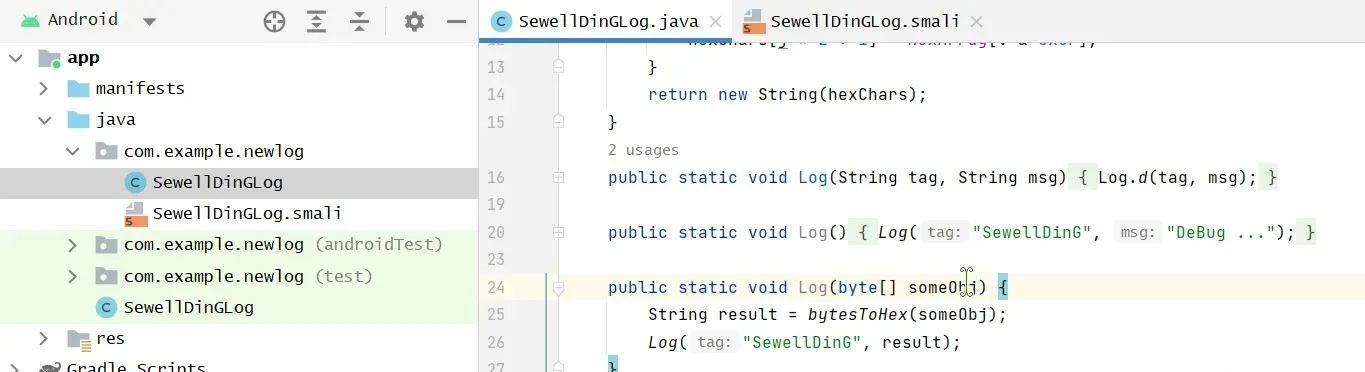
One thing to watch: our SewellDinGLog.smali lives in the root of the decompiled smali folder, so we need to fix its internal paths. In my case:
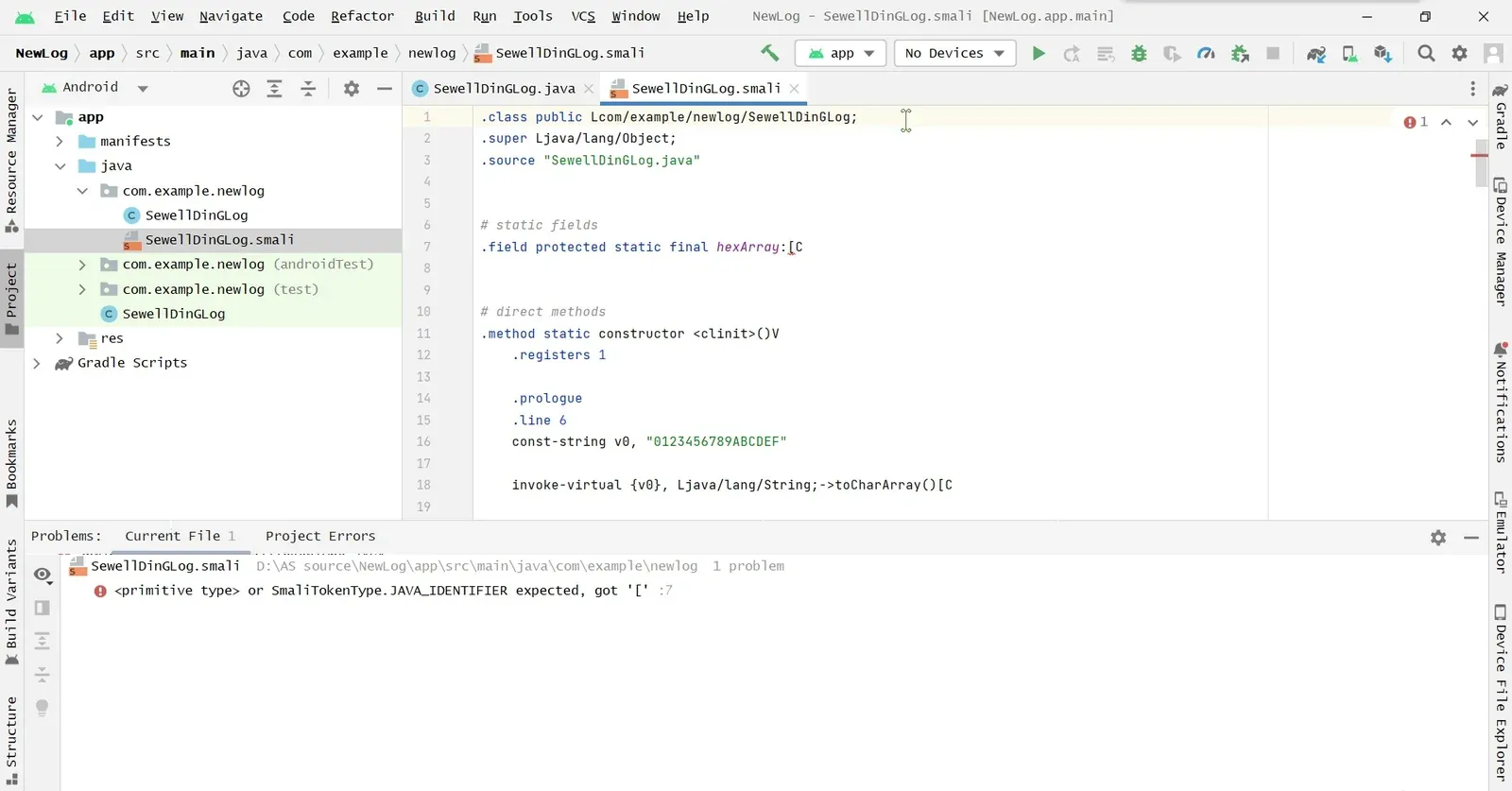
Replace every Lcom/example/newlog/SewellDinGLog with LSewellDinGLog:
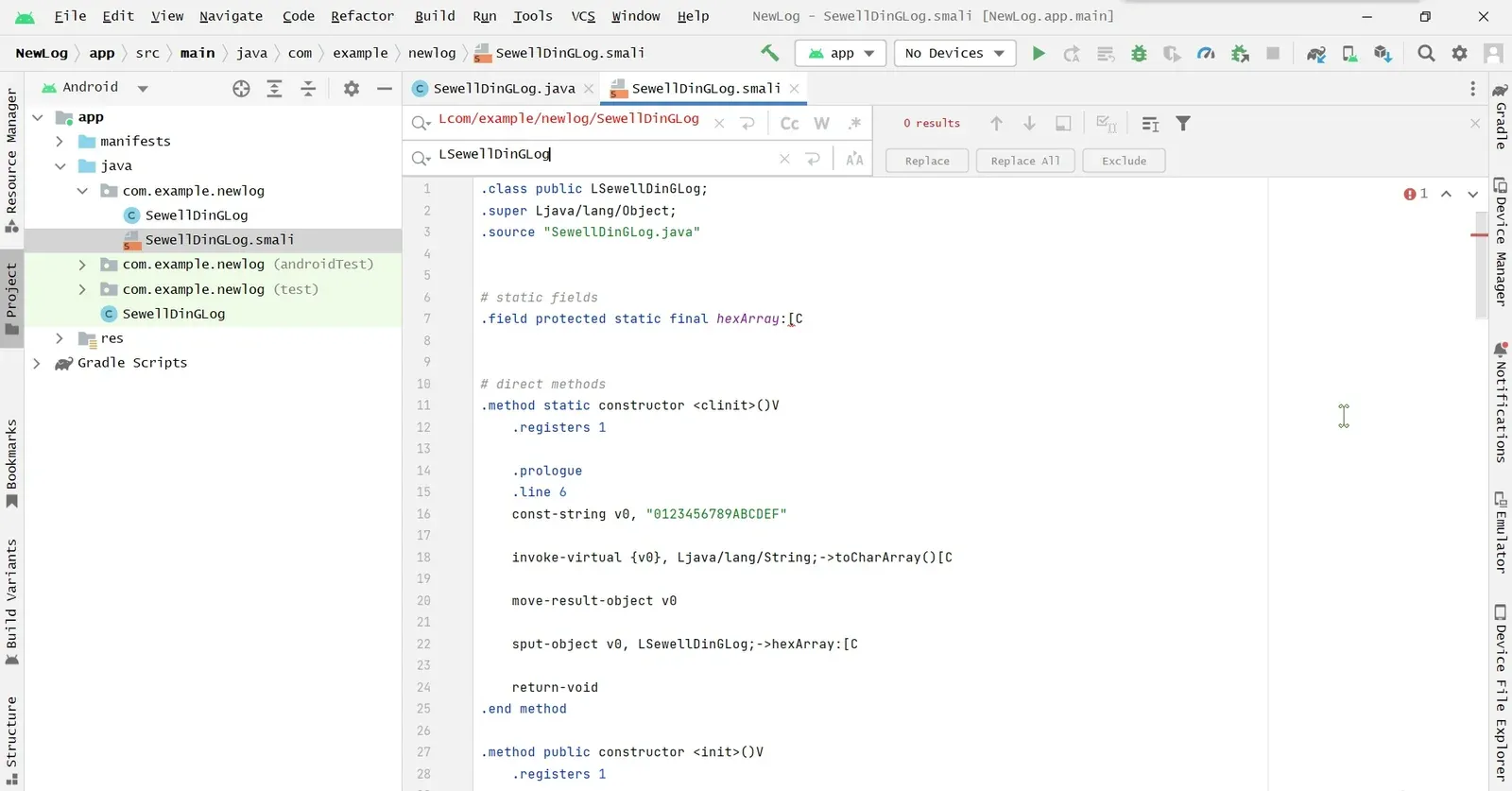
Then same as before — copy SewellDinGLog.smali into the smali folder, instrument, and recompile.
Decompile the instrumented APK with JADX to verify — sure enough, the extra SewellDinGLog.Log calls are now there to print the values:
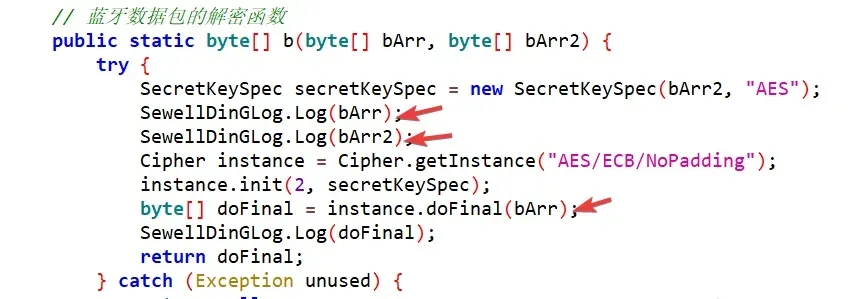
Finally we get the real values:
F:\platform-tools>adb logcat -s SewellDinG
--------- beginning of main
03-27 17:18:08.895 31117 31117 D SewellDinG: 05010630303030303082E3C89616017D
03-27 17:18:08.895 31117 31117 D SewellDinG: 241F632E5907042061014C1A3A45193B
03-27 17:18:08.895 31117 31117 D SewellDinG: 6629B62C88A7E50525E92C328AF258E6
03-27 17:18:10.114 31117 31117 D SewellDinG: 732F5CB22C06B0C2D0D17AD31D165805
03-27 17:18:10.114 31117 31117 D SewellDinG: 241F632E5907042061014C1A3A45193B
03-27 17:18:10.114 31117 31117 D SewellDinG: 05020100E3C896010202000000000000
03-27 17:18:11.770 31117 31117 D SewellDinG: 530B1FCA1467A408A321E71F3D152127
03-27 17:18:11.771 31117 31117 D SewellDinG: 241F632E5907042061014C1A3A45193B
0x06 A Q&A with myself
Q: Why not just call android.util.Log directly at the instrumentation site, like this:
invoke-static {p0, p1}, Landroid/util/Log;->d(Ljava/lang/String;Ljava/lang/String;)Iinstead of routing through another class’s function?
A: Wrapping the log call is far more flexible. You can write complex code in Java first and then compile it to smali, which is much simpler and more convenient than writing smali by hand — and at the instrumentation site you only need to add a single function call.
Colin Xiao — I take on contract reverse-engineering work, and writeups like this are how I show what I can do. If you need help with anything in this space — including but not limited to the areas I cover above — I’m available. No project is too big or too small — if it’s reverse engineering and I can do it, I’ll take it. DM me on X (@colinxiao_lab) or Telegram (@ColinXiao666).
Get in touch