iOS Code Signing, Part 2: Resource Rules, mobileprovision, and Re-signing
About the author. I’m Colin Xiao — an independent reverse engineer, mostly working solo on contract jobs. I dig into compiled code of every kind, including but not limited to: Android and iOS apps, x86/x64/ARM native binaries, packers and obfuscators, DRM and license checks, network protocols and APIs, crypto and signature algorithms, malware, game binaries, and embedded/IoT firmware. I also handle large-scale data collection and vulnerability research. If you have any project in mind, I’d be glad to take it on — whatever it is, as long as it’s within my wheelhouse. Just reach out. You can reach me on X at @colinxiao_lab or on Telegram at https://t.me/ColinXiao666.
This research is published for educational and defensive purposes. The target sample is anonymized throughout.
iOS Code Signing, Part 2: Resource Rules, mobileprovision, and Re-signing
In Part 1 I noted that an ipa still installs after you swap its SC_Info. The reason is simple once you read the CodeResources file:
<?xml version="1.0" encoding="UTF-8"?>
<!DOCTYPE plist PUBLIC "-//Apple//DTD PLIST 1.0//EN" "http://www.apple.com/DTDs/PropertyList-1.0.dtd">
<plist version="1.0">
<dict>
	<key>files</key>
	<dict>
		<key>EmojiUltimateViewController.nib</key>
		<data>
		ifQreSMmB3Uft3K3EF1/RLPF/zw=
		</data>
		<key>EmojiViewController.nib</key>
		<data>
		UUTdU18Tz6Fl6x7E2aGYcRxpH3A=
		</data>
		<key>English.lproj/Localizable.strings</key>
		<data>
		53Ka23KM2gkM/XGA2/7hVBG5jfc=
		</data>
		<key>MainWindow.nib</key>
		<data>
		UshXxpapPiP6lBtWe18OpnMv+lM=
		</data>
		<key>PkgInfo</key>
		<data>
		n57qDP4tZfLD1rCS43W0B4LQjzE=
		</data>
		<key>RemoteConfig.plist</key>
		<data>
		rQXI2OqpnGVOk5+BmA/F++FnAG0=
		</data>
		<key>de.lproj/Localizable.strings</key>
		<data>
		MAGm4wWT2b8996eIiqcJna3Jj5s=
		</data>
		<key>emoji.plist</key>
		<data>
		aybwK3Wkthu1Gk7XmEzyjXmGVRQ=
		</data>
		<key>emoji_ultimate_copy_button.png</key>
		<data>
		M7AjbQ3xPvVnFz4PB6kviXR9ePQ=
		</data>
		<key>emoji_ultimate_copy_button_background.png</key>
		<data>
		e7CSi/nIgilN4Skvg4kTVD+Un3M=
		</data>
		<key>emoji_ultimate_icon.png</key>
		<data>
		QREK+EwPbUuOJZf7HrAtqDG1a3o=
		</data>
		<key>emoji_ultimate_icon@2x.png</key>
		<data>
		ZRcuLgqQkQmFRh43aBR8snXi9HU=
		</data>
		<key>emoji_ultimate_view_background.png</key>
		<data>
		SPCyOB9McmjA9cYYma6lkXe23WE=
		</data>
		<key>es.lproj/Localizable.strings</key>
		<data>
		3ob4L+OaiqknLRq7FoZRSBvUIyU=
		</data>
		<key>fr.lproj/Localizable.strings</key>
		<data>
		t0XzVIa6xqvmp5KagcjmB3xR7pg=
		</data>
		<key>it.lproj/Localizable.strings</key>
		<data>
		anq4JMyR1PBXVZf50ZSs1DZo/Yg=
		</data>
		<key>nl.lproj/Localizable.strings</key>
		<data>
		c8FRK0aJIXOqcXMwQnmDmw3fWBQ=
		</data>
		<key>pt.lproj/Localizable.strings</key>
		<data>
		p2Bu2xab7q2mOKGkS3ilMjlbkg4=
		</data>
		<key>zh-hans.lproj/Localizable.strings</key>
		<data>
		GDxwv2JLXA1oNSOphz4DndPk5LM=
		</data>
		<key>zh-hant.lproj/Localizable.strings</key>
		<data>
		c3wmlLx60JrmuFeU/hOcLdepdAM=
		</data>
	</dict>
	<key>rules</key>
	<dict>
		<key>.*</key>
		<true/>
		<key>Info.plist</key>
		<dict>
			<key>omit</key>
			<true/>
			<key>weight</key>
			<real>10</real>
		</dict>
		<key>ResourceRules.plist</key>
		<dict>
			<key>omit</key>
			<true/>
			<key>weight</key>
			<real>100</real>
		</dict>
		<key>^SC_Info/.*\.sinf$</key>
		<dict>
			<key>omit</key>
			<true/>
			<key>weight</key>
			<integer>10000</integer>
		</dict>
		<key>^SC_Info/.*\.supp$</key>
		<dict>
			<key>omit</key>
			<true/>
			<key>weight</key>
			<integer>10000</integer>
		</dict>
	</dict>
</dict>
</plist>
Besides the files that participate in hashing, the file also excludes some files — the rules section:
<key>rules</key>
	<dict>
		<key>.*</key>
		<true/>
		<key>Info.plist</key>
		<dict>
			<key>omit</key>
			<true/>
			<key>weight</key>
			<real>10</real>
		</dict>
		<key>ResourceRules.plist</key>
		<dict>
			<key>omit</key>
			<true/>
			<key>weight</key>
			<real>100</real>
		</dict>
		<key>^SC_Info/.*\.sinf$</key>
		<dict>
			<key>omit</key>
			<true/>
			<key>weight</key>
			<integer>10000</integer>
		</dict>
		<key>^SC_Info/.*\.supp$</key>
		<dict>
			<key>omit</key>
			<true/>
			<key>weight</key>
			<integer>10000</integer>
		</dict>
	</dict>
There’s little written about resource rules, but from the signing behavior and download flow you can tell: files defined under rules with omit are not part of signature verification. Newer ipas are more elaborate:
		<key>PlugIns/PushService.appex/SC_Info/PushService.(sinf|supp|supf|supx)$</key>
		<dict>
			<key>omit</key>
			<true/>
			<key>weight</key>
			<integer>10000</integer>
		</dict>
		<key>SC_Info/Edu901iPhone.(sinf|supp|supf|supx)$</key>
		<dict>
			<key>omit</key>
			<true/>
			<key>weight</key>
			<integer>10000</integer>
		</dict>
		<key>^(.*/)?\.DS_Store$</key>
		<dict>
			<key>omit</key>
			<true/>
			<key>weight</key>
			<real>2000</real>
		</dict>
		<key>^.*</key>
		<true/>
		<key>^.*\.lproj/</key>
		<dict>
			<key>optional</key>
			<true/>
			<key>weight</key>
			<real>1000</real>
		</dict>
		<key>^.*\.lproj/locversion.plist$</key>
		<dict>
			<key>omit</key>
			<true/>
			<key>weight</key>
			<real>1100</real>
		</dict>
		<key>^Base\.lproj/</key>
		<dict>
			<key>weight</key>
			<real>1010</real>
		</dict>
		<key>^Info\.plist$</key>
		<dict>
			<key>omit</key>
			<true/>
			<key>weight</key>
			<real>20</real>
		</dict>
		<key>^PkgInfo$</key>
		<dict>
			<key>omit</key>
			<true/>
			<key>weight</key>
			<real>20</real>
		</dict>
		<key>^embedded\.provisionprofile$</key>
		<dict>
			<key>weight</key>
			<real>20</real>
		</dict>
		<key>^version\.plist$</key>
		<dict>
			<key>weight</key>
			<real>20</real>
		</dict>
	</dict>
A complete resourcerules sample: https://support.apple.com/library/APPLE/APPLECARE_ALLGEOS/HT5914/ResourceRules-ignoring-Scripts.plist
Beyond the early sc-info directory, newer ipas also support sc-info under different Frameworks and add the ^embedded.provisionprofile$ field — that corresponds to the enterprise-signing mobileprovision file.
Reading this plist tells you exactly which files are omitted from verification. That’s useless for an App Store ipa, but for enterprise and personal signing it matters a lot: control the resource rules, and you can modify the contents of an already-signed ipa. One caveat — Apple dropped support for custom resource rules on modern macOS:
Systems before OS X Mavericks 10.9 documented a signing feature (–resource-rules) to control which files in a bundle should be sealed by a code signature. This feature has been obsoleted for Mavericks. Code signatures made in Mavericks and later always seal all files in a bundle; there is no need to specify this explicitly any more. This also means that the Code Signing Resource Rules Path build setting in Xcode should no longer be used and should be left blank.
It is thus no longer possible to exclude parts of a bundle from the signature. Bundles should be treated as read-only once they have been signed.
Even so, the older codesign tool still works, and ipas signed with this parameter still install fine.
To exclude all resource files from signing, use this resource-rules file:
<?xml version="1.0" encoding="UTF-8"?>
<!DOCTYPE plist PUBLIC "-//Apple//DTD PLIST 1.0//EN" "http://www.apple.com/DTDs/PropertyList-1.0.dtd">
<plist version="1.0">
<dict>
	<key>rules</key>
	<dict>
		<key>.*</key>
		<false/>
	</dict>
</dict>
</plist>
The old codesign takes it via --resource-rules=. The resulting CodeResources in the signed ipa:
<?xml version="1.0" encoding="UTF-8"?>
<!DOCTYPE plist PUBLIC "-//Apple//DTD PLIST 1.0//EN" "http://www.apple.com/DTDs/PropertyList-1.0.dtd">
<plist version="1.0">
<dict>
	<key>files</key>
	<dict/>
	<key>files2</key>
	<dict/>
	<key>rules</key>
	<dict>
		<key>.*</key>
		<false/>
	</dict>
	<key>rules2</key>
	<dict>
		<key>.*</key>
		<false/>
		<key>^(Frameworks|SharedFrameworks|PlugIns|Plug-ins|XPCServices|Helpers|MacOS|Library/(Automator|Spotlight|LoginItems))/</key>
		<dict>
			<key>nested</key>
			<true/>
			<key>weight</key>
			<real>0.0</real>
		</dict>
	</dict>
</dict>
</plist>
Compare it to Part 1’s file and the difference jumps out: all the base64-encoded sha1/sha256 hashes are gone. That means every resource in the file can be modified without re-signing. Change what you want, re-zip, and install directly.
embedded.mobileprovision
A signed ipa also gains an embedded.mobileprovision (I’ll call it “mp”) file, added to the Payload directory during signing. For a re-signed ipa it plays the same role sc_info plays in an App Store ipa: it defines the authorization.
To understand authorization, first understand where mp comes from. Normally Xcode manages it automatically when you build with a developer certificate. Add a device for debugging and Xcode registers it into the mp for that bundle id — the “Automatically manage signing” setting:
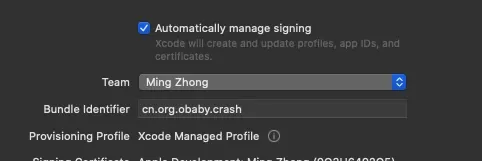
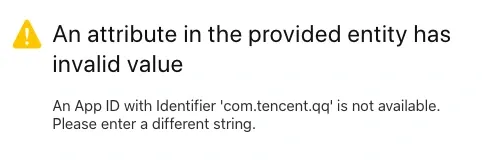
Handy for normal development, annoying for anything unusual — you can’t create a project with an already-taken bundle id (say com.example.popular):
But not being able to create the bundle id doesn’t mean a re-signed app can’t use the original one — the mp’s bundle id and the ipa’s original bundle id don’t have to match. Apple’s portal also supports wildcard bundle ids, though they come with limits (push notifications won’t work):
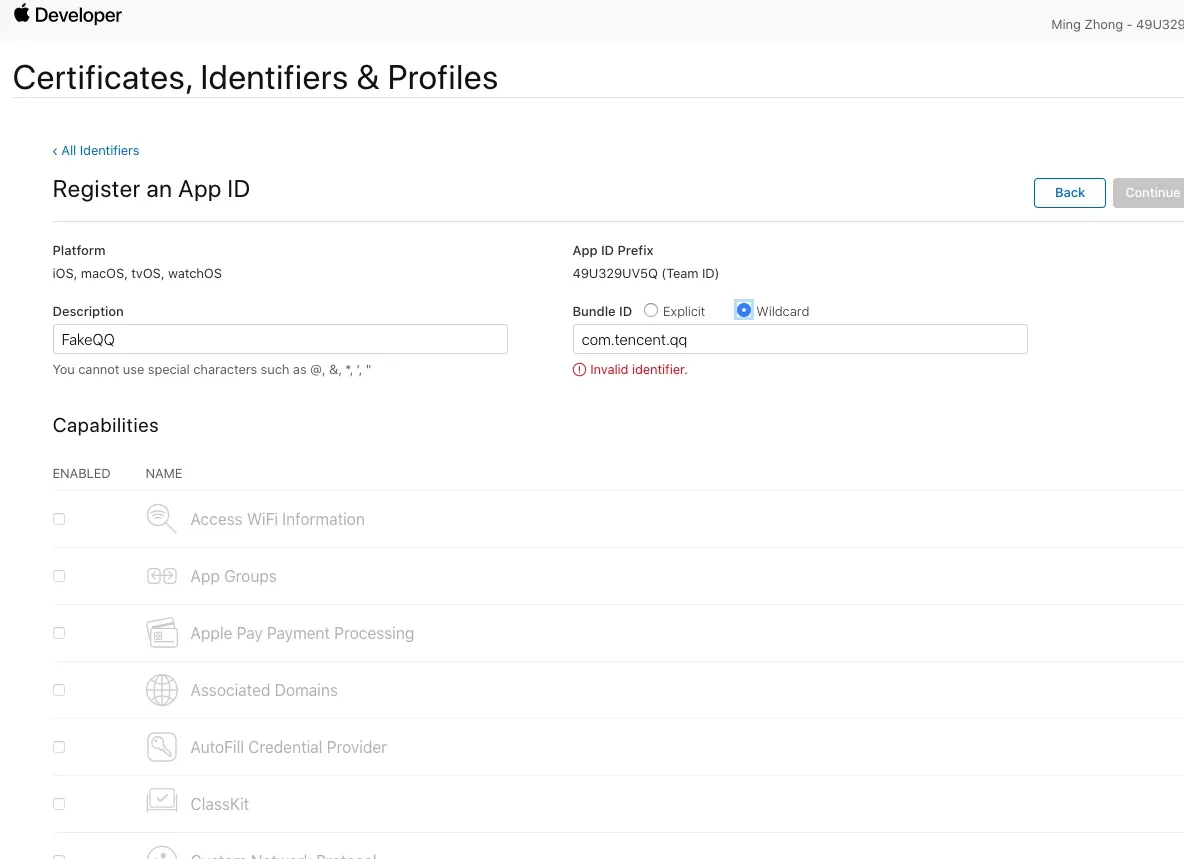
With a developer account you can compare the differences in the portal yourself. (Creating mp files from a plain Apple ID is out of scope here; you can trace Xcode to watch the flow.)
As for development mp vs distribution mp, the big practical difference is push notifications. If the re-signed app needs push, use a distribution mp, enable push on the bundle id, and add the push certificate.
The mp file has three main jobs:
- It defines the ipa’s entitlements.
- It defines the list of authorized devices.
- It holds its own key info: validity, developer info, bundle id, uuid, and the certificate.
The mp is a binary file:
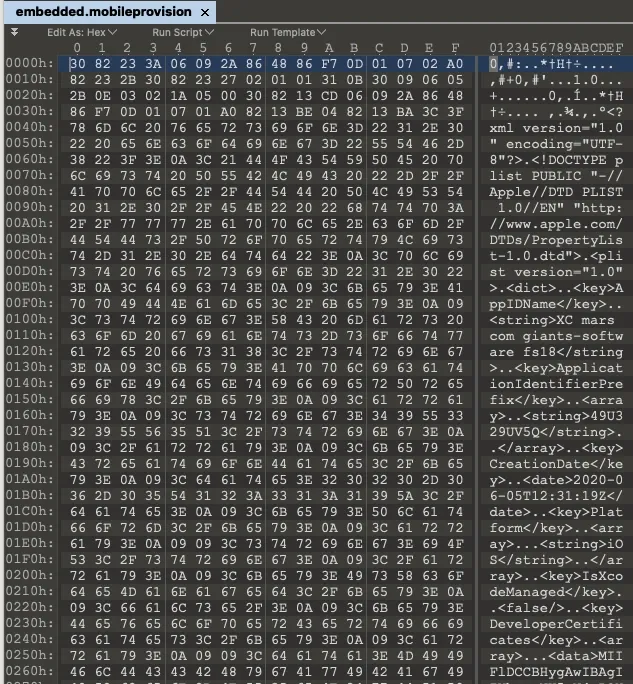
Entitlements
Entitlements define the ipa’s permissions. During signing they don’t have to exactly match the binary’s entitlements, but a big mismatch can cause install failures or crashes. macOS can preview them directly from the mp:
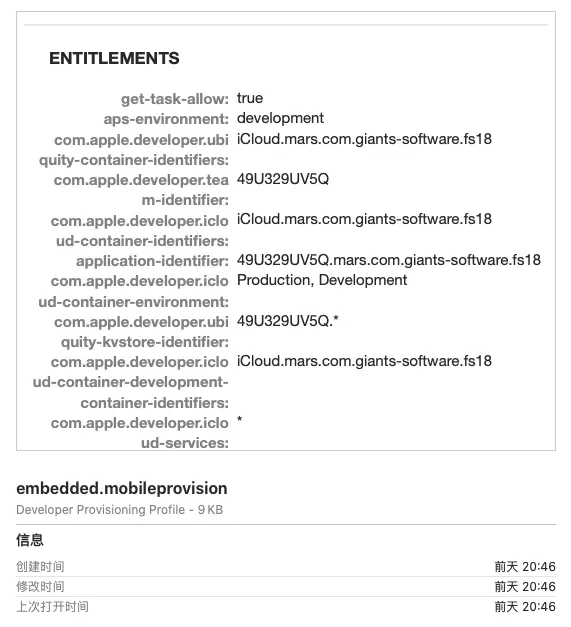
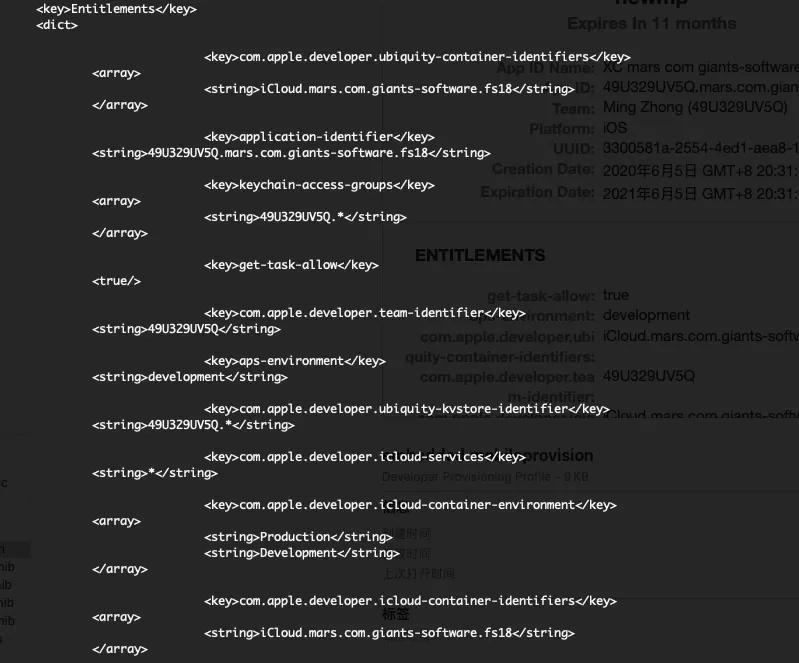
You can also dump the mp’s text with security:
cms -D -i /Volumes/DATA/python_projects/ios_code_sign/FlightRadar24_Pro-6.7.0_RESIGNED/Payload/Flightradar24.app/embedded.mobileprovisionThe output matches the preview:
For a signed ipa, read the signed entitlements with ldid:
ldid -e /Volumes/DATA/python_projects/ios_code_sign/FlightRadar24_Pro-6.7.0_RESIGNED/Payload/Flightradar24.app/Flightradar24Output:
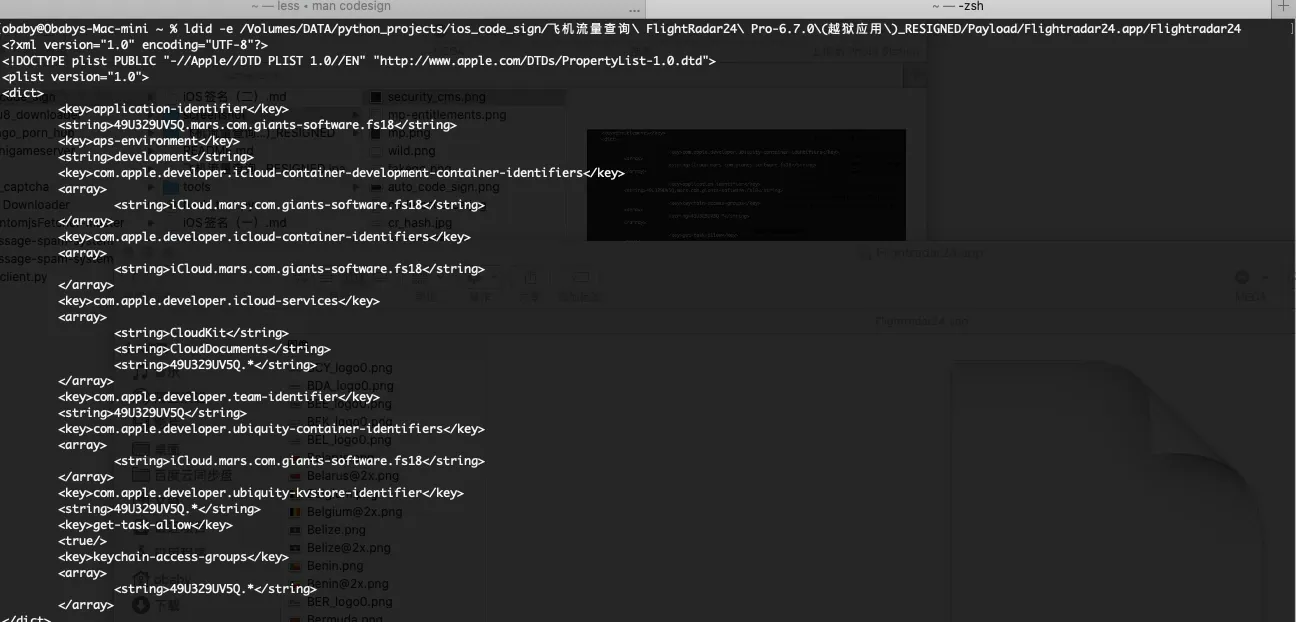
Comparing them, the signed binary’s entitlements and the mp’s entitlements are mostly identical — the difference is just that they’re not stored under a separate Entitlements directory.
Earlier I said the bundle ids don’t have to match. Mine was 49U329UV5Q.mars.com.giants-software.fs18 — the portal bundle id was mars.com.giants-software.fs18, but Xcode prepended the developer team id when creating the mp. The re-signed app’s own bundle id is se.resenatverket.FlightRadar24:
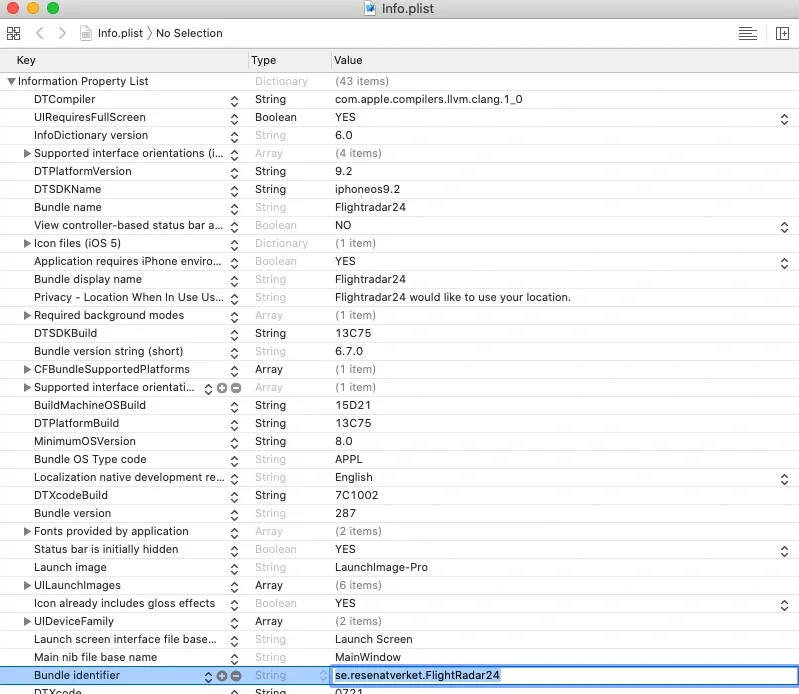
They differ, but installation works fine. And an ipa signed with custom resource rules shows it when verified with codesign — the result indicates custom ignore rules, which also tells you whether an ipa used custom resource rules. So if a signed ipa won’t install, the bundle id probably isn’t the culprit — look elsewhere.
ldid has a -s flag to write entitlements into a binary, but I wouldn’t sign an ipa with it. On a jailbroken system, if you’d rather avoid codesign, ldid is fine for writing permissions into a binary (e.g. debug-server). For ipas, use codesign --entitlements path to embed entitlements:
–entitlements path When signing, take the file at the given path and embed its contents in the signature as entitlement data. If the data at path does not already begin with a suitable binary (“blob”) header, one is attached automatically. When displaying a signature, extract any entitlement data from the signature and write it to the path given. Use “-” to write to standard output. By default, the binary “blob” header is returned intact; prefix the path with a colon “:” to automatically strip it off. If the signature has no entitle- ment data, nothing is written (this is not an error).
Run man codesign for the rest, or check Apple’s docs.
Authorized device list
This lives in the mp’s ProvisionedDevices field. There are two kinds, and the real split is enterprise vs personal developers. Personal developers get only the device-list form:
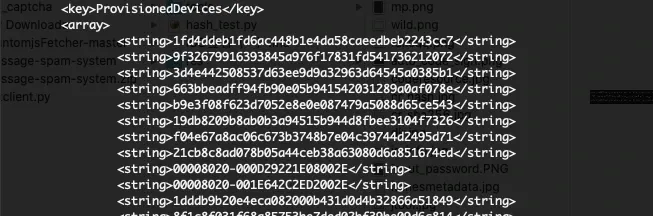
The list defines which devices can install the signed ipa, keyed by device uuid. Two ways to get a uuid: use a third-party tool, or install a device profile. A device not on the list can’t install the ipa.
Enterprise developers get the other form:
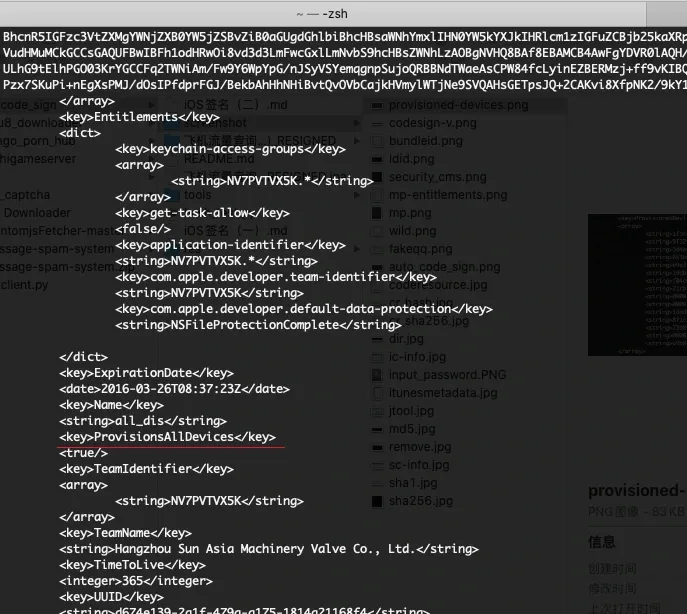
The enterprise mp adds a ProvisionsAllDevices field and drops ProvisionedDevices — meaning any device with a valid signature can install the ipa. That’s exactly why enterprise signing became the main distribution channel for third-party stores.
The mp’s own key info
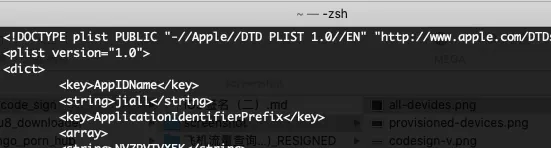
Mostly the mp’s validity, implemented in two parts: the creation date and a TTL.
CreationDate:
TTL:
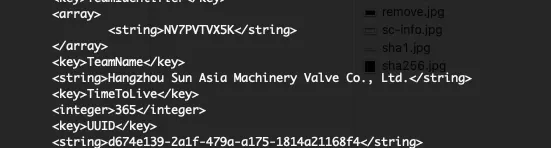
From those two you can compute the mp’s expiry. Once expired, the signed ipa won’t install. But expiry doesn’t mean re-signing: if you signed with the custom resource-rules file, just create an equivalent mp, zip it into the ipa to replace the old one, and it installs again. “Equivalent” means:
- Same developer account and bundle id for the mp.
- Keep the portal bundle id’s entitlements unchanged from before expiry.
- The developer certificate hasn’t expired, and the account hasn’t been banned.
Project (with the tools and samples used in Parts 1 and 2): https://github.com/obaby/ios_code_sign
Part 3 will cover signing tricks on macOS.
Colin Xiao — I take on contract reverse-engineering work, and writeups like this are how I show what I can do. If you need help with anything in this space — including but not limited to the areas I cover above — I’m available. No project is too big or too small — if it’s reverse engineering and I can do it, I’ll take it. DM me on X (@colinxiao_lab) or Telegram (@ColinXiao666).
Get in touch