iOS App Decryption: Four Tools, My Experience
About the author. I’m Colin Xiao — an independent reverse engineer, mostly working solo on contract jobs. I dig into compiled code of every kind, including but not limited to: Android and iOS apps, x86/x64/ARM native binaries, packers and obfuscators, DRM and license checks, network protocols and APIs, crypto and signature algorithms, malware, game binaries, and embedded/IoT firmware. I also handle large-scale data collection and vulnerability research. If you have any project in mind, I’d be glad to take it on — whatever it is, as long as it’s within my wheelhouse. Just reach out. You can reach me on X at @colinxiao_lab or on Telegram at https://t.me/ColinXiao666.
This research is published for educational and defensive purposes. The target sample is anonymized throughout.
iOS App Decryption: Four Tools, My Experience
I’ve tried four decryption tools — Clutch, dumpdecrypted, CrackerXI, and frida-ios-dump. The best and simplest is CrackerXI, with frida-ios-dump a close second: some apps still fail to decrypt, likely a device or Frida version issue. I spent a long time on Clutch and dumpdecrypted and never got them working — maybe they’re genuinely solid, but I never succeeded after trying every step, and version mismatch seems to be the hard blocker.

CrackerXI
Step 1: In Cydia, add the repo that hosts CrackerXI. If the first mirror fails, try the alternate.
Step 2: Open CrackerXI and enable Hook in Settings.
Step 3: In AppList, tap the app you want to decrypt — a dialog pops up.
Step 4: Choosing “YES, Full IPA” gives you an ipa file. Extract it yourself, locate the binary, then use class-dump to dump its headers.
frida-ios-dump
Step 1: Open Cydia on the device and add the Frida repo: https://build.frida.re
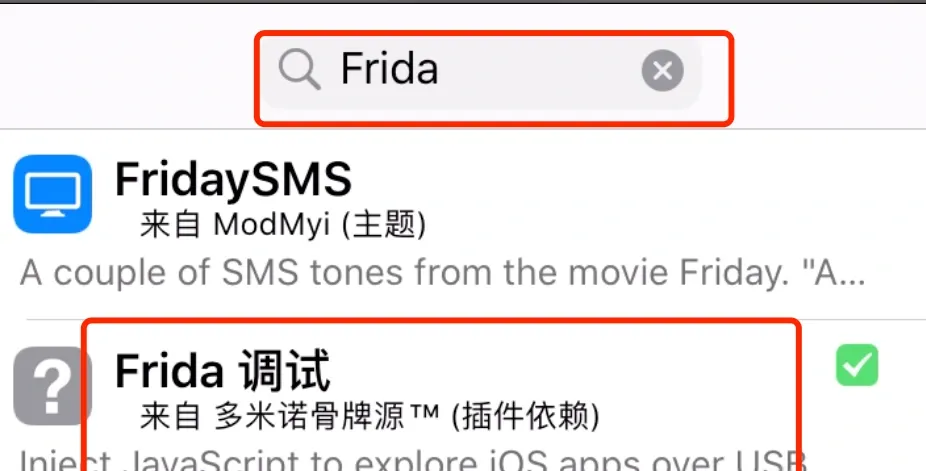
Then search for Frida and install. Every tutorial starts this way, but it didn’t work on my device — if it works for you, congrats. If not, do this instead: add a Frida mirror repo.
Step 2: Search for Frida. You should see:
Step 3: Run frida-ps -U:

Step 4: Install the rest of the tooling.
Download frida-ios-dump from https://github.com/AloneMonkey/frida-ios-dump
dump.pyis the main file — it lists the device’s installed apps and decrypts them.requirements.txtlists the required Python packages.
Enter the frida-ios-dump directory and run:
pip3 install -r requirements.txt --upgrade

python3 dump.py -l
Step 5: Configure.
Open dump.py and find these four lines, filling in your username, password, LAN IP, and port:
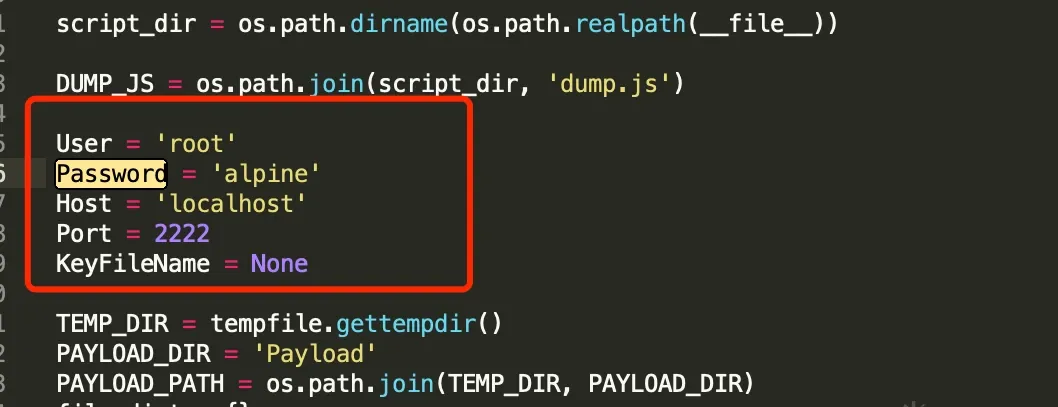
Make sure the phone and computer are on the same LAN.
I hit all sorts of errors. The fix:
python3 dump.py com.example.app
That worked. Trying another app:

Another error — probably a version issue again. The install flow itself is fine, otherwise the first app wouldn’t have worked.
Clutch
Clutch: https://github.com/KJCracks/Clutch
If you run Clutch on the device and get a permission error, give it the executable permission:


Then decrypt:
Clutch -d <serial number>(It’s reportedly deprecated — I never got a single one to work.)
dumpdecrypted
Download the source from https://github.com/stefanesser/dumpdecrypted/ and run make in the source directory to build the dylib. Copy the dylib to the device (if you’re root, /var/root is a good spot). cd into the directory holding the dylib, then inject it with the DYLD_INSERT_LIBRARIES environment variable (find the executable path with ps -A):
DYLD_INSERT_LIBRARIES=dumpdecrypted.dylib <executable path>Lots of errors again. I followed a thorough writeup on this, but even then I couldn’t get it to work.
Summary
Best to worst for me: CrackerXI, then frida-ios-dump.
Colin Xiao — I take on contract reverse-engineering work, and writeups like this are how I show what I can do. If you need help with anything in this space — including but not limited to the areas I cover above — I’m available. No project is too big or too small — if it’s reverse engineering and I can do it, I’ll take it. DM me on X (@colinxiao_lab) or Telegram (@ColinXiao666).
Get in touch