iOS Reverse Engineering End-to-End - Jailbreak Dumping and Hooking a Chat App Dice Roll
About the author. I’m Colin Xiao — an independent reverse engineer, mostly working solo on contract jobs. I dig into compiled code of every kind, including but not limited to: Android and iOS apps, x86/x64/ARM native binaries, packers and obfuscators, DRM and license checks, network protocols and APIs, crypto and signature algorithms, malware, game binaries, and embedded/IoT firmware. I also handle large-scale data collection and vulnerability research. If you have any project in mind, I’d be glad to take it on — whatever it is, as long as it’s within my wheelhouse. Just reach out. You can reach me on X at @colinxiao_lab or on Telegram at https://t.me/ColinXiao666.
This research is published for educational and defensive purposes. The target sample is anonymized throughout.
Looking at how the writeups break down, Android outnumbers iOS by five or six to one. I’ve spent most of my own time on Android too, so this doubles as an iOS introduction aimed at Android security engineers. It walks through a complete iOS reverse engineering session — jailbreak, dumping, UI analysis, dynamic and static analysis, and finally hooking — using the dice-roll mini-game in a widely-used IM app (WeChat) as the running example.
Jailbreak
The focus here is application security, so I won’t go deep on how jailbreaking itself is achieved. There are plenty of writeups and books on XNU kernel vulnerabilities — SockPuppet, the Project Zero surveys, MacOS and iOS Internals, and so on. Reading public exploit code (like oob_timestamp) helps, but for this article we just stand on those shoulders and use the packaged tools. Jailbreaking differs from Android rooting in that iOS is closed and far less fragmented — privilege escalation is mostly a single path (tfp0), and there’s no reflashing. Since we care about the app layer, use an existing jailbreak tool and move on.
Dumping
Once jailbroken you can ssh in — the iOS equivalent of Android’s adb shell. The next step is getting the app bundle. On Android that’s one adb pull; on iOS it’s more involved.
Most iOS apps come from the App Store, and App Store apps are protected by Apple’s FairPlay DRM: signed and encrypted. To analyze them you first decrypt — colloquially “dump” the binary. The usual tools:
- stefanesser/dumpdecrypted — injects a dylib into the process to obtain decrypted files (no dynamic libraries).
- conradev/dumpdecrypted — updated fork, decrypts per-module.
- Clutch — spawns the process via
posix_spawnpand decrypts, supports repackaging as ipa. (Static approaches like this mostly stopped working after iOS 12.) - frida-ios-dump — dynamic decryption via frida, supports repackaging.
- bagbak — same idea, but a Node.js frida binding.
Some of these have rotted. I noticed dumpdecrypted mishandles the file sandbox and fails to save — needs a small patch.
Most of these tools are memory dumps: they exec the target program to decrypt, which lets an app detect the dump via its initializers. If that happens, you can use a mremap_encrypted-based approach that calls the kernel interface directly, decrypting statically without ever launching the target.
Getting a foothold
Jailbroken, dumped — now what? Drop it in IDA? You can, but an iOS app’s main binary is a huge Mach-O. WeChat’s arm64 executable alone is 218 MB after decryption — a wall even in a reversing tool. You need an entry point, a “foothold.”
The most common one is the UI. On Android you’d use uiautomatorviewer and chase UI IDs through decompiled code (I usually just grab the top Activity instead). On iOS, UI analysis is genuinely effective, because iOS apps are MVC: a View’s events are handled by its Controller. Xcode has Debug View Hierarchy (requires the target to allow debugging); more commonly you use view-debugging frameworks like Reveal or the open-source FLEX.
Inject FLEX into the process for UI analysis:
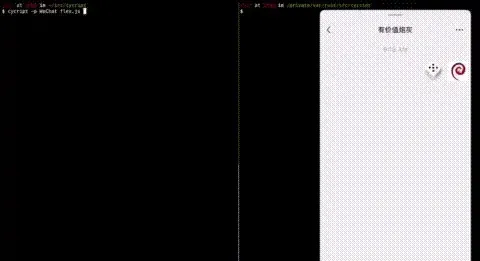
(That injection uses cycript — more on that later.) Or analyze from a desktop with Reveal, which still requires injecting RevealServer.dylib and calling [IBARevealLoader startServer] via the official lldb script:
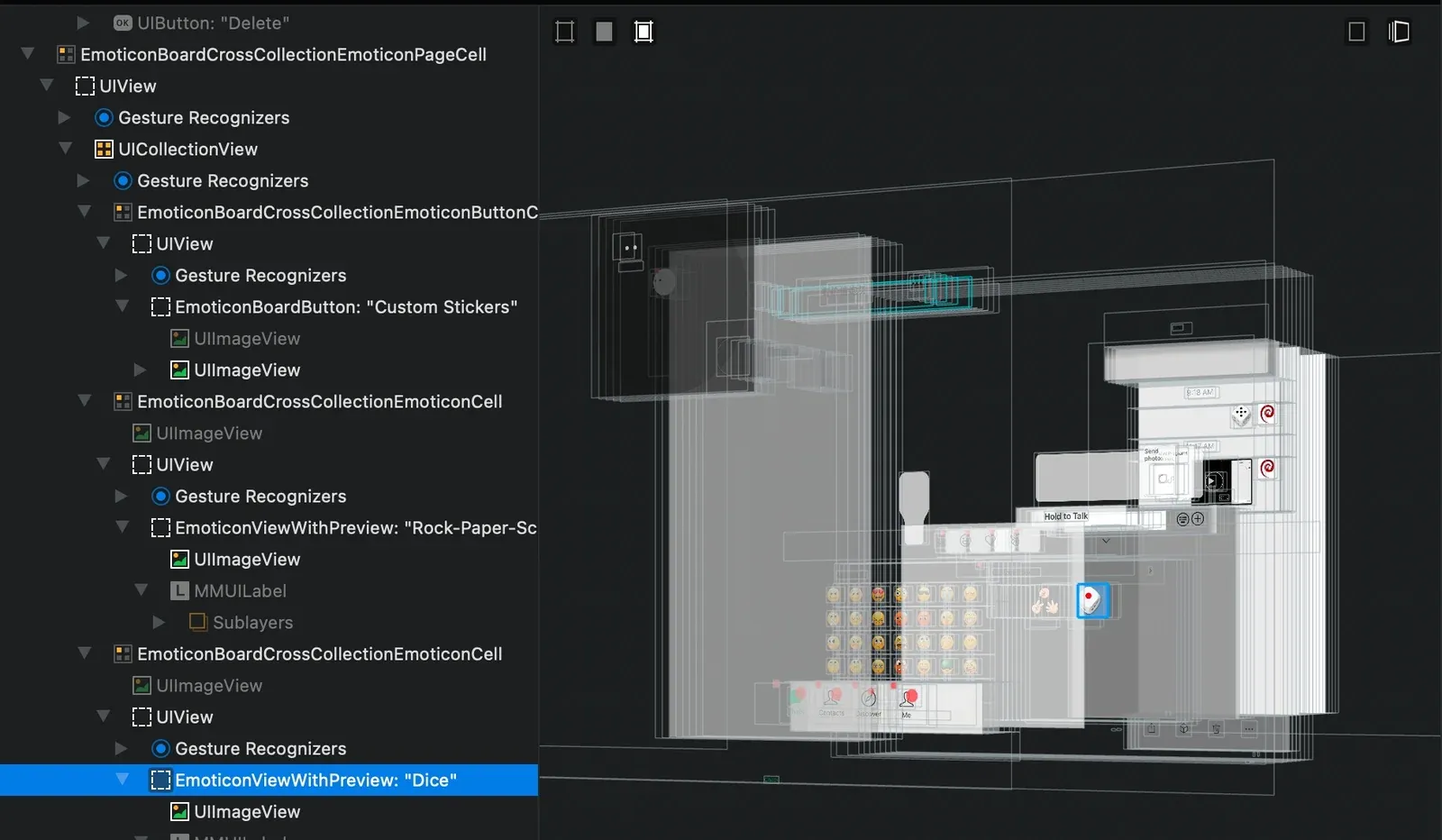
The dice button is a UIImageView — it doesn’t respond to taps itself, so I need to find the owning ViewController or Gesture Recognizer.
Dynamic analysis
From the UI I know the current Controller class is BaseMsgContentViewController, so I script a trace of every method it calls while sending a dice roll:
[-] 13:04:24.188 Hooked: -[BaseMsgContentViewController didRotateFromInterfaceOrientation:]
[-] 13:04:24.188 Hooked: -[BaseMsgContentViewController previewingContext:viewControllerForLocation:]
[-] 13:04:24.188 Hooked: -[BaseMsgContentViewController previewingContext:commitViewController:]
[-] 13:04:24.188 Hooked: -[BaseMsgContentViewController previewActionItems]
[-] 13:04:24.188 Hooked: -[BaseMsgContentViewController m_delegate]
[!] 13:04:24.291 Failed to hook: -[BaseMsgContentViewController willShow]
[-] 13:04:24.291 Hooked: -[BaseMsgContentViewController canPasteImage]
[-] 13:04:24.291 Hooked: -[BaseMsgContentViewController setTableFooterView:]
[-] 13:04:24.291 Hooked: -[BaseMsgContentViewController documentInteractionControllerViewControllerForPreview:]
[-] 13:04:24.291 Hooked: -[BaseMsgContentViewController willAppear]
[-] 13:04:24.291 Hooked: -[BaseMsgContentViewController showLoadingView]
[-] 13:04:24.291 Hooked: -[BaseMsgContentViewController initTableView]
[-] 13:04:24.293 Hooked: 614 methods for class BaseMsgContentViewController

# tap the dice icon to send an emote
[-] 13:04:35.075 ENTER -[BaseMsgContentViewController useTransparentNavibar]
[-] 13:04:35.076 ENTER -[BaseMsgContentViewController useTransparentNavibar]
[-] 13:04:35.078 ENTER -[BaseMsgContentViewController shouldInteractivePop]
[-] 13:04:35.078 ENTER -[BaseMsgContentViewController toolView]
[-] 13:04:35.132 ENTER -[BaseMsgContentViewController SendEmoticonMesssageToolView:]
[-] 13:04:35.148 ENTER -[BaseMsgContentViewController findNodeDataByLocalId:]
[-] 13:04:35.148 ENTER -[BaseMsgContentViewController addMessageNode:layout:addMoreMsg:]
[-] 13:04:35.148 ENTER -[BaseMsgContentViewController findNodeDataByLocalId:]
[-] 13:04:35.148 ENTER -[BaseMsgContentViewController getCurContentSizeHeight]
...
frida
SendEmoticonMesssageToolView looks interesting. Print its stack with frida:
import { kObjC } from "../../agent/objc";
import { kNative } from "../../agent/native";

// kObjC.traceClass("BaseMsgContentViewController");
kObjC.traceMethod("BaseMsgContentViewController", "- SendEmoticonMesssageToolView:", {
  onEnter: function(args) {
    log.i("SendEmoticonMesssageToolView", args[0], args[1]);
    kNative.printStackTrace(this.context);
  }
});
Output:
[-] 13:10:32.079 Hooked: -[BaseMsgContentViewController SendEmoticonMesssageToolView:]
[+] 13:10:37.212 SendEmoticonMesssageToolView 0x11f8a1800 0x10bf6e8ba
[-] 13:10:37.636 backtrace:
0x104e06de4 WeChat!0x2676de4
0x10294cde8 WeChat!0x1bcde8
0x1041bb930 WeChat!0x1a2b930
0x1b8331e34 UIKitCore!-[UICollectionView _selectItemAtIndexPath:animated:scrollPosition:notifyDelegate:deselectPrevious:]
0x1b83464b0 UIKitCore!-[UICollectionView _cellForItemAtIndexPath:includePrefetchedCells:]
0x1b8359e10 UIKitCore!-[UICollectionView touchesEnded:withEvent:]
0x1b46ef730 libsystem_malloc.dylib!nanov2_calloc
0x1b46f4100 libsystem_malloc.dylib!calloc
0x1b48ddae4 CoreFoundation!-[__NSSetM addObject:]
0x1b473926c libobjc.A.dylib!objc_autoreleasePoolPop
0x1b4a14320 CoreFoundation!_CFAutoreleasePoolPop
0x1b48dd594 CoreFoundation!-[__NSSetM enumerateObjectsWithOptions:usingBlock:]
0x1b498bc7c CoreFoundation!__NSSetM_new
0x1bb64e208 QuartzCore!CA::Layer::retain_parent(CA::Transaction*) const
0x1b8b5d9e8 UIKitCore!forwardTouchMethod
0x1b8b5dae4 UIKitCore!-[UIResponder touchesEnded:withEvent:]
The WeChat frames have no symbols — they’ve been stripped.
lldb
The same view in lldb:
(lldbinit) bt
* thread #1, queue = 'com.apple.main-thread', stop reason = breakpoint 1.1
  * frame #0: 0x0000000105334f04 WeChat`___lldb_unnamed_symbol201841$$WeChat
    frame #1: 0x0000000104b32f80 WeChat`___lldb_unnamed_symbol170264$$WeChat + 160
    frame #2: 0x0000000104e06de4 WeChat`___lldb_unnamed_symbol182196$$WeChat + 2600
    frame #3: 0x000000010294cde8 WeChat`___lldb_unnamed_symbol8796$$WeChat + 248
    frame #4: 0x00000001041bb930 WeChat`___lldb_unnamed_symbol129751$$WeChat + 624
    frame #5: 0x00000001b8331e34 UIKitCore`-[UICollectionView _selectItemAtIndexPath:animated:scrollPosition:notifyDelegate:deselectPrevious:] + 952
    frame #6: 0x00000001b8359e10 UIKitCore`-[UICollectionView touchesEnded:withEvent:] + 572
    frame #7: 0x00000001b8b5d9e8 UIKitCore`forwardTouchMethod + 332
    frame #8: 0x00000001b8b5dae4 UIKitCore`-[UIResponder touchesEnded:withEvent:] + 64
    frame #9: 0x00000001b8b5d9e8 UIKitCore`forwardTouchMethod + 332
    frame #10: 0x00000001b8b5dae4 UIKitCore`-[UIResponder touchesEnded:withEvent:] + 64
    frame #11: 0x00000001b8b5d9e8 UIKitCore`forwardTouchMethod + 332
    frame #12: 0x00000001b8b5dae4 UIKitCore`-[UIResponder touchesEnded:withEvent:] + 64
    frame #13: 0x00000001b86e6478 UIKitCore`_UIGestureEnvironmentUpdate + 6992
    frame #14: 0x00000001b86e48dc UIKitCore`-[UIGestureEnvironment _deliverEvent:toGestureRecognizers:usingBlock:] + 380
    frame #15: 0x00000001b86e4698 UIKitCore`-[UIGestureEnvironment _updateForEvent:window:] + 248
    frame #16: 0x00000001b8b6d654 UIKitCore`-[UIWindow sendEvent:] + 3512
    frame #17: 0x00000001b8b48840 UIKitCore`-[UIApplication sendEvent:] + 348
    frame #18: 0x0000000103de4920 WeChat`___lldb_unnamed_symbol111457$$WeChat + 404
    frame #19: 0x00000001ebaaa87c UIKit`-[UIApplicationAccessibility sendEvent:] + 100
Symbols are nice but not required — we can still resolve addresses in IDA. With ASLR, confirm the image load address:
(lldbinit) vmmap /WeChat
000102790000 - 00010d6d4000  af44000 R-X /private/var/containers/Bundle/Application/2A5D623F-5F8E-4A99-96C8-8CBD00D8B6BE/WeChat.app/WeChat        0 __TEXT
00010d6d4000 - 00010fc40000  256c000 RW- /private/var/containers/Bundle/Application/2A5D623F-5F8E-4A99-96C8-8CBD00D8B6BE/WeChat.app/WeChat  af44000 __DATA
00010fc40000 - 000110ac4000   e84000 R-- /private/var/containers/Bundle/Application/2A5D623F-5F8E-4A99-96C8-8CBD00D8B6BE/WeChat.app/WeChat  cb68000 __LINKEDIT
vmmapis a lldb command I defined myself, modeled on gef/pwndbg in gdb.
The load address here is 0x000102790000, while IDA’s __TEXT base is 0x100004000. You can rebase, but since there aren’t many functions I resolve them manually. lldb can also map addresses to offsets directly:
(lldbinit) image lookup -a 0x0000000105334f04
      Address: WeChat[0x0000000102ba4f04] (WeChat.__TEXT.__text + 45747972)
      Summary: WeChat`___lldb_unnamed_symbol201841$$WeChat
(lldbinit) image lookup -a 0x0000000104b32f80
      Address: WeChat[0x00000001023a2f80] (WeChat.__TEXT.__text + 37351296)
      Summary: WeChat`___lldb_unnamed_symbol170264$$WeChat + 160
(lldbinit) image lookup -a 0x0000000104e06de4
      Address: WeChat[0x0000000102676de4] (WeChat.__TEXT.__text + 40316388)
      Summary: WeChat`___lldb_unnamed_symbol182196$$WeChat + 2600
(lldbinit) image lookup -a 0x000000010294cde8
      Address: WeChat[0x00000001001bcde8] (WeChat.__TEXT.__text + 1805800)
      Summary: WeChat`___lldb_unnamed_symbol8796$$WeChat + 248
(lldbinit) image lookup -a 0x00000001041bb930
      Address: WeChat[0x0000000101a2b930] (WeChat.__TEXT.__text + 27425072)
      Summary: WeChat`___lldb_unnamed_symbol129751$$WeChat + 624
Symbol recovery
Mapping each lldb address to its __TEXT offset and jumping there in IDA gives the calling chain:
-[BaseMsgContentViewController SendEmoticonMesssageToolView:](45747972)-[MMInputToolView didSelectorSelfDefinedEmotcion:](37351296)-[EmoticonBoardView onTapEmoticonWrap:atIndex:maxCountPerLine:fromSection:](40316388)-[EmoticonBoardCrossCollectionController onEmoticonPageCellTapEmoticonWrap:atIndex:pid:maxCountPerLine:](1805800)-[EmoticonBoardCrossCollectionEmoticonPageCell collectionView:didSelectItemAtIndexPath:](27425072)
Since IDA can recover these ObjC selectors, the symbols are in principle restorable. If you do this often, automate it — see iOS symbol table recovery and restore-symbol.
Static analysis
Dynamic analysis found the entry point and the backtrace, but no obvious setDiceValue. To change the roll I have to read the functions themselves. Reversing is unavoidable now — I prefer not to reverse when I can avoid it, but here it’s the only way.
While the 200 MB Mach-O sat in IDA (four hours in, still not done — I watched a couple of episodes of anime in the meantime), I’ll cover some Objective-C fundamentals.
Objective-C 101
ObjC’s object model is message passing. Before reversing, let’s build a small program to see exactly how a call works:
#import <Foundation/Foundation.h>

@interface MyClass: NSObject
 - (void)insMethod:(const char *)a1 arg2:(int)a2;
 + (void)clsMethod:(const char *)a1 arg2:(int)a2;
@end

@implementation MyClass
 - (void)insMethod:(const char *)a1 arg2:(int)a2 {
     NSLog(@"insMethod called, self=%p, a1=%s", self, a1);
 }
 + (void)clsMethod:(const char *)a1 arg2:(int)a2 {
     NSLog(@"clsMethod called, self=%p, a1=%s", self, a1);
 }
@end

int main() {
    MyClass *c = [[MyClass alloc] init];
    [MyClass clsMethod:"hello" arg2:1];
    [c insMethod:"world" arg2:2];
    return 0;
}
Disassembly of main:
(lldbinit) disassemble
main @ test_hello:
    0x100003e90: push   rbp
    0x100003e91: mov    rbp, rsp
    0x100003e94: sub    rsp, 0x10
    0x100003e98: mov    dword ptr [rbp - 0x4], 0x0
->  0x100003e9f: mov    rax, qword ptr [rip + 0x424a] ; (void *)0x0000000100008120: MyClass
    0x100003ea6: mov    rdi, rax
    0x100003ea9: call   0x100003f04               ; symbol stub for: objc_alloc_init
    0x100003eae: mov    qword ptr [rbp - 0x10], rax
    0x100003eb2: mov    rax, qword ptr [rip + 0x4237] ; (void *)0x0000000100008120: MyClass
    0x100003eb9: mov    rsi, qword ptr [rip + 0x4220] ; "clsMethod:arg2:"
    0x100003ec0: mov    rdi, rax
    0x100003ec3: lea    rdx, [rip + 0xa8]         ; "hello"
    0x100003eca: mov    ecx, 0x1
    0x100003ecf: call   qword ptr [rip + 0x12b]   ; (void *)0x00007fff20439d00: objc_msgSend
    0x100003ed5: mov    rax, qword ptr [rbp - 0x10]
    0x100003ed9: mov    rsi, qword ptr [rip + 0x4208] ; "insMethod:arg2:"
    0x100003ee0: mov    rdi, rax
    0x100003ee3: lea    rdx, [rip + 0x8e]         ; "world"
    0x100003eea: mov    ecx, 0x2
    0x100003eef: call   qword ptr [rip + 0x10b]   ; (void *)0x00007fff20439d00: objc_msgSend
    0x100003ef5: xor    eax, eax
    0x100003ef7: add    rsp, 0x10
    0x100003efb: pop    rbp
    0x100003efc: ret
Both calls funnel into objc_msgSend:
id objc_msgSend(self, op, ...);self— the receiver: a class pointer for class methods, an object pointer for instance methods.op— the message identifier, aka the selector, a string naming the method....— the remaining arguments.
Checking the registers for the two calls:
(lldbinit) p/x $rdi
(unsigned long) $29 = 0x0000000100008120
(lldbinit) x/1s $rsi
0x100003f86: "clsMethod:arg2:"
(lldbinit) x/1s $rdx
0x100003f72: "hello"
(lldbinit) p/x $rcx
(unsigned long) $32 = 0x0000000000000001(lldbinit) p/x $rdi
(unsigned long) $54 = 0x0000000100208340
(lldbinit) x/1s $rsi
0x100003f96: "insMethod:arg2:"
(lldbinit) x/1s $rdx
0x100003f78: "world"
(lldbinit) p/x $rcx
(unsigned long) $57 = 0x0000000000000002Output:
2021-04-10 22:54:19.487148+0800 test_hello[99332:5120374] clsMethod called, self=0x100008120, a1=hello
2021-04-10 22:54:54.565229+0800 test_hello[99332:5120374] insMethod called, self=0x100208340, a1=world
So Objective-C is, mechanically, pretty close to C — which makes reversing it friendlier.
Reading the chain
By now IDA has mostly finished. Walk the backtrace up, function by function. First didSelectorSelfDefinedEmotcion — it just sends a selected custom emote, not what I want.
Next -[EmoticonBoardView onTapEmoticonWrap:atIndex:maxCountPerLine:fromSection:] — it checks whether the tapped emote is a selfie or custom emote and, if so, uploads asynchronously. Its didSelectorSelfDefinedEmotcion argument is a3, an object pointer. I don’t yet know which class, but it has these members:
m_emojiInfom_isAsyncUploadattachObject:forKey:
Searching the class-dump headers, that’s CEmoticonWrap:
#import <objc/NSObject.h>

#import "PBCoding-Protocol.h"

@class EmojiInfoObj, NSData, NSString;

@interface CEmoticonWrap : NSObject <PBCoding>
{
    _Bool m_bCanDelete;
    _Bool m_isAsyncUpload;
    _Bool m_isRemoteRecommed;
    _Bool m_isLastSended;
    unsigned int m_uiType;
    unsigned int m_uiGameType;
    unsigned int m_lastUsedTime;
    unsigned int m_extFlag;
    NSString *m_nsAppID;
    NSString *m_nsThumbImgPath;
    NSString *m_query;
    EmojiInfoObj *m_emojiInfo;
    NSData *_m_imageData;
}
This function just uploads and records metadata, so keep climbing. The next frame is the same selector on EmoticonBoardView, but here it’s acting as a delegate and just forwards — no real logic. From the name I can guess the custom emote bar is laid out in rows, each emote a Cell.
The whole backtrace has nothing dice-related. Whatever the case, the dice value must be fixed before the dice image is set. From the reversing above, the custom emote’s image lives in [CEmoticonWrap m_emojiInfo]:
@interface EmojiInfoObj : MMObject <PBCoding, NSCopying>
{
    _Bool _disableExtern;
    NSString *md5;
    NSString *url;
    NSString *thumbUrl;
    NSString *designerId;
    NSString *encryptUrl;
    NSString *aesKey;
    NSString *productId;
    NSString *externUrl;
    NSString *attachedText;
    NSString *externMd5;
    NSString *activityId;
    NSString *attachedTextColor;
    NSString *lensId;
    NSString *linkId;
    NSString *_tpUrlString;
    NSString *_authkey;
}
Now I need dynamic analysis again, to pin down when the dice image loads.
Static + dynamic together
Back in SendEmoticonMesssageToolView, the parameter is a CEmoticonWrap. Extend the trace callback to dump its fields:
[+] 21:50:18.958 Called SendEmoticonMesssageToolView:
[+] 21:50:18.958 emotion: <CEmoticonWrap: self.m_uiType=1, self.m_bCanDelete=1, self.m_uiGameType=2, self.m_nsAppID=(null), self.m_extFlag=0, self.m_nsThumbImgPath=(null), self.m_lastUsedTime=0, self.m_isAsyncUpload=0, self.m_isRemoteRecommed=0, self.m_isLastSended=0, self.m_query=(null), self.m_emojiInfo=<EmojiInfoObj: 0x2813c77b0> {
    activityId = <nil>;
    aesKey = <nil>;
    attachedText = <nil>;
    attachedTextColor = <nil>;
    authkey = <nil>;
    designerId = <nil>;
    disableExtern = 0;
    encryptUrl = <nil>;
    externMd5 = <nil>;
    externUrl = <nil>;
    lensId = <nil>;
    linkId = <nil>;
    md5 = "dice_emoticon_md5";
    productId = "custom_emoticon_pid";
    thumbUrl = <nil>;
    tpUrlString = <nil>;
    url = <nil>
}>
So at function entry these are empty; m_emojiInfo’s md5 is "dice_emoticon_md5", and the dice image isn’t generated yet. The real work happens later. The backtrace wasn’t wasted, though — at least we learned the argument layout and call flow.
Back to the function:
void __cdecl -[BaseMsgContentViewController SendEmoticonMesssageToolView:](BaseMsgContentViewController *self, SEL a2, id emotion)
{
  id v4; // x19
  id v5; // x20
  id *v6; // x21
  id v7; // x24
  unsigned __int8 v8; // w23
  id *v9; // x21
  id v10; // x0
  id *v11; // x21
  void *v12; // x20
  id v13; // x24
  unsigned int v14; // w22
  id *v15; // x21

  v4 = objc_retain(emotion);
  v5 = objc_loadWeakRetained((id *)&self->m_delegate);
  if ( ((unsigned int)objc_msgSend(v5, "respondsToSelector:", "CanSendEmoticonMessage") & 1) == 0 )
    goto LABEL_6;
  v7 = objc_loadWeakRetained(v6);
  v8 = (unsigned __int8)objc_msgSend(v7, "CanSendEmoticonMessage");
  objc_release(v7);
  objc_release(v5);
  if ( (v8 & 1) != 0 )
  {
    v10 = objc_loadWeakRetained(v9);
    if ( v10 )
    {
      v12 = v10;
      v13 = objc_loadWeakRetained(v11);
      v14 = (unsigned int)objc_msgSend(v13, "respondsToSelector:", "SendEmoticonMessage:");
      objc_release(v13);
      objc_release(v12);
      if ( v14 )
      {
        v5 = objc_loadWeakRetained(v15);
        objc_msgSend(v5, "SendEmoticonMessage:", v4);
LABEL_6:
        objc_release(v5);
        goto LABEL_7;
      }
    }
  }
LABEL_7:
  objc_release(v4);
}
Another delegate pattern. Print the delegate instance:
kObjC.traceMethod("BaseMsgContentViewController", "- SendEmoticonMesssageToolView:", {
  onEnter(args) {
    log.i("Called", args[1].readCString());
    const vc = new ObjC.Object(args[0]);
    const emotion = new ObjC.Object(args[2]);
    log.i("vc:", vc);
    log.i("m_delegate:", vc.valueForKey_("m_delegate"));
  }
});
Result:
[+] 19:15:24.203 Called SendEmoticonMesssageToolView:
[+] 19:15:24.204 vc: <BaseMsgContentViewController: 0x1200b8e00>
[+] 19:15:24.206 m_delegate: <WeixinContentLogicController: 0x11f340a90>
A WeixinContentLogicController — so look for its SendEmoticonMessage:, or in its parent or a category. Searching by name in IDA on this giant binary is laggy, so a shortcut: jump by function name directly. The actual implementation is inherited, -[BaseMsgContentLogicController SendEmoticonMessage:].
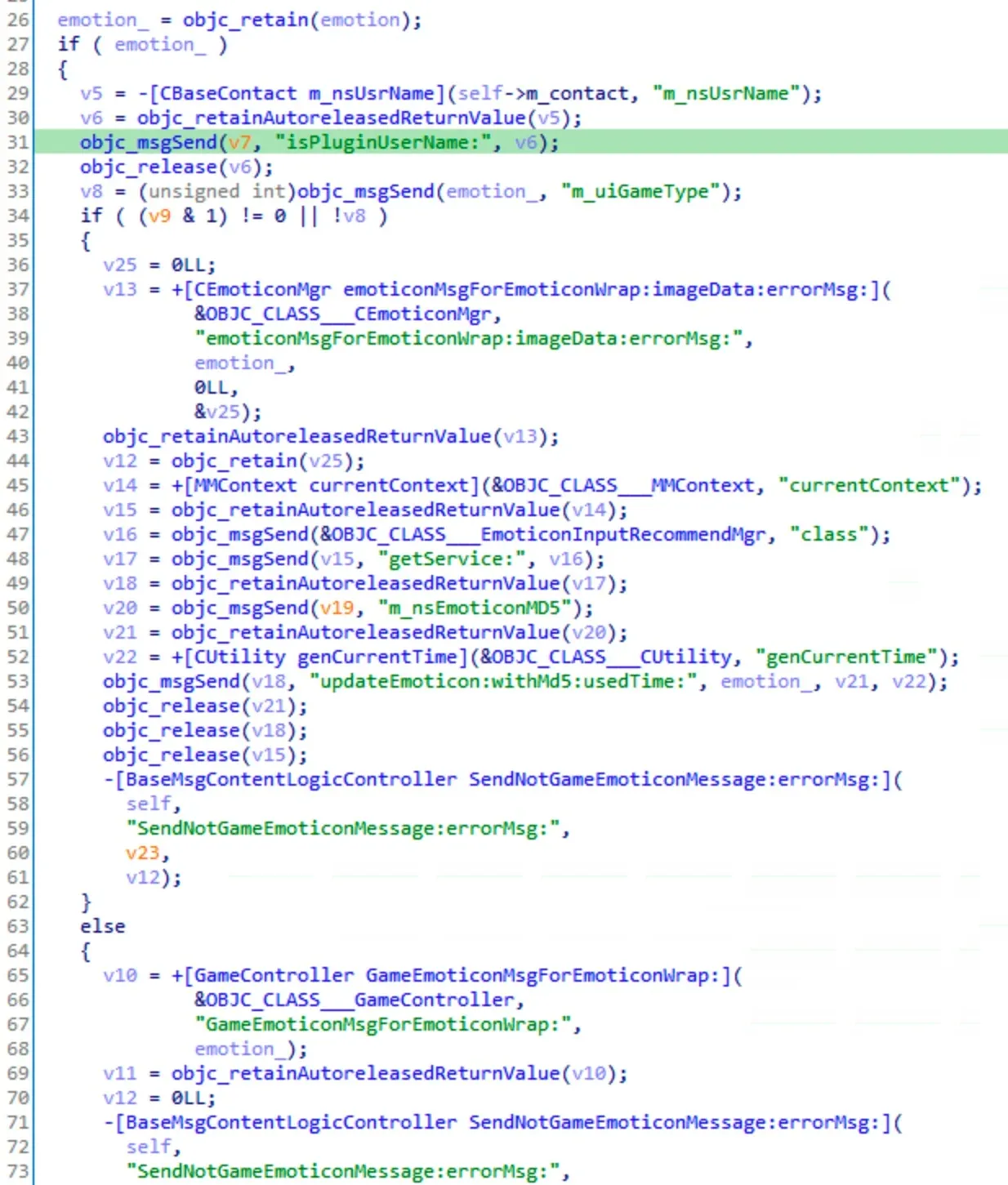
In the highlighted line, IDA’s decompiler mislabeled v7 as uninitialized. When that happens, read the assembly — it doesn’t lie:
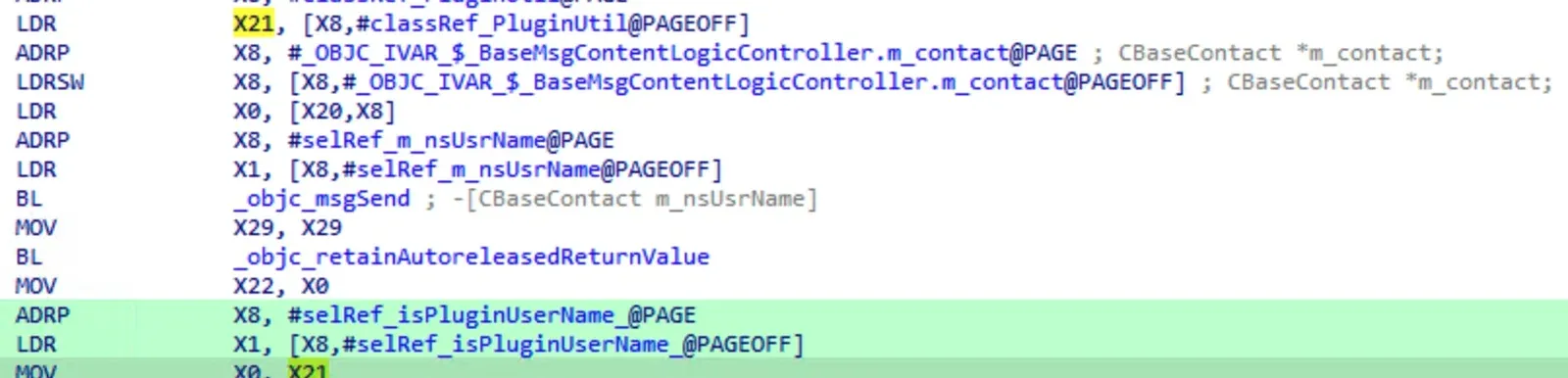
The first argument is actually a PluginUtil class address, calling the class method +[PluginUtil isPluginUserName:]. m_uiGameType was already dumped as 2, so the else branch is taken. Continuing this static+dynamic dance, the forward call chain resolves to:
-[BaseMsgContentLogicController SendEmoticonMessage:]+[GameController GameEmoticonMsgForEmoticonWrap:]+[GameController SetGameContentForMsgWrap:](parameter typeCMessageWrap)
The content is set here:
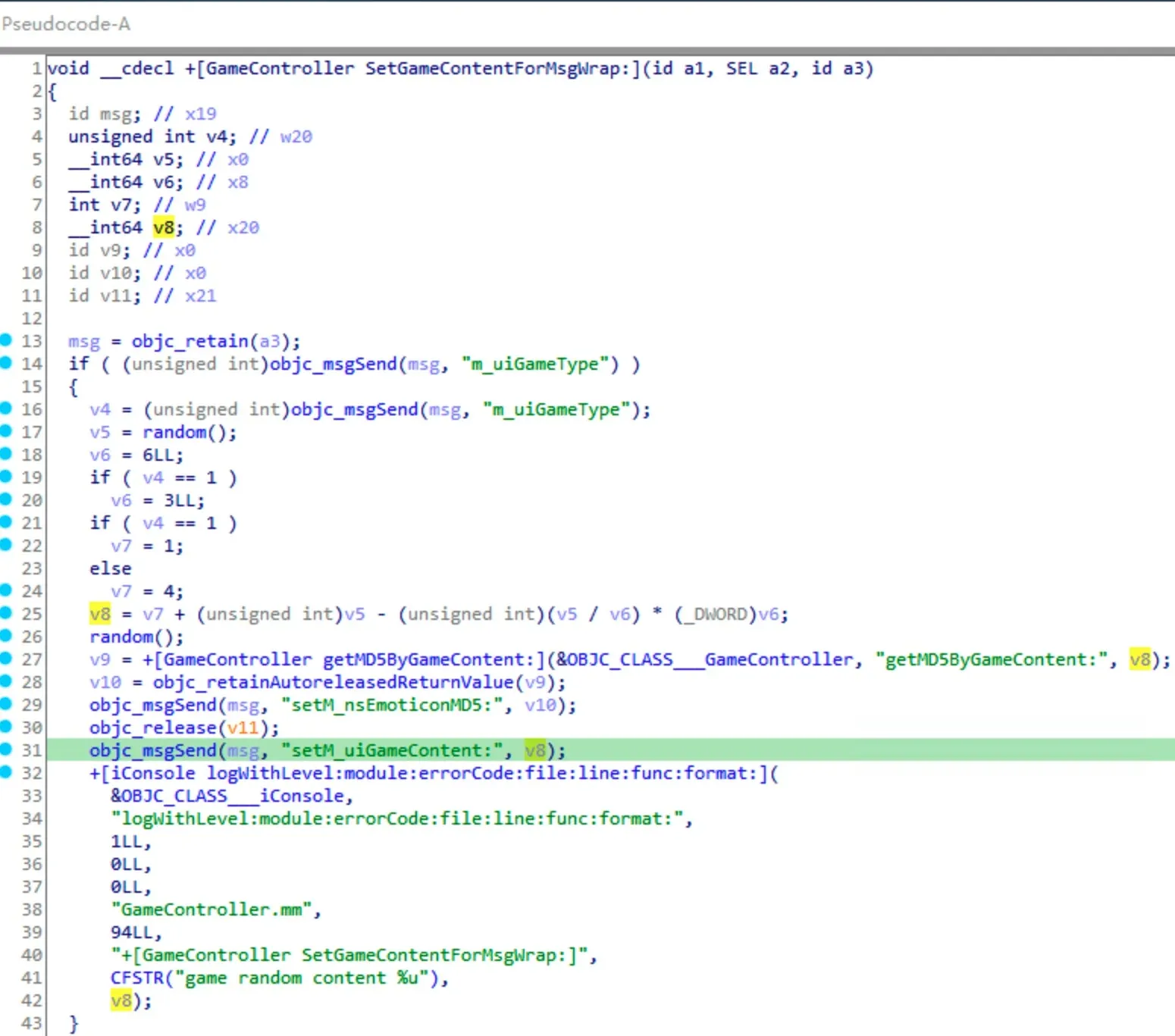
The logic is now obvious. If game type is 1:
content = 1 + rand - rand / 3 * 3 = 1 + rand % 3If game type is 2:
content = 4 + rand - rand / 6 * 6 = 4 + rand % 6We picked dice, so game type is 2, and content ranges 4 ~ 9 — exactly six values, one per die face. The three-value case above is plausibly rock-paper-scissors.
Two things worth noting. First, random is called twice but the second result is unused — likely to reduce predictability of the PRNG sequence. Second, the random value is then MD5’d, so if you change the value you may also need to fix the hash to pass validation — or simpler, just change random’s return value directly:
kNative.trace(null, "random", {
  onLeave(retval) {
    log.i("random:", retval.toInt32());
    retval.replace(ptr(5));
  }
});
The effect:

That’s the core of forcing the dice roll done.
On hooking, again
I’ve heard “hook” enough to be tired of it. PLT hook or inline hook — the essence is the same: modify code at runtime to redirect control flow. For raw binary patching the options are similar across platforms, but iOS also offers others. Let’s go through them.
Inline hook
The most general approach: prepend a jump at the target address, save the context, jump to your code, restore, and return. Inline hooking enables instruction-level tracing and underpins most dynamic tracing tools. Here’s roughly how frida-gum implements it:
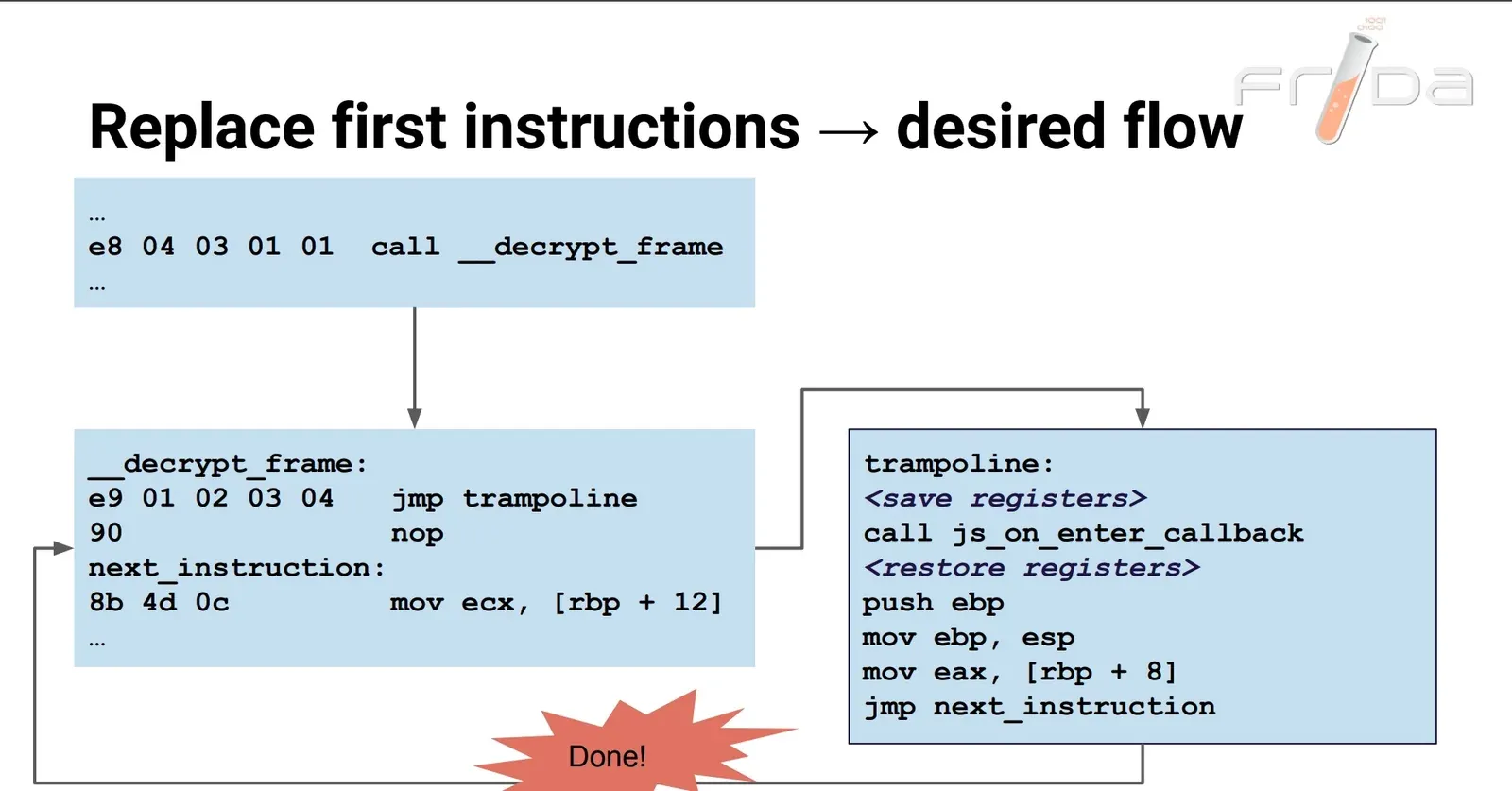
The principle is simple; engineering it is not. Code sections are usually non-writable, so you mmap a copy into your own space and patch that. Saving/restoring context is mostly assembly, and cross-platform means per-ISA work. All that heavy lifting is already done for us — we just call Interceptor.attach.
Method swizzling
Since Objective-C’s object model is message passing, you can dynamically swap the implementation behind a selector — method swizzling. Apple’s API:
void method_exchangeImplementations(Method m1, Method m2);This is the atomic equivalent of:
IMP imp1 = method_getImplementation(m1);
IMP imp2 = method_getImplementation(m2);
method_setImplementation(m1, imp2);
method_setImplementation(m2, imp1);
Again: simple in principle, fiddly in practice. Swapping two implementations directly is rarely done without checks:
+ (void)load
{
    static dispatch_once_t onceToken;
    dispatch_once(&onceToken, ^{
        Class aClass = [self class];

        SEL originalSelector = @selector(method_original:);
        SEL swizzledSelector = @selector(method_swizzle:);

        Method originalMethod = class_getInstanceMethod(aClass, originalSelector);
        Method swizzledMethod = class_getInstanceMethod(aClass, swizzledSelector);
        BOOL didAddMethod =
        class_addMethod(aClass,
                        originalSelector,
                        method_getImplementation(swizzledMethod),
                        method_getTypeEncoding(swizzledMethod));

        if (didAddMethod) {
            class_replaceMethod(aClass,
                                               swizzledSelector,
                                               method_getImplementation(originalMethod),
                                               method_getTypeEncoding(originalMethod));
        } else {
            method_exchangeImplementations(originalMethod, swizzledMethod);
        }
    });
}
Direct swapping is dangerous: if the class doesn’t implement the method, class_getInstanceMethod returns a parent’s Method and you end up swapping the parent’s, surprising every subclass. Hence the existence check above.
There are also selector-name collisions, repeated-swizzling, and _cmd mutation to worry about — which is why mature implementations like RSSwizzle and jrswizzle exist. For developers this matters, because it affects app stability.
frida also exposes an ObjC swizzle-based hook:
const myMethod_ = ObjC.classes.MyClass.myMethod_;
myMethod_.implementation = ObjC.implement(myMethod_, function (handle, selector, arg0) {
  log.i(`self=${handle}, selector=${selector}, arg0=${arg0}`);
});
NSProxy
In Java, java.lang.reflect.Proxy gives reflective dynamic proxying, widely used for AOP. Objective-C has the analogue: NSProxy.
/*	NSProxy.h
	Copyright (c) 1994-2019, Apple Inc. All rights reserved.
*/

#import <Foundation/NSObject.h>

@class NSMethodSignature, NSInvocation;

NS_ASSUME_NONNULL_BEGIN

NS_ROOT_CLASS
@interface NSProxy <NSObject> {
    __ptrauth_objc_isa_pointer Class	isa;
}

+ (id)alloc;
+ (id)allocWithZone:(nullable NSZone *)zone NS_AUTOMATED_REFCOUNT_UNAVAILABLE;
+ (Class)class;

- (void)forwardInvocation:(NSInvocation *)invocation;
- (nullable NSMethodSignature *)methodSignatureForSelector:(SEL)sel NS_SWIFT_UNAVAILABLE("NSInvocation and related APIs not available");
- (void)dealloc;
- (void)finalize;
@property (readonly, copy) NSString *description;
@property (readonly, copy) NSString *debugDescription;
+ (BOOL)respondsToSelector:(SEL)aSelector;

- (BOOL)allowsWeakReference API_UNAVAILABLE(macos, ios, watchos, tvos);
- (BOOL)retainWeakReference API_UNAVAILABLE(macos, ios, watchos, tvos);

// - (id)forwardingTargetForSelector:(SEL)aSelector;

@end

NS_ASSUME_NONNULL_END
It conforms to the NSObject protocol and its first ivar is an isa pointer, so it can be used as an NSObject — but it’s not an NSObject subclass. You only need to implement two methods:
- (void)forwardInvocation:(NSInvocation *)invocation;
- (nullable NSMethodSignature *)methodSignatureForSelector:(SEL)sel;
NSInvocation encapsulates an entire method call — arguments and return value. An example:
#import <Foundation/Foundation.h>

@interface MyProxy : NSProxy {
    id victim_;
}
+ (id)hookObject:(id)obj;
@end

@implementation MyProxy
+ (id)hookObject:(id)obj {
    MyProxy *p = [MyProxy alloc];
    p->victim_ = obj;
    return p;
}
- (NSMethodSignature *)methodSignatureForSelector:(SEL)sel {
    return [victim_ methodSignatureForSelector:sel];
}
- (void)forwardInvocation:(NSInvocation *)invocation {
    if ([victim_ respondsToSelector:invocation.selector]) {
        NSString *selectorName = NSStringFromSelector(invocation.selector);
        NSLog(@"ENTER %@", selectorName);
        [invocation invokeWithTarget:victim_];
        NSLog(@"LEAVE %@", selectorName);
    }
}
@end

int main(int argc, char *argv[]) {
    dispatch_semaphore_t sem = dispatch_semaphore_create(0);

    NSURL *url = [MyProxy hookObject:[NSURL URLWithString:@"https://evilpan.com"]];
    NSURLSessionDataTask *task = [[NSURLSession sharedSession] dataTaskWithURL:url completionHandler:^(NSData * _Nullable data, NSURLResponse * _Nullable response, NSError * _Nullable error) {
        dispatch_semaphore_signal(sem);
    }];
    [task resume];
    dispatch_semaphore_wait(sem, DISPATCH_TIME_FOREVER);
    return 0;
}
Output:
$ ./test_proxy
2021-04-11 11:18:55.193 test_proxy[15011:5637371] ENTER absoluteURL
2021-04-11 11:18:55.194 test_proxy[15011:5637371] LEAVE absoluteURL
We replace the original NSURL with our MyProxy, so every method call on it goes through the proxy — running our code before and after the original. That’s a hook.
Extras
A few things that didn’t fit above.
Thinning
Mach-O is multi-architecture — the same program can hold armv7 and arm64. Multiarch apps are bigger than a single-arch build but smaller than two separate ones (they share resources). Developers ship both for compatibility, but for reversing you only need one. Check whether it’s multiarch:
# via file
$ file pp2048/Payload/2048.app/2048
pp2048/Payload/2048.app/2048: Mach-O universal binary with 2 architectures: [arm_v7:Mach-O executable arm_v7] [arm64]
pp2048/Payload/2048.app/2048 (for architecture armv7):	Mach-O executable arm_v7
pp2048/Payload/2048.app/2048 (for architecture arm64):	Mach-O 64-bit executable arm64

# or via lipo
$ lipo -detailed_info pp2048/Payload/2048.app/2048
Fat header in: pp2048/Payload/2048.app/2048
fat_magic 0xcafebabe
nfat_arch 2
architecture armv7
    cputype CPU_TYPE_ARM
    cpusubtype CPU_SUBTYPE_ARM_V7
    offset 16384
    size 8838944
    align 2^14 (16384)
architecture arm64
    cputype CPU_TYPE_ARM64
    cpusubtype CPU_SUBTYPE_ARM64_ALL
    offset 8863744
    size 10265808
    align 2^14 (16384)
Keep only arm64 with lipo or ditto, both built into Apple’s toolchain:
# lipo
$ lipo -thin arm64 pp2048/Payload/2048.app/2048 -output thin_2048

# or ditto
$ ditto --arch arm64 pp2048/Payload/2048.app/2048 thin_2048
Both produce the same file.
Cycript
Earlier I used cycript to inject a dylib for UI analysis. cycript by saurik is a JavaScript REPL with mixed Objective-C syntax, which makes it very direct:
cy# [[UIApplication sharedApplication] keyWindow]
#"<iConsoleWindow: 0x11581f120; baseClass = UIWindow; frame = (0 0; 1194 834); gestureRecognizers = <NSArray: 0x2800d0570>; layer = <UIWindowLayer: 0x280eb1800>>"
It can call C functions directly and use enum constants:
cy# dlopen
(extern "C" void *dlopen(char const*, int))
cy# RTLD_NOW
2
cy# dlopen("/usr/lib/libFLEX.dylib", RTLD_NOW);
(typedef void*)(0x11a23e180)
The FLEX injection above (and Reveal injection) is exactly this dlopen-into-the-process trick. Cycript is powerful but thinly documented; the manual is the main reference, plus:
- http://www.cycript.org/manual/
- https://iphonedevwiki.net/index.php/Cycript_Tricks
- https://iosre.com/t/cycript/7554
Tweak
Jailbroken iOS has Cydia Substrate, the equivalent of Android’s Xposed. It provides a C API for jailbreak apps to patch methods at runtime, a plist-based manifest to select which app to hook, and it handles a method being hooked multiple times. A dylib built on Substrate is a “Tweak,” injected at app launch per the plist.
An example hook:
NSString *(*oldDescription)(id self, SEL _cmd);

// implicit self and _cmd are explicit with IMP ABI
NSString *newDescription(id self, SEL _cmd) {
    NSString *description = (*oldDescription)(self, _cmd);
    description = [description stringByAppendingString:@"!"];
    return description;
}

MSHookMessageEx(
    [NSObject class], @selector(description),
    &newDescription, &oldDescription
);
If that’s too verbose, use Logos — a preprocessor macro set (the %-prefixed directives) that compacts hook code:
%hook SBApplicationController
-(void)uninstallApplication:(SBApplication *)application {
	NSLog(@"Hey, we're hooking uninstallApplication:!");
	%orig; // Call the original implementation of this method
	return;
}
%end
Logos is now part of Theos; the NIC template system scaffolds a Makefile-based Tweak project quickly.
LLDB
LLDB is a powerful debugger — better than GDB in some scenarios. A few everyday examples:
Set breakpoints on every method of an ObjC class (regex):
(lldb) breakpoint set -r '\[ClassName .*\]$'Print an ObjC object:
(lldb) po addrList module mappings:
(lldb) image list -h -fSet the zero flag (common for flipping jump instructions):
(lldb) register write rflags `$rflags|0x40`Deeper dives and lldb scripting:
- https://lldb.llvm.org/use/tutorial.html
- https://lldb.llvm.org/use/python-reference.html
- https://github.com/llvm/llvm-project/tree/main/lldb/examples/python
Afterword
This article walked through a complete iOS reverse engineering session — jailbreak, dumping, UI analysis, dynamic analysis, static analysis, and the common iOS hooking approaches — using the dice-roll mini-game as the running example. I’d previously reversed the same dice roll on Android, where most of the code is obfuscated; the iOS side is far more readable by comparison. Many apps ship on both platforms, and when one platform resists, the other may yield — for Unity3D C# reversing, Android is actually easier than iOS (thanks to IL2CPP). Staying flexible and open-minded matters for any serious reverse engineer.
References
- RE-iOS-Apps
- https://iphonedevwiki.net/index.php
Colin Xiao — I take on contract reverse-engineering work, and writeups like this are how I show what I can do. If you need help with anything in this space — including but not limited to the areas I cover above — I’m available. No project is too big or too small — if it’s reverse engineering and I can do it, I’ll take it. DM me on X (@colinxiao_lab) or Telegram (@ColinXiao666).
Get in touch