Quickly Printing Block Parameter Signatures in Objective-C Methods with LLDB
About the author. I’m Colin Xiao — an independent reverse engineer, mostly working solo on contract jobs. I dig into compiled code of every kind, including but not limited to: Android and iOS apps, x86/x64/ARM native binaries, packers and obfuscators, DRM and license checks, network protocols and APIs, crypto and signature algorithms, malware, game binaries, and embedded/IoT firmware. I also handle large-scale data collection and vulnerability research. If you have any project in mind, I’d be glad to take it on — whatever it is, as long as it’s within my wheelhouse. Just reach out. You can reach me on X at @colinxiao_lab or on Telegram at https://t.me/ColinXiao666.
This research is published for educational and defensive purposes. The target sample is anonymized throughout.
Quickly Printing Block Parameter Signatures in Objective-C Methods with LLDB
iOS reverse engineering frequently hands you methods whose parameters are blocks. This post introduces an LLDB script that quickly prints the type of a block parameter in an Objective-C method.
Headers dumped with class-dump often contain signatures like:
- (void)doSomethingWithCompletionHandler:(CDUnknownBlockType)arg1;CDUnknownBlockType is a block-typed parameter. To call this method you need to know its actual type.
I searched around and found a good writeup that uses raw LLDB commands to find the parameter type:
http://www.swiftyper.com/2016/12/16/debuging-objective-c-blocks-in-lldb/
But typing those commands by hand every time is tedious. So I looked for a script and found:
https://github.com/ddeville/block-lldb-script
…but it’s been unmaintained for years and mostly doesn’t work. So let’s try fixing it:
-> debugging .
-> debugging ..
-> debugging ...
-> ....
-> fixed, yeah :)
Install
Clone the LLDB script:
cd ~
git clone git@github.com:everettjf/zlldb.git
Then add this line to ~/.lldbinit:
command script import ~/zlldb/main.pyUsage
Say we have a block method:
@interface Hello : NSObject
@end
@implementation Hello
+ (void)say:(NSString*)text callback:(void(^)(NSString *text,int x, NSString *y, double z, BOOL m))callback {
}
@end
Called like:
[Hello say:@"world" callback:^(NSString *text, int x, NSString *y, double z, BOOL m) {
}];
Set a breakpoint on that call line. When reversing without source, break on the objc_msgSend line instead:
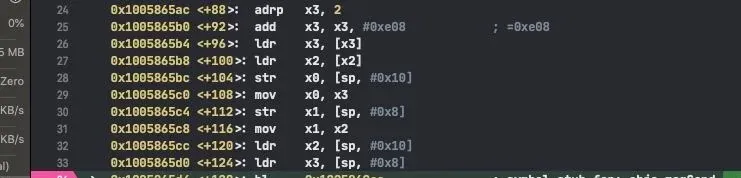
The block is the second parameter, so print $arg4. Then run zblock 0x100588080 (passing the block’s address to the zblock command) and the block’s parameters appear:
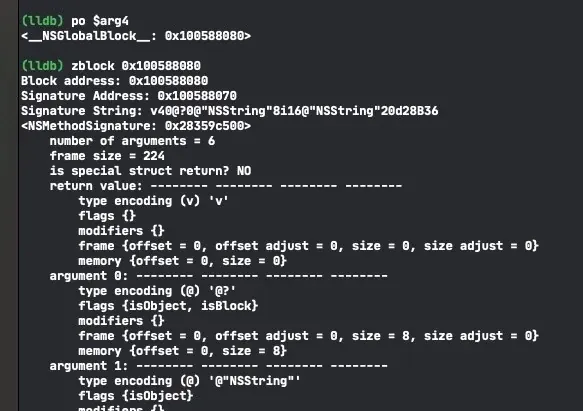
Match each line’s type encoding against Apple’s docs to learn the block’s parameters:
Code
https://github.com/everettjf/zlldb
Since Xcode 11’s built-in LLDB scripts default to Python 3, Facebook’s chisel still had some compatibility issues (maybe resolved by now). zlldb collects the few commands I use most, with Python 3 support (i.e. current Xcode). Besides zblock there are a handful of other simple commands — see the README.
References
- http://www.swiftyper.com/2016/12/16/debuging-objective-c-blocks-in-lldb/
- https://maniacdev.com/2013/11/tutorial-an-in-depth-guide-to-objective-c-block-debugging
- https://github.com/ddeville/block-lldb-script
- https://store.raywenderlich.com/products/advanced-apple-debugging-and-reverse-engineering
Enjoy :)
Colin Xiao — I take on contract reverse-engineering work, and writeups like this are how I show what I can do. If you need help with anything in this space — including but not limited to the areas I cover above — I’m available. No project is too big or too small — if it’s reverse engineering and I can do it, I’ll take it. DM me on X (@colinxiao_lab) or Telegram (@ColinXiao666).
Get in touch