Decrypting Statically-Linked BoringSSL Traffic: Locating ssl_log_secret Automatically
About the author. I’m Colin Xiao — an independent reverse engineer, mostly working solo on contract jobs. I dig into compiled code of every kind, including but not limited to: Android and iOS apps, x86/x64/ARM native binaries, packers and obfuscators, DRM and license checks, network protocols and APIs, crypto and signature algorithms, malware, game binaries, and embedded/IoT firmware. I also handle large-scale data collection and vulnerability research. If you have any project in mind, I’d be glad to take it on — whatever it is, as long as it’s within my wheelhouse. Just reach out. You can reach me on X at @colinxiao_lab or on Telegram at https://t.me/ColinXiao666.
This research is published for educational and defensive purposes.
Decrypting Statically-Linked BoringSSL Traffic: Locating ssl_log_secret Automatically
This is the second half of the frida-analykit + Wireshark series — a universal approach to decrypting TLS traffic from Flutter, WebView, and other targets that statically link BoringSSL.
Tools
- frida-analykit
- Wireshark
- Test resource:
003_frida-analykit-static-linked-boringssl
Foreword
“Universal” is an absolute word — pure clickbait, right? Yes, but also not entirely. Let me explain the goal of this second half before I defend the word.
The goal of this article:
Using BoringSSL’s source as the reference, locate and attach
ssl_log_secretby analyzing the instruction-level reference features of that function, so Wireshark can decrypt TLS traffic in real time.
Keep this goal in mind as the through-line for everything below. If you get lost, come back to it.
What reference features does ssl_log_secret have?
BoringSSL project: https://boringssl.googlesource.com/boringssl
Searching for ssl_log_secret in the project gives the result in Fig. 1:
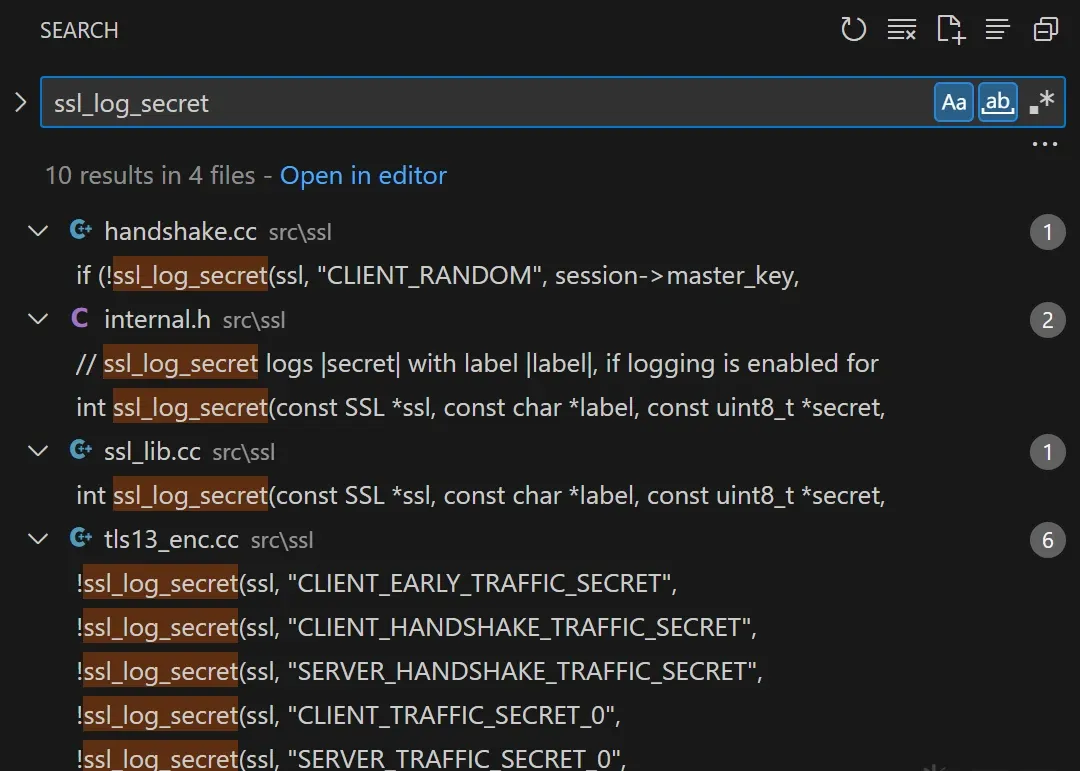 Fig. 1
The referencing file is src/ssl/handshake.cc:
bool ssl_send_finished(SSL_HANDSHAKE *hs) {
  // ...
  if (!ssl_log_secret(ssl, "CLIENT_RANDOM", session->master_key,
                      session->master_key_length)) {
    return 0;
  }
  // ...
}
See that? The CLIENT_RANDOM constant string is our entry point for locating ssl_log_secret.
(Before concluding this, there’s a premise to check: is ssl_send_finished called on every handshake? Yes. I’ll skip that discussion here, but whenever something looks “obvious” yet rests on premises, I’ll flag it in parentheses like this.)
Even though I probably shouldn’t, I found the client-handshake state machine genuinely interesting, so here it is:
state_start_connect
  └─ do_start_connect(hs)
      ├─ ssl_setup_key_shares(...)
      ├─ ssl_setup_extension_permutation(...)
      ├─ ssl_encrypt_client_hello(...)    # ECH scenario
      └─ ssl_add_client_hello(hs)         # send ClientHello
state_read_server_hello
  └─ do_read_server_hello(hs)            # parse ServerHello
state_read_server_certificate
  └─ do_read_server_certificate(hs)      # parse Certificate
state_verify_server_certificate
  └─ do_verify_server_certificate(hs)    # verify the certificate chain
state_read_server_key_exchange
  └─ do_read_server_key_exchange(hs)     # parse ServerKeyExchange
state_read_server_hello_done
  └─ do_read_server_hello_done(hs)       # parse ServerHelloDone
state_send_client_certificate
  └─ do_send_client_certificate(hs)      # send Certificate (if requested)
state_send_client_key_exchange
  └─ do_send_client_key_exchange(hs)     # send ClientKeyExchange
state_send_client_certificate_verify
  └─ do_send_client_certificate_verify(hs) # send CertificateVerify
state_send_client_finished
  └─ do_send_client_finished(hs)         # send ChangeCipherSpec + Finished
        ├─ ssl->method->add_change_cipher_spec(ssl)
        ├─ tls1_change_cipher_state(hs, evp_aead_seal)
        └─ ssl_send_finished(hs)          # ★ generate and add the Finished message
state_finish_flight
  └─ do_finish_flight(hs)
state_read_session_ticket
  └─ do_read_session_ticket(hs)
state_process_change_cipher_spec
  └─ do_process_change_cipher_spec(hs)
state_read_server_finished
  └─ do_read_server_finished(hs)
state_finish_client_handshake
  └─ do_finish_client_handshake(hs)
state_done
  └─ handshake complete, SSL_do_handshake() returns success
As the state machine shows, ssl_log_secret sits inside the handshake flow.
From the CLIENT_RANDOM entry point to the target function (manually)
Below I’ll use IDA Pro on a libssl.so sample to walk through the manual approach, then automate that process.
(This sample only analyzes the instruction-level relationships, never relying on function symbols. I chose this ELF purely because it’s small and parses quickly in IDA Pro — unlike WebView’s libmonochrome_64.so, which is 100+ MB and would take a lifetime. The analysis is deliberately not over-fitted to libssl.so’s specifics; it generalizes to WebView, Flutter, and most other projects that statically link BoringSSL. I’ll put the libssl.so sample under samples/, but I recommend using the libssl.so from your own test device, since the actual hook offsets you compute later depend on your target.)
- Search for the
CLIENT_RANDOMstring.
Relying on string search means
CLIENT_RANDOMmust exist in plaintext in the ELF (any layer of encoding/obfuscation is the shield against this).
 Fig. 2
- Use Xref to find the instruction referencing that string.
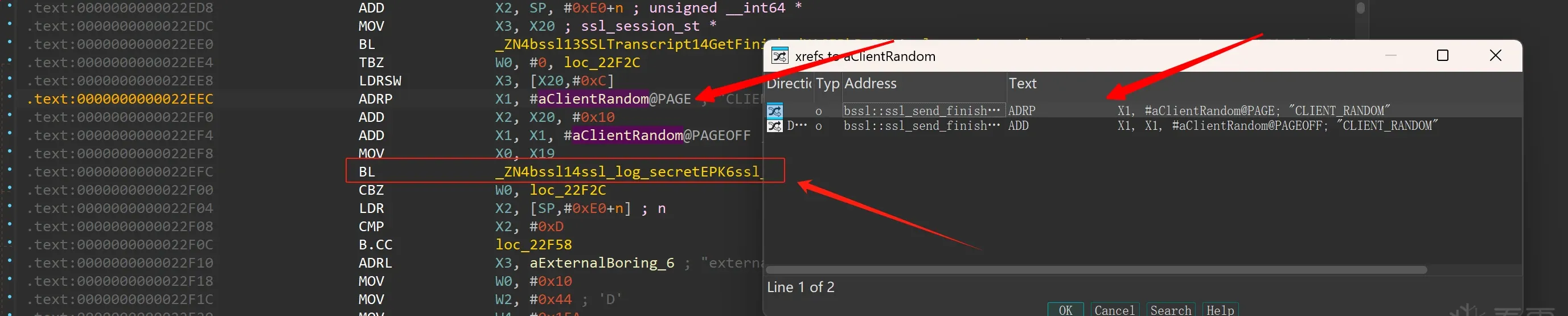 Fig. 3
- The string is passed as a function argument: at
0x22efcthere’s aBL #xxxxxx, which gives the target function entry at offset0x338A4.
This relies on
BLto reach the target (usingblr Xnto jump would be the shield).
Three simple steps, manually.
How do we automate this?
We’re not going to drag a heavy tool like IDA Pro into the pipeline. The automation below uses pure Frida scripts, in
frida-analykit.
From the manual 3-step process, the core steps are: search the feature string → find the instruction referencing it → analyze the following call/branch to determine the function entry.
Searching the feature string
Memory.scanis an efficient memory scanner in frida-gum, supporting exact-byte match, mask match, and regex match.
A fixed string like CLIENT_RANDOM is best done with exact-byte matching — the fastest of the three. For an ASCII sequence of a dozen-plus distinct bytes, matches are usually few. (Further optimization: constants like strings usually live in .rodata, so you can narrow the scan range.)
Here’s the Memory.scan / MatchPattern documentation:
declare namespace Memory {
    /**
     * Scans memory for occurrences of `pattern` in the memory range given by `address` and `size`.
     *
     * @param address Starting address to scan from.
     * @param size Number of bytes to scan.
     * @param pattern Match pattern, see `MatchPattern` for details.
     * @param callbacks Object with callbacks.
     */
    function scan(
        address: NativePointerValue,
        size: number | UInt64,
        pattern: string | MatchPattern,
        callbacks: MemoryScanCallbacks,
    ): Promise<void>;
  // ....
}

// tslint:disable:no-unnecessary-class
declare class MatchPattern {
    /**
     * Compiles a match pattern for use with e.g. `Memory.scan()`.
     *
     * @param pattern Match pattern of the form “13 37 ?? ff” to match 0x13 followed by 0x37 followed by any byte
     *                followed by 0xff, or “/Some\s*Pattern/” for matching a regular expression.
     *
     *                For more advanced matching it is also possible to specify an r2-style mask.
     *                The mask is bitwise AND-ed against both the needle and the haystack. To specify the mask append
     *                a `:` character after the needle, followed by the mask using the same syntax.
     *                For example: “13 37 13 37 : 1f ff ff f1”.
     *                For convenience it is also possible to specify nibble-level wildcards, like “?3 37 13 ?7”,
     *                which gets translated into masks behind the scenes.
     */
    constructor(pattern: string);
}
So we can write the following to search for the CLIENT_RANDOM feature string:
// CLIENT_RANDOM + \00  : the string bytes plus a \00 terminator
const pattern = '43 4c 49 45 4e 54 5f 52 41 4e 44 4f 4d 00'
const results = Memory.scanSync(module.base, module.size, pattern)

// results: { address: NativePointer, size: number }[]  — all matches for the pattern
Finding the instruction referencing that string
From an instruction perspective, to reference an address in memory the compiler might use adrp+add (adrl), adr, ldr, or movz/movk. Compilers have tendencies — they favor efficient, space-saving instructions. adrp+add is usually the most common (why not adr? It’s a single 4-byte instruction and thus the most efficient, but adr only reaches ~1 MB of offset, while .rodata constants and .text instructions usually span pages — rarely within 1 MB). So I’ll only discuss the adrp+add combination below; adr can be considered in practice, but adrp+add is the focus.
How do you search for an adrl instruction?
frida-gum bundles the Capstone disassembler;
Instruction.parseparses machine code and analyzes instructions.
declare class Instruction {
    /**
     * Parses the instruction at the `target` address in memory.
     *
     * Note that on 32-bit ARM this address must have its least significant bit
     * set to 0 for ARM functions, and 1 for Thumb functions. Frida takes care
     * of this detail for you if you get the address from a Frida API, for
     * example `Module.getExportByName()`.
     *
     * @param target Memory location containing instruction to parse.
     */
    static parse(
        target: NativePointerValue,
    ): Instruction | X86Instruction | ArmInstruction | Arm64Instruction | MipsInstruction;

    // ...
}
So by walking and parsing instructions in memory we can find where the feature string is referenced, right? Sure — but at what cost? Parsing every instruction, even with Capstone’s efficiency, takes minutes for a few megabytes. Unacceptable.
Instead, reuse the fast memory-scan approach from before.
How do you scan for instructions with memory scan?
Instructions live in memory as 0s and 1s, so their machine code has a regular encoding.
To scan for an adrp instruction we first need to understand each bit’s role. (I’ll skip add’s encoding — we don’t need it. Since adrp and add pair up into an adrl, once we locate the adrp, the following dozen or hundred instructions can be disassembled with Capstone easily.)
- ADRP encoding
adr/adrp Xi, #{imm}
------------------------------------------------------------------
| 31  | 30 ─ 29 | 28 27 26 25 24 | 23 ──────────────── 5 | 4 ─ 0 |
| op  |  immlo  |    1 0 0 0 0   |     immhi (19b)       |  Rd   |
------------------------------------------------------------------
# op      : 0=adr; 1=adrp
# immlo   : lowest 2 bits of the #{imm} immediate
# 28-24   : (0b10000) fixed bits, unchanged
# immhi   : upper 19 bits of the #{imm} immediate
# Rd      : destination register Xi

# (immhi:immlo): a signed 21-bit value
# imm = target page number – PC page number
Notice: for an adrp instruction, bit 31 and bits 28–24 — six bits total — are fixed. Can we use that to find all candidate adrp instructions?
That’s where the mask match mode from earlier comes in.
- What is “mask match”?
# After setting adrp's 6 fixed bits, the test value (hex 0x90000000):
  28   24   20   16
   v    v    v    v
1001 0000 0000 0000
0000 0000 0000 0000
   ^    ^    ^    ^
  12    8    4    0
# To express WHICH 6 bits we care about, we use a mask (hex 0x9F000000):
28 24 20 16
v v v v
1001 1111 0000 0000
0000 0000 0000 0000
^ ^ ^ ^
12 8 4 0# Combine the two with ":" to describe the bits to match (little-endian):
00 00 00 90 : 00 00 00 9F
# This description carries both: 1) which bits, 2) what value.
# Since the second half is a mask, the 0 bytes mean "these bits are unknown" — any value.
# So we can strip meaningless bytes and simplify to:
90 : 9F
# The matching is implemented as: test_value & mask == memory_value & maskEagerly throwing this pattern at Memory.scan — the memory just blows up: tens or hundreds of thousands of matches, because a single-byte pattern is far too loose. Let’s go back to the encoding and add more known bits.
Rd — which register will store the page base? Hard to predict. CLIENT_RANDOM is the second argument to ssl_log_secret, and by AArch64 calling convention that’s usually X1. But that’s only at the target function entry; we can’t guarantee CLIENT_RANDOM is passed directly rather than through a proxy wrapper (compiler-dependent) that then calls the target.
imm — the immediate is a page delta. When the PC’s page is fixed, the page delta is fixed too. Using that, we constrain each page we’re in with its own pattern, giving this mask:
  28   24   20   16
   v    v    v    v
1111 1111 1111 1111
1111 1111 1110 0000
   ^    ^    ^    ^
  12    8    4    0

# Only Rd is unknown. The mask is:
{test_value} : E0 FF FF FF

# The test value is computed from the page number.
Searching per page with this pattern filters results to the minimum.
Combining with add to filter the target address
The adrp matches only load a page base, not the target address — any address on that page is possible. So we also compare against an add instruction to add the remaining page offset.
Based on the candidate adrp instructions from the previous step, we filter with:
- The found instruction address must be 4-byte aligned.
- The next
add Xd, Xd, #{imm1}afteradrp Rd, #{imm}must computeXd == target address.
const targetAddr: NativePointer // the feature string's target address
const MAX_GAP: number = 30 // max gap from adrp -> add
let adrpResults: NativePointer[] // all candidate adrp instructions (4-byte aligned)

let funcEntries: NativePointer[] = [] // candidate target function entries

for (const code of adrpResults) {
    try {
        let insn = Instruction.parse(code) as Arm64Instruction
        if (insn.mnemonic !== 'adrp') {
            continue
        }
        const reg = insn.operands[0].value
        // then parse forward to the branch target
        let blInsn: Arm64Instruction | undefined
        let adrlTarget: NativePointer = ptr(insn.operands[1].value.toString())

        let foundAdd: boolean = false
        loop: for (let i = 0; i < MAX_GAP; i++) {
            insn = Instruction.parse(insn.next) as Arm64Instruction
            const ops = insn.operands
            switch (insn.mnemonic) {
                case 'add':
                    if (foundAdd) {
                        continue
                    }
                    if (ops[0].value !== reg) {
                        break
                    }
                    adrlTarget = adrlTarget.add(ops[2].value.toString())
                    if (!adrlTarget.equals(targetAddr)) {
                        // referenced target address mismatch
                        break loop
                    }
                    foundAdd = true
                    break
                case 'bl':
                    // a call that may branch to the function entry
                    blInsn = insn as Arm64Instruction
                    break loop
            }
        }

        if (blInsn) {
            // the next function call after the CLIENT_RANDOM string reference
            funcEntries.push(ptr(blInsn.operands[0].value.toString()))
        }
    } catch (e) {
    }
}
Matching the target function entry
Notice that while filtering for the adrl that reaches the target address, we also parse the following bl call to get the target function address. (In practice, the bl target isn’t guaranteed to be the target function — it may first go through a trampoline or tail call, so intermediate function resolution needs consideration.)
Implementation and optimization
With the above filtering, we should get the address containing ssl_log_secret… right?
Maybe. The script alone can return multiple matches — multiple matching strings or multiple referencing instructions. And we haven’t validated the target function at all. If we had to, we might check whether the target function references strlen to boost confidence that it’s ssl_log_secret. But I don’t want to pile on if/else branches for uncertain special cases — returning a small set of candidates and letting the user decide is more flexible, and that’s frida-analykit’s goal.
The code above is a throwaway prototype. Even optimized, it’s slow in practice — analyzing WebView’s libmonochrome_64.so takes nearly a minute. But there’s room to optimize:
- The per-page mask is the strictest mask matching available, but at 4 KB per page, a 100+ MB
libmonochrome_64.sois over 25,000 pages. - Filtering each page’s results in the JS layer costs context-switch overhead between JS and C.
Both can be improved:
- In theory
adrp+addcan address ~±4 GB, but within a single ELF it won’t occupy that much. So for theimmimmediate — positive or negative page delta — there will be fixed bits within each interval. Split into positive/negative intervals and compute each interval’s fixed imm high bits to filter, collapsing the O(n) page walk into two constant memory scans. (frida-analykit/script/elf/xref.ts) - Use
CModuleto embed C and filter pre-matched results directly, avoiding the JS/C context switch. (frida-analykit/script/cmodule/scan_adrp.ts)
#include <glib.h>
#include <gum/gummemory.h>
#include <gum/gumdefs.h>

#define PAGE_SIZE 0x1000
#define GET_ADDR_PAGE(x) ((uintptr_t)(x) & ~(PAGE_SIZE - 1))
#define ADRP_IMM_LEN_MASK 0x1fffff
#define ADRP_FIXED28_24_BITSET_MASK (0b10000 << 24)
#define ADRP_PAGE_INSTR_MASK 0x9fffffe0

typedef struct _MemoryScanRes MemoryScanRes;
typedef struct _ScanUserData ScanUserData;

static gboolean on_match_fuzzy_adrp(GumAddress address, gsize size, gpointer user_data);

struct _ScanUserData
{
    gpointer target_address;
    gint align_offset;
};

struct _MemoryScanRes
{
    GArray *results;
    ScanUserData *user_data;
};

void _dispose(const MemoryScanRes *res)
{
    g_array_free(res->results, TRUE);
}

static gboolean on_match_fuzzy_adrp(GumAddress address, gsize size, gpointer user_data)
{
    MemoryScanRes *scan_res = (MemoryScanRes *)user_data;
    const guintptr target_page = (guintptr)GET_ADDR_PAGE(scan_res->user_data->target_address);
    const guintptr align_offset = (guintptr)scan_res->user_data->align_offset;
    const guintptr addr_val = (guintptr)address - align_offset;
    const gpointer pc_addr = (gpointer)addr_val;

    // 4-byte instruction alignment
    if ((addr_val & (sizeof(guint32) - 1)) != 0)
        return TRUE;

    // match by PC page delta
    const guintptr pc_page = (guintptr)GET_ADDR_PAGE(address);
    const guint32 page_delta = (guint32)((target_page - pc_page) >> 12) & ADRP_IMM_LEN_MASK;
    const guint32 immlo = page_delta & 0b11;
    const guint32 immhi = page_delta >> 2;
    const guint32 op = 0x1;
    const guint32 adrp_sign =
        (op << 31) |
        (immlo << 29) |
        ADRP_FIXED28_24_BITSET_MASK |
        (immhi << 5);

    if (((*(guint32 *)pc_addr) & ADRP_PAGE_INSTR_MASK) != (adrp_sign & ADRP_PAGE_INSTR_MASK))
        return TRUE;

    g_array_append_val(scan_res->results, pc_addr);
    return TRUE;
}

gpointer scan(const GumAddress base_address,
               const gsize size,
               const gchar *pattern_str,
               MemoryScanRes *const scan_res)
{
    if (scan_res == NULL)
        return NULL;

    scan_res->results = g_array_new(FALSE, FALSE, sizeof(gpointer));

    const GumMemoryRange range = {base_address, size};
    const GumMatchPattern *pattern = gum_match_pattern_new_from_string(pattern_str);

    // Memory.scan's internal implementation
    gum_memory_scan(&range, pattern, on_match_fuzzy_adrp, scan_res);

    return scan_res->results;
}
After that round of optimization, a full-range scan of the 100+ MB libmonochrome_64.so finishes within 5 seconds — tolerable. (To compare before/after, swap AdrlXref.scanAdrl for AdrlXref.scanAdrlSlow.)
Testing
Enough talk — let’s see it in action. Back to BoringSSL for verification: frida-analykit/blob/main/script/net/ssl.ts.
- I wrote a test sample
app-release.apkcovering three common BoringSSL scenarios:okhttp/flutter/webview.
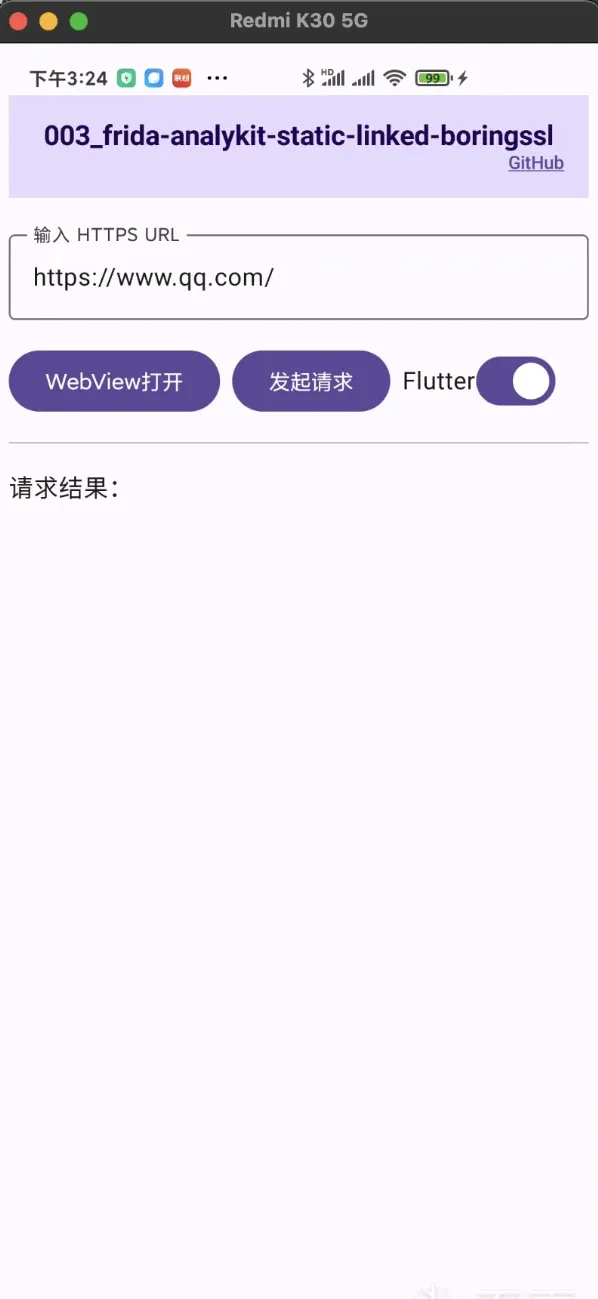 Fig. 4
- Install the analysis tool per the frida-analykit docs.
- Configure
config.yml:
# sample app
app: com.frida_analykit.static_linked_boringssl
jsfile: _agent.js

server:
  servername: /data/local/tmp/frida-server
  host: 127.0.0.1:6666
  device:

agent:
  datadir: ./data/
  stdout: ./logs/outerr.log
  stderr: ./logs/outerr.log

script:
  nettools:
    # directory to write sslkey output
    ssl_log_secret: ./data/nettools/sslkey/
npm run watchstarts script-change compilation../ptpython_spawn.shinjects the script into the app.
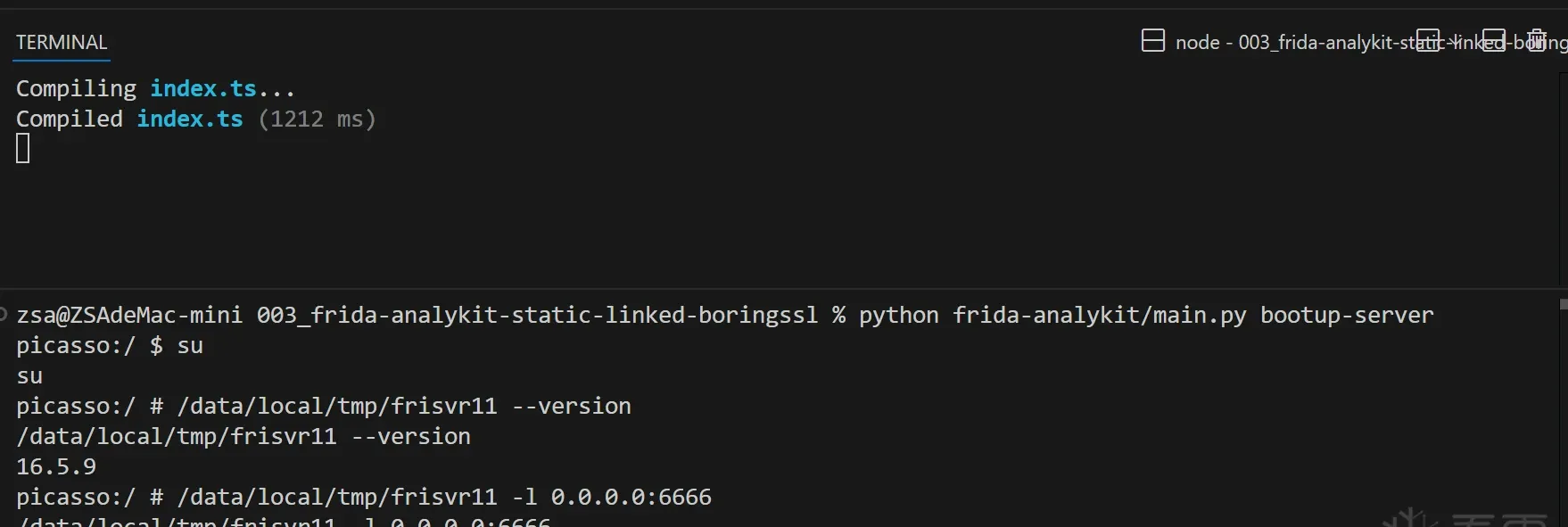 Fig. 5
- Walk through the attach flow via the REPL:
I use the REPL here to demonstrate the injection flow more directly (writing a script in
index.tsand injecting at the right moment works too).
# `script.jsh()` is py's method for naming a JS global variable;
# py holds JS-layer proxy variables via JsHandle.
=================== frida-analykit ===================
[jsfile] _agent.js
[update_at] 2025-04-25 16:01:36.531202
======================================================
# get the JS global: Process
>>> proc = script.jsh('Process')
# get the JS global: SSLTools
>>> ssltools = script.jsh('SSLTools')
# call Process.findModuleByName('libflutter.so'), proxying the result to py's libssl
>>> libflutter = proc.findModuleByName('libflutter.so')
# print libflutter's value (serialization relies on frida's rpc; non-JSON-serializable objects error out)
>>> libflutter.value
{'name': 'libflutter.so', 'base': '0x7c8e2d3000', 'size': 11325440, 'path': '/data/app/com.frida_analykit.static_linked_boringssl-m2yG6wqwVlJzh8_wwfz-9w==/base.apk!/lib/arm64-v8a/libflutter.so'}
# attach [libssl.so]'s boringssl-ssl_log_secret
>>> ssltools.attachBoringsslKeylogFunc({ 'libname': 'libssl.so' })
<JsHandle: [undefined] __get__$$2>
# attach [libflutter.so]'s boringssl-ssl_log_secret
>>> ssltools.attachBoringsslKeylogFunc({ 'mod': libflutter })
<JsHandle: [undefined] __get__$$3>
# before attaching webview, tap <Open Webview> to load the webview ELF first, or the so won't be found
>>> ssltools.attachBoringsslKeylogFunc({ 'libname': 'libmonochrome_64.so' })
<JsHandle: [undefined] __get__$$4>
# then follow the Part 1 flow to import the generated sslkey.log into Wireshark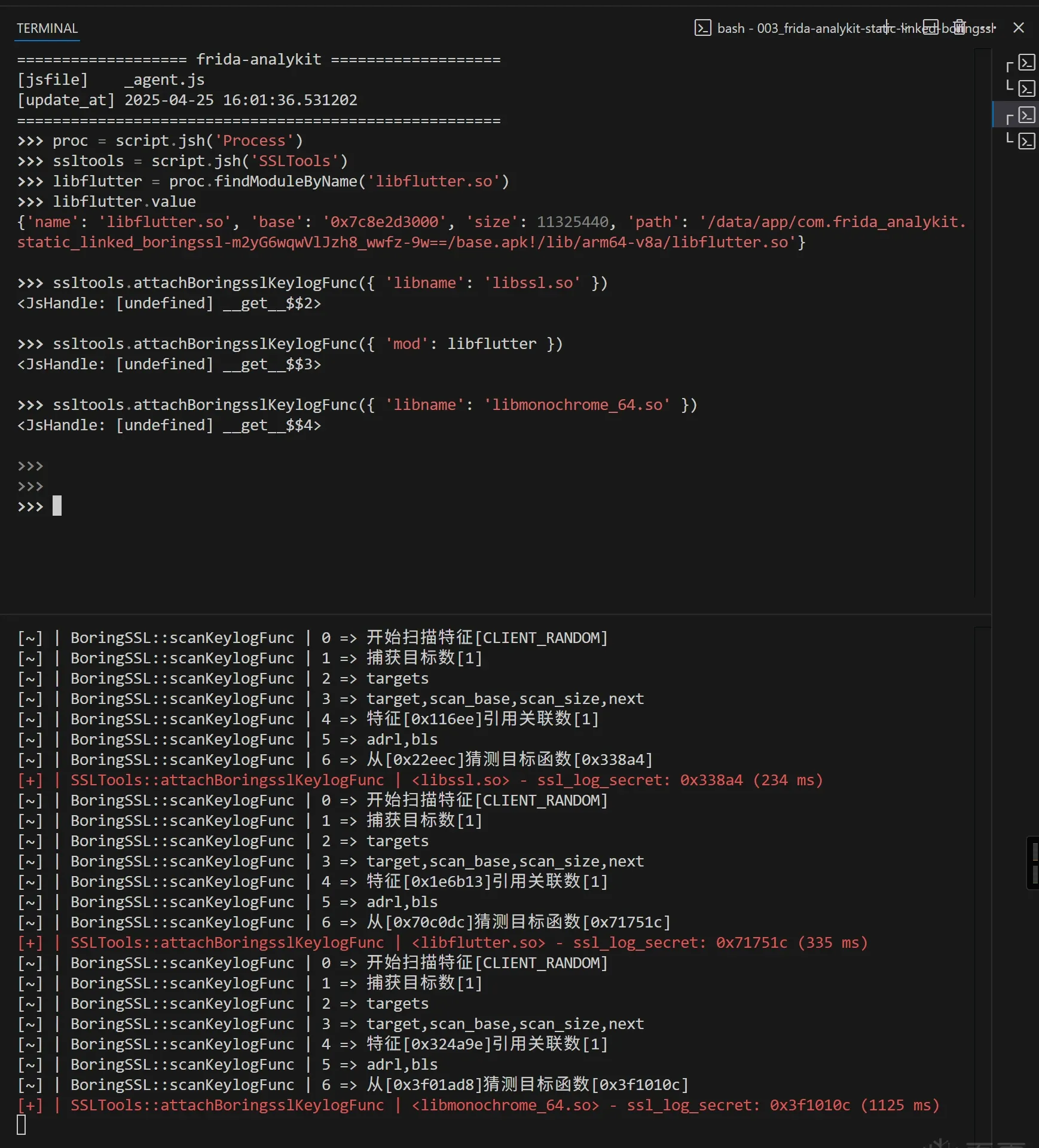 Fig. 6
You can feed the corresponding .so files into IDA Pro to verify that the computed offsets actually belong to ssl_log_secret.
- WebView traffic decrypted:
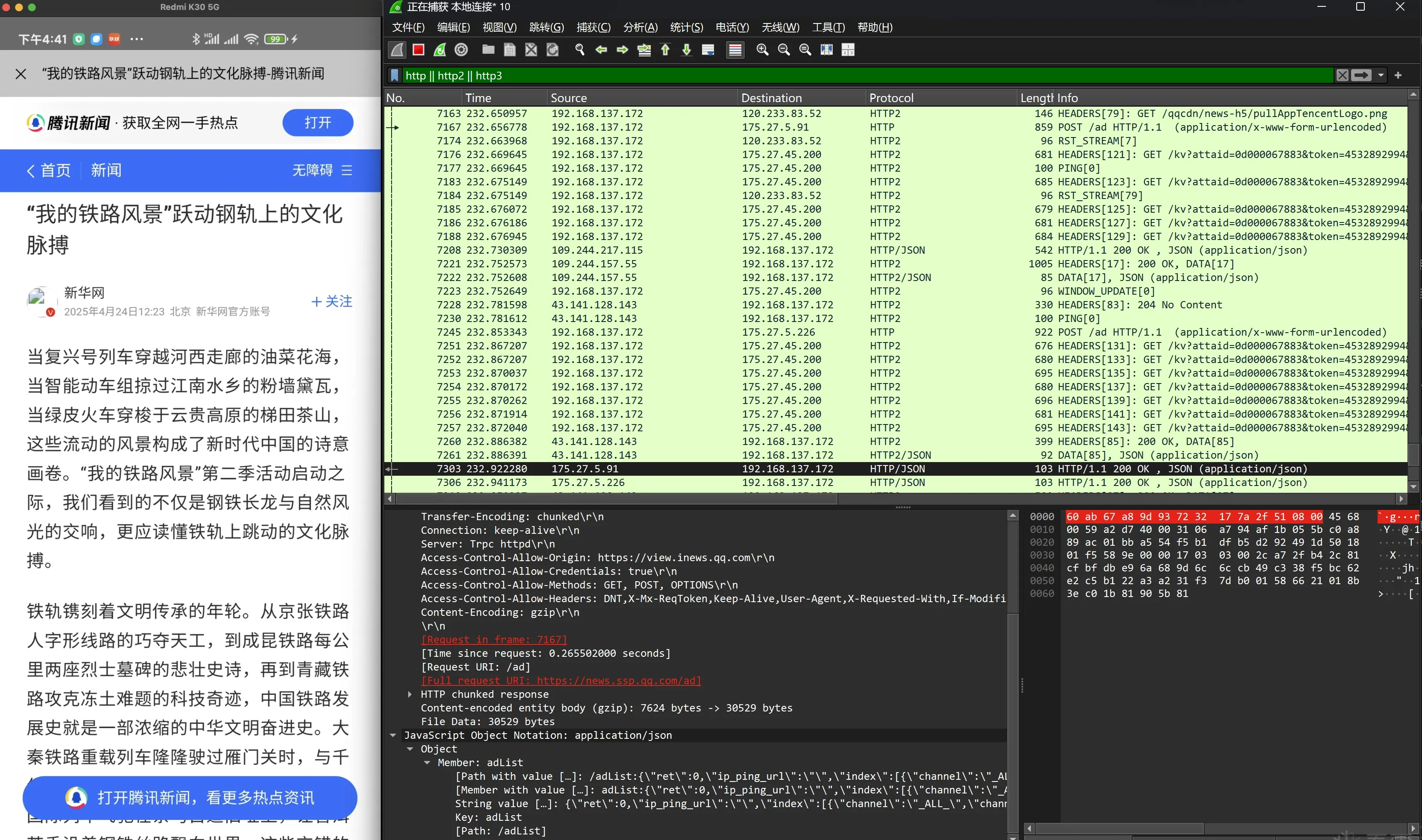 Fig. 7
- Flutter HTTP request decrypted:
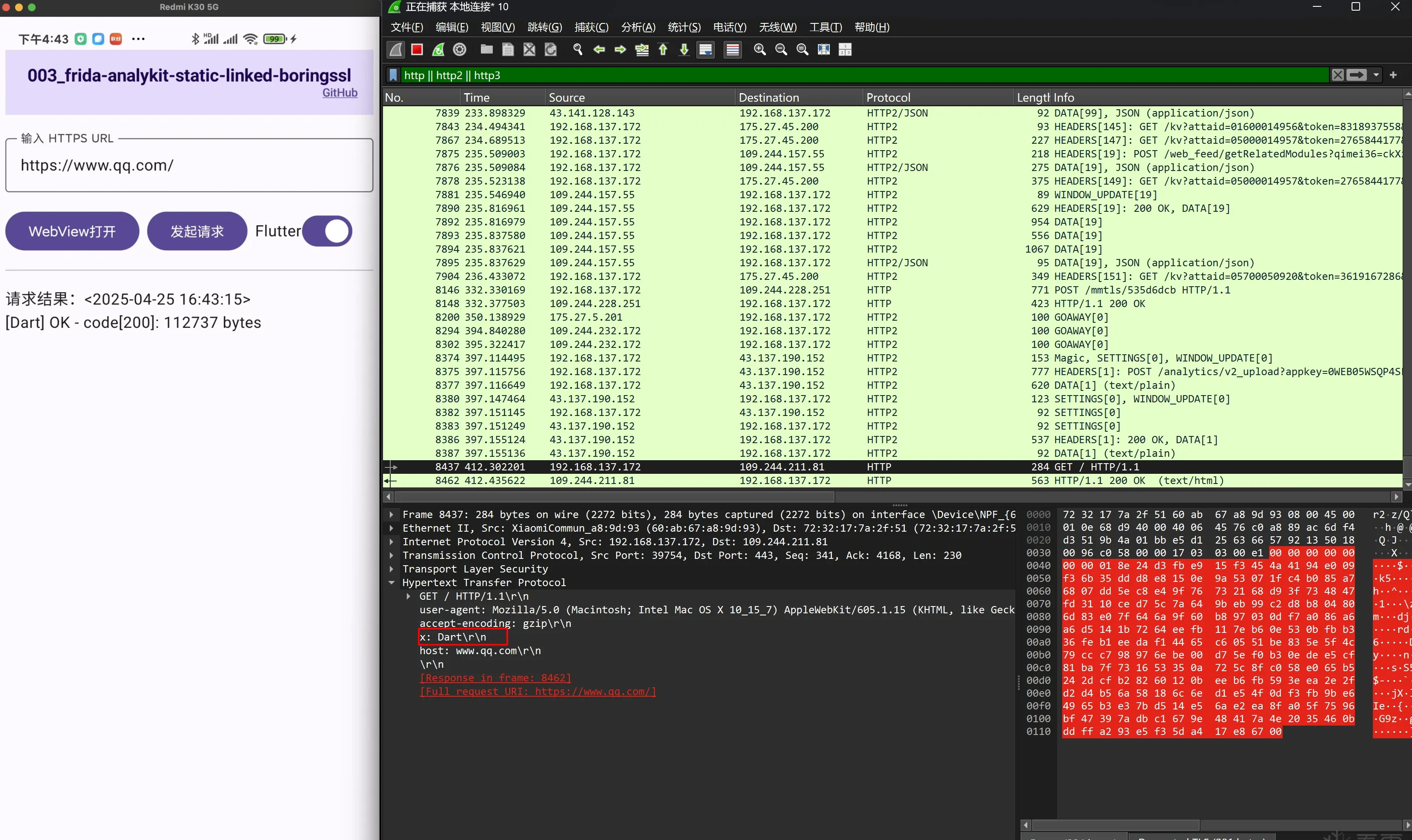 Fig. 8
- Java-layer okhttp request decrypted (toggle off the “Flutter switch” to switch):
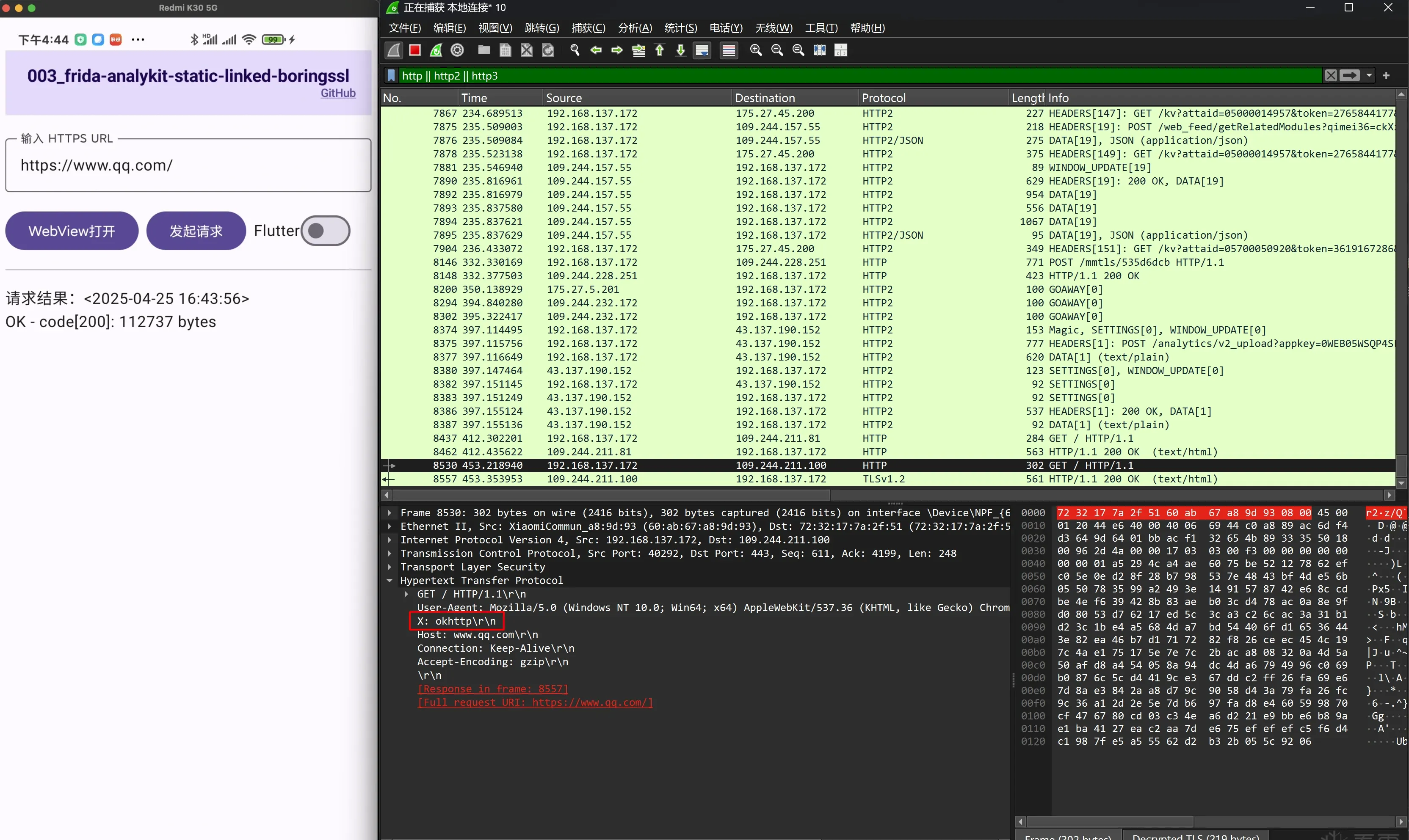 Fig. 9
In Fig. 8 and Fig. 9 you can see a custom x- header added to distinguish requests originating from dart vs okhttp.
That completes the second half.
Closing
Back to the foreword: is “universal” clickbait? I see two angles:
- From an objective, fact-seeking “me”: yes, it must be clickbait — it’s not bulletproof; any counterexample, any gap, means it isn’t truly “universal.”
- From a traffic-seeking “me”: not exactly — no wait, it’s still clickbait. I can’t deny the rigor angle, but making trade-offs to reach a balance is probably worth it.
What’s next
That wraps up the ssltools part of frida-analykit. Next I may look into:
- A more principled dex-dump for reversing: ordinary memory scanning is dumb and generic, but over-relying on features means it fundamentally can’t avoid false negatives. Can we dump dex precisely from first principles?
- Analyzing packed ELF main images: the usual approach is to unpack first, which means studying the packer ELF’s tedious
dlopenloading. But with enough auxiliary info, is analyzing while still packed feasible? - …
Colin Xiao — I take on contract reverse-engineering work, and writeups like this are how I show what I can do. If you need help with anything in this space — including but not limited to the areas I cover above — I’m available. No project is too big or too small — if it’s reverse engineering and I can do it, I’ll take it. DM me on X (@colinxiao_lab) or Telegram (@ColinXiao666).
Get in touch