The Native Activity Launch Flow: From Launcher Tap to onCreate
About the author. I’m Colin Xiao — an independent reverse engineer, mostly working solo on contract jobs. I dig into compiled code of every kind, including but not limited to: Android and iOS apps, x86/x64/ARM native binaries, packers and obfuscators, DRM and license checks, network protocols and APIs, crypto and signature algorithms, malware, game binaries, and embedded/IoT firmware. I also handle large-scale data collection and vulnerability research. If you have any project in mind, I’d be glad to take it on — whatever it is, as long as it’s within my wheelhouse. Just reach out. You can reach me on X at @colinxiao_lab or on Telegram at https://t.me/ColinXiao666.
This research is published for educational and defensive purposes.
The Native Activity Launch Flow: From Launcher Tap to onCreate
The Launcher
After Android boots, the system has already started Zygote, ServiceManager, SystemServer, and other system processes.
Inside ServiceManager, Binder is initialized. Inside SystemServer, the system services — ActivityManagerService, WindowManagerService, PackageManagerService, etc. — are registered with ServiceManager. Finally the Launcher desktop app is started.
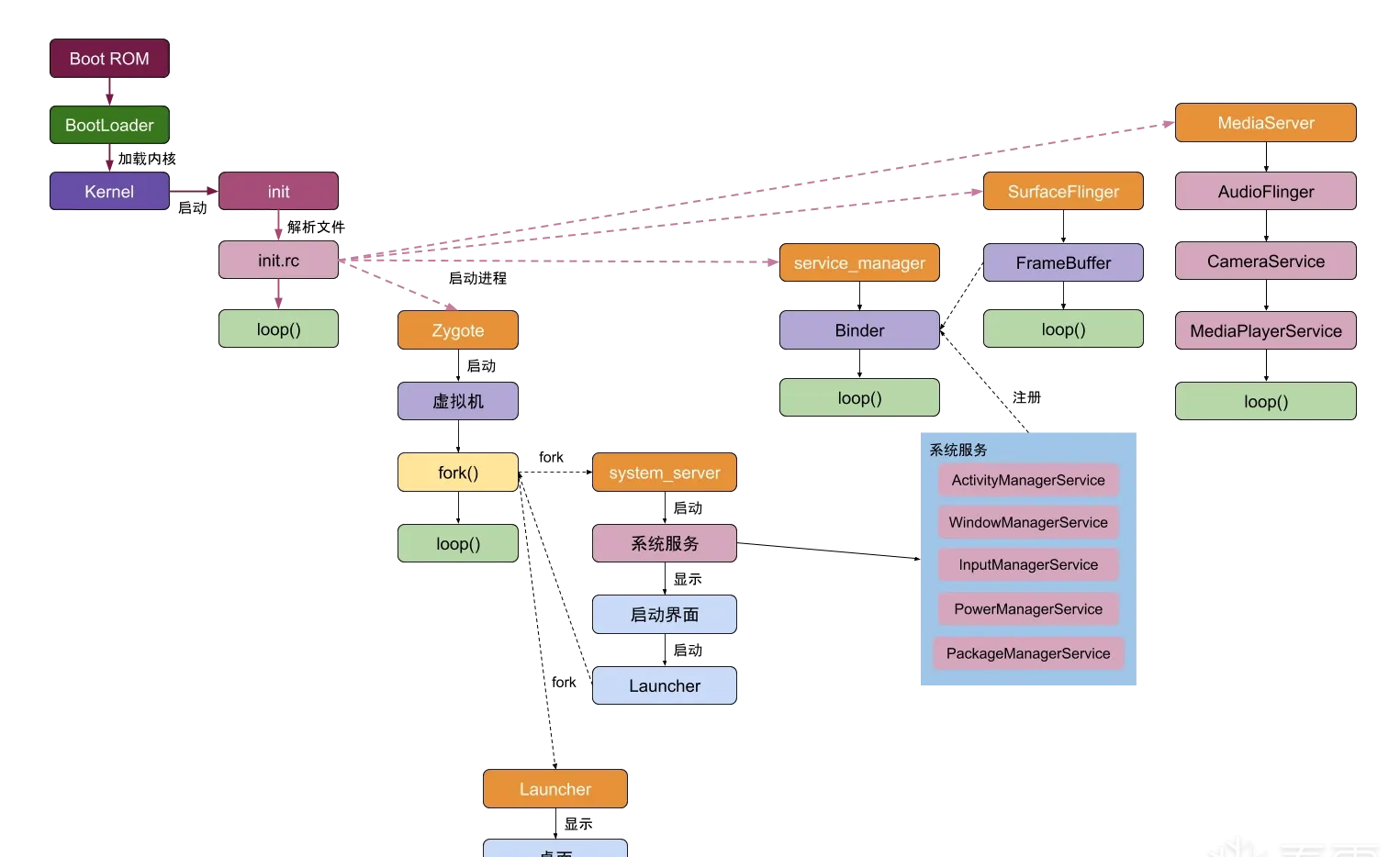 Fig. 1
Launcher is the user’s interactive interface; tapping an app icon opens the app. Different OEMs may customize Launcher (MIUI does), but the underlying principle is the same.
When an app is installed, PackageManagerService parses the APK’s AndroidManifest.xml, extracts the app’s info, and writes it to packages.xml — permissions, package name, icon, install location, version, userID, and so on. That file lives at /data/system/packages.xml.
The app launch flow
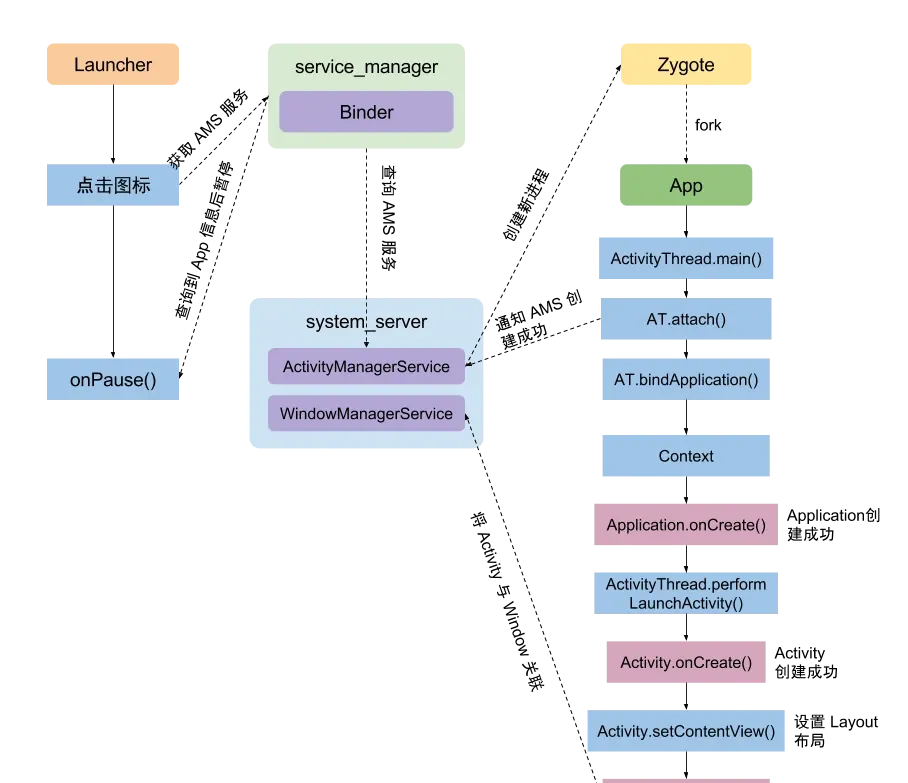 Fig. 2
When the user taps an icon, Launcher queries the app info through ServiceManager to AMS, then Zygote creates the target app process.
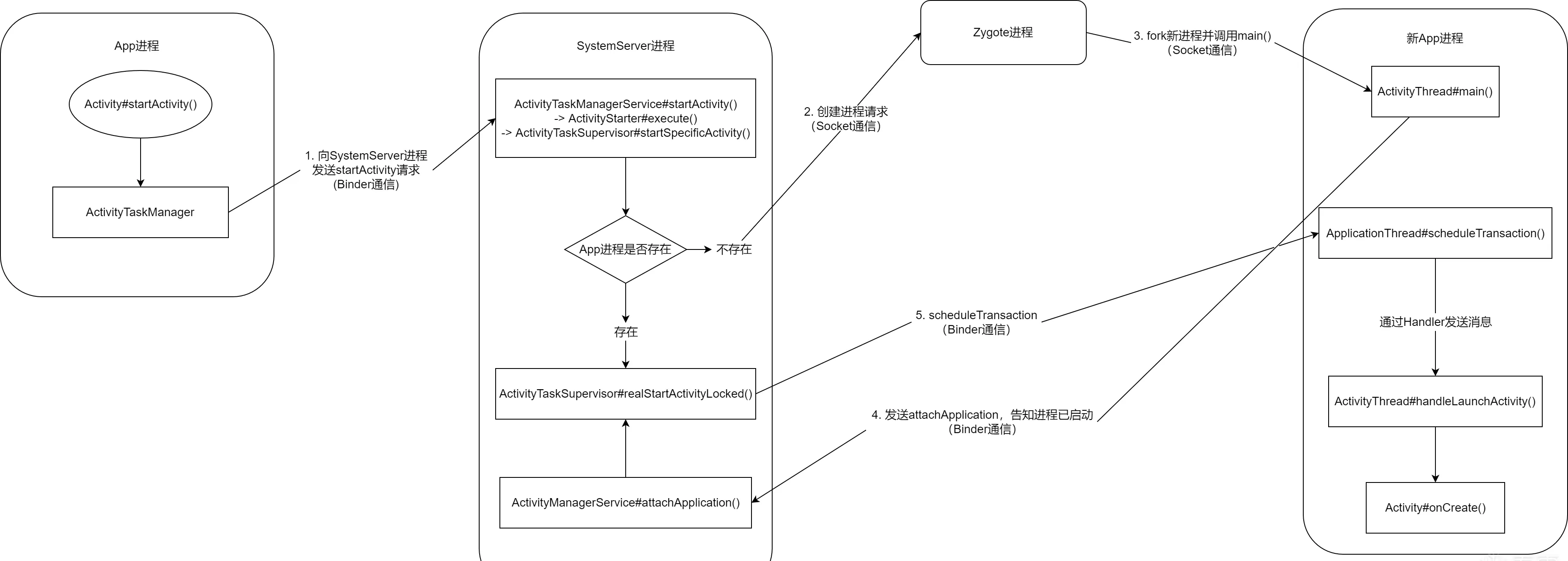 Fig. 3
Rough flow:
- Launcher talks to AMS via Binder.
- AMS checks whether the app process already exists.
- If it does, call
realStartActivityLockeddirectly and jump to step 7. - Otherwise, AMS asks Zygote to fork a new app process, which runs
Application.onCreate, creates the app’s context and other necessary objects (AMS keeps backups of these). - The new process notifies AMS via
ATTACH_APPLICATION_TRANSACTION. - AMS receives it and calls
realStartActivityLocked. - The process is set as the top Activity; a transaction is created and the
H.EXECUTE_TRANSACTIONcommand is dispatched. - Handling the message, the process calls
Activity.onCreateand initializes the app’s own views.
In code, the launch starts from Launcher:
- Check whether the target Activity exists; if so, no need to reopen —
Launcher.startActivitySafel→Launcher.startActivity. - Open the target Activity —
Activity.startActivity. - Call the service’s
startActivityvia ATMS —Activity.startActivityForResult→Instrumentation.execStartActivity→ActivityTaskManager.getService().startActivity.
ActivityManagerNative.getDefault() returns an ActivityManagerProxy as Launcher’s proxy to ActivityTaskManager; its startActivity sends START_ACTIVITY_TRANSACTION to notify ActivityTaskManager.
After that, execution moves from the Launcher process into ActivityManagerService (AMS) in system_server.
startActivityAsUserfirst obtains the userID and passes it down to the starter fromgetActivityStartController—startActivity→startActivityAsUser.- Create a new intent object, get
ApplicationPackageManager—ActivityStackSupervisor.startActivityMayWait→resolveActivity. - Resolve the Activity pointed to by the intent and store it on the Intent —
PackageManagerService.resolveIntent()→queryIntentActivities(). - Get the caller’s process info, use
Intent.FLAG_ACTIVITY_FORWARD_RESULTto decide whetherstartActivityForResulthandling is needed, and check the caller’s permission to launch the Activity. - Activities have several launch modes; handle
launchMode, create the Task, etc. If the target process already exists,onResume()directly; otherwise create the Activity and handleonNewIntent()—ActivityStackSupervisor.startActivityUncheckedLocked→startActivityLocked. - If a resumed Activity is found, run
startPausingLocked()to pause it and all background-stack Activities (normally this pauses the Launcher) —ActivityStack.resumeTopActivityInnerLocked. - Get the target Activity’s process info. On success the process is already started, so launch it via
realStartActivityLocked; otherwise callstartProcessAsyncthrough the AMS proxy. The former is the “already started” case; the latter creates the process from scratch —ActivityStackSupervisor.startSpecificActivity.
Consider the from-scratch case, which calls startProcessAsync to create a new process:
void startProcessAsync(ActivityRecord activity, boolean knownToBeDead, boolean isTop, String hostingType) {
    try {
        ...
        // Post a message to start the process, avoiding a possible deadlock
        // from calling AMS while holding the ATMS lock.
        final Message m = PooledLambda.obtainMessage(ActivityManagerInternal::startProcess,
                mAmInternal, activity.processName, activity.info.applicationInfo, knownToBeDead,
                isTop, hostingType, activity.intent.getComponent());
        mH.sendMessage(m);
    } finally {
        Trace.traceEnd(TRACE_TAG_WINDOW_MANAGER);
    }
}
startProcessAsync creates the process via a message that ATMS handles; the target is ActivityManagerInternal::startProcess.
ActivityManagerInternal::startProcess → ActivityManagerService::startProcessLocked → ProcessList::startProcessLocked → ProcessList::startProcess.
If the target is the top app, a flag is set to guarantee the highest start priority, and startProcess finally creates the target app process.
Once the process is created, execution switches to the new process, loads ActivityThread, and calls ActivityThread.main.
ActivityThread.main: create the main thread’s Looper, create theActivityThreadobject, callActivityThread.attach()to establish the Binder channel, startLooper.loop().ActivityThread.attach: create anActivityManagerProxy, callActivityManagerProxy.attachApplication()over theIActivityManagerBinder channel.
public static void main(String[] args) {
    ...
    // initialize the current process's Looper
    Looper.prepareMainLooper();
    ...
    ActivityThread thread = new ActivityThread();
    // Application is created here
    thread.attach(false, startSeq);

    if (sMainThreadHandler == null) {
        sMainThreadHandler = thread.getHandler();
    }

    if (false) {
        Looper.myLooper().setMessageLogging(new
                LogPrinter(Log.DEBUG, "ActivityThread"));
    }

    // call Looper.loop() to start the infinite loop
    Looper.loop();

    throw new RuntimeException("Main thread loop unexpectedly exited");
}
Looper keeps pulling messages from the queue and processing tasks. attach sends ATTACH_APPLICATION_TRANSACTION to notify the system_server service.
At this point the app’s ActivityThread and ApplicationThread are created, and the message loop exists. ActivityThread.attach calls ActivityManagerProxy.attachApplication, which via Binder calls AMS’s attachApplication, passing the ApplicationThread over.
attachApplication → attachApplicationLocked has two key functions:
bindApplicationActivityTaskManagerService.LocalService#attachApplication
private boolean attachApplicationLocked(@NonNull IApplicationThread thread,
                                        int pid, int callingUid, long startSeq) {
    synchronized (mProcLock) {
        app.mState.setCurAdj(ProcessList.INVALID_ADJ);
        app.mState.setSetAdj(ProcessList.INVALID_ADJ);
        app.mState.setVerifiedAdj(ProcessList.INVALID_ADJ);
        mOomAdjuster.setAttachingSchedGroupLSP(app);
        app.mState.setForcingToImportant(null);
        updateProcessForegroundLocked(app, false, 0, false);
        app.mState.setHasShownUi(false);
        app.mState.setCached(false);
        app.setDebugging(false);
        app.setKilledByAm(false);
        app.setKilled(false);
        app.setUnlocked(StorageManager.isUserKeyUnlocked(app.userId));
    }
    // remove the process-start timeout
    mHandler.removeMessages(PROC_START_TIMEOUT_MSG, app);

    final ProviderInfoList providerList = ProviderInfoList.fromList(providers);
    if (app.getIsolatedEntryPoint() != null) {
        thread.runIsolatedEntryPoint(
            app.getIsolatedEntryPoint(), app.getIsolatedEntryPointArgs());
    } else if (instr2 != null) {
        thread.bindApplication(processName, appInfo,
                               app.sdkSandboxClientAppVolumeUuid, app.sdkSandboxClientAppPackage,
                               providerList,
                               instr2.mClass,
                               profilerInfo, instr2.mArguments,
                               instr2.mWatcher,
                               instr2.mUiAutomationConnection, testMode,
                               mBinderTransactionTrackingEnabled, enableTrackAllocation,
                               isRestrictedBackupMode || !normalMode, app.isPersistent(),
                               new Configuration(app.getWindowProcessController().getConfiguration()),
                               app.getCompat(), getCommonServicesLocked(app.isolated),
                               mCoreSettingsObserver.getCoreSettingsLocked(),
                               buildSerial, autofillOptions, contentCaptureOptions,
                               app.getDisabledCompatChanges(), serializedSystemFontMap,
                               app.getStartElapsedTime(), app.getStartUptime());
    } else {
        thread.bindApplication(processName, appInfo,
                               app.sdkSandboxClientAppVolumeUuid, app.sdkSandboxClientAppPackage,
                               providerList, null, profilerInfo, null, null, null, testMode,
                               mBinderTransactionTrackingEnabled, enableTrackAllocation,
                               isRestrictedBackupMode || !normalMode, app.isPersistent(),
                               new Configuration(app.getWindowProcessController().getConfiguration()),
                               app.getCompat(), getCommonServicesLocked(app.isolated),
                               mCoreSettingsObserver.getCoreSettingsLocked(),
                               buildSerial, autofillOptions, contentCaptureOptions,
                               app.getDisabledCompatChanges(), serializedSystemFontMap,
                               app.getStartElapsedTime(), app.getStartUptime());
    }

    if (normalMode) {
        try {
            // finally calls ActivityTaskManagerService.LocalService#attachApplication()
            didSomething = mAtmInternal.attachApplication(app.getWindowProcessController());
        } catch (Exception e) {
        }
    }

    return true;
}
First focus on thread.bindApplication — thread is the ApplicationThread passed from the new process.
bindApplication sends the H.BIND_APPLICATION command to the process; on receiving it, the process handles it via handleBindApplication:
private void handleBindApplication(AppBindData data) {
    // initialize the context
    final ContextImpl appContext = ContextImpl.createAppContext(this, data.info);
    // initialize Instrumentation
    if (ii != null) {
        initInstrumentation(ii, data, appContext);
    } else {
        mInstrumentation = new Instrumentation();
        mInstrumentation.basicInit(this);
    }
    Application app;
    try {
        // initialize Application
        // calls LoadedApk#makeApplicationInner()
        app = data.info.makeApplicationInner(data.restrictedBackupMode, null);
        mInstrumentation.onCreate(data.instrumentationArgs);
        // callback Application#onCreate()
        mInstrumentation.callApplicationOnCreate(app);
    } finally {
    }
}
handleBindApplication initializes the context, then the Instrumentation object, creates the Application object, and calls its onCreate.
The initialization chain is makeApplication → newApplication:
public Application makeApplication(boolean forceDefaultAppClass, Instrumentation instrumentation) {

    if (mApplication != null) {
       return mApplication;
    }

    String appClass = mApplicationInfo.className;
    java.lang.ClassLoader cl = getClassLoader();

    // create a new ContextImpl for the Application
    ContextImpl appContext = ContextImpl.createAppContext(mActivityThread, this);

    // use the mInstrumentation created in handleBindApplication to create and attach an Application
    app = mActivityThread.mInstrumentation.newApplication(cl, appClass, appContext);
    appContext.setOuterContext(app);
}

public Application newApplication(ClassLoader cl, String className, Context context) {
    return newApplication(cl.loadClass(className), context);
}

// Instrumentation:
static public Application newApplication(Class<?> clazz, Context context) {
    // instantiate the Application
    Application app = (Application) clazz.newInstance();

    // bind the Application and context
    app.attach(context);
    return app;
}

// attach assigns the new ContextImpl to mBase — the concrete Context implementation
// used by all Contexts inside the Application — plus other info like mLoadedApk.
final void attach(Context context) {
    mBase = base;
    mLoadedApk = ContextImpl.getImpl(context).mPackageInfo;
}
Then the details of makeApplicationInner:
public Application makeApplicationInner(boolean forceDefaultAppClass,
                                        Instrumentation instrumentation) {
    return makeApplicationInner(forceDefaultAppClass, instrumentation, false);
}

private Application makeApplicationInner(boolean forceDefaultAppClass,
                                         Instrumentation instrumentation, boolean allowDuplicateInstances) {
    if (mApplication != null) {
        return mApplication;
    }

    synchronized (sApplications) {
        final Application cached = sApplications.get(mPackageName);
        if (cached != null) {
            if (!allowDuplicateInstances) {
                mApplication = cached;
                return cached;
            }
        }
    }

    Application app = null;

    final String myProcessName = Process.myProcessName();
    String appClass = mApplicationInfo.getCustomApplicationClassNameForProcess(
        myProcessName);

    try {
        final java.lang.ClassLoader cl = getClassLoader();
        if (!mPackageName.equals("android")) {
            initializeJavaContextClassLoader();
        }
        // initialize the Application's context
        ContextImpl appContext = ContextImpl.createAppContext(mActivityThread, this);
        // create the Application instance
        app = mActivityThread.mInstrumentation.newApplication(
            cl, appClass, appContext);
        appContext.setOuterContext(app);
    } catch (Exception e) {
    }
    mActivityThread.mAllApplications.add(app);
    mApplication = app;
    if (!allowDuplicateInstances) {
        synchronized (sApplications) {
            sApplications.put(mPackageName, app);
        }
    }

    if (instrumentation != null) {
        try {
            // callback Application#onCreate()
            instrumentation.callApplicationOnCreate(app);
        } catch (Exception e) {
        }
    }
    return app;
}
For the new process, once callApplicationOnCreate returns, the process’s context, Application, and Instrumentation objects are all created and initialized. Meanwhile AMS isn’t idle: after sending the commands, ActivityManagerService#attachApplicationLocked continues into ActivityTaskManagerService.LocalService#attachApplication:
public boolean attachApplication(WindowProcessController wpc) throws RemoteException {
    synchronized (mGlobalLockWithoutBoost) {
        try {
            // calls RootWindowContainer#attachApplication()
            // which finally calls AttachApplicationHelper#test()
            return mRootWindowContainer.attachApplication(wpc);
        } finally {
        }
    }
}

public boolean test(ActivityRecord r) {
    if (r.finishing || !r.showToCurrentUser() || !r.visibleIgnoringKeyguard
            || r.app != null || mApp.mUid != r.info.applicationInfo.uid
            || !mApp.mName.equals(r.processName)) {
        return false;
    }

    try {
        // calls ActivityTaskSupervisor#realStartActivityLocked()
        if (mTaskSupervisor.realStartActivityLocked(r, mApp,
                mTop == r && r.getTask().canBeResumed(r) /* andResume */,
                true /* checkConfig */)) {
            mHasActivityStarted = true;
        }
    } catch (RemoteException e) {
    }
    return false;
}
Note this ultimately calls ActivityTaskSupervisor#realStartActivityLocked for the final step. And if no new process was needed, resuming the app starts from exactly this point.
boolean realStartActivityLocked(ActivityRecord r, WindowProcessController proc,
        boolean andResume, boolean checkConfig) throws RemoteException {
    // create the launch transaction
    final ClientTransaction clientTransaction = ClientTransaction.obtain(proc.getThread(), r.token);
    final boolean isTransitionForward = r.isTransitionForward();
    final IBinder fragmentToken = r.getTaskFragment().getFragmentToken();
    // add the callback
    clientTransaction.addCallback(LaunchActivityItem.obtain(new Intent(r.intent),
                    System.identityHashCode(r), r.info,
                    mergedConfiguration.getGlobalConfiguration(),
                    mergedConfiguration.getOverrideConfiguration(), r.compat,
                    r.getFilteredReferrer(r.launchedFromPackage), task.voiceInteractor,
                    proc.getReportedProcState(), r.getSavedState(), r.getPersistentSavedState(),
                    results, newIntents, r.takeOptions(), isTransitionForward,
                    proc.createProfilerInfoIfNeeded(), r.assistToken, activityClientController,
                    r.shareableActivityToken, r.getLaunchedFromBubble(), fragmentToken));

    // set the post-launch lifecycle state
    final ActivityLifecycleItem lifecycleItem;
    if (andResume) {
        // RESUME state
        lifecycleItem = ResumeActivityItem.obtain(isTransitionForward);
    } else {
        // PAUSE state
        lifecycleItem = PauseActivityItem.obtain();
    }
    // set the state
    clientTransaction.setLifecycleStateRequest(lifecycleItem);

    // start the transaction; finally calls ClientLifecycleManager#scheduleTransaction()
    mService.getLifecycleManager().scheduleTransaction(clientTransaction);
    return true;
}
It first creates the Activity transaction, sets the callback and the lifecycle ActivityLifecycleItem, then schedules the transaction via ClientLifecycleManager#scheduleTransaction.
// the Activity launch transaction
void scheduleTransaction(ClientTransaction transaction) throws RemoteException {
    final IApplicationThread client = transaction.getClient();
    // calls ClientTransaction#schedule()
    transaction.schedule();
}

public void schedule() throws RemoteException {
    // calls ApplicationThread#scheduleTransaction()
    mClient.scheduleTransaction(this);
}

@Override
public void scheduleTransaction(ClientTransaction transaction) throws RemoteException {
    // finally calls ClientTransactionHandler#scheduleTransaction()
    ActivityThread.this.scheduleTransaction(transaction);
}

void scheduleTransaction(ClientTransaction transaction) {
    transaction.preExecute(this);
    // send a message; the H class receives it
    sendMessage(ActivityThread.H.EXECUTE_TRANSACTION, transaction);
}
As you can see, AMS ultimately sends the H.EXECUTE_TRANSACTION command to the process, which is handled there:
class H extends Handler {
    public void handleMessage(Message msg) {
        switch (msg.what) {
            case EXECUTE_TRANSACTION:
                final ClientTransaction transaction = (ClientTransaction) msg.obj;
                // execute the transaction
                mTransactionExecutor.execute(transaction);
                if (isSystem()) {
                    transaction.recycle();
                }
                break;
        }
    }
}
public void execute(ClientTransaction transaction) {
// calls TransactionExecutor#executeCallbacks()
executeCallbacks(transaction);
// execute the lifecycle state
executeLifecycleState(transaction);
mPendingActions.clear();
}This finally descends into ClientTransactionHandler#handleLaunchActivity — an abstract method whose concrete implementation is ActivityThread#handleLaunchActivity:
public Activity handleLaunchActivity(ActivityClientRecord r,
        PendingTransactionActions pendingActions, Intent customIntent) {
    // initialize before creating the Activity
    if (ThreadedRenderer.sRendererEnabled
            && (r.activityInfo.flags & ActivityInfo.FLAG_HARDWARE_ACCELERATED) != 0) {
        HardwareRenderer.preload();
    }
    // get the WMS service, initialize WindowManager
    WindowManagerGlobal.initialize();
    // GraphicsEnvironment signals that an activity is launching on the process
    GraphicsEnvironment.hintActivityLaunch();
    // launch the Activity; calls ActivityThread#performLaunchActivity()
    final Activity a = performLaunchActivity(r, customIntent);
    return a;
}
handleLaunchActivity ultimately calls back the target Activity’s onConfigurationChanged, initializes WindowManagerService, and calls ActivityThread.performLaunchActivity.
ActivityThread.performLaunchActivity() {
    // similar to Application creation: load the activity via classLoader
    activity = mInstrumentation.newActivity(classLoader,
               component.getClassName(), r.intent);
    // because Activity has a UI, its Context is a ContextThemeWrapper, but the impl is still ContextImpl
    Context appContext = createBaseContextForActivity(r, activity);
    activity.attach(context, mInstrumentation, application, ...);
    // associate with Window

    // call the activity's onCreate()
    mInstrumentation.callActivityOnCreate(activity, ...)
}

public void callActivityOnCreate(Activity activity, Bundle icicle) {
    prePerformCreate(activity);
    // calls Activity#performCreate()
    activity.performCreate(icicle);
    postPerformCreate(activity);
}
callActivityOnCreate calls back Activity.performCreate, which calls the Activity’s onCreate, Activity.setContentView, then ActivityThread.performResumeActivity — and performResumeActivity finally calls back onResume.
At this point, the new app process is fully created.
Closing
A long winding road with plenty of same-named functions — I got turned around several times while organizing these notes. Hopefully the final flow isn’t too confusing. Corrections welcome.
Colin Xiao — I take on contract reverse-engineering work, and writeups like this are how I show what I can do. If you need help with anything in this space — including but not limited to the areas I cover above — I’m available. No project is too big or too small — if it’s reverse engineering and I can do it, I’ll take it. DM me on X (@colinxiao_lab) or Telegram (@ColinXiao666).
Get in touch