Posting WeChat Moments Programmatically: Reversing SnsUploadUI with Frida
About the author. I’m Colin Xiao — an independent reverse engineer, mostly working solo on contract jobs. I dig into compiled code of every kind, including but not limited to: Android and iOS apps, x86/x64/ARM native binaries, packers and obfuscators, DRM and license checks, network protocols and APIs, crypto and signature algorithms, malware, game binaries, and embedded/IoT firmware. I also handle large-scale data collection and vulnerability research. If you have any project in mind, I’d be glad to take it on — whatever it is, as long as it’s within my wheelhouse. Just reach out. You can reach me on X at @colinxiao_lab or on Telegram at https://t.me/ColinXiao666.
This research is published for educational and defensive purposes. The target sample is anonymized throughout.
Posting WeChat Moments Programmatically: Reversing SnsUploadUI with Frida
I’d been deep in Windows reversing lately and felt my Android skills slipping, so I picked this back up in my spare time. Calling into WeChat’s own code to post a Moments update was something I’d wanted to pull off for a while — and it turns out it works. This post walks through posting a text-only Moment and a Moment with images.
0x1 Analyzing the Moments types
Tools used:
- A PC
- An Android phone that can debug the WeChat process
- WeChat 7.0.11
- ddms (to trace call flows)
- uiautomatorviewer (to locate control IDs)
- jadx (for static analysis of the WeChat APK)
- frida (to hook WeChat, gather info, and post the Moment)
Before analyzing code you need to find the right place to start — obviously, the compose-Moments screen. How do you find out which Activity that screen is? Easy: open it on the phone.
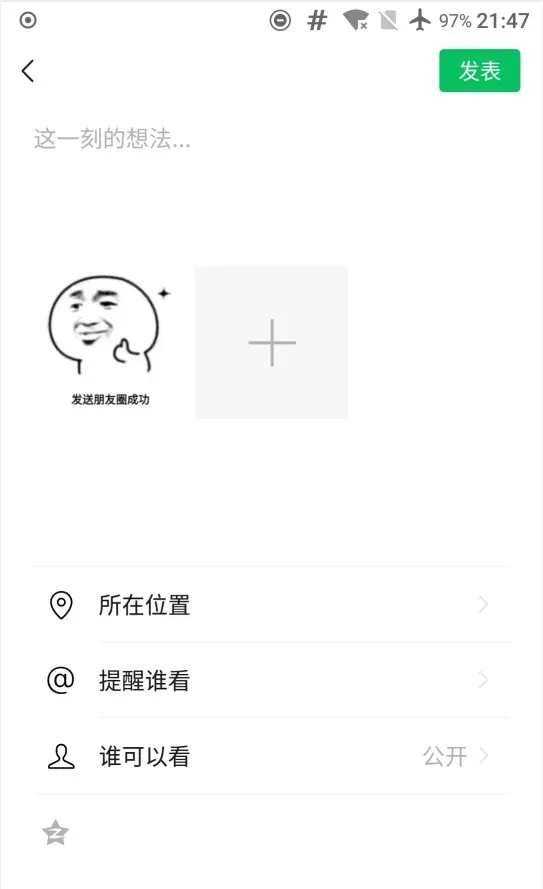
Plug the phone into the PC, enable USB debugging, and run:
adb shell dumpsys activity top
The compose-Moments Activity is com.tencent.mm.plugin.sns.ui.SnsUploadUI.
Finding the Activity isn’t enough, though — turning that into “where is the posting code” is still work. So instead, start from the “Post” button and find the posting code from there. What happens when you tap “Post”? Posting is a dynamic behavior, so tracing the call flow during a tap will surface useful info. ddms does that. Open ddms, select the WeChat process, open the compose-Moments screen on the phone, then click the circled icon in ddms to start tracing:
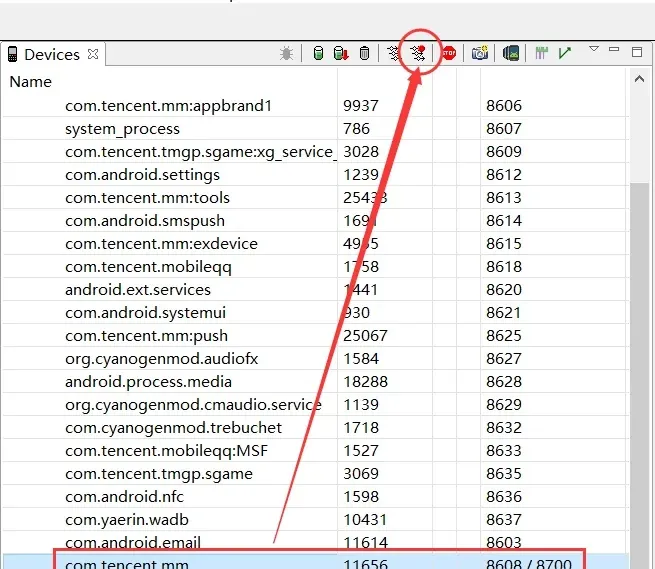
Post the Moment, then click the same icon again to stop. ddms produces the trace. To find the button-event code, search for the familiar Android name — onClick:
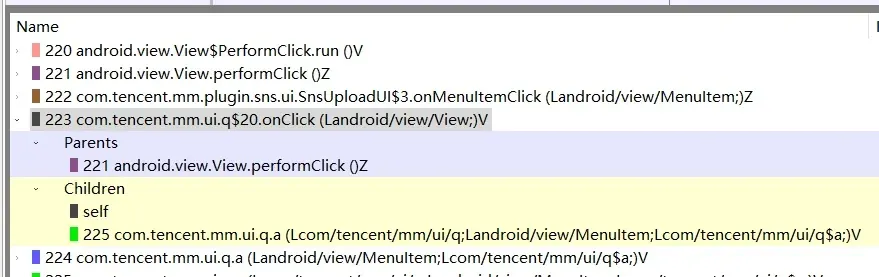
That finds onClick, but the entry right above it is more interesting — it contains the class name of the Activity we just found:

Now that we know the method is called, let’s see what onMemuItemClick is in com.tencent.mm.plugin.sns.ui.SnsUploadUI.
Open the WeChat APK in jadx, go to com.tencent.mm.plugin.sns.ui.SnsUploadUI, search for onMemuItemClick — there aren’t many results, and this one looks right:
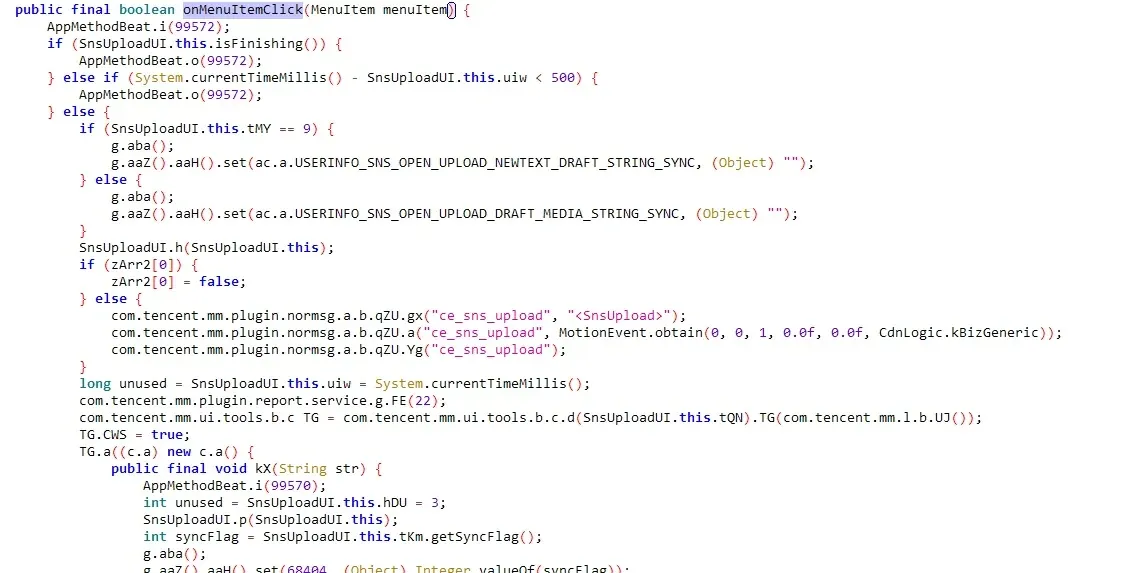
Inside onMemuItemClick:
String unused2 = SnsUploadUI.this.desc = SnsUploadUI.this.tQN.getText().toString();What’s special about this line? Two things:
descis short for “description”this.descis assigned fromthis.tQN.getText().toString()
When you post a Moment you write a description, so desc is very likely the Moment’s text. And since it comes from this.tQN.getText().toString(), this.tQN is probably the text box. Look where this.tQN is assigned — in onCreate:

Its id is d41. Which control is that? Open uiautomatorviewer, snapshot the compose screen, click the text box — the right side jumps to the matching control. Sure enough, d41 is the text box for the Moment description:
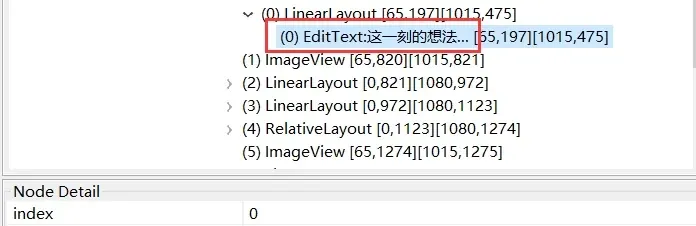
So this.desc is the description; following it should lead to the posting code. Further down in onMemuItemClick, this.desc is passed to SnsUploadUI.this.tQO.a. That a method is defined in the interface com.tencent.mm.plugin.sns.ui.z:

Knowing it’s an interface doesn’t help — interfaces have no real code; you need the implementation. Searching SnsUploadUI for where this.tQO is assigned, the ag method shows several assignments:
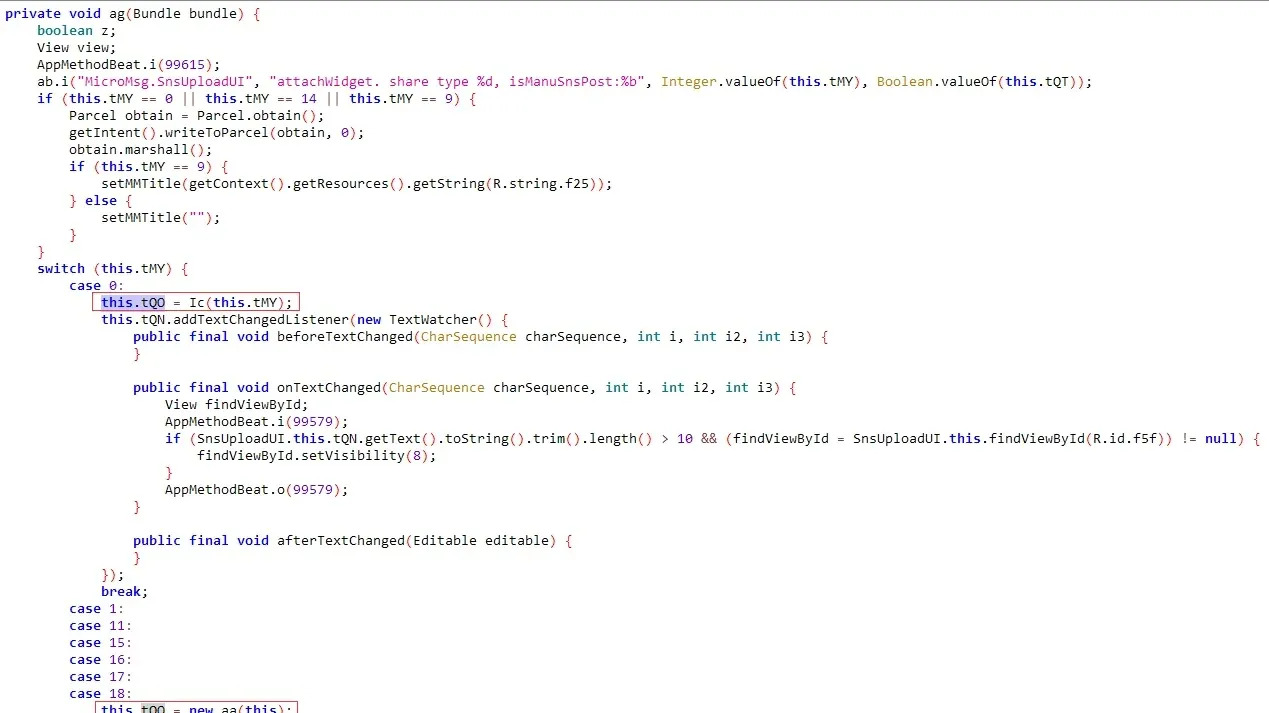
Which value this.tQO gets depends on this.tMY, an int. So hook SnsUploadUI.ag to find out what tMY is. Here’s the frida hook (JavaScript):
var SnsUploadUI = Java.use('com.tencent.mm.plugin.sns.ui.SnsUploadUI');
var ag = SnsUploadUI.ag.overload("android.os.Bundle");
// get sns type
ag.implementation = function(bundle){
    var ret = ag.call(this,bundle);
    send("sns type = " + this.tMY.value);
    return ret;
}
After hooking, every time you open the compose screen, ag runs and the console prints a number. From testing, that number is the Moment type. Types and their classes:
- 0 — a Moment with images →
com.tencent.mm.plugin.sns.ui.ai - 9 — a text-only Moment →
com.tencent.mm.plugin.sns.ui.ae
Both implement the com.tencent.mm.plugin.sns.ui.z interface (directly or indirectly). So this.tQO is initialized according to the Moment type, and SnsUploadUI.this.tQO.a is very likely the posting method. Let’s analyze each type.
0x2 Text Moments
Text is easier, so let’s start there. The class is com.tencent.mm.plugin.sns.ui.ae. First, what does its a method receive? Look back at where onMenuItemClick calls a:
public final boolean onMenuItemClick(MenuItem menuItem) {
    String unused2 = SnsUploadUI.this.desc = SnsUploadUI.this.tQN.getText().toString();
    int pasterLen = SnsUploadUI.this.tQN.getPasterLen();
    int privated = SnsUploadUI.this.tKm.getPrivated();
    int syncFlag2 = SnsUploadUI.this.tKm.getSyncFlag();
    ......
    PInt pInt = new PInt();
    if (SnsUploadUI.this.tQO instanceof a) {
        Bundle bundle = new Bundle();
        bundle.putInt("param_is_privated", privated);
        bundle.putString("param_description", SnsUploadUI.this.desc);
        bundle.putStringArrayList("param_with_list", new ArrayList(SnsUploadUI.this.uij.getAtList()));
        bundle.putInt("param_paste_len", pasterLen);
        try {
            bundle.putByteArray("param_localtion", SnsUploadUI.this.uik.getLocation().toByteArray());
        } catch (IOException e2) {
            ab.printErrStackTrace("MicroMsg.SnsUploadUI", e2, "parse location error", new Object[0]);
        }
        bundle.putBoolean("param_is_black_group", SnsUploadUI.this.tQS);
        bundle.putStringArrayList("param_group_user", SnsUploadUI.this.tQR);
        bundle.putInt("param_contact_tag_count", SnsUploadUI.this.tOk);
        bundle.putInt("param_temp_user_count", SnsUploadUI.this.tOl);
        pInt.value = ((a) SnsUploadUI.this.tQO).getContentType();
        z unused4 = SnsUploadUI.this.tQO;
    } else {
        SnsUploadUI.this.tQO.a(privated, syncFlag2, SnsUploadUI.this.tKm.getTwitterAccessToken(), SnsUploadUI.this.desc, SnsUploadUI.this.uij.getAtList(), SnsUploadUI.this.uik.getLocation(), (LinkedList<Long>) null, pasterLen, SnsUploadUI.this.tQS, SnsUploadUI.this.tQR, pInt, SnsUploadUI.this.tOj, SnsUploadUI.this.tOk, SnsUploadUI.this.tOl);
    }
}
From this plus a hook script, work out a’s parameters:
var ae = Java.use('com.tencent.mm.plugin.sns.ui.ae');
var ae_a = ae.a.overload("int","int","org.b.d.i","java.lang.String","java.util.List","com.tencent.mm.protocal.protobuf.bdi","java.util.LinkedList","int","boolean","java.util.List","com.tencent.mm.pointers.PInt","java.lang.String","int","int");
ae_a.implementation = function(isPrivate,syncFlag2,twitterAccessToken,desc,atList,location,list1,pasterLen,bool1,list2,pint1,str1,num1,num2){
    var ret = ae_a.call(this,isPrivate,syncFlag2,twitterAccessToken,desc,atList,location,list1,pasterLen,bool1,list2,pint1,str1,num1,num2);
    console.log("************Basic Info************");
    console.log("isPrivate = " + isPrivate);
    console.log("syncFlag2 = " + syncFlag2);
    console.log("twitterAccessToken = " + twitterAccessToken);
    console.log("desc = " + "'" + desc + "'");
    if(atList.size()>0){
        for(var i=0;i<atList.size();i++){
            console.log("atList[" + i + "] = " + atList.get(0));
        }
    }
    if(location != null){

        if(location.yRD.value != null){
            console.log("location.yRD = " + location.yRD.value);
        }

        if(location.yRE.value != null){
            console.log("location.yRE = " + location.yRE.value);
        }

    }
    console.log("list1 = " + list1);
    console.log("pasterLen = " + pasterLen);
    console.log("bool1 = " + bool1);
    if(list2 != null){
        console.log("list2 = " + list2.size());
    }
    else{
        console.log("list2 = " + list2);
    }
    console.log("pint1 = " + pint1.value.value);
    console.log("str1 = " + str1);
    console.log("num1 = " + num1);
    console.log("num1 = " + num1);

    return ret;
}//ae.a
After hooking, post a text Moment and the output is:
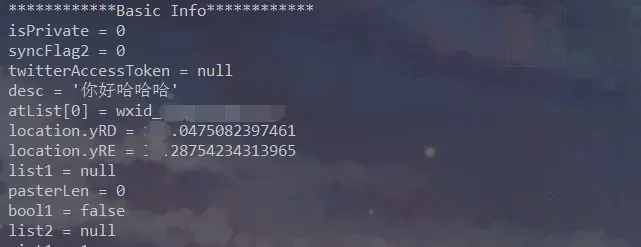
So:
- privated(int): whether the Moment is private: 0 public, 1 private
- desc(String): the Moment text
- AtList(List<String>): the wxids of mentioned people
- Location(com.tencent.mm.protocal.protobuf.bdi): location info
A lot of the parameters we still don’t understand — but the ones we need are clear. Can we just call a directly? First check whether com.tencent.mm.plugin.sns.ui.ae’s constructor can be called. It takes an Activity argument, which is hard to construct, so building ae to call a is out. Instead, read a directly. Since it’s a text Moment, focus on the text — the desc member of SnsUploadUI, which is a’s 4th parameter. Inside a, desc is str, and str is referenced only once — passed to ayVar.adk(). Where does ayVar come from? It’s initialized simply inside a, from a single number — so when we build ay, just pass the same value. At the end of a there’s also a conspicuous commit method — likely the actual publish call. Let’s verify with a small frida script:
if(Java.available)
{
    Java.perform(function(){
        var ay_class = Java.use("com.tencent.mm.plugin.sns.model.ay");
        var desc = "To be, or not to be, that is a question.";
        var ayInstance = ay_class.$new(2);
        ayInstance.adk(desc);
        ayInstance.commit();
    });
}
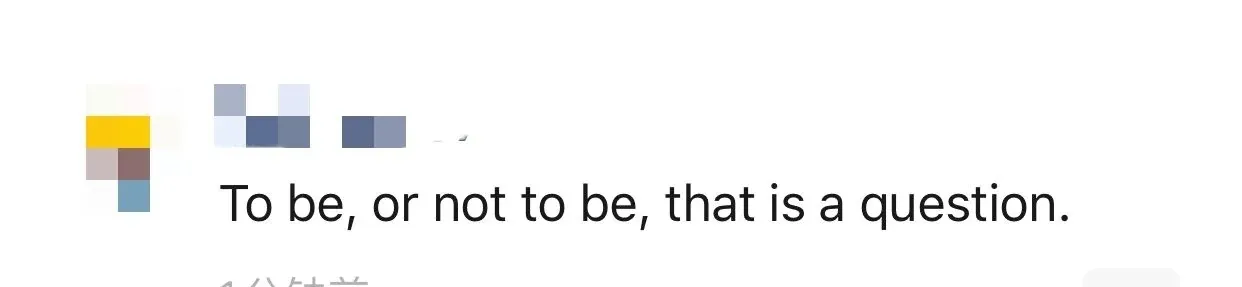
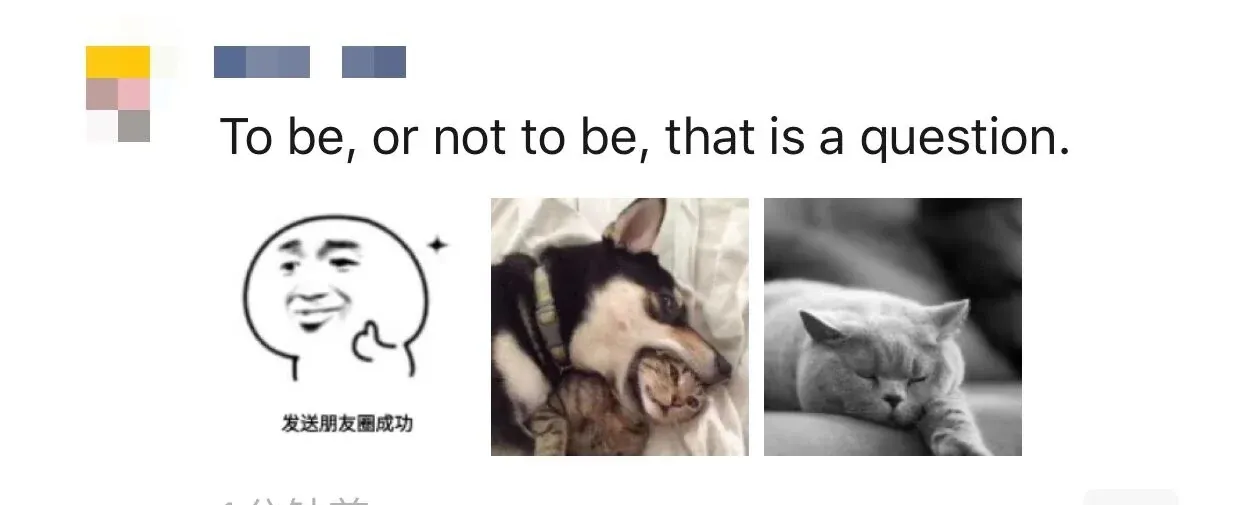
The text is “To be, or not to be, that is a question.” Sure enough, running the script posts the text Moment:
From analyzing com.tencent.mm.plugin.sns.ui.ae’s a method: a mainly takes the common data a Moment needs — whether it’s private, the text description, mentioned people, location, etc. — shared across other Moment types. And a text Moment only needs the text to post successfully.
0x3 Moments with images
Image Moments are similar; they just add image parameters, so focus on where images come in. The class is com.tencent.mm.plugin.sns.ui.ai. With the experience above, go straight to its a method (the ai class has several a methods; the one matching the com.tencent.mm.plugin.sns.ui.z interface signature is the one we want). At the start of a, an iterator walks a list, assembling com.tencent.mm.plugin.sns.data.j objects and putting them into linkedList2:
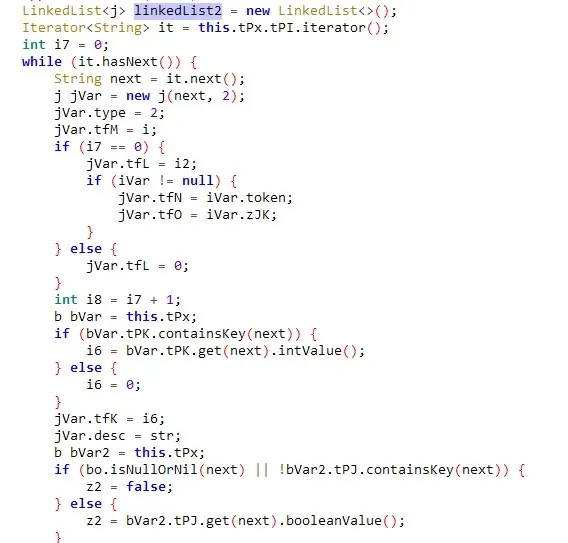
When assembling, the j class constructor takes a string and a number; the string maps to j’s path field — probably the image path:
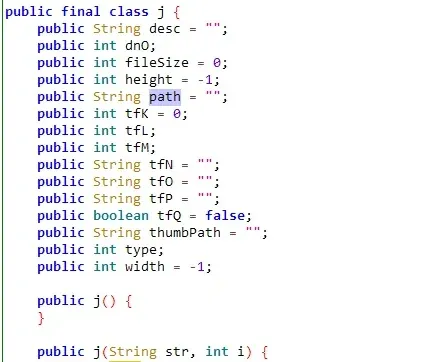
So j stores the image info for a Moment. It goes into linkedList2. linkedList2 is passed to two places: one is the a method, and the other is the com.tencent.mm.plugin.sns.ui.ai$a constructor:
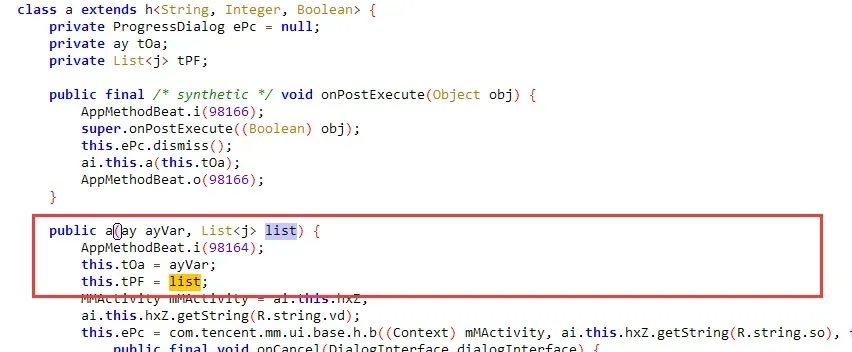
After linkedList2 goes into class a, it’s assigned to the member tPF, referenced only in a’s dU method:

Where is dU called? In a’s parent class com.tencent.mm.plugin.sns.model.h, dU is called from u:
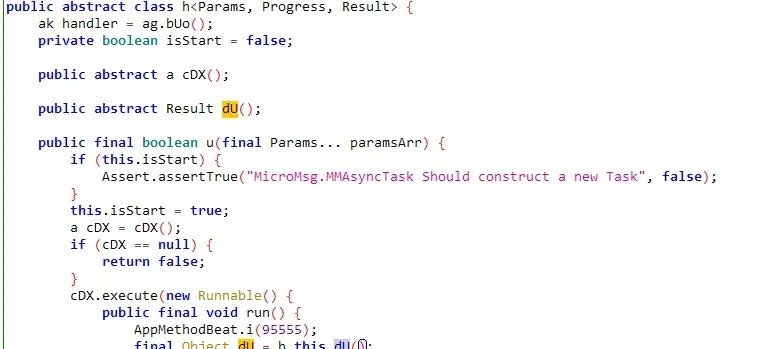
And u is called from ai’s a method. So linkedList2 ultimately reaches com.tencent.mm.plugin.sns.model.ay’s ey method. Now write some frida to call it:
if(Java.available)
{
    Java.perform(function(){
        var ay_class = Java.use("com.tencent.mm.plugin.sns.model.ay");
        var j_class = Java.use("com.tencent.mm.plugin.sns.data.j")
        var desc = "To be, or not to be, that is a question.";
        var likedList_class = Java.use("java.util.LinkedList");
        var linkedListInstance = likedList_class.$new();
        var ayInstance = ay_class.$new(1);
        var jInstance1 = j_class.$new("/storage/emulated/0/test1.jpg",2);
        var jInstance2 = j_class.$new("/storage/emulated/0/test2.jpg",2);
        var jInstance3 = j_class.$new("/storage/emulated/0/test3.jpg",2);

        linkedListInstance.add(jInstance1);
        linkedListInstance.add(jInstance2);
        linkedListInstance.add(jInstance3);
        ayInstance.ey(linkedListInstance);
        ayInstance.adk(desc);
        ayInstance.commit();
    });
}
Building on the text-post code, this initializes three j objects with three local image paths, adds them to a linked list, passes the list to ay’s ey, then calls ay.commit() to send the Moment. Running it — the image Moment posts successfully:
Colin Xiao — I take on contract reverse-engineering work, and writeups like this are how I show what I can do. If you need help with anything in this space — including but not limited to the areas I cover above — I’m available. No project is too big or too small — if it’s reverse engineering and I can do it, I’ll take it. DM me on X (@colinxiao_lab) or Telegram (@ColinXiao666).
Get in touch