Reconstructing a Dex VMP: From Trace Capture to Opcode Recovery
About the author. I’m Colin Xiao — an independent reverse engineer, mostly working solo on contract jobs. I dig into compiled code of every kind, including but not limited to: Android and iOS apps, x86/x64/ARM native binaries, packers and obfuscators, DRM and license checks, network protocols and APIs, crypto and signature algorithms, malware, game binaries, and embedded/IoT firmware. I also handle large-scale data collection and vulnerability research. If you have any project in mind, I’d be glad to take it on — whatever it is, as long as it’s within my wheelhouse. Just reach out. You can reach me on X at @colinxiao_lab or on Telegram at https://t.me/ColinXiao666.
This research is published for educational and defensive purposes. The target sample is anonymized throughout.
Reconstructing a Dex VMP: From Trace Capture to Opcode Recovery
Foreword
An earlier writeup on this hardening scheme already turned the app largely inside out. But anyone who has dug into it knows there’s still one last bastion standing between you and a full defeat: the Dex VMP. Before I started, I studied two other writeups — one on reconstructing a Dex VMP, another an intro to Android Dex VMP reconstruction and its security implications. The core idea of Dex VMP is that Dalvik instructions are encrypted and permuted. Here I reproduce the approach on the same sample and record the journey.
Getting a trace
It’s a VMP, so following the standard playbook means getting a trace first. From my experience this time, getting a decent trace is already half the battle. The common options I found across various writeups: IDA trace, Unidbg/AndroidNativeEmu, Frida Stalker, Frida QBDI, Dobby Instrument, and a Unicorn-based virtual CPU.
IDA trace
I started with an IDA trace script, but ran into two problems:
- After attaching, every run would quit halfway through the linker loading the packer’s SO. Single-stepping showed it hitting a
BRKinstruction insidertld_db_dlactivity, which exits immediately — yet loading other SOs didn’t trigger this (why?). I manually skipped past it. - Tracing
JNI_OnLoad, I found it would dead-loop forever the moment it enteredmutex_lock… I couldn’t solve that one, so I abandoned the approach.
Unidbg / AndroidNativeEmu
Filling in the Java environment is tiring, especially once I realized there would be a lot of proxy classes downstream. I didn’t have the patience to keep going.
Frida Stalker
Having come from the earlier writeup, I naturally tried Stalker — and hit the same wall as IDA: dead-looping forever inside mutex_lock.
Frida QBDI
I tried a Frida-QBDI tracer, but it crashed every time it traced certain jumps. Reading up on it, QBDI does appear to have such a bug.
Dobby Instrument (not attempted)
I only saw this later and think it’s worth trying next time — an instruction-level tooling writeup covers the Dobby source.
Unicorn virtual CPU (not attempted)
This is the approach from one of the writeups I mentioned. I didn’t fully grasp it, but the gist seems to be: inject Unicorn into the app as an SO, hook the target function with Frida, and when a call happens, feed the environment into Unicorn to trace.
Summary
After all that trial and error, I settled on Frida Stalker. By hooking mutex_lock, skipping Stalker in onEnter and restoring it in onLeave, and after countless crashes, I finally got a complete Dex VMP trace.
Instruction stream analysis
With the trace in hand, the analysis begins. At the site where onCreate is registered, DebugSymbol.fromAddress prints no symbol — likely a dynamically allocated memory region:
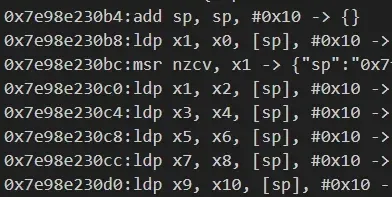
The function is small and almost entirely position-independent code — clearly just a trampoline. Soon it lands in sub_137978 in the main ELF.
Jump-table repair (incomplete)
sub_137978 is the big one — over 99% of the instruction stream lives in it. But IDA’s F5 can’t make it readable, because the whole thing is implemented with jump tables:
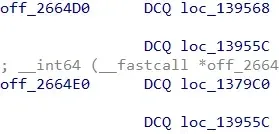
IDA does have a jump-table repair feature — Edit → Other → Specify switch idiom — and there’s a writeup on it, though the original post is dead and only a downloaded backup survives. I followed its explanation but didn’t get great results, probably because I didn’t nail down the “start of switch idiom” and “input register”.
I also tried data-flow analysis to backtrack the jump table and rewrite it as bcond addr1; b addr2. But that risks instruction reordering, and some blocks’ predecessors weren’t resolved, breaking the data flow. I couldn’t be bothered to iterate further. Instead, I pulled each BR X8 successor straight from the trace and added a reference in IDA with idc.add_cref(ea, next_ea, idc.fl_JF) — good enough for assembly-level analysis.
Function-call analysis
With this many instructions, where do you even start? Follow the function calls. Search the trace for BL. After a few short functions, I arrive at an interesting one, sub_13B1D8:
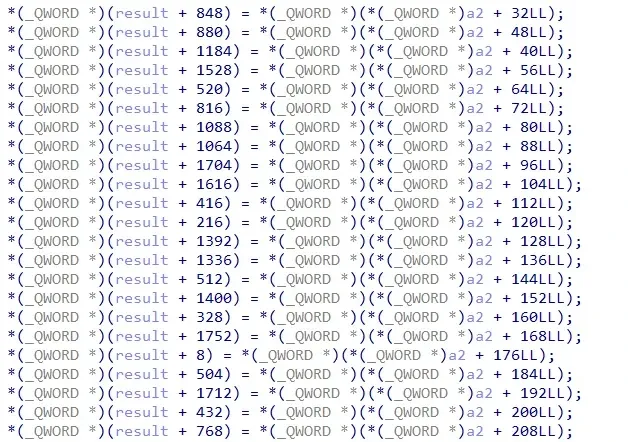
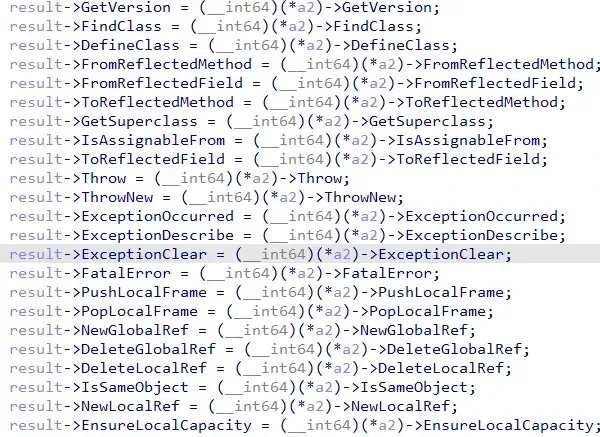
Such a large, neatly laid-out struct — and I hadn’t seen any initialization of a2 before it. Could it be…? I tried retyping a2 as JNIEnv*, and it lined up perfectly. Backing up to where the result is initialized, the result struct is 0x728 bytes, awfully close to JNIEnv’s 0x748 — so it’s very likely a reordered JNIEnv. Given the coincidence, I created the struct:
Continuing down the function calls, after another run of short functions I reach sub_144EF0. This one accounts for over 90% of the instruction stream, and no other function stands out. It’s probably the VM entry, so I name it vm_entry_sub_144EF0 and focus on it.
VM analysis
Like sub_137978, vm_entry_sub_144EF0 is entirely jump-table driven. What now?
Based on the writeups I mentioned, Dex VMP calls JNI functions heavily, so they’re a good entry point.
Starting from JNI calls
Take this one:
FindClass(androidx/appcompat/app/AppCompatActivity) libjiagu_64.so!0x19e654Going to 0x19e654 and setting the parameter to the reordered JNIEnv, sure enough, it really is calling FindClass — confirming the JNI hypothesis. Its call chain is vm_entry_sub_144EF0 -> sub_160D7C -> sub_19E508.
First, sub_160D7C:
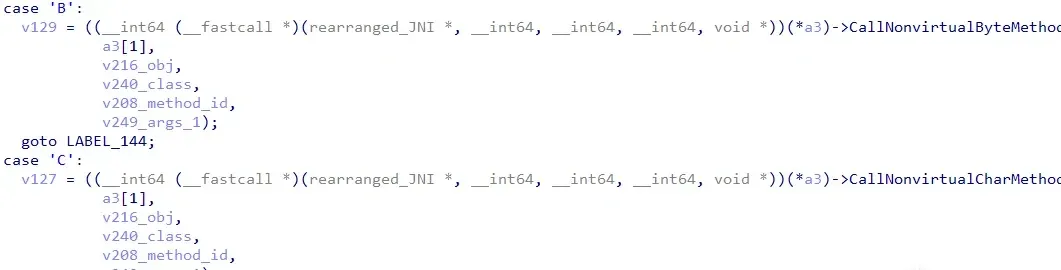
Lots of different CallXXMethod variants — clearly this interprets function-call instructions. I name it call_method_sub_160D7C.
Backing up from call_method_sub_160D7C’s call site, I find a series of cmp w0, xx comparisons and jumps — it looks like a handler dispatch flow keyed on an opcode. Tracing w0’s origin, it comes from sub_15FC34’s return value, and part of its input comes from sub_16CE0C in the same basic block. Both functions execute exactly 17 times, evenly distributed across the entire vm_entry_sub_144EF0 instruction stream.
Backing up further to loc_153FC8: checking its references, there are as many as 254. Since Dalvik opcodes are 1 byte (256 possibilities), this is almost certainly the VM’s dispatcher.
Now look at the OnCreate instructions from the unhardened sample:
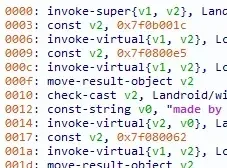
Count them — also exactly 17. So sub_15FC34 and sub_16CE0C should be the bytecode-parsing functions.
Decrypting the bytecode
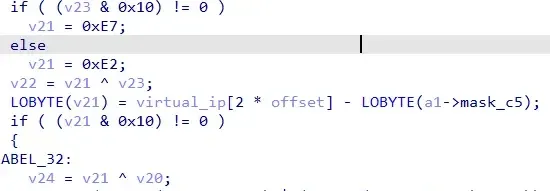
sub_16CE0C uses XOR repeatedly, like it’s decrypting bytecode:
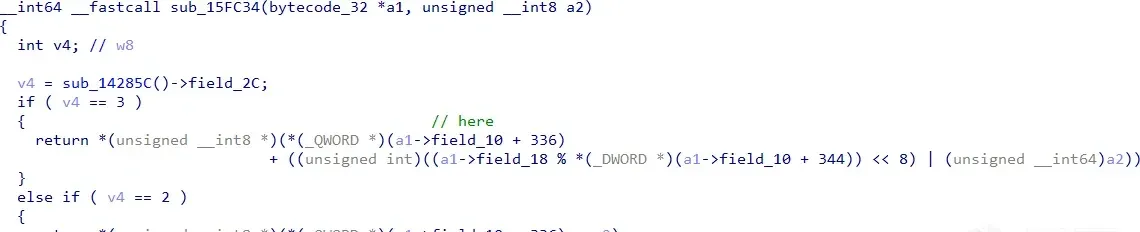
And sub_15FC34, as mentioned, returns the w0 that selects the handler. I didn’t study its generation closely — it looks like it reads from a file:
Back in call_method_sub_160D7C, I find two more functions nearly identical to sub_16CE0C, except they start decrypting at offset=2 and offset=4 respectively. Their return values are 0x154b (5451) and 0x21. Per the Dalvik invoke instruction format, offset=2 corresponds to the method index. Looking up method 5451 in 010 Editor: it’s exactly the function being called.
Arrange all the return values of these bytecode-decrypting functions in order and compare with the original bytecode:
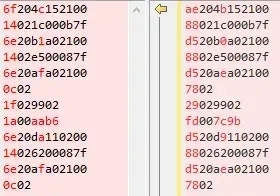
Everything matches except the opcode first byte and some operands. And even those operand differences are just index changes from the altered dex — the actual targets are still the same.
Restoring the opcodes
The rest is the grunt work of opcode recovery — but there are tells. At minimum, method- and field-related instructions can be reconstructed from the JNI calls. You can search resources for operands to see if they’re resource references, or infer opcodes from statistical signatures and context like breaking a Caesar cipher. There are also shortcuts: build your own onCreate that packs in as many instruction types as possible, harden it as a reference sample, and even if the opcode mapping changes, you can infer via handler similarity.
Summary
To sum up, onCreate’s key flow is: reorder the JNI environment, decrypt the opcode, select a handler, and decrypt operands — with the opcodes additionally permuted and needing further effort to map back to Dalvik opcodes.
Afterword
Studying this hardening scheme end to end touched FFI calls, Frida anti-debugging, dynamic ELF decryption and loading, a self-implemented linker parser and relocator, dynamic dex decryption and loading, and finally the Dex VMP. Honestly, while the Dex VMP part is where I spent the most time, it was mostly on getting a complete trace. The actual analysis afterward didn’t take long — probably because the critical bytecode-decrypting functions weren’t jump-table obfuscated (still F5-able), and the operands had no further transformation. The classic writeups from the community helped a lot too.
Still, a few questions remain open: where does the bytecode come from and how does it get loaded into memory? What’s the principle behind interpreter_wrap_int64_t and interpreter_wrap_float? Why does IDA debugging quit only when the packer’s SO hits the BRK in rtld_db_dlactivity, but not other SOs? I’ll revisit these when I get the chance.
Colin Xiao — I take on contract reverse-engineering work, and writeups like this are how I show what I can do. If you need help with anything in this space — including but not limited to the areas I cover above — I’m available. No project is too big or too small — if it’s reverse engineering and I can do it, I’ll take it. DM me on X (@colinxiao_lab) or Telegram (@ColinXiao666).
Get in touch