Reverse Engineering a Browser's Encrypted Credential Database
About the author. I’m Colin Xiao — an independent reverse engineer, mostly working solo on contract jobs. I dig into compiled code of every kind, including but not limited to: Android and iOS apps, x86/x64/ARM native binaries, packers and obfuscators, DRM and license checks, network protocols and APIs, crypto and signature algorithms, malware, game binaries, and embedded/IoT firmware. I also handle large-scale data collection and vulnerability research. If you have any project in mind, I’d be glad to take it on — whatever it is, as long as it’s within my wheelhouse. Just reach out. You can reach me on X at @colinxiao_lab or on Telegram at https://t.me/ColinXiao666.
This research is published for educational and defensive purposes. The target sample is anonymized throughout.
Reverse Engineering a Browser’s Encrypted Credential Database
Foreword
The goal
In some security engagements you need to perform forensics on a target host, and the browser is often a goldmine of information. I also wanted to sharpen my reverse engineering skills, so this writeup came out of that. I’m still early in my RE journey — corrections are welcome.
The target

First layer of decryption
SQLite3 basics
The functions you need to know from the SQLite3 library:
sqlite3_open:
int sqlite3_open(const char *filename,sqlite3 **ppDb);sqlite3_key: if the database is encrypted, you must call this first with the correct key before doing anything else. If the database isn’t encrypted, calling this and then operating on the DB instead produces “this database is encrypted or is not a database file” errors.
int sqlite3_key( sqlite3 *db, const void *pKey, int nKey)The MachineGuid key
Searching strings across all modules, chrome.dll contains "sqlite3_open/assis2.db" and a series of related SQL statements. I started from sqlite3_open.
The key thing: in SQLite3, if a database was encrypted at creation, you must run sqlite3_key to decrypt it before any SQL operation. So sqlite3_open is followed by sqlite3_key to decrypt the database:
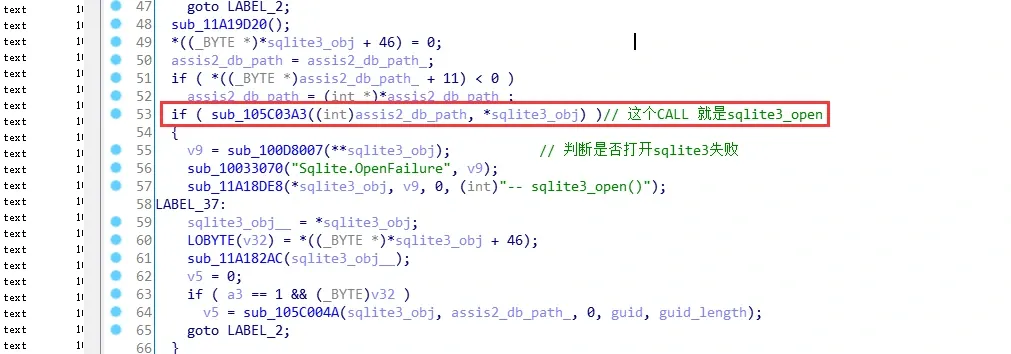
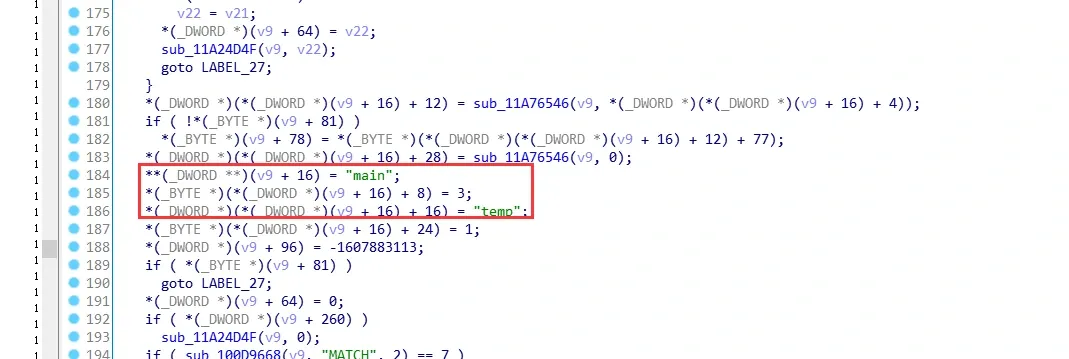
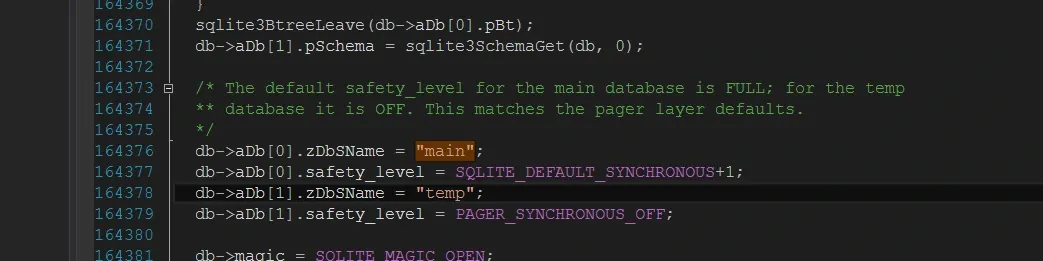
Why do I identify sub_105C03A3 as sqlite3_open? If you step inside you’ll find the same "main" / "temp" string features as the SQLite3 source — the default database name is always "main":
And sqlite3_open in the SQLite3 library has these signature features:
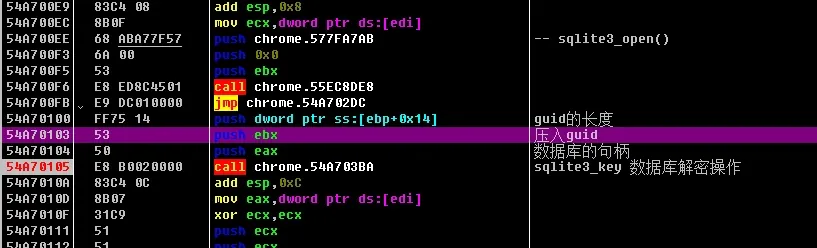
Next, sub_105C03BA does the SQLite3 decryption. It takes the database handle, and both guid and guid_length show up:
sub_105C03BA(**sqlite3_obj, guid, guid_length);
Under dynamic debugging you can see the same thing: the arguments are the database handle and a machine-serial string (the MachineGuid) plus its length, used for decryption:
With the API monitor tool you can also see this string is a serial-number value from the registry:

Second layer of decryption
That wraps up the first layer. The second layer is Base64 encoding plus AES128-ECB encryption.
Locating the key analysis point
I located the SQLite3 insert statement. The idea: at insert time the program must first encrypt the password, then assemble everything and execute the SQL, so an encryption call is bound to appear around here:
798497D7  |.  68 AEA1A77B   push chrome.7BA7A1AE;

Insert into [tb_account (domain,username,password,last_modify_time)values(?,?,passencode(?, ?), ?);
Then I set a breakpoint on the SQL statement and stepped through. It first validates the domain length format, then the username length format, then the password — one check after another, along with SQLite’s own transaction rollback handling. Worth stepping through yourself:
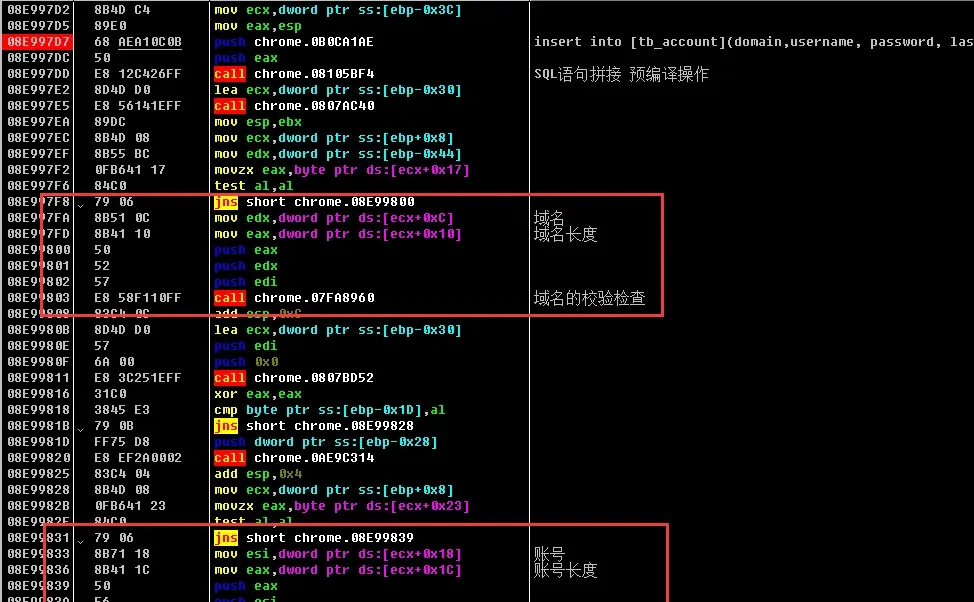
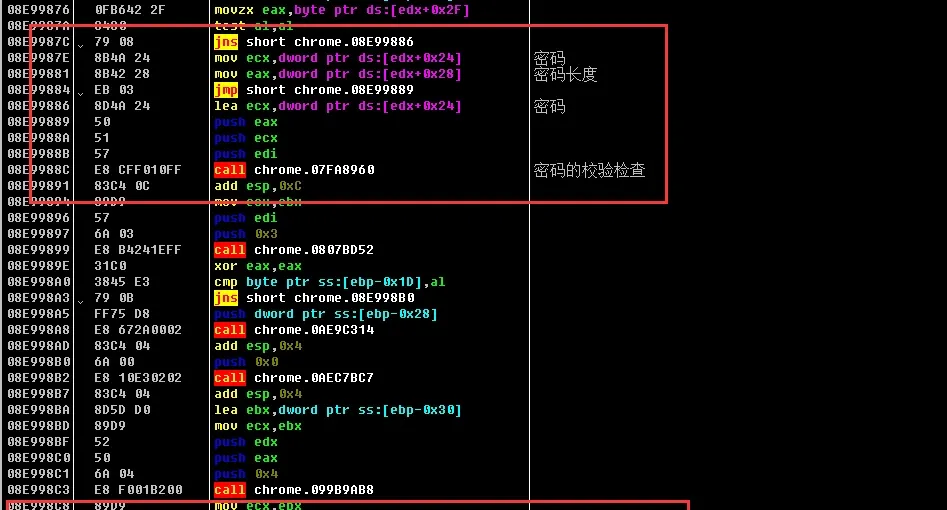
Only further down does the actual password encryption begin:
553A98CA E8 0D1E1EFF call chrome.5458B6DC ; password encryption starts here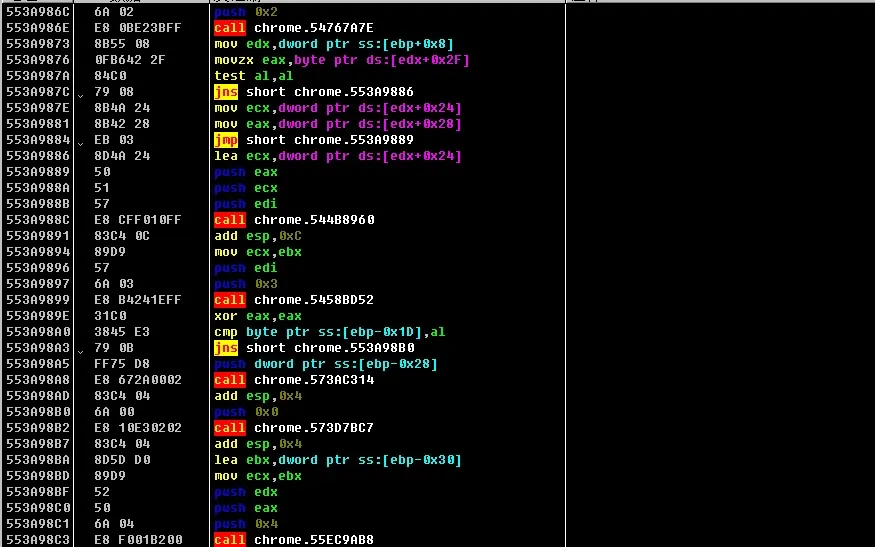
Stepping in, right before the encryption it pushes a fixed string, which is later concatenated with another string and used for encryption.
Odd/even password obfuscation
Keep single-stepping and you’ll find this CALL:
553A47B3 E8 AA020000 call chrome.553A4A62; password obfuscation CALL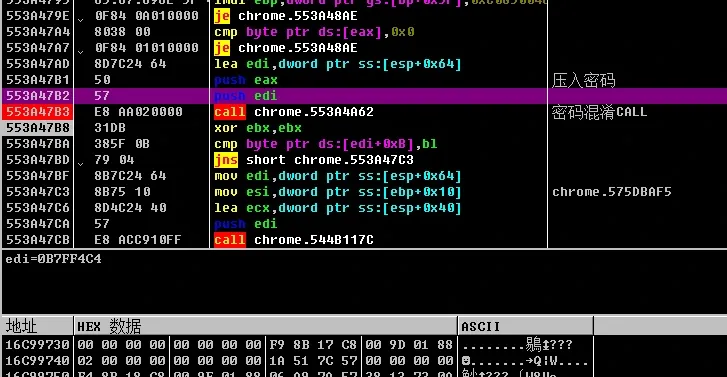
The and here makes the lowest bit 0/1, which decides between two branches:
082D4E40 81E1 FE000000 and ecx,0xFE ; take the low 2 bits080B4E34 E8 A7A20302 call chrome.0A0EF0E0 ; compute eax
080B4E39 89C1 mov ecx,eax ; ecx = eax
080B4E3B C1E9 1F shr ecx,0x1F ; ecx = ecx >> 0x1f
080B4E3E 01C1 add ecx,eax ; ecx = ecx + eax
080B4E40 81E1 FE000000 and ecx,0xFE ; ecx = ecx & 0xFE
080B4E46 29C8 sub eax,ecx ; eax = ah
080B4E48 89C3 mov ebx,eax ; ebx = ah
080B4E4A 8945 D8 mov dword ptr ss:[ebp-0x28],eax
080B4E4D 8D443F 02 lea eax,dword ptr ds:[edi+edi+0x2] ; password length * 2 + 2
080B4E51 FEC3 inc bl ; ebx = ebx + 1
080B4E53 8945 DC mov dword ptr ss:[ebp-0x24],eax ; push password length
080B4E56 50 push eax ; push password length
080B4E57 E8 E0740002 call chrome.0A0BC33C
080B4E5C 83C4 04 add esp,0x4
080B4E5F 89C1 mov ecx,eax
080B4E61 8945 E0 mov dword ptr ss:[ebp-0x20],eax
080B4E64 FF75 DC push dword ptr ss:[ebp-0x24] ; push password length
080B4E67 31C0 xor eax,eax
080B4E69 50 push eax
080B4E6A 51 push ecx
080B4E6B E8 80940102 call chrome.0A0CE2F0
080B4E70 83C4 0C add esp,0xC
080B4E73 8B45 E0 mov eax,dword ptr ss:[ebp-0x20]
080B4E76 85FF test edi,edi ; is the password length non-zero?
080B4E78 885D DC mov byte ptr ss:[ebp-0x24],bl
080B4E7B 8818 mov byte ptr ds:[eax],bl
080B4E7D 7E 65 jle short chrome.080B4EE4
080B4E7F 8B5D E0 mov ebx,dword ptr ss:[ebp-0x20] ; where the encrypted password is stored; each iteration puts a \x01 or \x02 in ebxThe final value at [ebp-0x28] drives the branch below and decides how the obfuscation byte is generated. It goes through an odd/even check: if [ebp-0x28] is \x02, it reads the even-indexed bytes; if \x01, the odd-indexed bytes:
08404E83    807D D8 00      cmp byte ptr ss:[ebp-0x28],0x0
08404E87    74 2E           je short chrome.08404EB7
08404E89    807D DC 02      cmp byte ptr ss:[ebp-0x24],0x2
08404E8D    75 51           jnz short chrome.08404EE0
AES128-ECB encryption
Next comes key generation. Here it pushes another serial-like string; together with the one pushed earlier during encryption, the two get concatenated to produce the AES key:
553A47E8 E8 77FEFFFF call chrome.553A4664 ; generates a 32-byte value, likely the key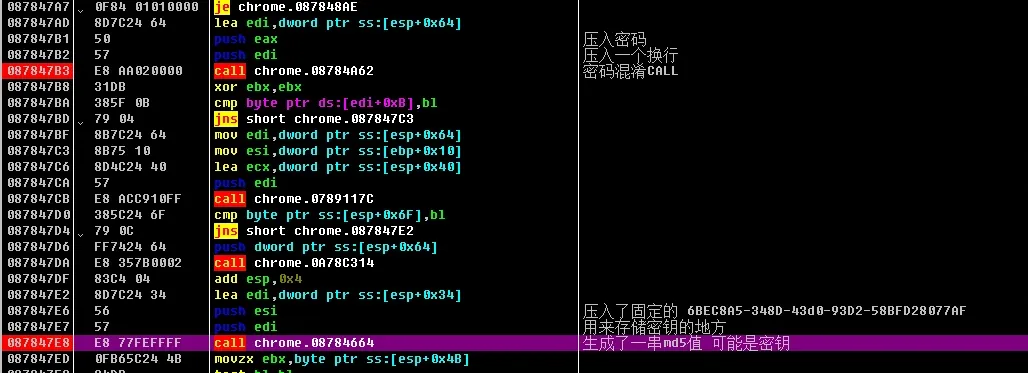
Stepping into this call, you see the two strings being concatenated:
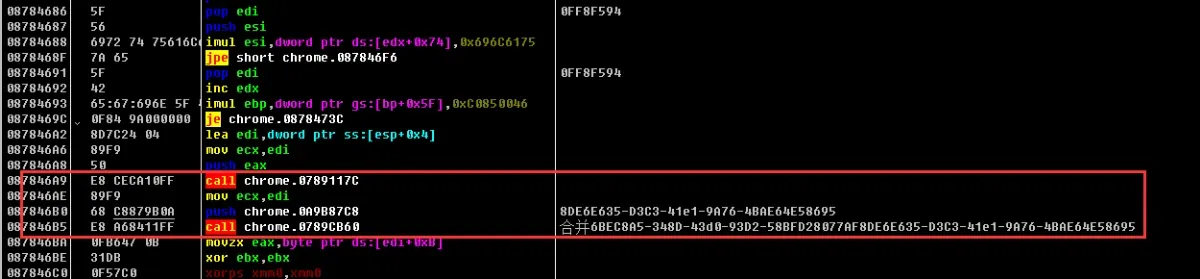
Then the key generation begins:
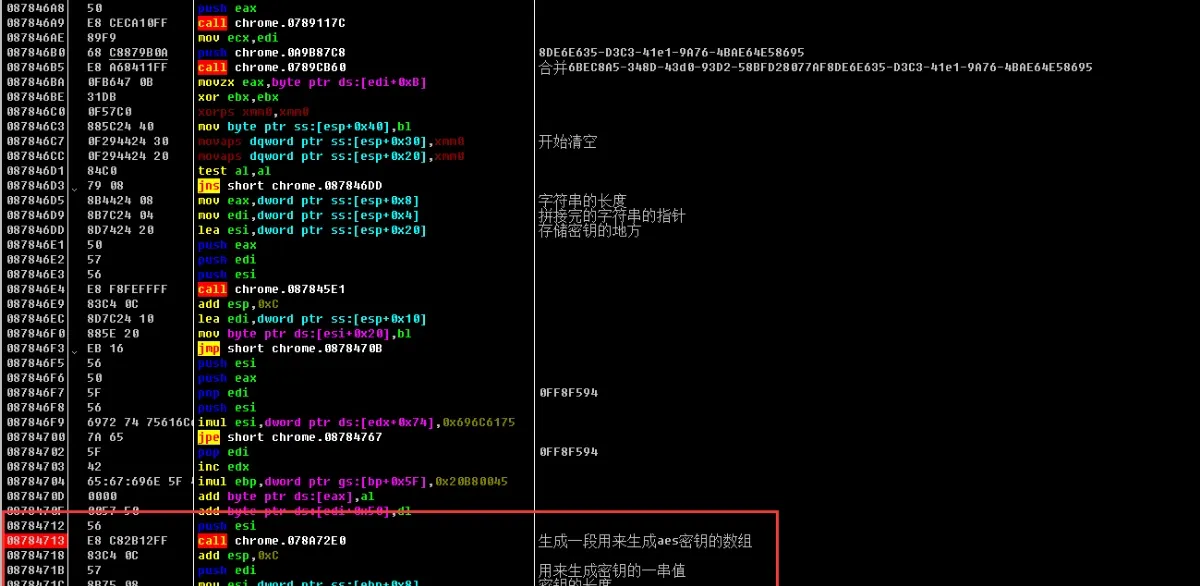
There are two main calls: one turns the concatenated string into a byte array, the other converts that byte array’s hex values into a string. The algorithm takes the last eight bytes of the two concatenated fixed serials and encrypts them into a byte array:
08784713 E8 C82B12FF call chrome.078A72E0 ; produces the byte array used to derive the AES keyThis call converts the byte array’s hex into a string:
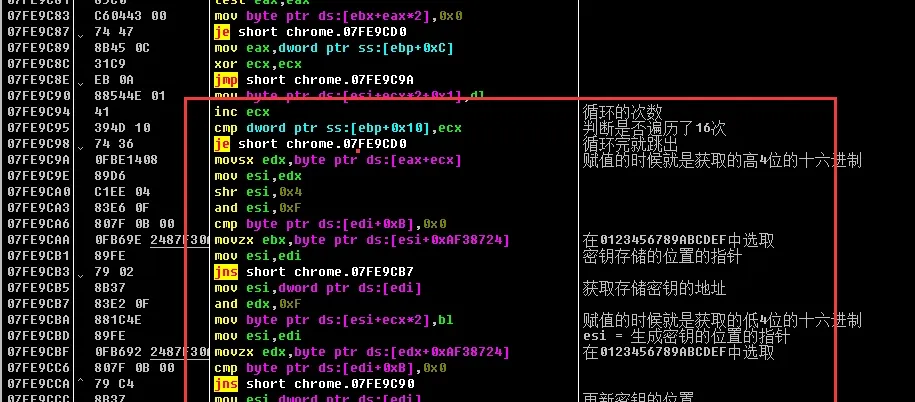
08784720 E8 CBC47F00 call chrome.08F80BF0 ; produces the AES keyThen the AES encryption call — it pushes the obfuscated password and the AES128-ECB key:
553A4860 E8 66E2FFFF call chrome.553A2ACB ; AES encryption CALL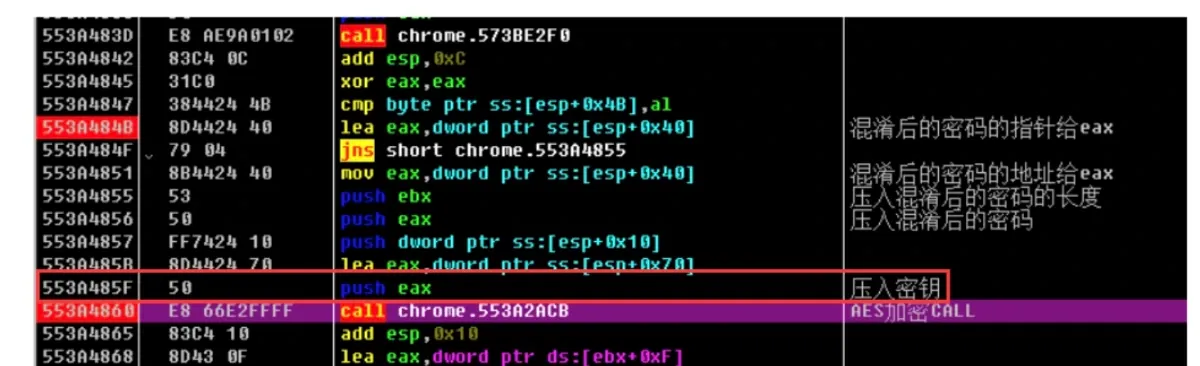
Base64 encoding
After AES, it generates a Base64 encoding (needed because the result is stored in the database):
553A4933 E8 988120FF call chrome.545ACAD0 ; produces the base64 encodingThe Base64 encoding uses the default alphabet:
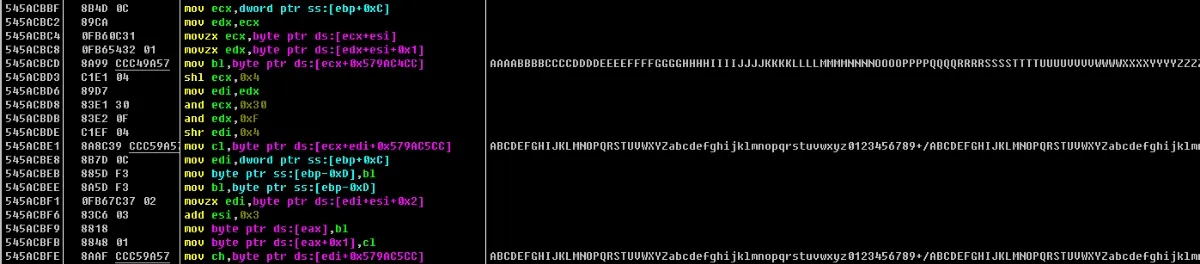
At this point AES128-ECB and Base64 are done. Finally it concatenates the fixed string (4B01F200ED01) with the Base64 result:
553A495A E8 458613FF call chrome.544DCFA4; concatenate the (4B01F200ED01) serial and the base64 output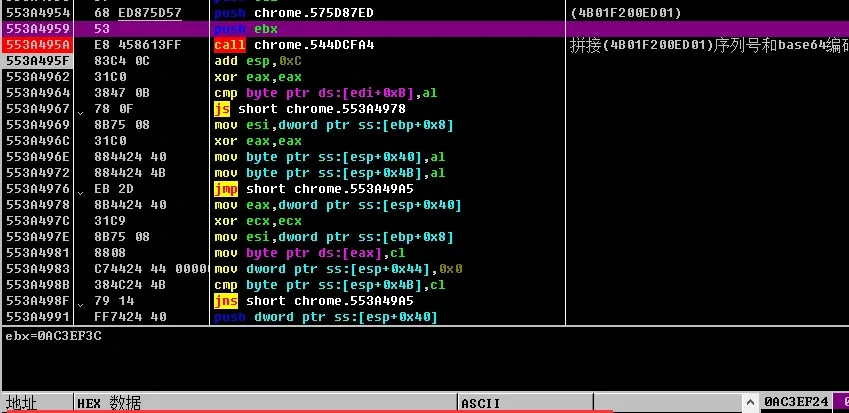
Summary
Simulating the decryption
The local machine’s MachineGuid:
5cbfe6e6-21aa-40df-8b1e-XXXXXXXXXXXXX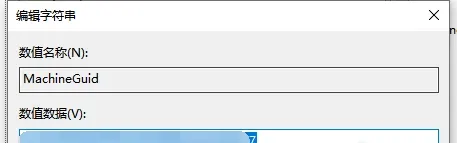
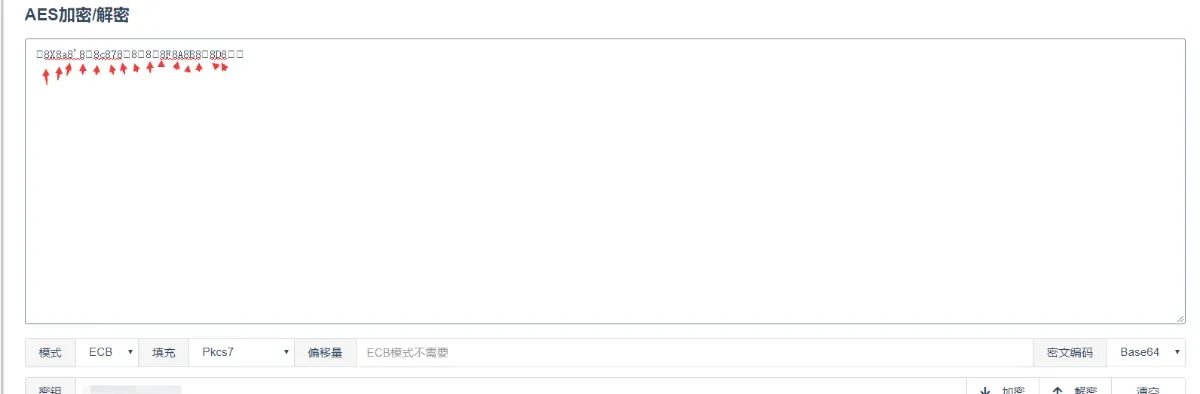
At this point the output looks like garbage — and it is. The browser itself adds a layer of obfuscation, the same one described above. Read every other byte and you get the example password 222222.
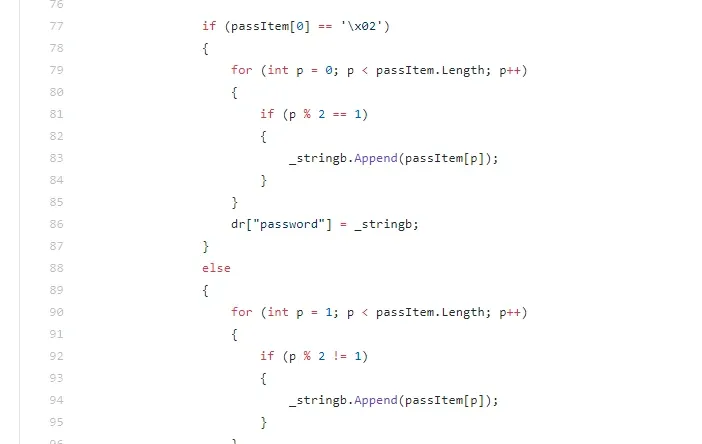
The first byte’s \x01 / \x02 handling matters:
Implementing the decryption
The whole decryption chain:
MachineGuid -> Base64 -> aes128 ecb -> odd/even de-obfuscationGet the MachineGuid
MachineGuid = pomocna.getKey(@"SOFTWARE\Microsoft\Cryptography", "MachineGuid", 2);

dbPath = pomocna.getKey(@"[redacted]SeSES\DefaultIcon", null, 0).Split(',')[0].Replace(@"[redacted]se6\Application\[redacted]se.exe", "") + @"[redacted]se6\User Data\Default\apps\LoginAssis\assis2.db";
Base64 decode
Convert.FromBase64StringAES decrypt
        public string DecryptAes(string text)
        {

            byte[] src = Convert.FromBase64String(text);
            RijndaelManaged aes = new RijndaelManaged();
            byte[] key = Encoding.ASCII.GetBytes("");
            aes.KeySize = 128;
            //aes.IV = Encoding.UTF8.GetBytes("");//
            //aes.Padding = PaddingMode.Zeros;//
            //aes.BlockSize = 128;//
            aes.Padding = PaddingMode.None;
            aes.Mode = CipherMode.ECB;
            using (ICryptoTransform decrypt = aes.CreateDecryptor(key, null))
            {
                byte[] dest = decrypt.TransformFinalBlock(src, 0, src.Length);
                decrypt.Dispose();
                return Encoding.UTF8.GetString(dest);
            }
        }
Odd/even detection and reading
                if (passItem[0] == '\x02')
                {
                    for (int p = 0; p < passItem.Length; p++)
                    {
                        if (p % 2 == 1)
                        {
                            _stringb.Append(passItem[p]);
                        }
                    }
                    dr["password"] = _stringb;
                }
                else
                {
                    for (int p = 1; p < passItem.Length; p++)
                    {
                        if (p % 2 != 1)
                        {
                            _stringb.Append(passItem[p]);
                        }
                    }
                    dr["password"] = _stringb;
                }
            }
A helper tool on GitHub
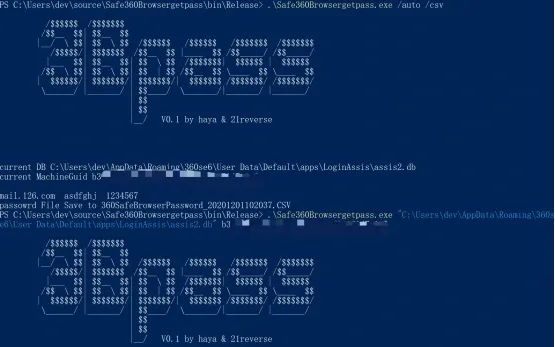
There’s a one-click helper for grabbing this browser’s passwords: a Cobalt Strike script plus a decryption utility designed to save red-team effort by downloading the browser database and recording the key for offline decryption. 360SafeBrowsergetpass.cna records the information needed for offline decryption, and 3Bpass does the password decryption (supporting both local auto-export and offline decryption).
GitHub: https://github.com/hayasec/360SafeBrowsergetpass
This writeup is for technical sharing only — stay legal, and nothing here is the author’s responsibility.
The tools are for authorized penetration testing only — stay legal, and nothing here is the author’s responsibility.
Colin Xiao — I take on contract reverse-engineering work, and writeups like this are how I show what I can do. If you need help with anything in this space — including but not limited to the areas I cover above — I’m available. No project is too big or too small — if it’s reverse engineering and I can do it, I’ll take it. DM me on X (@colinxiao_lab) or Telegram (@ColinXiao666).
Get in touch