Reverse Engineering the Alienware Keyboard USB Protocol for Custom RGB Control
About the author. I’m Colin Xiao — an independent reverse engineer, mostly working solo on contract jobs. I dig into compiled code of every kind, including but not limited to: Android and iOS apps, x86/x64/ARM native binaries, packers and obfuscators, DRM and license checks, network protocols and APIs, crypto and signature algorithms, malware, game binaries, and embedded/IoT firmware. I also handle large-scale data collection and vulnerability research. If you have any project in mind, I’d be glad to take it on — whatever it is, as long as it’s within my wheelhouse. Just reach out. You can reach me on X at @colinxiao_lab or on Telegram at https://t.me/ColinXiao666.
This research is published for educational and defensive purposes. The target sample is anonymized throughout.
A friend of mine bought a Dell G16 that shipped with Linux out of the box. That is a problem if you care about RGB: Dell’s keyboard control center only runs on Windows, so there was no way to control the keyboard backlighting. It gave me a good excuse to do something I had been meaning to try — reverse-engineer the keyboard’s USB protocol and write my own lighting controller. I own an Alienware M16, so that is the target I started with.
How the keyboard and the software talk
AlienFX devices connect to the computer over USB, and keyboard lighting is controlled through the HID (Human Interface Device) protocol. When you use the Alienware Command Center, it sends specific commands to the keyboard telling it how to set the lighting.
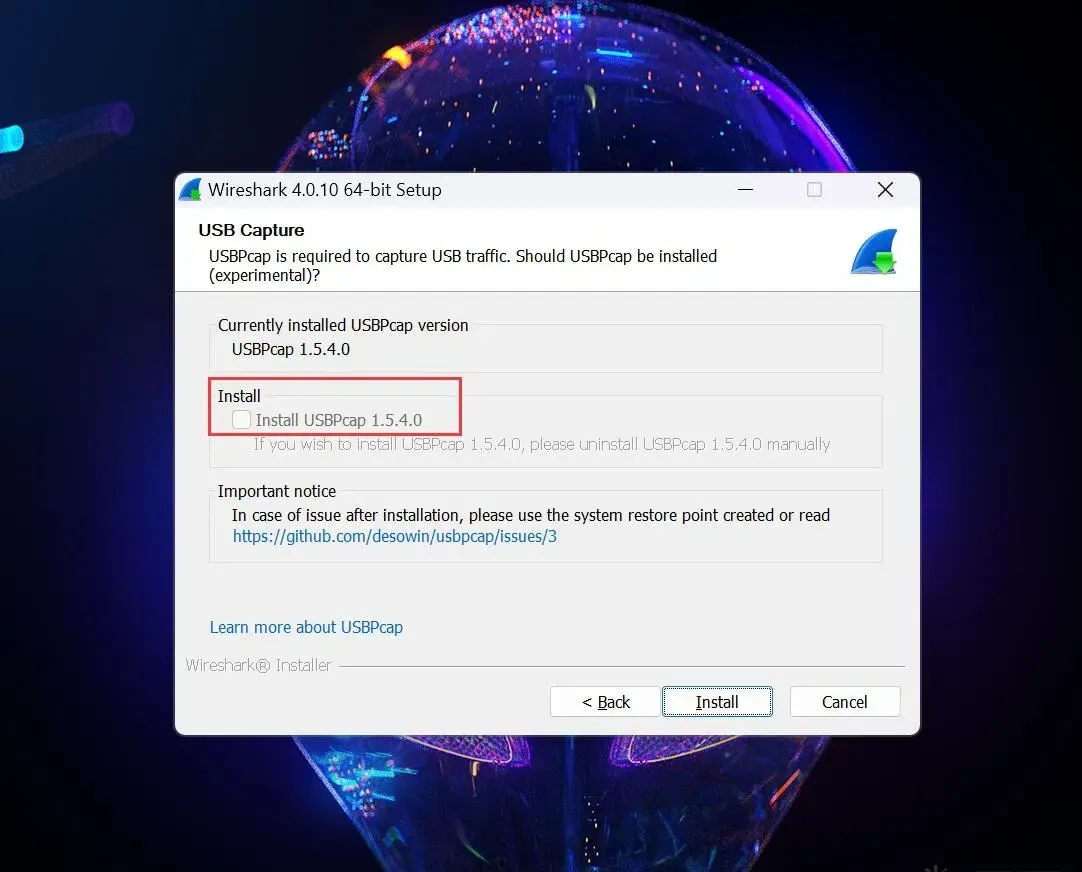
Wireshark ships with HID parsing these days, so we can analyze the USB traffic directly — just make sure to tick USBPcap when installing Wireshark.
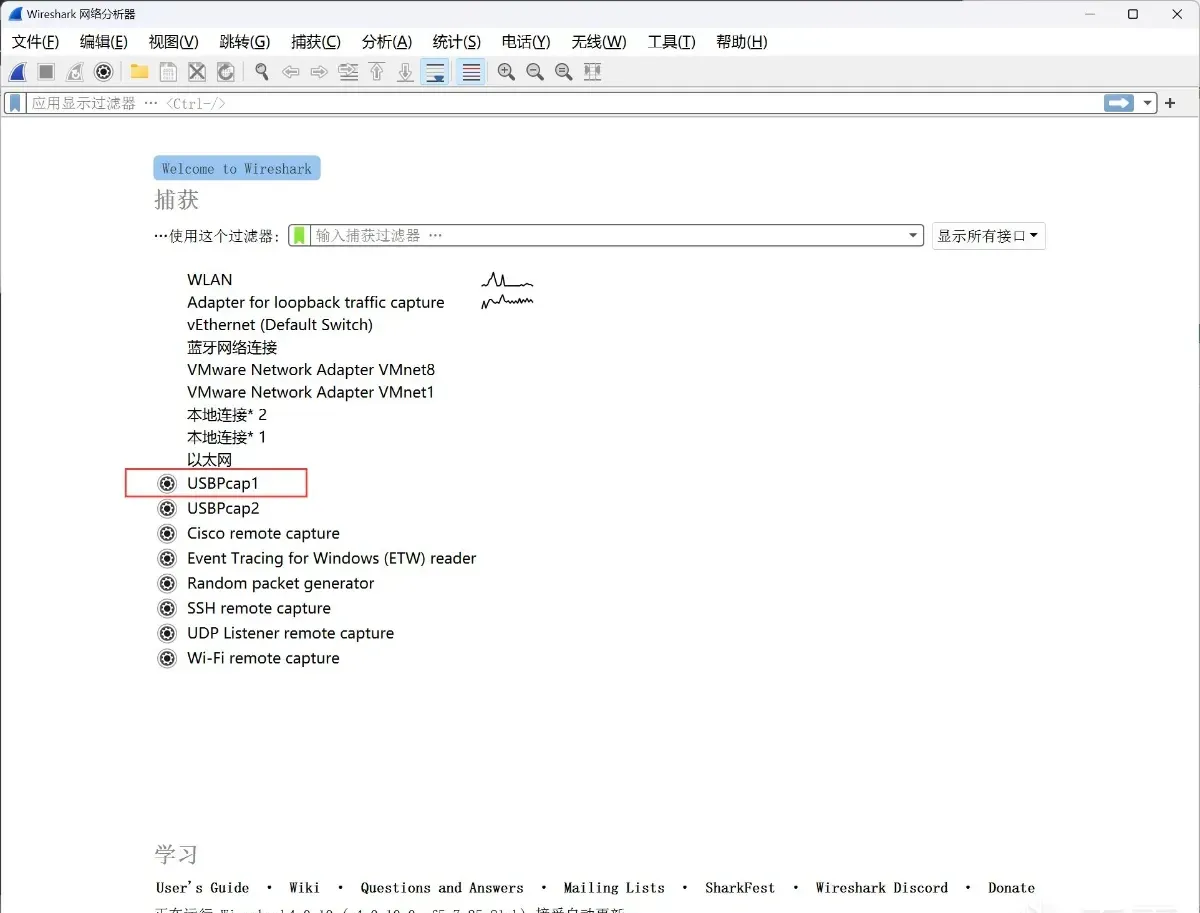
Open Wireshark and select USBPcap1.
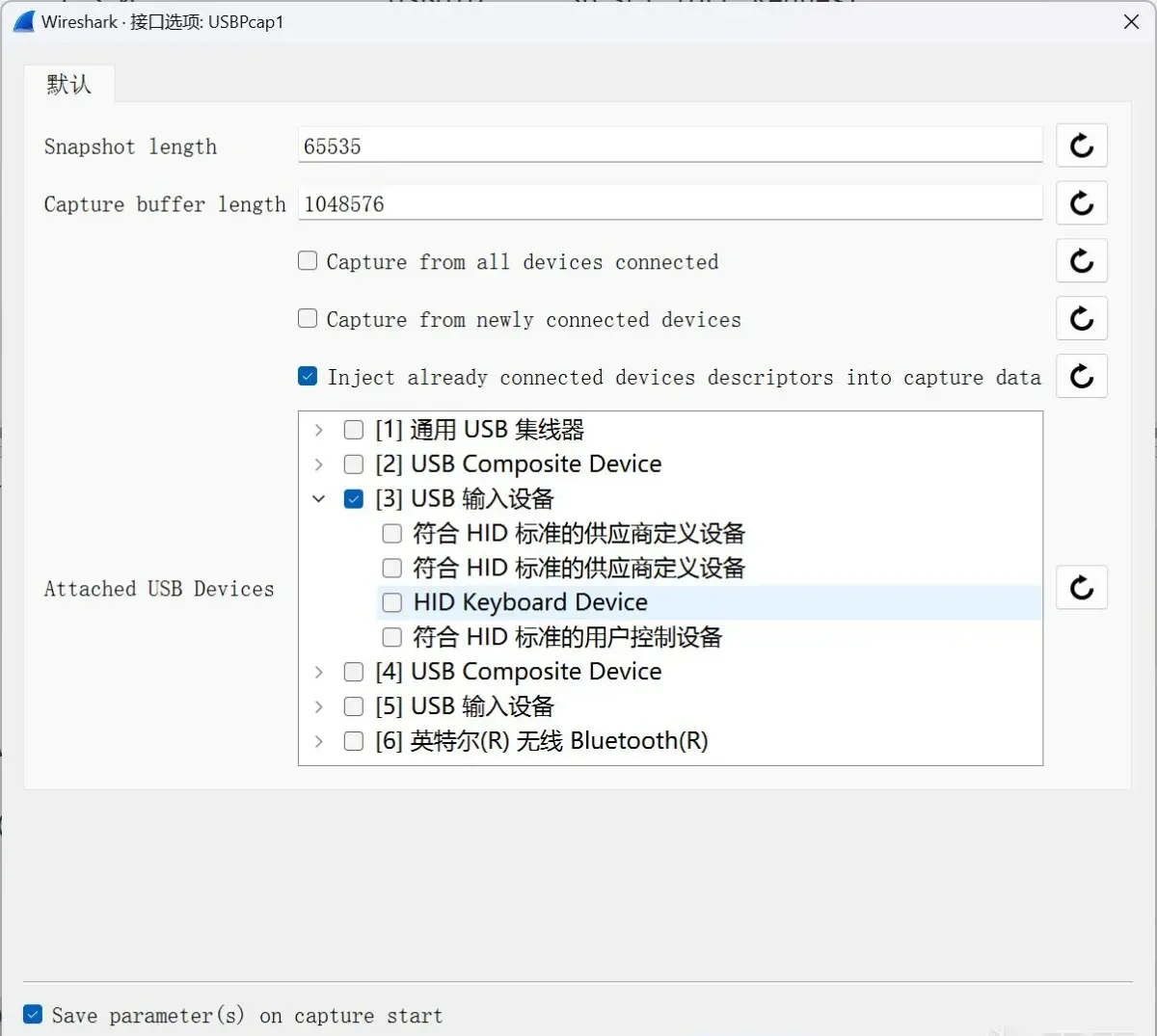
Pick the USB device you want to capture, then hit start.
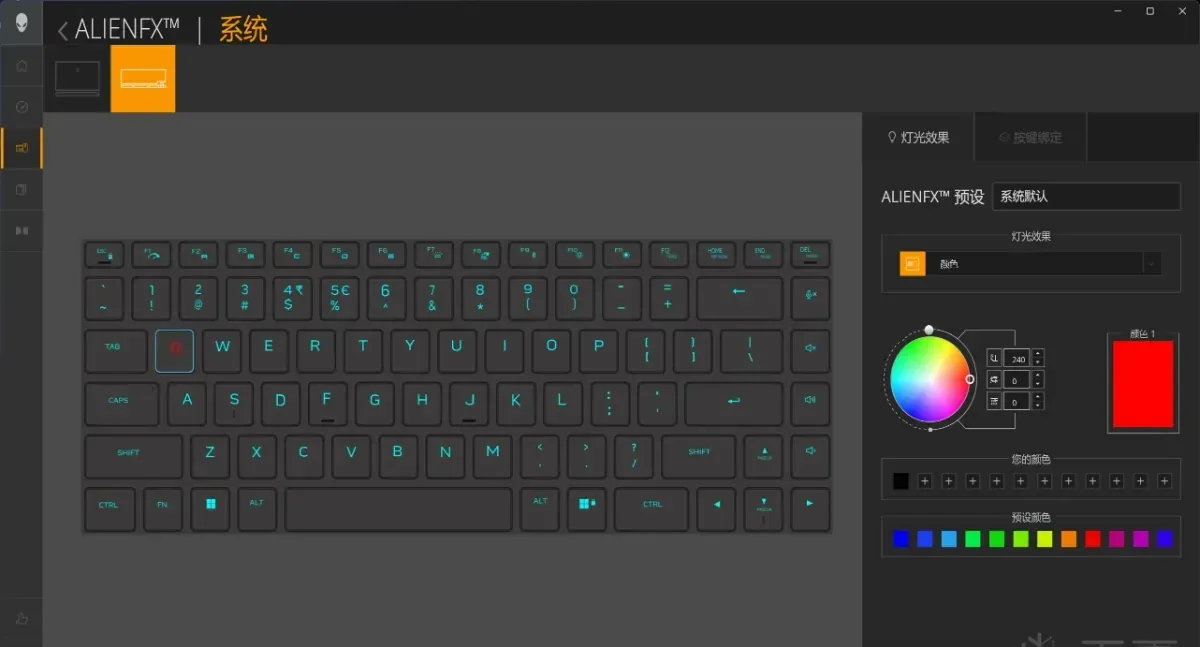
With the capture running, open Alienware Command Center, set a key to red, and apply.
Two packets show up in Wireshark — one sent and one received. Filter out the receive side so you only see what the host sends, with usb.src == "host".
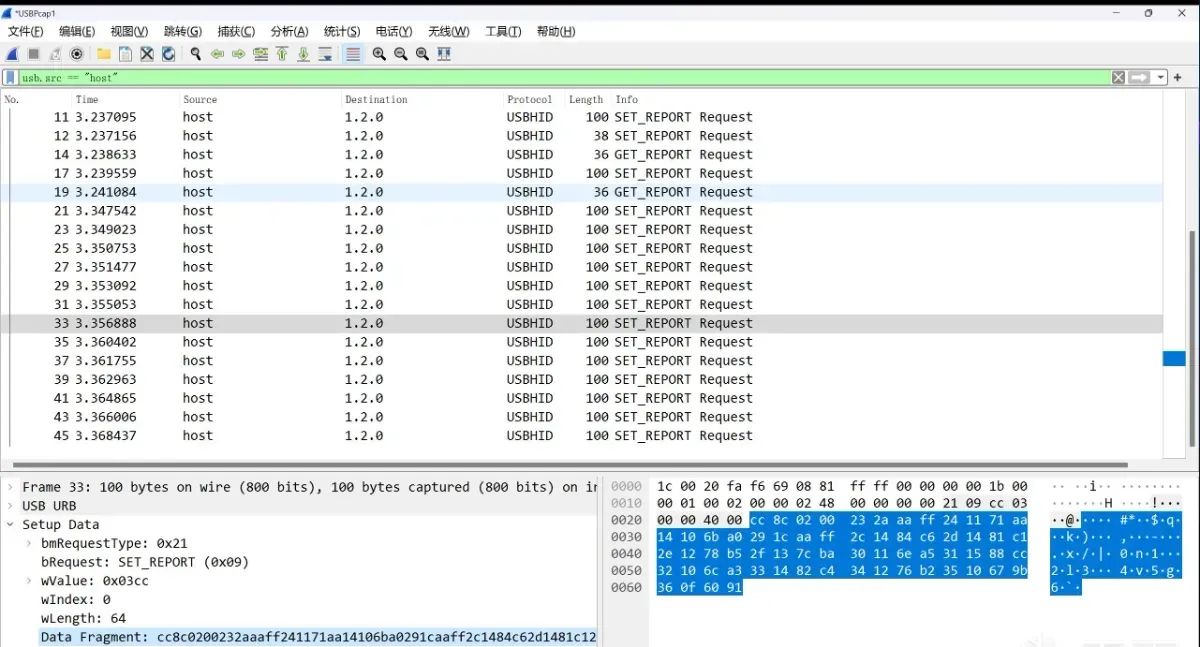
Changing a single key sends a lot of packets, and each packet has a different length. Each packet is a command, and commands have different lengths, so the job is to figure out the format of each one.
Verifying which packet does the work
To work out which packet actually changes the color, I wrote a small test program that replays packets back to the keyboard and watches what it does.
import logging
import time

import usb
from usb import USBError


class AlienwareUSBDriver:
    VENDOR_ID = 0xd62
    PRODUCT_ID = 0xc2b0

    SEND_BM_REQUEST_TYPE = 0x21
    SEND_B_REQUEST = 0x09
    SEND_W_VALUE = 0x3cc
    SEND_W_INDEX = 0x0

    PACKET_LENGTH = 63

    def __init__(self):
        self._control_taken = False
        self._device = None

    def acquire(self):
        """ Acquire control of the USB controller."""
        if self._control_taken:
            return

        self._device = usb.core.find(idVendor=AlienwareUSBDriver.VENDOR_ID, idProduct=AlienwareUSBDriver.PRODUCT_ID)

        if self._device is None:
            logging.error("ERROR: No AlienFX USB controller found; tried VID {}, PID {}"
                          .format(AlienwareUSBDriver.VENDOR_ID, AlienwareUSBDriver.PRODUCT_ID))

        try:
            self._device.set_configuration()
        except USBError as exc:
            logging.error("Cant set configuration. Error : {}".format(exc.strerror))

        try:
            usb.util.claim_interface(self._device, 0)
        except USBError as exc:
            logging.error("Cant claim interface. Error : {}".format(exc.strerror))

        self._control_taken = True
        logging.debug("USB device acquired, VID={}, PID={}".format(hex(AlienwareUSBDriver.VENDOR_ID),
                                                                   hex(AlienwareUSBDriver.PRODUCT_ID)))

    def release(self):
        if not self._control_taken:
            return

        try:
            usb.util.release_interface(self._device, 0)
        except USBError as exc:
            logging.error("Cant release interface. Error : {}".format(exc.strerror))

        try:
            self._device.attach_kernel_driver(0)
        except USBError as exc:
            logging.error("Cant re-attach. Error : {}".format(exc.strerror))

        self._control_taken = False
        logging.debug("USB device released, VID={}, PID={}".format(hex(AlienwareUSBDriver.VENDOR_ID),
                                                                   hex(AlienwareUSBDriver.PRODUCT_ID)))

    def write_packet(self, pkt):
        if not self._control_taken:
            return

        try:
            num_bytes_sent = self._device.ctrl_transfer(
                self.SEND_BM_REQUEST_TYPE, self.SEND_B_REQUEST,
                self.SEND_W_VALUE, self.SEND_W_INDEX,
                pkt, 0)

            logging.debug("wrote: {}, {} bytes".format(pkt, len(pkt)))
            if len(pkt) != num_bytes_sent:
                logging.error("writePacket: intended to write {} of {} bytes but wrote {} bytes"
                              .format(pkt, len(pkt), num_bytes_sent))

            return num_bytes_sent
        except USBError as exc:
            logging.error("writePacket: {}".format(exc))
The device identifiers are visible in Wireshark:
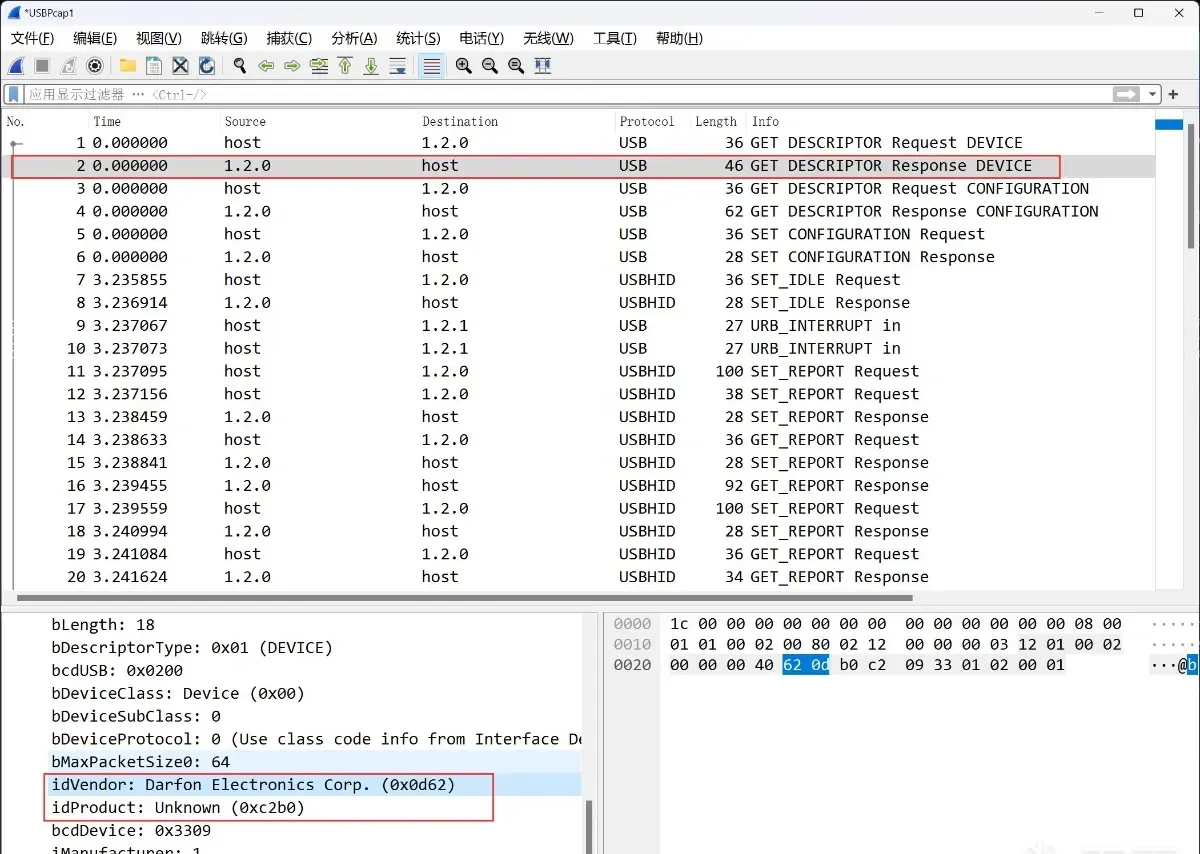
VENDOR_ID = 0xd62
PRODUCT_ID = 0xc2b0
The ctrl_transfer call needs bmRequestType, bRequest, wValue, and wIndex — all readable straight off the Wireshark capture.
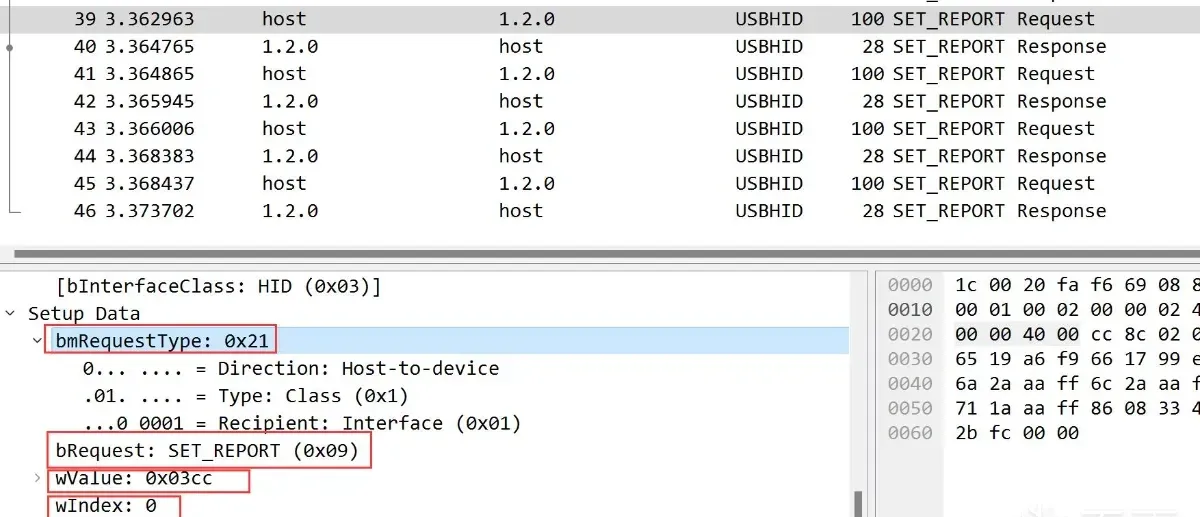
OUT_BM_REQUEST_TYPE = 0x21
OUT_B_REQUEST = 0x09
OUT_W_VALUE = 0x3cc
OUT_W_INDEX = 0x0
Replaying the captured packets one by one, exactly one of them changes the Q key’s color:
if __name__ == '__main__':
    device = AlienwareUSBDriver()
    device.acquire()

    data = bytes.fromhex('cc8c020073072f46121278b56519a6f9661799e568127ab7691aaaff6a2aaaff6c2aaaff6e137fbf7019a6f9711aaaff8608334b8708334b8808334b2bfc0000')
    device.write_packet(data)
Packet format
With the right packet in hand, the format falls out. To change colors, AWCC sends a CC 8C 02 00 command that carries the color of every key in one shot. Each key’s color is three bytes — R, G, B — so changing those three bytes changes the key’s color. Here is the packet layout:
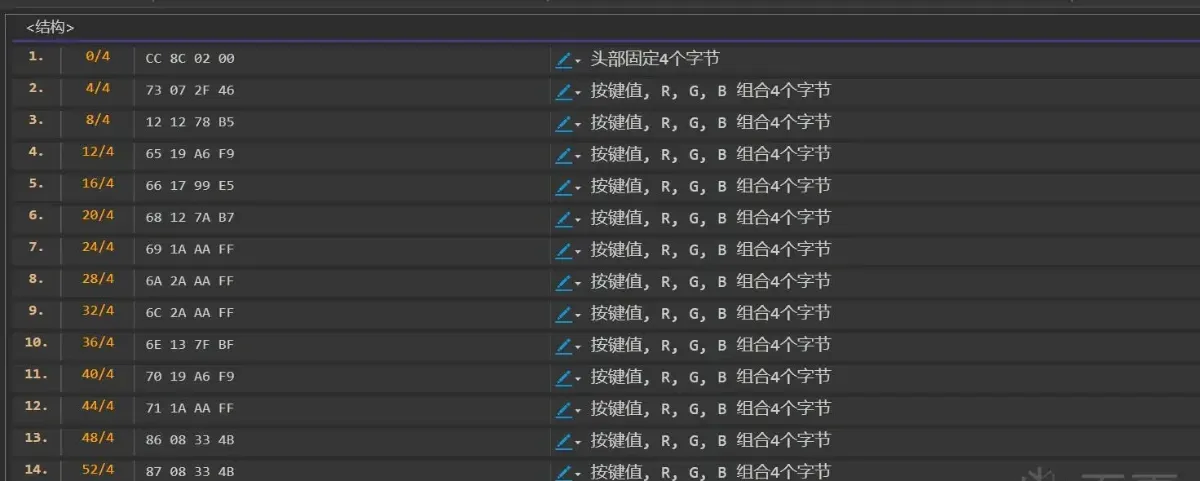
After a lot of trial and error, I mapped every key to its index in the packet:
| Key | Code | Key | Code | Key | Code | Key | Code |
|---|---|---|---|---|---|---|---|
| esc | 1 | f4 | 5 | u | 0x31 | lshift | 0x52 |
| f1 | 2 | f5 | 6 | i | 0x32 | z | 0x54 |
| f2 | 3 | f6 | 7 | o | 0x33 | x | 0x55 |
| f3 | 4 | f7 | 8 | p | 0x34 | c | 0x56 |
| f8 | 9 | 3 | 0x18 | [ | 0x35 | v | 0x57 |
| f9 | 0xa | 4 | 0x19 | ] | 0x36 | b | 0x58 |
| f10 | 0xb | 5 | 0x1a | \ | 0x38 | n | 0x59 |
| f11 | 0xc | 6 | 0x1b | a | 0x3f | m | 0x5a |
| f12 | 0xd | 7 | 0x1c | s | 0x40 | , | 0x5b |
| home | 0xe | 8 | 0x1d | d | 0x41 | . | 0x5c |
| end | 0xf | 9 | 0x1e | f | 0x42 | / | 0x5d |
| del | 0x10 | 0 | 0x1f | g | 0x43 | rshift | 0x5f |
| ` | 0x15 | - | 0x20 | h | 0x44 | up | 0x73 |
| 1 | 0x16 | = | 0x21 | j | 0x45 | lctrl | 0x65 |
| 2 | 0x17 | back | 0x24 | k | 0x46 | fn | 0x66 |
| tab | 0x29 | caps | 0x3e | l | 0x47 | lwin | 0x68 |
| q | 0x2b | enter | 0x4b | ; | 0x48 | lalt | 0x69 |
| w | 0x2c | space | 0x6a | ’ | 0x49 | ralt | 0x70 |
| e | 0x2d | rwin | 0x6e | right | 0x88 | rctrl | 0x71 |
| r | 0x2e | ralt | 0x70 | down | 0x87 | left | 0x86 |
| t | 0x2f | microphone | 0x14 | voice0 | 0x11 | voice+ | 0x13 |
| y | 0x30 | voice- | 0x12 | voice+ | 0x13 | voice- | 0x12 |
A quick script confirms the mapping:
if __name__ == '__main__':
    device = AlienwareUSBDriver()
    device.acquire()


    keymap = {
        'esc': 1, 'f1': 2, 'f2': 3, 'f3': 4, 'f4': 5, 'f5': 6, 'f6': 7, 'f7': 8, 'f8': 9, 'f9': 0xa, 'f10': 0xb, 'f11': 0xc, 'f12': 0xd, 'home': 0xe, 'end': 0xf,
        'del': 0x10, '`': 0x15, '1': 0x16, '2': 0x17, '3': 0x18, '4': 0x19, '5': 0x1a, '6': 0x1b, '7': 0x1c, '8': 0x1d, '9': 0x1e, '0': 0x1f, '-': 0x20, '=': 0x21,
        'back': 0x24, 'microphone': 0x14, 'tab': 0x29, 'q': 0x2b, 'w': 0x2c, 'e': 0x2d, 'r': 0x2e, 't': 0x2f, 'y': 0x30, 'u': 0x31, 'i': 0x32, 'o': 0x33, 'p': 0x34,
        '[': 0x35, ']': 0x36, '\\': 0x38, 'voice0': 0x11, 'caps': 0x3e, 'a': 0x3f, 's': 0x40, 'd': 0x41, 'f': 0x42, 'g': 0x43, 'h': 0x44, 'j': 0x45, 'k': 0x46,
        'l': 0x47, ';': 0x48, '\'': 0x49, 'enter': 0x4b, 'voice+': 0x13, 'lshift': 0x52, 'z': 0x54, 'x': 0x55, 'c': 0x56, 'v': 0x57, 'b': 0x58, 'n': 0x59, 'm': 0x5a,
        ',': 0x5b, '.': 0x5c, '/': 0x5d, 'rshift': 0x5f, 'up': 0x73, 'voice-': 0x12, 'lctrl': 0x65, 'fn': 0x66, 'lwin': 0x68, 'lalt': 0x69, 'space': 0x6a, 'ralt': 0x70,
        'rwin': 0x6e, 'rctrl': 0x71, 'left': 0x86, 'down': 0x87, 'right': 0x88
    }

    def get_key_bytes(a, b, a_color, b_color):
        header = bytes.fromhex('cc8c0200')
        a_bytes = (a << 24 | a_color).to_bytes(4, byteorder='big')
        b_bytes = (b << 24 | b_color).to_bytes(4, byteorder='big')

        data = header + a_bytes + b_bytes
        out = data + bytes(64 - len(data))
        return out


    chars = list(keymap.keys())
    a = 0
    a_color = 0
    b = 0
    b_color = 0
    for i, k in enumerate(chars):
        key = keymap[k]
        a = key
        a_color = 0xff0000
        b = 0
        b_color = 0
        if i > 0:
            b = keymap[chars[i - 1]]
            b_color = 0x00ff00
        device.write_packet(get_key_bytes(a, b, a_color, b_color))
        time.sleep(0.3)

    a_color = 0x00ff00
    b_color = 0x00ff00
    device.write_packet(get_key_bytes(a, b, a_color, b_color))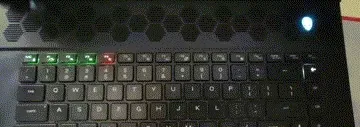
From here, you can set each key’s color dynamically.
Other commands
There are also commands to clear the lighting:
cc8c1000000000000000000000000000000000000000000000000000000000000000000000000000000000000000000000000000000000000000000000000000to turn off the wave lighting effect:
cc8c0500010101010101010101010101010101010101010101010101010101010101010101010101000000000100010101010101010101010101010100000000
cc8c0600000101010101010101010101010101000000000000010001010101010101010101000100000000000101000101010001000100010100010000000000
and to turn it on:
cc800305000001010101000000000000050000000000000000000000000000000000000000000000000000000000000000000000000000000000000000000000What actually took the time
The slowest part to figure out was this: when Alienware Command Center sets the whole keyboard to a single color, it sends many packets, and each key’s color value is slightly different. I assumed there was some special algorithm at work. Setting the whole board to green, for example, produced these per-key colors:
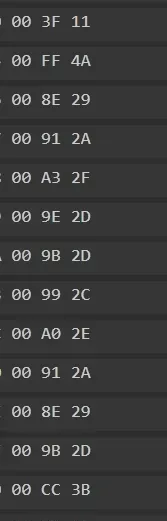
Parsing them out gives the RGB values:
00 3F 11- RGB(0, 63, 17)00 FF 4A- RGB(0, 255, 74)00 8E 29- RGB(0, 142, 41)00 91 2A- RGB(0, 145, 42)00 A3 2F- RGB(0, 163, 47)00 9E 2D- RGB(0, 158, 45)00 9B 2D- RGB(0, 155, 45)00 99 2C- RGB(0, 153, 44)00 A0 2E- RGB(0, 160, 46)00 91 2A- RGB(0, 145, 42)00 8E 29- RGB(0, 142, 41)00 9B 2D- RGB(0, 155, 45)00 CC 3B- RGB(0, 204, 59)00 8E 29- RGB(0, 142, 41)00 FF 4A- RGB(0, 255, 74)
All green-toned, but with different brightness and saturation — 00 FF 4A is a bright green while 00 8E 29 is a much deeper one. So there is no hidden algorithm after all: the software just jitters each key’s color with similar-looking values.
The full pipeline — capture with USBPcap, replay with a Python USB driver, then decode the command format — is reusable against any HID device you want to drive yourself, which is exactly the position a Linux user with an OEM keyboard finds themselves in.
Colin Xiao — I take on contract reverse-engineering work, and writeups like this are how I show what I can do. If you need help with anything in this space — including but not limited to the areas I cover above — I’m available. No project is too big or too small — if it’s reverse engineering and I can do it, I’ll take it. DM me on X (@colinxiao_lab) or Telegram (@ColinXiao666).
Get in touch