Reverse Engineering an iOS Rhythm Game: Binary Patching, Cert-Pinning Bypass, and Mutual-TLS Interception
About the author. I’m Colin Xiao — an independent reverse engineer, mostly working solo on contract jobs. I dig into compiled code of every kind, including but not limited to: Android and iOS apps, x86/x64/ARM native binaries, packers and obfuscators, DRM and license checks, network protocols and APIs, crypto and signature algorithms, malware, game binaries, and embedded/IoT firmware. I also handle large-scale data collection and vulnerability research. If you have any project in mind, I’d be glad to take it on — whatever it is, as long as it’s within my wheelhouse. Just reach out. You can reach me on X at @colinxiao_lab or on Telegram at https://t.me/ColinXiao666.
This research is published for educational and defensive purposes. The target sample is anonymized throughout.
Reverse Engineering an iOS Rhythm Game: Binary Patching, Cert-Pinning Bypass, and Mutual-TLS Interception
Intro
This is a music rhythm game with mixed local and online gameplay. It recently shipped v4.0.255 — reportedly the final entry in the series — so it seemed like a good time to dig in.
Extracting and unpacking the IPA
Prerequisites: a jailbroken iOS device.
- Download and install the game from the App Store.
- Decrypt and export it as an IPA using Clutch.
- Copy the IPA to a PC.
- Unzip it with 7-Zip or any unzip tool.
Patching the fragment value
Let’s start with a simple fragment-value patch, just to confirm the modify-and-run flow works end to end.
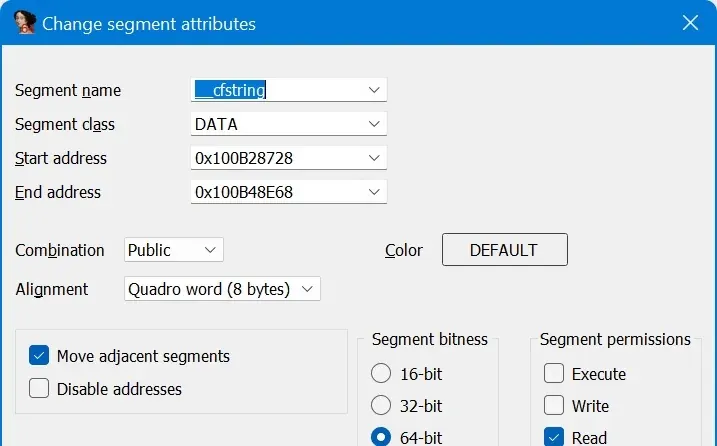
Load the main binary Arc-mobile in IDA x64 and wait for auto-analysis. Open Shift-F7 (Segments) and set the permissions of every segment with const, string, or data in its name to read-only, so IDA recognizes the strings when decompiling.
A little searching shows the fragment value lives in AppData Container/Library/Preferences/moe.low.arc.plist under the fr_v key, with a sibling fr_k key that verifies fr_v — some kind of hash. None of that matters, though: editing the local cache only works once, because the in-game value rewrite clobbers your edit. Let’s try a more effective approach.
In IDA’s Python console, 'fr_v'.encode().hex(' ') gives the hex bytes of the string, then in Hex View press Alt-B (Binary search) to find those bytes. (The string may be too short for IDA to recognize as a string, hence binary search rather than string search.)
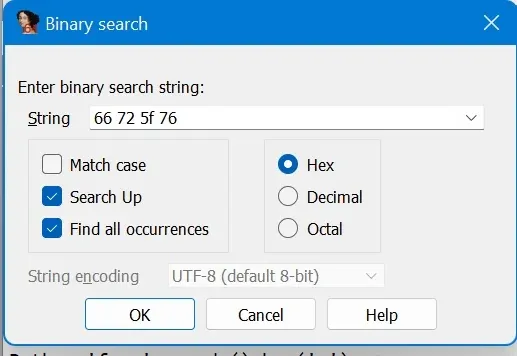
It’s found in the __cstring segment. Following the XREF leads to a function that reads fr_v and fr_k, does some verification-looking work, and returns either fr_v or 0 (0 presumably meaning verification failed).
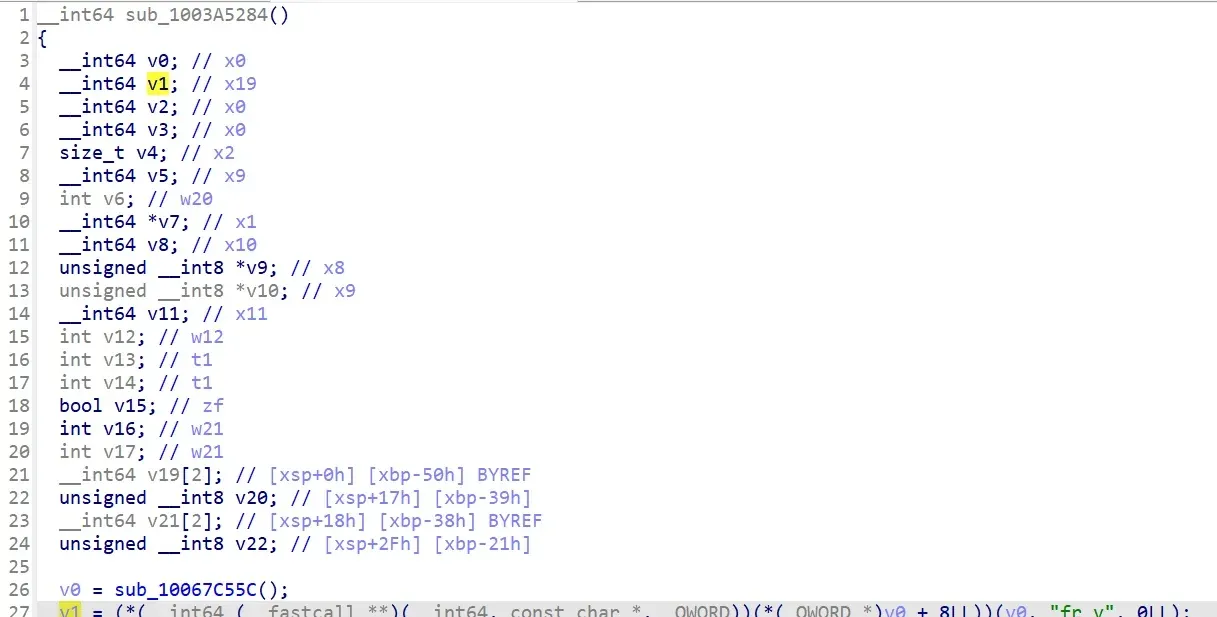
Now check how the function is called:
The return value is assigned straight into a struct with no further check. So changing the fragment value is trivial — we don’t even need to understand how fr_k verifies anything.
If you have Keypatch installed you can patch directly; to be tool-agnostic, here we generate the machine code from scratch. Open Compiler Explorer, compile a function that returns 999999999, and pick the armv8-a target:
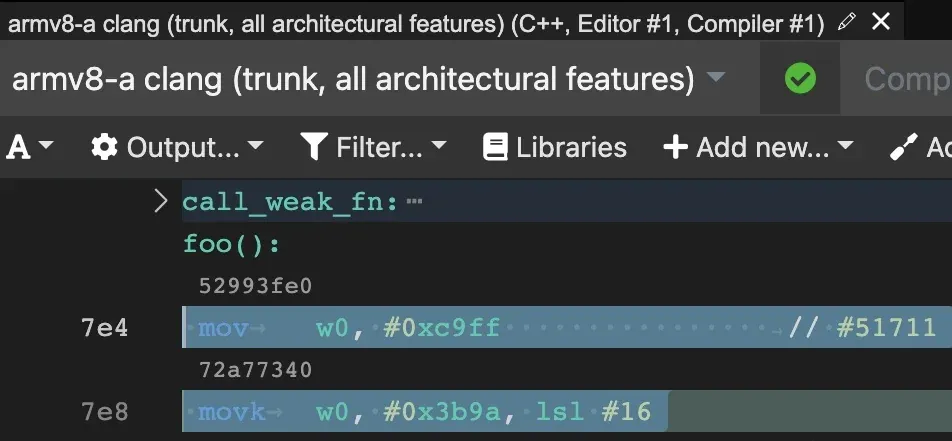
The short hex line above each assembly line is the machine code, but shown as little-endian DWORDs — swap the bytes before writing them into the binary.
Back in IDA’s disassembly, put the cursor on the first line of the target function, switch to Hex View, press F2 to edit, overwrite the hex bytes with our machine code, and press F2 again to commit:

Back in the disassembly view the function now returns 999999999. Press P to re-analyze it as a function, then F5 for pseudocode.

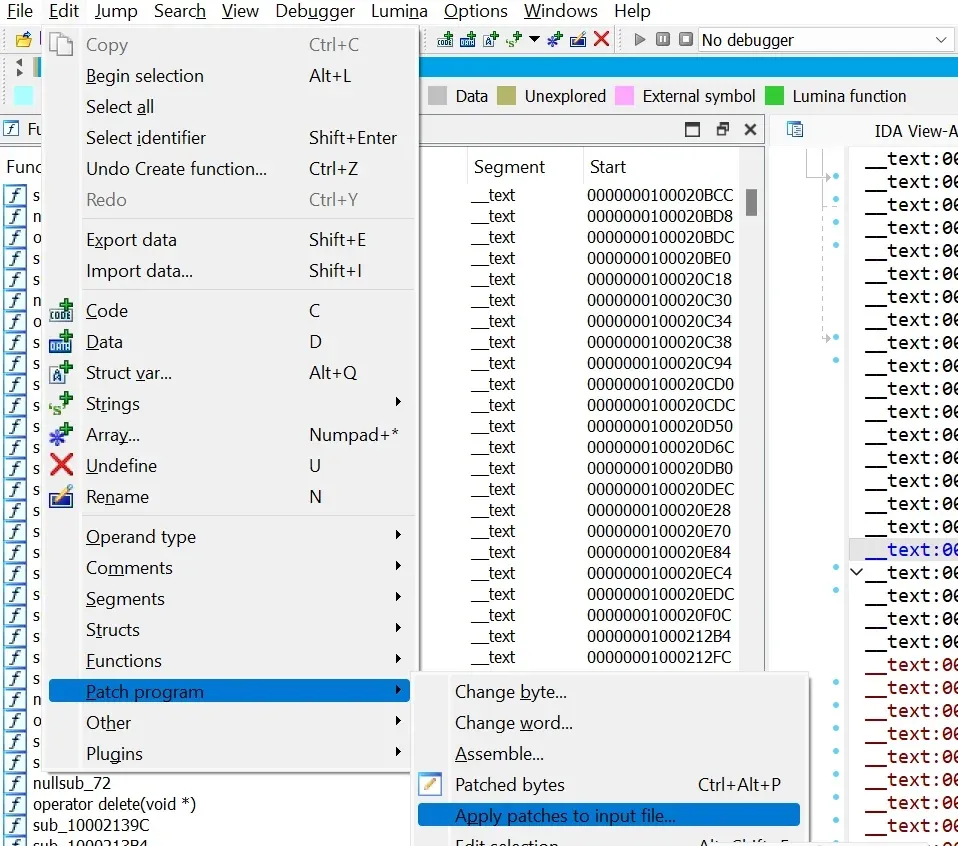
Now write the changes back into the Arc-mobile file via Edit → Patch program → Apply patches to input file… (available only when you’re in the disassembly or hex view).
Next, sideload the modified app. There are plenty of options here and it doesn’t strictly require a jailbreak — AltStore, AltServerPatcher, Sideloadly, Cydia Impactor, or even manual install — so I won’t go into detail.
If all went well, the installed game starts with 999999999 fragments every launch. That means you’ve got the full modify-IPA-and-install pipeline working. Now for something more interesting.
Rewriting the songlist file
There’s plenty of public documentation on the game’s resource format, so I’ll keep it brief. The main track files live under songs/, and songlist lists every track — it’s the index the game loads tracks from. To protect songlist from modification, the game hash-checks it, and the hash is hardcoded in the Arc-mobile binary.
Press Shift-F12 (strings), Ctrl-F search songlist, find the songs/songlist string, then follow the XREF to a function:
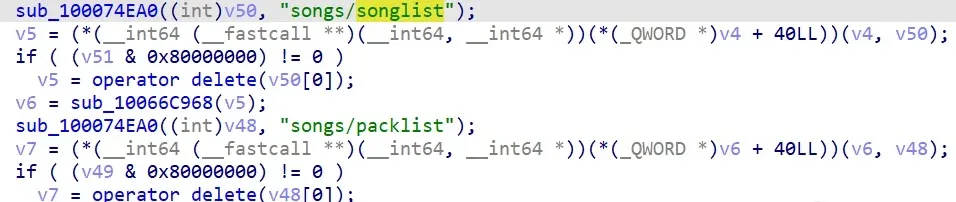
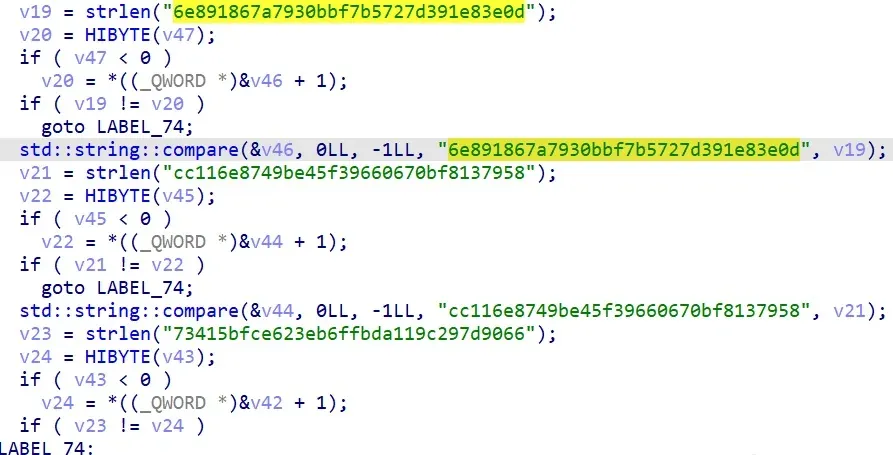
More telling, the second half of the function has this hash-comparison block:
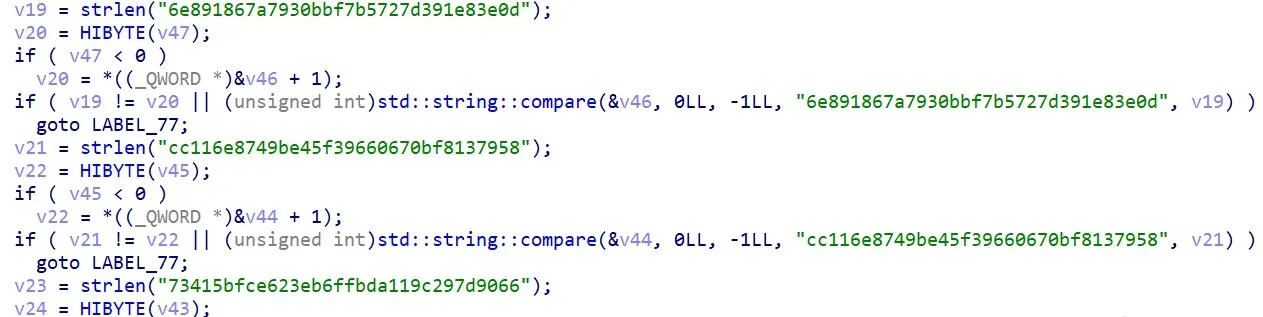
No doubt about it — this function loads the index files under songs/ and verifies them, three files in total: songlist, packlist, and unlocks. Let’s just bypass the check. First the assembly around the hash-string comparison:
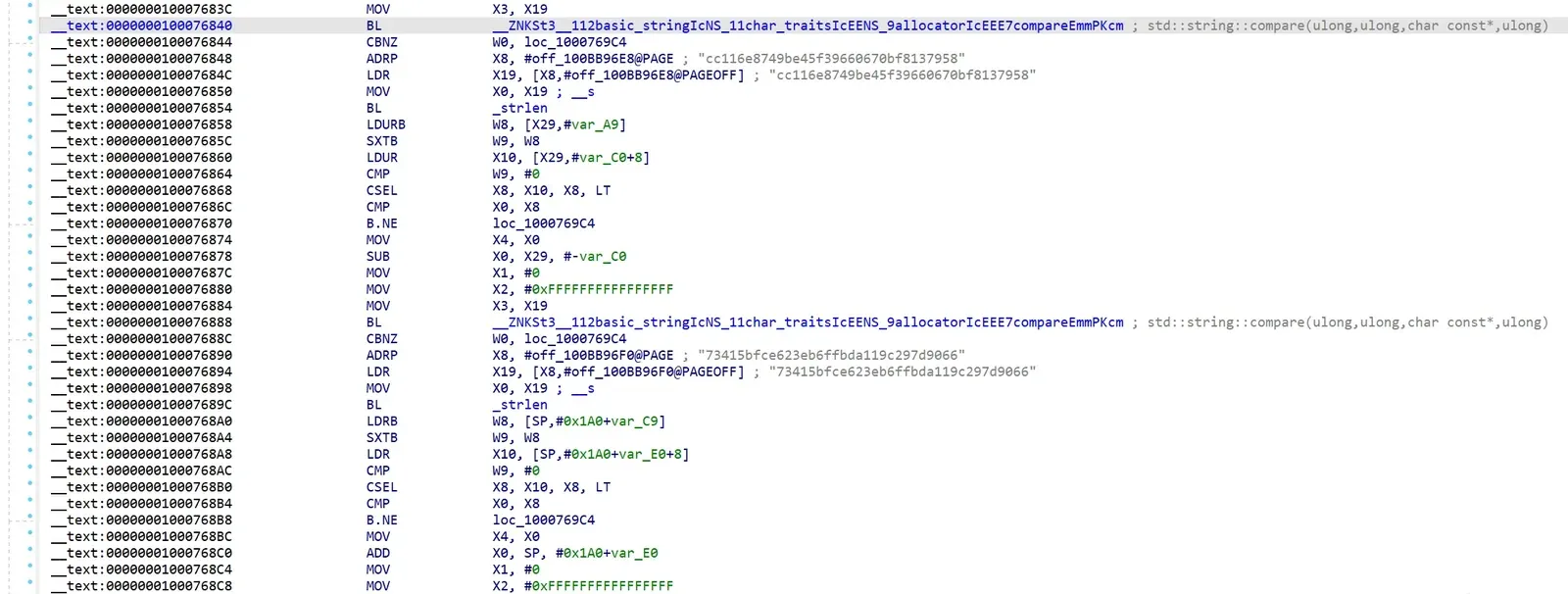
Right after the std::string::compare call comes a CBNZ: if the return value W0 != 0 (strings don’t match), it jumps away. To bypass the check we want the “match” path (W0 == 0) — i.e. no jump. So the simple mod is to replace all those CBNZ with NOP. No need to figure out how the hashes are computed at all.
Open Compiler Explorer again, translate NOP to machine code — 1F 20 03 D5 — and replace the CBNZ machine code:

In the pseudocode, the std::string::compare calls have all become no-ops.
Now we can freely change the files under songs/. For example, delete the remote_dl field of a download-required song in songlist, drop the downloaded ogg/aff files into that song id’s folder, and it becomes a local song with no download. Or edit unlocks to change how songs are unlocked — even make them unlock-free. I’ll leave that exploration to the reader.
Capturing the HTTPS API
Next, something slightly harder: capturing the HTTPS API traffic. First configure a man-in-the-middle proxy on the iOS device that can replace the HTTPS certificate and decrypt the traffic. You want a MITM tool that records packets — Burp Suite, mitmproxy, Charles Proxy, etc. I’ll use Burp Suite.
Set up Burp Suite’s proxy listener and the iOS network proxy, then install Burp’s HTTPS CA certificate into iOS’s trusted certificates. After that you should see some captured packets in Burp’s log.
But when you open the game and do something, no API packets show up in Burp. From experience, that’s cert pinning — time to unpin.
Searching the strings in Arc-mobile confirms the game uses the open-source TrustKit for cert pinning. Reading TrustKit’s source, the relevant function is [TSKPinningValidator evaluateTrust:forHostname:] — it validates the certificate for each request’s target and returns true on success. Knowing that, bypassing the pinning is trivial.
Open Compiler Explorer and write a function that returns true:
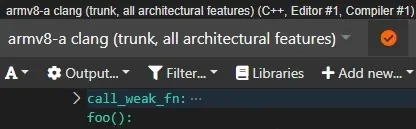
In IDA’s Function window, Ctrl-F search evaluateTrust to find the target, then overwrite the machine code as before.
Save, install, and try to capture again — still no API data in Burp. What’s going on? The cert pinning is already bypassed, but the game has another layer: client-side HTTPS certificate verification.
In a normal HTTPS request the client verifies the server’s certificate. In this setup, though, the server also verifies the client’s certificate — the connection is only established when both sides validate. Burp sits in the middle and blocks the client from sending its certificate to the server. If the MITM let the two sides validate each other directly, it couldn’t decrypt the traffic. So we have to extract the game’s client certificate and its private key.
Searching tells us that client-certificate verification on iOS always references NSURLAuthenticationMethodClientCertificate. Search that in IDA and we land on the function:
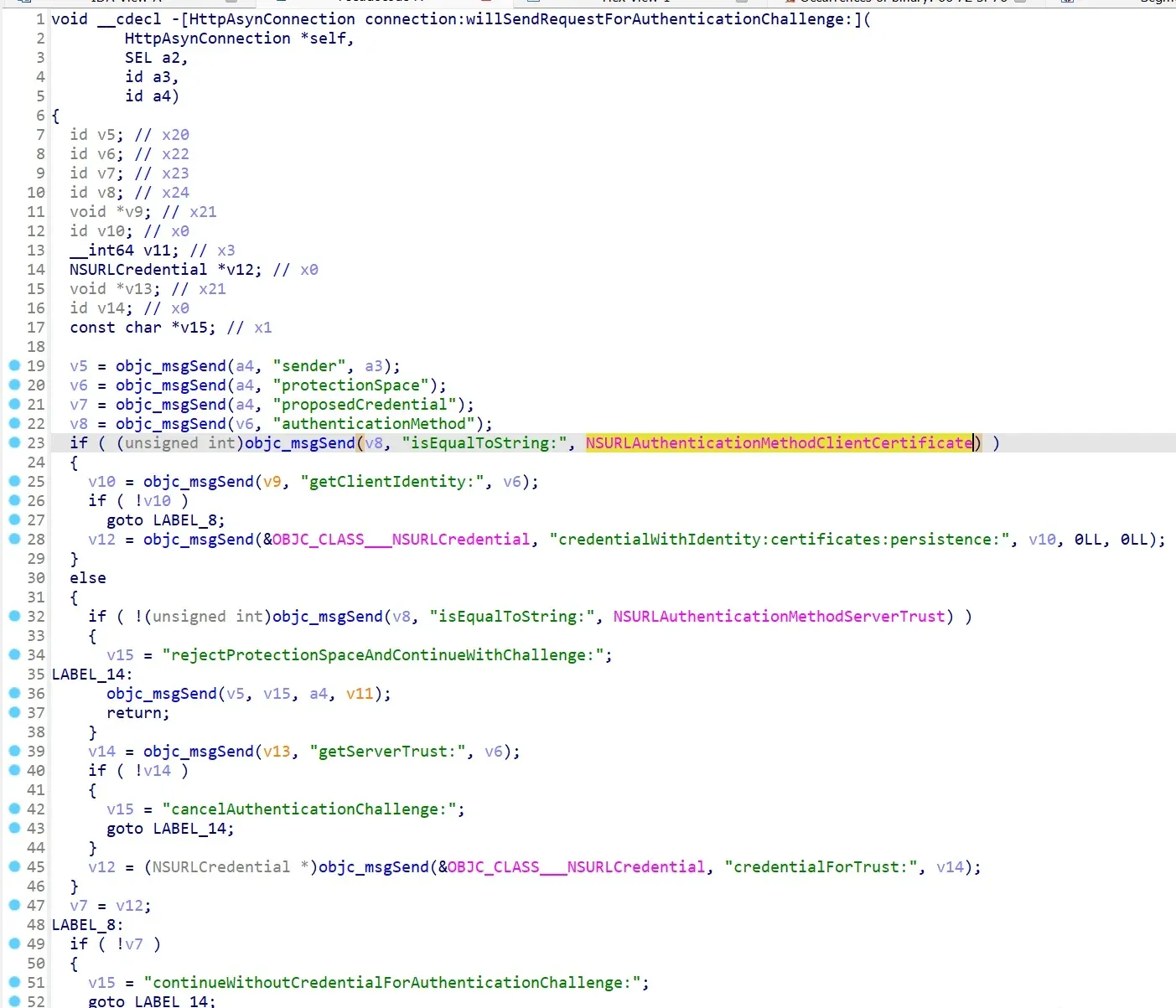
When handling the client-certificate request, this function first calls getClientIdentity, then passes the result to [NSURLCredential credentialWithIdentity:certificates:persistence:] to build an NSURLCredential. From Apple’s docs, an Identity contains both the certificate and the private key, so let’s follow getClientIdentity:
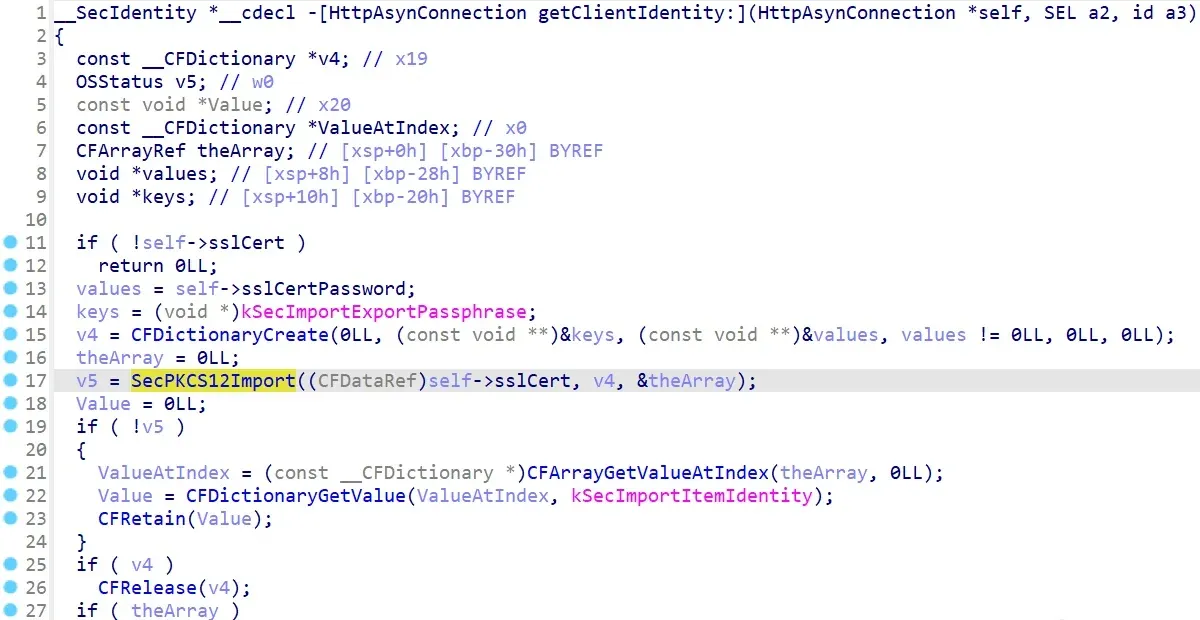
Clear enough — the function reads an encrypted PKCS12 certificate+key bundle. self->sslCert is the PKCS12 binary data and self->sslCertPassword is the password that decrypts it. Now we extract both.
Rather than spend time tracing the code to find the raw data, I used LLDB to pull it straight out of memory.
As long as you sideload with your own Apple developer certificate, you can debug the app with Xcode. If the device is jailbroken you can also run debugserver and attach IDA remotely. In Xcode use Debug → Attach to Process by PID or Name…, target Arc-mobile, launch the sideloaded game, and Xcode attaches.
Now compute the breakpoint address: target modules list shows the base address of Arc-mobile; add the function’s offset to it. Set the breakpoint, then trigger any API request (e.g. log in) to hit it.
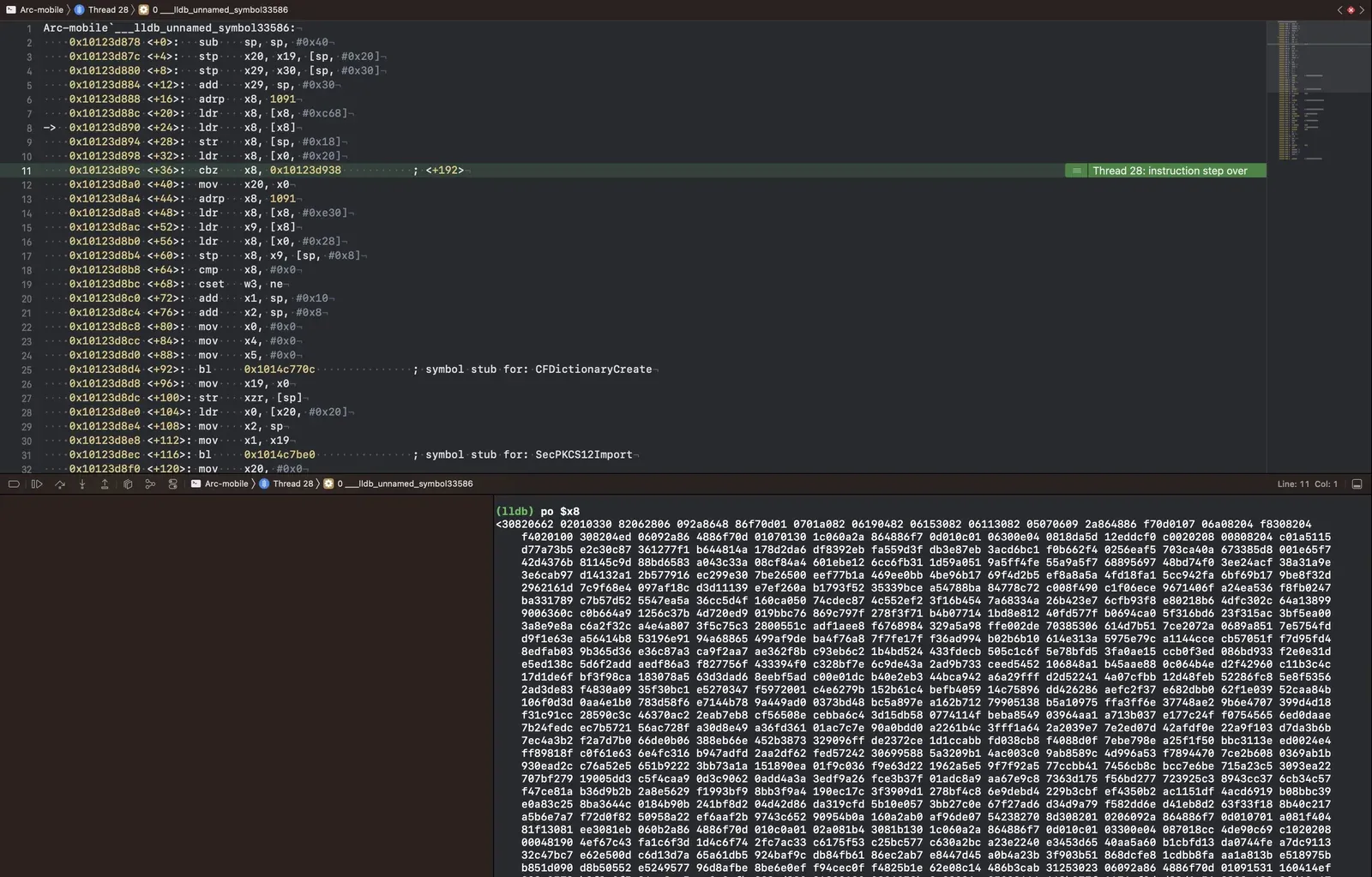
Step to where self->sslCert is read, then po $x8 prints the PKCS12 binary:
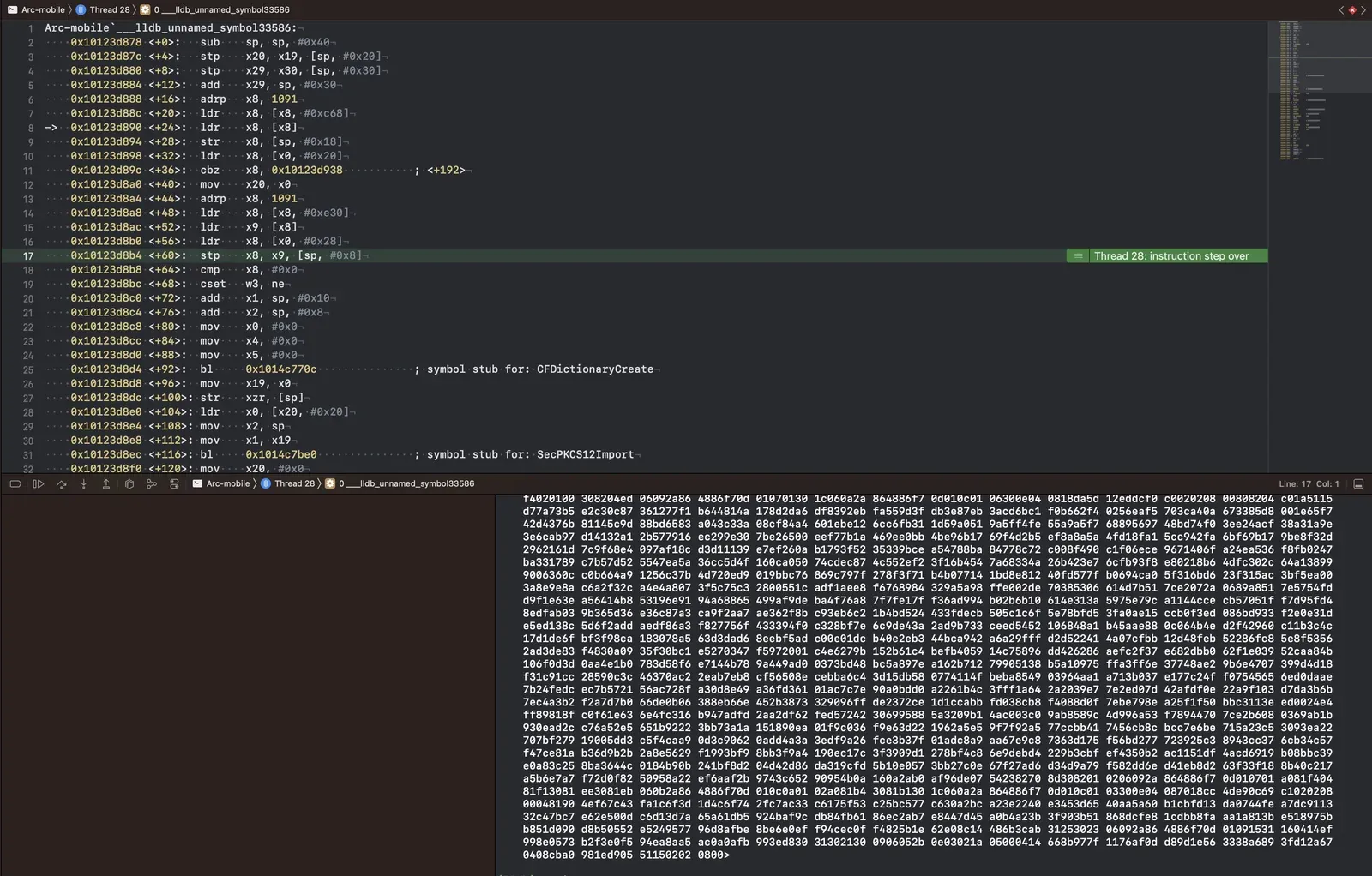
Likewise, at the self->sslCertPassword read we get the PKCS12 password: HelloWorld.
To impersonate the real client while capturing the API, I wrote a forwarding proxy in Go:
package main

import (
    "crypto"
    "crypto/tls"
    "crypto/x509"
    _ "embed"
    "io"
    "log"
    "net/http"

    "golang.org/x/crypto/pkcs12"
)

//go:embed v4.0.255_key.p12
var v4_0_255_key []byte
var password = "HelloWorld"

func init() {
    var (
        err       error
        clientKey crypto.PrivateKey
        clientCert *x509.Certificate
    )
    if clientKey, clientCert, err = pkcs12.Decode(v4_0_255_key, password); err != nil {
        panic(err)
    }
    http.DefaultClient.Transport = &http.Transport{TLSClientConfig: &tls.Config{
        Certificates: []tls.Certificate{{
            Certificate: [][]byte{clientCert.Raw},
            PrivateKey: clientKey,
        }},
    }}
}

func main() {
    addr := "0.0.0.0:5151"
    log.Println("Server Started at", addr)
    http.ListenAndServe(addr, http.HandlerFunc(handler))
}

func handler(w http.ResponseWriter, r *http.Request) {
    var (
        err error
        resp *http.Response
    )

    check := func(err error) bool {
        if err != nil {
            w.WriteHeader(500)
            log.Printf("%s %s", "FAIL", err.Error())
            return true
        }
        return false
    }

    log.Printf("%s %s", r.Method, r.URL.String())

    if resp, err = forwardHTTPRequest(r); check(err) {
        return
    }

    defer func() {
        resp.Body.Close()
    }()

    for key, vals := range resp.Header {
        for _, val := range vals {
            w.Header().Add(key, val)
        }
    }

    w.WriteHeader(resp.StatusCode)
    io.Copy(w, resp.Body)
}

func forwardHTTPRequest(r *http.Request) (resp *http.Response, err error) {
    r.URL.Scheme = "https"
    r.URL.Host = "arcapi-v2.lowiro.com"
    r.Header.Del("Host")

    req, err := http.NewRequest(r.Method, r.URL.String(), r.Body)
    if err != nil {
        return
    }

    req.Header = r.Header
    if resp, err = http.DefaultClient.Do(req); err != nil {
        return
    }
    return
}
Save the extracted PKCS12 binary as v4.0.255_key.p12, run the Go program, and it serves the API forwarder on 127.0.0.1:5151.
Then configure the MITM proxy to forward all API requests to the forwarder. With Charles use Map Remote; with Burp use an extension. Here’s the Python version:
from burp import IBurpExtender
from burp import IHttpListener

HOST_FROM = "arcapi-v2.lowiro.com"
HOST_TO = "127.0.0.1"
PORT_TO = 5151
PROTO_TO = "http"

class BurpExtender(IBurpExtender, IHttpListener):

  #
  # implement IBurpExtender
  #

  def registerExtenderCallbacks(self, callbacks):
    # obtain an extension helpers object
    self._helpers = callbacks.getHelpers()

    # set our extension name
    callbacks.setExtensionName("Traffic redirector")

    # register ourselves as an HTTP listener
    callbacks.registerHttpListener(self)

  #
  # implement IHttpListener
  #

  def processHttpMessage(self, toolFlag, messageIsRequest, messageInfo):
    # get the HTTP service for the request
    httpService = messageInfo.getHttpService()
    host = httpService.getHost()

    # if the host is HOST_FROM, change it to HOST_TO
    if messageIsRequest and host == HOST_FROM:
      messageInfo.setHttpService(self._helpers.buildHttpService(HOST_TO,
        PORT_TO, PROTO_TO))
Now capturing works. You could write a private server from the captured packets, but there are already ready-made server implementations — just point the forwarder’s destination at your private server instead. To host it on the public internet and play without any MITM setup, you also need to change the game’s API endpoint to your own.
Rewriting the API endpoint
This part is fiddly but not hard. From capture we know the API endpoint prefix is https://arcapi-v2.lowiro.com/join/21/. Search IDA for an API method like auth/login to find where request URLs are built.
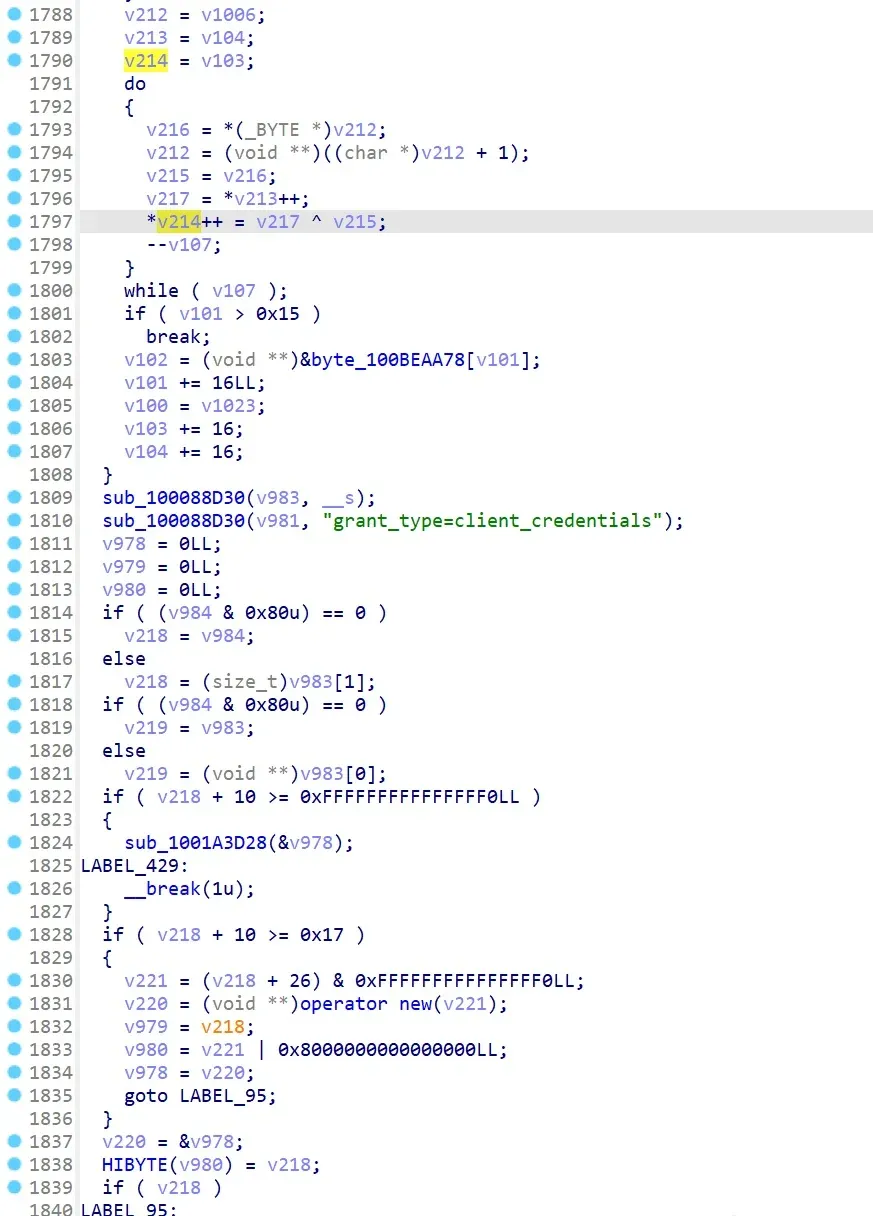
The endpoint prefix is encrypted. Reading the code a bit shows CFB mode — the previous block’s ciphertext is used to compute the next block’s XOR key:
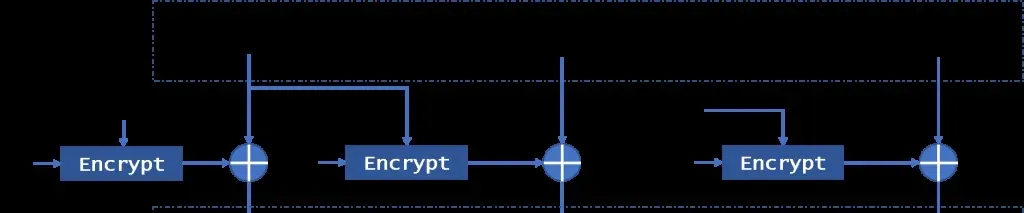
But the block encryption isn’t plainly AES (I’d guess the AES key was expanded or run through some input/output encoding). Being lazy, I’m not going to reverse the cipher — I just need to change the endpoint prefix. And since it’s CFB, I don’t care what the underlying block cipher is, or even the encryption key: I can use dynamic debugging to edit the ciphertext directly so it decrypts to the plaintext I want.
The first block’s XOR key (call it XK1) is fixed, independent of the ciphertext context, and we know the first block’s plaintext is https://arcapi-v (call it P1). So the first ciphertext block C1 is C1 = P1 ⊕ XK1. To change the plaintext to P1’, the new ciphertext C1’ is:
C1' = P1' ⊕ XK1 = P1' ⊕ P1 ⊕ P1 ⊕ XK1 = P1' ⊕ P1 ⊕ C1
In other words, XOR the known plaintext and the desired plaintext into the existing ciphertext, and it decrypts to what we want.
Changing a block’s ciphertext does affect the next block’s XOR key, but we can just read the current XOR key at each block step via dynamic debugging — so the encryption is no obstacle for what we’re doing.
Back in IDA, v214 does the final C1 ⊕ XK1 per-block decryption, so v212 and v213 are C1 and XK1. And byte_100BEAA78 points to the full ciphertext: 48 bytes, i.e. three 16-byte blocks.
Set an LLDB breakpoint before the decrypting do … while, inspect the memory pointed to by v212 and v213, and we get C1 and XK1.
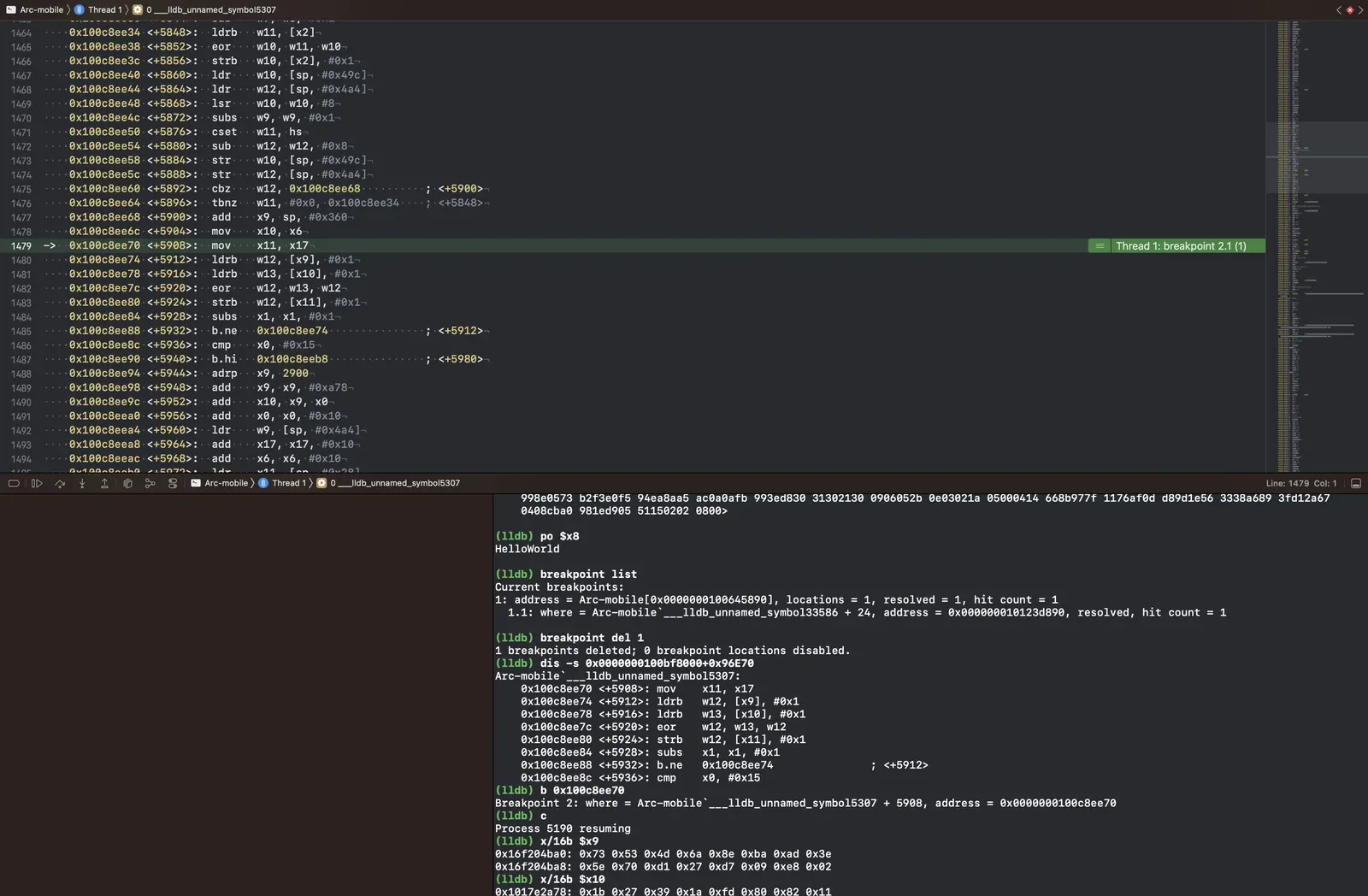
x10 is C1, x9 is XK1. Compute C1’ with the formula above, then overwrite C1 with memory write $x10 0x11 0x22 0x33…. To confirm the decrypted output matches, break after the do … while and check x/16b $x11-16. Repeat for all three blocks, then write the modified ciphertext back into byte_100BEAA78 in IDA.
With that done, you can point the game at your own private server and play anywhere.
Colin Xiao — I take on contract reverse-engineering work, and writeups like this are how I show what I can do. If you need help with anything in this space — including but not limited to the areas I cover above — I’m available. No project is too big or too small — if it’s reverse engineering and I can do it, I’ll take it. DM me on X (@colinxiao_lab) or Telegram (@ColinXiao666).
Get in touch