An Introduction to Reversing Cocos2d-JS Games
About the author. I’m Colin Xiao — an independent reverse engineer, mostly working solo on contract jobs. I dig into compiled code of every kind, including but not limited to: Android and iOS apps, x86/x64/ARM native binaries, packers and obfuscators, DRM and license checks, network protocols and APIs, crypto and signature algorithms, malware, game binaries, and embedded/IoT firmware. I also handle large-scale data collection and vulnerability research. If you have any project in mind, I’d be glad to take it on — whatever it is, as long as it’s within my wheelhouse. Just reach out. You can reach me on X at @colinxiao_lab or on Telegram at https://t.me/ColinXiao666.
This research is published for educational and defensive purposes. The target sample is anonymized throughout.
An Introduction to Reversing Cocos2d-JS Games
A quick walkthrough of reversing Cocos2d-JS mobile games. If you have any related ideas, feel free to reach out and discuss.
Some concepts
A few concepts I find useful:
- The two main Cocos game toolchains are
CocosCreatorandCocosStudio. The former is the dedicated tool for Cocos2d-JS; the latter is for Cocos2d-lua, Cocos2d-cpp, and the rest.
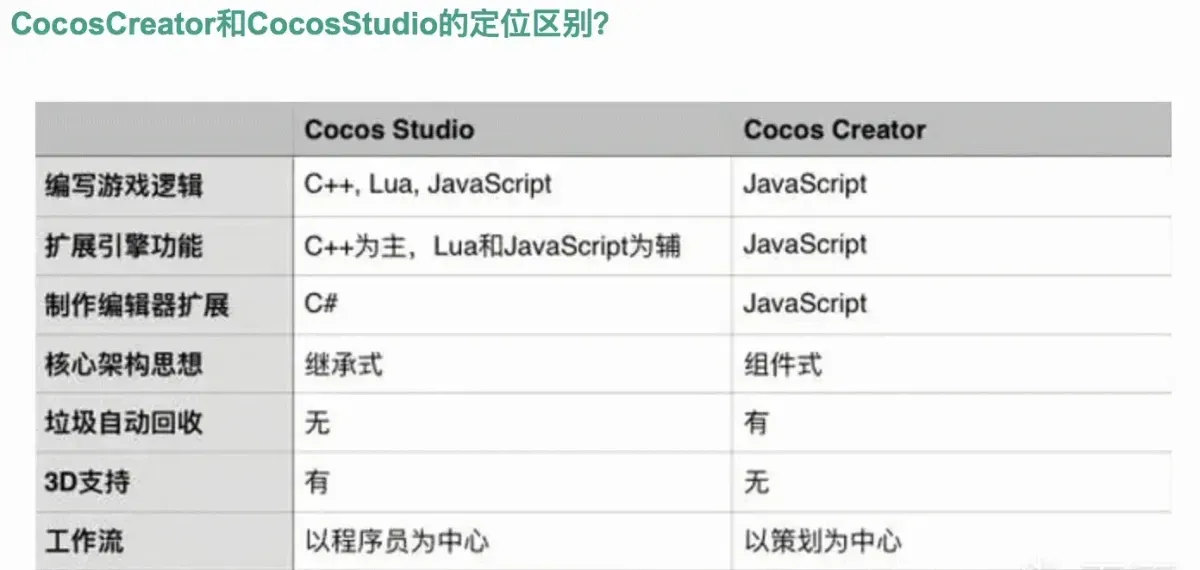
-
Games built with
Cocos Creator 2produce a key.sowith the default namelibcocos2djs.so. -
Games built with
Cocos Creator 3produce a key.sowith the default namelibcocos.so(the entry function is no longerapplicationDidFinishLaunching). -
Cocos Creator lets you choose whether to encrypt & compress the
.jsscripts at build time. The encryption algorithm is fixed atxxtea, and you can optionally use Zip compression. -
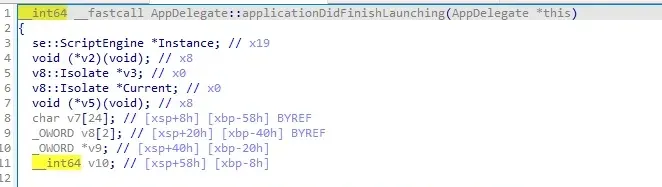
AppDelegate::applicationDidFinishLaunchinginlibcocos2djs.sois the entry function, a good place to start analysis. -
Cocos2d-JS is a branch of Cocos2d-x, so the https://github.com/cocos2d/cocos2d-x source applies to Cocos2d-JS too.
Writing my own demo
The benefit of writing my own demo is being able to quickly judge whether an error comes from being detected, or from behavior that would happen anyway.
Version info
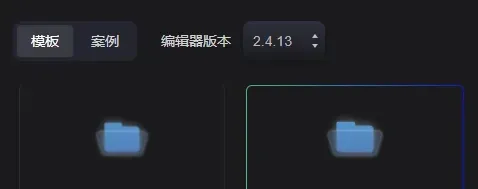
I tried 2.4.2 and 2.4.6 — both failed to build. The versions that finally worked:
- Editor:
Creator 2.4.13(the highest in the 2.x series; lower versions throw a pile of errors when compiling in AS) - NDK:
23.1.7779620 project/build.gradle:classpath 'com.android.tools.build:gradle:8.0.2'project/gradle/gradle-wrapper.properties:distributionUrl=https\://services.gradle.org/distributions/gradle-8.0.2-all.zip
Cocos Creator basics
I don’t do Cocos game development, so I went straight for the official Hello World template.
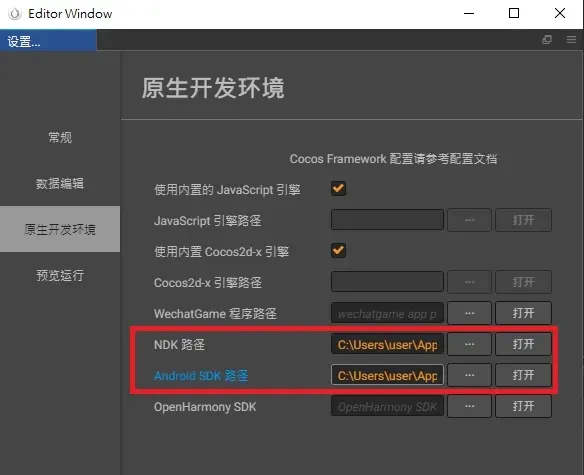
First, set the SDK and NDK paths:
Then the build parameters, mainly these two:
- Encrypt scripts: tick everything, keep the default key.
- Source Map: keep symbols, so IDA can show function names.
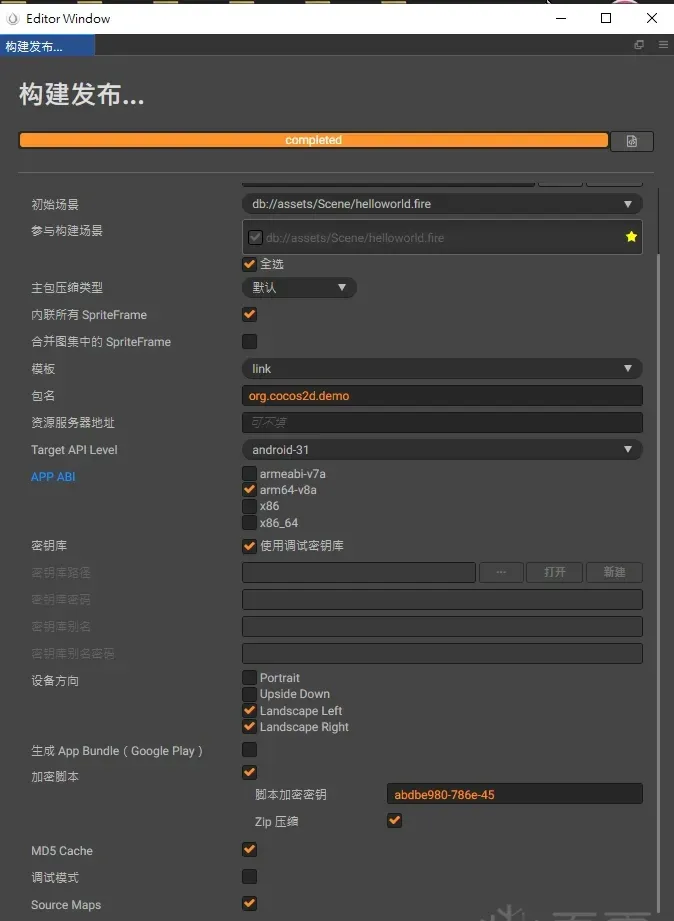
Cocos Creator builds fine for me but won’t compile, so I switch to Android Studio. Open build\jsb-link\frameworks\runtime-src\proj.android-studio with Android Studio and compile with the normal AS flow.
The demo prints Hello, World! in the center:

Decrypting the jsc scripts
One of the build options above is encrypt scripts, which encrypts the JS scripts into .jsc via the xxtea algorithm.
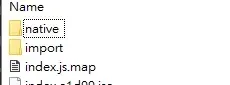
Most game functionality is implemented through JS scripts, so the first thing in Cocos2d-JS reversing is decrypting the .jsc. The .jsc files usually live in the assets directory inside the APK.
Getting the decryption key
Method one: start from applicationDidFinishLaunching
Method two: HOOK
- Hook
set_xxtea_key
// soName: libcocos2djs.so
function hook_jsb_set_xxtea_key(soName) {
    let set_xxtea_key = Module.findExportByName(soName, "_Z17jsb_set_xxtea_keyRKNSt6__ndk112basic_stringIcNS_11char_traitsIcEENS_9allocatorIcEEEE");
    Interceptor.attach(set_xxtea_key,{
        onEnter(args){
            console.log("xxtea key: ", args[0].readCString())
        },
        onLeave(retval){

        }
    })
}- Hook
xxtea_decrypt
function hook_xxtea_decrypt(soName) {
    let set_xxtea_key = Module.findExportByName(soName, "xxtea_decrypt");
    Interceptor.attach(set_xxtea_key,{
        onEnter(args){
            console.log("xxtea key: ", args[2].readCString())
        },
        onLeave(retval){

        }
    })
}
Python encrypt/decrypt script
Decrypts all .jsc under output_dir in one pass, and reproduces the same directory structure under input_dir.
# pip install xxtea-py
# pip install jsbeautifier

import xxtea
import gzip
import jsbeautifier
import os

KEY = "abdbe980-786e-45"

input_dir = r"cocos2djs_demo\assets" # abs path

output_dir = r"cocos2djs_demo\output" # abs path

def jscDecrypt(data: bytes, needJsBeautifier = True):
    dec = xxtea.decrypt(data, KEY)
    jscode = gzip.decompress(dec).decode()

    if needJsBeautifier:
        return jsbeautifier.beautify(jscode)
    else:
        return jscode

def jscEncrypt(data):
    compress_data = gzip.compress(data.encode())
    enc = xxtea.encrypt(compress_data, KEY)
    return enc

def decryptAll():
    for root, dirs, files in os.walk(input_dir):

        # create a structure matching input_dir
        for dir in dirs:
            dir_path = os.path.join(root, dir)
            target_dir = output_dir + dir_path.replace(input_dir, "")
            if not os.path.exists(target_dir):
                os.mkdir(target_dir)

        for file in files:
            file_path = os.path.join(root, file)

            if not file.endswith(".jsc"):
                continue

            with open(file_path, mode = "rb") as f:
                enc_jsc = f.read()

            dec_jscode = jscDecrypt(enc_jsc)

            output_file_path = output_dir + file_path.replace(input_dir, "").replace(".jsc", "") + ".js"

            print(output_file_path)
            with open(output_file_path, mode = "w", encoding = "utf-8") as f:
                f.write(dec_jscode)

def decryptOne(path):
    with open(path, mode = "rb") as f:
        enc_jsc = f.read()

    dec_jscode = jscDecrypt(enc_jsc, False)

    output_path = path.split(".jsc")[0] + ".js"

    with open(output_path, mode = "w", encoding = "utf-8") as f:
        f.write(dec_jscode)

def encryptOne(path):
    with open(path, mode = "r", encoding = "utf-8") as f:
        jscode = f.read()

    enc_data = jscEncrypt(jscode)

    output_path = path.split(".js")[0] + ".jsc"

    with open(output_path, mode = "wb") as f:
        f.write(enc_data)

if __name__ == "__main__":
    decryptAll()
Two ways .jsc files are read
To interfere with the game’s normal functionality, you obviously need to modify the JS scripts it executes. Replacing the .jsc files is one approach, but the prerequisite is finding where .jsc files are read.
Method one: read from the APK
My self-compiled demo reads the .jsc files from the assets directory of /data/app/XXX/base.apk this way.
The Cocos engine encrypts .jsc scripts with xxtea by default, so the .jsc read must happen before xxtea_decrypt.
Following the Cocos2d-x source to find where xxtea_decrypt is used, we land on LuaStack::luaLoadChunksFromZIP:
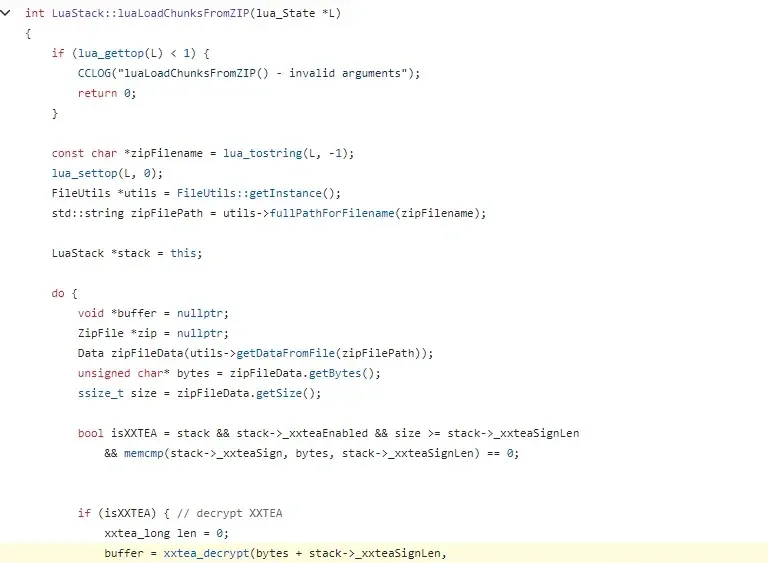
Going up, its bytes come from the getDataFromFile function:
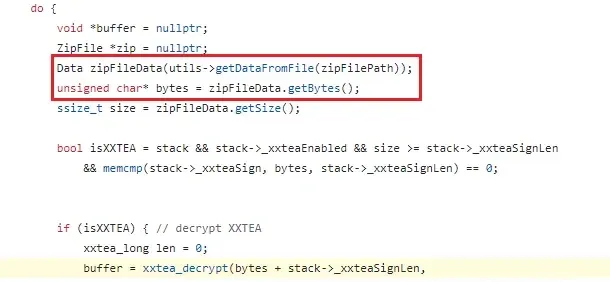
Keep following getDataFromFile: it calls getContents, and getContents calls fopen. But oddly, hooking fopen shows it never opens any .jsc file.
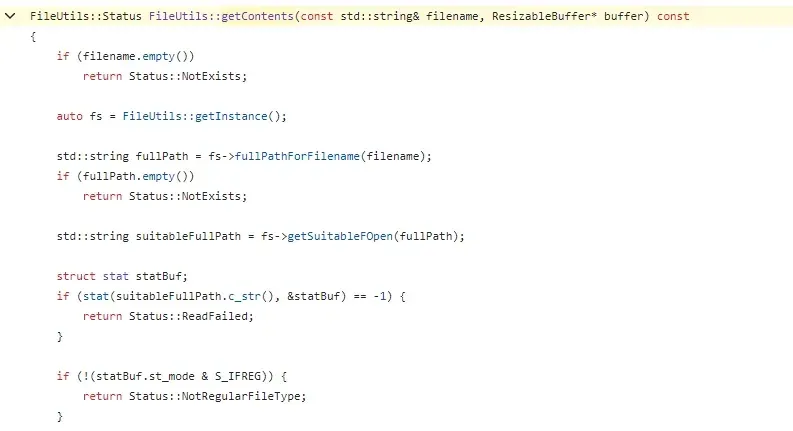
It turns out the function called is not FileUtils::getContents but FileUtilsAndroid::getContents.
One of its branches reads .jsc data by calling AAsset_read from libandroid.so, and opens .jsc files by calling AAssetManager_open.
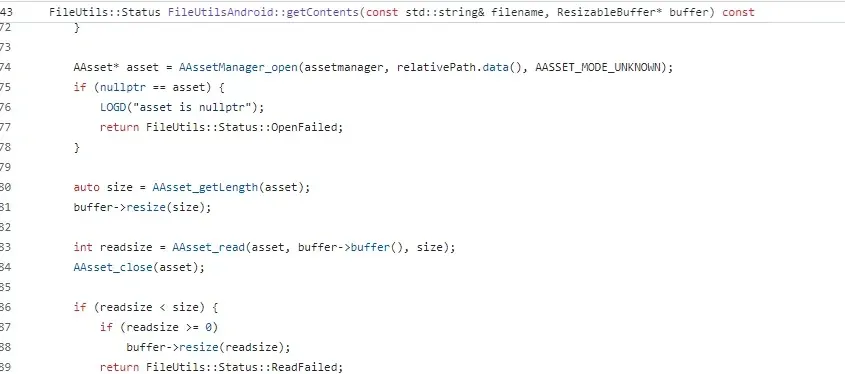
Digging into AAssetManager_open (online source) to find a place where I can do IO redirection:
AAssetManager_open calls AssetManager::open:
// frameworks/base/native/android/asset_manager.cpp
AAsset* AAssetManager_open(AAssetManager* amgr, const char* filename, int mode)
{
    Asset::AccessMode amMode;
    switch (mode) {
    case AASSET_MODE_UNKNOWN:
        amMode = Asset::ACCESS_UNKNOWN;
        break;
    case AASSET_MODE_RANDOM:
        amMode = Asset::ACCESS_RANDOM;
        break;
    case AASSET_MODE_STREAMING:
        amMode = Asset::ACCESS_STREAMING;
        break;
    case AASSET_MODE_BUFFER:
        amMode = Asset::ACCESS_BUFFER;
        break;
    default:
        return NULL;
    }

    AssetManager* mgr = static_cast<AssetManager*>(amgr);
    // here
    Asset* asset = mgr->open(filename, amMode);
    if (asset == NULL) {
        return NULL;
    }

    return new AAsset(asset);
}
AssetManager::open calls openNonAssetInPathLocked:
// frameworks/base/libs/androidfw/AssetManager.cpp
Asset* AssetManager::open(const char* fileName, AccessMode mode)
{
    AutoMutex _l(mLock);
    LOG_FATAL_IF(mAssetPaths.size() == 0, "No assets added to AssetManager");
    String8 assetName(kAssetsRoot);
    assetName.appendPath(fileName);

    size_t i = mAssetPaths.size();
    while (i > 0) {
        i--;
        ALOGV("Looking for asset '%s' in '%s'\n",
                assetName.string(), mAssetPaths.itemAt(i).path.string());
        // here
        Asset* pAsset = openNonAssetInPathLocked(assetName.string(), mode, mAssetPaths.itemAt(i));
        if (pAsset != NULL) {
            return pAsset != kExcludedAsset ? pAsset : NULL;
        }
    }

    return NULL;
}
AssetManager::openNonAssetInPathLocked first determines whether assets is inside a .gz or .zip. Since .apk is basically equivalent to .zip, it should take the else branch.
Strangely, when I verified with Frida, I could hook
openAssetFromZipLockedbut notgetZipFileLocked— clearly unreasonable.
// frameworks/base/libs/androidfw/AssetManager.cpp
Asset* AssetManager::openNonAssetInPathLocked(const char* fileName, AccessMode mode,
    const asset_path& ap)
{
    Asset* pAsset = NULL;

    if (ap.type == kFileTypeDirectory) {
        String8 path(ap.path);
        path.appendPath(fileName);

        pAsset = openAssetFromFileLocked(path, mode);

        if (pAsset == NULL) {
            /* try again, this time with ".gz" */
            path.append(".gz");
            pAsset = openAssetFromFileLocked(path, mode);
        }

        if (pAsset != NULL) {
            //printf("FOUND NA '%s' on disk\n", fileName);
            pAsset->setAssetSource(path);
        }

    // run this branch
    } else {
        String8 path(fileName);
					// here
        ZipFileRO* pZip = getZipFileLocked(ap);
        if (pZip != NULL) {

            ZipEntryRO entry = pZip->findEntryByName(path.string());
            if (entry != NULL) {

                pAsset = openAssetFromZipLocked(pZip, entry, mode, path);
                pZip->releaseEntry(entry);
            }
        }

        if (pAsset != NULL) {
            pAsset->setAssetSource(
                    createZipSourceNameLocked(ZipSet::getPathName(ap.path.string()), String8(""),
                                                String8(fileName)));
        }
    }

    return pAsset;
}
Continuing on the AssetManager::getZipFileLocked that failed to hook earlier — it calls AssetManager::ZipSet::getZip.
Hooking
getZipwith Frida succeeded this time; I suspect some optimization removedgetZipFileLocked, which is why that hook failed.
// frameworks/base/libs/androidfw/AssetManager.cpp
ZipFileRO* AssetManager::getZipFileLocked(const asset_path& ap)
{
    ALOGV("getZipFileLocked() in %p\n", this);

    return mZipSet.getZip(ap.path);
}
ZipSet::getZip calls SharedZip::getZip, which directly returns mZipFile:
// frameworks/base/libs/androidfw/AssetManager.cpp
ZipFileRO* AssetManager::ZipSet::getZip(const String8& path)
{
    int idx = getIndex(path);
    sp<SharedZip> zip = mZipFile[idx];
    if (zip == NULL) {
        zip = SharedZip::get(path);
        mZipFile.editItemAt(idx) = zip;
    }
    return zip->getZip();
}

ZipFileRO* AssetManager::SharedZip::getZip()
{
    return mZipFile;
}
Find where mZipFile is assigned; it ends up assigned by ZipFileRO::open(mPath.string()):
// frameworks/base/libs/androidfw/AssetManager.cpp
AssetManager::SharedZip::SharedZip(const String8& path, time_t modWhen)
    : mPath(path), mZipFile(NULL), mModWhen(modWhen),
      mResourceTableAsset(NULL), mResourceTable(NULL)
{
    if (kIsDebug) {
        ALOGI("Creating SharedZip %p %s\n", this, (const char*)mPath);
    }
    ALOGV("+++ opening zip '%s'\n", mPath.string());
    // here
    mZipFile = ZipFileRO::open(mPath.string());
    if (mZipFile == NULL) {
        ALOGD("failed to open Zip archive '%s'\n", mPath.string());
    }
}
From
frameworks/base/libs/androidfw/Android.bpwe know the lib file for the above code islibandroidfw.so, located under/system/lib64/. Pull it locally and open it in IDA; you can then hook these functions by the export names/addresses IDA shows.
Method two: read from the app’s data directory
Whichever method is used, .jsc data is obtained through getDataFromFile, which calls getContents:
getDataFromFile -> getContentsIn method one I initially looked at FileUtils::getContents, but the right one is FileUtilsAndroid::getContents.
FileUtils::getContents is only called when fullPath[0] == '/', and it opens .jsc via fopen:
// https://github.com/cocos2d/cocos2d-x/blob/76903dee64046c7bfdba50790be283484b4be271/cocos/platform/android/CCFileUtils-android.cpp
FileUtils::Status FileUtilsAndroid::getContents(const std::string& filename, ResizableBuffer* buffer) const
{
    static const std::string apkprefix("assets/");
    if (filename.empty())
        return FileUtils::Status::NotExists;

    string fullPath = fullPathForFilename(filename);

    if (fullPath[0] == '/')
			    // here
        return FileUtils::getContents(fullPath, buffer);

    // method one goes through here...
}
Replacement approaches
Normally there are several ways to replace a script:
-
Find where
.jscfiles are read and do IO redirection. -
Direct byte replacement — replace the
.jscbytes beforexxtea_decrypt, or replace the decrypted plaintext.jsscript afterxxtea_decrypt.Here “replace” means allocating new memory, placing the new data there, then swapping the pointer.
-
Directly replace the
.jscinside the APK, then repack. -
Replace the JS plaintext — not by allocating new memory like #2, but by modifying the plaintext JS data in the original memory directly.
After testing, only 1, 3, and 4 are viable. 2 causes the app to freeze (reason unclear).
Implementing approach one
From above, the first .jsc read path first calls ZipFileRO::open(mPath.string()) to open the APK, then obtains .jsc through AAssetManager_open.
Hook ZipFileRO::open to see what argument it gets:
function hook_ZipFile_open(flag) {
    let ZipFile_open = Module.getExportByName("libandroidfw.so", "_ZN7android9ZipFileRO4openEPKc");
    console.log("ZipFile_open: ", ZipFile_open)
    return Interceptor.attach(ZipFile_open,
        {
            onEnter: function (args) {
                console.log("arg0: ", args[0].readCString());
            },
            onLeave: function (retval) {

            }
        }
    );
}
One of them is the current APK path — assets clearly comes from here too, so this is a place to try redirection. First build a fake.apk, push it to /data/app/XXX/, then hook the IO redirection to point at fake.apk to swap the content.
For my own demo, building fake.apk works either by apktool unpack & repack, or by plain unzip & rezip & manual naming — but remember to give fake.apk at least 644 permissions.
Here’s the result of that approach in my demo — successfully changed the center string:
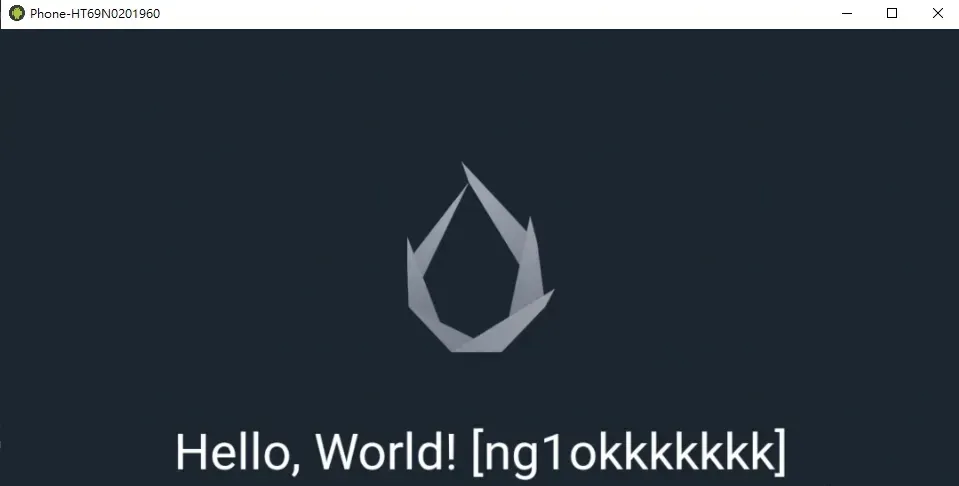
Still, this approach feels impractical (barely better than just repacking).
Approach two (failed)
Even just swapping the pointer like this freezes the app?
function hook_xxtea_decrypt() {
    Interceptor.attach(Module.findExportByName("libcocos2djs.so", "xxtea_decrypt"), {
        onEnter(args) {
            let jsc_data = args[0];
            let size = args[1].toInt32();
            let key = args[2].readCString();
            let key_len = args[3].toInt32();
            this.arg4 = args[4];

            let target_list = [0x15, 0x43, 0x73];
            let flag = true;
            for (let i = 0; i < target_list.length; i++) {
                if (target_list[i] != Memory.readU8(jsc_data.add(i))) {
                    flag = false;
                }
            }
            this.flag = flag;
            if (flag) {
                let new_size = size;
                let newAddress = Memory.alloc(new_size);
                Memory.protect(newAddress, new_size, "rwx")
                Memory.protect(args[0], new_size, "rwx")
                Memory.writeByteArray(newAddress, jsc_data.readByteArray(new_size))
                args[0] = newAddress;
            }

        },
        onLeave(retval) {
        }
    })

}
Implementing approach four
From a fellow researcher’s writeup, the V8 engine bundled in Cocos2d-JS ultimately executes the decrypted JS via evalString.
Before actually replacing anything, it’s best to first save a copy of the target JS by hooking evalString — the game’s hot-update strategy might mean the JS that evalString runs differs from what you get by manually decrypting .jsc from the APK.
function saveJscode(jscode, path) {
    var fopenPtr = Module.findExportByName("libc.so", "fopen");
    var fopen = new NativeFunction(fopenPtr, 'pointer', ['pointer', 'pointer']);
    var fclosePtr = Module.findExportByName("libc.so", "fclose");
    var fclose = new NativeFunction(fclosePtr, 'int', ['pointer']);
    var fseekPtr = Module.findExportByName("libc.so", "fseek");
    var fseek = new NativeFunction(fseekPtr, 'int', ['pointer', 'int', 'int']);
    var ftellPtr = Module.findExportByName("libc.so", "ftell");
    var ftell = new NativeFunction(ftellPtr, 'int', ['pointer']);
    var freadPtr = Module.findExportByName("libc.so", "fread");
    var fread = new NativeFunction(freadPtr, 'int', ['pointer', 'int', 'int', 'pointer']);
    var fwritePtr = Module.findExportByName("libc.so", "fwrite");
    var fwrite = new NativeFunction(fwritePtr, 'int', ['pointer', 'int', 'int', 'pointer']);

    let newPath = Memory.allocUtf8String(path);

    let openMode = Memory.allocUtf8String('w');

    let str = Memory.allocUtf8String(jscode);

    let file = fopen(newPath, openMode);
    if (file != null) {
        fwrite(str, jscode.length, 1, file)
        fclose(file);

    }
    return null;
}

function hook_evalString() {
    Interceptor.attach(Module.findExportByName("libcocos2djs.so", "_ZN2se12ScriptEngine10evalStringEPKclPNS_5ValueES2_"), {
        onEnter(args) {
            let path = args[4].readCString();
            path = path == null ? "" : path;
            let jscode = args[1];
            let size = args[2].toInt32();
            if (path.indexOf("assets/script/index.jsc") != -1) {
                saveJscode(jscode.readCString(), "/data/data/XXXXXXX/test.js");
            }
        }
    })
}
Use Memory.scan to find where to patch:
function findReplaceAddr(startAddr, size, pattern) {
    Memory.scan(startAddr, size, pattern, {
        onMatch(address, size) {
            console.log("target offset: ", ptr(address - startAddr))
            return 'stop';
        },
        onComplete() {
            console.log('Memory.scan() complete');
        }
    });
}

function hook_evalString() {
    Interceptor.attach(Module.findExportByName("libcocos2djs.so", "_ZN2se12ScriptEngine10evalStringEPKclPNS_5ValueES2_"), {
        onEnter(args) {
            let path = args[4].readCString();
            path = path == null ? "" : path;
            let jscode = args[1];
            let size = args[2].toInt32();
            if (path.indexOf("assets/script/index.jsc") != -1) {
                let pattern = "76 61 72 20 65 20 3D 20 64 2E 50 6C 61 79 65 72 41 74 74 72 69 62 75 74 65 43 6F 6E 66 69 67 2E 67 65 74 44 72 65 61 6D 48 6C 70 65 49 74 65 6D 44 72 6F 70 28 29 2C";
                findReplaceAddr(jscode, size, pattern);
            }
        }
    })
}
Finally, patch byte by byte with Memory.writeU8. The reason for not using Memory.writeUtf8String is that it appends a trailing '\0' by default, which throws an error.
function replaceEvalString(jscode, offset, replaceStr) {
    for (let i = 0; i < replaceStr.length; i++) {
        Memory.writeU8(jscode.add(offset + i), replaceStr.charCodeAt(i))
    }
}

// example:
function cheatAutoChopTree(jscode) {
    let replaceStr = 'true || "                                 "';
    replaceEvalString(jscode, 0x3861f6, replaceStr)
}
Practice on a tree-chopping game
A quick exercise on a tree-chopping game.
The game has an auto-chop feature, but it requires certain conditions to unlock.
How to find which .jsc holds the relevant logic? Just search the string directly.
Use replacement approach #4 to patch the JS condition, and here’s the result:
Conclusion
Approach #4’s replacement has a size limit — you can’t modify it arbitrarily. I still haven’t found a way to patch freely; if you know one, please share, and any ideas are welcome.
Afterword
With guidance from a commenter on the original thread, I finally found a much more convenient replacement approach than #4. I actually tried this kind of direct plaintext-JS replacement at the very beginning, but the app froze/crashed. Now I realize it was Frida’s API at fault — I had used Memory.alloc / Memory.allocUtf8String to allocate; switching to malloc from libc.so stopped the crashes. Why exactly, I’m not sure — maybe I’ll dig into Frida’s source someday.
Colin Xiao — I take on contract reverse-engineering work, and writeups like this are how I show what I can do. If you need help with anything in this space — including but not limited to the areas I cover above — I’m available. No project is too big or too small — if it’s reverse engineering and I can do it, I’ll take it. DM me on X (@colinxiao_lab) or Telegram (@ColinXiao666).
Get in touch