Reversing dpt-shell - A Class-Extraction Packer from the Inside Out
About the author. I’m Colin Xiao — an independent reverse engineer, mostly working solo on contract jobs. I dig into compiled code of every kind, including but not limited to: Android and iOS apps, x86/x64/ARM native binaries, packers and obfuscators, DRM and license checks, network protocols and APIs, crypto and signature algorithms, malware, game binaries, and embedded/IoT firmware. I also handle large-scale data collection and vulnerability research. If you have any project in mind, I’d be glad to take it on — whatever it is, as long as it’s within my wheelhouse. Just reach out. You can reach me on X at @colinxiao_lab or on Telegram at https://t.me/ColinXiao666.
This research is published for educational and defensive purposes. The target sample is anonymized throughout.
Reversing dpt-shell - A Class-Extraction Packer from the Inside Out
Lately I wanted to focus on how class-extraction (DEX extraction) packing is actually implemented, so I went looking and found luoyesiqiu’s dpt-shell project. After digging into it, this open-source packer turned out to be quite mature. So I decided to reverse it first, then read the source to understand how it works from the code side.
- Project: https://github.com/luoyesiqiu/dpt-shell
- Analyzed version: V1.12.2
Getting set up
Time to dust off an old friend (a demo APK I’d used when analyzing another packer) and run it through dpt-shell. It’s easy — just compile dpt.jar and chant the following into a terminal:
java -jar dpt.jar -f /path/to/apkWait for it to finish:
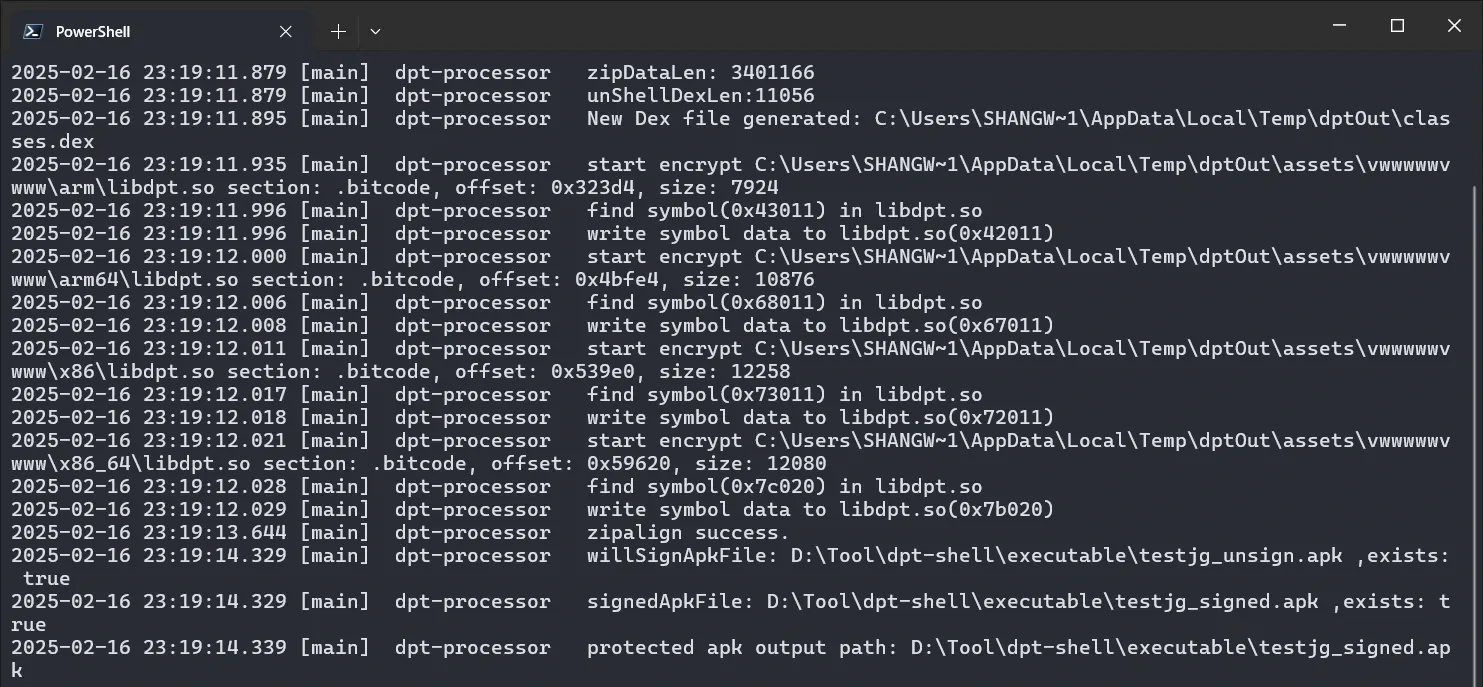
And out comes the protected APK:
(Wow, it even signs it for us.)
If you don’t want signing, here’s the help text:
usage: java -jar dpt.jar [option] -f <apk>
 -c,--disable-acf      Disable app component factory(just use for debug).
 -d,--dump-code        Dump the code item of DEX and save it to .json
                       files.
 -D,--debug            Make apk debuggable.
 -f,--apk-file <arg>   Need to protect apk file.
 -l,--noisy-log        Open noisy log.
 -x,--no-sign          Do not sign apk.
Reversing it
The shell’s logic, first pass
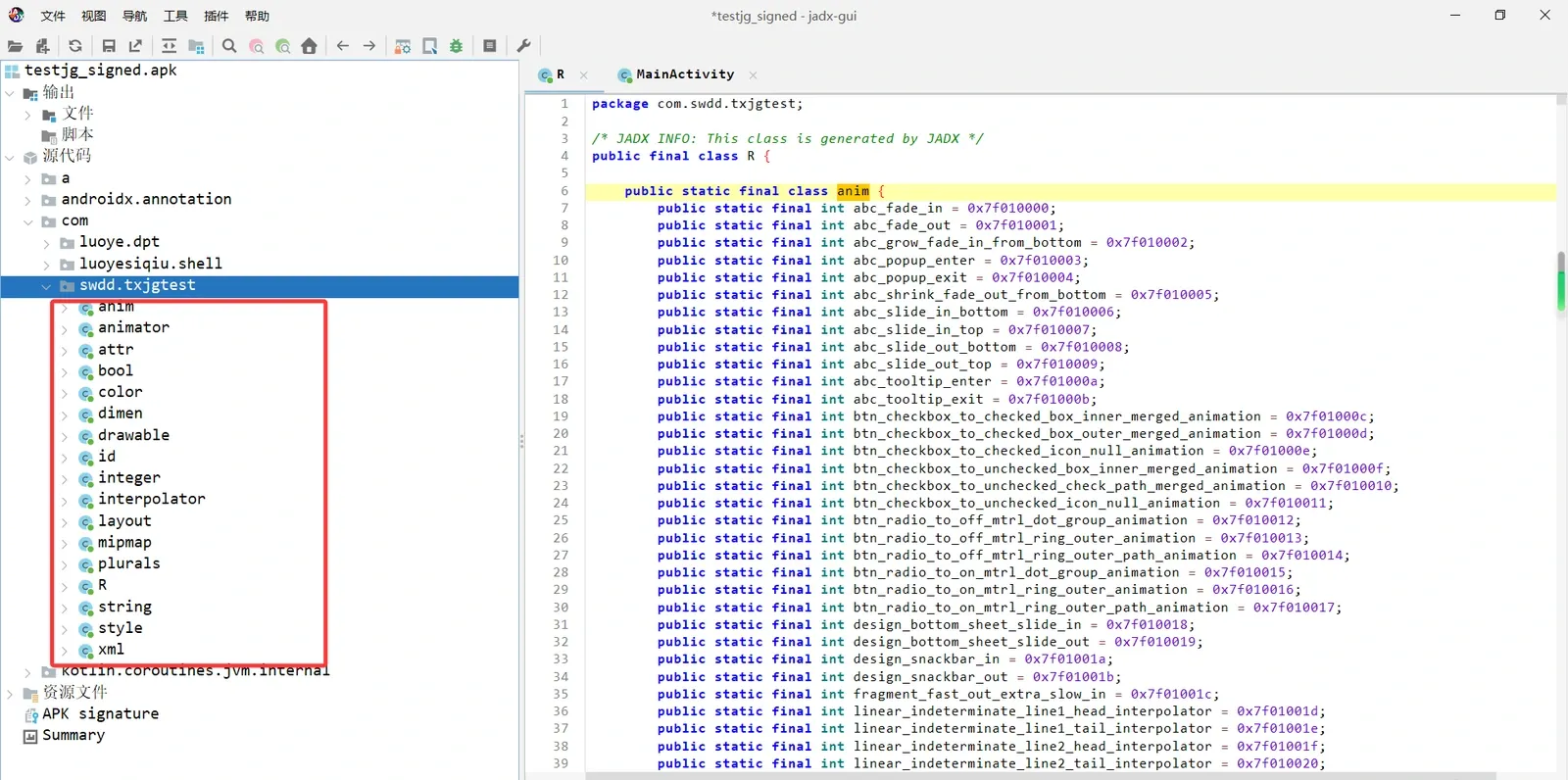
Here you can see the classes have already been extracted. First, the factory class has been replaced with the packer’s proxy factory:
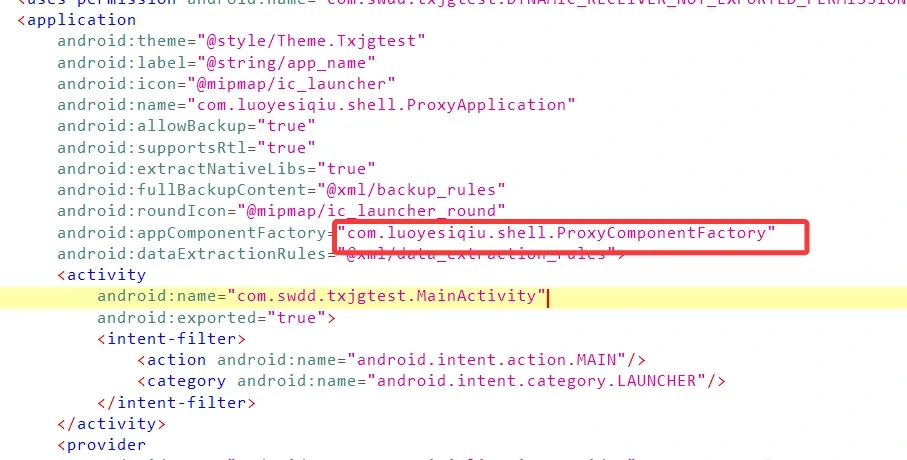
There’s a knowledge point worth pausing on: androidx.core.app.AppComponentFactory is used to dynamically control component instantiation — it lets you intercept and swap out Activity, Service, BroadcastReceiver, ContentProvider and other components when the system creates them. dpt-shell uses this spot to load the shell SO and hook a bunch of system functions.
Let’s keep going. What order does ActivityThread.handleBindApplication() load the APK and its app components in? See below:
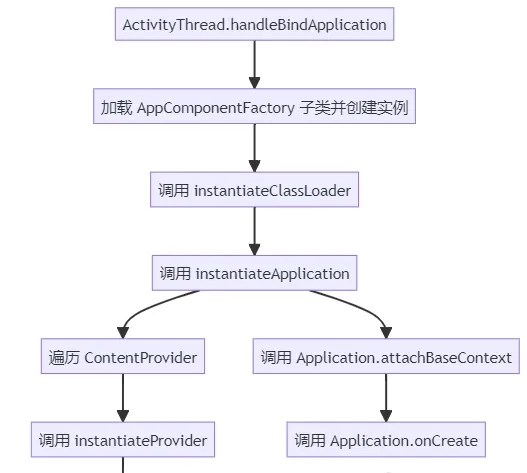
The method we care about here is instantiateClassLoader:
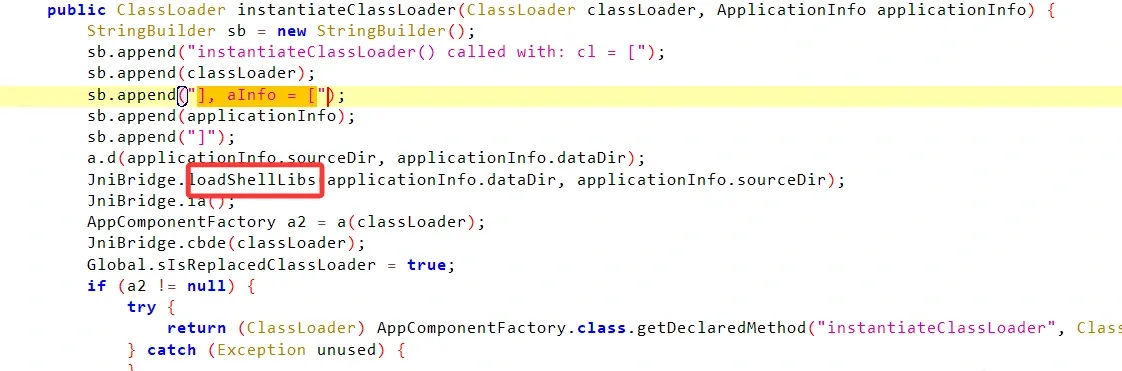
This is where the shell SO gets loaded. Control then reaches the proxy Application, the original DEX’s Application replacement and lifecycle calls happen, and the original DEX’s code starts running — with the necessary handling done so it loads properly. I’ll get into the details in the source analysis later.
Decrypting the shell SO
For this kind of extraction packer, you obviously start from the native layer.
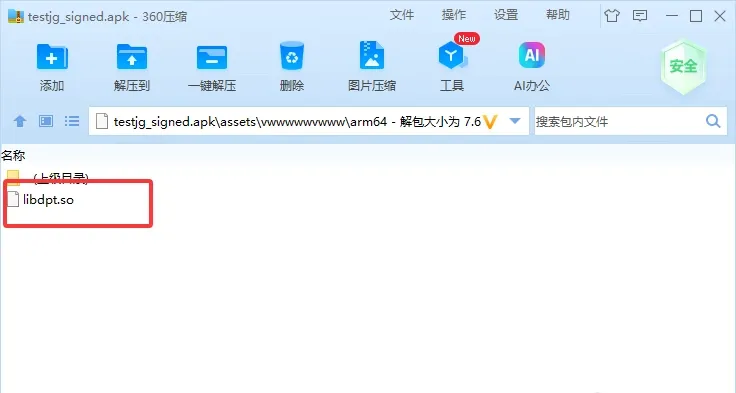
We’ll analyze dpt.so for arm64. Opening it in IDA, you’ll see the ELF’s bitcode section is encrypted:
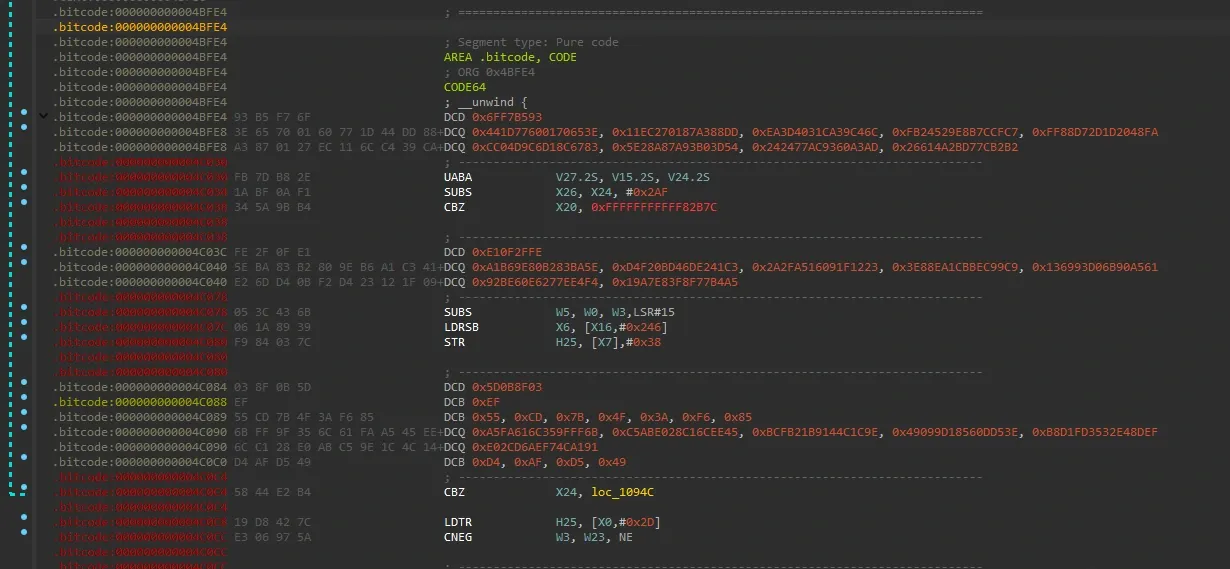
Statically decrypting the bitcode section
When you see this, you start from the initArray section — initArray holds constructors, which the linker runs right after loadLibrary. Sure enough, in sub_C67C in the initArray section we find:
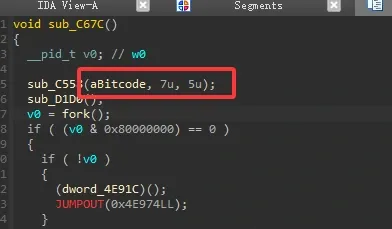
The function takes bitCode directly as an argument — suspicious.
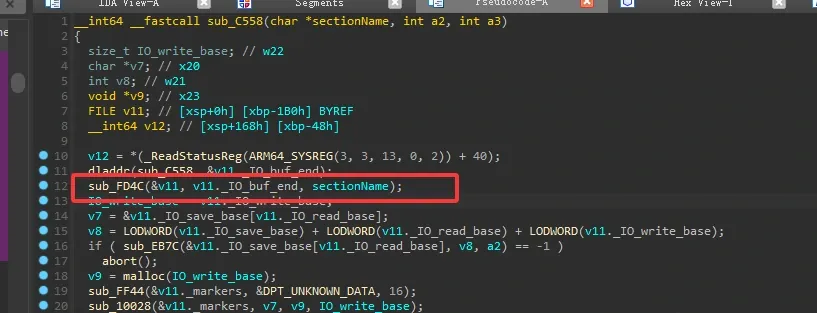
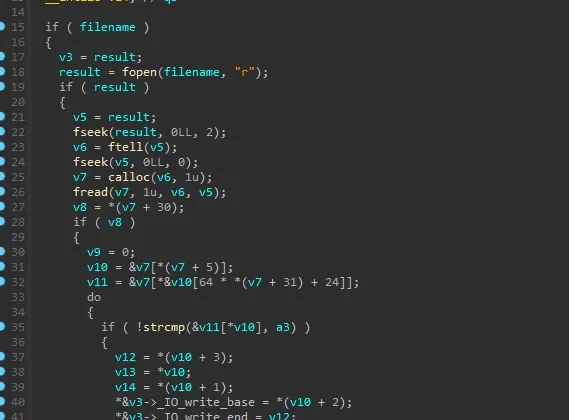
sectionName is passed into sub_FD4C, which locates the bitcode section’s address for later processing:
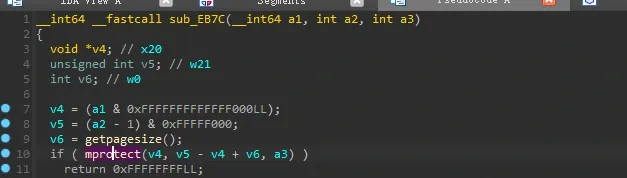
sub_EB7C modifies memory page permissions. In the segment window you can see the bitcode section is non-writable, so it uses mprotect to make the page writable before decrypting on the fly:
With the page permissions fixed, the next step is decrypting the encrypted bytes in memory:

From the flow, these two are the ones:
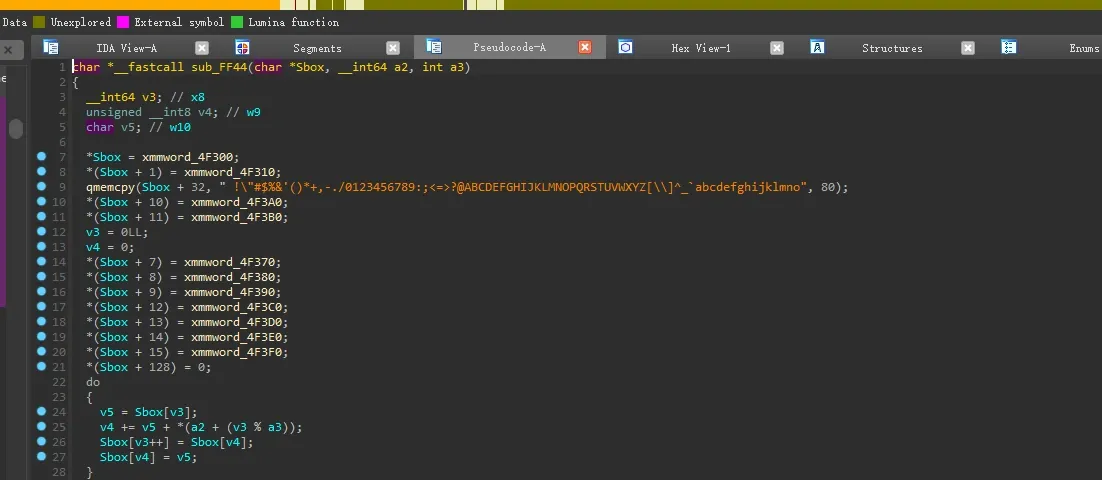
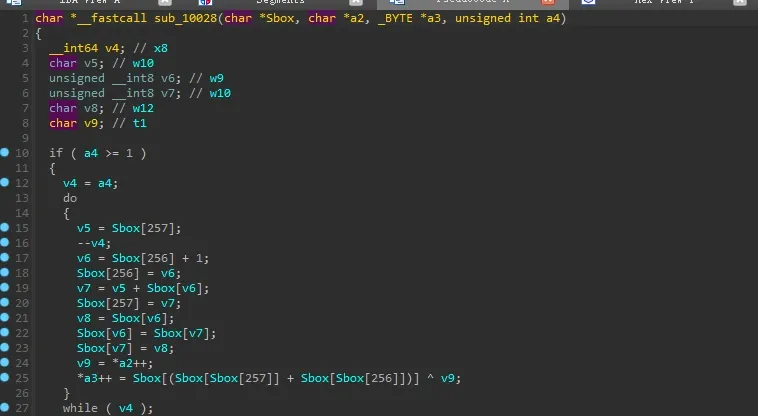
I’m sure you can see this is RC4 at a glance. The key can be found from the arguments below.
One thing to note: the key length is capped at 16. When writing code, don’t use len(key) — there are a lot of zero bytes after the key.
Decrypting the bitcode section with idapython:
import idc
import ida_segment
import idautils

def rc4_decrypt(key, data):
    """RC4 decryption implementation"""
    S = list(range(256))
    j = 0
    out = []

    # KSA init
    for i in range(256):
        j = (j + S[i] + key[i % 16]) % 256
        S[i], S[j] = S[j], S[i]

    # PRGA keystream generation and decrypt
    i = j = 0
    for byte in data:
        i = (i + 1) % 256
        j = (j + S[i]) % 256
        S[i], S[j] = S[j], S[i]
        k = S[(S[i] + S[j]) % 256]
        out.append(byte ^ k)
    return bytes(out)

def decrypt_bitcode():
    # Configure target segment name (change based on step 1 result)
    target_segment = ".bitcode"  # change to your segment name

    # Get the segment object
    seg = ida_segment.get_segm_by_name(target_segment)
    if not seg:
        print(f"[!] Error: segment '{target_segment}' not found")
        return

    start_ea = seg.start_ea
    end_ea = seg.end_ea
    print(f"[*] Found segment {target_segment}: 0x{start_ea:X}-0x{end_ea:X}")

    # Read encrypted data
    encrypted_data = idc.get_bytes(start_ea, end_ea - start_ea)
    if not encrypted_data:
        print("[!] Error: cannot read segment data")
        return

    # Define the RC4 key
    rc4_key = bytes([
        0xE5, 0x5E, 0x5A, 0x20, 0x2C, 0x25, 0xD9, 0x1C, 0x72, 0x74,
        0x2E, 0x36, 0x99, 0x02, 0x80, 0x06, 0x00, 0x00, 0x00, 0x00,
        0x00, 0x00, 0x00
    ])

    # Decrypt
    decrypted_data = rc4_decrypt(rc4_key, encrypted_data)
    print("[+] Decryption done, writing back to IDA database...")

    # Temporarily make the segment writable
    original_perms = idc.get_segm_attr(start_ea, idc.SEGATTR_PERM)
    idc.set_segm_attr(start_ea, idc.SEGATTR_PERM, 0x7)  # RWX

    # Patch byte by byte
    for offset, byte in enumerate(decrypted_data):
        idc.patch_byte(start_ea + offset, byte)

    # Restore segment permissions
    idc.set_segm_attr(start_ea, idc.SEGATTR_PERM, original_perms)

    print("[+] Decrypted data written successfully, re-analyze the code area!")
    print("    Done!")

# Run the decryption
decrypt_bitcode()
After running it, save and reload the file and the bitcode section is recognized:
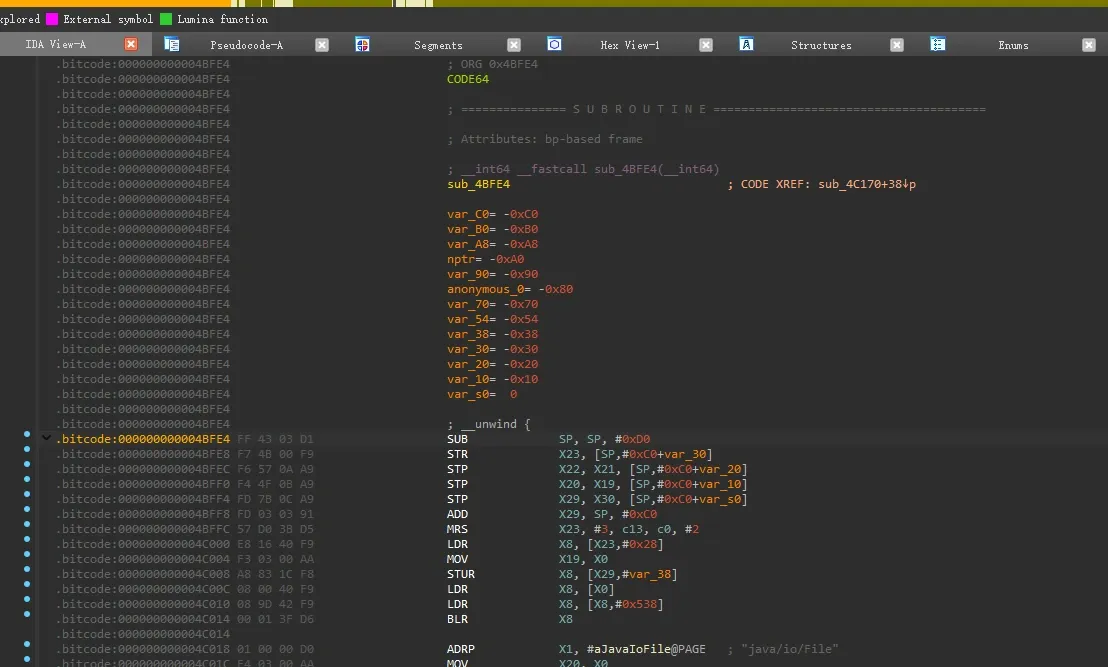
Dumping the decrypted bitcode from memory
For dumping an SO, whether you use GDA or some small tool, it all works. I’ll show Frida here.
With Frida, you first hook dlopen to catch the moment it loads the SO you want to dump, then grab the SO’s base and size:
function my_hook_dlopen(soName,index) {
    //mapsRedirect();
    //hook_memcmp_addr();
    Interceptor.attach(Module.findExportByName(null, "android_dlopen_ext"),
        {
            onEnter: function (args) {
                var pathptr = args[0];
                if (pathptr !== undefined && pathptr != null) {
                    var path = ptr(pathptr).readCString();
                    if (path.indexOf(soName) >= 0) {
                        this.is_can_hook = true;
                    }
                }
            },
            onLeave: function (retval) {
                if (this.is_can_hook) {
                    if (index == 1) {
                        NativeFunc();
                        dump_so(soName);
                    } else {
                        dump_so2(soName);
                    }

                }
            }
        }
    );
}

function dump_so2(so_name) {
    var libso = Process.getModuleByName(so_name);
    console.log("[name]:", libso.name);
    console.log("[base]:", libso.base);
    console.log("[size]:", ptr(libso.size));
    console.log("[path]:", libso.path);
    var file_path = "/sdcard/Download/" + libso.name + "_" + libso.base + "_" + ptr(libso.size) + ".so";
    var file_handle = new File(file_path, "wb");
    if (file_handle && file_handle != null) {
        Memory.protect(ptr(libso.base), libso.size, 'rwx');
        var libso_buffer = ptr(libso.base).readByteArray(libso.size);
        file_handle.write(libso_buffer);
        file_handle.flush();
        file_handle.close();
        console.log("[dump]:", file_path);
    }


}

function dump_so(so_name) {
    var libso = Process.getModuleByName(so_name);
    console.log("[name]:", libso.name);
    console.log("[base]:", libso.base);
    console.log("[size]:", ptr(libso.size));
    console.log("[path]:", libso.path);
    var file_path = "/data/data/[redacted package]/" + libso.name + "_" + libso.base + "_" + ptr(libso.size) + ".so";
    var file_handle = new File(file_path, "wb");
    if (file_handle && file_handle != null) {
        Memory.protect(ptr(libso.base), libso.size, 'rwx');
        var libso_buffer = ptr(libso.base).readByteArray(libso.size);
        file_handle.write(libso_buffer);
        file_handle.flush();
        file_handle.close();
        console.log("[dump]:", file_path);
    }
}


setImmediate(my_hook_dlopen("libdpt.so",2));
The difference between dump_so 1 and 2: one dumps to the private directory, the other to /sdcard — the sdcard one is easier to pull, so I default to 2.
Launch:
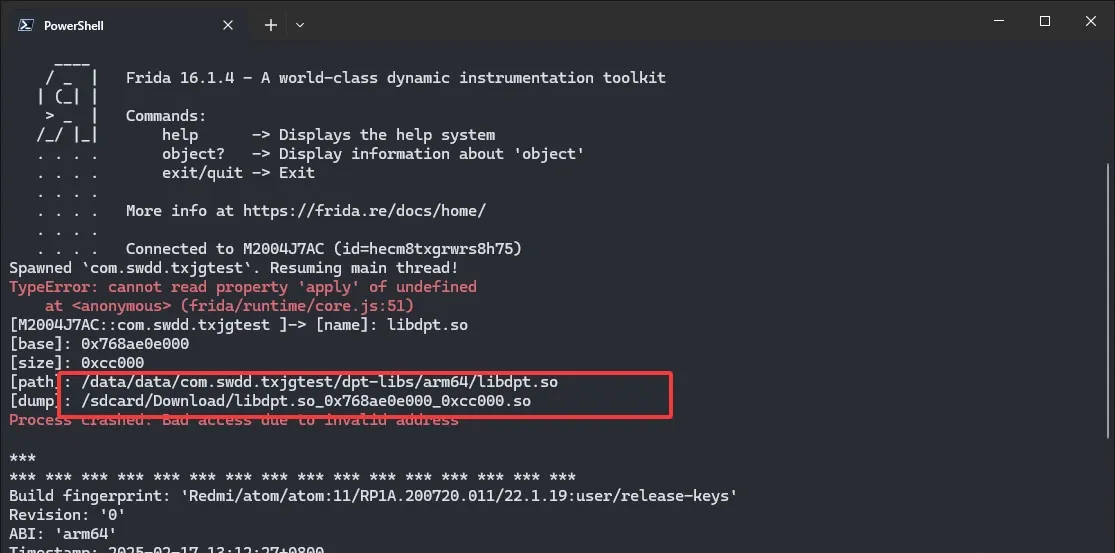
Well, the SO dumped but it crashed — clearly Frida got detected. Not a big deal; we’ll analyze it later.
Let’s look at the dumped SO. IDA usually can’t resolve the import/export tables and strings of an SO dumped from memory — you need SOFixer to fix it. Note: the -m argument is the SO’s base address in memory:
D:\Tool\SoFixer\SoFixer-Windows-64.exe -s E:\dpt-shell\dynamic\libdpt.so_0x768ae0e000_0xcc000.so -o libdpt.so -m 0x768ae0e000 -d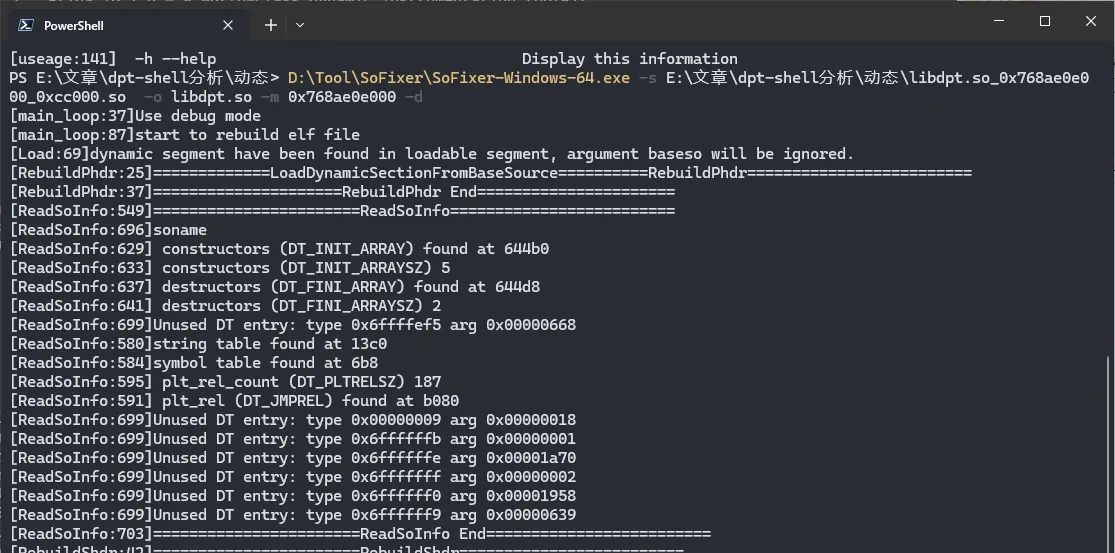
That’s the fix. Open it in IDA to check:

The bitcode section is gone — probably because the section headers are incomplete — but the code itself is definitely decrypted:
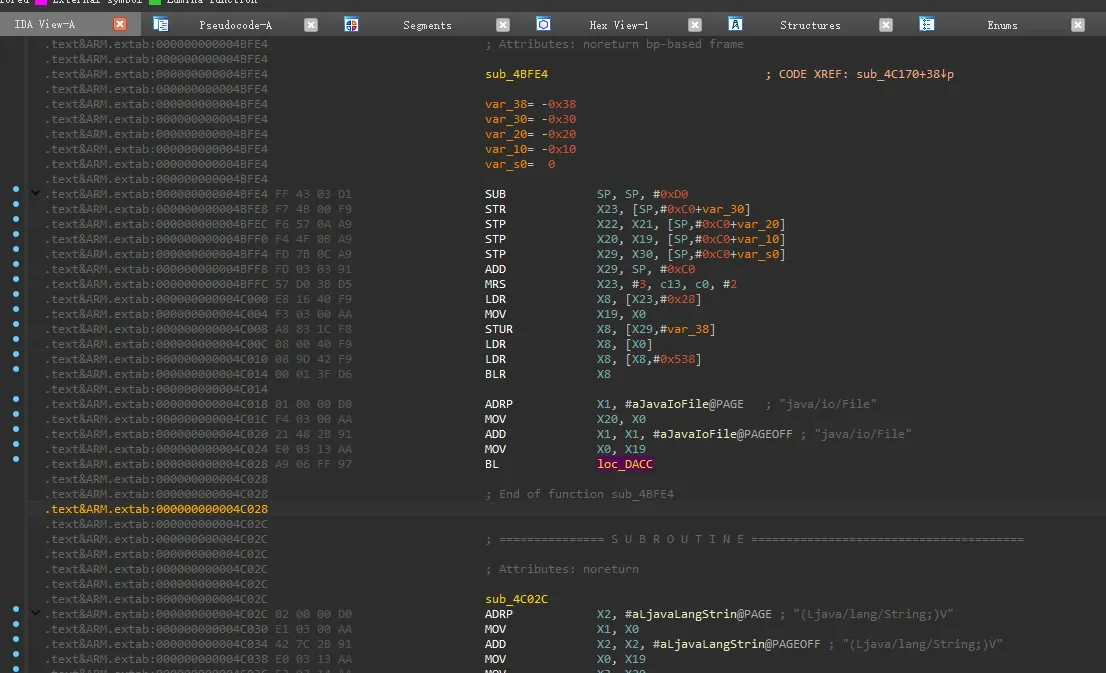
There are still some IDA misidentifications, but nothing that stops you from reading the code.
Bypassing the Frida detection
Earlier, while dumping the SO, we saw there’s a Frida check.
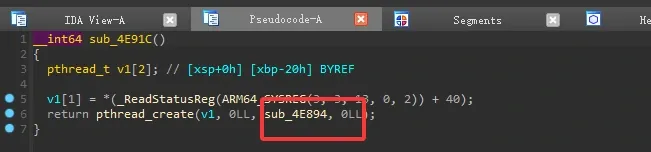
In the initArray call you can see a thread is created here — let’s look at the thread function:
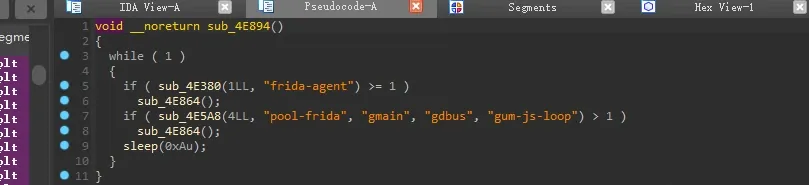
It checks for Frida keywords. That’s convenient.
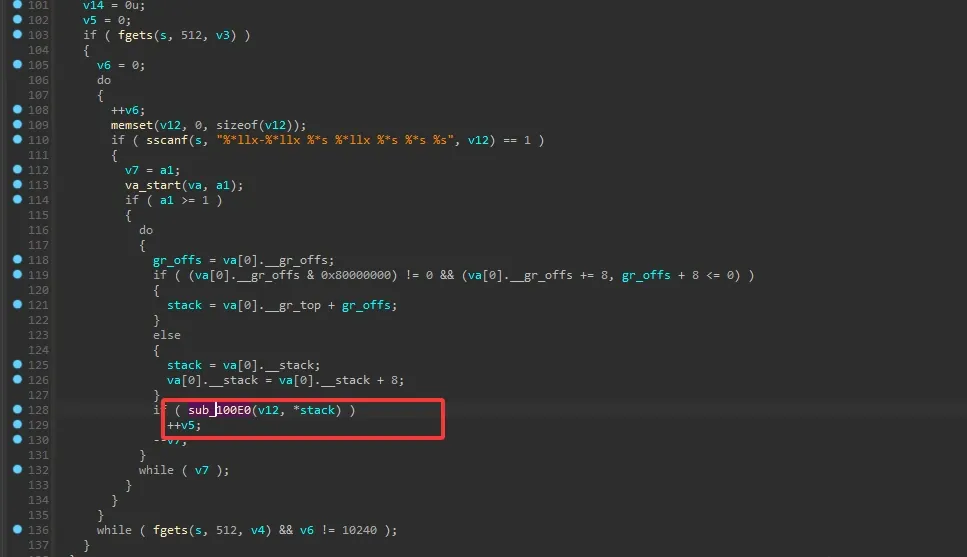
The check logic is a straightforward string scan. sub_100E0 is a self-implemented strstr:
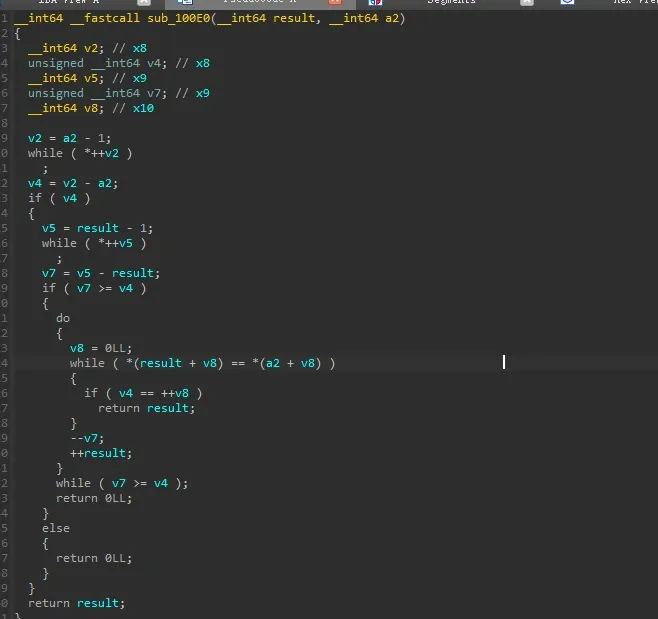
You can see the classic byte-by-byte matching — searching for a substring in a longer string.
So the detection function walks /proc/self/maps, looking for the frida-agent signature, and crashes if it finds it. What’s done well here is the self-implemented strstr walking the maps — it defeats simply hooking strstr to dodge detection. But the frida-agent signature string is stored in plaintext in memory, which it really shouldn’t be.

After detection, they all call the same function — the crash handler.
Click into it and there’s nothing, so you need to look at the assembly:

On ARM64, X30 is the link register — it holds the return address before ret. Here the function zeroes out X30, so the program crashes with Process crashed: Bad access due to invalid address.
Since that’s the case, just replace the function with an empty one:
function antiDetectFrida(Base) {
    var crashAddr = Base.add("0x4E864");

    var originalFunc = new NativeFunction(crashAddr, 'void', []);
    Interceptor.replace(originalFunc, new NativeCallback(function () {
    //    console.log("[Replaced] - Empty function executed");
        console.log('sub_4E894 called from:\n' + Thread.backtrace(this.context, Backtracer.FUZZY).map(DebugSymbol.fromAddress).join('\n') + '\n');

    }, 'void', []));
}
Full version:
function antiDetectFrida(Base) {
    var crashAddr = Base.add("0x4E864");

    var originalFunc = new NativeFunction(crashAddr, 'void', []);
    Interceptor.replace(originalFunc, new NativeCallback(function () {
    //    console.log("[Replaced] - Empty function executed");
        console.log('sub_4E894 called from:\n' + Thread.backtrace(this.context, Backtracer.FUZZY).map(DebugSymbol.fromAddress).join('\n') + '\n');

    }, 'void', []));
}

function NativeFunc() {
    console.info("[Hook Beging]");
    var Base = Module.getBaseAddress("libdpt.so");
    console.warn("[Base]->", Base);
    antiDetectFrida(Base);
}


function hook_android_dlopen_ext() {
    var isHook = false;
    Interceptor.attach(Module.findExportByName(null, "android_dlopen_ext"), {
        onEnter: function (args) {
            this.name = args[0].readCString();
            if (this.name.indexOf("libdpt.so") > 0) {
                console.log(this.name);
                var symbols = Process.getModuleByName("linker64").enumerateSymbols();
                var callConstructorAdd = null;
                for (var index = 0; index < symbols.length; index++) {
                    const symbol = symbols[index];
                    if (symbol.name.indexOf("__dl__ZN6soinfo17call_constructorsEv") != -1) {
                        callConstructorAdd = symbol.address;
                    }
                }
                console.log("callConstructorAdd -> " + callConstructorAdd);
                Interceptor.attach(callConstructorAdd, {
                    onEnter: function (args) {
                        if (!isHook) {
                            NativeFunc();
                            isHook = true;
                        }
                    },
                    onLeave: function () { }
                });

            }
        }, onLeave: function () { }
    });
}

setImmediate(hook_android_dlopen_ext);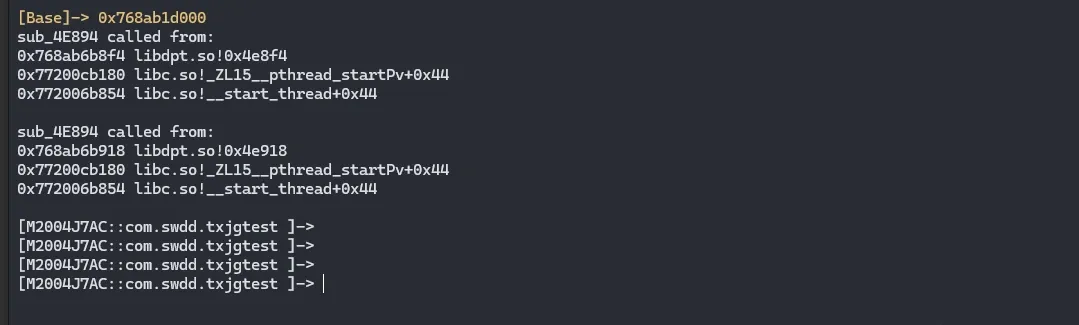
That’s how we successfully hook the program.
DEX back-fill analysis
First, an extraction packer has to process the DEX and back-fill the CodeItem, so the program must hook DefineClass or loadMethod to back-fill the correct bytecode before a method executes. Here’s the call chain when a Java method runs (copied from luoyesiqiu’s blog):
ClassLoader.java::loadClass -> DexPathList.java::findClass -> DexFile.java::defineClass -> class_linker.cc::LoadClass -> class_linker.cc::LoadClassMembers -> class_linker.cc::LoadMethodSo our approach is clear: find where the program registers its hook.
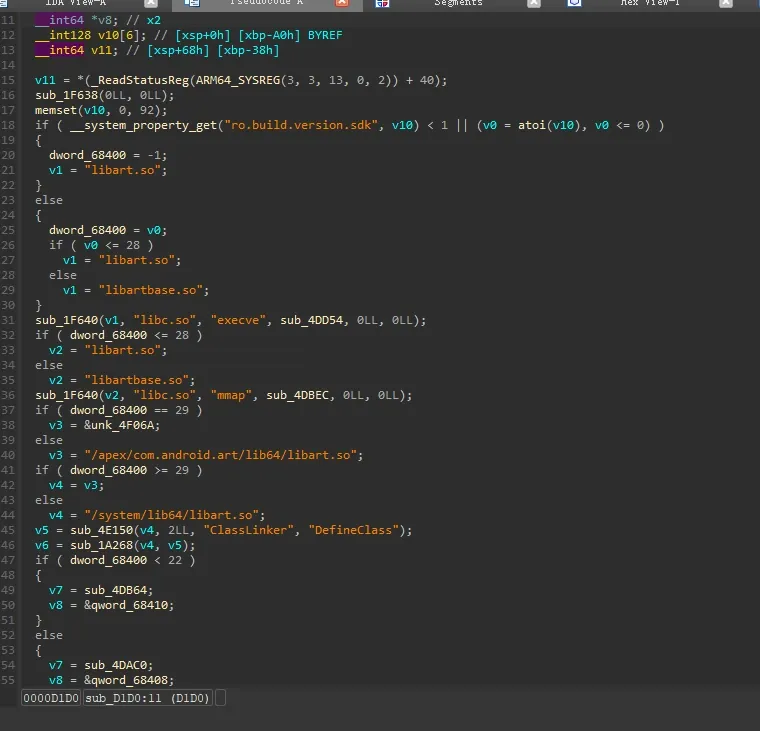
This function looks exactly like it — with experience you’d guess this is doing hooking. But it seems to use two hooking frameworks. Let’s try to recover the symbols.
First, notice this format:
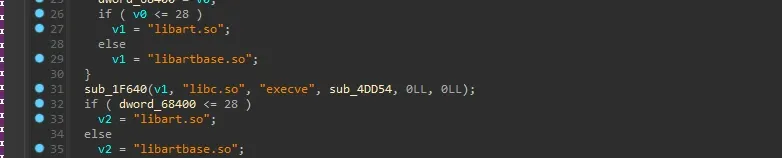
Does this remind you of shadowhook’s hook-registration format?
https://github.com/bytedance/android-inline-hook
#include "shadowhook.h"

void *shadowhook_hook_func_addr(
    void *func_addr,
    void *new_addr,
    void **orig_addr);

void *shadowhook_hook_sym_addr(
    void *sym_addr,
    void *new_addr,
    void **orig_addr);

void *shadowhook_hook_sym_name(
    const char *lib_name,
    const char *sym_name,
    void *new_addr,
    void **orig_addr);

typedef void (*shadowhook_hooked_t)(
    int error_number,
    const char *lib_name,
    const char *sym_name,
    void *sym_addr,
    void *new_addr,
    void *orig_addr,
    void *arg);

void *shadowhook_hook_sym_name_callback(
    const char *lib_name,
    const char *sym_name,
    void *new_addr,
    void **orig_addr,
    shadowhook_hooked_t hooked,
    void *hooked_arg);

int shadowhook_unhook(void *stub);
So we can boldly guess it’s shadowhook, or uses shadowhook’s template. Let’s grab a libshadowhook.so — compile it yourself or pull it from an existing app — then use bindiff to load the symbols. I’ll just summarize the bindiff step here:
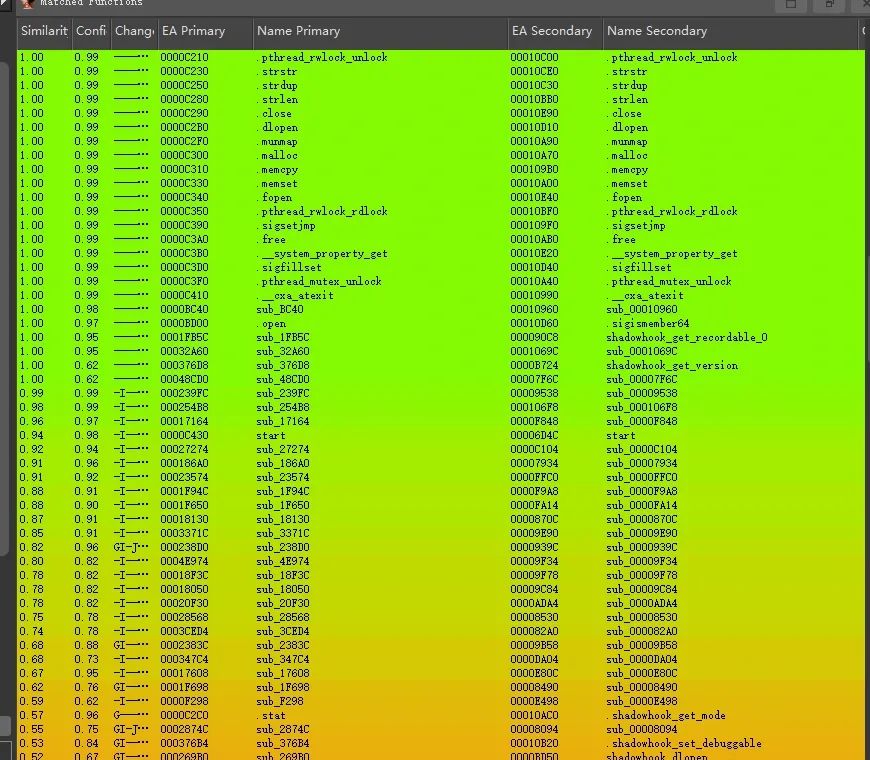
You can see directly that the shell basically uses the shadowhook framework, with modifications. At this point recovering symbols doesn’t matter much.
sub_1F640’s argument is clearly the registered hook, but here’s the next problem:
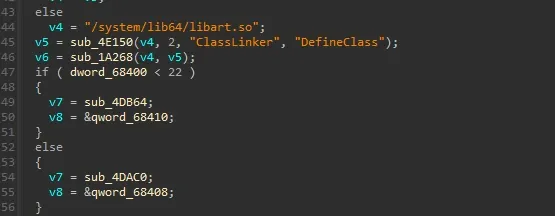
Why isn’t the DefineClass hook this same pattern anymore? It doesn’t look like ShadowHook either:
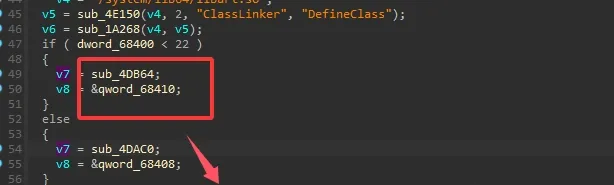
But look at the code — it’s clearly still doing hooking. So we know sub_4DAC0 is the function executed via hook before DefineClass, and it’s most likely where the DEX gets back-filled.

This is a very standard operation: after hooking, you need to restore the original state, so it returns to the recorded originMethod. So one of sub_4D608(a3, a6, a7)’s arguments must be the DexFile — we just need to hook in with Frida right after this function.
Also worth noting: check the SDK version. If it’s above 22, it takes the lower hook; below 22, the upper hook. Don’t hook the wrong one.
Then there’s sub_4D608’s logic. Searching through it:
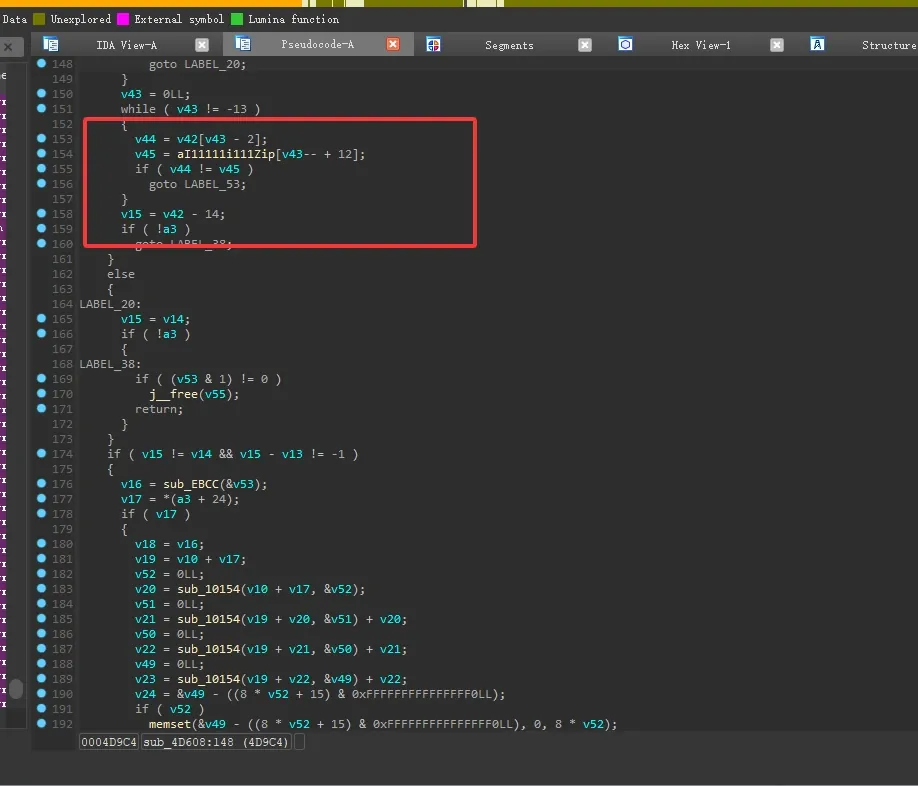
It reads a static resource — and since it’s an extraction packer, it must read from Assets. So we can basically guess there’s DexFile processing logic here.
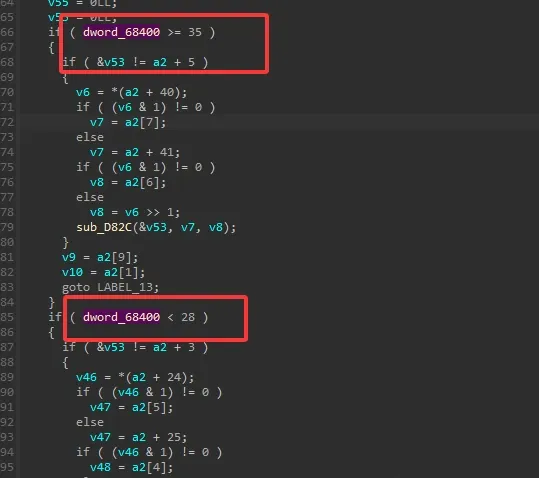
Here it handles different SDK versions differently.
Another very important thing: when processing the incoming file, you have to null-check the pointer first. The corresponding spot is:
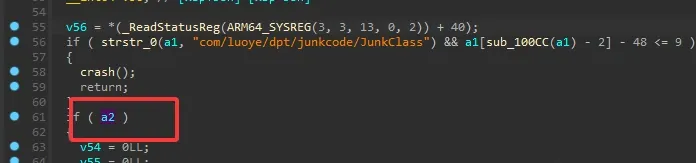
Here we can see a2 is actually the DexFile pointer.
So we just need to parse the a4 argument passed in after sub_4D608 finishes:
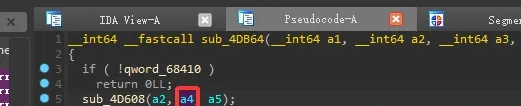
To parse this DexFile, let’s look at the DexFile object’s structure:
DexFile::DexFile(
	const uint8_t* base,             //dex file base address
	size_t size,                             //  dex file length
	const uint8_t* data_begin,
	size_t data_size,
	const std::string& location,
	uint32_t location_checksum,
	const OatDexFile* oat_dex_file,
	std::unique_ptr<DexFileContainer> container,
	bool is_compact_dex
)
The first is the base address, the second the length. With just these two we can dump the complete dexfile. Use the following (Frida code, spawn launch — mind the dlopen timing; I’ll only paste part of the code):
function analysisDex(Base) {

    var originalDefineClass = Base.add("0x4DB44");
    console.log("originalDefineClassAddr->", originalDefineClass)
    Interceptor.attach(originalDefineClass, {
        onEnter: function (args) {
            this.dex_file = this.context.x5;
            console.log(hexdump(this.context.x5))
        },
        onLeave: function (args) {
            var dex_file = this.dex_file;
        }
    })

}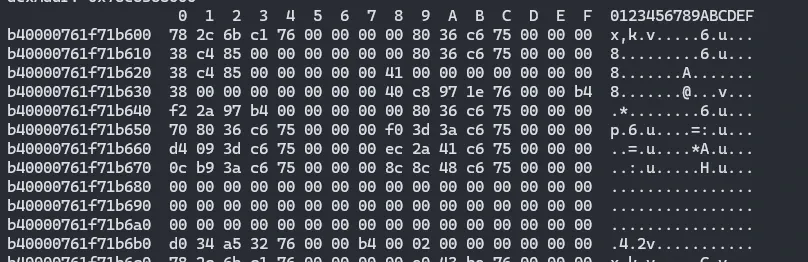
Reading this, the first 8 bytes don’t look like the DEX base address — the second group of 8 bytes is clearly an address, not a size, and the third group looks like the size. Why? Because in the C++ calling convention the first argument is actually the this pointer. To parse it you skip that pointer. Looking at the next chunk of memory, it matches the DexFile constructor parameters.
Getting the DexFile base address:
function analysisDex(Base) {
    var originalDefineClass = Base.add("0x4DB44");
    console.log("originalDefineClassAddr->", originalDefineClass)
    Interceptor.attach(originalDefineClass, {
        onEnter: function (args) {
            this.dex_file = this.context.x5;
            var base = ptr(this.dex_file).add(Process.pointerSize).readPointer();
            var size = ptr(this.dex_file).add(Process.pointerSize + Process.pointerSize).readUInt();
            console.log("[DexFile]-> Base = ", base);
            console.log("[DexFile]-> size = ", size);
        },
        onLeave: function (args) {
        }
    })

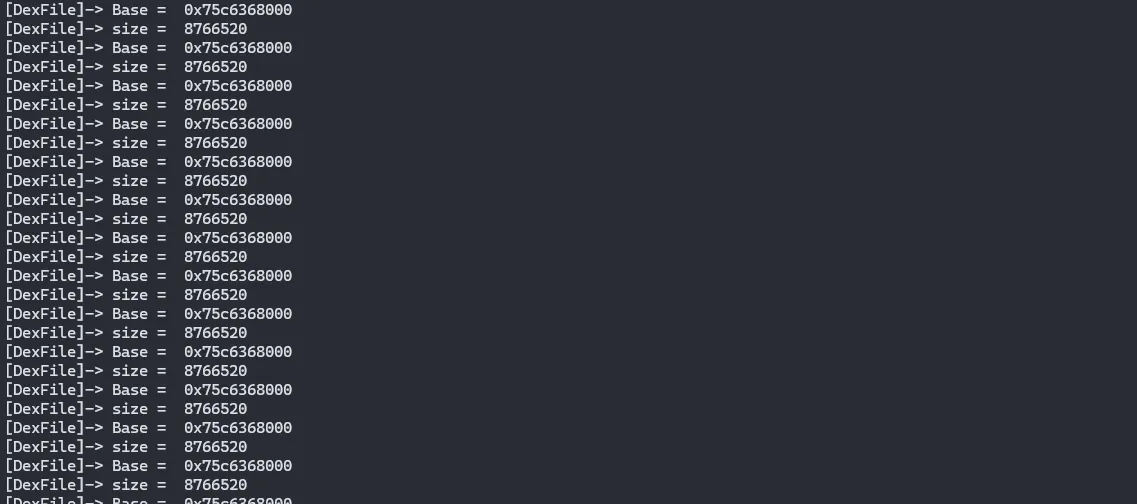
}
To make sure we read correctly, read the first 8 bytes of base to see the magic:
console.log("[DexFile]-> magic = ", magic);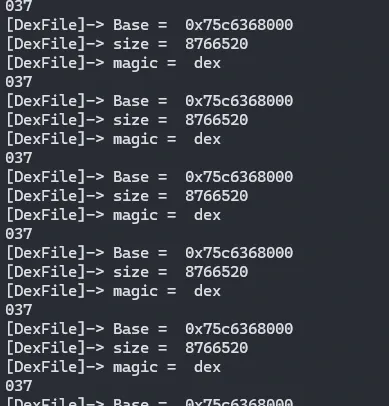
It matches the DexFile format. The smart reader will have noticed: the same base gets called over and over. That’s because an extraction packer doesn’t back-fill everything at once — it dynamically back-fills the insns on call, so it touches one DEX many times.
And in the hook logic, you can see dpt-shell doesn’t unload the already-loaded methods — few vendors do, since it would cost too much performance.
So why not create a map, store every distinct DEX base and size, and after the program finishes loading, iterate the map to dump them all?
Here’s the implementation:
const dexMap = new Map();

function analysisDex(Base) {
    var originalDefineClass = Base.add("0x4DB44");
    console.log("originalDefineClassAddr->", originalDefineClass)
    Interceptor.attach(originalDefineClass, {
        onEnter: function (args) {
            this.dex_file = this.context.x5;
            var base = ptr(this.dex_file).add(Process.pointerSize).readPointer();
            var size = ptr(this.dex_file).add(Process.pointerSize + Process.pointerSize).readUInt();
            console.log("[DexFile]-> Base = ", base);
            console.log("[DexFile]-> size = ", size);
            var magic = ptr(base).readCString();
            console.log("[DexFile]-> magic = ", magic);
            // check if base and size already exist
            let isDuplicate = false;
            for (let [existingBase, existingSize] of dexMap.entries()) {
                if (existingBase.equals(base) && existingSize === size) {
                    isDuplicate = true;
                    break;
                }
            }

            if (isDuplicate) {
                console.log(`[WARN] DexFile with base ${base} and size ${size} already exists, skipping...`);
            } else {
                dexMap.set(base, size);
                console.log(`[INFO] New DexFile found: base=${base}, size=${size}`);
            }
        },
        onLeave: function (args) {
        }
    })

}


function printDexMap() {
    console.log("Current DexFile Map:");
    for (let [base, size] of dexMap.entries()) {
        console.log(`Base: ${base}, Size: ${size}`);
    }
}
When Frida’s output slows down, or stops, call printDexMap():
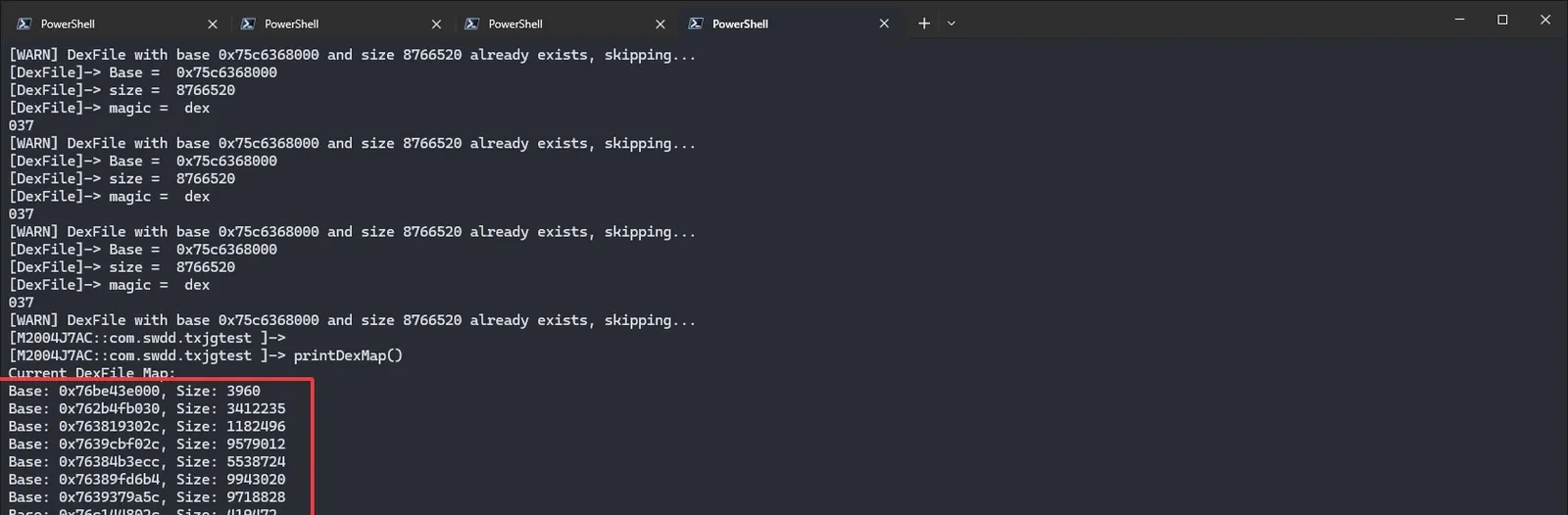
Now we have all loaded DEX base/size pairs. Write a loop script to dump them.
Here’s one I’ve already written that dumps straight to the private directory:
function get_self_process_name() {
    var openPtr = Module.getExportByName('libc.so', 'open');
    var open = new NativeFunction(openPtr, 'int', ['pointer', 'int']);
    var readPtr = Module.getExportByName("libc.so", "read");
    var read = new NativeFunction(readPtr, "int", ["int", "pointer", "int"]);
    var closePtr = Module.getExportByName('libc.so', 'close');
    var close = new NativeFunction(closePtr, 'int', ['int']);
    var path = Memory.allocUtf8String("/proc/self/cmdline");
    var fd = open(path, 0);

    if (fd != -1) {
        var buffer = Memory.alloc(0x1000);
        var result = read(fd, buffer, 0x1000);
        close(fd);
        result = ptr(buffer).readCString();
        return result
    }

    return "-1"
}

function Mkdir(path) {
    if (path.indexOf("com") == -1) {
        console.log("[Mkdir]-> Pass:", path);
        return 0;
    }
    var mkdirPtr = Module.getExportByName('libc.so', 'mkdir');
    var mkdir = new NativeFunction(mkdirPtr, 'int', ['pointer', 'int']);
    var opendirPtr = Module.getExportByName('libc.so', 'opendir');
    var opendir = new NativeFunction(opendirPtr, 'pointer', ['pointer']);
    var closedirPtr = Module.getExportByName('libc.so', 'closedir');
    var closedir = new NativeFunction(closedirPtr, 'int', ['pointer']);
    var cPath = Memory.allocUtf8String(path);
    var dir = opendir(cPath);

    if (dir != 0) {
        closedir(dir);
        return 0
    }

    mkdir(cPath, 0o755);
    chmod(path)
    console.log("[Mkdir]->", path);
}

function chmod(path) {
    var chmodPtr = Module.getExportByName('libc.so', 'chmod');
    var chmod = new NativeFunction(chmodPtr, 'int', ['pointer', 'int']);
    var cPath = Memory.allocUtf8String(path);
    chmod(cPath, 755)
}

function dumpDex() {

    dexMap.forEach((size, base) => {
        console.log(`Base: ${base}, Size: ${size}`);
        var magic = ptr(base).readCString();
        console.log("DesFileMagic->", magic);
        if (magic.indexOf("dex") == 0) {
            var process_name = get_self_process_name();
            if (process_name != "-1") {
                var dex_dir_path = "/data/data/" + process_name + "/files"
                Mkdir(dex_dir_path)
                dex_dir_path += "/dump_dex_" + process_name
                Mkdir(dex_dir_path)
                var dex_path = dex_dir_path + "/class" + (dex_count == 1 ? "" : dex_count) + ".dex"; console.log("[find dex]:", dex_path); var fd = new File(dex_path, "wb");
                if (fd && fd != null) {
                    dex_count++; var dex_buffer = ptr(base).readByteArray(size);
                    fd.write(dex_buffer); fd.flush();
                    fd.close(); console.log("[dump dex]:", dex_path)
                }
            }
        }
    });
}
After the program finishes loading, call DumpDex:
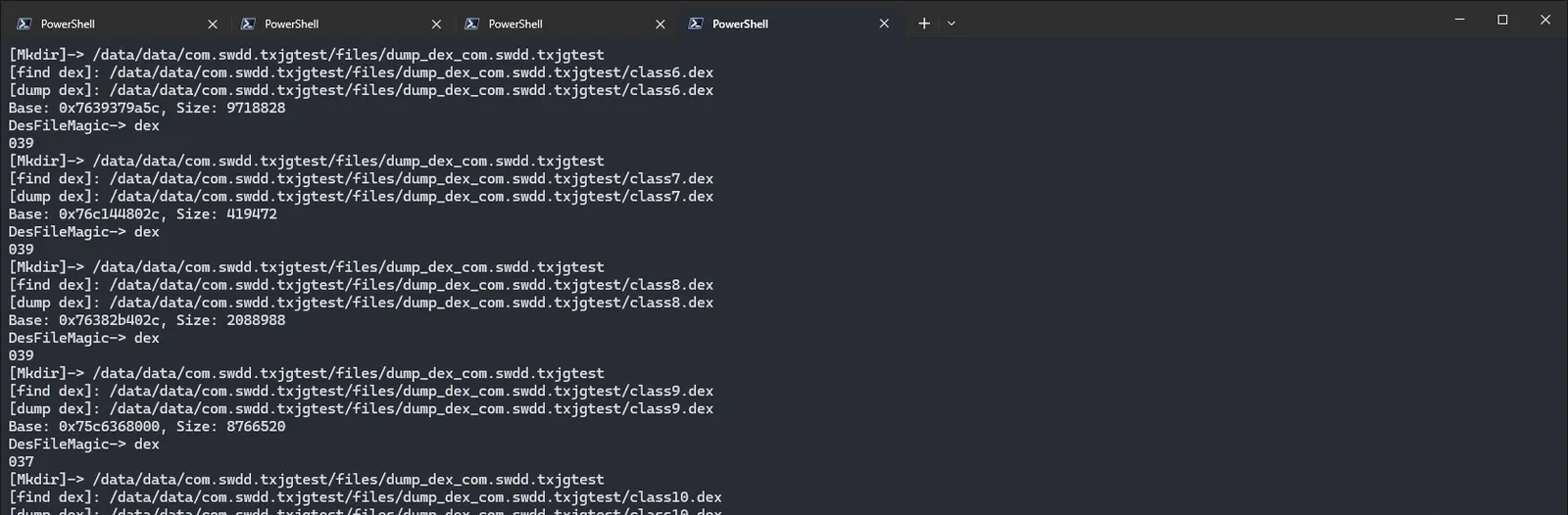
You’ll find the files in the private directory:
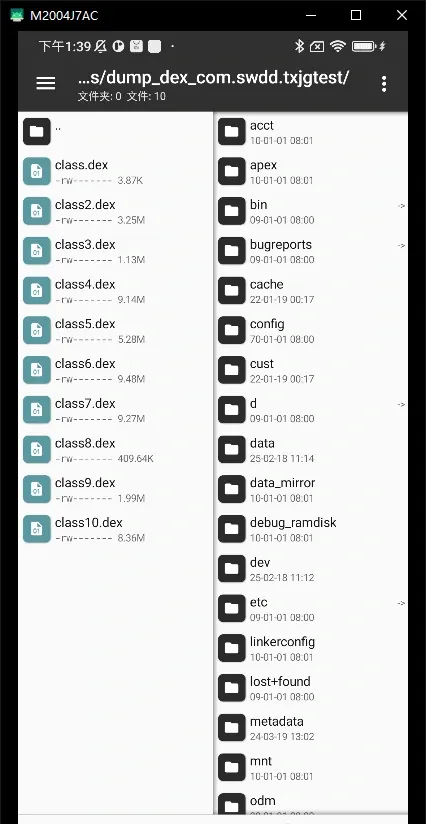
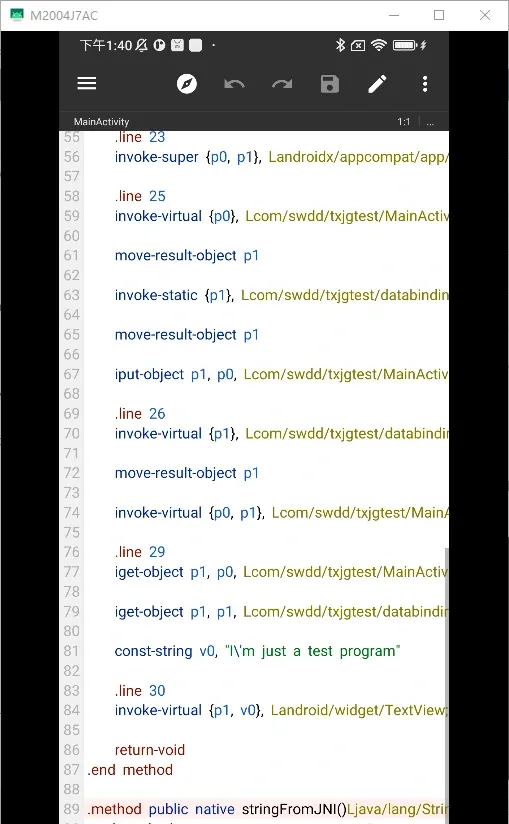
Decompile and you’ll see the extracted classes are all back-filled:
How it works
Here I mainly analyze how the program back-fills extracted classes into Class, cross-referencing the source. The other steps were already explained in the reversing section above.
The source shows this is DobbyHook:
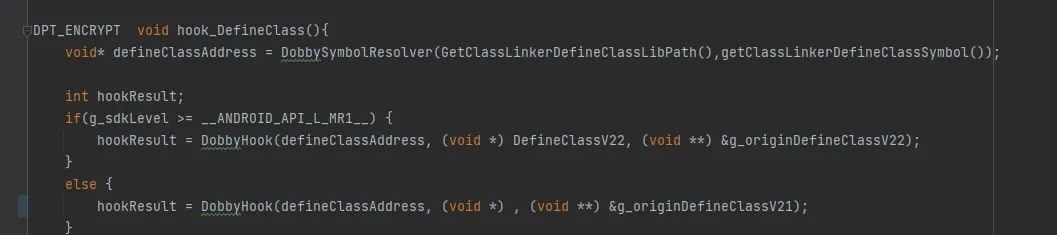
It checks the SDK version and handles different versions differently:
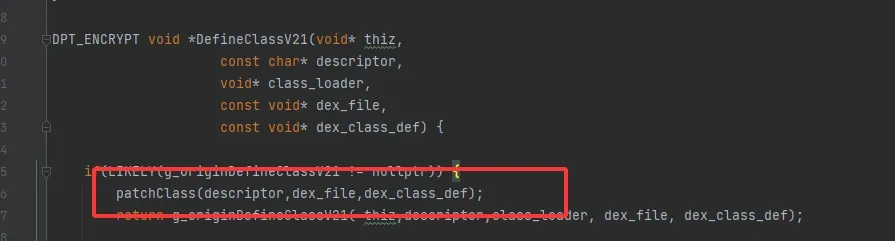
Here it goes straight to patchClass, so the focus is on patchClass’s logic:
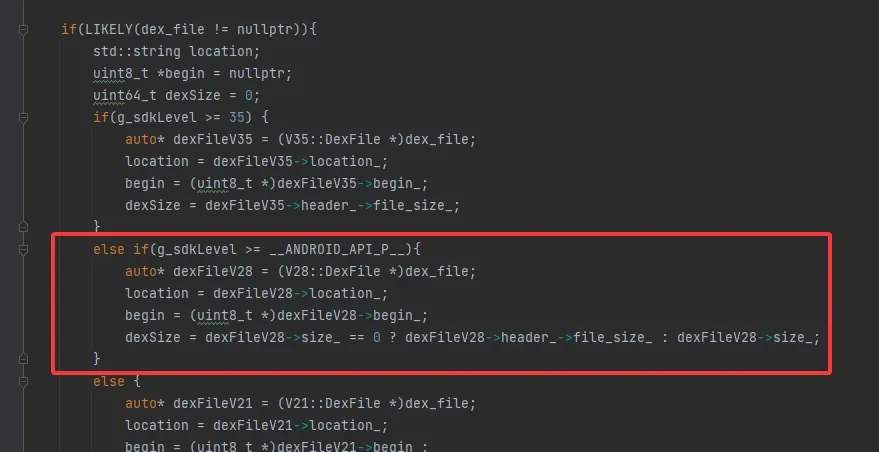
Here it parses the DexFile according to SDK version:
uint64_t static_fields_size = 0;
read += DexFileUtils::readUleb128(class_data, &static_fields_size);

uint64_t instance_fields_size = 0;
read += DexFileUtils::readUleb128(class_data + read, &instance_fields_size);

uint64_t direct_methods_size = 0;
read += DexFileUtils::readUleb128(class_data + read, &direct_methods_size);

uint64_t virtual_methods_size = 0;
read += DexFileUtils::readUleb128(class_data + read, &virtual_methods_size);
Gets the count of fields and methods in the class, preparing for later parsing:
dex::ClassDataField staticFields[static_fields_size];
read += DexFileUtils::readFields(class_data + read, staticFields, static_fields_size);

dex::ClassDataField instanceFields[instance_fields_size];
read += DexFileUtils::readFields(class_data + read, instanceFields, instance_fields_size);

dex::ClassDataMethod directMethods[direct_methods_size];
read += DexFileUtils::readMethods(class_data + read, directMethods, direct_methods_size);

dex::ClassDataMethod virtualMethods[virtual_methods_size];
read += DexFileUtils::readMethods(class_data + read, virtualMethods, virtual_methods_size);
Gets the details of all fields and methods, preparing for the patch:
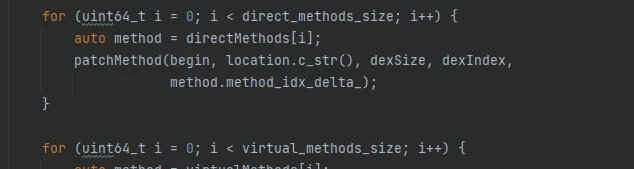
Here it passes all the methods read earlier into patchMethod to modify:
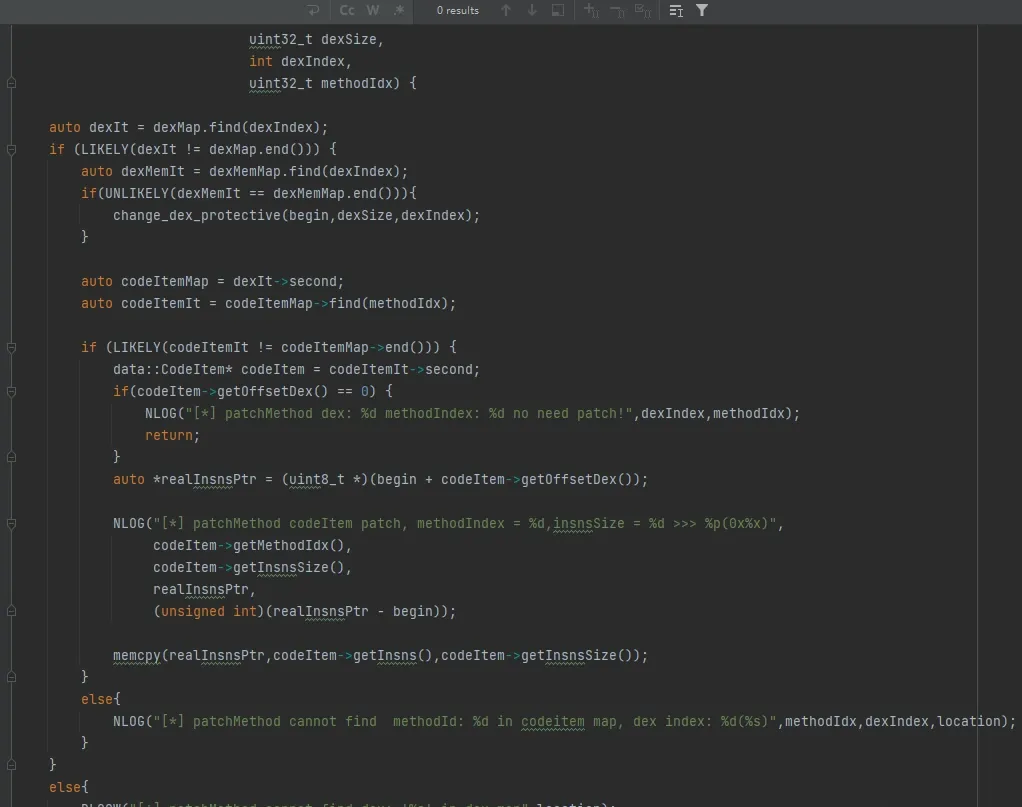
Then patchMethod: it uses the previously maintained dexMap, changes the relevant memory segment’s permissions, looks up the CodeItem in the map, and fills it in with memcpy.
That completes the dynamic back-fill of the class.
Wrapping up
dpt-shell packs a lot of techniques and packing principles worth studying into one project. A very rewarding learning process.
Colin Xiao — I take on contract reverse-engineering work, and writeups like this are how I show what I can do. If you need help with anything in this space — including but not limited to the areas I cover above — I’m available. No project is too big or too small — if it’s reverse engineering and I can do it, I’ll take it. DM me on X (@colinxiao_lab) or Telegram (@ColinXiao666).
Get in touch