Reversing a Hardware-Detection Tool: Harvesting CPU/GPU Telemetry Through Its Own DLL
About the author. I’m Colin Xiao — an independent reverse engineer, mostly working solo on contract jobs. I dig into compiled code of every kind, including but not limited to: Android and iOS apps, x86/x64/ARM native binaries, packers and obfuscators, DRM and license checks, network protocols and APIs, crypto and signature algorithms, malware, game binaries, and embedded/IoT firmware. I also handle large-scale data collection and vulnerability research. If you have any project in mind, I’d be glad to take it on — whatever it is, as long as it’s within my wheelhouse. Just reach out. You can reach me on X at @colinxiao_lab or on Telegram at https://t.me/ColinXiao666.
This research is published for educational and defensive purposes. The target sample is anonymized throughout.
Reversing a Hardware-Detection Tool: Harvesting CPU/GPU Telemetry Through Its Own DLL
Background
Everyone knows the “Master X” tool (a well-known Chinese hardware-detection utility) has unusually strong hardware detection. I got curious about how it works under the hood.
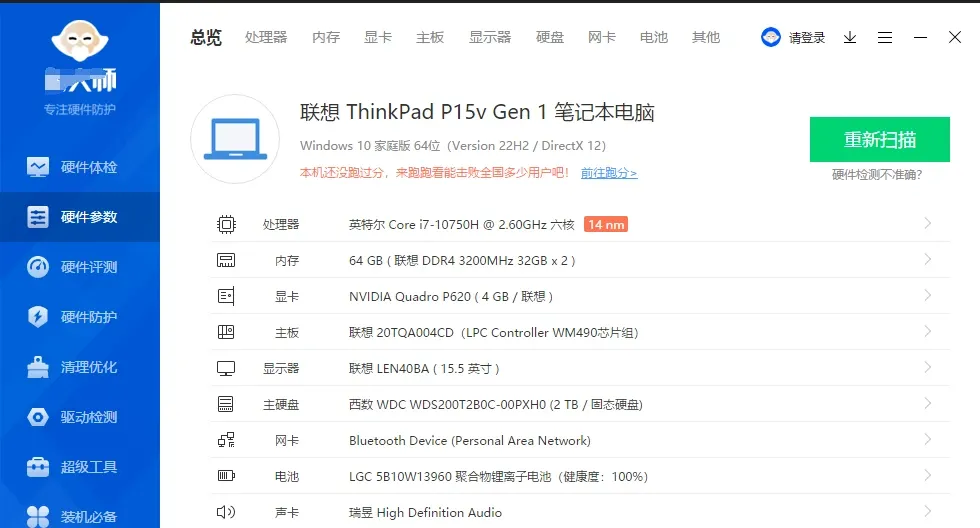
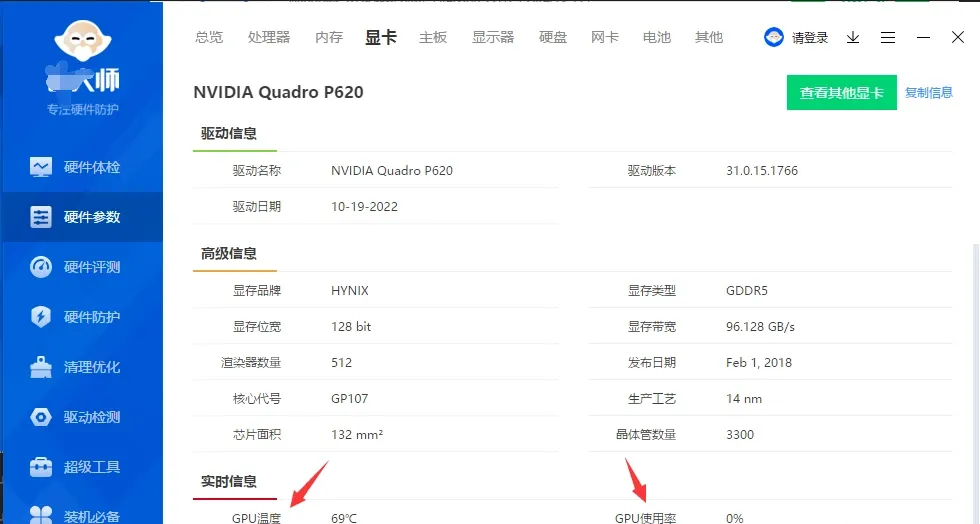
Reversing
Its hardware-detection logic turned out to be fairly involved — reimplementing the whole thing would be a lot of work. So instead I call the tool’s own binaries and hook them to get the hardware data. Here’s the approach.
1. Getting the “hardware overview”
As usual, start with the tool’s log file:
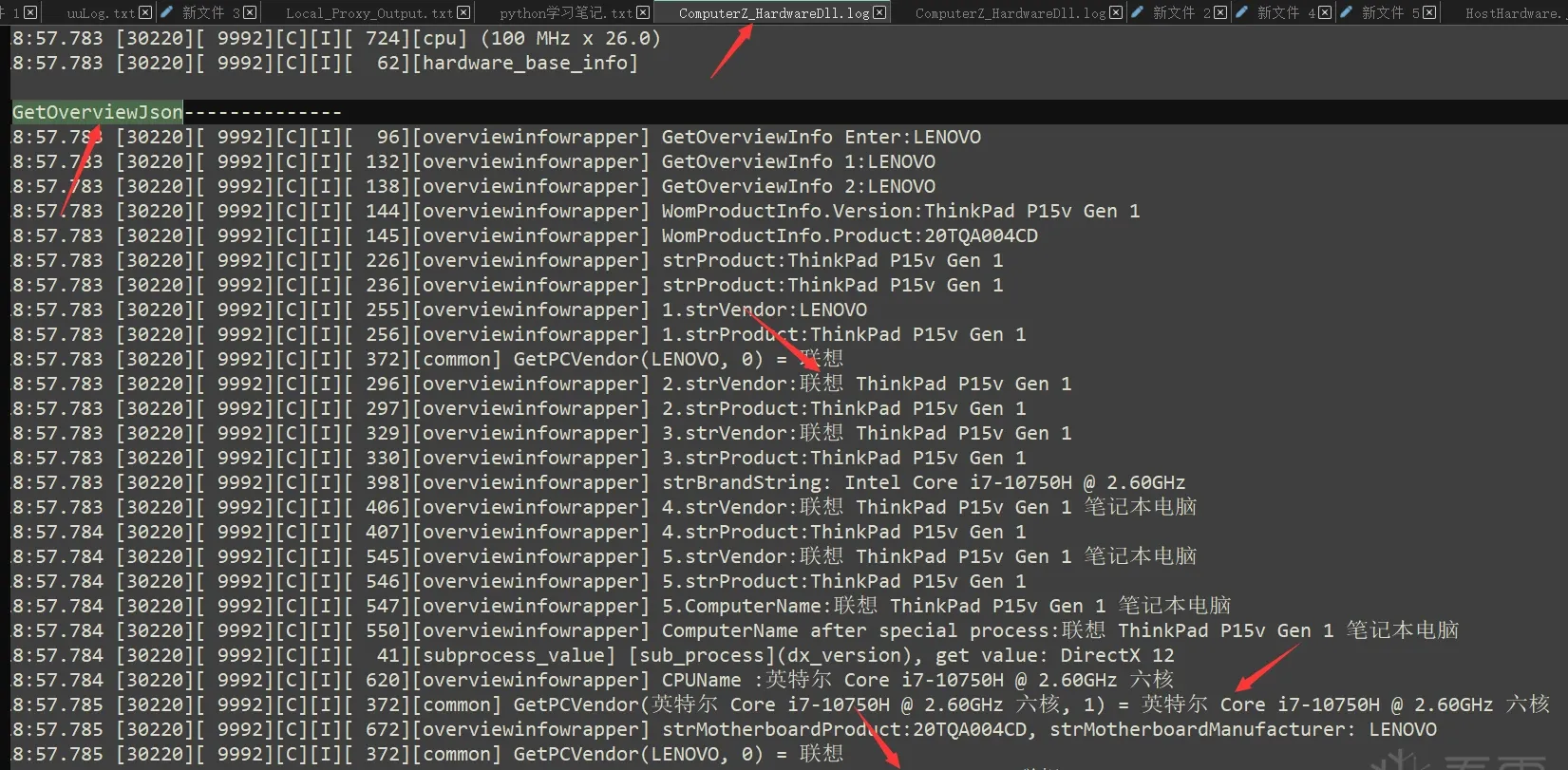
The keyword GetOverviewJson appears, followed by CPU, motherboard, and vendor info — that’s the “hardware overview” log.
Looking at its processes and files, there are two processes:
ComputerZ_CN.exe is the UI process and ComputerZService.exe is a service process:
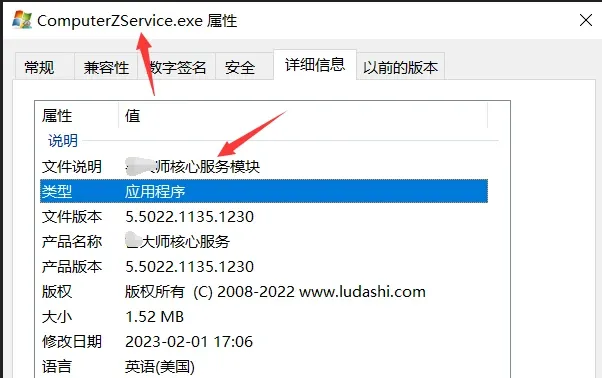
My guess: ComputerZService.exe calls DLLs that do the actual hardware detection, and ComputerZ_CN.exe just displays the results.
The files:
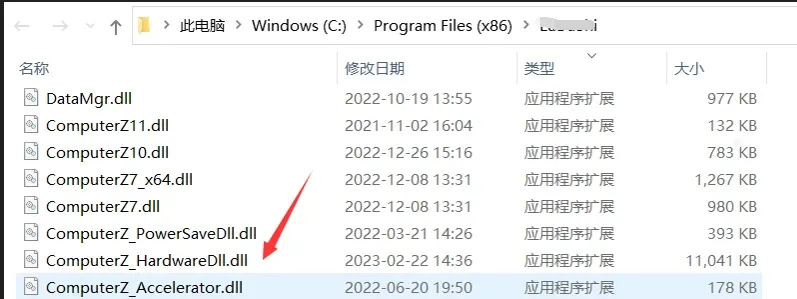
ComputerZ_HardwareDll.dll looks like it implements the hardware detection — the DLL to focus on.
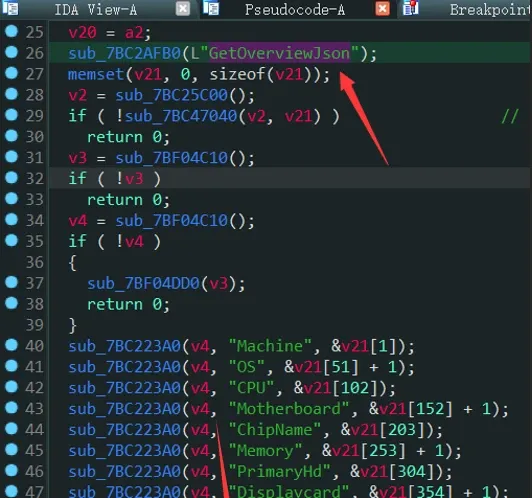
Based on the log keyword, open ComputerZ_HardwareDll.dll in IDA and search for GetOverviewJson:
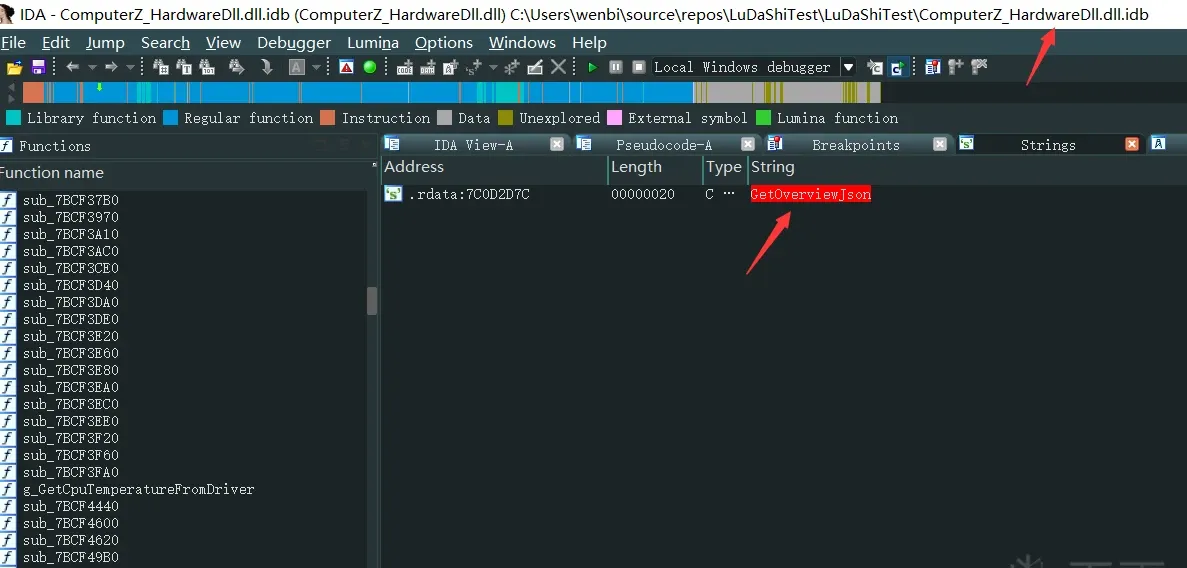
Find the reference:
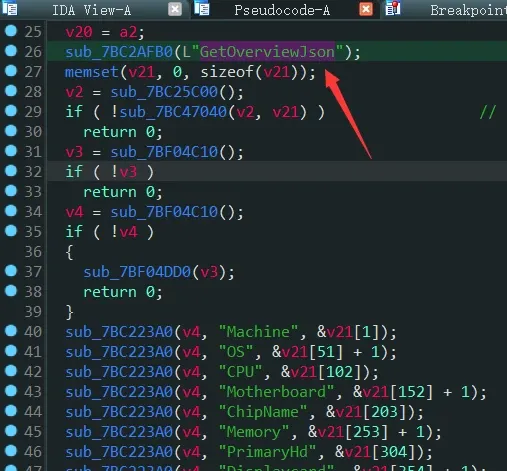
There are Machine, OS, CPU, Motherboard strings — this is exactly the “hardware overview” code.
My first thought was to just call this function with the right arguments. But the program kept throwing errors. It turns out the tool does a bunch of initialization before calling it, and calling the function directly skips that. Even after I reverse-engineered and replayed a bunch of the initialization, it still errored.
So I went one level up — to the functions the tool calls at the very start of a hardware scan.
Looking at ComputerZ_HardwareDll.dll’s exports:
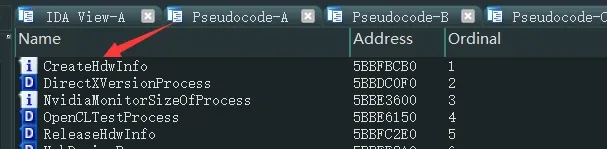
There’s a CreateHdwInfo function — creates the hardware-info object, likely called before a scan. No scan function in the exports.
Since it’s not in the DLL, look at the exe that calls the DLL — ComputerZService.exe. In IDA, search for the string ComputerZ_HardwareDll.dll:
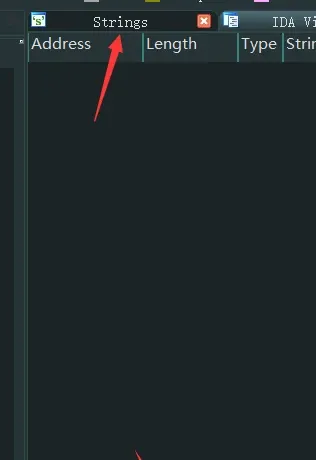
It didn’t match directly, but the string is there:
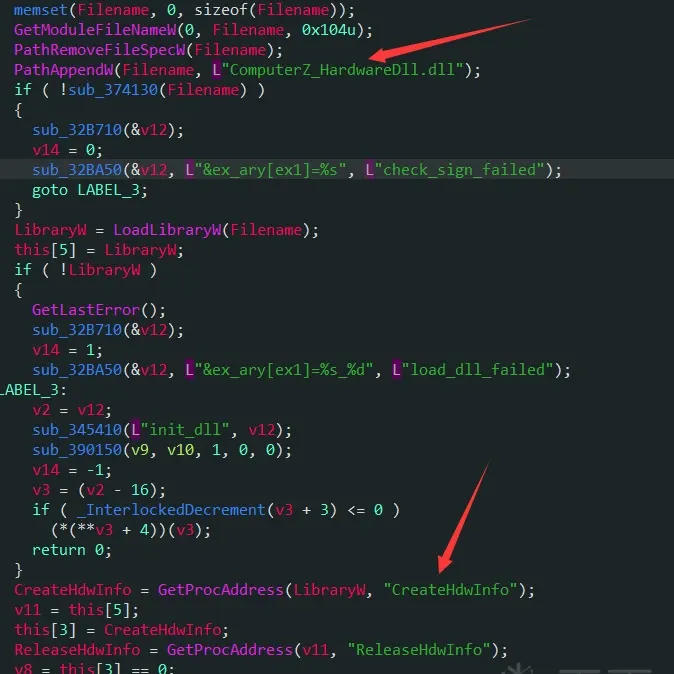
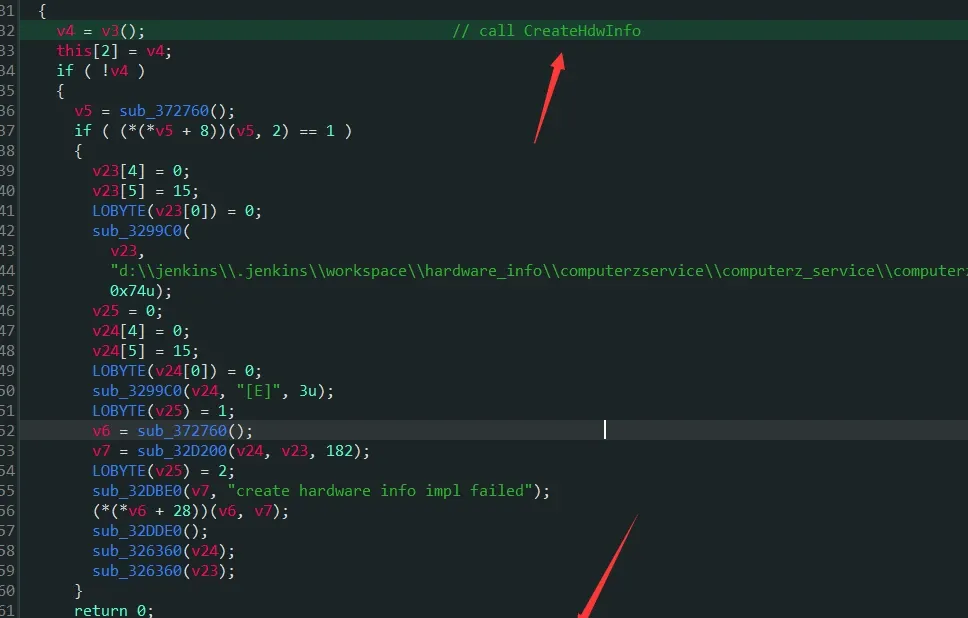
It calls the DLL’s CreateHdwInfo and hardware_info_main. hardware_info_main in the DLL:
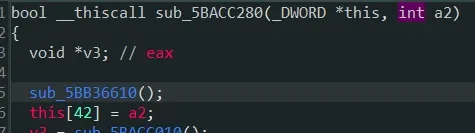
Calling hardware_info_main requires a this pointer as the first argument. I worked out what to fill it with from the call-site context in IDA:
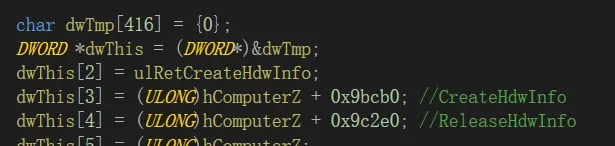
ComputerZService.exe ends up calling:
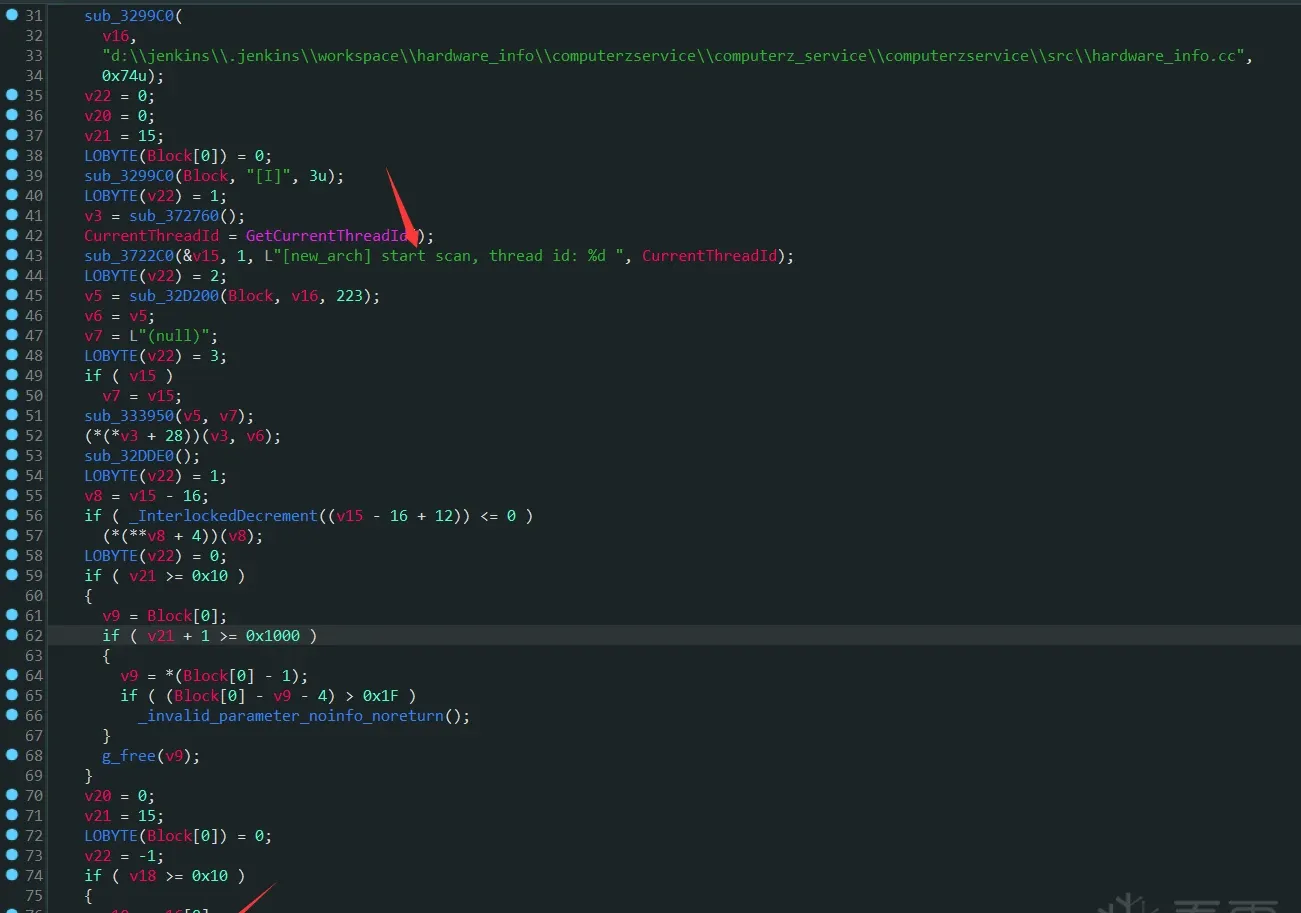
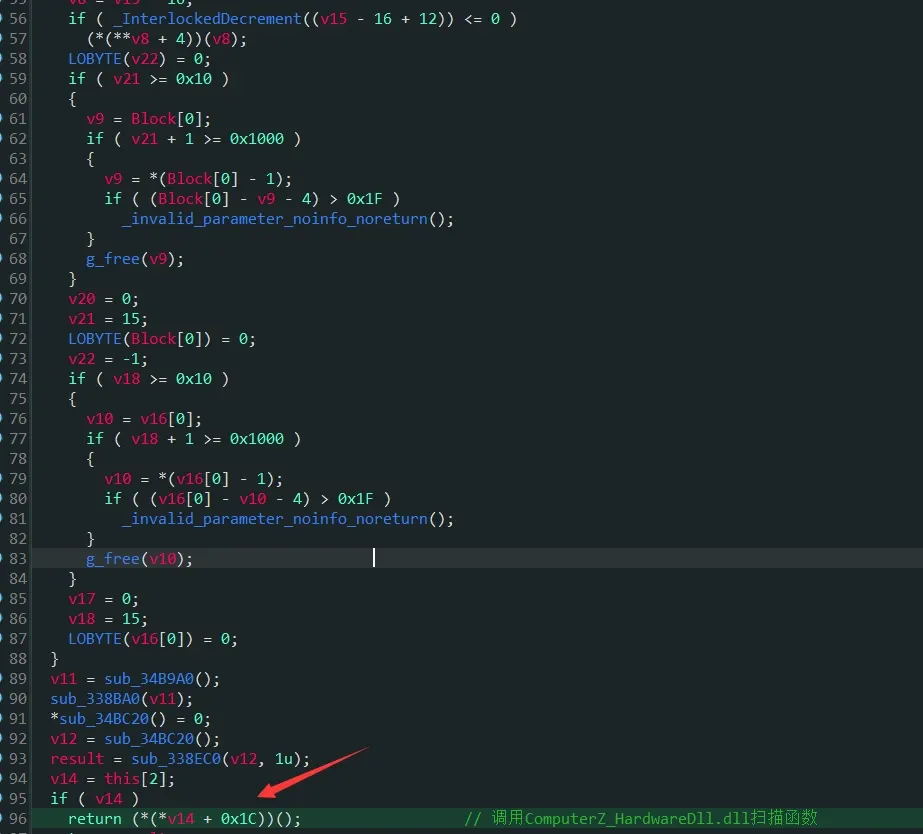
Inside sub_34D680 it calls the DLL’s scan function. How do I know (*(*(v14 + 0x1C)))() is the scan function? I set a breakpoint on g_GetOverviewJson in the DLL (renamed after identification) and walked the stack back into ComputerZService.exe:
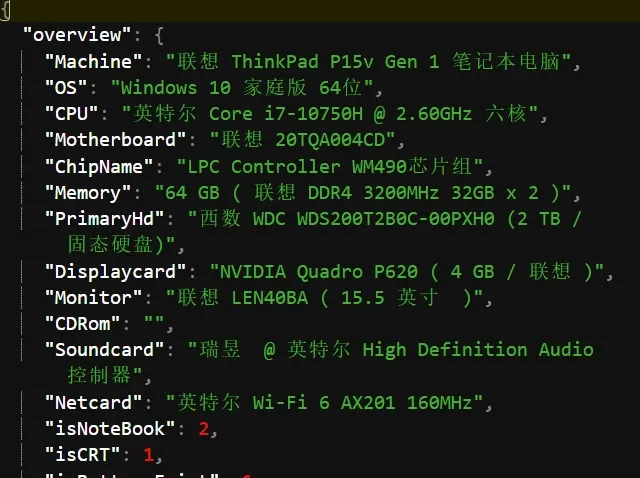
So I wrote code that calls these three functions in order, with a hook in g_GetOverviewJson, and it grabs the “hardware overview”:
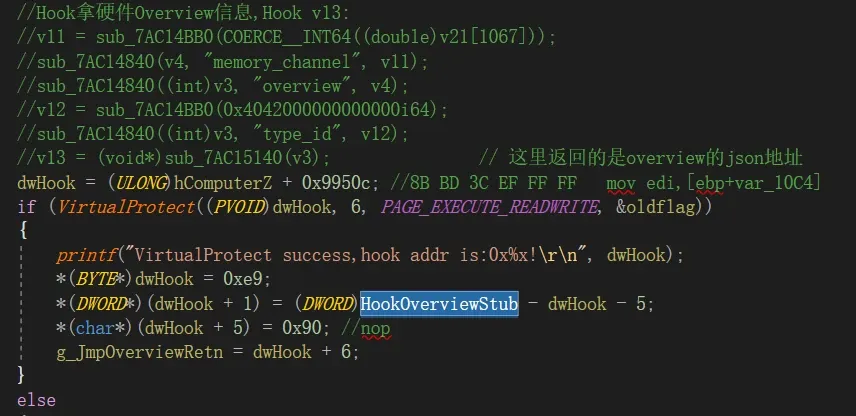
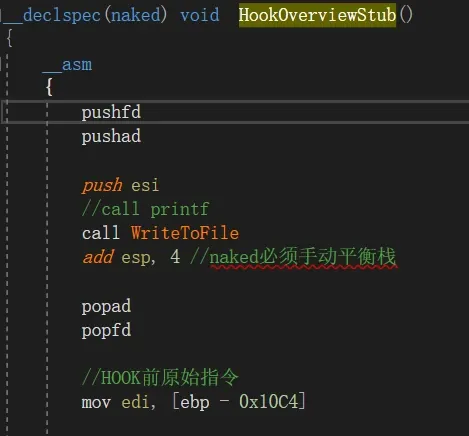
My machine’s data:
2. GPU usage and temperature
The simplest approach: use Cheat Engine to search for the value, then set a hardware write-breakpoint to find the code. The GPU usage and temperature values change, so:
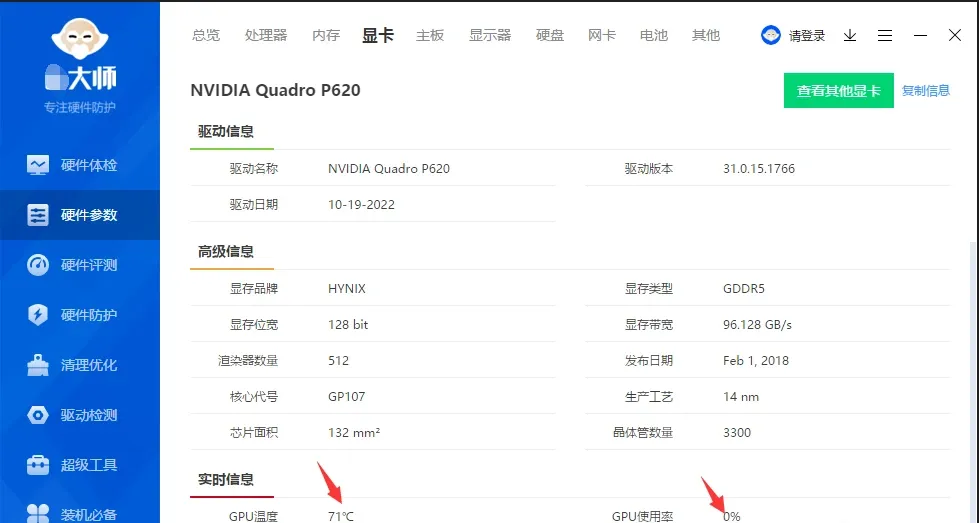
CE’s First Scan / Next Scan finds the changing value easily:
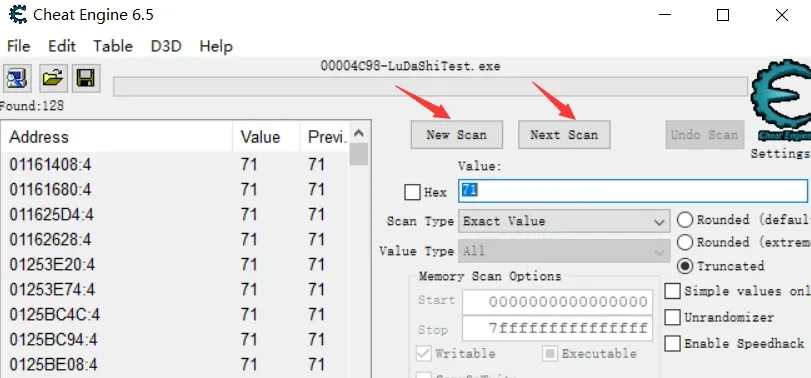
That leads to this code:
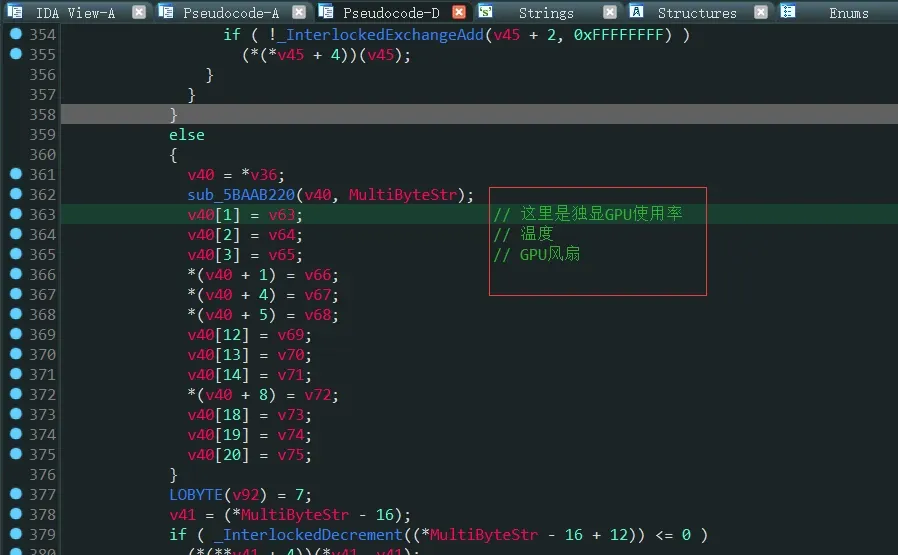
Hook it and you get GPU usage and temperature.
3. CPU usage and temperature
When scanning for CPU usage with CE, I initially filtered the results down to one — which made me land in the wrong place: ComputerZService.exe’s post-processing of the data instead of the source:
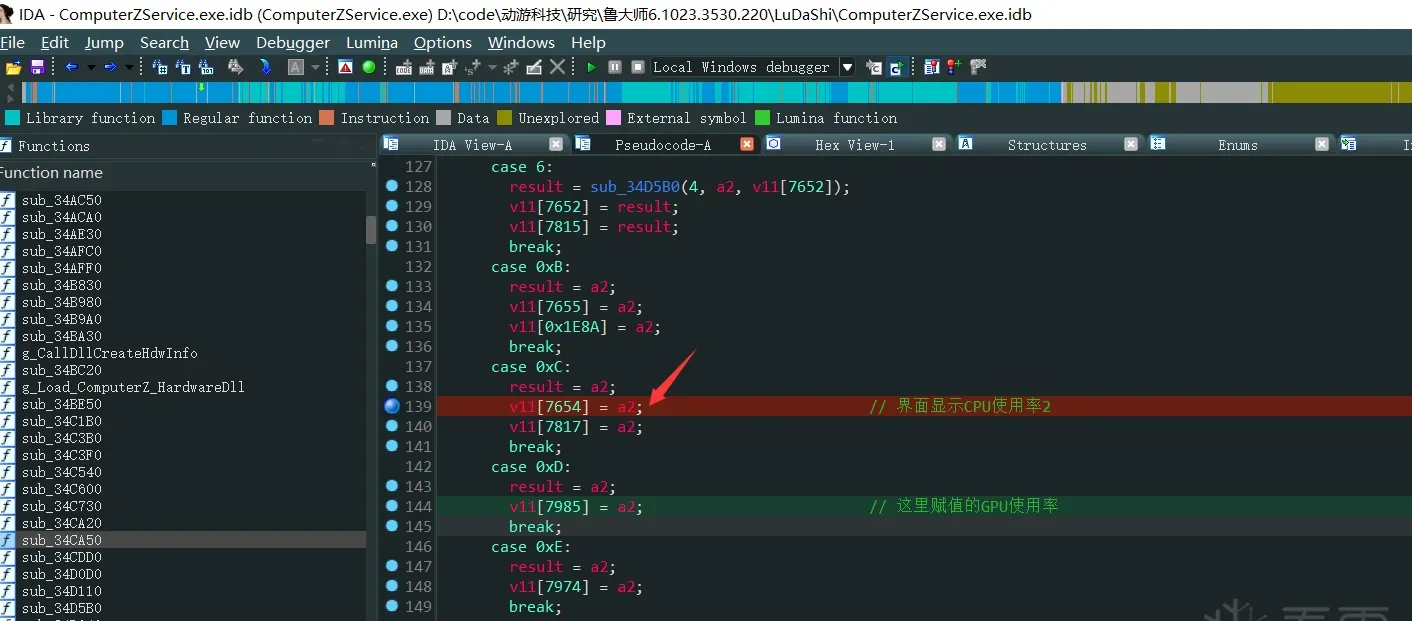
There are actually three values:
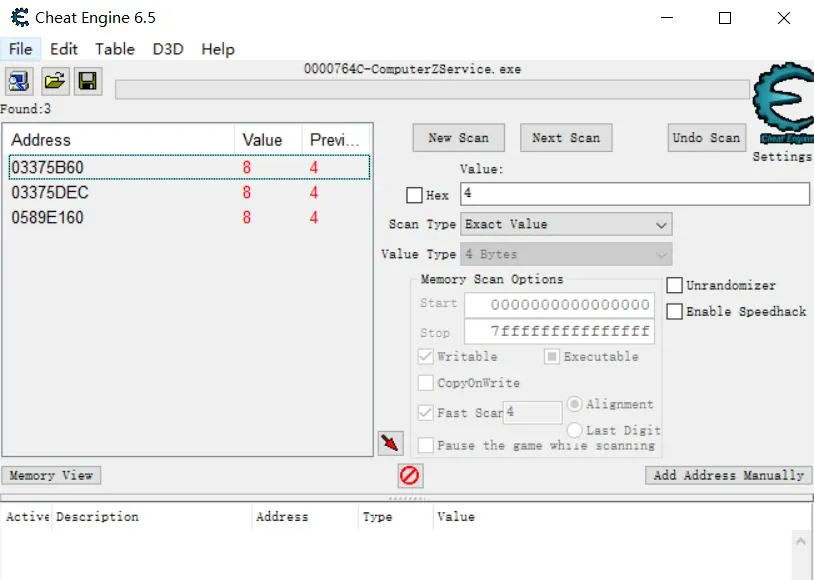
For each, right-click → “find out what writes to this address”:
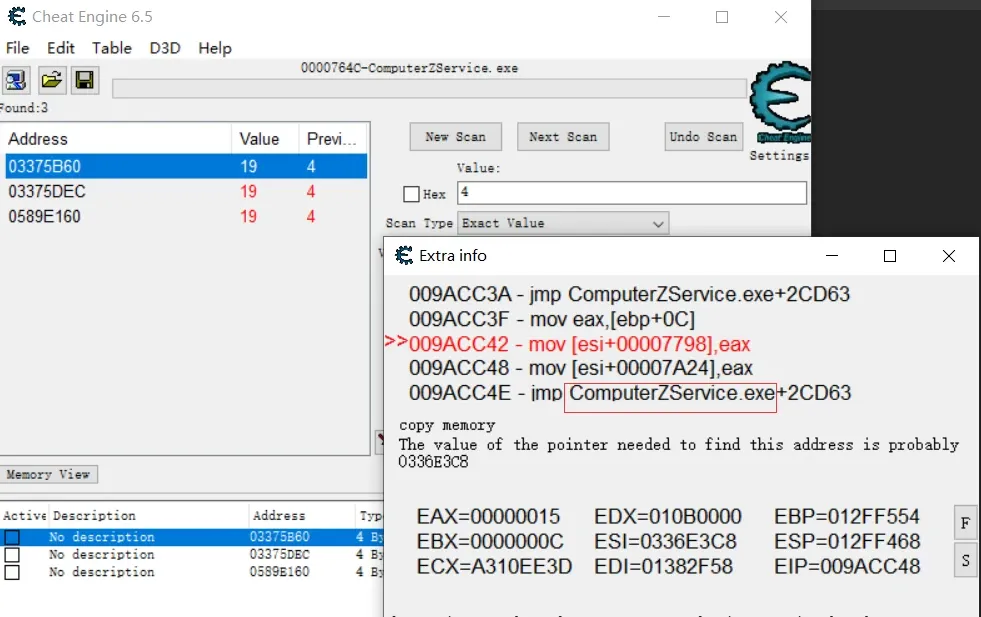
The first is in ComputerZService.exe — skip it:
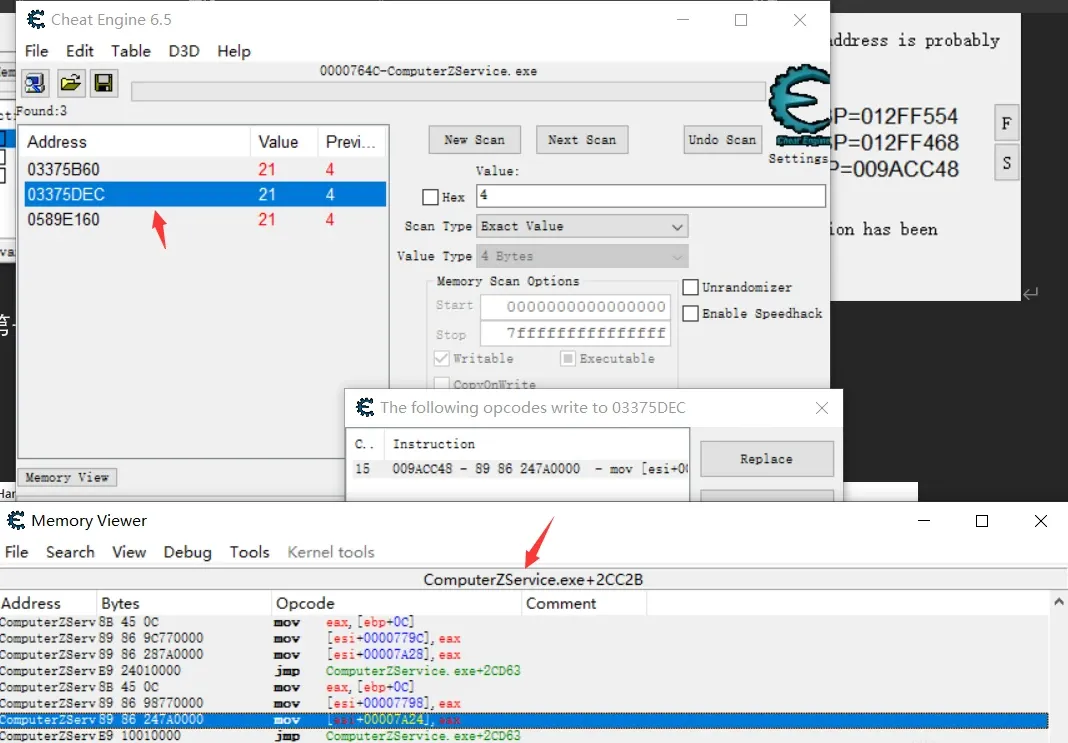
The second is also in ComputerZService.exe — skip:
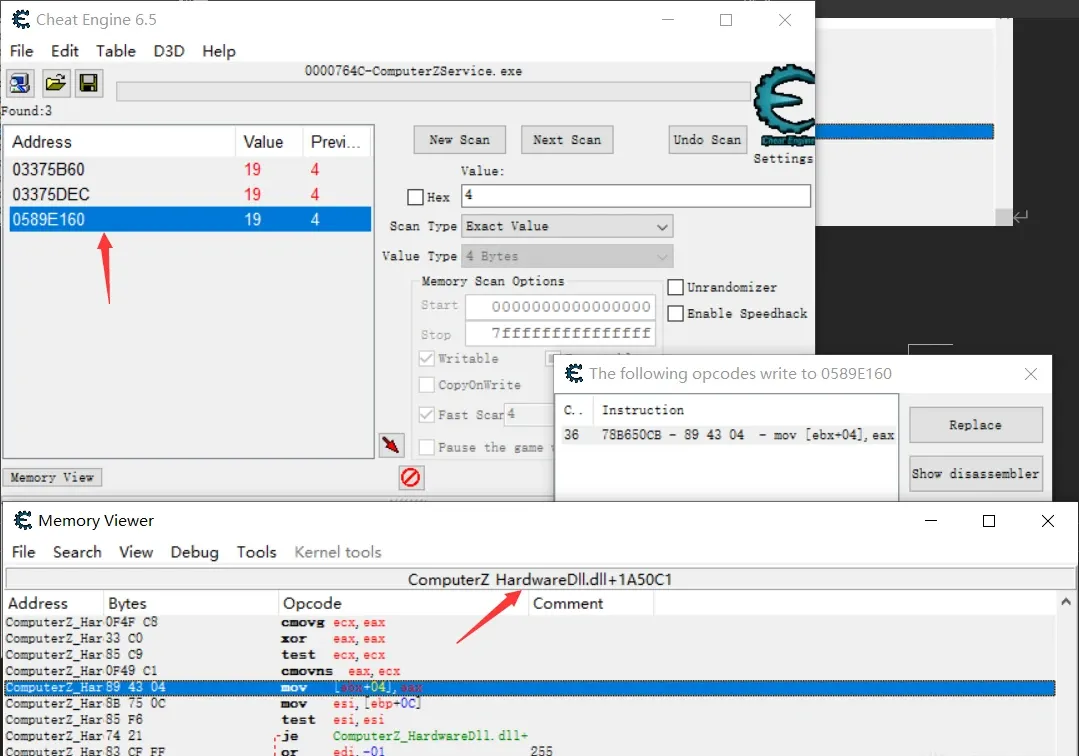
The third is in ComputerZ_HardwareDll.dll. Locate it in IDA:
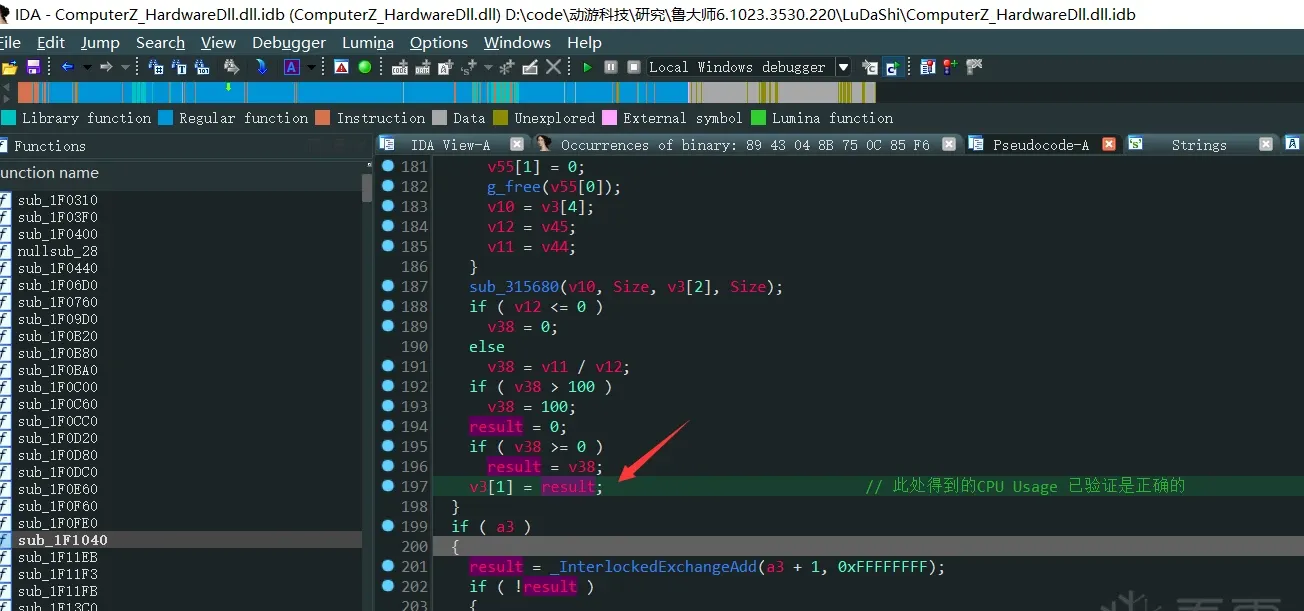
Hook it and read the data.
CPU temperature is harder to search precisely because it swings a lot. Do a precise first scan, then search subsequent changing values:
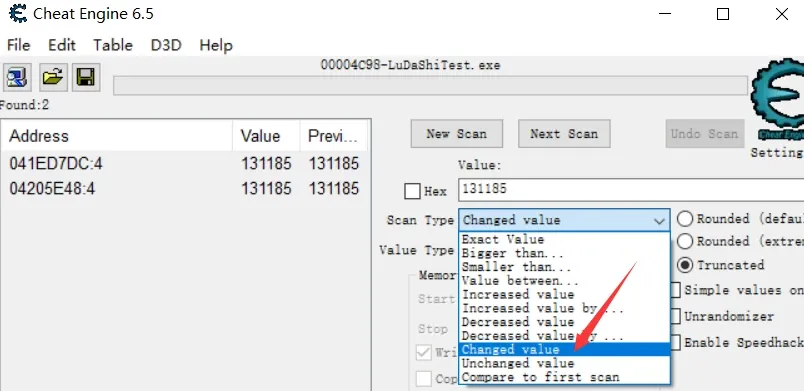
That leads here:
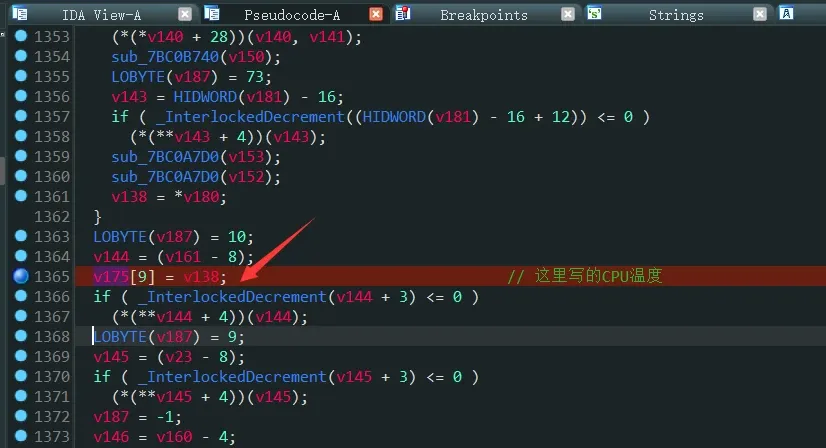
Hook it.
4. The CPU-temperature conflict
Testing my own program I hit a snag: if I open Master X first and then run my program, my program can’t read CPU temperature. If I run my program first, Master X can’t read it. My initial theory: the program opens the CPU-temperature resource exclusively. Since reading temperature needs a driver, I suspect the driver-open is gated.
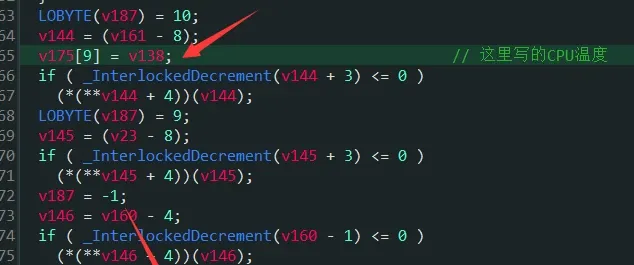
From where the CPU temperature is assigned, trace back the cross-references of v138:
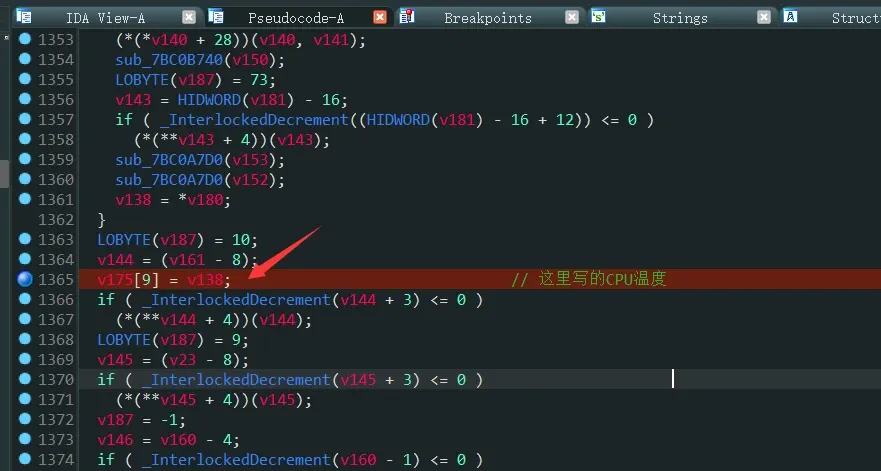
It comes from v84:
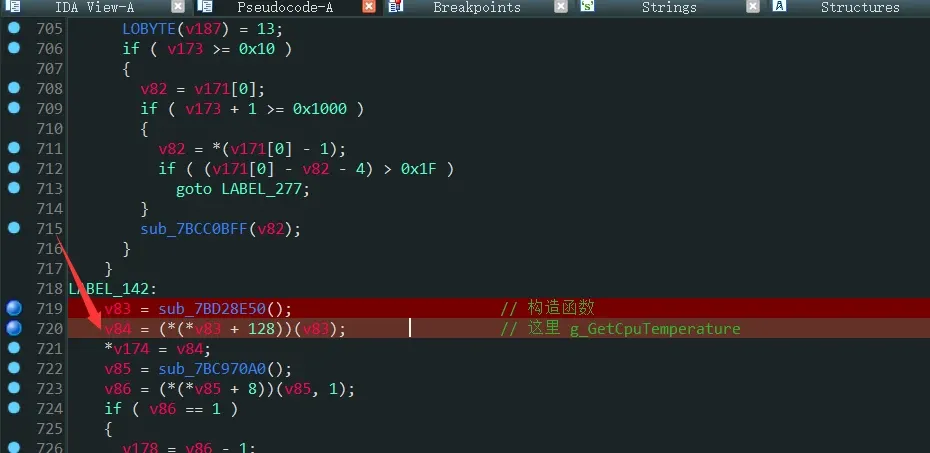
Use IDA’s dynamic debugger to step into the (*(*v83 + 128))(v83) call:
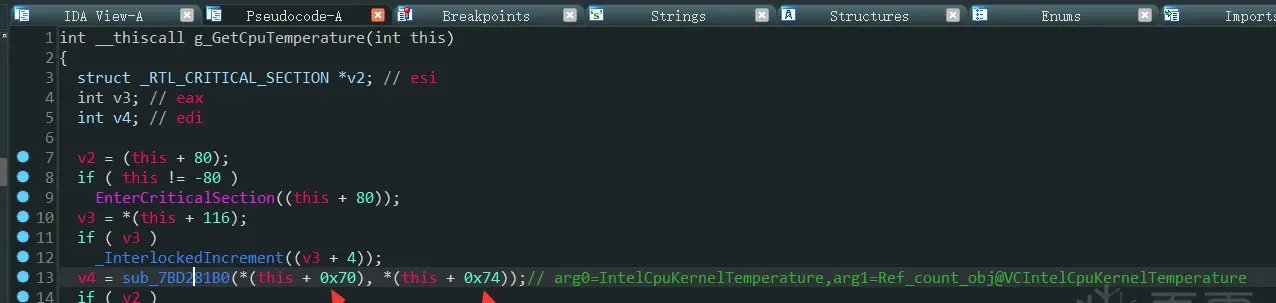
Without Master X running, this+0x70 and this+0x74 are non-zero — pointing to IntelCpuKernelTemperature and Ref_count_obj@VCIntelCpuKernelTemperature objects:
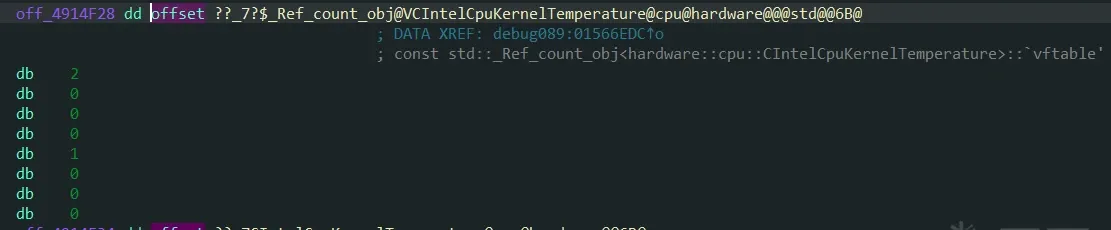
But with Master X running, both are 0. Set hardware write-breakpoints on them:
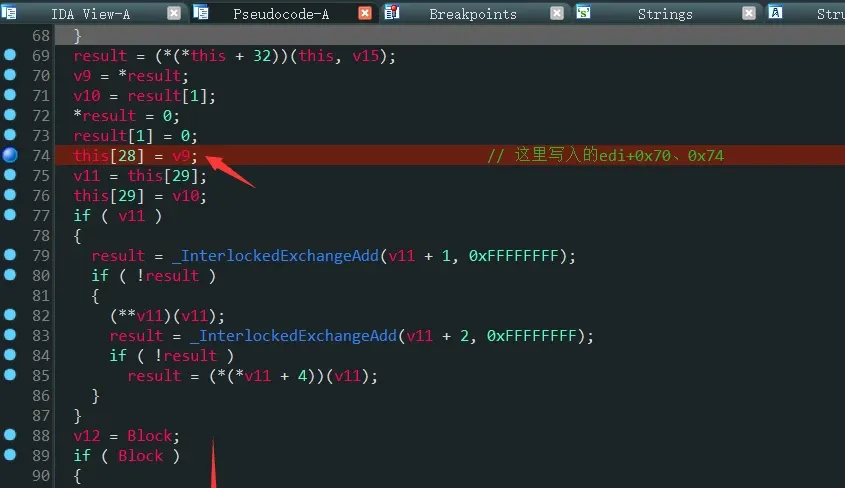
Then scroll down sub_7BD28CB0:
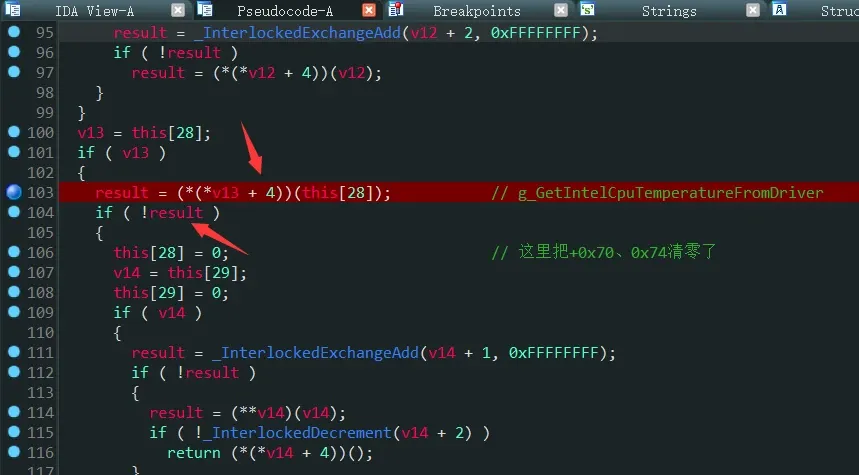
It calls g_GetIntelCpuTemperatureFromDriver (renamed after my analysis), and if the return value is 0 it zeroes +0x70/+0x74. Step into it:
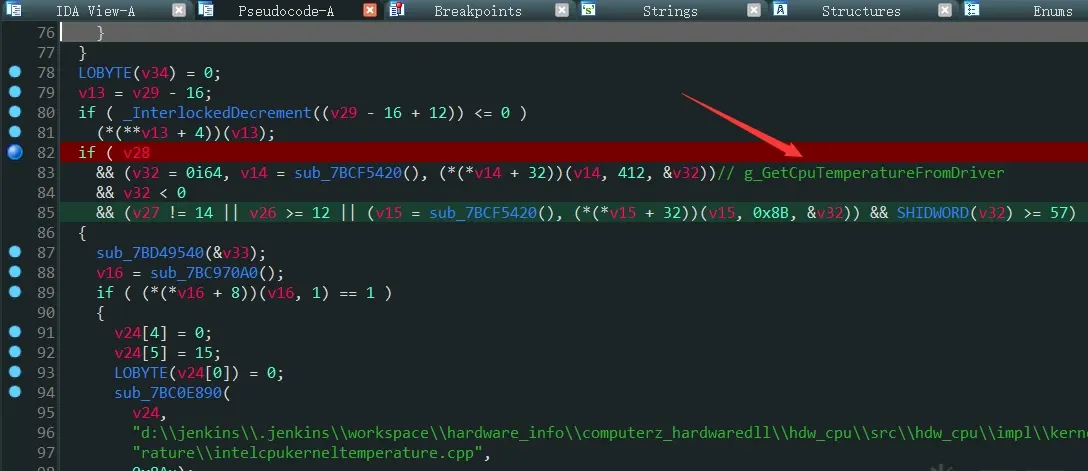
It calls g_GetCpuTemperatureFromDriver; step in:
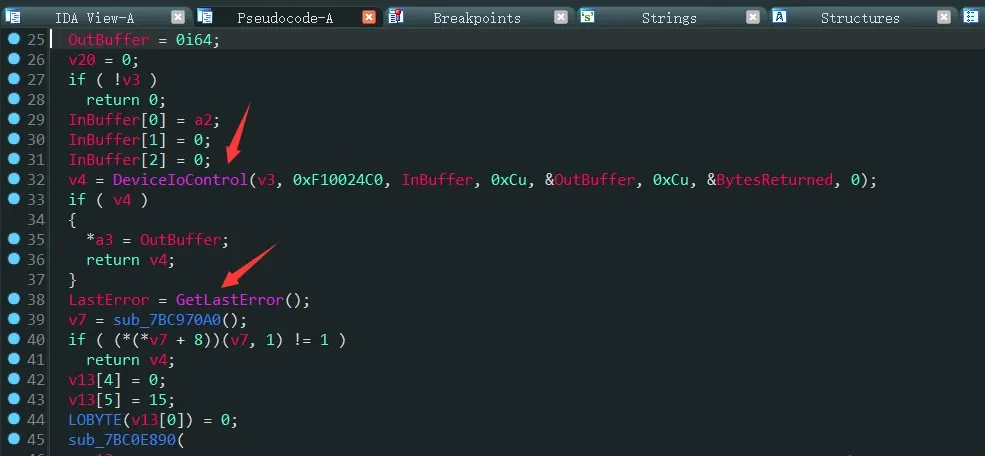
It calls DeviceIoControl. With Master X running, GetLastError() returns 6 — invalid handle. So it’s talking to a driver and the handle is invalid. Find where the driver is loaded/opened:
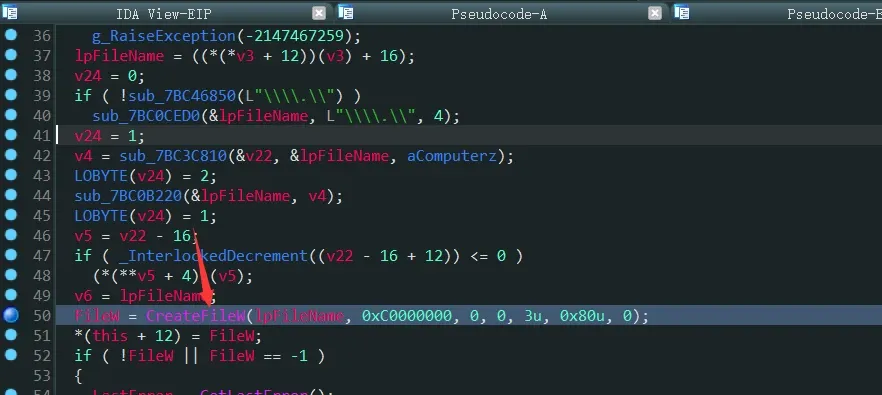
This is where it opens the \\.\ComputerZ symlink — the ComputerZ_x64.sys driver. F5-level dynamic debugging shows that after a successful CreateFileW, it calls g_StopAndDeleteService to stop and delete the driver, then calls CreateFileW again — which fails. That’s why DeviceIoControl gets an invalid handle:
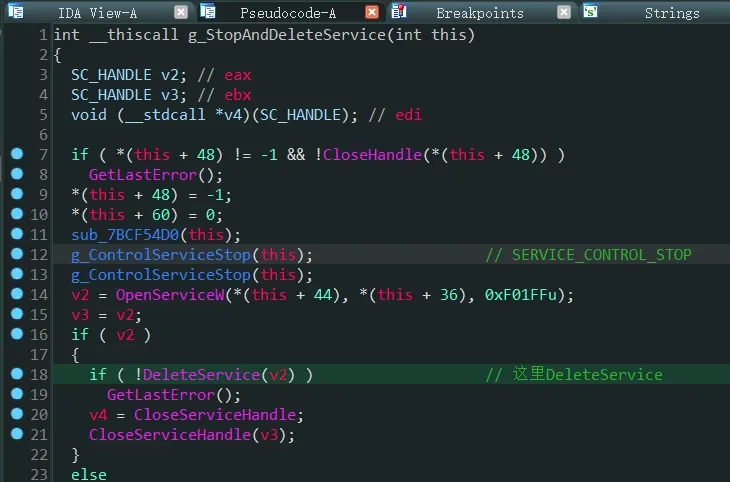
Why it calls g_StopAndDeleteService I didn’t dig into — time.
So in my own program I just neutralize it: hook g_StopAndDeleteService and retn at the entry:

5. Why CPU temperature fails on some machines
After all that, I trimmed the tool’s binaries down to only the files my program needs:

About 12 MB total. But testing showed some machines still fail to read CPU temperature. The cause is a field in the ComputerZ.set file — if it holds a certain value, the read fails; change it to another value and it works. Let’s find why. Search for 131185 with CE:
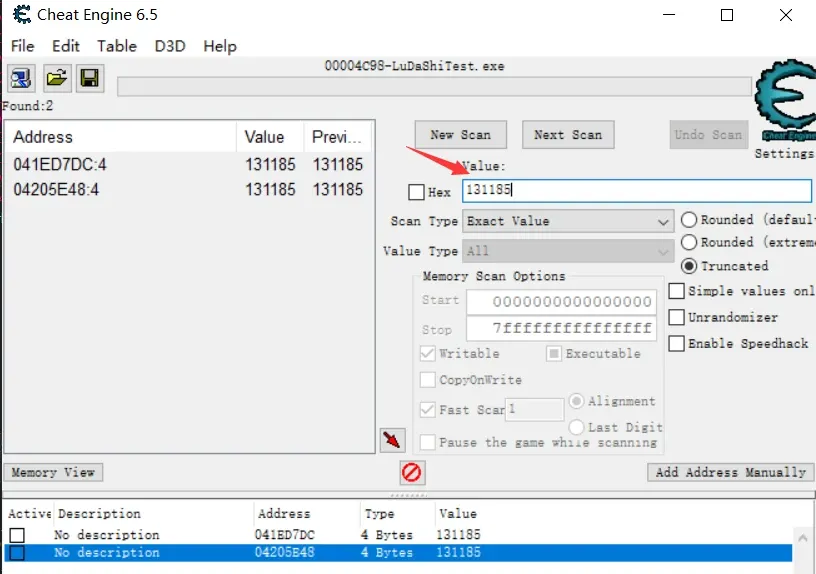
Set a hardware access breakpoint on the found address in x32dbg, then map it to IDA:
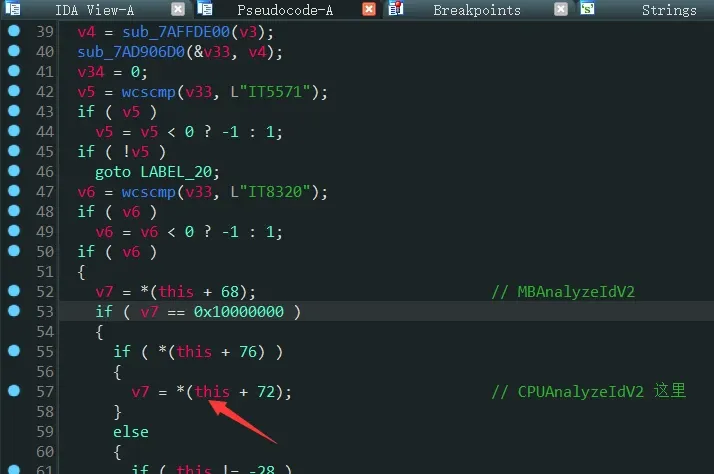
Find the caller:
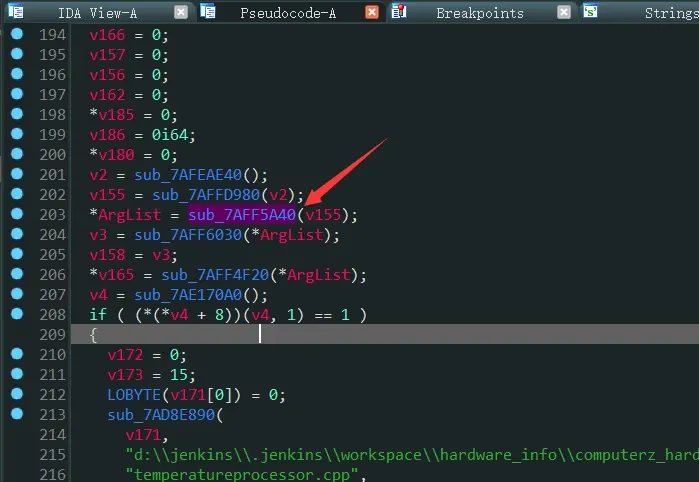
Scroll down sub_7B01F280:
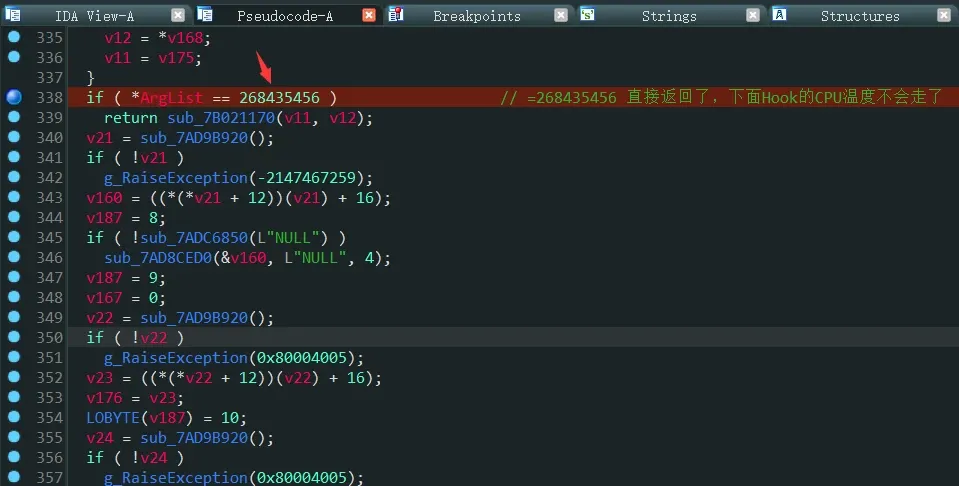
There’s 268435456 — if that’s the value, the function returns immediately and never reaches the hooked logic below:
So change 268435456 to 131185 and it works.
Implementation
I wrote a program that implements this whole flow — grabbing the hardware overview plus real-time CPU/GPU usage and temperature:
// LuDaShiTest.cpp : this file contains the "main" function
//

#include <stdio.h>
#include <stdlib.h>
#include <conio.h>
#include <windows.h>
#include <iostream>
#include <string.h>
using namespace std;

#include "utf82ascii.h"

#pragma warning(disable:4996)

// remember to run as admin, or CPU temperature can't be read

DWORD g_JmpOverviewRetn = 0, g_JmpGpuUsageRetn = 0, g_JmpCpuUsageRetn = 0,
	g_JmpCpuTemperatureRetn = 0;

const WCHAR* g_pszGpuUsage = L"GPU %s Usage:%d temperature:%d\r\n";
const char* g_pszCpuUsage = "CPU Usage:%d\r\n";
const char* g_pszCpuTemperature = "CPU Temperature:%d\r\n";


void call_back_func()
{
	printf("call_back_func");
}

BOOL WriteToFile(char* pszData)
{
	string strData = pszData;
	// garbled on English systems
	string strAscii = UTF_82ASCII(strData);
	printf(strAscii.c_str());

	FILE* fp = fopen("c:\\HostHardware.json" , "w");
	if (fp)
	{
		fwrite(strAscii.c_str(), 1, strAscii.length(), fp);
		fclose(fp);
	}

	return TRUE;
}

__declspec(naked) void  HookOverviewStub()
{
	__asm
	{
		pushfd
		pushad

		push esi
		//call printf
		call WriteToFile
		add esp, 4 // naked functions must balance the stack manually

		popad
		popfd

		// original instructions before the hook
		mov edi, [ebp - 0x10C4]

		jmp g_JmpOverviewRetn
	}
}

__declspec(naked) void  HookGpuUsageStub()
{
	__asm
	{
		pushfd
		pushad

		//push ebx
		//push g_pszCoreGpuUsage
		//call printf
		////call WriteToFile
		//add esp, 8 // naked functions must balance the stack manually

		mov ebx, [ebp - 0x54] // GPU Name
		cmp ebx, 0 // ebx may be 0
		jz __exit

		push [ebp - 0xBC] // temperature; -1 means no temperature (integrated GPUs have none; Master X does the same)
		push [ebp - 0xC0] // GPU Usage

		push [ebx]
		push g_pszGpuUsage
		call wprintf
		//call WriteToFile
		add esp, 0x10 // naked functions must balance the stack manually

__exit:
		popad
		popfd

		// original instructions before the hook
		lea ecx, [ebp - 0xC4]

		jmp g_JmpGpuUsageRetn
	}
}

__declspec(naked) void  HookCpuUsageStub()
{
	__asm
	{
		pushfd
		pushad

		push eax
		push g_pszCpuUsage
		call printf
		//call WriteToFile
		add esp, 8 // naked functions must balance the stack manually

		popad
		popfd

		// original instructions before the hook
		mov     esi, [ebp + 0xC]
		test    esi, esi

		jmp g_JmpCpuUsageRetn
	}
}

__declspec(naked) void  HookCpuTemperatureStub()
{
	__asm
	{
		pushfd
		pushad

		push edi
		push g_pszCpuTemperature
		call printf
		//call WriteToFile
		add esp, 8 // naked functions must balance the stack manually

		popad
		popfd

		// original instructions before the hook
		lock xadd[edx + 0Ch], eax

		jmp g_JmpCpuTemperatureRetn
	}
}

int main(void)
{
	//typedef char(__stdcall*GetOverviewJson)(PVOID, __int64, int);
	typedef char(__stdcall* GetOverviewJson)(__int64, int);
	typedef char(__stdcall* GetOverviewJson1)(DWORD*,DWORD*);
	typedef DWORD*(__cdecl *CreateHdwInfo)();
	typedef int(*Init0)();
	typedef char* (*Init1)(unsigned int a1);
	DWORD oldflag=0,dwHook=0;
	//0xe2080
	HMODULE hComputerZ = LoadLibraryA("ComputerZ_HardwareDll.dll");
	if (hComputerZ)
	{
		HMODULE hKernel32 = LoadLibraryA("Kernel32.dll");


		// after opening the driver symlink it stops and deletes the service, making later open/DeviceIoControl fail
		// Patch g_StopAndDeleteService
		dwHook = (ULONG)hComputerZ + 0x1657b0;
		if (VirtualProtect((PVOID)dwHook, 5, PAGE_EXECUTE_READWRITE, &oldflag))
		{
			// change to retn
			*(BYTE*)dwHook = 0xC3;
		}

		//--------------------------------------------------------------------
		// hook to grab the hardware overview info, hook v13:
		//v11 = sub_7AC14BB0(COERCE__INT64((double)v21[1067]));
		//sub_7AC14840(v4, "memory_channel", v11);
		//sub_7AC14840((int)v3, "overview", v4);
		//v12 = sub_7AC14BB0(0x4042000000000000i64);
		//sub_7AC14840((int)v3, "type_id", v12);
		//v13 = (void*)sub_7AC15140(v3);               // this returns the overview JSON address
		dwHook = (ULONG)hComputerZ + 0x9950c; //8B BD 3C EF FF FF   mov edi,[ebp+var_10C4]
		if (VirtualProtect((PVOID)dwHook, 6, PAGE_EXECUTE_READWRITE, &oldflag))
		{
			printf("VirtualProtect success,hook addr is:0x%x!\r\n", dwHook);
			*(BYTE*)dwHook = 0xe9;
			*(DWORD*)(dwHook + 1) = (DWORD)HookOverviewStub - dwHook - 5;
			*(char*)(dwHook + 5) = 0x90; //nop
			g_JmpOverviewRetn = dwHook + 6;
		}
		else
		{
			printf("memtype error %d\n", GetLastError());
		}

		// hook to grab per-GPU usage and temperature:
		//v59 = sub_7B6B7890(v1 + 4, SubStr); // this returns CPU usage, arg2 is the device number
		//if (*(v78 + 164) != 1)
		//{
		//	v60 = sub_7B6B8070(SubStr);       // temperature
		//	v61 = sub_7B6B65C0(SubStr);       // GPU fan
		//	sub_7B6BAAC0(&v58);
		//}
		//v16 = sub_7B6B2FD0();
		dwHook = (ULONG)hComputerZ + 0x26a1e5; //8D 8D 3C FF FF FF  lea ecx,[ebp+var_C4]
		if (VirtualProtect((PVOID)dwHook, 6, PAGE_EXECUTE_READWRITE, &oldflag))
		{
			printf("VirtualProtect success,hook addr is:0x%x!\r\n", dwHook);
			*(BYTE*)dwHook = 0xe9;
			*(DWORD*)(dwHook + 1) = (DWORD)HookGpuUsageStub - dwHook - 5;
			*(char*)(dwHook + 5) = 0x90; //nop
			g_JmpGpuUsageRetn = dwHook + 6;
		}
		else
		{
			printf("memtype error %d\n", GetLastError());
		}

		//
		// hook to grab per-CPU usage:
		//if (v38 > 100)
		//	v38 = 100;
		//result = 0;
		//if (v38 >= 0)
		//	result = v38;
		//v3[1] = result;  // the CPU usage here is verified correct
		dwHook = (ULONG)hComputerZ + 0x1a50ce; //8B 75 0C  mov esi,[ebp+arg_4]; 85 F6  test esi, esi
		if (VirtualProtect((PVOID)dwHook, 5, PAGE_EXECUTE_READWRITE, &oldflag))
		{
			printf("VirtualProtect success,hook addr is:0x%x!\r\n", dwHook);
			*(BYTE*)dwHook = 0xe9;
			*(DWORD*)(dwHook + 1) = (DWORD)HookCpuUsageStub - dwHook - 5;
			g_JmpCpuUsageRetn = dwHook + 5;
		}
		else
		{
			printf("memtype error %d\n", GetLastError());
		}

		// hook to grab per-CPU temperature:
		//LOBYTE(v186) = 10;
		//v143 = (v160 - 8);
		//v174[9] = v137;     // the CPU temperature is written here
		dwHook = (ULONG)hComputerZ + 0x311093; //F0 0F C1 42 0C  lock xadd [edx+0Ch], eax
		if (VirtualProtect((PVOID)dwHook, 5, PAGE_EXECUTE_READWRITE, &oldflag))
		{
			printf("VirtualProtect success,hook addr is:0x%x!\r\n", dwHook);
			*(BYTE*)dwHook = 0xe9;
			*(DWORD*)(dwHook + 1) = (DWORD)HookCpuTemperatureStub - dwHook - 5;
			g_JmpCpuTemperatureRetn = dwHook + 5;
		}
		else
		{
			printf("memtype error %d\n", GetLastError());
		}

		CreateHdwInfo createHdwInfo = (CreateHdwInfo)((ULONG)hComputerZ + 0x9bcb0);
		ULONG_PTR ulRetCreateHdwInfo = (ULONG_PTR)createHdwInfo();

		/*Init0 init0 = (Init0)((ULONG)hComputerZ + 0x2862f0);
		int nTest=init0();

		Init0 init2 = (Init0)((ULONG)hComputerZ + 0xe0a60);
		init2();

		Init0 init3 = (Init0)((ULONG)hComputerZ + 0x22def0);
		init3();

		Init0 init4 = (Init0)((ULONG)hComputerZ + 0x3f8b70);
		init4();*/

		try
		{
			char dwTmp[416] = {0};
			DWORD *dwThis = (DWORD*)&dwTmp;
			dwThis[2] = ulRetCreateHdwInfo;
			dwThis[3] = (ULONG)hComputerZ + 0x9bcb0; //CreateHdwInfo
			dwThis[4] = (ULONG)hComputerZ + 0x9c2e0; //ReleaseHdwInfo
			dwThis[5] = (ULONG)hComputerZ;
			dwThis[6] = (DWORD)&call_back_func;
			dwThis[6] = (DWORD)&dwThis[6];

			//hardware_info_main
			//(*(void(__thiscall**)(int, DWORD*))(*(DWORD*)ulRetCreateHdwInfo + 4))(ulRetCreateHdwInfo, dwThis);
			_asm
			{
				pushfd
				pushad

				mov ecx, ulRetCreateHdwInfo
				mov eax, [ecx]
				push dwThis
				call dword ptr[eax + 4]

				popad
				popfd
			}

			// call the ComputerZ_HardwareDll.dll scan function
			//(*(int (**)(void))(*(DWORD*)ulRetCreateHdwInfo + 28))(&dwThis);
			//(*(int (__thiscall**)(DWORD*))(*(DWORD*)ulRetCreateHdwInfo + 28))(&dwThis);
			_asm
			{
				pushfd
				pushad

				mov ecx, ulRetCreateHdwInfo
				mov eax, [ecx]
				call dword ptr[eax + 0x1C]

				popad
				popfd
			}
		}
		catch (...)
		{

		}
		printf("wait for the data to start coming in...\r\n");
		//system("pause");
		while (true)
		{
			Sleep(1000);
		}
	}
	else
		printf("ComputerZ_HardwareDll.dll not found!");
}
The result:
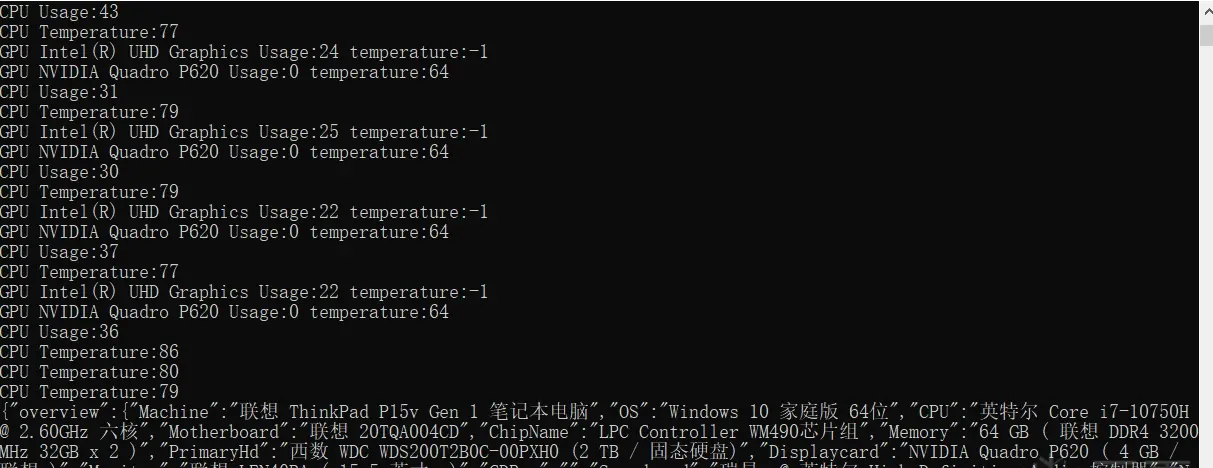
That’s as far as I took the analysis and exploitation. The attachments include the code and the usable binaries; the .idb is too large to upload.
Colin Xiao — I take on contract reverse-engineering work, and writeups like this are how I show what I can do. If you need help with anything in this space — including but not limited to the areas I cover above — I’m available. No project is too big or too small — if it’s reverse engineering and I can do it, I’ll take it. DM me on X (@colinxiao_lab) or Telegram (@ColinXiao666).
Get in touch