Reversing the Protobuf Chat Protocol of a Live-Streaming App
About the author. I’m Colin Xiao — an independent reverse engineer, mostly working solo on contract jobs. I dig into compiled code of every kind, including but not limited to: Android and iOS apps, x86/x64/ARM native binaries, packers and obfuscators, DRM and license checks, network protocols and APIs, crypto and signature algorithms, malware, game binaries, and embedded/IoT firmware. I also handle large-scale data collection and vulnerability research. If you have any project in mind, I’d be glad to take it on — whatever it is, as long as it’s within my wheelhouse. Just reach out. You can reach me on X at @colinxiao_lab or on Telegram at https://t.me/ColinXiao666.
This research is published for educational and defensive purposes. The target sample is anonymized throughout.
Reversing the Protobuf Chat Protocol of a Live-Streaming App
While analyzing the protocol of a short-video app’s live-streaming feature for work, I hit the chat (danmaku) messages. Capturing the traffic showed that the live-room chat is carried over Protocol Buffers. I’d brushed against protobuf before while doing Xposed work on a messaging app — but back then I only cared about the result and would just call an internal method that returned the parsed object for me. This time I was implementing the protocol myself, with no library to lean on, so I had to handle everything from scratch. This post documents that analysis.
0x01 — Setup
Three things are needed before starting:
- Protocol Buffers (installing it is a quick search away).
- A packet capture of the live-room chat.
- The
protoctool for a sanity check: copy the returned chat bytes from the capture into a file and run:
protoc --decode_raw < xxx.binThe tool parses the payload cleanly:
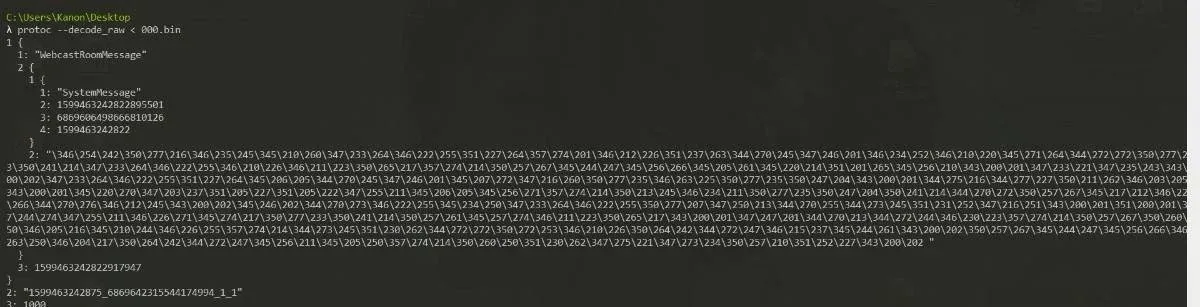
With the data parsing correctly, setup is done. Everything below uses the data in the screenshot as the example.
0x02 — The analysis flow
protoc --decode_raw gave me a rough picture, but what do the numbers actually mean? Those leading 1, 2, 3 … and 1:, 2:, 3: — a bit of searching confirms they’re protobuf tags, the key to decoding the message. A tag with a colon is a field; a tag without one is a repeated collection.
So how do I reconstruct the schema? In reverse engineering there is no original .proto file, so recovering the format means finding the parsing code in the source and writing the .proto myself. Using the screenshot above, I located the parsing code:
private ProtoApiResult a(b bVar) throws Exception {
        PatchProxyResult proxy = PatchProxy.proxy(new Object[]{bVar}, this, a, false, 22172);
        if (proxy.isSupported) {
            return (ProtoApiResult) proxy.result;
        }
        com.bytedance.android.tools.pbadapter.a.b protoDecoder = ((INetworkService) d.a(INetworkService.class)).getProtoDecoder(com.bytedance.android.livesdkapi.message.f.class);
        if (protoDecoder != null) {
            com.bytedance.android.livesdkapi.message.f fVar = (com.bytedance.android.livesdkapi.message.f) protoDecoder.decode(this.s.a(bVar));
            ProtoApiResult protoApiResult = new ProtoApiResult();
            protoApiResult.cursor = fVar.b;
            protoApiResult.fetchInterval = fVar.c;
            protoApiResult.now = fVar.d;
            protoApiResult.messages = new LinkedList();
            this.m = fVar.e;
            long currentTimeMillis = System.currentTimeMillis();
            this.n = currentTimeMillis - this.k;
            ag.b = (fVar.d + ((currentTimeMillis - this.k) / 2)) - currentTimeMillis;
            if (Lists.isEmpty(fVar.a)) {
                return protoApiResult;
            }
            // ...omitted
The b bVar argument is just the HTTP response body — not important. The key is the class com.bytedance.android.livesdkapi.message.f. Let’s look at its structure:
package com.bytedance.android.livesdkapi.message;
public class f {
    @SerializedName("messages")
    public List<a> a;
    @SerializedName("cursor")
    public String b;
    @SerializedName("fetch_interval")
    public long c;
    @SerializedName("now")
    public long d;
    @SerializedName("internal_ext")
    public String e;
    public static final class a {
        @SerializedName("method")   // actually a class name — used to pick the parser
        public String a;
        @SerializedName("payload")  // the data to parse, itself protobuf
        public byte[] b;
    }
}
Comparing this with the decoded output, the fields map to tags 2, 3, 4, 5:
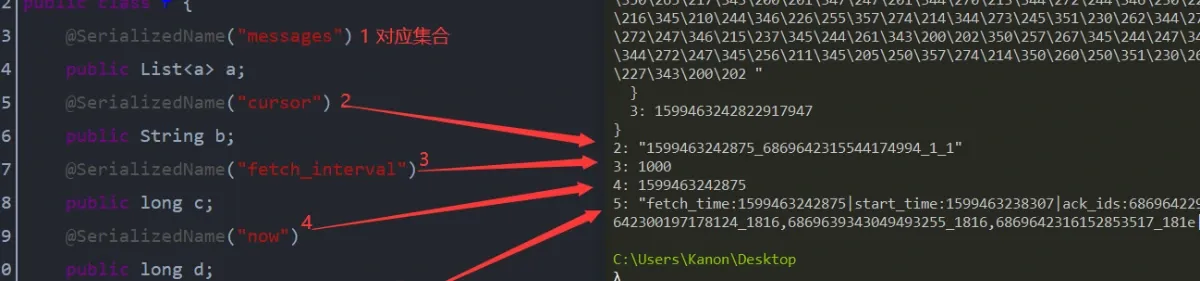
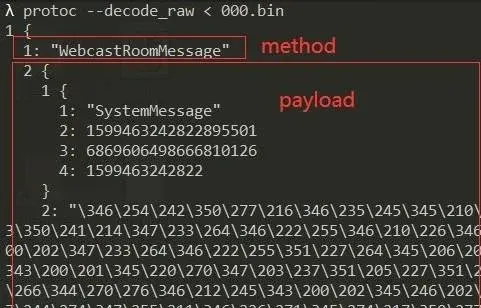
Tag 1 is an array of the inner class a, whose two fields are used to dynamically locate the parser for what follows: method is the class name for the remaining payload, and payload is the data itself — again protobuf. That method field is this part:
The overall shape is now clear. com.bytedance.android.livesdkapi.message.f is the outermost container for the live-room chat — it holds every message type. There will naturally be several method values, so I took "WebcastRoomMessage" as the first example and hunted for its mapping. Searching the code quickly found the enum com.bytedance.android.livesdkapi.depend.g.a, and tracing its references landed on com.bytedance.android.livesdkapi.chatroom.bl.a. With that mapping in hand, the remaining byte[] is parsed by the class cl. Here’s its structure:
public class cl extends d {             // note the inheritance
    public static ChangeQuickRedirect a;
    @SerializedName("content")
    public String b;
    @SerializedName("supprot_landscape")
    public boolean c;
    public cl() {
        this.type = com.bytedance.android.livesdkapi.depend.g.a.ROOM;   // enum type
    }
WebcastRoomMessage only declares two fields — content and supprot_landscape — yet the decoded data shows a lot more. Where’s the rest, and what’s the tag layout? I kept digging into how cl is parsed and found the mapping in com.bytedance.android.live.base.model.proto.d — the class responsible for parsing cl.class is gw.class:

Into gw.class:
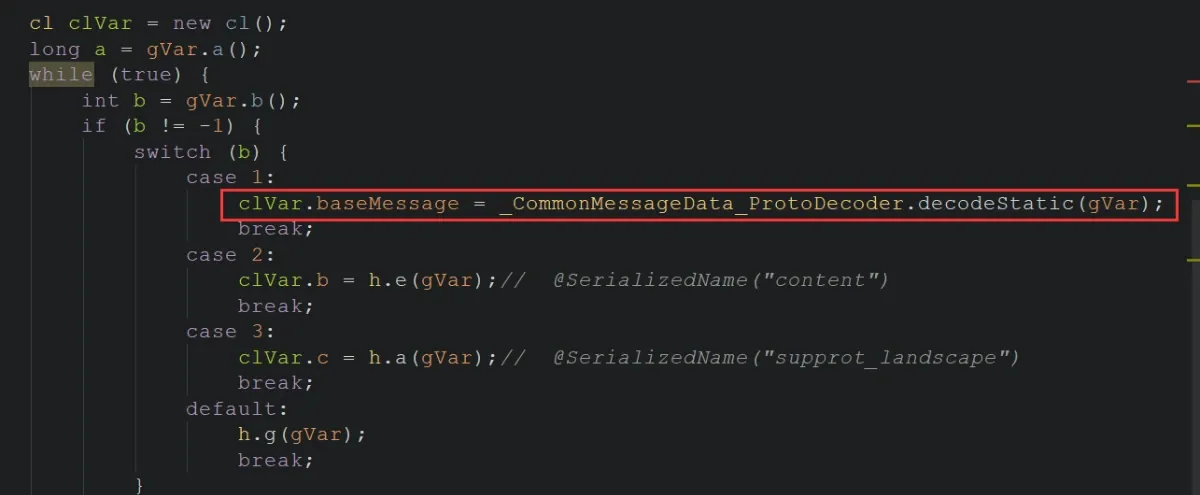
Here I learned content and supprot_landscape map to tags 2 and 3 respectively, and there’s a third field, baseMessage, left to parse. That one is a base-class member of cl.class. Checking multiple packets confirmed that every method shares the same base class:

The previously unparsed data lives there too. Looking at the baseMessage member’s structure and its tag table:
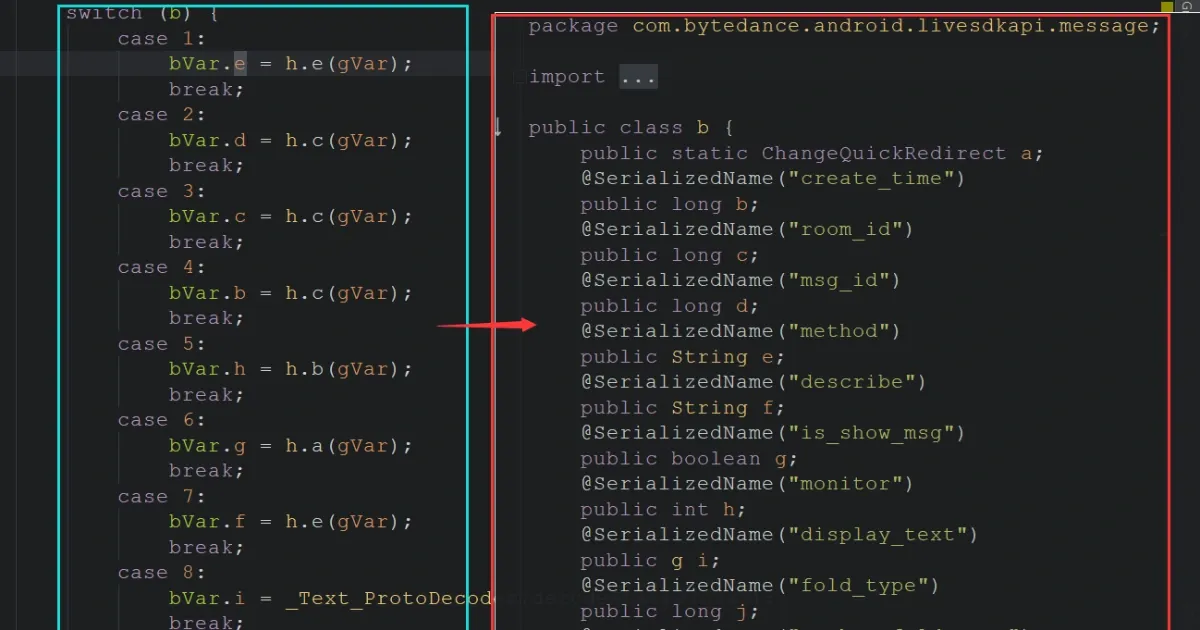
The chat structure is now clear:
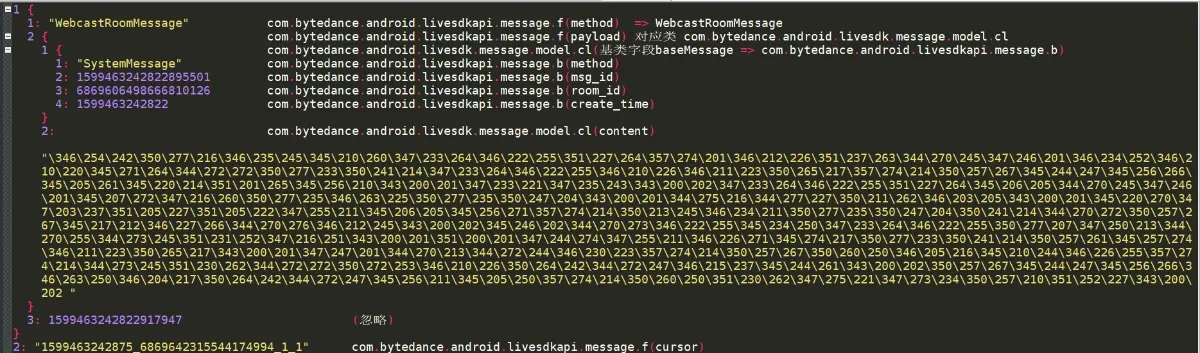
Time to write the .proto file.
0x03 — Writing the .proto file
Plenty of documentation covers proto syntax, so I’ll only hit the key points. Proto has proto2 and proto3. For reverse engineering I saw no benefit in proto3 — its syntax drops the field modifiers, which only makes the schema we’re reconstructing harder to reason about — so I used proto2.
You may have noticed the base class (baseMessage) has many fields, yet the decoded output only shows method, msg_id, room_id, create_time and a few others. That’s normal — not every field is required. Proto has three field modifiers: required, optional, and repeated. For a reverse-engineered schema we don’t know when a field actually holds a value, so we never use required; we use optional everywhere, and repeated for arrays.
Mind the types too. Mapping from Java: String → string, int → int32, long → uint64, and so on.
First, a ProtoApiResult.proto matching com.bytedance.android.livesdkapi.message.f, to hold the overall chat data:
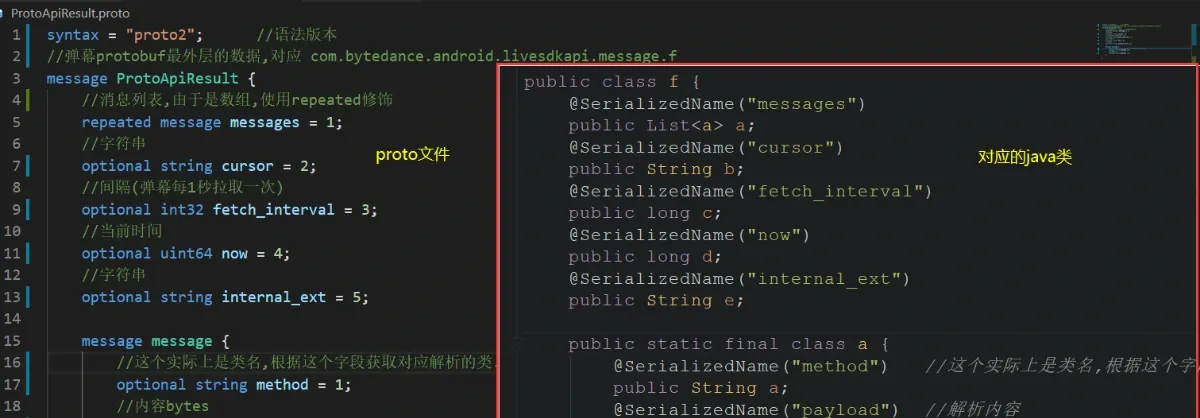
With the outer layer done, the class for WebcastRoomMessage:

And finally CommonMessageData:
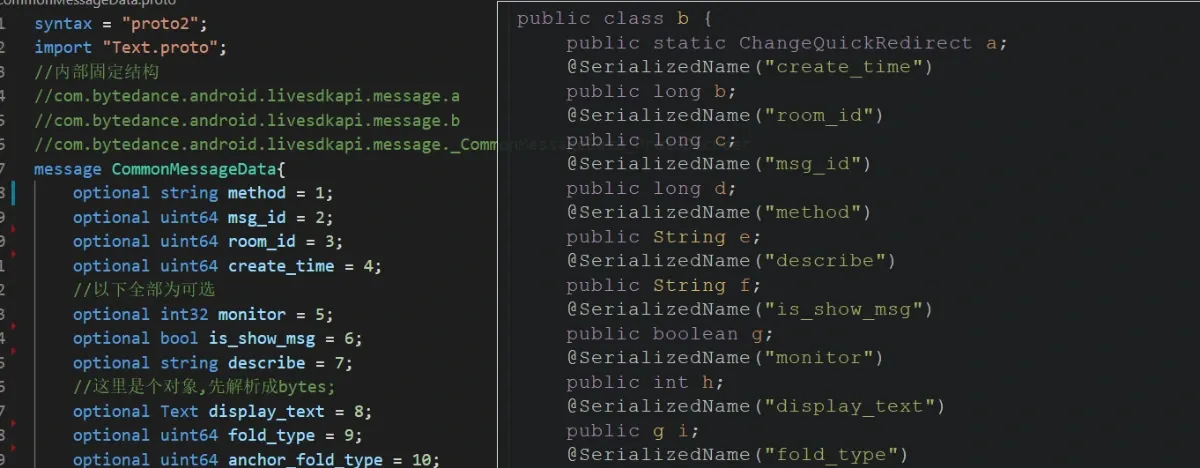
Note the display_text field here — it’s still an object with many fields inside. I’d already parsed it by this point. If you don’t want to parse that deep, you can delete the fields you don’t need, or simply type it as bytes. The important thing is keeping the tags straight.
Compile the .proto files into Java with:
protoc --java_out=out .\*.protoThe out directory now contains usable Java classes — import them into the project. The decode result:
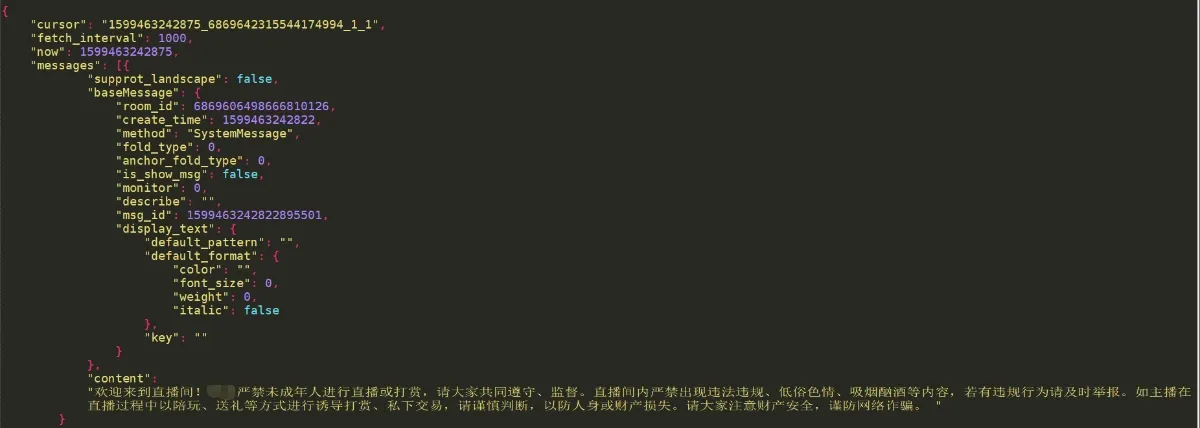
All that work to decode a single system notification… a short-video app’s live request can return tens of thousands of bytes, and using one of those as the example would have made the screenshots impossible, so I went with the smallest message I could find. The flow is identical for the other message types. Final demo:
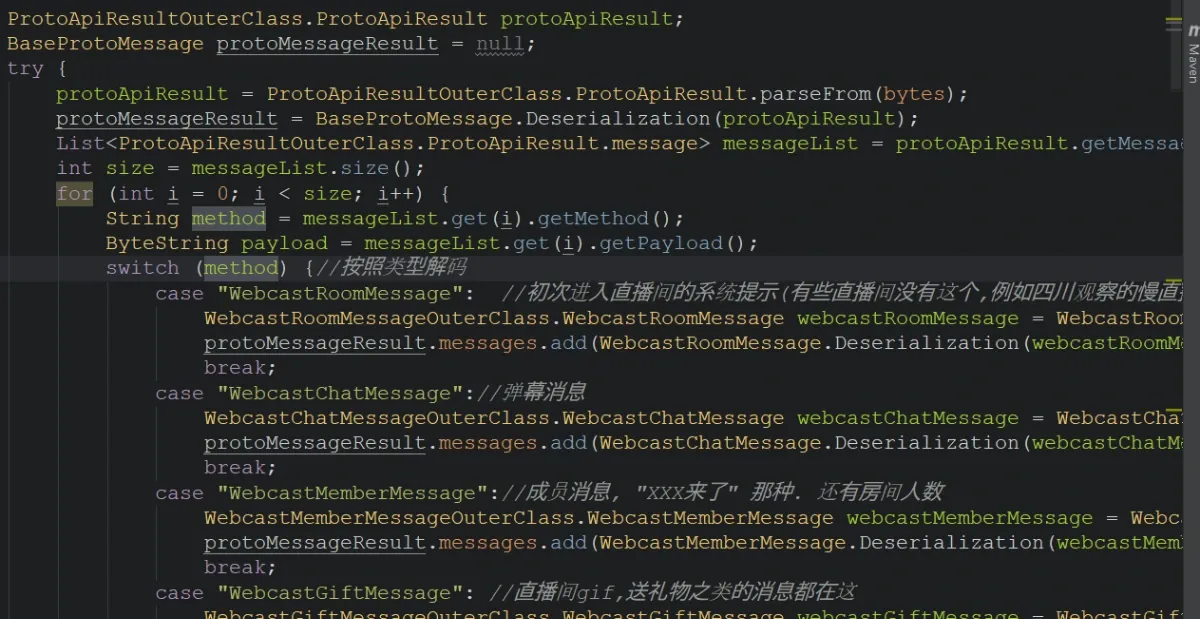
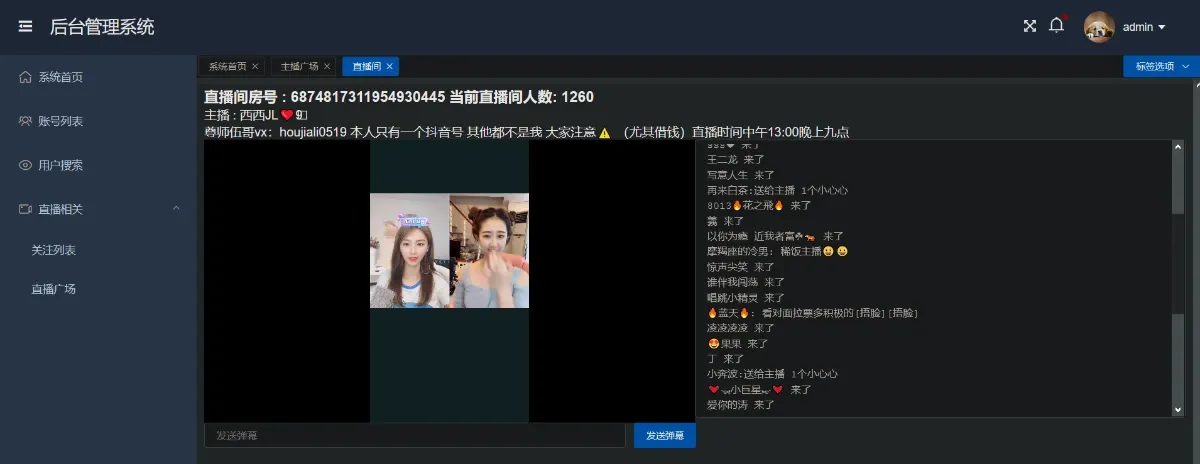
Colin Xiao — I take on contract reverse-engineering work, and writeups like this are how I show what I can do. If you need help with anything in this space — including but not limited to the areas I cover above — I’m available. No project is too big or too small — if it’s reverse engineering and I can do it, I’ll take it. DM me on X (@colinxiao_lab) or Telegram (@ColinXiao666).
Get in touch