Reversing the Windows Photos AI Eraser Models
About the author. I’m Colin Xiao — an independent reverse engineer, mostly working solo on contract jobs. I dig into compiled code of every kind, including but not limited to: Android and iOS apps, x86/x64/ARM native binaries, packers and obfuscators, DRM and license checks, network protocols and APIs, crypto and signature algorithms, malware, game binaries, and embedded/IoT firmware. I also handle large-scale data collection and vulnerability research. If you have any project in mind, I’d be glad to take it on — whatever it is, as long as it’s within my wheelhouse. Just reach out. You can reach me on X at @colinxiao_lab or on Telegram at https://t.me/ColinXiao666.
This research is published for educational and defensive purposes. The target sample is anonymized throughout.
I was looking for a way to remove a watermark from an image, and by chance I discovered that the latest Windows Photos app ships an AI eraser. It worked surprisingly well — well enough that I got curious about how it works. So I took it apart.
1. Is it a local model or a cloud model?
A quick offline test confirmed it runs entirely on-device. Sorting the program directory by size made the answer obvious: an onnxruntime.dll plus two model files, mager.onnxe and seg.onnxe.
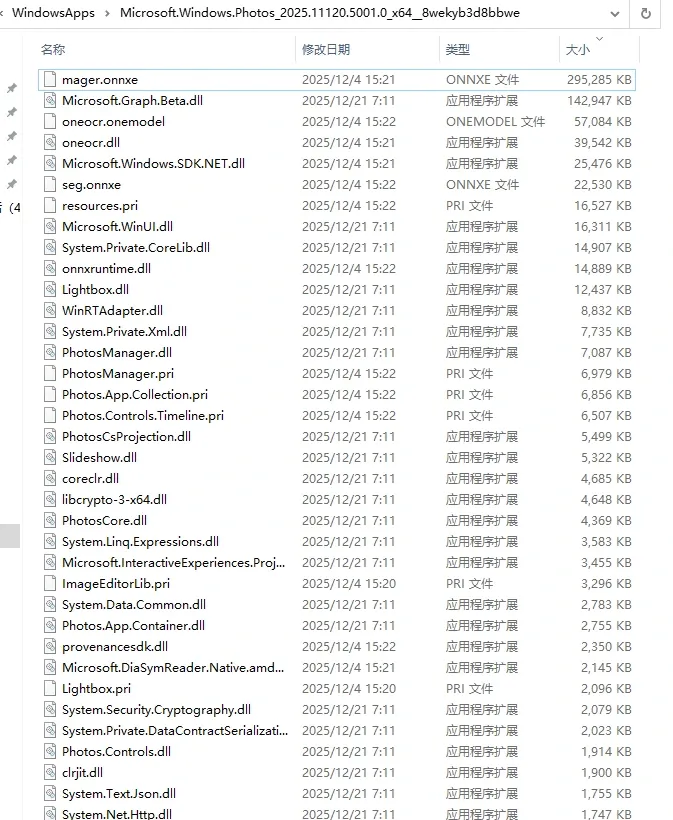
Searching the model names (and asking an LLM) confirmed what each one is: seg does background segmentation, and mager is the eraser model we care about.

2. Parsing the model and tracing who loads it
There’s a site that X-rays ONNX models — feed it a model and it visualizes the layers and parameters. These models wouldn’t parse, which means they’re either encrypted or non-standard ONNX.
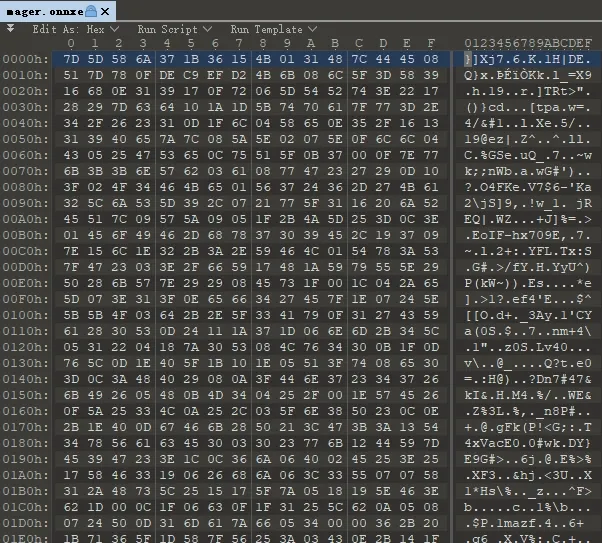
The bytes didn’t look right. Normal ONNX files are full of protobuf-serialized structures; this looked obfuscated. So next question: who loads onnxruntime.dll, and how does the loading flow work?
Turns out the app doesn’t use the onnxruntime.dll from the root directory — the relevant binaries sit together, with NPU-related components nearby.
Tracing the call chain shows the overall flow:
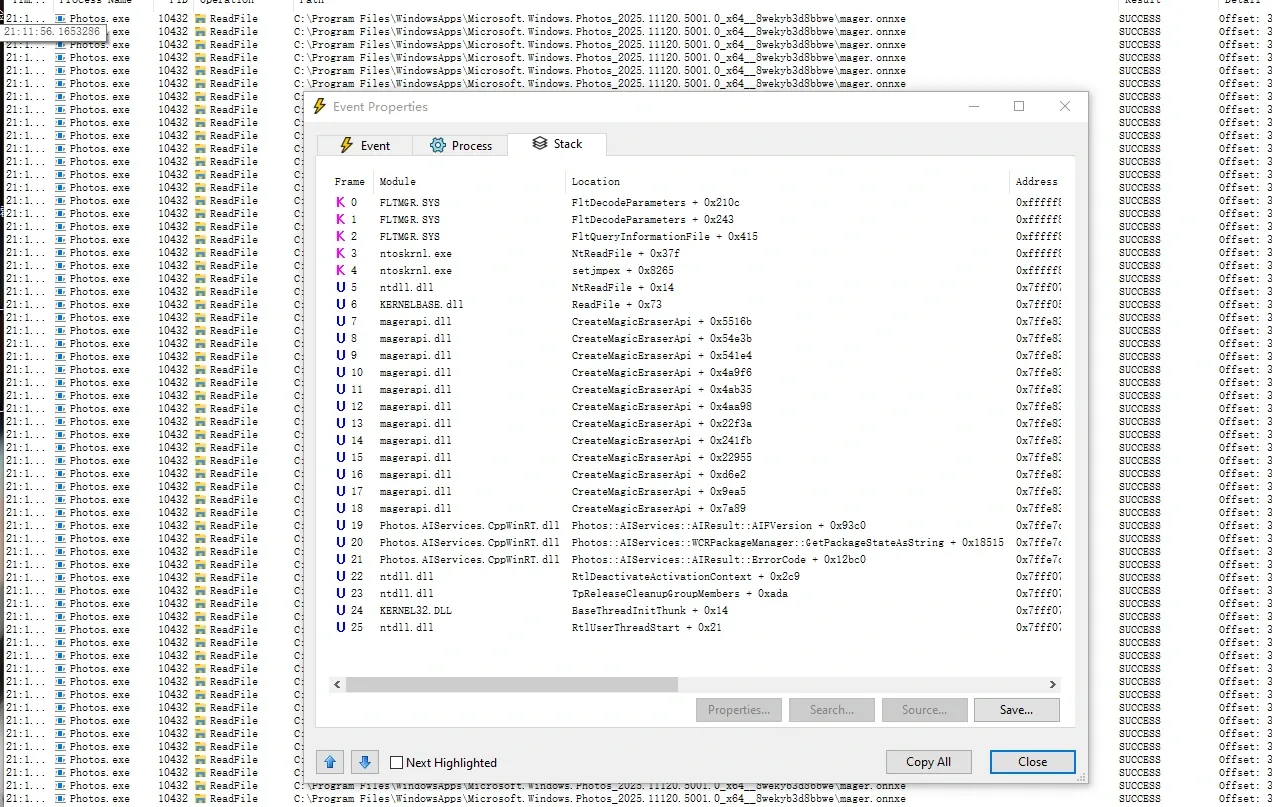
Microsoft binaries are essentially never packed, so static analysis in IDA straight from the call chain is enough. With ida-pro-mcp plus any capable model, the call chain resolves quickly.
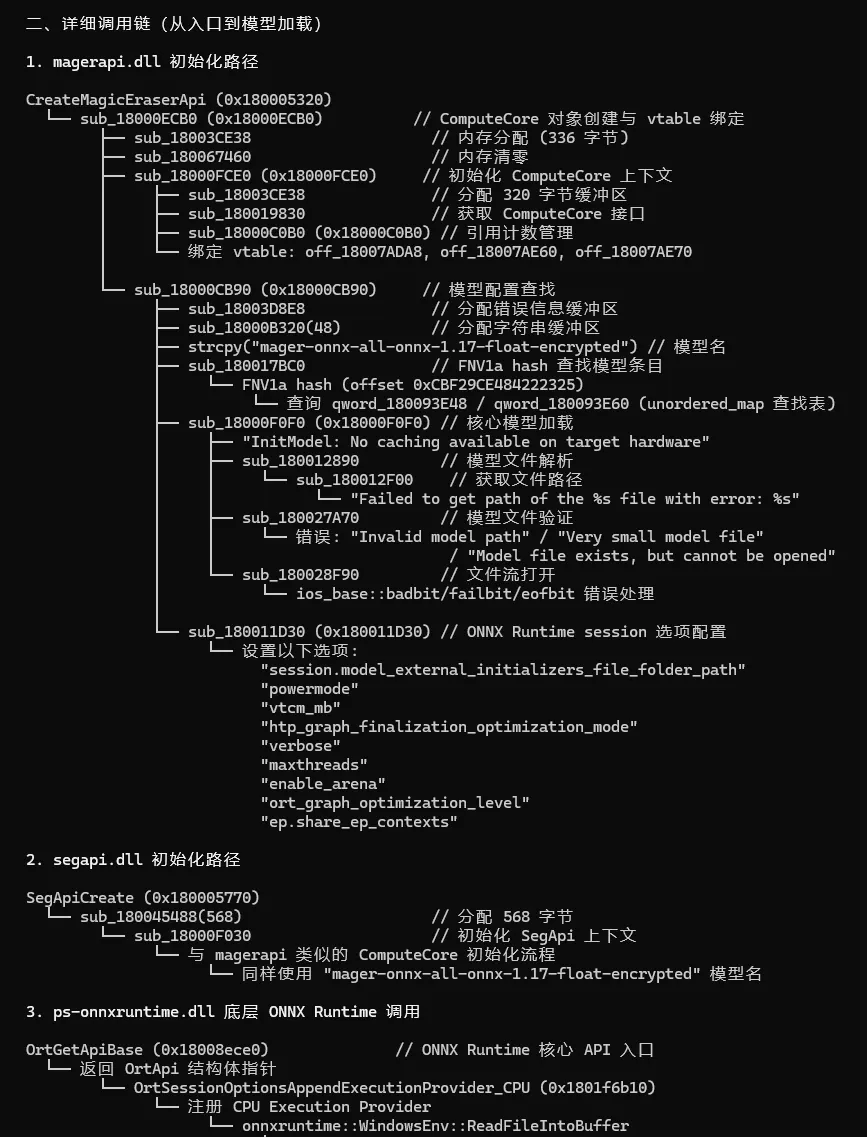
3. Chasing the key in IDA — starting with the seg model
The path is straightforward: a DLL loads a model file, which means it must decrypt it, which means there’s a key — either hardcoded in the DLL or read from somewhere. No packer, no obfuscation, so straight into IDA.
I started with seg.onnxe because it’s smaller (22 MB) and its logic should be simpler than the eraser model.
The first key entry point is segapi.dll. Searching for CreateSession / OrtCreateSession calls in IDA quickly landed on sub_1800032B0, the function that registers the model key table:
- registers
"key"→ a 14-byte ASCII string - registers
"long_key"→ a 4096-byte data block
The seg model only uses the "key" entry. So its protection scheme is a 14-byte ASCII string applied as a repeating XOR — not AES, just plain XOR obfuscation.
| Content | IDA address | File offset |
|---|---|---|
| the 14-byte ASCII key | 0x180083EA8 |
0x82EA8 |
Note that
segapi.dlluses PE section mapping. The.rdataVA base is0x180075000with a file offset of0x74000, so to locate a value on disk you subtract the VA and add the raw offset.
4. Verifying the seg decryption — first try
With the key, decryption is one line of Python:
key = b"[redacted]"  # the 14-byte ASCII key string recovered from segapi.dll
decrypted = bytes(enc[i] ^ key[i % 14] for i in range(len(enc)))
The result loads straight into onnx.load() — IR 6, 1094 nodes, input (1,3,512,512), output (1,512,512). It also visualizes cleanly in Netron:
| Property | Value |
|---|---|
| Input | input_image (1×3×512×512 float32) |
| Output | output (1×512×512 float32) |
| Nodes | 1094 |
| IR version | 6 |
| Framework | PyTorch 2.0.1 |
| Size | 22 MB |
Seg model done. On to mager.
5. The mager model — the key is one layer deeper
The key-management structure in magerapi.dll is nearly identical to segapi — the same sub_180002BC0 (mirroring segapi’s sub_1800032B0) registers the key table. But mager adds a layer:
"key"→ the same 14-byte string as seg"long_key"→ a 4096-byte key block
I initially assumed mager’s key was the prefix concatenated with long_key (14 + 4096), and spent a while on offsets. A manual XOR round proved it wrong — the decrypted header didn’t match the ONNX 0x08 magic.
Checking more carefully: mager doesn’t use the 14-byte prefix at all. It only uses the long_key 4096-byte block. The "key" → prefix mapping is for the seg model; mager’s InitModelKeyTable registers it too, but the actual load path only reads "long_key".
| Content | IDA address | File offset |
|---|---|---|
| 4096-byte key block | 0x18007AAC0 |
0x7AAC0 |
XOR-ing mager.onnxe (295 MB) with this 4096-byte block passes onnx.load() directly:
| Property | Value |
|---|---|
| Input | img_lr(1×3×256×256) + mask_lr(1×1×256×256) + img_hr(1×3×512×512) + mask_hr(1×1×512×512) |
| Output | output (1×3×512×512) |
| Nodes | 15284 |
| IR version | 8 |
| Framework | PyTorch 1.13.0 |
| Size | 288 MB |
6. The two models’ keys at a glance
| Model | Key | Length | Source |
|---|---|---|---|
| Seg | 14-byte ASCII string | 14 bytes | segapi.dll 0x82EA8 |
| Mager | 4096-byte binary block | 4096 bytes | magerapi.dll 0x7AAC0 |
Same algorithm for both: static repeating XOR, plaintext[i] = ciphertext[i] XOR key[i % key_len].
XOR is obfuscation, not cryptography — its security margin is low. But for on-device model protection, stopping people who just copy the file off disk is usually the whole point.
7. Running inference to verify
No point decrypting without running it. Loading both models in onnxruntime CPU mode:
- Seg inference: 512×512 input → same-size mask, ~200 ms per image
- Mager inference: needs 4 inputs (high/low-res image + high/low-res mask) → eraser output, ~2500 ms per image
Seg, fed frame-by-frame through video, runs about 4 FPS on CPU at 1280×720. With CUDA-enabled onnxruntime and a decent GPU, 40–80 FPS is realistic — fine for real-time matting.
Two pitfalls along the way:
- Edge tearing — when upscaling the 512×512 mask back to full res, bilinear interpolation + Gaussian feathering beats hard thresholding. Adding temporal EMA smoothing (weight 0.35) killed the frame-to-frame flicker.
- Lost audio — OpenCV’s
VideoWriterdoesn’t write an audio track; pulling it back in from the source with ffmpeg solves it.

8. A side look at Feishu’s models
Feishu installs under %LOCALAPPDATA%\Feishu\app\ and ships a surprising amount of AI:
| Directory | Engine | Purpose |
|---|---|---|
vesdk\model\ |
ByteNN (proprietary) | video editing: scene recognition, matting, skin segmentation, face tracking |
RTCSDK_RES\models\ |
ByteNN (TVM-based) | real-time A/V: 14 audio denoise / echo-cancel / voiceprint models |
RTCSDK_RES\model\ |
ByteNN (TVM-based) | video effects: real-time matting (831 KB), face landmarks (868 KB) |
What’s interesting is that Feishu uses Apache TVM as the underlying inference engine (VolcEngineRTC.dll exports the full set of TVM C++ classes — tvm::runtime::GraphRuntime, tvm::runtime::ModuleNode, etc.), wrapped in ByteDance’s own ByteNN container format (BM magic). The size compression is aggressive — an 831 KB matting model versus our 22 MB seg model, a 27× difference.
That .model format isn’t ONNX, though, so parsing it means reversing the BM container structure. Noted for another day.
9. What if the encryption is actually strong? — hook the runtime and intercept plaintext
Everything above works because the protection is XOR obfuscation with the key hardcoded in the DLL. If a model were protected with AES-256-GCM, the key in a white-box implementation or delivered server-side, extracting the key directly gets expensive.
So flip the strategy: stop fighting the key — wait for the program to decrypt, and intercept the model before it reaches the inference engine.
encrypted model → [in-program decryption] → plaintext bytes → OrtCreateSession → ONNX Runtime inference
                                                        ↑
                                                HOOK here
ONNX Runtime loads models through two key APIs:
| API | Argument | Notes |
|---|---|---|
OrtCreateSession |
file path | loads an .onnx from disk |
OrtCreateSessionFromArray |
memory bytes + length | loads directly from memory (the post-decryption path) |
If the program decrypts to memory and then calls OrtCreateSessionFromArray, the argument to that function is already the plaintext model. Hook it, dump the memory at model_data, and you get a complete, usable .onnx file.
Practical approach on Windows — MinHook
MinHook is a lightweight inline-hook library; a few lines hijack any DLL export:
// 1. define a proxy with the same signature as the original
typedef OrtStatus*(*PFN_OrtCreateSessionFromArray)(
    const OrtEnv*, const void* model_data, size_t model_data_length,
    const OrtSessionOptions*, OrtSession** out);

PFN_OrtCreateSessionFromArray OriginalFunc = NULL;

OrtStatus* Hooked_OrtCreateSessionFromArray(
    const OrtEnv* env, const void* model_data, size_t model_data_length,
    const OrtSessionOptions* options, OrtSession** out)
{
    // 2. dump the plaintext model to disk
    FILE* f = fopen("dump.onnx", "wb");
    fwrite(model_data, 1, model_data_length, f);
    fclose(f);

    // 3. call the original so the program keeps working
    return OriginalFunc(env, model_data, model_data_length, options, out);
}

// 4. install the hook
MH_Initialize();
MH_CreateHookApi(L"onnxruntime.dll", "OrtCreateSessionFromArray",
                 Hooked_OrtCreateSessionFromArray, (void**)&OriginalFunc);
MH_EnableHook(MH_ALL_HOOKS);
Compile this into a DLL, inject it into the target process (Photos or anything that loads onnxruntime), trigger the AI feature once, and dump.onnx is yours.
The extreme case — a custom inference engine
If the model isn’t ONNX but a proprietary format like Feishu’s ByteNN, the OrtCreateSession route won’t work. Instead:
- Locate the program’s internal
CreateSession/LoadModelin IDA - Find the layer that receives the decrypted model data
- Hook and dump at that layer
Same idea at the core: chase the program to the “decryption finished, inference about to start” boundary and cut in there.
The three extraction routes compared
| Scenario | Method | Difficulty |
|---|---|---|
| XOR obfuscation / no encryption | extract the key and XOR-decrypt (what we did here) | ⭐ |
| real crypto, but onnxruntime | hook OrtCreateSessionFromArray and dump plaintext |
⭐⭐ |
| real crypto + custom engine | dynamic debugging + IDA static analysis + hook internal LoadModel | ⭐⭐⭐⭐ |
The two Photos models happened to be the simplest case. But the methodology generalizes — if you can’t find the key, don’t pick the lock; wait for the door to open and walk in behind.
10. Takeaways
A few things worth keeping from this analysis:
- The “encryption” is obfuscation, not cryptography — seg uses a 14-byte ASCII string, mager a 4096-byte block, both as repeating XOR. It stops casual file copiers, not determined reverse engineers — but for local model protection, that’s often enough.
- Feishu’s model engineering is more mature — Apache TVM + a custom container format + on-demand download + versioning. It’s a full lifecycle inference architecture, not just “ship a file.”
- Local AI is becoming table stakes for desktop apps — Windows Photos’ eraser, system-level OCR, Feishu’s real-time matting and denoising are all moving on-device. Lightweight ONNX/TVM models will keep embedding themselves into everyday software.
- The DLLs reference far more model commands than just eraser and OCR — there’s a whole internal library of local AI under the hood.
Colin Xiao — I take on contract reverse-engineering work, and writeups like this are how I show what I can do. If you need help with anything in this space — including but not limited to the areas I cover above — I’m available. No project is too big or too small — if it’s reverse engineering and I can do it, I’ll take it. DM me on X (@colinxiao_lab) or Telegram (@ColinXiao666).
Get in touch