Statically Recovering UE5 UObject Reflection Struct Offsets via IDA String Search
About the author. I’m Colin Xiao — an independent reverse engineer, mostly working solo on contract jobs. I dig into compiled code of every kind, including but not limited to: Android and iOS apps, x86/x64/ARM native binaries, packers and obfuscators, DRM and license checks, network protocols and APIs, crypto and signature algorithms, malware, game binaries, and embedded/IoT firmware. I also handle large-scale data collection and vulnerability research. If you have any project in mind, I’d be glad to take it on — whatever it is, as long as it’s within my wheelhouse. Just reach out. You can reach me on X at @colinxiao_lab or on Telegram at https://t.me/ColinXiao666.
This research is published for educational and defensive purposes. The target sample is anonymized throughout.
When you’re rebuilding an Unreal Engine 5 SDK from a stripped binary, one of the first things you need is the correct layout of the reflection structs — FProperty, FField, UFunction, UEnum, UStruct. This is a static, string-search-driven way to recover those offsets without touching a memory scanner at all.
1. Recovering FProperty
Start in the UE5 source at UDataTableFunctionLibrary::execGetDataTableRowFromName:
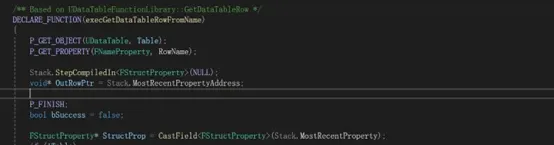
Scroll down to the else if branch. StructProp here is an FStructProperty*. When recovering FProperty by hand, we used to hunt for the Size offset with a memory scanner — but Size isn’t a member of FProperty itself; it represents the size of the FProperty class. Because UE’s type hierarchy is deeply nested, you can get a class’s size very easily: find any struct that inherits from FProperty.
FStructProperty inherits from FProperty and its first member is Struct, so that immediately gives us the Size value. Below it, FStructUtils::TheSameLayout is called.
Step into that function and you land on UStruct’s PropertiesSize. Step into ArePropertiesTheSame:
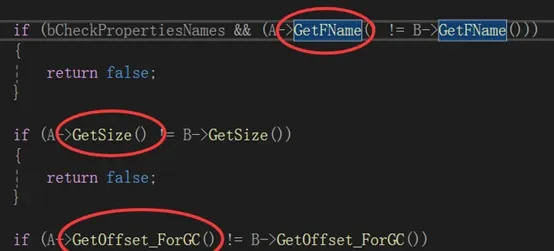
From there, GetFName gives the FField::NamePrivate offset, GetSize gives ElementSize, and GetOffset_ForGC gives Offset.
Now reproduce it in IDA. Search for the string aMissingtablein to locate UDataTableFunctionLibrary::execGetDataTableRowFromName:
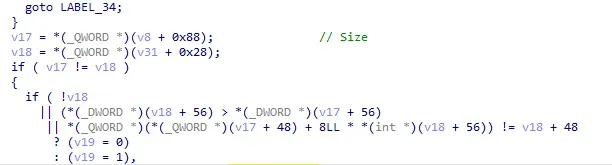
That leads to the offset of the Struct member in FStructProperty — which is also our FProperty size:
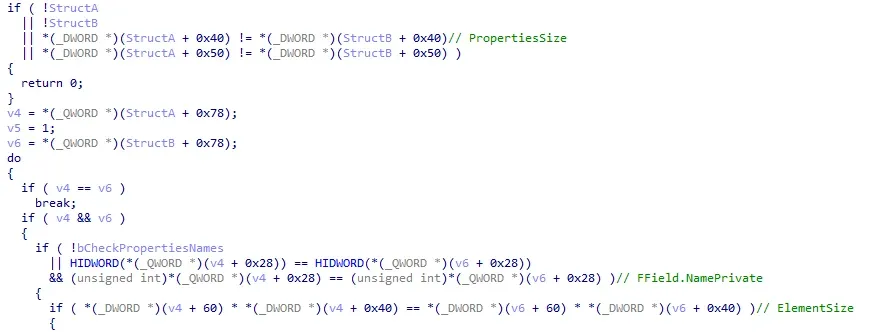
The same comparison yields the remaining member offsets, and FProperty is done.
2. Recovering FField
Still in the same function, step into Generic_GetDataTableRowFromName:

Then into CopyScriptStruct, find the for loop with TFieldIterator, jump to its constructor, and follow the call to IterateToNext. That’s where you read off FField::ClassPrivate and FField::Next. Confirm in IDA:

FField is now recovered.
3. Recovering UFunction
For UFunction’s Func offset, locate ProcessEvent in the UE source, find the UFunction::Invoke call inside it, and step into Invoke — the return value points you at the Func offset. Reproducing in IDA gives Func = 0xE0.
4. Recovering UEnum
In IDA’s Names window, search for the string aSTime3f3f3f. The first three-argument function above it is UEnum::GetNameByValue, which is awkward to analyze from source — so read it directly in IDA:
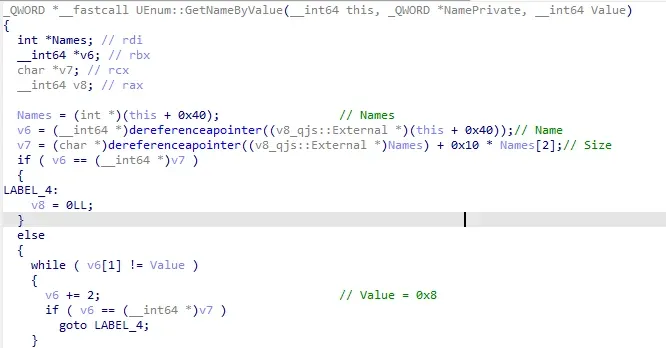
Look at the v7 assignment: Names[2] is the current element count of the TArray (since Names is int*, 2 * 4 = 8 — note this is not the maximum element count). The v6[1] != value comparison tells us Value sits at offset 0x8; v6 += 2 means Size = 0x10; and v8 = *v6 means Name is at offset 0x0. That completes UEnum.
UObject and UStruct::SuperStruct are trivial enough to find yourself, so I’ll leave those as an exercise.
Colin Xiao — I take on contract reverse-engineering work, and writeups like this are how I show what I can do. If you need help with anything in this space — including but not limited to the areas I cover above — I’m available. No project is too big or too small — if it’s reverse engineering and I can do it, I’ll take it. DM me on X (@colinxiao_lab) or Telegram (@ColinXiao666).
Get in touch