A First Look at Swift Runtime: Building an Alamofire Packet Capture Tool with Frida
About the author. I’m Colin Xiao — an independent reverse engineer, mostly working solo on contract jobs. I dig into compiled code of every kind, including but not limited to: Android and iOS apps, x86/x64/ARM native binaries, packers and obfuscators, DRM and license checks, network protocols and APIs, crypto and signature algorithms, malware, game binaries, and embedded/IoT firmware. I also handle large-scale data collection and vulnerability research. If you have any project in mind, I’d be glad to take it on — whatever it is, as long as it’s within my wheelhouse. Just reach out. You can reach me on X at @colinxiao_lab or on Telegram at https://t.me/ColinXiao666.
This research is published for educational and defensive purposes. The target sample is anonymized throughout.
A First Look at Swift Runtime: Building an Alamofire Packet Capture Tool with Frida
Background
Since its 2014 release, Swift has grown into a dominant force in Apple’s ecosystem. A 2019 survey found that over half of non-game apps were already written in Swift. With Swift 5’s release in 2019 came ABI stability — a genuine milestone — and I expect more apps will depend on Swift going forward.
From a reverse-engineering angle, though, Swift analysis is comparatively thin, and some otherwise-great projects are stuck on old Swift versions and break under Swift 5 — swift-frida is one.
I recently read through the Swift docs, working from how Swift types are laid out in a Mach-O binary up to runtime analysis. Along the way I built a command-line tool, SwiftDump, that extracts Swift object definitions from a Mach-O, plus a Frida version called FridaSwiftDump.
This post focuses on the Swift runtime data structures, targeting Alamofire — the ~33k-star Swift HTTP library — to build a basic packet-capture tool that can print GET/POST requests and bypass SSL pinning. It covers Swift memory layout, the calling convention, argument passing, and calling runtime functions.
Project: FridaHookSwiftAlamofire
Test environment
A fresh iOS Swift project referencing Alamofire 5.2.1 as a framework via CocoaPods. Xcode 11.5 (11E608c), Swift 5.2, running on a real ARM64 device.
Confirming the key functions
Let’s start from the normal development side to understand Alamofire’s request flow and pick a good function to hook. After getting a working Frida version, I test it against other apps.
1. A simple Alamofire GET
import Alamofire

let urlstr = "https://httpbin.org/get?time=\( Int(Date().timeIntervalSince1970) )";
AF.request(urlstr).response { (rsp:AFDataResponse<Data?>) in
    if let data = rsp.data {
        let str = String(data: data, encoding: String.Encoding.utf8) ?? "nil"
        print("rspstr=", str);
    } else {
        let str: String = "faild, err=\(rsp.error?.errorDescription ?? "nil")"
        print(str);
    }
}
2. How Alamofire works
AF is Session.default; Session creates and manages Requests. After AF.request is called, Session creates a DataRequest and enqueues it into requestQueue, where the setup creates it. Looking at DataRequest, after creation it calls:
override func task(for request: URLRequest, using session: URLSession) -> URLSessionTaskAnyone familiar with Objective-C knows NSURLSessionTask — the URLSessionTask here exists specifically for ObjC compatibility. Check the source.
Since it’s ObjC-compatible, we hook the ObjC way:
open func dataTask(with request: URLRequest, completionHandler: @escaping (Data?, URLResponse?, Error?) -> Void) -> URLSessionDataTaskThe implementation is in HookDataTaskWithRequest.ts and is simple enough that I won’t elaborate. Running the Frida hook and re-sending the GET confirms it fires — but the completionHandler argument is empty. Why?
Back to the Alamofire source. In Session.swift’s init, the default URLSession’s delegate is SessionDelegate, which handles the various data and status callbacks. Find:
open func urlSession(_ session: URLSession, dataTask: URLSessionDataTask, didReceive data: Data)This is where response data arrives — hook it here. It’s a Swift function, so the ObjC hook method won’t work. Swift’s exported function names are name-mangled at compile time; under Swift 5 the symbol becomes a string starting with $, carrying type info. This one mangles to:
$s9Alamofire15SessionDelegateC03urlB0_8dataTask10didReceiveySo12NSURLSessionC_So0i4DataF0C10Foundation0J0VtFDemangle it with (note the \ before $):
swift demangle "\$s9Alamofire15SessionDelegateC03urlB0_8dataTask10didReceiveySo12NSURLSessionC_So0i4DataF0C10Foundation0J0VtF"Output:
Alamofire.SessionDelegate.urlSession(_: __C.NSURLSession, dataTask: __C.NSURLSessionDataTask, didReceive: Foundation.Data) -> ()Confirmed — that’s the symbol we need.
Foundation.Data’s memory layout
Continuing from the last step, use getExportByName in Frida to get the function pointer and hook it. The first two arguments are ObjC-compatible, so they can be wrapped as Frida ObjC.Objects. The third argument is Swift’s Foundation.Data — how do we read its data?
Let’s study Foundation.Data first. Swift’s Foundation is open source, so we can look inside. Simplify Data.swift down to the relevant definitions:
public struct Data : ReferenceConvertible, Equatable, Hashable, RandomAccessCollection, MutableCollection, RangeReplaceableCollection, MutableDataProtocol, ContiguousBytes {
    // A small inline buffer of bytes suitable for stack-allocation of small data.
    struct InlineData {// max=15 bytes
        var bytes: Buffer // 15 bytes
        var length: UInt8 // 1 bytes
    }
    // A buffer of bytes too large to fit in an InlineData, but still small enough to fit a storage pointer + range in two words.
    struct InlineSlice {  // max=HalfInt.max
        var slice: Range<HalfInt>
        var storage: __DataStorage
    }
    final class RangeReference {
    }
    // A buffer of bytes whose range is too large to fit in a signle word. Used alongside a RangeReference to make it fit into _Representation's two-word size.
    struct LargeSlice {
        var slice: RangeReference
        var storage: __DataStorage
    }

    // The actual storage for Data's various representations.
    internal enum _Representation {
        case empty
        case inline(InlineData)
        case slice(InlineSlice)
        case large(LargeSlice)
    }
    internal var _representation: _Representation
}
// Underlying storage representation for medium and large data.
internal final class __DataStorage {
    //
}
The basic structure is known; the representation differs by data size, as the comments above explain. On arm64, our test response is only a few hundred bytes, so it fits InlineSlice:
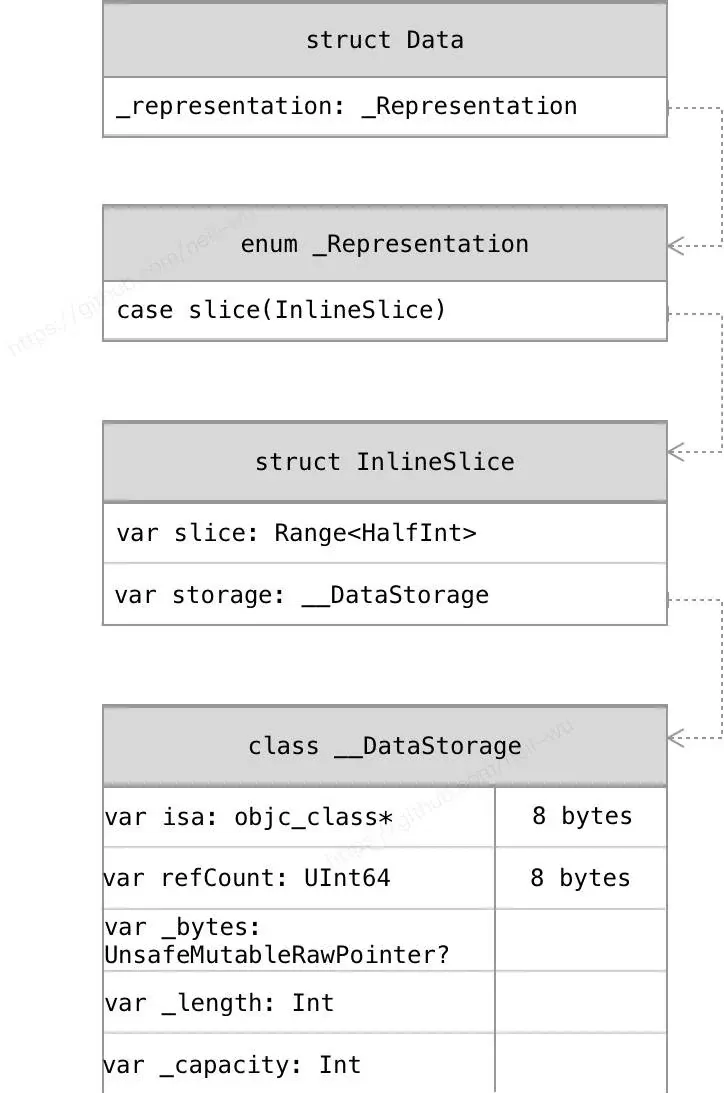
The Swift ABI calling convention makes a point of first-class values that can be passed directly in registers. Data uses exactly that: it’s split across two registers — args[2] carries the range info, args[3] carries the __DataStorage pointer. (args[0] points at NSURLSession, args[1] at NSURLSessionDataTask; the prototype has three parameters, but at the call site there are four.)
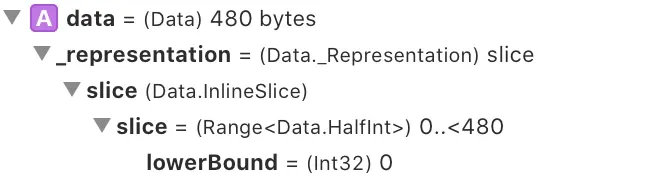
args[2] = 0x1e000000000 => 0x0,0x1e0 => range from 0 to 0x1e0
args[3] = DataStorage's address
__DataStorage is a Swift class, so we resolve its address from the class memory layout (see the structure diagram above; the code is in SDSwiftDataStorage.ts).
Note: during normal development you can also see the rough structure of Swift Data by setting a breakpoint in Xcode:
Kill SSL pinning
First, how Alamofire uses SSL pinning:
let manager = ServerTrustManager(evaluators: ["httpbin.org": PinnedCertificatesTrustEvaluator()])
self.session = Session(serverTrustManager: manager)
Tracing the code, func attemptServerTrustAuthentication(with challenge: URLAuthenticationChallenge) -> ChallengeEvaluation decides whether to check the certificate. With pinning enabled it returns useCredential; with no checks configured it returns (.performDefaultHandling, nil, nil). We just need to force this function to always return that tuple.
A tuple’s memory layout is linear (padding with zeros for alignment if unaligned), so after hooking, the first value the pointer points at is the one to overwrite. The code lives in HookAFServerTrust.ts:
// TypeScript
let func_attemptServerTrust = Module.getExportByName(null, '$s9Alamofire15SessionDelegateC32attemptServerTrustAuthentication4withSo36NSURLSessionAuthChallengeDispositionV11disposition_So15NSURLCredentialCSg10credentialAA7AFErrorOSg5errortSo019NSURLAuthenticationK0C_tF');
log(`[HookAFServerTrust] hook func_attemptServerTrust ${func_attemptServerTrust}`);
Interceptor.attach(func_attemptServerTrust, {
    onLeave(retval:InvocationReturnValue) {
        // force set retval to 0x1 to enable .performDefaultHandling
        let val = retval.toInt32();
        if (val != 0x1) {
            log(`[HookAFServerTrust] attemptServerTrustAuthentication retval ${retval}, reset to 0x1`);
            let fakeret = new NativePointer(0x1)
            retval.replace(fakeret)
        }
    }
});
Swift String
What if we want the value of a Swift.String? Check its memory layout. String is a value-type struct with two representations — Small (≤15 bytes) and Large. We know Foundation.URL has an initializer from String:
s10Foundation3URLV6stringACSgSSh_tcfC ---> Foundation.URL.init(string: __shared Swift.String) -> Foundation.URL?Hook it. I found that for Small Strings, Swift passes the value directly in two registers; for Large Strings, the two arguments point at two properties — matching the ABI rule that Swift value types are sometimes passed directly in registers. The code is in SDSwiftString.ts.
One more step
Can we call Swift runtime functions directly? Yes — given the right arguments. For example, analyzing our test app in IDA shows $s10Foundation4DataV19_bridgeToObjectiveCSo6NSDataCyF with prototype:
Foundation.Data._bridgeToObjectiveC() -> __C.NSDataIt converts Data to NSData, which we can use directly in Frida as an ObjC type. Pass Data’s two arguments — range and DataStorage — to this function. Example from SwiftRuntime.ts:
// Get the function symbol's address
const func_data2nsdata_ptr = Module.getExportByName(null, '$s10Foundation4DataV19_bridgeToObjectiveCSo6NSDataCyF');
// Build a function pointer to call
funcptr_data_bridgeToObjectiveC = new NativeFunction(func_data2nsdata_ptr,'pointer', ['pointer', 'pointer']);

// Call it
let ret:NativePointer = funcptr_data_bridgeToObjectiveC(rangePtr, dataStoragePtr) as NativePointer;
let ocret = new ObjC.Object(ret); // is __NSSwiftData: NSData
// From here you can call ObjC methods directly, e.g. ocret.length(), ocret.bytes()
Summary
Swift retains some dynamism to stay compatible with Objective-C, but for efficiency it leans heavily on registers — passing values directly rather than indirectly, trading implementation complexity for runtime performance. For reverse engineering there’s still a lot to dig into here; I’ve only scratched a small part and it still has rough edges. Comments and discussion welcome — and if it’s useful, consider starring the FridaHookSwiftAlamofire project.
References
- Swift ABI
- swift-corelibs-foundation
- Swift-MemoryLayout
Colin Xiao — I take on contract reverse-engineering work, and writeups like this are how I show what I can do. If you need help with anything in this space — including but not limited to the areas I cover above — I’m available. No project is too big or too small — if it’s reverse engineering and I can do it, I’ll take it. DM me on X (@colinxiao_lab) or Telegram (@ColinXiao666).
Get in touch