Injecting a theos Tweak to Modify a Game's Avatar Upload and Serve an Animated GIF
About the author. I’m Colin Xiao — an independent reverse engineer, mostly working solo on contract jobs. I dig into compiled code of every kind, including but not limited to: Android and iOS apps, x86/x64/ARM native binaries, packers and obfuscators, DRM and license checks, network protocols and APIs, crypto and signature algorithms, malware, game binaries, and embedded/IoT firmware. I also handle large-scale data collection and vulnerability research. If you have any project in mind, I’d be glad to take it on — whatever it is, as long as it’s within my wheelhouse. Just reach out. You can reach me on X at @colinxiao_lab or on Telegram at https://t.me/ColinXiao666.
This research is published for educational and defensive purposes. The target sample is anonymized throughout.
Injecting a theos Tweak to Modify a Game’s Avatar Upload and Serve an Animated GIF
Intro
This one’s been on my list for a while — partly to record the code for myself, partly to share it.
Requirement and final result
The game doesn’t support uploading animated GIFs: before upload, the client snapshots the image into a still frame. By injecting code I got it to upload the animated image instead.
Environment and tools
I was on macOS 10.10 before, which caps out at Xcode 7 — and Xcode 7 has no on-device debugging. So I upgraded to macOS Catalina 10.15.4 with the latest Xcode, but that version is slow and breaks a lot of software; I planned to downgrade later.
| Environment | Version |
|---|---|
| OS | macOS Catalina 10.15.4 (a bit too new — a lot of tools broke, so I planned to downgrade) |
| Device | iPhone 7, iOS 11 (jailbroken) |
| theos on macOS | latest |
| Transfer tool / SSH | — |
| Xcode | 11.5 |
| On-device FLEXible (UI inspection + packet capture), or Charles | — |
| Hopper Disassembler on macOS | — |
theos is the tool for writing tweak code and packaging it into a deb. FLEXible is an on-device debugging tool: it inspects an app’s UI hierarchy, shows the methods and variables in class-dumped headers, and can capture packets.
The approach
Idea A: find the image-upload POST request, then change the image URL parameter. Dead end — the client signs all parameters and sends the signature to the backend; changing any parameter breaks signature validation.
Idea B: change the local image path right when the crop window saves. Maybe workable, but I wanted something simpler.
Idea C: inject into the code that assembles the parameter dictionary right before upload, and forcibly swap the image parameter’s URL. This doesn’t disturb the signature generation logic.
Idea D: disassemble and reverse the signing algorithm. Hard and time-consuming, but if you crack it you could forge data on essentially every request via a man-in-the-middle. I went with Idea C — it’s the simpler path.
Tracing the image-upload request
Use FLEXible to get a rough idea of the controllers and methods in the view hierarchy:
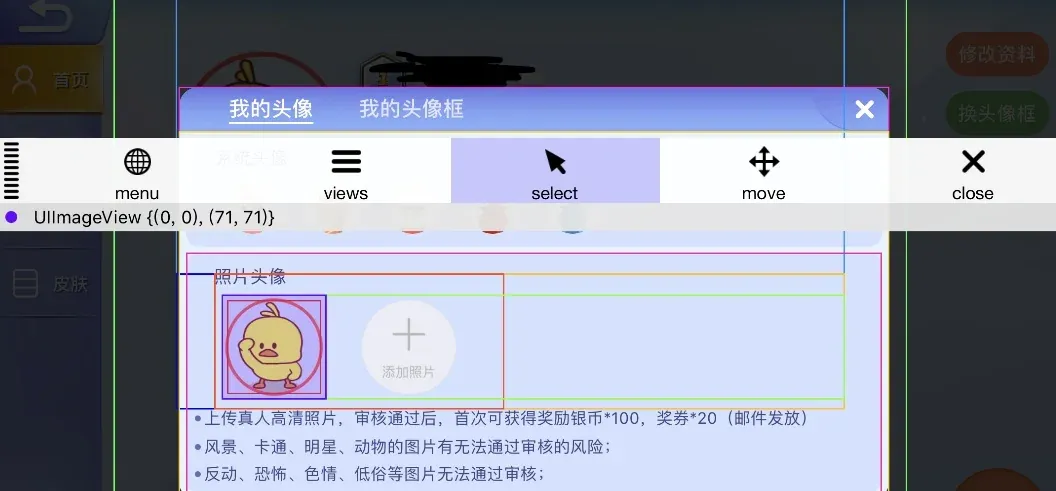
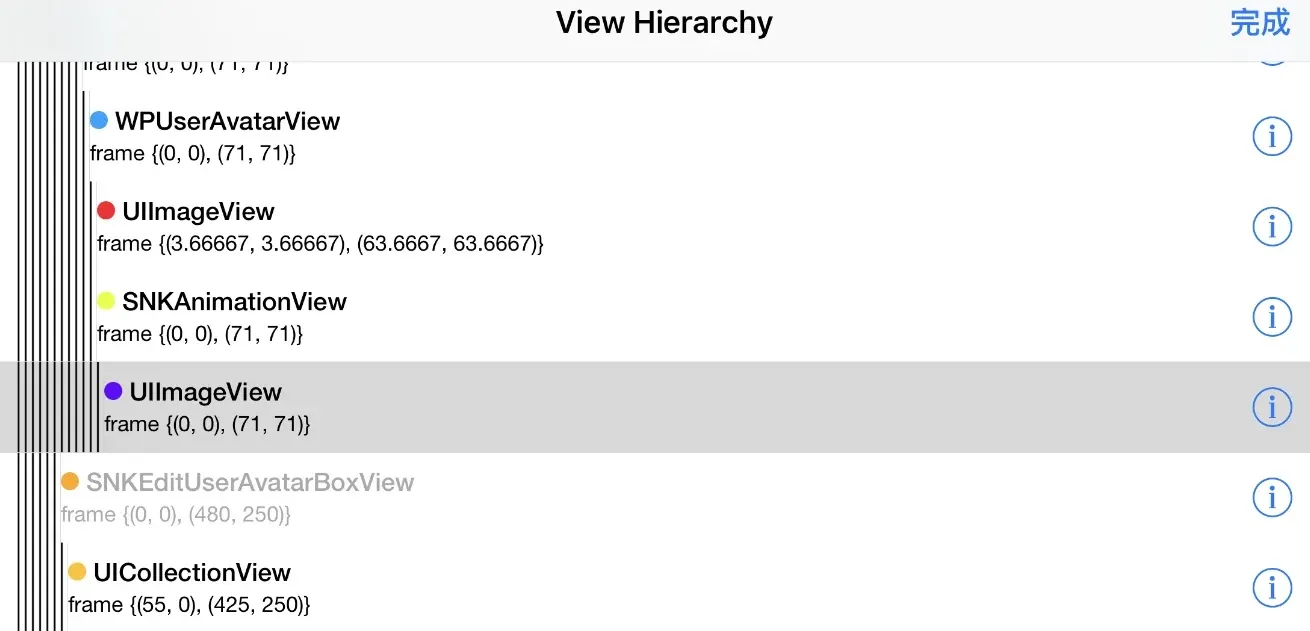
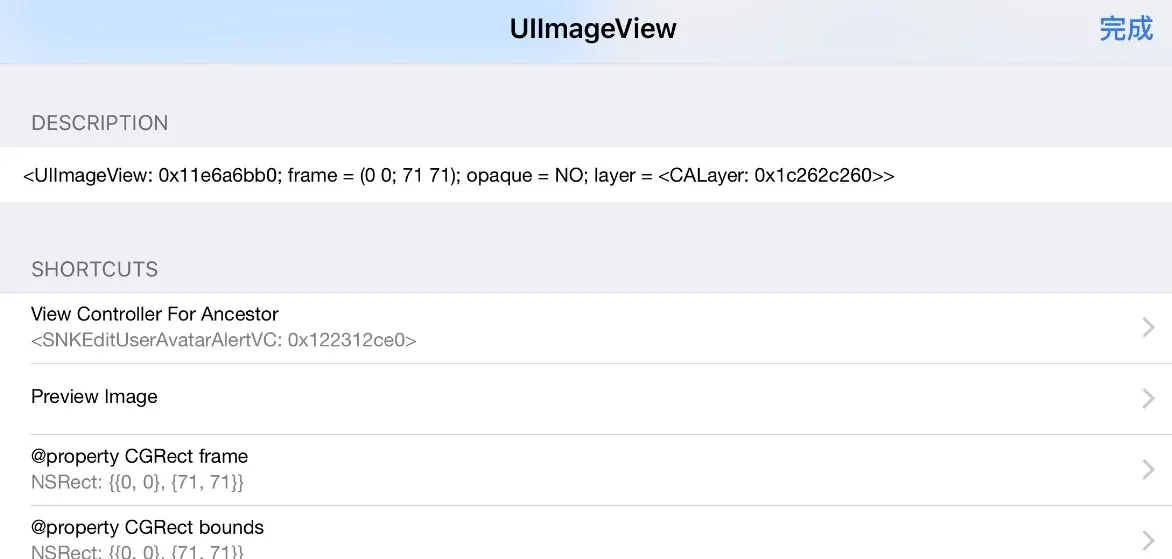
I didn’t really need the hierarchy — I just needed the upload to trigger a capture. Open FLEXible’s menu, choose Network History, tap Settings, and enable packet capture. Go back to the game, upload any image, then reopen Network to see the capture list:
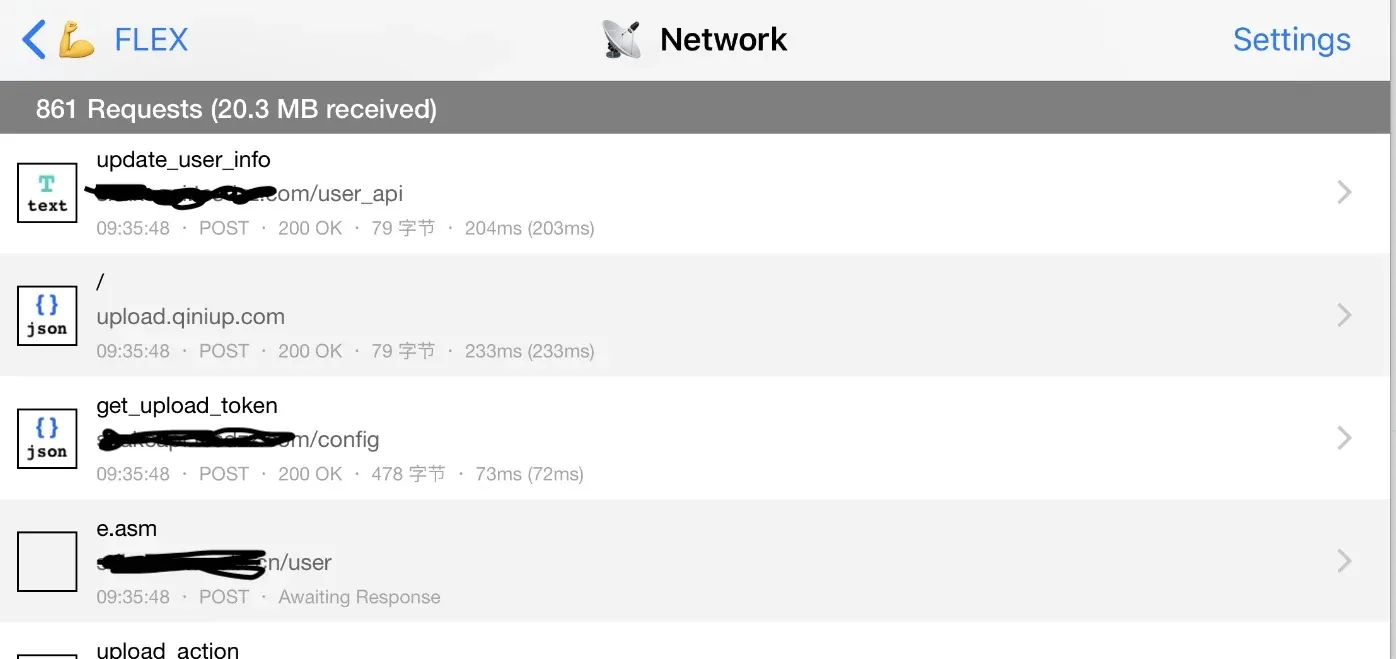
The two suspicious POST requests are the first two: upload.qiniup.com and update_user_info. Open them for details:
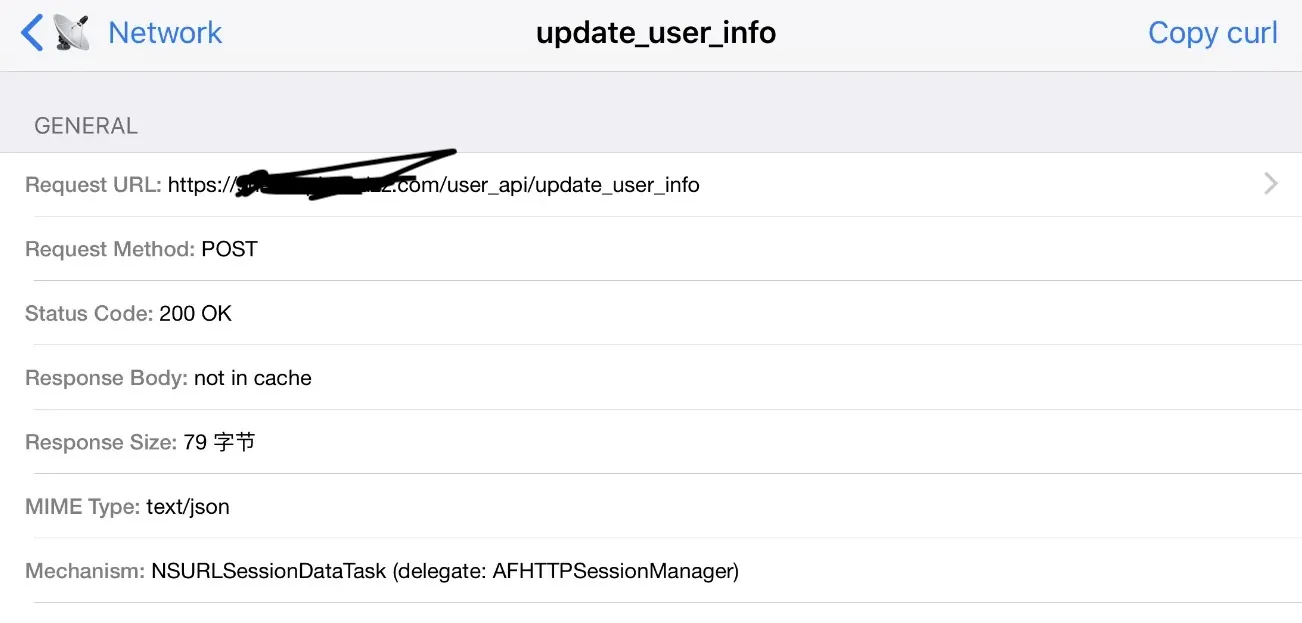
The image doesn’t fit in the capture, so I copied it as curl:
curl -v -X POST ‘https://upload.qiniup.com’ -H ‘User-Agent: QiniuObject-C/7.3.2 (iPhone; iOS 11.2.6; ABE768DC-FA02-4CAB-9DF8-2720B0E7C890; GcvQmcsBpX-WqRIW_YTKKXua3PbSXh831RS_u2NW)’ -H ‘Content-Type: multipart/form-data; boundary=werghnvt54wef654rjuhgb56trtg34tweuyrgf’ -H ‘Content-Length: 27824’ -H ‘Cookie:’ [TOO MUCH DATA TO INCLUDE]
This request uploads the image stream. The boundary can’t be written out fully — FLEXible doesn’t display image stream data — and the Cookie is truncated too; it carries the user’s sid and similar. This request also depends on a token from the third request in the list: you fetch the token first, then upload. I’ll show that in a shell script below.
On success the upload returns the image’s key and hash — note this only uploads the image to the hosting bucket; it isn’t linked to the game avatar yet.
{
  "key" : "sa/fc6861905d20200613100399.jpg",
  "hash" : "FifEYajsNl7aqU88gsOYSyewk199"
}
That key is what the next request uses as its headimgurl parameter.
The other POST request (sensitive parameters replaced with example):
curl -v -X POST ‘https://example.com/user\_api/update\_user\_info’ -H ‘market: apple’ -H ‘Content-Type: application/x-www-form-urlencoded’ -H ‘ExampleVersion: 4.3.31’ -H ‘ExampleUserID: example-5631-4446-example-09da14d65cb9’ -H ‘ExampleProduct: example’ -H ‘User-Agent: example/4.1.31 (iPhone; iOS 11.2.6; Scale/3.00)’ -H ‘Accept-Language: zh-Hans-CN;q=1’ -H ‘nonce: 1592013691’ -H ‘Cookie:’ -d ‘build_tag=4531.0&device_id=example-A6FA-4A74-8CA3-example-1779-0000008790C7E566&device_name=iPhone%207%20Plus&device_system_platform=iPhone9%2C2&headimgurl=https://example.com/sa/fc6861905d20200613100399.jpg&idfa=0D79361D-C19F-4A77-84Bd-D725AA96B4D8&market=apple&os\_version=11.2&platform=1&sid=example&example\_sign=%2B70m/3s/1314dgNQ641mE9YmN6c%3D&uid=example&version=4.1.31’

This POST updates the avatar, and the key parameter is headimgurl. You can’t just change the URL in the request, because example_sign is computed over all request parameters — the backend rejects it with a signature failure unless you recompute the sign with the algorithm.
Uploading my own GIF to the bucket with a shell script
The code I want to inject is the method that assembles update_user_info — I just swap the headimgurl value at assembly time. But first I need to upload my own image to the bucket, not through the game’s upload flow, but with my own shell script that simulates the POST and returns the final URL.
#! bin/shell#! bin/shell

# content, keyword to search for
getContentByKeyword() {
	content=$1
	keyword=$2
	echo $content | awk -F \"$keyword\"\:\" '{ print $2 }' | awk -F \" '{print $1}'
}

getHeaderByKeyword() {
	content=$1
	keyword=$2
	echo $content | grep $keyword | awk -F $keyword\:\  '{ print $2 }' | awk -F \  '{print $1}'
}

content=`curl -v -X POST 'https://example.com/config/get_upload_token' -H 'market: apple' -H 'Content-Type: application/x-www-form-urlencoded' -H 'ExampleVersion: 4.1.26' -H 'ExampleUserID: example' -H 'ExampleProduct: example' -H 'User-Agent: example/4.3.26 (iPhone; iOS 11.2.6; Scale/3.00)' -H 'Accept-Language: zh-Hans-CN;q=1' -H 'nonce: 1589783647' -H 'Cookie:' -d 'bucket=example&build_tag=example.0&device_id=example-A4FA-4A64-example-example-1779-example&device_name=iPhone%207%20Plus&device_system_platform=iPhone9%2C2&idfa=example-C18F-4A77-84BC-example&market=apple&os_version=11.2&platform=1&sid=example&example_sign=8HX%example%3D&type=2&uid=example-5495-439f-example-example&version=4.1.26'`
token=`getContentByKeyword "$content" "token"`
echo $token >> test2.txt


uploadResponse=`curl  -v -i https://upload.qbox.me  -F "token=$token"     -H 'User-Agent: QiniuObject-C/7.1.0 (iPhone; iOS 11.2.6; example-FA02-4CAB-example-example)' -H 'Content-Type: multipart/form-data' -H 'Accept-Language: zh-cn' -H 'Accept-Encoding: br, gzip, deflate' -H 'Cookie:'  -H 'Accept: */*' -F "file=@/Users/mac/Desktop/test4.gif"`
nonce=`getHeaderByKeyword "$uploadResponse" "EagleId"`
picPath=`getContentByKeyword "$uploadResponse" "key"`
echo $nonce >> test2.txt
echo $picPath >> test2.txt
nonce=${nonce:8:10}
timeStamp=`date +%s`
nonce=timeStamp
echo $nonce >> test2.txt
Step one: fetch the token via get_upload_token, using the user’s uid/sid. Step two: POST to upload.qbox.me to upload the local GIF — -F "file=@/Users/mac/Desktop/test4.gif" above. On success you get back something like this, where key is the image URL you’ll splice into headimgurl:
{
  "key" : "sa/fc6861905d20200613100399.gif",
  "hash" : "FifEYajsNl7aqU88gsOYSyewk199"
}
Disassembling to find the method to inject
Decrypt the app first (details in my bfinject writeup). Open the Mach-O in Hopper Disassembler and search for the avatar-update API keyword update_user_info:
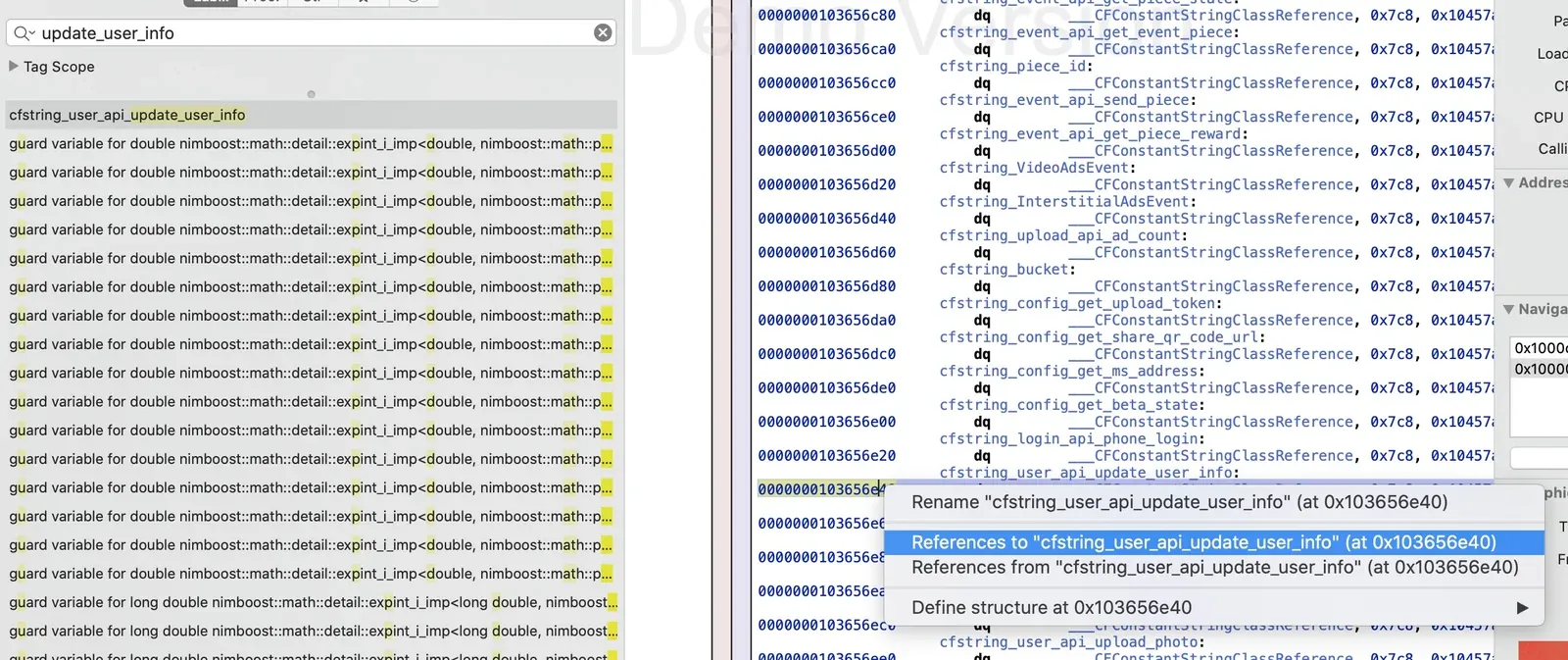
Right-click to find who calls this address, then jump to the pseudocode:
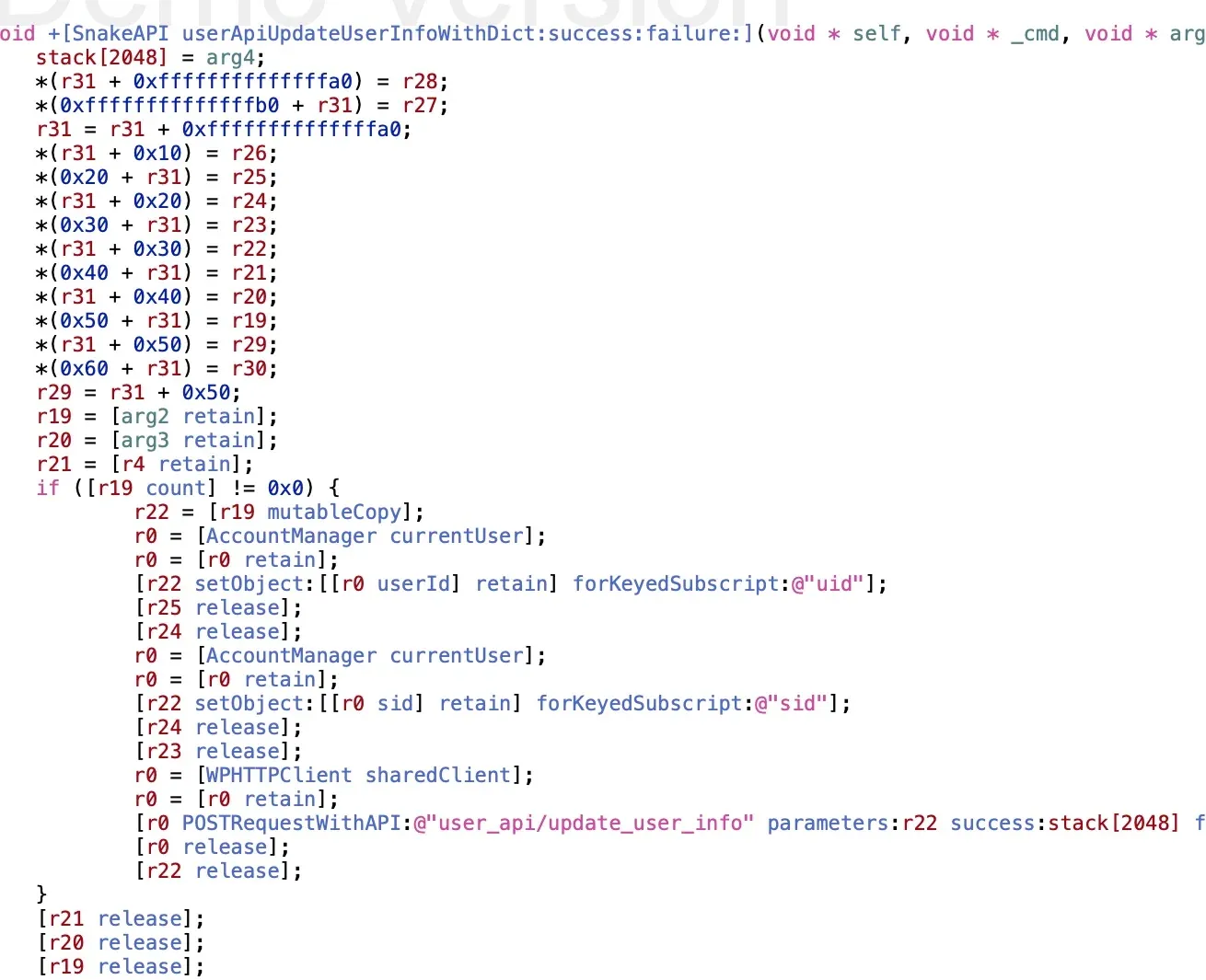
It’s basically this method: userApiUpdateUserInfoWithDict — it updates user info from a dictionary, and headimgurl is one of the dictionary keys. Change that value and the image URL changes. That’s the hypothesis, anyway.
Writing the tweak
To verify it, I wrote a tweak that hooks the method and prints the argument:
%hook SnakeAPI
+ (void)userApiUpdateUserInfoWithDict:(id)arg1 success:(id)arg2 failure:(id)arg3 {
	NSLog(@"arg before: %@", arg1);
 	%log;
	%orig;
}
%end
Build with nic.pl (template 11 for a tweak), set the MobileSubstrate Bundle filter to the app’s bundle ID, then add the arch and target lines to the Makefile:
ARCHS = armv7 arm64
TARGET = iphone:latest:8.0
Run make package to produce a deb, install it on the phone (via SSH, a phone-assistant tool, or Filza), and trigger an avatar upload while watching the macOS console:
[headimgurl] = 'sa/234234234234234.jpg'So arg1 is a dictionary — replacing its headimgurl changes the avatar. Since arg1 is immutable, I just nuked it and built a fresh dictionary. The final tweak:
%hook SnakeAPI
+ (void)userApiUpdateUserInfoWithDict:(id)arg1 success:(id)arg2 failure:(id)arg3 {
	NSLog(@"before: %@", arg1);
	arg1 =nil;
	arg1 = [NSDictionary dictionaryWithObjectsAndKeys:
    	@"https://example/sa/2345345345345345.jpg", @"headimgurl",nil];
	NSLog(@"after: %@", arg1);
 	%log;
  	%orig;
}
%end
The image URL is hardcoded — it’s the address returned by my shell upload, an animated GIF. Rebuild, reinstall, upload an avatar. The upload succeeds but the avatar still shows the old image — local cache, I figured. Restart the game, and there it is: the avatar refreshes into my animated GIF.
Colin Xiao — I take on contract reverse-engineering work, and writeups like this are how I show what I can do. If you need help with anything in this space — including but not limited to the areas I cover above — I’m available. No project is too big or too small — if it’s reverse engineering and I can do it, I’ll take it. DM me on X (@colinxiao_lab) or Telegram (@ColinXiao666).
Get in touch