Reverse Engineering a Ticketing Platform's `sign` Parameter for Ticket-Restock Monitoring
About the author. I’m Colin Xiao — an independent reverse engineer, mostly working solo on contract jobs. I dig into compiled code of every kind, including but not limited to: Android and iOS apps, x86/x64/ARM native binaries, packers and obfuscators, DRM and license checks, network protocols and APIs, crypto and signature algorithms, malware, game binaries, and embedded/IoT firmware. I also handle large-scale data collection and vulnerability research. If you have any project in mind, I’d be glad to take it on — whatever it is, as long as it’s within my wheelhouse. Just reach out. You can reach me on X at @colinxiao_lab or on Telegram at https://t.me/ColinXiao666.
This research is published for educational and defensive purposes. The target sample is anonymized throughout.
Reverse Engineering a Ticketing Platform’s sign Parameter for Ticket-Restock Monitoring
Concerts have been multiplying lately and tickets are impossible to get, so I looked into restock tickets and built a monitor for a ticketing platform’s concert restocks.
The simplest entry point is the web side.
On the concert page it says “web not supported for purchase” — no worries, we’re only checking whether tickets exist, not buying. Just capture the ticket-quantity endpoint for any music festival.
Capturing gives two links — the session endpoint:
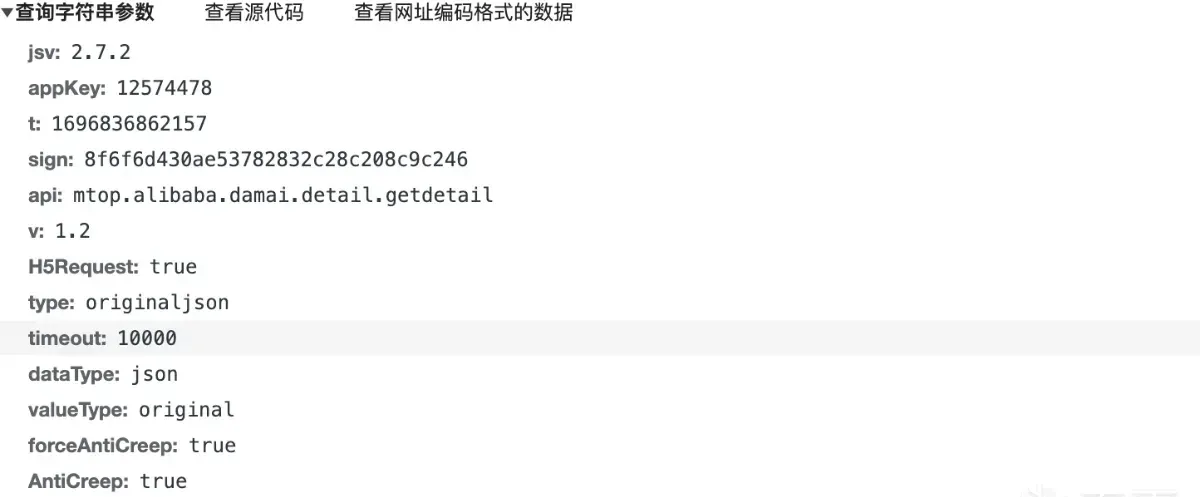
https://mtop.damai.cn/h5/mtop.alibaba.damai.detail.getdetail/1.2/?jsv=2.7.2&appKey=12574478&t=1696836862157&sign=8f6f6d430ae53782832c28c208c9c246&api=mtop.alibaba.damai.detail.getdetail&v=1.2&H5Request=true&type=originaljson&timeout=10000&dataType=json&valueType=original&forceAntiCreep=true&AntiCreep=true&useH5=true&data=%7B%22itemId%22%3A739853478245%2C%22platform%22%3A%228%22%2C%22comboChannel%22%3A%222%22%2C%22dmChannel%22%3A%22damai%40damaih5_h5%22%7DAnd the seat endpoint:
https://mtop.damai.cn/h5/mtop.alibaba.detail.subpage.getdetail/2.0/?jsv=2.7.2&appKey=12574478&t=1696837077937&sign=2000a8d025a2b8ff407be20a671b5e48&api=mtop.alibaba.detail.subpage.getdetail&v=2.0&H5Request=true&type=originaljson&timeout=10000&dataType=json&valueType=original&forceAntiCreep=true&AntiCreep=true&useH5=true&data=%7B%22itemId%22%3A%22739853478245%22%2C%22bizCode%22%3A%22ali.china.damai%22%2C%22scenario%22%3A%22itemsku%22%2C%22exParams%22%3A%22%7B%5C%22dataType%5C%22%3A2%2C%5C%22dataId%5C%22%3A%5C%22211839138%5C%22%2C%5C%22privilegeActId%5C%22%3A%5C%22%5C%22%7D%22%2C%22platform%22%3A%228%22%2C%22comboChannel%22%3A%222%22%2C%22dmChannel%22%3A%22damai%40damaih5_h5%22%7DAfter verifying, the headers are uniform and unchanged with no encrypted parameters, and the cookie is consistent but has unknown parameters _m_h5_tk and _m_h5_tk_enc:

The two endpoints’ parameters are mostly the same. Session endpoint:
Seat endpoint:
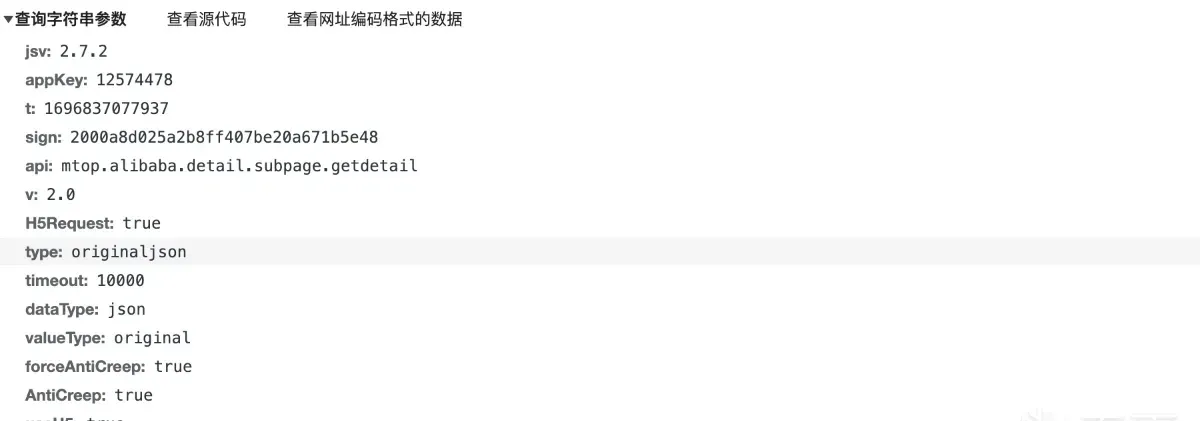
The key parameters are t, sign, and data; the rest are fixed.
data is obvious: the session endpoint’s itemId is the performance ID (other params fixed); the seat endpoint’s itemId is the performance ID and dataId is the current session ID (e.g., the 10.21 show), other params fixed.
Next, set a breakpoint to see how t and sign are generated. Open the console with F12, set an XHR breakpoint — either on sign or on the matching URL:
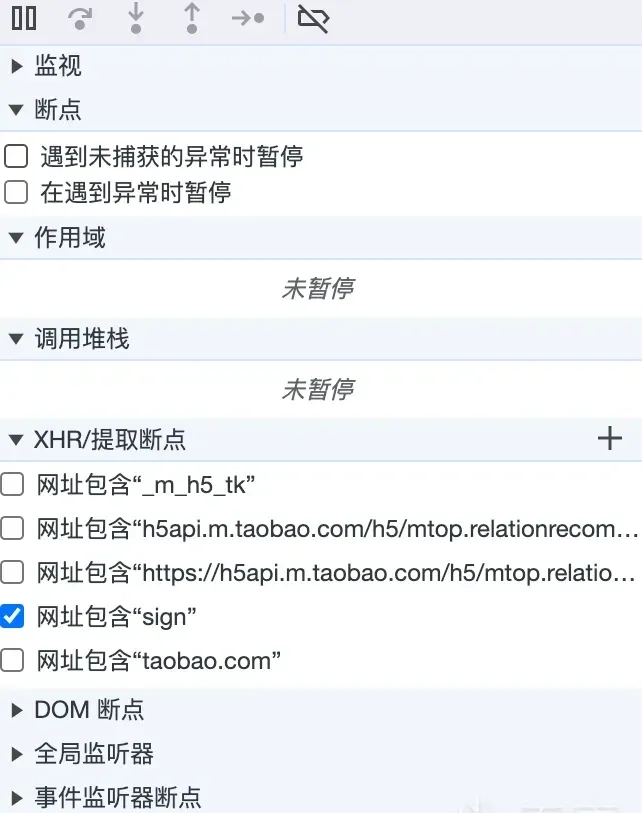
Refresh to trigger the breakpoint and find the JS file that issues the request:
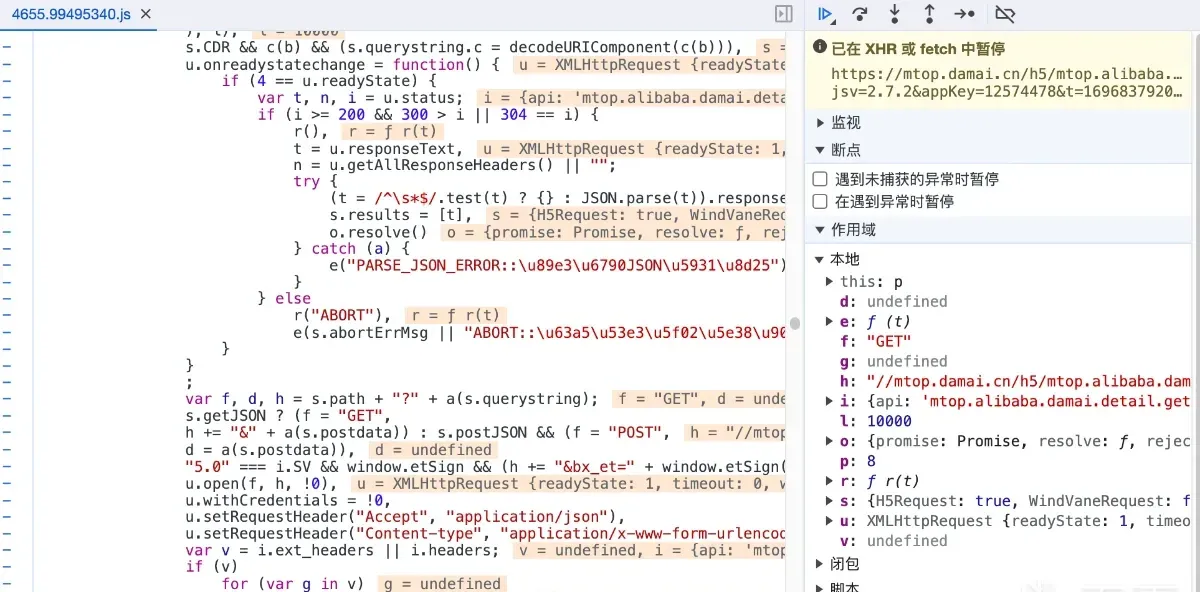
A little debugging in this file finds the encryption function easily:
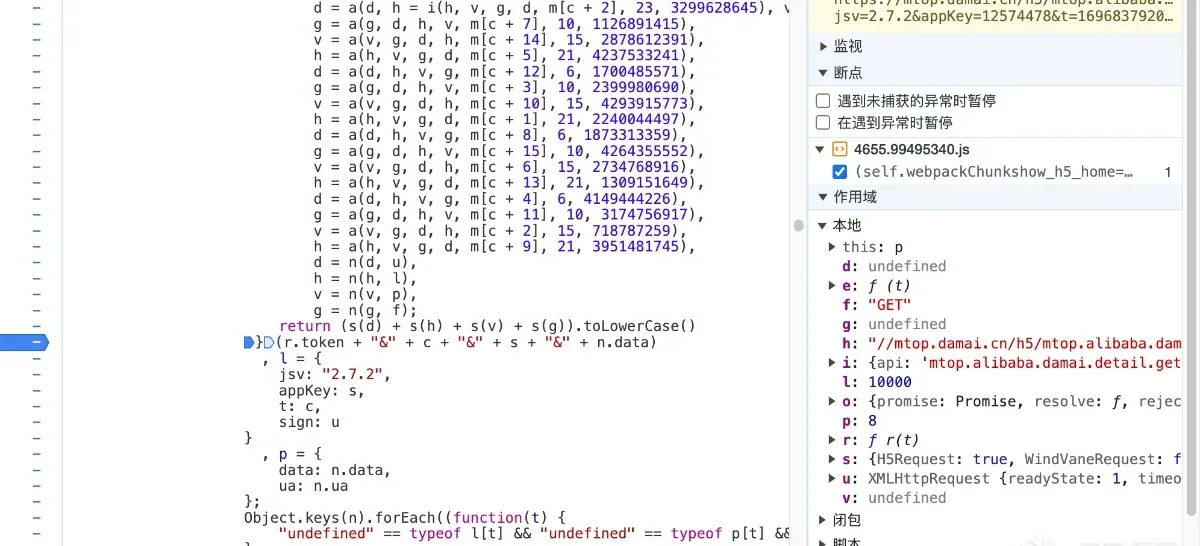
The function joins token, c, s, data with & as a separator, then encrypts the result to get sign.
token is unknown for now; c is the t timestamp from the URL; s is the fixed appKey from the URL; data is the JSON string of the URL’s data — just concatenate them.
So only token is left unknown. Set a breakpoint on the function:
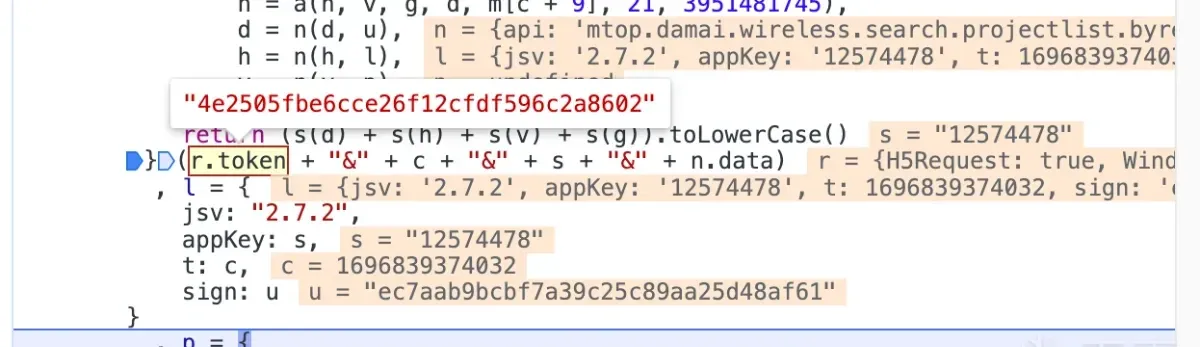
The token looks familiar. Looking back at the cookie we need: token is the first half of the cookie’s _m_h5_tk — just take it directly.
Encrypting the same parameters with an online MD5 tool gives the same result, so the encryption function is just MD5.
Now we only need to know how _m_h5_tk is generated. Go back to the homepage, clear the cookie cache, capture again, and find the request that sets the cookie:
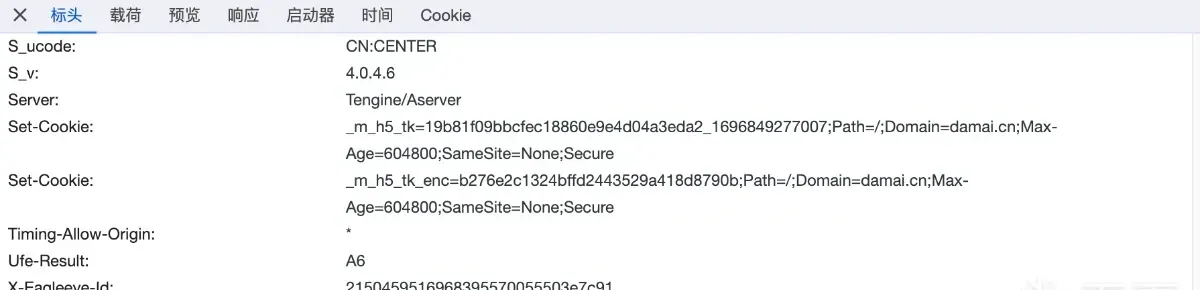
It turns out that once the token expires, sending any request with the expired sign returns a fresh _m_h5_tk. Done.
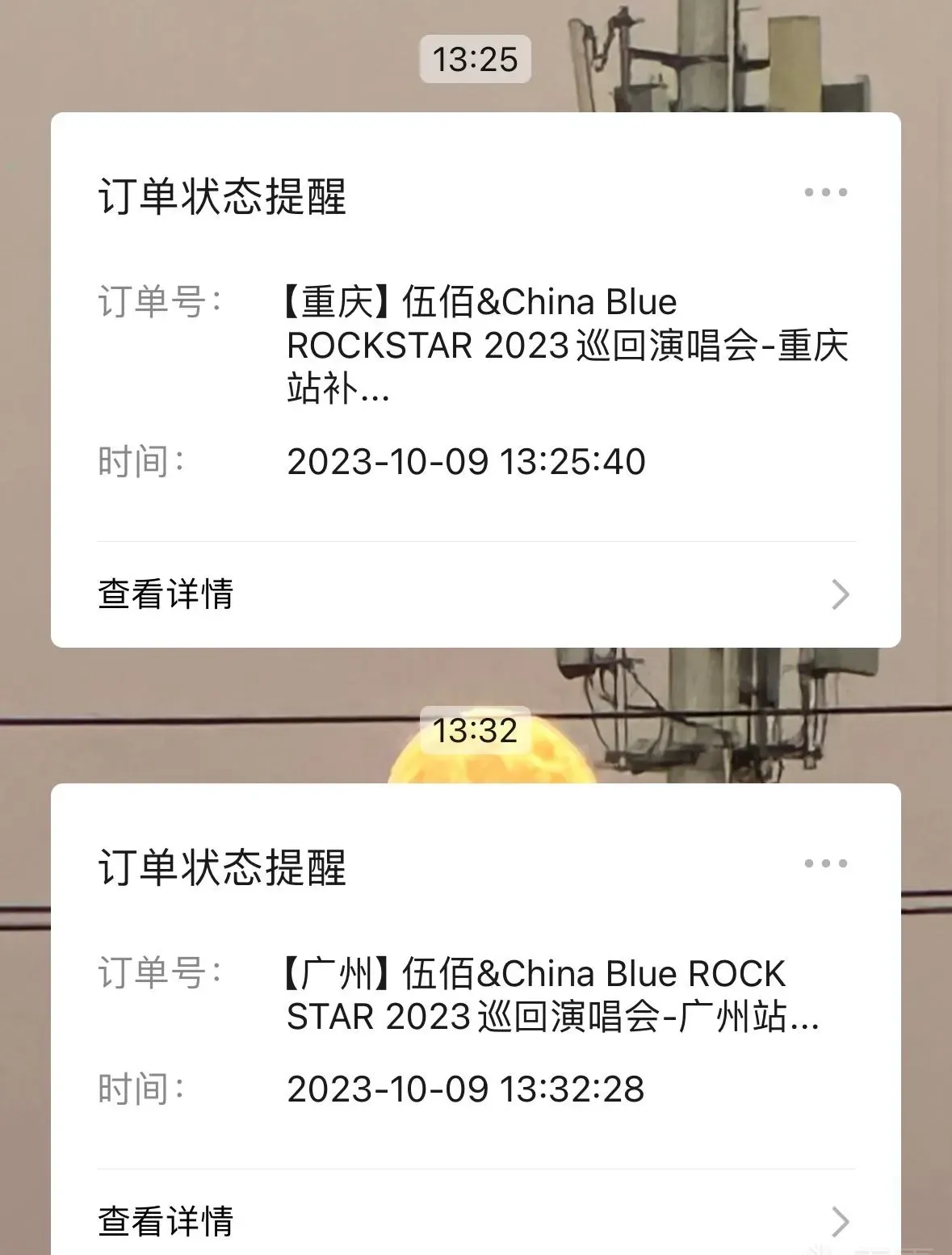
Finally, add a push notification (e.g., a messaging-app push) or any other notification API, and the restock monitor is complete.
2023-10-22 update:
GitHub: https://github.com/Raptor-wxw/TIcketMonitoring
Colin Xiao — I take on contract reverse-engineering work, and writeups like this are how I show what I can do. If you need help with anything in this space — including but not limited to the areas I cover above — I’m available. No project is too big or too small — if it’s reverse engineering and I can do it, I’ll take it. DM me on X (@colinxiao_lab) or Telegram (@ColinXiao666).
Get in touch