Tracing a WMI Query to the Kernel: How Get-PhysicalDisk Reads Serial Number and UID
About the author. I’m Colin Xiao — an independent reverse engineer, mostly working solo on contract jobs. I dig into compiled code of every kind, including but not limited to: Android and iOS apps, x86/x64/ARM native binaries, packers and obfuscators, DRM and license checks, network protocols and APIs, crypto and signature algorithms, malware, game binaries, and embedded/IoT firmware. I also handle large-scale data collection and vulnerability research. If you have any project in mind, I’d be glad to take it on — whatever it is, as long as it’s within my wheelhouse. Just reach out. You can reach me on X at @colinxiao_lab or on Telegram at https://t.me/ColinXiao666.
This research is published for educational and defensive purposes. The target sample is anonymized throughout.
Earlier I showed how to pull a disk’s serial number and UID with:
Get-PhysicalDisk | Select-Object FriendlyName, SerialNumber, UniqueIdor equivalently:
Get-CimInstance -ClassName MSFT_PhysicalDisk -Namespace root/Microsoft/Windows/Storage | Select-Object FriendlyName, SerialNumber, UniqueIdBut I never explained how that query actually gets into the kernel to read the serial number and UID. This closes that gap — and more usefully, it lays out a repeatable method for tracing any query like this back to the driver and structures that answer it.
Pinpointing the kernel memory
Run the query in PowerShell in a VM:
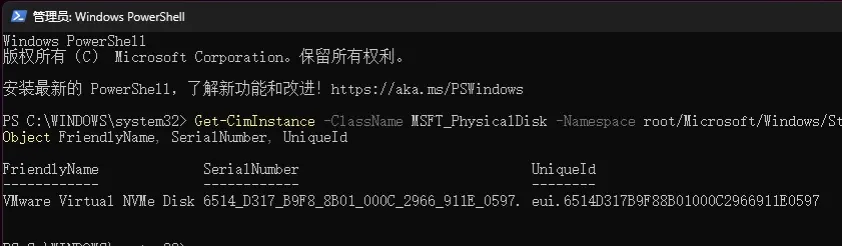
Copy the serial number into Cheat Engine and search for a wchar_t*:
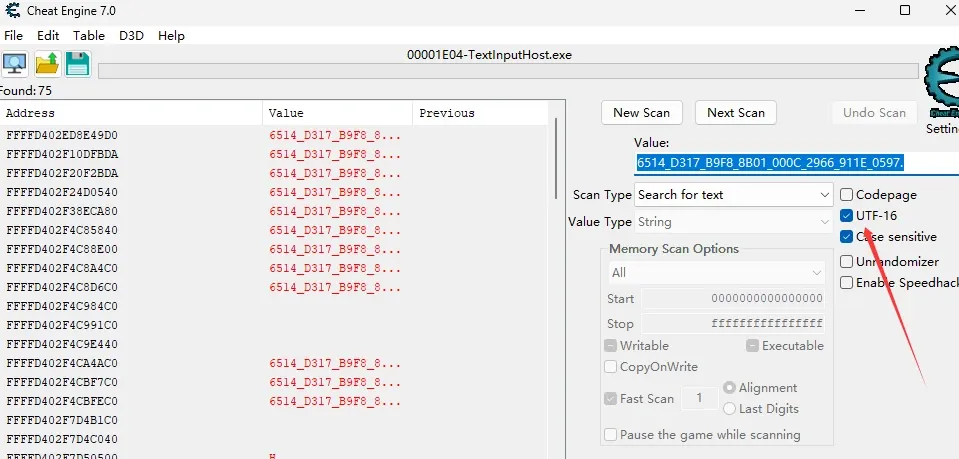
To confirm which address the query actually reads, tweak candidates one at a time and re-run the query until the result changes with the edit. (Spoiler: the address lives in the MiVaNonPagedPool range.)
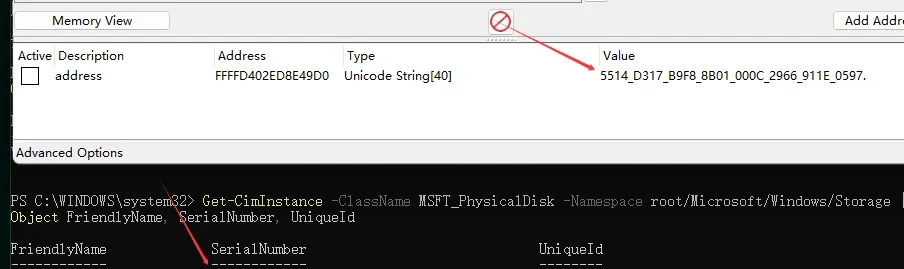
Editing the first character to 5 changes the query output accordingly, so this kernel address is the one our query reads.
Hardware breakpoint
Set a one-byte read breakpoint on that address in WinDbg:
ba r1 0xFFFFD402ED8E49D0 "u @Rip L5; g"ba is the hardware breakpoint command, r = read (also w write, e execute), 1 = one byte, u @Rip L5 disassembles five instructions at the current RIP, and g continues. One caveat: close Cheat Engine first (or stop it from reading that address), otherwise you’ll just keep hitting CE’s own driver reads:
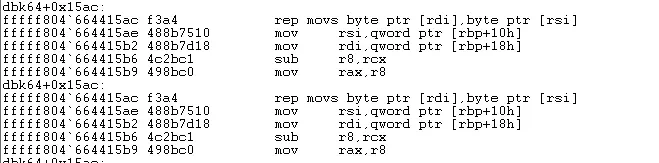
If that happens, bl to list breakpoints, then clear the offending one. Then re-set the breakpoint without g and re-run the query:
ba r1 0xFFFFD402ED8E49D0 "u @Rip L5"Run the query again in PowerShell and the breakpoint lands inside spaceport.sys (this VM is Windows 11 24H2), in RtlStringCbCopyW — the routine that copies the string from argument 3 to argument 1. Use kv to dump the stack, or just print the stack on the breakpoint by swapping u @Rip for k:
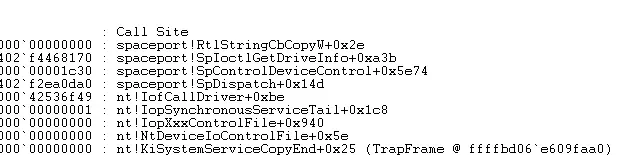
That gives us the full call flow from user mode into the kernel and down to the address that holds the serial number.
From the driver to the structure
Drop the VM’s spaceport.sys into IDA and go to spaceport!SpIoctlGetDriveInfo+0xa3b. RtlStringCbCopyW itself isn’t interesting — it’s just a string copy:
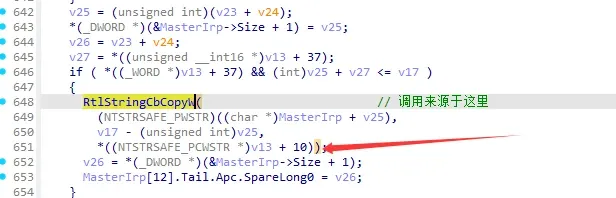
The thing to chase is the source of v13 (+10 in the listing is +0x50). You can set breakpoints on suspected origins of v13 to see which actually executes; the answer is that v13 comes from the return value of SpFindDriveByTempId:
DriveByTempId = (struct SP_DRIVE *)SpFindDriveByTempId((struct _GUID *)&v123[20]);
v13 = DriveByTempId;
You could chase the source of v123[20] next, but first step into SpFindDriveByTempId:
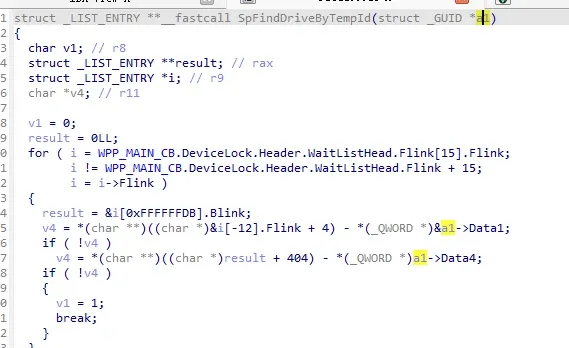
The pseudocode does use the parameter, plus a global variable for structure resolution. This is where a key lesson kicks in: WinDbg is better than IDA for resolving globals.
IDA’s symbol resolution gives you the global, but you’d still have to resolve the structure by hand:

WinDbg’s symbol resolution is cleaner. Walking the code with the resolved global:
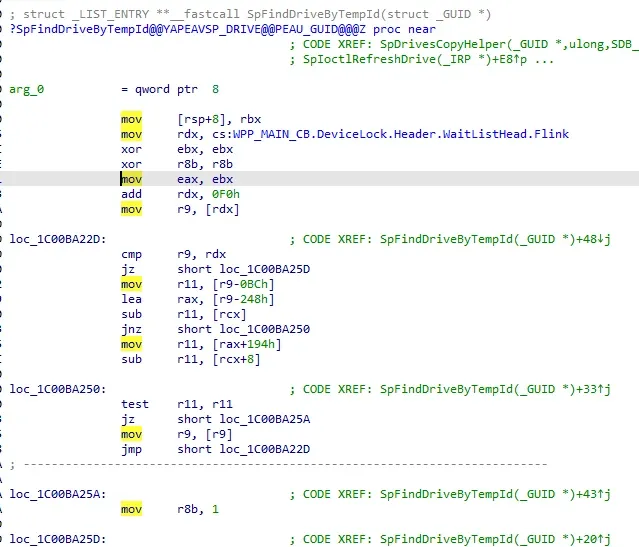
rdx = 0xffffd402`ed2ac1f8
add  rdx, 0xF0
rdx = 0xffffd402`ed2ac2e8
mov  r9, [rdx]
r9  = 0xffffd402`ed71d868
lea  rax, [r9-0x248]
rax = 0xffffd402`ed71d620
That’s v13. Add back the original 0x50 offset:
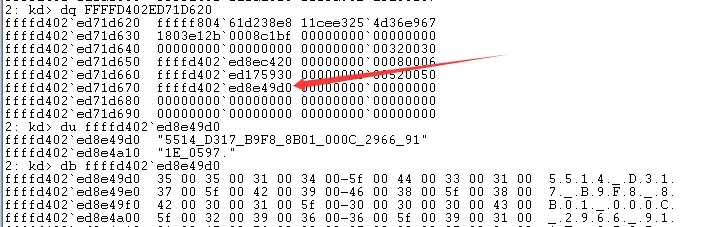
And you’ve reached the exact kernel address the query reads.
The general method
The same approach works for any hardware and any query: locate the answer string in kernel memory, hardware-breakpoint the read, walk the stack to the owning driver, then resolve the structure in IDA (and lean on WinDbg for global-variable resolution). One practical note: some hardware serial numbers only refresh after the WMI service restarts. Also, since my VM has a single disk, SpFindDriveByTempId didn’t need to loop — with multiple physical disks it iterates over drives, which is worth a look if you’re on real hardware.
Colin Xiao — I take on contract reverse-engineering work, and writeups like this are how I show what I can do. If you need help with anything in this space — including but not limited to the areas I cover above — I’m available. No project is too big or too small — if it’s reverse engineering and I can do it, I’ll take it. DM me on X (@colinxiao_lab) or Telegram (@ColinXiao666).
Get in touch