Understanding the Android Debugging Architecture (JDWP, adb, and ptrace)
About the author. I’m Colin Xiao — an independent reverse engineer, mostly working solo on contract jobs. I dig into compiled code of every kind, including but not limited to: Android and iOS apps, x86/x64/ARM native binaries, packers and obfuscators, DRM and license checks, network protocols and APIs, crypto and signature algorithms, malware, game binaries, and embedded/IoT firmware. I also handle large-scale data collection and vulnerability research. If you have any project in mind, I’d be glad to take it on — whatever it is, as long as it’s within my wheelhouse. Just reach out. You can reach me on X at @colinxiao_lab or on Telegram at https://t.me/ColinXiao666.
This research is published for educational and defensive purposes. The target sample is anonymized throughout.
Understanding the Android Debugging Architecture (JDWP, adb, and ptrace)
Why this matters
When remote-debugging an Android .so with IDA, there are times you need to break at early entry points — init_array, JNI_OnLoad, and the like. The standard technique is to launch the app in debug mode, take control before the program really starts, and then tell the app to continue via jdb.
That jdb step takes a debug port, and the port is usually read from DDMS. But DDMS has been deprecated in the official tooling, and I didn’t want to either rebuild my environment or install an old SDK just to read a number. So I set out to find a cleaner way.
My first instinct: DDMS’s real job here is just showing the port. The port is used by jdb on the host, so it’s a local host port — and a local port can’t reach a remote target directly, so there must be port forwarding underneath. If I could find the target-side port, I could do the forwarding from the command line myself.
I did find a DDMS replacement. But searching around exposed two widespread problems: plenty of Android reverse engineers are fluent in the steps of debugging yet don’t understand the mechanics, and most tutorials (even print ones) teach procedure without the underlying principle. This post is the “why” behind the “how”.
The key steps of remote-debugging an Android .so
There are two ways to debug with IDA: attach to a running process, or start the app in debug mode. I’ll only cover the second, since it subsumes the first. The usual flow:
1. Launch the app in debug mode. From an adb shell:
am start -D -n com.outdoor.debugtest/.MainActivityThe app now waits for a debugger:
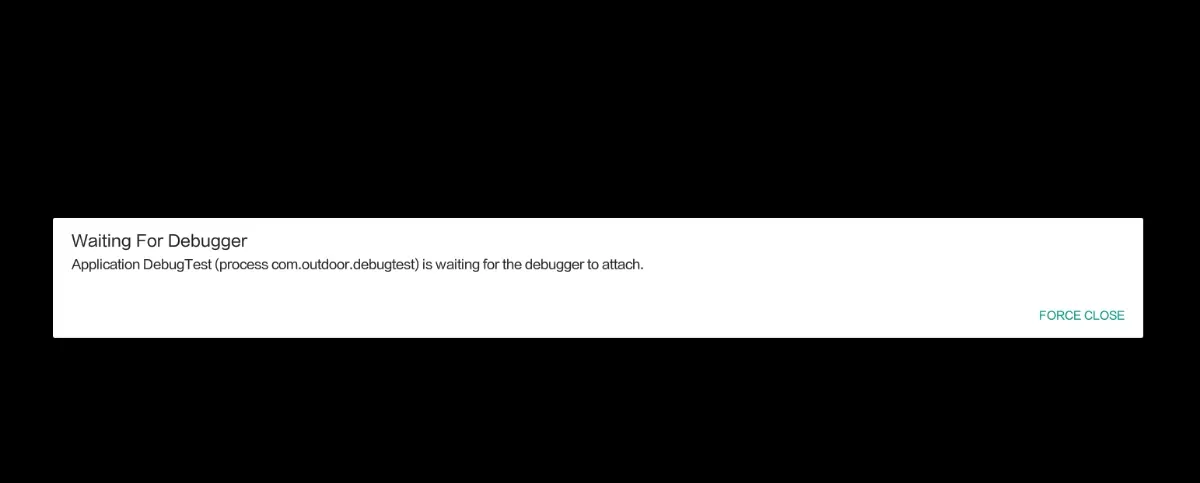
2. Start android_server:
ringtag:/data/local/tmp # ./android_server64

IDA Android 64-bit remote debug server(ST) v1.22. Hex-Rays (c) 2004-2017
Listening on 0.0.0.0:23946...
3. Forward the port:
adb forward tcp:23946 tcp:239464. Attach IDA to the process. Pick the remote ARM Linux/Android debugger:
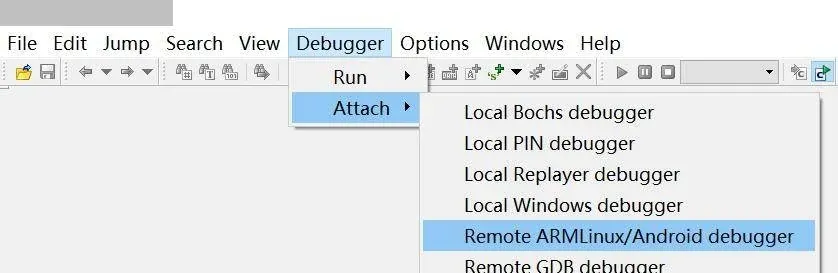
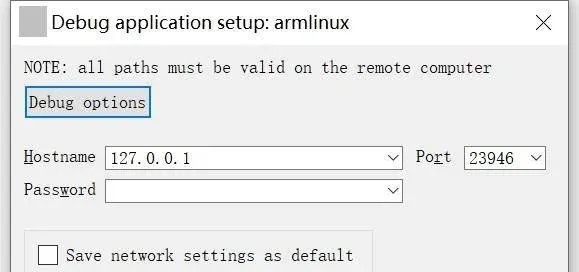
Hostname 127.0.0.1 or localhost:
Attach to the process:
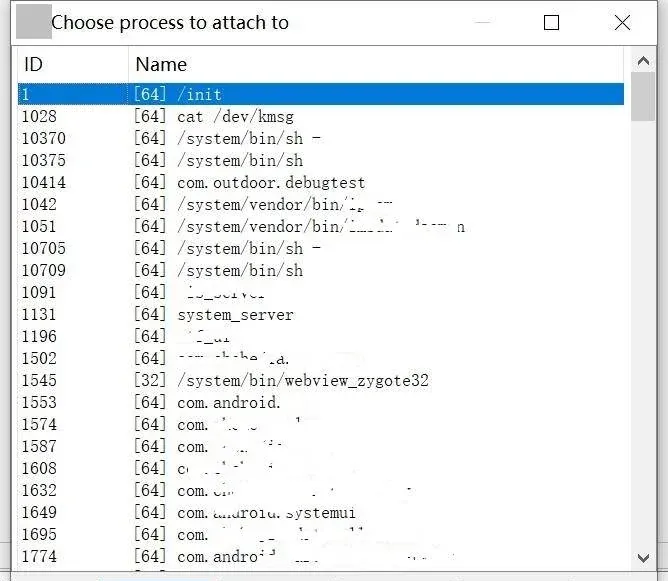
Attached:
Check “Suspend on library load/unload” so the process pauses when the target .so loads:
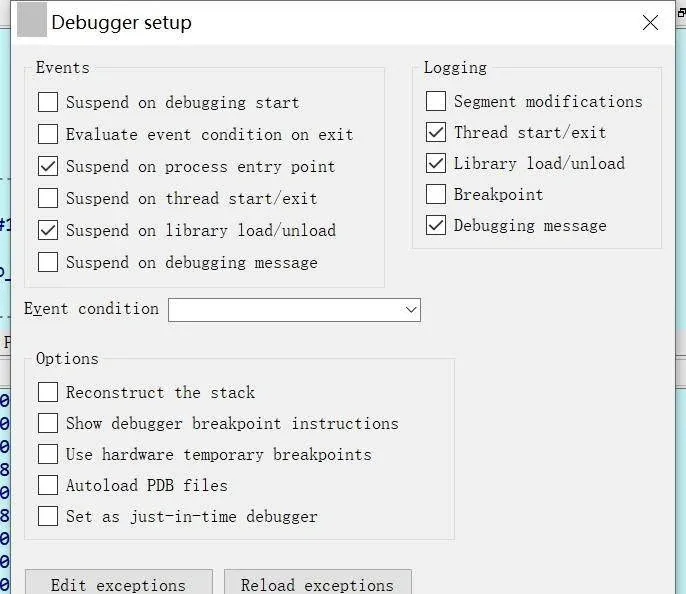
5. Connect jdb to the process’s VM. DDMS shows the debug port — say 55555 — and on the host you run:
C:\Users\reverser>jdb -connect com.sun.jdi.SocketAttach:hostname=localhost,port=55555
设置未捕获的java.lang.Throwable
设置延迟的未捕获的java.lang.Throwable
正在初始化jdb...
>
Press F9 in IDA to let the process run until the target .so loads; the IDA output window shows:
PDBSRC: loading symbols for '/data/app/com.outdoor.debugtest-iQxBx29FyKFuLtnU6wwQag==/lib/arm64/libnative-lib.so'...6. Break in the target .so. Find the library in IDA’s Modules view, double-click it, set a breakpoint, and you’re debugging.
That’s the procedure. Now the interesting questions:
- a) Where does DDMS’s port number come from? Is there a cleaner way to get it?
- b)
jdbis a Java VM debugging command — why is it needed when debugging a.so? Who is it talking to? Why can’t IDA just start debugging after attaching? - c) What’s the relationship between adb,
android_server, and IDA? How is the debugging connection between IDA and the app process actually built?
The Android debugging model
The model below is drawn from the comments in AOSP’s system/core/adb/jdwp_service.cpp, which spell out how Android debugging is established. First a translation of the model, then an abstract summary.
- When
adbdstarts, it creates a Unix server socket named@jdwp-control. - When a new JDWP daemon thread starts in a new VM process, it connects to
@jdwp-controlto announce its availability:
      JDWP thread                             @jdwp-control
          |                                         |
          |------------------------------->         |
          | hello I'm in process <pid>              |
          |                                         |
This connection stays open until the JDWP thread’s process exits.
- So
adbdmaintains a JDWP list of every active process, reachable by clients through thedevice:debug-portsservice. - When a debugger wants to connect, it runs
adb forward tcp:... jdwp:<pid>— thejdwp:prefix names the target JDWP process on the device. - On receiving that,
adbd:- calls
socketpair()to create a pair of equivalent sockets; - attaches the first socket to the local socket, which is itself connected to the remote socket;
- uses
sendmsg()to pass the second socket’s file descriptor directly to the JDWP process:
- calls
      JDWP thread                             @jdwp-control
          |                                         |
          |                  <----------------------|
          |           OK, try this file descriptor  |
| |- The JDWP thread then uses this new socket descriptor as its channel to the debugger (receiving the JDWP-Handshake, answering messages, and so on).
The result, in one picture:
Debugger <---> LocalSocket <----> RemoteSocket        (ADB Server, host)
                                      |
                                  Transport
                          (TCP for emulator, USB for device)
                                      |
   JDWP <======> LocalSocket <----> RemoteSocket       (ADBD, device)
Summary of the model
The first thing to be precise about: the model above is the debugging model for the Android VM — the debugger talks JDWP to the virtual machine. IDA’s Android support, by contrast, works at the whole-process level, not just the VM. The distinction is easy to see: IDA can debug native processes like linker or init, which the JDWP-based native debugging framework cannot.
So there are two layers of debugging: the JDWP framework is a VM-level implementation, and IDA’s Android debugging is a process-level implementation. Understanding this split is the key to everything below.
Decrypting the key steps
1. Where does DDMS’s port come from?
Per the previous section, a debugger runs adb forward tcp:<hostport> jdwp:<pid> to forward a host port to the target process on the device, then connects to it. The host port is chosen by the debugger — so DDMS is simply performing that same forward and displaying the resulting port.
That means we can replace DDMS with the forward command itself.
A follow-up worth flagging. When you launch an app in debug mode, you see a log line like:
--------- beginning of system
03-08 10:01:05.709 6761 6761 W ActivityThread: Application com.outdoor.appcomvulbypassactivityperm is waiting for the debugger on port 8100...
It says the app is waiting for a debugger on port 8100 — so can’t we just forward the host port to 8100? Trying it fails, and here’s why. Android’s debug mode has two flavors: dt_socket (connect to the JDWP thread via a plain socket) or dt_android_adb (via adb). Theoretically forwarding to 8100 should work, but digging into the source shows the VM starts in dt_android_adb mode by default, and that startup parameter is hardcoded — not user-configurable.
From frameworks/base/core/jni/AndroidRuntime.cpp:
601  int AndroidRuntime::startVm(JavaVM** pJavaVM, JNIEnv** pEnv, bool zygote)
602  {
……
772
773      /*
774       * Enable debugging only for apps forked from zygote.
775       * Set suspend=y to pause during VM init and use android ADB transport.
776       */
777      if (zygote) {
778        addOption("-agentlib:jdwp=transport=dt_android_adb,suspend=n,server=y");
779      }

……
995      if (JNI_CreateJavaVM(pJavaVM, pEnv, &initArgs) < 0) {
996          ALOGE("JNI_CreateJavaVM failed\n");
997          return -1;
998      }
999
1000      return 0;
1001  }
So forwarding to 8100 fails because the VM runs in dt_android_adb mode and the JDWP thread isn’t actually listening on 8100 — that log line misleads a lot of people.
If you genuinely want to connect to the JDWP thread over a plain socket, there are two ways: install a hooking framework to patch the parameter (not very useful), or use dlopen/dlsym to modify the debug startup parameter and restart the JDWP thread — the approach for remote debugging in production.
2. Why use jdb when debugging a .so?
As established, native JDWP debugging and IDA debugging are two different layers. jdb is there to tell the VM to continue. The app was launched in debug mode specifically so we could break early; once launched it waits for a debugger connection. jdb connects to the target process’s VM via dt_android_adb, the VM resumes, and then IDA can debug the now-running process.
In short, JDWP is used as an auxiliary mechanism that lets us break very early in process startup.
3. adb, android_server, and IDA — how is the connection built?
From the previous two sections, adb is really assisting with connection setup:
- For JDWP debugging, it supplies the
dt_android_adbtransport. - For IDA debugging, it supplies port forwarding and remote process launching.
android_server and IDA keep the same shape as the native debugging model, because android_server is IDA’s own implementation of Android debugging:
              IDA (host) <---> RemoteSocket
                                   |
                               Transport
                       (TCP for emulator, USB for device)
                                   |
   PROCESS <==> ptrace <==> android_server (device)
android_server plays a role analogous to adbd — except adbd talks to the JDWP thread over a local socket to relay debug signals, while android_server is actually a debugger built on ptrace: one end speaks to IDA over a socket (exchanging debug commands and data), and the other end directly controls the debuggee via ptrace.
Takeaway
The whole point is to see these as two stacked layers. JDWP debugging is a VM-level facility that adb wires up with socket plumbing; IDA debugging is a process-level facility where android_server is a ptrace-based debugger with a socket front-end. Once you separate “who is forwarding what” from “who is actually controlling the process,” every confusing step in the procedure falls into place.
Colin Xiao — I take on contract reverse-engineering work, and writeups like this are how I show what I can do. If you need help with anything in this space — including but not limited to the areas I cover above — I’m available. No project is too big or too small — if it’s reverse engineering and I can do it, I’ll take it. DM me on X (@colinxiao_lab) or Telegram (@ColinXiao666).
Get in touch