Semi-Automated Reversing with Unicorn: Recovering an E-Commerce App's Sign Algorithm
About the author. I’m Colin Xiao — an independent reverse engineer, mostly working solo on contract jobs. I dig into compiled code of every kind, including but not limited to: Android and iOS apps, x86/x64/ARM native binaries, packers and obfuscators, DRM and license checks, network protocols and APIs, crypto and signature algorithms, malware, game binaries, and embedded/IoT firmware. I also handle large-scale data collection and vulnerability research. If you have any project in mind, I’d be glad to take it on — whatever it is, as long as it’s within my wheelhouse. Just reach out. You can reach me on X at @colinxiao_lab or on Telegram at https://t.me/ColinXiao666.
This research is published for educational and defensive purposes. The target sample is anonymized throughout.
Semi-Automated Reversing with Unicorn: Recovering an E-Commerce App’s Sign Algorithm
Why Unicorn?
The title came to me near the end of writing this post. Unicorn saved an enormous amount of manual labor. You could use another emulation engine, but with Unicorn it’s just pip install unicorn, a .py file, and you’re running.
Why semi-automated? Because you still have to write the code that drives Unicorn — deciding what to execute and what to observe.
Why this sign algorithm? Because there are already writeups on calling the sign algorithm directly (e.g. via Frida RPC), and I wanted to level up my assembly-reading skills. The sign generator lives in a native library inside a major e-commerce app; my goal was to reconstruct the algorithm itself, not just call it.
Setup
Integrating the .so
For easier analysis and debugging, I integrated the sign-generating .so into my own APK and invoked it directly. Gradle version differences made most writeups I found useless, and I hit a lot of potholes; in the end the setup is simple — create src/main/jniLibs/armeabi-v7a/, drop the .so in, and configure build.gradle and CMakeLists.txt. The exact fix varies with the Gradle version.
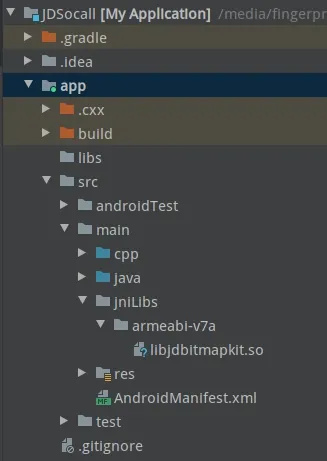
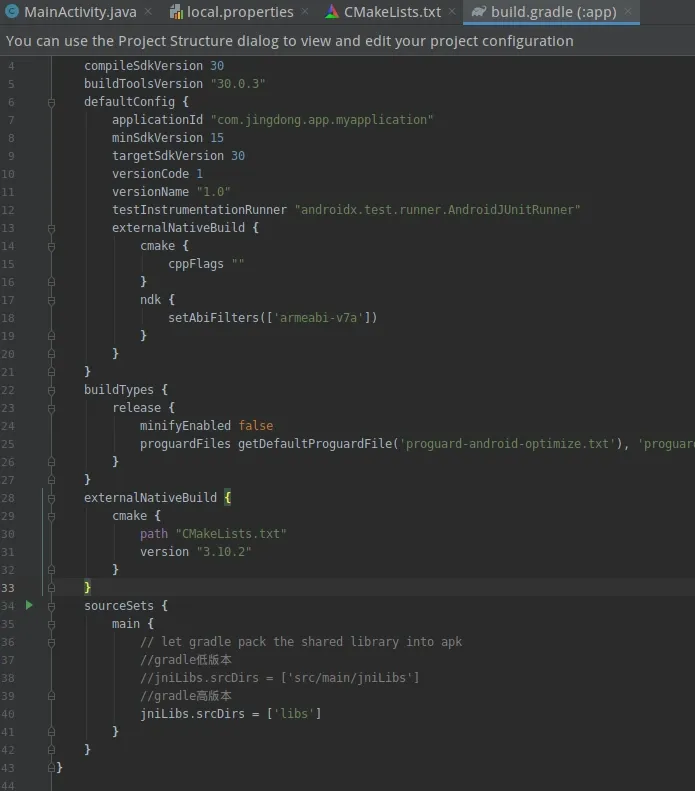

The .so also has two trivial checks; NOP out two branch instructions and they’re gone.
The overall encryption flow
The top-level flow is:
sub_127E4 -> sub_126AC -> sub_18B8 -> sub_227C
The core encryption is in sub_126AC, which takes the plaintext string, its length, and two random values:

sub_126AC returns the encrypted bytes; sub_18B8 base64-encodes them; sub_227C runs a standard MD5.
sub_126AC — algorithm selection
sub_126AC is only the entry point. It picks the encryption scheme and the corresponding key based on the two random values:
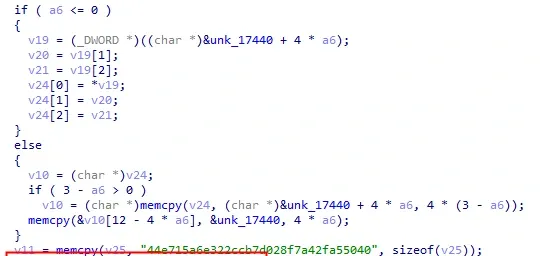
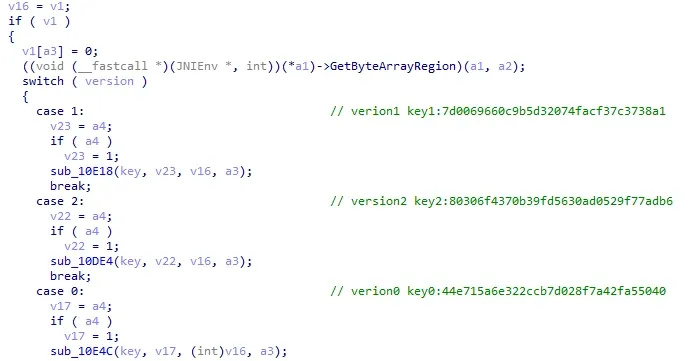
I’ll call the three schemes version0, version1, and version2. version0 and version1 share the exact same flow; the only difference is a constant passed in — version0 uses 32, version1 uses 16. I’ll analyze version0.
Version0 encryption
Execution flow
sub_10E4C -> sub_125F0 -> sub_12580 -> sub_10EA4 -> sub_10D70
The plaintext is split into 8-byte groups, each fed to sub_10EA4. Any leftover bytes go to sub_10D70.
sub_10EA4 — bit initialization
sub_10EA4 first initializes, then loops as many times as the length of the passed-in key0:
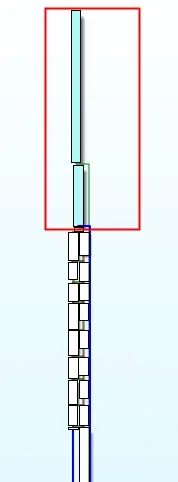
The two tall blocks at the top are the initialization. IDA’s F5 is compact; a partial view:
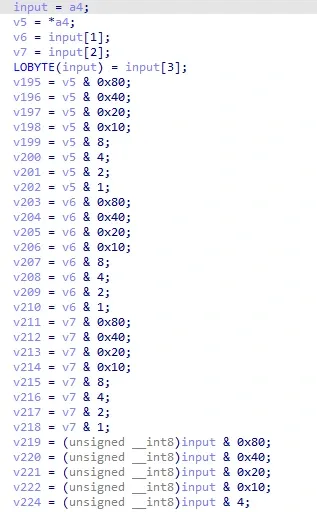
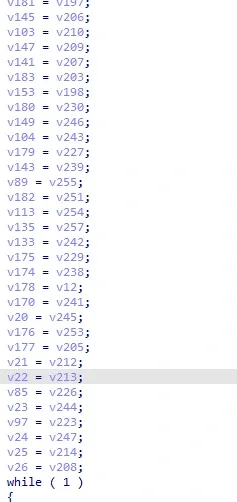
Notice the eight input bytes are ANDed with 0x80 (1000 0000), 0x40 (0100 0000), 0x20 (0010 0000), 0x10 (0001 0000), 0x8 (0000 1000), 0x4 (0000 0100), 0x2 (0000 0010), and 0x1 (0000 0001), then assigned to variables. Look at what those ANDs operate on — they’re exactly the 64 bits of the 8 input bytes. Later those bits get shuffled and put back together.
sub_10EA4 — bit shuffling
The sixteen small blocks in the flow graph:
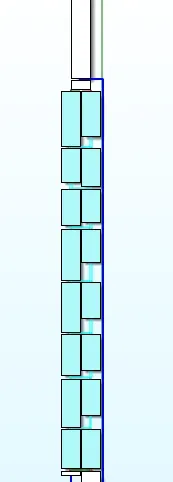
Some F5 output:
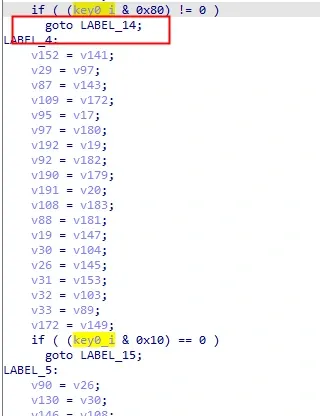
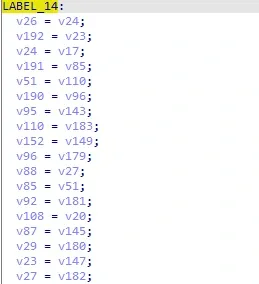
key0_i is the i-th character of key0. Inside the loop, key0_i is also ANDed against the same eight masks, and the result is the branch condition — i.e. it checks whether the corresponding bit of key0_i is 0 or 1, and branches accordingly to swap the variables from the initialization. That’s the bit shuffle.
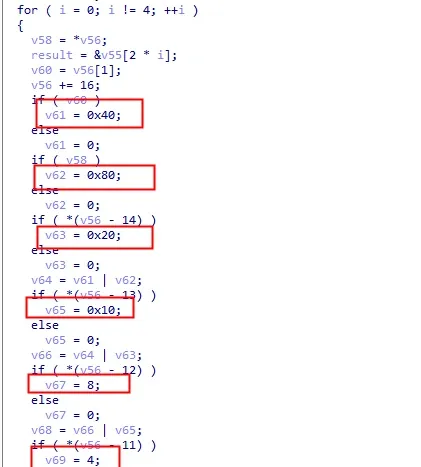
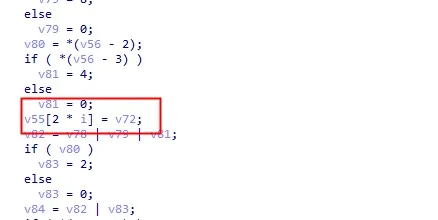
sub_10EA4 — bit restoration
At the end, the bits are put back: four rounds, two bytes restored per round.
Recovering sub_10EA4 with Unicorn
How to reconstruct the algorithm? The process is simple but the volume is large. Do I really have to hand-transcribe F5’s output line by line? No — there’s a smarter way with Unicorn.
We’ve established that sub_10EA4 only shuffles the 64 input bits into 8 new bytes; it doesn’t change their values. So can we find the mapping of each bit before and after the shuffle? Yes.
Use Unicorn to control the 64 bits fed into sub_10EA4. If exactly one bit is set, the output has exactly one bit set. The index of the set bit before vs. after is the mapping for that position. Run it 64 times, once per bit, and you get the complete before→after mapping.
(Unicorn usage itself is out of scope here.)
from unicorn import *
from unicorn.arm_const import *

table = []

def bytes2bin(bytes):
    arr = []
    for v in [m for m in bytes]:
        arr.append(
            [(v & 128) >> 7, (v & 64) >> 6, (v & 32) >> 5, (v & 16) >> 4, (v & 8) >> 3, (v & 4) >> 2, (v & 2) >> 1,
             v & 1])
    return [i for j in arr for i in j]


def bin2bytes(arr):
    length = len(arr) // 8
    arr1 = [0 for _ in range(length)]
    for j in range(length):
        arr1[j] = arr[j * 8] << 7 | arr[j * 8 + 1] << 6 | arr[j * 8 + 2] << 5 | arr[j * 8 + 3] << 4 | arr[
            j * 8 + 4] << 3 | arr[j * 8 + 5] << 2 | arr[j * 8 + 6] << 1 | arr[j * 8 + 7]
    return bytes(arr1)


def read(name):
    with open(name, 'rb') as f:
        return f.read()


def hook_code(mu, address, size, user_data):
    if address == BASE + 0x119cc:
        arr2 = []
        for byte in mu.mem_read(PLAINTEXT_ADDR, 8):
            arr2.append(byte)
        table.append([user_data.index(1), bytes2bin(arr2).index(1)])


if __name__ == "__main__":
    key0 = b'44e715a6e322ccb7d028f7a42fa55040'
    mu = Uc(UC_ARCH_ARM, UC_MODE_THUMB)
    BASE = 0x400000
    STACK_ADDR = 0x0
    STACK_SIZE = 1024
    PLAINTEXT_ADDR = 1024 * 2
    PLAINTEXT_SIZE = 1024
    KEY_ADDR = 1024 * 3
    KEY_SIZE = 1024
    mu.mem_map(BASE, 1024 * 1024)
    mu.mem_map(STACK_ADDR, STACK_SIZE)
    mu.mem_map(PLAINTEXT_ADDR, PLAINTEXT_SIZE)
    mu.mem_map(KEY_ADDR, KEY_SIZE)
    mu.reg_write(UC_ARM_REG_SP, STACK_ADDR + STACK_SIZE - 1)
    # mu.mem_write(BASE, read("F:\\Code\\Pycharm\\JDSign\\libjdbitmapkit.so"))
    mu.mem_write(BASE, read("./libjdbitmapkit.so"))
    mu.mem_write(KEY_ADDR, key0)

    for i in range(64):
        arr1 = [0 for j in range(64)]
        arr1[i] = 1
        h = mu.hook_add(UC_HOOK_CODE, hook_code, arr1)
        mu.mem_write(PLAINTEXT_ADDR, bin2bytes(arr1))
        mu.reg_write(UC_ARM_REG_R1, KEY_ADDR)
        mu.reg_write(UC_ARM_REG_R2, 32)
        mu.reg_write(UC_ARM_REG_R3, PLAINTEXT_ADDR)
        mu.emu_start(BASE + 0x00010EA4 + 1, BASE + 0x000119D0)
        mu.hook_del(h)
    print(table)
This yields the mapping table. For example [1,4] means bit 1 ends up at position 4 after the shuffle:
[[0, 0], [1, 4], [2, 61], [3, 15], [4, 56], [5, 40], [6, 6], [7, 59], [8, 62], [9, 58], [10, 17], [11, 2], [12, 12], [13, 8], [14, 32], [15, 60], [16, 13], [17, 45], [18, 34], [19, 14], [20, 36], [21, 21], [22, 22], [23, 39], [24, 23], [25, 25], [26, 26], [27, 20], [28, 1], [29, 33], [30, 46], [31, 55], [32, 35], [33, 24], [34, 57], [35, 19], [36, 53], [37, 37], [38, 38], [39, 5], [40, 30], [41, 41], [42, 42], [43, 18], [44, 47], [45, 27], [46, 9], [47, 44], [48, 51], [49, 7], [50, 49], [51, 63], [52, 28], [53, 43], [54, 54], [55, 52], [56, 31], [57, 10], [58, 29], [59, 11], [60, 3], [61, 16], [62, 50], [63, 48]]And sub_10EA4 is trivial to reconstruct:
def sub_10EA4(input):
    table = [[0, 0], [1, 4], [2, 61], [3, 15], [4, 56], [5, 40], [6, 6], [7, 59], [8, 62], [9, 58], [10, 17], [11, 2],
             [12, 12], [13, 8], [14, 32], [15, 60], [16, 13], [17, 45], [18, 34], [19, 14], [20, 36], [21, 21],
             [22, 22], [23, 39], [24, 23], [25, 25], [26, 26], [27, 20], [28, 1], [29, 33], [30, 46], [31, 55],
             [32, 35], [33, 24], [34, 57], [35, 19], [36, 53], [37, 37], [38, 38], [39, 5], [40, 30], [41, 41],
             [42, 42], [43, 18], [44, 47], [45, 27], [46, 9], [47, 44], [48, 51], [49, 7], [50, 49], [51, 63], [52, 28],
             [53, 43], [54, 54], [55, 52], [56, 31], [57, 10], [58, 29], [59, 11], [60, 3], [61, 16], [62, 50],
             [63, 48]]
    arr = bytes2bin(input)
    arr1 = [0 for i in range(len(arr))]
    for i in range(len(table)):
        arr1[table[i][1]] = arr[table[i][0]]
    return bin2bytes(arr1)
Analyzing sub_10D70
sub_10D70 decompiles cleanly in IDA:
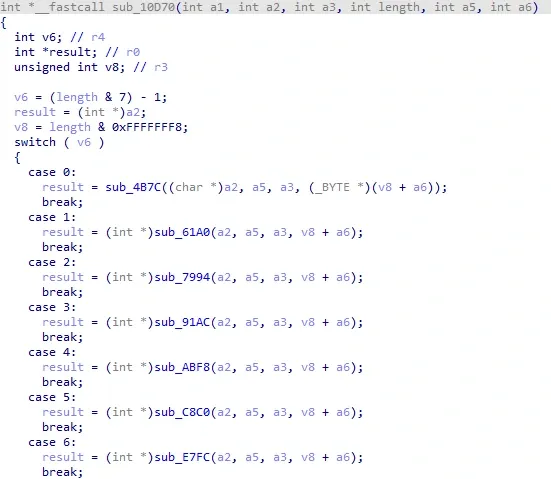
As mentioned, the plaintext is split into 8-byte groups fed to sub_10EA4; sub_10D70 encrypts the leftover 1–7 bytes. These six cases (case 0 through case 6) all share one template. Take case 0 — sub_4B7C — as the example.
sub_4B7C initialization
sub_4B7C encrypts a single byte. Its flow graph:
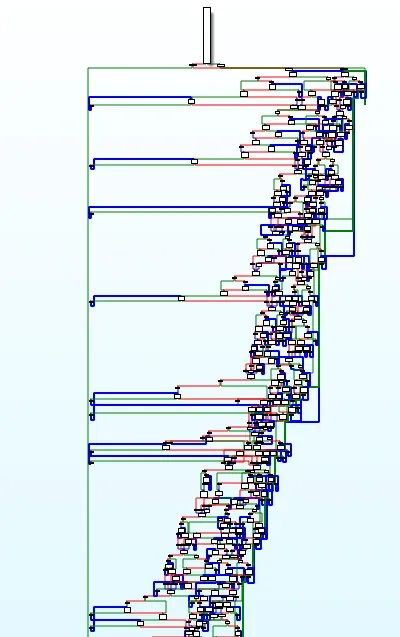
Dense. The other five cases look the same. First thought: OLLVM? After careful analysis and dynamic debugging, I concluded it’s not OLLVM — no characteristic flood of constants from control-flow flattening, no unreachable blocks, no bogus control flow or instruction substitution. (Though I might simply have failed to recognize it.) Either way, I read through the whole thing end to end.
Initialization:
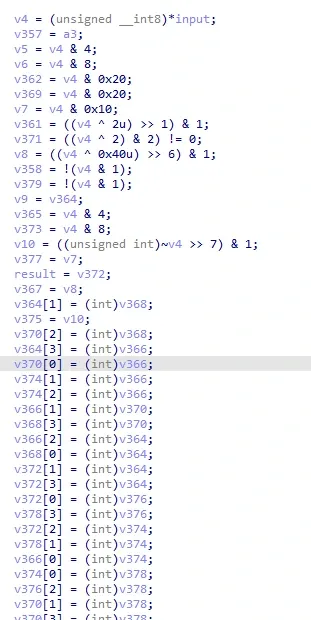
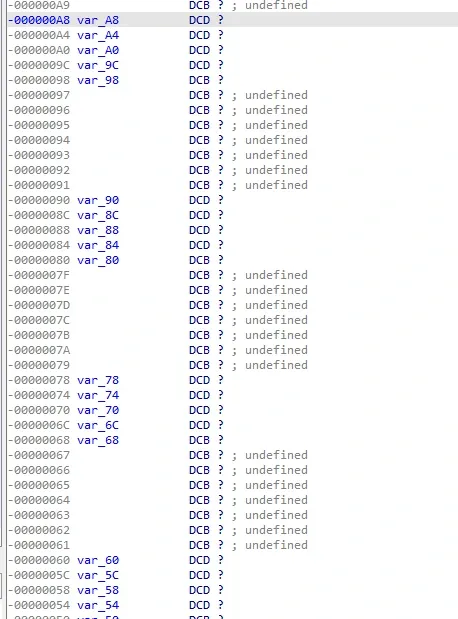
It resembles sub_10EA4, but with meaningful differences. The top half extracts the bits of the one input byte and does some extra computation, assigning to variables. The bottom half takes addresses of variables and stores them at other variables’ addresses plus offsets. It’s clearer if you look at sub_4B7C’s stack space.
Think of five consecutive variables as one array. Scrolling down, there are eight such arrays; the first four slots of each hold addresses of other arrays’ heads, and the fifth holds the computed value of an input bit. Looking at later cases, the number of such arrays equals the number of input bits.
That’s initialization. After that, a lot of loop computation.
sub_4B7C — the computation
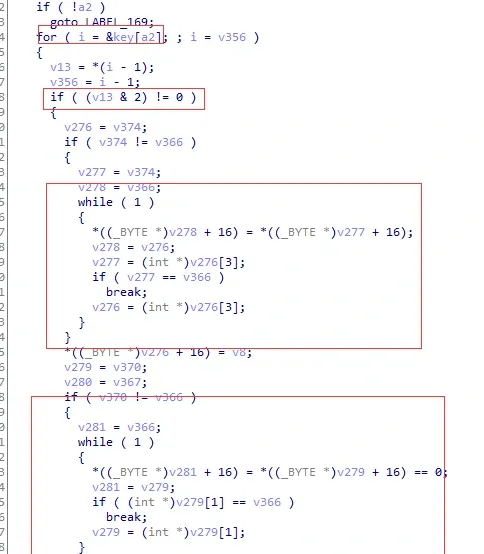
The loop branches on each bit of each byte of key0, and there are only two kinds of computation — the two big blocks, which are two small loops. Their assembly:
.text:00005BE2 loc_5BE2                                ; CODE XREF: sub_4B7C+104↑j
.text:00005BE2                 CMP             R1, R2
.text:00005BE4                 MOV             R12, R1
.text:00005BE6                 BEQ             loc_5C00
.text:00005BE8                 MOV             R6, R1
.text:00005BEA                 MOV             R8, R2
.text:00005BEC                 B               loc_5BF0
.text:00005BEE ; ---------------------------------------------------------------------------
.text:00005BEE
.text:00005BEE loc_5BEE                                ; CODE XREF: sub_4B7C+1082↓j
.text:00005BEE                 MOV             R12, R6
.text:00005BF0
.text:00005BF0 loc_5BF0                                ; CODE XREF: sub_4B7C+1070↑j
.text:00005BF0                 LDRB            R6, [R6,#0x10]
.text:00005BF2                 STRB.W          R6, [R8,#0x10]
.text:00005BF6                 MOV             R8, R12
.text:00005BF8                 LDR.W           R6, [R12,#0xC]
.text:00005BFC                 CMP             R6, R2
.text:00005BFE                 BNE             loc_5BEE
.text:00005C00text:00005C00 CMP R11, R2
.text:00005C02 STRB.W R4, [R12,#0x10]
.text:00005C06 MOV R4, R11
.text:00005C08 LDRB.W R8, [SP,#0xE0+var_98]
.text:00005C0C IT NE
.text:00005C0E MOVNE R12, R2
.text:00005C10 BNE loc_5C16
.text:00005C12 B loc_5C2C
.text:00005C14 ; ---------------------------------------------------------------------------
.text:00005C14
.text:00005C14 loc_5C14 ; CODE XREF: sub_4B7C+10AE↓j
.text:00005C14 MOV R4, R6
.text:00005C16
.text:00005C16 loc_5C16 ; CODE XREF: sub_4B7C+1094↑j
.text:00005C16 LDRB R6, [R4,#0x10]
.text:00005C18 RSBS.W R6, R6, #1
.text:00005C1C IT CC
.text:00005C1E MOVCC R6, #0
.text:00005C20 STRB.W R6, [R12,#0x10]
.text:00005C24 LDR R6, [R4,#4]
.text:00005C26 MOV R12, R4
.text:00005C28 CMP R6, R2
.text:00005C2A BNE loc_5C14What do these two loops do? Very simple: they repeatedly chase the address stored in the first four slots of the array defined above, comparing it against another variable’s address, and while comparing they keep shifting the value in the array’s fifth slot.
Recovering case0 (sub_4B7C) with Unicorn
This one looks nasty, and it is — unlike sub_10EA4’s simple bit swap, it computes further after extracting the bits.
Let’s look at the tail of sub_4B7C:
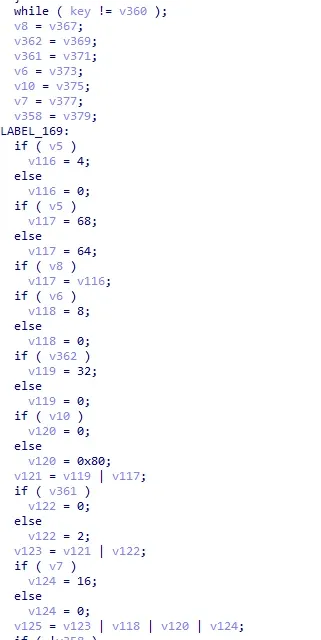
It’s nearly identical to sub_10EA4’s bit-restoration tail. So here’s a bold hypothesis: sub_4B7C also shuffles the input byte’s bits and restores them, except the bits are computed after the shuffle, and every bit follows the same rule. I.e. if input bit x is 0, then after shuffle+compute+restore, output bit y is some value m; if input bit x is 1, output bit y is n. In symbols: (x,0) -> (y,m) and (x,1) -> (y,n). Testing confirmed the hypothesis.
Again we can use Unicorn to find all mappings. This time the idea changes: control the input bits, and compare the result of “one bit set” against “all bits zero” to get every mapping.
from unicorn import *
from unicorn.arm_const import *

table = []
table1 = []

def bytes2bin(bytes):
    arr = []
    for v in [m for m in bytes]:
        arr.append(
            [(v & 128) >> 7, (v & 64) >> 6, (v & 32) >> 5, (v & 16) >> 4, (v & 8) >> 3, (v & 4) >> 2, (v & 2) >> 1,
             v & 1])
    return [i for j in arr for i in j]


def bin2bytes(arr):
    length = len(arr) // 8
    arr1 = [0 for _ in range(length)]
    for j in range(length):
        arr1[j] = arr[j * 8] << 7 | arr[j * 8 + 1] << 6 | arr[j * 8 + 2] << 5 | arr[j * 8 + 3] << 4 | arr[
            j * 8 + 4] << 3 | arr[j * 8 + 5] << 2 | arr[j * 8 + 6] << 1 | arr[j * 8 + 7]
    return bytes(arr1)


def read(name):
    with open(name, 'rb') as f:
        return f.read()


def hook_code(mu, address, size, user_data):
    if address == BASE + 0x5284:
        table.append(bytes2bin(mu.mem_read(PLAINTEXT_ADDR, 1)))


if __name__ == "__main__":
    key0 = b'44e715a6e322ccb7d028f7a42fa55040'
    mu = Uc(UC_ARCH_ARM, UC_MODE_THUMB)
    BASE = 0x400000
    STACK_ADDR = 0x0
    STACK_SIZE = 1024
    PLAINTEXT_ADDR = 1024 * 2
    PLAINTEXT_SIZE = 1024
    KEY_ADDR = 1024 * 3
    KEY_SIZE = 1024
    mu.mem_map(BASE, 1024 * 1024)
    mu.mem_map(STACK_ADDR, STACK_SIZE)
    mu.mem_map(PLAINTEXT_ADDR, PLAINTEXT_SIZE)
    mu.mem_map(KEY_ADDR, KEY_SIZE)
    mu.reg_write(UC_ARM_REG_SP, STACK_ADDR + STACK_SIZE - 1)
    # mu.mem_write(BASE, read("F:\\Code\\Pycharm\\JDSign\\libjdbitmapkit.so"))
    mu.mem_write(BASE, read("./libjdbitmapkit.so"))
    mu.mem_write(KEY_ADDR, key0)

    for i in range(9):
        arr1 = [0 for j in range(8)]
        if i != 0:
            arr1[i-1] = 1
        h = mu.hook_add(UC_HOOK_CODE, hook_code, arr1)
        mu.mem_write(PLAINTEXT_ADDR, bin2bytes(arr1))
        mu.reg_write(UC_ARM_REG_R0, KEY_ADDR)
        mu.reg_write(UC_ARM_REG_R1, 32)
        mu.reg_write(UC_ARM_REG_R2, 1)
        mu.reg_write(UC_ARM_REG_R3, PLAINTEXT_ADDR)
        mu.emu_start(BASE + 0x0004B7C + 1, BASE + 0x0005288)
        mu.hook_del(h)

    for i in range(8):
        for j in range(8):
            arr3 = []
            if table[0][j] != table[i+1][j]:
                table1.append([i, j, table[0][j], table[i+1][j]])
    print(table1)
Result:
[[0, 6, 0, 1], [1, 4, 1, 0], [2, 5, 0, 1], [3, 0, 0, 1], [4, 2, 0, 1], [5, 3, 0, 1], [6, 1, 1, 0], [7, 7, 0, 1]]Each entry is [x, y, m, n]. For example [6, 1, 1, 0] means input bit 6 lands on output bit 1 after shuffle+compute, and if bit 6 is 0 the output is 0, if 1 the output is 1.
Then sub_4B7C is easy to reconstruct:
def sub_4B7C(input):
    table = [[0, 6, 0, 1], [1, 4, 1, 0], [2, 5, 0, 1], [3, 0, 0, 1], [4, 2, 0, 1], [5, 3, 0, 1], [6, 1, 1, 0],
             [7, 7, 0, 1]]
    arr = bytes2bin(input)
    arr1 = [0 for i in range(8)]
    for i in range(8):
        if arr[i] == 0:
            arr1[table[i][1]] = table[i][2]
        else:
            arr1[table[i][1]] = table[i][3]
    return bin2bytes(arr1)
All cases in one shot with Unicorn
Now that case0 is reconstructed, step back to sub_10D70: seven cases, seven functions, differing only in start/end address and byte count. Generalize — get all mappings in one run:
from unicorn import *
from unicorn.arm_const import *

table = []
table1 = []


def bytes2bin(bytes):
    arr = []
    for v in [m for m in bytes]:
        arr.append(
            [(v & 128) >> 7, (v & 64) >> 6, (v & 32) >> 5, (v & 16) >> 4, (v & 8) >> 3, (v & 4) >> 2, (v & 2) >> 1,
             v & 1])
    return [i for j in arr for i in j]


def bin2bytes(arr):
    length = len(arr) // 8
    arr1 = [0 for _ in range(length)]
    for j in range(length):
        arr1[j] = arr[j * 8] << 7 | arr[j * 8 + 1] << 6 | arr[j * 8 + 2] << 5 | arr[j * 8 + 3] << 4 | arr[
            j * 8 + 4] << 3 | arr[j * 8 + 5] << 2 | arr[j * 8 + 6] << 1 | arr[j * 8 + 7]
    return bytes(arr1)


def read(name):
    with open(name, 'rb') as f:
        return f.read()


def hook_code(mu, address, size, user_data):
    if address == BASE + user_data[2] -4:
        table.append(bytes2bin(mu.mem_read(PLAINTEXT_ADDR, m[0])))


if __name__ == "__main__":
    key0 = b'44e715a6e322ccb7d028f7a42fa55040'
    mu = Uc(UC_ARCH_ARM, UC_MODE_THUMB)
    BASE = 0x400000
    STACK_ADDR = 0x0
    STACK_SIZE = 1024 * 10
    PLAINTEXT_ADDR = 1024 * 10
    PLAINTEXT_SIZE = 1024
    KEY_ADDR = 1024 * 11
    KEY_SIZE = 1024
    mu.mem_map(BASE, 1024 * 1024)
    mu.mem_map(STACK_ADDR, STACK_SIZE)
    mu.mem_map(PLAINTEXT_ADDR, PLAINTEXT_SIZE)
    mu.mem_map(KEY_ADDR, KEY_SIZE)
    mu.reg_write(UC_ARM_REG_SP, STACK_ADDR + STACK_SIZE - 1)
    # mu.mem_write(BASE, read("F:\\Code\\Pycharm\\JDSign\\libjdbitmapkit.so"))
    mu.mem_write(BASE, read("./libjdbitmapkit.so"))
    mu.mem_write(KEY_ADDR, key0)

    arr = [[1, 0x0004B7C, 0x0005288], [2, 0x00061A0, 0x0006AE8], [3, 0x0007994, 0x000084A6], [4, 0x000091AC, 0x00009DF4],
           [5, 0x0000ABF8, 0x0000BA8C], [6, 0x0000C8C0, 0x0000D9A0], [7, 0x0000E7FC, 0x0000FC1C]]
    for m in arr:
        for i in range(m[0]*8+1):
            arr1 = [0 for j in range(m[0]*8)]
            if i != 0:
                arr1[i - 1] = 1
            h = mu.hook_add(UC_HOOK_CODE, hook_code, m)
            mu.mem_write(PLAINTEXT_ADDR, bin2bytes(arr1))
            mu.reg_write(UC_ARM_REG_R0, KEY_ADDR)
            mu.reg_write(UC_ARM_REG_R1, 32)
            mu.reg_write(UC_ARM_REG_R2, 1)
            mu.reg_write(UC_ARM_REG_R3, PLAINTEXT_ADDR)
            mu.emu_start(BASE + m[1] + 1, BASE + m[2])
            mu.hook_del(h)

        for i in range(m[0]*8):
            for j in range(m[0]*8):
                arr3 = []
                if table[0][j] != table[i + 1][j]:
                    table1.append([i, j, table[0][j], table[i + 1][j]])
        print("case %s 映射关系:"%(m[0]-1))
        print(table1)
        table.clear()
        table1.clear()
Output:
case 0 映射关系:
[[0, 6, 0, 1], [1, 4, 1, 0], [2, 5, 0, 1], [3, 0, 0, 1], [4, 2, 0, 1], [5, 3, 0, 1], [6, 1, 1, 0], [7, 7, 0, 1]]
case 1 映射关系:
[[0, 5, 0, 1], [1, 9, 0, 1], [2, 0, 1, 0], [3, 7, 1, 0], [4, 10, 0, 1], [5, 6, 0, 1], [6, 13, 1, 0], [7, 1, 0, 1], [8, 4, 0, 1], [9, 11, 0, 1], [10, 14, 1, 0], [11, 3, 1, 0], [12, 12, 0, 1], [13, 15, 1, 0], [14, 8, 0, 1], [15, 2, 0, 1]]
case 2 映射关系:
[[0, 17, 0, 1], [1, 7, 0, 1], [2, 5, 0, 1], [3, 19, 1, 0], [4, 18, 0, 1], [5, 15, 1, 0], [6, 22, 0, 1], [7, 21, 0, 1], [8, 16, 0, 1], [9, 4, 0, 1], [10, 12, 0, 1], [11, 2, 1, 0], [12, 10, 1, 0], [13, 13, 1, 0], [14, 20, 1, 0], [15, 8, 1, 0], [16, 9, 0, 1], [17, 23, 0, 1], [18, 11, 1, 0], [19, 6, 0, 1], [20, 1, 0, 1], [21, 3, 1, 0], [22, 0, 1, 0], [23, 14, 0, 1]]
case 3 映射关系:
[[0, 25, 1, 0], [1, 4, 0, 1], [2, 29, 0, 1], [3, 1, 0, 1], [4, 27, 1, 0], [5, 18, 1, 0], [6, 23, 1, 0], [7, 14, 1, 0], [8, 28, 1, 0], [9, 11, 0, 1], [10, 9, 1, 0], [11, 13, 0, 1], [12, 24, 1, 0], [13, 0, 1, 0], [14, 5, 0, 1], [15, 2, 1, 0], [16, 26, 0, 1], [17, 12, 0, 1], [18, 31, 1, 0], [19, 16, 1, 0], [20, 30, 0, 1], [21, 15, 0, 1], [22, 10, 0, 1], [23, 22, 1, 0], [24, 7, 1, 0], [25, 21, 0, 1], [26, 6, 1, 0], [27, 3, 1, 0], [28, 8, 1, 0], [29, 20, 0, 1], [30, 19, 1, 0], [31, 17, 0, 1]]
case 4 映射关系:
[[0, 11, 0, 1], [1, 12, 0, 1], [2, 28, 1, 0], [3, 30, 0, 1], [4, 13, 1, 0], [5, 24, 0, 1], [6, 22, 1, 0], [7, 25, 1, 0], [8, 23, 1, 0], [9, 3, 0, 1], [10, 16, 0, 1], [11, 8, 1, 0], [12, 34, 0, 1], [13, 2, 0, 1], [14, 5, 0, 1], [15, 7, 1, 0], [16, 4, 0, 1], [17, 14, 0, 1], [18, 39, 1, 0], [19, 33, 0, 1], [20, 15, 0, 1], [21, 0, 0, 1], [22, 31, 0, 1], [23, 9, 1, 0], [24, 29, 0, 1], [25, 26, 1, 0], [26, 19, 0, 1], [27, 6, 1, 0], [28, 27, 1, 0], [29, 10, 1, 0], [30, 37, 0, 1], [31, 38, 1, 0], [32, 20, 0, 1], [33, 21, 1, 0], [34, 1, 0, 1], [35, 36, 0, 1], [36, 32, 0, 1], [37, 17, 0, 1], [38, 18, 0, 1], [39, 35, 1, 0]]
case 5 映射关系:
[[0, 11, 0, 1], [1, 45, 0, 1], [2, 15, 1, 0], [3, 22, 0, 1], [4, 10, 0, 1], [5, 7, 0, 1], [6, 3, 0, 1], [7, 42, 0, 1], [8, 17, 1, 0], [9, 21, 0, 1], [10, 4, 0, 1], [11, 8, 1, 0], [12, 19, 1, 0], [13, 32, 0, 1], [14, 28, 1, 0], [15, 31, 1, 0], [16, 29, 0, 1], [17, 14, 1, 0], [18, 39, 1, 0], [19, 27, 1, 0], [20, 2, 1, 0], [21, 24, 0, 1], [22, 26, 1, 0], [23, 9, 1, 0], [24, 41, 0, 1], [25, 1, 1, 0], [26, 47, 0, 1], [27, 44, 0, 1], [28, 23, 1, 0], [29, 0, 1, 0], [30, 12, 1, 0], [31, 18, 0, 1], [32, 33, 0, 1], [33, 36, 0, 1], [34, 40, 1, 0], [35, 34, 0, 1], [36, 25, 0, 1], [37, 16, 1, 0], [38, 5, 1, 0], [39, 35, 0, 1], [40, 38, 0, 1], [41, 37, 1, 0], [42, 13, 0, 1], [43, 20, 1, 0], [44, 6, 0, 1], [45, 43, 0, 1], [46, 30, 0, 1], [47, 46, 1, 0]]
case 6 映射关系:
[[0, 7, 1, 0], [1, 9, 0, 1], [2, 53, 1, 0], [3, 19, 1, 0], [4, 15, 1, 0], [5, 8, 0, 1], [6, 3, 0, 1], [7, 24, 1, 0], [8, 18, 0, 1], [9, 51, 0, 1], [10, 42, 1, 0], [11, 39, 0, 1], [12, 20, 0, 1], [13, 12, 0, 1], [14, 28, 1, 0], [15, 27, 1, 0], [16, 23, 0, 1], [17, 49, 0, 1], [18, 10, 1, 0], [19, 55, 1, 0], [20, 52, 1, 0], [21, 17, 0, 1], [22, 48, 0, 1], [23, 14, 1, 0], [24, 33, 0, 1], [25, 25, 1, 0], [26, 4, 1, 0], [27, 11, 0, 1], [28, 47, 1, 0], [29, 0, 0, 1], [30, 21, 1, 0], [31, 44, 0, 1], [32, 16, 0, 1], [33, 41, 0, 1], [34, 29, 0, 1], [35, 1, 0, 1], [36, 46, 0, 1], [37, 5, 0, 1], [38, 30, 0, 1], [39, 45, 0, 1], [40, 31, 1, 0], [41, 43, 1, 0], [42, 36, 1, 0], [43, 26, 0, 1], [44, 34, 0, 1], [45, 2, 0, 1], [46, 6, 0, 1], [47, 50, 1, 0], [48, 13, 1, 0], [49, 37, 1, 0], [50, 32, 0, 1], [51, 40, 0, 1], [52, 35, 0, 1], [53, 38, 0, 1], [54, 54, 0, 1], [55, 22, 0, 1]]
Version2 encryption
Execution flow
sub_10DE4 -> sub_12FF0 -> sub_12ECC -> sub_130D0, with sub_12ECC as the interesting part.
sub_12ECC initialization
At the start of sub_12ECC: r1 holds the key2 address, r2 holds the constant 1, r3 holds the plaintext address, and after the stack is allocated, [SP,#0x48+arg_0] holds the plaintext length.
.text:00012ECC                 LDR.W           R12, =(__stack_chk_guard_ptr - 0x12ED8)
.text:00012ED0                 PUSH.W          {R4-R11,LR}
.text:00012ED4                 ADD             R12, PC ; __stack_chk_guard_ptr
.text:00012ED6                 LDR.W           R12, [R12] ; __stack_chk_guard
.text:00012EDA                 SUB             SP, SP, #0x24
.text:00012EDC                 MOV             R10, R3
.text:00012EDE                 LDR.W           R3, [R12]
.text:00012EE2                 MOV             R7, R1
.text:00012EE4                 LDR.W           R8, [SP,#0x48+arg_0]
.text:00012EE8                 MOV             R9, R2
.text:00012EEA                 STR             R3, [SP,#0x48+var_2C]
.text:00012EEC                 CMP.W           R8, #0
.text:00012EF0                 BNE             loc_12F02
Four instructions set up the state: plaintext address → r10, key2 address → r7, constant 1 → r9, plaintext length (from [SP,#0x48+arg_0]) → r8:
.text:00012EDC                 MOV             R10, R3

.text:00012EE2                 MOV             R7, R1

.text:00012EE8                 MOV             R9, R2

.text:00012EE4                 LDR.W           R8, [SP,#0x48+arg_0]
sub_12ECC — the encryption loop
Further into sub_12ECC, the sign encryption starts at 0x12F68 — a loop:
.text:00012F66                 MOVS            R3, #0
.text:00012F68
.text:00012F68 loc_12F68
.text:00012F68                 AND.W           R2, R3, #0xF
.text:00012F6C                 ADD             R0, SP, #0x48+var_28
.text:00012F6E                 ADD             R2, R0
.text:00012F70                 AND.W           R1, R3, #7
.text:00012F74                 LDRB.W          R0, [R10]
.text:00012F78                 ADDS            R3, #1
.text:00012F7A                 LDRB.W          R2, [R2,#-0x14]
.text:00012F7E                 CMP             R3, R8
.text:00012F80                 LDRB            R4, [R7,R1]
.text:00012F82                 EOR.W           R0, R2, R0
.text:00012F86                 EOR.W           R0, R0, R4
.text:00012F8A                 ADD             R0, R2
.text:00012F8C                 EOR.W           R2, R2, R0
.text:00012F90                 UXTB            R2, R2
.text:00012F92                 STRB.W          R2, [R10],#1
.text:00012F96                 LDRB            R1, [R7,R1]
.text:00012F98                 EOR.W           R2, R2, R1
.text:00012F9C                 STRB.W          R2, [R10,#-1]
.text:00012FA0                 BNE             loc_12F68
Register r10. The plaintext address lives in r10. Three instructions touch it. LDRB.W R0, [R10] at 00012F74 loads one plaintext byte into r0. STRB.W R2, [R10],#1 at 00012F92 first stores r2 to the address in r10 (not important yet — the final value is stored later), then post-increments r10 (a post-indexed addressing mode). Between 00012F92 and 00012F9C, a byte at r7 offset by r1 is loaded into r1, XORed with r2, and put back into r2. Finally STRB.W R2, [R10,#-1] at 00012F9C stores the result to R10-1 — since r10 was just incremented, -1 is the original address, so this is where the final value lands.
Register r3. r3 is the counter: incremented at 00012F78 ADDS R3, #1, compared against the length in r8 at 00012F7E CMP R3, R8.
Register r2. At the top, r3 is ANDed with 0xf into r2, then added to SP,#0x48+var_28, still into r2; then LDRB.W R2, [R2,#-0x14] loads the byte at SP,#0x48+var_28 plus offset (i & 0xf) - 0x14.
Register r4. AND.W R1, R3, #7 puts i & 7 into r1; LDRB R4, [R7,R1] loads key2[i & 7] into r4 (since r7 holds key2).
The computation. The actual math:
.text:00012F82                 EOR.W           R0, R2, R0
.text:00012F86                 EOR.W           R0, R0, R4
.text:00012F8A                 ADD             R0, R2
.text:00012F8C                 EOR.W           R2, R2, R0
.text:00012F90                 UXTB            R2, R2

.text:00012F96                 LDRB            R1, [R7,R1]
.text:00012F98                 EOR.W           R2, R2, R1
r0 is the plaintext byte, r2 the table value, r4 the key byte.
IDA F5 of this part:

Reconstructing sub_12ECC
We have the plaintext, key2, and the computation. The only unknown is the array at SP,#0x48+var_28 minus 0x14 — one value per loop iteration (offset i & 0xf). Static analysis can’t reveal it, so IDA dynamic debugging gave the array value [0x37, 0x92, 0x44, 0x68, 0xA5, 0x3D, 0xCC, 0x7F, 0xBB, 0xF, 0xD9, 0x88, 0xEE, 0x9A, 0xE9, 0x5A].
The Python equivalent of sub_12ECC:
def sub_12ECC(input):
    arr = [0x37, 0x92, 0x44, 0x68, 0xA5, 0x3D, 0xCC, 0x7F, 0xBB, 0xF, 0xD9, 0x88, 0xEE, 0x9A, 0xE9, 0x5A]
    key2 = b"80306f4370b39fd5630ad0529f77adb6"
    arr1 = [0 for _ in range(len(input))]
    for i in range(len(input)):
        r0 = int(input[i])
        r2 = arr[i & 0xf]
        r4 = int(key2[i & 7])
        r0 = r2 ^ r0
        r0 = r0 ^ r4
        r0 = r0 + r2
        r2 = r2 ^ r0
        r1 = int(key2[i & 7])
        r2 = r2 ^ r1
        arr1[i] = r2 & 0xff
    return bytes(arr1)
The whole sign flow
At this point every key function is reconstructed; assembling the complete sign flow is just mechanical work. I was going to post a half-finished version, but a commenter pointed out the walkthrough is already complete enough, so I’ll leave the full reconstruction as an exercise.
What the vendor got wrong
The meta-lesson is the same one these native sign generators always teach: anything the client computes, the client can be made to reveal. This algorithm lives entirely in a .so the app ships to every device, so a determined analyst with an emulator can recover it bit-by-bit — the bit-mapping trick here is a clean, general technique for exactly that. The fix isn’t “make the shuffle harder” — obfuscation only slows this down — it’s to move integrity decisions server-side (attestation, keyed signatures, anomaly detection) and treat the client’s sign as untrusted input, not as a security control.
Colin Xiao — I take on contract reverse-engineering work, and writeups like this are how I show what I can do. If you need help with anything in this space — including but not limited to the areas I cover above — I’m available. No project is too big or too small — if it’s reverse engineering and I can do it, I’ll take it. DM me on X (@colinxiao_lab) or Telegram (@ColinXiao666).
Get in touch