Unidbg: Black-Box Magic for Android Native Reversing
About the author. I’m Colin Xiao — an independent reverse engineer, mostly working solo on contract jobs. I dig into compiled code of every kind, including but not limited to: Android and iOS apps, x86/x64/ARM native binaries, packers and obfuscators, DRM and license checks, network protocols and APIs, crypto and signature algorithms, malware, game binaries, and embedded/IoT firmware. I also handle large-scale data collection and vulnerability research. If you have any project in mind, I’d be glad to take it on — whatever it is, as long as it’s within my wheelhouse. Just reach out. You can reach me on X at @colinxiao_lab or on Telegram at https://t.me/ColinXiao666.
This research is published for educational and defensive purposes. The target sample is anonymized throughout.
Unidbg: Black-Box Magic for Android Native Reversing

Course goals
- Understand Unicorn and Unidbg.
- Learn Unidbg’s common APIs from the source.
- Understand Unidbg hooks.
- Understand Unidbg patches.
Tools
- The tutorial demo
- IDEA
- IDA
Unicorn & Unidbg
What is Unicorn?

Unicorn is a CPU emulator framework open-sourced in 2015 by a team at Nanyang Technological University in Singapore. It supports multiple architectures — x86/x64, ARM/ARM64, MIPS, and more. Its main characteristics:
- Multi-architecture support: it emulates CPU instructions from different architectures, useful for cross-platform analysis and testing.
- High performance: Unicorn uses JIT compilation to translate emulated instructions into native host instructions, improving execution efficiency.
- Rich bindings: it ships bindings for Python, Java, C#, and more, so it’s convenient across programming environments.
- Hook and intercept support: you can set hooks during emulation to intercept specific instructions or memory accesses — very useful for reverse engineering and dynamic analysis.
- CPU-focused: unlike emulators that simulate both CPU and OS, Unicorn focuses on CPU instruction emulation, providing simple hook, memory, and instruction-execution interfaces without OS-level simulation.
GitHub: https://github.com/unicorn-engine/unicorn
What is Unidbg?
Unidbg (Unicorn Debugger) is an open-source, lightweight emulator designed mainly for emulating Android native code. It was open-sourced in 2019, is Maven-based, written in Java, and runs inside an IDE. Unidbg can emulate Android native functions, letting reverse engineers and security researchers analyze a binary’s runtime behavior. It supports emulated syscalls and JNI calls, so code that depends on them can run in an emulated environment. Built on Unicorn, Unidbg’s advantage is a covert monitoring mechanism that can emulate a complex native environment for deep dynamic analysis. As open source, it’s widely supported and actively maintained, and has become a powerful tool in Android native reversing.
Competitors: AndroidNativeEmu and its successor ExAndroidNativeEmu (Unidbg’s edge: it implements more syscalls and JNI).
GitHub: https://github.com/zhkl0228/unidbg
Use cases, pros and cons
| Aspect | Description |
|---|---|
| Use cases | |
| Emulated execution | Run the function you care about in a target SO and get results equivalent to a real device; replace Frida/Xposed call for RPC. |
| Monitoring | Observe how the sample reads/modifies its environment; monitor all external accesses — syscalls, library calls, JNI calls, file I/O. |
| Algorithm analysis & recovery | Provides hook/debug/trace capabilities; combined with a time-travel debugger, it’s a powerful analysis tool for Android native code. |
| Pros | |
| Low cost | Cuts device and spoofing cost; no need to buy/maintain real devices or rent cloud phones. |
| Flexibility | Can emulate or proxy every function-call interface, making it easy to simulate device-environment changes. |
| Monitoring | Watches detailed native execution flow, including JNI calls and file access. |
| Analysis | With a time-travel debugger, offers strong algorithm analysis/recovery. |
| Cons | |
| Steep learning curve | Especially environment completion (“filling the environment”); done poorly, results are unusable. |
| Slow | Unicorn-based emulation is much slower than a real device; Dynarmic etc. can speed it up but sacrifice some algorithm-recovery ability. |
| Feature limits | No optimization for specific scenarios, no config management; not all syscalls are well emulated, so some logic may fail. |
| Poor extensibility | As a Java project, Unidbg can’t be an IDA/Ghidra plugin and is hard to embed elsewhere, unlike a Python project. |
First steps with Unidbg
Setting up
- Download IDEA (Community edition).
- Download the source, open it in IDEA, and configure the SDK.
- Project structure:
├── README.md                     # project intro and usage guide
├── LICENSE                       # open-source license
├── .gitignore                    # git ignore config
├── pom.xml                       # Maven config: dependencies and build
├── mvnw                          # Maven Wrapper script (Linux/Mac)
├── mvnw.cmd                      # Maven Wrapper script (Windows)
├── test.sh                       # test script (Linux/Mac)
├── test.cmd                      # test script (Windows)
├── .mvn/                         # Maven config directory
│   └── wrapper/                  # Maven Wrapper config
├── assets/                       # resource files used during emulation
│   ├── *.dll                     # Windows dynamic-link libraries
│   └── *.so                      # Linux/Android shared libraries
├── backend/                      # backend logic, core emulation
├── unidbg-api/                   # core interfaces and abstract classes
│   └── src/                      # API module source
├── unidbg-ios/                   # iOS emulation module
│   └── src/                      # iOS emulation source
├── unidbg-android/               # Android emulation module
│   ├── pom.xml                   # Maven build file
│   ├── pull.sh                   # pull Android emulation dependencies
│   └── src/                      # unidbg-android source
│       ├── main/
│       │   ├── java/             # core Java source
│       │   │   └── com/github/unidbg/  # core emulator, filesystem, VM components
│       │   │   └── net/fornwall/jelf   # ELF parsing
│       │   └── resources/        # resources: JNI libs, Android system libs
│       ├── test/
│       │   ├── java/             # unit tests
│       │   ├── native/android/   # C/C++ source for Android native tests
│       │   └── resources/        # test resources: prebuilt binaries (log4j.properties controls logging; can trace syscalls like open/syscall)
└── .mvn/ # Maven Wrapper configlog4j.logger.com.github.unidbg.linux.file=DEBUG // change INFO to DEBUGLearning by project
package com.example.test2;

import com.github.unidbg.AndroidEmulator;
import com.github.unidbg.Module;
import com.github.unidbg.arm.backend.DynarmicFactory;
import com.github.unidbg.linux.android.AndroidEmulatorBuilder;
import com.github.unidbg.linux.android.AndroidResolver;
import com.github.unidbg.linux.android.dvm.DalvikModule;
import com.github.unidbg.linux.android.dvm.DvmObject;
import com.github.unidbg.linux.android.dvm.ProxyDvmObject;
import com.github.unidbg.linux.android.dvm.VM;
import com.github.unidbg.memory.Memory;

import java.io.File;

public class MainActivity {

    private final AndroidEmulator emulator; // define the Android emulator instance
    private final VM vm; // define the Dalvik VM instance

    public MainActivity() {
        // create a 32-bit Android emulator using the Dynarmic backend
        emulator = AndroidEmulatorBuilder.for32Bit()
                .addBackendFactory(new DynarmicFactory(true))
                .build();

        // get the emulator's memory API
        Memory memory = emulator.getMemory();
        // set the system library resolver
        LibraryResolver resolver = new AndroidResolver(23);
        memory.setLibraryResolver(resolver);

        // create the Dalvik VM instance
        vm = emulator.createDalvikVM();
        // set whether to print verbose JNI logs
        vm.setVerbose(false);

        // load the SO from the given path without auto-calling JNI_OnLoad
        DalvikModule dm = vm.loadLibrary(new File("unidbg-android/src/test/resources/example_binaries/armeabi-v7a/libnative-lib.so"), false);
        // manually call JNI_OnLoad
        dm.callJNI_OnLoad(emulator);
    }

    public void crack() {
        // create a vm object that proxies a Java object into the JNI layer
        DvmObject<?> obj = ProxyDvmObject.createObject(vm, this);

        // record the start time
        long start = System.currentTimeMillis();

        // iterate all possible 3-char combinations
        for (char a : LETTERS) {
            for (char b : LETTERS) {
                for (char c : LETTERS) {
                    String str = "" + a + b + c;
                    // call the JNI method with the current combo
                    boolean success = obj.callJniMethodBoolean(emulator, "jnitest(Ljava/lang/String;)Z", str);
                    if (success) {
                        // on success, print and return
                        System.out.println("Found: " + str + ", off=" + (System.currentTimeMillis() - start) + "ms");
                        return;
                    }
                }
            }
        }
    }

    private static final char[] LETTERS = {
        'A', 'B', 'C', 'D', 'E', 'F', 'G', 'H', 'I', 'J', 'K', 'L', 'M',
        'N', 'O', 'P', 'Q', 'R', 'S', 'T', 'U', 'V', 'W', 'X', 'Y', 'Z',
        'a', 'b', 'c', 'd', 'e', 'f', 'g', 'h', 'i', 'j', 'k', 'l', 'm',
        'n', 'o', 'p', 'q', 'r', 's', 't', 'u', 'v', 'w', 'x', 'y', 'z'
    }; // the alphabet

    public static void main(String[] args) {
        // record start time
        long start = System.currentTimeMillis();
        // create the MainActivity instance
        MainActivity main = new MainActivity();
        // print the result
        System.out.println("load offset=" + (System.currentTimeMillis() - start) + "ms");
        // call the crack method
        main.crack();
    }
}
emulator = AndroidEmulatorBuilder.for32Bit()
.addBackendFactory(new DynarmicFactory(true))
.build();for32Bit()creates a 32-bit Android emulator;for64Bit()creates a 64-bit one. If the APK only shipsarmeabi-v7a, you must use 32-bit; if onlyarm64-v8a, use 64-bit. Difference: 64-bit runs ~10% faster; Unidbg supports/refines ARM32 more than ARM64.- Unidbg supports several backends — currently five: Unicorn, Unicorn2, Dynarmic (faster), Hypervisor, KVM. The
trueinnew DynarmicFactory(true)means fall back to the default Unicorn backend on exception.
.setRootDir() // set the VM's root directory for IO redirection; e.g. if the app reads /data/data/123.txt and rootDir is E:/unidbg, the real path is E:/unidbg/data/data/123.txtCommon emulator APIs
| Method | Return type | Description |
|---|---|---|
getMemory() |
Memory |
Get the memory API. |
getPid() |
int |
Get the process PID. |
createDalvikVM() |
VM |
Create a VM. |
createDalvikVM(File apkFile) |
VM |
Create a VM with a specified APK path. |
getDalvikVM() |
VM |
Get the created VM. |
showRegs() |
void |
Show register state (optionally specific registers). |
getBackend() |
Backend |
Get the backend CPU. |
getProcessName() |
String |
Get the process name. |
getContext() |
RegisterContext |
Get the register context. |
traceRead(long begin, long end) |
void |
Trace memory reads. |
traceWrite(long begin, long end) |
void |
Trace memory writes. |
traceCode(long begin, long end) |
void |
Trace assembly execution. |
isRunning() |
boolean |
Whether the emulator is running. |
    LibraryResolver resolver = new AndroidResolver(23);
    memory.setLibraryResolver(resolver);
23 and 19 correspond to SDK 23 (Android 6.0) and SDK 19 (Android 4.4) runtime-library environments. For 64-bit SOs you can only pick SDK 23.
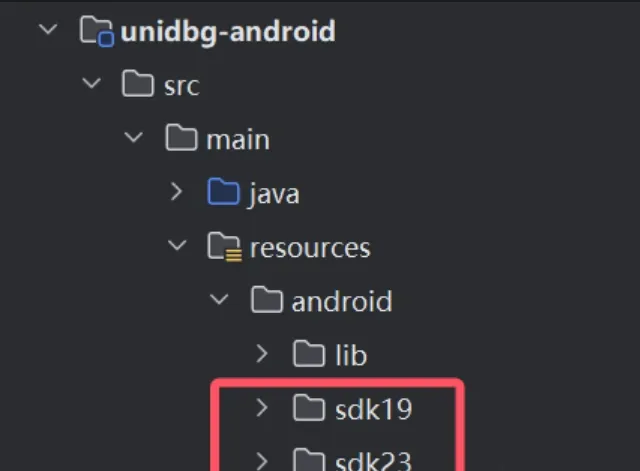
Common memory APIs
| Method | Return type | Description |
|---|---|---|
setLibraryResolver(AndroidResolver resolver) |
void |
Set the Android SDK version resolver (supports 19 and 23). |
getStackPoint() |
long |
Get the current stack pointer. |
pointer(long address) |
UnidbgPointer |
Get a pointer to an address; manipulate memory through it. |
getMemoryMap() |
Collection<MemoryMap> |
Get the current memory map. |
findModule(String moduleName) |
Module |
Find a module by name. |
findModuleByAddress(long address) |
Module |
Find a module by address. |
loadLibrary(File file, boolean forceLoad) |
ElfModule |
Load an SO, calling Linker.do_dlopen(). |
allocatestack(int size) |
UnidbgPointer |
Allocate stack memory of a given size. |
writestackstring(String value) |
UnidbgPointer |
Write a string to stack memory. |
writestackBytes(byte[] value) |
UnidbgPointer |
Write a byte array to stack memory. |
malloc(int size, boolean runtime) |
UnidbgPointer |
Allocate memory of a given size; return a pointer to it. |
	// create the Dalvik VM instance
	vm = emulator.createDalvikVM();
	// set whether to print verbose JNI logs
	vm.setVerbose(false);
	// load the SO from the given path without auto-calling JNI_OnLoad
	DalvikModule dm = vm.loadLibrary(new File("unidbg-android/src/test/resources/example_binaries/armeabi-v7a/libnative-lib.so"), false);
	// manually call JNI_OnLoad
dm.callJNI_OnLoad(emulator);| Method | Return type | Description |
|---|---|---|
createDalvikVM(File apkFile) |
VM |
Create a VM with a specified APK (file may be null). |
setVerbose(boolean verbose) |
void |
Toggle JNI log output. |
loadLibrary(File soFile, boolean callInit) |
DalvikModule |
Load an SO; second arg controls auto-calling the init function. |
setJni(Jni jni) |
void |
Set the JNI interface; prefer implementing AbstractJni. |
getJNIEnv() |
Pointer |
Get the JNIEnv pointer (passable as an argument). |
getJavaVM() |
Pointer |
Get the JavaVM pointer (passable as an argument). |
callJNI_OnLoad(Emulator<?> emulator, Module module) |
void |
Call JNI_OnLoad. |
addGlobalObject(DvmObject<?> obj) |
int |
Add a global object; return its hash. |
addLocalObject(DvmObject<?> obj) |
int |
Add a local object; return its hash. |
getObject(int hash) |
DvmObject<?> |
Get an object by hash. |
resolveClass(String className) |
DvmClass |
Resolve a class name into a DvmClass. |
getPackageName() |
String |
Get the APK package name. |
getVersionName() |
String |
Get the APK version name. |
getVersionCode() |
String |
Get the APK version code. |
openAsset(String assetName) |
InputStream |
Open an APK asset. |
getManifestXml() |
String |
Get the AndroidManifest.xml text. |
getSignatures() |
CertificateMeta[] |
Get APK signing info. |
findClass(String className) |
DvmClass |
Get an already-loaded class by name. |
getEmulator() |
Emulator<?> |
Get the emulator object. |
VM dalvikVM = emulator.createDalvikVM(new File("apk file path"))— create a VM with an APK; Unidbg does some setup for you, like parsing APK basics (version name/code, package name, signatures), reducing environment work, and loading APK resources so you canopenAssetfiles fromassets/.loadLibraryhas three overloads:
/**
 * Load a library by name.
 * @param libname library name, excluding the "lib" prefix and ".so" suffix (e.g. "example" -> "libexample.so").
 * @param forceCallInit whether to force-call the library's init function (like JNI_OnLoad).
 * @return the loaded DalvikModule.
 */
DalvikModule loadLibrary(String libname, boolean forceCallInit);

/**
 * Load a library from a raw byte array.
 * @param libname library name, only used as an identifier.
 * @param raw the buffer, for easier ELF parsing.
 */
DalvikModule loadLibrary(String libname, byte[] raw, boolean forceCallInit);

/**
 * Load an ELF from a path.
 * @param elfFile a valid ELF file, e.g. new File("unidbg-android/src/test/resources/example_binaries/armeabi-v7a/libnative-lib.so")
 * @param forceCallInit whether to force-call the library's init function (like JNI_OnLoad).
 */
DalvikModule loadLibrary(File elfFile, boolean forceCallInit);
Calling JNI functions

// 1st arg: the emulator instance
// 2nd arg: the Java-layer method signature to call
// 3rd arg: varargs; older versions required lots of manual wrapping, newer versions handle it for you — see callJniMethod
boolean success = obj.callJniMethodBoolean(emulator, "jnitest(Ljava/lang/String;)Z", str);

/**
 * Helper to call a JNI method.
 *
 * @param emulator   the emulator instance.
 * @param vm         the Dalvik VM instance.
 * @param objectType the class of the method (DvmClass).
 * @param thisObj    the object instance (DvmObject).
 * @param method     the method signature (e.g. "methodName(paramTypes)returnType").
 * @param args       varargs.
 * @return           the return value (Number), integer or float.
 */
protected static Number callJniMethod(Emulator<?> emulator, VM vm, DvmClass objectType, DvmObject<?> thisObj, String method, Object... args) {
    // find the native function pointer
    UnidbgPointer fnPtr = objectType.findNativeFunction(emulator, method);
    // add the object to the local reference table to avoid GC
    vm.addLocalObject(thisObj);
    // build the argument list
    List<Object> list = new ArrayList<>(10);
    // add the JNI env pointer (JNIEnv*)
    list.add(vm.getJNIEnv());
    // add the this reference (jobject)
    list.add(thisObj.hashCode());
    // process the varargs
    if (args != null) {
        for (Object arg : args) {
            if (arg instanceof Boolean) {
                // boolean -> JNI_TRUE / JNI_FALSE
                list.add((Boolean) arg ? VM.JNI_TRUE : VM.JNI_FALSE);
                continue;
            } else if (arg instanceof Hashable) {
                // Hashable means DvmObject or subclass
                list.add(arg.hashCode()); // add object reference (jobject)
                if (arg instanceof DvmObject) {
                    // add DvmObject to the local reference table
                    vm.addLocalObject((DvmObject<?>) arg);
                }
                continue;
            } else if (arg instanceof DvmAwareObject ||
                    arg instanceof String ||
                    arg instanceof byte[] ||
                    arg instanceof short[] ||
                    arg instanceof int[] ||
                    arg instanceof float[] ||
                    arg instanceof double[] ||
                    arg instanceof Enum) {
                // DvmAwareObject, string, array, or enum -> create a proxy DvmObject
                DvmObject<?> obj = ProxyDvmObject.createObject(vm, arg);
                // add object reference (jobject)
                list.add(obj.hashCode());
                // add to the local reference table
                vm.addLocalObject(obj);
                continue;
            }

            // other types are added directly
            list.add(arg);
        }
    }
    // call the native function with the arg list and return the result
    return Module.emulateFunction(emulator, fnPtr.peer, list.toArray());
}
Primitive types pass through directly — int, long, boolean, double, etc.
Unidbg also wraps these object types for you:
- String
- byte array
- short array
- int array
- float array
- double array
- Enum
Constructing special arguments
For other data types, use resolveClass to construct them — e.g. Context:
DvmObject<?> context = vm.resolveClass("android/content/Context").newObject(null);Symbol calls vs offset calls
Symbol call
Symbol symbol = module.findSymbolByName("exported symbol");
if (symbol != null){
	// 1st: emulator instance, 2nd: jnienv, 3rd: jclass, 4th: varargs
    Number numbers = symbol.call(emulator, vm.getJNIEnv(), vm.addLocalObject(instanceClass), varargs);
    int result = numbers.intValue();
    System.out.println(result);
    // if the return value is a string, use vm.getObject(retval)
    System.out.println(vm.getObject(result).getValue());
}else {
    System.out.println("symbol not found");
}
Offset call
// 1st: emulator instance, 2nd: offset address (add +1 for Thumb), 3rd: jnienv, 4th: jclass, 5th: varargs
Number number = module.callFunction(emulator, 0x11240, vm.getJNIEnv(),vm.addLocalObject(SecurityUtils),vm.addLocalObject(new StringObject(vm, "super")));
DvmObject<?> object = vm.getObject(number.intValue());
System.out.println("result:" + object.getValue());
Hooking in Unidbg
| Category | Description | Pros | Cons |
|---|---|---|---|
| Built-in third-party hook frameworks | Dobby (formerly HookZz), Whale, xHook, etc. HookZz is better for 32-bit, Dobby for 64-bit; xHook can’t hook Sub_xxx sub-functions. |
Rich features: multiple hook modes like inline hook and PLT hook. Easy to use: concise API. | Detectable: some apps detect these frameworks. Limitations: inline hook can fail on short or adjacent functions; PLT hook can’t hook non-exported functions. |
| Native Unicorn-engine hooks | Instruction-level, block-level, memory read/write, and exception hooks via Unicorn; Unidbg also wraps a Console Debugger. | Stealthier: native hooks are harder to detect. Flexible: hook any code location. | More complex: requires understanding the low-level mechanism; harder to configure. |
HookZz & Dobby
// get the HookZz instance for later hooking
IHookZz hookZz = HookZz.getInstance(emulator);
// inline-hook the exported function "ss_encrypt" with HookZz.wrap
hookZz.wrap(module.findSymbolByName("ss_encrypt"), new WrapCallback<RegisterContext>() {
    @Override
    public void preCall(Emulator<?> emulator, RegisterContext ctx, HookEntryInfo info) {
        // runs before the function call
        // get the pointer of the 3rd argument
        Pointer pointer = ctx.getPointerArg(2);
        // get the integer value of the 4th argument
        int length = ctx.getIntArg(3);
        // read the memory the pointer points to and get the key data
        byte[] key = pointer.getByteArray(0, length);
        // use Inspector to dump the key for debugging
        Inspector.inspect(key, "ss_encrypt key");
    }

    @Override
    public void postCall(Emulator<?> emulator, RegisterContext ctx, HookEntryInfo info) {
        // runs after the function call
        // print the return value
        System.out.println("ss_encrypt.postCall R0=" + ctx.getLongArg(0));
    }
});
1. Get the HookZz instance:
IHookZz hookZz = HookZz.getInstance(emulator);2. wrap hook:
hookZz.wrap(functionAddress, new WrapCallback<RegisterContext>() {
    @Override
    public void preCall(Emulator<?> emulator, RegisterContext context, HookEntryInfo info) {
        // before the call
        UnidbgPointer input = ctx.getPointerArg(2);
			System.out.println("preCall:"+vm.getObject(input.toIntPeer()));

    }

    @Override
    public void postCall(Emulator<?> emulator, RegisterContext context, HookEntryInfo info) {
        // after the call
        // get the integer return value
        System.out.println("postCall:" + ctx.getLongArg(0));
        // get the jstr
			UnidbgPointer input = ctx.getPointerArg(0);
			System.out.println("postCall:"+vm.getObject(input.toIntPeer()));
    }
});
wrap has two overloads — by symbol or by address. They’re equivalent; symbol lookup ends up calling symbol.getAddress() anyway. WrapCallback’s generic interface has three variants: RegisterContext (function hook), HookZzArm32RegisterContext (ARM32), and HookZzArm64RegisterContext (ARM64). Because they can read register values, they’re suitable for inline hooks.
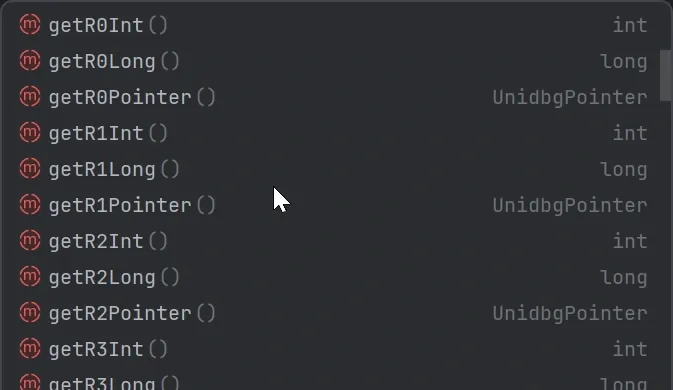
HookZzArm64RegisterContext reads registers via the following methods:
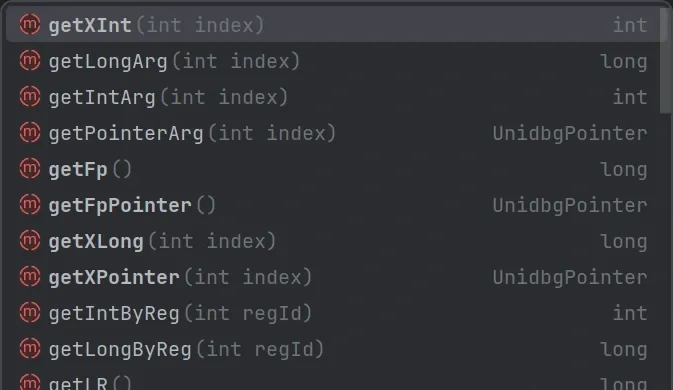
3. instrument inline hook
// inline-hook the instruction at an address with HookZz.instrument; add +1 for Thumb
hookZz.instrument(module.base + 0x11470, new InstrumentCallback<Arm64RegisterContext>() {
    @Override
    public void dbiCall(Emulator<?> emulator, Arm64RegisterContext ctx, HookEntryInfo info) {
	    // runs when the specified instruction executes
        // print the W0 register value
        System.out.println("W0=" + ctx.getXInt(0));
    }
});
4. replace
// use Dobby.replace to replace the implementation of "Java_com_zj_wuaipojie_util_SecurityUtil_diamondNum"
Dobby dobby = Dobby.getInstance(emulator);
dobby.replace(module.findSymbolByName("Java_com_zj_wuaipojie_util_SecurityUtil_diamondNum"), new ReplaceCallback() { // Dobby inline-hooks the exported function
    @Override
    public HookStatus onCall(Emulator<?> emulator, HookContext context, long originFunction) {
		// replace with an integer
        return HookStatus.LR(emulator,888888);
        // string
        return HookStatus.LR(emulator, vm.addLocalObject(new StringObject(vm, "super")));
    }
});
Unicorn hooks
emulator.getBackend().hook_add_new(new CodeHook() {
    @Override
    public void hook(Backend backend, long address, int size, Object user) {
        Arm64RegisterContext context = emulator.getContext();
        if (address == module.base + 0x11330) {
            int x0=emulator.getBackend().reg_read(Arm64Const.UC_ARM64_REG_X0).intValue();
            System.out.println("x0:"+vm.getObject(x0));
            emulator.getBackend().reg_write(Arm64Const.UC_ARM64_REG_X0,vm.addLocalObject(new StringObject(vm, "super")));
        }
    }
    @Override
    public void onAttach(UnHook unHook) {
    }
    @Override
    public void detach() {
    }
}, module.base + 0x11240,module.base + 0x11340,null);
StringObject Result = SecurityUtils.callStaticJniMethodObject(emulator, "vipLevel(Ljava/lang/String;)Ljava/lang/String;", "123");
System.out.println("Result: " + Result.getValue());
Console Debugger
The Console Debugger is a powerful Unidbg tool that lets you set breakpoints, single-step, and inspect/modify memory and registers during emulation, for deep analysis of target behavior.
Debugger attach = emulator.attach();
attach.addBreakPoint(module.base + 0x11070); // breakpoint address
// call
Number number = module.callFunction(emulator, 0x11014, vm.getJNIEnv(),vm.addLocalObject(SecurityUtils),vm.addLocalObject(new StringObject(vm, "123456")));
System.out.println("result:" + number.intValue());
Replacing the return value
emulator.attach().addBreakPoint(module.findSymbolByName("verifyApkSign").getAddress(), new BreakPointCallback() {
        @Override
        public boolean onHit(Emulator<?> emulator, long address) {
            System.out.println("replacing function verifyApkSign");
            RegisterContext registerContext = emulator.getContext();
            emulator.getBackend().reg_write(ArmConst.UC_ARM_REG_PC, registerContext.getLRPointer().peer);
            emulator.getBackend().reg_write(ArmConst.UC_ARM_REG_R0, 0);
            return true;
        }
});| Command | Description |
|---|---|
c |
Continue execution |
n |
Step over the current instruction |
bt |
Backtrace |
st hex |
Search the stack |
shw hex |
Search the writable heap |
shr hex |
Search the readable heap |
shx-hex |
Search the executable heap |
nb |
Break at the next block |
s |
Step into the current instruction |
s [decimal] |
Execute N instructions |
s (blx) |
Execute until a blx mnemonic (slower) |
m (op) [size] |
Show memory; default size 0x70, hex or decimal |
mr0-mr7, mfp, mip, msp [size] |
Show memory at the given register |
m (address) [size] |
Show memory at an address (must start with 0x) |
wr0-wr7, wfp, wip, wsp <value> |
Write to the given register |
wb(address), ws(address), wi(address) <value> |
Write (byte/short/int) to an address (must start with 0x) |
wx (address) <hex> |
Write bytes to an address (must start with 0x) |
b (address) |
Add a temporary breakpoint (must start with 0x; may be a module offset) |
b |
Add a breakpoint at register PC |
r |
Remove the breakpoint at register PC |
blr |
Add a temporary breakpoint at register LR |
p (assembly) |
Patch an assembly instruction at PC |
where |
Show the Java stack trace |
trace [begin-end] |
Set instruction tracing |
traceRead [begin-end] |
Set memory-read tracing |
traceWrite [begin-end] |
Set memory-write tracing |
vm |
List loaded modules |
vbs |
List breakpoints |
d |
Show disassembly |
d (0x) |
Show disassembly at an address |
stop |
Stop emulation |
run [arg] |
Run a test |
gc |
Run System.gc() |
threads |
List threads |
cc size |
Convert an address range’s assembly to a C function |
Patching in Unidbg
Patch is modifying the binary directly. Fundamentally there are two forms:
- patching the binary file;
- patching in memory.
Patching has many uses, and in some cases works better than hooking — hence this section. File patching is what most people know (the KeyPatch experience in IDA is friendly). Here I’ll focus on Unidbg’s in-memory patch, using the Keystone assembler:
UnidbgPointer pointer = UnidbgPointer.pointer(emulator,module.base + 0x1146C);
// before patching, make sure you've correctly located the target address and its instruction set (ARM or Thumb)
// for 32-bit, use: Keystone keystone = new Keystone(KeystoneArchitecture.Arm, KeystoneMode.ArmThumb);
Keystone keystone = new Keystone(KeystoneArchitecture.Arm64, KeystoneMode.LittleEndian);
String s = "MOV W0, #0x99";  // the assembly instruction to write
byte[] machineCode = keystone.assemble(s).getMachineCode();   // assemble to machine code
pointer.write(machineCode); // write to memory
Colin Xiao — I take on contract reverse-engineering work, and writeups like this are how I show what I can do. If you need help with anything in this space — including but not limited to the areas I cover above — I’m available. No project is too big or too small — if it’s reverse engineering and I can do it, I’ll take it. DM me on X (@colinxiao_lab) or Telegram (@ColinXiao666).
Get in touch