Unpacking a .NET JIT Protector on .NET Framework 4.8+ with WinDbg TTD
About the author. I’m Colin Xiao — an independent reverse engineer, mostly working solo on contract jobs. I dig into compiled code of every kind, including but not limited to: Android and iOS apps, x86/x64/ARM native binaries, packers and obfuscators, DRM and license checks, network protocols and APIs, crypto and signature algorithms, malware, game binaries, and embedded/IoT firmware. I also handle large-scale data collection and vulnerability research. If you have any project in mind, I’d be glad to take it on — whatever it is, as long as it’s within my wheelhouse. Just reach out. You can reach me on X at @colinxiao_lab or on Telegram at https://t.me/ColinXiao666.
This research is published for educational and defensive purposes. The target sample is anonymized throughout.
The problem: methods that decompile to nothing
I was analyzing a .NET application and hit a wall immediately. Every time I opened one of the executable files in dnSpy, the methods simply refused to decompile. After poking at the shell code and searching for tell-tale strings, I identified the culprit: a commercial German .NET JIT protector that had extracted the method bodies — the ILCode — out of every method and held them encrypted, decrypting them only at runtime.
So the familiar path opened up in front of me: figure out how to get those method bodies back.
Why the existing tooling didn’t work
The natural first move was to look for prior art. I found wwh1004’s excellent writeup “A guide to .NET JIT unpacking” and the accompanying open-source project, JitUnpacker-Framework. It’s a well-known approach: load a .NET executable, parse all its methods, then actively call each one through MethodDesc::DoPrestub to force the JIT to compile it and dump the restored method info.
Two problems stopped me cold.
First, the protector has a fairly complex set of protection modules and runtime logic. You can’t just load a single .NET executable, enumerate its methods, and trigger DoPrestub — the protection modules haven’t even started yet. And even if I could simulate that startup, a wall of anti-debug checks was waiting on the other side. I tested directly: attaching a debugger or injecting Frida trips the detection, the protector immediately revokes the license, and the program refuses to run normally.
Second, JitUnpacker-Framework is six years old. It supports .NET 2.0 through 4.7.2, and .NET 4.8+ was never adapted in. Modern Windows ships .NET Framework 4.8+ by default and keeps it updated through Windows Update, while remaining compatible with .NET 4.0+ assemblies. That alone makes the tool a poor fit for a modern target.
A different angle: WinDbg TTD
Building on wwh1004’s detailed analysis of the .NET JIT compilation flow, I decided to come at it from a different direction. Instead of trying to make the tool run the protector’s startup logic, I would record the process with WinDbg TTD (Time Travel Debugging), then debug the recording — using WinDbg’s SOS extension for .NET — to recover the method body instructions of the protected functions on a .NET Framework 4.8+ platform, and finally automate the whole extraction with JavaScript.
After the fact, I re-read wwh1004’s article and project code more carefully and realized the German protector I was up against only extracts the method body instructions. It does not touch the local variable signatures or the exception clause information — never mind the more advanced token-encryption schemes. So I downloaded .NET Reactor 6.9.0, enabled its NecroBit option (which protects all three: method body instructions, local variable signatures, and exception clause info), and ran through the whole WinDbg TTD workflow again — successfully recovering the latter two as well.
The process isn’t especially hard. What’s striking is how little material exists on analyzing and recovering .NET JIT shells on .NET Framework 4.8+, and how hard it is to find anything about using WinDbg TTD for recovery. This post is my writeup of that method — a simpler, more flexible way to restore a generic .NET JIT protector.
.NET JIT background
Documentation resources
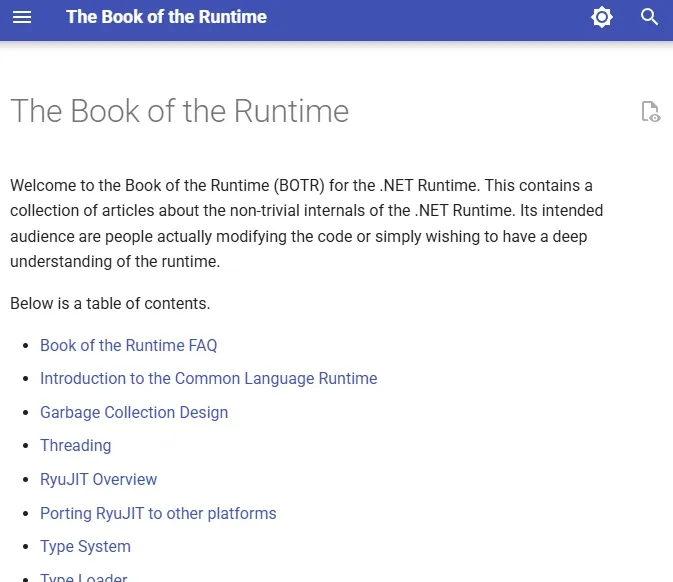
The CLR and JIT learning docs that wwh1004 referenced — The Book of the Runtime — belonged to the dotnet/coreclr project, which has since been archived read-only. The code moved to dotnet/runtime, and the documentation has its own GitHub Pages build where you can read the RyuJIT section directly.
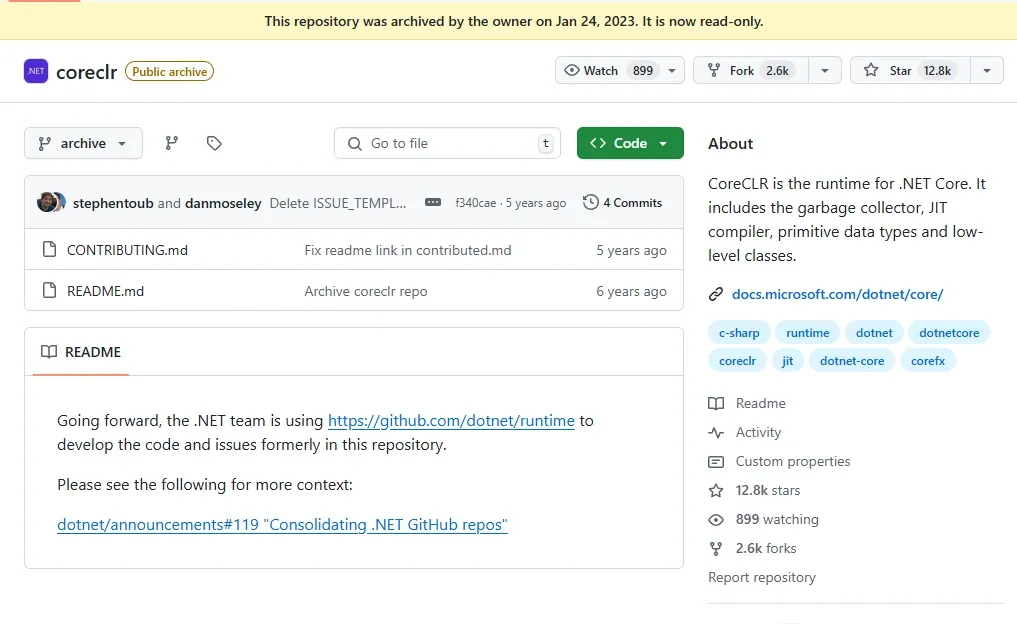
If you browse the dotnet/runtime repo you’ll notice it has been in continuous development since .NET 5.0 and recently reached .NET 10.0 — but none of that is the .NET Framework 4.8+ we run on Windows. The reason .NET Framework isn’t open source is a historical one: its code design is deeply coupled to Windows, with closed-source component dependencies and licensing constraints that make it expensive to extract. Microsoft did publish Reference Source for several .NET Framework versions, but that isn’t the real thing — it lacks the core components like the CLR and the JIT. After Microsoft shifted its .NET development focus to the cross-platform dotnet/runtime, 4.8 became the last major .NET Framework release, receiving only security and stability fixes.
The good news: the JIT compilation flow is essentially unchanged between .NET Framework and .NET Runtime. So when analyzing the JIT in my local .NET Framework 4.8 clr.dll and clrjit.dll, I can consult the dotnet/runtime source and the RyuJIT module docs as reference.
While debugging in WinDbg, I also use the .NET SOS debugging extension to decode the opaque handles of C# structures. The official docs cover it well.
Module and method info, and ILCode
Reading the references, one thing is clear: the JIT changes between .NET versions, so for stability and compatibility protectors hook the ICorJitCompiler vtable rather than some other function. Hooking any other function risks painful version-offset churn. And ICorJitCompiler is easy to obtain directly through the getJit function:
// runtime/src/coreclr/jit/ee_il_dll.cpp
static CILJit g_CILJit;
DLLEXPORT ICorJitCompiler* getJit()
{
    if (!g_jitInitialized)
    {
        return nullptr;
    }

    return &g_CILJit;
}
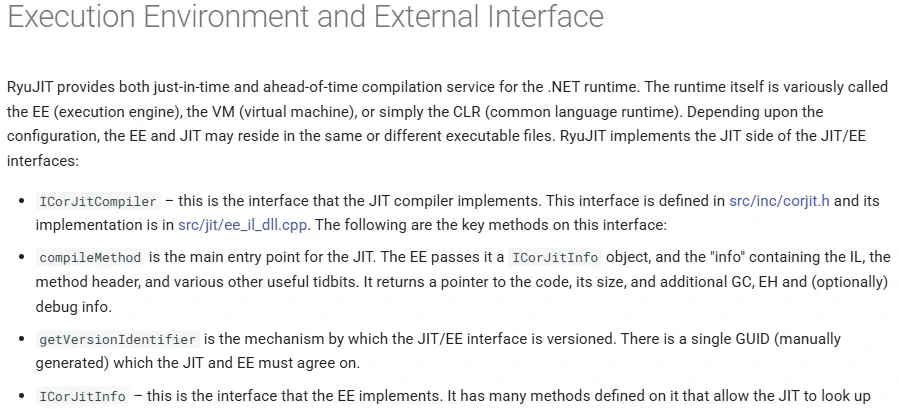
In the RyuJIT Overview’s Execution Environment and External Interface section, you’ll find the ICorJitCompiler interface and its methods. It explains that compileMethod is the JIT’s main entry point: the execution engine passes it an ICorJitInfo object plus parameters holding the IL code, the method header, and various other useful information.
Let’s look at the ICorJitCompiler definition and comments in the .NET Runtime project — heavily commented, and note that compileMethod has different implementations on 32-bit and 64-bit systems.
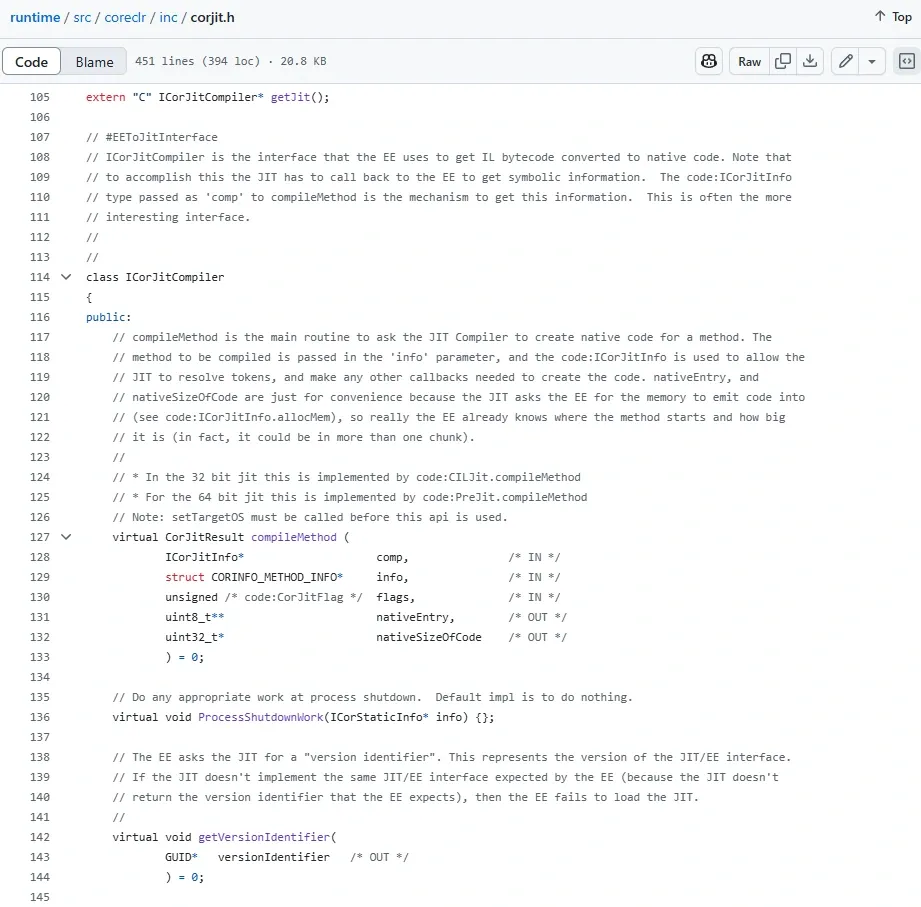
Since this article uses a 32-bit .NET Reactor-protected sample, I locate the CILInterp::compileMethod implementation.
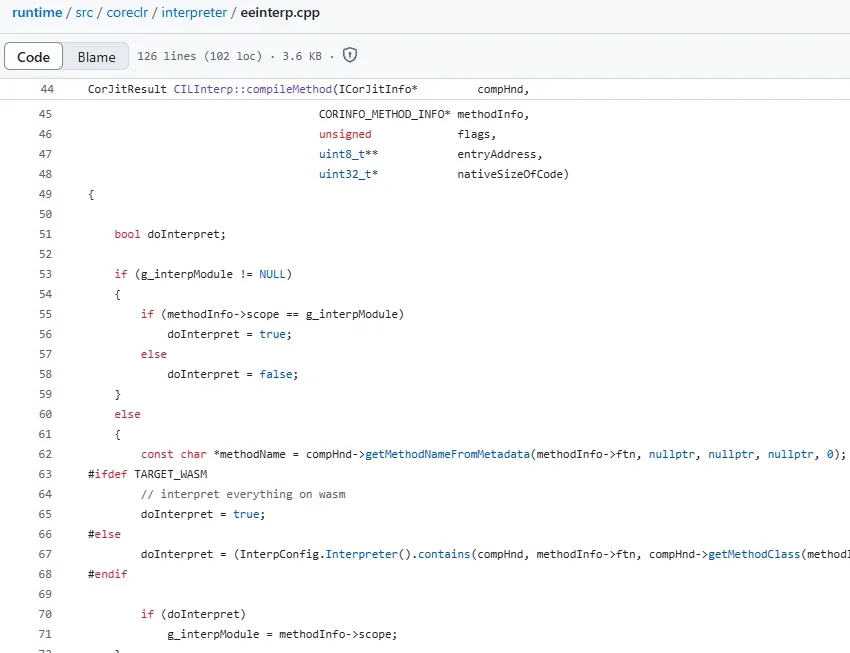
Notice the CORINFO_METHOD_INFO structure. Looking up its implementation, you can see the ILCode info, maxStack, and the exception clause count EHcount. I can break on this function in WinDbg and grab all of that:
// runtime/src/coreclr/inc/corinfo.h

struct CORINFO_METHOD_INFO
{
    CORINFO_METHOD_HANDLE       ftn;
    CORINFO_MODULE_HANDLE       scope;
    uint8_t *                   ILCode;
    unsigned                    ILCodeSize;
    unsigned                    maxStack;
    unsigned                    EHcount;
    CorInfoOptions              options;
    CorInfoRegionKind           regionKind;
    CORINFO_SIG_INFO            args;
    CORINFO_SIG_INFO            locals;
};
There are also CORINFO_METHOD_HANDLE and CORINFO_MODULE_HANDLE, which look related to method and module info. Let’s check their definitions:
// runtime/src/coreclr/inc/corinfo.h

// Cookie types consumed by the code generator (these are opaque values
// not inspected by the code generator):

typedef struct CORINFO_MODULE_STRUCT_*      CORINFO_MODULE_HANDLE;
typedef struct CORINFO_METHOD_STRUCT_*      CORINFO_METHOD_HANDLE;
From the comments and some searching, these two values are opaque handles — identifiers — passed between the JIT and the CLR/CoreCLR runtime, standing in for the runtime’s method metadata and internal representation. Their internal layout is complex and varies across CLR versions, and the JIT doesn’t need to know that layout — it just needs an identifier. The flip side: if the JIT depended directly on the concrete layout of CLR internals, any internal refactoring would break it, which makes maintenance miserable.
In practice this means that while debugging compileMethod in WinDbg, you can’t trivially parse a memory structure to figure out which module’s method is being compiled. JitUnpacker-Framework sidesteps this by enumerating every method in the executable and actively calling each one, so it always knows which method it’s invoking.
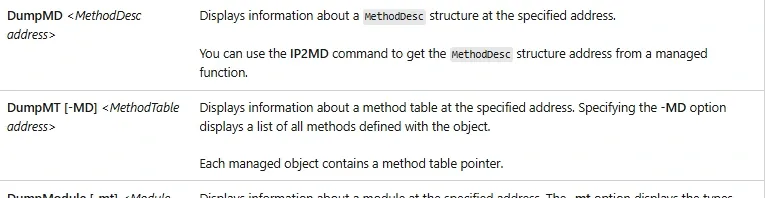
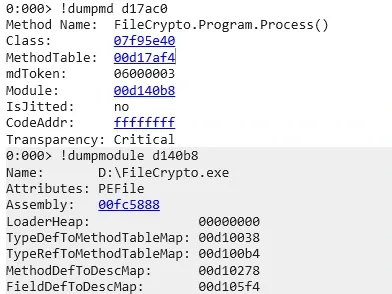
After some trial and error, while reading the WinDbg SOS documentation I noticed the DumpMD and DumpModule commands. It turns out you can feed them the CORINFO_METHOD_HANDLE and CORINFO_MODULE_HANDLE values from CORINFO_METHOD_INFO to recover the module and method info:
Local variable signatures
Now that I can break on compileMethod in WinDbg to get the ILCode, and use the SOS commands to know which module and method the JIT is compiling, the next step is the local variable signature.
Loading the program in dnSpy, right-click a method and choose Edit Method Body / IL. In the Instructions panel there’s an item LocalVarSigTok. That value leads you — via Program → PE → Storage Stream #0: #~ → Table Stream → StandAloneSig — to a file offset in the #Blob heap. Parsing that blob yields the information shown in the Locals panel.
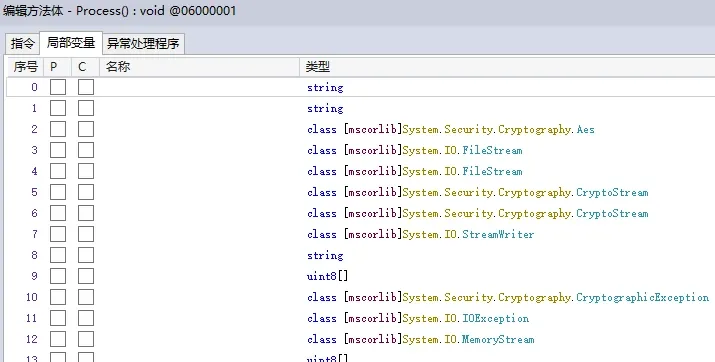
For debugging, locate Compiler::lvaInitTypeRef(), which contains a loop that processes the method’s local variables.
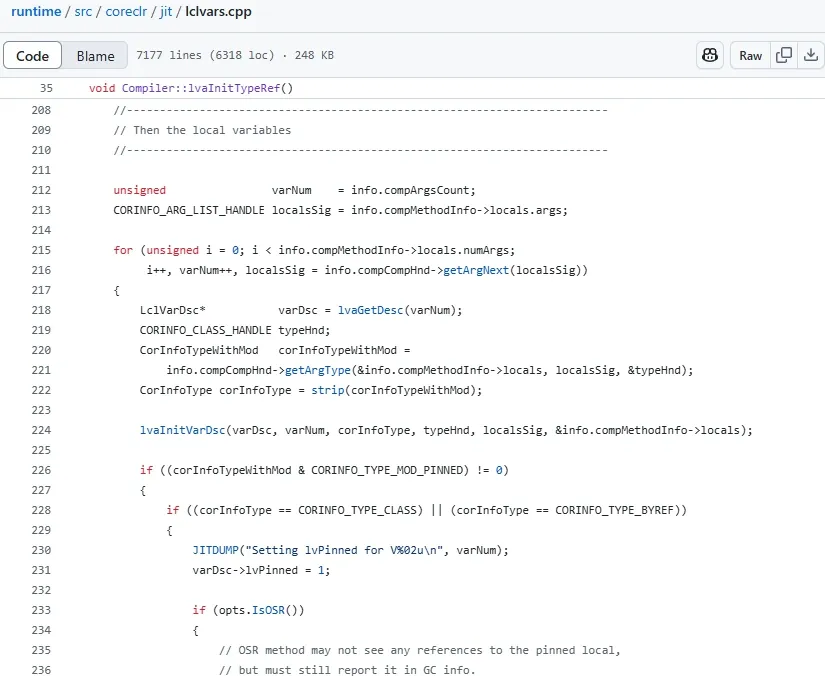
Here info.compMethodInfo->locals is the CORINFO_SIG_INFO locals from the CORINFO_METHOD_INFO structure above. Let’s look at CORINFO_SIG_INFO’s definition. The PCCOR_SIGNATURE pSig field is a pointer to the method’s local variable signature data in the #Blob heap. That data is the serialization of the C# structure variables — it contains the variable count and the type info of each variable. In other words, parsing a method’s local variable signature data stream is itself a deserialization performed in C#, and the internal type-structure sizes match.
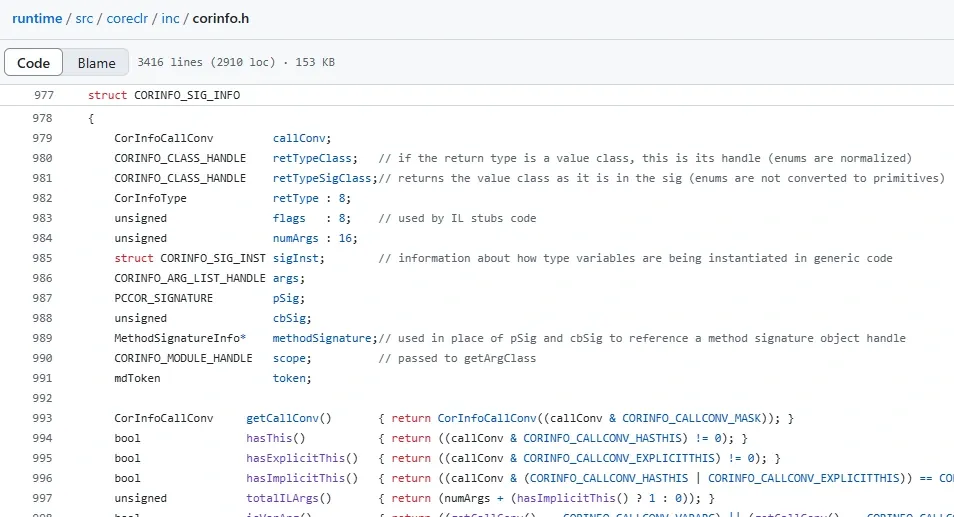
That raises a question: how do you know where a method’s local variable signature data stream ends? I dug into JitUnpacker-Framework’s source and found it simulates the deserialization, walking through the Sig pointer.
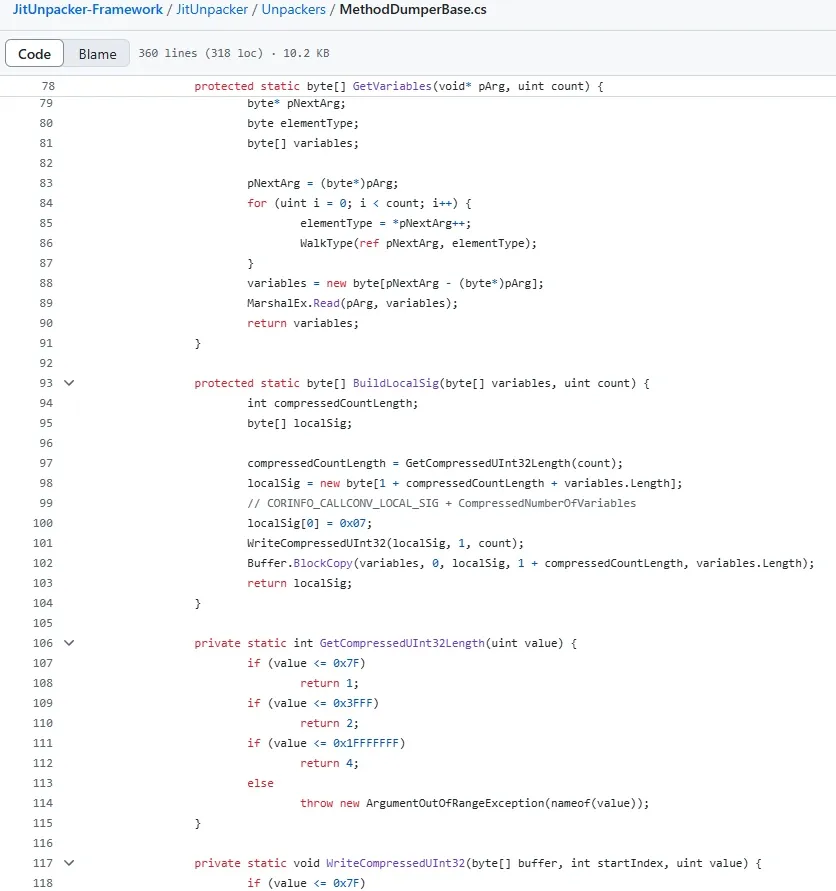
You can see WalkType in MethodDumperBase.cs parsing a dozen-plus .NET types:
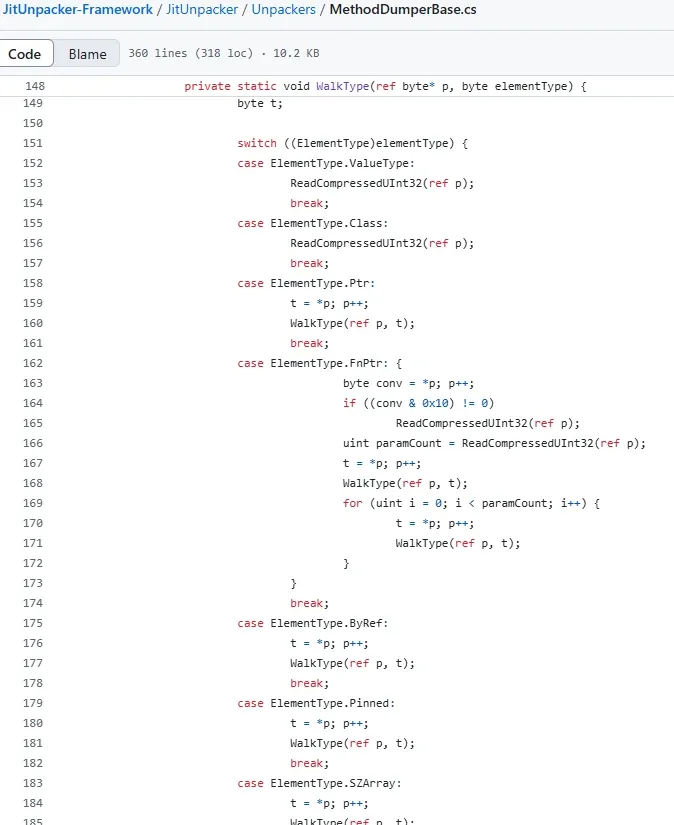
But WinDbg can’t do that kind of complex deserialization during debugging. So how do I determine the end of the local variable signature data stream?
After some debugging I found a neat trick. Notice that after each iteration of the for loop, the i++ runs alongside localsSig = info.compCompHnd->getArgNext(localsSig), where localsSig is the current variable signature pointer. On the final increment, when i reaches locals.numArgs and the loop is about to exit, getArgNext runs one more time — and afterwards localsSig points at the end of the entire local variable signature data stream.
That solves the local variable signature extraction problem in WinDbg.
Exception clause information
Finally, the exception clauses. In dnSpy’s Edit Method Body / IL window, under Exception Handlers, you can see the exception types plus the catch start/end and handler start/end — all expressed as offsets within the method’s instructions.
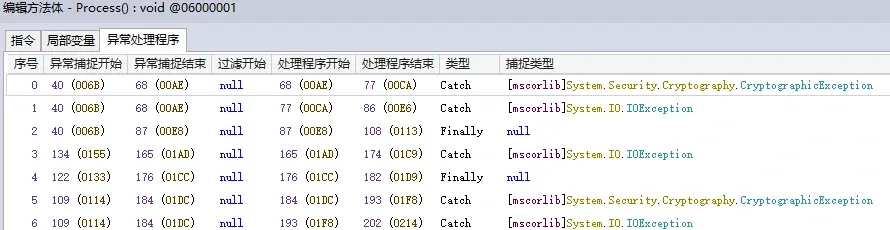
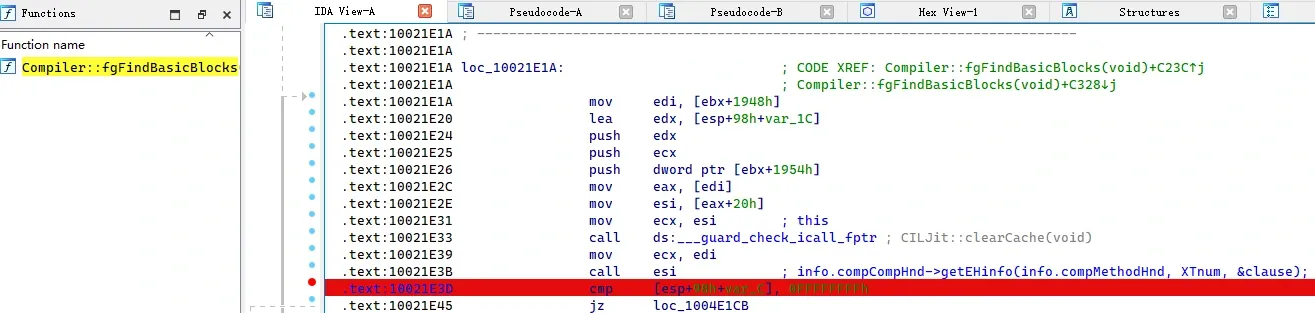
Locate the loop inside Compiler::fgFindBasicBlocks:
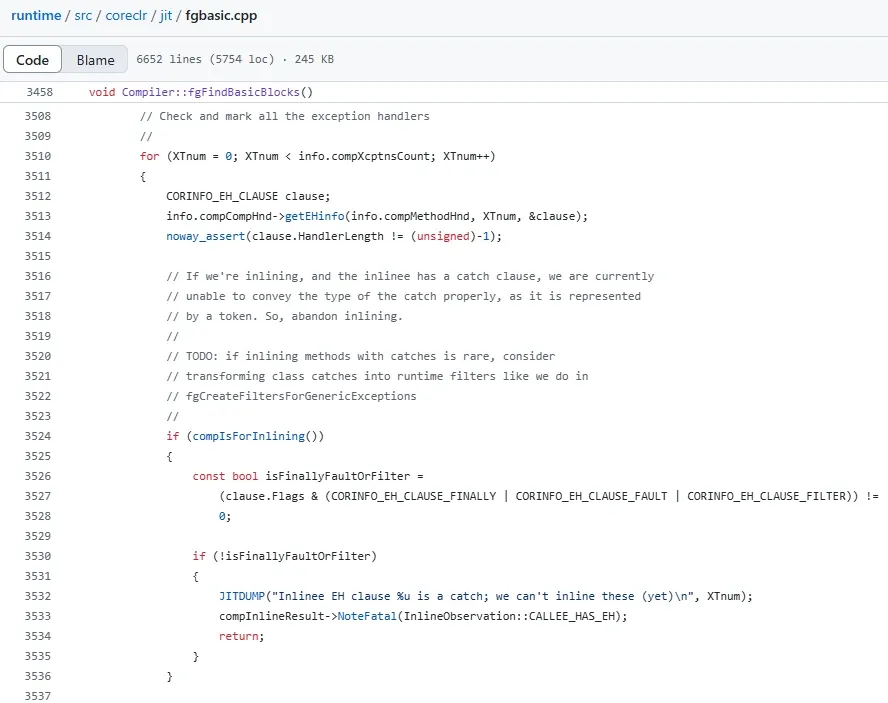
The loop calls info.compCompHnd->getEHinfo(info.compMethodHnd, XTnum, &clause), after which clause holds the extracted value. This is where I use WinDbg to pull the exception clause info, then inspect the CORINFO_EH_CLAUSE type. There can be more than one clause — the count was already captured from CORINFO_METHOD_INFO:
// runtime/src/coreclr/inc/corinfo.h

//----------------------------------------------------------------------------
// Exception handling

struct CORINFO_EH_CLAUSE
{
    CORINFO_EH_CLAUSE_FLAGS     Flags;
    uint32_t                    TryOffset;
    uint32_t                    TryLength;
    uint32_t                    HandlerOffset;
    uint32_t                    HandlerLength;
    union
    {
        uint32_t                ClassToken;       // use for type-based exception handlers
        uint32_t                FilterOffset;     // use for filter-based exception handlers (COR_ILEXCEPTION_FILTER is set)
    };
};
Recovery with WinDbg TTD
For how to use WinDbg TTD itself, see my earlier writeup “TTD debugging and reverse engineering with ttd-bindings”. The recovery workflow is:
- Use TTD to record the execution of the .NET-JIT-protected executable.
- Analyze the recording.
- Use the TTD Calls object to list every call to
clrjit!CILJit::compileMethod(x86). - Use
!ttto jump to the relevant point in time, set a breakpoint, and extract the info needed for that JIT compilation. - Automate that single-shot process with WinDbg’s JavaScript Debugger Scripting to extract the info for all JIT-compiled methods.
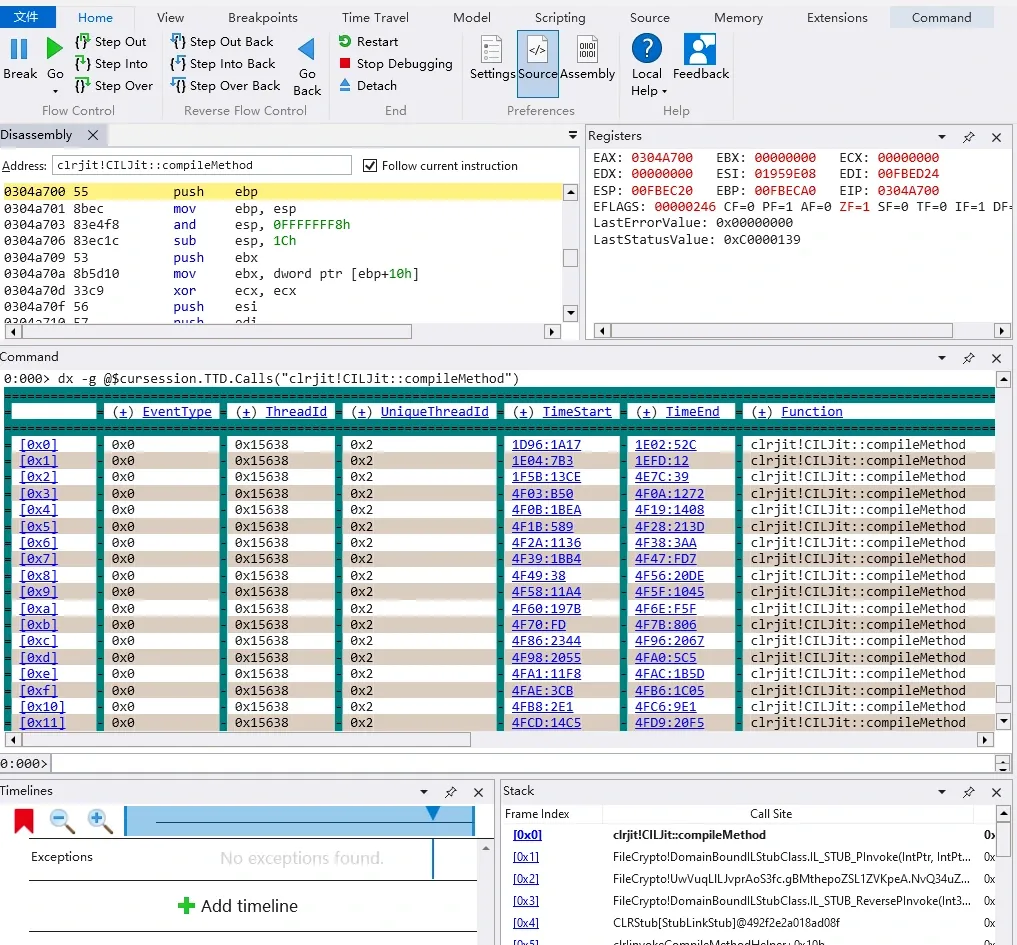
All the recovered per-method info is written to a JSON file. Then a small C# program loads the protected file plus that JSON, and — borrowing from JitUnpacker-Framework, using dnlib — repairs and restores the methods.
The debugging process
Let’s walk a single extraction end to end to see exactly where to break and what to read.
In WinDbg, run lm to find where clrjit.dll’s symbols live — something like C:\ProgramData\Dbg\sym\clrjit.pdb\97077D9E2E3C48B29B28B6E5E35FEC932\clrjit.pdb. That’s the JIT engine for my system’s .NET Framework 4.8+. To pin down the exact Framework version, run MSBuild -version inside C:\Windows\Microsoft.NET\Framework\v4.0.xxxxx:
PS C:\Windows\Microsoft.NET\Framework\v4.0.30319> .\MSBuild -version
Microsoft(R) Build Engine version 4.8.9037.0
[Microsoft .NET Framework version 4.0.30319.42000]
Copyright (C) Microsoft Corporation. All rights reserved.
(Note: when repairing a target with JitUnpacker-Framework itself, you need a system on .NET Framework 4.8 or lower, otherwise its RuntimeFunctionConfigGenerator.bat fails to fetch symbol offsets. I tested a VM running Windows 1803, which ships .NET Framework 4.7.3+, and it could fetch the offsets and unpack fine.)
With clrjit.pdb in hand, load clrjit.dll into IDA and locate CILJit::compileMethod. IDA identifies it as a stdcall call, which you can also confirm through debugging. What we want is the third parameter, struct CORINFO_METHOD_INFO* info — after breaking at CILJit::compileMethod, read it directly from esp+C.
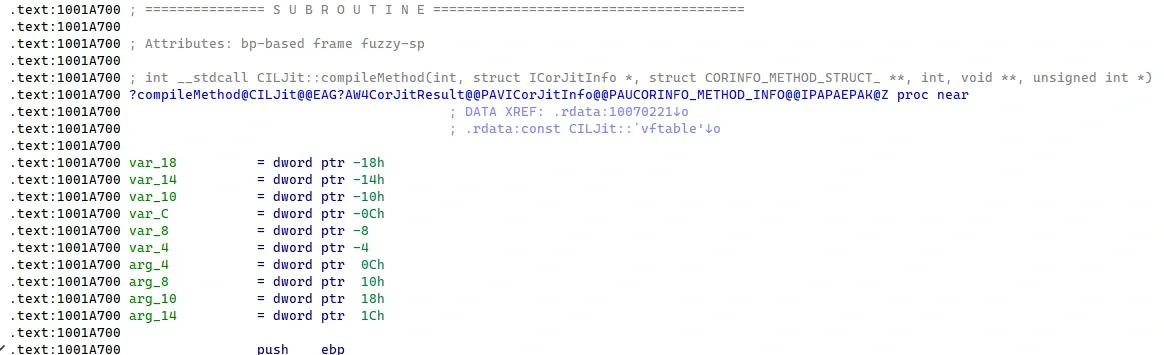
Next find Compiler::lvaInitTypeRef and, with the help of debugging, locate the localsSig = info.compCompHnd->getArgNext(localsSig) call. A bit further down is the loop exit. Set a breakpoint there: the result of the final getArgNext call is still sitting in eax, so break and read it directly.
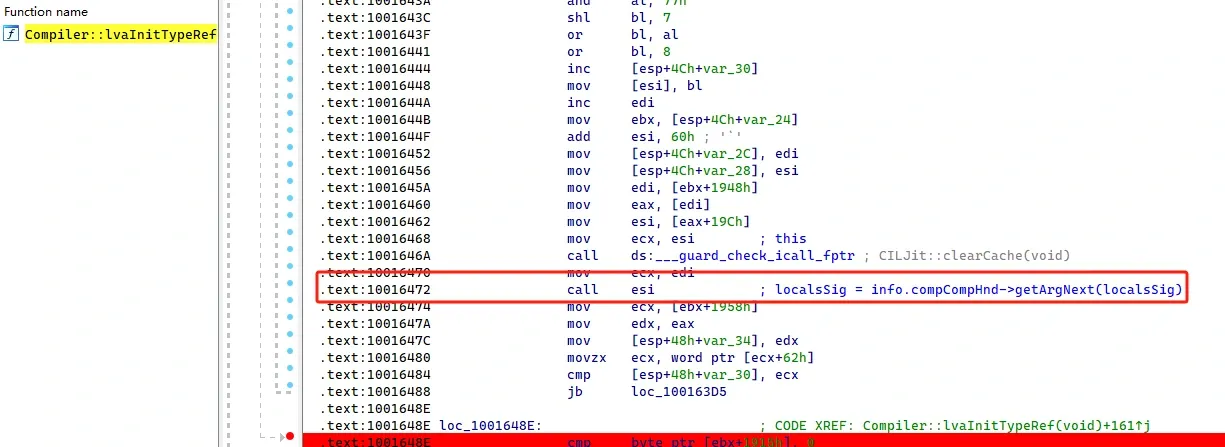
Finally the exception clause info. We already have the count. Find Compiler::fgFindBasicBlocks and, through debugging, locate info.compCompHnd->getEHinfo(info.compMethodHnd, XTnum, &clause). Break after it executes and parse the clause pointer’s stack offset to extract the clause info.
Automating the extraction in JavaScript
The automation is a WinDbg JavaScript script. Besides the official docs, the WinDbg JavaScript Scripts repository is a rich reference. Here I’ll sketch a few helper utilities; the complete implementation is in the attachment, and you can follow along in WinDbg with the commands it contains.
First a Windbg class wrapping the common interactions — logging, command execution, and reading memory and register values:
class Windbg{
    static log = x => host.diagnostics.debugLog(`${x}\n`)

    static show = x => {
        for (var line of x) {
            Windbg.log(line);
        }
    }

    static system = x => host.namespace.Debugger.Utility.Control.ExecuteCommand(x)

    static getUint32(addr){
        return host.memory.readMemoryValues(addr, 1, 4)[0]
    }

    static getBytesArr(addr,size){
        return host.memory.readMemoryValues(addr, size, 1)
    }

    static getRegVal(reg){
        return host.currentThread.Registers.User[reg]
    }
}
The method info and exception clause info have many fields, so I define two small classes. Reading their structure memory through the constructor effectively acts as deserialization, keeping the parsing clean:
function ArrToDatView(arr){
    var buffer = new ArrayBuffer(arr.length);
    var uint8Array = new Uint8Array(buffer);
    arr.forEach((value, index) => {
        uint8Array[index] = value;
    });

    return new DataView(buffer);
}

class MethodInfo{
    constructor(dataView, offset = 0){
        this.method_handle = dataView.getUint32(offset, true);
        this.module_handle = dataView.getUint32(offset + 4, true);
        this.ilcode_addr =  dataView.getUint32(offset + 8, true);
        this.ilcode_size =  dataView.getUint32(offset + 12, true);
        this.max_stack =  dataView.getUint32(offset + 16, true);
        this.eh_count =  dataView.getUint32(offset + 20, true);
    }
}

class EHClauseInfo{
        constructor(dataView, offset = 0) {
        this.HandlerType = dataView.getUint32(offset, true);
        this.TryOffset = dataView.getUint32(offset + 4, true);
        this.TryLength = dataView.getUint32(offset + 8, true);
        this.HandlerOffset = dataView.getUint32(offset + 12, true);
        this.HandlerLength = dataView.getUint32(offset + 16, true);
        this.CatchTypeTokenOrFilterOffset = dataView.getUint32(offset + 20, true);
    }
}

var arr = Windbg.getBytesArr(method_info_addr,24);
var method_info = new MethodInfo(ArrToDatView(arr));


var arr = Windbg.getBytesArr(ptr,0x1C);
var clauseInfo = new EHClauseInfo(ArrToDatView(arr));
To write the output to a JSON file, there’s a helper for writing data to disk:
function WriteToFile(path,data) {
    var logFile;
    if (host.namespace.Debugger.Utility.FileSystem.FileExists(path)) {
        logFile = host.namespace.Debugger.Utility.FileSystem.CreateFile(path, "CreateNew");
    } else {
        logFile = host.namespace.Debugger.Utility.FileSystem.CreateFile(path);
    }
    var textWriter = host.namespace.Debugger.Utility.FileSystem.CreateTextWriter(logFile, "Utf8");
    try {
            textWriter.WriteLine(data)
    } finally {
        logFile.Close();
    }
}
I also had Gemini 2.5 Pro generate a rule-filtering module so I can define exactly which JIT methods to extract, rather than recording every JIT-compiled function on every run:
Rule spec:
target: "module" or "method"
pattern: the string to match
type: "include" (process only if matched) or "exclude" (skip if matched)
matchType: (optional) "contains" (default), "exact", "startsWith", "endsWith"

Rule processing logic:
1. Exclude rules have the highest priority. If any exclude rule matches, the target (module or method) is skipped.
2. If include rules exist for a target (module or method), that target must match at least one include rule to be processed.
   If no include rule targets it, the target passes the include check by default (unless excluded).
3. Module rules apply first, then method rules. If a module is filtered out, none of its methods are processed.
The main function ties it together:
    const filterRules = [
        {target:FilterTargets.MODULE, type:FilterTypes.INCLUDE, matchType:FilterMatchTypes.CONTAINS, pattern:"FileCrypto.exe"},
        {target:FilterTargets.METHOD, type:FilterTypes.INCLUDE, matchType:FilterMatchTypes.CONTAINS, pattern:"Process()"},
    ];

    Windbg.log('Start...');

    Windbg.system("!tt 100");
    const startTime = Date.now();
    var jitMethodCount = parseInt(Windbg.system(`dx -r2 @$cursession.TTD.Calls("clrjit!CILJit::compileMethod").Count()`)[0].split(": ")[1].trim(),16);
    Windbg.log(`Total JIT compilations to process: ${jitMethodCount}`);
    for (var index = 0; index < jitMethodCount; index++) {
        const elapsedTime = ((Date.now() - startTime) / 1000).toFixed(2);
        Windbg.log(`Progress: ${index}/${jitMethodCount} ${((index / jitMethodCount) * 100).toFixed(2)}%, Elapsed Time: ${elapsedTime}s`);
        Windbg.system(`dx -r2 @$cursession.TTD.Calls("clrjit!CILJit::compileMethod")[0x${index.toString(16)}].@"TimeStart".SeekTo()`)
        try {
            extractFuncInfo(filterRules);
        } catch (e) {
            Windbg.log(`Error processing index ${index}: ${e.message}`);
            Windbg.log(`Stack: ${e.stack}`);
        }
    }
    Windbg.log("Using filter rules: " + JSON.stringify(filterRules, null, 2));

    WriteToFile("D:\\FileCrypto.json", JSON.stringify({"ModulesInfo":modulesInfo}, null, 2));
    Windbg.log('Finished extracting JIT information.');
The resulting JSON looks like this:
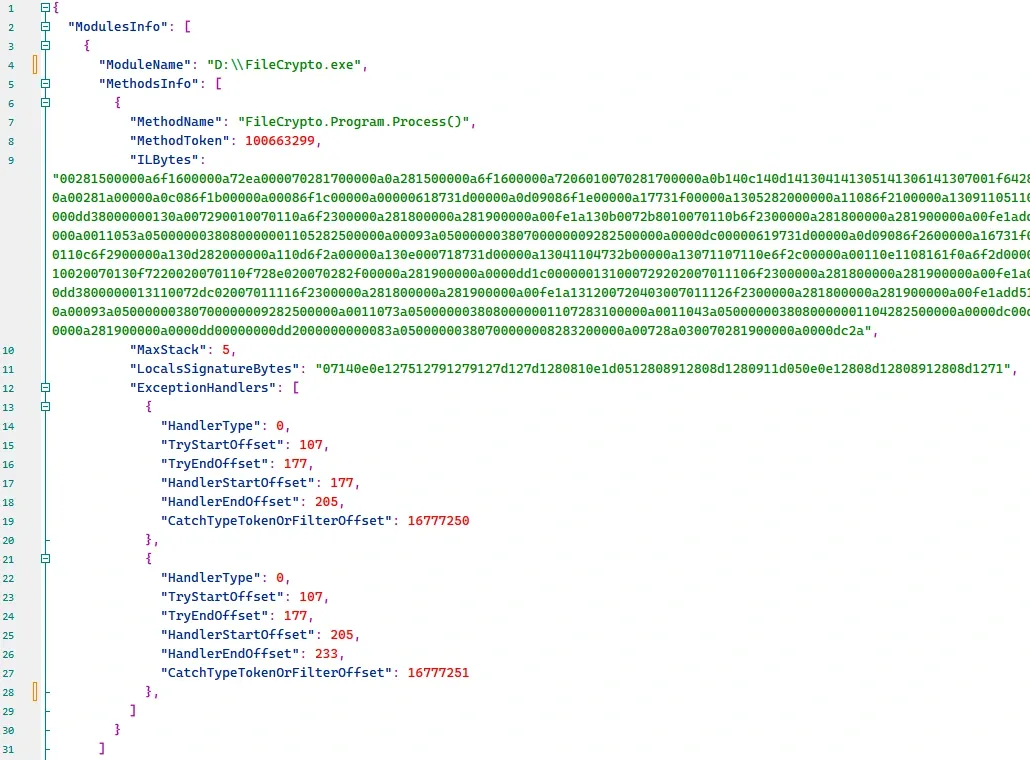
Restoring methods with C# JitPatcher
Once the method info is extracted, the rest is straightforward. First, define some structure types to deserialize the JSON, then read and deserialize it:
public class JitDumpInfo
{
    public List<ModuleDumpInfo> ModulesInfo { get; set; }
}
public class ModuleDumpInfo
{
    public string ModuleName { get; set; }
    public List<MethodDumpInfo> MethodsInfo { get; set; }
}
public class MethodDumpInfo
{
    public string MethodName { get; set; }
    public uint MethodToken { get; set; }
    public string ILBytes { get; set; }
    public ushort MaxStack { get; set; }
    public string LocalsSignatureBytes { get; set; }
    public List<ExceptionHandlerInfo> ExceptionHandlers { get; set; } = new List<ExceptionHandlerInfo>();
}

public class ExceptionHandlerInfo
{
    public int  HandlerType { get; set; }
    public uint TryStartOffset { get; set; }
    public uint TryEndOffset { get; set; }
    public uint HandlerStartOffset { get; set; }
    public uint HandlerEndOffset { get; set; }
    public uint CatchTypeTokenOrFilterOffset { get; set; }
}

JitDumpInfo jitDumpInfo = null;
try
{
    string jsonData = File.ReadAllText(jsonDataPath);
    jitDumpInfo = JsonSerializer.Deserialize<JitDumpInfo>(jsonData, new JsonSerializerOptions { PropertyNameCaseInsensitive = true });
}
From there, the repair follows JitUnpacker-Framework’s approach using the powerful dnlib library — the core logic is in the attached code.
Wrapping up
This writeup documents my process of recovering a .NET JIT protector with WinDbg TTD. It offers a way to restore JIT-protected targets on .NET Framework 4.8+ — a gap JitUnpacker-Framework doesn’t cover — and it’s more flexible than the existing tooling, at the cost of some manual locating and analysis.
One more thing worth calling out: TTD records a program by injecting a recorder DLL and performing dynamic binary instrumentation, much like Pin. Without targeted detection, common anti-debugging tricks simply don’t fire. So when a target’s anti-debugging is strict, the WinDbg TTD approach is worth a try — you might be surprised at what slips through.
The full tooling: https://github.com/bin4re/WindbgTtdJitPatcher
Colin Xiao — I take on contract reverse-engineering work, and writeups like this are how I show what I can do. If you need help with anything in this space — including but not limited to the areas I cover above — I’m available. No project is too big or too small — if it’s reverse engineering and I can do it, I’ll take it. DM me on X (@colinxiao_lab) or Telegram (@ColinXiao666).
Get in touch