How WeChat Channels Encrypts Video: Reversing WxIsaac64 and the 128KB XOR Key
About the author. I’m Colin Xiao — an independent reverse engineer, mostly working solo on contract jobs. I dig into compiled code of every kind, including but not limited to: Android and iOS apps, x86/x64/ARM native binaries, packers and obfuscators, DRM and license checks, network protocols and APIs, crypto and signature algorithms, malware, game binaries, and embedded/IoT firmware. I also handle large-scale data collection and vulnerability research. If you have any project in mind, I’d be glad to take it on — whatever it is, as long as it’s within my wheelhouse. Just reach out. You can reach me on X at @colinxiao_lab or on Telegram at https://t.me/ColinXiao666.
This research is published for educational and defensive purposes. The target sample is anonymized throughout.
How WeChat Channels Encrypts Video: Reversing WxIsaac64 and the 128KB XOR Key
TL;DR
Instantiate WxIsaac64 (a variant of the Isaac64 PRNG), generate 2^17 bytes, and XOR them against the first 2^17 bytes of the video stream.
Why I went down this rabbit hole
The short version: my favorite video downloader stopped working, and I wanted to know exactly why. What started as a “why did this break” question turned into a full teardown of how a WebAssembly-based PRNG ends up gating every video a platform serves. The encryption turns out to be a single XOR against a fixed-size keystream — small enough to reverse completely, which is what makes it a nice case study.
Preparation: enabling developer tools
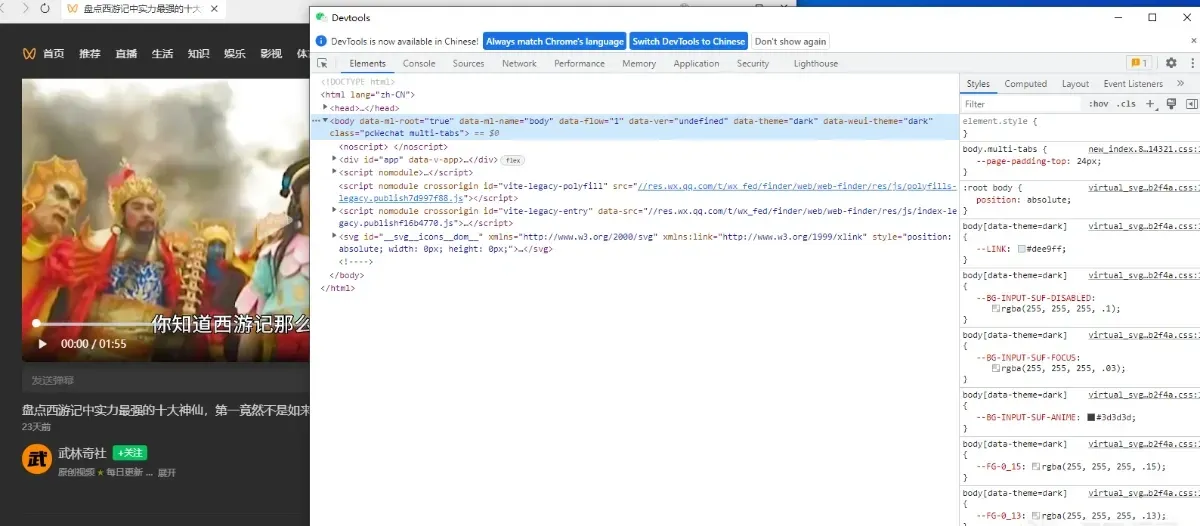
Before any reversing, I needed developer tools inside the client. They’re disabled by default, so the first move is a small patch to one of the client’s DLLs: find the xweb-enable-inspect startup flag, patch the branch instruction that guards it, and force that branch to always execute.
The reversal
First pass in JavaScript
Open any video and the network panel lights up. The requests carrying stodownload are the downloaded video files — but what comes back is encrypted.
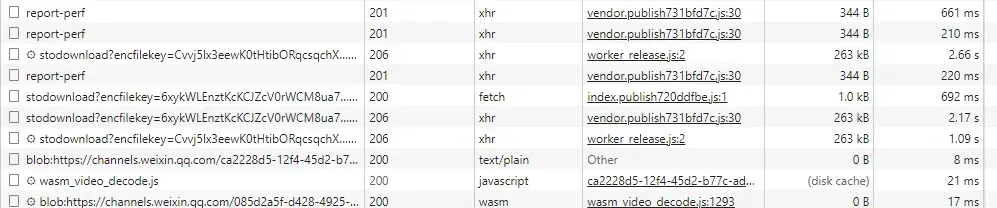
Take a look at the file header before decryption. The format is clearly wrong:
aynakeya @ ThinkStation]:~/workspace/weixinshipin
01:59:21 $ xxd -l 32 v2.bin
00000000: 75a2 b80f 5db2 528b af76 c5f0 9407 a7e9  u...].R..v......
00000010: 4c31 99a8 60ef a5de c64e ce1e 3ab1 6e74  L1..`....N..:.nt
By contrast, a valid MP4 header looks like this:
00000000: 0000 0020 6674 7970 6973 6f6d 0000 0200  ... ftypisom....
00000010: 6973 6f6d 6973 6f32 6176 6331 6d70 3431  isomiso2avc1mp41
Confirmed encrypted. Now, where do I start? Decryption has to happen after the download completes, so the decrypt routine is most likely wired into the download-completion path. Tracing which line issues the request leads to g.send() in worker_release.js.
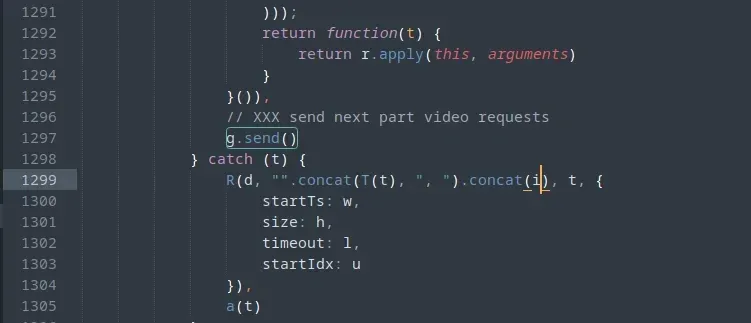
Anyone who’s written an XMLHttpRequest wrapper will recognize this: after all the callbacks are set up, .send() fires the request. Scrolling up from there surfaces the response handling.
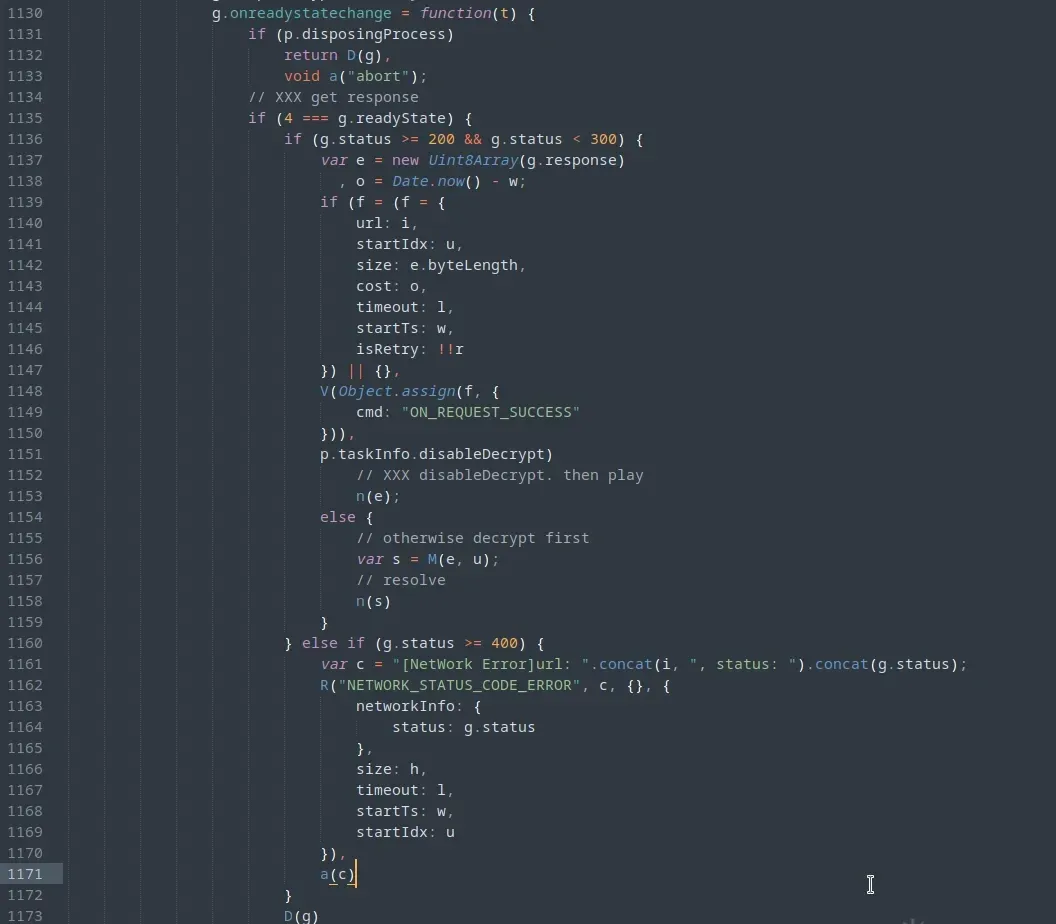
There it is: the decrypt function is M, taking the data and a startIndex (the byte offset into the file). M is refreshingly simple — it XORs the data against decryptor_array, and if startIdx exceeds the array length it skips the XOR and leaves the data untouched.
Drop a breakpoint on M and decryptor_array turns out to have a constant length: 2^17 = 131072 bytes, every time.
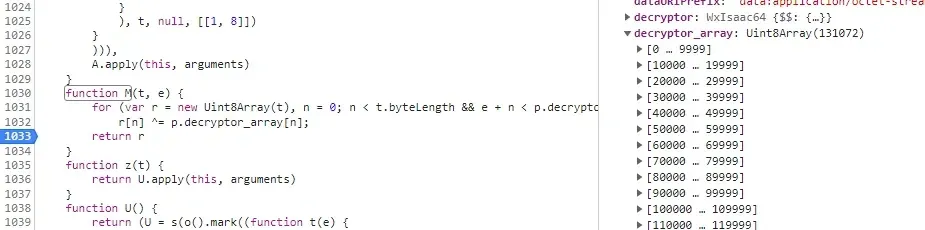
So the keystream is finite, and the encryption only touches the first 131072 bytes of the video. That strategy makes sense: encrypting and decrypting an entire stream would visibly tax playback. (Full-stream DRM is a different beast, and I won’t pretend to be an expert on it.)
Two more observations: for the same video, decryptor_array is consistent; for different videos, it differs. So the array is derived from something per-video. Searching the code, decryptor_array is only ever assigned inside wasm_isaac_generate.
wasm_isaac_generate is called from exactly one place: wasm_video_decode.js, where it’s exposed as an assembly function reachable from WebAssembly through the _emscripten_asm_const_int interface.

Which means it’s time to reverse some WebAssembly.
Deeper into WebAssembly
Download wasm_video_decode.wasm, then use the wabt toolchain to turn it into a .o file the disassembler can chew on:
./path/to/wasm2c wasm_video_decode.wasm -o wasm_video_decode.c
cp /path/to/wasm-rt-impl.c .
cp /path/to/wasm-rt-impl.h .
cp /path/to/wasm-rt.h .
gcc -c wasm_video_decode.c -o wasm_video_decode.o
Drop wasm_video_decode.o into the disassembler, search for calls to _emscripten_asm_const_int, and wasm_isaac_generate shows up inside function f378.
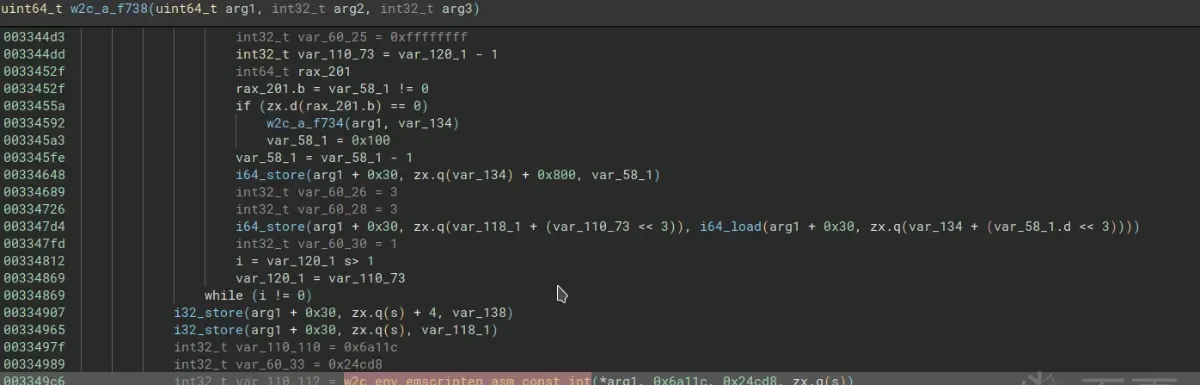
Breakpoints and call-stack inspection confirm that decryptor.generate() in worker_release.js is what eventually reaches wasm_isaac_generate. Digging into it, decryptor is itself a WebAssembly object — WxIsaac64.
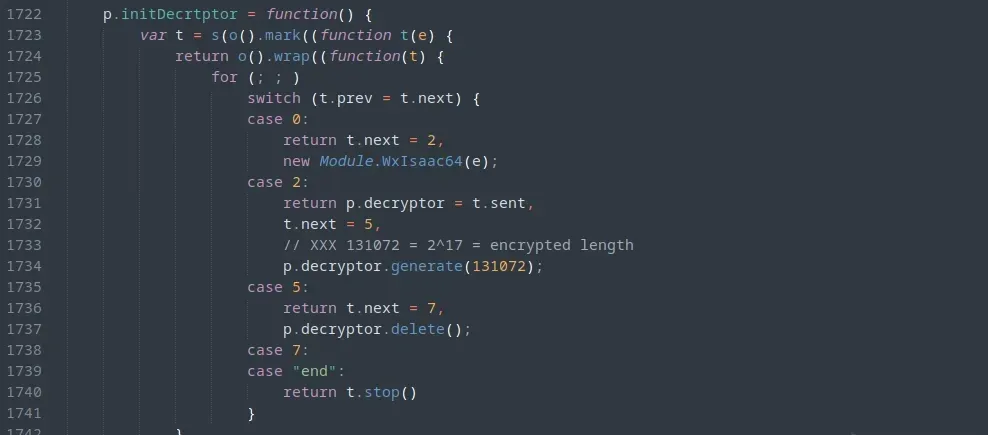
And Isaac64, as the name suggests, is a pseudorandom number generator.
The picture snaps into focus:
decryptoris initialized with a per-video seed.- JavaScript calls
decryptor.generate(), which makes wasm produce 2^17 (131072) random numbers in its memory. - wasm writes those numbers back to JavaScript through
wasm_isaac_generate, assigning them todecryptor_array.
Now that I know where decryptor_array comes from, the last question is where the Isaac64 seed comes from.
Tracing the seed back
The rest is grunt work: set breakpoints, read call stacks, and keep walking backward until the seed first appears.

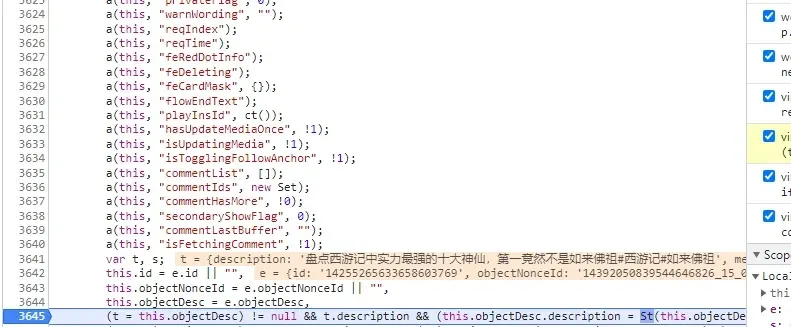
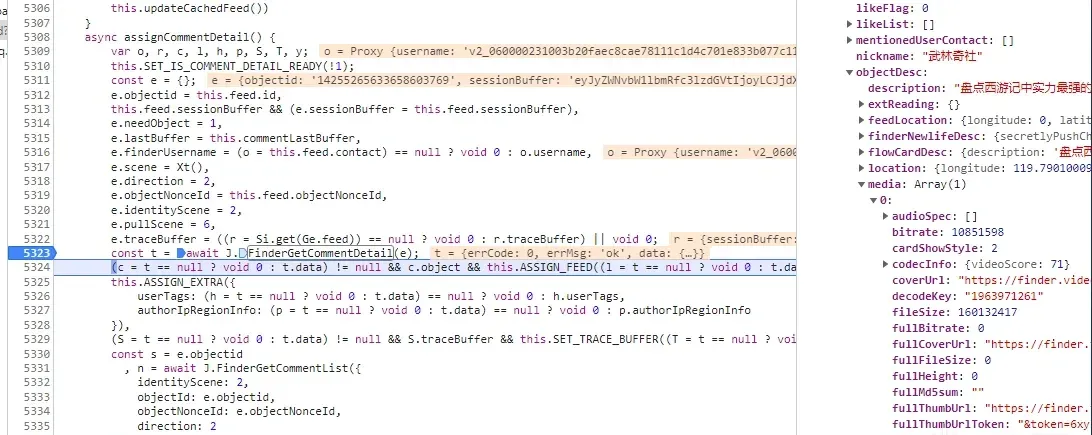
In plain terms, the chain is FinderGetCommentDetail(objectid) → objectDesc.media.decodeKey → seed.
Injecting WeixinJSBridge
So where does FinderGetCommentDetail pull its data from? Continue the trace and it bottoms out in window.WeixinJSBridge.invoke.
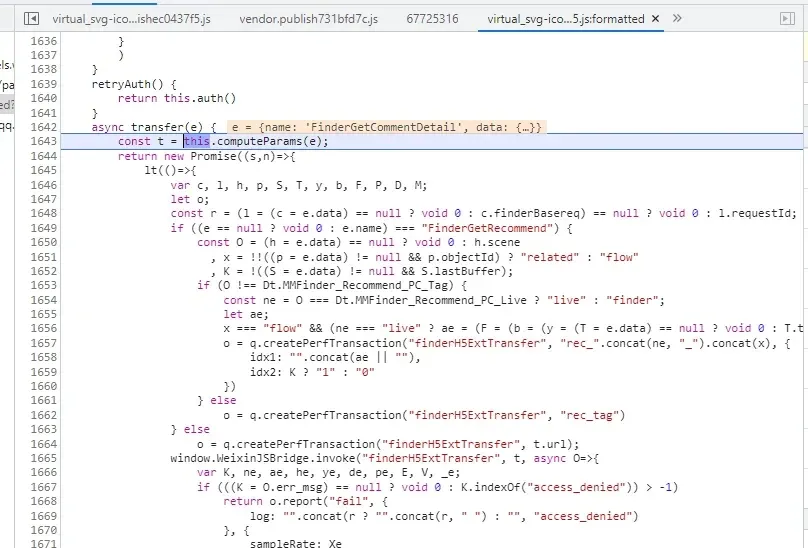
window.WeixinJSBridge? That’s the client’s native bridge, and reversing the full communication protocol it speaks was more than I wanted to bite off. Time to switch to plan B: inject and observe.
(function () {
    function wrapper(name,origin) {
        console.log(`injecting ${name}`);
        return function() {
            let cmdName = arguments[0];
            console.log(`${name}("${cmdName}", ...) => args: `);
            console.log(arguments[1])
            if (arguments.length == 3) {
                let original_callback = arguments[2];
                arguments[2] = async function () {
                    console.log(`${name}("${cmdName}", ...) => callback result (length: ${arguments.length}):`);
                    if (arguments.length == 1) {
                        console.log(arguments[0]);
                    }else {
                        console.log(arguments);
                    }
                    return await original_callback.apply(this, arguments);
                }
            }
            let result = origin.apply(this,arguments);
            return result;
        }
    }
    window.WeixinJSBridge.invoke = wrapper("WeixinJSBridge.invoke",window.WeixinJSBridge.invoke);
})()
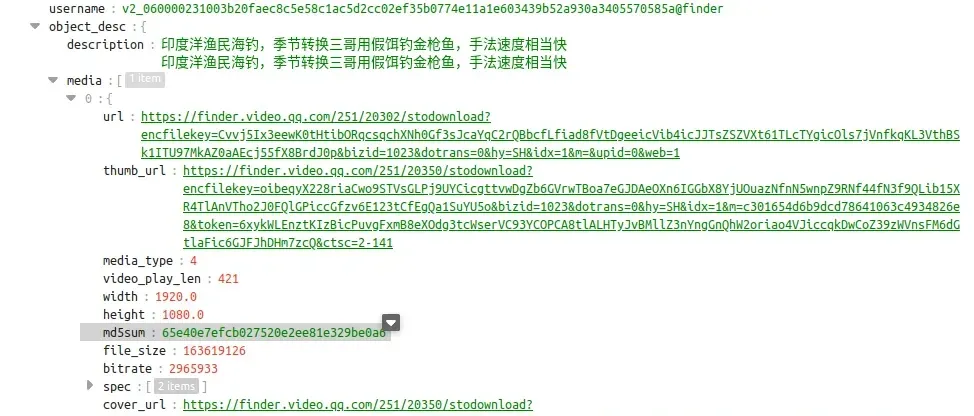
The hook paid off immediately — every field I needed came through.

Summary
FinderGetCommentDetailreturns the video’sdecode_key(the seed),url,title, and the rest.- The seed drives
decryptor_array. - Download the encrypted stream via
urland XOR the encrypted region againstdecryptor_array.
Building a downloader
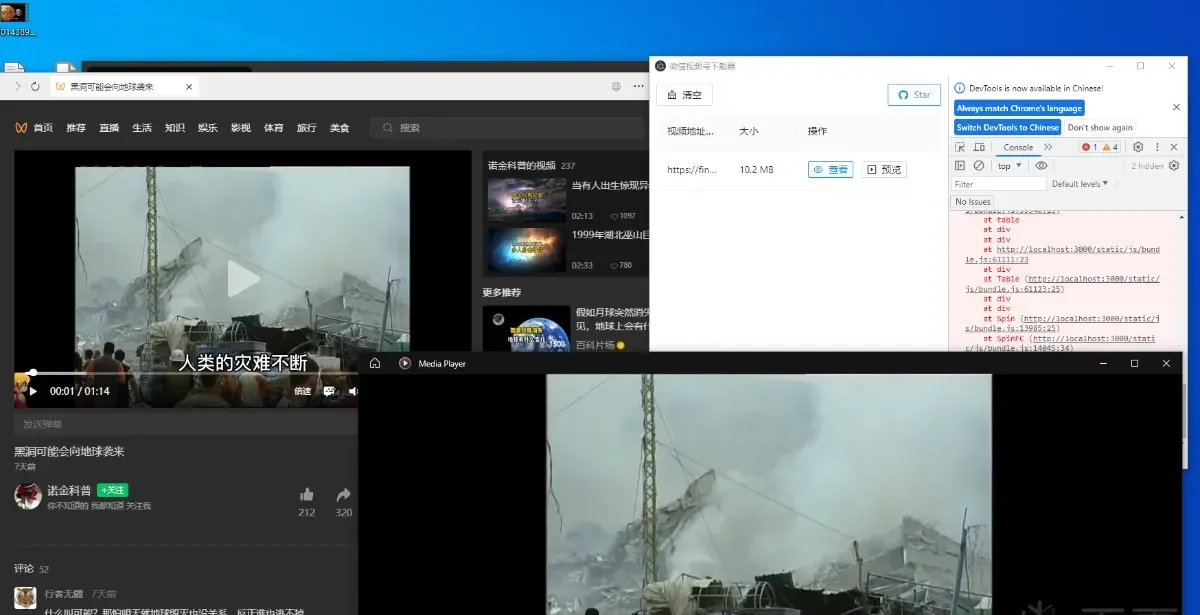
Getting the seed normally means reversing the client protocol, which I didn’t want to sink more time into. But a downloader that’s already using a proxy to intercept video URLs can take the same shortcut one step further: a man-in-the-middle that also grabs the decode_key.
Insert the WeixinJSBridge.invoke injection into a JS file the client loads, and whenever the client requests a video URL, forward the URL plus its metadata to a local server. That solves seed, URL, and title in one move. Download the video, then regenerate the keystream from the seed and decrypt.
The final hook:
(function () {
    if (window.wvds !== undefined) {
        return
    }
    let receiver_url = "https://wechat.video.download";
    function send_response_if_is_video(response) {
        if (response == undefined) {
            return;
        }
        if (response["err_msg"] != "H5ExtTransfer:ok") {
            return;
        }
        let value = JSON.parse(response["jsapi_resp"]["resp_json"]);
        if (value["object"] == undefined || value["object"]["object_desc"] == undefined  || value["object"]["object_desc"]["media"].length == 0) {
            return
        }
        let media = value["object"]["object_desc"]["media"][0];
        let video_data = {
            "decode_key": media["decode_key"],
            "url": media["url"]+media["url_token"],
            "size": media["file_size"],
            "description":  value["object"]["object_desc"]["description"].trim(),
            "uploader": value["object"]["nickname"]
        }
        fetch(receiver_url, {
            method: 'POST',
            mode: 'no-cors',
            body: JSON.stringify(video_data),
        }).then((resp) => {
            console.log(`video data for ${video_data["description"]} sent`);
        });
    }
    function wrapper(name,origin) {
        console.log(`injecting ${name}`);
        return function() {
            let cmdName = arguments[0];
            if (arguments.length == 3) {
                let original_callback = arguments[2];
                arguments[2] = async function () {
                    if (arguments.length == 1) {
                        send_response_if_is_video(arguments[0]);
                    }
                    return await original_callback.apply(this, arguments);
                }
            }
            let result = origin.apply(this,arguments);
            return result;
        }
    }
    console.log(`------- Invoke WechatVideoDownloader Service ---------`);
    window.WeixinJSBridge.invoke = wrapper("WeixinJSBridge.invoke",window.WeixinJSBridge.invoke);
    window.wvds = true;
})()
Relevant links
- WeChat client v3.9.8.15
- wasm_video_decode.wasm v1.2.46
- worker_release.js v1.2.46
- wasm_video_decode.js v1.2.46
- wasm_video_decode_fallback.js v1.2.46
Colin Xiao — I take on contract reverse-engineering work, and writeups like this are how I show what I can do. If you need help with anything in this space — including but not limited to the areas I cover above — I’m available. No project is too big or too small — if it’s reverse engineering and I can do it, I’ll take it. DM me on X (@colinxiao_lab) or Telegram (@ColinXiao666).
Get in touch